Every byte at rest in GCP is already encrypted with Google-managed keys you never see. So why does anyone bother with Cloud KMS? Because “encrypted by default” answers the wrong question. The question auditors, regulators, and your own incident-response team actually ask is: who can revoke access to the plaintext, and how fast? With default encryption the answer is “Google, and you have no lever.” Customer-Managed Encryption Keys (CMEK) put that lever in your hands — disable one key version and a petabyte of BigQuery becomes ciphertext nobody can read until you re-enable it. This guide builds the full picture: the key hierarchy, how CMEK actually wires into services, the envelope-encryption mechanics underneath, rotation, the Cloud HSM and EKM boundaries, and the separation-of-duties controls that stop a single admin from destroying it all.
In a nutshell
Every safe-deposit box in a bank vault is already locked, and the vault is fireproof. That is roughly what “encrypted at rest by default” means on GCP: Google locks every byte with keys it manages, and you never see them. So the honest question is not “is my data encrypted?” — it always is. The question an auditor or your incident-response lead actually asks is “who can open the box, and can I stop them on a moment’s notice?” With default encryption the bank holds the only master key. Customer-Managed Encryption Keys (CMEK) change that: you bring your own master key, the vault is required to use it, and the day you take that key home — disable it — every box welds shut until you bring it back. That revocation lever, not the presence of a lock, is the entire reason CMEK exists.
Now the clever part, because a vault does not want to lug your heavy master key to every single box. Instead it uses a cheap, disposable little key (a Data Encryption Key, or DEK) to actually lock your documents — fast, and a fresh one per box — and then locks that little key inside your master key (the Key Encryption Key, or KEK). Only the small, wrapped key rides along next to the documents; your master key never leaves the locked key room (Cloud KMS, or a hardware safe inside it). That two-layer trick is envelope encryption, and it is why encryption can be fast and unlimited in size while your one precious key stays put.
The rest of the lesson is about where that key room is (a software cabinet, a tamper-proof Cloud HSM, or a safe in a bank you own entirely — External Key Manager), how you hand the vault permission to use your key (a per-service robot called a service agent gets exactly one role on the key), and how you make sure no single employee can both weld the boxes shut and read what is inside. Get those three right and CMEK becomes a precise, auditable kill-switch over petabytes of data. Get them wrong and you have either a false sense of control or a self-inflicted outage.
Level: Expert, with a beginner on-ramp · Time: ~30 min
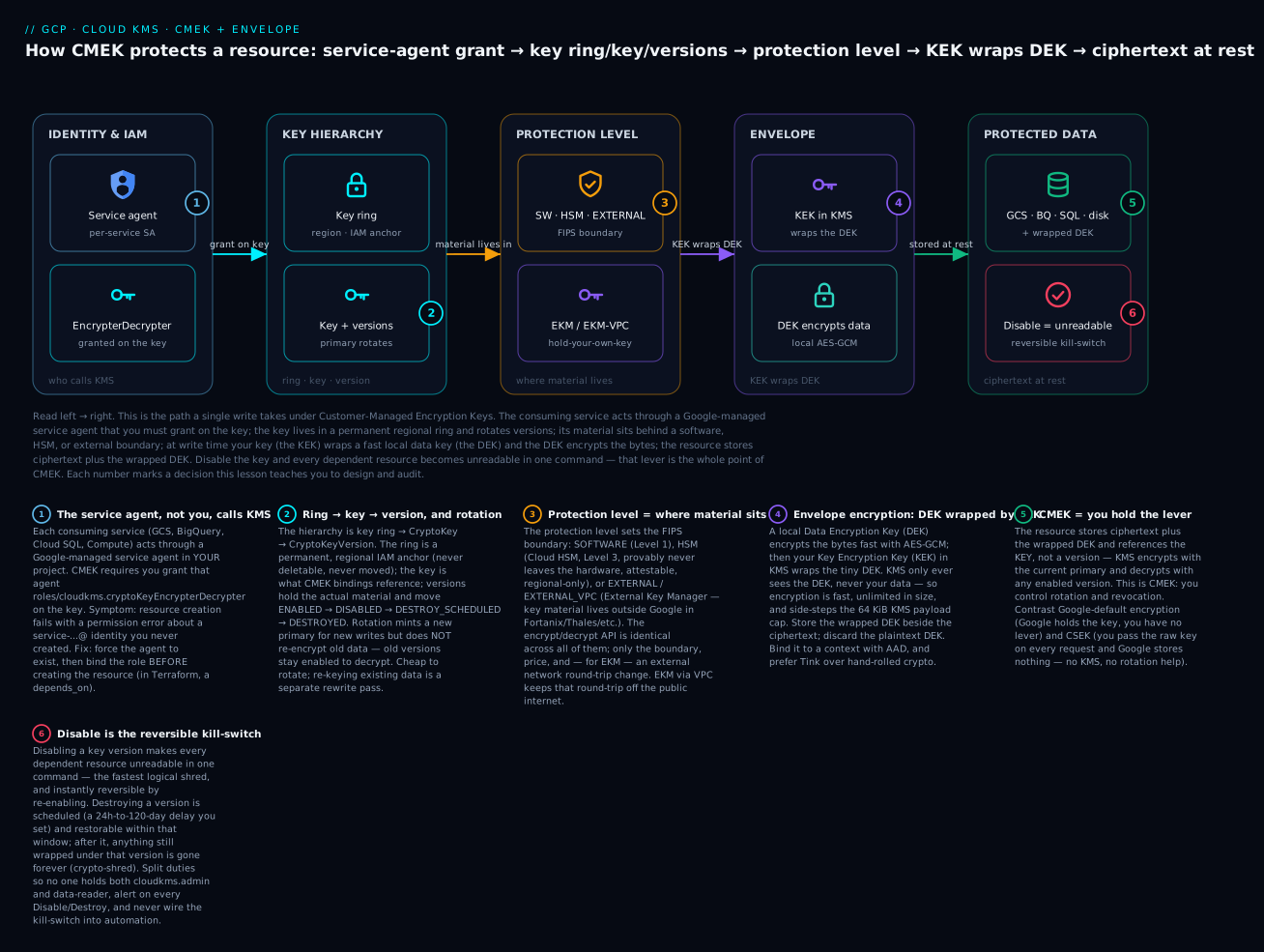
Read the diagram left to right: a service agent (1) is granted the encrypt/decrypt role on your key; the key lives in a permanent regional key ring and rotates versions (2); its material sits behind a software, HSM, or external boundary (3); at write time your KEK wraps a fast local DEK (4) which encrypts the bytes; the resource stores ciphertext plus the wrapped DEK (5); and disabling the key version makes all of it unreadable in one reversible command (6).
Prerequisites & what you’ll be able to do
Before this lesson you should be comfortable with IAM members, roles, and bindings and with the idea of a service account — grants are the load-bearing part of CMEK, so a solid grip on IAM roles, policies, and conditions pays off immediately. It helps to have met Cloud KMS at an introductory level in Cloud KMS & Secret Manager fundamentals, and to know that services like GCS and BigQuery already encrypt at rest by default. You do not need a GCP account open to follow along — every gcloud command below is real and current, project IDs and key paths are placeholders, and any representative output is labelled as such.
After this lesson you can:
- Name every layer of the key ring → key → version hierarchy and pick the right protection level (software, HSM, external) for a workload.
- Distinguish Google-default encryption vs CMEK vs CSEK precisely, and say exactly what lever each one does (and does not) give you.
- Wire CMEK into GCS, BigQuery, Cloud SQL, and Persistent Disk by granting the correct service agent the one role it needs.
- Implement envelope encryption (DEK wrapped by a KMS KEK) for application payloads, ideally through Tink, with AAD binding.
- Design rotation and write a real re-encryption procedure for the genuine-compromise case.
- Choose between Cloud HSM, EKM, and EKM via VPC for regulated and hold-your-own-key mandates, and reason about their availability cost.
- Enforce separation of duties and safe key destruction, and alert on the disable/destroy kill-switch so it is a deliberate tool, never an accident.
Encryption models at a glance: default vs CMEK vs CSEK vs EKM
Before the deep dives, here is the whole decision on one page. Everything at rest in GCP is encrypted; these rows differ only in who holds the key and what lever that gives you. Read it as “requirement → model,” because that is how it comes up in a design review or an audit.
| Model | Who holds the key material | Your revocation / rotation lever | Uses Cloud KMS? | Reach for it when… |
|---|---|---|---|---|
| Google-default | None | No | There is no compliance requirement to control keys — the sane default | |
| CMEK | You, in Cloud KMS | You disable / rotate / destroy the key | Yes | You must be able to prove you can revoke access to the plaintext |
| CSEK (customer-supplied) | You, off-platform; supplied on every request | You, by withholding the key | No (KMS stores nothing) | You refuse to let Google store the key at all (niche; GCE/GCS only) |
| CMEK + Cloud HSM | You, inside a FIPS 140-2 L3 HSM | You (same as CMEK) | Yes (HSM) | A regulator requires hardware-backed keys and attestation |
| CMEK + EKM | You / a third party, outside Google | You, by pulling the external key | Yes (KMS proxies) | Hold-your-own-key: material must never reside in Google |
Two lines to internalise, because interviews and auditors probe exactly these:
- CMEK is about the lever, not the lock. The bytes are encrypted either way. CMEK’s entire value is that you can disable, rotate, or destroy the key and thereby revoke access to the plaintext on your own schedule. If you cannot articulate the revocation story, you have not justified CMEK.
- CSEK ≠ CMEK. With CSEK you pass the raw key on every API call and Google holds nothing between calls — there is no KMS key, no rotation help, no IAM on a key. With CMEK the key lives in Cloud KMS and you manage it there. They solve different mandates; do not conflate them.
Where the key material physically sits — and the FIPS boundary around it — is the protection level, set per key at creation:
| Protection level | --protection-level |
Material lives | FIPS | Locations | Note |
|---|---|---|---|---|---|
| Software | software |
Google KMS, in software | 140-2 L1 | regional · multi-region · global | Default, cheapest, highest quotas |
| Cloud HSM | hsm |
Google-operated HSM hardware | 140-2 L3 | regional only | Never leaves hardware; attestation available |
| External | external |
Your external KMS, reached over HTTPS | per external manager | regional | KMS holds only a key URI reference |
| External VPC | external via ekmConnection |
Your external KMS, reached over your VPC | per external manager | regional | No public egress from the data plane |
1. KMS concepts: key rings, keys, versions, protection levels
Cloud KMS has a four-level hierarchy, and getting the vocabulary exact saves you from IAM and rotation mistakes later:
- Key ring — a regional (or multi-regional/global) grouping of keys. It is a location anchor and an IAM boundary. A key ring cannot be deleted or moved, and its location is permanent. Pick the location to match the data you will protect; a CMEK key must live in a location compatible with the resource it encrypts (same region, or a multi-region that contains it).
- Key (
CryptoKey) — a logical, named key with a purpose:ENCRYPT_DECRYPT(symmetric),ASYMMETRIC_SIGN,ASYMMETRIC_DECRYPT, orMAC. CMEK uses symmetricENCRYPT_DECRYPT. - Key version (
CryptoKeyVersion) — the actual cryptographic material. Rotation creates a new primary version; old versions stay available for decrypt. Versions move throughENABLED -> DISABLED -> DESTROY_SCHEDULED -> DESTROYED. - Protection level — where the private material lives and the FIPS boundary it sits behind:
SOFTWARE,HSM(Cloud HSM, FIPS 140-2 Level 3), orEXTERNAL/EXTERNAL_VPC(External Key Manager).
Create a ring and a software key:
PROJECT=sec-kms-prod
LOCATION=us-central1

gcloud kms keyrings create app-keyring \
  --project="$PROJECT" --location="$LOCATION"

gcloud kms keys create gcs-cmek \
  --project="$PROJECT" --location="$LOCATION" \
  --keyring=app-keyring \
  --purpose=encryption \
  --protection-level=software \
  --rotation-period=90d \
  --next-rotation-time="$(date -u -v+90d +%Y-%m-%dT%H:%M:%SZ 2>/dev/null || date -u -d '+90 days' +%Y-%m-%dT%H:%M:%SZ)"
The resource name you will paste everywhere is the fully-qualified key path:
projects/PROJECT/locations/LOCATION/keyRings/RING/cryptoKeys/KEY. CMEK bindings reference the key, not a version — KMS always encrypts with the current primary and can decrypt with any enabled version.
2. Wiring CMEK into GCS, BigQuery, Cloud SQL, and Persistent Disk
The mechanism is consistent across services: each service runs a service agent (a Google-managed service account in your project), and you grant that agent the roles/cloudkms.cryptoKeyEncrypterDecrypter role on the key. The service agent — not your user identity — calls KMS at write and read time. Get the IAM grant wrong and resource creation fails with a permission error on the agent, which trips people up because the error is about an identity they did not create.
Cloud Storage. The Storage service agent is service-PROJECTNUMBER@gs-project-accounts.iam.gserviceaccount.com:
PROJECT_NUMBER=$(gcloud projects describe "$PROJECT" --format='value(projectNumber)')
KEY=projects/$PROJECT/locations/$LOCATION/keyRings/app-keyring/cryptoKeys/gcs-cmek

# Force the agent to exist, then grant it
gcloud storage service-agent --project="$PROJECT"

gcloud kms keys add-iam-policy-binding gcs-cmek \
  --project="$PROJECT" --location="$LOCATION" --keyring=app-keyring \
  --member="serviceAccount:service-${PROJECT_NUMBER}@gs-project-accounts.iam.gserviceaccount.com" \
  --role="roles/cloudkms.cryptoKeyEncrypterDecrypter"

# Set a default CMEK on the bucket: every new object is wrapped with it
gcloud storage buckets update gs://my-cmek-bucket --default-encryption-key="$KEY"
BigQuery. Grant the BigQuery service agent, then set a default key on the dataset (and/or per-table). The agent is bq-PROJECTNUMBER@bigquery-encryption.iam.gserviceaccount.com:
gcloud kms keys add-iam-policy-binding bq-cmek \
  --project="$PROJECT" --location="$LOCATION" --keyring=app-keyring \
  --member="serviceAccount:bq-${PROJECT_NUMBER}@bigquery-encryption.iam.gserviceaccount.com" \
  --role="roles/cloudkms.cryptoKeyEncrypterDecrypter"

bq update --default_kms_key="$KEY" "$PROJECT:analytics_ds"
Cloud SQL. The Cloud SQL service agent gets the grant, and the key is set at instance creation — you cannot retrofit CMEK onto an existing instance, you must create a new one (typically restore from backup into a CMEK instance):
SQL_SA="service-${PROJECT_NUMBER}@gcp-sa-cloud-sql.iam.gserviceaccount.com"
gcloud kms keys add-iam-policy-binding sql-cmek \
  --project="$PROJECT" --location="$LOCATION" --keyring=app-keyring \
  --member="serviceAccount:${SQL_SA}" \
  --role="roles/cloudkms.cryptoKeyEncrypterDecrypter"

gcloud sql instances create pg-cmek \
  --project="$PROJECT" --region="$LOCATION" \
  --database-version=POSTGRES_16 --edition=ENTERPRISE \
  --tier=db-custom-2-8192 \
  --disk-encryption-key="projects/$PROJECT/locations/$LOCATION/keyRings/app-keyring/cryptoKeys/sql-cmek"
Persistent Disk / Compute. The Compute Engine service agent is service-PROJECTNUMBER@compute-system.iam.gserviceaccount.com; the disk takes the key at create time:
gcloud compute disks create data-disk \
  --project="$PROJECT" --zone="${LOCATION}-a" --size=200 \
  --kms-key="projects/$PROJECT/locations/$LOCATION/keyRings/app-keyring/cryptoKeys/disk-cmek"
The Terraform shape for the binding is identical regardless of service — grant the agent, then reference the key:
resource "google_kms_crypto_key_iam_member" "gcs_agent" {
  crypto_key_id = google_kms_crypto_key.gcs_cmek.id
  role          = "roles/cloudkms.cryptoKeyEncrypterDecrypter"
  member        = "serviceAccount:service-${data.google_project.p.number}@gs-project-accounts.iam.gserviceaccount.com"
}

resource "google_storage_bucket" "data" {
  name                        = "my-cmek-bucket"
  location                    = "US"
  uniform_bucket_level_access = true
  encryption {
    default_kms_key_name = google_kms_crypto_key.gcs_cmek.id
  }
  depends_on = [google_kms_crypto_key_iam_member.gcs_agent]
}
That depends_on matters: without the IAM binding in place first, bucket creation with CMEK races and fails.
3. Envelope encryption: DEKs, KEKs, and the encrypt/decrypt flow
CMEK at the service layer hides a pattern you should implement yourself whenever you encrypt application payloads, because calling KMS to encrypt every record directly is slow, rate-limited, and size-capped (the encrypt API tops out at 64 KiB of plaintext). The pattern is envelope encryption:
- Generate a random Data Encryption Key (DEK) locally — a 256-bit AES key.
- Encrypt your data with the DEK locally (fast, unlimited size, your own AES-GCM).
- Call KMS to encrypt (wrap) the DEK with a Key Encryption Key (KEK) that never leaves KMS.
- Store the wrapped DEK next to the ciphertext. Discard the plaintext DEK from memory.
To decrypt: read the wrapped DEK, call KMS decrypt to unwrap it, decrypt the data locally, drop the DEK again. KMS only ever sees the tiny DEK, never your data.
import os
from google.cloud import kms
from cryptography.hazmat.primitives.ciphers.aead import AESGCM

client = kms.KeyManagementServiceClient()
KEK = "projects/sec-kms-prod/locations/us-central1/keyRings/app-keyring/cryptoKeys/app-kek"

def encrypt(plaintext: bytes, aad: bytes = b"") -> dict:
    dek = AESGCM.generate_key(bit_length=256)          # 1. local DEK
    nonce = os.urandom(12)
    ciphertext = AESGCM(dek).encrypt(nonce, plaintext, aad)  # 2. local encrypt
    wrapped = client.encrypt(                            # 3. wrap DEK in KMS
        request={"name": KEK, "plaintext": dek,
                 "additional_authenticated_data": aad}
    ).ciphertext
    return {"wrapped_dek": wrapped, "nonce": nonce, "ciphertext": ciphertext}

def decrypt(blob: dict, aad: bytes = b"") -> bytes:
    dek = client.decrypt(                                # unwrap DEK in KMS
        request={"name": KEK, "ciphertext": blob["wrapped_dek"],
                 "additional_authenticated_data": aad}
    ).plaintext
    return AESGCM(dek).decrypt(blob["nonce"], blob["ciphertext"], aad)
Two production notes. First, pass Additional Authenticated Data (AAD) — the same value must be supplied on encrypt and decrypt, binding the wrapped DEK to a context (e.g. a tenant ID), so a stolen ciphertext cannot be unwrapped against the wrong record. Second, for hot paths, don’t reach for raw KMS — use Tink, Google’s crypto library, with a KMS-backed KEK. Tink does envelope encryption correctly, caches nothing dangerous, and removes the foot-guns of hand-rolling nonces.
4. Rotation: automatic, manual, and re-encryption reality
Set --rotation-period and KMS automatically generates a new primary version on schedule. This is cheap because it does not re-encrypt anything. New writes use the new primary; existing ciphertext stays wrapped under whichever version created it, and old versions remain enabled for decrypt. Rotation limits the blast radius of a single version’s compromise and satisfies “keys must rotate every N days” controls — it does not, by itself, re-protect old data.
# Inspect and force a manual rotation
gcloud kms keys versions list --location="$LOCATION" \
  --keyring=app-keyring --key=gcs-cmek

gcloud kms keys versions create --location="$LOCATION" \
  --keyring=app-keyring --key=gcs-cmek --primary   # new primary now

# Adjust the schedule
gcloud kms keys update gcs-cmek --location="$LOCATION" \
  --keyring=app-keyring --rotation-period=30d \
  --next-rotation-time="$(date -u -d '+30 days' +%Y-%m-%dT%H:%M:%SZ)"
If a control genuinely requires that old data be re-wrapped under the new version (true key compromise, or a hard “no data older than the current key” mandate), you must actively re-encrypt:
- GCS: rewrite objects in place —
gcloud storage objects update gs://bucket/obj --encryption-key=$KEY(or a server-side rewrite) re-wraps under the current primary. - BigQuery: run
ALTER TABLE ... SET OPTIONS(kms_key_name=...), or recreate the table; BigQuery re-encrypts the underlying storage. - Application envelopes: unwrap-and-rewrap the DEKs (the data DEK can stay; only its wrapping changes), which is far cheaper than re-encrypting payloads.
Do not destroy old versions just because you rotated. Any object still wrapped under version 3 becomes permanently unreadable the moment version 3 is destroyed. Disable, observe
crypto_key_versionusage in logs for your full retention window, then schedule destruction.
5. Cloud HSM and the FIPS 140-2 Level 3 boundary
Software-protected keys are FIPS 140-2 Level 1. Many regulated workloads require Level 3 — tamper-evident, tamper-responsive hardware with identity-based authentication. Cloud HSM gives you exactly that: keys with --protection-level=hsm are generated and used inside Google-operated, FIPS 140-2 Level 3 validated HSMs, and the private material provably never leaves the hardware in plaintext. The API surface is identical to software keys — same encrypt/decrypt, same CMEK wiring — only the protection level and (modestly higher) price change.
gcloud kms keys create payments-hsm \
  --project="$PROJECT" --location="$LOCATION" --keyring=app-keyring \
  --purpose=encryption --protection-level=hsm --rotation-period=90d \
  --next-rotation-time="$(date -u -d '+90 days' +%Y-%m-%dT%H:%M:%SZ)"
Cloud HSM also supports attestation: each version can return a signed statement from the HSM proving the key was created in genuine Google HSM hardware, which auditors increasingly ask for. Two constraints to plan around: HSM keys are regional only (no global/multi-region HSM key rings — pick the region deliberately), and HSM has its own cryptographic-operation quotas, so a high-QPS envelope workload should cache unwrapped DEKs rather than calling the HSM per request.
# Retrieve the signed attestation for an HSM key version
gcloud kms keys versions describe 1 \
  --location="$LOCATION" --keyring=app-keyring --key=payments-hsm \
  --attestation-file=attestation.dat
6. External Key Manager (EKM) and EKM via VPC for hold-your-own-key
For “hold-your-own-key” / key-externalization mandates — where the organization (or its regulator) insists the key material live outside Google entirely, in a third-party manager like Fortanix, Thales, or Equinix SmartKey — use External Key Manager. With --protection-level=external, the key material stays in your external HSM/KMS; Cloud KMS holds only a reference (a key URI) and proxies crypto operations out to it. Pull your key from the external manager and Google instantly loses the ability to decrypt: that is the entire value proposition, and the entire risk (your external manager is now a hard availability dependency for your data plane).
gcloud kms keys create ekm-key \
  --project="$PROJECT" --location="$LOCATION" --keyring=app-keyring \
  --purpose=encryption --protection-level=external \
  --skip-initial-version-creation

gcloud kms keys versions create \
  --location="$LOCATION" --keyring=app-keyring --key=ekm-key \
  --external-key-uri="https://my-ekm.example.com/v0/keys/abc-123" \
  --primary
The original EKM reached the external manager over the public internet via HTTPS, which many security teams will not accept. EKM via VPC removes that: Cloud KMS connects to your external manager over a private path through your VPC (no public exposure of the external endpoint). You first create an ekmConnection pointing at a service-attachment or hostname reachable in your VPC, then bind key versions to it:
gcloud kms ekm-connections create ekm-vpc-conn \
  --project="$PROJECT" --location="$LOCATION" \
  --service-resolvers-from-file=resolvers.yaml

gcloud kms keys versions create \
  --location="$LOCATION" --keyring=app-keyring --key=ekm-key \
  --ekm-connection-key-path="/keys/abc-123" --primary
Latency and availability are real here. Every CMEK read on an EKM-backed resource is a network round-trip to your external manager. Size its HA accordingly, and prefer EKM for the keys that must be externalized (the crown-jewels dataset), not blanket across every bucket.
7. IAM separation of duties and key destruction safeguards
The whole point of CMEK collapses if one person can both destroy the key and read the data. Enforce three distinct roles, granted at the key ring level, never bundling them on one identity:
| Role | Predefined role | Can do | Must NOT also have |
|---|---|---|---|
| Key admin | roles/cloudkms.admin |
create keys, set rotation, schedule destruction | data-reader access to protected resources |
| Crypto operator (services) | roles/cloudkms.cryptoKeyEncrypterDecrypter |
encrypt/decrypt (the service agents) | admin / destroy |
| Auditor | roles/cloudkms.viewer |
read key metadata, no crypto, no admin | any write |
# Key admins (a small group) — admin only, no decrypt
gcloud kms keyrings add-iam-policy-binding app-keyring \
  --project="$PROJECT" --location="$LOCATION" \
  --member="group:kms-admins@example.com" \
  --role="roles/cloudkms.admin"
Two safeguards stop accidental or malicious destruction:
Destruction is a scheduled, reversible delay. Destroying a version moves it to DESTROY_SCHEDULED for a configurable period (default 24 hours, settable up to 120 days at key-ring creation) before the material is actually gone. During that window you can restore it. Set this window deliberately — 24 hours is too short to catch a bad change over a long weekend:
gcloud kms keyrings create app-keyring \
  --project="$PROJECT" --location="$LOCATION"
# destroyScheduledDuration is set per-key at creation, e.g. 30 days:
gcloud kms keys create critical-cmek \
  --project="$PROJECT" --location="$LOCATION" --keyring=app-keyring \
  --purpose=encryption --destroy-scheduled-duration=2592000s

# If someone schedules a destroy in error, restore within the window:
gcloud kms keys versions restore 5 \
  --location="$LOCATION" --keyring=app-keyring --key=critical-cmek
An Org Policy can forbid destruction tooling-wide as a backstop, and Cloud KMS Autokey (where available) can centralize key creation so app teams never hold cloudkms.admin at all.
8. Auditing key usage and handling disabled-key incidents
Cloud KMS data-access audit logs are not on by default — and without them you are blind to who decrypted what. Turn them on, then alert on the events that matter.
# In the project/org IAM policy auditConfigs, enable KMS data-access logs
auditConfigs:
- service: cloudkms.googleapis.com
  auditLogConfigs:
  - logType: DATA_READ
  - logType: DATA_WRITE
  - logType: ADMIN_READ
Every crypto op then lands in Cloud Logging, tagged with the exact key version used:
resource.type="cloudkms_crypto_key"
protoPayload.serviceName="cloudkms.googleapis.com"
protoPayload.methodName="Decrypt"
protoPayload.resourceName=~"cryptoKeys/payments-hsm"
The single highest-value alert is on administrative state changes — disable and destroy:
resource.type="cloudkms_crypto_key_version"
protoPayload.methodName=("DestroyCryptoKeyVersion" OR
  "UpdateCryptoKeyVersion")
Handling a disabled-key incident. When a key version flips to DISABLED, every dependent resource starts failing reads — GCS returns 403s on objects wrapped by that version, BigQuery queries error, a Cloud SQL or Compute instance whose disk key is disabled will eventually fail to start. The recovery is fast precisely because disable is reversible:
# Triage: which version, what state, who touched it
gcloud kms keys versions list --location="$LOCATION" \
  --keyring=app-keyring --key=payments-hsm \
  --format='table(name.scope(cryptoKeyVersions), state)'

# Re-enable to restore access immediately
gcloud kms keys versions enable 4 \
  --location="$LOCATION" --keyring=app-keyring --key=payments-hsm
Disabling a key is the fastest “logical shred” you have — flip it and the data is unreadable everywhere instantly, without touching the data. That makes it a deliberate incident-response tool (kill access to a breached dataset in one command) and a self-inflicted outage waiting to happen. Alert on it, document who is allowed to do it, and never wire it into automation that can fire by accident.
Enterprise scenario
A payments platform team running a regulated tokenization service had a contractual hold-your-own-key requirement: their bank partner mandated that the bank, not Google, control the key protecting the cardholder dataset, and that key material never reside in Google’s infrastructure. The naive read was “use EKM” — but their first EKM design reached the external Fortanix cluster over the public internet, and their own VPC Service Controls perimeter plus the partner’s security review both rejected any public egress from the data plane.
The fix was EKM via VPC combined with strict separation of duties. They stood up an ekmConnection so Cloud KMS reached the external manager privately through their Shared VPC host project — no public endpoint, all traffic inside the perimeter. The cardholder BigQuery dataset and the GCS bucket holding raw card files were bound to the EKM-backed key; the bank held the actual material in Fortanix and could revoke it unilaterally. Crucially, no human at the platform team held both cloudkms.admin and BigQuery data-reader on that dataset, and a destroy-scheduled duration of 30 days plus an alert on every Disable/Destroy event meant an accidental or malicious key kill could be caught and restored long before material was lost.
# The load-bearing binding: dataset CMEK pinned to the EKM-via-VPC key,
# whose material the bank controls externally.
bq update --default_kms_key=\
"projects/pay-prod/locations/us-central1/keyRings/pci-ring/cryptoKeys/ekm-card-key" \
  pay-prod:cardholder_ds
The result satisfied the audit: the bank could prove sole control of the key, GCP never saw the material, the path was private, and a single disabled key version became the documented, alarmed kill-switch for the entire cardholder dataset rather than a silent outage.
Verify
- Confirm CMEK is actually applied, not just configured:
gcloud storage buckets describe gs://my-cmek-bucket \ --format='value(encryption.defaultKmsKeyName)' bq show --format=prettyjson "$PROJECT:analytics_ds" | grep -i kmsKeyName - Prove the service agent has the grant (and nothing more):
gcloud kms keys get-iam-policy gcs-cmek --location="$LOCATION" --keyring=app-keyring. - Test the kill-switch in non-prod: disable a version, confirm reads fail with a permission error, re-enable, confirm recovery. If disabling does not break reads, your resource is not actually using that key.
- Confirm audit logs flow: run a decrypt, then query Cloud Logging for the
Decryptevent and verify thecryptoKeyVersionfield is populated. - Validate rotation produced a new primary:
gcloud kms keys versions list ...should show an incremented primary after the rotation period. - For HSM/EKM, pull the attestation (HSM) or confirm the
ekmConnectionstate isVERIFIED(EKM) before trusting the boundary.
Going deeper
Everything above builds a correct, defensible CMEK setup. This section is for the person who has to defend it in an audit, size it under load, or keep it alive at 2 a.m. — the internals and edge cases where the tidy mental model quietly breaks.
The version state machine, and why “destroy” has a delay
A CryptoKeyVersion is a small state machine, and every operational decision hangs off which state a version is in. The steady-state path is ENABLED → DISABLED → DESTROY_SCHEDULED → DESTROYED, plus a few creation-time states you meet with HSM/external/import keys: PENDING_GENERATION (async key generation for HSM and external), PENDING_IMPORT / IMPORT_FAILED (bring-your-own-key), and PENDING_EXTERNAL_DESTRUCTION for EKM.
gcloud kms keys versions describe 4 \
  --location="$LOCATION" --keyring=app-keyring --key=payments-hsm \
  --format='yaml(state, generateTime, destroyTime, protectionLevel)'
Two properties follow from the machine and matter enormously in production. ENABLED ⇄ DISABLED is instant and reversible — that is why disable is your kill-switch and your recovery is a single enable. DESTROY_SCHEDULED is the one and only place you can still restore from. Once a version reaches DESTROYED, anything wrapped under it is unrecoverable, full stop. The scheduled delay is not bureaucracy: it is the platform giving you a window to notice a mistake before an irreversible, blast-radius-of-a-petabyte operation completes. Set --destroy-scheduled-duration to survive a long weekend (30–90 days on anything that matters), never the 24-hour default.
KMS quotas, rate limits, and why hot paths cache DEKs
Cloud KMS enforces per-project, per-location quotas on cryptographic operations (separate read and write QPS ceilings), and those ceilings step down as the boundary hardens: software is highest, HSM lower, EXTERNAL/EKM lower still and additionally gated by your external manager’s own throughput. Every raw client.encrypt/decrypt is a network round-trip that counts against the quota and adds latency; an EKM operation round-trips all the way to your external HSM. A service that naively calls KMS per record will hit the quota wall and the latency wall together, under exactly the load you least want it to.
This is the deeper reason envelope encryption exists: you call KMS once to wrap/unwrap the DEK, then do thousands of local AES-GCM operations with that DEK without touching KMS again. On a hot path, cache the unwrapped DEK in memory with a bounded lifetime (and re-wrap periodically) so you amortise one KMS call across many records. Do not hand-roll that cache — Tink’s KMS-envelope AEAD does exactly this, safely. If you must raise a genuine per-op ceiling, request a quota increase, but treat that as the last lever, not the first.
Bring-your-own-key without EKM: key import
EKM keeps material outside Google. Its sibling — key import — does the opposite: it puts your own material into Cloud KMS so KMS manages it thereafter. You create an import job (which mints an RSA wrapping key), wrap your raw key to the import job’s public key client-side, and import it as a new version. Purpose and protection level must match the target key, and the target key is created with --skip-initial-version-creation so the first version is the imported one.
# 1. An import job establishes the RSA-OAEP wrapping key
gcloud kms import-jobs create byok-import \
  --project="$PROJECT" --location="$LOCATION" --keyring=app-keyring \
  --import-method=rsa-oaep-3072-sha256-aes-256 \
  --protection-level=hsm

# 2. Wrap your raw key to that job's public key (offline), then import it
gcloud kms keys versions import \
  --project="$PROJECT" --location="$LOCATION" --keyring=app-keyring \
  --key=byok-key --import-job=byok-import \
  --algorithm=google-symmetric-encryption \
  --target-key-file=wrapped-key.bin
Use import when a compliance regime says “we generate the key material” but is content for Google to hold it afterward; use EKM when the regime says the material may never reside in Google at all. They are different answers to different sentences in the same audit.
Enforcing CMEK org-wide, and Autokey
CMEK you set by hand is CMEK someone forgets. Two org-policy list constraints make it mandatory: constraints/gcp.restrictNonCmekServices lists the services that must refuse to create resources without CMEK, and constraints/gcp.restrictCmekCryptoKeyProjects restricts which projects’ keys are acceptable (so a team cannot satisfy the first constraint with a key from an unmanaged project).
# policy.yaml — listed services refuse resource creation without CMEK
name: organizations/ORG_ID/policies/gcp.restrictNonCmekServices
spec:
  rules:
  - values:
      allowedValues:
      - bigquery.googleapis.com
      - storage.googleapis.com
      - sqladmin.googleapis.com
gcloud org-policies set-policy policy.yaml
The remaining friction is that CMEK-everywhere means app teams need keys, and you do not want them all holding cloudkms.admin. Cloud KMS Autokey (where available) resolves that: a team requests a resource with a lightweight key handle, and Autokey provisions a compliant, correctly-located CMEK key on their behalf from a central key project — so the guardrail is satisfied without spreading key-admin power.
EKM connection state and the data-plane availability math
An EKM-backed key turns your external manager into a synchronous dependency of every read of the protected data. That is a different risk shape from software CMEK, and the math is unforgiving: your effective data availability is min(GCP, your external manager, the network path between them). A three-nines external HSM silently caps a four-nines dataset at three nines.
# Confirm the connection before you trust the boundary
gcloud kms ekm-connections describe ekm-vpc-conn \
  --project="$PROJECT" --location="$LOCATION" \
  --format='yaml(serviceResolvers, cryptoSpacePath, keyManagementMode)'
Design consequences experienced teams bake in: run the external manager multi-node and, ideally, multi-region; keep the EKM-via-VPC path (the ekmConnection and its service resolvers) as carefully monitored as any production dependency; and — the judgement call — reserve EKM for the crown-jewels keys whose externalisation is a hard mandate, leaving everything else on software or HSM CMEK. Blanket EKM buys you a fragile data plane for buckets nobody asked to externalise.
Key location compatibility, and the multi-region trap
A CMEK key must live in a location compatible with the resource it protects. A regional resource wants a key in the same region. A multi-region resource — a US or EU multi-region GCS bucket, a multi-region BigQuery dataset — wants a key in that same multi-region. Here is the trap: HSM and EKM keys are regional-only. There is no US-multi-region HSM key, so you cannot protect a US multi-region bucket or dataset with an HSM key — you must either pin the resource to a single region (and use a regional HSM key) or accept software protection for the multi-region case. Because the key ring’s location is permanent, this is a create-time decision you cannot walk back; sketch the resource-to-key location map before you create the first ring.
Cost model and the crypto-shred reality
Cloud KMS bills on two axes: active key versions per month and cryptographic operations (per block of operations). HSM versions and operations cost more than software; EXTERNAL/EKM more again. Two implications: first, rotation multiplies active versions — a 30-day rotation left running for three years accumulates ~36 billable versions per key, so disable (and eventually, after the observation window, destroy) versions that no longer wrap any live data. Second, and more strategic, destroying the last version that wraps a dataset is a legitimate deletion mechanism: “crypto-shredding” satisfies a GDPR/CCPA erasure obligation for data you cannot otherwise reach (immutable backups, WORM archives) by making it mathematically unrecoverable. It is a powerful tool and a loaded gun pointed at your own data — which is exactly why the destroy delay, separation of duties, and disable/destroy alerting in sections 7 and 8 are not optional.
Practice challenges
Work these in order, on a throwaway project — several touch irreversible operations (version destruction, locked settings) you never want to rehearse on real keys. Each expands to a solution with exact commands and a one-line “why.”
Challenge 1 — Build the hierarchy (beginner). Create a key ring and a software ENCRYPT_DECRYPT key with a 90-day rotation period, then print the fully-qualified key path and confirm a primary version exists.
<details> <summary>Solution</summary>
gcloud kms keyrings create lab-ring --location=us-central1
gcloud kms keys create lab-key --location=us-central1 --keyring=lab-ring \
  --purpose=encryption --protection-level=software --rotation-period=90d \
  --next-rotation-time="$(date -u -d '+90 days' +%Y-%m-%dT%H:%M:%SZ)"
gcloud kms keys describe lab-key --location=us-central1 --keyring=lab-ring \
  --format='value(name)'
gcloud kms keys versions list --location=us-central1 --keyring=lab-ring --key=lab-key
Why: it fixes the vocabulary — ring → key → version — and shows that a --purpose=encryption key auto-creates version 1 as the primary, the thing CMEK binds to.
</details>
Challenge 2 — Wire CMEK into a bucket (beginner → intermediate). Grant the GCS service agent cryptoKeyEncrypterDecrypter on your lab key, set it as a bucket’s default key, and prove it is applied with describe.
<details> <summary>Solution</summary>
PN=$(gcloud projects describe "$(gcloud config get-value project)" --format='value(projectNumber)')
gcloud storage service-agent   # force the agent to exist
gcloud kms keys add-iam-policy-binding lab-key --location=us-central1 --keyring=lab-ring \
  --member="serviceAccount:service-${PN}@gs-project-accounts.iam.gserviceaccount.com" \
  --role="roles/cloudkms.cryptoKeyEncrypterDecrypter"
gcloud storage buckets update gs://my-lab-bucket \
  --default-encryption-key="projects/$(gcloud config get-value project)/locations/us-central1/keyRings/lab-ring/cryptoKeys/lab-key"
gcloud storage buckets describe gs://my-lab-bucket \
  --format='value(encryption.defaultKmsKeyName)'   # must echo the key path
Why: the grant is on the service agent, not you — and a config that is not confirmed by describe is a config you are only assuming works.
</details>
Challenge 3 — Envelope encryption with AAD (intermediate). Using the lesson’s encrypt/decrypt functions, encrypt a payload with aad=b"tenant-42", decrypt it correctly, then prove that decrypting with aad=b"tenant-99" fails.
<details> <summary>Solution</summary>
blob = encrypt(b"card:4111-1111-1111-1111", aad=b"tenant-42")
assert decrypt(blob, aad=b"tenant-42") == b"card:4111-1111-1111-1111"
try:
    decrypt(blob, aad=b"tenant-99")            # wrong context
    print("BUG: should not reach here")
except Exception as e:
    print("correctly rejected:", type(e).__name__)   # InvalidTag / KMS error
Why: AAD binds the wrapped DEK to a context, so a stolen ciphertext cannot be replayed against a different record — a mismatch fails the authentication tag rather than returning wrong plaintext. </details>
Challenge 4 — Exercise the kill-switch (intermediate → advanced). On a test object encrypted with your lab key, disable the primary version, confirm the read fails, then re-enable and confirm recovery.
<details> <summary>Solution</summary>
gcloud kms keys versions disable 1 --location=us-central1 --keyring=lab-ring --key=lab-key
gcloud storage cp gs://my-lab-bucket/secret.txt .    # expect a 403 / key-disabled error
gcloud kms keys versions enable 1  --location=us-central1 --keyring=lab-ring --key=lab-key
gcloud storage cp gs://my-lab-bucket/secret.txt .    # now succeeds
Why: if disabling the key does not break the read, the resource is not actually using that key — this is the one test that proves CMEK is real, and it demonstrates disable is an instant, reversible logical shred. </details>
Challenge 5 — Hardware boundary and its constraint (advanced). Create an HSM key, pull its attestation to a file, and explain in one line why you could not have made it a global key.
<details> <summary>Solution</summary>
gcloud kms keys create hsm-key --location=us-central1 --keyring=lab-ring \
  --purpose=encryption --protection-level=hsm
gcloud kms keys versions describe 1 --location=us-central1 --keyring=lab-ring \
  --key=hsm-key --attestation-file=att.dat
# global fails: HSM keys are regional-only.
gcloud kms keyrings create hsm-global --location=global   # a ring is fine...
gcloud kms keys create x --location=global --keyring=hsm-global \
  --purpose=encryption --protection-level=hsm            # ...but this is rejected
Why: Cloud HSM material is bound to regional hardware, so there is no global/multi-region HSM key — attestation is the signed proof the key was born in genuine Google HSM hardware, which auditors ask for. </details>
Challenge 6 — Hold-your-own-key with separation of duties (senior stretch). Design (commands + reasoning) an EKM-via-VPC key for a cardholder dataset: private connection, a 30-day destroy window, admin and data-reader on different identities, and an alert on disable/destroy. State the availability trade-off you accepted.
<details> <summary>Solution</summary>
# Private path to the external manager (no public egress)
gcloud kms ekm-connections create card-ekm --location=us-central1 \
  --service-resolvers-from-file=resolvers.yaml
gcloud kms keys create card-key --location=us-central1 --keyring=lab-ring \
  --purpose=encryption --protection-level=external \
  --destroy-scheduled-duration=2592000s --skip-initial-version-creation
gcloud kms keys versions create --location=us-central1 --keyring=lab-ring \
  --key=card-key --ekm-connection-key-path="/keys/card-123" --primary

# SoD: admins get admin only; the BigQuery service agent gets crypto only; no overlap.
gcloud kms keyrings add-iam-policy-binding lab-ring --location=us-central1 \
  --member="group:kms-admins@example.com" --role="roles/cloudkms.admin"
# Alert (log-based metric) on the two events that lose data:
#   methodName = DestroyCryptoKeyVersion OR UpdateCryptoKeyVersion (disable)
Why: the bank holds the material and can revoke unilaterally (the mandate), the private path keeps the data plane off the public internet, and the 30-day window plus alerting make an accidental kill recoverable — the trade-off accepted is that the external manager is now a synchronous availability dependency for every read, so it must be run HA. </details>
Common beginner mistakes
- “Default encryption already protects me, so CMEK is redundant.” CMEK does not add encryption — the data was already encrypted. It adds a revocation lever you control. Right model: the question is never “encrypted?” but “can I revoke access to the plaintext on my own schedule?” — that is the only thing CMEK buys.
- “I granted my user the
cryptoKeyEncrypterDecrypterrole.” Your identity is not what calls KMS — the service’s service agent (a Google-managed SA in your project) does. Right model: force the agent to exist and grant it the role; your user grant does nothing for CMEK writes. - “Rotating the key re-encrypts my old data.” Rotation only changes which version new writes use; existing ciphertext stays wrapped under the version that created it. Right model: rotation caps a single version’s blast radius and satisfies “rotate every N days” — re-protecting old data is a separate, deliberate rewrite pass.
- “I’ll destroy the old versions to tidy up after rotating.” Destroying a version still wrapping live data makes that data permanently unreadable. Right model: disable, watch
crypto_key_versionusage in logs for your full retention window, and only then schedule destruction — with a long destroy-scheduled duration. - “CMEK and CSEK are the same thing.” With CSEK you pass the raw key on every request and Google stores nothing between calls; with CMEK the key lives in Cloud KMS and you manage it there. Right model: they answer different mandates — “Google may never store my key” (CSEK) vs “I must be able to rotate/revoke a managed key” (CMEK).
- “An HSM or EKM key can be global / multi-region.” Both are regional-only. Right model: you cannot CMEK-protect a
USmulti-region bucket or dataset with an HSM/EKM key — pin the resource to a region or accept software protection, and decide at ring-creation because the location is permanent. - “EKM is just better security with no downside.” EKM makes your external manager a synchronous dependency of every read — pull the key and, by design, data is unreadable, but so is an outage of the external HSM. Right model: reserve EKM for keys that must be externalised, run the external manager HA, and know your data availability is now capped by it.
- “One trusted admin can own the whole key lifecycle.” If a single identity can both destroy the key and read the data, CMEK’s guarantee collapses. Right model: separate
cloudkms.admin(no data access), the crypto-operator agents, andcloudkms.viewer— and never let a key admin also hold data-reader on the protected resource. - “Disabling a key is a safe housekeeping action.” Disable is an instant, estate-wide outage for every resource wrapped by that version. Right model: treat it as a deliberate incident-response kill-switch — document who may do it, alert on every occurrence, and keep it out of any automation that could fire by accident.
Glossary
- Cloud KMS — Google Cloud’s managed key-management service: it creates, stores, rotates, and controls access to cryptographic keys, and performs encrypt/decrypt on your behalf.
- Key ring — a regional (or multi-region/global) container and IAM boundary for keys. Its location is permanent; it cannot be deleted or moved.
- Key (
CryptoKey) — a logical, named key with a fixed purpose (e.g.ENCRYPT_DECRYPT). CMEK bindings reference the key, not a specific version. - Key version (
CryptoKeyVersion) — the actual cryptographic material. Rotation adds versions; the primary version is used for new encrypts; any enabled version can decrypt. - Primary version — the version KMS uses to encrypt right now. Rotation makes a new version primary without disabling the old ones.
- Purpose — what a key can do:
ENCRYPT_DECRYPT(symmetric, used by CMEK),ASYMMETRIC_SIGN,ASYMMETRIC_DECRYPT, orMAC. - Protection level — where the key material lives and the FIPS boundary around it:
SOFTWARE,HSM,EXTERNAL, orEXTERNAL_VPC. - CMEK (Customer-Managed Encryption Key) — encrypting a resource under your Cloud KMS key instead of a Google-managed one, so you control rotation and revocation.
- Google-default encryption — the always-on encryption GCP applies with keys Google manages; you get encryption but no key-control lever.
- CSEK (Customer-Supplied Encryption Key) — you provide the raw key on each request and Google stores nothing; distinct from CMEK, where KMS holds and manages the key.
- Envelope encryption — encrypting data with a local DEK, then encrypting (wrapping) the DEK with a KEK held in KMS; only the wrapped DEK is stored alongside the ciphertext.
- DEK (Data Encryption Key) — a fast, disposable symmetric key that encrypts the actual bytes locally; a fresh one per object/record.
- KEK (Key Encryption Key) — the key in Cloud KMS that wraps (encrypts) DEKs and never leaves KMS. In envelope encryption, your CMEK key is the KEK.
- Wrapping / unwrapping — encrypting (wrapping) or decrypting (unwrapping) a DEK with the KEK via the KMS
encrypt/decryptAPI. - AAD (Additional Authenticated Data) — extra context (e.g. a tenant ID) bound into an encrypt/decrypt; the same value must be supplied both times or decryption fails, preventing ciphertext replay across contexts.
- Tink — Google’s open-source crypto library that implements envelope encryption and KMS-backed AEAD correctly, removing hand-rolled-crypto foot-guns.
- Rotation — generating a new primary key version on a schedule (
--rotation-period); cheap because it does not re-encrypt existing data. - Re-encryption / re-key — actively rewriting existing data so it is wrapped under the new key version; required when a control demands old data be re-protected, and separate from rotation.
cryptoKeyEncrypterDecrypter— the predefined role (roles/cloudkms.cryptoKeyEncrypterDecrypter) that permits encrypt/decrypt with a key; granted to service agents for CMEK.- Service agent — a Google-managed service account in your project that a service (GCS, BigQuery, Cloud SQL, Compute) uses to call KMS. CMEK requires granting it the crypto role on the key.
cloudkms.admin— the role to create keys, set rotation, and schedule destruction; in a sound design it never also holds data-reader on protected resources.cloudkms.viewer— read-only access to key metadata: no crypto operations, no administration.- Cloud HSM — CMEK keys generated and used inside Google-operated, FIPS 140-2 Level 3 hardware; material provably never leaves the HSM. Regional-only.
- Attestation — a signed statement from a Cloud HSM proving a key version was created in genuine Google HSM hardware; auditors increasingly require it.
- FIPS 140-2 — a US cryptographic-module standard; Level 1 covers software keys, Level 3 covers tamper-responsive HSM hardware.
- EKM (External Key Manager) —
--protection-level=external: key material stays outside Google in a third-party manager (Fortanix, Thales, …) and Cloud KMS proxies crypto operations to it via a key URI. ekmConnection— the resource describing how Cloud KMS reaches your external manager; bound to key versions for EKM.- EKM via VPC — reaching the external manager over a private path through your VPC instead of the public internet, removing public egress from the data plane.
- Key import / import job — bringing your own key material into Cloud KMS by wrapping it to an import job’s RSA key; contrast with EKM, where material stays external.
- Cloud KMS Autokey — a feature that auto-provisions compliant CMEK keys on demand from a central key project, so app teams never hold
cloudkms.admin. DESTROY_SCHEDULED/ destroy-scheduled duration — the reversible waiting state (24h default, up to 120 days) a version enters before destruction; the only state from which you canrestore.- Crypto-shredding — deleting data by destroying the key that protects it, making it mathematically unrecoverable; used to satisfy erasure mandates for otherwise-unreachable data.
restrictNonCmekServices— the org-policy constraint (constraints/gcp.restrictNonCmekServices) that forces listed services to refuse resource creation without CMEK.