In a nutshell
Think of GCP IAM like the access-control system in a large office building. Allow policies are key cards: security hands them out, and they only ever add access. Give someone a card for the third floor, then later a card for the whole building, and they can now open every door — you can’t take the building away by issuing a narrower card afterwards. That is exactly why “just grant a smaller role” so often fails: a broader grant somewhere up the chain already said yes.
This lesson is about the other half of the system — the parts that let you actually constrain a powerful identity. Deny policies are “sealed door” signs that override every key card: the door won’t open for anyone, except the one fire marshal you explicitly list. IAM Conditions are smart cards that only work during business hours or only on certain floors. And impersonation replaces the permanent master key you’d otherwise hand a night-shift contractor with a temporary badge that stops working at dawn — and logs every time it’s issued.
Put those together and you get the goal every security team is chasing: nobody walks around with standing admin rights. Access is granted narrowly, expires on its own, is bounded by a rule even an admin can’t cross, and every use of the emergency path sets off an alarm. By the end you’ll be able to author each of those controls and prove they actually bind.
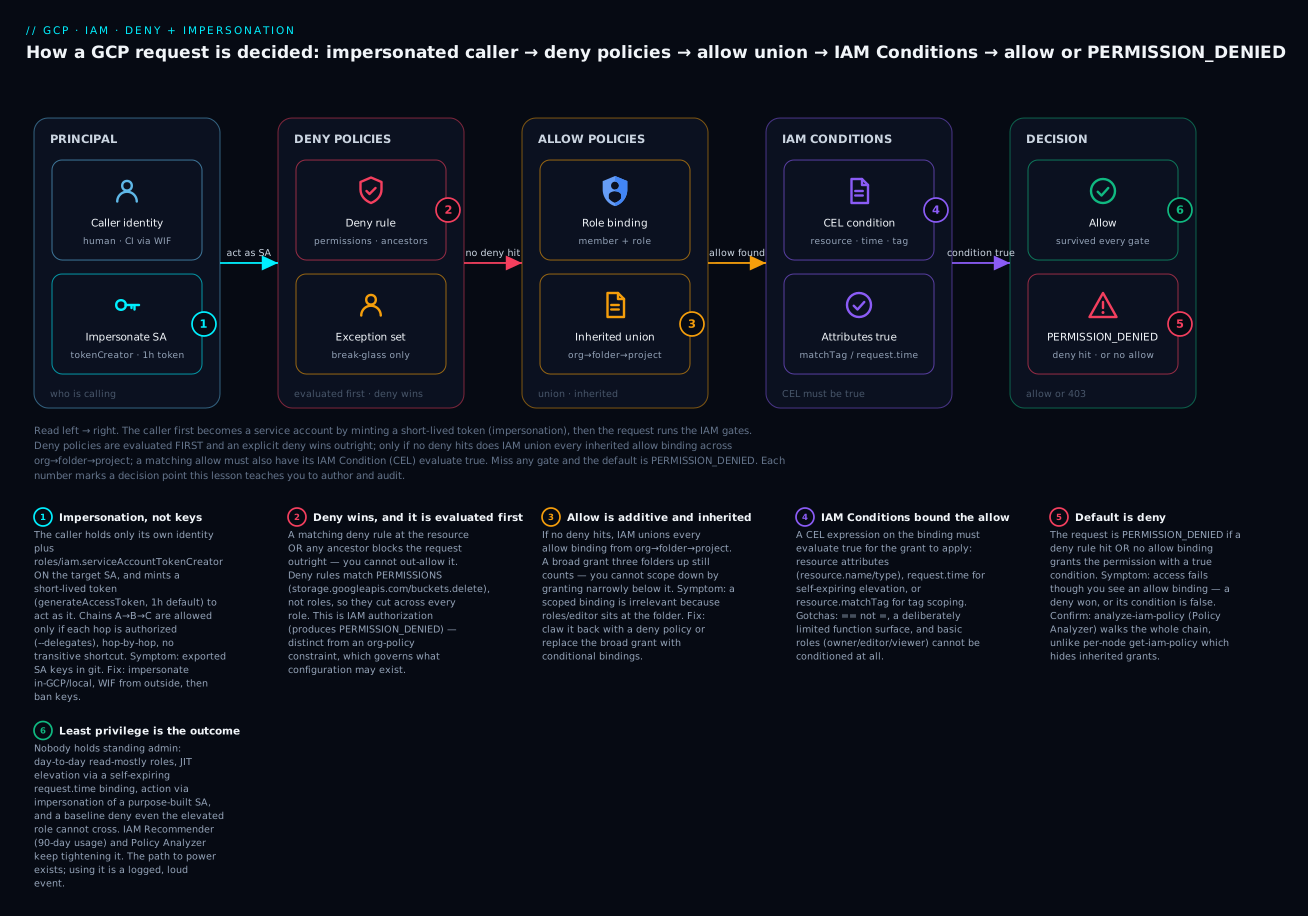
The diagram traces one request left to right: the caller impersonates a service account, then IAM checks deny policies first (an explicit deny wins outright), unions every inherited allow binding across org→folder→project, and requires the matching binding’s CEL condition to be true — miss any gate and the default is PERMISSION_DENIED.
Level: Advanced → Expert · Time: ~40 min (longer if you stand up the break-glass workflow in step 8)
Prerequisites & what you’ll be able to do. You’ll get the most from this if you’re comfortable with GCP’s resource hierarchy (org → folder → project) and the basics of allow policies, roles, and service accounts. If any of that is shaky, start with GCP IAM fundamentals: roles, service accounts, and policy and the IAM deep dive on roles, policies, conditions, and Recommender; this lesson picks up where allow-only IAM leaves off. After working through it you’ll be able to:
- Explain GCP’s request-evaluation order and why deny wins over any allow.
- Author and attach a deny policy with a scoped break-glass exception.
- Write IAM Conditions (CEL) that bound a grant by resource, tag, or time.
- Replace long-lived service-account keys with impersonation and short-lived tokens, and reason about delegation chains.
- Tell a deny policy apart from an org-policy constraint, and know which to reach for.
- Find the over-broad grants you already have with Policy Analyzer and IAM Recommender.
Allow-only IAM gets you surprisingly far and then quietly betrays you. Someone inherits roles/editor three folders up, a forgotten grant at the project node survives every cleanup, and your beautifully scoped binding is irrelevant because a broader one already said yes. Allow policies are additive and non-revoking: nothing in an allow policy can take away a permission another allow policy granted. To actually constrain a powerful identity you need the other half of the model — deny policies, conditions, and credentials that expire on their own. This is the toolkit I reach for when “just don’t grant Editor” stops being a viable answer.
1. How IAM actually evaluates a request
Before authoring anything, internalize the evaluation order, because deny policies invert the intuition you built on allow-only IAM:
- Gather deny policies attached at the resource and every ancestor (project, folder, org). If any matching deny rule applies to the principal and permission — and no exception applies — the request is denied, full stop. Deny wins over allow, always.
- Gather allow policies (the classic
getIamPolicybindings) at the resource and all ancestors. The union is additive: a grant anywhere in the chain counts. - If an allow binding grants the permission and its condition (if any) evaluates true, allow. Otherwise the default is deny.
Two consequences matter. First, inheritance is real and union-based for allow: you cannot “scope down” by granting narrowly at the project if a broad role sits at the folder. Deny policies are how you claw that back. Second, deny policies are evaluated on permissions (e.g. storage.googleapis.com/buckets.delete), not roles — so they cut across every role that happens to include that permission.
# See the allow policy at a single node (does NOT show inherited bindings)
gcloud projects get-iam-policy my-prod-project --format=json

# Walk effective access for a principal across the hierarchy
gcloud asset analyze-iam-policy \
  --organization=123456789012 \
  --identity="user:dana@example.com" \
  --format=json
get-iam-policy is local to one node, which is exactly why teams under-estimate inherited access. analyze-iam-policy (Policy Analyzer) is the tool that tells the truth across the chain — more on it in step 7.
2. Authoring deny policies
Deny policies are a separate resource from allow policies. They attach to an attachment point — an org, folder, or project encoded in a specific URL form — and contain rules with deniedPrincipals, optional exceptionPrincipals, the deniedPermissions, and an optional denialCondition.
Here is a policy that blocks everyone from deleting projects and from deleting buckets, except a narrow break-glass group:
# deny-destructive.yaml
rules:
- denyRule:
    deniedPrincipals:
    - "principalSet://goog/public:all"
    exceptionPrincipals:
    - "principalSet://goog/group/breakglass-admins@example.com"
    deniedPermissions:
    - "cloudresourcemanager.googleapis.com/projects.delete"
    - "storage.googleapis.com/buckets.delete"
Attach it to a folder so it inherits to every project beneath:
# Attachment point must be URL-encoded: cloudresourcemanager.googleapis.com%2Ffolders%2FFOLDER_ID
gcloud iam policies create deny-destructive \
  --attachment-point="cloudresourcemanager.googleapis.com/folders/456789012345" \
  --kind=denypolicies \
  --policy-file=deny-destructive.yaml
A few rules that bite if you ignore them:
principalSet://goog/public:allmeans every principal, including your own admins. Always pair a broad deny withexceptionPrincipalsfor the identities that legitimately need the permission, or you will lock yourself out of break-glass.- Not every permission is deny-supported. Check the per-service list of permissions usable in deny policies before relying on one; some permissions simply cannot be denied yet.
- Exception principals are an escape hatch from the deny, not a grant. The excepted principal still needs an allow binding for the action to succeed.
To list and read deny policies at a node:
gcloud iam policies list \
  --attachment-point="cloudresourcemanager.googleapis.com/folders/456789012345" \
  --kind=denypolicies
3. IAM Conditions: bounding the allow side
Deny policies are blunt. IAM Conditions are the scalpel on the allow side: a CEL expression attached to a binding so the grant only applies when the expression is true. Conditions match three attribute families.
Resource attributes — restrict a role to specific resources or types:
gcloud projects add-iam-policy-binding my-prod-project \
  --member="group:storage-ops@example.com" \
  --role="roles/storage.admin" \
  --condition='expression=resource.name.startsWith("projects/_/buckets/prod-logs-"),title=only-prod-logs-buckets,description=Storage admin limited to prod-logs buckets'
Date/time attributes — time-bound a grant so it self-expires, which is the backbone of elevation workflows:
gcloud projects add-iam-policy-binding my-prod-project \
  --member="user:dana@example.com" \
  --role="roles/compute.admin" \
  --condition='expression=request.time < timestamp("2026-06-15T00:00:00Z"),title=temp-compute-admin,description=Expires 2026-06-15'
Request attributes — match on properties of the call itself, such as the API resource path being created (request.path) or, very commonly, a hierarchical tag on the resource:
# Grant only on resources carrying tag environment=nonprod
gcloud projects add-iam-policy-binding my-shared-project \
  --member="group:dev-team@example.com" \
  --role="roles/compute.instanceAdmin.v1" \
  --condition='expression=resource.matchTag("123456789012/environment", "nonprod"),title=nonprod-only'
Caveats that trip people up: conditions support a deliberately limited CEL surface (no arbitrary functions), they cannot use = (use ==), and not all roles support every attribute — basic roles (owner/editor/viewer) cannot be conditioned at all. The resource.type and resource.name attributes are also not populated for every service, so test the condition against the actual API before trusting it.
4. Service account impersonation and short-lived tokens
The single highest-leverage move in GCP IAM is to stop handing out long-lived credentials and start impersonating. Instead of a human or a CI job holding a key for a service account, they hold their own identity plus the right to mint a short-lived token for the SA on demand.
The enabling role is roles/iam.serviceAccountTokenCreator, granted on the target service account (the SA being impersonated), to the caller:
gcloud iam service-accounts add-iam-policy-binding \
  deploy-sa@my-prod-project.iam.gserviceaccount.com \
  --member="group:platform-deployers@example.com" \
  --role="roles/iam.serviceAccountTokenCreator"
Now any member of that group can run gcloud as the SA without ever touching a key:
# Per-command impersonation
gcloud storage ls --impersonate-service-account=deploy-sa@my-prod-project.iam.gserviceaccount.com

# Mint a raw OAuth2 access token (default lifetime 1h, capped configurably)
gcloud auth print-access-token \
  --impersonate-service-account=deploy-sa@my-prod-project.iam.gserviceaccount.com
Application code uses the same mechanism through the client libraries’ impersonated credentials, so no token handling leaks into your app. Three flavors of short-lived credential come out of the IAM Credentials API, and picking the right one matters:
generateAccessToken— an OAuth2 access token for calling Google APIs. The everyday case.generateIdToken— an OIDC ID token with anaudclaim, for authenticating to Cloud Run, IAP, or any OIDC-verifying endpoint.signJwt/signBlob— sign payloads with the SA’s Google-managed key without ever seeing the key material.
Token lifetime defaults to one hour. You can extend access tokens up to 12 hours, but only after explicitly allowlisting the SA via the
constraints/iam.allowServiceAccountCredentialLifetimeExtensionorg policy. Shorter is safer; reach for the extension only when a long-running job genuinely needs it.
5. Delegation chains and the tokenCreator boundary
serviceAccountTokenCreator is, by design, a privilege-escalation primitive: whoever holds it on an SA becomes that SA, inheriting every permission the SA has. Treat the grant as equivalent to granting the SA’s entire role set to the caller. That is the boundary to defend.
Delegation chains let you impersonate transitively: A is allowed to impersonate B, B is allowed to impersonate C, and a caller acting as A can reach C only if each hop is explicitly authorized. You declare the intermediate hops with --delegates:
# Caller -> sa-a -> sa-b -> sa-c
# Requires: caller has tokenCreator on sa-a,
#           sa-a has tokenCreator on sa-b,
#           sa-b has tokenCreator on sa-c
gcloud auth print-access-token \
  --impersonate-service-account=sa-c@proj.iam.gserviceaccount.com \
  --delegates=sa-a@proj.iam.gserviceaccount.com,sa-b@proj.iam.gserviceaccount.com
The chain is verified hop-by-hop; there is no transitive shortcut. Use chains sparingly — they make audit harder and are usually a sign that a trust boundary (e.g. cross-project, or human-to-automation) wants an explicit, intentional bridge SA rather than a sprawl of direct grants. Audit every tokenCreator grant the way you would audit roles/owner, because functionally it can be.
6. Replacing keys with impersonation and WIF
Exported service account keys are the worst standing credential in most GCP estates: long-lived, copyable, and frequently committed. Two patterns replace them, and you should use both:
- Inside GCP and for local human use: impersonation (step 4). Humans authenticate with
gcloud auth loginand impersonate; workloads on GCP use the attached service account directly. - From outside GCP (CI/CD, other clouds, on-prem): Workload Identity Federation, so an external OIDC/SAML identity exchanges its token for a short-lived GCP credential with no key at all. I cover the full STS exchange, pool setup, and attribute conditions in the keyless CI/CD article; the IAM-side point here is that WIF still terminates in an impersonation grant — the external identity is bound to an SA via
roles/iam.workloadIdentityUser, which is the federated cousin oftokenCreator.
Once those two cover your access paths, slam the door on keys with org policy so no one can recreate the problem:
# Block creation of user-managed SA keys org-wide
gcloud resource-manager org-policies enable-enforce \
  iam.disableServiceAccountKeyCreation \
  --organization=123456789012

# And block key *upload* too
gcloud resource-manager org-policies enable-enforce \
  iam.disableServiceAccountKeyUpload \
  --organization=123456789012
Apply these at the org node with carefully scoped folder/project exceptions for the rare legacy system that genuinely cannot federate yet — and put that exception on a deadline.
7. Finding the risky grants you already have
You cannot least-privilege what you cannot see. Two services do the seeing.
Policy Analyzer answers “who can do what, where.” Query it for dangerous permissions across the org:
# Which principals can delete buckets anywhere under the org?
gcloud asset analyze-iam-policy \
  --organization=123456789012 \
  --permissions="storage.googleapis.com/buckets.delete" \
  --expand-groups \
  --format=json
--expand-groups is the flag that matters: it resolves group memberships so you see actual humans, not just the group binding, which is where over-grants hide.
IAM Recommender uses 90 days of observed usage to recommend tightening roles down to what an identity actually exercised:
gcloud recommender recommendations list \
  --project=my-prod-project \
  --location=global \
  --recommender=google.iam.policy.Recommender \
  --format="table(content.overview.member, content.overview.removedRole)"
Feed Recommender output into your IaC review, not directly into apply — it is advisory and occasionally over-eager on infrequently-used-but-required permissions. Pair it with deny policies for permissions that should never be used regardless of observed history.
8. A least-privilege break-glass and elevation workflow
Put the pieces together into the workflow I deploy in regulated estates. The principle: nobody holds standing admin; elevation is short-lived, conditioned, audited, and bounded by a deny policy that even the elevated role cannot cross.
- Baseline deny at the org/folder: deny the truly catastrophic permissions (org policy edits, billing detach, KMS key destroy) for
public:all, with anexceptionPrincipalslist of one tightly-controlled break-glass group. - Just-in-time elevation: day-to-day, engineers carry read-mostly roles. To act, they request a time-bound conditional binding (
request.time < ...) granting the operational role for a few hours, ideally minted by an automated approval system that writes the binding and lets it expire on its own. - Act via impersonation, never via a personal admin grant: the elevated identity impersonates a purpose-built SA so the action runs as a named, auditable principal with exactly-scoped permissions.
- Break-glass is logged and loud: every use of the exception group fires an alert and a ticket. The path exists; using it is an event.
A condition for a self-expiring elevation, the kind your automation writes:
gcloud projects add-iam-policy-binding my-prod-project \
  --member="user:dana@example.com" \
  --role="roles/container.admin" \
  --condition='expression=request.time < timestamp("2026-06-08T18:00:00Z"),title=jit-gke-admin-incident-4821,description=Incident 4821 elevation, expires 18:00 UTC'
Going deeper
Everything above is the working toolkit. This section is the layer underneath it — the internals, limits, and sharp edges that separate a policy that looks right from one that holds up under audit and at scale.
Deny policies are a versioned v3 resource with real limits. Deny policies live in the IAM v3 surface (iam.googleapis.com, the policies collection), entirely separate from the allow policy you read with getIamPolicy. Each carries an etag, so any programmatic update is a read-modify-write — fetch, mutate, write back with the etag, retry on conflict, exactly as you would for allow policies. There is a ceiling on how many deny rules you can stack on one attachment point (a few hundred; check the current quota before you design a per-team fan-out of rules), and each change is eventually consistent — IAM changes take up to roughly seven minutes to fully propagate, so a freshly attached deny won’t necessarily block the very next call. Never test a deny by firing the action immediately and declaring victory when it’s still allowed; give it time, or you’ll ship a rule you think is live and isn’t.
Principal identifiers in deny policies use the v2 string form. Allow bindings use the friendly user:, group:, serviceAccount: prefixes. Deny policies (and Workload Identity Federation) use the longer principal identifier form:
principalSet://goog/public:all                          # every principal
principalSet://goog/group/GROUP_EMAIL                    # a Google group
principal://goog/subject/USER_EMAIL                      # one specific user
principalSet://goog/cloudIdentityCustomerId/CUSTOMER_ID  # your whole Cloud Identity org
principalSet:// names a set of identities; principal:// names exactly one. Get this wrong and your exceptionPrincipals silently matches nobody, so the deny applies to the very admins you meant to spare — which is precisely how people lock themselves out of break-glass.
IAM Conditions run a deliberately small CEL. The condition language is Common Expression Language, but IAM exposes only a curated slice: no user-defined functions, a fixed set of attributes, and per-service population that isn’t uniform. Two tag functions are worth knowing precisely:
resource.matchTag("123456789012/environment", "prod")   # by namespaced key NAME
resource.matchTagId("tagKeys/456", "tagValues/789")      # by immutable numeric ID
matchTag reads nicely but breaks if someone renames the tag key or value; matchTagId binds to immutable numeric IDs and survives renames — reach for the ID form in anything long-lived or IaC-managed. Remember too that resource.type/resource.name aren’t populated for every service, == is required (never =), and there’s a cap on how many conditional bindings a single policy can hold, so conditions scale by tag, not by enumerating a thousand resource names.
Deny policies are not org-policy constraints — know which problem you have. This is the distinction people conflate most. A deny policy is an IAM authorization control: it governs actions — “which principal may call which permission” — and a violation surfaces as PERMISSION_DENIED from the IAM check. An organization policy constraint (the orgpolicy.googleapis.com service) is a configuration control: it governs what resources may exist or how they may be configured — iam.disableServiceAccountKeyCreation, compute.vmExternalIpAccess, gcp.resourceLocations — enforced by each service at create/update time, not by IAM’s per-request authorization. The disableServiceAccountKeyCreation policy you enforced in step 6 is a constraint (it forbids a configuration: creating a key), whereas denying iam.serviceAccounts.getAccessToken would be a deny policy (it forbids an action: minting a token). Rule of thumb: govern what can exist with an org-policy constraint; govern what an identity may do with a deny policy. Custom org-policy constraints (CEL over resource fields) are the config-side cousin of IAM Conditions — same language, different target. The resource hierarchy and org-policy guardrails lesson goes deep on the constraint side.
tokenCreator and actAs are different escalations — don’t swap them. roles/iam.serviceAccountTokenCreator (permission iam.serviceAccounts.getAccessToken) lets the caller mint the SA’s tokens and directly become it. roles/iam.serviceAccountUser (permission iam.serviceAccounts.actAs) lets the caller deploy or attach a resource that will run as the SA — a Cloud Run service, a GCE VM, a Cloud Function. Both are privilege escalations granted on the target SA, but they are not interchangeable: a deploy pipeline that attaches an SA to a Cloud Run service needs actAs, not tokenCreator; a human who wants to run gcloud as the SA needs tokenCreator. Audit both — and when you want to lock impersonation down precisely, you can write a deny policy or a custom role directly on iam.serviceAccounts.getAccessToken.
Downscoped tokens narrow a token below the SA’s own IAM. For the highest-blast-radius workloads there’s one more squeeze: after impersonation hands you an access token, you can exchange it at the Security Token Service for a downscoped token bounded by a Credential Access Boundary — a set of rules (currently Cloud Storage, bucket-level, up to ten rules) that cap what that specific token can touch, regardless of what the SA is otherwise allowed. It’s how a broker service mints a token that reads exactly one bucket for one downstream job. Overkill for most estates, but the right tool when a single SA legitimately holds broad access and you need to hand out surgically narrow slices of it.
Impersonation is auditable and rate-limited. Every token mint is written to Admin Activity audit logs (always on, no cost) under iamcredentials.googleapis.com — that’s the trail step 5 of Verify reads. The IAM Credentials API also has request-rate quotas, so a workload that mints a fresh token per call instead of caching it for the token’s lifetime can throttle itself under load. Cache the token for its validity window; don’t re-mint per request.
Verify
Prove the controls actually bind before you trust them:
# 1) Confirm the deny policy exists and is attached
gcloud iam policies list \
  --attachment-point="cloudresourcemanager.googleapis.com/folders/456789012345" \
  --kind=denypolicies

# 2) Confirm impersonation works AND that the SA's scope is what you think
gcloud storage ls --impersonate-service-account=deploy-sa@my-prod-project.iam.gserviceaccount.com

# 3) Confirm the denied action is actually blocked for a normal user
#    (run as a non-exception principal -> expect PERMISSION_DENIED)
gcloud storage rm gs://prod-logs-bucket --recursive

# 4) Confirm no user-managed keys exist on a sensitive SA
gcloud iam service-accounts keys list \
  --iam-account=deploy-sa@my-prod-project.iam.gserviceaccount.com \
  --managed-by=user

# 5) Audit who actually minted tokens (impersonation shows in Admin Activity logs)
gcloud logging read \
  'protoPayload.serviceName="iamcredentials.googleapis.com" AND protoPayload.methodName:"GenerateAccessToken"' \
  --project=my-prod-project --limit=20 --format=json
In step 4, the --managed-by=user filter is the one that matters: Google-managed keys always exist and are fine; user-managed keys are the liability. An empty result there is the goal.
Enterprise scenario
A platform team running a multi-tenant analytics estate had a recurring incident: a shared automation SA with roles/bigquery.dataEditor at the project level could, by inheritance, write to every tenant’s dataset — and one buggy pipeline did exactly that, cross-contaminating two tenants’ tables. The constraint was hard: tenants were isolated by dataset, not by project, so project-level IAM could not separate them, and they could not re-architect into per-tenant projects on the incident’s timeline.
The fix combined three of the tools above. First, a hierarchical tag tenant=<id> on each dataset. Second, the broad project-level grant was deleted and replaced with conditional bindings keyed on the tag, so each tenant’s automation SA could only touch its own datasets. Third — the part that made auditors sign off — a deny policy ensured no automation principal could ever delete a dataset, with a single break-glass exception group.
# Per-tenant scoped grant: SA only writes to datasets tagged tenant=acme
gcloud projects add-iam-policy-binding analytics-prod \
  --member="serviceAccount:acme-pipeline@analytics-prod.iam.gserviceaccount.com" \
  --role="roles/bigquery.dataEditor" \
  --condition='expression=resource.matchTag("123456789012/tenant", "acme"),title=acme-datasets-only,description=Tenant isolation for acme pipeline'
The pipelines themselves moved to impersonation — the WIF-federated CI identity impersonates the per-tenant SA — so the same buggy job today simply gets PERMISSION_DENIED the moment it reaches across a tenant boundary, instead of silently succeeding. Same outcome, no re-platforming, enforced by IAM rather than by hoping the code is correct.
Practice challenges
Work these against a sandbox org or project where you can safely attach policies. Replace every placeholder (123456789012, project IDs, SA and group emails) with your own; nothing here should run against production as written. Each solution notes the one idea it proves.
1. (Beginner) See the access you actually have, not just one node.
Find everywhere user:dana@example.com can delete storage buckets under organization 123456789012 — including access inherited from folders and granted through groups.
<details> <summary>Solution</summary>
gcloud asset analyze-iam-policy \
  --organization=123456789012 \
  --identity="user:dana@example.com" \
  --permissions="storage.googleapis.com/buckets.delete" \
  --expand-groups \
  --format=json
Why: per-node get-iam-policy shows only bindings at that one resource; Policy Analyzer walks the whole hierarchy and --expand-groups resolves memberships, so you see real effective access instead of a local slice.
</details>
2. (Beginner) Grant an admin role that expires on its own.
Give user:dana@example.com roles/compute.admin on my-prod-project until 2026-08-01T00:00:00Z, with no cleanup ticket.
<details> <summary>Solution</summary>
gcloud projects add-iam-policy-binding my-prod-project \
  --member="user:dana@example.com" \
  --role="roles/compute.admin" \
  --condition='expression=request.time < timestamp("2026-08-01T00:00:00Z"),title=temp-compute-admin,description=Auto-expires 2026-08-01'
Why: a request.time condition makes the binding self-expire — the grant simply stops applying after the timestamp, which is the backbone of just-in-time elevation.
</details>
3. (Intermediate) Block a destructive permission with a break-glass exception.
Attach a deny policy to folder 456789012345 that stops everyone from deleting buckets, except the group storage-breakglass@example.com.
<details> <summary>Solution</summary>
# deny-bucket-delete.yaml
rules:
- denyRule:
    deniedPrincipals:
    - "principalSet://goog/public:all"
    exceptionPrincipals:
    - "principalSet://goog/group/storage-breakglass@example.com"
    deniedPermissions:
    - "storage.googleapis.com/buckets.delete"
gcloud iam policies create deny-bucket-delete \
  --attachment-point="cloudresourcemanager.googleapis.com/folders/456789012345" \
  --kind=denypolicies \
  --policy-file=deny-bucket-delete.yaml
Why: deny wins over any inherited allow and matches the permission across every role — but the exception only removes the group from the deny; those admins still need their own allow binding to actually delete. </details>
4. (Intermediate) Confine a role to tagged resources only.
Let group:dev-team@example.com administer Compute instances, but only ones tagged environment=nonprod (tag key namespaced under org 123456789012).
<details> <summary>Solution</summary>
gcloud projects add-iam-policy-binding my-shared-project \
  --member="group:dev-team@example.com" \
  --role="roles/compute.instanceAdmin.v1" \
  --condition='expression=resource.matchTag("123456789012/environment", "nonprod"),title=nonprod-only,description=Instance admin limited to nonprod-tagged resources'
Why: a resource-attribute condition scopes the grant to matching resources instead of the whole project — and for anything long-lived, prefer matchTagId("tagKeys/…","tagValues/…") so a tag rename can’t silently widen access.
</details>
5. (Advanced) Impersonate through a two-hop chain, with no key anywhere.
A caller (group:platform-deployers@example.com) must act as sa-b@proj.iam.gserviceaccount.com, but policy says they may only reach it through sa-a. Set up the grants and mint a token.
<details> <summary>Solution</summary>
# 1) caller may impersonate sa-a
gcloud iam service-accounts add-iam-policy-binding \
  sa-a@proj.iam.gserviceaccount.com \
  --member="group:platform-deployers@example.com" \
  --role="roles/iam.serviceAccountTokenCreator"

# 2) sa-a may impersonate sa-b
gcloud iam service-accounts add-iam-policy-binding \
  sa-b@proj.iam.gserviceaccount.com \
  --member="serviceAccount:sa-a@proj.iam.gserviceaccount.com" \
  --role="roles/iam.serviceAccountTokenCreator"

# 3) mint a token as sa-b, declaring the intermediate hop
gcloud auth print-access-token \
  --impersonate-service-account=sa-b@proj.iam.gserviceaccount.com \
  --delegates=sa-a@proj.iam.gserviceaccount.com
Why: the chain is verified hop-by-hop with no transitive shortcut — each tokenCreator grant is a deliberate bridge — and nothing exports a key, so there is no long-lived credential to leak.
</details>
6. (Advanced) Retire keys everywhere and prove a sensitive SA has none.
Stop anyone creating or uploading user-managed SA keys across org 123456789012, then verify deploy-sa@my-prod-project.iam.gserviceaccount.com carries zero user-managed keys.
<details> <summary>Solution</summary>
gcloud resource-manager org-policies enable-enforce \
  iam.disableServiceAccountKeyCreation --organization=123456789012
gcloud resource-manager org-policies enable-enforce \
  iam.disableServiceAccountKeyUpload --organization=123456789012

# An EMPTY result here is the goal:
gcloud iam service-accounts keys list \
  --iam-account=deploy-sa@my-prod-project.iam.gserviceaccount.com \
  --managed-by=user
Why: the two org-policy constraints forbid the key configuration going forward (distinct from a deny policy, which would forbid an action), and --managed-by=user isolates the liability — Google-managed keys always exist and are fine; user-managed ones are what you’re hunting.
</details>
Common beginner mistakes
-
“I granted the role narrowly at the project, so that’s the only access they have.” Allow policies are a union over the whole hierarchy — a broad role at the folder or org still applies, no matter how tight your project-level binding is. Right model: check effective access with Policy Analyzer, then claw broad grants back with a deny policy or replace them with conditional bindings.
-
“The exception principals in my deny policy are now allowed.”
exceptionPrincipalsonly removes those identities from the deny; it grants nothing. Right model: deny and allow are separate systems — an excepted principal still needs its own allow binding for the action to succeed. -
“
tokenCreatorandserviceAccountUserdo the same thing.” They don’t.serviceAccountUser/actAslets you deploy a resource that runs as the SA;tokenCreatorlets you mint the SA’s tokens and become it. Right model: pick by task — attaching an SA to Cloud Run needsactAs; running gcloud as the SA needstokenCreator. -
“My condition uses
resource.type = "compute.googleapis.com/Instance".” Two bugs at once: CEL requires==, not=, andresource.typeisn’t populated for every service. Right model: use==, test the condition against the real API first, and prefermatchTag/matchTagIdfor scoping you can rely on. -
“A deny policy and an org policy are the same guardrail.” A deny policy governs actions (permissions; produces
PERMISSION_DENIED); an org-policy constraint governs configuration (what may exist — no external IPs, no SA keys). Right model: choose by whether you’re constraining an action or a resource’s shape. -
“Impersonation tokens can last as long as I want.” They default to one hour and only reach twelve after you explicitly allowlist the SA via the
iam.allowServiceAccountCredentialLifetimeExtensionorg policy. Right model: short-lived by design — long-lived keys are exactly the anti-pattern impersonation exists to kill. -
“I’ll condition Owner/Editor to scope it down.” Basic roles (
owner,editor,viewer) cannot carry IAM Conditions at all. Right model: use predefined or custom roles when you need a conditional binding.
Glossary
- Allow policy (IAM policy) — the classic set of
member → rolebindings read withgetIamPolicy; additive and unioned across the resource hierarchy. - Deny policy — a separate IAM v3 resource that blocks specific permissions for specific principals; evaluated before allow, and deny wins.
- Attachment point — the org, folder, or project a deny policy is attached to, written in URL-encoded form (e.g.
cloudresourcemanager.googleapis.com/folders/ID). - Binding — one
member+role(+ optional condition) inside an allow policy. - Principal / member — an identity: a user, group, service account, or federated (WIF) identity.
- Principal identifier — the v2 string form (
principalSet://…,principal://…) used in deny policies and WIF, as opposed to theuser:/group:prefixes in allow bindings. - Permission — an atomic action, formatted
service.resource.verb(e.g.storage.buckets.delete); deny policies and custom roles operate on these. - Role — a bundle of permissions: basic (
owner/editor/viewer), predefined, or custom. - IAM Condition — a CEL expression attached to a binding; the grant applies only when it evaluates true.
- CEL (Common Expression Language) — the deliberately limited expression syntax IAM Conditions use;
==not=, no arbitrary functions. - Hierarchical tag — a key/value attached to resources and matched in conditions via
matchTag(by name) ormatchTagId(by immutable numeric ID). - Service account (SA) — a non-human identity that workloads and automation run as.
- Impersonation — minting a short-lived token to act as an SA without holding its key.
serviceAccountTokenCreator— the role (permissioniam.serviceAccounts.getAccessToken) that lets a caller mint an SA’s tokens and become it.serviceAccountUser/actAs— the role/permission to deploy or attach a resource that runs as an SA; distinct from token minting.generateAccessToken/generateIdToken/signJwt— IAM Credentials API methods producing, respectively, an OAuth2 token, an OIDC ID token, and a signed payload.- Delegation chain — transitive impersonation (A→B→C) where each hop is separately authorized and declared with
--delegates; no transitive shortcut. - Workload Identity Federation (WIF) — exchanging an external OIDC/SAML identity’s token for a short-lived GCP credential, with no exported key.
workloadIdentityUser— the federated cousin oftokenCreator, binding an external identity to a GCP service account.- Org-policy constraint — a Resource Manager guardrail on resource configuration (e.g.
iam.disableServiceAccountKeyCreation); a different system from IAM deny policies. - Credential Access Boundary (downscoped token) — an STS exchange that narrows an access token below the SA’s own IAM, currently bucket-level for Cloud Storage.
- Policy Analyzer —
gcloud asset analyze-iam-policy; answers “who can do what, where” across the hierarchy. - IAM Recommender — surfaces role reductions from roughly 90 days of observed usage.
- Break-glass — a tightly controlled emergency access path (the
exceptionPrincipalsof a deny) whose every use fires an alert. - etag — the optimistic-concurrency token that makes a policy update a read-modify-write.
- Propagation delay — the roughly seven minutes an IAM change can take to fully take effect.