In a nutshell
Google Cloud IAM is the system that decides, for every single API call, who is allowed to do what on which resource. The fundamentals lesson taught you to use it; this lesson takes the model apart so you can reason about it with the precision a security review or a certification exam demands — because the gap between “I granted a role” and “I can prove this principal has exactly the access I intended, and no more” is where almost every real cloud incident and every hard exam question lives.
Picture a large office building with a smart-badge security system. Permissions are individual abilities — “open the server-room door”, “print in colour”. You never hand someone a loose ability; you issue a role, which is a pre-loaded badge. A basic role is the owner’s master badge that opens every door in every building (convenient, catastrophic if lost). A predefined role is a job-specific badge the facilities team designs and keeps up to date (“Cleaner — Floors 1–3”). A custom role is a badge you cut yourself with exactly the doors you choose. Binding a role is the act of assigning one badge to one person for one building or one floor, sometimes with fine print (“valid until Friday”, “east wing only”) — that fine print is an IAM Condition. The allow policy is the notice at a door listing who holds which badge there. Inheritance means a badge issued at the building level works on every floor below it, and you cannot cancel it by pinning a note to a single floor — you can only add more badges downward. A deny policy is the guard’s “these people never open this door, whatever badge they hold” list, checked first and overriding everything. And the Policy Intelligence tools are the security office’s reports: who could open the vault?, why did Priya’s badge fail at door 12?, she’s held the master badge a year but only ever entered the mailroom, and if we downgrade her badge, which doors she actually used would stop working?
Hold one sentence and the rest follows: effective access is the union of every grant at and above a resource, minus anything a deny forbids, and only where each grant’s condition is true — with four tools to measure and prove it.
Level: Intermediate → Advanced · Time: ~47 min · Prerequisite: Google Cloud IAM Fundamentals
Most engineers can grant a role on Google Cloud. Far fewer can tell you, with precision, which kind of role they granted, what its launch stage means for support and stability, exactly how the allow policy that holds it is structured, how that grant combines with every other grant up and down the resource hierarchy, how to bound it with a condition the platform will actually enforce, and how to prove afterwards that a principal has precisely the access you intended — no more, no less. That gap is where over-privilege lives, and it is where interviews and the Associate Cloud Engineer and Professional Cloud Security Engineer exams probe hardest. This lesson closes it. We assume you already know the basics — what a principal is, that you grant roles rather than bare permissions, that service accounts exist — from Google Cloud IAM Fundamentals: Roles, Service Accounts, Policy & Inheritance. Here we go one layer down on every part of the model: the three role types and their launch stages, the complete allow-policy schema field by field, every member type including the federated principal sets, the inheritance and union evaluation rules in full, IAM Conditions with the whole CEL attribute surface, and the four least-privilege tools — IAM Recommender, Policy Analyzer, Policy Troubleshooter, and Policy Simulator — that turn least privilege from an aspiration into something you can measure. Deny policies and impersonation chains have their own dedicated companion lesson; we cover just enough of each here to place them in the model and point you there.
Learning objectives
By the end of this lesson you will be able to:
- Choose correctly between basic, predefined, and custom roles, and reason about a custom role’s launch stage, included permissions, and where it is defined.
- Read and author the allow-policy schema field by field —
bindings,role,members,condition,etag,version, andauditConfigs. - Name and correctly use every member (principal) type, including the special
allUsers/allAuthenticatedUserssets andprincipalSet:///principal://identifiers. - Explain policy inheritance and the additive union evaluation rule precisely, including how conditions and deny policies fit the evaluation order.
- Write IAM Conditions in CEL against resource, request, and date/time attributes, and respect their structural limits (the per-binding condition rules, unsupported services, basic-role exclusion).
- Drive the least-privilege tooling — IAM Recommender for right-sizing, Policy Analyzer for “who can do what”, Policy Troubleshooter for “why was this allowed/denied”, and Policy Simulator for “what would this change break”.
Prerequisites & where this fits
You need a Google Cloud account, the gcloud CLI (or Cloud Shell), and a working grasp of the resource hierarchy (Organization → Folders → Projects → Resources) and the three IAM questions (who, what, which resource) — all covered in Google Cloud IAM Fundamentals, which this lesson deliberately builds on rather than repeats. If a term here feels unfamiliar (principal, binding, the allow policy, additive inheritance, service accounts), read that lesson first; everything below assumes it. This is a Fundamentals-track deep dive in the Google Cloud Zero-to-Hero course, sitting between the IAM fundamentals lesson and the data and security deep dives. The payoff is operational: by the end you will configure access the way a security-minded platform team does and be able to defend every choice in a review.
Core concepts: the four moving parts, restated precisely
The fundamentals lesson framed IAM as a function — who may do what on which resource. To go deeper you need four objects held in mind with engineering precision, because the rest of the lesson manipulates each one:
| Object | Precise definition | The thing people get wrong |
|---|---|---|
| Permission | The atomic right to call one API method, written service.resource.verb (e.g. compute.instances.start). You never grant these directly. |
They are not granted individually and they are not the same as a role; one role bundles many. |
| Role | A named, versioned collection of permissions. Three types (basic, predefined, custom) — a type is not a launch stage. | Confusing the role type (who curates it) with its launch stage (how stable/supported it is). |
| Binding | One role + a set of members + an optional condition, inside an allow policy. The unit you actually add and remove. |
Thinking a member “has a role”; a member has a role in a binding on a specific resource, possibly conditioned. |
| Allow policy | The collection of bindings (plus etag, version, optional auditConfigs) attached to one resource node. |
Thinking it lists effective access; it lists only this node’s bindings — inheritance is computed separately. |
Two evaluation facts sit on top, and the whole lesson refers back to them:
- Allow is additive and inherited downward. Effective access on a resource is the union of every binding on it and on all its ancestors. A child grant can only add; it can never subtract a parent’s grant.
- Deny is evaluated first and wins. A separate deny policy (its own resource) is checked before allow; a matching deny without an exception blocks the request regardless of any allow. (Deny policies get full treatment in the companion lesson; we place them in the order here and return to them briefly later.)
Hold those, and every behaviour below follows.
Role types in depth: basic, predefined, custom
A role is a bundle of permissions; the type tells you who curates it and how broad it is. There are exactly three, and choosing among them is most of least-privilege.
| Role type | Identifier form | Who curates it | Granularity | Can be conditioned? | When to use |
|---|---|---|---|---|---|
| Basic (primitive) | roles/owner, roles/editor, roles/viewer |
Google — fixed, legacy | Enormous: span every service | No (basic roles cannot carry IAM Conditions) | Never in production. A throwaway personal sandbox at most |
| Predefined | roles/storage.objectViewer, roles/compute.instanceAdmin.v1 |
Google — curated and maintained per service | Task- and service-scoped | Yes | The default. Start here for almost everything |
| Custom | projects/PID/roles/myRole or organizations/ORG/roles/myRole |
You | Exactly the permissions you list | Yes | Only when no predefined role is tight enough |
Why basic roles are an anti-pattern (the interview answer)
roles/owner, roles/editor, and roles/viewer each carry thousands of permissions across every API. roles/editor lets the holder write to your databases, modify networks, and deploy code; roles/owner adds the ability to change IAM itself (and therefore to escalate without limit) and to set up billing. Two extra facts make them worse than just “broad”: they cannot be constrained with IAM Conditions (so no time-bounding, no resource-scoping), and roles/owner grants setIamPolicy, meaning a single Owner can re-grant Owner to anyone. The professional default is a predefined role scoped to the task; drop to custom only when even the narrowest predefined role grants more than the principal needs.
Predefined roles: what they actually are
A predefined role is a Google-maintained named set of permissions for one job on one service — roles/cloudsql.client (connect to Cloud SQL), roles/pubsub.publisher (publish to topics), roles/logging.viewer (read logs). Three properties matter in practice. First, Google maintains them: when a service ships a new method, Google adds the relevant permission to the appropriate predefined roles automatically — you inherit the update for free. Second, they come in graduated tiers for many services (viewer → editor/user/writer → admin), and the right discipline is to grant the lowest tier that does the job. Third, some carry version suffixes like .v1 / .v2 (e.g. roles/compute.instanceAdmin.v1); these are distinct roles, and you should pin to the one you have tested. Inspect any role’s exact permission list before handing it out:
# See precisely what a predefined role grants, and its stage
gcloud iam roles describe roles/cloudsql.client \
  --format="yaml(name, title, stage, includedPermissions)"
Custom roles: launch stage, included permissions, and location
A custom role is one you author by listing the exact permissions it should contain. It is the scalpel for least privilege — but you own it, so understand its three defining properties.
(1) Where it lives — project or organization, never folder. A custom role is defined at project or organization scope (there is no folder-level custom role). The choice is a reuse-vs-isolation trade-off:
| Definition scope | Identifier | Reuse | When to choose |
|---|---|---|---|
| Project | projects/PROJECT_ID/roles/roleId |
Usable only within that project | One-off needs scoped to a single project |
| Organization | organizations/ORG_ID/roles/roleId |
Usable across every project and folder in the org | A role several teams/projects share — define once, govern centrally |
You still grant a custom role on whatever resource node you like (a project, a bucket); where it is defined governs reuse and who can edit it, not where it can be applied.
(2) Its launch stage — a lifecycle flag you set. Every role carries a launch stage describing how stable and supported it is. For custom roles you choose it; it is metadata you manage as the role matures, and Google may not support roles left in non-GA stages indefinitely.
| Launch stage | Meaning | SLA / support | Typical use |
|---|---|---|---|
ALPHA |
Experimental, may change | None | Early authoring/testing of a new role |
BETA |
More stable, still evolving | Limited | Wider testing before standardising |
GA (GENERAL_AVAILABILITY) |
Production-ready, stable | Full | The stage every shared, production custom role should reach |
DEPRECATED |
On its way out | Replaced | Mark a role you are retiring; pair with a replacement |
DISABLED |
Defined but cannot be granted or used | — | Soft-retire a role without deleting it (preserves history) |
EAP |
Early Access Programme | None | Rarely relevant to custom roles |
A practical lifecycle: author at ALPHA/BETA, promote to GA once proven, and DISABLED (not delete) when retiring so existing bindings surface in audits rather than silently vanishing.
(3) Its permissions — and which ones you may include. You assemble the role from explicit permissions, but two constraints bite. First, a permission can only be added to a custom role if its own support level allows it — permissions are themselves SUPPORTED, TESTING, or NOT_SUPPORTED for custom roles, and a NOT_SUPPORTED permission will be silently dropped or rejected. Second, to create or edit a custom role you need iam.roles.create/update at the relevant scope (via roles/iam.roleAdmin at project level or roles/iam.organizationRoleAdmin at org level) and you can only include permissions you yourself are entitled to grant. Quotas also apply: 300 custom roles per project and 300 per organization (defaults).
# Create a project-level custom role from an explicit permission list
gcloud iam roles create bucketLifecycleManager \
  --project=my-prod-project \
  --title="Bucket Lifecycle Manager" \
  --description="Read buckets and manage lifecycle config only" \
  --permissions=storage.buckets.get,storage.buckets.update \
  --stage=GA

# A cleaner approach for real roles: author a YAML definition and apply it
cat > role-def.yaml <<'YAML'
title: "Bucket Lifecycle Manager"
description: "Read buckets and manage lifecycle config only"
stage: "GA"
includedPermissions:
- storage.buckets.get
- storage.buckets.update
YAML
gcloud iam roles update bucketLifecycleManager \
  --project=my-prod-project --file=role-def.yaml

# Disable (soft-retire) instead of deleting, to preserve audit history
gcloud iam roles update bucketLifecycleManager \
  --project=my-prod-project --stage=DISABLED
The maintenance cost is the gotcha: unlike predefined roles, a custom role does not automatically gain new permissions when a service adds methods — you must update it. Keep custom roles few, prefer org-level definitions for anything shared, and start every one from a predefined role’s permission list (gcloud iam roles describe) and trim, rather than assembling from scratch.
The allow-policy schema, field by field
The fundamentals lesson showed an allow policy as “a list of bindings.” Here is the complete object the API actually returns from getIamPolicy, with every field that matters:
{
  "version": 3,
  "etag": "BwYh2k9d0l0=",
  "bindings": [
    {
      "role": "roles/storage.objectViewer",
      "members": [
        "group:data-readers@example.com",
        "serviceAccount:report-job@my-prod-project.iam.gserviceaccount.com"
      ]
    },
    {
      "role": "roles/compute.instanceAdmin.v1",
      "members": ["group:platform-team@example.com"],
      "condition": {
        "title": "nonprod-only",
        "description": "Only on resources tagged nonprod",
        "expression": "resource.matchTag('123456789012/environment', 'nonprod')"
      }
    }
  ],
  "auditConfigs": [
    {
      "service": "storage.googleapis.com",
      "auditLogConfigs": [
        { "logType": "DATA_READ" },
        { "logType": "DATA_WRITE" }
      ]
    }
  ]
}
Field by field:
| Field | What it is | Why it matters |
|---|---|---|
bindings[] |
The list of grants. Each is one role + members + optional condition. |
The unit you add/remove. Two bindings can share a role if they differ by condition (see below). |
bindings[].role |
The role identifier (basic, predefined, or custom). | One role per binding. |
bindings[].members[] |
The principals receiving the role in this binding. | Member types are the next section — get the prefixes exact. |
bindings[].condition |
An optional CEL predicate (title, optional description, expression). |
Its presence forces policy version 3 (below). |
etag |
A concurrency token for the whole policy. | Read-modify-write: you must send back the etag you read, or the write is rejected — this prevents clobbering a concurrent change. |
version |
The policy schema version: 1 (no conditions) or 3 (conditions allowed). |
Conditions require version: 3. There is no version 2 in use. Always request --format with the full policy when conditions exist, or you may strip them on a naive overwrite. |
auditConfigs[] |
Per-service Data Access audit-log configuration (which DATA_READ/DATA_WRITE/ADMIN_READ logs to emit, and exemptions). |
Audit logging is configured in the IAM policy itself; Admin Activity logs are always on and free, but Data Access logs are opt-in here. |
Three operational rules flow from the schema:
- Always read-modify-write via the helper commands (
add-iam-policy-binding/remove-iam-policy-binding), which fetch the current policy, apply your change, preserve theetag, and put it back. Hand-editing the JSON and re-uploading is how people accidentally drop conditions or lose a concurrent edit. - The same role can appear in two bindings if they carry different conditions — that is precisely how you grant a role broadly in one binding and a conditioned variant in another. Unconditional and conditional grants of the same role to the same member are different bindings.
getIamPolicyis node-local. It returns only this resource’s bindings, never inherited ones — computing effective access is the job of Policy Analyzer (later).
# Read the full policy at a node, including version and conditions
gcloud projects get-iam-policy my-prod-project --format=json

# Add a conditional binding (this implicitly sets version 3)
gcloud projects add-iam-policy-binding my-prod-project \
  --member="group:platform-team@example.com" \
  --role="roles/compute.instanceAdmin.v1" \
  --condition='expression=resource.matchTag("123456789012/environment","nonprod"),title=nonprod-only'
Every member (principal) type — the exact identifiers
A member (the policy JSON calls it that; the console says “principal”) is who a binding grants to. Getting the prefix exactly right matters — a typo is silently treated as a different, non-existent principal and the grant simply does nothing. Here is the complete set you will meet:
| Member type | Identifier form | Represents | Notes / when to use |
|---|---|---|---|
| Google account | user:alex@example.com |
One human (Gmail or Cloud Identity/Workspace) | Sparingly — prefer groups. |
| Google group | group:team@example.com |
A managed collection of accounts/SAs | The default for human access. Change membership outside IAM. |
| Service account | serviceAccount:app@PID.iam.gserviceaccount.com |
A non-human workload identity | Anything code-driven: VM, Cloud Run, CI. |
| Workspace/Cloud Identity domain | domain:example.com |
Everyone in a domain | Coarse, broad grants — use with care. |
| All authenticated users | allAuthenticatedUsers |
Any Google identity or federated workload that has authenticated | Broad; excludes anonymous callers but still very wide. |
| All users | allUsers |
Literally anyone on the internet, unauthenticated | Public resources only (e.g. a public web bucket). Treat as radioactive — it makes data public. |
| Federated principal (single) | principal://iam.googleapis.com/.../subject/SUBJECT |
One external identity via Workload Identity Federation | Direct-resource-access grants to a specific federated subject. |
| Federated principal set | principalSet://iam.googleapis.com/.../attribute.X/VALUE |
A set of external identities matching an attribute | E.g. “all tokens from repo my-org/app” — keyless CI/CD. |
| Workforce pool principal/set | principal://.../locations/global/workforcePools/POOL/... |
Federated human workforce identities (external IdP) | Workforce Identity Federation for employees from an external IdP. |
| Deleted member (tombstone) | deleted:user:...?uid=... |
A principal whose underlying identity was deleted | You will see these in policies; clean them up — they are dead bindings. |
Two precision points exam-setters love. First, allAuthenticatedUsers is not “people in my org” — it is any authenticated Google or federated identity on the planet, so it is almost as dangerous as allUsers for anything sensitive. Second, the difference between principal:// (one federated subject) and principalSet:// (a set matched by attribute) is the difference between granting to one specific external identity versus to a whole class of them; the set form is what powers keyless GitHub Actions. The full federation mechanics live in Keyless Authentication to GCP: Workload Identity Federation for GitHub Actions and CI/CD; what you need here is to recognise and correctly write each identifier.
The unbreakable habit: grant to groups for humans, to dedicated service accounts for workloads, and make any allUsers/allAuthenticatedUsers/domain: grant a deliberate, reviewed decision.
Policy inheritance and the union evaluation rule, in full
This is the concept that separates people who think they understand GCP IAM from those who do, so we go deeper than the fundamentals overview.
Allow policies attach at any node — organization, folder, project, or an individual resource (a bucket, a Pub/Sub topic, a Cloud SQL instance). A policy at a parent is inherited by every descendant. A principal’s effective access on a given resource is the union of every binding that applies to it across the entire ancestry chain: the resource itself → its project → its folder(s) → the organization. The model is purely additive — each level can only add permissions.
The consequence that bites, stated exactly: a child node cannot reduce, scope, or revoke what an ancestor granted. There is no “most specific binding wins” and no allow-side inheritance block. If a user holds roles/editor at a folder, granting them only roles/storage.objectViewer at one project beneath does not narrow them — the union still includes the folder’s Editor. To actually remove a permission that a broad ancestor confers, the allow model is powerless; that is the entire reason deny policies exist.
The full evaluation order for any single request, end to end:
- Deny policies at the resource and all ancestors are gathered. If a matching deny rule applies to this principal and permission and no exception covers them, the request is denied immediately — deny always wins.
- Allow policies at the resource and all ancestors are gathered and unioned.
- For each binding that grants the required permission, its condition (if any) is evaluated against the request. If at least one such binding has a condition that is true (or no condition), the request is allowed.
- Otherwise, the default is deny (implicit deny).
Two subtleties worth banking:
- Conditions are per-binding, evaluated at request time against the actual call — the same member can be allowed for one resource and denied for another under one conditional binding.
setIamPolicyitself is governed by IAM. Changing a policy requires the relevant*.setIamPolicypermission (e.g. via aroles/*.adminorroles/resourcemanager.*Adminrole) on that node — which is exactly whyroles/owner’s ability to set policy makes it an escalation primitive.
# The ONLY honest way to read effective access — across the whole chain, not one node
gcloud asset analyze-iam-policy \
  --organization=123456789012 \
  --identity="user:alex@example.com" \
  --format=json
If you know AWS, retune deliberately: GCP is resource-centric with automatic additive inheritance where a child cannot revoke a parent’s grant (so you constrain with Conditions and deny policies), whereas AWS is identity-centric where SCPs set a permission ceiling (restrict only, never grant) and an explicit Deny overrides any Allow. The contrast is developed in full in the fundamentals lesson.
IAM Conditions: the whole CEL surface
IAM Conditions are how you bound a grant on the allow side without inventing a narrower role. A condition is a CEL (Common Expression Language) predicate attached to one binding; the grant takes effect only when the expression evaluates true at request time. This is the scalpel for least privilege, and exam questions probe both what you can match on and what you cannot do.
The attribute families you can match on
| Attribute family | Key attributes | What it lets you express |
|---|---|---|
| Resource | resource.name, resource.type, resource.service, resource.matchTag(...), resource.matchTagId(...) |
Limit a role to specific resources, a resource type, a service, or resources carrying a tag |
| Date/time | request.time (a timestamp; compare with timestamp(...), extract with .getHours(), .getDayOfWeek(), etc., optionally in a named time zone) |
Self-expiring grants, business-hours-only access, scheduled windows |
| Request — API attributes | api.getAttribute(...) (e.g. allowed Compute regions/zones for an operation) |
Constrain how an API is called (e.g. only create VMs in europe-west1) |
| Request — URL/path & host (where applicable) | request.path, request.host, request.headers[...] |
Match properties of the call itself (notably for IAP-fronted access) |
| Request — IP / access levels (via Access Context Manager) | tied to access levels | Pair IAM with device/IP/region context (covered with IAP/VPC-SC) |
Worked conditions
# 1. Time-bound: a self-expiring compute.admin grant — no cleanup task needed
gcloud projects add-iam-policy-binding my-prod-project \
  --member="user:alex@example.com" \
  --role="roles/compute.admin" \
  --condition='expression=request.time < timestamp("2026-07-01T00:00:00Z"),title=temp-compute-admin,description=Expires 2026-07-01'

# 2. Resource-name-bound: storage.admin only on buckets named prod-logs-*
gcloud projects add-iam-policy-binding my-prod-project \
  --member="group:storage-ops@example.com" \
  --role="roles/storage.admin" \
  --condition='expression=resource.name.startsWith("projects/_/buckets/prod-logs-"),title=only-prod-logs'

# 3. Tag-bound: instanceAdmin only on resources tagged environment=nonprod
gcloud projects add-iam-policy-binding my-prod-project \
  --member="group:platform-team@example.com" \
  --role="roles/compute.instanceAdmin.v1" \
  --condition='expression=resource.matchTag("123456789012/environment","nonprod"),title=nonprod-only'

# 4. Business-hours-only (UTC), combining two clauses with &&
gcloud projects add-iam-policy-binding my-prod-project \
  --member="group:oncall@example.com" \
  --role="roles/cloudsql.admin" \
  --condition='expression=request.time.getHours("UTC") >= 9 && request.time.getHours("UTC") < 18,title=business-hours'
The structural limits — memorise these
- Basic roles cannot be conditioned. Another reason to avoid Owner/Editor/Viewer.
- CEL here is a deliberately restricted surface. No arbitrary functions, no calling other APIs from the expression — only the supported attributes and built-ins. Use
==, never=. - There is a per-binding condition limit. A single binding carries at most one condition expression (combine clauses with
&&/||inside it), and a given role-condition pairing is unique — you cannot stack multiple separate conditions on the same binding. To express “A or B” use two bindings, each conditioned. - Not every resource type/service supports every attribute.
resource.name/resource.typeare not populated for all services; an unsupported attribute makes the condition silently fail (and the grant never takes effect). Always test the condition against the real API before trusting it. - Conditions force policy version 3. A tool that reads/writes the policy as version 1 will drop conditional bindings — use the full-policy helpers.
- The console has a condition builder (a guided UI) as well as a raw CEL editor; the CLI takes the raw
expression.
For the deeper interplay of conditions with deny policies and impersonation, see Advanced GCP IAM: Deny Policies, Conditional Bindings, and Impersonation Chains.
Deny policies and impersonation: where they fit (brief)
Two parts of the model are essential to place here but are covered exhaustively elsewhere, so we keep them short and pointed.
Deny policies are the only way to take access away on a hierarchy where allow is additive. A deny policy is a separate resource from the allow policy, attached to an org/folder/project, evaluated first, and it blocks permissions (e.g. storage.googleapis.com/buckets.delete) for deniedPrincipals — cutting across every role that contains that permission — with optional exceptionPrincipals and a denialCondition. The classic guardrail is “no one deletes production, full stop,” always paired with a break-glass exception (and remember an exception is an escape from the deny, not a grant — the principal still needs an allow binding to act). Full authoring, evaluation, and pitfalls: Advanced GCP IAM: Deny Policies, Conditional Bindings, and Impersonation Chains.
Impersonation is how you use a service account without a downloadable key: a caller holding roles/iam.serviceAccountTokenCreator on the target SA mints a short-lived token and acts as it; the related iam.serviceAccounts.actAs (via roles/iam.serviceAccountUser) lets a deployer attach an SA to a workload so it runs as that identity. Both are granted on the SA-as-resource and both are deliberate privilege-escalation primitives to audit. The fundamentals lesson introduces them; the chains and delegation depth are in the companion lesson above. The point to retain in this lesson: impersonation and actAs are themselves governed by ordinary IAM bindings, so everything you have learned about role types, conditions, and inheritance applies to them too.
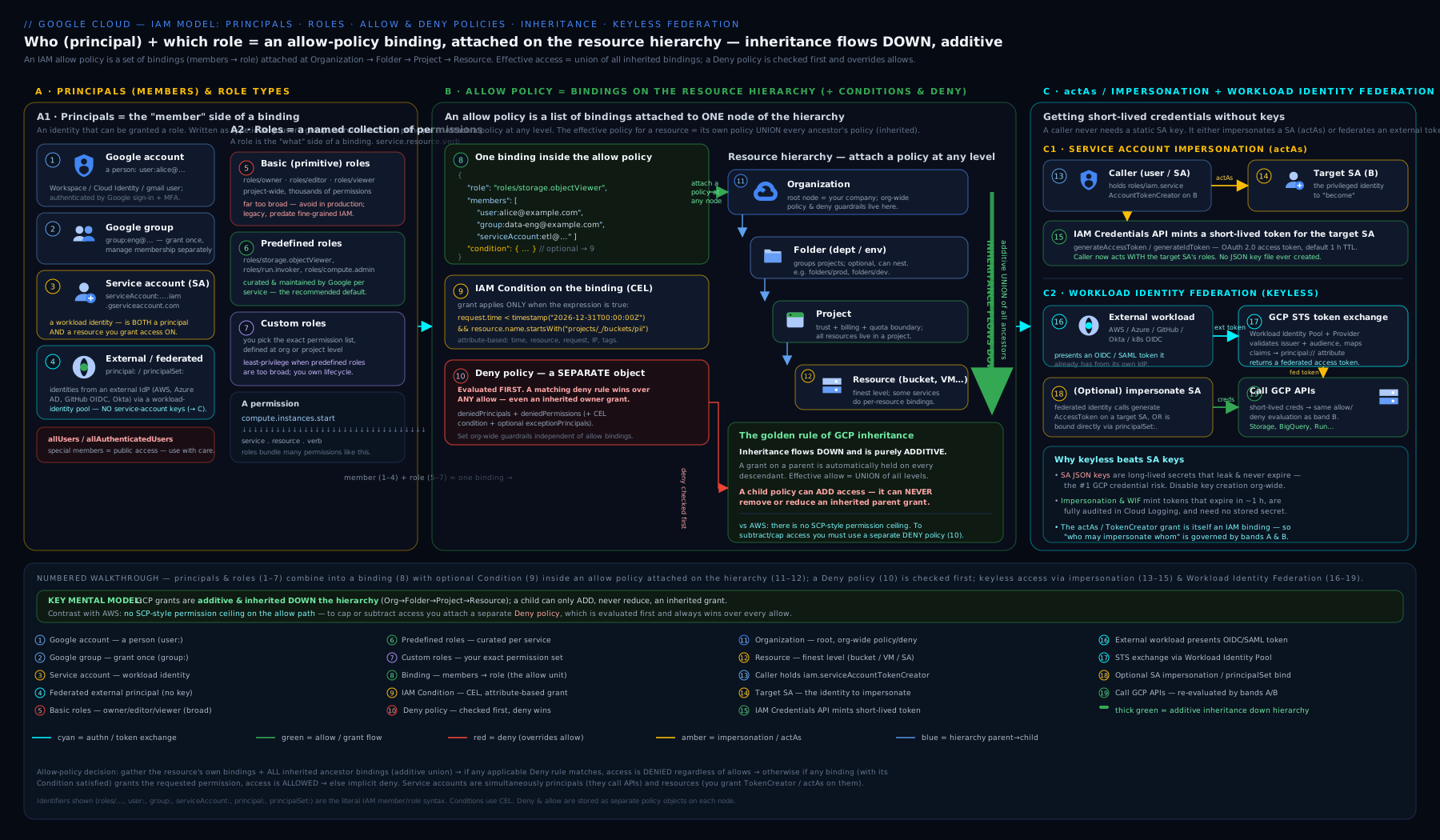
The diagram ties the whole model together: principals on the left, the role → permission bundling in the middle (basic vs predefined vs custom), allow policies attached at organization, folder, project, and resource with grants accumulating downward as a union while individual bindings are bounded by IAM Conditions, the deny policy sitting in front as a hard override evaluated first, and the keyless paths on the right — workloads impersonating attached or target service accounts, and external identities entering through Workload Identity Federation. Read it top-to-bottom for inheritance, and front-to-back for evaluation order (deny → allow → condition).
Least-privilege tooling: Recommender, Analyzer, Troubleshooter, Simulator
Least privilege is not a one-time grant; it is a measured, maintained state. Google ships four distinct tools for it, and knowing which answers which question is exactly what an interviewer and the PCSE exam test. They are different tools — do not conflate them.
| Tool | The question it answers | Mechanism | Output |
|---|---|---|---|
| IAM Recommender (Active Assist) | “Is this principal over-granted? What tighter role would still cover what they actually use?” | Analyses 90 days of usage from audit logs | Role recommendations (swap/remove roles, reduce to a smaller role) + insights |
| Policy Analyzer | “Who can do what on which resource?” (effective access across the whole hierarchy) | Queries the Cloud Asset Inventory index of all policies | A list of bindings/identities matching your query — the effective union |
| Policy Troubleshooter | “Why was a specific request allowed or denied for this principal?” | Replays the evaluation for one principal + permission + resource | A per-binding explanation of the allow/deny decision |
| Policy Simulator | “If I apply this policy change, what currently-allowed access would break?” | Replays the last 90 days of access against the proposed policy | A list of accesses that would have been denied under the new policy |
IAM Recommender — right-sizing roles automatically
The Recommender watches what a principal has actually used over 90 days and proposes shrinking their roles to fit — for example, “this member has roles/editor but only ever used Storage and Logging; replace it with roles/storage.admin + roles/logging.viewer.” It surfaces in the console’s IAM page (a “Excess permissions” / recommendation chip beside a binding) and via API/CLI. It is the engine that turns “we granted Editor to unblock someone in 2024” back into least privilege.
# List role recommendations for a project (right-sizing suggestions)
gcloud recommender recommendations list \
  --project=my-prod-project \
  --location=global \
  --recommender=google.iam.policy.Recommender \
  --format="table(name, primaryImpact.category, content.overview)"
Policy Analyzer — “who can do what”
Policy Analyzer answers access questions across the entire hierarchy by querying the Cloud Asset Inventory (so it sees inherited bindings that getIamPolicy never shows). You can pivot on identity (“everything alex@ can do”), on resource (“everyone who can touch this bucket”), or on permission/role (“who can storage.buckets.delete”). This is the tool for access reviews and for answering an auditor.
# Everything one identity can do across the org
gcloud asset analyze-iam-policy \
  --organization=123456789012 \
  --identity="user:alex@example.com"

# Everyone who has any access to a specific resource
gcloud asset analyze-iam-policy \
  --organization=123456789012 \
  --full-resource-name="//storage.googleapis.com/projects/_/buckets/prod-logs-eu"
Policy Troubleshooter — “why allowed/denied”
When a specific call returns PERMISSION_DENIED (or, more worryingly, succeeded when you expected a denial), the Troubleshooter replays the exact evaluation for one principal + permission + resource and tells you which binding (at which node) granted or failed to grant it, and whether a condition or deny tipped the decision. It is the debugger for “I granted the role, why is it still denied?” (Common answers: granted at the wrong node, a condition evaluated false, or a deny policy intervened.)
gcloud policy-troubleshoot iam \
  //cloudresourcemanager.googleapis.com/projects/my-prod-project \
  --principal-email="alex@example.com" \
  --permission="compute.instances.start"
Policy Simulator — “what would this change break”
Before you tighten a policy (remove a role, add a deny, shrink to a custom role), the Simulator replays the last 90 days of real access against your proposed policy and reports exactly which previously-allowed accesses would now be denied. It is the safety net that turns “tighten and hope” into “tighten with evidence” — run it before every least-privilege reduction so you do not cause an outage. It is available in the console’s IAM editor (“Simulate” before saving a change).
Used together the loop is: Recommender proposes a tightening → Simulator confirms it breaks nothing real → you apply it → Analyzer verifies the resulting effective access → Troubleshooter explains any surprise. That loop is operational least privilege.
Hands-on lab: a custom role, a conditional grant, and the tooling
You will create a project-scoped custom role, grant it with an IAM Condition, then use Policy Analyzer, Policy Troubleshooter, and Recommender to verify and reason about the result. Run everything in Cloud Shell or a local shell after gcloud auth login. This stays comfortably inside the GCP Free Tier / $300 credit — IAM operations are free.
Step 1 — Variables
export PROJECT_ID="$(gcloud config get-value project)"
export PROJECT_NUM="$(gcloud projects describe "$PROJECT_ID" --format='value(projectNumber)')"
export ME="$(gcloud config get-value account)"
echo "Project: $PROJECT_ID ($PROJECT_NUM)  Me: $ME"
Expected: your project ID, number, and account printed back.
Step 2 — Create a least-privilege custom role at GA
gcloud iam roles create labBucketLifecycle \
  --project="$PROJECT_ID" \
  --title="Lab Bucket Lifecycle Manager" \
  --description="Read buckets and update lifecycle only" \
  --permissions=storage.buckets.get,storage.buckets.update \
  --stage=GA

gcloud iam roles describe labBucketLifecycle \
  --project="$PROJECT_ID" \
  --format="yaml(name, stage, includedPermissions)"
Expected: the role’s full name (projects/<id>/roles/labBucketLifecycle), stage: GA, and the two permissions. You have authored a role containing exactly two permissions — nothing more.
Step 3 — Grant the custom role to yourself with a self-expiring condition
gcloud projects add-iam-policy-binding "$PROJECT_ID" \
  --member="user:${ME}" \
  --role="projects/${PROJECT_ID}/roles/labBucketLifecycle" \
  --condition='expression=request.time < timestamp("2026-12-31T00:00:00Z"),title=temp-lab,description=Self-expiring lab grant'
Expected: the updated policy prints, showing a binding for your custom role carrying a condition with title temp-lab. Note the policy is now version 3 because it holds a condition.
Step 4 — Verify effective access with Policy Analyzer
gcloud asset analyze-iam-policy \
  --scope="projects/${PROJECT_ID}" \
  --identity="user:${ME}" \
  --format="json" | head -40
Expected: JSON listing your access, including the labBucketLifecycle grant with its condition. This is the effective view across the chain — the honest answer to “what can I do here.”
Step 5 — Ask the Troubleshooter “why”
# Should be ALLOWED for an action the role covers...
gcloud policy-troubleshoot iam \
  "//cloudresourcemanager.googleapis.com/projects/${PROJECT_ID}" \
  --principal-email="${ME}" \
  --permission="storage.buckets.update"

# ...and explained as DENIED for one it does NOT (unless granted elsewhere)
gcloud policy-troubleshoot iam \
  "//cloudresourcemanager.googleapis.com/projects/${PROJECT_ID}" \
  --principal-email="${ME}" \
  --permission="storage.buckets.delete"
Expected: the first reports the grant via your custom-role binding (subject to the condition); the second explains there is no binding granting storage.buckets.delete (so it is denied unless a broader role you hold elsewhere covers it). This is the debugger you reach for on any PERMISSION_DENIED.
Step 6 — Look for right-sizing recommendations
gcloud recommender recommendations list \
  --project="$PROJECT_ID" --location=global \
  --recommender=google.iam.policy.Recommender \
  --format="table(name, primaryImpact.category, stateInfo.state)"
Expected: a (possibly empty) list — recommendations need ~90 days of usage to appear, so a fresh project may show none. The point is knowing where the Recommender lives and that it drives role-tightening.
Validation
# Confirm the custom role exists at GA and your conditional binding is present
gcloud iam roles describe labBucketLifecycle --project="$PROJECT_ID" \
  --format="value(stage)"
gcloud projects get-iam-policy "$PROJECT_ID" \
  --flatten="bindings[].members" \
  --filter="bindings.members:user:${ME} AND bindings.role:labBucketLifecycle" \
  --format="table(bindings.role, bindings.condition.title)"
You should see GA and a row pairing the custom role with the temp-lab condition title.
Cleanup
gcloud projects remove-iam-policy-binding "$PROJECT_ID" \
  --member="user:${ME}" \
  --role="projects/${PROJECT_ID}/roles/labBucketLifecycle" \
  --condition='expression=request.time < timestamp("2026-12-31T00:00:00Z"),title=temp-lab,description=Self-expiring lab grant'

# Soft-retire (or delete) the custom role
gcloud iam roles delete labBucketLifecycle --project="$PROJECT_ID"
Note: a deleted custom role enters a 7-day soft-delete window during which it can be undeleted (gcloud iam roles undelete), after which it is purged.
Cost note
Nothing in this lab costs money. IAM — roles (predefined and custom), policies, bindings, conditions — and the tooling (Recommender, Policy Analyzer, Troubleshooter, Simulator) are free; you pay for the resources IAM protects, not for IAM. The only caveat: Cloud Asset Inventory (which Policy Analyzer queries) and Data Access audit logs (configured via auditConfigs) can incur small storage/analysis costs at scale — Admin Activity logs, used by Recommender, are always free. Tidy up stale custom roles and bindings: they are a security liability, not a billing one.
Going deeper
You now have the whole GA model. Four advanced layers separate someone who configures IAM from someone who operates it at scale: the consistency machinery underneath every write, the permission-introspection APIs, the newest outer-boundary control, and how all the guardrails compose.
The eventual-consistency and etag machinery (why a fresh grant “doesn’t work yet”)
IAM is an eventually consistent system, and forgetting that produces the most baffling “it worked on retry” bugs. When you write a binding, the change is usually live within a minute or two, but Google documents that access changes can take up to 7 minutes to fully propagate across all systems. The practical trap: automation that creates a service account, grants it a role, and immediately uses that identity can hit a transient PERMISSION_DENIED that resolves itself moments later. The fix is retry with backoff, never “grant a broader role because the narrow one ‘doesn’t work.’”
Under the write sits the etag — a concurrency token for the whole policy. getIamPolicy returns the current etag; setIamPolicy must echo it back; if any other writer changed the policy in between, your write is rejected with gRPC ABORTED (HTTP 409). The add-iam-policy-binding / remove-iam-policy-binding helpers perform the read-modify-write-and-retry loop for you — which is the real reason to prefer them over a hand-rolled get→edit→set. It is also why a tool that reads a policy as version 1 and writes it back as version 1 will silently strip every version-3 conditional binding: it round-trips a schema that cannot represent the condition.
The same hazard has a Terraform face worth memorising, because it can wipe other teams’ grants in production:
| Terraform resource | Scope of authority | Safe? |
|---|---|---|
google_*_iam_member |
One member in one role — purely additive | Safest. Adds/removes just your binding, leaves everything else |
google_*_iam_binding |
Authoritative for one role — Terraform owns the full member list of that role | Careful: drops members added outside Terraform |
google_*_iam_policy |
Authoritative for the whole policy — overwrites every binding on the node | Foot-gun. A single apply can erase every other team’s grant |
The rule: reach for google_*_iam_member unless you have a deliberate reason to own an entire role or the whole policy.
Testable permissions: what can be granted here vs what you hold
Two distinct APIs answer two questions people constantly conflate. queryTestablePermissions — surfaced as gcloud iam list-testable-permissions — lists every permission that can be granted on a given resource, each tagged with its customRolesSupportLevel (SUPPORTED / TESTING / NOT_SUPPORTED) and whether its API is disabled. This is the canonical way to know, before authoring a custom role, which permissions you may legally include and which will be rejected or dropped.
# Which permissions can be granted (and put in a custom role) on this project?
gcloud iam list-testable-permissions \
  //cloudresourcemanager.googleapis.com/projects/my-prod-project \
  --format="table(name, customRolesSupportLevel, apiDisabled)"
Representative output (abridged):
NAME                                   CUSTOMROLESSUPPORTLEVEL  APIDISABLED
storage.buckets.get                    SUPPORTED
storage.buckets.list                   SUPPORTED
resourcemanager.projects.setIamPolicy  TESTING
...
The other method, testIamPermissions, answers the reverse: “which of these permissions does the caller currently hold on this resource?” It is what the Cloud Console calls to grey out buttons you cannot use, and what a well-behaved app calls to hide features rather than let them fail. It never grants anything — it only reports the caller’s own effective permissions on one resource. Keep the pair straight: list-testable-permissions = what is grantable here; testIamPermissions = what I already have here.
Principal Access Boundary — the outer ceiling GCP long lacked
The allow model can only add; a deny policy removes specific permissions; but until recently nothing cleanly expressed “these principals may only ever touch resources in these projects, no matter what anyone grants them.” Principal Access Boundary (PAB) fills that gap. It is a principal-centric ceiling, and it is a two-object model:
- A principal access boundary policy lists the resources a principal set is permitted to reach (rules with
effect: ALLOWover resource names), plus anenforcementVersion. - A policy binding attaches that PAB policy to a principal set — a Workforce/Workload Identity pool, a group, or all principals in an org/folder/project.
A bound principal can then access a resource only if all of these hold: the resource is inside its boundary, an allow policy grants the permission, its condition (if any) is true, and no deny blocks it. Deny still wins first; PAB simply caps the reachable resource set before allow is even considered.
# principal access boundary policy — details (representative shape)
displayName: "Prod-data resource boundary"
details:
  rules:
  - description: "Bound principals may only reach these nodes"
    resources:
    - "//cloudresourcemanager.googleapis.com/projects/prod-data-123"
    - "//cloudresourcemanager.googleapis.com/folders/456789012345"
    effect: ALLOW
  enforcementVersion: "1"
# PAB is administered through two command groups; inspect the current surface
# (the feature is still expanding across services — verify supported resources)
gcloud iam principal-access-boundary-policies --help
gcloud iam policy-bindings --help
If you know AWS, the mental bridge is close but not exact: SCPs cap by account/OU (where a resource lives); PAB caps by principal set (who is acting) — think “an SCP attached to identities.” Two caveats keep you honest: enforcement is versioned, and not every service/resource type is enforced yet — treat PAB as a strengthening guardrail on top of least-privilege allow policies, not a replacement for them, and confirm coverage for the resources you care about before relying on it.
Least privilege at scale — the layered model
At one project, least privilege is a habit; across an organisation it is an architecture. The layers compose, each bounding access from a different angle:
| Control | What it bounds | Direction | Attaches to |
|---|---|---|---|
| Predefined vs custom role | how broad the granted ability is | picks granularity | the role definition |
| Allow binding | who holds which role where | adds access | a resource / project / folder / org node |
| IAM Condition | when a binding applies | narrows one binding | inside a single binding |
| Deny policy | specific permissions, hierarchy-wide | removes access | org / folder / project |
| Principal Access Boundary | the reachable resource set per principal set | ceiling | a principal set |
Operating them at scale reduces to a small number of durable rules: predefined-over-custom by default; groups for humans, dedicated service accounts for workloads; grant at the lowest node that works so inheritance does not over-reach; bound elevated or temporary grants with Conditions; set hierarchy-wide “never” with deny policies and per-identity ceilings with PAB; and run the Recommender → Simulator → apply → Analyzer → Troubleshooter loop on a schedule, not only during incidents. For custom roles specifically, respect the 300-per-project / 300-per-org quota by defining anything shared once at the org level, templating each from a predefined role’s permission list and trimming, and DISABLED-not-deleting on retirement so existing bindings stay visible in audits — remembering always that custom roles carry a maintenance tax predefined roles do not (no auto-update when a service ships new methods).
Practice challenges
Six graded exercises, beginner → advanced. Everything here is free (IAM operations cost nothing) and safe in a throwaway project in Cloud Shell. Try each before opening its solution.
1. (Beginner) Read a predefined role before you trust it. Print the exact permission list and launch stage of roles/pubsub.publisher.
<details> <summary>Show solution</summary>
gcloud iam roles describe roles/pubsub.publisher \
  --format="yaml(name, stage, includedPermissions)"
Why: never grant a role whose real permission set you have not read — a friendly title hides the actual breadth. </details>
2. (Beginner) Audit one node’s direct grants. List every role→member pair bound directly on your current project, one row per member.
<details> <summary>Show solution</summary>
gcloud projects get-iam-policy "$(gcloud config get-value project)" \
  --flatten="bindings[].members" \
  --format="table(bindings.role, bindings.members)"
Why: get-iam-policy is node-local — it shows only this project’s bindings, not inherited ones; that limitation is the entire reason Policy Analyzer exists (challenge 5).
</details>
3. (Intermediate) Author a two-permission custom role by trimming, not guessing. Create a GA custom role that can only get and list Cloud Storage buckets, copying the exact permission strings from an existing predefined role rather than typing them from memory.
<details> <summary>Show solution</summary>
# 1) Copy the exact permission spellings from a predefined role
gcloud iam roles describe roles/storage.admin \
  --format="value(includedPermissions)" | tr ',' '\n' | grep -E '^storage\.buckets\.(get|list)$'

# 2) Create the trimmed custom role at GA
gcloud iam roles create bucketReaderLite \
  --project="$(gcloud config get-value project)" \
  --title="Bucket Reader (lite)" \
  --description="Get and list buckets only" \
  --permissions=storage.buckets.get,storage.buckets.list \
  --stage=GA
Why: templating from a predefined role avoids typos and NOT_SUPPORTED permissions that would be silently dropped from a custom role.
</details>
4. (Intermediate) A self-expiring grant, proven to be version 3. Grant roles/compute.viewer to a group with a condition that expires at the end of Q3 2026, then prove the resulting policy is schema version 3.
<details> <summary>Show solution</summary>
gcloud projects add-iam-policy-binding "$(gcloud config get-value project)" \
  --member="group:platform-team@example.com" \
  --role="roles/compute.viewer" \
  --condition='expression=request.time < timestamp("2026-09-30T23:59:59Z"),title=expires-q3-2026,description=Temporary read access'

# The presence of ANY condition forces version 3
gcloud projects get-iam-policy "$(gcloud config get-value project)" \
  --format="value(version)"
Why: any conditional binding forces the policy to version 3, and a time condition makes the grant clean itself up with no cron job. </details>
5. (Advanced) “Who can delete buckets, org-wide?” — without getIamPolicy. Find every identity that has storage.buckets.delete anywhere in the organisation, accounting for inheritance.
<details> <summary>Show solution</summary>
gcloud asset analyze-iam-policy \
  --organization=123456789012 \
  --permissions="storage.buckets.delete"
Why: Policy Analyzer queries Cloud Asset Inventory and computes the effective union across the whole hierarchy — getIamPolicy only ever sees one node and would miss every inherited grant.
</details>
6. (Advanced) Model “read always, admin only during incidents” — and de-risk the rollback. A group needs roles/storage.objectViewer on one bucket at all times, plus roles/storage.admin on it only during a declared incident window. Express this as bindings, explain why it cannot be a single binding, and name the tool you would run before removing the admin grant so you do not cause an outage.
<details> <summary>Show solution</summary>
Two bindings — a binding holds exactly one role, so two roles is two bindings by definition, and a binding holds at most one condition (combine clauses with &&):
# Standing read access, scoped to just this bucket via a resource-name condition
gcloud projects add-iam-policy-binding "$(gcloud config get-value project)" \
  --member="group:data-team@example.com" \
  --role="roles/storage.objectViewer" \
  --condition='expression=resource.name.startsWith("projects/_/buckets/my-bucket"),title=read-my-bucket'

# Elevated admin on the same bucket, only during the incident window (two clauses, one binding)
gcloud projects add-iam-policy-binding "$(gcloud config get-value project)" \
  --member="group:data-team@example.com" \
  --role="roles/storage.admin" \
  --condition='expression=resource.name.startsWith("projects/_/buckets/my-bucket") && request.time < timestamp("2026-07-20T06:00:00Z"),title=incident-4213-admin'
Before removing the admin binding afterwards, run Policy Simulator — it replays the last 90 days of real access against the proposed (tightened) policy and lists exactly what would newly be denied.
Why: one role and one condition per binding is a structural rule, not a style choice; and Simulator turns “tighten and hope” into “tighten with evidence.” </details>
Common beginner mistakes
Distinct from the symptom→fix table below, these are the mental traps — the wrong model that produces the wrong command in the first place.
- “A member has a role.” A principal never simply “has” a role globally — it holds a role in a binding, on a specific node, possibly under a condition. The same group can be admin on one project and have nothing on the next. Right model: always think role-on-a-node, never role-on-a-person.
- “
get-iam-policyshows everything they can do here.” It returns only the bindings attached directly to that one node — every inherited grant from the project, folder, and org is invisible to it. Right model: for effective access use Policy Analyzer (analyze-iam-policy);get-iam-policyis a single-node view. - “Granting a narrower role at the child project will rein them in.” Allow is additive — a broad grant on an ancestor still applies in full; your narrow child grant only adds to it. Right model: to actually reduce access, remove the ancestor grant, add a deny policy, or cap with PAB — a child allow can never subtract.
- “
allAuthenticatedUsersmeans people in my organisation.” It means any authenticated identity on the internet — every Gmail account and every federated workload on Earth. Right model: use a specificgroup:/domain:; reserveallAuthenticatedUsers/allUsersfor genuinely public resources and treat them as radioactive. - “I’ll just grant Editor to unblock them for now.”
roles/editorcarries thousands of write permissions across every service, cannot be conditioned, and “for now” reliably becomes forever. Right model: grant the predefined role scoped to the task, time-conditioned if the need is genuinely temporary. - “Conditions stack on a binding like firewall rules.” A binding holds at most one condition; you cannot pile several on one binding,
==is equality (=is a syntax error), and “A OR B” is either||inside one expression or two separate bindings. Right model: one tested predicate per binding. - “My custom role will pick up new permissions automatically, like the predefined one did.” Only predefined roles auto-gain permissions when a service ships new methods; a custom role is frozen until you edit it. Right model: custom roles are yours to maintain — keep them few, and prefer predefined unless you truly need the scalpel.
- “I edited the policy JSON by hand and re-uploaded it.” A naive round-trip can drop version-3 conditions (if written back as v1) and lose a concurrent edit (stale
etag→ABORTED). Right model: useadd/remove-iam-policy-binding, which preserve the version and etag for you.
Common mistakes & troubleshooting
| Symptom | Likely cause | Fix |
|---|---|---|
PERMISSION_DENIED despite “granting the role” |
Granted at the wrong node, the binding’s condition is false, or a deny policy blocks it | Run Policy Troubleshooter for the exact decision; check the condition and any deny policy; remember getIamPolicy is node-local |
| A conditional binding “disappeared” after an edit | A tool read/wrote the policy as version 1, stripping the condition | Always use the full-policy helpers; conditions require version 3 — never overwrite a v3 policy as v1 |
| Custom role missing a permission you listed | The permission is TESTING/NOT_SUPPORTED for custom roles, or you lacked the right to grant it |
Check the permission’s support level; you can only include permissions you may grant; use a predefined role if it cannot be included |
| Custom role didn’t gain a new service feature’s permission | Custom roles don’t auto-update; only predefined roles do | Add the new permission to the custom role manually, or switch to a predefined role |
| Scoped a user down with a narrow project grant but they still have too much | Allow inheritance is additive — a broad ancestor grant is not reduced by a child | Remove the ancestor grant, or use a deny policy; you cannot subtract via a child allow |
| Tightening a policy caused an outage | Removed a role/added a deny without checking real usage | Run Policy Simulator before any tightening — it replays 90 days and shows what would break |
| A fresh grant “doesn’t work” for a few minutes | IAM is eventually consistent — propagation can take up to ~7 minutes | Retry with backoff; do not “fix” it by granting a broader role — the narrow grant will take effect |
allAuthenticatedUsers exposed data you thought was internal |
It means any authenticated identity on the internet, not “my org” | Replace with a specific group/domain; reserve allUsers/allAuthenticatedUsers for genuinely public resources |
setIamPolicy rejected with an etag error |
Concurrent modification — your etag is stale (ABORTED/409) |
Re-read the policy and retry; prefer add/remove-iam-policy-binding which handle the read-modify-write |
Stale deleted:... members linger in a policy |
The underlying identity was deleted but the binding remains | Remove the tombstoned bindings; review with Policy Analyzer |
Best practices
- Default to predefined roles; never use basic roles in production. Drop to a custom role only when no predefined role is tight enough — and start it from a predefined role’s permission list, then trim.
- Define shared custom roles at the organization level, one-offs at the project level; keep them few, version them, and
DISABLEDrather than delete when retiring so they stay visible in audits. - Set custom-role launch stages deliberately — author at
ALPHA/BETA, promote toGAfor anything production, and don’t leave shared roles in non-GA stages. - Grant to groups for humans and dedicated service accounts for workloads; make every
allUsers/allAuthenticatedUsers/domain:grant a reviewed decision. - Grant at the lowest node that works — bind at the project or resource, not the org/folder, unless the access genuinely must span everything beneath (because inheritance will carry it down).
- Use IAM Conditions to bound grants — self-expiring time conditions for elevation, resource/tag conditions for scope — and test the condition against the real API before trusting it.
- Prefer
google_*_iam_memberin Terraform (additive, one member) over_iam_binding/_iam_policy(authoritative) unless you deliberately intend to own an entire role or policy. - Run the tooling as a loop: Recommender to find over-grants → Simulator to confirm a tightening is safe → apply → Analyzer to verify effective access → Troubleshooter to explain surprises.
- Always read-modify-write via
add/remove-iam-policy-bindingto preserve theetagand any conditions; never hand-edit and re-upload a policy blindly.
Security notes
IAM is your security perimeter on GCP, so a handful of principles carry outsized weight. Treat roles/owner and any role granting setIamPolicy as escalation primitives — the holder can re-grant access (including to themselves) and cannot be constrained with Conditions; grant such roles rarely, to groups, and audit them like crown jewels. Make least privilege measurable, not aspirational: the Recommender right-sizes, the Simulator proves a tightening is safe, and the Analyzer/Troubleshooter let you and auditors see and explain effective access — use them on a schedule, not just in incidents. Turn on the audit trail you control: Admin Activity logs are always on and free, but Data Access logs are opt-in via auditConfigs in the IAM policy — enable them for sensitive services so “who read this data” is answerable. Bound powerful grants with Conditions (time, resource, tag) so access cleans itself up, use deny policies for hard, hierarchy-wide guardrails with break-glass exceptions, and add a Principal Access Boundary where a class of principals must never reach beyond a defined resource set. Finally, eliminate standing credentials — prefer impersonation and Workload Identity Federation over downloaded keys (covered in the companions). The deep treatment of deny policies, conditions, and impersonation chains is in Advanced GCP IAM.
Interview & exam questions
-
“What are the three role types, and how does a role type differ from a launch stage?” The types are basic (Owner/Editor/Viewer — broad, Google-fixed, cannot be conditioned), predefined (Google-curated, task/service-scoped, the default), and custom (you author the exact permission list). The launch stage (
ALPHA/BETA/GA/DEPRECATED/DISABLED) is separate metadata describing how stable/supported a role is — you set it for custom roles. Type = who curates and how broad; stage = lifecycle/stability. -
“Where can a custom role be defined, and what’s the maintenance gotcha?” At project or organization scope (never folder). Org-level roles are reusable across all projects; project-level are local. The gotcha: a custom role does not automatically gain new permissions when a service adds methods (unlike predefined roles), so you must maintain it — and there’s a quota of 300 per project / 300 per org.
-
“Walk me through the allow-policy schema.” A policy has
bindings[](each = onerole+members[]+ optionalcondition), anetag(concurrency token for read-modify-write), aversion(1, or3when conditions are present), and optionalauditConfigs[](per-service Data Access logging).getIamPolicyreturns only this node’s bindings — not inherited ones. -
“Why does a condition force policy version 3, and what breaks if you ignore it?” Conditions are only representable in schema version 3; a tool that reads/writes the policy as version 1 will silently strip conditional bindings. Always use the full-policy helpers so you don’t drop conditions on an overwrite.
-
“Explain inheritance and the union rule, with the evaluation order.” Allow policies attach at any node and are inherited downward, additively; effective access is the union of a resource’s and all ancestors’ grants, and a child cannot reduce a parent’s grant. Order: deny policies first (a match without exception denies, full stop) → union of allow → a binding granting the permission whose condition is true → else implicit deny.
-
“A user has Editor at a folder; you grant only Object Viewer at one project beneath. What can they do there, and how would you actually limit them?” Everything Editor allows plus Object Viewer (additive union). To limit them you must remove the folder-level Editor grant or apply a deny policy — a narrower child allow cannot subtract.
-
“What can IAM Conditions match on, and what are their structural limits?” Match families: resource (
resource.name/type/matchTag), date/time (request.time— self-expiring grants, business hours), and request/API attributes (api.getAttribute, paths/headers, access levels). Limits: basic roles can’t be conditioned, CEL is a restricted surface (==not=), one condition per binding (combine with&&/||; use two bindings for OR across conditions), some attributes aren’t populated for every service (test against the real API), and conditions require version 3. -
“You hold
roles/editorbut only ever use Storage and Logging. What tool tells you that and what does it suggest?” The IAM Recommender (Active Assist) — it analyses 90 days of audit-log usage and recommends replacing the over-broad role with the smaller roles you actually use. -
“Which tool answers ‘who can do what on this resource’, and why not just
getIamPolicy?” Policy Analyzer (gcloud asset analyze-iam-policy), because it queries Cloud Asset Inventory and computes the effective union across the whole hierarchy, whereasgetIamPolicyshows only one node’s bindings and misses inherited access. -
“How do you find out why a specific request was allowed or denied?” Policy Troubleshooter — it replays the evaluation for one principal + permission + resource and tells you which binding (at which node) decided it, including whether a condition or deny tipped it.
-
“You’re about to remove a broad role / add a deny. How do you avoid an outage?” Run Policy Simulator first — it replays the last 90 days of real access against the proposed policy and lists exactly which currently-allowed accesses would be denied, so you tighten with evidence rather than hope.
-
“Differentiate
allUsers,allAuthenticatedUsers,principal://andprincipalSet://.”allUsers= anyone on the internet, unauthenticated (data becomes public).allAuthenticatedUsers= any authenticated Google/federated identity worldwide (not “my org”).principal://= one specific federated identity (Workload/Workforce Identity Federation).principalSet://= a set of federated identities matched by attribute (e.g. all tokens from one repo) — the basis of keyless CI/CD. -
“What is a Principal Access Boundary and how does it differ from a deny policy?” A PAB is a principal-centric ceiling: a boundary policy lists the resources a principal set may reach, attached via a policy binding; a bound principal can act only where the resource is inside the boundary and an allow grant covers it. A deny policy removes specific permissions hierarchy-wide. PAB bounds the reachable resource set per identity; deny bounds permissions. Deny is still evaluated first.
Quick check
- Name the three role types and state which one cannot carry an IAM Condition.
- At which scopes can a custom role be defined, and what is the key maintenance difference from a predefined role?
- Which allow-policy field forces version 3, and what happens if a tool writes the policy as version 1?
- In one sentence, state the IAM evaluation order from deny through to the implicit default.
- Match each tool to its question: Recommender, Policy Analyzer, Policy Troubleshooter, Policy Simulator.
Answers
- Basic, predefined, custom. Basic roles (Owner/Editor/Viewer) cannot carry a condition.
- Project or organization scope (not folder). Unlike a predefined role, a custom role does not auto-update with new service permissions — you must maintain it (and there’s a 300-per-project/org quota).
- The presence of a
conditionon any binding forces version 3; a tool writing the policy as version 1 will silently strip conditional bindings. - Deny policies are evaluated first (a matching deny without an exception denies outright) → then the union of all allow grants up the hierarchy → a binding granting the permission whose condition is true allows → otherwise the default is deny.
- Recommender = “is this principal over-granted / what tighter role fits actual usage?”; Policy Analyzer = “who can do what on which resource (effective access)?”; Policy Troubleshooter = “why was this request allowed/denied?”; Policy Simulator = “what currently-allowed access would this change break?”.
Exercise
Design and verify a least-privilege grant end to end, using the tooling as a loop:
- Pick a real task (e.g. “rotate object lifecycle on the logs bucket”). Find the smallest predefined role that covers it (
gcloud iam roles describe), and only if none fits, author a custom role from a trimmed permission list at project scope, set toGA. - Grant the role to a group (not your user) with an IAM Condition — either resource-scoped (
resource.name.startsWith(...)) or self-expiring (request.time < timestamp(...)). - Run Policy Analyzer (
analyze-iam-policy) for the group and confirm the effective access is exactly the one grant — no more. - Run Policy Troubleshooter for one permission the role covers (expect allow) and one it does not (expect a denied explanation).
- Now propose tightening something broad in the project and run Policy Simulator to see what 90 days of access it would break — then decide whether to proceed.
- Check the IAM Recommender page for any over-grant suggestions on the project.
- Clean up: remove the binding and
DISABLED-then-delete the custom role (note the 7-day undelete window).
If step 3 shows precisely your intended grant and step 5 shows the blast radius of a tightening before you apply it, you have practised operational least privilege, not just configured a role.
Certification mapping
- Associate Cloud Engineer (ACE): core and heavily tested. Configuring access and security — managing IAM with
gcloud, predefined vs custom roles (creating, describing, granting), reading allow policies, member types, and basic Conditions. The lab here mirrors the hands-on style of ACE questions. - Professional Cloud Security Engineer (PCSE): the deep end — the full allow-policy schema and version-3 conditions, policy inheritance and the union/evaluation order, custom-role launch stages and least-privilege design, Principal Access Boundary, and crucially the tooling (Recommender, Policy Analyzer, Policy Troubleshooter, Policy Simulator) for measuring and proving least privilege at organisation scale. Deny policies, conditions, and impersonation chains (the companions) complete the PCSE picture.
- Professional Cloud Architect (PCA): the design-judgement layer — choosing role types, where to define custom roles, when to bound with Conditions versus deny policies versus PAB, and how inheritance shapes a multi-project/folder access design.
Glossary
- Role type — who curates a role and how broad it is: basic (Owner/Editor/Viewer), predefined (Google-curated), or custom (yours).
- Launch stage — a role’s lifecycle/stability flag:
ALPHA,BETA,GA,DEPRECATED,DISABLED(andEAP); set by you for custom roles. - Predefined role — a Google-maintained, task/service-scoped permission bundle that auto-gains new permissions; the default choice.
- Custom role — a role you author from an explicit permission list, defined at project or org scope; you maintain it (no auto-update; 300 per project/org).
- Allow policy — the collection of
bindings(+etag,version, optionalauditConfigs) attached to one resource node. - Binding — one
role+members[]+ optionalcondition; the unit you add/remove. The same role may appear in two bindings if their conditions differ. - etag — a concurrency token for the whole policy, used for safe read-modify-write.
- Policy version — the allow-policy schema version:
1(no conditions) or3(conditions allowed). - Member (principal) — the identity a binding grants to:
user:,group:,serviceAccount:,domain:,allUsers,allAuthenticatedUsers,principal://,principalSet://. principalSet://vsprincipal://— a set of federated identities matched by attribute, versus one specific federated identity.- Policy inheritance — grants flow downward through the hierarchy and accumulate as a union; a child cannot reduce a parent’s grant.
- Union evaluation — effective access = the union of a resource’s and all ancestors’ allow bindings, after deny policies are applied first.
- IAM Condition — a CEL predicate on one binding (resource/date-time/request attributes) so the grant applies only when true; forces version 3.
- auditConfigs — the per-service Data Access audit-log configuration embedded in the IAM policy (Admin Activity logs are always on).
- IAM Recommender — Active Assist tool that right-sizes roles from 90 days of usage.
- Policy Analyzer — Cloud Asset Inventory–backed tool answering “who can do what” across the hierarchy.
- Policy Troubleshooter — replays evaluation for one principal/permission/resource to explain an allow/deny.
- Policy Simulator — replays 90 days of access against a proposed policy to show what would break.
- Eventual consistency (IAM) — policy changes propagate asynchronously; usually effective within a minute or two, but Google documents up to 7 minutes for full propagation. Retry with backoff rather than over-granting.
ABORTED/ etag conflict — the error (HTTP 409) returned when you write a policy with a staleetag; the helper commands re-read and retry for you.- Testable permissions — the permissions that can be granted on a resource (
queryTestablePermissions/gcloud iam list-testable-permissions), each tagged with a custom-role support level. testIamPermissions— the API method reporting which of a supplied list of permissions the caller currently holds on a resource (used by consoles to enable/disable UI); it grants nothing.customRolesSupportLevel— whether a permission isSUPPORTED,TESTING, orNOT_SUPPORTEDfor inclusion in a custom role.- Principal Access Boundary (PAB) — a principal-centric ceiling: a boundary policy lists the resources a principal set may reach, attached via a policy binding; access requires the resource to be inside the boundary and an allow grant, with deny still winning first.
- Policy binding (PAB) — the object that attaches a principal access boundary policy to a principal set.
- Terraform IAM resource types —
google_*_iam_member(additive, one member — safest),google_*_iam_binding(authoritative for one role),google_*_iam_policy(authoritative for the whole policy — overwrites everything).
Next steps
You now command the complete IAM model — the three role types and custom-role launch stages, the full allow-policy schema, every member type, additive inheritance and the union/evaluation order, IAM Conditions in CEL, the consistency machinery and testable-permissions APIs, the Principal Access Boundary ceiling, and the four tools that make least privilege measurable. Build directly on it with the data-pipeline deep dive next, Google Cloud Dataflow, In Depth: Apache Beam, Streaming vs Batch, Windowing & Autoscaling, where service-account identity and least-privilege grants are how a pipeline reads sources and writes sinks. To go deeper on the control surfaces touched only briefly here, follow Advanced GCP IAM: Deny Policies, Conditional Bindings, and Impersonation Chains, and revisit the foundations any time in Google Cloud IAM Fundamentals: Roles, Service Accounts, Policy & Inheritance.