In a nutshell
A three-tier web application is the most common shape for any website that real people log into, and it works by splitting the job into three separate roles so each one can be scaled, secured, and repaired on its own. Picture a busy restaurant. The dining room and the waiters take your order and bring your food — that is the presentation/web tier. The kitchen actually cooks the meal by following the recipes — that is the application/logic tier. And the locked pantry and walk-in fridge at the back, where all the ingredients are safely kept, is the data tier. On a busy night you hire more waiters without touching the pantry, and you keep the pantry locked in the back where no customer ever wanders — which is exactly how a well-built web app treats its database.
On Google Cloud those three roles map onto specific managed services. A global load balancer is the front door that greets every visitor and spreads them evenly across many identical, interchangeable web servers — the waiters. Those web servers run your application code (either a managed instance group of virtual machines, or Cloud Run containers) — the kitchen. And a Cloud SQL database, sitting on a private network with no public address, is the pantry where the durable truth lives. Wrapped around that spine are the boring-but-essential parts: a VPC with private subnets so the tiers talk to each other but not to the open internet; IAM service accounts so each tier gets only the permissions it truly needs; health checks and autoscaling so a broken server is replaced automatically and a busy hour adds capacity on its own; and Secret Manager so the database password lives in a vault instead of a text file.
The reason this 40-year-old pattern refuses to die is that the separation itself is the payoff. When traffic surges you add web servers and leave the database untouched; when you want the database safe you hide it behind a private network and the web servers never notice the difference. Get this foundational build right on GCP and a service that used to fall over under load becomes a non-event — which is the entire story of this lesson. The architecture diagram in the “Architecture overview” section traces the full request path; everything below fleshes out each piece and then hands you exercises to build it yourself.
Level: Junior · Time: ~33 min
Prerequisites: You should be comfortable with the very basics of a cloud account — that a project is your billing-and-resource boundary, and that resources live in regions and zones. It helps to know roughly what a virtual machine and a relational database are. You do not need to be an expert in any single service; this lesson is the map that ties them together. If GCP’s fundamentals or the load balancer feel unfamiliar, skim Cloud fundamentals: resource hierarchy and pricing and Cloud Load Balancing deep dive first.
After this lesson you can:
- Explain the three tiers in plain language and say why separating them lets each one scale, fail, and get secured on its own terms.
- Trace a single request end to end on GCP: DNS → global HTTPS load balancer + Cloud Armor → a stateless web tier → a private Cloud SQL database → and back.
- Choose deliberately between a managed instance group and Cloud Run for the web tier, and defend the choice for a given traffic shape.
- Lay out a VPC with private subnets, Private Service Access for Cloud SQL, and Cloud NAT for controlled outbound access — with no public IPs on the web or data tiers.
- Keep the database credential out of every config file and image using Secret Manager and a per-tier service account (and know the even-stronger option beyond that).
- Name the three failure modes that page you at 2 a.m. — a zone outage, a database connection storm, a bad deploy — and the standard mitigation for each.
A mid-sized further-education college — the kind that runs Moodle for 18,000 students across three campuses — has a problem every August. Enrollment opens, every applicant and returning student logs in within the same fortnight, and the single virtual machine that has hosted the learning portal for six years falls over under the load. Last year the registrar’s office took 2,000 phone calls in a week because students could not submit coursework before a deadline, and the IT team spent three nights restarting a server by hand. The principal’s brief to the new platform engineer is blunt and unglamorous: “make the portal stay up in August, stop keeping the database password in a config file, and do it without hiring a team I cannot afford.” This is not a machine-learning moonshot. It is the most common architecture in the world — a three-tier web application — and getting the foundational version right on Google Cloud is what turns three sleepless nights into a non-event. This article is that reference build.
The three tiers are a separation of concerns that has survived four decades because it keeps working. The presentation/web tier takes HTTP requests and renders responses. The application/logic tier runs the business rules — in a small Moodle-style app these two often live in the same process, and we will treat the web+app tier as one horizontally scalable layer. The data tier is the database of record, where the durable truth lives. The whole point of separating them is that each tier fails, scales, and gets secured on its own terms: you add web servers when traffic spikes without touching the database, and you harden the database behind a private network without slowing down the web servers.
Why not just a bigger single server
The college’s instinct — and the honest starting point for most teams — is “the VM is too small, buy a bigger VM.” Naming why that fails matters, because someone will propose it in every planning meeting.
A single large VM is a single point of failure: when it reboots for a kernel patch, or its zone has an incident, the entire portal is down, and August is exactly when you cannot afford that. It scales only vertically — you can buy a bigger machine right up until you hit the largest machine, and you are still paying for that peak capacity in February when nobody is enrolling. It couples the tiers: a runaway web process can starve the database of CPU on the same box. And it tends to keep secrets on disk — the database password ends up in a config.php, which is the exact thing the principal asked to stop, and the exact thing that leaks when a backup or a repo goes somewhere it should not.
The three-tier pattern on GCP fixes all four: a load balancer spreads traffic across many small, identical, replaceable web instances in multiple zones; the web tier scales horizontally up in August and back down in February so you pay for what you use; the data tier is a separate managed service with its own failover; and the database credential lives in Secret Manager, never on a web server’s disk.
Architecture overview
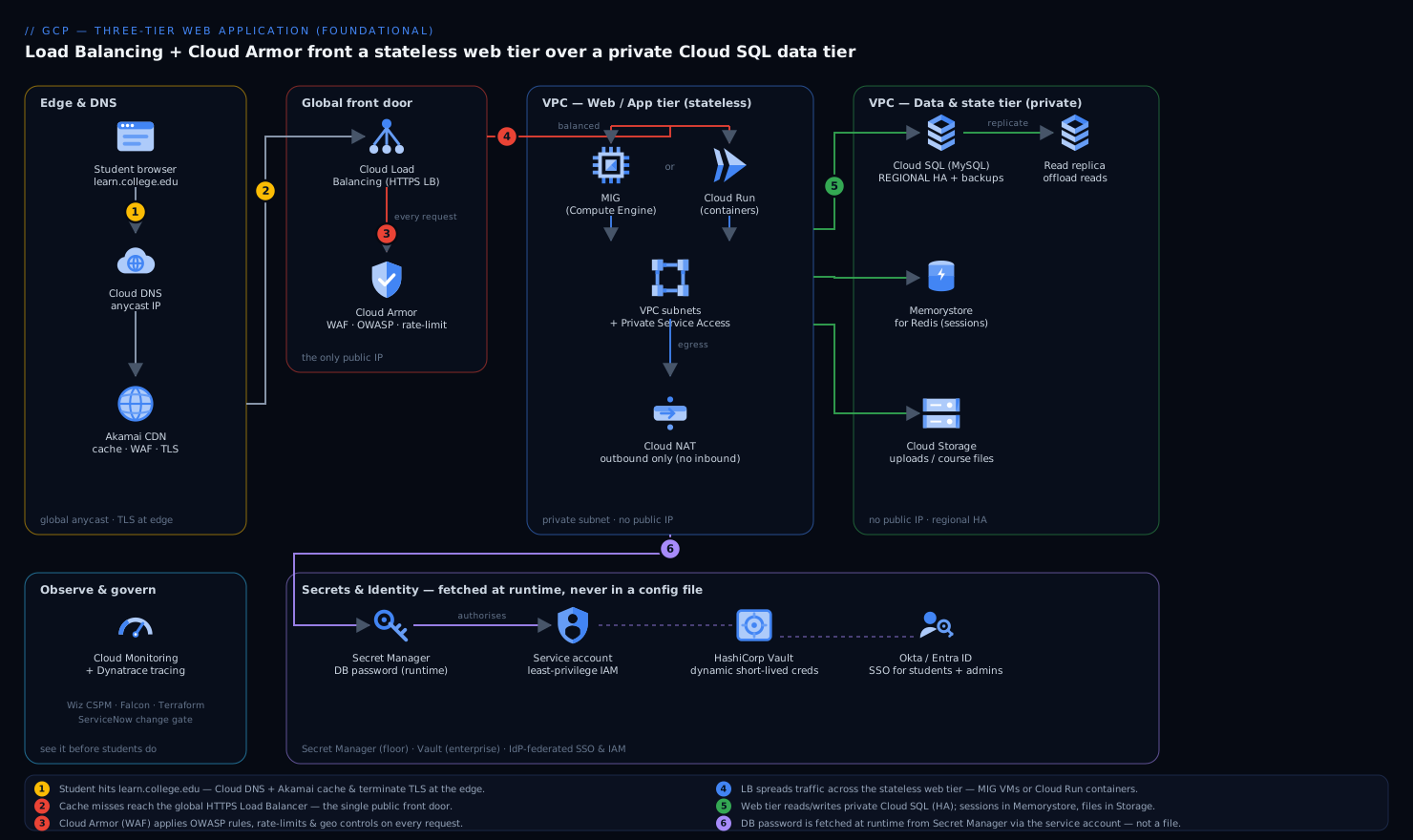
Follow the diagram as a single request’s journey, edge to database and back: a student’s browser → Cloud DNS → the global HTTPS Load Balancer (screened by Cloud Armor) → the stateless web tier (a managed instance group or Cloud Run) → the private, highly-available Cloud SQL database — with Secret Manager handing the web tier its DB credential and Memorystore plus Cloud Storage holding session and file state off to the side. The one fact that makes the whole picture click: everything toward the front is public and replaceable, and everything toward the back is private and durable. Trace it once and the whole architecture makes sense.
-
Edge & DNS. A student opens
learn.college.edu. Cloud DNS resolves it to a single global anycast IP that fronts the application. For this college, Akamai sits in front as the CDN and edge: it caches the static course assets (PDFs, lecture videos, CSS/JS) close to students so those bytes never travel to GCP at all, terminates TLS at the edge, and absorbs a first layer of volumetric and bot traffic — which keeps the August spike of cacheable requests off the origin entirely. -
Global HTTPS Load Balancer + WAF. Requests that are not served from cache reach Cloud Load Balancing (the global external Application Load Balancer). It terminates HTTPS with a Google-managed certificate, and every request first passes through Cloud Armor, GCP’s WAF and DDoS shield, attached as a security policy on the backend. Cloud Armor runs preconfigured OWASP rules (SQL injection, XSS), per-IP rate limiting to stop a single client hammering the login endpoint, and geo or IP allow/deny lists. This is the single front door — one place to enforce edge security for every request that reaches the app.
-
Web/App tier. The load balancer distributes traffic across the web tier, which is where the two valid foundational choices diverge (covered in the next section): either a managed instance group (MIG) of identical Compute Engine VMs running Moodle behind the LB, or Cloud Run running Moodle as a container that scales to zero. Either way, the web tier is stateless — it holds no durable data — so any instance can serve any request and instances are freely added or destroyed.
-
Data tier. The web tier reads and writes to Cloud SQL (MySQL for Moodle), running as a regional, highly-available instance with a standby in a second zone and automated backups. Critically, Cloud SQL has no public IP: the web tier reaches it over Private Service Access on the VPC’s private subnet, so the database is never exposed to the internet.
-
Secrets, not config files. Before the web tier can connect to Cloud SQL, it needs the DB password. It does not read a file. It fetches the credential at runtime from Secret Manager, authorized by the instance’s or service’s service account — no password is baked into an image, a container, or a repo. For the college’s heavier compliance and rotation needs (and to manage non-GCP secrets like the Akamai API token), HashiCorp Vault can sit alongside as the central secrets broker with dynamic, short-lived database credentials and a full audit trail; Secret Manager is the GCP-native floor, Vault is the enterprise ceiling.
-
State that is not the database. User sessions and Moodle’s cache go to Memorystore for Redis so that a student’s logged-in session survives any single web instance being replaced — the web tier stays genuinely stateless. Uploaded assignments and course files go to a Cloud Storage bucket, not a VM disk, so files persist independently of any instance and can be served via Akamai.
The defining property to internalize: the only thing exposed to the internet is the load balancer’s IP behind Cloud Armor. The web instances have no public IPs, the database has no public IP, and everything talks over a private VPC. That single fact is what makes this defensible rather than just available.
The one real decision: MIG VMs vs. Cloud Run
For a foundational three-tier app on GCP the web tier has two legitimate answers, and a Junior engineer should be able to argue both. They are not equally good for every case; the table is the honest comparison.
| Dimension | Managed Instance Group (Compute Engine) | Cloud Run (containers) |
|---|---|---|
| Mental model | “Many identical VMs behind the LB” | “Run my container, you handle the machines” |
| Scaling | Autoscaler adds/removes VMs on CPU/LB load (seconds–minutes) | Scales per-request, to zero when idle (sub-second cold start tax) |
| Idle cost | You pay for the minimum running VMs 24/7 | ~Zero when no traffic — ideal for nights/off-season |
| Fit for Moodle | Strong: Moodle is a long-running PHP app, easy to lift onto a VM image | Strong if you containerize Moodle and keep it stateless |
| Ops burden | You own the OS: patching, the base image, OS-level agents | No OS to manage; Google patches the platform |
| Spiky August load | Pre-warm + autoscale; predictable | Effortless burst, but watch DB connection storms on scale-up |
| When it wins | Steady baseline traffic, OS-level control, existing VM images | Bursty/seasonal traffic, small team, “no servers to babysit” |
For this college the honest recommendation is Cloud Run if they are willing to containerize Moodle: the workload is intensely seasonal, scale-to-zero saves real money in the quiet months, and “no OS to patch” is exactly what a one-person platform team needs. If they want to lift the existing VM image with minimal change and value OS-level control, the MIG is a perfectly correct foundational choice. Both sit behind the same Load Balancer + Cloud Armor + Cloud SQL + Secret Manager skeleton — that skeleton is the architecture; the web-tier engine is swappable.
One trap with either choice: when the web tier scales out fast, every new instance opens database connections, and Cloud SQL has a connection ceiling. Put a connection pooler (the Cloud SQL Auth Proxy with pooling, or ProxySQL) in the path so an autoscaling event does not become a database connection storm — the failure that turns a traffic spike into an outage.
Networking and the VPC, concretely
The network is where Junior builds most often go wrong, so be deliberate. A single VPC with purpose-built subnets is enough:
- A subnet for the web tier (the MIG VMs, or the Serverless VPC connector that lets Cloud Run reach private resources).
- A range reserved for Private Service Access, which is how Cloud SQL gets a private IP inside your VPC.
- Cloud NAT so that web instances with no external IP can still reach the internet outbound (OS updates, calling the Akamai or Okta APIs) without being reachable inbound.
Firewall rules express the tiering as policy, not hope: allow the Load Balancer’s health-check and proxy ranges into the web tier on 443/8080; allow the web tier to reach Cloud SQL’s private IP on 3306; deny everything else, and especially never open 3306 or 22 to 0.0.0.0/0. A minimal Terraform sketch of the data tier shows the intent — private IP only, HA, backups, deletion protection:
resource "google_sql_database_instance" "moodle" {
  name             = "moodle-prod"
  database_version = "MYSQL_8_0"
  region           = "europe-west2"

  settings {
    tier              = "db-custom-4-15360"
    availability_type = "REGIONAL"          # HA standby in a second zone
    disk_autoresize   = true
    backup_configuration {
      enabled                        = true
      binary_log_enabled             = true # enables point-in-time recovery
      transaction_log_retention_days = 7
    }
    ip_configuration {
      ipv4_enabled    = false               # NO public IP
      private_network = google_compute_network.vpc.id
    }
  }
  deletion_protection = true                # don't let a typo drop prod
}
And the credential the app uses to connect is created in Secret Manager, never written to an image:
echo -n "$DB_PASSWORD" | gcloud secrets create moodle-db-pass --data-file=-
# the web tier's service account is granted read access, and nothing else:
gcloud secrets add-iam-policy-binding moodle-db-pass \
  --member="serviceAccount:moodle-web@PROJECT.iam.gserviceaccount.com" \
  --role="roles/secretmanager.secretAccessor"
Identity: students, and the people who run it
There are two distinct identity problems and it is worth separating them.
Students authenticate to Moodle itself, typically against the college’s existing directory. If the college standardizes workforce and student SSO on Okta (or Microsoft Entra ID), Moodle federates to it over SAML/OIDC so a student has one login across the portal and other campus systems, with MFA enforced centrally — and crucially, account de-provisioning is one action in the IdP when a student leaves.
The engineers and admins who operate the GCP project authenticate to Google Cloud, and their human identities should come from the same IdP: federate Okta/Entra → Google Cloud so that access to the project is granted to IdP groups, governed by least-privilege IAM roles, and revoked centrally. No standing personal gcloud keys; no shared admin password. The web tier and Cloud Run service each run as a dedicated service account with the narrowest roles that work — read this secret, connect to this Cloud SQL instance, write to this bucket — and nothing more.
Security posture
For a foundational app the security story is layered and mostly built from defaults done correctly:
- Edge: Cloud Armor (OWASP rules, rate limiting, geo controls) in front of the LB; Akamai adds an outer CDN/WAF and TLS-at-edge layer.
- Network: no public IPs on web or data tiers, private VPC, deny-by-default firewalls, Cloud NAT for controlled egress.
- Identity: IdP-federated SSO for humans (Okta/Entra), per-tier service accounts, least-privilege IAM.
- Secrets: Secret Manager as the floor, HashiCorp Vault for dynamic short-lived DB creds and audit when the college’s compliance grows.
- Posture & runtime (the enterprise layer): Wiz runs agentless cloud-security-posture scanning across the GCP project — it flags the moment a bucket turns public, a firewall rule widens, or the Cloud SQL instance drifts toward a public IP, and Wiz Code scans the Terraform in the repo so a misconfiguration is caught before it is applied, not after. CrowdStrike Falcon sensors on the MIG VMs give runtime threat detection and feed the college’s security alerts (on Cloud Run, where there is no OS to instrument, you lean on platform controls and Wiz instead). When Wiz or Falcon raises a finding, it auto-opens a ServiceNow incident so there is a tracked ticket and an owner, not just a log line.
The principal’s specific ask — “stop keeping the database password in a config file” — is satisfied the moment the credential moves to Secret Manager and the web tier reads it via its service account. That is the single highest-value security change in the whole project.
Cost
A three-tier app’s bill is dominated by what runs 24/7, so the architecture choice is also a cost choice.
| Lever | Mechanism | Typical effect |
|---|---|---|
| Scale to zero | Cloud Run for the web tier idles to ~0 in the off-season | Largest saving for seasonal traffic like enrollment |
| Right-size + autoscale | MIG min instances low; scale out only in August | Avoid paying February capacity all year |
| Cache at the edge | Akamai/CDN serves static course assets | Cuts origin egress and compute on cacheable load |
| Committed-use discounts | 1-year CUD on the steady Cloud SQL + baseline web | ~Up to ~55% off the always-on tier |
| Storage tiering | Old course archives to Nearline/Coldline buckets | Cheap long-term retention of past terms |
For the college the big lever is obvious: traffic is near zero for months, so scale-to-zero compute plus edge caching is the difference between a bill sized for August and a bill sized for the actual usage curve. The one cost you should not trim is the regional HA Cloud SQL — paying for a standby is cheap insurance against the exact outage that started this project.
Scaling, failure modes, and reliability
Scaling is per-tier by design. The web tier scales horizontally — the autoscaler (MIG) or per-request scaling (Cloud Run) adds capacity on load and removes it after — and because the tier is stateless, this is safe. The data tier scales differently and more slowly: read replicas offload read-heavy traffic (Moodle dashboards, course listings) from the primary, and you scale the primary up (a bigger tier) rather than out. Recognizing that the database does not scale like the web tier — and protecting it with a connection pooler and read replicas — is the single most important scaling lesson in this pattern.
Failure modes to name before they page you at 2 a.m.:
- A zone incident. Mitigated by spreading the web tier across multiple zones and running Cloud SQL as REGIONAL (automatic failover to the standby in seconds). This is why HA is non-negotiable.
- A database connection storm on scale-up. Many new web instances open connections at once and exhaust Cloud SQL’s limit. Mitigated by the connection pooler.
- A traffic or attack spike. Mitigated at the edge by Cloud Armor rate limiting and Akamai absorption before requests reach the LB.
- A bad deploy. Mitigated by rolling updates (MIG) or gradual traffic splitting / instant rollback (Cloud Run), so a broken release reaches a fraction of students and is reverted in one command.
- Accidental data loss. Mitigated by automated backups with point-in-time recovery and
deletion_protectionon the instance.
Reliability targets (RTO/RPO). For this college a pragmatic, affordable goal is RTO ~5 minutes, RPO ~minutes: regional Cloud SQL fails over automatically within the region, point-in-time recovery bounds data loss to minutes, and the stateless web tier is recreated from its image/container in moments. True multi-region (a cross-region read replica promotable on a regional outage) is the next maturity step — worth naming, not worth buying for a single college on day one.
Observability
You cannot keep the portal up in August if you cannot see it. Cloud Monitoring and Cloud Logging are the native floor: LB latency and 5xx rates, web-tier CPU and instance count, Cloud SQL connection count and replication lag, and Cloud Armor blocked-request counts — with alerting policies that page before students do. For a richer operating picture the college can run Dynatrace (or Datadog) across the stack for distributed tracing of a request from edge to database, automatic dependency mapping, and anomaly detection that flags a latency or error regression on its own. The metrics that actually matter here are p95 page latency, login success rate, Cloud SQL connection saturation, and cache hit-rate at Akamai — the four numbers that predict an August outage.
Build and deploy
Treat the whole thing as code so it is reproducible and reviewable. Terraform provisions the VPC, subnets, firewall rules, Load Balancer, Cloud Armor policy, MIG or Cloud Run service, Cloud SQL, Memorystore, the bucket, and the IAM bindings — the network and security are deliverables, not afterthoughts, and Wiz Code scans those Terraform plans in the pull request. Ansible can handle OS-level configuration on the MIG image (installing the PHP runtime, the Moodle app, OS agents) if you go the VM route. The application pipeline runs in GitHub Actions or Jenkins: build the Moodle container or VM image, run tests, and deploy — authenticating to GCP via Workload Identity Federation so there is no stored service-account key to leak. For teams that want declarative, auditable rollouts, Argo CD can drive deployments from Git as the source of truth. Whatever the tool, the principle is the same: no human clicks in the console for a production change, and every change is a reviewable, revertible commit. New environment changes pass a ServiceNow change approval before they go live, giving the college a documented gate.
Explicit tradeoffs
Accept these, or build the single VM and own its risks. The three-tier pattern adds more moving parts than one server — a load balancer, a separate managed database, a VPC with private networking, a secrets store, a cache — and each is one more thing to understand and provision. The private networking that makes it secure (no public IPs, Cloud NAT for egress, Private Service Access for Cloud SQL) is exactly where Junior builds get stuck, and a missing firewall rule or NAT looks like a silent hang, not a clear error. Splitting state out to Memorystore and Cloud Storage to keep the web tier stateless is discipline you must hold — the moment someone writes a session to a local disk, scale-to-zero and rolling updates start losing user data.
When the simpler thing is genuinely right: for a 50-student internal tool with no traffic spikes and no compliance pressure, a single well-backed-up VM (or a managed App Engine / Cloud Run service with a small Cloud SQL and nothing else) is the correct, cheaper answer — do not build a global load balancer for it. And at the other end, when the college grows to multi-region resilience, microservices, or GKE-based container orchestration, this foundational pattern is the base camp you grow from, not a dead end. The three tiers, the WAF at the edge, the private data tier, and the secret-not-in-a-file rule all carry forward unchanged.
Going deeper
The sections above are the map. This one is for the reader who will actually build it and wants to know where the sharp edges are — the internals, the version caveats, and the handful of settings that quietly decide whether August is calm or on fire.
What the “global” load balancer is actually doing
At the beginner level the load balancer is just “the front door.” Under the hood it is a fleet of Google Front Ends (GFEs) sitting in Google’s edge points-of-presence around the world, all answering the same anycast IP. A student in Manchester and a student in Singapore type the same address; the network routes each to the nearest GFE. That GFE terminates TLS, applies your Cloud Armor security policy, and then forwards the request over Google’s private backbone to a healthy backend in your region. That is precisely why it is called global: one IP, one certificate, one WAF policy, many edge locations.
Two correctness details trip up almost every first build:
- Health checks come from Google’s ranges, not from your users. The load balancer probes your backends from
35.191.0.0/16and130.211.0.0/22. If your firewall does not allow those ranges into the web tier, every backend is marked unhealthy, the LB returns502s, and it looks exactly as if your app is broken when the app is perfectly fine. This one missing firewall rule is the single most common “my brand-new load balancer only serves 502” cause. - There are two global external ALBs. The newer, Envoy-based global external Application Load Balancer uses
--load-balancing-scheme=EXTERNAL_MANAGED; the older classic one usesEXTERNAL. New builds should chooseEXTERNAL_MANAGED— that is where advanced traffic management (header-based routing, traffic mirroring, fault injection) lives. Cloud Armor attaches to the backend service in both cases.
Reaching a private database — the mechanisms, and the Cloud Run twist
“Cloud SQL has no public IP” is the goal; how the web tier reaches it depends on the tier engine. See Cloud SQL HA, read replicas, and private connectivity for the full treatment; the short version:
- Private Service Access (PSA). You reserve an internal IP range and create a VPC peering to Google’s
servicenetworkingproducer network. Cloud SQL then receives a private IP inside that peered range, reachable from your VPC. This is the classic path for MIG VMs. - The Cloud SQL Auth Proxy. A small binary/sidecar that opens an authenticated, encrypted tunnel to the instance using its instance connection name (
PROJECT:REGION:INSTANCE) and IAM — no manual TLS certificates, no hard-coded IP. It is the recommended connection method precisely because auth and encryption stop being your problem. - The Cloud Run twist. A serverless container has no network interface on your VPC by default. To reach a private Cloud SQL IP from Cloud Run you either attach a Serverless VPC Access connector (or the newer Direct VPC egress, now GA, which is cheaper and lower-latency), or use Cloud Run’s built-in Cloud SQL connection which speaks to the instance connection name for you. Forgetting this is why “it works from my VM but Cloud Run just times out connecting to the database” is a rite of passage.
The connection-storm problem, in numbers
This is the single most important scaling nuance in the whole pattern: the web tier scales out, but the database scales up. A Cloud SQL instance has a finite max_connections that grows with the machine tier. Now do the arithmetic on a scale-out. If each web instance holds a pool of 20 connections and August takes you from 5 instances to 60, you have gone from 100 to 1,200 connections in minutes — and a mid-tier Cloud SQL may cap well below that. The instance starts refusing connections, and a traffic spike becomes an outage. This is exactly why Cloud Run’s effortless burst needs a watchful eye (Cloud Run deep dive covers its scaling knobs).
Three mitigations, in order of leverage:
- A connection pooler in the path — PgBouncer (Postgres) or ProxySQL (MySQL), or Cloud SQL’s own managed connection pooling where available — multiplexes thousands of thin client connections down onto a small pool of real database connections.
- Cap the multiplication at the source. On Cloud Run,
--max-instances× per-instance pool size is your worst case; set both deliberately and raise concurrency so each instance serves more requests before a new one spins up. On a MIG, the autoscaler ceiling plays the same role. - Offload reads to replicas. Moodle dashboards and course listings are read-heavy; Cloud SQL read replicas take that traffic off the primary so the primary’s connection budget is spent on writes.
Better than a stored password: IAM database authentication
Secret Manager removes the password from disk, but the password still exists — it can be read, logged, or leaked, and it must be rotated. The next rung up is to have no password at all. With IAM database authentication enabled (cloudsql_iam_authentication=on), the web tier’s service account authenticates to Cloud SQL with a short-lived OAuth token minted at connect time (the Auth Proxy or connector handles the token exchange for you). There is no static credential to store, rotate, or leak; access is granted and revoked through IAM like everything else in the project. For a security-conscious build this is the “even better” answer that the Secret Manager step is a stepping stone toward — and it is the subject of Practice challenge 6.
The tier you can’t blue/green: schema migrations
You can replace every web instance in seconds because they are stateless and identical. You cannot do that to the database — it holds the single copy of the truth. That is why a schema change is the riskiest deploy in a three-tier app, and why the expand/contract (a.k.a. parallel-change) pattern exists:
- Expand: make a backward-compatible schema change first — add the new column or table, but keep the old one. Both the current app and the next version can run against this shape.
- Migrate: deploy the new app version (rolling update or canary) that writes the new shape while the old shape still works, then backfill existing rows.
- Contract: only after every instance is on the new version and the data is backfilled do you drop the old column or table.
Never ship a migration that a still-running old instance cannot tolerate — during a rolling update, old and new run at the same time. This discipline is what lets the stateless tiers stay fast and fearless on top of a stateful one.
Quotas and limits to size before August, not during it
Autoscaling only helps if the ceilings above it are set high enough. Before a known spike, check and raise as needed: regional CPU and in-use IP-address quota (a MIG scaling to 60 VMs needs the vCPUs and the internal addresses), the Cloud SQL connection limit for the chosen tier, Serverless VPC connector throughput (it has a maximum Gbps and instance-count band), and Cloud Run max-instances per service and per region. Every one of these is a silent ceiling that turns “autoscaling will handle it” into “why did it stop at 40 instances at 09:00 on results day?” A ten-minute quota review in July is the cheapest reliability work you will ever do.
The shape of the win
Next August, enrollment opens and the portal does not fall over. Cloud Load Balancing spreads the surge across web instances that autoscale on their own; Akamai serves the cacheable course assets so most of the spike never reaches GCP; Cloud Armor turns away the bots and rate-limits the login floods; Cloud SQL’s standby is ready if a zone hiccups; and the database password the principal worried about lives in Secret Manager, read by a service account, present in no config file and no repo. The IT team spends August watching a Dynatrace dashboard instead of restarting a server at 3 a.m. None of this is exotic — it is the foundational three-tier pattern, built honestly on GCP. That is precisely why it is worth getting right: it is the architecture you will reach for again and again, and the day you stop losing sleep over August is the day it has paid for itself.
Practice challenges
Work these against a scratch project, or just write each command and check it against the solution. They escalate from wiring up private connectivity to eliminating the database password entirely. Placeholders (PROJECT_ID, service-account emails, IP ranges) are yours to fill in.
1. Give Cloud SQL a private address (beginner). Before an instance can have a private IP, the VPC needs a reserved range peered to Google’s service-networking. Reserve a /16 range named google-managed-services and create the private connection on a VPC called moodle-vpc.
<details> <summary>Solution</summary>
# 1. Reserve an internal range for Google-managed services to allocate from
gcloud compute addresses create google-managed-services \
  --global --purpose=VPC_PEERING --prefix-length=16 \
  --network=projects/PROJECT_ID/global/networks/moodle-vpc

# 2. Create the private connection (VPC peering) to servicenetworking
gcloud services vpc-peerings connect \
  --service=servicenetworking.googleapis.com \
  --ranges=google-managed-services \
  --network=moodle-vpc --project=PROJECT_ID
Why: Private Service Access works by peering your VPC with Google’s producer network. Without the reserved range and the peering, --network on a Cloud SQL instance has nowhere to draw a private IP from, and the create fails.
</details>
2. Create the data tier with no public IP, HA, and point-in-time recovery (beginner→intermediate). Create a MySQL 8.0 Cloud SQL instance moodle-prod in europe-west2, private IP only, regional HA, backups on, and deletion protection.
<details> <summary>Solution</summary>
gcloud sql instances create moodle-prod \
  --database-version=MYSQL_8_0 \
  --region=europe-west2 \
  --tier=db-custom-4-15360 \
  --availability-type=REGIONAL \
  --no-assign-ip \
  --network=projects/PROJECT_ID/global/networks/moodle-vpc \
  --enable-bin-log \
  --backup-start-time=03:00 \
  --retained-transaction-log-days=7 \
  --deletion-protection
Why: --no-assign-ip + --network makes the instance reachable only over the private VPC (it depends on the peering from challenge 1). --availability-type=REGIONAL adds the standby in a second zone, and --enable-bin-log with backups is what unlocks point-in-time recovery. --deletion-protection stops a fat-fingered delete from dropping prod.
</details>
3. Move the password into a vault the web tier alone can read (intermediate). Store the database password in Secret Manager as moodle-db-pass, then grant only the web tier’s service account read access — nothing broader.
<details> <summary>Solution</summary>
echo -n "$DB_PASSWORD" | gcloud secrets create moodle-db-pass \
  --replication-policy=automatic --data-file=-

gcloud secrets add-iam-policy-binding moodle-db-pass \
  --member="serviceAccount:moodle-web@PROJECT_ID.iam.gserviceaccount.com" \
  --role="roles/secretmanager.secretAccessor"
Why: the value is piped from stdin (--data-file=-) so it never lands in a file or your shell history as an argument. Granting secretAccessor on the single secret to one service account is least privilege — the web tier can read this credential and nothing else, and no human or image ever holds the password.
</details>
4. Express the tiering as firewall rules (intermediate). Write two rules on moodle-vpc: allow the load balancer’s health-check ranges into the web tier on tcp:8080, and allow the web tier (tag web) to egress to the Cloud SQL private range on tcp:3306.
<details> <summary>Solution</summary>
# Let Google's health-check + LB proxy ranges probe the web tier
gcloud compute firewall-rules create allow-hc-to-web \
  --network=moodle-vpc --direction=INGRESS --action=ALLOW \
  --rules=tcp:8080 \
  --source-ranges=35.191.0.0/16,130.211.0.0/22 \
  --target-tags=web

# Let the web tier reach Cloud SQL's private range on the MySQL port
gcloud compute firewall-rules create allow-web-to-sql \
  --network=moodle-vpc --direction=EGRESS --action=ALLOW \
  --rules=tcp:3306 \
  --destination-ranges=10.60.0.0/24 \
  --target-tags=web
Why: those two source ranges are the Google health-check/proxy ranges — omit them and every backend shows unhealthy and the LB serves 502s. Scoping the DB rule to the web tag and the SQL range (not 0.0.0.0/0) is the whole point of tiering: only the web tier may talk to the database, and only on 3306.
</details>
5. Put a WAF and a login rate-limit in front (intermediate→advanced). Create a Cloud Armor policy moodle-armor that blocks SQL-injection attempts and throttles any single client IP to 100 requests/minute, then attach it to the backend service moodle-web-backend.
<details> <summary>Solution</summary>
gcloud compute security-policies create moodle-armor \
  --description="WAF + rate limiting for Moodle"

# Preconfigured OWASP SQL-injection ruleset
gcloud compute security-policies rules create 1000 \
  --security-policy=moodle-armor \
  --expression="evaluatePreconfiguredWaf('sqli-v33-stable')" \
  --action=deny-403

# Per-IP rate limit: >100 req/60s from one IP gets 429s
gcloud compute security-policies rules create 2000 \
  --security-policy=moodle-armor \
  --src-ip-ranges="*" --action=throttle \
  --rate-limit-threshold-count=100 \
  --rate-limit-threshold-interval-sec=60 \
  --conform-action=allow --exceed-action=deny-429 \
  --enforce-on-key=IP

gcloud compute backend-services update moodle-web-backend \
  --security-policy=moodle-armor --global
Why: the WAF rule is evaluated at Google’s edge before traffic reaches your backends, so injection probes never touch Moodle. The throttle rule keyed on IP is what stops a single machine from brute-forcing the login endpoint during enrollment — the rate limit is enforced at the edge, not by your app.
</details>
6. Delete the password entirely with IAM database authentication (advanced). Turn on IAM auth on moodle-prod, create a database user that is the web tier’s service account, and grant it the roles to log in and connect — so there is no stored password at all.
<details> <summary>Solution</summary>
# Enable IAM authentication on the instance
gcloud sql instances patch moodle-prod \
  --database-flags=cloudsql_iam_authentication=on

# Create a DB user that maps to the service account
# (drop the .gserviceaccount.com suffix for the username)
gcloud sql users create moodle-web@PROJECT_ID.iam \
  --instance=moodle-prod \
  --type=CLOUD_IAM_SERVICE_ACCOUNT

# Grant the SA the roles to authenticate and connect
gcloud projects add-iam-policy-binding PROJECT_ID \
  --member="serviceAccount:moodle-web@PROJECT_ID.iam.gserviceaccount.com" \
  --role="roles/cloudsql.instanceUser"
gcloud projects add-iam-policy-binding PROJECT_ID \
  --member="serviceAccount:moodle-web@PROJECT_ID.iam.gserviceaccount.com" \
  --role="roles/cloudsql.client"
Why: with IAM auth on, the app connects using a short-lived OAuth token (minted by the Auth Proxy/connector) instead of a static password — there is nothing to store in Secret Manager, nothing to rotate, and nothing to leak. instanceUser lets the SA log in as a database principal; client lets it open the connection. This is the security ceiling that challenge 3’s Secret Manager step points toward.
</details>
Common beginner mistakes
- “Just give the database a public IP with a strong password — it’s behind a firewall anyway.” A public IP is internet-reachable by definition: it will be found by scanners within hours, brute-forced, and one loose firewall rule exposes it entirely. The right model is a database with no public IP at all, reached only over Private Service Access on the private VPC. You can’t attack what you can’t route to.
- “The web tier can just keep the session on its local disk.” The instant an instance is replaced (a deploy, an autoheal, a scale-to-zero) that session is gone and the student is logged out mid-quiz. The tier is only stateless — and therefore freely replaceable — if session state lives outside it, in Memorystore. Local disk is for scratch, never for anything a user would miss.
- “Autoscaling means I don’t have to think about the database.” Autoscaling multiplies the web tier, and every new web instance opens more database connections. The database does not scale the same way — it scales up (a bigger instance), fronted by a connection pooler, with reads pushed to replicas. “Web scales out, data scales up” is the sentence to memorize.
- “HA is a luxury; one zone is fine to save money.” A single zone will have an incident, and it is a coin-flip whether it lands during your quiet week or your busiest one. A REGIONAL Cloud SQL standby costs a fraction of one outage’s worth of support calls and lost coursework. HA is the one line item on this build you should never trim.
- “Put the DB password in an environment variable or bake it into the image.” Environment variables show up in logs, crash dumps, and
describeoutput; image layers get pushed to registries and shared. Fetch the credential at runtime from Secret Manager via the service account — or, better still, use IAM database authentication and have no password to leak in the first place. - “My new load balancer returns 502 — the app must be broken.” Nine times out of ten the app is fine and your firewall is silently dropping Google’s health checks. The LB probes from
35.191.0.0/16and130.211.0.0/22; if those ranges can’t reach the web tier, every backend is marked unhealthy and you get 502s. Allow them and the 502s vanish. - “Cloud Run scales to zero, so it’s always the cheaper choice.” For bursty, seasonal traffic, yes. But for a steady 24/7 baseline, per-request pricing plus cold-start latency plus connection churn can cost more than a small always-on MIG — and scale-to-zero adds a cold-start delay to the first login after an idle spell. Match the engine to the traffic shape, don’t cargo-cult “serverless is cheaper.”
Glossary
- Three-tier architecture — Splitting a web app into a presentation/web tier, an application/logic tier, and a data tier so each can be scaled, secured, and repaired independently. In small apps the web and logic tiers often share a process.
- Presentation / web tier — The layer that receives HTTP requests and returns responses. Stateless and horizontally scalable; the “waiters and dining room.”
- Application / logic tier — Where the business rules run. In Moodle-style apps it lives in the same process as the web tier; the “kitchen.”
- Data tier — The database of record that holds the durable truth. Scaled up and protected behind private networking; the “locked pantry.”
- Stateless — A tier that keeps no durable data of its own, so any instance can serve any request and instances can be added or destroyed freely. Sessions and files must live elsewhere for this to hold.
- Cloud Load Balancing (global external ALB) — A single global anycast IP, served by Google Front Ends at the edge, that terminates TLS, applies Cloud Armor, and forwards requests to healthy backends. The only internet-facing part of the app.
- Anycast IP — One IP address announced from many locations at once, so each user is routed to the nearest edge automatically.
- Cloud Armor — GCP’s web application firewall and DDoS shield, attached as a security policy on a backend service: OWASP rules, per-IP rate limiting, and geo/IP allow-deny lists, enforced at the edge.
- Managed Instance Group (MIG) — A group of identical Compute Engine VMs created from an instance template that autoheals, autoscales, and rolls out new versions automatically. One valid web-tier engine.
- Cloud Run — A serverless platform that runs your container and scales it per-request, down to zero when idle. The other valid web-tier engine; no OS to manage.
- Cloud SQL — Google’s managed relational database (MySQL, PostgreSQL, SQL Server). Handles backups, patching, and failover for you.
- Regional (HA) instance — A Cloud SQL configuration with a synchronous standby in a second zone that fails over automatically in seconds on a zone incident.
- Read replica — A read-only copy of a Cloud SQL primary that serves read-heavy traffic, taking load off the primary so its capacity is spent on writes.
- VPC (Virtual Private Cloud) — Your private, software-defined network on GCP, carved into subnets, in which the tiers communicate without touching the public internet.
- Subnet — An IP range within a VPC, in a region, that resources attach to. This build uses purpose-built subnets per tier.
- Private Service Access (PSA) — A VPC peering to Google’s service-networking that lets managed services like Cloud SQL receive a private IP inside your VPC. Requires a reserved internal range.
- Cloud SQL Auth Proxy — A binary/sidecar that opens an authenticated, encrypted tunnel to a Cloud SQL instance via its connection name and IAM — no manual TLS certs, no hard-coded IPs.
- Serverless VPC Access connector / Direct VPC egress — The mechanisms that let a serverless service (Cloud Run) send traffic into a private VPC — for example, to reach a private Cloud SQL IP. Direct VPC egress is the newer, cheaper GA option.
- Cloud NAT — Managed network address translation that lets instances with no external IP make outbound internet connections (updates, API calls) without being reachable inbound.
- Firewall rule — A VPC-level allow/deny rule scoped by direction, source/destination range, port, and target tag. Expresses the tiering as enforced policy rather than convention.
- Health check — A probe that determines whether a backend is healthy. The load-balancer check decides whether to route to an instance; a MIG’s autohealing check decides whether to rebuild it. Google probes from
35.191.0.0/16and130.211.0.0/22. - Autoscaling — Automatically adding or removing web-tier capacity based on load (CPU, load-balancing utilization, per-request), bounded by a floor and ceiling.
- Connection pooler — A component (PgBouncer, ProxySQL, or managed pooling) that multiplexes many thin client connections onto a small pool of real database connections, preventing scale-out connection storms.
- Service account — A non-human identity that a workload runs as. Each tier gets a dedicated one with only the roles it needs, so the web tier’s identity can read one secret and connect to one database and nothing more.
- IAM (Identity and Access Management) — GCP’s permission system: who (principal) can do what (role) on which resource. Least-privilege IAM is how each tier is confined to its job.
- IAM database authentication — Authenticating to Cloud SQL with a service account’s short-lived OAuth token instead of a stored password — the stronger alternative to keeping a credential in Secret Manager.
- Secret Manager — GCP’s managed store for credentials and API keys. The web tier fetches the DB password from it at runtime via its service account; the value never lands in an image or repo.
- Memorystore — Managed Redis/Memcached, used here to hold user sessions and cache outside the web tier so that tier can stay stateless.
- Cloud Storage — Object storage for uploaded assignments and course files, kept off VM disks so files persist independently of any instance and can be served via the CDN.
- Point-in-time recovery (PITR) — Restoring a database to any moment within a retention window using automated backups plus the binary/transaction log — the mitigation for accidental data loss.
- RTO / RPO — Recovery Time Objective (how fast you must be back up) and Recovery Point Objective (how much data loss is tolerable). This build targets RTO ~5 min, RPO ~minutes.
- Expand/contract migration — A schema-change discipline (expand backward-compatibly, migrate the app, then contract) that lets you change a stateful database safely while old and new app versions run at once.
- Workload Identity Federation — Letting an external system (a CI runner, another cloud) authenticate to GCP as a service account without a stored key — how the deploy pipeline avoids a leakable credential.