In a nutshell
Imagine you are not buying a house but renting rooms in a vast, professionally-run building that spans the whole planet. You do not own the wiring, the plumbing or the security guards — you rent exactly the space you need, for as long as you need it, and hand it back when you are done. That building is Google Cloud, and this lesson is the tour you take before you move in.
Three questions decide whether renting goes smoothly. Where is your room? (Google has buildings — regions — on every continent, and you choose which one.) How is the building organised so the right people hold the right keys and each team gets its own bill? (That is the resource hierarchy: Organisation → Folders → Projects → Resources.) And how does the meter work — what exactly are you charged for, and how do you avoid a nasty bill? (That is pricing: pay-per-second, automatic discounts, a generous free tier, and budgets that warn you early.)
Get comfortable with those three ideas — location, hierarchy, and pricing — and everything else on Google Cloud (virtual machines, databases, Kubernetes, AI) becomes a safe, familiar space to explore. Get them muddled and your first month is a scramble of surprise bills and permissions that behave in ways you did not intend. This lesson makes sure you are in the first group. Nothing here costs money, and every term is defined the moment it appears.
Level: Beginner (Junior) · Time: ~35 min (reading + the optional hands-on lab) · No prior cloud experience needed.
Before you launch a single virtual machine on Google Cloud, three ideas decide whether your time on the platform is calm or chaotic: where your resources physically live, how they are organised so that security and billing flow predictably, and what you actually pay for. Get these wrong and you spend your first month confused about why a teammate can see a database they should not, or why a small test left a bill you did not expect. Get them right and the rest of Google Cloud — Compute Engine, BigQuery, GKE — becomes safe to explore.
This lesson is the on-ramp. It assumes nothing. By the end you will understand Google’s global infrastructure (regions, zones, multi-regions and the edge), the resource hierarchy that is the single most important design decision on the platform, the shared-responsibility model that tells you who secures what, and the pricing model with its discounts and the all-important Free Tier and $300 credit. It maps directly to the Cloud Digital Leader (CDL) and Associate Cloud Engineer (ACE) exams, and it gives a working architect the mental model everything else hangs from.
Learning objectives
By the end of this lesson you can:
- Explain what Google Cloud is and place the IaaS / PaaS / SaaS service models against real GCP products.
- Describe the global infrastructure — regions, zones, multi-regions, edge points of presence — and choose a region for a workload deliberately.
- Lay out the resource hierarchy (Organization → Folders → Projects → Resources) and explain why the project is the boundary for isolation and billing, and how policy inherits down the tree.
- Describe Cloud Identity, APIs and service enablement, and the shared-responsibility model.
- Reason about pricing: pay-as-you-go, sustained-use and committed-use discounts, the Free Tier and $300 credit, budgets, and what actually drives cost.
- Understand how billing accounts and the payments profile sit alongside the hierarchy, and use labels to attribute cost.
- Recognise the core GCP services and what each is for.
Prerequisites
You need a Google account and a browser — nothing more. No prior cloud experience is assumed; every term is defined as it appears. A credit card is required to activate the Free Trial (Google uses it only to verify you are human and will not auto-charge you when the trial ends), but you will not be charged to complete the lab. This is the first lesson in the Google Cloud Zero-to-Hero course and everything downstream — IAM, networking, compute, data — builds on the foundations here.
Core concept: what Google Cloud actually is
Google Cloud (GCP) is Google’s public cloud: a global pool of compute, storage, networking, data and AI services that you rent on demand and pay for by usage, all reachable through a web console, a command-line tool (gcloud), client libraries and REST APIs. Instead of buying servers, racking them in a data centre, and waiting weeks, you provision a virtual machine in seconds and delete it just as fast. That shift — from owning capital equipment to renting a service — is the whole point of cloud computing, and it brings elasticity (scale up and down with demand), a global reach you could never build yourself, and a pay-for-what-you-use cost model.
Cloud services are usually grouped into three models, distinguished by how much the provider manages for you:
| Model | What you get | What you manage | What Google manages | GCP examples |
|---|---|---|---|---|
| IaaS (Infrastructure as a Service) | Raw compute, storage, network | OS, runtime, app, data, scaling | Hardware, virtualisation, data centre | Compute Engine, Persistent Disk, VPC |
| PaaS (Platform as a Service) | A managed platform to run code or data | Your app, your data, config | OS, runtime, patching, scaling | Cloud Run, App Engine, Cloud SQL, BigQuery |
| SaaS (Software as a Service) | Finished software you just use | Only your data and users | Everything else | Google Workspace, Looker |
The practical rule: move up the stack whenever you can. The higher the model, the less undifferentiated heavy lifting you do. A junior engineer instinctively reaches for a VM (IaaS) because it is familiar; an architect asks, “could this be Cloud Run or BigQuery instead?” because managed services remove patching, scaling and a whole class of operational toil. You will still use IaaS where you need full control, but it should be a deliberate choice, not a default.
Core concept: Google’s global infrastructure
Google’s network is one of the largest on Earth, connected by private subsea and terrestrial fibre. Understanding its physical shape matters because latency, availability, data residency and cost all depend on where your resources sit.
Regions and zones
A region is an independent geographic area — europe-west2 (London), asia-south1 (Mumbai), us-central1 (Iowa) — containing multiple zones. A zone is a deployment area within a region (us-central1-a, us-central1-b, …), roughly one or more data centres with independent power, cooling and networking. The relationship is the foundation of resilience on GCP:
| Concept | What it is | Failure isolation | Naming example |
|---|---|---|---|
| Region | An independent geographic area | Survives a regional disaster only if you replicate to another region | asia-south1 |
| Zone | An isolated location inside a region | Survives a single-zone failure if you spread across zones | asia-south1-a |
| Multi-region | Data replicated across a continent | Highest durability/availability for storage | EU, US, ASIA |
The rule of thumb for availability: for high availability, spread across zones; for disaster recovery, spread across regions. A single VM lives in one zone, so a zonal outage takes it down — running instances in two or more zones behind a load balancer keeps you up.
Global, regional and zonal services
Every GCP service has a scope, and this trips up beginners constantly:
| Scope | Meaning | Examples |
|---|---|---|
| Zonal | Lives in one zone; fails with that zone | Compute Engine VM, zonal Persistent Disk |
| Regional | Replicated across zones in a region | Regional Persistent Disk, regional MIG, Cloud SQL HA |
| Global | One instance serving the whole world | VPC network, global HTTP(S) Load Balancer, Cloud DNS, IAM |
That the VPC network is global is a genuine GCP differentiator (in some other clouds the virtual network is regional). One VPC can hold subnets in every region, which dramatically simplifies global architectures. By contrast, subnets themselves are regional, and VMs are zonal.
Multi-regions and the edge
For storage that must be extremely durable and available, multi-regions (US, EU, ASIA) replicate data across a large geographic area. Cloud Storage buckets and BigQuery datasets can be multi-regional.
Separately, Google operates a global edge network of Points of Presence (PoPs) — hundreds of locations far more numerous than the regions. The edge terminates user connections close to them, runs Cloud CDN caching, and pulls traffic onto Google’s private backbone as early as possible (this is cold-potato routing — Google carries your traffic on its own network rather than the public internet for as long as possible), which is why GCP can feel fast globally even when the workload runs in one region.
Choosing a region
Pick a region by weighing four factors, usually in this order:
- Latency — closest to your users (Mumbai for India, London for the UK).
- Data residency / compliance — regulation may require data to stay in-country or in-continent.
- Service & feature availability — not every product or machine type exists in every region; newer GPUs and services land in large regions first.
- Price — per-unit cost varies by region;
us-central1is often among the cheapest, some regions carry a premium.
Sustainability is a useful tiebreaker: Google publishes a carbon-free energy percentage per region, so when latency and price are equal, the greener region is the better citizen.
Core concept: the resource hierarchy
This is the most important design decision you will make on Google Cloud, so read it twice. Every resource you create lives in a tree, and IAM permissions and Organisation Policies flow down that tree by inheritance. Get the topology right and governance is a handful of policies set high up; get it wrong and you spend years stapling exceptions onto individual projects.
The hierarchy, top to bottom:
| Level | What it is | One per | Why it exists |
|---|---|---|---|
| Organisation | The root node, tied to your Cloud Identity / Workspace domain | One per company | Apply company-wide policy and ownership; survives individual employees leaving |
| Folder | A grouping node (nestable up to 10 deep) | Many | Map departments / teams / environments; the unit of delegated autonomy and distinct guardrails |
| Project | The core container for resources | Many | The trust, isolation and billing boundary |
| Resource | The actual service instances (VMs, buckets, datasets) | Many | The things that do work |
The project is the boundary that matters
A project is the fundamental unit of Google Cloud. Almost every resource belongs to exactly one project, and the project is simultaneously:
- The billing boundary — costs roll up per project, so cost attribution is only as good as your project layout.
- The isolation / trust boundary — by default, resources in different projects cannot reach each other; IAM is scoped here.
- The API enablement boundary — you enable services (APIs) per project.
- The quota boundary — many quotas and limits are per project.
A project has three identifiers, and confusing them is a classic beginner error:
| Identifier | Example | Mutable? | Used for |
|---|---|---|---|
| Project ID | kloudvin-prod-7f3a |
No — permanent, globally unique | gcloud commands, APIs, the thing you actually reference |
| Project number | 849302118245 |
No — auto-assigned | Some internal references, service agents |
| Project name | KloudVin Production |
Yes — display only | Human readability in the console |
The golden rule of project design: one workload + one environment = one project (so app-prod and app-dev are separate projects). This gives you clean cost attribution, a tight blast radius if something is misconfigured, and per-environment IAM. The opposite — one giant project holding everything — destroys cost visibility and means a single bad IAM grant exposes your whole estate.
Folders and policy inheritance
Folders group projects (and other folders, nested up to ten deep). They are where you grant a team autonomy and apply distinct guardrails — a payments folder can have different allowed regions or stricter rules than a data folder.
The mechanism that makes the hierarchy powerful is inheritance. Two things flow down the tree:
- IAM allow policies — a role granted at the Organisation or folder level is inherited by everything beneath it. This is additive and a union: a child cannot take away access granted by a parent. Grant
roles/viewerat a folder and every project in it inherits read access. (This additive, can’t-be-reduced model is a notable contrast with how some other clouds let a child boundary deny inherited access — on GCP you reach for explicit deny policies for that, which the next lesson covers.) - Organisation Policies — constraints (guardrails) such as “only allow resources in EU regions” or “disable service-account key creation” set high in the tree apply to everything below, unless explicitly overridden where allowed.
A minimal, sensible topology for a mid-size company looks like this:
Organisation (kloudvin.com)
├── fldr-bootstrap            # Terraform state, CI/CD service accounts
├── fldr-common               # shared logging, DNS, networking hub
├── fldr-platform
│   ├── prj-platform-prod
│   └── prj-platform-nonprod
└── fldr-business-units
    ├── fldr-payments
    │   ├── prj-payments-prod
    │   └── prj-payments-dev
    └── fldr-data
        ├── prj-data-prod
        └── prj-data-dev
Design the tree on paper before you open the console, driven by two questions: where do policy boundaries fall (that decides folders), and where does cost attribution fall (that decides projects). The dedicated GCP Resource Hierarchy & Org Policy Guardrails lesson takes this design much further once you are ready.
Core concept: Cloud Identity, APIs and shared responsibility
Cloud Identity
The Organisation node does not appear by magic — it is created when you have a Cloud Identity or Google Workspace account for your domain. Cloud Identity is Google’s free, standalone Identity-as-a-Service product: it manages your users and groups (the who) at kloudvin.com, independent of email. When a Cloud Identity (or Workspace) account exists, Google provisions the Organisation resource for that domain, and your company — not any individual’s personal Gmail — owns the cloud estate. This matters: resources owned by a personal account vanish with that person, whereas an Organisation persists. Authentication (proving who you are) is Cloud Identity’s job; authorisation (what you may do) is IAM’s, the subject of the next lesson.
APIs and service enablement
Every Google Cloud service is exposed as an API, and on a fresh project almost all of them are disabled by default. Before you can use Compute Engine you must enable compute.googleapis.com; before BigQuery, bigquery.googleapis.com. This is a security feature — your attack surface is only the APIs you have switched on — and a cost-safety feature. You enable services per project, in the console or with one command:
gcloud services enable compute.googleapis.com
gcloud services list --enabled        # see what is on
The shared-responsibility model
Security in the cloud is shared. Google secures the cloud; you secure what you put in it. The line moves depending on the service model — the more managed the service, the more Google handles:
| Responsibility | IaaS (Compute Engine) | PaaS (Cloud Run) | SaaS (Workspace) |
|---|---|---|---|
| Physical data centre, hardware | |||
| Network infrastructure, hypervisor | |||
| Operating system & patching | You | ||
| Runtime / platform | You | ||
| Application code | You | You | |
| Your data & access (IAM) | You | You | You |
| Identity & user configuration | You | You | You |
Notice the constant across every column: your data, your IAM and your configuration are always yours to secure. Google will never misconfigure a permission for you — the most common cloud breaches are customer misconfigurations (a world-readable bucket, an over-broad role), not provider failures. Google calls its side security of the cloud; yours is security in the cloud.
Core concept: how Google Cloud pricing works
Cloud cost surprises almost always come from not understanding the model, so let us make it concrete.
Where the charges land: billing accounts and the payments profile
Before we talk about rates, understand where the money flows from. Two objects sit slightly outside the resource hierarchy but connect to it, and beginners routinely conflate them with projects:
- A Cloud Billing account is the object that actually pays for usage. It is not a project and it is not in the resource tree — it is a separate resource that you link to one or many projects. Every chargeable project must point at exactly one billing account; one billing account can pay for hundreds of projects. This is what lets a whole company consolidate spend onto one invoice, or a team ring-fence its own.
- A payments profile is the Google-wide record of who pays and how — legal name, address, tax details and the payment instrument (card, bank account, etc.). One payments profile can back several billing accounts. Profiles come in two types: Individual (you pay for your own use) and Business (an organisation pays; supports multiple administrators and, on qualifying accounts, monthly invoicing).
The relationship, top to bottom:
| Object | What it holds | Cardinality |
|---|---|---|
| Payments profile | Legal identity + payment instrument | 1 profile → many billing accounts |
| Cloud Billing account | The thing that gets charged; carries a currency and a payment method | 1 account → many projects |
| Project | Where resources (and therefore charges) are created | 1 project → exactly 1 billing account |
| Resource | The VM / bucket / query that meters usage | many per project |
Billing accounts come in two flavours. A self-serve (online) account is paid automatically by card or bank and is what you get with the free trial. An invoiced (offline) account bills monthly against agreed terms and is for larger organisations — you apply for it through Google Cloud Sales. Crucially, billing administration is a separate permission from resource administration: someone can manage the bill (roles/billing.admin) without touching a single VM, and an engineer can build resources without ever seeing the company’s payment details. Keeping those two apart is a foundational security and finance practice, and we return to the exact roles in Going deeper. The full mechanics live in the GCP Billing & Cost Management deep dive.
Pay-as-you-go and the units that bill
The baseline is pay-as-you-go (on-demand): no upfront commitment, billed per second or per unit for what you consume, charged monthly. Different resources meter differently — and knowing the unit is how you predict the bill:
| Resource | Billed by | Cost driver |
|---|---|---|
| Compute Engine VM | vCPU + memory per second (min 1 min) | Machine type, region, running time |
| Persistent Disk | Provisioned GB-month | Size and type (you pay even when the VM is off) |
| Cloud Storage | GB-month stored + operations + egress | Volume, storage class, retrieval |
| BigQuery | Bytes scanned (on-demand) or slots | Query design and data volume |
| Cloud Run | vCPU + memory while serving requests | Request volume and concurrency; scales to zero |
| Network egress | GB leaving Google’s network | Cross-region and internet egress |
Two facts to internalise early. First, a stopped VM still costs money because its Persistent Disk and any reserved static IP keep billing — to stop paying for compute you must delete the disk too, and to stop paying entirely you delete the resources. Second, ingress (data in) is generally free, but egress (data out) is charged, and cross-region or internet egress is a frequent source of surprise bills.
Discounts: paying less for the same thing
Google rewards steady and committed usage with automatic and opt-in discounts:
| Discount | How it works | When it applies | Commitment |
|---|---|---|---|
| Sustained-Use Discounts (SUD) | Automatic discount the more of a month a VM runs | Compute Engine (predefined N-family) | None — applied automatically |
| Committed-Use Discounts (CUD) | Commit to 1- or 3-year spend or resources for up to ~57% off | Compute, and many other services (spend-based) | 1 or 3 years |
| Spot VMs | Spare capacity up to ~60–91% cheaper | Fault-tolerant, interruptible workloads | None, but can be pre-empted any time |
| Per-second billing | Pay only for seconds used (min 1 min) | Compute Engine, GKE | None |
The architect’s mental model: use Spot for anything interruptible (batch, CI, stateless workers), let Sustained-Use reward your always-on baseline automatically, and buy Committed-Use for the predictable floor of your steady-state spend after a few months of data.
Estimating before you build: the Pricing Calculator
Never guess at cost. Google’s free, public Pricing Calculator (at cloud.google.com/products/calculator) lets you model a workload — pick a machine type, region, disk size, hours per month, then add storage and egress — and see an estimated monthly bill before you provision anything. It bakes in Sustained-Use Discounts automatically and lets you toggle Committed-Use, so you can compare on-demand versus a 1-year commitment side by side. For anything beyond a toy, model it in the calculator first; it turns “I think this VM is cheap” into a number you can defend in a design review. Pair it with the per-product Pricing pages (every service publishes its per-unit rates) and, once you are running, the Cloud Billing reports dashboard for actuals versus your estimate.
Free Tier and the $300 credit
Google offers two distinct things people often conflate:
- The $300 free trial credit — new customers get US $300 in credit valid for 90 days to spend on almost anything. When it expires (or is spent), nothing auto-charges; you stay on a sandbox until you actively upgrade to a paid account.
- The Always Free tier — a set of usage limits on ~20+ products that are free forever, even after the trial, for accounts in good standing. Examples: one small
e2-microVM per month in select US regions, 5 GB of Cloud Storage, generous BigQuery query/storage allowances, and Cloud Run’s monthly free requests and compute.
This lesson’s lab fits comfortably inside the Always Free tier.
Budgets and keeping cost under control
You cannot set a hard cap that stops spending in real time, but you can be warned early. A Cloud Billing budget watches a billing account or project and fires alerts at thresholds (e.g. 50/90/100% of a monthly amount) to email or, via Pub/Sub, to automation. Combined with labels (key-value tags on resources) for cost attribution and the Cloud Billing reports dashboard, budgets are how teams avoid nasty end-of-month surprises. Set a budget on day one — it is free.
Labels: tagging resources for cost attribution
The project tells you which project spent money; labels tell you why. A label is a simple key = value pair you attach to a resource — env=prod, team=payments, cost-center=cc-4471, app=checkout. Labels have no effect on how a resource behaves; their entire job is to slice your bill and your inventory. Attach them consistently and the Cloud Billing reports (and the BigQuery billing export) can group spend by team, environment or application — the difference between “we spent ₹80,000 last month” and “checkout-prod spent ₹80,000, up 30% on egress.”
# Label a resource at creation…
gcloud compute instances create web-1 \
  --zone=asia-south1-a \
  --labels=env=prod,team=payments,app=checkout

# …or add/update labels on an existing project
gcloud projects update kv-prod-7f3a \
  --update-labels=env=prod,cost-center=cc-4471
A few rules worth knowing early: keys and values use lowercase letters, numbers, - and _ only; you get up to 64 labels per resource; and a label is not an IAM boundary or an Organisation-Policy target. Those are tags — a separate, access-controlled construct used for conditional IAM and policy, not for billing. Do not confuse the two: labels are for the accountant, tags are for the security team. Agree a small, mandatory label taxonomy on day one; retro-fitting labels across a sprawling estate is miserable.
Core services overview
You will meet these throughout the course; this is the one-line map so the names are not strangers:
| Service | Category | What it is |
|---|---|---|
| Compute Engine | Compute (IaaS) | Virtual machines you fully control |
| Cloud Run | Compute (serverless) | Run containers that scale to zero; no servers to manage |
| Google Kubernetes Engine (GKE) | Containers | Managed Kubernetes for orchestrating containers |
| Cloud Storage | Storage | Durable object storage (buckets) for files and blobs |
| Cloud SQL | Database | Managed MySQL, PostgreSQL and SQL Server |
| BigQuery | Analytics | Serverless data warehouse; SQL over petabytes |
| VPC | Networking | Your global private network — subnets, firewalls, routing |
| IAM | Security | Who can do what, where — the access-control plane |
| Pub/Sub | Messaging | Global, scalable asynchronous messaging and event ingestion |
A useful first decision tree for compute: need full OS control or a legacy app → Compute Engine; a stateless container/API that should scale to zero → Cloud Run; complex, multi-service orchestration with portability → GKE.
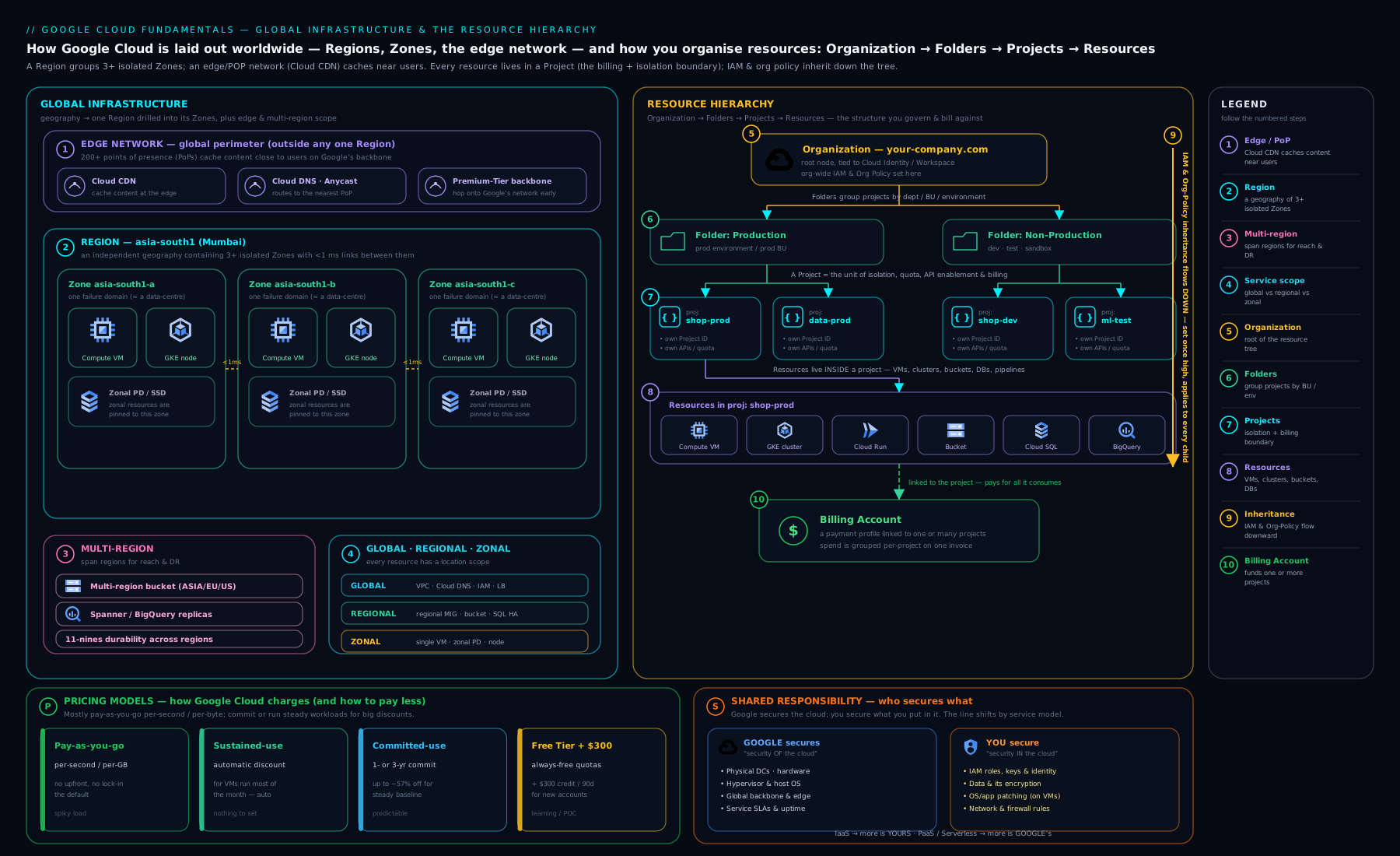
The diagram holds the two mental pictures you must carry whenever you design on Google Cloud, side by side. On the left, the physical world — regions, their zones and the global edge — which answers where your resources live, and therefore their latency, resilience and data residency. On the right, the logical tree — Organisation → Folders → Projects → Resources — down which IAM and Organisation Policy inherit, and against which every project’s billing, quota and isolation are drawn. Location on the left, governance and cost on the right: an architect keeps both in view at once.
Hands-on lab: create a project, enable an API, set a budget, and explore the hierarchy
In this lab you will use Cloud Shell (a free, browser-based terminal with gcloud pre-installed) to create a project, see where it sits in the hierarchy, enable a service, and set a budget guardrail — then clean up. Everything here is within the Free Tier / $300 trial.
Step 1 — Open Cloud Shell
In the Google Cloud Console, click the Activate Cloud Shell icon (a terminal >_) in the top bar. After a moment you have a shell with gcloud ready. Confirm who you are:
gcloud auth list
gcloud config list
Step 2 — Create a new project
Project IDs are globally unique, so add a random suffix:
PROJECT_ID="kv-fundamentals-$RANDOM"
gcloud projects create "$PROJECT_ID" --name="KV Fundamentals Lab"
gcloud config set project "$PROJECT_ID"
Expected output: Operation "operations/..." finished successfully. and Updated property [core/project].
Note: to create resources that cost money you must link a billing account (
gcloud billing accounts listthengcloud billing projects link "$PROJECT_ID" --billing-account=BILLING_ID). For this lab the read-only inspection steps work without it.
Step 3 — See the project in the hierarchy
gcloud projects describe "$PROJECT_ID"
Look at the output: projectId, projectNumber, name, lifecycleState: ACTIVE, and — if you have an Organisation — a parent field showing the folder or org it sits under. This is the resource hierarchy made concrete. If you have org access, list it:
gcloud organizations list           # the root node (if any)
gcloud resource-manager folders list --organization=ORG_ID   # folders under it
Step 4 — Enable an API
gcloud services enable compute.googleapis.com
gcloud services list --enabled --filter="config.name:compute"
Expected output: the enable operation finishes, and the second command lists compute.googleapis.com. You have just opened exactly one door in your project’s attack surface — deliberately.
Step 5 — Set a budget (guardrail)
In the console, go to Billing → Budgets & alerts → Create budget, scope it to your new project, set a small amount (e.g. ₹100 / $2) and alert thresholds at 50% / 90% / 100%. This costs nothing and is the single best habit for avoiding surprises.
Step 6 — Validation
Confirm the three things you set up:
gcloud config get-value project          # your lab project
gcloud services list --enabled | grep compute   # API on
gcloud projects describe "$PROJECT_ID" --format="value(lifecycleState)"  # ACTIVE
Step 7 — Cleanup
Deleting the project removes everything in it and stops all billing — the cleanest possible teardown:
gcloud projects delete "$PROJECT_ID"
You will be asked to confirm. The project enters a 30-day “pending deletion” state (recoverable) and then is permanently removed.
Cost note: every step above is free. Creating a project, enabling an API, inspecting the hierarchy and setting a budget incur no charge; deleting the project guarantees nothing is left billing. The only way this lab could cost money is if you went on to create chargeable resources — which we did not.
Going deeper
The foundations above are enough to start safely. This section is for when you want to know how the machinery actually works — the details that separate someone who uses Google Cloud from someone who architects it. It is fine to skim on a first read and return after the hands-on lab.
How IAM really resolves down the tree
“Policies inherit downward” is the beginner-correct summary. The precise rule the platform evaluates is: the effective allow set for a principal on a resource is the union of every allow policy from that resource up to the Organisation. There is no “deny by inheritance” — a child cannot subtract a role a parent granted. When you genuinely need to remove access that inheritance grants, you attach an IAM deny policy (deny rules are evaluated first and win over any allow), or you use IAM Conditions to make a grant apply only under constraints (a time window, a specific resource-name prefix, requests from a particular network). Layer on Organisation Policy — which restricts what can exist rather than who can act — and the real decision at request time is: deny policies → allow union → conditions, all bounded by org-policy guardrails. Holding that order in your head is what lets you answer “why can this service account still read that bucket?” with confidence instead of guesswork.
Billing internals: roles, links, export and the real “hard cap”
Billing has its own IAM roles, deliberately separate from resource roles:
| Role | Can do | Typical holder |
|---|---|---|
roles/billing.admin |
Manage billing accounts, link/unlink projects, view all spend | Finance / FinOps lead |
roles/billing.user |
Link a project to a billing account (but not manage the account) | Team lead creating projects |
roles/billing.viewer |
See spend and cost data, change nothing | Analysts, auditors |
roles/resourcemanager.projectBillingManager |
Attach/detach billing on a project, without account-wide visibility | Project owner |
The billing account → project link is itself a governed action: to spin up a chargeable project a person needs billing.user on the account and project-create rights in the hierarchy — separating “who may spend company money” from “who may build.”
For real cost visibility, turn on Cloud Billing export to BigQuery: Google writes a detailed, per-SKU, per-label usage row for every resource into a dataset you own, usually within hours. That table is the backbone of any serious FinOps practice — you query egress by service, spot a runaway job, or charge back by team label in SQL. The console reports are a view; the BigQuery export is the ground truth.
And the perennial question — can I set a hard cap that stops spend? Natively, no: budgets alert, they do not enforce. The supported pattern for a true kill-switch is to have a budget publish to a Pub/Sub topic that triggers a Cloud Function; the function calls the Cloud Billing API to unlink the billing account from the project when spend crosses 100%. That genuinely halts new billable usage — at the cost of taking the project offline — so it is a blunt instrument reserved for hard-limited sandboxes, never production.
Regions, zones and the network underneath
Two internals surprise people. First, zone letters are per-customer aliases, not global places: your project’s asia-south1-a and someone else’s may map to entirely different physical clusters. Google maps zone names to physical clusters independently so that not everyone piles into “zone a”, which spreads load — so never assume two accounts’ same-letter zones are co-located. Second, for storage you have more than “regional vs multi-region”: a dual-region bucket gives you two specific named regions behind a single high-availability endpoint with low inter-region latency — the right tool when compliance dictates the exact two regions.
At the network layer, egress has two service tiers: Premium (the default — traffic rides Google’s private backbone end-to-end for lower latency, at higher price) and Standard (traffic uses the public internet for more of the path — cheaper, region-scoped). For latency-sensitive global apps, Premium earns its cost; for cheap, region-local egress, Standard can trim the bill. Knowing the tier exists is half the optimisation.
The mechanics of the discounts
Sustained-Use Discounts are not per-VM — Google aggregates your total vCPU and memory usage per region per project across the month and discounts the portion that ran a large fraction of it, even reassembling short-lived instances into “inferred instances.” So you earn SUD credit for steady load spread across many brief VMs, not only one long-lived one. Committed-Use Discounts come in two shapes: resource-based (commit to a specific amount of vCPU/RAM in a region for 1 or 3 years — up to ~57% for general-purpose) and flexible / spend-based (commit to a dollar-per-hour spend across eligible services, with more freedom to change machine types). Per-second billing rounds up to a one-minute minimum, so a 40-second VM bills a full minute, but a 10-minute-20-second VM bills 620 seconds — not 11 minutes. These sound like trivia until you are shaving a five-figure monthly bill, where each is real money.
Guardrails that scale: org policy, liens, contacts and quota
Organisation Policy constraints come in two types: boolean (on/off, e.g. compute.disableSerialPortAccess) and list (allow or deny a set of values, e.g. gcp.resourceLocations to permit only EU regions). Set high, inherited low, they stop mistakes before they happen — a developer simply cannot create a VM in a banned region. To stop accidental deletion of a critical project, attach a lien (gcloud alpha resource-manager liens create) so projects delete is blocked until the lien is removed. Register Essential Contacts at the org or folder level so security, billing and outage notifications reach the right team rather than one person’s inbox. And remember quotas are hierarchical and per-project: hitting a quota is a soft limit you request an increase for (a support ticket), distinct from a hard system limit (an architecture change) — knowing which you have hit saves hours.
Practice challenges
Work these in order; they climb from beginner to advanced. Try each before opening the solution. Nothing here charges you if you stay within the lab’s read-only steps and the Always Free tier.
Challenge 1 — Read a project’s identity (Beginner)
gcloud projects describe shows name: KloudVin Production, projectId: kloudvin-prod-7f3a, projectNumber: '849302118245'. Which value do you put in a gcloud command or API call, and which one can you safely rename later?
<details> <summary>Solution</summary>
Use the Project ID — kloudvin-prod-7f3a — everywhere in commands, APIs and IAM bindings. Only the name (“KloudVin Production”) is mutable and display-only; the ID and the number are permanent.
Why: commands reference the immutable ID, so renaming the friendly display name never breaks anything. </details>
Challenge 2 — How many projects? (Beginner)
AcmePay runs one app, checkout, in dev and prod, plus a separate analytics app in prod only. Following best practice, how many projects should exist, and what would you name them?
<details> <summary>Solution</summary>
Three: checkout-dev, checkout-prod, analytics-prod. The rule is one workload + one environment = one project.
Why: per-project billing gives clean cost attribution, and per-project IAM keeps the blast radius of a misconfiguration to one environment. </details>
Challenge 3 — Turn a service on and prove it (Beginner → Intermediate)
Write the commands to (a) point gcloud at project kv-fundamentals-1234, (b) enable BigQuery, and © confirm it is enabled.
<details> <summary>Solution</summary>
gcloud config set project kv-fundamentals-1234
gcloud services enable bigquery.googleapis.com
gcloud services list --enabled --filter="config.name:bigquery"
Why: every service is a per-project API that is off by default; enabling it opens exactly that one door and nothing else. </details>
Challenge 4 — Fix a “billing not enabled” error (Intermediate)
You created a project, but gcloud compute instances create … fails complaining that billing is not enabled. What is almost certainly wrong, which commands fix it (assuming you hold the rights), and which two permissions do you need?
<details> <summary>Solution</summary>
The project has no billing account linked. Link one:
gcloud billing accounts list
gcloud billing projects link kv-fundamentals-1234 \
  --billing-account=0X0X0X-0X0X0X-0X0X0X
You need roles/billing.user on the billing account and roles/resourcemanager.projectBillingManager (or Owner) on the project.
Why: chargeable resources require a linked billing account, and the link itself is a governed action that deliberately separates “who may spend money” from “who may build.” </details>
Challenge 5 — Design a hierarchy and place a guardrail (Intermediate → Advanced)
Sketch a folder/project tree for “AcmePay” — a payments team and a data team, each with prod and dev, plus a shared networking/logging function and a Terraform bootstrap area. Then name one Organisation Policy and say exactly where you would attach it.
<details> <summary>Solution</summary>
Organisation (acmepay.com)
├── fldr-bootstrap          # prj-bootstrap (TF state, CI service accounts)
├── fldr-common             # prj-net-hub, prj-logging
├── fldr-payments
│   ├── prj-payments-prod
│   └── prj-payments-dev
└── fldr-data
    ├── prj-data-prod
    └── prj-data-dev
Attach the list constraint gcp.resourceLocations = in:eu-locations on fldr-payments to force EU-only resources for data residency; it inherits to both payments projects automatically.
Why: folders are the policy boundary, so one folder-level constraint beats editing every project — and payments’ residency rule should not leak onto the data team. </details>
Challenge 6 — Match pricing levers to a workload and make it attributable (Advanced)
A workload has three parts: an always-on 24/7 API baseline, nightly 2-hour batch jobs that tolerate interruption, and unpredictable traffic spikes. Pick the cheapest pricing lever for each part, and describe how you would make the monthly bill attributable per team.
<details> <summary>Solution</summary>
- Always-on baseline → a Committed-Use Discount (1- or 3-year) once you have a few months of data confirming the steady floor; Sustained-Use Discounts already reward it automatically in the meantime.
- Interruptible nightly batch → Spot VMs (up to ~60–91% off; may be pre-empted, which batch tolerates).
- Unpredictable spikes → on-demand autoscaling, or Cloud Run scaling to zero, so you pay only for the burst.
- Attribution → mandatory labels (
team=,env=,app=) on every resource, plus Cloud Billing export to BigQuery, thenGROUP BYtheteamlabel in SQL.
Why: each usage shape maps to the cheapest lever that fits its interruption tolerance, and labels turn one opaque invoice into per-team truth. </details>
Common beginner mistakes
These are misconceptions, not error messages — the wrong mental model that quietly leads you astray. (For symptom → cause → fix lookups, see the troubleshooting table below.)
- “One big project keeps things simple.” It does the opposite: it destroys cost attribution and means a single over-broad IAM grant exposes everything. Right model: one workload + one environment = one project; group them with folders.
- “I stopped the VM, so I’m not paying.” Its Persistent Disk and any reserved static IP keep billing after you stop it. Right model: stopping halts only vCPU/memory; delete the disk and release the IP (or delete the project) to stop paying fully.
- “The $300 credit is the free tier.” They are two different things. Right model: the $300 credit is a 90-day trial balance; the Always Free tier is a set of per-product limits that last forever, even after the trial.
- “I’ll just set a hard spending cap.” There is no native real-time hard stop — budgets only alert. Right model: budgets + labels give visibility; a Pub/Sub-driven billing unlink is the only true cap, and only for sandboxes.
- “Project name and project ID are the same thing.” The name is a mutable display label; the ID is permanent and is what every command and API uses. Right model: reference the ID; never assume the name is stable or unique.
- “A child project can tighten inherited access by granting less.” IAM is an additive union — a child cannot remove a role a parent granted. Right model: use deny policies or Organisation Policy to restrict, and set them high in the tree.
- “Ingress and egress cost the same.” Ingress (data in) is generally free; egress (data out) — especially cross-region and internet — is where the charge lives. Right model: architect to minimise egress and keep chatty traffic in-region.
- “Any region will do; pick the default.” Region choice drives latency, data-residency compliance, feature availability and price all at once. Right model: choose deliberately against those four factors (greener region as the tiebreaker).
- “Zone
-ais the same physical place for everyone.” Zone letters map to different clusters across accounts. Right model: never assume co-location by letter; spread across zones for HA regardless of the names.
Common mistakes & troubleshooting
| Symptom | Likely cause | Fix |
|---|---|---|
API [compute.googleapis.com] not enabled when creating a VM |
Service disabled on the project (default state) | gcloud services enable compute.googleapis.com and retry |
| “The caller does not have permission” creating a project | No resourcemanager.projects.create at org/folder, or no Organisation |
Ask an org admin for roles/resourcemanager.projectCreator, or create under no-org with appropriate rights |
| Bill keeps growing after you “stopped” the VM | Persistent Disk and static IP still provisioned | Delete the disk and release the static IP; or delete the whole project |
| Unexpectedly large egress charges | Cross-region or internet data transfer | Keep traffic in-region; review the egress pricing for your flows |
| Can’t pick the region/feature you want | Service or machine type not offered there | Choose a larger region; check product availability per region |
| Resources you create are owned by your personal account | No Cloud Identity / Organisation set up | Set up Cloud Identity so the company Organisation owns resources |
| Project ID already taken | IDs are globally unique across all customers | Add a random suffix or pick a more specific ID |
Best practices
- Design the hierarchy before you build. Decide folders by policy boundary and projects by workload+environment, on paper, first.
- One workload + one environment = one project. Never the “one giant project” anti-pattern — it destroys cost attribution and blast-radius isolation.
- Set policies and IAM as high as is safe. Inheritance means one folder-level grant beats fifty per-project grants; manage it as code.
- Enable only the APIs you need, per project — minimise attack surface and accidental cost.
- Set a budget on day one, label resources for cost attribution, and review the billing dashboard weekly.
- Separate billing from building. Grant
roles/billing.adminto finance andprojectBillingManagerto project owners; engineers should never need to see payment details. - Choose regions deliberately for latency, residency, availability and price — and prefer greener regions on a tie.
- Use a Cloud Identity / Organisation so the company, not a person, owns the estate.
Security notes
- Security is shared: Google secures the infrastructure; your data, IAM and configuration are always yours. Most incidents are customer misconfigurations.
- The project is the trust boundary — resources in different projects are isolated by default. Use that isolation; do not collapse environments into one project.
- Least privilege starts at the hierarchy: grant the narrowest role at the lowest scope that works (detailed in the IAM lesson).
- Organisation Policies are preventative guardrails (e.g. restrict regions, disable SA-key creation) that inherit down the tree — set them high.
- APIs are off by default for a reason; enable consciously and disable what you no longer use.
- Cloud Audit Logs record who did what; ensure they are retained for investigation.
Interview & exam questions
-
What is the difference between a region and a zone? A region is an independent geographic area (e.g.
asia-south1); a zone is an isolated deployment area within a region (e.g.asia-south1-a). For high availability you spread across zones; for disaster recovery you spread across regions. -
Why is the project the most important boundary on GCP? It is simultaneously the billing, isolation/trust, API-enablement and quota boundary. Almost every resource belongs to exactly one project, so cost attribution and blast radius follow your project layout.
-
Explain IAM/policy inheritance in the resource hierarchy. IAM allow policies and Organisation Policies set at Organisation or folder level are inherited by everything beneath them. IAM is additive and a union — a child cannot remove access granted by a parent (you use explicit deny policies for that).
-
Which GCP resources are global, regional and zonal? Give an example of each. Global: VPC network, global HTTP(S) Load Balancer, IAM. Regional: subnet, regional MIG, Cloud SQL HA. Zonal: a Compute Engine VM, a zonal Persistent Disk.
-
A stopped VM — are you still paying for it? Yes. The VM’s vCPU/memory stop billing, but its Persistent Disk and any reserved static IP keep charging. To stop paying entirely, delete the disk/IP or the whole project.
-
Differentiate the three pricing discounts. Sustained-Use Discounts apply automatically the longer a VM runs in a month (no commitment). Committed-Use Discounts give a larger discount for a 1- or 3-year commitment. Spot VMs are deeply discounted spare capacity that can be pre-empted at any time.
-
What is the difference between the $300 credit and the Always Free tier? The $300 credit is a 90-day trial balance for new customers. The Always Free tier is a set of per-product usage limits that remain free indefinitely, even after the trial.
-
Explain the shared-responsibility model with an IaaS vs PaaS example. On IaaS (Compute Engine) you patch the OS, runtime and app; on PaaS (Cloud Run) Google handles the OS and runtime and you bring only your container and config. In both, your data, IAM and configuration are your responsibility.
-
How do you choose a region for a new workload? Weigh latency to users, data-residency/compliance, service/feature availability, and price (carbon-free energy as a tiebreaker).
-
What does “enabling an API” mean and why does it matter? Each service is a per-project API, off by default. Enabling it (
gcloud services enable …) switches the service on for that project; leaving others off minimises attack surface and accidental cost. -
What is Cloud Identity and why does it matter for ownership? Cloud Identity is Google’s free IDaaS managing users/groups for your domain; having it provisions the Organisation node so the company owns resources, which persist even after individuals leave.
-
Can you set a hard spending cap on GCP? Not a real-time hard stop. You set Cloud Billing budgets that alert at thresholds (and can trigger Pub/Sub automation), and you use labels and reports for attribution.
-
How does a Cloud Billing account relate to a project? A billing account is a separate resource, outside the hierarchy, that pays for usage. One billing account can fund many projects; each chargeable project links to exactly one billing account. Billing administration is a distinct permission from resource administration.
-
When would you use a label versus a tag? Labels are
key=valuemetadata for billing and inventory attribution and have no access-control effect. Tags are a separate, access-controlled construct used to target conditional IAM and Organisation Policy. Use labels to slice the bill, tags to gate access.
Quick check
- True or false: a single Compute Engine VM survives a zone failure.
- Which one resource type is global on GCP — a subnet, a VM, or a VPC network?
- Your
devandprodof the same app should live in ___ project(s). - Which costs money: data into GCP (ingress) or data out (egress)?
- How long is the new-customer free trial credit valid, and for how much?
- Which object actually pays for usage — a project, a folder, or a Cloud Billing account?
Answers: 1. False — a VM is zonal; a zonal outage takes it down, so spread across zones for HA. 2. The VPC network (subnets are regional, VMs are zonal). 3. Two — one workload + one environment = one project. 4. Egress (data out) is charged; ingress is generally free. 5. US $300, valid for 90 days. 6. A Cloud Billing account — it is linked to the project but is a separate resource outside the hierarchy.
Exercise
Design (on paper or in a text file, no resources needed) a resource hierarchy for a fictional company “AcmePay” that has a payments platform and a data-analytics team, each with production and development environments, plus a shared logging/networking function and a Terraform bootstrap area. Then:
- Draw the Organisation → Folders → Projects tree.
- For two folders, state one Organisation Policy you would set there and why (e.g. restrict payments to EU regions for residency).
- Pick a region for the payments production project and justify it against the four region-selection factors.
- List which APIs each project would need enabled.
- Propose a mandatory label taxonomy (three keys) and name which billing role each of a finance lead, a team lead and an auditor should hold.
Compare your design against the “one workload + one environment = one project” and “folders by policy boundary” rules.
Certification mapping
- Cloud Digital Leader (CDL): Digital transformation with Google Cloud and Infrastructure & application modernisation — global infrastructure, the service models, the value of managed services, and the basics of cost (Free Tier, discounts, budgets) are directly examinable.
- Associate Cloud Engineer (ACE): Setting up a cloud solution environment — creating and managing projects, the resource hierarchy, enabling APIs, linking billing and setting budgets, and choosing regions/zones are core, hands-on ACE skills.
- The pricing, discount and shared-responsibility concepts recur across every Professional exam as the assumed foundation.
Glossary
- Region — an independent geographic area containing multiple zones (e.g.
europe-west2). - Zone — an isolated deployment area within a region (e.g.
europe-west2-a). - Multi-region — data replicated across a continent-scale area (
US,EU,ASIA) for maximum durability. - Dual-region — a storage location made of two specific named regions behind one high-availability endpoint.
- Point of Presence (PoP) / edge — a global network location that terminates user traffic and serves CDN content close to users.
- Cold-potato routing — Google pulling your traffic onto its private backbone as early as possible rather than the public internet.
- Carbon-free energy percentage — a per-region figure Google publishes for how much of a region’s electricity is carbon-free; a regional tiebreaker.
- Network service tier — Premium (default; Google’s backbone, lower latency, higher price) vs Standard (public internet for more of the path; cheaper, regional).
- Service models (IaaS / PaaS / SaaS) — the three levels of how much the provider manages, from raw infrastructure to finished software.
- Organisation — the root node of the resource hierarchy, tied to a Cloud Identity/Workspace domain.
- Folder — a grouping node (nestable to 10 deep) for organising projects and applying inherited policy.
- Project — the core resource container and the billing, isolation, API and quota boundary.
- Resource — the actual service instance (a VM, bucket, dataset) that lives inside a project and does work.
- IAM (Identity and Access Management) — the system controlling who can do what, where.
- IAM deny policy — an explicit deny, evaluated before allows, used to remove access that inheritance would otherwise grant.
- IAM Condition — an attribute-based clause (time, resource name, network) that narrows when a role binding applies.
- Organisation Policy — inherited guardrail constraints (boolean or list) that restrict what can exist, e.g. allowed regions.
- Lien — a marker on a project that blocks its deletion until removed, guarding critical projects.
- Essential Contacts — registered addresses at org/folder level that receive security, billing and outage notifications.
- Quota — a per-project usage ceiling; a soft quota can be raised via a request, a hard limit cannot.
- Cloud Identity — Google’s free identity-as-a-service for managing users and groups.
- API / service enablement — switching a per-project service API on before use.
- Shared-responsibility model — the division of security duties between Google (the cloud) and you (in the cloud).
- Cloud Billing account — the resource that pays for usage; linked to (but separate from) one or many projects.
- Payments profile — the Google-wide record of legal identity and payment instrument; Individual or Business type.
- Self-serve vs invoiced billing account — automatic card/bank payment vs monthly invoicing against agreed terms.
- Sustained-Use Discount (SUD) — automatic discount for VMs that run much of a month.
- Committed-Use Discount (CUD) — larger discount in exchange for a 1- or 3-year commitment (resource-based or spend-based).
- Spot VM — deeply discounted, pre-emptible spare capacity.
- Free Tier — Always Free per-product usage limits plus the $300 / 90-day trial credit.
- Pricing Calculator — Google’s free tool for estimating a workload’s monthly cost before you build.
- Budget — a Cloud Billing alert on spend against a threshold.
- Billing export (to BigQuery) — detailed per-SKU, per-label usage rows written to a dataset you own; the basis of FinOps.
- Label — a
key=valuetag on a resource for cost attribution and inventory; no access-control effect. - Tag — an access-controlled construct (distinct from a label) used to target conditional IAM and Organisation Policy.
- Ingress — data flowing into Google’s network, generally free.
- Egress — data leaving Google’s network, which is charged.
- FinOps — the practice of managing and attributing cloud cost, powered here by budgets, labels and the billing export.
Next steps
You now have the foundations: where resources live, how they are organised, who secures what, and what you pay. The next lesson goes deep on the who can do what half of the platform — principals, roles, the allow policy and inheritance, service accounts and keyless authentication — in Google Cloud IAM Fundamentals: Roles, Service Accounts, Policy & Inheritance. With the hierarchy from this lesson and IAM from the next, you will be ready to build safely.