The resource hierarchy is the single most important design decision you make on Google Cloud, because IAM bindings and Org Policies flow down it by inheritance. Get the topology right and guardrails become a few constraints set high in the tree; get it wrong and you spend the next two years stapling exceptions onto individual projects. This guide walks the whole thing end to end: mapping business units to a folder/project layout, bootstrapping the org node and a Terraform seed project, choosing a folder strategy, applying inherited Org Policy constraints, and validating the result.
In a nutshell
Picture your Google Cloud estate as a family home with house rules. The whole house is your organization; the floors are folders; the rooms are projects; and the furniture in each room — the VMs, buckets, and databases — are the resources. Two things cascade from the top of this house downward, and understanding that cascade is the whole lesson. First, keys (this is IAM — who is allowed to do what): a key handed to someone at the front door opens every room inside, unless a specific room adds an extra lock. Second, house rules (this is Organization Policy — what is allowed to exist at all): a rule posted at the front door, say “no candles anywhere”, applies in every room and on every desk automatically, and someone standing in one bedroom generally cannot overrule a whole-house “no”.
That cascade is called inheritance, and it is why the hierarchy is the single most important design decision on GCP. Draw the tree well and your guardrails are a handful of rules set once, high up, that every future project inherits for free — new teams are born compliant. Draw it badly and you spend years taping exceptions onto individual projects, because you set the rules too low to inherit. Beginners reach for the console and start creating projects; professionals sketch the tree on paper first, precisely because everything downstream flows from its shape.
There are two governance levers and they answer different questions. IAM answers “who can act” — it grants people and service accounts roles. Organization Policy answers “what configurations are even allowed” — it forbids public IPs, restricts which regions you may deploy to, blocks long-lived service-account keys, regardless of who is asking. The magic is that both flow down the same tree by inheritance, and Org Policy is checked at the moment a resource is created: a compliant request goes through, a violating one is denied outright with a policy error. This lesson builds the tree from scratch, sets the canonical guardrails high, and — crucially — teaches the two inheritance-merge rules that trip up almost everyone.
Level: Intermediate · Time: ~26 min
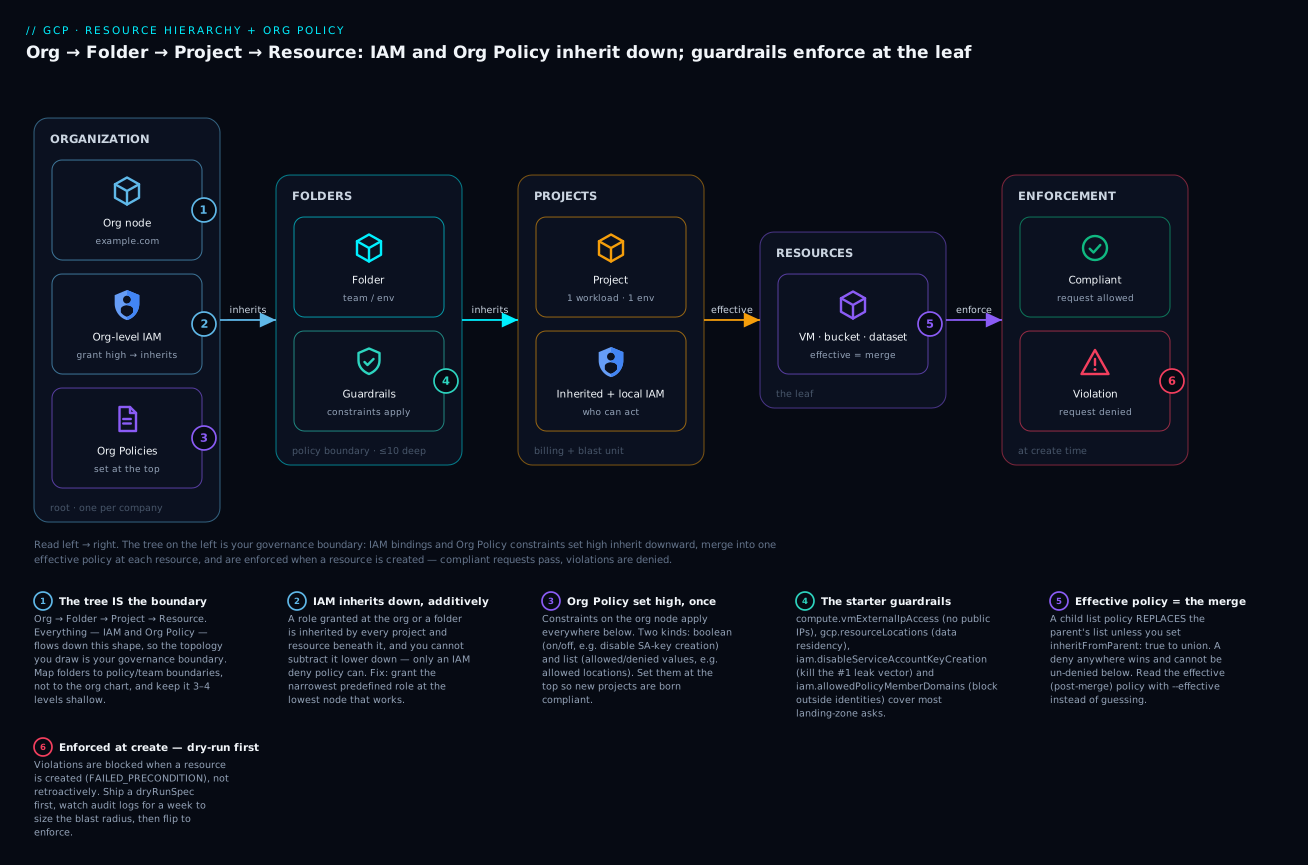
The diagram traces the estate left to right — organization, folders, projects, resources — and shows the two things that inherit down it (IAM bindings and Org Policy constraints) merging into one effective policy at each leaf, where a create request is finally allowed or denied.
Prerequisites & what you’ll be able to do. Before this lands smoothly, you’ll want a working mental model of GCP IAM — members, roles, and bindings — from the IAM fundamentals lesson, and to have met projects and billing in the cloud fundamentals lesson. Comfort reading a little Terraform and YAML helps but is not required. After working through it you will be able to:
- Map business units to a folder/project topology whose shape is your governance boundary.
- Bootstrap an organization node, a Terraform seed project, and a least-privilege foundation service account.
- Choose deliberately between environment-first, domain-first, and hybrid folder strategies.
- Set the canonical landing-zone guardrails (locations, external IP, SA keys, allowed identities, CMEK) high in the tree so every project inherits them.
- Predict exactly how boolean and list Org Policies merge under inheritance, and read the effective policy instead of guessing.
- Target policy and access by tag across the hierarchy, and roll restrictions out safely as dry-runs.
How IAM inheritance flows down the tree
Org Policy gets the spotlight later; IAM inheritance deserves its own moment first, because it behaves differently from the policy inheritance in step 5 and beginners routinely conflate the two.
Every node in the hierarchy — the org, each folder, each project — carries its own IAM allow policy: a list of bindings, each pairing a member (a user, group, or service account) with a role (a bundle of permissions). When a principal tries an action on a resource, GCP evaluates the union of every binding from that resource all the way up to the org node. A role you grant at the org is therefore live on every project and resource beneath it. Grant roles/viewer to a group at the org node and that group can read everything in the company; grant roles/compute.admin on the fldr-payments folder and the holder administers Compute in every payments project, present and future.
Three properties follow, and they are the ones to internalize:
- Inheritance is downward and automatic. You never re-grant a role on a child to “pass it down”; it is already there. New projects created under a folder inherit the folder’s (and org’s) bindings the instant they exist. This is exactly why you grant the Terraform foundation SA its roles at the org node in step 2 — so they cover every project it will ever create.
- Inheritance is additive — you cannot subtract with an allow. There is no “less access” binding. If a group has
roles/editorat the org, you cannot claw it back to viewer inside one project by granting viewer there; the org-level editor still applies. To remove effective access below a grant you need an IAM deny policy — a separate object that denies specific permissions on a node and its descendants, covered in the IAM deny policies lesson. Deny is evaluated before allow and wins. - Least privilege means granting low, not high. Because a high grant fans out to everything below, the discipline is to grant the narrowest predefined role at the lowest node that satisfies the need. An org-level
roles/owneron a human is the single most common audit finding; it means that person can do anything, anywhere, forever.
A worked example makes the union concrete. Suppose:
Org               : group:all-eng@example.com       -> roles/viewer
fldr-payments     : group:payments-team@example.com -> roles/compute.admin
prj-payments-prod : alice@example.com               -> roles/compute.instanceAdmin.v1
Alice, a member of both all-eng and payments-team, acting on a VM in prj-payments-prod, holds the union: read-everything (from the org), full Compute admin on all payments projects (from the folder), plus instance-admin on this one project (granted locally). GCP does not pick the “most specific” binding — it grants the sum. To see who has access to a resource with inheritance resolved, use Policy Analyzer rather than reading one node’s policy:
# Who can act on the project, considering inherited bindings (Policy Analyzer)
gcloud asset analyze-iam-policy \
  --organization="${ORG_ID}" \
  --identity="user:alice@example.com" \
  --full-resource-name="//cloudresourcemanager.googleapis.com/projects/acme-payments-prod"
That is IAM inheritance. Org Policy inherits down the same tree but merges by different rules — hold that distinction; step 5 returns to it.
1. Map business units to topology before you create anything
Resist the urge to open the console. The hierarchy on GCP is Organization -> Folders (nested up to 10 deep) -> Projects -> Resources, and both IAM and Org Policy inherit at every level. That means the folder structure is your governance boundary. Sketch it on paper first.
Two questions drive the design:
- Where do policy boundaries fall? A folder is the unit at which you grant a team autonomy and apply distinct guardrails. If platform and payments need different allowed regions or different SA-key rules, they belong in different folders.
- Where do billing and cost attribution fall? Projects are the atomic unit of billing. One workload + one environment = one project is the rule of thumb. Avoid the “one giant project” anti-pattern; it destroys cost attribution and blast-radius isolation.
A minimal target topology for a mid-size org:
Organization (example.com)
├── fldr-bootstrap            # Terraform state, CI/CD service accounts
├── fldr-common               # shared services: logging, DNS, networking hub
├── fldr-platform
│   ├── prj-platform-prod
│   └── prj-platform-nonprod
└── fldr-business-units
    ├── fldr-payments
    │   ├── prj-payments-prod
    │   └── prj-payments-dev
    └── fldr-data
        ├── prj-data-prod
        └── prj-data-dev
Callout: keep a dedicated
fldr-bootstrap(orfldr-common) for the seed project and CI service accounts. It is the one place you grant elevated, hierarchy-wide permissions, and you want it isolated and heavily audited.
2. Bootstrap the org node, billing, and a seed project for Terraform state
You need a human with roles/resourcemanager.organizationAdmin and roles/billing.admin at the org level for the initial bootstrap. The seed project is special: it holds Terraform state and a service account that will later create everything else, so it is created by hand once.
Find your org and billing IDs:
# Organization ID (numeric)
gcloud organizations list

# Billing accounts you can link
gcloud billing accounts list
Create the seed project and link billing:
export ORG_ID="123456789012"
export BILLING_ACCOUNT="0X0X0X-0X0X0X-0X0X0X"
export SEED_PROJECT="acme-bootstrap-seed"

gcloud projects create "${SEED_PROJECT}" \
  --organization="${ORG_ID}"

gcloud billing projects link "${SEED_PROJECT}" \
  --billing-account="${BILLING_ACCOUNT}"
Enable the APIs the foundation needs, then create the remote state bucket with versioning so Terraform state history is recoverable:
gcloud config set project "${SEED_PROJECT}"

gcloud services enable \
  cloudresourcemanager.googleapis.com \
  cloudbilling.googleapis.com \
  iam.googleapis.com \
  serviceusage.googleapis.com \
  orgpolicy.googleapis.com \
  storage.googleapis.com

# Remote state bucket, uniform access + versioning
gcloud storage buckets create "gs://${SEED_PROJECT}-tfstate" \
  --location=us \
  --uniform-bucket-level-access \
  --public-access-prevention

gcloud storage buckets update "gs://${SEED_PROJECT}-tfstate" --versioning
Create the Terraform service account and grant it the org-level roles it needs to manage the hierarchy. Prefer Workload Identity Federation from your CI system over downloading a JSON key.
gcloud iam service-accounts create tf-foundation \
  --project="${SEED_PROJECT}" \
  --display-name="Terraform Foundation SA"

export TF_SA="tf-foundation@${SEED_PROJECT}.iam.gserviceaccount.com"

# Roles needed to create folders, projects, and set org policy
for ROLE in \
  roles/resourcemanager.folderAdmin \
  roles/resourcemanager.projectCreator \
  roles/orgpolicy.policyAdmin \
  roles/billing.user ; do
  gcloud organizations add-iam-policy-binding "${ORG_ID}" \
    --member="serviceAccount:${TF_SA}" \
    --role="${ROLE}"
done
roles/billing.useron the org (or on the billing account) lets the SA link new projects to billing.roles/orgpolicy.policyAdminis what lets it set the constraints in step 4. Grant these at the org node so they inherit everywhere new projects land.
3. Folder strategy: environment-based vs domain-based vs hybrid
This is where teams argue. There is no universally correct answer, only trade-offs against how your org actually grants access and applies policy.
| Strategy | Layout | Best when | Trade-off |
|---|---|---|---|
| Environment-first | fldr-prod, fldr-nonprod under the org |
Policy differs mostly by environment (prod is locked down, dev is permissive) | Team autonomy is awkward; a team’s prod and dev live in different subtrees |
| Domain/team-first | fldr-payments, fldr-data, each containing prod/dev projects |
You want to delegate a whole folder to a team and let them self-serve | Environment-wide policy must be set per team folder or via tags |
| Hybrid | Team folders at the top, environment encoded in the project (and a tag), prod/nonprod folders only where needed | Most mid-to-large orgs | More moving parts; relies on disciplined naming + tags |
My default recommendation is domain/team-first with environment encoded as a tag (see step 6). It maps cleanly to org structure, makes folder-level IAM delegation natural, and lets you still target “all production” via tag-bound policies rather than forcing prod into its own subtree.
Watch the 10-level nesting limit and the per-folder/per-org quotas. Going more than 3-4 levels deep almost always signals you are modelling org-chart politics rather than policy boundaries.
4. Apply inherited Org Policy constraints
Org Policies are restrictions you set on a resource node (org, folder, or project) that constrain how resources below it can be configured. They are distinct from IAM: IAM answers “who can act”, Org Policy answers “what configurations are allowed at all”. Set them high so they inherit.
Three guardrails every landing zone should have:
Restrict resource locations (gcp.resourceLocations) — a list constraint that limits which regions/locations resources can be created in.
cat > locations-policy.yaml <<'EOF'
name: organizations/123456789012/policies/gcp.resourceLocations
spec:
  rules:
  - values:
      allowedValues:
      - in:us-locations
      - in:europe-west1-locations
EOF

gcloud org-policies set-policy locations-policy.yaml
Disable service account key creation (iam.disableServiceAccountKeyCreation) — a boolean constraint. Long-lived SA keys are the most common credential-leak vector; block them and push teams to Workload Identity.
gcloud org-policies enable-enforce \
  iam.disableServiceAccountKeyCreation \
  --organization="${ORG_ID}"
Enforce CMEK and restrict the KMS projects that can supply keys. Two constraints work together here: gcp.restrictNonCmekServices denies resource creation in listed services unless CMEK is supplied, and gcp.restrictCmekCryptoKeyProjects limits which projects’ keys are acceptable.
cat > cmek-policy.yaml <<'EOF'
name: organizations/123456789012/policies/gcp.restrictNonCmekServices
spec:
  rules:
  - values:
      deniedValues:
      - storage.googleapis.com
      - bigquery.googleapis.com
EOF

gcloud org-policies set-policy cmek-policy.yaml
Roll restrictive policies out to a non-prod folder first.
gcp.resourceLocationsin particular will block legitimate global resources if you forget to allow the relevantin:location groups (for example,in:us-locationscovers multi-regionus).
Those three are the classic core. Three more turn a starter set into a credible landing-zone baseline, and they map directly to the guardrails auditors ask about first.
Block external IPs on VMs (compute.vmExternalIpAccess) — a list constraint, and the fastest way to shrink attack surface: no VM gets a public IP unless it is explicitly allow-listed. Deny all, org-wide:
cat > no-ext-ip.yaml <<'EOF'
name: organizations/123456789012/policies/compute.vmExternalIpAccess
spec:
  rules:
  - denyAll: true
EOF

gcloud org-policies set-policy no-ext-ip.yaml
Egress still works through Cloud NAT; only inbound-reachable public IPs are blocked. To exempt a single bastion, list its instance by full name (projects/PROJECT/zones/ZONE/instances/NAME) under allowedValues instead of denyAll.
Restrict which identities can be granted access (iam.allowedPolicyMemberDomains) — a list constraint (Google calls it domain restricted sharing) that stops anyone adding an identity from outside your Cloud Identity — a personal @gmail.com, a partner’s domain — to any IAM policy in the org. The catch that burns everyone: it takes your Cloud Identity customer ID, not the domain string.
# Find your customer ID first
gcloud organizations list \
  --format="value(owner.directoryCustomerId)"

cat > allowed-domains.yaml <<'EOF'
name: organizations/123456789012/policies/iam.allowedPolicyMemberDomains
spec:
  rules:
  - values:
      allowedValues:
      - C0xxxxxxx
EOF

gcloud org-policies set-policy allowed-domains.yaml
Tame the default service account (iam.automaticIamGrantsForDefaultServiceAccounts) — a boolean constraint. New projects otherwise grant the default Compute/App Engine service account the broad roles/editor; enforce this at the org so that automatic over-grant never happens on any future project.
gcloud org-policies enable-enforce \
  iam.automaticIamGrantsForDefaultServiceAccounts \
  --organization="${ORG_ID}"
Together — locations, external IP, SA keys, allowed identities, default-SA grants, and CMEK — this is the canonical landing-zone starter set most enterprises begin from, all set once at the org node so every project inherits them.
5. Boolean vs list constraints, and how inheritance actually resolves
Getting inheritance wrong is the number-one source of “why is my policy not applying” tickets. There are two constraint types and they merge differently.
Boolean constraints are simply enforced or not. A child policy can override the parent by setting its own enforce value. Example: enforce disableServiceAccountKeyCreation at the org, then explicitly not enforce it on a single sandbox project.
# project-level override that turns the boolean OFF for a sandbox
name: projects/acme-sandbox-xyz/policies/iam.disableServiceAccountKeyCreation
spec:
  rules:
  - enforce: false
List constraints are more subtle. By default a child policy that sets rules replaces the inherited values entirely — it does not union with them. To add to what a parent allows, you set inheritFromParent: true in the child spec so the child’s values merge with the inherited ones.
# child folder ADDS asia-southeast1 on top of whatever the org already allows
name: folders/444555666/policies/gcp.resourceLocations
spec:
  inheritFromParent: true
  rules:
  - values:
      allowedValues:
      - in:asia-southeast1-locations
Key rules to internalize:
- A
denyanywhere in the hierarchy wins; you cannot un-deny a value lower down by allowing it. - Without
inheritFromParent: true, a child list policy starts from scratch and ignores the parent’s list. reset: truein a spec drops the locally set policy and falls back to pure inheritance — useful for clearing a one-off exception.
Inspect the effective (post-merge) policy on any node rather than guessing:
gcloud org-policies describe gcp.resourceLocations \
  --project="acme-payments-prod" \
  --effective
6. Tags and labels for cost attribution across the hierarchy
Two different mechanisms, frequently confused:
- Labels are key/value pairs on individual resources, surfaced in billing export for cost attribution. They do not participate in IAM or Org Policy. Use them for
cost-center,team,app. - Tags (resource-manager Tags) are hierarchical key/value pairs defined at org/folder level, inherited by descendants, and bindable to IAM conditions and Org Policy. Use them to target policy at, say, “everything tagged environment=production” regardless of folder.
Create a tag and bind it so a policy can key off it:
# Define a tag key + value at the org
gcloud resource-manager tags keys create environment \
  --parent="organizations/${ORG_ID}"

gcloud resource-manager tags values create production \
  --parent="${ORG_ID}/environment"

# Bind the tag value to a project (inherited by its resources)
gcloud resource-manager tags bindings create \
  --tag-value="${ORG_ID}/environment/production" \
  --parent="//cloudresourcemanager.googleapis.com/projects/acme-payments-prod"
Because tags are inherited and bindable, they are how you target governance across folders: an Org Policy rule or an IAM binding can carry a condition that only applies to resources tagged environment=production, no matter which folder they live in. That is precisely what makes the domain-first + environment-tag strategy from step 3 work without a separate prod subtree — the exact CEL for both is in Going deeper below.
For cost attribution, enforce a labelling convention on every project and rely on BigQuery billing export. A useful sanity query once export is flowing:
SELECT
  labels.value AS cost_center,
  ROUND(SUM(cost), 2) AS total_cost
FROM `acme-billing.billing_export.gcp_billing_export_v1_XXXXXX`
LEFT JOIN UNNEST(labels) AS labels
WHERE labels.key = 'cost-center'
  AND _PARTITIONTIME >= TIMESTAMP_SUB(CURRENT_TIMESTAMP(), INTERVAL 30 DAY)
GROUP BY cost_center
ORDER BY total_cost DESC
7. Codify the hierarchy with the Cloud Foundation Toolkit modules
Click-ops does not survive an audit. The terraform-google-modules project ships maintained modules for exactly this. Wire your seed bucket as the backend, then build folders and projects from modules.
terraform {
  backend "gcs" {
    bucket = "acme-bootstrap-seed-tfstate"
    prefix = "foundation/hierarchy"
  }
  required_providers {
    google = {
      source  = "hashicorp/google"
      version = "~> 6.0"
    }
  }
}

module "fldr_payments" {
  source  = "terraform-google-modules/folders/google"
  version = "~> 5.0"

  parent  = "organizations/${var.org_id}"
  names   = ["fldr-payments"]
}

module "prj_payments_prod" {
  source  = "terraform-google-modules/project-factory/google"
  version = "~> 18.0"

  name            = "acme-payments-prod"
  org_id          = var.org_id
  billing_account = var.billing_account
  folder_id       = module.fldr_payments.ids["fldr-payments"]

  activate_apis = [
    "compute.googleapis.com",
    "logging.googleapis.com",
  ]

  labels = {
    cost-center = "payments"
    env         = "prod"
  }
}
Manage Org Policies as code too. The org-policy module wraps both boolean and list constraints so they live in version control beside the hierarchy:
module "policy_disable_sa_keys" {
  source  = "terraform-google-modules/org-policy/google"
  version = "~> 6.0"

  organization_id = var.org_id
  constraint      = "constraints/iam.disableServiceAccountKeyCreation"
  policy_type     = "boolean"
  enforce         = true
}

module "policy_locations" {
  source  = "terraform-google-modules/org-policy/google"
  version = "~> 6.0"

  organization_id   = var.org_id
  constraint        = "constraints/gcp.resourceLocations"
  policy_type       = "list"
  allow             = ["in:us-locations", "in:europe-west1-locations"]
  allow_list_length = 2
}
Pin module and provider versions. The Cloud Foundation Toolkit modules change behaviour across majors, and the underlying
google_org_policy_policyresource (v2 Org Policy API) differs meaningfully from the legacygoogle_organization_policy. Standardize on the v2 API for new builds.
Enterprise scenario
A fintech platform team I worked with enforced gcp.resourceLocations at the org node, allow-listing in:eu-locations only, to satisfy a data-residency commitment. Weeks later a downstream team filed a ticket: their new project could not enable Cloud Logging’s _Default bucket, and provisioning a global external HTTPS load balancer failed with a policy violation. The constraint was doing exactly what it was told — but in:eu-locations does not cover resources Google models as global, and several foundational services (log buckets created in global, certain load-balancer components, Cloud DNS) are global by design.
The instinct was to relax the policy to in:eu-locations plus a blanket allow, which would have quietly defeated the residency guarantee. The correct fix is to add the dedicated global value group, which permits global-scoped resources without opening up any regional location:
name: organizations/123456789012/policies/gcp.resourceLocations
spec:
  rules:
  - values:
      allowedValues:
      - in:eu-locations
      - in:global-locations
We validated blast radius before rollout by shipping it as a dryRunSpec first and reading the audit logs for a week — zero new violations, confirming no regional drift crept in. The deeper lesson: location constraints reason over Google’s value groups, not raw region strings, and global is a first-class group you almost always have to allow explicitly. We codified the final policy in the CFT org-policy module so the in:global-locations entry is reviewed in PR rather than hot-patched in the console under incident pressure.
Going deeper
Org Policy v1 vs v2 — and why new builds use v2. There are two generations of the API. The legacy v1 surface (gcloud resource-manager org-policies, Terraform google_organization_policy) still works, but the v2 surface used throughout this lesson (gcloud org-policies, Terraform google_org_policy_policy) adds four things you will want: dry-run (dryRunSpec), per-rule conditions (CEL — the tag-gated pattern below), custom constraints, and the in: / is: value prefixes for list constraints. Do not manage the same constraint through both generations — they fight. Standardize on v2.
Custom Org Policy constraints (CEL). Predefined constraints do not cover everything. A custom constraint lets you DENY or ALLOW a specific create/update based on a CEL expression evaluated over the resource itself:
# custom-constraint.yaml — forbid GCE instances with the serial port enabled
name: organizations/123456789012/customConstraints/custom.disableGceSerialPort
resourceTypes:
- compute.googleapis.com/Instance
methodTypes:
- CREATE
- UPDATE
condition: >-
  resource.metadata.items.exists(item,
    item.key == 'serial-port-enable' && item.value == 'true')
actionType: DENY
displayName: "Disallow enabling the GCE serial port"
gcloud org-policies set-custom-constraint custom-constraint.yaml

# then enforce it like any other constraint, high in the tree
gcloud org-policies enable-enforce \
  custom.disableGceSerialPort --organization="${ORG_ID}"
Custom constraints are GA for a growing (but not universal) list of resource types — confirm your target type is supported before you rely on one.
Tag-gated Org Policy (targeting “all production” without a prod subtree). This is the payoff of step 6’s tags. A v2 policy rule can carry a condition keyed on a tag, so one policy enforces only on tagged resources regardless of folder:
name: organizations/123456789012/policies/compute.vmExternalIpAccess
spec:
  rules:
  - condition:
      expression: "resource.matchTag('123456789012/environment', 'production')"
      title: prod-only-no-ext-ip
    denyAll: true
  - allowAll: true   # everything not tagged production keeps default behaviour
Every resource tagged environment=production, in any folder, is now denied an external IP; anything else falls through to the unconditional rule. That is the “target policy by tag” mechanism the hybrid folder strategy depends on.
Tags plus IAM conditions (conditional access by tag). The same tags drive IAM conditions — grant a role only on resources carrying a tag:
gcloud projects add-iam-policy-binding acme-payments-prod \
  --member="group:payments-oncall@example.com" \
  --role="roles/compute.instanceAdmin.v1" \
  --condition='expression=resource.matchTag("123456789012/environment", "production"),title=prod-vms-only'
The tag is referenced by its namespaced name (ORG_ID/KEY), and tag values, once bound to a project, are inherited by its resources — so binding environment=production on the project makes every VM in it satisfy the condition automatically.
Quotas, limits, and the shapes that calcify. Folders nest up to 10 levels below the org, but there are also per-parent limits (folders per parent, projects per folder) and org-wide totals that are quotas you raise by request, not hard walls — design as though they are finite. Two operations feel one-way: a project cannot move between organizations (only between folders in the same org, via gcloud projects move), and folder deletion requires an empty subtree. Protect a critical project from accidental deletion with a lien:
gcloud resource-manager liens create \
  --project=acme-payments-prod \
  --restrictions=resourcemanager.projects.delete \
  --reason="Production - deletion requires a change ticket"
Sizing blast radius before you enforce. Two safety tools stack. Dry-run policies (dryRunSpec, shown in Verify) log violations without blocking, so you see what new creates would break. Policy Simulator for Org Policy goes further and analyses which existing resources a proposed constraint would already violate, from historical data — impact sizing before even a dry-run. For access, IAM Policy Simulator replays recent access to show whether removing a role would have broken anyone. Wire Security Command Center to the org node so a missing or drifted guardrail surfaces as a posture finding rather than an audit surprise.
Essential Contacts. Set org/folder-level contacts so security, billing, and technical notifications reach a role account, not one engineer’s inbox:
gcloud essential-contacts create \
  --email="security-notify@example.com" \
  --notification-categories=security,technical \
  --organization="${ORG_ID}"
Verify
Confirm the hierarchy and that guardrails resolve as intended.
# Hierarchy renders as expected
gcloud projects list --filter="parent.id=${FOLDER_ID}"
gcloud resource-manager folders list --organization="${ORG_ID}"

# Effective org policy at a leaf project (post-inheritance merge)
gcloud org-policies describe gcp.resourceLocations \
  --project="acme-payments-prod" --effective

# Prove the SA-key guardrail actually blocks creation
gcloud iam service-accounts keys create /tmp/test-key.json \
  --iam-account="some-sa@acme-payments-prod.iam.gserviceaccount.com"
# Expected: FAILED_PRECONDITION / policy violation, no key written
Use Policy Troubleshooter to explain why a principal can or cannot do something — it walks the inherited IAM bindings for you:
gcloud policy-troubleshoot iam \
  //cloudresourcemanager.googleapis.com/projects/acme-payments-prod \
  --principal-email="dev@example.com" \
  --permission="resourcemanager.projects.get"
Before enforcing a new restriction org-wide, set it as a dry-run policy (dryRunSpec). Violations are logged to Cloud Audit Logs without blocking anything, so you can measure blast radius first.
gcloud org-policies set-policy locations-dryrun.yaml
# where the YAML uses dryRunSpec instead of spec
gcloud logging read \
  'protoPayload.status.message:"Org Policy"' \
  --project="acme-payments-prod" --limit=20
Practice challenges
Work each one before opening the solution — the whole skill of this topic is predicting the effective result, so commit to an answer first. They escalate from topology sketching to the merge rules that decide real incidents.
Challenge 1 (beginner). A startup has two teams — web and data — each needing a prod and a dev project, plus one shared logging project the platform team owns. Sketch the folder/project tree and name where your policy boundary sits.
<details> <summary>Solution</summary>
A domain-first tree:
Organization (example.com)
├── fldr-common
│   └── prj-logging
├── fldr-web
│   ├── prj-web-prod
│   └── prj-web-dev
└── fldr-data
    ├── prj-data-prod
    └── prj-data-dev
The folders are the policy boundary: guardrails or IAM delegated on fldr-web cover both web projects and nothing else. Why: folders are where autonomy and distinct policy are granted, and each project stays the atomic billing/blast-radius unit.
</details>
Challenge 2 (beginner). You must guarantee that no project in the company — current or future — can create long-lived service-account keys. Which constraint, boolean or list, and at which node?
<details> <summary>Solution</summary>
iam.disableServiceAccountKeyCreation, a boolean constraint, enforced at the org node:
gcloud org-policies enable-enforce \
  iam.disableServiceAccountKeyCreation --organization="${ORG_ID}"
Why: set at the org, it inherits to every existing and future project automatically — “born compliant” — which a per-project approach can never guarantee. </details>
Challenge 3 (intermediate). The org allows in:us-locations. The fldr-eu folder needs to also allow in:europe-west1-locations for a European team, without losing the US allowance. Write the folder policy.
<details> <summary>Solution</summary>
name: folders/444555666/policies/gcp.resourceLocations
spec:
  inheritFromParent: true
  rules:
  - values:
      allowedValues:
      - in:europe-west1-locations
Why: inheritFromParent: true unions the child’s values with the parent’s; omit it and the folder policy replaces the org list, silently dropping in:us-locations — the single most common list-policy mistake.
</details>
Challenge 4 (intermediate). The org denies external IPs on VMs (compute.vmExternalIpAccess, denyAll: true). One acme-sandbox-xyz project must let developers attach a public IP to a throwaway test VM. Grant the exception, and name the risk.
<details> <summary>Solution</summary>
A project-level list policy that overrides the inherited one:
name: projects/acme-sandbox-xyz/policies/compute.vmExternalIpAccess
spec:
  rules:
  - allowAll: true
Because a child list policy without inheritFromParent: true replaces the inherited rule, this allowAll overrides the org’s denyAll for that project only. Risk: it is a standing hole — tag it environment=sandbox, put it on a review cadence, and prefer listing the specific instance name over allowAll. Why: child list policies replace the parent unless they opt into inheritance.
</details>
Challenge 5 (advanced). You enforce gcp.resourceLocations = in:eu-locations at the org for data residency. A team reports their global external HTTPS load balancer and the Cloud Logging _Default bucket both fail to create. Fix it without weakening residency.
<details> <summary>Solution</summary>
Add the global value group alongside the regional one:
spec:
  rules:
  - values:
      allowedValues:
      - in:eu-locations
      - in:global-locations
Why: the constraint reasons over Google’s value groups, not raw regions; global is a first-class group covering resources Google models as global (some LB components, log buckets, Cloud DNS). Allowing it does not open any regional location, so residency holds.
</details>
Challenge 6 (advanced). Guarantee that no IAM binding anywhere in the org can grant access to an identity outside your company’s Cloud Identity (for example, someone adding a personal @gmail.com to a project). Name the guardrail, the value it actually takes, and one caveat.
<details> <summary>Solution</summary>
iam.allowedPolicyMemberDomains (domain restricted sharing), a list constraint at the org. Its allowed values are your Cloud Identity customer/directory ID(s) (like C0xxxxxxx, from gcloud organizations list --format="value(owner.directoryCustomerId)") — not the literal example.com, which is the classic trap that enforces nothing.
Caveat: it can block legitimate Google-managed service agents and cross-org service accounts; allow their customer IDs (or use the newer principal-set allowances) so you do not break inter-service access. Why: the constraint matches identities by directory customer ID, so a domain string never matches. </details>
Common beginner mistakes
- “More specific wins, like a firewall rule.” IAM is a union, not a longest-prefix match. A
viewergrant on a project does not narrow aneditorinherited from the org — both apply. Right model: to reduce effective access below a grant you need an IAM deny policy, never a lower allow. - “Setting a list Org Policy on a folder adds to the parent’s list.” By default it replaces. Right model: add
inheritFromParent: trueto union; without it the child starts from an empty list and silently wipes the parent’s allowlist. - “Org Policy controls who can do things.” That is IAM. Org Policy controls what configurations may exist, regardless of who. A user with
roles/ownerstill cannot attach a public IP ifcompute.vmExternalIpAccessdenies it. - “Labels and tags are the same thing.” Labels are free-form key/values for billing and cost attribution and never affect policy. Tags are hierarchical, inherited, and bindable to IAM conditions and Org Policy. Use labels for cost, tags for governance.
- “
allowedPolicyMemberDomainstakes my domain name.” It takes your Cloud Identity customer ID. Puttingexample.comthere enforces nothing while looking like it worked — always verify the effective policy afterwards. - “
gcp.resourceLocationsvalues are literal regions.” They are value groups (in:us-locations,in:global-locations). Forgettingin:global-locationsbreaks legitimate global resources — the residency incident in the enterprise scenario above. - “I’ll just download an SA key for the pipeline.” That is the exact leak vector you disabled at the org. Right model: Workload Identity Federation — see the keyless CI/CD lesson.
Glossary
- Organization (org node): the root of the hierarchy, one per company, tied to a Cloud Identity/Workspace domain. Everything else hangs beneath it.
- Folder: a grouping node between the org and projects (nested up to 10 deep). The unit of IAM delegation and policy boundaries.
- Project: the atomic unit of billing, quota, and resource ownership. One workload + one environment per project is the rule of thumb.
- Resource: a concrete thing (VM, bucket, dataset) living inside a project — the leaf of the tree.
- Resource hierarchy: the
Organization -> Folders -> Projects -> Resourcestree down which IAM and Org Policy inherit. - IAM allow policy: the list of bindings attached to a node saying which members hold which roles.
- Binding: one
member -> rolepairing inside an allow policy. - Member / principal: an identity — user, group, service account, or federated identity — that a role is granted to.
- Role: a named bundle of permissions. Prefer predefined roles (narrow) over basic roles (
owner/editor/viewer, broad); custom roles when neither fits. - Inheritance: the downward cascade — a binding or constraint set on a node applies to every node beneath it.
- IAM deny policy: a separate object that denies specific permissions on a node and its descendants; evaluated before allow and used to subtract access.
- Organization Policy (Org Policy): a restriction on what configurations are allowed on a node and below, independent of who is asking.
- Constraint: the specific rule an Org Policy enforces (e.g.
gcp.resourceLocations). - Boolean constraint: on/off; a child can override the parent’s
enforcevalue. - List constraint: allows or denies a set of values; a child replaces the parent’s list unless
inheritFromParent: true. allowedValues/deniedValues: the value lists inside a list-constraint rule; adenyanywhere in the tree wins.inheritFromParent: the flag that makes a child list policy union with (rather than replace) the parent’s values.- Effective policy: the final result after all inheritance and merging — what actually applies. Read it with
--effective. - Dry-run policy (
dryRunSpec): a policy that logs violations to audit logs without blocking, used to size blast radius before enforcing. - Custom constraint: a v2 Org Policy constraint you define with a CEL expression over the resource, to DENY/ALLOW configurations no predefined constraint covers.
- Value group (
in:/is:): named collections (e.g.in:us-locations,in:global-locations) that list constraints reason over instead of raw strings. - Tag (resource-manager tag): a hierarchical, inherited key/value bindable to IAM conditions and Org Policy — used to target governance across folders.
- Label: a free-form key/value on a resource for cost attribution and organization; never affects policy.
- IAM Condition: a CEL expression on a binding that limits when/where the role applies (e.g. only on resources with a given tag).
- CEL (Common Expression Language): the small expression language used in IAM conditions, custom constraints, and tag-gated Org Policy rules.
- Seed / bootstrap project: the hand-created first project holding Terraform state and the foundation service account.
- Cloud Foundation Toolkit (CFT): the maintained
terraform-google-modulesset for folders, projects, and org policies. - Lien: a marker on a project that blocks deletion until removed.
- Customer / directory ID: your Cloud Identity tenant identifier (e.g.
C0xxxxxxx); the valueiam.allowedPolicyMemberDomainsexpects.
Checklist
Pitfalls and next steps
The mistakes that hurt most: setting list policies on a child without inheritFromParent: true and silently wiping the parent’s allowlist; enabling gcp.resourceLocations without allowing global/multi-region location groups and breaking legitimate resources; and downloading SA keys “just for the pipeline” after you spent effort disabling them — use Workload Identity Federation instead. Also remember a single project cannot move between organizations, and folder deletion requires the subtree be empty, so plan moves before they calcify.
Next, layer on a VPC Service Controls perimeter around your sensitive data projects, wire Security Command Center to the org node for posture findings, and add a terraform plan gate in CI that fails on any drift from the codified hierarchy. At that point the hierarchy stops being a diagram and becomes an enforced, auditable contract. Continue with the VPC Service Controls lesson to build that perimeter next.