In a nutshell
This lesson is about keeping a Google Cloud organization safe — its identities, its data, its network, and its workloads — and being able to prove it is safe to an auditor. It is the third pillar of the Google Cloud Architecture Framework (Google’s version of the Well-Architected Framework), and it answers one question in many layers: when an attacker gets past your first defence, what stops them at the second, the third, and the fourth — and how would you even know they were there?
The whole pillar rests on one idea: defense in depth. You never rely on a single wall. Think of securing your cloud like securing a hospital that holds millions of patient records. A badge reader at every door decides who you are and which rooms open for you — a nurse’s badge does not open the pharmacy safe (that is IAM, least privilege). Instead of handing out physical keys that get copied and lost, each door checks a live, expiring token (that is keyless identity — Workload Identity Federation). Inside, locked wards and interior walls mean standing in the lobby does not put you in the ICU (network segmentation, private-by-default, Identity-Aware Proxy). The medicine safe has a lock whose key you personally hold, and pulling that key makes the contents unusable in an instant (CMEK — customer-managed encryption keys), while a sealed records room no file can be carried out of stops theft even by someone with a valid badge (VPC Service Controls). Cameras and a security desk watch every corridor (Security Command Center). A tamper-proof visitor logbook the regulator can read on demand is your compliance evidence (audit logs). And a soundproof consulting room where not even the hospital’s own staff can overhear the conversation happening right now is a Confidential VM — data protected even while it is being processed in memory.
If you remember nothing else: identity is the new perimeter, prevention beats detection, detection beats hope, and evidence beats screenshots. The rest of this lesson turns each of those into concrete Google Cloud services and decisions.
Level: Advanced · Time: ~45 min
Prerequisites & what you’ll be able to do. You’ll get the most from this if you already understand Google Cloud’s resource hierarchy (Organization → Folders → Projects), the basics of IAM (principals, roles, bindings), and what a VPC is. If any of those feel shaky, the deep dives on IAM, Workload Identity Federation, and VPC Service Controls each go one level below this lesson. After working through this pillar you will be able to:
- Design an identity architecture — IdP federation to Cloud Identity, groups-to-roles, keyless machine identity, and just-in-time privilege — and know why each choice closes a specific attack.
- Layer preventive and detective controls (Organization Policy, VPC Service Controls, CMEK, Security Command Center) into a defense-in-depth design and explain the blast radius each one contains.
- Protect data at rest, in transit, and in use, and choose between Google-managed keys, CMEK, HSM, and external key management for a given sensitivity tier.
- Build continuous, queryable compliance evidence instead of a pre-audit screenshot scramble, and enforce data residency and sovereignty.
- Secure the software supply chain — shift security left with Binary Authorization, SLSA provenance, and vulnerability scanning so untrusted code never reaches production.
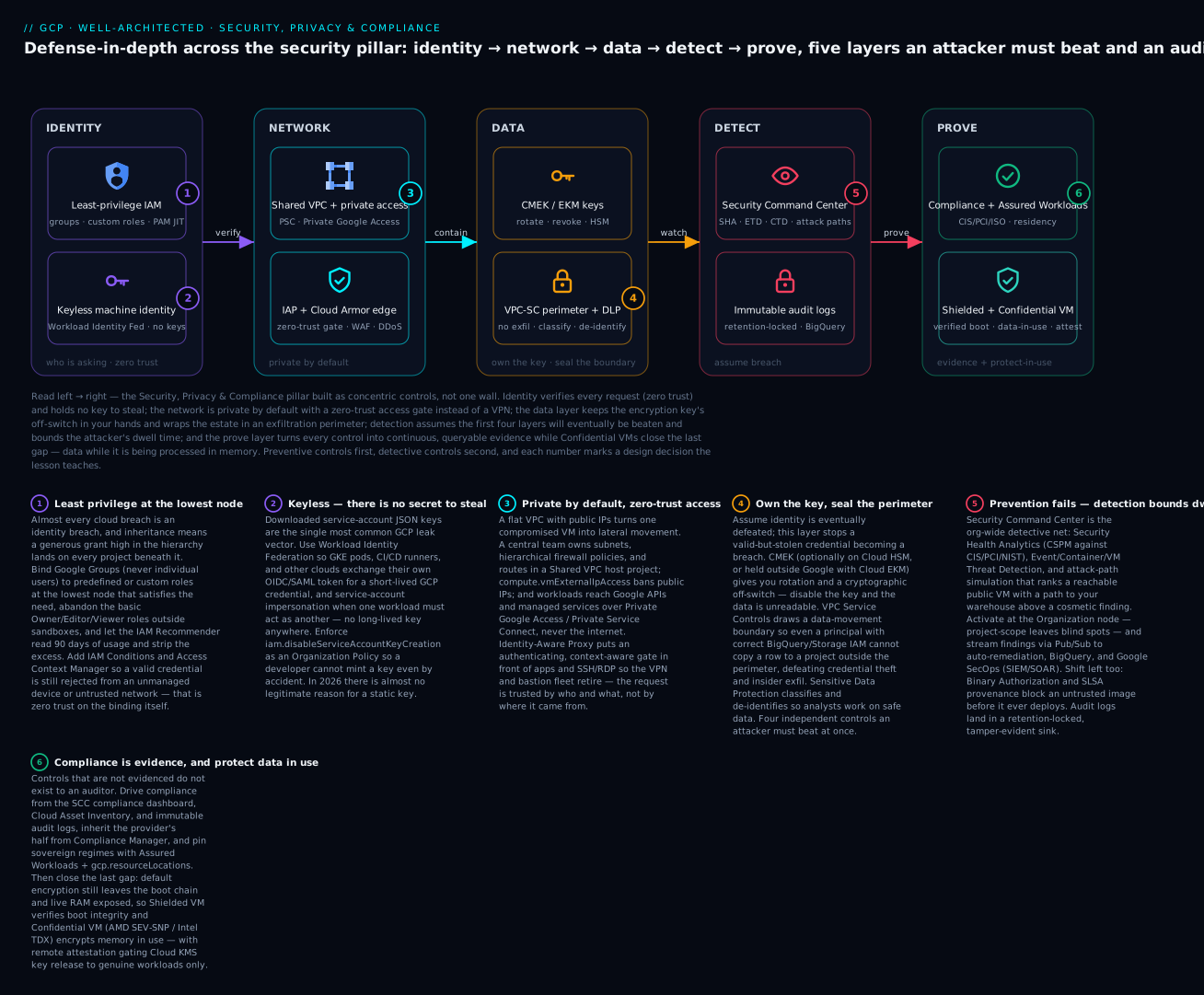
Read the map left to right: each zone is a layer an attacker must beat and an auditor can read — identity verifies every request and holds no key to steal, the network is private by default with a zero-trust gate instead of a VPN, the data layer keeps the key’s off-switch in your hands behind an exfiltration perimeter, detection assumes the earlier layers will eventually be beaten, and the prove layer turns it all into evidence while Confidential VMs close the last gap of data in use.
Where this fits
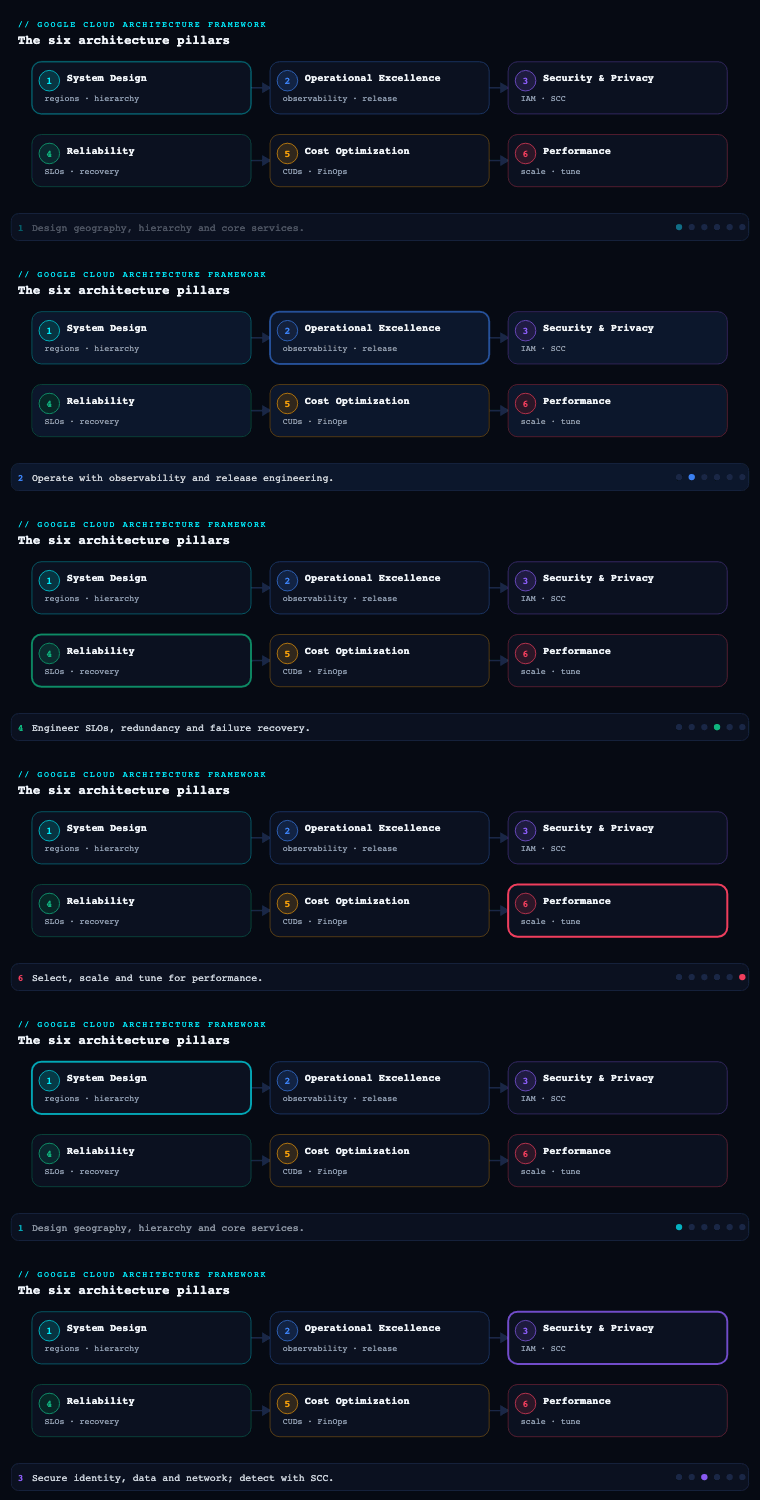
The Google Cloud Architecture Framework is Google’s Well-Architected equivalent, and Security, Privacy & Compliance is the third of its pillars (after Operational Excellence and Reliability, and before Cost Optimization, Performance Optimization, and the cross-cutting AI/ML perspective). Where the Cloud Adoption Framework’s Secure theme asks is the organization ready to protect itself, this pillar answers the architect’s question: given a Google Cloud organization, how do you actually build defense-in-depth around identity, data, network, and workloads, prove it to an auditor, and detect the attacker who slips past the first wall? Google frames the pillar around a small set of core principles — implement security by design, adopt zero trust, shift security left into CI/CD, implement preventive and detective controls, and use AI securely and responsibly — and the sections below take each sub-component (IAM, data security, network security, compliance, secrets management, threat detection, and confidential computing) and walk it as you would implement it in a real Google Cloud organization with a resource hierarchy, a Shared VPC, and a CISO who needs evidence.
The five design principles, in one place
Before the services, hold the principles they implement — every decision later in the lesson is one of these five made concrete:
| Principle | What it means | Where it shows up in this lesson |
|---|---|---|
| Security by design | Bake controls into the architecture (as code, inherited by default) rather than bolting them on. | Organization Policy baseline, hierarchical firewall policies, CMEK-required, Shielded-VM-required — all set once at the org node. |
| Zero trust | Never trust the network location; verify every request on identity, device, and context. | IAM Conditions, Access Context Manager, context-aware access, Identity-Aware Proxy, keyless Workload Identity Federation. |
| Shift security left | Move controls into source, build, and CI/CD so defects and secrets are caught before deploy. | Secret scanning, Binary Authorization, SLSA provenance, Artifact Analysis, IaC policy checks. |
| Preventive and detective controls | Prevent bad states from existing at all, and detect the ones that slip through. | Org Policy / IAM Deny / VPC-SC (preventive) plus Security Command Center (detective). |
| Use AI securely and responsibly | Apply the same identity, data, and network controls to AI/ML workloads and their data. | CMEK on training data, VPC-SC around Vertex AI, DLP on prompts/outputs, Confidential VMs with GPUs. |
Identity and Access Management (IAM)
What it is. IAM on Google Cloud is how you bind principals (human users in Cloud Identity / Google Workspace, federated workforce identities, service accounts, and groups) to roles (bundles of granular permissions) on resources arranged in the resource hierarchy — Organization → Folders → Projects → resources. A binding is the atom: principal + role + resource, expressed as an IAM allow policy that is inherited downward through the hierarchy. This is the GCP analog of AWS IAM + SCPs and Azure RBAC + management groups fused into one model.
Why it matters. Almost every cloud breach is an identity breach — a leaked service-account key, an over-granted Owner, a forgotten external collaborator. On GCP the inheritance model means a generous grant high in the hierarchy (say roles/editor at the org node) silently lands on every project beneath it, so identity mistakes scale by default. Getting IAM right is the single highest-leverage security control.
How to do it well — the hierarchy and least privilege. Bind roles to Google Groups, never to individual users, so joiner/mover/leaver is a directory operation, not an IAM edit. Grant at the lowest node that satisfies the need — a project, not the org. Abandon the basic roles (Owner, Editor, Viewer) for anything beyond a sandbox; prefer predefined roles scoped to a service, and where those are still too broad, author custom roles that enumerate exactly the permissions a job function needs. Use the IAM Recommender (part of Active Assist) to find and strip excess permissions — it reads 90 days of usage and proposes a tighter role automatically.
How to do it well — zero trust on the binding itself. A grant is not just who and what; it can be when and under what conditions. Use IAM Conditions to make bindings conditional on request attributes — time windows, the resource name prefix, or the caller’s IP. Layer Access Context Manager access levels (device posture, IP range, geography) and enforce them with VPC Service Controls and context-aware access so that even a valid credential is rejected from an unmanaged device or an untrusted network. For the most sensitive grants, require privileged access just-in-time via Privileged Access Manager (PAM), which grants an elevated role for a bounded window with an approval trail instead of a standing binding.
How to do it well — service accounts (the machine identities). Service accounts are the most-abused credential on GCP. The rules: do not create service-account keys — they are long-lived secrets that leak. For workloads on GKE, use Workload Identity Federation for GKE so pods impersonate a service account with no key. For CI/CD (GitHub Actions, GitLab) and other clouds, use Workload Identity Federation with OIDC/SAML so an external runner exchanges its own token for short-lived GCP credentials — again, no stored key. When one service must act as another, use service-account impersonation (roles/iam.serviceAccountTokenCreator) to mint short-lived tokens. Enforce the org policy iam.disableServiceAccountKeyCreation so a developer cannot mint a key even by accident.
Governance guardrails — Organization Policy. Above IAM allow policies sit Organization Policy Service constraints — preventive guardrails set at org/folder/project that no project owner can override. These are the GCP equivalent of SCPs: iam.allowedPolicyMemberDomains (only your domain can be granted — kills external sharing), iam.disableServiceAccountKeyCreation, compute.requireShieldedVm, compute.vmExternalIpAccess (deny public IPs), gcp.resourceLocations (data-residency), and storage.publicAccessPrevention. IAM Deny policies complement allow policies by denying a permission set regardless of any allow grant — a true backstop.
| Concern | Anti-pattern | Well-Architected pattern |
|---|---|---|
| Workforce login | Individual user bindings, consumer Gmail | Cloud Identity + Groups, federated from Entra ID/Okta via SAML/OIDC + SCIM |
| Role granularity | roles/owner “to unblock the team” |
Predefined/custom roles at the lowest node, tightened by IAM Recommender |
| Machine credentials | Downloaded service-account JSON keys | Workload Identity Federation + impersonation, keys disabled by org policy |
| Standing privilege | Permanent roles/owner for ops |
Privileged Access Manager just-in-time elevation with approval |
| External access | Sharing to outside domains | iam.allowedPolicyMemberDomains allow-list + VPC Service Controls |
| Conditional access | Credential valid anywhere | IAM Conditions + Access Context Manager + context-aware access |
Worked example — turn off the most dangerous default, safely. The single highest-value guardrail is disabling downloadable service-account keys org-wide. Because a flip to enforce could break a legitimate script that still uses a key, you roll it out in dry-run first so violations are logged, not blocked, then promote to enforce once the logs are clean:
# policy.yaml — modern Organization Policy (gcloud org-policies) shape
name: organizations/123456789012/policies/iam.disableServiceAccountKeyCreation
spec:
  rules:
    - enforce: true
# See who is at risk first: which principals hold basic Owner/Editor on a project
gcloud projects get-iam-policy PROJECT_ID \
  --flatten="bindings[].members" \
  --filter="bindings.role:roles/owner OR bindings.role:roles/editor" \
  --format="table(bindings.role, bindings.members)"

# Apply the guardrail at the org node (inherits to every folder and project)
gcloud org-policies set-policy policy.yaml
The domain-restriction sibling is a list constraint that allow-lists only your Cloud Identity customer ID, so no one can grant a role to an outside Gmail or another company’s domain:
# only principals in your Cloud Identity org can ever be granted a role
name: organizations/123456789012/policies/iam.allowedPolicyMemberDomains
spec:
  rules:
    - values:
        allowedValues:
          - "C03xxxxxx"   # your Cloud Identity customer ID (not the domain string)
Artifacts and decisions. An identity architecture diagram (IdP → Cloud Identity → groups → roles → hierarchy); the group-to-role catalog mapped to job functions; the Organization Policy baseline as Terraform; a service-account inventory with key-creation disabled; a break-glass procedure (a hardware-MFA super-admin account, sealed) for when federation fails; and an IAM Recommender triage cadence.
Data security
What it is. Data security is protecting data at rest, in transit, and in use across the data lifecycle — encryption, key management, classification, de-identification, and exfiltration prevention — for the services that actually hold the data (Cloud Storage, BigQuery, Cloud SQL, Spanner, Persistent Disk).
Why it matters. Data is what attackers and regulators care about. The two failure modes that dominate are misconfiguration (a public Cloud Storage bucket, an over-shared BigQuery dataset) and key compromise. The pillar’s “keep people away from data” principle means humans should rarely touch raw production data at all.
How to do it well — encryption and key management. Everything on Google Cloud is encrypted at rest by default with Google-managed keys; the architectural decisions are about who controls the key. Use Cloud KMS with customer-managed encryption keys (CMEK) to put yourself in the key’s control plane — you can rotate, disable, and crucially revoke a key to make data unreadable, and every key use is logged. For the highest assurance, back keys with Cloud HSM (FIPS 140-2 Level 3 hardware) or hold the key entirely outside Google with Cloud External Key Manager (Cloud EKM) so Google can never decrypt without your external KMS releasing the key. Enforce CMEK organization-wide with the gcp.restrictNonCmekServices and gcp.restrictCmekCryptoKeyProjects org policies. In transit, traffic is encrypted by default; enforce TLS at the edge and use Application Layer Transport Security (ALTS) for service-to-service within Google’s fabric.
How to do it well — classification and de-identification. You cannot protect what you have not found. Run Sensitive Data Protection (formerly Cloud DLP) to discover and classify PII/PHI/PCI across Cloud Storage, BigQuery, and Datastore using 150+ built-in infoType detectors, then de-identify through masking, tokenization, format-preserving encryption, or bucketing so analytics teams work on safe data. Pipe BigQuery and Cloud Storage discovery profiles into Security Command Center so data risk shows up next to infrastructure risk.
How to do it well — fine-grained access and exfiltration control. In BigQuery, use authorized views, column-level security (policy tags from Dataplex/Data Catalog), and row-level security so a principal sees only the rows and columns they’re entitled to. Wrap your data-holding projects in a VPC Service Controls perimeter — this is the single most important anti-exfiltration control on GCP: it stops a principal with a valid Storage/BigQuery permission from copying data to a project outside the perimeter, defeating credential theft and insider exfil. Turn on Cloud Storage public access prevention and uniform bucket-level access org-wide.
| Control | Service | What it gives you |
|---|---|---|
| Key custody | Cloud KMS (CMEK), Cloud HSM, Cloud EKM | Rotation, revocation, hold-your-own-key, key-use audit |
| Discovery & classification | Sensitive Data Protection (DLP) | Find/classify PII; profiles into SCC |
| De-identification | DLP transforms, format-preserving encryption | Safe analytics on tokenized data |
| Fine-grained access | BigQuery column/row-level security, policy tags | Least privilege inside a dataset |
| Exfiltration prevention | VPC Service Controls perimeter | Data cannot leave the trust boundary |
| Bucket hardening | Public access prevention, uniform bucket-level access | No accidental public data |
Artifacts and decisions. A data classification scheme and inventory; a key-management standard (which data tiers require CMEK vs. CMEK-on-HSM vs. EKM, and the rotation period); DLP inspection/de-identification templates; the VPC-SC perimeter and ingress/egress rules; and a documented decision on data residency enforced via gcp.resourceLocations.
Network security
What it is. Network security on GCP is segmentation, perimeter defense, private connectivity, and traffic inspection across the VPC, the edge, and the boundary to the internet and to other clouds.
Why it matters. The network is both an isolation boundary and an attack surface. A flat VPC with public IPs and permissive firewall rules turns one compromised VM into lateral movement across the estate; a well-segmented, private-by-default network contains the blast radius.
How to do it well — topology and segmentation. Use Shared VPC so a central network/security team owns subnets, firewall rules, and routes in a host project, while application teams deploy into attached service projects — a clean separation of network control from workload ownership. Segment with firewall rules and, preferably, hierarchical firewall policies (set at org/folder so they apply across projects and cannot be loosened locally) and network firewall policies with firewall rules using tags / secure tags for identity-aware micro-segmentation rather than brittle IP ranges. Default-deny egress and allow only what’s needed.
How to do it well — private by default. Eliminate public IPs (enforced by compute.vmExternalIpAccess). Reach Google APIs without traversing the internet via Private Google Access and Private Service Connect (which also privately exposes your own services and consumes third-party SaaS). Connect to managed services (Cloud SQL, Memorystore) over Private Service Access. Bridge to on-prem/other clouds with Cloud VPC and Cloud Interconnect / HA VPN, and resolve names privately with Cloud DNS private zones.
How to do it well — edge and inspection. Front public apps with the global external Application Load Balancer plus Google Cloud Armor for WAF (OWASP Top-10 preconfigured rules), L7 DDoS defense (Cloud Armor Adaptive Protection), geo/IP rules, and rate limiting — backed by Google’s always-on volumetric DDoS protection. Add reCAPTCHA Enterprise for bot defense and Identity-Aware Proxy (IAP) to put a zero-trust authentication gate in front of apps and SSH/RDP — replacing the VPN and bastion entirely. For deep packet inspection and egress filtering, deploy Cloud NGFW (Cloud Next Generation Firewall) with its intrusion prevention (IPS) and TLS inspection, or Secure Web Proxy for outbound traffic governance. Capture VPC Flow Logs and Firewall Rules Logging for detection and forensics.
| Layer | Control | Service |
|---|---|---|
| Topology | Centralized network ownership | Shared VPC (host/service projects) |
| Segmentation | Cross-project, identity-aware rules | Hierarchical firewall policies + secure tags |
| Private access | No internet path to Google/SaaS | Private Service Connect, Private Google Access |
| Edge | WAF + L3-7 DDoS + bot defense | Cloud Armor, reCAPTCHA Enterprise, global ALB |
| App access | Zero-trust gate, no VPN/bastion | Identity-Aware Proxy (IAP) |
| Inspection | IPS, TLS inspection, egress control | Cloud NGFW, Secure Web Proxy |
Artifacts and decisions. A network topology diagram (Shared VPC, subnets per region/tier, interconnect); the hierarchical firewall policy set in Terraform; a “no public IP” decision and exceptions register; a Cloud Armor policy with WAF + rate-limit rules; and an IAP rollout plan to retire bastions/VPN.
Compliance
What it is. Compliance is mapping external obligations (PCI DSS, HIPAA, SOC 2, ISO 27001, FedRAMP, GDPR, India’s DPDP Act) to implemented technical controls, continuously evidencing those controls, and proving the cloud provider’s own attestations cover the shared-responsibility split.
Why it matters. Controls that aren’t evidenced don’t exist to an auditor. Manual screenshot-gathering is slow, stale the moment it’s captured, and doesn’t scale across hundreds of projects. The goal is continuous, queryable compliance.
How to do it well — inherit, then prove your half. Start from Google Cloud’s compliance reports and certifications in Compliance Manager and the Compliance reports manager — Google’s own ISO, SOC, PCI, and regional attestations cover the infrastructure layer of shared responsibility. Then evidence your configuration. Use Security Command Center’s compliance dashboard, which maps active findings to benchmarks (CIS Google Cloud Foundations, PCI DSS, NIST 800-53, ISO 27001) and shows real-time pass/fail per control. Define your controls as Organization Policy constraints and Assured Workloads for regulated regimes (FedRAMP, IL4/IL5, regional sovereignty) which enforce data residency, personnel restrictions, and provider-controls in a constrained folder. Maintain everything as code so the control is its own evidence.
How to do it well — data residency and sovereignty. For EU/India/regional mandates, combine gcp.resourceLocations (where resources may live), Assured Workloads (sovereign control packages), and Sovereign Controls partner regions, plus Cloud EKM so key custody never leaves your jurisdiction. For privacy specifically, run Sensitive Data Protection to evidence you know where personal data is, honor data-subject requests, and apply minimization.
How to do it well — continuous evidence. Stream Cloud Audit Logs (Admin Activity is always-on and immutable; enable Data Access logs for read/write of data) to a locked, retention-policied Cloud Logging bucket and BigQuery. Pair Cloud Asset Inventory (point-in-time config + change feed) with Security Health Analytics to produce auditor-ready, time-stamped evidence of control state, on demand.
| Obligation type | GCP mechanism | Evidence artifact |
|---|---|---|
| Provider attestations (infra layer) | Compliance Manager / reports manager | Downloadable SOC 2, ISO, PCI reports |
| Configuration compliance | SCC compliance dashboard (CIS/PCI/NIST) | Real-time control pass/fail |
| Regulated/sovereign workloads | Assured Workloads, Sovereign Controls | Enforced residency + personnel controls |
| Data residency | gcp.resourceLocations, Cloud EKM |
Org-policy denial of out-of-region resources |
| Audit trail | Cloud Audit Logs → Logging/BigQuery | Immutable, retention-locked activity logs |
| Asset & change evidence | Cloud Asset Inventory + Security Health Analytics | Time-stamped config + change history |
Artifacts and decisions. A control-mapping matrix (obligation → control → GCP mechanism → evidence source); the chosen benchmark in SCC; an Assured Workloads decision per regulated workload; an audit-log retention and access-restriction policy; and a data-residency design.
Secrets management
What it is. Secrets management is the secure storage, distribution, rotation, and auditing of credentials, API keys, certificates, and other sensitive configuration — keeping them out of source code, container images, and environment variables.
Why it matters. Hard-coded secrets are the most common way credentials leak: committed to git, baked into images, printed in logs. A leaked database password or API key is a direct breach. (This is a live lesson on KloudVin’s own history — old DB passwords once lived in git and had to be rotated and never re-committed.)
How to do it well — Secret Manager. Store secrets in Secret Manager, which versions every secret, encrypts at rest (CMEK-capable), and gates access through IAM (roles/secretmanager.secretAccessor) with full Cloud Audit Logging of every access. Workloads fetch secrets at runtime — Cloud Run, Cloud Functions, GKE, and Compute Engine can mount secrets as files or inject them as environment variables natively, so the secret never lands in an image or repo. Pin to specific versions in production and promote new versions deliberately. Scope each secret’s accessor binding to exactly the service account that needs it, and replicate per data-residency requirements (automatic or user-managed regions).
How to do it well — rotation and hygiene. Configure rotation with schedules and Pub/Sub notifications that trigger a Cloud Function to mint and store a new credential, so secrets are short-lived. Crucially, prefer not to have a secret at all: Workload Identity Federation and service-account impersonation replace stored credentials with short-lived tokens for cloud-to-cloud and CI/CD auth, and IAM database authentication lets Cloud SQL accept IAM identities instead of passwords. Stop secret introduction at the source with Secret Manager + Sensitive Data Protection scanning and Software Delivery Shield / git pre-commit secret scanners so a credential never reaches a repo. For PKI and mTLS, use Certificate Authority Service (CA Service) and Certificate Manager rather than self-managed certs.
| Need | Anti-pattern | Well-Architected pattern |
|---|---|---|
| App credentials | .env file / hard-coded in image |
Secret Manager, mounted at runtime, IAM-scoped |
| CI/CD auth to GCP | Stored service-account key | Workload Identity Federation (OIDC), no key |
| Database auth | Long-lived DB password | IAM database authentication / short-lived creds |
| Rotation | Manual, yearly, often skipped | Scheduled rotation + Pub/Sub-triggered function |
| Certificates | Self-signed, manually renewed | CA Service + Certificate Manager |
| Leak prevention | Hope nobody commits a secret | Secret scanning in CI + DLP, keys disabled by org policy |
Artifacts and decisions. A secrets inventory with owner and rotation period; the Secret Manager naming/labeling and replication policy; a “no static keys” standard backed by iam.disableServiceAccountKeyCreation; rotation runbooks; and a secret-scanning gate in the pipeline.
Secure software supply chain — shifting security left
What it is. The security pillar does not stop at the running workload — it reaches back into how the workload got there. Secure software supply chain is protecting every stage from source → build → artifact → deploy → runtime so that only trusted, provenance-verified, vulnerability-scanned code ever reaches production. This is the concrete expression of the framework’s “shift security left” principle: move controls as early in the lifecycle as possible, where a defect is cheapest to fix and an attacker has the least leverage.
Why it matters. Modern breaches increasingly enter through the build, not the front door — a poisoned dependency, a tampered base image, a compromised CI runner, a leaked token in a build log. A signed, “clean-looking” image that carries a known critical CVE or was built by an untrusted pipeline is a breach waiting to be scheduled onto a node. Runtime controls cannot see any of this; you have to gate it before deploy.
How to do it well — Software Delivery Shield end to end. Google packages the supply-chain controls under Software Delivery Shield, and the architecture is a chain of gates:
- Source & dev — develop in managed, ephemeral Cloud Workstations so a developer laptop is not the weakest link, and run secret scanning and IaC policy checks presubmit so credentials and non-compliant infrastructure never merge.
- Build — build in Cloud Build, which produces SLSA Build Level 3 provenance (a signed, tamper-evident record of what was built, from which source, by which builder). Authenticate the pipeline to GCP with Workload Identity Federation, never a stored key.
- Artifact — push images to Artifact Registry, where Artifact Analysis (formerly Container Analysis) scans on push and continuously re-scans for newly disclosed CVEs, and generates an SBOM (software bill of materials).
- Deploy — enforce Binary Authorization: a deploy-time admission policy that lets an image run on GKE or Cloud Run only if it carries the required attestations (e.g. “was built by our Cloud Build pipeline”, “passed vulnerability scanning”, “was signed by our release attestor”). Anything unsigned or tampered is blocked at admission.
- Runtime — Container Threat Detection and continuous validation keep watching, and re-check that already-running pods still satisfy the policy as new information (a fresh CVE, a revoked attestation) arrives.
How to do it well — Binary Authorization policy. The policy is declarative and, like every other guardrail, rolls out in a dry-run / audit mode (DRYRUN_AUDIT_LOG_ONLY) before it blocks. A production policy requires attestations by a specific attestor and keeps a documented break-glass path (a signed pod annotation) for emergencies:
# binauthz-policy.yaml — imported with: gcloud container binauthz policy import binauthz-policy.yaml
globalPolicyEvaluationMode: ENABLE          # also trust Google's own system images
defaultAdmissionRule:
  evaluationMode: REQUIRE_ATTESTATION
  enforcementMode: ENFORCED_BLOCK_AND_AUDIT_LOG
  requireAttestationsBy:
    - projects/PROJECT_ID/attestors/prod-attestor
clusterAdmissionRules:
  asia-south1.prod-cluster:                 # stricter rule for the prod cluster
    evaluationMode: REQUIRE_ATTESTATION
    enforcementMode: ENFORCED_BLOCK_AND_AUDIT_LOG
    requireAttestationsBy:
      - projects/PROJECT_ID/attestors/prod-attestor
| Supply-chain stage | Threat it faces | GCP control |
|---|---|---|
| Source / dev | Leaked secret, laptop compromise, bad IaC | Secret scanning, Cloud Workstations, IaC policy checks |
| Build | Compromised runner, unverifiable output | Cloud Build + SLSA L3 provenance, WIF (keyless) |
| Artifact | Vulnerable / tampered image | Artifact Registry + Artifact Analysis (scan + SBOM) |
| Deploy | Untrusted or unsigned image runs | Binary Authorization attestation gate |
| Runtime | Drift, newly-disclosed CVE, revoked trust | Container Threat Detection + continuous validation |
Artifacts and decisions. The Binary Authorization policy per cluster/service and its attestors; the SLSA level you require and how provenance is verified; the vulnerability-severity threshold that blocks a release; the break-glass procedure and who may invoke it; and the CI secret-scanning and IaC-policy gates — all as code, feeding findings back into Security Command Center.
Threat detection with Security Command Center
What it is. Security Command Center (SCC) is Google Cloud’s native security and risk-management platform — the single pane that unifies posture management (misconfigurations), vulnerability management, threat detection, attack-path analysis, and compliance across the whole organization. It is the GCP analog of AWS Security Hub + GuardDuty + Inspector + Macco-equivalents fused into one product, available in Standard, Premium, and the Enterprise tier (which adds multi-cloud CSPM/CNAPP via the Mandiant-powered platform and SIEM/SOAR through integrated Google SecOps).
Why it matters. Prevention eventually fails or is bypassed; detection bounds the attacker’s dwell time and proves to auditors you would notice. SCC turns thousands of signals across hundreds of projects into prioritized, deduplicated findings with the context — which exposed asset, which toxic permission combination, which attack path to a high-value resource — needed to act, rather than a raw firehose of alerts.
How to do it well — the detective services inside SCC. Enable the built-in detectors and route their findings:
- Security Health Analytics (SHA) — managed posture scanning that continuously detects misconfigurations (public buckets, over-broad firewall rules, missing CMEK, disabled audit logs) and maps them to CIS/PCI/NIST benchmarks. This is your CSPM engine.
- Event Threat Detection (ETD) — analyzes Cloud Audit Logs, VPC Flow Logs, and DNS logs in near-real-time to surface active threats: anomalous IAM grants, service-account key abuse, cryptomining patterns, brute-force SSH, data exfiltration, and known-bad IP/domain contact (Google threat intelligence).
- Container Threat Detection (KTD) — runtime detection of suspicious behavior inside GKE containers (reverse shells, added binaries, malicious scripts).
- Virtual Machine Threat Detection (VMTD) — agentless, hypervisor-level scanning of running VM memory for cryptomining and other malware.
- Web Security Scanner — crawls App Engine/Compute/GKE web apps for XSS, outdated libraries, and mixed content.
- Sensitive Data Protection discovery and Mandiant Attack Surface Management feed data-risk and external-exposure context.
How to do it well — prioritize and respond. Premium/Enterprise add attack path simulation and Risk/Toxic combination findings that rank exposures by how reachable a high-value asset is — so you fix the public VM with a path to your data warehouse before the cosmetic finding. Virtual Red Team continuously models attacker paths. Operationalize the output: export findings to Pub/Sub to drive automated remediation (a Cloud Function that quarantines a resource), to BigQuery for analytics, and into Google SecOps (Chronicle) for SIEM correlation and SOAR playbooks. Wire SCC notifications to ticketing so every high-severity finding has an owner and an SLA.
| Capability | SCC service / tier | Detects / provides |
|---|---|---|
| Posture (CSPM) | Security Health Analytics | Misconfigurations vs. CIS/PCI/NIST |
| Log-based threats | Event Threat Detection | IAM abuse, exfil, cryptomining, bad-IP contact |
| Container runtime | Container Threat Detection | Reverse shells, malicious binaries in GKE |
| VM malware | VM Threat Detection (agentless) | Cryptomining in VM memory |
| Web app vulns | Web Security Scanner | XSS, outdated libs, mixed content |
| Risk prioritization | Attack path simulation, toxic combinations (Premium/Enterprise) | Reachable high-value-asset exposure |
| SIEM/SOAR + multicloud | Google SecOps, Enterprise tier | Correlation, playbooks, AWS/Azure CSPM |
Artifacts and decisions. The SCC tier decision (Premium for single-cloud GCP; Enterprise for multi-cloud + SIEM/SOAR); the finding-export architecture (Pub/Sub → remediation, BigQuery → analytics, SecOps → SIEM); a finding-severity-to-SLA runbook; the muted-findings policy; and the active benchmark for the compliance dashboard.
Shielded VMs and Confidential VMs
What it is. These are two distinct hardening technologies for Compute Engine (and the GKE nodes built on it). Shielded VM protects the boot integrity of a VM — verifying it boots a trusted, unmodified software stack. Confidential VM protects data in use — encrypting the VM’s memory so that data is unreadable even to the hypervisor and Google itself. Together they close the two gaps that encryption-at-rest and encryption-in-transit leave open: the boot chain and the live RAM.
Why it matters. Encryption at rest and in transit still leave data in plaintext while it’s being processed in memory, and leave the boot chain vulnerable to rootkits/bootkits that persist beneath the OS. For regulated, multi-tenant, or highly sensitive workloads (health data, financial PII, cryptographic key handling), “in use” protection and verifiable boot are the difference between meeting and missing a sovereignty or zero-trust requirement.
How to do it well — Shielded VM. Enable Shielded VM (it’s default on most modern images) to get three protections: Secure Boot (only signed, trusted boot components load — blocks bootkits), Virtual Trusted Platform Module (vTPM) with Measured Boot (records integrity measurements of the boot sequence), and integrity monitoring (compares the boot baseline against later boots and raises a finding in SCC/Cloud Logging on tampering). Enforce it across the org with the compute.requireShieldedVm organization policy so no one can launch an unverified VM.
How to do it well — Confidential VM. Turn on Confidential Computing to encrypt memory with keys generated and held in hardware that the host OS and hypervisor cannot access. GCP offers a choice of hardware-backed technologies — AMD SEV and SEV-SNP (the latter adds memory-integrity and stronger attestation), and Intel TDX — selectable by machine series (N2D/C2D/C3D for AMD, C3 for Intel TDX). For confidential GKE, enable Confidential GKE Nodes; for accelerated/AI workloads, Confidential VMs with GPUs (NVIDIA H100 confidential computing) extend the trust boundary to the accelerator. Use remote attestation so a relying party (or Cloud KMS, releasing a key only to an attested workload) can cryptographically verify the workload is genuine before trusting it. Confidential VMs are largely a flag, not an application rewrite — the main trade-offs are a modest performance overhead, a constrained set of supported machine types/regions, and image compatibility, so validate on your workload.
| Technology | Protects | Mechanism | Enforce / enable with |
|---|---|---|---|
| Secure Boot | Boot chain | Only signed boot components load | Shielded VM (default), compute.requireShieldedVm |
| vTPM + Measured Boot | Boot integrity baseline | Hardware-rooted boot measurements | Shielded VM |
| Integrity monitoring | Post-boot tampering | Baseline vs. runtime comparison → SCC finding | Shielded VM |
| Confidential VM | Data in use (RAM) | Hardware-encrypted memory (AMD SEV-SNP / Intel TDX) | Confidential Computing flag on N2D/C2D/C3/C3D |
| Confidential GKE Nodes | Containers’ data in use | Confidential VM as node | GKE node-pool setting |
| Confidential GPU | AI/accelerated data in use | Confidential H100 + attestation | Confidential VM with GPU |
Artifacts and decisions. A workload-sensitivity tiering that says which tiers require Shielded-only vs. Shielded + Confidential; the compute.requireShieldedVm org policy; a Confidential VM machine-type/region feasibility and performance-validation result; an attestation-gated key-release design (Cloud KMS releasing keys only to attested Confidential VMs); and integrity-monitoring alert routing into SCC.
Going deeper
The sections above are the what and why. This section is the how it actually works underneath — the mechanics an architect needs when a design review turns to “but what happens when…”. Read it once now, and again the day you have to defend a control to an auditor or a red team.
How IAM actually decides — deny beats allow. An access decision is not a single policy lookup. Google first gathers every IAM allow policy attached from the resource up through its ancestors (project → folder → org) and takes the union of the roles granted — inheritance is additive and there is no “deny” inside an allow policy. Separately it gathers IAM Deny policies, which also inherit down the hierarchy. The evaluation order is decisive: deny rules are evaluated first, and a matching deny wins over any allow. So an org-level deny on iam.googleapis.com/serviceAccountKeys.create (with a narrow exception for a break-glass principal) is a true backstop no downstream roles/owner can undo. Layer IAM Conditions on top — CEL expressions on request attributes (request.time, resource.name, resource.matchTag(...)) — and remember conditions only narrow a grant, never widen it. When a decision surprises you, the Policy Troubleshooter and Policy Analyzer replay exactly which binding granted (or which deny blocked) a specific principal-permission-resource triple.
Organization Policy evaluation and custom constraints. Org Policy is evaluated at resource create/update time, before the resource exists — which is why a guardrail turns a would-be finding into an impossibility. Policies merge down the hierarchy with explicit rules for inheritFromParent and reset, and list constraints combine allow/deny values across levels. Beyond the hundreds of built-in constraints you can author custom constraints — CEL over a resource’s own fields (e.g. deny a Compute instance whose machineType is not in an allow-list, or a bucket without a retention policy). Every constraint supports a dryRunSpec so it audits (logs violations) before it enforces; treat dry-run → mine the logs → enforce as the mandatory rollout for any new guardrail, or you will break CI, nightly exports, and SaaS integrations nobody documented.
VPC Service Controls is a different plane from firewalls and IAM. Confusing the three is the most common design error. Firewalls govern packets (L3/L4, and L7 with Cloud NGFW). IAM governs whether a principal is authorized for an API operation. VPC-SC governs whether data may move across a boundary on managed-service APIs — and it can deny a request that both the firewall and IAM would allow. A perimeter is a set of projects; ingress and egress rules specify from (identities, source networks/perimeters) and to (resources, services, operations) so you can permit a named CI service account to read one bucket from one project and nothing else. API traffic is pinned to the restricted VIP (restricted.googleapis.com, 199.36.153.4/30) via Private Google Access so it never touches the public path. Like Org Policy, VPC-SC has a dry-run mode whose violations land in audit logs — indispensable, because retrofitting a perimeter around live pipelines is where teams get hurt.
CMEK envelope encryption, and why revocation is instant. CMEK does not encrypt your terabytes with your KMS key directly. Data is encrypted with a per-object data encryption key (DEK); the DEK is then wrapped by your key encryption key (KEK), which lives in Cloud KMS, Cloud HSM, or an external EKM. Cloud KMS never sees your plaintext data — only the DEK it wraps and unwraps — which is what makes revocation a cryptographic off-switch: disable the KEK and no service can unwrap any DEK, so the data is unreadable in seconds without touching the data service’s own IAM. Access is granted to per-service service agents (roles/cloudkms.cryptoKeyEncrypterDecrypter), never to humans. Key rotation creates a new key version used for new encryptions; existing data stays wrapped by its version until rewritten, so rotation is not re-encryption. With Cloud EKM the key material never leaves your external HSM, and Key Access Justifications can require a signed reason (visible to you, approvable/deniable) for every decrypt — the strongest sovereignty posture Google offers.
Confidential computing internals and attestation. A Confidential VM’s memory is encrypted by the CPU with a key the hypervisor and host OS cannot read (AMD SEV-SNP adds memory-integrity protection and a hardware attestation report; Intel TDX isolates a “trust domain”). The powerful pattern is attestation-gated key release: the workload produces a hardware-signed attestation proving what is running, and Cloud KMS (or your EKM) releases a key only to a workload whose measurement matches an approved value — so a tampered image gets no key and no data. On the boot side, Measured Boot records the boot sequence into the vTPM; integrity monitoring compares each later boot against that baseline and raises an SCC finding on drift. The trade-offs are real and worth validating: a single-digit-percent performance overhead, a constrained set of supported machine types and regions, and (classically) --maintenance-policy=TERMINATE because a confidential instance cannot live-migrate.
The SCC finding pipeline and posture-as-code. A finding is produced by a source (SHA, ETD, a third-party connector) against an asset, deduplicated and scored. Route it with a notification config to Pub/Sub, and from there to a Cloud Function (auto-quarantine), BigQuery (analytics/evidence), or Google SecOps (SIEM/SOAR). Mute rules suppress accepted-risk noise without deleting the finding. The Security Posture service lets you define and deploy a posture (a bundle of Org Policy + SHA detectors) as code and detect drift from it — CSPM that is itself version-controlled. Attack-path simulation builds a graph of assets, identities, and network reachability to rank the chain (public VM → over-broad SA → path to the warehouse) rather than 200 unranked findings.
Governing Google’s own access. For sovereignty and insider-risk requirements, Access Transparency logs Google support/engineering access to your data, and Access Approval makes that access require your explicit approval first — a control Org Policy fundamentally cannot express, and one Assured Workloads enforces as part of a regulated regime.
Cost, quota, and version caveats. Security is not free, and the exam-and-invoice reality matters: SCC Premium/Enterprise is priced on a spend- or asset-based model (budget for it before enabling org-wide); Sensitive Data Protection inspection is billed per data volume scanned (sample large tables); Cloud KMS bills per active key version and per crypto-operation; Confidential VM carries a compute premium and a narrower machine/region matrix; audit logs at scale cost real money in Logging/BigQuery storage (Admin Activity is free, Data Access can be voluminous — enable it deliberately). Watch the renames, too, or you’ll grep for the wrong thing: Cloud DLP → Sensitive Data Protection, Container Analysis → Artifact Analysis, Chronicle → Google SecOps, and the legacy gcloud resource-manager org-policies surface → the current gcloud org-policies (v2). Flag GA vs. preview when you standardize on a feature, because preview features carry no availability SLA.
Real-world enterprise scenario
Meridian Health Networks, a fictional pan-India digital-health platform (820 employees, processing electronic health records for 11 million patients across 40+ hospitals), is migrating from a single sprawling project to a governed Google Cloud organization. They must satisfy ISO 27001, SOC 2 Type II, PCI DSS (for payments), and India’s DPDP Act data-residency rules, all on a tight budget. They apply the pillar sub-component by sub-component.
IAM. They federate Cloud Identity from their existing Microsoft Entra ID via SAML + SCIM, so all 820 staff and joiner/mover/leaver flow from the HR-driven directory. They bind only Google Groups to roles, abolish basic roles outside two sandbox projects, and stand up a hierarchy of Organization → Folders (prod, non-prod, shared-services, security) → 60 projects. The platform team disables service-account keys org-wide (iam.disableServiceAccountKeyCreation), runs all GKE workloads on Workload Identity Federation for GKE, and wires GitHub Actions to GCP through Workload Identity Federation — zero downloaded keys exist in the estate. SREs get production roles/container.admin only through Privileged Access Manager just-in-time, with a 2-hour window and approval. The IAM Recommender trims 1,400 excess permissions in the first quarter.
Data security. EHR data lives in BigQuery and Cloud SQL, encrypted with CMEK backed by Cloud HSM; the payments dataset uses Cloud EKM so the key never leaves their on-prem HSM — meeting the strictest sovereignty reading. Sensitive Data Protection profiles every BigQuery dataset and Cloud Storage bucket, classifies PHI/PII/PCI, and feeds the profiles into SCC; analytics teams query format-preserving-encrypted and column-masked views via BigQuery column- and row-level security with policy tags. The entire data estate sits inside a VPC Service Controls perimeter — a stolen analyst credential cannot copy a single row to an outside project.
Network security. A Shared VPC host project (security-team-owned) serves subnets to all 60 service projects. Hierarchical firewall policies enforce default-deny egress and identity-aware secure tags; compute.vmExternalIpAccess bans public IPs. Clinicians and admins reach internal apps through Identity-Aware Proxy — the corporate VPN and all bastions are retired. Public patient-portal traffic terminates on a global external Application Load Balancer behind Google Cloud Armor (OWASP rules + Adaptive Protection + rate limiting) and reCAPTCHA Enterprise. Cloud NGFW with IPS inspects east-west and egress traffic.
Compliance. They enable Security Command Center Enterprise, set the compliance dashboard to CIS Google Cloud Foundations + PCI DSS + ISO 27001, and place the regulated EHR and payments folders under Assured Workloads with gcp.resourceLocations pinned to asia-south1/asia-south2 — enforcing DPDP residency. Provider attestations are pulled from Compliance Manager; Cloud Audit Logs (Admin Activity + Data Access) stream to a retention-locked Logging bucket and BigQuery for the auditors.
Secrets management. All application credentials move to Secret Manager, mounted into Cloud Run and GKE at runtime, each scoped to a single service account; DB access uses IAM database authentication where possible. Rotation is scheduled with Pub/Sub-triggered Cloud Functions. A secret-scanning gate in CI plus DLP blocks any new credential from reaching a repo — directly addressing their earlier near-miss of credentials in source control.
Secure supply chain. Container images are built in Cloud Build with SLSA L3 provenance, pushed to Artifact Registry where Artifact Analysis scans them, and Binary Authorization blocks any image on the prod GKE cluster that lacks the release attestor’s signature — so a tampered or unscanned image cannot be scheduled onto a node processing patient data.
Threat detection. SCC Enterprise runs Security Health Analytics, Event Threat Detection, Container Threat Detection, and VM Threat Detection; findings export to Pub/Sub (auto-quarantine a public bucket within minutes), BigQuery, and Google SecOps for SIEM correlation and SOAR playbooks. Attack-path simulation flags a toxic combination — a misconfigured service account reachable from the internet with a path to the EHR warehouse — which they remediate before it’s exploited.
Confidential computing. All EHR-processing nodes run on Confidential GKE Nodes (AMD SEV-SNP) so patient data is encrypted in memory; compute.requireShieldedVm ensures every VM is Shielded with Secure Boot, vTPM, and integrity monitoring routed to SCC. Cloud KMS is configured to release the payments key only to attested Confidential VMs.
Measurable outcome. Within two quarters Meridian reaches a CIS Foundations score of 94% (from 47%), passes its SOC 2 Type II audit with auditor evidence pulled directly from Cloud Asset Inventory and the SCC compliance dashboard, holds zero downloaded service-account keys across 60 projects, cuts mean-time-to-detect for the simulated exfil scenario from days to under 15 minutes, and retires its VPN and bastion fleet — reducing both attack surface and operating cost.
Deliverables & checklist
Practice challenges
Work these in order — they climb from a five-minute read-only query to a full deploy-time gate. Each has a worked solution; try it before you open it. (Commands assume the gcloud CLI; outputs shown are representative — there is no live project behind this lesson. Replace every PROJECT_ID, ORG_ID, and email with your own.)
1. (Beginner) Find the over-privileged principals. List every principal holding a basic Owner or Editor role on a project, and say why that is the first thing to fix.
<details> <summary>Solution</summary>
gcloud projects get-iam-policy PROJECT_ID \
  --flatten="bindings[].members" \
  --filter="bindings.role:roles/owner OR bindings.role:roles/editor" \
  --format="table(bindings.role, bindings.members)"
Why: basic roles are coarse (Editor can change almost anything) and, because policies inherit down the hierarchy, an Editor granted at a folder lands on every project beneath it. Replacing them with predefined/custom roles at the lowest node is the highest-leverage least-privilege move.
</details>
2. (Beginner) Kill the most common leak vector — in dry-run first. Disable downloadable service-account key creation org-wide without breaking a script that might still use one today.
<details> <summary>Solution</summary>
Roll out with a dryRunSpec so violations are logged, not blocked; mine the audit logs for a couple of weeks, then promote to enforce.
# dryrun-policy.yaml
name: organizations/ORG_ID/policies/iam.disableServiceAccountKeyCreation
spec:
  rules:
    - enforce: true      # this is the LIVE spec; below is the audit-only trial
dryRunSpec:
  rules:
    - enforce: true
gcloud org-policies set-policy dryrun-policy.yaml
# ...watch orgpolicy dry-run violations in Cloud Audit Logs, then remove dryRunSpec to enforce.
Why: prevention beats remediation, but flipping straight to enforce can break a legitimate key user — dry-run surfaces those before the guardrail blocks anything. </details>
3. (Intermediate) Wire CI/CD to GCP with zero keys. Let a specific GitHub Actions repo authenticate to GCP with no downloaded service-account key.
<details> <summary>Solution</summary>
Create a Workload Identity pool + OIDC provider pinned to the repo, then let only that repo impersonate the service account.
gcloud iam workload-identity-pools create github-pool \
  --location=global --display-name="GitHub pool"

gcloud iam workload-identity-pools providers create-oidc github-provider \
  --location=global --workload-identity-pool=github-pool \
  --issuer-uri="https://token.actions.githubusercontent.com" \
  --attribute-mapping="google.subject=assertion.sub,attribute.repository=assertion.repository" \
  --attribute-condition="assertion.repository=='my-org/my-repo'"

gcloud iam service-accounts add-iam-policy-binding deployer@PROJECT_ID.iam.gserviceaccount.com \
  --role=roles/iam.workloadIdentityUser \
  --member="principalSet://iam.googleapis.com/projects/PROJECT_NUMBER/locations/global/workloadIdentityPools/github-pool/attribute.repository/my-org/my-repo"
Why: the runner exchanges its own short-lived OIDC token for GCP credentials — there is no static key to leak, and the attribute-condition means a fork or other repo cannot use the pool.
</details>
4. (Intermediate) Ask the Recommender what to trim. Have the IAM Recommender propose least-privilege role reductions for a project, and read one recommendation.
<details> <summary>Solution</summary>
gcloud recommender recommendations list \
  --project=PROJECT_ID --location=global \
  --recommender=google.iam.policy.Recommender \
  --format="table(name, primaryImpact.category, description)"
Representative output:
DESCRIPTION
Replace roles/editor with roles/artifactregistry.writer + roles/logging.logWriter for svc-ci@...
Why: the Recommender bases its proposal on 90 days of actual usage, so you tighten to what the principal really does rather than guessing — and you can apply it as a reviewed change, not a blind revoke. </details>
5. (Advanced) Prove a stolen credential cannot exfiltrate. Put a BigQuery/Storage data project behind a VPC Service Controls perimeter in dry-run, then confirm a cross-perimeter copy would be denied by reading the violation.
<details> <summary>Solution</summary>
# Create a dry-run perimeter around the data project's restricted services
gcloud access-context-manager perimeters dry-run create data-perimeter \
  --perimeter-title="Data exfil boundary" \
  --perimeter-type=regular \
  --perimeter-resources=projects/DATA_PROJECT_NUMBER \
  --perimeter-restricted-services=storage.googleapis.com,bigquery.googleapis.com \
  --policy=ACCESS_POLICY_ID
Then attempt (or simulate) a bq extract / gsutil cp to a project outside the perimeter and inspect the dry-run violation:
gcloud logging read \
  'protoPayload.metadata.@type="type.googleapis.com/google.cloud.audit.VpcServiceControlAuditMetadata"
   AND protoPayload.metadata.dryRun=true' \
  --project=DATA_PROJECT_ID --limit=5
Why: IAM and firewalls both allow a legitimate API caller; only VPC-SC denies data leaving the boundary. Dry-run logs the would-be denial so you can confirm the control works — and discover any legitimate cross-project flow — before you enforce. </details>
6. (Advanced) Gate deploys on trusted, signed images. Ensure only images signed by your release attestor can run on the prod GKE cluster, with a break-glass escape hatch.
<details> <summary>Solution</summary>
Import a Binary Authorization policy that requires attestation, starting in dry-run:
# binauthz-policy.yaml
globalPolicyEvaluationMode: ENABLE
defaultAdmissionRule:
  evaluationMode: REQUIRE_ATTESTATION
  enforcementMode: DRYRUN_AUDIT_LOG_ONLY        # promote to ENFORCED_BLOCK_AND_AUDIT_LOG when clean
  requireAttestationsBy:
    - projects/PROJECT_ID/attestors/prod-attestor
clusterAdmissionRules:
  asia-south1.prod-cluster:
    evaluationMode: REQUIRE_ATTESTATION
    enforcementMode: ENFORCED_BLOCK_AND_AUDIT_LOG
    requireAttestationsBy:
      - projects/PROJECT_ID/attestors/prod-attestor
gcloud container binauthz policy import binauthz-policy.yaml
# Break-glass for a genuine emergency: annotate the pod
#   alpha.image-policy.k8s.io/break-glass: "true"  (logged for audit)
Why: the gate runs at admission, so a tampered or unscanned image is blocked before it ever schedules onto a node — shift-left made enforceable — while the audited break-glass annotation keeps an incident from becoming an outage. </details>
Common beginner mistakes
These are the misconceptions newcomers carry into a GCP security design — distinct from the operational pitfalls below. Each is the wrong mental model and the right one.
- “I’ll grant
roles/ownerto move fast and tighten it later.” Basic roles are enormous, and because grants inherit downward, “later” rarely comes before the grant has spread. Right model: start least-privilege from day one — predefined or custom roles at the lowest node, bound to a group, tightened by the IAM Recommender. Tightening after an incident is remediation; starting tight is design. - “A service-account key is just the easy way to authenticate my script.” A downloaded JSON key is a long-lived secret that gets committed, imaged, and forgotten — the #1 GCP leak vector. Right model: there is almost never a legitimate reason for a static key in 2026. Use Workload Identity Federation or impersonation for short-lived credentials, and disable key creation org-wide so the easy-wrong path is closed.
- “Everything’s encrypted at rest by default, so my data is protected.” Default encryption stops someone who steals a disk — it does nothing against a valid credential copying data out, and nothing for data in memory or the boot chain. Right model: layer CMEK (you hold the off-switch), VPC Service Controls (the exfil boundary), DLP (know and de-identify what you hold), and Confidential VM (protect data in use).
- “The firewall / VPC will stop data theft.” Firewalls filter packets; they do not stop an authorized BigQuery or Storage API call from shipping data to an attacker’s project. Right model: exfiltration is a data-plane problem solved by a VPC Service Controls perimeter, not a network-plane firewall rule — the two live on different planes and you need both.
- “We turned on Security Command Center, so we’re covered.” SCC detects; a dashboard nobody owns is an ignored backlog, and detection without prevention lets bad states exist in the first place. Right model: prevention first (Organization Policy, IAM Deny), then detection with owners, an SLA, and Pub/Sub-driven auto-remediation, prioritized by attack-path/toxic-combination ranking.
- “Compliance is the screenshots I collect the week before the audit.” Screenshots are stale the moment they’re taken and don’t scale past a handful of projects. Right model: evidence is a continuous by-product — the SCC compliance dashboard, Cloud Asset Inventory, and immutable audit logs answer the auditor’s query on demand, and the provider’s half comes from Compliance Manager.
- “Sharing a resource to a colleague’s Gmail is fine for now.” External sharing is how data quietly leaves your control boundary. Right model: run identities through Cloud Identity and set
iam.allowedPolicyMemberDomainsso only principals in your own organization can ever be granted a role.
Common pitfalls
- Relying on IAM allow policies alone and forgetting Organization Policy. IAM says who can do something; without Organization Policy constraints and IAM Deny policies a project owner can still create public buckets, public IPs, or service-account keys. Set the preventive guardrails at org/folder so they cannot be overridden, and treat them as code.
- Downloaded service-account keys. The default-easy path — create a key, paste the JSON — is the most common GCP leak vector. Disable key creation org-wide and standardize on Workload Identity Federation and impersonation; there is almost no legitimate reason for a long-lived key in 2026.
- Treating Security Command Center as a dashboard nobody owns. Enabling SCC without wiring findings to Pub/Sub-driven remediation, ticketing, and an SLA just produces an ignored backlog. Assign owners, automate the obvious remediations, and use attack-path/toxic-combination ranking so the team fixes reachable risk first, not cosmetic findings.
- Forgetting VPC Service Controls, so valid credentials = data exfiltration. IAM and firewalls don’t stop a principal with legitimate BigQuery/Storage permissions from copying data to an outside project. The VPC-SC perimeter is the control that defeats credential theft and insider exfil — design it early, because retrofitting perimeters around live data pipelines is painful.
- Confusing encryption-at-rest with “data is protected.” Default encryption leaves the boot chain and memory-in-use exposed. For sensitive/regulated workloads, enforce Shielded VM (Secure Boot + integrity monitoring) and run Confidential VMs/GKE Nodes so data is encrypted while processed — and use attestation to gate key release.
- Compliance theater — controls with no evidence. Auditors need time-stamped proof, not screenshots. Drive compliance from the SCC compliance dashboard, Cloud Asset Inventory, and immutable Cloud Audit Logs, and inherit the provider’s half from Compliance Manager — so evidence is continuous and queryable, not a quarterly fire drill.
Glossary
- Principal — an identity that can be granted access: a user, group, service account, or federated (workforce/workload) identity.
- IAM allow policy — the collection of
principal + rolebindings on a resource; grants are additive and inherit downward through the hierarchy. - Role — a bundle of permissions. Basic (
Owner/Editor/Viewer, too broad), predefined (service-scoped, the default choice), or custom (you enumerate exact permissions). - Resource hierarchy — Organization → Folders → Projects → resources; the tree that IAM and Organization Policy inherit down.
- Organization Policy — preventive guardrails (constraints) evaluated at resource create/update time that no project owner can override; the GCP analog of AWS SCPs.
- IAM Deny policy — rules that deny a permission set regardless of any allow grant; evaluated before allow policies, so a deny wins.
- IAM Conditions — CEL expressions that make a binding conditional on request attributes (time, resource name, tag); they only narrow a grant.
- Service account — a non-human (machine) identity a workload runs as.
- Service-account key — a downloadable long-lived credential for a service account; the most common leak vector — avoid, and disable org-wide.
- Workload Identity Federation (WIF) — lets an external identity (GKE pod, CI runner, another cloud) exchange its own OIDC/SAML token for short-lived GCP credentials — keyless auth.
- Service-account impersonation — one identity minting a short-lived token to act as a service account, via
roles/iam.serviceAccountTokenCreator. - Privileged Access Manager (PAM) — just-in-time elevation that grants a privileged role for a bounded window with approval, instead of a standing binding.
- Access Context Manager — where you define access levels (device posture, IP, geography) enforced by VPC-SC and context-aware access.
- VPC Service Controls (VPC-SC) — a data-movement perimeter around managed-service APIs; blocks exfiltration even by a principal with valid IAM. A different plane from firewalls and IAM.
- Shared VPC — a central host project owns subnets/firewalls/routes; service projects attach and deploy into them, separating network control from workload ownership.
- Private Google Access / Private Service Connect — reach Google APIs and services over private IPs without traversing the internet.
- Identity-Aware Proxy (IAP) — a zero-trust authentication gate in front of apps and SSH/RDP that replaces the VPN and bastion.
- Cloud Armor — the WAF + L3–L7 DDoS + rate-limiting service in front of the global load balancer.
- Cloud NGFW — Cloud Next Generation Firewall, with intrusion prevention (IPS) and TLS inspection for deep traffic inspection.
- CMEK — customer-managed encryption key: you control the KEK in Cloud KMS, so you can rotate, disable, and revoke (a cryptographic off-switch).
- Cloud KMS / Cloud HSM / Cloud EKM — key management in software, in FIPS 140-2 L3 hardware, or in an external HSM outside Google, respectively.
- Envelope encryption — data is encrypted with a DEK, which is wrapped by your KEK in KMS; KMS never sees your plaintext, which is why revocation is instant.
- ALTS — Application Layer Transport Security: mutual auth + encryption for service-to-service traffic inside Google’s fabric.
- Sensitive Data Protection (DLP) — discovers, classifies (150+ infoTypes), and de-identifies PII/PHI/PCI across Storage, BigQuery, and Datastore.
- De-identification — masking, tokenization, format-preserving encryption, or bucketing so analytics runs on safe data.
- Security Command Center (SCC) — GCP’s native CSPM/CNAPP: posture, vulnerability, threat detection, attack paths, and compliance in one pane (Standard/Premium/Enterprise).
- Security Health Analytics / Event / Container / VM Threat Detection — the SCC detectors for misconfigurations, log-based threats, GKE runtime threats, and VM-memory malware.
- Attack path simulation / toxic combination — SCC ranking that surfaces a reachable chain to a high-value asset above cosmetic findings.
- Google SecOps — Google’s SIEM/SOAR (formerly Chronicle) for correlation and automated response playbooks.
- Assured Workloads — binds a folder to a sovereign/compliance regime (FedRAMP, IL4/5, EU-sovereign), enforcing residency and personnel-access controls including over Google’s staff.
- Compliance Manager — where you obtain Google’s own attestations (SOC 2, ISO, PCI) covering the infrastructure layer of shared responsibility.
- Cloud Audit Logs / Cloud Asset Inventory — the immutable activity trail and the point-in-time-plus-change config record that together form auditor evidence.
- Binary Authorization — a deploy-time admission policy that lets an image run only if it carries the required attestations; the shift-left enforcement gate.
- SLSA — Supply-chain Levels for Software Artifacts: a framework for build provenance; Cloud Build emits SLSA Build Level 3 provenance.
- Software Delivery Shield / Artifact Analysis — Google’s end-to-end supply-chain security solution, and its vulnerability scanning + SBOM for images in Artifact Registry.
- Shielded VM — boot-integrity protection: Secure Boot, vTPM + Measured Boot, and integrity monitoring.
- Confidential VM — data-in-use protection: hardware-encrypted memory via AMD SEV-SNP or Intel TDX, verifiable by remote attestation.
- Remote attestation — a hardware-signed proof of what is running, used to gate key release (KMS releases a key only to an attested workload).
- Zero trust / defense in depth / least privilege / shift-left — the design principles: verify every request, layer independent controls, grant the minimum, and move controls as early in the lifecycle as possible.
- Break-glass — a sealed, audited emergency-access path (a hardware-MFA super-admin, or a signed Binary Authorization annotation) for when normal controls fail.
What’s next
Part 4 of the Google Cloud Architecture Framework turns from protecting the workload to paying for it: Cost Optimization — building a FinOps practice with billing structure, budgets and alerts, committed-use and spend-based discounts, the Recommender family, and the rate/usage/architecture levers that keep a secure platform affordable.