In a nutshell
Cloud cost optimization sounds like a finance chore — hunt the biggest line item, switch something off, feel virtuous for a month. On Google Cloud it is something quite different and far more powerful: an architectural discipline. You design the system so that what you spend tracks the value it produces, and you keep it that way continuously — with the same rigor you give latency or availability. Cost is a design property, not a quarterly cleanup.
The mental model that makes it click: think of running your cloud estate like running a fleet of rental cars. There are five moves, and a mature team makes all five by design:
- Negotiate the daily rate. Commit to a year (or three) and the rate drops — committed-use discounts (CUDs); and just by driving steadily you earn an automatic loyalty discount — sustained-use discounts (SUDs).
- Grab the deeply discounted cars for errands that can wait. They are 60–91% cheaper, but the agency can recall them in about 30 seconds — Spot VMs. Perfect for batch and CI; never for the ambulance.
- Don’t rent a 7-seater to carry one passenger. Match the machine to the actual load — right-sizing with Recommender.
- Return each car the instant the trip ends. Scale up on demand and back down to zero when idle — autoscaling and scale-to-zero.
- Read the itemised statement every week, so a wrong charge is caught in days, not discovered at year-end — billing export → BigQuery, budgets, and FinOps dashboards.
This lesson is the Cost Optimization pillar of the Google Cloud Architecture Framework, and it teaches all five moves as architecture: the pricing models, the right-sizing loop, the data-cost levers (BigQuery and Cloud Storage), the network-egress trap most teams miss, and the FinOps operating model that assigns an owner and a decision to every rupee of waste. The trap the whole pillar exists to prevent is treating cost as a finance problem someone else owns; done well, it is an engineering loop that runs every day.
Level: Advanced · Time: ~38 min
Prerequisites. You should be comfortable with the GCP resource hierarchy and pricing model (org → folders → projects, how usage is billed) and the Architecture Framework pillars. To get the most from the data sections, skim the Cloud Billing deep dive and the BigQuery pricing deep dive. If any of those are unfamiliar, read them first — this lesson assembles them into a cost-aware design mindset.
After this lesson you will be able to:
- Explain the four cost principles and why value-over-invoice beats chasing the biggest line item.
- Stand up the financial control plane: billing topology, enforced labels, BigQuery billing export, and multi-scope budgets wired to Pub/Sub.
- Choose the right rate lever per workload — sustained-use vs resource-based CUD vs spend-based (flexible) CUD vs Spot — and size commitments to the 24×7 baseline.
- Run an evidence-driven right-sizing loop with Recommender/Active Assist, autoscaling, custom machine types, BigQuery editions, and Cloud Storage Autoclass.
- Minimize the network-egress cost most teams never see, and stand up FinOps showback/chargeback with unit-economics KPIs.
- Automate a budget breach end-to-end (budget → Pub/Sub → Cloud Function), and know exactly why a budget alone can never hard-cap a bill.
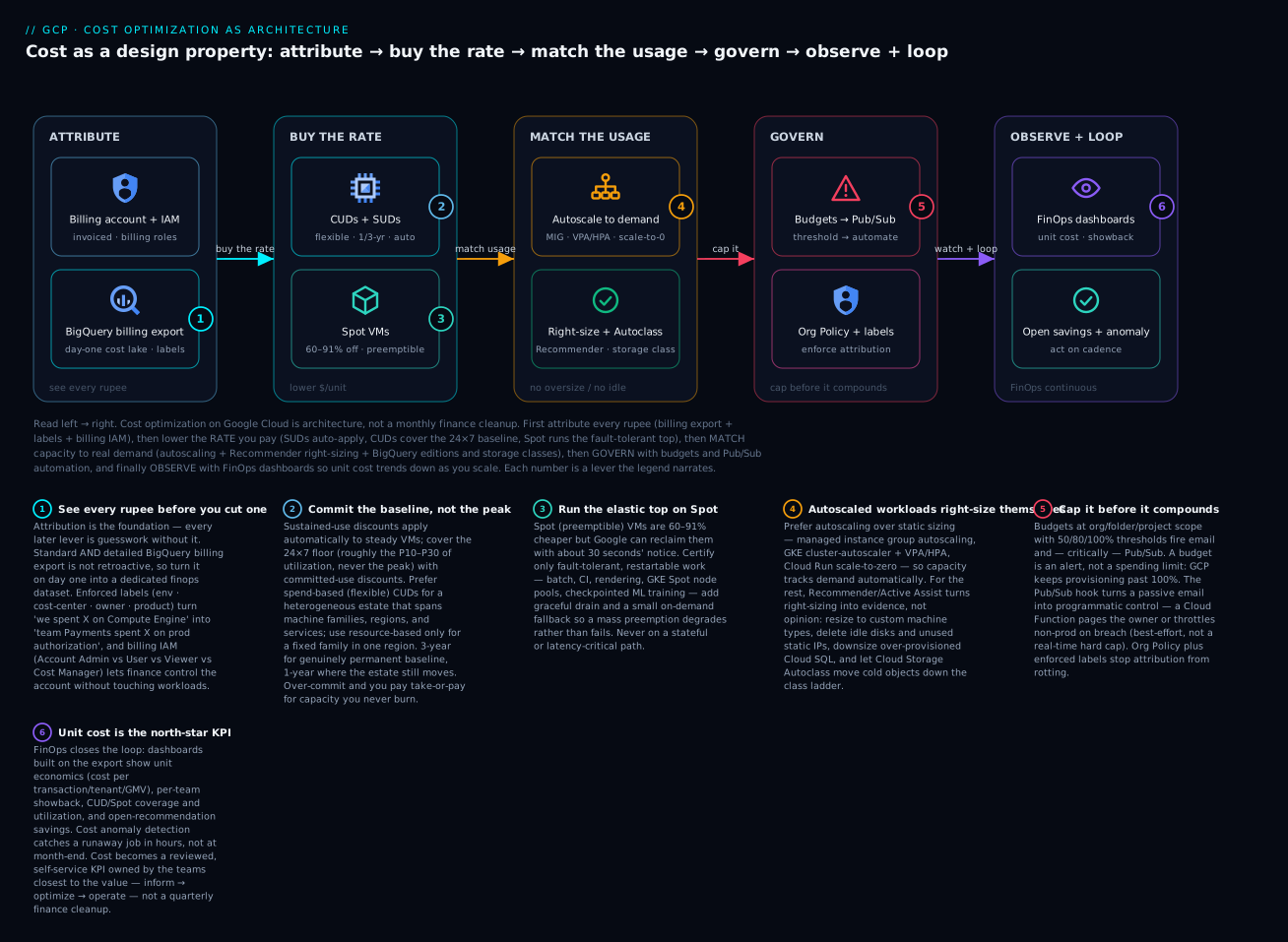
Read the diagram left → right: you first attribute every rupee (billing export + labels + billing IAM), then lower the rate you pay (SUDs auto-apply, CUDs cover the 24×7 baseline, Spot runs the fault-tolerant top), match capacity to real demand (autoscaling + Recommender right-sizing + BigQuery/storage class), govern with budgets and Pub/Sub automation, and observe with FinOps dashboards so unit cost trends down as you scale — the numbered badges are the levers the sections below unpack.
Where this fits
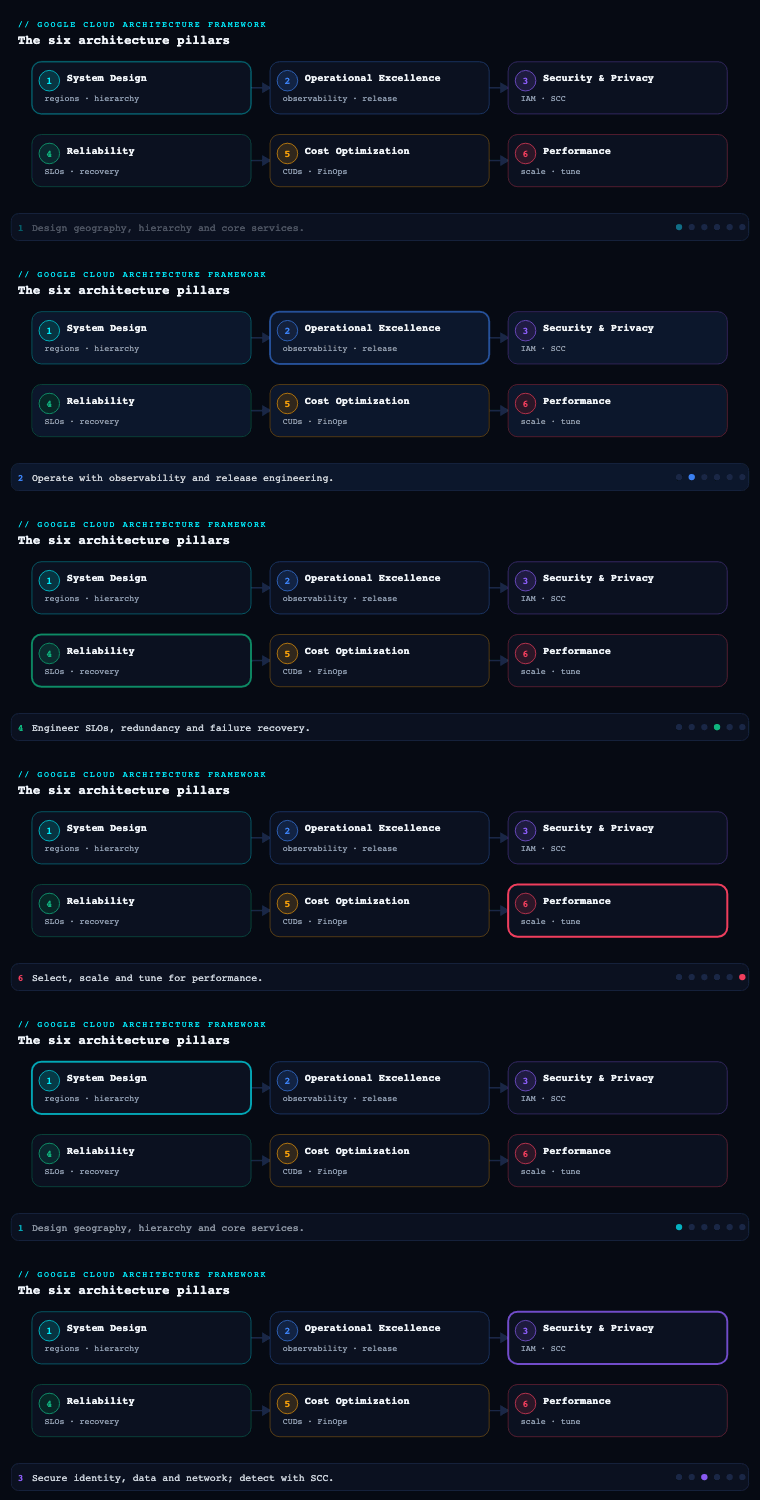
Cost Optimization is part 5 of the Google Cloud Architecture Framework, and it is deliberately late in the sequence because it is a discipline applied to a system that already exists — the System Design, Operational Excellence, Security, and Reliability pillars set the shape of the workload, and Cost Optimization is the continuous practice of making sure that shape delivers measurable business value for every rupee or dollar spent. The framework frames the entire pillar around one idea — align cloud spending with business value — and then operationalizes it through four core principles, a FinOps culture, and a concrete toolchain (Cloud Billing, BigQuery billing export, Recommender / Active Assist, committed use discounts, Spot VMs, and the FinOps Hub). The trap this pillar exists to prevent is treating cost as a quarterly finance cleanup; done well, it is an engineering loop that runs every day with the same rigor as reliability.
Cost principles — the design philosophy underneath every spend decision
The Cost Optimization pillar is built on four core principles that, like the framework’s other pillars, are the lens you apply before you reach for a knob. They are not “turn things off”; they are about ensuring spend maps to value and that the organization is wired to keep it that way.
| Core principle | What it means | The practical consequence |
|---|---|---|
| Align cloud spending with business value | Every resource should deliver measurable value; optimize for total cost of ownership (TCO) and unit economics, not the lowest invoice | Prefer managed/serverless to cut operational TCO; measure cost per transaction / per tenant, not just monthly spend |
| Foster a culture of cost awareness | People across the org consider cost impact and have the data to make informed trade-offs | Showback/chargeback, self-service dashboards, cost in the definition-of-done — not a central gatekeeper |
| Optimize resource usage | Provision only what you need and pay only for what you consume | Right-size, autoscale, Spot VMs, CUDs/SUDs, storage-class and BigQuery pricing-model choices |
| Optimize continuously | Monitor usage and cost proactively and act on inefficiency before it compounds | A recurring FinOps loop: inform → optimize → operate, driven by Recommender and anomaly detection |
Why it matters. The single highest-leverage idea here is value over invoice. A naïve cost program chases the biggest line items and starves a profitable workload of the headroom it needs; a mature one asks “what is the unit cost of the thing the business sells, and is it trending the right way?” The framework explicitly biases toward managed services and serverless (Cloud Run, GKE Autopilot, Cloud SQL, BigQuery, Dataflow) because the largest hidden cost in most estates is not compute — it is the human operational toil of patching, scaling, and failover that managed products absorb. The second load-bearing idea is culture: cost decisions are made by hundreds of engineers in pull requests, not by a finance team once a quarter, so the only scalable control is to give those engineers visibility and ownership.
How to do it well. Write the principles down as a cost-optimization policy / charter (an ADR-style document) that states your TCO stance, your unit-cost metrics, and the managed-first default. Define one or two unit-economics KPIs per product (cost per 1,000 API calls, cost per active tenant, cost per processed GB) so optimization has a north star. Establish that cost is a non-functional requirement reviewed in design and in production, exactly like latency or availability — this is what keeps the other three principles from becoming someone else’s job.
Billing and budgets — the financial control plane
Cloud Billing is the foundation of the entire pillar: it is where spend is incurred, attributed, controlled, and exported. Get the billing structure right and every downstream practice — showback, budgets, FinOps reporting — becomes a query; get it wrong and you spend the program’s first six months untangling who-owns-what.
The structural decisions.
- Billing-account topology. A Cloud Billing account pays for usage in the projects linked to it; it can be a self-serve (online) account or an invoiced account for enterprises. The standard enterprise pattern is one (or a small number of) invoiced billing account(s) at the org, with many projects linked to it, so that the resource hierarchy (org → folders → projects) and the billing hierarchy line up and cost rolls up cleanly by folder/environment.
- Attribution via labels and projects. Because the project is the primary billing boundary and quotas/IAM also attach there, project-per-environment-per-workload gives you clean native attribution. Layer labels (
env,cost-center,owner,product,data-classification) on resources so cost can be sliced by dimensions the org cares about. Labels are the difference between “we spent X on Compute Engine” and “team Payments spent X on prod authorization.” - Budgets and alerts. Cloud Billing budgets are set at the billing-account, project, or label scope, with threshold rules (e.g., 50/80/100% of a fixed amount or of last month’s spend) that fire email and, critically, Pub/Sub notifications. The Pub/Sub hook is what turns a budget from a passive email into programmatic cost control — a Cloud Function can react to a breach (page the owner, throttle a non-prod environment, or in extreme cases cap spend).
- Billing export. Two exports matter: Standard usage cost export to BigQuery (the cost and usage rows that power every dashboard and FinOps query) and detailed usage cost export (resource-level granularity). Optionally enable the pricing export. This export is the single most important artifact in the pillar — it is the data lake your FinOps practice runs on.
| Artifact | Purpose | Tool |
|---|---|---|
| Billing-account ↔ project map | Clean cost roll-up matching the resource hierarchy | Cloud Billing, Resource Manager |
| Labeling standard (enforced) | Slice cost by team/product/env/cost-center | Labels + Organization Policy / IaC |
| Budgets with threshold + Pub/Sub | Proactive alerting and programmatic control | Cloud Billing budgets, Pub/Sub, Cloud Functions |
| BigQuery billing export (standard + detailed) | The cost data lake for all reporting | BigQuery billing export |
| Billing IAM roles | Separate who spends from who administers billing | Billing Account Administrator / User / Viewer, Cost Manager |
How to do it well. Enable BigQuery billing export on day one — it is not retroactive, so every day without it is a permanent gap in your history. Enforce a mandatory labeling policy in IaC (and reconcile unlabeled spend monthly) so attribution does not rot. Set budgets at multiple scopes (org-wide, per-environment folder, and per high-spend project), and wire at least the production budgets to Pub/Sub so breaches are actionable, not just informational. Separate billing IAM (Billing Account Administrator vs User vs Viewer, plus the Cost Manager role for budgets/exports) from project IAM so finance controls the account without touching workloads. Artifacts: a billing topology diagram, an enforced labeling standard, a budget catalogue (scope, threshold, action), and the BigQuery export wired into the FinOps dataset.
In practice. Once the BigQuery export is enabled (a one-time choice in Billing → Billing export → BigQuery export, pointing at a dedicated finops dataset — it cannot be backfilled, so do it before anything else), a budget is a couple of lines. Budgets are created against the billing account and scoped down by project or label:
# A prod project budget: alert at 50% / 90% (current spend) and 100% (forecasted),
# to email AND a Pub/Sub topic so a Cloud Function can react.
gcloud billing budgets create \
  --billing-account=BILLING_ACCOUNT_ID \
  --display-name="prod-monthly" \
  --budget-amount=5000000INR \
  --filter-projects="projects/PROD_PROJECT_ID" \
  --threshold-rule=percent=0.5 \
  --threshold-rule=percent=0.9 \
  --threshold-rule=percent=1.0,basis=forecasted-spend \
  --all-updates-rule-pubsub-topic="projects/FINOPS_PROJECT/topics/budget-alerts"
The basis=forecasted-spend threshold is the one that warns you before the month closes; current-spend (the default) tells you once the money is already gone.
Committed-use discounts and Spot VMs — buying capacity at the right price
Once attribution and budgets exist, the largest single lever on the rate you pay is the pricing model. Google offers a layered set of discounts, and using them deliberately routinely moves 20–60% of a compute bill. The art is matching each discount mechanism to the predictability and fault-tolerance of the workload.
The discount mechanisms.
| Mechanism | How it works | Commitment | Best for | Trade-off |
|---|---|---|---|---|
| Sustained use discounts (SUDs) | Automatic discount for running eligible VMs (certain machine families) a large fraction of the month | None | Any steady Compute Engine usage — applied with zero action | Modest; auto-applied, not stackable with CUDs on the same usage |
| Resource-based CUDs | Commit to a quantity of vCPU + memory in a region for 1 or 3 years | 1 or 3 yr | Stable, predictable Compute Engine baseline | Region/family-bound; pay even if unused |
| Spend-based (flexible) CUDs | Commit to an hourly dollar spend (e.g., on Compute, Cloud Run, GKE Autopilot, Cloud SQL, AlloyDB, Spanner, BigQuery) for 1 or 3 yr | 1 or 3 yr | Steady spend across families/regions/services; less SKU-rigid | Still a take-or-pay floor |
| Spot VMs | Deeply discounted preemptible capacity (commonly 60–91% off) that Google can reclaim with ~30s notice | None | Fault-tolerant, interruptible work: batch, CI, rendering, stateless web behind a queue, GKE Spot node pools, ML training with checkpointing | Can be preempted any time; not for stateful/critical-path |
| BigQuery editions / capacity (slots) + autoscaling | Reserve slots (Standard/Enterprise/Enterprise Plus editions) with autoscaling and optional commitments instead of pure on-demand bytes-scanned | Optional 1–3 yr | Steady-state analytics; predictable, capped query cost | Requires capacity planning vs on-demand |
Why it matters and how to do it well. The mistake is to treat these as either/or. The correct pattern is a layered stack: let SUDs apply automatically to steady VMs; cover the stable baseline with CUDs (use spend-based/flexible CUDs when your usage moves across machine families, regions, or services — they are far more forgiving than resource-based for a heterogeneous estate); run the elastic, fault-tolerant top of the workload on Spot VMs; and put BigQuery on slot reservations with autoscaling if analytics is steady. Size CUD coverage to roughly your 24×7 minimum (often the P10–P30 of utilization, not the peak) so you never pay for committed capacity you don’t burn, and use CUD analysis / Recommender CUD recommendations in the console to right-size the commitment. Architect interruption tolerance so Spot is usable: checkpoint long jobs, drain GKE Spot pods gracefully (cluster-autoscaler + Spot node pools), and keep a small on-demand or Standard fallback so a mass preemption degrades rather than fails. Decisions to record: baseline coverage % per service, 1-yr vs 3-yr term (3-yr for genuinely permanent baseline, 1-yr where the estate is still moving), resource-based vs flexible CUD per workload, and which workloads are certified Spot-safe.
In practice. A resource-based commitment is a one-liner; spend-based (flexible) CUDs are purchased from the Cloud Billing console/API because they span services rather than a single region:
# Resource-based CUD: commit vCPU + memory in one region for 1 year.
gcloud compute commitments create baseline-commit \
  --region=asia-south1 \
  --plan=twelve-month \
  --type=general-purpose \
  --resources=vcpu=100,memory=400GB
# --plan=thirty-six-month for a 3-year term. Spend-based / flexible CUDs are bought
# under Billing → Commitments, since they cover $-spend across services, not a fixed SKU.
Right-sizing — eliminating the gap between provisioned and used
Right-sizing closes the most common and most embarrassing source of waste: resources provisioned far larger (or simply left running) than the workload actually needs. On Google Cloud this is not guesswork — Recommender and Active Assist generate machine-specific recommendations from observed utilization, so right-sizing is an evidence-driven loop rather than an opinion.
What “right-sizing” actually covers.
| Target | The recommendation source | Typical action |
|---|---|---|
| Over-provisioned VMs | VM machine-type (right-sizing) recommendations from Recommender, based on observed CPU/RAM | Resize to a smaller predefined or custom machine type; switch family (e.g., N2 → E2) |
| Idle VMs | Idle VM recommendations | Stop or delete VMs with near-zero utilization |
| Idle persistent disks & idle IPs | Idle PD / idle external IP recommendations | Delete unattached disks; release reserved-but-unused static IPs |
| Over-provisioned Cloud SQL | Cloud SQL over-provisioned instance recommendations | Downsize tier; remove idle instances |
| GKE workloads | GKE cost insights / cost allocation, Vertical Pod Autoscaler (VPA) recommendations | Set right Pod requests/limits; enable VPA; GKE Autopilot to pay per-Pod resource |
| BigQuery | Query/storage cost insights | Partition & cluster tables; prune SELECT *; cut bytes scanned; pick capacity vs on-demand |
| Cloud Storage | Autoclass, lifecycle insights | Auto-transition to Nearline/Coldline/Archive; delete/abort multipart per lifecycle |
Why it matters and how to do it well. Right-sizing is continuous, not a one-off audit, because workloads grow, shrink, and get redeployed — yesterday’s perfect size is next quarter’s waste. Operationalize it by reading Recommender programmatically (it is available via API and as a BigQuery export of recommendations, so you can track open recommendations and their estimated monthly savings as a metric), then triaging: auto-apply the safe, reversible ones (delete idle disks/IPs, downsize obvious over-provision) and route the rest to the owning team. Prefer autoscaling over static sizing wherever possible — managed instance group autoscaling, GKE cluster autoscaler + node auto-provisioning + VPA/HPA, Cloud Run request-based concurrency — because an autoscaled workload right-sizes itself. Use custom machine types to avoid the “round up to the next predefined size” tax. For data, the biggest right-sizing wins are usually BigQuery (partitioning, clustering, killing SELECT *, capacity vs on-demand) and Cloud Storage (Autoclass + lifecycle rules). Artifacts: a recurring right-sizing report (open recommendations + projected savings), an autoscaling-by-default standard, and a Spot/custom-machine-type policy.
In practice. Recommender is queryable per-recommender, so you can pull the backlog into a triage report. The costProjection value is the projected monthly saving (it is reported as a negative cost — a saving):
# Machine-type (right-size) recommendations for one zone, with the projected saving.
gcloud recommender recommendations list \
  --project=PROJECT_ID \
  --location=asia-south1-a \
  --recommender=google.compute.instance.MachineTypeRecommender \
  --format="table(name.basename(), primaryImpact.costProjection.cost.units:label=MONTHLY_SAVING, description)"
# Swap the recommender to surface other waste:
#   google.compute.instance.IdleResourceRecommender       (idle VMs)
#   google.compute.disk.IdleResourceRecommender           (unattached disks)
#   google.compute.address.IdleResourceRecommender        (reserved-but-unused IPs)
#   google.cloudsql.instance.OverprovisionedRecommender   (oversized Cloud SQL)
#   google.compute.commitment.UsageCommitmentRecommender  (CUD purchase advice)
FinOps — the operating model that makes it stick
FinOps is the cultural and operational engine of this pillar — the methodology that combines people, process, and technology to create financial accountability for cloud. Tooling surfaces waste; FinOps is what ensures someone owns it, decides on it, and that the decision aligns cost with value. Without it, dashboards are admired and ignored.
The FinOps lifecycle (and what each phase looks like on GCP).
| Phase | What you do | GCP enablers |
|---|---|---|
| Inform | Give everyone visibility: allocation, showback/chargeback, shared-cost split, unit economics | Cloud Billing reports, BigQuery billing export, FinOps Hub, Looker/Looker Studio dashboards |
| Optimize | Act on the data: right-size, buy CUDs, move to Spot, kill idle, re-architect to serverless | Recommender / Active Assist, CUDs, Spot VMs, Autoclass, GKE/Cloud Run autoscaling |
| Operate | Embed it: budgets, anomaly alerts, policy, cadence, KPIs, reviews | Budgets + Pub/Sub, cost anomaly detection, Organization Policy, FinOps cadence |
The operating model. A practical GCP FinOps practice has: a cross-functional FinOps team or guild (engineering + finance + product), a showback or chargeback model built on the BigQuery export and labels (showback to start — make spend visible to teams without the friction of internal billing — graduating to chargeback as the culture matures), a shared-cost allocation rule for the unattributable (networking, support, shared platforms), and unit-economics reporting that ties spend to a business metric. The team runs a regular cadence (e.g., monthly cost review per business unit) where open Recommender savings, budget variance, anomalies, and unit-cost trend are the standing agenda, and each item has an owner and a decision.
Why it matters and how to do it well. The framework is explicit that robust cost optimization needs two things: the ability to distinguish wasteful from value-driving usage, and an embedded culture of financial accountability. FinOps delivers both. Do it well by making cost self-service (teams see their own dashboards, get their own recommendations, own their own budgets) rather than centralized gatekeeping — the central team sets standards, tooling, and guardrails, while spend decisions sit with the teams closest to the value. Put cost into the engineering loop: a cost estimate in the design review, a cost delta surfaced in CI (e.g., Infracost-style on the Terraform plan), and cost as a first-class KPI alongside reliability. Artifacts: a FinOps charter and RACI, a showback/chargeback model, a shared-cost allocation policy, a unit-economics definition per product, and a documented monthly cost-review cadence.
Cost monitoring and dashboards — closing the continuous loop
Continuous optimization needs continuous visibility. The monitoring layer is what makes “optimize continuously” real: it turns the BigQuery export and Recommender into dashboards, anomaly alerts, and forecasts that surface inefficiency before it compounds into a bill shock.
The monitoring building blocks.
| Capability | Tool | What it gives you |
|---|---|---|
| Native cost dashboards | Cloud Billing reports (Reports, Cost breakdown, Cost table) | Spend by project/service/SKU/label/time; on-demand slicing without building anything |
| Waste & utilization at a glance | FinOps Hub (waste/utilization view, savings opportunities) | Surfaces idle/underused resources and consolidated savings recommendations |
| Custom analytics & unit economics | BigQuery billing export + Looker / Looker Studio | Bespoke dashboards: cost per tenant/transaction, chargeback views, trend & burn-down |
| Idle/right-size recommendations | Recommender / Active Assist (+ recommendations BigQuery export) | Actionable, $-quantified optimization items tracked over time |
| Cost anomaly detection | Cost anomaly detection (Cloud Billing / Active Assist) | Automatic alerting on unexpected spend spikes by project/service |
| Budget breaches & automation | Cloud Billing budgets → Pub/Sub → Cloud Functions | Programmatic reaction to threshold breaches |
| Forecasting | Billing reports forecast / BigQuery models | End-of-month and trend projection to catch drift early |
Why it matters and how to do it well. The native Cloud Billing reports and Cost breakdown are the fastest way to answer “where did the money go,” and the FinOps Hub is the fastest way to answer “where is the waste” — both should be the default landing pages for a FinOps team. But the strategic dashboards are the ones you build on the BigQuery export in Looker Studio: unit-economics (cost per business metric), per-team showback, CUD coverage/utilization, and Spot vs on-demand mix — these tie spend to value, which is the whole point of the pillar. Wire cost anomaly detection so a runaway job or a misconfigured autoscaler is caught in hours, not at month-end, and put forecasting on the dashboard so you see a budget breach coming before it lands. Define a small set of cost KPIs and review them on the FinOps cadence:
| KPI | Why it matters |
|---|---|
| Unit cost (cost per transaction / tenant / GB) | The truest measure of value alignment; should trend down or flat as you scale |
| CUD/Spot coverage & utilization | Are you buying discounts and actually burning the commitment? |
| Idle / waste spend (from FinOps Hub & Recommender) | The directly recoverable money on the table |
| Open recommendation savings ($) | Backlog of un-actioned optimization; a FinOps team’s worklist |
| Budget variance & forecast | Early warning on drift before the invoice |
| Untagged / unallocated % | How much spend you cannot attribute — a governance smell |
Artifacts: a Looker Studio (or Looker) FinOps dashboard suite on the BigQuery export, configured cost anomaly detection, a tracked open-recommendations report, and a defined cost-KPI scorecard reviewed on cadence.
Going deeper
The sections above are the what and the why. This section is the how it actually works underneath — the billing-export schema, the mechanics of how a CUD lands on a bill, how to make Spot genuinely safe, the data-cost math, the egress trap, and why a budget can never truly cap a bill. This is the material that separates someone who has read the pillar from someone who has run it.
The billing-export schema — the queries FinOps actually runs
The standard export writes one row per (service, SKU, project, label-set, day, location) with the fields that matter: cost (the list cost), usage, a repeated credits[] record, project.labels, resource labels, location, and currency. The single most misunderstood point is list cost vs effective (net) cost. The cost column is the undiscounted list price. Every discount — SUD, CUD, committed-use credit, promotion, free tier — arrives as a negative entry in the repeated credits[] array. So the real number your CFO cares about is:
net (effective) cost =
cost+ SUM(credits.amount)
The canonical showback query — net monthly cost by team label, with anything unlabeled bucketed so you can measure the “unallocated %” governance smell — looks like this:
-- Net monthly cost by team label; credits included; UNALLOCATED bucketed; costliest first.
SELECT
  COALESCE((SELECT value FROM UNNEST(labels) WHERE key = 'team'), 'UNALLOCATED') AS team,
  ROUND(SUM(cost), 2)                                                            AS list_cost,
  ROUND(SUM((SELECT IFNULL(SUM(c.amount), 0) FROM UNNEST(credits) c)), 2)        AS credits,
  ROUND(SUM(cost) + SUM((SELECT IFNULL(SUM(c.amount), 0) FROM UNNEST(credits) c)), 2) AS net_cost
FROM `FINOPS_PROJECT.finops.gcp_billing_export_v1_XXXXXX_XXXXXX_XXXXXX`
WHERE _PARTITIONTIME  >= TIMESTAMP_TRUNC(TIMESTAMP_SUB(CURRENT_TIMESTAMP(), INTERVAL 1 MONTH), MONTH)
  AND usage_start_time >= TIMESTAMP_TRUNC(TIMESTAMP_SUB(CURRENT_TIMESTAMP(), INTERVAL 1 MONTH), MONTH)
  AND usage_start_time <  TIMESTAMP_TRUNC(CURRENT_TIMESTAMP(), MONTH)
GROUP BY team
ORDER BY net_cost DESC;
Two details make this production-grade. First, the _PARTITIONTIME predicate: the export table is partitioned on ingestion time, and filtering it keeps this meta-query about cost from itself scanning (and billing) the entire history — the irony of an expensive cost query is real. Second, the UNALLOCATED bucket is your untagged % KPI: divide its net_cost by the total and you have the exact figure the labeling policy is supposed to drive toward zero.
How committed-use discounts actually apply
The most common misconception is that a CUD is like a reserved instance you attach to a specific VM. It is not. CUDs are billing-level discounts applied automatically to matching usage:
- Resource-based CUD matches vCPU + memory of a specific machine family in a specific region. If you run matching VMs, the committed portion is billed at the discounted rate automatically — you never point the commitment at an instance.
- Spend-based (flexible) CUD matches dollar spend across the covered services (Compute, Cloud Run, GKE Autopilot, Cloud SQL, AlloyDB, Spanner, BigQuery, and more). It does not care which family or region the spend lands in — which is exactly why it fits a heterogeneous, moving estate.
- CUD sharing. By default, commitments are shared across every project linked to the billing account, so a commitment “bought in” one project discounts matching usage anywhere in the account. This is great for utilization but a subtlety for showback: the credit lands where the usage is, so you must attribute the commitment fee deliberately or a heavily-committed team can look artificially cheap.
- Stacking. SUDs and CUDs do not double-dip on the same usage. Usage covered by a CUD is billed at the committed rate and does not also earn a sustained-use discount; SUDs apply to the uncommitted remainder. So the layered stack is additive across different usage, not multiplicative on the same usage.
The break-even intuition: a 1-year commitment is worth it only for capacity you are confident you will run for most of the term. If a 1-year CUD is, say, ~37% off on-demand, you need to actually use the committed capacity a large majority of the term for it to pay off — which is why you commit the P10–P30 of utilization (the 24×7 floor), never the peak, and let google.compute.commitment.UsageCommitmentRecommender do the arithmetic from your observed usage. Over-commit a workload that then shrinks or moves region and you keep paying the take-or-pay floor for capacity you no longer burn.
Making Spot usable — preemption handling done right
Spot’s 60–91% discount is only free money if the workload survives a reclaim. Compute Engine gives an ACPI G2 soft-off signal ~30 seconds before preemption — the window in which you must checkpoint and drain. On GKE, the clean pattern is a Spot node pool that scales to zero, tainted so only tolerant pods land on it, plus checkpointing and a small on-demand fallback:
# A Spot node pool that scales from 0, tainted so only Spot-tolerant pods schedule on it.
gcloud container node-pools create spot-batch \
  --cluster=CLUSTER_NAME --region=asia-south1 \
  --spot \
  --enable-autoscaling --min-nodes=0 --max-nodes=20 \
  --node-taints=spot=true:NoSchedule
# Only Spot-tolerant, checkpointing pods land on the pool.
spec:
  nodeSelector:
    cloud.google.com/gke-spot: "true"       # GKE labels Spot nodes automatically
  tolerations:
    - key: spot
      operator: Equal
      value: "true"
      effect: NoSchedule
  terminationGracePeriodSeconds: 25          # act inside the ~30s preemption signal
# A PodDisruptionBudget expresses how much loss the workload tolerates.
apiVersion: policy/v1
kind: PodDisruptionBudget
metadata:
  name: batch-pdb
spec:
  minAvailable: 0        # pure batch tolerates full loss; a service sets a real floor
  selector:
    matchLabels:
      app: batch
Three production rules ride on top. Checkpoint long jobs so a preemption costs minutes, not the whole run. Spread across zones and machine types — Spot availability is per-zone-per-type, so one big homogeneous request is more preemptible than a diversified one. And keep a small on-demand (or Standard) fallback pool so a mass reclaim degrades throughput rather than failing the pipeline.
Recommender at scale — exporting the whole backlog
Reading Recommender with gcloud is per-project, per-location, per-recommender — fine for a spot check, useless for a 400-project org. At fleet scale you enable the Recommender BigQuery export (via the BigQuery Data Transfer Service) so every recommendation across the org lands in a dataset on a schedule. Now “open savings ($)” is a single query you can trend on a dashboard: each recommendation row carries a primaryImpact.costProjection, a recommender type, and a state (ACTIVE → CLAIMED → SUCCEEDED, or DISMISSED). Summing costProjection where state = 'ACTIVE' is your recoverable-money KPI; watching SUCCEEDED climb over time is proof the FinOps loop is actually closing, not just admiring. Active Assist is the umbrella brand over Recommender, the CUD/idle recommenders, and cost anomaly detection.
BigQuery and Cloud Storage — the data-cost levers
For most data-heavy estates, the two biggest usage levers are BigQuery’s pricing model and Cloud Storage’s class ladder.
BigQuery: on-demand vs Editions. On-demand bills per TiB scanned; Editions (Standard/Enterprise/Enterprise Plus) bill for slot-time, with autoscaling (a baseline floor + an autoscale ceiling) and optional 1–3 year commitments. The break-even is about steadiness: spiky, low-volume analytics → on-demand plus a hard maximum_bytes_billed cap; high, steady volume → a reservation with a committed baseline and an autoscale ceiling. Model it against measured slot-hours, never a guessed TiB threshold. And always preview bytes before you pay — a --dry_run returns the scan estimate without running the query:
# --dry_run returns bytes processed WITHOUT scanning or billing anything.
bq query --use_legacy_sql=false --dry_run \
  'SELECT event_name, COUNT(*) AS n
   FROM `PROJECT.ds.events`
   WHERE _PARTITIONDATE BETWEEN "2026-06-01" AND "2026-06-30"
   GROUP BY event_name'
# → "Query successfully validated. Assuming the tables are not modified,
#    running this query will process 4200000000 bytes of data." (representative)
Partition and cluster tables so a WHERE prunes whole slices, and never SELECT * on a wide table (SELECT * EXCEPT(blob) if you must) — columnar storage bills the columns you touch. (The BigQuery pricing deep dive linked above goes further.)
Cloud Storage: Autoclass. Rather than hand-tuning lifecycle rules, Autoclass automatically moves each object between Standard → Nearline → Coldline → Archive based on its own access pattern — hot objects stay hot, untouched ones sink to cheaper classes, and a re-accessed object climbs back:
gcloud storage buckets create gs://BUCKET \
  --location=asia-south1 \
  --enable-autoclass
# Existing bucket: gcloud storage buckets update gs://BUCKET --enable-autoclass
Autoclass trades a small per-object management fee for removing the risk of a hand-written lifecycle rule that either leaves cold data on Standard (waste) or demotes hot data to Archive (expensive retrieval). Use it for buckets with unpredictable access; keep explicit lifecycle rules where the pattern is known and simple.
The egress trap — the line item nobody provisions
The most-missed cost lever is the network. Ingress is free; egress is charged, and the rate depends on the path the bytes take:
| Traffic path | Relative cost | Design lever |
|---|---|---|
| Same-zone, internal IP | Free | Colocate chatty services in one zone where latency allows |
| Cross-zone, same region | Low | Keep tightly-coupled services in one region |
| Cross-region (within GCP) | Higher | Don’t ship raw data across regions — process where it lands |
| Egress to the internet | Highest (varies by Network Service Tier) | Cloud CDN, Standard vs Premium tier, cache at the edge |
| To Google APIs / Cloud Storage | Free/cheap via Private Google Access / PSC | Reach Google services privately, not over internet egress |
A pair of microservices split across regions, a read replica pulled cross-region, or nightly backups shipped across continents can quietly dwarf every CUD and Spot saving you fought for. The levers are architectural: colocate talkative services, use Private Service Connect / Private Google Access to reach Google APIs without internet egress, front egress-heavy static content with Cloud CDN so origin egress collapses to cache fills, choose the Standard Network Service Tier where global premium routing is not required, and honor data gravity — compute next to the data, don’t drag the data to the compute. (Rates vary by region and tier — always price a design against the current Network pricing page rather than a remembered number.)
Programmatic budget control — and why a budget can’t hard-cap
Here is the nuance that surprises almost everyone: a Cloud Billing budget is an alerting construct, not a spending limit. When you hit 100%, GCP does not stop provisioning — it keeps serving your traffic (which is usually what you want in prod). To act on a breach you wire budget → Pub/Sub → Cloud Function, and even then it is best-effort:
# main.py — 2nd-gen Cloud Function (Python), triggered by the budget's Pub/Sub topic.
import base64, json, os
from googleapiclient import discovery
import functions_framework

TARGET = f"projects/{os.environ['TARGET_PROJECT_ID']}"   # a NON-PROD project ONLY

@functions_framework.cloud_event
def cap_nonprod(event):
    payload = json.loads(base64.b64decode(event.data["message"]["data"]))
    cost, budget = payload.get("costAmount", 0), payload.get("budgetAmount", 0)
    if cost < budget:
        return  # under budget — nothing to do
    billing = discovery.build("cloudbilling", "v1")
    # Detaching the billing account stops ALL billable resources — DESTRUCTIVE.
    billing.projects().updateBillingInfo(
        name=TARGET, body={"billingAccountName": ""}
    ).execute()
    print(f"Billing DISABLED for {TARGET} (cost {cost} >= budget {budget})")
Two caveats are non-negotiable. First, budget notifications are periodic and lag real spend (they are not a real-time meter), so this is damage control, not a guaranteed cap — you can still overshoot between notifications. Second, disabling billing detaches the account and tears down billable resources on that project, so this pattern is only ever for a non-prod sandbox; for anything with data or users, react with a softer action (scale non-prod to zero, page the owner, open a ticket). The function’s service account needs a billing-management role (e.g., Project Billing Manager). This is the shape of Google’s own documented sample — powerful, and exactly why you point it at a throwaway project.
Real-world enterprise scenario
Helix Retail Group is a fictional pan-India omnichannel retailer running a Google Cloud estate of roughly ₹2.4 crore/month (~$290k) across e-commerce, an inventory/order platform, a data/analytics warehouse, and a recommendations ML pipeline. Spend grew 40% year-on-year with no corresponding revenue lift, finance was blind to which product drove which cost, and a single misconfigured BigQuery job once added ₹18 lakh in a weekend. The CTO charters a FinOps program with a target to cut TCO 25% in two quarters without degrading the Diwali-peak shopping experience.
Cost principles. The platform team writes a one-page cost charter: managed-first (justify any move to self-managed VMs), TCO over invoice, and a unit-economics north star of cost per ₹1,000 of GMV plus cost per active monthly shopper. Cost is declared a non-functional requirement reviewed in every design.
Billing and budgets. They consolidate onto a single invoiced Cloud Billing account at the org and align it to the resource hierarchy (prod/nonprod/shared folders). A mandatory labeling policy (product, env, cost-center, team) is enforced in Terraform, and they backfill labels to drop unallocated spend from 22% to under 4%. BigQuery billing export (standard + detailed) feeds a finops dataset. Budgets are set org-wide, per environment folder, and per high-spend project (e-commerce, warehouse), each wired to Pub/Sub; a Cloud Function auto-throttles non-prod environments at 90% and pages the owner on prod breaches.
CUDs and Spot VMs. Analysis of the BigQuery export shows a stable 24×7 baseline of ~55% of compute. They cover it with 3-year spend-based (flexible) CUDs (the estate spans E2, N2, Cloud Run, and Cloud SQL, so flexible beats resource-based), keep a 1-year flexible CUD on the still-moving recommendations service, and let SUDs apply automatically. The recommendations ML training and nightly catalog/image processing move to Spot VMs (GKE Spot node pools with checkpointing and graceful drain), with a small on-demand fallback pool — cutting that batch compute ~78%. BigQuery moves to Enterprise edition slot reservations with autoscaling for steady reporting, leaving ad-hoc analytics on on-demand.
Right-sizing. They export Recommender recommendations to BigQuery and track open savings as a KPI. Idle PDs and unused static IPs are auto-reclaimed; over-provisioned VMs are resized to custom machine types; an over-provisioned Cloud SQL replica is downsized. GKE Autopilot plus VPA right-size the e-commerce microservices to actual Pod usage, and Cloud Run scale-to-zero is enabled across non-prod.
FinOps. A FinOps guild (two platform engineers + a FinOps analyst from finance + a product owner) runs a monthly cost review per business unit on a showback model (chargeback planned for year two). Shared platform and networking cost is split by a documented allocation rule. Cost estimates appear in design reviews and a cost delta is surfaced on every Terraform plan in CI.
Cost monitoring. The team lives in Cloud Billing reports and the FinOps Hub for daily waste, and builds a Looker Studio suite on the export: unit cost per ₹1,000 GMV, per-product showback, CUD coverage/utilization, Spot mix, and open-recommendation savings. Cost anomaly detection is enabled per project — the kind of runaway BigQuery job that once cost ₹18 lakh is now caught within the hour.
Outcome. Within two quarters Helix cut TCO ~27% (CUDs + Spot delivered the rate reduction, right-sizing and idle cleanup the usage reduction), drove unallocated spend below 4%, lifted CUD utilization to 96%, and reduced cost per active shopper 31% even as traffic grew into the Diwali peak — which it served at full performance because optimization targeted waste, not headroom. The anomaly alerts and budget automation mean a repeat of the weekend bill-shock is now an hour-one page, not a month-end surprise.
Practice challenges
Work these in order — they climb from “read the bill” to “automate the guardrail.” Try each before opening the solution.
1. (Beginner) Last month’s spend by service, net of credits. You have BigQuery billing export flowing into finops. Write a query that returns each service’s list cost, total credits, and net cost for last calendar month, most expensive first.
<details><summary>Solution</summary>
SELECT
  service.description AS service,
  ROUND(SUM(cost), 2) AS list_cost,
  ROUND(SUM((SELECT IFNULL(SUM(c.amount), 0) FROM UNNEST(credits) c)), 2) AS credits,
  ROUND(SUM(cost) + SUM((SELECT IFNULL(SUM(c.amount), 0) FROM UNNEST(credits) c)), 2) AS net_cost
FROM `FINOPS_PROJECT.finops.gcp_billing_export_v1_XXXXXX_XXXXXX_XXXXXX`
WHERE _PARTITIONTIME  >= TIMESTAMP_TRUNC(TIMESTAMP_SUB(CURRENT_TIMESTAMP(), INTERVAL 1 MONTH), MONTH)
  AND usage_start_time >= TIMESTAMP_TRUNC(TIMESTAMP_SUB(CURRENT_TIMESTAMP(), INTERVAL 1 MONTH), MONTH)
  AND usage_start_time <  TIMESTAMP_TRUNC(CURRENT_TIMESTAMP(), MONTH)
GROUP BY service
ORDER BY net_cost DESC;
Why: cost is the undiscounted list price; discounts live in the negative credits[] array, so net_cost = cost + SUM(credits.amount) is the number that matches your invoice.
</details>
2. (Beginner) A project budget that warns before it’s too late. Create a budget on SANDBOX_PROJECT_ID of ₹1,00,000/month that alerts at 50% and 90% of actual spend and at 100% of forecast, to email and a Pub/Sub topic.
<details><summary>Solution</summary>
gcloud billing budgets create \
  --billing-account=BILLING_ACCOUNT_ID \
  --display-name="sandbox-monthly" \
  --budget-amount=100000INR \
  --filter-projects="projects/SANDBOX_PROJECT_ID" \
  --threshold-rule=percent=0.5 \
  --threshold-rule=percent=0.9 \
  --threshold-rule=percent=1.0,basis=forecasted-spend \
  --all-updates-rule-pubsub-topic="projects/FINOPS_PROJECT/topics/budget-alerts"
Why: multiple thresholds plus a forecasted-spend rule warn you before month-end, and the Pub/Sub topic is what makes a breach actionable rather than just an email nobody reads. </details>
3. (Intermediate) Showback with an “unallocated” bucket. Produce net cost for this month grouped by the team label, with anything unlabeled shown as UNALLOCATED, sorted by net cost. Then say how you’d turn it into an untagged-% KPI.
<details><summary>Solution</summary>
SELECT
  COALESCE((SELECT value FROM UNNEST(labels) WHERE key = 'team'), 'UNALLOCATED') AS team,
  ROUND(SUM(cost) + SUM((SELECT IFNULL(SUM(c.amount),0) FROM UNNEST(credits) c)), 2) AS net_cost
FROM `FINOPS_PROJECT.finops.gcp_billing_export_v1_XXXXXX_XXXXXX_XXXXXX`
WHERE _PARTITIONTIME  >= TIMESTAMP_TRUNC(CURRENT_TIMESTAMP(), MONTH)
  AND usage_start_time >= TIMESTAMP_TRUNC(CURRENT_TIMESTAMP(), MONTH)
GROUP BY team
ORDER BY net_cost DESC;
Why: COALESCE(... , 'UNALLOCATED') surfaces unattributable spend as its own row; UNALLOCATED.net_cost ÷ total.net_cost is the untagged-% governance KPI the labeling policy exists to drive toward zero.
</details>
4. (Intermediate) Pick the discount stack for a mixed baseline. A workload runs a steady 24×7 floor of ~80 vCPU / 320 GB spread across E2 and N2 in asia-south1, plus spiky daytime peaks. Design the discount strategy and name the command that validates it.
<details><summary>Solution</summary>
Cover the P10–P30 floor (not the peak) with a 1-year spend-based (flexible) CUD — the estate spans two families, so flexible beats resource-based, and 1-year because the mix is still moving. Let SUDs apply automatically to the uncommitted remainder, and run the spiky peaks on Spot or on-demand. Validate the commitment size against observed usage:
gcloud recommender recommendations list \
  --project=PROJECT_ID --location=asia-south1 \
  --recommender=google.compute.commitment.UsageCommitmentRecommender \
  --format="table(name.basename(), primaryImpact.costProjection.cost.units, description)"
Why: you match the mechanism to the workload’s predictability and heterogeneity, and you commit only the floor you’re certain to burn — over-committing the peak is how CUDs lose money. </details>
5. (Advanced) Move a nightly batch job to Spot, safely. Convert a nightly GKE image-processing job to Spot without risking a failed run when Google reclaims capacity.
<details><summary>Solution</summary>
Create a tainted, scale-to-zero Spot node pool, and make the job tolerate it, checkpoint, and set a disruption budget:
gcloud container node-pools create spot-batch \
  --cluster=CLUSTER_NAME --region=asia-south1 --spot \
  --enable-autoscaling --min-nodes=0 --max-nodes=20 \
  --node-taints=spot=true:NoSchedule
spec:
  nodeSelector: { cloud.google.com/gke-spot: "true" }
  tolerations:
    - { key: spot, operator: Equal, value: "true", effect: NoSchedule }
  terminationGracePeriodSeconds: 25   # act inside the ~30s preemption signal
Add checkpointing so a reclaim costs minutes, a PodDisruptionBudget, and a small on-demand fallback pool.
Why: Spot’s discount is only real if interruption-tolerance is engineered in — taint + toleration keep non-tolerant pods off, and checkpoint + drain + fallback turn a mass preemption into a delay, not a failure. </details>
6. (Advanced) Auto-cap a runaway sandbox — and state the limits. A dev sandbox repeatedly blows its budget overnight. Wire an automatic 100% cap and state exactly why it is not a guaranteed hard limit.
<details><summary>Solution</summary>
Wire budget (forecasted 100%) → Pub/Sub → Cloud Function that disables billing on the sandbox project:
@functions_framework.cloud_event
def cap_nonprod(event):
    payload = json.loads(base64.b64decode(event.data["message"]["data"]))
    if payload.get("costAmount", 0) < payload.get("budgetAmount", 0):
        return
    discovery.build("cloudbilling", "v1").projects().updateBillingInfo(
        name=f"projects/{os.environ['TARGET_PROJECT_ID']}",
        body={"billingAccountName": ""}).execute()
Caveats: (1) budget notifications lag real spend, so you can overshoot between messages — it is best-effort, not a real-time meter; (2) detaching billing destroys billable resources, so this is non-prod only — prod reacts with a softer action (scale to zero, page the owner).
Why: GCP never auto-stops spend at 100% — a budget is an alarm, not a sprinkler — so any real cap is opt-in automation, and disabling billing is a blunt instrument you only aim at a throwaway project. </details>
Common beginner mistakes
These are misconceptions — the wrong mental model — as distinct from the architect-level pitfalls listed further down.
- “A budget will cap my bill.” It won’t. A budget only alerts; GCP keeps provisioning past 100%. Right model: a budget is a smoke alarm, not a sprinkler — if you want action, wire Pub/Sub automation, and even that is best-effort and lagging.
- “Spot VMs are just cheaper VMs — use them everywhere.” They can be reclaimed in ~30 seconds; on a stateful or latency-critical path that means outages. Right model: Spot is for fault-tolerant, restartable work with checkpointing and an on-demand fallback.
- “A CUD is a reserved instance pinned to a VM.” No — CUDs are billing-level discounts applied automatically to matching usage and shared across projects; you never attach one to a machine. Right model: commit the baseline quantity or spend, and the discount finds the usage.
- “SUD + CUD stack for a bigger discount on the same VM.” They don’t double-dip: CUD-covered usage does not also earn SUD. Right model: the CUD covers the committed floor; SUD auto-applies to the uncommitted remainder.
- “I’ll switch on billing export when I actually need to analyze cost.” The export is not retroactive — you get zero history for the period before you enabled it. Right model: turn on standard and detailed export on day one, before there’s a crisis to analyze.
- “On-demand BigQuery is fine and
SELECT *is harmless.” You pay per bytes scanned;SELECT *on a wide, unpartitioned table can scan (and bill) terabytes for one query. Right model: partition + cluster, select only needed columns,--dry_runfirst, and cap withmaximum_bytes_billed. - “Network egress is free or negligible.” Egress — especially cross-region and internet — is a real, often invisible line item that can exceed your compute savings. Right model: colocate chatty services, use private access + Cloud CDN, and respect data gravity.
- “Recommender flagged it, so the saving is booked.” A recommendation is a suggestion until someone applies it. Right model: track open savings ($) as a KPI, auto-apply the safe/reversible ones, and assign the rest an owner in the FinOps cadence.
Deliverables & checklist
Common pitfalls
- No billing export until you need it. BigQuery billing export is not retroactive, so teams that enable it during a cost crisis have no history to analyze. Avoid it: turn on standard and detailed export on day one, before any optimization work.
- Chasing the biggest line item instead of unit cost. Cutting the largest service can starve a profitable workload and miss the real waste. Avoid it: measure unit economics (cost per transaction/tenant/GMV) and optimize against value, not the raw invoice.
- Over-committing on CUDs. Buying 3-year resource-based commitments for a workload that then shrinks or moves regions leaves you paying for capacity you don’t burn. Avoid it: size CUDs to the 24×7 minimum (P10–P30), prefer spend-based/flexible CUDs for a heterogeneous estate, and use 1-year where the estate is still moving.
- Spot VMs on the critical path. Running stateful or latency-critical services on preemptible capacity causes outages when Google reclaims it. Avoid it: certify only fault-tolerant workloads for Spot, add checkpointing and graceful drain, and keep an on-demand fallback.
- Recommendations admired, never actioned. Recommender and the FinOps Hub surface savings that nobody owns, so waste persists. Avoid it: export recommendations, track open savings ($) as a KPI, auto-apply the safe ones, and assign the rest in the FinOps cadence.
- Centralized cost gatekeeping. A single FinOps team approving every spend becomes a bottleneck and breeds resentment. Avoid it: make cost self-service — teams get their own dashboards, recommendations, and budgets — while the central team owns standards and guardrails.
- Unlabeled spend rot. Without enforced labels, attribution decays and large slices of cost become unallocatable. Avoid it: enforce labeling in IaC/Organization Policy and reconcile unallocated spend every month.
Glossary
- TCO (total cost of ownership) — the full cost of running a workload, including the human toil of operating it, not just the resource invoice; the reason the framework biases toward managed/serverless.
- Unit economics / unit cost — cost divided by a business metric (per transaction, per tenant, per ₹1,000 GMV, per processed GB); the truest measure of value alignment, and the KPI that should trend down or flat as you scale.
- Showback — showing each team its own spend for visibility, without an internal invoice. Chargeback — actually billing that spend back to the team’s budget; a more mature model you graduate to.
- FinOps — the operating model (people + process + technology) that creates financial accountability for cloud, run as a continuous inform → optimize → operate loop.
- SUD (sustained-use discount) — an automatic, no-commitment discount for running eligible VMs a large fraction of the month; applies to usage not already covered by a CUD.
- CUD (committed-use discount) — a discount in exchange for a 1- or 3-year commitment. Resource-based commits a quantity of vCPU + memory in a region/family; spend-based (flexible) commits an hourly dollar spend across many services and is more forgiving for a heterogeneous estate.
- Take-or-pay — a commitment you pay for whether or not you use it; the risk in over-committing CUDs.
- Spot VM (preemptible) — deeply discounted (60–91% off) compute that Google can reclaim with ~30 seconds’ notice; safe only for fault-tolerant, restartable work.
- Recommender / Active Assist — Google’s engine that generates $-quantified optimization recommendations (right-size, idle VM/disk/IP, over-provisioned Cloud SQL, CUD purchase) from observed utilization; queryable via API and exportable to BigQuery.
- Custom machine type — a VM sized to exact vCPU/RAM instead of rounding up to a predefined size; avoids the “next size up” tax.
- MIG (managed instance group) — a group of identical VMs with autoscaling and autohealing; the classic way to autoscale Compute Engine to demand.
- VPA / HPA — Vertical Pod Autoscaler (right-sizes Pod requests/limits) and Horizontal Pod Autoscaler (scales replica count) in GKE.
- Scale-to-zero — dropping to zero running instances when there is no traffic (e.g., Cloud Run, a Spot node pool with
min-nodes=0), so idle costs nothing. - BigQuery on-demand — pay per TiB scanned per query. BigQuery Editions / slots / reservation — pay for slot-time (compute) with a committed baseline and an autoscale ceiling; cheaper for steady, high-volume analytics.
maximum_bytes_billed— a per-query byte cap that turns a runawaySELECT *into an error instead of a four-figure line item.- Autoclass — a Cloud Storage bucket feature that automatically moves each object across Standard/Nearline/Coldline/Archive based on its access pattern, replacing hand-tuned lifecycle rules.
- Storage classes — Standard (hot) → Nearline → Coldline → Archive (cold), each cheaper to store but with higher retrieval cost and minimum-duration terms.
- Billing export — a continuous feed of cost/usage rows into BigQuery; standard (service/SKU level) and detailed (resource level). Not retroactive, so enable it day one.
- List cost vs effective (net) cost — list is the undiscounted price (
costcolumn); net subtracts credits (cost + SUM(credits.amount)), and is the number that matches your invoice. - Credits — negative entries in the export representing discounts (SUD, CUD, committed-use, promotions, free tier).
- Budget — a Cloud Billing alerting construct with thresholds (current or forecasted spend) that notifies email and Pub/Sub; not a spending limit.
- Pub/Sub — the messaging service a budget publishes breaches to, enabling a Cloud Function to react programmatically.
- Cost anomaly detection — automatic alerting on unexpected spend spikes by project/service, so a runaway job is caught in hours, not at month-end.
- FinOps Hub — a console view that surfaces idle/underused resources and consolidated savings opportunities at a glance.
- Billing IAM roles — Billing Account Administrator / User / Viewer and Cost Manager (budgets/exports); separated from project IAM so finance controls the account without touching workloads.
- Label — a
key:valuetag on resources/projects (env,cost-center,owner,product) that makes cost sliceable; the basis of showback. - Unallocated (untagged) spend — cost that cannot be attributed to a team/product because it lacks labels; a governance smell to drive toward zero.
- Egress — outbound network traffic, which is charged (ingress is free); the rate depends on the path (same-zone free → cross-region → internet), an often-invisible line item.
- Network Service Tier — Premium (Google’s global backbone) vs Standard (cheaper, regional routing); a lever on internet-egress cost.
- Private Service Connect / Private Google Access — ways to reach Google APIs and services over private networking instead of paid internet egress.
What’s next
Part 6 of the Google Cloud Architecture Framework series turns to the Performance Optimization pillar — designing for and continuously tuning the latency, throughput, and scalability of the system whose cost you have just brought under disciplined control.