In a nutshell
System design is the skill of turning a set of requirements (“a payments API that must never lose a transaction, stay up during a festival sale, and keep Indian data in India”) into a concrete architecture (“Cloud Run in front, Spanner for the ledger, Pub/Sub between them, all in asia-south1 + asia-south2”). The trap beginners fall into is starting from the services — “let’s use Spanner!” — and reverse-engineering a problem to fit. Good architects do the opposite, and they do it the same way every time, running a short repeatable method.
Think of it like planning a new hospital. You do not begin by choosing the brand of the MRI machine. You begin by asking how many patients per day, how fast the emergency room must respond, what must legally stay on-site, and what happens when the power fails — and once those numbers are on the wall, the equipment choices fall out almost on their own. The method in this lesson is that same discipline for software: requirements → capacity estimate → API & data model → compute, storage & data choices → scaling & caching → reliability & DR → cost. Each step’s answer is the next step’s input, and the moment you can name the numbers, the right Google Cloud building block is usually obvious.
Google Cloud hands you a menu of managed building blocks — Cloud Run, GKE, and Compute Engine for compute; Cloud SQL, Spanner, Firestore, and Bigtable for data; Pub/Sub and Cloud Tasks for wiring services together — and the entire craft is matching each block to a requirement you can defend. This lesson has two halves that serve that craft. The first half (this method and a worked example) is how to think — the sequence you run at a whiteboard, in a design review, or in a system-design interview. The second half (the Google Cloud Architecture Framework’s System Design pillar — principles, geography, the resource hierarchy, networking, and the compute/storage/database decision tables) is what to pick — the detailed menu each step of the method reaches into. A total beginner can follow the method; an experienced engineer will still find sharp edges in “Going deeper.”
Level: Advanced · Time: ~45 min
Prerequisites: You should be comfortable with the idea that a project is your billing-and-resource boundary and that resources live in regions and zones, and know roughly what a virtual machine, a relational database, and a load balancer are. You do not need to have used any of these services in anger — the method is the map that ties them together. If the foundational shape of a web app on GCP is unfamiliar, read Three-tier web application: the foundational build first; it is the gentle, concrete companion to this more abstract lesson.
After this lesson you can:
- Run a repeatable 7-step method to design any system on Google Cloud, from a blank page to a defensible architecture.
- Do a back-of-envelope capacity estimate (QPS, storage growth, connection count) and use it to size the design.
- Choose deliberately between Cloud Run, GKE, and Compute Engine, and between Cloud SQL, Spanner, Firestore, and Bigtable, and defend each choice against a concrete requirement.
- Pick Pub/Sub vs Cloud Tasks (and know where Cloud Scheduler, Eventarc, and Workflows fit) for wiring services together.
- Reason about caching, reliability/DR (RPO/RTO), and cost as design forces that change the architecture, not as afterthoughts.
- Walk a whiteboard or interview design end to end and explain the trade-off behind every box.
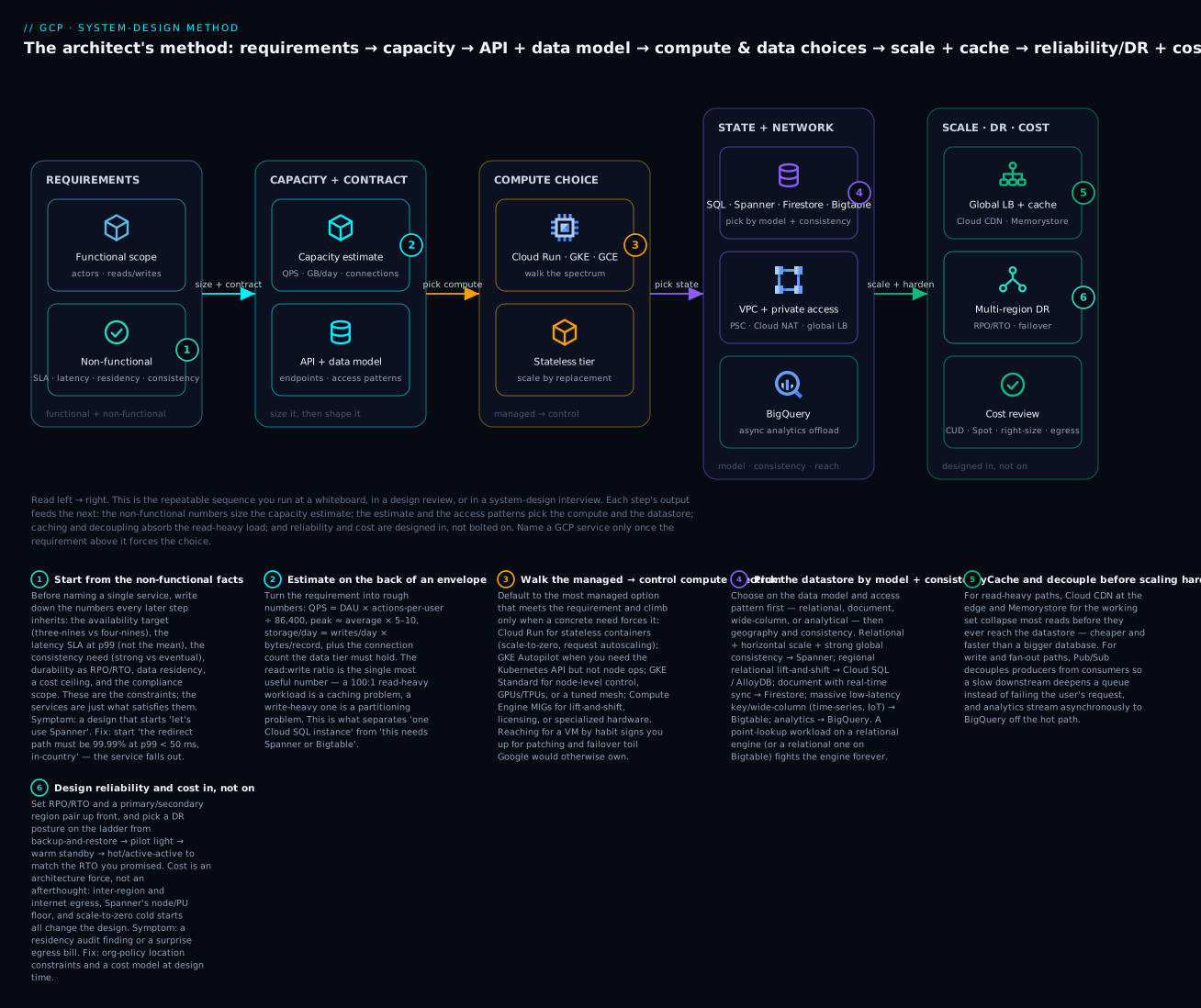
Read the diagram left → right: the non-functional numbers on the far left size everything downstream, the access patterns pick the compute and the datastore in the middle, and caching, DR, and cost harden the design on the right — name a GCP service only once the requirement above it forces the choice.
Where this fits
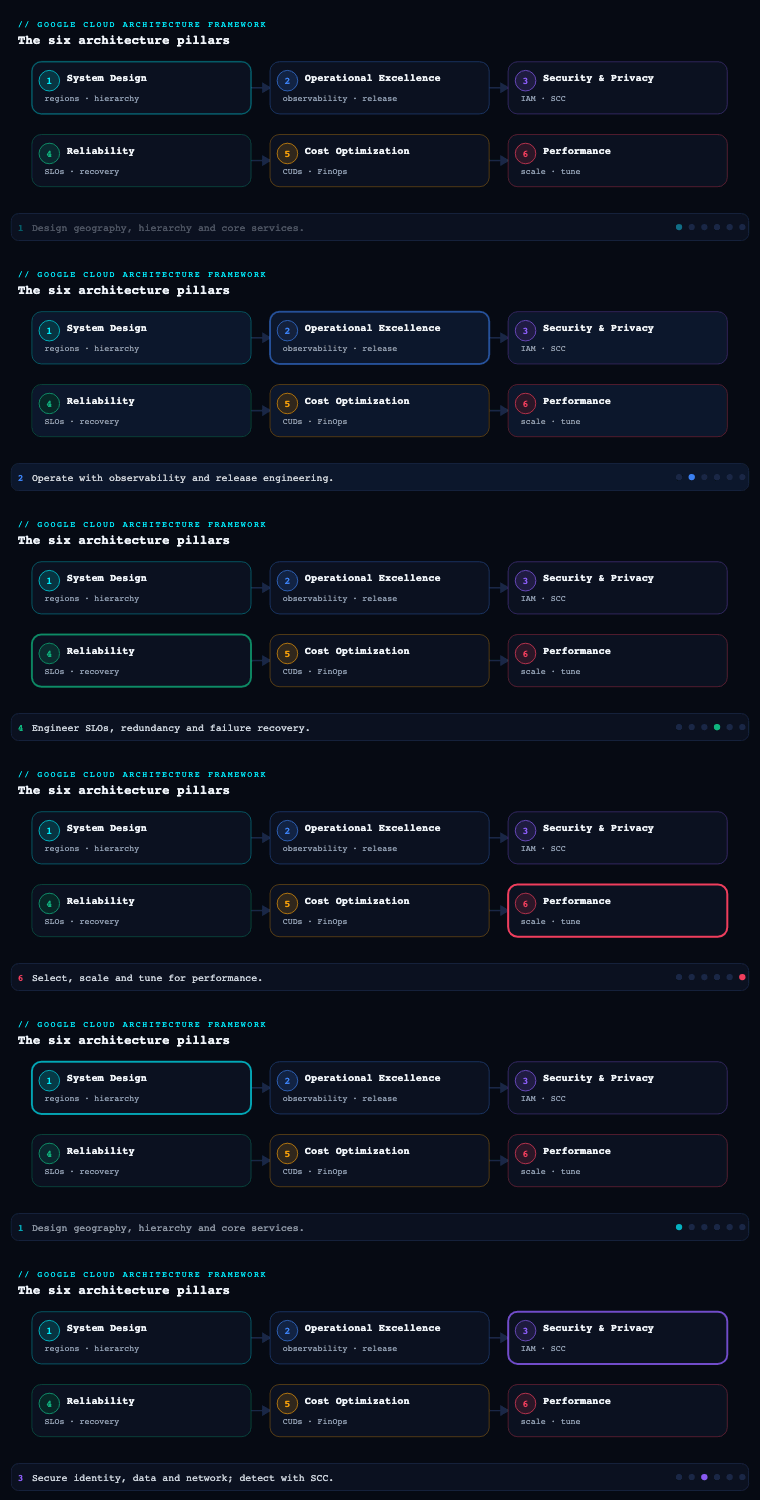
The Google Cloud Architecture Framework is Google’s body of guidance for building and running workloads on Google Cloud, organized into pillars — System Design, Operational Excellence, Security, Privacy & Compliance, Reliability, Cost Optimization, and Performance Optimization — sitting on top of a set of cross-cutting core principles. System Design is the foundational pillar — part 1 of the series — and it is deliberately first, because it is where you make the structural, hard-to-reverse decisions that every other pillar later inherits: where your data physically lives (geography and regions), how your environment is organized for governance and billing (the resource hierarchy), how packets move and what is reachable (networking foundations), and which managed primitives you build on (compute, storage, and databases). Get System Design right and reliability, cost, and performance become tuning problems; get it wrong and they become migration projects.
The architect’s method — from requirements to cost
The framework pillars below tell you the principles and hand you the menu of services. The method is the repeatable sequence you actually run against a blank page. It is the same whether you are sketching a startup’s first service, reviewing a staff engineer’s design doc, or standing at an interview whiteboard. Seven steps, and the discipline that makes it work is simple: each step’s output is the next step’s input, and skipping a step is where designs go wrong. You do not get to pick a database (step 5) before you know the access pattern (step 3) and the read:write ratio (step 2); doing it out of order is how a point-lookup workload ends up on a relational engine it will fight forever.
Step 1 — Requirements: functional and non-functional
Split requirements into two piles. Functional requirements are what the system does — the operations and the actors (“a user shortens a URL,” “a merchant settles a batch,” “an admin revokes a link”). Non-functional requirements (NFRs) are the qualities it must have, and they are the ones that actually drive the architecture. Write them down as numbers before you name a single service.
| Non-functional requirement | The question to answer | What it later drives |
|---|---|---|
| Scale | How many users/requests/GB, today and in 3 years? | The whole capacity estimate (step 2) |
| Latency SLA | How fast, at p99 (not the mean)? | Region choice, caching, compute, datastore |
| Availability target | Three-nines? Four-nines? On which path? | Zonal vs regional vs multi-region topology |
| Consistency | Must reads see the latest write, always? | Spanner vs Firestore vs Bigtable vs eventual |
| Durability (RPO/RTO) | How much data may you lose, how fast must you recover? | Replication, backups, DR posture (step 7) |
| Data residency | Must the data legally stay in a country/region? | Region pair, Organization Policy, Assured Workloads |
| Security & compliance | PCI/HIPAA/SOC 2? What’s the data classification? | Perimeters, CMEK, IAM, VPC Service Controls |
| Cost ceiling | What’s the budget envelope? | Managed-vs-self, scale-to-zero, CUDs, region |
The most valuable habit here is to label each requirement a one-way door or a two-way door (a reversible decision). “It must stay in India” and “the ledger must be strongly consistent” are one-way doors — expensive to reverse because data has gravity and residency is a legal fact. “It runs on Cloud Run” is a two-way door — you can re-containerize onto GKE in a sprint. Spend your design energy on the one-way doors; prototype your way through the two-way ones.
Step 2 — Capacity estimate: the back of the envelope
Turn the scale NFR into rough numbers. Precision is not the point — an order of magnitude is, because it is the difference between “one Cloud SQL instance is fine” and “this needs Spanner or Bigtable.” The four quantities worth estimating:
- QPS (queries/sec) ≈
daily active users × actions per user per day ÷ 86,400. Then peak QPS ≈average × 5–10(a peak factor; festival sales and morning logins are spiky). - Storage growth ≈
writes per day × bytes per record, projected to 1 and 5 years. Data that grows linearly to a few TB is very different from data that grows to petabytes. - Bandwidth ≈
QPS × payload size, which foreshadows egress cost and CDN value. - Connection count — how many concurrent connections the data tier must hold. This one quietly kills designs: a relational database has a hard
max_connections, and thousands of stateless compute instances each opening a pool will exhaust it.
The single most useful derived number is the read:write ratio. A 100:1 read-heavy workload is fundamentally a caching problem (put a CDN and Memorystore in front and most reads never reach the database); a write-heavy or high-fan-out workload is a partitioning problem (choose a store that spreads writes, and decouple with Pub/Sub). You will do the arithmetic for a real workload in the worked example below.
Step 3 — API and data model: the contract and the access patterns
Now define the API contract — the handful of operations the system exposes (POST /urls, GET /{short}) with their inputs and outputs — and the data model behind it. The reason this comes before the database choice is that the access pattern is what actually selects the datastore. Ask: is the dominant access a point lookup by key (screams key-value: Firestore or Bigtable), a relational query with joins and transactions (Cloud SQL, AlloyDB, Spanner), a range scan over time-ordered rows (Bigtable), or a large aggregate over history (BigQuery)? Model the entities and, critically, list the queries you must serve. A schema that is beautiful but cannot serve your hot query cheaply is the wrong schema.
Step 4 — Compute: walk the managed → control spectrum
With load and shape known, pick where the code runs. The framework’s full compute table is in the Choosing compute, storage, and databases section below; the decision is a walk from most-managed to least, stopping at the first option that meets the requirement:
- Can it run as a stateless container over HTTP/events? → Cloud Run (scale-to-zero, request-based autoscaling, nothing to patch). This is the default for new services. If cold starts hurt the hot path, set
min-instancesbefore you reach for anything heavier. See the Cloud Run deep dive. - Does it need the Kubernetes API (operators, StatefulSets, DaemonSets) but not node management? → GKE Autopilot (Google runs the nodes; you pay per pod).
- Does it need node-level control, GPUs/TPUs, custom networking, or a service mesh you tune? → GKE Standard.
- Is it VM-shaped — lift-and-shift, license-bound, specialized hardware, or non-containerizable? → Compute Engine with regional managed instance groups for zonal redundancy and autoscaling.
The question that decides it: “What is the cheapest operational model that still meets this requirement?” Reaching for a VM by habit signs your team up for patching, scaling, and failover toil that Google would otherwise own.
Step 5 — Storage, database, and messaging: model, consistency, wiring
Pick the datastore by data model and consistency, not by familiarity (the full storage and database tables are in the Choosing compute, storage, and databases section below). The decision flow:
- Relational, needs to scale horizontally with strong global consistency, no app-level sharding → Spanner (see Spanner schema design).
- Relational, regional, lift-and-shift OLTP → Cloud SQL (or AlloyDB for demanding PostgreSQL/HTAP).
- Document with real-time sync for mobile/web → Firestore.
- Massive-scale, low-latency key or wide-column (time-series, IoT, ad-tech) → Bigtable.
- Analytics / warehouse over history → BigQuery. Hot-path cache → Memorystore.
Then wire the services together. The two workhorses are Pub/Sub and Cloud Tasks, and conflating them is a classic mistake — one is an event bus, the other is a task queue:
| Dimension | Pub/Sub | Cloud Tasks |
|---|---|---|
| Mental model | Event bus — publish once, fan out to many independent subscribers | Task queue — enqueue one unit of work for one specific handler |
| Delivery | At-least-once (exactly-once available); push or pull | At-least-once to a specific HTTP (or App Engine) target |
| Rate control | Consumer-driven; flow control on the subscriber | Per-queue dispatch rate + max concurrency — throttle the target |
| Scheduling | Immediate; optional ordering keys | Per-task schedule/delay (up to ~30 days), deferred execution |
| Best for | Streaming ingestion, event fan-out, decoupling many consumers | Deferred/offloaded work; calling one worker at a controlled rate |
| Reach for it when… | “Many things care about this event” | “Do this one job later, without overwhelming the worker” |
Around those two sit the rest of the wiring: Cloud Scheduler is managed cron; Eventarc routes events (built on Pub/Sub) to Cloud Run and Workflows; Workflows orchestrates a sequence of steps and service calls. See the Pub/Sub deep dive for delivery semantics.
Step 6 — Scaling and caching: absorb load before you buy more database
Read-heavy paths are a caching problem before they are a scaling problem. In order of leverage: Cloud CDN at the edge (cache cacheable responses so they never reach your origin), Memorystore (Redis/Valkey) for the hot working set and sessions, then autoscaling the compute (Cloud Run concurrency + max-instances; MIG autoscaler; GKE HPA/VPA + cluster autoscaler), read replicas to take reads off a primary, and a connection pooler so scaled-out compute does not exhaust the database’s connections. Write and fan-out paths get Pub/Sub decoupling so a slow downstream deepens a queue instead of failing the user’s request, and analytics stream asynchronously to BigQuery off the hot path.
Step 7 — Reliability, DR, and cost: designed in, not bolted on
Finally, harden and price it. State the RPO (how much data you may lose) and RTO (how fast you must recover), then pick a DR posture on the ladder to match the RTO you promised:
| DR posture | RTO / RPO character | Cost | Fits |
|---|---|---|---|
| Backup & restore | Hours; RPO = backup interval | Lowest | Non-critical, cost-sensitive |
| Pilot light | Tens of minutes | Low | Core data replicated, compute off |
| Warm standby | Minutes | Medium | Scaled-down replica running |
| Hot standby / active-active | Seconds; RPO ≈ 0 | Highest | Four-nines paths (payments) |
For cost, treat these as design forces, not a finance afterthought: committed use discounts (resource- and spend-based) for steady baseline, Spot VMs for fault-tolerant work, sustained use discounts (automatic on Compute Engine/GKE), scale-to-zero for bursty serverless, right-sizing via Recommender, and — the silent line item — egress (inter-region and internet). Spanner’s node/processing-unit floor and BigQuery’s on-demand-vs-capacity model belong in this same conversation.
Where the menu is. The rest of this lesson — Core principles, Geography, the Resource hierarchy, Networking, and the compute/storage/database tables — is the detailed menu each step above draws on. Read the method as the how to think, and the framework sections as the what to pick. Next, watch the method run end to end on a concrete problem.
Worked example — designing a URL shortener on GCP
A URL shortener is the classic warm-up because it is deceptively deep: read-heavy, latency-sensitive, and global. Watch the seven steps produce the design.
Step 1 — Requirements. Functional: create a short link (optionally with a custom alias and an expiry), redirect a short link to its long URL, and count clicks. Non-functional: the redirect path must be 99.99% available at p99 < 50 ms globally (users are worldwide); links are durable with RPO ≈ 0 (losing a link breaks a printed QR code); the create path may be slower and can tolerate scale-to-zero; the team is small and cost-conscious.
Step 2 — Capacity. Assume 100 M new URLs/month. Writes ≈ 100,000,000 ÷ (30 × 86,400) ≈ ~40 writes/sec average, ~200/sec at a 5× peak. A shortener is famously read-heavy — assume 100:1 — so reads ≈ ~3,900/sec average and ~20,000/sec at peak. Storage: each record (7-char code + a ~500-byte URL + metadata) ≈ ~600 bytes, so 100 M × 600 B ≈ 60 GB/month → ~720 GB/year → ~3.6 TB over 5 years. Modest. The key space: base62 over 7 characters is 62⁷ ≈ 3.5 trillion codes — comfortably more than the ~6 billion links five years produces. Read the tea leaves: massively read-heavy (caching problem), tiny records, a point-lookup access pattern, and a global low-latency SLA.
Step 3 — API & data model. POST /urls {long_url, alias?, ttl?} → {short} and GET /{short} → 301/302 redirect. The data model is a single key-value record: key = short code, value = {long_url, created_at, expires_at, owner}. The dominant access is a point lookup by short code — no joins, no scans. That single fact is decisive.
Step 4 — Compute. Stateless HTTP with bursty traffic → Cloud Run. Put min-instances > 0 on the redirect service to eliminate cold starts on the latency-critical hot path; let the create service scale to zero to save money. GKE (no node/mesh need) and GCE (nothing VM-shaped here) would both be over-provisioned complexity.
Step 5 — Data & wiring. A point-lookup, read-heavy, global key-value workload points squarely at a key-value/document store, not a relational one. Firestore (multi-region, serverless, strongly consistent per document) is the pragmatic default for a small team; Bigtable is the answer if raw throughput and single-digit-ms latency at extreme scale dominate; Spanner earns its place only if you want globally-sequential short codes with strong consistency (its node floor is real cost for a workload this small). A single-region Cloud SQL would work at this data size but fights the global 20k/sec redirect SLA. Click events go onto Pub/Sub and stream to BigQuery — counting clicks must never slow a redirect.
Step 6 — Scaling & caching. Redirects are the hot path, so cache them: Cloud CDN in front of the global external Application Load Balancer caches the redirect response by short code with a TTL, and Memorystore holds the warm working set. Together they collapse the vast majority of the ~20k/sec reads at the edge, so the datastore only ever sees cache misses and writes. This — not the database brand — is what lets a tiny team serve the load cheaply.
Step 7 — Reliability, DR & cost. A multi-region datastore (Firestore multi-region, or Bigtable replication) survives a region loss and gives RPO ≈ 0 on links; the global external ALB shifts traffic on a regional failure to keep the redirect path at four-nines. Cost stays low because the CDN + cache slash paid database reads, create scales to zero, and the storage is only a few TB; egress is cheap because a redirect is a tiny 301 header, not a payload. The decision that mattered was not “which database” — it was recognizing the access pattern and the read:write ratio in step 2–3, which made caching + a KV store + async analytics the obvious spine.
Core principles — the design philosophy underneath every decision
The Architecture Framework’s core principles are the lens you apply before you reach for a service. They are not pillar-specific; they are the shared design philosophy that keeps the pillars coherent, and the System Design pillar is where you operationalize them first.
The principles you are applying. Across Google’s guidance the load-bearing principles are:
| Principle | What it means in practice | The System Design consequence |
|---|---|---|
| Design for change | Requirements, traffic, and Google’s own services evolve; bake in the ability to evolve | Favor loosely coupled, API-fronted services; avoid hard-wiring regions or instance types |
| Document your architecture | An architecture that lives only in someone’s head cannot be reviewed, audited, or evolved | Produce diagrams, an ADR (architecture decision record) log, and IaC as the source of truth |
| Simplify and use managed services | Undifferentiated heavy lifting (patching, replication, failover) is Google’s job, not yours | Prefer Cloud Run, GKE Autopilot, BigQuery, Spanner over self-managed equivalents |
| Decouple your architecture | Tight coupling turns a local failure into a global one and blocks independent scaling | Insert Pub/Sub, queues, and well-defined service boundaries between components |
| Use a stateless architecture | Stateless tiers scale horizontally and recover by replacement, not repair | Push state to managed data stores; keep compute fungible |
| Automate and use IaC | Manual, click-ops change is unreproducible and drift-prone | Terraform / Infrastructure Manager, Config Controller, CI/CD for infra |
Why it matters. These principles are what stop System Design from degenerating into “pick a VM and a database.” Design for change is the difference between a workload you can move to a second region in a sprint and one that needs a re-platform. Simplify and use managed services is usually the single highest-leverage decision a team makes on Google Cloud, because Google’s managed primitives (Spanner, BigQuery, Cloud Run, GKE Autopilot) absorb exactly the operational toil that sinks projects.
How to do it well. Treat the principles as a checklist you run against every significant decision and record the answer. The concrete artifacts are an Architecture Decision Record (ADR) log (one short document per significant, hard-to-reverse choice, with context, options, decision, and consequences), a set of reference architecture diagrams, and an IaC repository that is the environment rather than describing it. The framework’s own Architecture Center, Cloud Well-Architected content, and the Google Cloud Architecture Diagramming tool are the canonical references; Active Assist and Recommender later surface where reality has drifted from these principles.
Geography and regions — where your data and compute physically live
Region and zone selection is the most physical decision in System Design: it sets latency to your users, your data-residency and compliance posture, your blast radius, and a meaningful slice of your cost. It is also one of the hardest to reverse, because data has gravity — once petabytes live in europe-west1, moving them is a project, not a config change.
The hierarchy of physical placement.
- A region (e.g.,
asia-south1= Mumbai,us-central1= Iowa,europe-west1= Belgium) is an independent geographic area, itself made of zones. - A zone (e.g.,
asia-south1-a) is a deployment area within a region, isolated for failure-domain purposes; Google guidance is to spread across at least two, preferably three, zones so the loss of one zone does not take the workload down. - Multi-region locations (e.g.,
US,EU,ASIA) exist for specific services — Cloud Storage, BigQuery, Spanner, Firestore — and replicate data across multiple regions in a geography for durability and availability.
The decisions you are actually making.
| Decision driver | What it forces you to evaluate | GCP levers |
|---|---|---|
| Latency to users | Pick regions close to the user population; multi-region front door | Cloud CDN, global External Application Load Balancer, Network Service Tiers (Premium vs Standard) |
| Data residency / sovereignty | Some data legally cannot leave a country/continent | Regional resources, Organization Policy location constraints, Assured Workloads, Sovereign Controls |
| Service availability | Not every product or machine type exists in every region | Per-region product availability, GPU/TPU availability |
| Reliability target | Single-zone vs multi-zone vs multi-region | Zonal vs regional resources (regional MIGs, regional persistent disk) |
| Carbon footprint | Regions differ in carbon intensity | Per-region carbon-free energy % published by Google |
| Cost | Pricing differs by region; egress between regions is charged | Per-region pricing, network egress matrix |
How to do it well. Choose a primary region by latency and residency, then a secondary region in the same geography (and ideally the same continent for low cross-region latency and for legal residency) for DR. Make every resource’s location an explicit, IaC-set value — never accept a default region. For data-residency-bound workloads, enforce placement with the Organization Policy constraint gcp.resourceLocations (allowed/denied locations) rather than trusting engineers to remember, and consider Assured Workloads to get a compliance-scoped folder with location and personnel controls baked in. Artifacts: a region-selection rationale (latency, residency, CFE%, cost) recorded as an ADR, a primary/secondary region pair per workload, and Organization Policy location constraints applied at the right folder.
The resource hierarchy — the structural backbone for governance, billing, and isolation
The Google Cloud resource hierarchy is the single most important governance artifact you create, because almost everything else attaches to it: IAM policies, Organization Policies, billing, networking scope, and quotas all inherit down it. Designing it deliberately, up front, is the difference between governance-by-design and governance-by-cleanup-project-two-years-later.
The levels, top to bottom.
- Organization — the root node, tied 1:1 to a Cloud Identity or Google Workspace account; it represents the company and is where org-wide IAM and Organization Policy live.
- Folders — optional grouping nodes (nestable) that typically model departments, teams, environments, or legal entities; they are the natural attach point for delegated administration and environment-specific policy.
- Projects — the fundamental unit of resource ownership, billing, quota, and isolation; every resource lives in exactly one project, and a project is the boundary for APIs, service accounts, and most IAM.
- Resources — the VMs, buckets, databases, etc., inside projects.
Why it matters. The hierarchy is how inheritance works. An IAM role granted at a folder flows to every project beneath it; an Organization Policy set at the org constrains everything below unless explicitly overridden. This is enormously powerful and equally dangerous: a project landing in the wrong folder silently inherits the wrong access and the wrong guardrails. The project is also the billing and quota boundary — billing rolls up to a Cloud Billing account linked per project, and quotas are largely per-project-per-region, so your project topology directly shapes both your cost reporting and your scaling ceilings.
How to do it well. Follow the Google enterprise foundations / landing zone pattern:
- Separate environments (prod / non-prod / dev) into different folders and different projects — never share a project across environments — so blast radius, IAM, and billing are cleanly split.
- Put shared infrastructure (host VPC, logging, monitoring, security tooling) in its own dedicated projects (e.g., a
vpc-host-prod, aloggingsink project, asecurityproject), distinct from workload projects. - Use a resource naming and labeling convention and apply labels (
env,cost-center,owner,data-classification) consistently so billing export and policy can slice by them. - Bootstrap with the Cloud Foundation Toolkit / Terraform
terraform-google-modulesand the enterprise foundations blueprint, and govern ongoing structure with Organization Policy Service constraints (e.g., disable default network, restrict external IPs, restrict resource locations, require OS Login). - Route org-wide audit data with an aggregated log sink at the org or folder level into a central logging project / BigQuery / Cloud Storage.
| Artifact | Purpose | Tool |
|---|---|---|
| Org → folder → project diagram | The map everything inherits from | Architecture diagram + Terraform |
| Folder-per-environment layout | Clean prod/non-prod isolation | Resource Manager, folders |
| Org Policy constraint set | Org-wide guardrails by inheritance | Organization Policy Service |
| Billing accounts + budgets | Cost ownership and alerting | Cloud Billing, budgets/alerts, BigQuery billing export |
| Foundation IaC | Reproducible, reviewable structure | Cloud Foundation Toolkit, Infrastructure Manager/Terraform |
Artifacts to produce: an organization/folder/project topology diagram, an Organization Policy baseline, a naming-and-labeling standard, the billing-account-to-project mapping with budgets and alerts, and the foundation expressed as version-controlled Terraform.
Networking foundations — VPC design, hybrid connectivity, and reachability
Networking is the substrate every workload runs on, and on Google Cloud it has one property that makes it different from most clouds: the VPC is a global resource whose subnets are regional. That single fact reshapes how you design — you do not need a separate VPC per region, and you can route between regions over Google’s backbone without peering meshes.
The foundational VPC decisions.
- VPC mode: custom, not auto. Always create custom-mode VPCs (and disable the default network via Organization Policy) so you control every subnet and CIDR explicitly. Auto-mode creates a subnet in every region with fixed ranges — convenient and wrong for enterprise IP planning.
- Shared VPC vs VPC Peering. Shared VPC lets a host project own the network and service projects attach to it — the standard enterprise pattern, giving central network teams control while application teams own their workloads. VPC Network Peering connects two separate VPCs with non-transitive routing, used when teams or business units need full network autonomy. Network Connectivity Center provides hub-and-spoke transitive connectivity when you need many VPCs/on-prem sites to interconnect.
- IP address planning. Allocate non-overlapping RFC 1918 CIDRs centrally with room for growth, and reserve dedicated secondary ranges for GKE Pods and Services (VPC-native/alias IP). Overlapping ranges are the classic blocker to future peering, hybrid connectivity, and acquisitions — plan generously now.
Connectivity, ingress, and security.
| Concern | The right Google Cloud building block |
|---|---|
| Hybrid connectivity | Cloud Interconnect (Dedicated or Partner) for private, high-bandwidth links; Cloud VPN (HA VPN) as backup or for lower bandwidth |
| Dynamic routing | Cloud Router with BGP for hybrid and for regional/global dynamic routing mode |
| Outbound from private VMs | Cloud NAT (managed, no NAT instances) so private VMs reach the internet without external IPs |
| Private access to Google APIs | Private Google Access, Private Service Connect, VPC Service Controls to reach BigQuery, Cloud Storage, etc. without traversing the public internet |
| Global load balancing / ingress | Cloud Load Balancing (global External Application LB, regional, internal, network LB) on Google’s anycast frontend |
| Edge protection | Cloud Armor (WAF, DDoS, geo/rate rules), Cloud CDN for caching |
| East-west security | VPC firewall rules + hierarchical firewall policies (org/folder-level), firewall policies, tags/service accounts as rule targets |
| Exfiltration control | VPC Service Controls service perimeters around sensitive data services |
| DNS | Cloud DNS (public + private zones, DNS peering/forwarding for hybrid) |
Why it matters and how to do it well. Network topology is a foundational, slow-to-change decision; a flat single VPC with overlapping ranges and public IPs everywhere is a security and scaling dead end. The enterprise-standard pattern is: Shared VPC with a host project per environment, custom-mode subnets with deliberate CIDR allocation (including GKE secondary ranges), Cloud NAT for egress, Private Google Access / Private Service Connect so workloads never need public IPs to reach Google services, hierarchical firewall policies for org-wide baseline rules, VPC Service Controls perimeters around data, and HA VPN + Cloud Interconnect for redundant hybrid links terminated on Cloud Router. Artifacts: a CIDR/IP allocation plan, a Shared VPC host/service-project design, a network topology diagram (regions, subnets, connectivity, LB ingress), firewall and hierarchical-policy definitions, and a hybrid-connectivity design with redundancy.
Choosing compute, storage, and databases — selecting the right managed primitives
This is where System Design becomes concrete: matching each workload to the Google Cloud compute, storage, and data services whose operational model, scaling behavior, and consistency guarantees fit the requirement. The framework’s bias is explicit — prefer the most managed option that meets the requirement — because every operational concern you hand to Google is one your team does not run at 2 a.m.
Compute — the managed-vs-control spectrum
| Service | Model | Best for | You manage |
|---|---|---|---|
| Cloud Run | Serverless containers, scale-to-zero | Stateless HTTP/event services, APIs, web apps, jobs | Just the container |
| Cloud Run functions (Cloud Functions) | Event-driven functions (FaaS) | Glue, event handlers, lightweight endpoints | Just the function code |
| App Engine | PaaS (standard/flexible) | Classic web apps wanting a fully managed platform | App + minimal config |
| GKE Autopilot | Managed Kubernetes, Google runs nodes | Containerized platforms wanting K8s API without node ops | Workloads + manifests |
| GKE Standard | Managed Kubernetes, you size node pools | K8s needing node-level control, GPUs/TPUs, custom networking | Node pools + workloads |
| Compute Engine (MIGs) | VMs / managed instance groups | Lift-and-shift, licensed software, full OS control, specialized hardware | OS, patching, scaling config |
| Batch / Dataflow / Dataproc | Managed batch & data processing | HPC/batch jobs, streaming/batch ETL, Spark/Hadoop | Job definition |
How to choose. Walk the spectrum from most-managed to least: Can it run as a stateless container? → Cloud Run (with scale-to-zero and request-based autoscaling). Does it need the Kubernetes API but not node control? → GKE Autopilot. Does it need node-level control, GPUs/TPUs, or a service mesh you tune? → GKE Standard. Is it a VM-shaped, lift-and-shift, or license-bound workload? → Compute Engine with regional managed instance groups for zonal redundancy and autoscaling. For VM cost/efficiency, layer machine families (E2/N2/N2D general purpose, C-series compute-optimized, M-series memory-optimized), Spot VMs for fault-tolerant work, and committed use discounts for steady baseline.
Storage — match the access pattern, not the habit
| Service | Type | Best for | Notes |
|---|---|---|---|
| Cloud Storage | Object | Unstructured blobs, data lake, backups, static assets | Storage classes: Standard / Nearline / Coldline / Archive; Autoclass; regional/dual-region/multi-region |
| Persistent Disk / Hyperdisk | Block (VM-attached) | Boot disks, databases on VMs, low-latency block | Zonal vs regional PD (synchronous cross-zone replication) |
| Local SSD | Ephemeral block | Scratch, caches, very high IOPS | Data lost on stop/terminate |
| Filestore | Managed NFS | Shared POSIX file systems, lift-and-shift apps, GKE RWX | Tiers from Basic to Enterprise |
| Cloud Storage FUSE / Parallelstore | File-over-object / HPC parallel FS | ML training data, HPC scratch | High-throughput AI/HPC |
How to choose. Decide by access shape and durability need: object (Cloud Storage) for anything blob-like or lake-like, picking the storage class by access frequency (or Autoclass to let Google move objects automatically and avoid early-deletion fees); block (Persistent Disk/Hyperdisk, using regional PD when a database VM must survive a zone failure) for VM-attached low-latency storage; managed NFS (Filestore) only when you genuinely need shared POSIX semantics. Govern object data with lifecycle policies, Object Versioning, retention policies/Bucket Lock (WORM), and uniform bucket-level access.
Databases — pick by data model and consistency, not by familiarity
| Service | Model | Consistency / scale | Best for |
|---|---|---|---|
| Cloud SQL | Managed MySQL / PostgreSQL / SQL Server | Regional HA (multi-zone), read replicas; vertical scale | Lift-and-shift relational, classic OLTP |
| AlloyDB for PostgreSQL | Managed PostgreSQL-compatible | High-performance HA, columnar engine for analytics | Demanding PostgreSQL OLTP/HTAP |
| Spanner | Distributed relational | Horizontal scale + strong consistency, global, 99.999% | Global OLTP, financial/inventory, no-sharding scale |
| Firestore | Document NoSQL | Serverless, regional/multi-region, real-time | Mobile/web app data, real-time sync |
| Bigtable | Wide-column NoSQL | Massive scale, low-latency, high-throughput | Time-series, IoT, ad-tech, large analytical KV |
| Memorystore | Managed Redis / Valkey / Memcached | In-memory cache | Caching, sessions, leaderboards |
| BigQuery | Serverless data warehouse | Petabyte-scale analytics, separation of storage/compute | Analytics, BI, ELT, ML on data (BigQuery ML) |
How to choose. Start from the data model and consistency requirement: relational + needs to scale globally with strong consistency → Spanner; relational, regional, lift-and-shift → Cloud SQL (or AlloyDB when you need more performance/HTAP from PostgreSQL); document with real-time sync → Firestore; huge-scale low-latency key/wide-column (time-series, IoT) → Bigtable; analytical/warehouse → BigQuery; hot-path caching → Memorystore. Capture for each store the RPO/RTO, HA topology (multi-zone vs multi-region), read-replica strategy, and consistency model, because those are the System Design facts the Reliability pillar will later depend on. Artifacts: a per-workload service-selection matrix (compute/storage/database) with the rationale, a data-classification and residency note per data store, and the HA/replication topology for each stateful service.
Foundational system-design decisions — the cross-cutting choices
Some System Design decisions cut across all the sub-components above and set the trajectory of the whole platform. These are the ones to make consciously, early, and record as ADRs.
- Identity foundation. Stand up Cloud Identity / Workspace federated to your IdP (e.g., via Workforce Identity Federation / SAML), use groups as the unit of IAM grants (never grant to individuals), and adopt Workload Identity Federation so workloads (and CI/CD) use short-lived federated credentials instead of long-lived service-account keys.
- Single vs multi-region topology. Decide per workload tier whether it is zonal, regional, or multi-region, and write down the resulting availability ceiling — this is the decision the Reliability pillar inherits wholesale.
- Managed-first vs control. Default to serverless/managed (Cloud Run, GKE Autopilot, Spanner, BigQuery) and justify any move toward self-managed VMs with a concrete requirement (licensing, OS control, specialized hardware).
- Consistency and coupling model. Choose where you accept eventual consistency and asynchronous, Pub/Sub-decoupled processing versus where you require strong consistency (Spanner) — this shapes both performance and reliability.
- Quota and scaling ceilings. Inventory the per-project, per-region quotas that gate your scaling paths and request increases ahead of need; project topology and region choice both move these ceilings.
- Tagging/labeling and FinOps hooks. Bake in labels and billing export to BigQuery from day one so cost, residency, and ownership are queryable, not retrofitted.
Real-world enterprise scenario
Meridian Pay is a fictional pan-Asian digital-payments and merchant-settlement company headquartered in Bengaluru. Their platform handles real-time card authorizations, a merchant ledger, a settlement engine, and a fraud-scoring service. Peak load reaches ~30,000 authorizations/second during festival-sale windows across India and Southeast Asia. Regulation requires that Indian payment data remain resident in India, and the board has set a target of four-nines (99.99%) availability for the authorization path with a regional active topology plus tested cross-region DR. They are migrating from an on-prem data centre and are net-new on Google Cloud.
Core principles. The platform team writes an ADR log from day one and adopts a managed-first rule: nothing self-hosted unless a licensing or hardware requirement forces it. Everything is Terraform via Infrastructure Manager, decoupled with Pub/Sub between authorization, ledger, and settlement so a slow downstream deepens a queue rather than failing a card swipe.
Geography and regions. They choose asia-south1 (Mumbai) as primary and asia-south2 (Delhi) as secondary — both in India, satisfying data residency while giving a true second region for DR. The authorization tier runs across three zones in asia-south1. An Organization Policy gcp.resourceLocations constraint, set at the production folder, hard-blocks any resource outside the two Indian regions, and the regulated ledger sits inside an Assured Workloads folder.
Resource hierarchy. Under the org they create folders prod, nonprod, and shared. Workloads land in dedicated projects (auth-prod, ledger-prod, settlement-prod), while shared concerns get their own projects: vpc-host-prod (Shared VPC host), logging (aggregated org-level log sink to BigQuery), and security. An Organization Policy baseline disables the default network, blocks external IPs on VMs, enforces OS Login, and restricts locations. Labels (env, cost-center, data-classification=pci) are mandatory, and Cloud Billing budgets with alerts are wired per project, with billing export to BigQuery.
Networking foundations. A custom-mode Shared VPC lives in vpc-host-prod; the three workload projects attach as service projects. Non-overlapping /16s are allocated per region with dedicated GKE secondary ranges for Pods/Services. Cloud NAT provides egress so no VM has a public IP; Private Service Connect and Private Google Access reach BigQuery and Cloud Storage privately; VPC Service Controls wraps the ledger and fraud data in a perimeter to block exfiltration. Ingress is a global External Application Load Balancer fronted by Cloud Armor (rate-limiting + geo rules) and Cloud CDN for static merchant assets. Redundant HA VPN plus a Partner Interconnect link, terminated on Cloud Router, connect the remaining on-prem reconciliation systems.
Compute, storage, databases. The authorization service and merchant dashboard run on Cloud Run (request-based autoscaling, scale-to-zero for non-prod). The fraud-scoring platform, needing GPUs and a service mesh, runs on GKE Standard. The merchant ledger moves to Spanner for horizontal scale with strong consistency and 99.999% availability — no application-level sharding — which is the decision that lets the auth path hit four-nines. Reporting and settlement analytics land in BigQuery (with BigQuery ML for fraud features); the hot authorization cache uses Memorystore for Redis; transaction-evidence blobs and statements go to Cloud Storage with Bucket Lock (WORM) for the regulator’s retention requirement.
Foundational decisions. Identity federates the corporate IdP into Cloud Identity via Workforce Identity Federation; all IAM is granted to groups, and CI/CD uses Workload Identity Federation (zero downloaded service-account keys). Per-project, per-region quotas on Cloud Run instances and Spanner nodes are raised to 2x projected peak ahead of the festival window.
Outcome. Meridian Pay went live with 99.99% measured availability on the authorization path over its first two quarters, passed a residency audit cleanly (the Organization Policy location constraint produced zero out-of-region resources), and executed a DR drill that failed asia-south1 over to asia-south2 with Spanner multi-region promotion and a load-balancer traffic shift in under 8 minutes. Choosing Spanner over sharded Cloud SQL at System Design time is what the team credits for avoiding the re-platform that the old on-prem ledger would have required to scale.
Deliverables & checklist
Common pitfalls
- Accepting default regions and the default network. Resources land wherever a quickstart put them, creating a residency violation or a flat, overlapping-CIDR network. Avoid it: set every location explicitly in IaC, disable the default network via Organization Policy, and enforce
gcp.resourceLocations. - Retrofitting the resource hierarchy. Teams start in one shared project and discover months later that IAM, billing, and blast radius are hopelessly entangled. Avoid it: design the org/folder/project topology and Organization Policy baseline first, using the enterprise foundations blueprint, with one project per environment per workload.
- Overlapping or stingy IP ranges. A flat or overlapping CIDR plan blocks future peering, hybrid links, GKE growth, and acquisitions. Avoid it: allocate non-overlapping RFC 1918 ranges centrally with generous headroom and dedicated GKE secondary ranges before the first subnet is built.
- Sharded relational DB where Spanner fits. Building application-level sharding on Cloud SQL to chase global scale creates years of operational pain. Avoid it: when you need horizontal scale with strong consistency, choose Spanner at design time rather than re-platforming later.
- Reaching for VMs by habit. Lifting everything onto Compute Engine ignores the managed-first principle and signs the team up for patching, scaling, and failover toil. Avoid it: walk the managed spectrum (Cloud Run → GKE Autopilot → GKE Standard → Compute Engine) and justify each step down with a concrete requirement.
- Long-lived service-account keys. Downloaded JSON keys leak and never rotate, becoming a standing breach. Avoid it: use Workload Identity Federation for workloads and CI/CD and grant IAM to groups, not individuals.
Going deeper
This is the material an experienced engineer will care about — the internals and edge cases that make the difference between a design that demos and a design that survives production.
One-way doors vs two-way doors. Not all decisions carry the same weight, and the skill is spending your design budget on the ones that are expensive to reverse. One-way doors (hard to undo): your region and residency choice (data gravity plus legal constraints), the resource hierarchy (retrofitting IAM/billing onto a populated org is brutal), and the primary datastore’s data model (migrating a relational schema to wide-column, or vice versa, is a re-platform). Two-way doors (cheap to undo): the compute engine (re-containerize onto GKE in a sprint), the cache, and much of the scaling topology. Deliberate slowly on the one-way doors; prototype fast through the two-way ones. This single framing keeps design reviews from spending an hour on the reversible choice and five minutes on the irreversible one.
CAP and PACELC behind the database table. The database decision is really a choice of where on the consistency/latency curve you want to sit. A single-primary Cloud SQL has one writer — simple and strongly consistent, but that writer is your ceiling. Spanner gives you strong (in fact external) consistency across regions using TrueTime, but pays for it with commit-wait latency on cross-region writes — the “consistency costs latency” corner made explicit. Firestore offers strong consistency per document with serverless scale. Bigtable is strongly consistent within a single cluster but eventually consistent across replicated clusters — you trade cross-cluster consistency for availability and throughput. There is no free lunch; picking a database is picking your point on this curve, and step 1’s consistency NFR is what tells you which point.
Capacity-estimation traps. Three mistakes recur. (1) Designing to the mean. Size to peak and to p99 latency, because the average hides the exact load that pages you at 2 a.m. (2) Forgetting the connection count. A relational database has a hard max_connections; ten thousand stateless compute instances, each with a small pool, will exhaust it long before CPU is the problem — the fix is a connection pooler (PgBouncer, the Cloud SQL connectors) or a database that does not connection-bind. (3) The hot-key / celebrity problem. If one key takes 50% of traffic while the average key takes a rounding error, no amount of even sharding helps — you must cache the hot key at the edge, replicate it, or fan its reads out. Averages lie; distributions tell the truth.
Quotas and scaling ceilings are first-class design constraints. Per-project, per-region quotas (Cloud Run max instances, Compute Engine CPUs, Spanner nodes, and — a classic silent wall — Cloud NAT port allocation) gate your scaling path just as surely as a code bug. NAT port exhaustion in particular presents as intermittent connection failures under load, not as an obvious “quota exceeded.” Inventory the quotas on your scaling path, request increases ahead of the launch, and remember that region choice and project topology both move these ceilings.
Cost is an architecture force, not a line item. Four cost mechanics change designs. Egress — inter-region and internet egress is metered and is the silent budget-killer of chatty cross-region designs; keep tiers that talk a lot in the same region. Spanner’s floor — it bills by nodes/processing units with a minimum, so a tiny always-on Spanner is expensive; size in processing units for small workloads or pick Firestore/Cloud SQL. Scale-to-zero vs min-instances — free when idle, but the first request after idle pays a cold start; on a latency-critical path, min-instances > 0 trades a little cost for predictable p99. CUDs vs SUDs — sustained use discounts apply automatically to Compute Engine/GKE for running most of the month, while committed use discounts (resource- and spend-based) are a deliberate 1-/3-year commitment; know which applies so you neither double-count nor leave savings on the table.
How the method maps onto the six pillars. The seven-step method is not separate from the framework — it is the framework, sequenced for a single design. Steps 1–2 (requirements, capacity) are System Design + Performance Optimization; steps 4–5 (compute, data) are the heart of System Design; step 6 (scaling, caching) is Performance + Reliability; step 7 (DR, cost) is Reliability + Cost Optimization; and all of it rests on Operational Excellence (you can run it) and Security, Privacy & Compliance (it is safe by construction). Run the method and you have exercised every pillar without having to consult six documents.
Practice challenges
Work these as design exercises — sketch the answer on paper first, then open the solution. They escalate from a back-of-envelope estimate to a full DR design, and they exercise the same method the lesson teaches. Placeholders are yours to fill in.
1. Estimate the load for a social feed (beginner). A social app has 5 M daily active users, each opening their feed 20 times a day; each open is 1 read. Estimate the average and peak read QPS and say what the number implies for the design.
<details> <summary>Solution</summary>
Average reads = 5,000,000 × 20 ÷ 86,400 ≈ ~1,160 reads/sec. At a 5× peak factor, ~5,800 reads/sec. That is comfortably a single-region workload, and being heavily read-dominated it is a caching problem first: put Memorystore in front for the hot feed and/or precompute feeds (fan-out-on-write), and add read replicas if a database still sees load.
Why: QPS ≈ DAU × actions ÷ 86,400, then peak = average × a peak factor. The magnitude (thousands, not millions) tells you not to over-engineer — no Spanner, no multi-region, just cache + replicas.
</details>
2. Choose the compute for a thumbnail API (beginner → intermediate). A stateless HTTP service resizes uploaded images to thumbnails. Traffic is spiky (quiet nights, busy campaigns), no GPUs, no special OS. Which compute service, and which one setting matters most?
<details> <summary>Solution</summary>
Cloud Run. It is stateless HTTP with bursty load — the textbook case: request-based autoscaling and scale-to-zero mean you pay for campaigns, not for quiet nights. The setting that matters is container concurrency (how many requests one instance serves at once) together with max-instances; tune concurrency to your per-request CPU/memory to balance cost against tail latency, and set min-instances=0 to save money (or >0 if cold-start latency on the first request hurts).
gcloud run deploy thumbnailer --image IMAGE_URL --region REGION \
  --concurrency=40 --max-instances=100 --min-instances=0
Why: stateless + spiky = Cloud Run; GKE or GCE would add node/OS management for no benefit. Concurrency is the dial that trades cost against latency. </details>
3. Choose the database for a global ledger (intermediate). A fintech needs a transaction ledger that is strongly consistent, scales horizontally to global write volume, and must not rely on application-level sharding. Which database, and what is the main cost caveat?
<details> <summary>Solution</summary>
Spanner. It is the only Google Cloud database that combines a relational model, horizontal scale, and strong (external) consistency at global scale, with a 99.999% multi-region SLA — exactly the “no-sharding global OLTP” case. The cost caveat is Spanner’s node / processing-unit floor: a minimally-sized instance is still a real monthly cost, so for smaller workloads size it in processing units (sub-node granularity) rather than whole nodes, and confirm the write volume genuinely justifies it over Cloud SQL.
Why: model (relational) + scale (horizontal) + consistency (strong, global) has exactly one answer on GCP. Everything else is a trade-off against that trio. </details>
4. Pub/Sub or Cloud Tasks? (intermediate). Pick the right primitive for each: (a) “email a receipt to the customer after checkout, retried with backoff, at a rate the mail provider can accept”; (b) “when an order is placed, notify the inventory, analytics, and fraud services.”
<details> <summary>Solution</summary>
(a) Cloud Tasks. It is one job handed to one handler (the mail sender) where you need per-queue rate limiting so you do not overwhelm the provider, plus retries with backoff and optional deferral. (b) Pub/Sub. It is one event that many independent consumers care about — classic fan-out; each of inventory, analytics, and fraud subscribes and processes at its own pace.
Why: task-to-one-worker-with-throttle → Cloud Tasks; event-to-many-consumers → Pub/Sub. Using Pub/Sub to throttle a single downstream, or Cloud Tasks to fan out, fights the tool. </details>
5. Protect the datastore from a hot key (intermediate → advanced). In the URL shortener, a single “celebrity” short link receives 50% of all redirects. The naive design serves every redirect straight from Firestore. Redesign the read path so the hot key does not become a database hotspot and redirects stay under 50 ms globally.
<details> <summary>Solution</summary>
Put a cache in front of the point lookup. Cloud CDN on the global external Application Load Balancer caches the 301/302 redirect keyed by the short code with a TTL, so the celebrity link is served from the edge POP nearest each user — the datastore never sees the hot reads at all. Back it with Memorystore for the warm working set so even cache-miss traffic mostly avoids Firestore. The datastore is left serving only writes and cold misses.
Why: a hot key cannot be spread by sharding — it is one key. The fix is to serve it from cache at the edge, which both removes the database hotspot and beats the latency SLA because the response never crosses an ocean. </details>
6. Design DR for a payments auth path (advanced). The card-authorization path needs RTO < 10 minutes, RPO ≈ 0, and the data must stay in-country. Sketch the region, data, and failover design, and name the guardrail that enforces residency (rather than trusting engineers).
<details> <summary>Solution</summary>
Use a primary + secondary region in the same country (e.g., asia-south1 + asia-south2). Put the ledger on Spanner multi-region (or a dual-region config) so writes are synchronously replicated → RPO ≈ 0 and fast promotion of the secondary. Front the auth service with the global external Application Load Balancer so a regional failure is a traffic shift, not a rebuild → RTO in minutes. Run the auth tier across three zones in the primary for zonal resilience. Enforce residency with the Organization Policy constraint gcp.resourceLocations set at the production folder, hard-blocking any resource outside the two in-country regions — and test the failover with a scheduled DR drill, because an untested DR plan is a hope, not a plan.
Why: RPO ≈ 0 + minutes RTO demands a synchronously-replicated multi-region datastore plus an LB-driven traffic shift; residency is guaranteed by policy inheritance, not by reminding people. </details>
Common beginner mistakes
- “Start by picking the service — Cloud Run! Spanner!” Naming a service first is how you end up running Spanner for a 1 GB app or Cloud SQL for a global ledger. The right model is to start from the requirements and the capacity estimate; the service is the output of the method, not the input.
- “Estimate to the average.” Averages hide the load that actually breaks you. Design to peak (average × a peak factor) and to p99 latency, because your worst 1% of requests is where the pager lives.
- “Use the database I already know.” Familiarity is the wrong axis. Pick by data model + access pattern + consistency: a point-lookup key-value workload on a relational engine — or a relational, transactional workload on Bigtable — fights the engine forever.
- “More web replicas means more scale.” Scaling the compute tier out multiplies the connections hitting the data tier, which does not scale the same way. The data tier scales up (a bigger instance), plus read replicas, a connection pooler, and a cache. “Compute scales out, data scales up” is the sentence to memorize.
- “Pub/Sub and Cloud Tasks are just two queues.” One is an event bus (fan out to many), the other a task queue (one job, one handler, with rate control). Using Pub/Sub to throttle a single downstream, or Cloud Tasks to notify many consumers, is a fight with the tool.
- “We can go multi-region later — just flip a switch.” Data has gravity and residency is a legal fact. Region and the datastore’s geography are one-way doors; decide them at design time, because moving petabytes later is a project, not a config change.
- “Cost is a finance problem for after launch.” Egress, Spanner’s node floor, and scale-to-zero cold starts are architecture forces that change the design itself — keep chatty tiers co-located, size Spanner honestly, and set
min-instanceson latency-critical paths. Price it while you design it.
Glossary
- System design — Turning requirements into a concrete architecture; here, a repeatable 7-step method (requirements → capacity → API/data → compute/data → scale/cache → reliability/DR → cost).
- Functional vs non-functional requirement — Functional = what the system does (operations, actors); non-functional (NFR) = the qualities it must have (scale, latency, availability, consistency, residency, cost). NFRs drive the architecture.
- SLA / SLO — A Service Level Agreement is the promised target (e.g., 99.99% availability); an SLO is the internal objective you run to. Both are stated per path, not per system.
- RPO / RTO — Recovery Point Objective = how much data you may lose (the acceptable gap); Recovery Time Objective = how fast you must be back. Together they pick your DR posture.
- QPS — Queries (or requests) per second; the core capacity number, estimated as
DAU × actions ÷ 86,400and multiplied by a peak factor. - Back-of-envelope (capacity) estimate — A deliberately rough, order-of-magnitude calculation of QPS, storage growth, bandwidth, and connections that sizes the whole design.
- Read:write ratio — The ratio of reads to writes; a high (read-heavy) ratio is a caching problem, a write-heavy one is a partitioning problem.
- Access pattern — How the data is actually queried (point lookup, range scan, relational join, aggregate). The access pattern, not familiarity, selects the datastore.
- Hot key / celebrity problem — One key taking a huge share of traffic; not fixable by even sharding, so it must be cached at the edge, replicated, or fanned out.
- One-way vs two-way door — A decision that is expensive to reverse (region, hierarchy, data model) vs one that is cheap to change (compute engine, cache). Spend design effort on the former.
- Managed → control spectrum — The compute choice ordered from most-managed to least: Cloud Run → GKE Autopilot → GKE Standard → Compute Engine. Default to the most managed that meets the requirement.
- Stateless — A tier that keeps no durable data of its own, so any instance can serve any request and instances can be added or destroyed freely; state lives in a managed store.
- Horizontal vs vertical scaling — Horizontal = add more instances/nodes (how stateless compute and Spanner/Bigtable scale); vertical = a bigger single instance (how Cloud SQL primarily scales).
- Strong vs eventual consistency — Strong = a read always sees the latest committed write; eventual = replicas converge over time. The consistency NFR picks the database.
- External consistency — Spanner’s guarantee that the commit order of transactions matches real-time order globally, implemented with TrueTime (a bounded-uncertainty clock).
- CAP / PACELC — Frameworks describing the trade-off among consistency, availability, and (in PACELC) latency; choosing a database is choosing a point on this curve.
- Cloud Run — Serverless containers with scale-to-zero and request-based autoscaling; the default compute for stateless HTTP/event services.
- GKE Autopilot / Standard — Managed Kubernetes: Autopilot runs the nodes for you (pay per pod); Standard gives you node-level control, GPUs/TPUs, and custom networking.
- Compute Engine / MIG — Virtual machines and Managed Instance Groups (autohealing, autoscaling VM fleets); for lift-and-shift, licensing, or specialized hardware.
- Cloud SQL — Managed MySQL/PostgreSQL/SQL Server; regional HA, read replicas, vertical scale. Classic relational OLTP.
- AlloyDB — High-performance, PostgreSQL-compatible managed database with a columnar engine for HTAP workloads.
- Spanner — Distributed relational database with horizontal scale and strong global consistency (99.999% multi-region); for global OLTP and ledgers with no app-level sharding.
- Firestore — Serverless document (NoSQL) database with real-time sync and multi-region options; for mobile/web app data.
- Bigtable — Wide-column NoSQL for massive-scale, low-latency, high-throughput workloads (time-series, IoT, ad-tech).
- Memorystore — Managed Redis/Valkey/Memcached; the in-memory cache for hot keys, sessions, and leaderboards.
- BigQuery — Serverless data warehouse with separated storage/compute for petabyte-scale analytics (and BigQuery ML).
- Pub/Sub — A managed event bus: publish once, fan out to many subscribers; for streaming ingestion and decoupling many consumers.
- Cloud Tasks — A managed task queue: one unit of work to one handler, with per-queue rate limiting, retries, and scheduling.
- Cloud Scheduler / Eventarc / Workflows — Managed cron / event routing (built on Pub/Sub) / step orchestration — the rest of the service-wiring toolkit.
- Cloud CDN — Google’s content delivery network; caches responses at the edge so they never reach your origin.
- Global external Application Load Balancer — A single global anycast frontend that terminates TLS, applies Cloud Armor, and routes to the nearest healthy backend.
- Committed use discount (CUD) — A 1- or 3-year commitment (resource- or spend-based) that discounts steady baseline usage.
- Sustained use discount (SUD) — An automatic discount on Compute Engine/GKE for running instances a large share of the month; separate from CUDs.
- Spot VM — A deeply discounted, preemptible Compute Engine VM for fault-tolerant, interruptible work.
- Egress — Network data leaving a region or Google’s network; metered (inter-region and internet) and a common silent cost.
- Quota — A per-project, per-region ceiling (instances, CPUs, nodes, NAT ports) that gates scaling; request increases ahead of need.
- Blast radius — The scope of what a single failure or compromise can affect; minimized by isolating environments and workloads into separate projects/regions.
What’s next
Part 2 of the Google Cloud Architecture Framework series turns to the Operational Excellence pillar — building the observability, automation, incident-management, and operational-readiness practices that keep the system you have just designed running reliably in production.