In a nutshell
Before any team ships a workload, someone has to decide where projects live, what they’re allowed to do, whose network they plug into, and how you’d ever prove the data can’t walk out the door. A landing zone — Google calls it a secure foundation — is that decision, made once, in code, and enforced automatically for every project that will ever exist. It is the umbrella architecture that ties together four moving parts you may have met on their own: the resource hierarchy, identity and access, the network, and the security and operations guardrails. This lesson is the whole picture; each part also has its own deep-dive.
Think of it like a master-planned business park. Before the first tenant arrives, the developer lays the roads, runs the fibre and power, installs the security gates, and writes the zoning bylaws. A new tenant just leases a unit and starts working the same day — and cannot run their own power line across the street, cut a hole in the perimeter fence, or store hazardous chemicals in a retail zone, because the rules are baked into the site, not left to each tenant’s good intentions. The opposite — everyone throwing up their own shack in an open field with their own wiring and their own idea of a fence — is exactly the forty-orphaned-projects mess this lesson exists to prevent. A landing zone makes the safe path the fast path: teams get a fully-governed project in a day, and the dangerous things are simply not possible.
Level: Advanced · Time: ~40 min
Prerequisites. You should be comfortable with GCP projects, IAM roles, and service accounts, and know what a VPC, subnet, and firewall rule are. If any of that is fuzzy, skim the pillar lessons below first — this umbrella assumes them.
After this lesson you can:
- Explain the two axes of a landing zone — the governance axis (org → folders → projects, down which policy inherits) and the connectivity axis (host projects that own the network, consumed by service projects) — and why the VPC Service Controls perimeter is a third thing IAM cannot do.
- Lay out an organization → folder → project hierarchy grouped by environment, and attach Organization Policy guardrails a project team cannot switch off.
- Stand up a Shared VPC and attach a workload with least-privilege, per-subnet network access.
- Draw a VPC Service Controls perimeter the right way — dry-run first, read the violations, then enforce.
- Choose a deployment approach (Terraform Example Foundation, Cloud Foundation Fabric/FAST, or the Cloud Foundation Toolkit) and run the foundation as a day-2 product.
The pillars, each with a dedicated deep-dive. This lesson is the umbrella; when you need the full detail on one axis, go to its lesson:
- GCP Landing Zone: Resource Hierarchy — the org node, folders, projects, and hierarchy trade-offs.
- GCP Landing Zone: Identity & Access — Cloud Identity, groups, IAM, service accounts, Workload Identity Federation.
- GCP Landing Zone: Networking — Shared VPC, hybrid connectivity, firewall policies, Cloud DNS.
- GCP Landing Zone: Security & Guardrails — Org Policy, VPC Service Controls, Security Command Center, CMEK.
- GCP Landing Zone: Operations & Billing — logging sinks, monitoring, billing export, budgets.
(That is five lessons for four pillars because operations and security are big enough to split — read them as the two halves of the “guardrails” pillar.)
The fastest way to a Google Cloud mess is the friendliest path: someone signs in with a corporate Google account, clicks Create project, and ships. Six months later there are forty projects with no parent, three of them billing to a personal card, production and a hackathon sharing a default VPC that someone widened to 0.0.0.0/0 “for the demo,” and a bigquery.dataViewer grant on the analytics dataset that quietly lets anyone with a stolen token bq extract the whole customer table to a bucket in a project you have never heard of. The secure foundation — Google’s name for a landing zone — is the antidote: a pre-built, governed organization where every project is born inside the hierarchy, inherits non-negotiable guardrails it cannot turn off, attaches to a network it does not own, and sits inside a data-exfiltration perimeter that the IAM model alone cannot give you. This article builds that foundation end to end with the resource hierarchy, Shared VPC, the Organization Policy Service, VPC Service Controls, and Security Command Center.
This is the deployable reference architecture, not a tour of the Cloud Adoption Framework. It follows the shape of the major architecture centers: the scenario, the end-to-end governance and data path, a component-by-component breakdown, concrete Terraform and wiring, the enterprise concerns, a named worked example with real numbers, and an honest section on when the full build is overkill. Where it overlaps the official Enterprise foundations blueprint, I say so and explain the why, because the blueprint gives you the modules but rarely the reasoning.
The business scenario
The forcing functions are identical from a Series-B startup to a 30,000-person bank; only the dial settings change. Picture three companies that all need the same shape:
- Series-B SaaS (≈70 engineers). One Google Cloud project holds staging and production. A service-account key was committed to a public repo last month, and because that SA had
Editoron the project, the blast radius was everything. They have a SOC 2 Type II audit in five months and no story for “who can read the production database” or “prove no one can copy it out.” - Mid-market healthtech (≈800 staff). Eleven squads, each with self-serve projects created against a shared billing account. No naming standard, no central logs, PHI sitting in BigQuery in the same project as a marketing data mart, and an auditor who wants to see HIPAA-scoped data provably isolated — not isolated by an IAM grant someone could change on a Friday afternoon.
- Global enterprise (30,000+ staff, 50+ business units). Federated identity from Entra ID, three data-residency regimes (EU, US, India), an on-prem data center that must reach Google Cloud over redundant private circuits, and a board mandate that no project — ever — can expose a VM with a public IP, disable audit logging, or move regulated data outside an approved set of services.
All three share five root problems. Weak isolation (one project is one blast radius, and Editor/Owner is a skeleton key). Inconsistent guardrails (security is whatever the person who built the project remembered to do). A network free-for-all (default VPCs, default firewall rules, every team re-IP’ing and re-peering). No data-exfiltration boundary — and this is the GCP-specific gap most teams miss: IAM answers “can this identity call this API?” but it does not answer “can data leave this trust boundary?” A correctly-granted reader can still gsutil cp a bucket to a personal project or run a BigQuery query that exports across a project line. And finally no single security pane to see misconfigurations, vulnerabilities, and active threats across the estate.
The design goal is precise: every new project is governed from the first second — it lands inside the hierarchy already carrying the org’s policies, already attached to a network it consumes but cannot reconfigure, already inside a VPC Service Controls perimeter so regulated data is physically prevented from leaving, and already streaming findings into one Security Command Center pane. The safe path must be the fast path: a team should request a project and receive it fully baselined the same day, then deploy without filing a ticket for every firewall rule or policy.
Architecture overview
The foundation is organized on two axes: a governance axis — the resource hierarchy of organization → folders → projects, down which IAM and Organization Policy inherit — crossed with a connectivity axis — a small set of platform host projects that own the network and the security perimeters, consumed by a growing set of workload service projects. Decisions flow down the hierarchy; packets flow through the host projects; and a thin perimeter (VPC Service Controls) wraps the projects that touch regulated data so that even correctly-authorized calls cannot move that data out. Get those right and the rest is parameters.
The governance path, top to bottom. At the apex is the organization resource, provisioned 1:1 with your Cloud Identity / Workspace account and your verified DNS domain (kloudvin.com). It is the root of all policy: an IAM binding or an Organization Policy constraint set here flows to every folder and project beneath and cannot be loosened lower down — a child may add restriction, never remove a parent’s. Directly under the org node sit bootstrap and common folders for the foundation’s own plumbing (the seed project that holds Terraform state and the foundation service account; the logging, monitoring, and Security Command Center projects), and then the estate branches into environment folders — production, non-production, development — each of which contains the workload projects for that tier, plus a sandbox folder with loose policy and hard budgets and a bootstrap/common split for shared services. Folders are policy scopes: a constraint assigned to production applies to every current and future project under it. The leaves are projects, the unit of billing, quota, and isolation — and crucially, the unit the network and the perimeter attach to.
The connectivity path, through the host projects. Workloads do not own networks. In each environment folder there is a Shared VPC host project (one for production, one for non-production, one for development) owned by the network team; it holds the VPC, subnets, routes, hierarchical firewall policies, Cloud Router, the Cloud Interconnect / HA VPN attachments to on-prem, and Cloud NAT for egress. Workload service projects are attached to their environment’s host project and simply consume subnets via the compute.networkUser role — a VM in a service project draws its IP from a subnet that lives in the host project. North-south internet egress is forced through Cloud NAT (no external IPs on VMs, enforced by Organization Policy), and access to Google APIs goes over Private Google Access / Private Service Connect so it never touches the public internet. On-prem reaches Google Cloud once, over the Interconnect/VPN that terminates in the host project, and every attached service project can reach it through the shared network. Because there is one VPC and one firewall control plane per environment, there is no east-west peering mesh and no N² problem.
The perimeter path — the piece IAM cannot do. Around the projects that handle regulated or sensitive data, you draw a VPC Service Controls service perimeter. The perimeter is a boundary at the API layer: it tells Google “calls to these services (BigQuery, Cloud Storage, etc.) for resources inside this perimeter are only honored when the caller is also inside the perimeter (or matches an explicit ingress/egress rule).” Now a stolen token with valid bigquery.dataViewer cannot exfiltrate a table to a project outside the perimeter, because the API itself refuses the cross-boundary read. Access Context Manager supplies the access levels (caller IP ranges, device posture, identity) that the perimeter’s ingress rules consult. This is the control that turns “the data is hard to read” into “the data cannot leave.”
The observation plane, over everything. Audit logs from every project stream to a central logging project (an aggregated log sink at the org node routes Admin Activity, Data Access, and platform logs to a BigQuery dataset and a locked log bucket). And Security Command Center (Premium/Enterprise) is enabled at the org node so its built-in services — Security Health Analytics (misconfiguration scanning), Event Threat Detection (log-based threat detection), Web Security Scanner, and VM/Container Threat Detection — produce a single, org-wide stream of findings, with Sensitive Data Protection (formerly DLP) discovering where the regulated data actually lives.
If you sketch this, it is two overlaid pictures. The governance picture is an org chart: org node → {bootstrap, common} and {production, non-production, development, sandbox}, with little “policy” tags hanging off each folder and arrows pointing down. The connectivity picture is, per environment, a hub of one Shared VPC host project with workload service projects clipped onto it, an Interconnect line to on-prem, and a Cloud NAT for egress — all wrapped, for the regulated projects, in a dashed VPC-SC perimeter ring at the API layer.
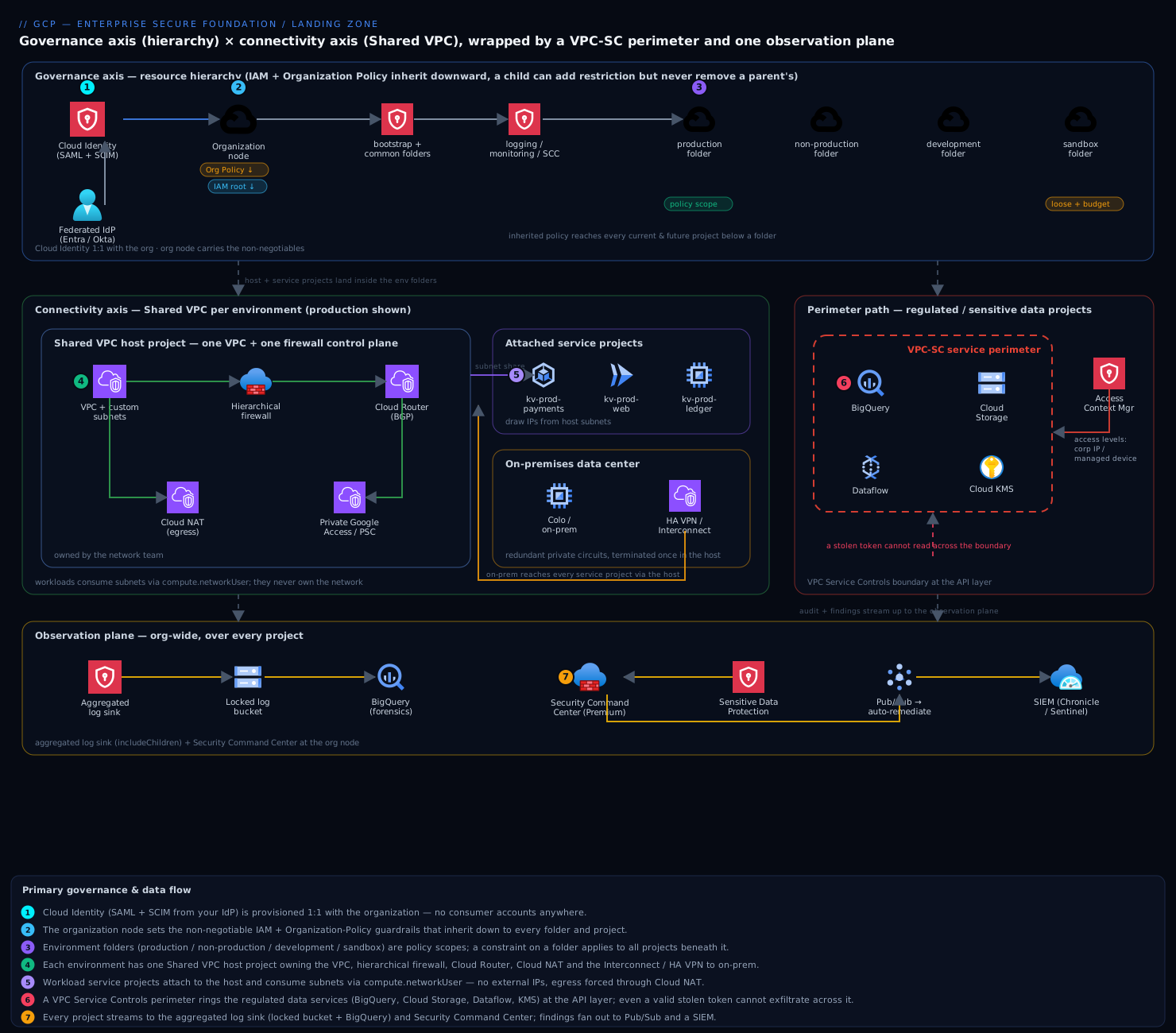
The governance flows down the tree, traffic flows through the host project, and the perimeter is a ring at the API boundary that no IAM grant can punch through. The rest of the article unpacks each piece.
Component breakdown
| Component | What it does | Why it’s there | Key configuration choices |
|---|---|---|---|
| Organization resource | Single root of the hierarchy; top of the IAM and Organization-Policy inheritance chain; the scope SCC, the asset inventory, and the log sink bind to | Turns personal projects into a governed estate that survives employees leaving; the one place to set non-negotiable, estate-wide guardrails | Provision Cloud Identity first and federate to your IdP; treat Super Admin as break-glass (hardware MFA, 2+ recovery accounts); grant roles/resourcemanager.organizationAdmin to a group and keep org-node IAM tiny |
| Folders (environment-oriented) | Group projects for policy and RBAC inheritance | A constraint or role on production applies to every current and future project beneath it, so governance is set once, not per project |
Group by environment and function, not by team; keep the tree shallow (≤ 3–4 levels); a sandbox folder with loose policy and a hard budget; bootstrap/common for the foundation’s own projects |
| Projects | Unit of billing, quota, IAM blast radius, and network/perimeter attachment | The real isolation boundary — a leaked key is capped to one project, not the company | Naming + label standard (env, business-unit, cost-center, data-class); no human gets Owner/Editor on a prod project; vended from IaC, never hand-clicked |
| Shared VPC (host + service projects) | Host project owns one VPC and shares its subnets; service projects consume IPs without owning the network | One network and one firewall control plane per environment; no peering mesh, no east-west bottleneck, network owned by the network team | A Shared VPC per environment (prod/non-prod/dev host projects) so there is a hard boundary with no peering between tiers; grant compute.networkUser per-subnet, not project-wide; centralize Cloud NAT, Interconnect, and Cloud DNS in the host |
| Hierarchical firewall policies | Allow/deny rules attached at the org or folder level, evaluated before per-VPC rules | Estate-wide network guardrails (e.g., deny RDP/SSH from the internet) that a project team cannot override | Attach a baseline deny-all-ingress-from-internet + allow-iap-ranges at a top folder; let teams add VPC rules only below the inherited deny |
| Organization Policy Service | Sets constraints (boolean and list) that cap what can be configured, inherited down the hierarchy | Make non-negotiables impossible regardless of IAM — IAM says who can act, Org Policy says what is permissible at all | Enforce compute.vmExternalIpAccess (deny external IPs), compute.requireOsLogin, iam.disableServiceAccountKeyCreation, gcp.resourceLocations (residency), sql.restrictPublicIp, iam.allowedPolicyMemberDomains (block external identities); set at org/folder, exempt narrowly with tags |
| VPC Service Controls + Access Context Manager | API-layer perimeter around projects; calls to protected services succeed only from inside the perimeter or via explicit ingress/egress rules | The control IAM lacks — stops data exfiltration even by a correctly-authorized but stolen/abused identity | Start in dry-run to learn the blast radius from violation logs; protect the regulated services (bigquery, storage, dataflow, KMS, logging); use ingress/egress rules + access levels (corp IP / managed device) for legitimate cross-boundary flows; perimeter bridges for controlled multi-perimeter sharing |
| Cloud NAT + Private Google Access / PSC | Outbound internet for VMs without external IPs; private path to Google APIs | Keeps the egress identity known and the data path off the public internet, complementing VPC-SC | Cloud NAT per region in the host project; enable Private Google Access on subnets; Private Service Connect endpoints for Google/partner APIs so even API traffic stays internal |
| Cloud Interconnect / HA VPN + Cloud Router | Private, redundant connectivity to on-prem; dynamic (BGP) route exchange | One predictable, audited hybrid path instead of a mesh of one-off tunnels | Terminate once in the host project; HA VPN (two tunnels, two interfaces) or Dedicated/Partner Interconnect with a redundant pair; advertise only required ranges |
| Centralized logging (aggregated sink) | Org-level log sink routes Admin Activity, Data Access, and platform logs to a locked log bucket + BigQuery | One tamper-resistant, queryable audit record across every project, isolated from the projects that generate it | Aggregated sink at the org node with includeChildren; locked bucket with retention + bucket lock; restrict who can read Data Access logs; export to BigQuery for SQL forensics |
| Security Command Center (Premium/Enterprise) | Org-wide security pane: misconfig scanning, threat detection, vulnerability + posture management, attack-path simulation | Single place to see and triage what is wrong and what is being attacked across the whole estate | Enable at the org node; turn on Security Health Analytics, Event Threat Detection, VM/Container Threat Detection; Sensitive Data Protection to discover where regulated data lives; export findings to a SIEM (Chronicle/Sentinel) and to Pub/Sub for automation |
Two components are routinely under-appreciated. VPC Service Controls is the one most teams skip and most regret — they assume IAM least-privilege is the whole exfiltration story, then an incident (or an auditor) reveals that a single over-broad token could have copied the warehouse out, and IAM would never have stopped it. And the aggregated log sink to a locked bucket is your evidence locker: if a panicked engineer or an attacker can delete audit logs, you have lost both forensics and compliance, so it must live in a project they have no write path into.
Implementation guidance
Bootstrapping order. Provision Cloud Identity and federate your IdP → claim the organization node and lock down Super Admin → create the seed/bootstrap project that holds remote Terraform state (a GCS bucket) and the foundation service account with org-level roles → lay down the folder hierarchy and the org-node Organization Policies and aggregated log sink → enable Security Command Center at the org → stand up the per-environment Shared VPC host projects, hybrid connectivity, and hierarchical firewall policies → define the VPC-SC perimeters in dry-run → vend the first workload service projects via the project factory. Do not retrofit this onto a sprawling existing org until you have mapped every loose project to a target folder; importing a messy project applies the inherited policy and will surface violations.
Infrastructure as Code. The reference is Google’s Cloud Foundation Fabric modules or the Terraform Example Foundation (the deployable form of the Enterprise foundations blueprint). Both are Terraform; Deployment Manager is deprecated and Config Connector/KCC is for workload reconciliation, not the foundation bootstrap. Structure the foundation as staged Terraform: 0-bootstrap (seed project, state bucket, CI/CD identity), 1-org (folders, org policies, log sink, SCC), 2-environments (per-env folders + Shared VPC host projects), 3-networks (subnets, firewall, Interconnect, NAT, DNS), 4-projects (the project factory). A folder + an org policy denying external IPs looks like:
# 1-org: an environment folder under the org, with a guardrail attached
resource "google_folder" "production" {
  display_name = "production"
  parent       = "organizations/${var.org_id}"
}

# Deny external IPs on every VM in production (and all future projects under it)
resource "google_org_policy_policy" "no_external_ip" {
  name   = "${google_folder.production.name}/policies/compute.vmExternalIpAccess"
  parent = google_folder.production.name

  spec {
    rules {
      enforce = "TRUE"   # boolean constraint: the behaviour is denied outright
    }
  }
}

# Data residency: restrict resource locations to EU + India multi-regions
resource "google_org_policy_policy" "resource_locations" {
  name   = "${google_folder.production.name}/policies/gcp.resourceLocations"
  parent = google_folder.production.name

  spec {
    rules {
      values {
        allowed_values = ["in:eu-locations", "in:asia-south1-locations"]
      }
    }
  }
}
A project from the factory is a pull request, not a console click — it creates the project in the right folder, links billing, enables APIs, applies labels, and attaches it as a Shared VPC service project:
module "app_a_prod" {
  source          = "terraform-google-modules/project-factory/google"
  name            = "kv-prod-app-a"
  folder_id       = google_folder.production.name
  billing_account = var.billing_account
  labels = {
    env = "prod", business_unit = "payments", cost_center = "cc-4407", data_class = "pci"
  }
  activate_apis = ["compute.googleapis.com", "run.googleapis.com", "logging.googleapis.com"]

  # Attach to the production Shared VPC host and grant subnet access
  shared_vpc         = module.prod_host.project_id
  shared_vpc_subnets = ["projects/${module.prod_host.project_id}/regions/asia-south1/subnetworks/prod-app"]
}
Networking wiring. In each environment’s host project, create the VPC with custom-mode subnets (never auto-mode — auto-mode hands you a subnet in every region with predictable ranges you do not control). Disable the default network by Org Policy (compute.skipDefaultNetworkCreation) so no project is born with an open default VPC. Enable Shared VPC on the host, then attach service projects and grant compute.networkUser per subnet (not project-wide) so a service project can only place IPs in the subnets it is meant to. Centralize Cloud NAT per region for egress and turn on Private Google Access on every subnet; for API traffic that must stay fully internal, add Private Service Connect endpoints. Terminate hybrid connectivity once — HA VPN (four-nines, two tunnels across two interfaces) for most, Dedicated/Partner Interconnect with a redundant pair for high-bandwidth/low-latency — on a Cloud Router that advertises only the ranges on-prem actually needs. Layer hierarchical firewall policies at a top folder: a baseline that denies all internet ingress and allows only the Identity-Aware Proxy ranges (35.235.240.0/20) for SSH/RDP, so admin access is brokered through IAP, not public IPs.
Identity wiring. Federate Cloud Identity to your IdP (Entra ID / Okta / Ping) with SAML for sign-in and SCIM for automatic user/group provisioning, so joiners and leavers sync without manual steps and there are no @gmail.com consumer accounts anywhere. Drive all access through Google Groups, never per-user bindings: a group like gcp-payments-prod-developers@ is granted a predefined or custom role on the kv-prod-app-a project — and even then, no human gets roles/owner or roles/editor on production; use granular roles and IAM Conditions to scope by resource and time. Enforce iam.allowedPolicyMemberDomains at the org so a policy can never grant access to an identity outside your domain (the classic accidental allUsers/external-domain leak), and iam.disableServiceAccountKeyCreation so workloads use Workload Identity Federation / attached service accounts and keyless auth instead of downloadable JSON keys. Reserve a tightly-watched break-glass path: two Super Admin accounts on hardware keys, offline, with an alert on any sign-in.
Perimeter wiring (VPC Service Controls). Create an access policy at the org, then a service perimeter listing the projects that hold regulated data and the protected restricted_services (bigquery.googleapis.com, storage.googleapis.com, dataflow.googleapis.com, cloudkms.googleapis.com, logging.googleapis.com). Always start in dry-run (use_explicit_dry_run_spec) — the perimeter logs what it would block without breaking anything, and those violation logs are how you discover the legitimate cross-boundary flows you must allow. Then write ingress/egress rules for those flows (e.g., the CI pipeline’s service account may read a specific bucket from outside) and attach access levels from Access Context Manager (corp IP ranges, managed devices) so even console access to protected data is conditional. Only after dry-run is clean do you enforce. Use a perimeter bridge if two perimeters must share specific projects in a controlled way.
resource "google_access_context_manager_service_perimeter" "regulated" {
  parent = "accessPolicies/${var.access_policy_id}"
  name   = "accessPolicies/${var.access_policy_id}/servicePerimeters/regulated_data"
  title  = "regulated_data"

  # Start in dry-run: log violations, enforce nothing yet.
  use_explicit_dry_run_spec = true
  spec {
    resources           = [for p in var.regulated_project_numbers : "projects/${p}"]
    restricted_services = ["bigquery.googleapis.com", "storage.googleapis.com",
                           "dataflow.googleapis.com", "cloudkms.googleapis.com"]
    access_levels       = [google_access_context_manager_access_level.corp_devices.name]
  }
}
Detective layer. Enable Security Command Center at the org node and turn on its built-in services; route findings to Pub/Sub for automated remediation and to your SIEM (Google SecOps/Chronicle or Microsoft Sentinel) for correlation. Run Sensitive Data Protection discovery across BigQuery and Cloud Storage so you actually know where PHI/PCI/PII lives before you draw perimeters around it. Keep the aggregated log sink exporting to a locked bucket and BigQuery for forensics, and enable Data Access audit logs on the regulated services (they are off by default and are exactly what an auditor wants).
Enterprise considerations
Security & Zero Trust. Trust is layered, and each layer assumes the one above can fail. The project is the IAM blast-radius boundary — a leaked key is capped to one project because projects share no IAM. Organization Policy enforces non-negotiables (no external IPs, OS Login, no SA keys, approved locations) that survive even a compromised project owner, because Org Policy caps what is configurable, above what IAM can grant. Hierarchical firewall + IAP mean no admin port is exposed to the internet and every SSH/RDP session is brokered and logged. And VPC Service Controls closes the gap IAM cannot: it assumes a credential will eventually leak and ensures that even a valid token cannot move regulated data across the perimeter. That layering — identity-perimeter (BeyondCorp/IAP) for humans, network-perimeter (firewall/NAT) for traffic, and API-perimeter (VPC-SC) for data — is what “Zero Trust on GCP” actually means in practice.
Cost optimization. All projects roll up to one or a few billing accounts, so committed-use discounts and sustained-use discounts apply where they are needed, and the BigQuery billing export plus mandatory labels (cost_center, business_unit, env) make spend attributable per team. Set budgets and alerts per project (hard caps and aggressive alerts on the sandbox folder). Centralizing Cloud NAT and egress in the host project avoids a NAT per workload — a real five-figure annual saving at scale. The honest trade-off: Security Command Center Premium/Enterprise and VPC Service Controls operational overhead are not free, and SCC Premium is priced on spend, so budget for it as a line item rather than a surprise.
Scalability. The model scales by adding projects, which sidesteps the per-project quotas (firewall rules, subnets, IAM bindings) that strangle a single-project design. The project factory vends a fully-baselined, network-attached project the same day; folders and policies inherit automatically so governance scales at zero marginal cost per project; and a Shared VPC comfortably carries many service projects without the N² peering problem a hub-of-VPCs would create.
Reliability & DR (RTO/RPO). The foundation itself is resilient — the hierarchy, Org Policies, and the log sink are global control-plane constructs, and Google’s regional/zonal redundancy underpins the network. Because the entire foundation is Terraform, your DR plan for the platform is “re-apply the code.” For workloads, the project-per-environment pattern makes a clean DR region straightforward: replicate data (BigQuery cross-region datasets, GCS dual/multi-region buckets, Cloud SQL cross-region replicas) and pre-create the DR subnets in the host project. Typical targets: mission-critical (payments/ledger) RTO ≤ 1 h / RPO ≤ 5 min via active-passive multi-region with continuous replication; standard tier RTO ≤ 4 h / RPO ≤ 1 h via warm standby; dev/test RTO 24 h from IaC redeploy. Keep the log bucket in a multi-region so audit survives a regional event.
Observability. Three planes. Audit — the aggregated sink gives one immutable record of every API call across every project, queryable in BigQuery. Security posture — Security Command Center aggregates misconfigurations, vulnerabilities, attack paths, and active threats into one org-wide view with attack-path simulation that scores which exposures actually reach high-value assets. Operations — Cloud Monitoring with metrics scopes that span projects gives SREs a single pane, and VPC Flow Logs + Firewall Insights feed network forensics. Wire SCC and Event Threat Detection findings into your SIEM so security and ops correlate in one place.
Governance. Guardrails come in two flavors: preventive — Organization Policy constraints and hierarchical firewall that block the action — and detective — Security Health Analytics and Event Threat Detection that flag drift and threats, routed to Pub/Sub for auto-remediation. The whole org definition lives in Git: folders, policies, perimeters, network, and project requests are reviewed by pull request, giving change history and four-eyes approval on the things that matter. Use resource labels + tags as the taxonomy that powers cost, policy exemptions, and findings triage.
Reference enterprise example
MeridianPay is a fictional payments company: ~500 employees, processing card transactions across the EU and India, subject to PCI-DSS and India’s data-residency expectations, growing 55% year over year. They start on three overloaded Google Cloud projects and migrate to a secure foundation over one quarter, deploying the Terraform Example Foundation with their own modules on top.
Target structure. Cloud Identity is federated from Entra ID via SAML + SCIM. The org node carries the non-negotiables. A bootstrap folder holds the seed project (Terraform state, foundation SA); a common folder holds the logging project (aggregated sink → locked multi-region bucket + BigQuery), the monitoring project, and the Security Command Center project. Environment folders production, non-production, and development each own a Shared VPC host project — prod’s VPC lives in asia-south1 (Mumbai) and europe-west1, with HA VPN to their Frankfurt and Mumbai colos and Cloud NAT for egress. production holds service projects kv-prod-payments, kv-prod-ledger, kv-prod-web; non-production holds the matching *-staging. A sandbox folder gives each of their 9 squads a personal project with loose policy but a hard ₹25,000/month budget and nightly cleanup of idle resources.
Guardrails they set. Org-node Organization Policies deny external IPs (compute.vmExternalIpAccess), require OS Login, disable service-account key creation, restrict iam.allowedPolicyMemberDomains to meridianpay.com, skip default-network creation, and set gcp.resourceLocations to EU + India multi-regions. The production folder adds sql.restrictPublicIp and a stricter location set. A hierarchical firewall policy at the org denies all internet ingress and allows only the IAP range for admin access — so there is no public SSH anywhere.
The perimeter. They draw a VPC Service Controls perimeter around {kv-prod-payments, kv-prod-ledger, logging}, protecting BigQuery, Cloud Storage, Dataflow, and KMS. They run it in dry-run for three weeks, watch the violation logs, and discover (and then explicitly allow via egress rules) exactly two legitimate cross-boundary flows: the reconciliation pipeline reading a partner bucket, and the SIEM export. An access level requires a corp IP and a managed device for any console access to cardholder data. Then they enforce. Now even a leaked bigquery.dataViewer token cannot bq extract the cardholder table to an outside project — the API refuses it.
Identity. gcp-payments-prod-developers@ (an Entra group synced by SCIM) gets granular roles on kv-prod-payments — no Owner, no Editor. Workloads use Workload Identity Federation; there are zero downloadable SA keys. When an engineer leaves, Entra removes them and SCIM revokes access within minutes.
Outcomes after one quarter.
| Metric | Before (3 shared projects) | After (secure foundation) |
|---|---|---|
| Time to provision a governed project | ~3 days, manual, inconsistent | < 1 day via the project factory, fully baselined and network-attached |
| Blast radius of a leaked key | The whole company (Editor everywhere) | One project, scoped roles |
| Data exfiltration of the cardholder table | Possible with any valid read token | Blocked at the API by VPC-SC, even for valid tokens |
| External IPs / public SSH | Common, ad-hoc | Impossible by Org Policy + hierarchical firewall (IAP only) |
| Audit trail | Deletable by project owners | Aggregated, locked bucket, queryable in BigQuery |
| Security visibility | None, per-project guesswork | One Security Command Center pane, findings → SIEM |
| Cost attribution | One opaque bill | Per squad / per environment via labels |
| Data residency | Unenforced | gcp.resourceLocations to EU + India |
The CISO’s summary: “We stopped hoping nobody could copy the card table out and made it impossible at the API, and our PCI assessor now reviews two isolated projects inside a perimeter instead of everything we own.”
When to use it
Use a secure foundation when you have (or will soon have) multiple teams, more than one environment, any compliance obligation (PCI, HIPAA, SOC 2, data residency), or any need to attribute cost and contain blast radius. Past roughly three or four projects, or the first audit, this is the GCP default — the direct counterpart to an AWS multi-account Landing Zone and an Azure Enterprise-Scale Landing Zone. The org/folder/project tree maps to AWS OUs/accounts and Azure management groups/subscriptions; Shared VPC maps to a centrally-owned hub network; Organization Policy maps to SCPs / Azure Policy; and VPC Service Controls is the GCP-specific control with no clean AWS/Azure equivalent — the API-layer data-exfiltration perimeter is the single biggest reason to take GCP’s foundation seriously on its own terms.
Trade-offs and costs. A foundation adds real overhead: a platform/cloud-foundations team to own it, a learning curve around Org Policy and (especially) VPC-SC perimeters, and baseline spend — the hierarchy and Org Policy are free, but Security Command Center Premium/Enterprise, Interconnect, and cross-region replication are not, so budget a few thousand dollars a month before workloads. VPC Service Controls in particular has a genuine operational tax: every new legitimate cross-boundary integration needs an ingress/egress rule, and a perimeter misconfigured straight to enforce will break things — which is exactly why dry-run first is non-negotiable.
Anti-patterns to avoid. Running workloads in the seed/bootstrap or org-admin projects (keep them tiny and locked down). Treating Organization Policy as if it grants — it only caps; IAM still grants. Auto-mode VPCs and default networks (you lose control of your IP plan; disable them by policy). Granting compute.networkUser project-wide instead of per-subnet. Per-user IAM bindings and Owner/Editor on production (use groups + granular roles). Downloadable service-account keys (use Workload Identity Federation). Drawing a VPC-SC perimeter without dry-run and without first running Sensitive Data Protection to know where the data is. A folder tree organized by team instead of by environment/function (you end up duplicating policy everywhere). And the big one: assuming IAM least-privilege alone solves exfiltration — it does not, which is the entire reason VPC-SC exists.
Alternatives. For a genuinely small shop that will never exceed a couple of teams, plain organization + a handful of hand-built projects + a single Shared VPC + the core Org Policies may be enough — you get isolation, central networking, and one bill without the full perimeter and SCC machinery, at the price of doing the baseline yourself and revisiting it when the first audit lands. If you want the opinionated, supported build, deploy the Enterprise foundations blueprint (Terraform Example Foundation) or Cloud Foundation Fabric and customize, rather than hand-rolling everything. For multi-cloud governance, the equivalents are AWS Landing Zones (Control Tower) and Azure Enterprise-Scale — the tree, policy-as-guardrail, hub network, and federated SSO map almost one-to-one, with VPC Service Controls as the GCP capability the other two cannot quite replicate.
The secure foundation is not a product you buy once; it is a foundation you operate. Done well it becomes invisible: teams ship into a network that already works, with guardrails they never think about, a data perimeter that quietly refuses the one query that would have made the news, and a security team that sleeps better because the dangerous things are simply not possible.
Going deeper
This is where the foundation stops being a diagram and becomes a set of APIs with sharp edges. Everything below is the detail that separates a foundation that looks right from one that survives an audit and a red team.
Organization Policy: boolean vs list, inheritance, and dry-run
Org Policy has exactly two constraint shapes, and mixing them up is the single most common apply-time error. A boolean constraint (iam.disableServiceAccountKeyCreation, compute.requireOsLogin, compute.skipDefaultNetworkCreation, sql.restrictPublicIp) is on or off — in Terraform’s google_org_policy_policy you set rules { enforce = "TRUE" }. A list constraint takes a set of allowed or denied values and does not accept enforce. The one people trip over most is compute.vmExternalIpAccess: despite reading like a yes/no, it is a list constraint (the list is “which VM instances may have an external IP”). To deny external IPs everywhere you deny the whole list:
resource "google_org_policy_policy" "no_external_ip_canonical" {
  name   = "${google_folder.production.name}/policies/compute.vmExternalIpAccess"
  parent = google_folder.production.name
  spec {
    rules {
      deny_all = "TRUE"   # list constraint: deny the entire set. NOT enforce = TRUE.
    }
  }
}
Same story for gcp.resourceLocations, a list constraint whose values use special group prefixes (in: for a location group such as in:us-locations or in:eu-locations, or a bare region/multi-region value):
# resource-locations.yaml  —  apply with:  gcloud org-policies set-policy resource-locations.yaml
name: folders/FOLDER_ID/policies/gcp.resourceLocations
spec:
  rules:
    - values:
        allowedValues:
          - "in:eu-locations"
          - "in:asia-south1-locations"
Inheritance and merge. Policy flows down the hierarchy and a child can only tighten, never loosen. For a list constraint, a child that wants to add to (rather than replace) an inherited list sets inheritFromParent = true; a child that needs a clean slate — usually a sandbox folder — uses a reset. This is why you set broad denials high (org node) and carve narrow, tagged exceptions low, not the reverse.
Dry-run for Org Policy. Just like VPC-SC, org policies can be staged. A policy can carry a dryRunSpec (Terraform: a dry_run_spec block) that is evaluated and logged but not enforced — violations appear in the audit log as orgPolicyViolationInfo without blocking anyone. Roll a new constraint out in dry-run across a busy folder, watch for a week, then promote it to spec. Policy Simulator for Org Policy does the same analysis ahead of time by replaying recent activity against the proposed policy.
Custom constraints. The built-in (“managed”) constraints do not cover everything. A custom constraint lets you write a CEL expression against a specific resource type — for example, forbidding oversized machine types:
resource "google_org_policy_custom_constraint" "deny_large_machines" {
  name           = "custom.denyLargeMachineTypes"
  parent         = "organizations/${var.org_id}"
  display_name   = "Disallow oversized machine types"
  action_type    = "DENY"                      # deny when the condition is true
  condition      = "resource.machineType.contains('n2-standard-64') || resource.machineType.contains('m1-')"
  method_types   = ["CREATE", "UPDATE"]
  resource_types = ["compute.googleapis.com/Instance"]
}
You then reference custom.denyLargeMachineTypes from a google_org_policy_policy exactly like a built-in constraint. Custom constraints are supported for a growing but finite list of resource types (Compute, GKE, and others) — check the current support matrix before designing around one.
Tag-based conditional enforcement. To exempt a specific project from an org-wide policy without moving it, attach a resource tag (e.g. exemption=vpc-sc-egress) and add a condition to the policy rule that references the tag. Tags — not labels — are the right tool because tag values are themselves IAM-controlled, so who may grant an exemption is itself governed.
VPC Service Controls: spec vs status, ingress/egress, and the restricted VIP
A perimeter has two configurations. status is the enforced config; spec combined with useExplicitDryRunSpec = true is the dry-run config. In dry-run the perimeter computes what it would block and writes it to the audit log — with a vpcServiceControlsUniqueId you can grep for — while letting the call through. Promoting to enforcement means copying the proven spec into status and dropping the dry-run flag. Never skip this: a perimeter authored straight to status will sever a legitimate flow someone forgot about.
Resources are project numbers, not IDs. A perimeter lists projects/1234567890, the numeric project number — not projects/kv-prod-payments. This trips up everyone once; wire the project_number (not project_id) through your Terraform, as the perimeter example above does with var.regulated_project_numbers.
Ingress and egress rules are how legitimate cross-boundary traffic is allowed back in. Each rule names a from (identities and a source — an access level, or another perimeter’s resources) and a to (the target resources plus the specific service/method operations). In words: “allow the CI service account, coming from the corp access level, to call storage.googleapis.com google.storage.objects.get on the artifacts bucket.” Grant the narrowest operation set that works.
Private egress to protected APIs. Inside a perimeter, VMs with no external IP still need to reach Google APIs privately and in a way the perimeter honors. That is the restricted VIP: route *.googleapis.com through a DNS CNAME to restricted.googleapis.com, which resolves to 199.36.153.4/30, and add a route for that block to the default internet gateway. Now API traffic never touches the public internet and lands inside the perimeter. (private.googleapis.com / 199.36.153.8/30 is the non-VPC-SC variant.)
The impersonation gotcha. If a caller inside the perimeter impersonates a service account, the impersonated identity must also be allowed — a surprising share of “why is this blocked” tickets are an egress rule missing the impersonated SA. And note that not every service is VPC-SC-supported; check the supported-products list before assuming a service can be protected.
Perimeter bridges vs ingress rules. When two perimeters must share specific projects, a bridge joins them for those resources. Prefer scoped ingress/egress rules for one-off flows and reserve bridges for genuine, ongoing two-way sharing — a bridge is coarser and easier to over-grant.
Shared VPC at scale — and where it stops
A service project attaches to exactly one host project; a host can carry many service projects (into the hundreds, subject to current quotas on service projects, subnets, and routes). Grant roles/compute.networkUser per subnet via the subnet’s IAM policy, not project-wide, so a service project can only place IPs in the subnets it is meant to. The host’s network team holds roles/compute.networkAdmin and roles/compute.securityAdmin; workload teams get neither.
Shared VPC’s limit is that it is one VPC per host, per environment — clean isolation, but no built-in transit between those VPCs. When you genuinely need many VPCs to interconnect (mergers, multi-region hub-and-spoke, partner networks), reach for Network Connectivity Center as the transit hub, or Private Service Connect to expose a single service across boundaries without peering the whole network. Do not paper over a missing transit design with a mesh of VPC peerings — that is the N² problem the landing zone exists to avoid.
The hierarchy’s sharp edges
A project ID is the immutable, globally-unique string you chose (kv-prod-payments); a project number is the numeric one Google assigned. Some surfaces (VPC-SC, certain IAM and billing APIs) want the number. Deleting a project is a 30-day soft-delete — recoverable — but to stop an accidental delete of something critical, attach a lien:
gcloud resource-manager liens create \
  --project=kv-prod-ledger \
  --restrictions=resourcemanager.projects.delete \
  --reason="PCI ledger — deletion requires a change ticket"
Folders nest several levels deep (currently up to a documented maximum — verify the current figure before designing a deep tree) with per-parent quotas on child folders and projects, which is another reason to keep the tree shallow and environment-oriented rather than mirroring a twelve-layer org chart.
Keyless identity and break-glass
Workload Identity Federation (WIF) removes downloadable keys entirely: an external workload (GitHub Actions, an on-prem app, another cloud) presents its own OIDC/SAML token to Google’s Security Token Service, which — if a workload identity pool trusts that issuer and the attributes match — exchanges it for a short-lived Google access token that impersonates a service account. Nothing to leak, nothing to rotate. Inside GCP, GKE and Cloud Run use attached service accounts for the same keyless result. Pair this with iam.disableServiceAccountKeyCreation so the old JSON-key path is closed by policy.
Break-glass. Super Admin is a Cloud Identity/Workspace role that sits above GCP Org Admin — it can undo almost anything, so it is emergency-only: two dedicated accounts, hardware security keys, credentials offline in a safe, and a real-time alert on any sign-in. Day-to-day org administration runs through a much narrower roles/resourcemanager.organizationAdmin group.
The evidence locker: aggregated sink internals
An aggregated sink at the org node with includeChildren = true captures logs from every current and future project. The sink writes as a Google-managed writer identity (a service account in the sink’s config) that you must grant write permission on the destination — forget that grant and the sink silently drops everything. Route to a log bucket with a retention period and then bucket lock it: once locked, the retention is irreversible and no one — not even an org admin — can shorten it or delete logs early, which is exactly the property an auditor wants. Remember that Data Access audit logs are off by default for most services; turn them on for the regulated ones, and consider CMEK on the log bucket. Keep this in a project the workload teams have no write path into.
SCC tiers and automation
Security Command Center comes in three tiers. Standard (free) gives basic Security Health Analytics and asset inventory. Premium (priced as a percentage of GCP spend) adds full SHA, Event Threat Detection, VM/Container Threat Detection, attack-path simulation (which scores which exposures actually reach a high-value asset), posture management, and Sensitive Data Protection discovery. Enterprise layers in Google SecOps/Chronicle, multicloud coverage, and case management. Wire findings out via continuous exports to Pub/Sub (for automated remediation — a Cloud Function that closes an open bucket the moment SHA flags it) and to BigQuery (for trend queries), and use mute rules so accepted risks do not drown the real ones.
Deployment approaches compared
You almost never hand-build a foundation. Three supported starting points:
| Approach | What it is | Best when |
|---|---|---|
| Terraform Example Foundation (the deployable Enterprise foundations blueprint) | Google’s opinionated, staged reference (0-bootstrap … 4-projects) with a prescribed CI/CD pipeline |
You want the supported, audited “golden path” and will customize modules on top |
| Cloud Foundation Fabric + FAST | A large library of lean, composable Terraform modules; FAST (Fabric FAST) is its end-to-end multi-stage foundation | You want maximum flexibility and are comfortable assembling stages yourself |
| Cloud Foundation Toolkit (CFT) | The terraform-google-modules/* registry modules (project-factory, org-policy, network, log-export, …) |
You are composing your own foundation and want battle-tested building blocks — the project factory in this lesson is a CFT module |
All three are Terraform. Deployment Manager is deprecated; Config Connector / KCC reconciles workload resources from Kubernetes and is not a foundation-bootstrap tool. Whichever you pick, the staged shape is the same: bootstrap the seed project and state first, then org-level policy, then environments and networks, then the project factory.
Day-2 operations
Go-live is the start. Running the foundation means: every change — a new constraint, a perimeter tweak, a new folder — is a pull request reviewed by the platform team, applied by the CI/CD service account, and staged in dry-run (org-policy dryRunSpec / VPC-SC spec) before enforcement. New workloads arrive through the project factory, never the console. You watch for drift (a scheduled terraform plan, plus SCC posture and Config Validator) because a console click that bypasses code is the thing that rots a foundation. Exceptions are granted by tag, time-boxed with IAM Conditions, and reviewed. And you keep provider and module versions moving — pinned, but not frozen — so a two-year-old foundation is not stranded on a superseded Org Policy API. The measure of a good foundation is not the launch; it is that eighteen months later a new team still gets a baselined project in a day and nobody has quietly disabled a guardrail.
Practice challenges
Work these top to bottom; most are safe read-only or folder-scoped. Replace every ORG_ID, FOLDER_ID, *_PROJECT, and number with your own placeholders.
1. (Beginner) See the shape before you govern it. List your organization, its top-level folders, and the projects under one folder.
<details> <summary>Solution</summary>
gcloud organizations list
gcloud resource-manager folders list --organization=ORG_ID
gcloud projects list --filter="parent.type=folder AND parent.id=FOLDER_ID"
Why: you cannot design guardrails for a hierarchy you have not mapped — the first day-1 (and day-2) task is always inventory. </details>
2. (Beginner → Intermediate) Create an environment folder and read what it already inherits. Make a production folder and list the org policies in effect on it.
<details> <summary>Solution</summary>
gcloud resource-manager folders create \
  --display-name=production --organization=ORG_ID

gcloud org-policies list --folder=FOLDER_ID
Why: a folder is a policy scope — anything you attach here lands on every current and future project beneath it, so you confirm the inherited baseline before adding to it. </details>
3. (Intermediate) Deny external IPs at the folder — correctly. Apply the external-IP denial as the list constraint it actually is, then verify.
<details> <summary>Solution</summary>
# no-external-ip.yaml
name: folders/FOLDER_ID/policies/compute.vmExternalIpAccess
spec:
  rules:
    - denyAll: true
gcloud org-policies set-policy no-external-ip.yaml
gcloud org-policies describe compute.vmExternalIpAccess --folder=FOLDER_ID
Why: compute.vmExternalIpAccess is a list constraint — denyAll: true (Terraform deny_all) is correct; enforce would be rejected because that field is only for boolean constraints.
</details>
4. (Intermediate) Attach a workload to Shared VPC with least privilege. Enable Shared VPC on the host, associate a service project, and grant network access on one subnet, not the whole project.
<details> <summary>Solution</summary>
gcloud compute shared-vpc enable HOST_PROJECT
gcloud compute shared-vpc associated-projects add SERVICE_PROJECT \
  --host-project HOST_PROJECT

# per-SUBNET networkUser, not project-wide:
gcloud compute networks subnets add-iam-policy-binding prod-app \
  --project=HOST_PROJECT --region=asia-south1 \
  --member="group:gcp-payments-prod-developers@meridianpay.com" \
  --role="roles/compute.networkUser"
Why: subnet-scoped compute.networkUser means the service project can only place IPs in the subnet it is meant to — a project-wide grant hands it every subnet in the host.
</details>
5. (Advanced) Perimeter the safe way: dry-run, observe, then allow. Create a VPC-SC perimeter in dry-run over the regulated projects, then find the violations it logs.
<details> <summary>Solution</summary>
# one access policy per org — find it: gcloud access-context-manager policies list --organization=ORG_ID
gcloud access-context-manager perimeters dry-run create regulated_data \
  --policy=POLICY_ID --title="regulated_data" \
  --resources=projects/PROJECT_NUMBER \
  --restricted-services=bigquery.googleapis.com,storage.googleapis.com

# after some traffic, read what it WOULD have blocked:
gcloud logging read \
  'protoPayload.metadata."@type"="type.googleapis.com/google.cloud.audit.VpcServiceControlAuditMetadata" AND protoPayload.metadata.dryRun=true' \
  --limit=20 --format=json
Why: dry-run surfaces the legitimate cross-boundary flows (a reconciliation pipeline, a SIEM export) as violation logs before you enforce — so you write the exact ingress/egress rules you need instead of discovering them through a production outage. </details>
6. (Advanced) Govern a gap the built-ins miss with a custom constraint. Author a custom org policy constraint that blocks oversized machine types, and roll it out in dry-run first.
<details> <summary>Solution</summary>
resource "google_org_policy_custom_constraint" "deny_large_machines" {
  name           = "custom.denyLargeMachineTypes"
  parent         = "organizations/${var.org_id}"
  display_name   = "Disallow oversized machine types"
  action_type    = "DENY"
  condition      = "resource.machineType.contains('n2-standard-64') || resource.machineType.contains('m1-')"
  method_types   = ["CREATE", "UPDATE"]
  resource_types = ["compute.googleapis.com/Instance"]
}

resource "google_org_policy_policy" "enforce_deny_large_machines" {
  name   = "${google_folder.non_production.name}/policies/custom.denyLargeMachineTypes"
  parent = google_folder.non_production.name
  dry_run_spec {                       # stage it: evaluate + log, do not block yet
    rules { enforce = "TRUE" }
  }
}
Why: managed constraints do not cover every rule you will want; a CEL custom constraint fills the gap — and even a custom one goes out in dry_run_spec first so you learn its blast radius before enforcing.
</details>
Common beginner mistakes
These are misconceptions — the wrong mental model, not just a wrong command.
- “IAM least privilege is my whole exfiltration story.” No. IAM answers can this identity call this API? — it never answers can this data leave the trust boundary? A correctly-granted reader can still
bq extractorgsutil cpto a project you do not control. The boundary that stops that is VPC Service Controls, at the API layer. This gap is the entire reason VPC-SC exists. - “Organization Policy grants access.” It does not. Org Policy only caps what is configurable — it can make external IPs impossible, but it cannot let anyone do anything. IAM still does all the granting. You need both: IAM says who can act, Org Policy says what is permissible at all.
- “I’ll just turn the perimeter on.” A VPC-SC perimeter authored straight to enforcement will sever a legitimate flow you forgot about and page you at 2 a.m. Always dry-run first, read the violation logs, write the ingress/egress rules, then enforce. Same discipline for a new org policy (
dryRunSpec). - “
compute.vmExternalIpAccessis a boolean — setenforce = TRUE.” It reads like a yes/no but it is a list constraint (the list is “which VMs may have an external IP”). The API rejectsenforceon it. Deny the whole list withdeny_all = "TRUE"(Terraform) /denyAll: true(YAML). - “Give the team
Editorso they can get their work done.”EditorandOwnerare near-skeleton keys — a leakedEditortoken is a company-wide incident. Grant granular predefined or custom roles to a group, scope with IAM Conditions, and let no human holdOwner/Editoron a production project. - “Folders should mirror our org chart / team structure.” Group folders by environment and function (
production,non-production,development,sandbox), not by team. Team-shaped trees duplicate the same policy across branches and rot the moment there is a reorg. - “VPC-SC takes project IDs.” It takes project numbers (
projects/1234567890). Passing the ID is a classic first-perimeter failure. - “Auto-mode VPC / the default network is fine to start.” Auto-mode hands you a subnet in every region with ranges you did not choose, and the default network ships with permissive rules. Disable default-network creation by policy (
compute.skipDefaultNetworkCreation) and use custom-mode subnets so you own your IP plan from day one.
Glossary
- Landing zone / secure foundation — a pre-built, governed GCP organization into which every project is born already carrying policy, network, and perimeter. Google’s term is secure foundation; “landing zone” is the name shared with AWS/Azure.
- Organization resource (org node) — the single root of the hierarchy, provisioned 1:1 with your Cloud Identity/Workspace domain. Top of the IAM and Org Policy inheritance chain.
- Cloud Identity — Google’s identity service holding your users and groups; federated to your IdP (Entra ID, Okta) via SAML + SCIM. Provisioned before the org node.
- Folder — a hierarchy node grouping projects (and other folders) for policy and IAM inheritance. A policy scope: attach once, applies to everything beneath, now and in future.
- Project — the unit of billing, quota, IAM blast radius, and network/perimeter attachment. Project ID = the immutable string you chose; project number = the numeric ID Google assigned (used by VPC-SC and some APIs).
- Resource hierarchy — organization → folders → projects; the governance axis down which policy inherits and can only be tightened, never loosened.
- Organization Policy Service — sets constraints that cap what can be configured, inherited down the tree. Distinct from IAM (which grants).
- Constraint (boolean vs list) — a boolean constraint is on/off (
enforce); a list constraint takes allowed/denied values (deny_all/allow_all/values).compute.vmExternalIpAccessandgcp.resourceLocationsare list constraints. - Custom constraint — a CEL-expression constraint you author against a specific resource type when no built-in (“managed”) constraint fits.
- Shared VPC — a host project owns one VPC and shares its subnets; service projects attach and consume IPs without owning the network. One network/firewall control plane per environment.
compute.networkUser— the IAM role a service project needs to place resources in a host subnet; grant it per subnet, not project-wide.- Hierarchical firewall policy — allow/deny rules attached at org or folder level, evaluated before per-VPC rules, so a team cannot override them.
- VPC Service Controls (VPC-SC) — an API-layer perimeter: calls to protected services for resources inside the perimeter succeed only from inside, or via explicit ingress/egress rules. Stops data exfiltration IAM cannot.
- Service perimeter —
spec/status/ dry-run —statusis the enforced config;spec+useExplicitDryRunSpecis dry-run (log, do not block). Promote spec→status to enforce. - Access Context Manager — supplies the access levels (caller IP, device posture, identity) that a perimeter’s ingress rules consult. One access policy per org (plus scoped policies).
- Ingress / egress rule — an explicit allowance for legitimate cross-perimeter traffic, naming the identities, source, target resources, and service/method operations.
- Perimeter bridge — a controlled join of two perimeters so they can share specific projects both ways.
- Restricted VIP (
restricted.googleapis.com,199.36.153.4/30) — the private API endpoint that keeps Google-API traffic off the public internet and inside the VPC-SC perimeter, via a DNS CNAME and a route. - Private Google Access / Private Service Connect (PSC) — subnet-level private reach to Google APIs; PSC additionally exposes a specific service across boundaries without peering.
- Cloud NAT — outbound internet for VMs that have no external IP; centralized per region in the host project.
- Cloud Interconnect / HA VPN / Cloud Router — private, redundant on-prem connectivity; Cloud Router exchanges routes dynamically via BGP. Terminate once, in the host project.
- Aggregated log sink — an org-node sink with
includeChildrenthat routes every project’s logs to a locked bucket + BigQuery, written by a Google-managed writer identity. - Log bucket / bucket lock — the storage for logs; bucket lock makes the retention period irreversible — the tamper-proof evidence locker.
- Data Access logs — audit logs of data reads/writes; off by default, enabled per service — exactly what auditors ask for.
- Security Command Center (SCC) — the org-wide security pane. Standard (free, basic), Premium (SHA, Event Threat Detection, attack-path simulation, priced on spend), Enterprise (adds SecOps/Chronicle, multicloud).
- Security Health Analytics / Event Threat Detection — SCC’s misconfiguration scanner and log-based threat detector.
- Sensitive Data Protection (formerly Cloud DLP) — discovers and classifies where PHI/PCI/PII actually lives, so you perimeter the right projects.
- Workload Identity Federation (WIF) — exchanges an external OIDC/SAML token for a short-lived Google token via the Security Token Service — keyless auth, nothing to leak or rotate.
- Service-account key — a downloadable JSON credential; the thing you are trying not to create. Disable with
iam.disableServiceAccountKeyCreation. - IAM Conditions — attribute/time-based conditions on an IAM binding, scoping a grant by resource, request time, and so on.
- Break-glass — the tightly-watched emergency Super Admin path (hardware keys, offline, alerted). Super Admin is a Cloud Identity role above GCP Org Admin.
- Lien — a hold on a resource that blocks deletion until removed; used to protect critical projects.
- Project factory — a Terraform (CFT) module that vends a fully-baselined, network-attached project from a pull request instead of a console click.
- Enterprise foundations blueprint / Terraform Example Foundation — Google’s supported, staged Terraform reference for the whole foundation.
- Cloud Foundation Fabric / FAST — a lean, composable Terraform module library; FAST is its end-to-end multi-stage foundation.
- Cloud Foundation Toolkit (CFT) — the
terraform-google-modules/*registry of production-ready modules (project-factory, org-policy, network, log-export). - Config Connector (KCC) — reconciles workload GCP resources from Kubernetes; not a foundation-bootstrap tool.
- Identity-Aware Proxy (IAP) — brokers SSH/RDP and app access by identity instead of public IP; its range
35.235.240.0/20is the one your hierarchical firewall allows for admin access. - Zero Trust / BeyondCorp — the model where trust is per-request and layered (identity perimeter for humans, network perimeter for traffic, API perimeter for data), assuming any single layer can fail.