In a nutshell
Before you deploy a single VM, a Google Cloud landing zone needs a shape — a tree that says where things live, who governs them, and how the bill is split. That tree is the resource hierarchy: one organization at the root, folders in the middle to group and govern, and projects at the leaves where every actual resource (a VM, a bucket, a dataset) is created, billed, and locked down. This lesson is about designing that tree specifically for a landing zone — not “what is a folder” in the abstract, but how many folders, on which axis, provisioned by what, with which guardrails attached where.
Think of it like a large office building. The building (the organization) sets rules everyone must obey — fire code, the badge system, the master electricity meter. Each floor (a folder) can add its own stricter access rules and is handed to a department to run, but no floor can repeal the building’s fire code. Each locked office (a project) is where people and equipment actually live, where the door locks independently, and where the sub-meter measures that room’s power. You wouldn’t hand every new hire a drill and let them knock through walls wherever they like — you’d have facilities build rooms to a standard floor plan. In GCP that “facilities team building rooms to a standard” is the project factory: a Terraform module that stamps out every project the same governed way.
Get this layer right and everything later — identity, networking, security controls, cost reporting — snaps cleanly onto the tree. Get it wrong and every later layer inherits the debt. That is why the hierarchy is part 1 of the series and why Google’s Enterprise foundations blueprint spends its first chapter here.
Level: Advanced · Time: ~37 min
Prerequisites. You should know what a GCP project is and the basics of IAM (members, roles, bindings). If those are fuzzy, read Cloud Fundamentals: Resource Hierarchy & Pricing and IAM Fundamentals first. The mechanics of how policies inherit and merge are drilled in Resource Hierarchy & Org-Policy Guardrails; this lesson focuses on designing the tree rather than the inheritance engine itself.
After this you will be able to:
- Provision the organization node correctly (Cloud Identity first, Super Admin as break-glass,
organizationAdminto a group). - Choose between environment-, team-, and hybrid-oriented folder patterns and justify the choice from the dominant constraint.
- Design a project naming convention and a labels/tags taxonomy you can enforce in a pipeline.
- Stand projects up through a project factory instead of by hand, and protect prod with liens.
- Know where IAM and organization policy attach on the tree — and where they must not.
- Map the whole thing to Google’s Enterprise foundations blueprint and the
terraform-example-foundationstaged pipeline.
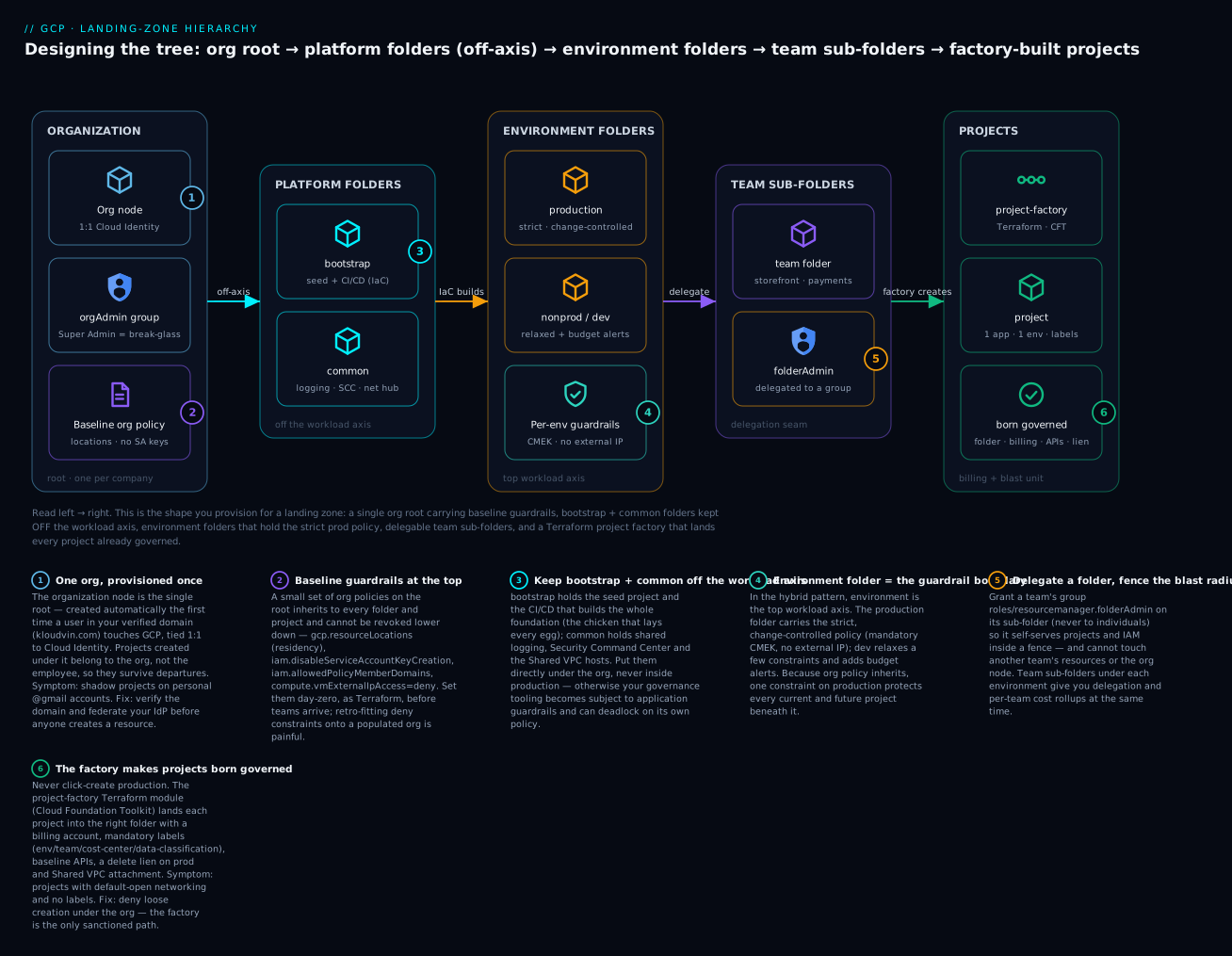
Read the diagram left to right. A single org root carries the day-zero guardrails; bootstrap and common sit directly under it, deliberately off the workload axis; environment folders (prod / nonprod / dev) form the top of the workload subtree and hold the strict production policy; team sub-folders under each environment are the delegation seam; and the project factory lands every project into the right folder already labelled, billed, API-enabled and (for prod) lien-protected. The six badges mark where the design is powerful — and where it silently breaks; we return to each below.
Where this fits
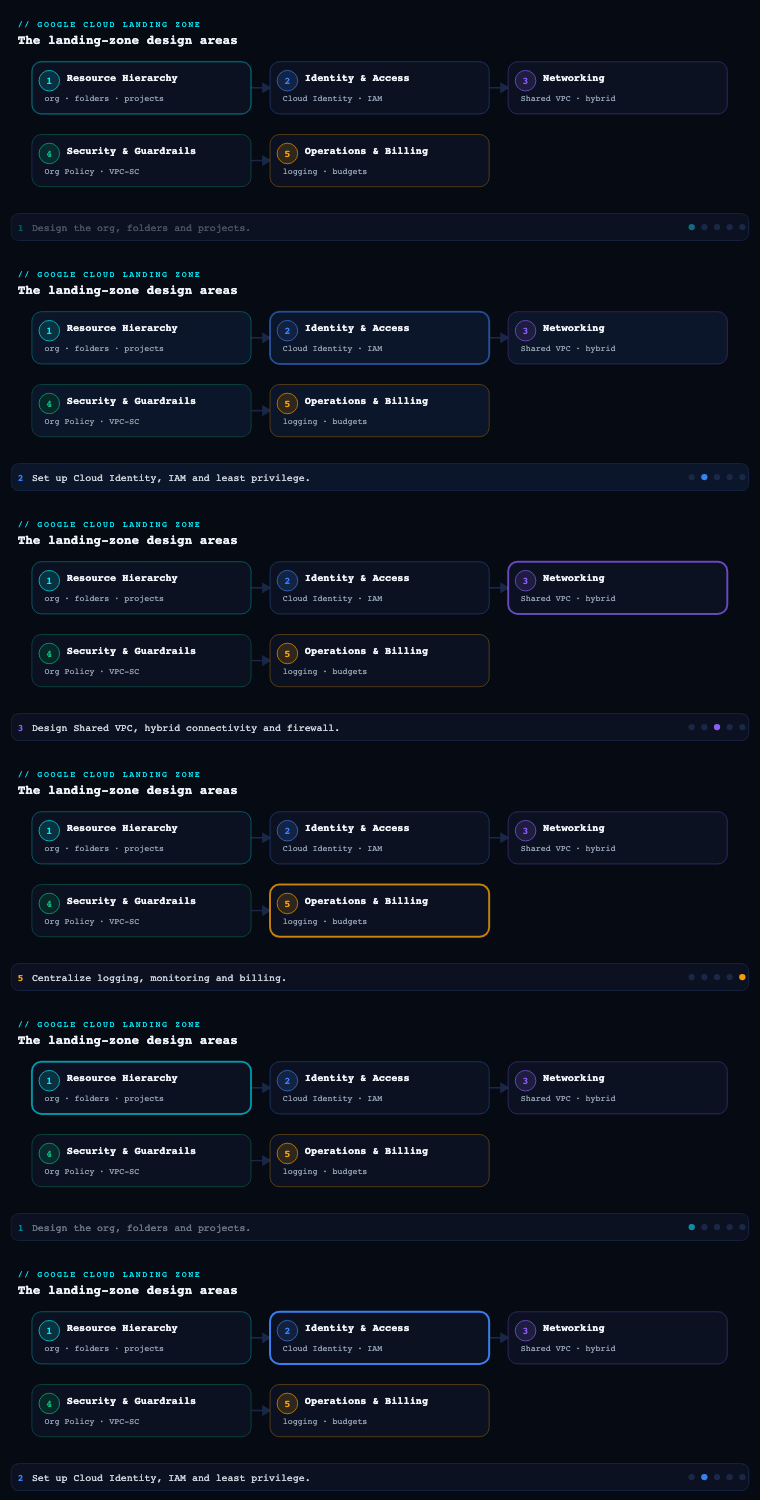
A Google Cloud landing zone is built in layers — resource hierarchy, identity, networking, security and detective controls, and platform automation — and this article is part 1 because the hierarchy is the substrate everything else attaches to. The resource hierarchy is the tree of organization → folders → projects that all of Google Cloud’s policy machinery hangs off: IAM allow/deny policies inherit down it, the Organization Policy Service applies constraints down it, Shared VPC host projects and the Cloud Asset Inventory scope to nodes in it, and billing rolls up through it. Decide this layer badly and every later design area — your network host projects, your CMEK boundaries, your detective controls in Security Command Center, your Terraform foundation pipeline — inherits the debt and the rework. Decide it well, following the patterns from Google’s Enterprise foundations blueprint and the Cloud Architecture Center landing-zone guidance, and the rest of the build snaps into a tree that is governable, billable, and queryable from day one.
The organization node
What it is
The organization resource (often called the organization node or simply the org) is the single root of the GCP resource hierarchy. It is not something you create with gcloud projects create; it is provisioned automatically the first time a user in your domain creates a Google Cloud resource, and it is tied 1:1 to a Cloud Identity or Google Workspace account. The relationship is strict: a Cloud Identity / Workspace account maps to exactly one organization resource, and that organization is identified by your verified DNS domain (e.g. kloudvin.com) and a numeric organization ID.
Two control planes meet at the org node, and conflating them is the most common day-zero mistake:
- Cloud Identity / Workspace is the identity plane. It owns users, groups, the domain, and one all-powerful role: the Super Admin. The Super Admin verifies domain ownership and performs account recovery — but the Super Admin is not the person who should run the cloud day to day.
- Google Cloud IAM is the resource plane. At org creation, the Super Admin’s first job is to grant the Organization Administrator role (
roles/resourcemanager.organizationAdmin) to a group, and then step back out of routine operations.
Why it matters
The org node is what turns a pile of personal projects into a governed estate. Three properties make it load-bearing:
- Lifecycle ownership. Projects created under an organization belong to the organization, not to the employee who clicked “Create.” When that employee leaves, the project — and its production workload — does not become orphaned or get deleted with their personal account. This single property is the reason “shadow projects” created outside the org are a security and continuity risk.
- Top of the inheritance chain. Any IAM policy or organization-policy constraint set at the org node flows to every folder, project, and resource beneath it and cannot be revoked lower down (a child can add restriction, never remove a parent’s deny). This is exactly why you place your non-negotiable, estate-wide guardrails here and nowhere else.
- Single pane. Cloud Asset Inventory, Security Command Center, BigQuery billing export, and Access Context Manager all scope cleanly to the org node, giving you one place to query “everything we run.”
How to do it well
- Provision Cloud Identity first, deliberately. Verify the domain, decide federation with your IdP (Entra ID, Okta, Ping) before any project exists, so users are real federated identities — never
@gmail.comconsumer accounts — from the first login. - Get the Super Admin out of IAM. Treat Super Admin accounts as break-glass: hardware-key MFA, ideally 2+ accounts for recovery, used only for identity emergencies. Grant
organizationAdminto a dedicated group (gcp-org-admins@) and operate from there. - Keep the org node almost empty of IAM. Bind only a tiny set of roles at the very top —
organizationAdmin,orgpolicy.policyAdmin, billing and security viewers for central teams. Everything else belongs on folders and projects. - Set a default org-policy baseline immediately, before teams arrive (see the table below). Retro-fitting deny constraints onto a populated org is painful.
Concrete artifacts, decisions, and tools
| Artifact / decision | GCP service or tool | Notes |
|---|---|---|
| Verified domain + users/groups | Cloud Identity (or Google Workspace) | 1:1 with the org node; federate to your corporate IdP via SAML/OIDC |
| Organization Administrator group | Cloud IAM (roles/resourcemanager.organizationAdmin) |
Granted by Super Admin once, then Super Admin steps away |
| Estate-wide guardrails | Organization Policy Service (gcloud org-policies) |
e.g. iam.disableServiceAccountKeyCreation, compute.requireOsLogin, gcp.resourceLocations, iam.allowedPolicyMemberDomains, sql.restrictPublicIp |
| Where new projects may attach | constraints/resourcemanager.allowedResourceCreationLocations style controls + IaC |
Force projects to be created under governed folders, not loose under org |
| Org-wide inventory & search | Cloud Asset Inventory | Feeds drift detection and the Terraform foundation |
| Inheritance documentation | Architecture decision record (ADR) | Records org ID, Super Admin custody, admin group, baseline constraints |
A representative day-zero org-policy baseline:
| Constraint | Effect | Why at the org node |
|---|---|---|
iam.allowedPolicyMemberDomains |
Only your Cloud Identity customer ID may receive IAM grants | Blocks accidental access to external/consumer accounts estate-wide |
iam.disableServiceAccountKeyCreation |
No downloadable SA keys | Forces Workload Identity Federation / short-lived creds everywhere |
gcp.resourceLocations |
Restrict to approved regions (e.g. in:eu-locations, asia-south1) |
Data-residency / sovereignty as a hard floor |
compute.requireOsLogin |
SSH via IAM + OS Login only | Removes per-VM key sprawl |
compute.vmExternalIpAccess |
Deny external IPs by default | Private-by-default posture inherited downward |
sql.restrictPublicIp / storage.publicAccessPrevention |
No public Cloud SQL / public buckets | High-blast-radius footguns closed before teams arrive |
Folders by environment and team
What it is
A folder is the optional grouping node that sits between the organization and projects. Folders can contain projects and other folders, and they are the natural attachment point for IAM allow policies and organization-policy constraints that should apply to a set of projects but not the whole estate. The hard structural limits matter for design:
- Up to 10 levels of folder nesting beneath the organization node.
- Up to 300 child folders under any single parent.
Those numbers are generous, but good hierarchies use almost none of that depth. Two to four meaningful levels is plenty for most enterprises; every extra level multiplies the “which policy wins here?” cognitive load and the surface area for misconfiguration.
The blueprint convention is that folders express two orthogonal axes: environment (production / non-production / development / sandbox) and team or business unit (a product team, a domain, a subsidiary). The whole design question — covered in the trade-offs section below — is which axis you put on top.
Why it matters
Folders are where delegated administration and environment isolation actually happen:
- Environment folders let you apply strict production guardrails (no public IPs, mandatory CMEK, change-controlled IAM) to the
productionsubtree while keeping adevelopmentsubtree loose enough for engineers to move fast. Because organization policies inherit, a single constraint on theproductionfolder protects every current and future project under it. - Team folders let you grant a product team’s group
roles/resourcemanager.folderAdmin(or scoped roles) on their folder, so they self-serve project creation and IAM within a fenced blast radius — without ever touching another team’s resources or the org node. - Cost attribution rolls up the folder tree: Cloud Billing reports and the BigQuery billing export let you aggregate spend by folder, so an environment folder or a team folder becomes a natural cost center even though billing is technically assigned per project.
How to do it well
- Carve out platform folders directly under the org, separate from workloads. The Enterprise foundations blueprint puts a
bootstrapfolder right below the org node (it holds the seed/CI-CD projects that build the rest of the foundation via IaC — the chicken that lays every other egg) and acommonfolder for shared services (centralized logging, org-wide security tooling, shared VPC/DNS) that span environments. Keeping these out of the environment/team subtree means the tooling that governs the estate is not itself governed by application guardrails. - Group by guardrail similarity, not the org chart. Folders are a governance tree, not an HR tree. If two teams need identical policy, they can share a folder; if Marketing reorganizes, your folder tree should not have to migrate.
- Stay shallow and consistent. Pick one pattern (next section) and apply it uniformly. Mixing “environment-on-top” in one branch and “team-on-top” in another is how estates become un-navigable.
- Standardize folder naming. A predictable scheme (
fldr-prod,fldr-nonprod,fldr-<team>-prod) makes IaC, asset queries, and audits trivial.
Concrete artifacts, decisions, and tools
| Artifact / decision | GCP service or tool | Notes |
|---|---|---|
| Folder tree itself | Resource Manager (gcloud resource-manager folders create) or Terraform google_folder |
Built and version-controlled by the foundation pipeline |
| Per-folder guardrails | Organization Policy Service attached at folder scope | e.g. deny external IPs on production, allow on a sandbox folder |
| Delegated team access | Cloud IAM roles on folders (folderAdmin, folderIAMAdmin, custom roles) |
Granted to Google Groups, never to individuals |
| Bootstrap / seed | bootstrap folder + seed project + Terraform service account |
Houses the CI/CD that provisions everything else (terraform-example-foundation pattern) |
| Shared services | common folder |
Centralized logging sink project, SCC project, interconnect/DNS host projects |
| Cost rollups | Cloud Billing reports + BigQuery billing export | Aggregate by folder for environment/team cost centers |
Projects
What it is
A project is the base-level node of the hierarchy and the fundamental organizing entity of Google Cloud — every resource (a Compute Engine VM, a Cloud Storage bucket, a BigQuery dataset, a GKE cluster) lives in exactly one project. A project is also the unit at which you enable APIs, attach a billing account, set quotas, and bound an IAM trust domain. A project carries three identifiers, and the distinction is operationally important:
| Identifier | Mutable? | Used for |
|---|---|---|
| Project ID | Set once at creation, immutable | The globally-unique, human-chosen handle in CLI/API/URLs (e.g. kv-shop-prod-9f3a) |
| Project number | Auto-generated, immutable | Read-only numeric ID some APIs and IAM principalSet:// bindings reference |
| Display name | Mutable | The friendly label in the console; can change freely |
Because the project ID is immutable and globally unique, your naming convention is a one-shot decision — you cannot rename it later, only create a new project and migrate.
Why it matters
The project is the primary unit of isolation, billing, and quota in GCP — the rough analogue of an AWS account or an Azure subscription, but far cheaper to create, so you can afford many of them:
- Blast-radius boundary. Compromise or misconfiguration in one project is fenced from others. A per-app, per-environment project (
shop-prod,shop-nonprod,shop-dev) means a bad IAM grant in dev cannot touch prod data. - Billing & quota boundary. Each project attaches to one billing account and carries its own API quotas; this is how you stop a runaway batch job in one team from exhausting another’s Compute quota.
- IAM boundary. A project is a clean trust domain — service accounts, Workload Identity, and per-resource IAM all resolve within it.
The design tension is granularity: too few projects and you lose isolation and clear cost attribution; too many and you drown in management overhead (hence you automate project creation via a project factory).
How to do it well
- One workload, one environment, one project. The widely-used default is a project per (application × environment) —
app-dev,app-nonprod,app-prod— placed under the right environment/team folder. This gives clean isolation and per-environment cost lines. - Automate creation with a project factory. Never click-create production projects. Use the
project-factoryTerraform module (part of the Cloud Foundation Toolkit) so every project lands with: the correct parent folder, a billing account, labels, baseline APIs, a default network policy, and break-glass IAM — consistently. - Label everything. Apply labels (
env,team,cost-center,data-classification,app) at creation. Labels are how billing export, asset queries, and FinOps reporting slice the estate; they are not optional metadata. - Use Shared VPC service projects. Application projects should be service projects that attach to a central Shared VPC host project (defined in your networking layer, part 3 of this series) rather than each running its own VPC.
- Reserve a quarantine/CICD path. New projects should be created into a governed folder by the factory, never loosely under the org node where no environment policy applies.
Concrete artifacts, decisions, and tools
| Artifact / decision | GCP service or tool | Notes |
|---|---|---|
| Project creation at scale | terraform-google-modules/project-factory (CFT) |
Enforces folder, billing, labels, APIs, default deny network |
| Immutable ID scheme | Naming standard, e.g. kv-<app>-<env>-<rand> |
One-shot; lock it down before scale-out |
| Labels taxonomy | Resource labels | env, team, cost-center, data-classification, app |
| Billing linkage | Cloud Billing account attach | One billing account, attributed per project |
| Service-project attachment | Shared VPC (gcloud compute shared-vpc associated-projects add) |
App projects consume central network |
| Quota & API enablement | Service Usage API | Baseline APIs enabled by the factory |
Resource-hierarchy design patterns and trade-offs
What it is
Google’s landing-zone guidance names three canonical hierarchy patterns, distinguished by what you put on the top folder axis. All three keep bootstrap and common folders directly under the org node; they differ only in how the workload subtree is organized.
Pattern A — Environment-oriented (top axis = environment)
Organization (kloudvin.com)
├── bootstrap            (seed + CI/CD, IaC)
├── common               (logging, security, shared VPC/DNS)
├── production
│   ├── shop-prod (project)
│   └── payments-prod (project)
├── non-production
│   ├── shop-nonprod
│   └── payments-nonprod
└── development
    ├── shop-dev
    └── payments-dev

Pattern B — Team / business-unit-oriented (top axis = team)
Organization
├── bootstrap
├── common
├── retail-team
│   ├── prod / nonprod / dev (projects or sub-folders)
├── payments-team
│   ├── prod / nonprod / dev
└── data-platform-team
    └── prod / nonprod / dev

Pattern C — Hybrid (recommended for most: environment on top, teams beneath)
Organization
├── bootstrap
├── common
├── production
│   ├── retail-team   → shop-prod
│   └── payments-team → payments-prod
├── non-production
│   ├── retail-team   → shop-nonprod
│   └── payments-team → payments-nonprod
└── development
    ├── retail-team   → shop-dev
    └── payments-team → payments-dev
A fourth real-world variant — region / subsidiary / legal-entity-oriented — puts a top axis like apac, emea, india-entity first, and is used when data sovereignty or legal separation dominates every other concern.
Why it matters
The pattern choice is hard to reverse: moving projects between folders is possible but re-parents all inherited IAM and org policy, so you want to choose deliberately. It is fundamentally a trade-off between policy simplicity, team autonomy, and cost/ownership clarity.
| Pattern | Top axis | Policy/guardrail simplicity | Team autonomy & delegation | Cost & ownership clarity | Best when |
|---|---|---|---|---|---|
| A — Environment | prod / nonprod / dev | Strongest — one prod policy set covers all apps; easy to lock prod hard | Weaker — a team’s resources are split across env folders, harder to delegate one folder | Cost is naturally per-environment; per-team needs labels | Strict, uniform compliance posture; few teams; environment policy dominates |
| B — Team / BU | per team | Weaker — every team folder needs its own prod-grade constraints; risk of drift | Strongest — delegate one folder per team, full self-service blast-radius | Strongest — folder = cost center = owner | Many autonomous product teams; strong FinOps-by-team need |
| C — Hybrid (env→team) | env, then team | Strong — prod guardrails on env folder, inherited by all teams’ prod | Strong — team sub-folders under each env are delegable | Good — slice by env and team via folders + labels | Most enterprises — balances all three; the foundations-blueprint default |
| D — Region / entity | region / legal entity | Strong for residency (gcp.resourceLocations per region folder) |
Per-entity delegation | Per-entity billing accounts often required | Sovereignty / legal separation is the overriding driver |
How to do it well
- Default to the hybrid pattern © unless a specific force overrides it. Environment-on-top gives you clean, inheritable prod guardrails; team sub-folders give you delegation and team cost rollups. It is what the Enterprise foundations blueprint and most large GCP estates land on.
- Let the dominant constraint pick the top axis. If uniform compliance is non-negotiable → environment on top (A/C). If autonomous teams and per-team P&L dominate → team on top (B). If data residency / legal entities dominate → region/entity on top (D).
- Keep
bootstrapandcommonout of the workload axis in every pattern, directly under the org, so foundation tooling and shared services aren’t subject to application guardrails. - Cover what folders can’t with labels. Whichever axis you don’t put in folders (team in pattern A, environment in pattern B) you recover through mandatory labels + BigQuery billing export — so you can always slice cost by both env and team.
- Stay shallow. Even with 10 levels available, prefer ≤4. Encode the rest (app, region) in project IDs and labels, not in ever-deeper folders.
Going deeper
Everything above is the design surface. This section is the machinery underneath it — the parts that separate a hierarchy that looks right in a diagram from one that survives an audit, a bulk project-creation run, and a five-year reorg. It also folds in the two topics a landing-zone hierarchy lives or dies on but that beginner treatments skip: liens and quotas.
How organization-policy inheritance actually merges
Beginners picture inheritance as “the org policy applies everywhere.” The reality is a merge you must be able to reason about, because it decides what a resource is actually allowed to do:
- Boolean constraints (e.g.
iam.disableServiceAccountKeyCreation) are on/off. A child can enforce a parent’s boolean or, if the constraint permits, override it — but a parent that enforces cannot be loosened below unless it explicitly allows overrides. - List constraints (e.g.
gcp.resourceLocations) carryallowedValues/deniedValues. By default a child policy replaces the parent’s list. SetinheritFromParent: trueto union the child’s rules onto the parent’s instead of replacing them — a distinction that has burned many teams who thought a folder-levelallow asia-south1was adding to the org list when it was actually narrowing it. - Effective policy is what you must read before trusting anything:
gcloud org-policies describe gcp.resourceLocations --folder=FOLDER_ID --effectivereturns the post-merge result at that node, not just the policy set there. - Custom constraints extend the built-in catalogue with CEL expressions over resource fields — for example, “new projects must carry an
envlabel” or “Compute instances may not use a given machine family.” They are GA and defined at the org, then referenced like any other constraint:
# 1. Define a custom constraint (representative)
gcloud org-policies set-custom-constraint constraint.yaml
# constraint.yaml:
#   name: organizations/ORG_ID/customConstraints/custom.requireEnvLabel
#   resourceTypes: [ cloudresourcemanager.googleapis.com/Project ]
#   methodTypes:   [ CREATE ]
#   condition: "has(resource.labels) && 'env' in resource.labels"
#   actionType: ALLOW
#   displayName: "New projects must carry an env label"

# 2. Enforce it at a folder
gcloud org-policies set-policy policy.yaml   # references constraint custom.requireEnvLabel
Because enforcement happens at create/update time (a violation returns FAILED_PRECONDITION), always ship a dry-run first (dryRunSpec) and watch audit logs for a week to size the blast radius before flipping to live enforcement.
Tags vs labels — two different systems people constantly conflate
They read as “key/value on a resource,” but they are unrelated subsystems:
| Labels | Tags (Resource Manager Tags) | |
|---|---|---|
| Purpose | Billing, FinOps, free-form metadata | Conditional IAM, conditional org policy, network firewall targeting |
| Governed by IAM? | No — any editor can set them | Yes — TagKey/TagValue are org-level resources with their own IAM |
| Inheritance | None; per-resource | Inherited down the hierarchy from the node they’re attached to |
| Typical use in a LZ | env, team, cost-center, data-classification in billing export |
environment=prod tag driving a conditional org policy or an IAM binding |
# Tags are hierarchical, IAM-controlled resources (representative)
gcloud resource-manager tags keys create environment --parent=organizations/ORG_ID
gcloud resource-manager tags values create prod --tag-key=environment
gcloud resource-manager tags bindings create \
  --tag-value=tagValues/TAG_VALUE_ID \
  --parent=//cloudresourcemanager.googleapis.com/projects/PROJECT_NUMBER
The landing-zone pattern: use labels for cost slicing (they land in the BigQuery billing export), and tags when you need a value that drives policy — e.g. an IAM condition that only grants a role on resources tagged environment=nonprod.
Liens — stop the fat-finger prod delete
A lien blocks a specific mutation on a project — most usefully its deletion. Every production project the factory creates should carry one:
gcloud resource-manager liens create \
  --project=PROJECT_ID \
  --restrictions=resourcemanager.projects.delete \
  --reason="production estate — deletion requires lien removal" \
  --origin=terraform-foundation
gcloud resource-manager liens list --project=PROJECT_ID
Now gcloud projects delete PROJECT_ID fails until someone with resourcemanager.projects.updateLiens removes the lien on purpose — turning an irreversible fat-finger into a two-step, audited action. In Terraform this is google_resource_manager_lien. (Folders and projects also have a soft-delete/recovery window of ~30 days, but a lien is your first line of defence, not the recovery bin.)
Quotas at landing-zone scale
Quotas are per-project, per-region (and per-metric) — they do not inherit down folders, which surprises people. Two quota facts shape a landing zone:
- The project-creation quota is finite. A brand-new billing account or org has a modest ceiling on how many projects it can create in a window; a factory that bulk-creates 70 projects can hit it. Request an increase early via the Cloud Quotas API / console (
Project creation requestsquota) so your first foundation run doesn’t stall. - Workload quotas are a per-project baseline the factory should seed. Compute CPUs, in-use IP addresses, and API rate limits are all per-project. The factory can apply quota adjuster preferences or file increase requests so a new prod project isn’t born with dev-sized ceilings.
# Inspect and (representative) raise a quota with the Cloud Quotas surface
gcloud alpha services quota list \
  --service=compute.googleapis.com --consumer=projects/PROJECT_ID
Monitor quota usage (Cloud Monitoring exposes serviceruntime.googleapis.com/quota/allocation/usage) so you get paged at 80% rather than discovering the ceiling during a launch.
The Terraform foundation pipeline, staged
“Provision it with Terraform” is not one apply — Google’s reference terraform-example-foundation is a staged pipeline, each stage its own state and pipeline, run in order:
| Stage | Builds | Notes |
|---|---|---|
0-bootstrap |
Seed project, Terraform state bucket, CI/CD (Cloud Build / Jenkins / GitHub Actions), the highly-privileged seed service account | The chicken-and-egg step — bootstrapped once, often by an org admin, granting the seed SA org-level roles |
1-org |
Org-level IAM, the org-policy baseline, common folder, logging/SCC/billing-export projects |
The estate-wide guardrails |
2-environments |
The production / non-production / development (and shared) folders + per-env baseline |
The environment axis |
3-networks-* |
Shared VPC hosts, subnets, hybrid connectivity, DNS (per environment) | The networking layer (series part 3) |
4-projects |
The project factory instantiated per app/team | Where workloads finally land |
Later stages run under short-lived, impersonated service accounts (Workload Identity Federation from the CI runner → a stage SA), never downloaded keys — which is exactly why iam.disableServiceAccountKeyCreation is safe to set on day zero. The alternative Google-published foundation is Cloud Foundation Fabric / FAST, a more modular, faster-moving set of blueprints; both encode the same hierarchy principles, and the choice is largely team preference.
Re-parenting and move semantics
Moving a folder or project (gcloud resource-manager folders move, gcloud projects move) re-evaluates inherited IAM and org policy immediately at the new location — a compliant project can become non-compliant (or vice-versa) the moment it lands. Caveats that make pattern choice “hard to reverse”: VPC Service Controls perimeter membership does not follow a move automatically, some billing and org-policy edge cases need re-application, and a mass re-parenting during a reorg can briefly change hundreds of resources’ effective policy. This is the concrete reason the earlier advice — pick the top axis deliberately, and don’t mirror the org chart — matters.
Scale, limits, and the org-level extras
| Thing | Limit / fact | Design implication |
|---|---|---|
| Organizations | 1 per Cloud Identity/Workspace account | The root is a given, not a choice |
| Folder depth | ≤10 levels below the org | Prefer ≤4; push detail into IDs/labels |
| Folders per parent | ≤300 | Plenty; you’ll never design near it |
| Project ID / number | Immutable, globally unique | Naming is one-shot; lock it before scale-out |
| IAM policy size | Bounded members per policy (~1,500) | Bind groups, never individuals, to stay under it |
| Deleted projects | ~30-day recovery window | Recover a fat-finger delete, but liens are the real guard |
Two org-node extras worth wiring day-one: Essential Contacts (routes security/technical/billing notifications to the right teams, not a random project owner) and a Cloud Asset Inventory feed (streams resource/policy changes to Pub/Sub for real-time drift detection against your Terraform source of truth).
Real-world enterprise scenario
KloudVin Retail Group is a fictional ₹4,200-crore omnichannel retailer (≈US$500M revenue) with ~900 engineers across three product domains — Storefront (e-commerce web/app), Payments & Wallet (PCI-DSS scope), and Data & ML (recommendations, demand forecasting). They are mid-migration from on-prem and a sprawl of ungoverned GCP projects that individual teams created with personal accounts. The mandate: a governed landing zone, data residency in asia-south1 (Mumbai) and asia-south2 (Delhi), PCI isolation for Payments, and per-team cost accountability for FinOps. Budget discipline is real — this is INR, and runaway dev spend has burned them before.
Organization node. They verify kloudvinretail.com in Cloud Identity, federate to their existing Entra ID via SAML so all 900 engineers log in with corporate identities (no consumer accounts). The Workspace Super Admin is split across two hardware-key break-glass accounts held by the cloud lead and the CISO, used only for identity recovery. The Super Admin grants roles/resourcemanager.organizationAdmin to gcp-org-admins@kloudvinretail.com (5 platform engineers) and exits routine ops. Day-zero org-policy baseline: gcp.resourceLocations = in:asia-south1, asia-south2 (hard residency floor), iam.disableServiceAccountKeyCreation, iam.allowedPolicyMemberDomains locked to their customer ID, compute.vmExternalIpAccess denied, storage.publicAccessPrevention enforced.
Folders. They adopt the hybrid pattern ©. Directly under the org: a bootstrap folder (seed project + the Terraform foundation CI/CD running in Cloud Build) and a common folder (centralized log sink project, a Security Command Center Premium project, and the Shared VPC host projects for each environment). The workload subtree is environment-first:
Organization (kloudvinretail.com)
├── bootstrap        → prj-bootstrap-seed, prj-cicd
├── common           → prj-logging, prj-scc, prj-net-hub-{prod,nonprod}
├── production
│   ├── storefront   → prj-store-prod
│   ├── payments     → prj-pay-prod        (PCI subtree, tightest policy)
│   └── data-ml      → prj-data-prod
├── non-production
│   ├── storefront / payments / data-ml
└── development
    ├── storefront / payments / data-ml
The production folder carries the strict guardrails (deny external IP — already inherited, mandatory CMEK via constraints/gcp.restrictNonCmekServices, change-controlled IAM); the payments sub-folders under prod and nonprod get additional PCI constraints (restricted egress, VPC-SC perimeter membership). The development folder relaxes a few constraints and — crucially for budget — carries per-project budget alerts so a forgotten GPU notebook pages the team before it pages finance. Each product domain’s group gets roles/resourcemanager.folderAdmin on their sub-folders within each environment, so Storefront self-serves its own dev/nonprod projects but cannot touch Payments.
Projects. Created exclusively by the project-factory Terraform module — never by hand. Naming is the immutable scheme kvr-<domain>-<env>-<rand> (e.g. kvr-store-prod-7b21). Every project lands with labels env, team, cost-center, data-classification, attaches to one billing account, enables only baseline APIs, and is wired as a Shared VPC service project to the matching common host project. The factory produces ~70 projects across the three domains × three environments × a handful of apps.
Artifacts produced. A Cloud Identity tenant with Entra federation; an org-policy baseline as Terraform (google_org_policy_policy); the bootstrap/common/env/team folder tree as google_folder resources; a project-factory module instantiated per app; a labels taxonomy doc; a BigQuery billing export with Looker Studio dashboards sliced by env and team; and an ADR recording org ID, Super Admin custody, and pattern choice.
Measurable outcome (6 months): shadow/ungoverned projects went from ~140 to 0 (all migrated under the org or decommissioned); 100% of projects carry the four mandatory labels (enforced by IaC validation in the pipeline), versus ~30% before; FinOps can now attribute 100% of spend to a team and environment, and dev-environment budget alerts cut idle dev spend by ~38%; PCI auditors accepted the payments folder + VPC-SC perimeter as the documented cardholder-data boundary, shortening the assessment.
Deliverables & checklist
Practice challenges
Work these in order — the first two are read-only and safe on any org you can view; the later ones mutate the hierarchy, so run them in a sandbox org or a folder you own. All commands use PLACEHOLDER IDs (ORG_ID, FOLDER_ID, PROJECT_ID, BILLING_ID) — substitute your own.
1. (Beginner) Find your organization and its top-level folders. Discover the org ID and list what sits directly under it.
<details> <summary>Solution</summary>
gcloud organizations list
gcloud resource-manager folders list --organization=ORG_ID
Why: the org node is the root of everything; before you design a tree you confirm the root and what already hangs off it (often the shadow projects you’re about to govern). </details>
2. (Beginner) Read the effective location policy at the org. Don’t guess the residency floor — read the merged result.
<details> <summary>Solution</summary>
gcloud org-policies describe gcp.resourceLocations \
  --organization=ORG_ID --effective
Why: --effective returns the post-merge policy actually in force, which is what a resource is judged against — not just the policy object set at that node.
</details>
3. (Beginner→Intermediate) Create the two platform folders off the workload axis.
Stand up bootstrap and common directly under the org.
<details> <summary>Solution</summary>
gcloud resource-manager folders create \
  --display-name="bootstrap" --organization=ORG_ID
gcloud resource-manager folders create \
  --display-name="common" --organization=ORG_ID
Why: keeping foundation tooling and shared services out of production means your CI/CD and log sink aren’t governed by application guardrails — and can’t deadlock on the very policy they deploy.
</details>
4. (Intermediate) Protect a production project with a deletion lien.
Make gcloud projects delete fail until someone deliberately removes the guard.
<details> <summary>Solution</summary>
gcloud resource-manager liens create \
  --project=PROJECT_ID \
  --restrictions=resourcemanager.projects.delete \
  --reason="production — deletion requires lien removal"
gcloud resource-manager liens list --project=PROJECT_ID
Why: a lien turns an irreversible fat-finger (projects delete) into a two-step, audited action; every prod project the factory creates should carry one.
</details>
5. (Intermediate→Advanced) Stand up an environment folder and a governed project in Terraform. Use the Cloud Foundation Toolkit project-factory so the project is born labelled, billed and API-enabled.
<details> <summary>Solution</summary>
resource "google_folder" "production" {
  display_name = "production"
  parent       = "organizations/ORG_ID"
}

module "store_prod" {
  source  = "terraform-google-modules/project-factory/google"
  version = "~> 17.0"   # check the registry for the current version

  name              = "kvr-store-prod"
  random_project_id = true
  org_id            = "ORG_ID"
  folder_id         = google_folder.production.id
  billing_account   = "BILLING_ID"
  labels = {
    env               = "prod"
    team              = "storefront"
    cost-center       = "retail-1042"
    data-classification = "internal"
  }
  activate_apis = ["compute.googleapis.com", "logging.googleapis.com"]
}
Why: the folder gives the project its inherited guardrails; the factory guarantees the parent, billing, labels and APIs are set the same way every time — no hand-created, un-labelled, default-open projects. </details>
6. (Advanced) Enforce a taxonomy rule with a custom org-policy constraint.
Require that new projects carry an env label — reject creation otherwise.
<details> <summary>Solution</summary>
# require-env-label.yaml
name: organizations/ORG_ID/customConstraints/custom.requireEnvLabel
resourceTypes: [ cloudresourcemanager.googleapis.com/Project ]
methodTypes:   [ CREATE ]
condition: "has(resource.labels) && 'env' in resource.labels"
actionType: ALLOW
displayName: "New projects must carry an env label"
gcloud org-policies set-custom-constraint require-env-label.yaml
# then reference custom.requireEnvLabel in an org-policy set at the org/folder,
# shipping it as a dryRunSpec first and watching audit logs before enforcing.
Why: custom constraints (CEL, GA) enforce your taxonomy at create time — the pipeline validation and the platform agree on the same rule, and a project simply cannot be born non-compliant. Dry-run first to size the blast radius. </details>
Common beginner mistakes
These are conceptual traps — wrong mental models a newcomer brings from other clouds or from click-ops. (They’re distinct from the operational anti-patterns in Common pitfalls below.)
- “A folder is a security boundary like a project.” No. The project is the isolation/blast-radius/trust boundary; a folder is a grouping and policy-inheritance node. Two projects in the same folder are not automatically able to reach each other’s resources, and a folder does not sandbox anything by itself. Right model: folders group and inherit policy; projects isolate.
- “Labels and tags are the same key/value thing.” They’re unrelated subsystems. Labels are free-form, ungoverned, and exist for billing/FinOps. Tags are org-level, IAM-governed, inheritable resources that drive conditional IAM, conditional org policy, and firewall rules. Using a label where you needed a tag means your “policy” isn’t enforced at all.
- “Org policies will clean up the violations already out there.” They won’t. Constraints are enforced at create/update time going forward; a bucket that was already public stays public until you remediate it separately. Right model: set the policy to stop new violations, then run a separate remediation pass (Cloud Asset Inventory + a fixer) on the existing estate.
- “More projects will cost more money.” Projects themselves are free — you pay for the resources inside them. Fearing project sprawl leads people to cram many apps and environments into one project, destroying isolation and cost attribution. Right model: create a project per (app × environment) freely; automate it with the factory.
- “I’ll grant broad roles at the org node so people can just get to their stuff.” IAM inherits down and additively — a role at the org is a role on everything. Grant at the lowest node that works (a team’s folder, a single project), to a group, using the narrowest predefined or custom role. The org node should be almost empty of bindings.
- “The folder tree and the network follow the same shape.” They don’t. The hierarchy is the governance tree; the network is a separate design — usually one Shared VPC host per environment in
common, with app projects attaching as service projects. Don’t try to express network topology in folders.
Common pitfalls
- Running everything as Super Admin / Organization Admin. The Workspace Super Admin and
organizationAdminare estate-god roles. Using them for daily work means one phished session compromises the whole org. Avoid: Super Admin = break-glass only (hardware keys, ≥2 accounts); operate from scoped groups on folders/projects, never from the org node. - Mirroring the org chart in folders. Building the folder tree to match departments means every reorg triggers a re-parenting migration that resets inherited IAM and org policy. Avoid: group by guardrail similarity and environment; recover the org-chart view through labels, not folder structure.
- Going too deep. Just because you can nest 10 levels doesn’t mean you should. Deep trees make “which policy wins here?” unanswerable and slow audits. Avoid: ≤4 meaningful levels; push app/region detail into project IDs and labels.
- Hand-creating projects. Click-created projects land with no parent folder, no labels, default-open networking, and inconsistent IAM — the exact shadow-project problem you set out to kill. Avoid: the
project-factorymodule is the only sanctioned path; deny loose creation under the org with policy. - Treating the project ID as renameable. Teams pick a throwaway ID, scale to 70 projects, then discover the ID is immutable and globally unique and baked into IAM bindings and URLs. Avoid: lock the naming scheme before scale-out; use the mutable display name for cosmetic labels.
- Forgetting
bootstrap/commonbelong outside the workload axis. Putting the CI/CD seed project or the central log sink insideproductionsubjects your governance tooling to application guardrails (and risks a circular dependency where the thing that builds the foundation is blocked by the foundation’s own policy). Avoid: keepbootstrapandcommondirectly under the org node.
Glossary
- Organization node (org): the single root of the GCP resource hierarchy, tied 1:1 to a Cloud Identity/Workspace account and your verified domain. Auto-created; owns every project beneath it.
- Cloud Identity / Google Workspace: the identity plane — users, groups, the domain. Where your IdP (Entra/Okta) federates in.
- Super Admin: the all-powerful Workspace/Cloud Identity account. Verifies the domain and does account recovery. Treat as break-glass only.
- Organization Administrator (
roles/resourcemanager.organizationAdmin): the top IAM role on the resource plane. Grant to a group; the Super Admin then steps out. - Folder: an optional grouping node between org and projects. Holds other folders or projects; the attachment point for scoped IAM and org policy. ≤10 deep, ≤300 per parent.
- Project: the base node — every resource lives in exactly one. The unit of isolation, billing, quota, and API enablement.
- Project ID / number / display name: the immutable global handle / the immutable numeric ID / the mutable friendly label. Only the display name can change.
- Organization Policy Service / constraint: the guardrail engine. Boolean constraints are on/off; list constraints allow/deny values; custom constraints are CEL expressions you author. Enforced at create/update time, inherited down.
- Effective policy: the post-merge result at a node (read with
--effective) — what a resource is actually judged against. - IAM allow / deny policy: who can do what. Inherits down and adds up; only a deny policy can subtract a grant lower in the tree.
- Label: free-form, ungoverned key/value on a resource, used for billing/FinOps slicing (lands in the BigQuery billing export).
- Tag (Resource Manager Tag): an org-level, IAM-governed, inheritable key/value that drives conditional IAM, conditional org policy, and firewall rules. Not the same as a label.
- Lien: a block on a specific project mutation (usually delete). Turns an irreversible action into a deliberate, audited one.
- Quota: a per-project, per-region ceiling (CPUs, IPs, API rate, project-creation rate). Does not inherit down folders; managed via the Cloud Quotas API.
- Project factory (
terraform-google-modules/project-factory): the Cloud Foundation Toolkit module that creates projects consistently — parent folder, billing, labels, APIs, network, IAM. - Cloud Foundation Toolkit (CFT): Google’s library of production-ready Terraform modules (project-factory, folders, org-policy, networking).
terraform-example-foundation: Google’s reference staged foundation pipeline (0-bootstrap→1-org→2-environments→3-networks→4-projects).- Cloud Foundation Fabric / FAST: Google’s alternative, more modular set of foundation blueprints — same principles, different packaging.
- Enterprise foundations blueprint: Google’s opinionated end-to-end landing-zone design (hierarchy, identity, networking, security, deployment) that this series follows.
- bootstrap folder: holds the seed project and the CI/CD that builds the foundation. Directly under the org, off the workload axis.
- common folder: holds shared services (centralized logging, Security Command Center, Shared VPC hosts, DNS). Directly under the org, off the workload axis.
- Shared VPC (host / service project): one project owns the VPC (host); many projects attach and deploy into its subnets (service). The landing-zone networking pattern.
- Seed / bootstrap service account: the highly-privileged SA created in
0-bootstrapthat later stages impersonate (via Workload Identity Federation) to build the estate — so no keys are downloaded. - Cloud Asset Inventory (CAI): the org-wide inventory and change-feed service; feeds drift detection against your Terraform source of truth.
- Security Command Center (SCC): GCP’s central security/risk posture service, scoped to the org node.
- Essential Contacts: org/folder/project-level routing of security, technical, and billing notifications to the right teams.
- Break-glass: a rarely-used, tightly-controlled emergency account (hardware-key MFA, ≥2 copies) reserved for recovery, not daily work.
- ADR (Architecture Decision Record): a short document capturing a decision and its rationale — here, org ID, Super Admin custody, and the chosen hierarchy pattern.
What’s next
Part 2 of Google Cloud Landing Zone Design moves up the stack to Identity & Access — designing Cloud Identity federation, the IAM allow/deny model, Google Groups for delegated administration, and Workload Identity Federation across the hierarchy you just built. Continue with Landing Zone: Identity & Access to build the next layer on the tree you just designed.