In a nutshell
A landing zone’s security pillar is the layer that turns policy into physics. The first three parts agreed on how the cloud estate is shaped, who may act, and how the network is wired — but agreements can be forgotten, mis-clicked, or ignored. Security & Guardrails is where “we agreed not to do that” becomes “the platform will not let you do that.” It is preventive first (stop the bad thing before it exists) and detective second (catch what still slips through), and it is expressed as configuration, not as a slide deck of good intentions.
Picture a bank, not a single vault door. Organization Policy is the building code — some things simply cannot be built here (no public windows into the vault room), and the inspector rejects the blueprint at permit time, before a single brick is laid. VPC Service Controls is the loading dock with a manifest — even a courier with a valid ID badge cannot wheel a cart of cash out to a truck that isn’t on the approved list; the badge (IAM) got them in, but moving value across the wall needs its own sign-off. CMEK is you holding the only key to the safe-deposit boxes — the bank stores your box, but if you melt your key, nobody opens it, not even the bank. Assured Workloads is a bonded, cleared-staff-only wing — the whole floor is pre-certified to a regulation, and even the building’s own maintenance crew must be vetted and in-country to enter. And Security Command Center is the guard station with every camera feed — it doesn’t lock any door itself, but it sees the whole building at once, raises the alarm on what the locks missed, and proves to the auditor that the locks are working.
Get this pillar right and the identity, network, and operations pillars all inherit a hard, provable, defence-in-depth baseline. Get it wrong and everything above it is expensive scaffolding around an open door.
Level: Advanced · Time: ~38 min · Prerequisites: Part 1 — the resource hierarchy (Organization, folders, projects, and policy inheritance — the tree that guardrails attach to), the identity plane from Part 2 (IAM grants who may act), and the network from Part 3 (the private path VPC-SC rides on). Comfort reading a gcloud command and a YAML block.
After this lesson you can:
- Explain the difference between preventive controls (Org Policy, VPC-SC) and detective controls (SCC), and why a complete landing zone needs both planes.
- Author Organization Policy baselines — list, boolean, and custom (CEL) constraints — and roll them out safely with dry-run before enforcement.
- Design a VPC Service Controls perimeter with access levels and ingress/egress rules, and route APIs through the restricted VIP so data can’t be exfiltrated with valid credentials.
- Stand up Security Command Center at org scope, stream findings to a SIEM, and prioritize with Attack Path Simulation.
- Build a CMEK topology (key-management project, HSM/EKM protection levels, scheduled rotation, per-service-agent grants) and enforce it so nothing is created without a key you control.
- Pin a regulated domain to a sovereignty/compliance regime with Assured Workloads, and describe how all five controls compose as defence in depth.
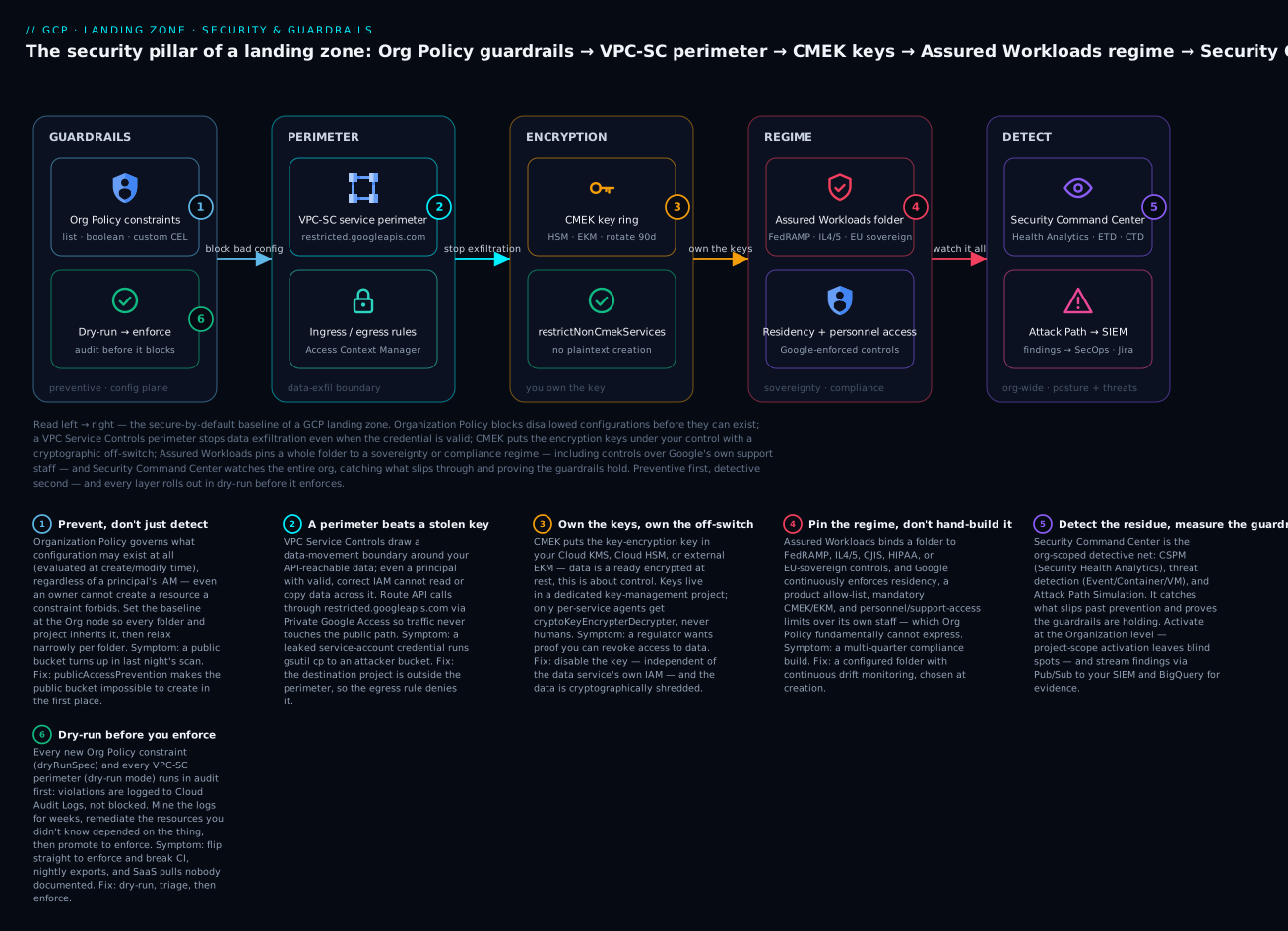
Read left → right: Organization Policy blocks disallowed configurations before they can exist; a VPC Service Controls perimeter stops data leaving even when the credential is valid; CMEK puts the encryption keys — and the off-switch — under your control; Assured Workloads pins a whole folder to a sovereignty or compliance regime including controls over Google’s own support staff; and Security Command Center watches the entire org, catching what slips through and proving the guardrails hold. Every preventive layer rolls out in dry-run before it enforces.
Where this fits
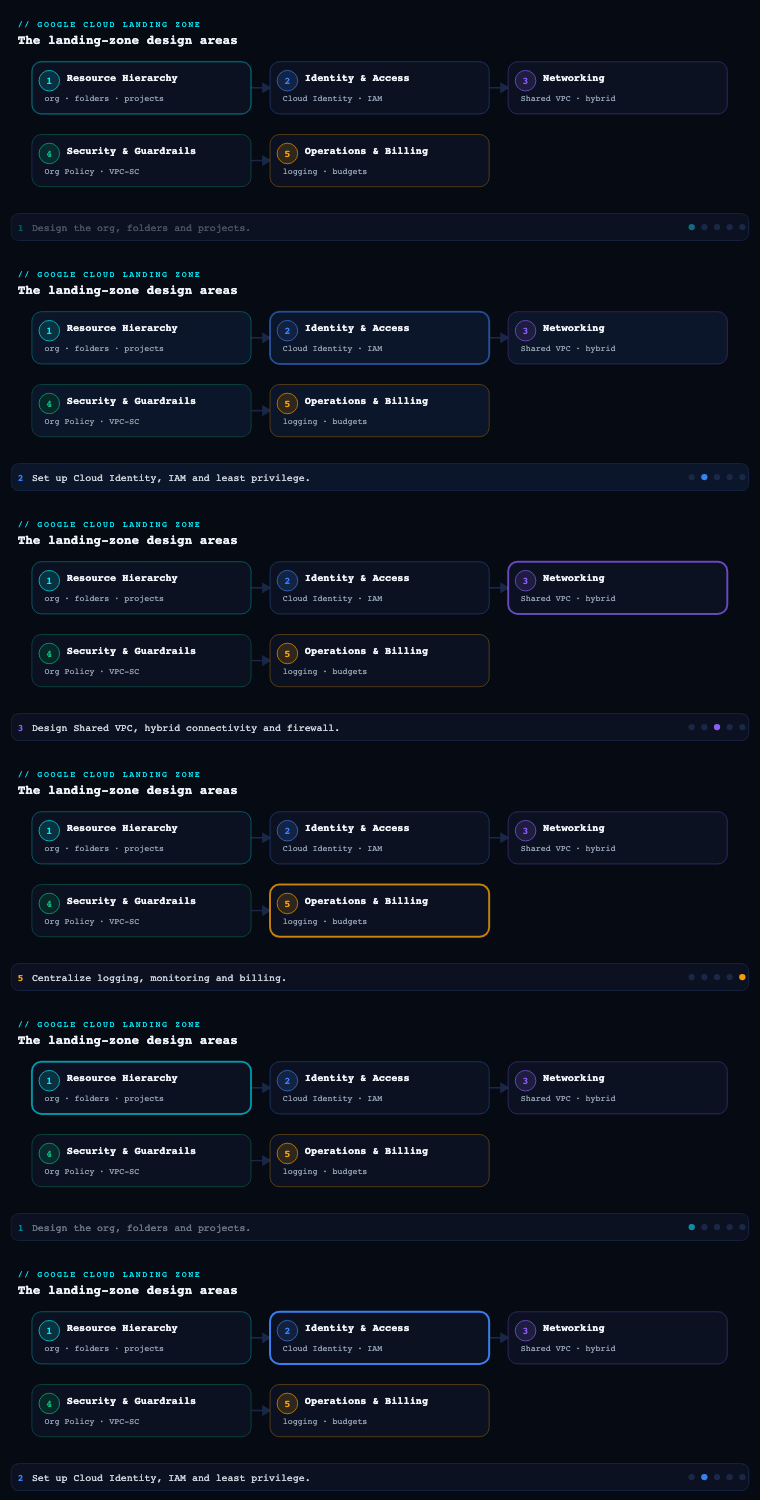
Parts 1–3 built the resource hierarchy, the identity plane, and the network of the Google Cloud landing zone. Security & Guardrails is the layer that makes all three enforceable: it turns “we agreed not to do that” into “the platform will not let you do that.” On Google Cloud the guardrail model is preventive first — Organization Policy stops disallowed configurations before they exist, VPC Service Controls draw a data-exfiltration perimeter around your APIs, CMEK puts you in control of the encryption keys under your data, and Assured Workloads pins whole folders to a sovereignty or compliance regime — and detective second, with Security Command Center continuously scoring posture and surfacing threats across the org. This article goes deep on those five sub-components and, critically, on how they compose: an Org Policy that blocks public IPs, a VPC-SC perimeter that blocks the exfiltration path, a CMEK boundary that blocks decryption outside your key ring, an Assured Workloads folder that pins residency, and SCC watching the whole thing — that is defence in depth expressed as landing-zone configuration, not slideware.
Organization Policy constraints — preventive guardrails on the hierarchy
What it is. The Organization Policy Service lets you set constraints on the resource hierarchy (Organization, folder, or project) that restrict what configurations are even allowed, regardless of a principal’s IAM permissions. This is the key distinction from IAM: IAM governs who can act; Org Policy governs what may exist. A user with roles/owner on a project still cannot create a VM with an external IP if an Org Policy forbids it. Constraints come in two flavours: list constraints (allow/deny specific values, e.g. which regions, which external IPs, which sharing domains) and boolean constraints (on/off, e.g. disable SA key creation, require OS Login). A constraint set on a node becomes the effective policy for everything beneath it, with child nodes able to inherit, merge, or override depending on how the policy is written.
Why it matters. Org Policy is the preventive backbone of the entire guardrail strategy. Detective controls tell you the barn door is open; preventive controls nail it shut. Because constraints are evaluated at resource-creation and modification time by the API itself, a misconfiguration is rejected, not merely flagged hours later by a scanner. That is the difference between “we found a public bucket in last night’s scan” and “the public bucket could never be created.” For regulated landing zones this is non-negotiable — auditors want to see that residency and exposure controls are enforced, not aspirational.
How to do it well.
- Set baseline constraints at the Organization node so every folder and project inherits them, then relax narrowly per folder where genuinely needed (e.g. a
sandboxfolder that permits external IPs). Inheritance means you write the strict policy once. - Anchor on the curated guardrail baselines. The Secure Foundations Blueprint and the Assured Workloads / org-policy bundles ship a vetted starting set. Don’t invent your list from scratch — start from the blueprint and tighten.
- Use the high-value constraints deliberately. A landing-zone baseline almost always includes the constraints in the table below.
- Prefer
dry_run_spec(the “dry-run / audit” mode) when introducing a new constraint to an existing estate. Org Policy supports a dry-run policy that logs what would be violated without blocking, so you can find and remediate non-compliant resources before flipping to enforcement. - Author the new-style constraints with conditions and tags where supported, and reach for Custom Organization Policies (backed by Common Expression Language, CEL) when no built-in constraint fits — e.g. “GKE clusters must have Shielded Nodes” or “Cloud SQL must not have a public IP.” Custom constraints let you write
resource.<field> == <value>rules against supported services. - Manage every policy as code in Terraform (
google_org_policy_policy,google_org_policy_custom_constraint) and review via pull request — Org Policy drift is a real incident vector.
| Constraint (selected baseline) | Type | What it prevents |
|---|---|---|
gcp.resourceLocations |
List | Resources created outside approved regions (residency) |
compute.vmExternalIpAccess |
List | VMs getting public IPs (default-deny, allow-list exceptions) |
compute.requireOsLogin |
Boolean | SSH outside centrally-managed OS Login identities |
compute.requireShieldedVm |
Boolean | VMs without Secure/Measured Boot + vTPM |
iam.disableServiceAccountKeyCreation |
Boolean | Exportable, long-lived SA JSON keys |
iam.allowedPolicyMemberDomains |
List | IAM grants to identities outside your Cloud Identity domain(s) |
iam.automaticIamGrantsForDefaultServiceAccounts |
Boolean | Default SAs silently receiving roles/editor |
storage.publicAccessPrevention |
Boolean | Buckets/objects becoming publicly readable |
storage.uniformBucketLevelAccess |
Boolean | Legacy per-object ACLs that bypass IAM |
sql.restrictPublicIp |
Boolean | Cloud SQL instances exposed on a public IP |
gcp.restrictNonCmekServices |
List | Services creating resources without CMEK |
Worked example — enforce a baseline, dry-run a risky one, and write a custom constraint. Three patterns you use constantly. First, a boolean constraint enforced at the Org node so every project inherits it, and a list constraint that pins residency:
# publicaccess.yaml — a boolean constraint. Enforced at the Org, inherited everywhere.
name: organizations/ORG_ID/policies/storage.publicAccessPrevention
spec:
  rules:
    - enforce: true
# locations.yaml — a list constraint. Only EU locations may host resources.
name: organizations/ORG_ID/policies/gcp.resourceLocations
spec:
  rules:
    - values:
        allowedValues:
          - in:eu-locations   # a Google-curated value group; also us-locations, asia-locations, or exact regions
gcloud org-policies set-policy publicaccess.yaml
gcloud org-policies set-policy locations.yaml
Second, never flip a risky constraint straight to enforce on a live estate — introduce it in dry-run so violations are logged, not blocked. In Terraform the same policy carries a dry_run_spec you later graduate to spec:
# Introduce external-IP deny in AUDIT mode first. When the dry-run audit logs
# (type OrgPolicyViolationInfo) are clean, move the same rule into spec { } to enforce.
resource "google_org_policy_policy" "external_ip" {
  name   = "organizations/ORG_ID/policies/compute.vmExternalIpAccess"
  parent = "organizations/ORG_ID"

  dry_run_spec {
    rules { deny_all = "TRUE" }
  }
}
Third, when no built-in constraint fits, author a custom constraint in CEL — here “every GKE cluster must enable Shielded Nodes,” then enforce it like any other constraint:
# shielded-nodes.yaml — a CUSTOM constraint. ALLOW == permit the op ONLY when the condition is true.
name: organizations/ORG_ID/customConstraints/custom.gkeRequireShieldedNodes
resourceTypes:
  - container.googleapis.com/Cluster
methodTypes:
  - CREATE
  - UPDATE
condition: "resource.shieldedNodes.enabled == true"
actionType: ALLOW
displayName: Require Shielded GKE nodes
description: All GKE clusters must enable Shielded Nodes.
gcloud org-policies set-custom-constraint shielded-nodes.yaml
# then enforce it — a policy file whose name references custom.gkeRequireShieldedNodes, enforce: true
gcloud org-policies set-policy enforce-shielded.yaml
Key artifacts: an Org Policy baseline document mapping each constraint to a control objective; the Terraform module that applies it at Org/folder scope; a dry-run rollout plan for any constraint added to a live estate; and a register of approved exceptions (which folder, which constraint, why, expiry).
VPC Service Controls — a data-exfiltration perimeter around your APIs
What it is. VPC Service Controls (VPC-SC) create a service perimeter — a virtual boundary around a set of projects within which Google-managed APIs (Cloud Storage, BigQuery, Cloud KMS, Pub/Sub, and dozens more) can be called, and across which data cannot move unless an explicit rule allows it. The crucial insight is that VPC-SC does not control identity (that’s IAM) — it controls context and data movement. Even a principal holding valid, correct IAM permissions on a BigQuery dataset is blocked from reading it if the request originates outside the perimeter, or from copying it to a project outside the perimeter. VPC-SC closes the gap that IAM alone cannot: a leaked credential or a malicious insider with legitimate access still cannot exfiltrate data out of the boundary.
Why it matters. This is GCP’s principal defence against data exfiltration via the API surface. The classic attack — stolen service-account credential, then gsutil cp the data to an attacker-controlled bucket in their own project — is exactly what a perimeter stops, because the destination project is outside the perimeter and the egress rule denies it. VPC-SC is also how you ensure that data which must stay inside the company cannot be reached from the public internet even with valid keys, and how you stop the subtler “service-to-service” exfiltration where data hops between Google services. For any landing zone handling regulated or high-value data, VPC-SC is the control that makes “valid credentials are not enough” literally true.
How to do it well.
- Start in dry-run (audit) mode. A perimeter can run in dry-run so violations are logged to Cloud Audit Logs but not blocked. This is mandatory before enforcement on a live estate — VPC-SC famously breaks things you didn’t know depended on cross-project API calls (CI pipelines, data exports, third-party SaaS pulls). Run dry-run for weeks, mine the
vpcServiceControlsUniqueIdviolation logs, then enforce. - Design the perimeter topology deliberately. Options: one large perimeter around all production data projects (simplest, strongest), multiple perimeters per data domain, or a Perimeter Bridge that lets two perimeters share specific projects. Most landing zones begin with a single production perimeter and add bridges only when a genuine cross-domain need appears.
- Define Access Levels (via Access Context Manager) that describe trusted context — corporate IP CIDRs, specific regions, required device-trust posture, or specific identities — and attach them as ingress rules so that, e.g., admins on the corporate network can reach perimeter data while the same call from a coffee-shop IP is denied.
- Write precise ingress/egress rules. The modern policy model uses ingress policies (who/what may enter) and egress policies (what may leave, e.g. to a specific partner project) keyed on identity, project, and service. Keep them minimal — every rule is a hole in the wall.
- Plan for private connectivity. Route Google API calls through Private Google Access / Private Service Connect endpoints (e.g.
restricted.googleapis.com, which resolves only to VPC-SC-protected APIs) so on-prem and VPC traffic reaches APIs inside the perimeter without traversing the public internet. Pair with DNS for*.googleapis.compointing at the restricted VIP. - Account for the break-glass path. Enforcement can lock out legitimate emergency work; pre-define an ingress rule or an Access Level for the break-glass group, and document it.
| Design element | Tool / mechanism | Decision in the landing zone |
|---|---|---|
| The boundary | Service Perimeter | One prod perimeter to start; bridges only on demand |
| Trusted context | Access Levels (Access Context Manager) | Corporate CIDRs, region, device trust, identities |
| Who may enter | Ingress policies | Admins from corp net + named CI principals |
| What may leave | Egress policies | Named partner/export projects only |
| Private API path | restricted.googleapis.com + PGA/PSC + DNS |
All API traffic stays off the public internet |
| Safe rollout | Dry-run perimeter + audit logs | Weeks of dry-run before enforce |
Worked example — a dry-run perimeter with a trusted access level and one ingress rule. Build the boundary in audit mode, define trusted context, allow one narrow entry, then promote. Note VPC-SC’s own dry-run: a perimeter has an enforced status and a proposed spec, and “enforce” copies spec → status:
# 1. One org-scoped access policy (skip if you already have one).
gcloud access-context-manager policies create \
  --organization=ORG_ID --title="corp-policy"

# 2. An access level describing TRUSTED context — corporate egress CIDRs.
gcloud access-context-manager levels create corp_network \
  --policy=POLICY_ID --title="Corp network" \
  --basic-level-spec=access-level.yaml
# access-level.yaml — the trusted-context definition (a list of conditions).
- ipSubnetworks:
    - 203.0.113.0/24
    - 198.51.100.0/24
# 3. Create the perimeter in DRY-RUN first: restricted services, nothing blocked yet.
gcloud access-context-manager perimeters dry-run create prod_data \
  --policy=POLICY_ID --title="Prod data perimeter" \
  --perimeter-type=regular \
  --resources=projects/PROJECT_NUMBER \
  --restricted-services=storage.googleapis.com,bigquery.googleapis.com,cloudkms.googleapis.com

# 4. Allow a narrow ingress: SecOps, from the corp network only, into BigQuery.
gcloud access-context-manager perimeters dry-run update prod_data \
  --policy=POLICY_ID --set-ingress-policies=ingress.yaml
# ingress.yaml — who may ENTER the perimeter, from where, to do what.
- ingressFrom:
    sources:
      - accessLevel: accessPolicies/POLICY_ID/accessLevels/corp_network
    identities:
      - group:gcp-secops@example.com
  ingressTo:
    operations:
      - serviceName: bigquery.googleapis.com
        methodSelectors:
          - method: "*"
    resources:
      - "*"
# 5. After weeks of clean dry-run logs, promote the SAME config to ENFORCED.
gcloud access-context-manager perimeters dry-run enforce prod_data --policy=POLICY_ID
For the full exfiltration-prevention walkthrough — bridges, egress rules to partner projects, and the DNS that pins the restricted VIP — see the dedicated VPC Service Controls deep-dive lesson.
Key artifacts: a perimeter topology diagram; the Access Context Manager access-level definitions; the ingress/egress rule catalogue with justification per rule; the dry-run violation report and remediation log; and the DNS/PGA configuration that routes APIs to the restricted VIP.
Security Command Center — the detective and posture plane
What it is. Security Command Center (SCC) is Google Cloud’s centralized security and risk-management platform — the single pane that aggregates misconfiguration findings, vulnerabilities, and threats across the whole organization. It runs three broad classes of capability: posture/CSPM (built-in detectors like Security Health Analytics flag misconfigurations such as public buckets, open firewall rules, disabled audit logs, or non-CMEK resources against benchmarks like CIS GCP); threat detection (Event Threat Detection mines Cloud Audit and other logs for IOC patterns and anomalous IAM grants; Container Threat Detection and VM Threat Detection watch runtime behaviour); and attack-path and exposure analysis (the Attack Path Simulation and Toxic Combination features in the premium/Enterprise tiers show how an internet-exposed resource could chain to a high-value asset). Everything lands as a normalized Finding in the SCC inventory, scored by severity.
Why it matters. Org Policy and VPC-SC are preventive, but no preventive control is complete — new services ship, exceptions get granted, drift happens. SCC is the detective net that catches what slips through, plus the inventory (Cloud Asset Inventory under the hood) that answers “what do we even have and how exposed is it?” Critically, SCC is org-scoped: it sees every project, so it is the right place to measure whether the landing-zone guardrails are actually holding. It is also the integration point that pushes findings to your SIEM/SOAR so security operations runs from one normalized feed rather than per-product consoles.
How to do it well.
- Choose the tier deliberately. SCC sells as Standard (free; basic Security Health Analytics and some Web Security Scanner), Premium, and Enterprise (adds Event/Container/VM Threat Detection, Attack Path Simulation, broader compliance reporting, and — in Enterprise — multi-cloud coverage and Mandiant-powered capabilities via the Google SecOps integration). Regulated landing zones almost always need Premium or Enterprise for threat detection and attack-path analysis. Activate at the Organization level so coverage is complete; project-level activation leaves blind spots.
- Wire up notifications and export. Configure Finding Notifications to Pub/Sub and stream to your SIEM (Chronicle/Google SecOps, Splunk) and to ticketing. Use the Continuous Exports to BigQuery for long-term analytics and audit evidence.
- Operationalize muting and remediation. Use mute rules to suppress accepted-risk findings (with documented justification) so the queue reflects actionable items; track mean time to remediate (MTTR) per severity. Many findings have Security Health Analytics remediation guidance and can be auto-remediated with Cloud Functions/Workflows triggered off the Pub/Sub feed.
- Use the compliance dashboards (CIS GCP, PCI-DSS, NIST, ISO mappings in Premium/Enterprise) as standing evidence rather than building your own spreadsheets.
- Lean on Attack Path Simulation to prioritize: a medium-severity misconfig on an asset that sits on a path to a crown-jewel database outranks a high-severity finding on an isolated sandbox.
| SCC capability | Detector / feature | What it catches |
|---|---|---|
| Misconfiguration (CSPM) | Security Health Analytics | Public buckets, open firewalls, disabled logging, non-CMEK |
| App vulns | Web Security Scanner | XSS, mixed content, outdated libs on public apps |
| Threats from logs | Event Threat Detection | Anomalous IAM grants, malware IOCs, data-exfil signals |
| Runtime threats | Container / VM Threat Detection | Suspicious binaries, crypto-mining, reverse shells |
| Exposure | Attack Path Simulation / Toxic Combinations | Internet → high-value-asset attack chains |
| Inventory | Cloud Asset Inventory | “What do we have, where, how exposed” |
Worked example — stream findings to your SIEM, export for evidence, and mute accepted risk. Activation is an org-level action done once; from there the operating model is notification, export, and muting. Every command is org-scoped because SCC is org-scoped:
# Stream ACTIVE, high-severity findings to Pub/Sub → your SIEM (Google SecOps/Splunk).
gcloud scc notifications create scc-high-findings \
  --organization=ORG_ID \
  --description="Active HIGH/CRITICAL findings to SecOps" \
  --pubsub-topic=projects/SECOPS_PROJECT/topics/scc-findings \
  --filter='state="ACTIVE" AND severity="HIGH"'

# Land every active finding in BigQuery for long-term analytics and audit evidence.
gcloud scc bqexports create scc-bq-export \
  --organization=ORG_ID \
  --dataset=projects/SECOPS_PROJECT/datasets/scc_findings \
  --filter='state="ACTIVE"'

# Mute an accepted-risk class so the queue shows only ACTIONABLE items (mute ≠ resolve).
gcloud scc muteconfigs create mute-sandbox-buckets \
  --organization=ORG_ID \
  --description="Accepted risk: intentional public demo buckets in sandbox" \
  --filter='category="PUBLIC_BUCKET_ACL" AND resource.project_display_name="sandbox-demo"'
Key artifacts: the SCC tier decision and org-level activation; the Pub/Sub→SIEM export configuration; the mute-rule catalogue with justifications; a finding-triage runbook with severity-based SLAs; and the compliance-dashboard mapping used as audit evidence.
Customer-managed encryption keys (CMEK) — owning the keys under your data
What it is. Every byte at rest in Google Cloud is encrypted by default with Google-managed keys — that is automatic and free. CMEK changes who controls the key-encryption key: instead of Google managing it opaquely, you create and own a CryptoKey in Cloud KMS (or Cloud HSM, or Cloud External Key Manager / EKM) and point your services — Cloud Storage, BigQuery, Persistent Disk, Cloud SQL, Pub/Sub, Spanner, and many more — at that key via a CMEK setting. The service then calls KMS to wrap/unwrap data-encryption keys using your key. Because you govern the key’s IAM, rotation, and lifecycle, you gain a powerful lever: disabling or destroying the key cryptographically renders the data inaccessible — a hard, provable control that Google-managed keys cannot give you.
Why it matters. CMEK matters for three concrete reasons. First, separation of duties / cryptographic shredding: the ability to revoke access to data by disabling a key — independent of the data service’s own IAM — is exactly what many regulators and risk teams require. Second, key residency and HSM/external control: Cloud HSM keeps keys in FIPS 140-2 Level 3 hardware in a chosen region; Cloud EKM keeps the key material outside Google entirely, in a partner key manager (Thales, Fortanix, etc.) or your own, so Google never holds the key — the basis for “hold your own key” sovereignty stories. Third, auditability: every key use is logged, so you can prove what decrypted what, when. The landing-zone decision is which data classes get CMEK, in which protection level, in which region — and how you stop resources being created without CMEK.
How to do it well.
- Stand up a dedicated KMS topology. Create key rings per region per environment (KMS keys are regional and a key ring’s location is fixed at creation) in a tightly-controlled key-management project, separate from the workload projects that use the keys. This separates the duty of managing keys from using data.
- Pick the protection level per data class:
SOFTWARE(KMS) for general workloads,HSM(Cloud HSM) for regulated/high-value data,EXTERNAL/EKM when key material must live outside Google. Document the mapping from data classification to protection level. - Grant each service its CMEK permission precisely. Every CMEK-using service runs as a per-service agent (e.g. the Cloud Storage service agent) that needs
roles/cloudkms.cryptoKeyEncrypterDecrypteron the specific key — grant that and nothing broader, and never grant humans encrypt/decrypt on production keys. - Automate rotation (set a
rotation_periodon the CryptoKey so KMS generates new key versions on schedule) and define a key-destruction / disable runbook for the cryptographic-shredding scenario, including the 24-hour-plus scheduled-destruction safety window KMS enforces. - Enforce CMEK at the guardrail layer. Use the Org Policy constraints
gcp.restrictNonCmekServices(deny resource creation in named services unless CMEK is set) andgcp.restrictCmekCryptoKeyProjects(restrict which KMS projects may supply CMEK keys) so a developer cannot quietly create a non-CMEK BigQuery dataset. This is where CMEK and Org Policy compose. - Mind the operational gotchas: a destroyed/disabled key takes the data offline; key region must match (or be compatible with) the resource region; CMEK adds KMS API calls and a small cost/latency — all worth designing for, not discovering in production.
| Decision | Options | Landing-zone guidance |
|---|---|---|
| Protection level | SOFTWARE / HSM / EXTERNAL (EKM) |
By data class; HSM for regulated, EKM for sovereignty |
| Key location | Per region per env | Key rings in a dedicated key-mgmt project |
| Rotation | Manual vs scheduled | Scheduled rotation_period (e.g. 90 days) |
| Who can encrypt/decrypt | Service agents vs humans | Per-service agent on the specific key only |
| Enforcement | Optional vs mandatory | restrictNonCmekServices + restrictCmekCryptoKeyProjects |
| Shredding | N/A vs key-disable runbook | Documented disable/destroy procedure |
Worked example — a rotating HSM key, a scoped service-agent grant, a CMEK dataset, and enforcement. The full loop: create the key in the key-management project, grant only the service agent, create data that defaults to it, then make CMEK mandatory so nobody bypasses it:
# 1. In the DEDICATED key-management project: a regional key ring + an HSM key that rotates.
gcloud kms keyrings create hhg-eu-prod \
  --location=europe-west1 --project=KEYMGMT_PROJECT

gcloud kms keys create bq-cmek \
  --location=europe-west1 --keyring=hhg-eu-prod --project=KEYMGMT_PROJECT \
  --purpose=encryption --protection-level=hsm \
  --rotation-period=90d --next-rotation-time=2026-10-01T00:00:00Z

# 2. Grant ONLY the BigQuery service agent encrypt/decrypt on THAT key — never a human.
gcloud kms keys add-iam-policy-binding bq-cmek \
  --location=europe-west1 --keyring=hhg-eu-prod --project=KEYMGMT_PROJECT \
  --member="serviceAccount:bq-PROJECT_NUMBER@bigquery-encryption.iam.gserviceaccount.com" \
  --role="roles/cloudkms.cryptoKeyEncrypterDecrypter"

# 3. Create a BigQuery dataset that DEFAULTS to the CMEK key.
bq mk --dataset \
  --default_kms_key=projects/KEYMGMT_PROJECT/locations/europe-west1/keyRings/hhg-eu-prod/cryptoKeys/bq-cmek \
  WORKLOAD_PROJECT:clinical_eu
# restrict-noncmek.yaml — these services may NOT create resources without CMEK.
name: organizations/ORG_ID/policies/gcp.restrictNonCmekServices
spec:
  rules:
    - values:
        deniedValues:
          - bigquery.googleapis.com
          - storage.googleapis.com
          - sqladmin.googleapis.com
# restrict-keyprojects.yaml — CMEK keys may ONLY come from the key-management project.
name: organizations/ORG_ID/policies/gcp.restrictCmekCryptoKeyProjects
spec:
  rules:
    - values:
        allowedValues:
          - under:projects/KEYMGMT_PROJECT
The envelope-encryption mechanics (your key wraps a data-encryption key), EKM/Key Access Justifications, and the destroy-versus-disable lifecycle are covered end-to-end in the Cloud KMS / CMEK deep-dive lesson.
Key artifacts: a data-classification-to-protection-level matrix; the KMS key-ring / key-management-project Terraform; the per-service-agent IAM bindings; the rotation and destruction runbooks; and the CMEK-enforcement Org Policies.
Assured Workloads — pinning a folder to a compliance and sovereignty regime
What it is. Assured Workloads lets you create a folder (the Assured Workloads workload) that is bound to a specific compliance or sovereignty regime — for example FedRAMP Moderate/High, IL4/IL5, CJIS, HIPAA, ITAR, EU Regions & Support / EU Sovereign Controls, Canada Regions & Support, and others. Once a workload is created under a regime, Google automatically applies and continuously enforces the controls that regime requires: data residency (resources can only be created in approved regions), personnel access controls (support and operations restricted to vetted personnel in approved geographies — the sovereign / support-access dimension), encryption requirements (often CMEK mandatory, sometimes EKM), and product restrictions (only services that meet the regime are permitted in the folder). It is, in effect, a pre-packaged, Google-enforced bundle of Org Policies, residency rules, personnel controls, and key requirements wrapped around a folder — plus continuous monitoring that flags drift from the regime.
Why it matters. Assembling FedRAMP-High or EU-sovereignty controls by hand — every region constraint, every CMEK rule, every support-access restriction, every product allow-list — is enormous, error-prone, and hard to prove. Assured Workloads collapses that to a regime selection and delivers continuous, auditable enforcement plus the personnel/operational controls (data residency and who-can-touch-the-data) that you fundamentally cannot build yourself with Org Policy alone, because they govern Google’s own support staff. For organizations under government, defence, healthcare, or data-sovereignty mandates, this is the difference between a multi-quarter compliance project and a configured folder. It is the landing zone’s answer to “this entire workload domain must provably stay within these legal and operational boundaries.”
How to do it well.
- Place regulated workloads in their own folder hierarchy and create an Assured Workloads workload for the right regime, rather than retrofitting controls onto a general-purpose folder. The regime is chosen at creation and shapes everything beneath.
- Understand what the regime enforces so teams don’t fight it: which regions are allowed, which products are excluded (some services aren’t authorized for some regimes — design around the allow-list), whether CMEK or EKM is mandatory, and what the personnel access / support-access posture is.
- Combine with CMEK and your own Org Policies. Assured Workloads sets a baseline; layer additional org constraints and your CMEK keys (often EKM for the strongest sovereignty) on top. The two are designed to compose.
- Use the continuous-monitoring / violations view to catch and remediate any drift from the regime, and feed those signals alongside SCC.
- Plan the operating model: restricted personnel access affects how your engineers and Google support troubleshoot; brief teams that some convenience features are intentionally unavailable inside the boundary, and define the support pathway in advance.
| Regime family | Example use case | Core controls it enforces |
|---|---|---|
| US Government (FedRAMP Mod/High, IL4/IL5) | Federal / defence workloads | US-region residency, US-personnel support access, CMEK |
| Criminal Justice (CJIS) | Law-enforcement data | Residency + vetted-personnel access |
| Healthcare (HIPAA) | PHI workloads | Restricted products + encryption posture |
| EU Sovereignty (EU Regions & Support, EU Sovereign Controls) | EU data-residency / sovereignty | EU residency, EU-personnel access, CMEK/EKM |
| Regional (Canada, others) | In-country residency mandates | In-region residency + support access |
Worked example — create a FedRAMP Moderate workload folder. One command binds a new folder to a regime; Google then applies and continuously enforces residency, personnel/support access, the product allow-list, and mandatory CMEK beneath it. The regime is fixed at creation — choose deliberately:
# Creates the Assured Workloads folder + its enforced control bundle under the regime.
gcloud assured workloads create \
  --organization=ORG_ID \
  --location=us-central1 \
  --display-name="federal-research" \
  --compliance-regime=FEDRAMP_MODERATE \
  --billing-account=billingAccounts/0X0X0X-0X0X0X-0X0X0X
Key artifacts: the regulated-folder design and the Assured Workloads workload definition (regime + region); the documented region/product allow-list for that regime; the CMEK/EKM keys mandated by the regime; and the continuous-monitoring view wired into the security operating model.
Real-world enterprise scenario
Helvetia HealthGrid (fictional) is a Swiss-headquartered digital-health platform, 2,400 employees, processing patient data across the EU and a growing US federal-research line of business. It is subject to GDPR, Swiss data-protection law, HIPAA for the US research data, and a contractual EU data-sovereignty requirement from several hospital customers. Its landing zone, built in Parts 1–3, has a folder hierarchy with a Platform folder, an EU clinical domain (dev/staging/prod), and a new US federal-research domain.
Organization Policy. The Platform team applies a baseline at the Org node: gcp.resourceLocations restricted to europe-* for the clinical domain (overridden to us-* only in the federal folder), compute.vmExternalIpAccess default-deny, storage.publicAccessPrevention and uniformBucketLevelAccess enforced, iam.disableServiceAccountKeyCreation on, iam.automaticIamGrantsForDefaultServiceAccounts disabled, and sql.restrictPublicIp enforced. Two Custom Org Policies (CEL) require Shielded GKE nodes and forbid Cloud SQL public IP estate-wide. Every constraint was rolled out via dry_run_spec for three weeks first; the dry-run logs surfaced 11 legacy public-IP VMs and 4 non-uniform buckets, all remediated before enforcement. All policy is Terraform (google_org_policy_policy, google_org_policy_custom_constraint).
VPC Service Controls. A single production service perimeter wraps the EU clinical prod projects plus the KMS key-management project. Access Context Manager access levels permit the corporate CIDRs and the SecOps device-trust posture; ingress rules admit the named GitHub Actions deployer principals and on-call admins; egress rules allow exactly one approved analytics-export project. API traffic is forced through restricted.googleapis.com via Private Google Access and a DNS override. The perimeter ran in dry-run for six weeks — the violation logs caught a nightly BigQuery export to an out-of-perimeter project, which was rebuilt as an egress rule before enforcement.
Security Command Center. SCC is activated at the Organization level at the Enterprise tier for Event Threat Detection, Container Threat Detection, and Attack Path Simulation. Findings stream via Pub/Sub into Google SecOps (Chronicle) and to Jira; Continuous Exports land in BigQuery for audit evidence. Mute rules suppress accepted sandbox findings. The team prioritizes off Attack Path Simulation, which flagged a medium-severity over-permissive firewall on a path to the clinical database as the top item that quarter.
CMEK. Data classified restricted (patient records) uses Cloud HSM keys; the EU-sovereignty hospital contracts mandate Cloud EKM with a Swiss-hosted Fortanix key manager so key material never resides in Google. Key rings live per region per env in a dedicated hhg-keymgmt project; per-service agents hold cryptoKeyEncrypterDecrypter on the specific keys; rotation is set to 90 days. gcp.restrictNonCmekServices mandates CMEK for Storage, BigQuery, and Cloud SQL, and gcp.restrictCmekCryptoKeyProjects locks CMEK keys to hhg-keymgmt. A documented key-disable runbook provides cryptographic shredding for offboarding a hospital tenant.
Assured Workloads. The US federal-research domain is created as an Assured Workloads workload under FedRAMP Moderate (with a path to HIPAA controls for the PHI subset). This auto-enforces US-region residency, US-personnel support access, and mandatory CMEK, and continuously monitors for drift. The EU clinical prod folder is additionally pinned with EU Regions & Support / EU Sovereign Controls so EU residency and EU-personnel access are Google-enforced, satisfying the hospital sovereignty clauses without the Platform team hand-building those personnel controls.
Measurable outcome (first two quarters). Preventive guardrails meant zero public buckets and zero public-IP Cloud SQL instances could be created (down from 9 such resources in the legacy estate). The VPC-SC perimeter blocked 3 real exfiltration attempts in dry-run analysis (misrouted exports + one stolen-credential test by the red team) before enforcement. SCC MTTR for high-severity findings fell to under 24 hours, and the CIS GCP compliance score rose from 71% to 96%. CMEK with EKM let them sign the two largest hospital sovereignty contracts, and the Assured Workloads FedRAMP folder turned an estimated two-quarter compliance build into a configured folder, passing the customer’s federal audit on first submission.
Going deeper
This section is for the reader who already knows the five sub-components and wants the internals, edge cases, and the caveats that bite in production.
The four enforcement planes — and why you need all of them
Newcomers picture “security” as one control. A GCP landing zone stacks four different kinds of enforcement that fail independently, so you run them together — plus a fifth, detective, plane over the top:
- Configuration plane (Org Policy): may a resource of this shape exist here at all? Evaluated at create/modify time; a failure is a
FAILED_PRECONDITION. Evenroles/ownercannot beat it. - Context plane (VPC-SC): may data move across this boundary, in this context? Evaluated per request on the API surface; valid IAM is not sufficient.
- Cryptographic plane (CMEK): can this data be decrypted without a key you control? The off-switch is yours, independent of any service’s IAM.
- Regime plane (Assured Workloads): are residency, product, and personnel controls provably held over time — including over Google’s own staff?
- Detective plane (SCC): over all four, are the guardrails actually holding, and what slipped through?
IAM (from Part 2) is the sixth plane — who may call the API at all. The most common design error is confusing planes: trying to “IAM-deny away” a resource shape (that’s Org Policy), or “org-policy away” a data-exfiltration path (that’s VPC-SC), or assuming CMEK makes data “more secure” (it changes control, not the cipher).
Org Policy internals — inheritance, merge, and the CEL edge
- Inheritance is not just on/off. A child policy can set
inheritFromParent: trueand merge with the parent (list constraints combine per the allow/deny rules), orreset: true/inheritFromParent: falseto replace the parent’s effective policy for that subtree. Boolean constraints don’t merge — the nearest node wins. A folder “exception” written the wrong way can silently reopen the whole subtree. - List constraints have value groups. Prefer Google-curated groups (
in:eu-locations,in:us-locations) andis:/under:prefixes over hand-listing every region or project.allowedValuesanddeniedValuesare mutually exclusive within a single rule. - Custom constraints (CEL) are deliberately limited. They cover a subset of resources/services, evaluate a single-resource CEL expression at CREATE/UPDATE, cannot see other resources or do cross-resource joins, and can lag new API fields. Mind the
actionType:ALLOWmeans “permit the operation only when the condition is true”;DENYmeans “reject when true.” Invert that logic and you either block everything or nothing. - Tags + conditional policies let one constraint apply only where a governance tag is bound — the modern way to carve a scoped exception without spinning up a new folder.
VPC-SC internals — spec vs status, bridges, and the DNS that makes it real
- Dry-run is a diff. A perimeter carries an enforced
statusconfig and a proposedspec(dry-run) config; violations are computed againstspecand logged with avpcServiceControlsUniqueId. “Promote” simply copiesspec→status. This is why you can iterate on rules for weeks without touching production behaviour. - Ingress/egress rules ≠ a perimeter bridge. Ingress/egress rules punch a keyed hole (identity + project + service + method) for a specific flow; a bridge makes two perimeters share member projects wholesale. Prefer rules — a bridge widens blast radius on both sides.
- The private path is DNS-deep.
restricted.googleapis.comresolves to199.36.153.4/30(only VPC-SC-aware APIs) andprivate.googleapis.comto199.36.153.8/30(private, but not perimeter-scoped). Private Google Access plus a Cloud DNS response policy for*.googleapis.compointed at the restricted VIP is what keeps API traffic off the public path — miss it and requests egress publicly, defeating the perimeter you just built. - Not every service is VPC-SC-integrated. Check the supported-products list; an unsupported service inside the perimeter is a silent gap, not a protected resource.
CMEK internals — envelope encryption, rotation, and the destroy window
- Envelope encryption. Your CMEK is a key-encryption key (KEK) that wraps per-object/per-chunk data-encryption keys (DEKs). The service calls KMS to unwrap the DEK on read — so KMS availability and latency become part of your data path, and a KMS outage or a revoked grant makes the data unreadable by design.
- Rotation does not re-encrypt old data. A new key version encrypts new writes; existing data stays wrapped under the version that wrote it. That’s why you can’t delete an old version still referenced by live data, and why “rotate” is cheap but “re-key everything” is not.
- Destroy is a scheduled action; disable is instant. Scheduling destruction moves a version to
DESTROY_SCHEDULEDwith a mandatory recovery window (24 hours or more) before the material is gone. Disable is immediate and reversible — use disable for a break-glass “take it offline,” destroy only for true cryptographic shredding. - EKM couples you to an external system. With Cloud EKM the key material lives at a partner (Fortanix, Thales) or your own manager; if that endpoint is unreachable, decryption fails. Sovereignty buys you an availability dependency, and Key Access Justifications can require a signed reason for every unwrap request.
SCC internals — inventory, finding lifecycle, and the tiers
- Cloud Asset Inventory is the backbone. SCC’s “what do we have and how exposed” comes from CAI’s near-real-time asset graph. Attack Path Simulation walks that graph from internet-exposed nodes toward high-value assets and scores blast radius — which is why a “medium” on a path to the crown jewels can outrank a “high” on an isolated sandbox.
- Findings have a lifecycle.
ACTIVEvsINACTIVE(the underlying issue is gone) vs muted (you accepted the risk — the finding still exists, it’s just hidden from the default view). Mute ≠ resolve: muting a live misconfiguration hides it, it does not fix it. - Tiers gate the good stuff. Standard = free Security Health Analytics + some Web Security Scanner; Premium adds Event Threat Detection, attack paths, and compliance dashboards; Enterprise folds in multi-cloud coverage and Mandiant-powered Google SecOps. Threat detection and attack-path prioritization are the reason regulated landing zones buy up from Standard.
Assured Workloads internals — what “sovereignty” actually constrains
- It governs Google, not just you. Beyond residency and a product allow-list, the sovereign regimes restrict which Google personnel (by geography and vetting) may touch support data, and pair with Access Approval (you approve each Google support access) and Key Access Justifications. That personnel dimension is precisely the part you cannot build with Org Policy — Org Policy pins regions, not people.
- Regime is set at creation and monitored forever. You choose the compliance regime when the workload is created and cannot change it in place. Continuous monitoring raises violations when a resource drifts out of the regime — route those alongside SCC findings.
- It composes, it doesn’t replace. Assured Workloads is a baseline bundle; layer your own custom Org Policies and (often EKM) CMEK on top for the strongest posture. The FedRAMP folder still benefits from your
restrictNonCmekServicesand your VPC-SC perimeter.
Cost, quota, and latency edges
- VPC-SC has no line-item cost but real operational cost — dry-run triage, break-glass design, and the DNS/PGA plumbing. Budget the engineering, not a bill.
- SCC Premium/Enterprise price on a percentage of covered spend (or per-asset in some SKUs); model it before org-wide activation so the number doesn’t surprise finance.
- CMEK adds a KMS API call (and a few milliseconds) per wrap/unwrap; HSM and EKM cost more than SOFTWARE, and key rings, versions, and KMS QPS all carry quotas. High-throughput encrypt/decrypt paths should reuse DEKs, not call KMS per object.
- Assured Workloads narrows the product surface — some cost-optimizing or convenience services may simply be unavailable inside the boundary, so design the regulated domain’s architecture around the allow-list, not around your general-purpose defaults.
Practice challenges
Work these in a sandbox org, folder, or project you control. Placeholders (ORG_ID, POLICY_ID, PROJECT_NUMBER, KEYMGMT_PROJECT, service-account emails) are illustrative — substitute your own. Several controls (VPC-SC enforce, Assured Workloads) have real blast radius, so keep them in dry-run / a throwaway folder. Each solution notes the one idea it proves.
1. (Beginner) See which org policies actually apply to a project. Constraints inherit down the hierarchy, so the effective policy on a project is rarely what’s set on the project itself. List them.
<details> <summary>Solution</summary>
# All constraints in effect on the project (inherited + local):
gcloud org-policies list --project=PROJECT_ID

# Drill into one to see the effective value and where it came from:
gcloud org-policies describe storage.publicAccessPrevention \
  --project=PROJECT_ID --effective
Why: Org Policy is an inherited control — --effective shows the merged result after Org → folder → project, which is what the API actually enforces, not just the binding on the leaf.
</details>
2. (Beginner) Enforce a boolean baseline constraint. Turn on storage.publicAccessPrevention at the org so no bucket anywhere can be made public.
<details> <summary>Solution</summary>
# publicaccess.yaml
name: organizations/ORG_ID/policies/storage.publicAccessPrevention
spec:
  rules:
    - enforce: true
gcloud org-policies set-policy publicaccess.yaml
Why: this is prevention at the configuration plane — the public bucket becomes impossible to create, rather than something SCC flags after the fact. Prevention first; detection catches the residue. </details>
3. (Intermediate) Roll out a residency constraint the safe way — dry-run, inspect, then enforce. Restrict resources to EU locations, but audit first so you find non-compliant resources before blocking anything.
<details> <summary>Solution</summary>
# locations-dryrun.yaml — AUDIT only: log would-be violations, block nothing.
name: organizations/ORG_ID/policies/gcp.resourceLocations
dryRunSpec:
  rules:
    - values:
        allowedValues:
          - in:eu-locations
gcloud org-policies set-policy locations-dryrun.yaml
# ...run for weeks, review OrgPolicyViolationInfo audit-log entries, remediate,
# then move the SAME rules from dryRunSpec: into spec: and re-apply to ENFORCE.
Why: dryRunSpec decouples “find what would break” from “start breaking things.” Every constraint added to a live estate goes through this — flipping straight to enforce is how you cause an outage.
</details>
4. (Intermediate) Stream security findings to a SIEM and to BigQuery. Wire SCC so active high-severity findings reach Pub/Sub and every active finding lands in BigQuery for evidence.
<details> <summary>Solution</summary>
gcloud scc notifications create scc-high-findings \
  --organization=ORG_ID \
  --pubsub-topic=projects/SECOPS_PROJECT/topics/scc-findings \
  --filter='state="ACTIVE" AND severity="HIGH"'

gcloud scc bqexports create scc-bq-export \
  --organization=ORG_ID \
  --dataset=projects/SECOPS_PROJECT/datasets/scc_findings \
  --filter='state="ACTIVE"'
Why: SCC is org-scoped and its value is realized through export — a single normalized feed into SecOps/Splunk plus a durable BigQuery record is what turns detection into an operational and audit capability. </details>
5. (Advanced) Build a dry-run VPC-SC perimeter with a trusted access level. Wrap a project with restricted Storage/BigQuery/KMS, define a corporate-network access level, and allow one narrow ingress — all in dry-run.
<details> <summary>Solution</summary>
gcloud access-context-manager policies create --organization=ORG_ID --title="corp-policy"

gcloud access-context-manager levels create corp_network \
  --policy=POLICY_ID --title="Corp network" --basic-level-spec=access-level.yaml
# access-level.yaml: a list with one item →  - ipSubnetworks: [203.0.113.0/24]

gcloud access-context-manager perimeters dry-run create prod_data \
  --policy=POLICY_ID --title="Prod data perimeter" --perimeter-type=regular \
  --resources=projects/PROJECT_NUMBER \
  --restricted-services=storage.googleapis.com,bigquery.googleapis.com,cloudkms.googleapis.com

gcloud access-context-manager perimeters dry-run update prod_data \
  --policy=POLICY_ID --set-ingress-policies=ingress.yaml
# ...weeks of clean dry-run logs, then:  perimeters dry-run enforce prod_data --policy=POLICY_ID
Why: the perimeter blocks data movement, not identity — even valid IAM can’t exfiltrate across it. Building in dry-run first is mandatory because VPC-SC breaks cross-project API calls (CI, exports) you didn’t know existed. </details>
6. (Advanced) Make CMEK mandatory and prove it end-to-end. Create a rotating HSM key in a key-management project, grant only the BigQuery service agent, create a CMEK dataset, then enforce restrictNonCmekServices so a non-CMEK dataset can’t be created.
<details> <summary>Solution</summary>
gcloud kms keyrings create hhg-eu-prod --location=europe-west1 --project=KEYMGMT_PROJECT
gcloud kms keys create bq-cmek --location=europe-west1 --keyring=hhg-eu-prod \
  --project=KEYMGMT_PROJECT --purpose=encryption --protection-level=hsm \
  --rotation-period=90d --next-rotation-time=2026-10-01T00:00:00Z

gcloud kms keys add-iam-policy-binding bq-cmek \
  --location=europe-west1 --keyring=hhg-eu-prod --project=KEYMGMT_PROJECT \
  --member="serviceAccount:bq-PROJECT_NUMBER@bigquery-encryption.iam.gserviceaccount.com" \
  --role="roles/cloudkms.cryptoKeyEncrypterDecrypter"

bq mk --dataset --default_kms_key=projects/KEYMGMT_PROJECT/locations/europe-west1/keyRings/hhg-eu-prod/cryptoKeys/bq-cmek \
  WORKLOAD_PROJECT:clinical_eu
# restrict-noncmek.yaml — then set-policy this to make CMEK mandatory for these services.
name: organizations/ORG_ID/policies/gcp.restrictNonCmekServices
spec:
  rules:
    - values:
        deniedValues: [bigquery.googleapis.com, storage.googleapis.com, sqladmin.googleapis.com]
Why: this is where CMEK and Org Policy compose — the key gives you the cryptographic off-switch, and restrictNonCmekServices makes bypassing it impossible. Only the service agent, never a human, holds encrypt/decrypt, preserving separation of duties.
</details>
Common beginner mistakes
These are misconceptions, not typos — each is a wrong mental model that leads to a wrong design.
- “IAM permissions are enough to stop data theft.” IAM decides who may call an API; it does nothing about where data may go. A stolen-but-valid service-account credential still exfiltrates a dataset — unless a VPC-SC perimeter blocks the data-movement context. Right model: IAM = who may act; VPC-SC = across which boundary data may move.
- “Org Policy and IAM are the same kind of control.” Different planes. IAM governs a request (“can this principal call this API right now?” →
PERMISSION_DENIED). Org Policy governs configuration (“may a resource of this shape exist here?” →FAILED_PRECONDITIONat create time, even for an owner). You can’t IAM-deny a resource shape or org-policy a runtime permission. - “Turn on Security Command Center and we’re secure.” SCC is detective, not preventive — it tells you the barn door is open after it opened. Prevention is Org Policy and VPC-SC first; SCC catches the residue and measures that the guardrails hold. Detection without prevention is a life of cleaning up after the fact.
- “CMEK makes my data more encrypted / safer from Google.” Data at rest is already encrypted by default. CMEK doesn’t add a stronger cipher — it changes who controls the key, giving you separation of duties and a cryptographic off-switch. And that off-switch cuts both ways: disable or destroy the key and your own production data goes offline.
- “We’ll flip on the new constraint / VPC-SC and see what breaks.” Enforcing straight away breaks CI pipelines, nightly exports, and SaaS integrations nobody documented — and triggers an emergency rollback. Every preventive control ships in dry-run for weeks first: log the would-be violations, remediate, then enforce.
- “Assured Workloads is just a bundle of Org Policies we could build ourselves.” It also enforces personnel / support-access controls over Google’s own staff by geography and vetting, plus Access Approval and Key Access Justifications. Org Policy can pin regions; it cannot restrict which Google engineer may touch a support case. That’s the part you cannot hand-build.
Deliverables & checklist
Common pitfalls
- Enforcing VPC-SC (or a new Org Policy) without a dry-run. Flipping straight to enforce breaks CI, exports, and SaaS integrations you didn’t know existed, and triggers an emergency rollback. Fix: always run dry-run /
dry_run_specmode for weeks, mine the violation logs, remediate, then enforce. - Treating SCC findings as the whole strategy. Detection without prevention means you are forever cleaning up misconfigurations after the fact. Fix: make Org Policy and VPC-SC the preventive first line, and use SCC to catch the residue and measure that the guardrails hold.
- Granting humans encrypt/decrypt on production CMEK keys, or co-locating keys with data. This defeats separation of duties and the cryptographic-shredding control. Fix: keys live in a dedicated key-management project, only per-service agents get
cryptoKeyEncrypterDecrypter, and CMEK is enforced withrestrictNonCmekServices. - Forgetting that destroying or disabling a key takes the data offline. Teams disable a key for “cleanup” and take production down, or destroy a key still in use. Fix: a documented key lifecycle/shredding runbook, the KMS scheduled-destruction safety window, and rotation rather than ad-hoc deletion.
- Activating Security Command Center (or Assured Workloads regimes) at project scope or after the fact. Project-scoped SCC leaves blind spots; retrofitting a regime onto a populated general-purpose folder is painful. Fix: activate SCC at the Organization level, and create Assured Workloads workloads up front as the home for regulated domains.
- Building sovereignty/personnel controls by hand instead of using Assured Workloads. Org Policy can pin regions but cannot restrict Google’s own support personnel by geography or vetting. Fix: use Assured Workloads for residency and personnel/support-access controls, and layer your CMEK/EKM and custom Org Policies on top.
Glossary
| Term | Plain-language meaning |
|---|---|
| Organization Policy Service | The plane that governs what configuration may exist on the hierarchy (Org/folder/project), enforced at resource create/modify time — independent of IAM. |
| Constraint | A single Org Policy rule. List constraints allow/deny specific values (regions, domains); boolean constraints are on/off (e.g. disable SA keys). |
| Custom constraint | An Org Policy rule you author in CEL (resource.<field> == …) against a supported resource type when no built-in constraint fits. ALLOW permits only when true; DENY rejects when true. |
| Effective policy | The merged result of a constraint after Org → folder → project inheritance — what the API actually enforces on a given node. |
Dry-run policy (dryRunSpec / dry_run_spec) |
An Org Policy mode that logs would-be violations without blocking, so you find non-compliant resources before enforcing. |
| VPC Service Controls (VPC-SC) | A boundary around a set of projects across which data cannot move on the Google API surface unless a rule allows it — defence against exfiltration even with valid IAM. |
| Service perimeter | The VPC-SC boundary itself; has an enforced status config and a proposed dry-run spec. |
| Perimeter bridge | A link that lets two perimeters share member projects wholesale (wider blast radius than an ingress/egress rule). |
| Access Context Manager | The service that defines access levels (trusted context) used by VPC-SC ingress rules and by context-aware access. |
| Access level | A named description of trusted context — IP CIDRs, region, device posture, or identities — attached as a VPC-SC ingress condition. |
| Ingress / egress policy | VPC-SC rules for who/what may enter the perimeter and what may leave, keyed on identity + project + service + method. |
restricted.googleapis.com |
The restricted VIP (199.36.153.4/30) that resolves only to VPC-SC-aware APIs; with Private Google Access + DNS it keeps API traffic off the public path. |
| Security Command Center (SCC) | The org-scoped detective/posture platform aggregating misconfigurations, vulnerabilities, and threats as normalized findings. |
| Security Health Analytics | SCC’s built-in CSPM detector — flags public buckets, open firewalls, disabled logging, non-CMEK resources against benchmarks like CIS GCP. |
| Event / Container / VM Threat Detection | SCC threat detectors that mine audit logs (ETD) and runtime behaviour (CTD/VMTD) for IOCs, anomalous grants, crypto-mining, reverse shells. |
| Attack Path Simulation | A Premium/Enterprise SCC feature that walks the asset graph from internet-exposed nodes to high-value assets and scores exposure, for prioritization. |
| Finding | A single normalized SCC issue with a severity and a lifecycle: ACTIVE, INACTIVE (resolved), or muted (accepted-risk, hidden but not fixed). |
| Mute rule | An SCC rule that suppresses a class of accepted-risk findings from the default view — muting is not resolving. |
| Cloud Asset Inventory (CAI) | The near-real-time asset graph under SCC that answers “what do we have, where, and how exposed.” |
| CMEK | Customer-Managed Encryption Keys — you own the key-encryption key in Cloud KMS/HSM/EKM and control its IAM, rotation, and lifecycle. |
| Cloud KMS | Google’s key-management service that holds your CryptoKeys and performs wrap/unwrap on behalf of CMEK-using services. |
| Key ring / CryptoKey / key version | KMS containers: a key ring (regional) holds CryptoKeys; each key has versions; rotation makes a new version for new writes without re-encrypting old data. |
| Protection level | SOFTWARE (KMS), HSM (Cloud HSM, FIPS 140-2 L3), or EXTERNAL/EKM (key material outside Google) — chosen per data class. |
| Cloud EKM | External Key Manager — CMEK where the key material lives at a partner (Fortanix, Thales) or your own manager; Google never holds the key. |
| Envelope encryption | Your CMEK (a KEK) wraps per-object data-encryption keys (DEKs); the service unwraps the DEK via KMS on read. |
| Cryptographic shredding | Rendering data permanently inaccessible by disabling/destroying the key — a control independent of the data service’s own IAM. |
| Service agent | A Google-managed per-service identity (e.g. …@bigquery-encryption.iam.gserviceaccount.com) that must hold cryptoKeyEncrypterDecrypter on the specific CMEK key. |
restrictNonCmekServices / restrictCmekCryptoKeyProjects |
Org Policy list constraints that make CMEK mandatory for named services, and restrict which projects may supply CMEK keys. |
| Assured Workloads | A folder bound at creation to a compliance/sovereignty regime; Google continuously enforces residency, products, encryption, and personnel controls beneath it. |
| Compliance regime | The standard a workload is pinned to — FedRAMP Mod/High, IL4/IL5, CJIS, HIPAA, ITAR, EU Regions & Support / EU Sovereign Controls, Canada, etc. |
| Data residency | The requirement that resources only be created/stored in approved regions — enforced by gcp.resourceLocations and by Assured Workloads. |
| Personnel / support access | The sovereignty control over which Google support staff (by geography/vetting) may access data — enforceable only via Assured Workloads, not Org Policy. |
| Access Approval / Key Access Justifications | Controls that make you approve each Google support access, and that can require a signed justification for every key-unwrap. |
| Defence in depth | Layering independent controls (config, context, crypto, regime, detection) so no single failure exposes the data. |
What’s next
With preventive guardrails, the data-exfiltration perimeter, posture detection, customer-controlled keys, and sovereignty regimes in place, Part 5 — Logging, Monitoring & Operations designs the org-wide log sinks, the security/audit log architecture, monitoring, and the operational runbooks that keep the landing zone observable and accountable.