In a nutshell
Picture a secure government building. Your IAM badge says who you are and which floors your clearance opens — that is regular GCP access control, and it is essential. But a valid badge does nothing to stop a cleared employee (or someone who stole a badge) from walking classified files out the front door to the parking lot. Stopping that needs a second thing: a customs checkpoint at the building’s perimeter that inspects not only who you are, but where you came from and what you are carrying out. VPC Service Controls (VPC-SC) is that perimeter checkpoint for GCP’s managed data APIs — Cloud Storage, BigQuery, Secret Manager, and roughly a hundred more.
The rest of the building’s security is just the different rules the guards enforce. Access levels are the visitor policy: “only arrivals on the approved corporate shuttle (an allow-listed IP range), only with a company-issued and encrypted laptop (a managed device), only people on today’s list (an approved identity).” Ingress and egress rules are the specific, logged loading-dock doors: the one courier allowed to drop off a package, the one crate allowed to leave to a named address. And crucially, before you lock the whole building down, you run a dry-run — a dress rehearsal where the guards write down everyone they would have turned away, without actually stopping anyone, so you fix the visitor list before the real lockdown strands your own night shift.
Why should a beginner care? Because the single most common cloud data breach is not someone breaking the lock — it is a valid credential (a leaked key, an over-scoped token, a compromised laptop) being used from the wrong place to copy data somewhere it should never go. IAM cheerfully authorizes that, because the credential is genuine. VPC-SC is the layer that says “valid or not, this data does not leave the perimeter.” By the end of this lesson you will be able to build one, open precise holes in it for the traffic that is legitimate, and roll it out without paging yourself at 2 a.m.
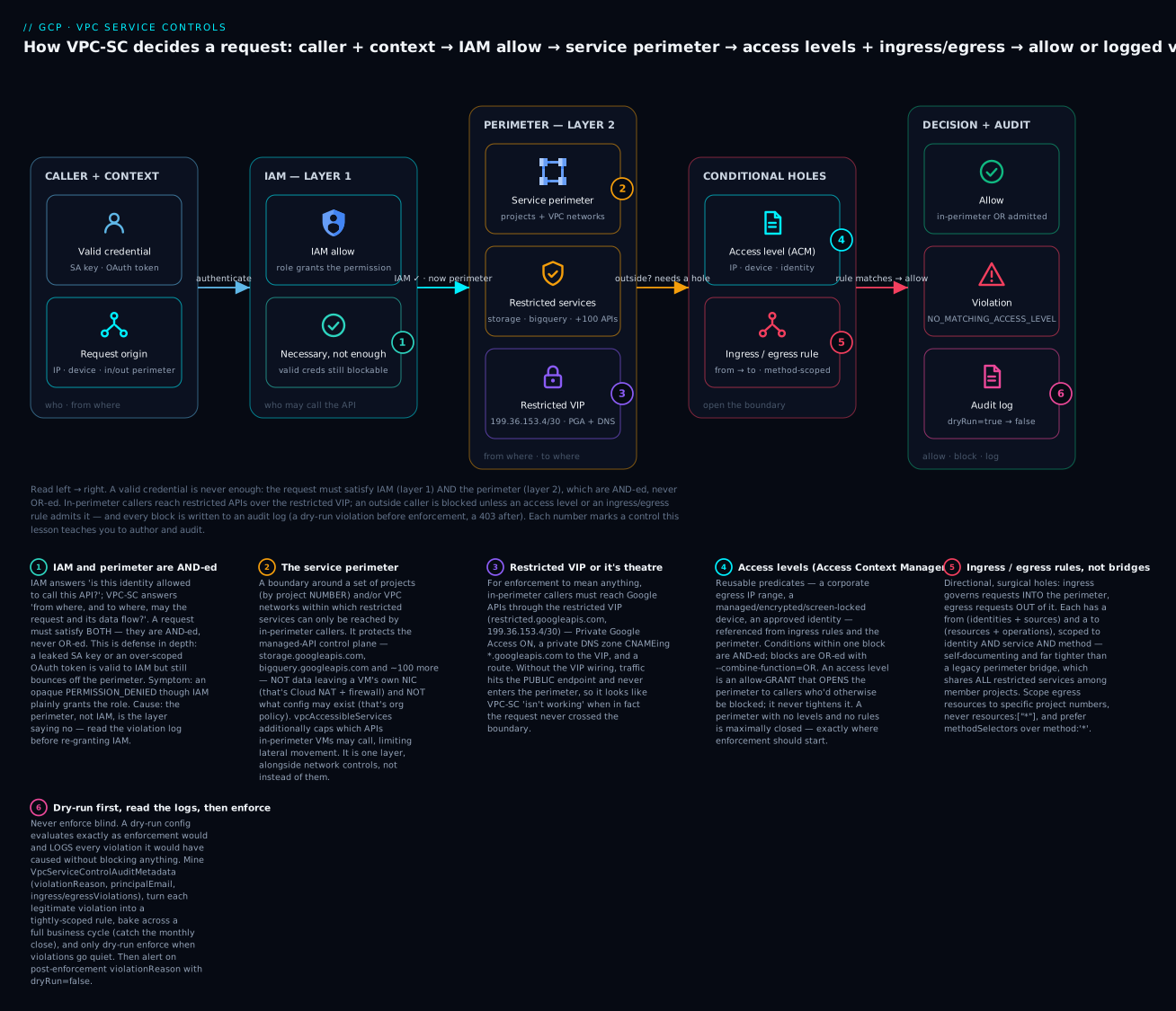
The diagram traces one request left to right: the caller authenticates, IAM confirms the role grants the permission (necessary but not sufficient), and then the perimeter decides — in-perimeter callers reach restricted services through the restricted VIP, an outside caller is bounced unless an access level or ingress/egress rule admits it, and every block is written to an audit log as a dry-run violation before enforcement and a 403 after.
Level: Expert · Time: ~40 min (longer if you wire the restricted VIP and bake a real dry-run window)
Prerequisites & what you’ll be able to do. You will get the most from this if you are comfortable with GCP’s resource hierarchy (org → folder → project), IAM allow policies and service accounts, and the basics of VPC networking and Private Google Access. If IAM is shaky, the companion piece is Advanced GCP IAM: deny policies, conditional bindings, and impersonation chains — VPC-SC is the network-and-identity half of the same defense-in-depth story. It also pays to keep three neighbours straight from this one: hierarchical firewall policies and Cloud NAT egress control (the packet-level perimeter), resource hierarchy and org-policy guardrails (the configuration guardrails), and Shared VPC multi-project network architecture (where the restricted VIP and Private Google Access get wired). After working through this lesson you will be able to:
- Explain precisely what VPC-SC protects (the managed-API control plane) and what it does not (firewalls, IAM, a VM’s own NIC).
- Stand up an org access policy and a service perimeter protecting projects by project number, with the restricted VIP wired correctly.
- Author Access Context Manager access levels by IP, device, and identity, and reference them from the perimeter and rules.
- Open surgical ingress/egress rules scoped to identity, service, and method — and know when a perimeter bridge is the right blunter tool instead.
- Cap lateral movement from inside with VPC accessible services.
- Roll the whole thing out in dry-run, mine
VpcServiceControlAuditMetadataviolation logs, anddry-run enforceonly when the window is clean. - Tell a VPC-SC violation apart from an IAM
PERMISSION_DENIED, a firewall drop, and an org-policy rejection — and reach for the right one.
IAM answers “is this identity allowed to call this API?” It does not answer “even with valid credentials, is this request allowed to leave with the data?” That gap is the entire exfiltration story on GCP: a leaked service account key, an over-scoped OAuth token, or a compromised laptop can read a Cloud Storage bucket or run a BigQuery extract from anywhere on the internet, and IAM will happily authorize it because the credential is valid. VPC Service Controls (VPC-SC) closes that gap by drawing a network-and-identity perimeter around the managed-API control plane itself. This guide builds a perimeter from the threat model up, layers Access Context Manager on top, opens controlled holes with ingress/egress rules, and — most importantly — rolls the whole thing out in dry-run so you find out what breaks before your users do.
1. The threat model VPC-SC actually addresses
Be precise about scope, because VPC-SC is frequently mis-sold. It protects against data exfiltration over the Google API surface — storage.googleapis.com, bigquery.googleapis.com, secretmanager.googleapis.com, and roughly 100 other managed services. The concrete attacks it defeats:
- Stolen credentials used off-network. An attacker exfiltrates a service account key, then runs
gsutil cp gs://prod-bucket/* .from their own machine. IAM says yes; the perimeter says no, because the request originates outside the perimeter. - Data exfiltration to an attacker-controlled project. An insider with
storage.objects.getcopies objects fromgs://your-prod-buckettogs://attacker-bucketin a personal project. Egress rules block the destination project. - IAM misconfiguration blast radius. Someone fat-fingers
allUsersonto a bucket. The perimeter still blocks reads from outside it, turning a critical leak into a non-event.
What VPC-SC does not do: it is not a firewall (that is hierarchical firewall policies and Cloud NAT), it is not IAM (you still need least-privilege bindings), and it does nothing for data leaving via a GCE VM’s own NIC to the public internet. It is one layer. Treat it as the control-plane perimeter that sits alongside network controls, not instead of them.
The mental model: IAM is “who you are and what role you hold.” VPC-SC is “from where, and to where, the request and its data are allowed to flow.” A request must satisfy both. They are AND-ed, never OR-ed.
2. Perimeters, restricted services, and the restricted VIP
A service perimeter is a boundary around a set of projects (more precisely, project numbers; perimeters can also protect VPC networks directly) within which a chosen list of restricted services can only be reached by callers inside the perimeter. Everything lives under an access policy bound to your organization.
First, find or create the org-scoped access policy. There is normally exactly one.
ORG_ID=123456789012

# Is there already an org access policy?
gcloud access-context-manager policies list --organization="$ORG_ID"

# If empty, create one (scopeless == org-wide)
gcloud access-context-manager policies create \
  --organization="$ORG_ID" \
  --title="org-access-policy"

POLICY=$(gcloud access-context-manager policies list \
  --organization="$ORG_ID" --format="value(name)")
Now create a perimeter protecting two projects, restricting Storage, BigQuery, and Secret Manager:
gcloud access-context-manager perimeters create prod_data_perimeter \
  --policy="$POLICY" \
  --title="prod-data-perimeter" \
  --resources="projects/111111111111,projects/222222222222" \
  --restricted-services="storage.googleapis.com,bigquery.googleapis.com,secretmanager.googleapis.com" \
  --perimeter-type=regular
Two non-obvious but critical points:
Resources are project numbers, not IDs. projects/my-prod-app will be silently wrong in some tooling; always resolve with gcloud projects describe my-prod-app --format='value(projectNumber)'.
The restricted VIP is mandatory for it to mean anything. When a service is restricted, in-perimeter callers must reach it through the restricted Virtual IP, restricted.googleapis.com (199.36.153.4/30), not the public endpoint. This requires Private Google Access plus a DNS override and a route. The DNS response CNAMEs the public hostnames to the restricted VIP:
# Private DNS zone so *.googleapis.com resolves to the restricted VIP
gcloud dns managed-zones create restricted-googleapis \
  --project=my-host-project \
  --visibility=private \
  --networks=projects/my-host-project/global/networks/prod-vpc \
  --dns-name=googleapis.com. \
  --description="Force Google APIs onto the restricted VIP"

gcloud dns record-sets create googleapis.com. \
  --project=my-host-project --zone=restricted-googleapis \
  --type=A --ttl=300 --rrdatas="199.36.153.4,199.36.153.5,199.36.153.6,199.36.153.7"

gcloud dns record-sets create '*.googleapis.com.' \
  --project=my-host-project --zone=restricted-googleapis \
  --type=CNAME --ttl=300 --rrdatas="googleapis.com."
Then add a route to 199.36.153.4/30 via the default internet gateway, and ensure subnets have --enable-private-ip-google-access. Without the VIP wiring, requests still hit the public endpoint and the perimeter looks like it “isn’t working” — when in fact the traffic never entered it.
3. Access Context Manager: access levels by IP, identity, and device
Restricting services to in-perimeter callers is binary. Access levels add nuance: they are reusable predicates — “the corporate egress IPs,” “a managed device,” “a specific identity” — that you reference from ingress rules and from the perimeter’s --access-levels to grant conditional entry to human and external callers.
The cleanest way to author non-trivial levels is a YAML spec applied with replace-all. A basic level pinning to corporate egress CIDRs:
# corp-network.yaml
- ipSubnetworks:
    - 203.0.113.0/24
    - 198.51.100.0/24
gcloud access-context-manager levels create corp_network \
  --policy="$POLICY" \
  --title="corp-network" \
  --basic-level-spec=corp-network.yaml \
  --combine-function=AND
Conditions within a single block are AND-ed; multiple blocks (list entries) are OR-ed when --combine-function=OR. To require the request come from corp IPs and be made by a member of an approved group, combine an IP condition with members:
# corp-and-trusted-identity.yaml
- ipSubnetworks:
    - 203.0.113.0/24
  members:
    - user:breakglass@example.com
    - serviceAccount:etl-runner@my-prod-app.iam.gserviceaccount.com
For device trust (managed, encrypted, screen-locked, or — with Endpoint Verification — corporate-owned), use devicePolicy:
# managed-device.yaml
- devicePolicy:
    requireScreenlock: true
    requireCorpOwned: true
    allowedEncryptionStatuses:
      - ENCRYPTED
    osConstraints:
      - osType: DESKTOP_MAC
        minimumVersion: "14.0.0"
      - osType: DESKTOP_CHROME_OS
Access levels are an allow-grant, not a restriction. They never tighten a perimeter; they open it to callers who would otherwise be blocked. A perimeter with no access levels and no ingress rules is maximally closed — which is exactly where you want enforcement to start.
4. Ingress and egress rules for controlled cross-perimeter access
Real systems are not hermetic. Your CI in a tooling project deploys to prod; a partner service reads one bucket; an analytics job in another perimeter queries BigQuery. Ingress/egress rules are the surgical holes — far better than the legacy “perimeter bridge” because they are directional, scoped to identity and service and method, and self-documenting.
- Ingress rules govern requests into the perimeter from outside it.
- Egress rules govern requests out of the perimeter to resources elsewhere.
Each rule has a from (source: identities and/or sources like access levels or other projects) and a to (destination: resources and the operations/services permitted). Author them as YAML and apply with --set-policy/update.
Allow a CI service account living outside the perimeter to push objects into a perimeter bucket:
# ingress-ci.yaml
- ingressFrom:
    identities:
      - serviceAccount:deployer@tooling-project.iam.gserviceaccount.com
    sources:
      - accessLevel: "*"
  ingressTo:
    operations:
      - serviceName: storage.googleapis.com
        methodSelectors:
          - method: google.storage.objects.create
          - method: google.storage.objects.get
    resources:
      - "*"
gcloud access-context-manager perimeters update prod_data_perimeter \
  --policy="$POLICY" \
  --set-ingress-policies=ingress-ci.yaml
Allow an in-perimeter ETL job to read from a specific bucket in a partner project (egress):
# egress-partner-read.yaml
- egressFrom:
    identities:
      - serviceAccount:etl-runner@my-prod-app.iam.gserviceaccount.com
  egressTo:
    operations:
      - serviceName: storage.googleapis.com
        methodSelectors:
          - method: google.storage.objects.get
          - method: google.storage.objects.list
    resources:
      - projects/333333333333
gcloud access-context-manager perimeters update prod_data_perimeter \
  --policy="$POLICY" \
  --set-egress-policies=egress-partner-read.yaml
Two rules of thumb. Scope resources to specific project numbers, not "*", on egress — an egress rule with resources: ["*"] and a wildcard service is functionally a hole the size of the entire managed-API surface. And prefer methodSelectors over * for method: objects.create + objects.get is a deploy path; * includes setIamPolicy and bucket deletion.
5. Dry-run mode: rolling out without breaking workloads
This is the step that separates a successful VPC-SC rollout from a Sev-1. Never enforce a perimeter blind. A perimeter (and every individual ingress/egress rule) has a dry-run configuration that evaluates exactly as enforcement would and logs every violation it would have caused — without blocking anything.
Create the perimeter in dry-run by attaching the spec to the spec config and marking it dry-run:
# Promote an existing enforced perimeter's config into dry-run for editing,
# or author dry-run directly:
gcloud access-context-manager perimeters dry-run create prod_data_perimeter \
  --policy="$POLICY" \
  --resources="projects/111111111111,projects/222222222222" \
  --restricted-services="storage.googleapis.com,bigquery.googleapis.com,secretmanager.googleapis.com"
You can iterate on the dry-run spec (add restricted services, tweak ingress/egress) independently of what is enforced:
gcloud access-context-manager perimeters dry-run update prod_data_perimeter \
  --policy="$POLICY" \
  --add-restricted-services="aiplatform.googleapis.com"
Let it bake for at least one full business cycle — a week covers weekly batch jobs, monthly close jobs will surprise you. Mine the dry-run violations (Step 8), fix each one with a rule or by moving a resource inside the perimeter, and only when violations go quiet do you promote:
# Apply the dry-run config as the enforced config
gcloud access-context-manager perimeters dry-run enforce prod_data_perimeter \
  --policy="$POLICY"
Dry-run logs appear under method
*DryRun*in audit logs withvpcServiceControlsUniqueIdentifier. A request that would be blocked succeeds and emits a violation entry; a request that succeeds under both specs emits nothing. Zero dry-run violations over a representative window is your green light — not “it looked fine for an hour.”
6. Perimeter bridges and multi-project, multi-perimeter designs
For most cross-perimeter access, reach for ingress/egress rules first. Perimeter bridges remain useful for one pattern: a set of projects that must freely share a restricted service among themselves while each also belonging to its own regular perimeter. A bridge is a perimeter of type bridge whose member projects can call each other’s restricted services without rules.
gcloud access-context-manager perimeters create shared_analytics_bridge \
  --policy="$POLICY" \
  --title="shared-analytics-bridge" \
  --perimeter-type=bridge \
  --resources="projects/111111111111,projects/444444444444"
A project can sit in exactly one regular perimeter but in multiple bridges. Architecturally, the patterns that scale:
| Pattern | When | Trade-off |
|---|---|---|
| One large perimeter per environment (all of prod) | Few teams, uniform trust | Coarse blast radius; one bad rule is org-wide |
| Perimeter per data domain (payments, PII, analytics) | Strong domain isolation needs | More rules; clearer ownership and audit |
| Regular perimeters + bridges for shared assets | Teams isolated but share a data lake | Bridges are coarse — they share all restricted services |
Lean toward domain perimeters with explicit egress rules over bridges. Bridges are blunt; an ingress/egress rule says exactly “this identity, this method, this destination,” which is what an auditor (and future-you) wants to read.
7. Common breakages: BigQuery, Cloud Build, and service agents
These are the ones that will actually page you.
- BigQuery cross-project query and copy. A query reading a dataset in a project outside the perimeter, or
EXPORT DATAto an external bucket, is an egress event. Scheduled queries and BI Engine run as service agents — they need ingress/egress allowances, not just human identities. - Cloud Build. The Cloud Build service agent and the per-build worker pull source, push images to Artifact Registry, and read secrets. Default (non-private) worker pools run outside your perimeter, so builds that touch restricted services fail. Fix: use private worker pools peered into a perimeter VPC, or add ingress rules for
cloudbuildandartifactregistryoperations. The default@cloudbuild.gserviceaccount.comagent often needs explicit ingress. - Service agents in general. Dataflow, Composer, Vertex AI, Pub/Sub, and Dataproc all act as
service-<PROJECT_NUMBER>@...gserviceaccount.comagents. When the perimeter blocks them, the symptom is an opaque “permission denied” that IAM swears is granted — because it is granted; VPC-SC is the layer denying it. Always check violation logs before re-granting IAM.
# ingress for Cloud Build + Artifact Registry from a tooling perimeter/project
- ingressFrom:
    identities:
      - serviceAccount:service-111111111111@gcp-sa-cloudbuild.iam.gserviceaccount.com
    sources:
      - accessLevel: "*"
  ingressTo:
    operations:
      - serviceName: artifactregistry.googleapis.com
        methodSelectors:
          - method: "*"
      - serviceName: storage.googleapis.com
        methodSelectors:
          - method: google.storage.objects.get
    resources:
      - "*"
A perimeter does not exempt Google’s own managed services. If a first-party service agent legitimately needs in, it goes in the rules like any other identity. There is no implicit allowlist for “Google services.”
8. Reading VPC-SC violation logs and iterating toward enforcement
Every block (real or dry-run) writes a Cloud Audit Log entry with a metadata block of type VpcServiceControlAuditMetadata. This is your single source of truth — read it, do not guess. Query in Logs Explorer with this filter:
logName=~"cloudaudit.googleapis.com%2Fpolicy"
protoPayload.metadata.@type="type.googleapis.com/google.cloud.audit.VpcServiceControlAuditMetadata"
For just the violations a dry-run config would have caused (so you can clear them before enforcing):
logName=~"cloudaudit.googleapis.com%2Fpolicy"
protoPayload.metadata.violationReason!=""
protoPayload.metadata.dryRun=true
The fields that tell you exactly what to do:
| Field | What it tells you |
|---|---|
protoPayload.metadata.violationReason |
e.g. NO_MATCHING_ACCESS_LEVEL, RESOURCES_NOT_IN_SAME_SERVICE_PERIMETER, SERVICE_NOT_ALLOWED_FROM_VPC |
protoPayload.authenticationInfo.principalEmail |
which identity to put in an ingress/egress rule |
protoPayload.metadata.ingressViolations / egressViolations |
the source/target project and service — your rule’s from/to |
protoPayload.requestMetadata.callerIp |
source IP — feed it into an access level if it is a corp egress |
protoPayload.serviceName / methodName |
the exact serviceName + method for methodSelectors |
The loop is mechanical and should be boring: read a violation, decide whether it is legitimate (write a tightly-scoped rule) or an attack (you just caught one), update the dry-run config, wait, repeat until the dry-run violation count for legitimate traffic is zero. Then dry-run enforce. Wire a log-based metric on violationReason!="" with dryRun=false so that post-enforcement violations page you — those are either a new legitimate workload that needs a rule, or someone trying to walk out with your data.
9. VPC accessible services: capping the APIs reachable from inside
Everything so far controls who may reach your restricted services from outside. There is a second, orthogonal dimension: which Google APIs may be called from inside the perimeter at all. That is VPC accessible services (vpcAccessibleServices), and it is the lever that shrinks lateral-movement and pivot risk. Without it, a compromised in-perimeter VM can still call any Google API the restricted VIP routes — including services you never restricted — and use one of them as a staging ground. With it, in-perimeter clients may call only the services on an explicit allow-list; everything else is refused inside the boundary.
Turn it on for a perimeter and pin the allow-list:
gcloud access-context-manager perimeters update prod_data_perimeter \
  --policy="$POLICY" \
  --enable-vpc-accessible-services \
  --add-vpc-allowed-services="storage.googleapis.com,bigquery.googleapis.com,logging.googleapis.com,monitoring.googleapis.com"
The special token RESTRICTED-SERVICES expands to exactly the perimeter’s restricted-services list, so a common tight baseline is “allow the restricted set plus logging/monitoring and nothing else”:
gcloud access-context-manager perimeters update prod_data_perimeter \
  --policy="$POLICY" \
  --enable-vpc-accessible-services \
  --set-vpc-allowed-services="RESTRICTED-SERVICES,logging.googleapis.com,monitoring.googleapis.com"
In config/Terraform form the same intent reads as:
# fragment of the perimeter spec
vpcAccessibleServices:
  enableRestriction: true
  allowedServices:
    - storage.googleapis.com
    - bigquery.googleapis.com
    - logging.googleapis.com
restricted-servicesandvpcAccessibleServicesanswer different questions.restricted-services= “which of my services are protected from outside callers.”vpcAccessibleServices= “which services may be called from inside my VPC.” Set both: the first stops exfiltration inward-to-outward across the boundary; the second stops a foothold inside from pivoting to an unexpected API. ASERVICE_NOT_ALLOWED_FROM_VPCviolation in the logs is this control firing — add the service to the allow-list only if the call is legitimate.
Going deeper
Everything above is the working toolkit. This section is the layer underneath it — the internals, limits, and sharp edges that separate a perimeter that looks right from one that holds up under audit, at scale, and under attack.
VPC-SC is one of four distinct controls people constantly conflate. Get the taxonomy crisp and most confusion evaporates:
| Control | Question it answers | Enforced by | A block surfaces as |
|---|---|---|---|
| IAM (allow / deny) | Which identity may call which API permission? | Per-request authorization check | PERMISSION_DENIED (IAM) |
| VPC Service Controls | From where / to where may the request and its data flow across the managed-API surface? | Service perimeter | PERMISSION_DENIED carrying a VPC-SC violationReason |
| VPC / hierarchical firewall | Which packets (L3/L4) may reach a VM’s NIC? | Data-plane packet filter | connection timeout / refused — no API-level error |
| Org-policy constraint | What resources may exist / how may they be configured? | Resource create/update validation | constraint-violation error at create time |
Read the table twice. A firewall never produces an API error — it drops packets, so the symptom is a hang. An org-policy constraint fires at create time on configuration (e.g. gcp.restrictVpcPeering, iam.disableServiceAccountKeyCreation), never on a data read. IAM and VPC-SC both surface as PERMISSION_DENIED, which is exactly why teams re-grant IAM in a panic when the real culprit is the perimeter — the tell is a violationReason field in the error and a VpcServiceControlAuditMetadata log entry.
Restricted VIP vs private VIP — the silent-failure trap. There are two Private-Google-Access virtual IPs and they are not interchangeable. restricted.googleapis.com (199.36.153.4/30) routes only the services that VPC-SC supports and is the one that makes the perimeter enforce. private.googleapis.com (199.36.153.8/30) routes all Google APIs — including ones VPC-SC cannot protect — but provides no VPC-SC enforcement. Point your *.googleapis.com DNS at the private VIP by mistake and your perimeter quietly does nothing for that traffic. If an in-perimeter workload genuinely needs an API the restricted VIP does not route, that is a real design tension — split DNS or a separate egress path — not something to paper over by switching everything to the private VIP.
Access policies can be org-scoped or scoped to a folder/project. The default access policy is org-wide and there is exactly one, but you can also create scoped policies bound to a specific folder or project (--scopes=folders/FOLDER_ID). Scoped policies let a delegated team manage their own perimeters and access levels without touching org-wide policy — useful in large estates where a central team should not be the bottleneck for every rule change. The trade-off is more moving parts and the need to reason about which policy owns a given perimeter. Perimeters and levels always live under exactly one access policy; you reference a level by its full name, accessPolicies/POLICY_ID/accessLevels/LEVEL_NAME.
Ingress/egress rules have more knobs than identities and methods. Two that matter at scale. identityType lets a rule match a class of caller rather than an enumerated list — ANY_IDENTITY, ANY_USER_ACCOUNT, ANY_SERVICE_ACCOUNT — so you can say “any identity, but only from this access level,” which is how you admit a fleet of unknown-in-advance callers gated purely by network/device posture:
# ingress-any-identity-from-corp.yaml
- ingressFrom:
    identityType: ANY_IDENTITY
    sources:
      - accessLevel: accessPolicies/1122334455/accessLevels/corp_network
  ingressTo:
    operations:
      - serviceName: bigquery.googleapis.com
        methodSelectors:
          - method: "*"
    resources:
      - "*"
And on egress, sourceRestriction: SOURCE_RESTRICTION_ENABLED lets you constrain which in-perimeter sources may use the egress rule (by access level), rather than every in-perimeter caller:
# egress-scoped-source.yaml
- egressFrom:
    identities:
      - serviceAccount:etl-runner@my-prod-app.iam.gserviceaccount.com
    sourceRestriction: SOURCE_RESTRICTION_ENABLED
    sources:
      - accessLevel: accessPolicies/1122334455/accessLevels/corp_network
  egressTo:
    operations:
      - serviceName: bigquery.googleapis.com
        methodSelectors:
          - method: "*"
    resources:
      - projects/555555555555
Manage perimeters as code, and mind the spec vs status split. In Terraform the resource is google_access_context_manager_service_perimeter; the enforced config lives in the status {} block and the dry-run config in the spec {} block, gated by use_explicit_dry_run_spec = true. That mirrors the gcloud dry-run surface exactly — spec is the rehearsal, status is live.
resource "google_access_context_manager_service_perimeter" "prod" {
  parent = "accessPolicies/${var.policy_id}"
  name   = "accessPolicies/${var.policy_id}/servicePerimeters/prod_data_perimeter"
  title  = "prod-data-perimeter"

  # spec{} = dry-run rehearsal; status{} = enforced. Flip this to promote.
  use_explicit_dry_run_spec = true

  spec {
    resources           = ["projects/111111111111", "projects/222222222222"]
    restricted_services = ["storage.googleapis.com", "bigquery.googleapis.com"]

    vpc_accessible_services {
      enable_restriction = true
      allowed_services   = ["storage.googleapis.com", "bigquery.googleapis.com"]
    }
  }
}
A subtle IaC trap: managing ingress/egress rules both inline in the perimeter resource and via the separate google_access_context_manager_service_perimeter_ingress_policy / _egress_policy resources fights itself — pick one representation per perimeter or Terraform will thrash on every plan.
Changes are eventually consistent — do not test-then-declare-victory. VPC-SC configuration changes propagate on the order of minutes, not instantly. A freshly attached rule or a just-promoted enforcement will not necessarily be live on the very next call. Never fire the action immediately, see it still succeed, and conclude your rule “doesn’t work” — give it time, and confirm through the logs rather than a single probe. The same caution applies in reverse when tightening: a request that starts failing right after a change may simply be a stale-cache artifact for a few minutes.
Perimeters have real quotas. There are limits on projects per perimeter, perimeters per access policy, access levels per policy, and rules per perimeter (all in the low hundreds to low thousands depending on the object — check the current VPC-SC quota page before you design a per-team fan-out). This is why the scalable design is few, well-chosen perimeters with tag- and access-level-driven rules, not one perimeter per project or one rule per resource.
The console has a first-class troubleshooter, and every denial carries a correlation ID. When a request is blocked, the error and its log entry carry a vpcServiceControlsUniqueIdentifier. Paste it into the VPC Service Controls troubleshooter in the console (or feed the identifier to support) and it walks the exact policy evaluation — which perimeter, which config, which missing rule caused the block. It turns “opaque 403” into “add this identity to this ingress rule.” For automated triage, the same identifier lets you correlate a user-reported failure with its precise VpcServiceControlAuditMetadata entry.
VPC-SC composes with, but is not, Access Approval or Assured Workloads. For regulated estates, VPC-SC is one control in a stack: Access Approval gates Google support access to your data behind your explicit sign-off, and Assured Workloads pins location/personnel constraints. They are complementary — VPC-SC stops your credentials from exfiltrating data across the boundary; the others constrain Google’s access and residency. Do not expect any one of them to do another’s job.
Enterprise scenario
A fintech platform team ran a regulated data lake: customer PII in BigQuery and Cloud Storage across two prod projects, with a strict control that “production data must never be readable from outside the corporate network or copied to a non-prod project.” IAM was already least-privilege, but an internal red-team exercise lifted a Dataflow worker’s service account token from a debug log and demonstrated that, with that token, they could bq extract a PII table to a personal GCS bucket from a coffee-shop laptop. IAM authorized it end to end. That was the finding that funded VPC-SC.
The constraint that made rollout hard: a nightly Cloud Composer (Airflow) DAG ran ~40 BigQuery jobs, several of which read a reference dataset hosted in a separate “shared-ref” project, and the reporting team’s Looker instance queried BigQuery from a fixed NAT egress IP block. A naive enforced perimeter would have black-holed the entire nightly close and every dashboard the next morning.
They ran the perimeter in dry-run for three weeks — long enough to capture the monthly close. Mining VpcServiceControlAuditMetadata dry-run violations surfaced exactly three legitimate gaps: the Composer service agent reading cross-project, the BigQuery copy into the reference project, and Looker’s IP block. Each became a tightly-scoped rule rather than a broad opening. The Looker access level pinned to the NAT CIDRs:
# looker-egress-ip.yaml
- ipSubnetworks:
    - 203.0.113.16/28
The Composer egress to the reference project, scoped to read methods only:
# composer-ref-read.yaml
- egressFrom:
    identities:
      - serviceAccount:service-111111111111@cloudcomposer-accounts.iam.gserviceaccount.com
  egressTo:
    operations:
      - serviceName: bigquery.googleapis.com
        methodSelectors:
          - method: "google.cloud.bigquery.v2.JobService.InsertJob"
    resources:
      - projects/555555555555
After two consecutive nights of zero dry-run violations across the full DAG, they ran dry-run enforce. The red-team’s stolen-token attack now failed with NO_MATCHING_ACCESS_LEVEL from the external IP — the credential was still valid, but the data could not leave. Total user-facing impact at enforcement: zero. The cost was three weeks of patience and a habit of reading violation logs instead of guessing.
Verify
Confirm the perimeter behaves before and after enforcement:
# 1. Perimeter config and its enforced vs dry-run specs
gcloud access-context-manager perimeters describe prod_data_perimeter \
  --policy="$POLICY"

# 2. From an in-perimeter VM, restricted API must resolve to the VIP
dig storage.googleapis.com +short        # expect 199.36.153.x
gsutil ls gs://prod-bucket               # succeeds in-perimeter

# 3. From OUTSIDE the perimeter, with valid creds, it must be denied
#    (run on a non-perimeter host using the same SA)
gsutil ls gs://prod-bucket               # expect: 403, request violates VPC-SC

# 4. List active access levels and rules
gcloud access-context-manager levels list --policy="$POLICY"
gcloud access-context-manager perimeters describe prod_data_perimeter \
  --policy="$POLICY" --format="yaml(status.ingressPolicies,status.egressPolicies)"
In Logs Explorer, after enforcement, confirm legitimate workloads emit no violationReason while a deliberate out-of-perimeter call does. That asymmetry is proof the perimeter is real and correctly scoped.
Practice challenges
Work these against a sandbox org or project where you can safely attach policies — never production as written. Replace every placeholder (123456789012, project numbers, SA and group emails, $POLICY) with your own. Each solution notes the one idea it proves.
1. (Beginner) Get the identifier VPC-SC actually wants.
Your teammate put projects/my-prod-app in a perimeter’s --resources and it behaves oddly. Produce the value the perimeter really needs, and confirm an in-perimeter VM resolves Storage to the restricted VIP.
<details> <summary>Solution</summary>
# Perimeters key on the project NUMBER, not the ID:
gcloud projects describe my-prod-app --format='value(projectNumber)'
# -> e.g. 111111111111  ->  use projects/111111111111 in --resources

# On an in-perimeter VM, the restricted VIP must answer:
dig storage.googleapis.com +short        # expect 199.36.153.x (restricted VIP)
Why: --resources takes projects/<NUMBER>; a project ID is silently wrong in parts of the tooling. And if dig does not return 199.36.153.x, the restricted VIP is not wired, so the perimeter never sees the traffic.
</details>
2. (Beginner) Stand up a perimeter the safe way — in dry-run.
Create the org access policy (if absent) and a dry-run perimeter protecting project 111111111111, restricting Cloud Storage and BigQuery. Do not enforce.
<details> <summary>Solution</summary>
ORG_ID=123456789012
gcloud access-context-manager policies create \
  --organization="$ORG_ID" --title="org-access-policy"   # skip if one exists
POLICY=$(gcloud access-context-manager policies list \
  --organization="$ORG_ID" --format="value(name)")

gcloud access-context-manager perimeters dry-run create prod_data_perimeter \
  --policy="$POLICY" \
  --resources="projects/111111111111" \
  --restricted-services="storage.googleapis.com,bigquery.googleapis.com"
Why: dry-run create builds the spec config that evaluates and logs violations without blocking anything — the only safe way to discover what a perimeter would break before it breaks it.
</details>
3. (Intermediate) An access level that needs corp network AND an approved group.
Author a level corp_and_ops that admits a request only when it comes from 203.0.113.0/24 and the caller is in group:prod-operators@example.com, then attach it to the perimeter.
<details> <summary>Solution</summary>
# corp-and-ops.yaml
- ipSubnetworks:
    - 203.0.113.0/24
  members:
    - group:prod-operators@example.com
gcloud access-context-manager levels create corp_and_ops \
  --policy="$POLICY" --title="corp-and-ops" \
  --basic-level-spec=corp-and-ops.yaml --combine-function=AND

gcloud access-context-manager perimeters dry-run update prod_data_perimeter \
  --policy="$POLICY" --add-access-levels=corp_and_ops
Why: conditions within one block are AND-ed, so IP and members must both hold. Two separate list entries would OR instead — a much weaker control.
</details>
4. (Intermediate) Let outside CI push objects in, and nothing else.
Write an ingress rule so serviceAccount:deployer@tooling-project.iam.gserviceaccount.com (outside the perimeter) may objects.create and objects.get on Storage inside it — but not delete or change IAM.
<details> <summary>Solution</summary>
# ingress-ci.yaml
- ingressFrom:
    identities:
      - serviceAccount:deployer@tooling-project.iam.gserviceaccount.com
    sources:
      - accessLevel: "*"
  ingressTo:
    operations:
      - serviceName: storage.googleapis.com
        methodSelectors:
          - method: google.storage.objects.create
          - method: google.storage.objects.get
    resources:
      - "*"
gcloud access-context-manager perimeters dry-run update prod_data_perimeter \
  --policy="$POLICY" --set-ingress-policies=ingress-ci.yaml
Why: methodSelectors pins the hole to exactly the deploy path; a method: "*" would silently include setIamPolicy and buckets.delete. sources.accessLevel: "*" means “from anywhere network-wise” — tighten it to a real level if the CI has a fixed egress.
</details>
5. (Advanced) Egress to one external project, read-only, no wildcards.
Let the in-perimeter etl-runner@my-prod-app.iam.gserviceaccount.com read (but not write) Storage objects in partner project 333333333333 — and nowhere else.
<details> <summary>Solution</summary>
# egress-partner-read.yaml
- egressFrom:
    identities:
      - serviceAccount:etl-runner@my-prod-app.iam.gserviceaccount.com
  egressTo:
    operations:
      - serviceName: storage.googleapis.com
        methodSelectors:
          - method: google.storage.objects.get
          - method: google.storage.objects.list
    resources:
      - projects/333333333333
gcloud access-context-manager perimeters dry-run update prod_data_perimeter \
  --policy="$POLICY" --set-egress-policies=egress-partner-read.yaml
Why: resources is scoped to one project number, and methods to read-only. resources: ["*"] with a wildcard method is a hole the size of the whole managed-API surface — the exact exfiltration path the perimeter exists to close.
</details>
6. (Advanced) Mine the logs, fix one gap, then go live.
A nightly Composer DAG shows dry-run violations. Find them, turn the one legitimate egressViolation into a rule, confirm a clean window, and enforce.
<details> <summary>Solution</summary>
# Logs Explorer — dry-run violations only:
logName=~"cloudaudit.googleapis.com%2Fpolicy"
protoPayload.metadata.violationReason!=""
protoPayload.metadata.dryRun=true
Read principalEmail (the Composer service agent), egressViolations (target project + service), and methodName — those become the rule’s egressFrom/egressTo/methodSelectors (as in challenge 5). Apply with dry-run update, wait for the DAG to run clean, then:
# Only after a representative clean window (include the monthly close):
gcloud access-context-manager perimeters dry-run enforce prod_data_perimeter \
  --policy="$POLICY"

# Then alert on POST-enforcement violations:
#   filter: violationReason!="" AND protoPayload.metadata.dryRun=false
Why: the log fields map one-to-one onto rule fields, so you author from evidence, not guesswork. Enforcing before violations go quiet is exactly how a rollout becomes a Sev-1; the post-enforcement alert catches both new legitimate workloads and real attacks. </details>
Common beginner mistakes
-
“VPC-SC is a firewall.” It is not. A firewall filters packets at a VM’s NIC (L3/L4) and a drop shows up as a hang. VPC-SC is an API-control-plane perimeter; a block is a
PERMISSION_DENIEDwith aviolationReason. Right model: firewalls guard the network path, VPC-SC guards the managed-API surface — you need both. -
“I’ll put project IDs in
--resources.” Perimeters key on project numbers. An ID is silently wrong in parts of the tooling. Right model: resolve--format='value(projectNumber)'first and useprojects/<NUMBER>. -
“The perimeter isn’t working — my VM still reached the API.” Almost always the restricted VIP is unwired (Private Google Access off, DNS not pointing
*.googleapis.comat199.36.153.4/30, or pointed at the private VIP by mistake), so the traffic hit the public endpoint and never entered the perimeter. Right model: confirmdigreturns199.36.153.xbefore concluding anything. -
“Access levels tighten the perimeter.” They do the opposite — they are allow-grants that open the perimeter to callers who would otherwise be blocked. Right model: a perimeter with zero levels and zero rules is maximally closed; every level and rule is a deliberate hole.
-
“Google’s own services get in automatically.” There is no implicit allowlist. Cloud Build, Composer, Dataflow, Vertex, and scheduled-query service agents are blocked like anyone else until a rule admits them. Right model: read the violation log, find the
service-<NUMBER>@...agent, and add a scoped ingress/egress rule. -
“
resources: ["*"]on egress is fine — IAM still protects me.” That is a hole the size of the entire managed-API surface, and IAM is the very layer that already said yes to the leaked credential. Right model: scope egressresourcesto specific project numbers andmethodSelectorsto specific methods. -
“I tested the new rule and it still failed, so the rule is broken.” VPC-SC changes are eventually consistent — minutes, not instant. Right model: give it time and verify through the logs, not a single immediate probe.
-
“Enforce first, watch for breakage, fix forward.” That is how a rollout becomes an outage. Right model: dry-run across a full business cycle (catch the monthly close), clear every legitimate violation to zero with rules, then
dry-run enforce. -
“A perimeter replaces IAM.” They are AND-ed, not either/or. A perimeter with sloppy IAM still lets an in-perimeter insider over-reach; least-privilege IAM without a perimeter still lets a valid stolen credential exfiltrate. Right model: defense in depth — keep both tight.
Glossary
- VPC Service Controls (VPC-SC) — a GCP control that draws a network-and-identity perimeter around managed Google APIs, preventing data exfiltration even when the caller holds valid IAM credentials.
- Service perimeter — the boundary itself: a set of projects (by number) and/or VPC networks within which restricted services are reachable only from inside.
- Regular perimeter — the standard perimeter type; a project may belong to exactly one.
- Perimeter bridge — a
bridge-type perimeter whose member projects freely share all restricted services with each other; a project can be in many bridges but only one regular perimeter. - Access policy — the org- or folder/project-scoped container that holds perimeters and access levels; normally one org-wide policy exists.
- Scoped access policy — an access policy bound to a folder/project (
--scopes), letting a delegated team manage its own perimeters and levels. - Access Context Manager (ACM) — the service that defines access levels and hosts access policies.
- Access level — a reusable predicate (IP range, device posture, identity) referenced by perimeters and rules; an allow-grant that opens the perimeter, never a restriction.
- Basic level — an access level built from
ipSubnetworks,members,devicePolicy,regions; conditions within a block AND, blocks OR (with--combine-function=OR). devicePolicy— the access-level clause requiring managed/encrypted/screen-locked or corporate-owned devices (via Endpoint Verification).- Restricted services — the list of managed APIs a perimeter protects from outside callers (
storage.googleapis.com,bigquery.googleapis.com, …). - VPC accessible services (
vpcAccessibleServices) — the orthogonal allow-list of which APIs may be called from inside the perimeter, limiting lateral movement. - Restricted VIP —
restricted.googleapis.com(199.36.153.4/30); routes only VPC-SC-supported services and makes the perimeter enforce. - Private VIP —
private.googleapis.com(199.36.153.8/30); routes all Google APIs but provides no VPC-SC enforcement (a common misconfiguration). - Private Google Access (PGA) — the subnet setting that lets VMs without external IPs reach Google APIs over internal routing; a prerequisite for the restricted VIP.
- Ingress rule — a directional allowance for requests into the perimeter, with an
ingressFrom(identities/sources) andingressTo(resources/operations). - Egress rule — a directional allowance for requests out of the perimeter, with an
egressFromandegressTo. methodSelectors— the per-service list of API methods a rule permits; prefer overmethod: "*"to avoid admitting destructive methods.identityType— a rule field matching a class of caller (ANY_IDENTITY,ANY_USER_ACCOUNT,ANY_SERVICE_ACCOUNT) instead of enumerated identities.sourceRestriction— an egress-rule field (SOURCE_RESTRICTION_ENABLED) constraining which in-perimeter sources (by access level) may use the rule.- Dry-run mode — a perimeter/rule configuration (
spec) that evaluates exactly as enforcement would and logs violations without blocking; the safe rollout path. - Enforced config — the live perimeter configuration (
status);dry-run enforcepromotes thespecinto it. VpcServiceControlAuditMetadata— the Cloud Audit Log metadata type recording every VPC-SC block (real or dry-run); your single source of truth.violationReason— the log field naming why a request was blocked (NO_MATCHING_ACCESS_LEVEL,SERVICE_NOT_ALLOWED_FROM_VPC,RESOURCES_NOT_IN_SAME_SERVICE_PERIMETER, …).vpcServiceControlsUniqueIdentifier— the correlation ID on a denial, pasted into the console VPC-SC troubleshooter to see the exact evaluation.- Service agent — a Google-managed identity (
service-<PROJECT_NUMBER>@...gserviceaccount.com) that first-party services act as; blocked by the perimeter unless a rule admits it. - Project number — the immutable numeric ID (
projects/111111111111) perimeters key on, as opposed to the human-readable project ID. - Access Approval / Assured Workloads — complementary controls that gate Google support access and pin residency/personnel; distinct from VPC-SC, which governs your data flows across the boundary.