Every serious hybrid estate eventually outgrows a single VPN tunnel. A flapping link or a maintenance window on one side should never partition your network, and you want both paths carrying traffic rather than one sitting idle. On GCP the answer is HA VPN plus Cloud Router running BGP: redundant tunnels across two interfaces, dynamic route exchange, and explicit control over which path wins. This walkthrough builds that seam end to end, then steers failover deterministically and stitches multiple sites together with Network Connectivity Center.
In a nutshell
Level: Advanced · Time: ~27 min
Think of connecting your on-prem data center to Google Cloud like running cables between two buildings across a busy street. A Classic VPN is a single cable — cut it (a fiber break, a router reboot, a maintenance window) and the two buildings become islands. HA VPN runs two cables, and here is the trick: each end plugs into a different electrical panel — a separate Google edge domain — so no single power failure, device reboot, or maintenance event can take both cables down at once. That physical separation is exactly what earns the 99.99% availability SLA.
But two cables are useless if nobody agrees which one to use. That agreement is BGP, spoken by Cloud Router — picture two dispatchers, one at each building, on a permanent phone call: “here are the rooms I can reach, and here is how you get to them.” When a cable drops, the dispatcher on that side stops answering, the other side notices within seconds, and traffic reroutes — no human, no editing static routes. Cloud Router advertises your GCP subnets out to on-prem and learns on-prem’s networks back, automatically and continuously.
The last idea is which cable wins when both are healthy. By default both carry traffic at once — active/active, load-shared — for maximum throughput. But if a stateful firewall sits on-prem, a connection must leave and return on the same cable or the firewall sees a reply with no matching session and drops it. So you reach for BGP “loudness” knobs — MED and AS-path — to make one cable primary and the other a hot standby. Get that policy wrong and you get asymmetric routing, the single most common HA VPN outage.
You will get the most from this lesson if you already understand VPCs, subnets, and routes on GCP (see VPC networking deep dive) and the basics of IP routing; the enterprise sections lean on Shared VPC architecture and stateful firewall behaviour. After this lesson you will be able to:
- Stand up an HA VPN gateway with two tunnels that genuinely qualifies for the 99.99% SLA.
- Configure Cloud Router BGP — ASN, dynamic-routing mode, custom advertisements — and read a BGP session’s status.
- Choose active/active vs active/passive and steer failover deterministically with MED and AS-path prepending.
- Explain, against a concrete requirement, when to use HA VPN vs Classic VPN vs Dedicated/Partner Interconnect.
- Scale beyond one site with Network Connectivity Center, and debug flapping tunnels and asymmetric routing.
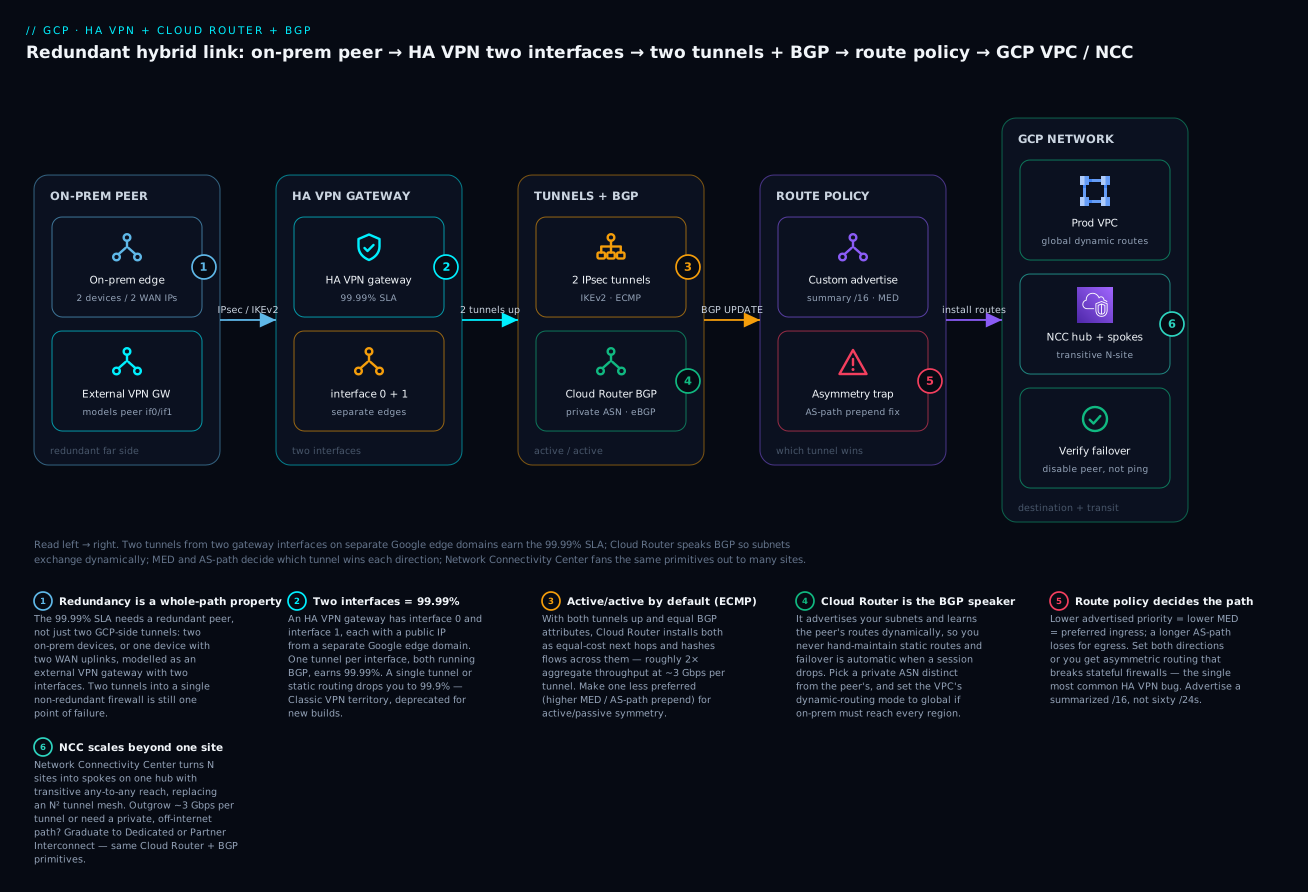
The diagram traces one hybrid link left to right: a redundant on-prem peer (two devices or two WAN IPs, modelled as an external VPN gateway) into an HA VPN gateway whose two interfaces live on separate Google edge domains, up through two IPsec tunnels that Cloud Router runs BGP across (active/active ECMP by default), into a route-policy layer where MED and AS-path decide which tunnel wins and a summarized advertisement keeps the peer’s table clean, and finally into the GCP VPC (with global dynamic routing) or a Network Connectivity Center hub that fans the same primitives out to many sites.
When to reach for HA VPN (vs Classic VPN and Interconnect)
Before building, place HA VPN on the map of GCP hybrid options. Nearly all of them terminate on a Cloud Router and speak BGP; they differ in SLA, bandwidth, whether traffic touches the public internet, encryption, and cost.
| Option | Path | Bandwidth (typical) | SLA | Encrypted on the wire? | Reach for it when |
|---|---|---|---|---|---|
| Classic VPN | Public internet | ~3 Gbps/tunnel | 99.9% | Yes (IPsec) | Legacy only — single-interface gateway, static or single BGP session. Deprecated for new builds; migrate to HA VPN. |
| HA VPN | Public internet | ~3 Gbps/tunnel × N tunnels | 99.99% | Yes (IPsec) | Encrypted hybrid over the internet, up in an hour, cost-sensitive; two tunnels give redundancy + ECMP throughput. |
| Partner Interconnect | Via a service provider | 50 Mbps – 50 Gbps | 99.9% / 99.99% (topology-dependent) | No by default (add MACsec / VPN) | Private connectivity without your own cross-connect; bandwidth beyond VPN; provider already present in your colo. |
| Dedicated Interconnect | Direct cross-connect to Google | 10 / 100 Gbps circuits | 99.9% / 99.99% (redundant topology) | No by default (add MACsec / VPN) | Highest bandwidth, lowest and most predictable latency, private path; large steady egress; you can reach a Google colocation facility. |
Two clarifications people trip on:
- HA VPN is not “Classic VPN plus a tunnel.” A Classic VPN gateway (
target-vpn-gateway) has one interface and one external IP, and its SLA caps at 99.9%; Google has deprecated it for new deployments. HA VPN (vpn-gateways) is a different resource with two interfaces on two edge domains, and the 99.99% SLA is available only when you run two BGP tunnels. You cannot upgrade one to the other in place — you migrate. - Interconnect is not encrypted by default. Dedicated/Partner Interconnect gives you a private circuit, but the bytes are not encrypted on the wire the way IPsec encrypts a VPN. For sensitive data over Interconnect you either enable MACsec (Dedicated, where available) or run HA VPN over Cloud Interconnect — IPsec tunnels that ride the private circuit instead of the internet. Choosing Interconnect “for security” without adding one of these is a common misconception.
A useful rule of thumb: start with HA VPN (cheap, encrypted, 99.99%, up in an hour). Graduate to Interconnect when you outgrow ~3 Gbps per tunnel, need consistent low latency, or must keep traffic off the public internet — and keep the same Cloud Router + BGP muscle memory, because Interconnect uses it too.
Step 1: Understand HA VPN topology and the 99.99% SLA
HA VPN is not “Classic VPN with a second tunnel.” It is a distinct gateway resource with two interfaces, interface 0 and interface 1, each given its own external IP from a separate Google edge domain. That separation is what backs Google’s 99.99% availability SLA. The SLA is conditional, and the conditions are where most designs go wrong:
- You must configure two tunnels, one from each gateway interface, to a peer that is itself redundant.
- The peer side must be either a second HA VPN gateway, two physical on-prem devices, or one device with two separate external IPs (two WAN uplinks).
- Both tunnels must run BGP through Cloud Router. A single tunnel, or static routing, drops you to a 99.9% SLA at best.
# Create the HA VPN gateway (two interfaces are allocated automatically)
gcloud compute vpn-gateways create ha-vpn-gw-use4 \
  --network=prod-vpc \
  --region=us-east4

# Inspect the two interfaces and their auto-assigned public IPs
gcloud compute vpn-gateways describe ha-vpn-gw-use4 \
  --region=us-east4 \
  --format="table(vpnInterfaces[].id, vpnInterfaces[].ipAddress)"
Rule of thumb: the SLA is a property of the whole path, not the gateway. Two tunnels to a single non-redundant firewall is still a single point of failure, SLA or not.
For GCP-to-GCP, you create an HA VPN gateway in each region/VPC and a peer gateway reference. For GCP-to-on-prem, you model the far side with an external VPN gateway resource describing your physical device IPs.
# Model an on-prem peer with two WAN IPs as a 2-interface external gateway
gcloud compute external-vpn-gateways create onprem-dc1 \
  --interfaces=0=203.0.113.10,1=198.51.100.10
Step 2: Cloud Router fundamentals - BGP sessions, ASNs, dynamic routing mode
Cloud Router is the BGP speaker. It learns routes from your peer and advertises GCP subnets back. Two decisions matter before you create it.
ASN selection. Cloud Router needs a private ASN (64512-65534, or the 32-bit range). Your peer needs a different ASN; eBGP between distinct ASNs is the normal mode. Reusing the same ASN on both ends forces iBGP semantics you do not want over VPN.
Dynamic routing mode. This is set on the VPC, not the router, and it is the single most consequential networking flag in a hybrid design:
| Mode | What Cloud Router advertises | What it learns | Use when |
|---|---|---|---|
regional (default) |
Only subnets in the router’s own region | Peer routes applied to the router’s region | Single-region footprint, or you want regional isolation |
global |
All subnets in the VPC, across every region | Peer routes propagated to all regions | Multi-region VPC reachable over one hybrid edge |
# Set the VPC to global dynamic routing so on-prem reaches every region
gcloud compute networks update prod-vpc --bgp-routing-mode=global

# Create the Cloud Router with a private ASN
gcloud compute routers create cr-use4 \
  --network=prod-vpc \
  --region=us-east4 \
  --asn=65001 \
  --advertisement-mode=default
--advertisement-mode=default means the router auto-advertises connected subnets. We switch to custom in Step 4 once we need to control exactly what leaves.
Step 3: Active/active vs active/passive design and ECMP
With two tunnels up and both running BGP, Cloud Router programs ECMP (Equal-Cost Multi-Path) across them by default. Traffic is hashed across both tunnels on a 5-tuple basis. This is active/active, and it is what you want for throughput: two tunnels means roughly 2x aggregate bandwidth (each HA VPN tunnel caps near 3 Gbps, and per-flow throughput is bounded well below that, so multiple flows are what fill the pipe).
The decision tree:
- Active/active - both tunnels advertise routes with equal BGP attributes. Cloud Router installs both as ECMP next-hops. Maximum throughput, instant failover, but return-path symmetry is not guaranteed (acceptable for most stateless routing; a problem for stateful middleboxes on-prem).
- Active/passive - one tunnel is made less preferred via BGP attributes (lower advertised priority / longer AS-path). All traffic uses the primary; the standby carries traffic only when the primary withdraws its routes. Predictable, symmetric paths, at the cost of half your bandwidth idle.
First, create the tunnels. Each tunnel binds to a specific gateway interface and a specific peer interface:
# Tunnel 0: GCP interface 0 -> peer interface 0
gcloud compute vpn-tunnels create tun-use4-if0 \
  --peer-external-gateway=onprem-dc1 \
  --peer-external-gateway-interface=0 \
  --region=us-east4 \
  --ike-version=2 \
  --shared-secret="${PSK_0}" \
  --router=cr-use4 \
  --vpn-gateway=ha-vpn-gw-use4 \
  --interface=0

# Tunnel 1: GCP interface 1 -> peer interface 1
gcloud compute vpn-tunnels create tun-use4-if1 \
  --peer-external-gateway=onprem-dc1 \
  --peer-external-gateway-interface=1 \
  --region=us-east4 \
  --ike-version=2 \
  --shared-secret="${PSK_1}" \
  --router=cr-use4 \
  --vpn-gateway=ha-vpn-gw-use4 \
  --interface=1
Now attach a BGP interface and peer to each tunnel. BGP runs over a link-local /30 (169.254.0.0/16) per tunnel:
# BGP session on tunnel 0
gcloud compute routers add-interface cr-use4 \
  --interface-name=if-tun0 \
  --vpn-tunnel=tun-use4-if0 \
  --ip-address=169.254.0.1 \
  --mask-length=30 \
  --region=us-east4

gcloud compute routers add-bgp-peer cr-use4 \
  --peer-name=bgp-tun0 \
  --interface=if-tun0 \
  --peer-ip-address=169.254.0.2 \
  --peer-asn=64600 \
  --region=us-east4

# BGP session on tunnel 1 (second /30)
gcloud compute routers add-interface cr-use4 \
  --interface-name=if-tun1 \
  --vpn-tunnel=tun-use4-if1 \
  --ip-address=169.254.1.1 \
  --mask-length=30 \
  --region=us-east4

gcloud compute routers add-bgp-peer cr-use4 \
  --peer-name=bgp-tun1 \
  --interface=if-tun1 \
  --peer-ip-address=169.254.1.2 \
  --peer-asn=64600 \
  --region=us-east4
At this point, with default attributes on both sessions, you have active/active ECMP.
Step 4: Custom route advertisements - summarization, specific ranges, priorities
By default Cloud Router advertises every subnet, which leaks your full IP plan to the peer and produces a noisy table. Switch to custom advertisements to send exactly what you intend - ideally a summarized supernet rather than dozens of /24s.
You can set advertisements at the router level (applies to every BGP peer) or per-peer (overrides the router for that session). Per-peer is what enables asymmetric, active/passive steering.
# Router-level: advertise a single summary instead of all subnets
gcloud compute routers update cr-use4 \
  --region=us-east4 \
  --advertisement-mode=custom \
  --set-advertisement-groups=all_subnets \
  --set-advertisement-ranges=10.20.0.0/16=GCP-prod-supernet
all_subnets is a convenience group; combining it with explicit ranges lets you advertise connected subnets plus a static summary (for example, a route to a downstream NCC spoke or a peered VPC the peer should also reach). If you want a clean summary only, drop the group and list ranges explicitly.
Summarize aggressively. On-prem route tables are finite and often shared with the rest of the enterprise WAN; advertising a
/16instead of sixty/24s is a courtesy that prevents real incidents.
Step 5: Steering failover with MED, AS-path prepending, and base priorities
For deterministic active/passive (or to prefer one region over another), you bias BGP. GCP gives you three levers; understand which direction each one steers.
Advertised route priority (MED). When Cloud Router advertises a route, --advertised-route-priority becomes the MED the peer sees. Lower MED wins at the peer. So to make tunnel 0 primary for traffic coming from on-prem into GCP, advertise GCP routes with a lower priority on tunnel 0 and higher on tunnel 1:
# Make tunnel 0 the preferred ingress path (lower MED = preferred)
gcloud compute routers update-bgp-peer cr-use4 \
  --peer-name=bgp-tun0 \
  --region=us-east4 \
  --advertised-route-priority=100

gcloud compute routers update-bgp-peer cr-use4 \
  --peer-name=bgp-tun1 \
  --region=us-east4 \
  --advertised-route-priority=200
Base priority / learned-route preference. That only steers the on-prem-to-GCP direction. The GCP-to-on-prem direction is decided by how Cloud Router ranks routes it learns. Identical learned routes get ECMP; to prefer tunnel 0, the peer must influence it - either by advertising a lower MED toward GCP, or by AS-path prepending on the standby. Prepending lengthens the AS-path, and longer AS-path loses:
! On the peer (e.g. Cisco IOS-XE), prepend own ASN on the standby tunnel
route-map TO-GCP-STANDBY permit 10
  set as-path prepend 64600 64600
!
router bgp 64600
  neighbor 169.254.1.1 route-map TO-GCP-STANDBY out
The clean mental model:
| Direction | Decided by | To prefer tunnel 0 |
|---|---|---|
| On-prem -> GCP | MED that GCP advertises | Lower --advertised-route-priority on tunnel 0 |
| GCP -> on-prem | What the peer advertises (MED or AS-path) | Peer sends lower MED, or prepends AS-path on tunnel 1 |
Set both sides consistently or you get asymmetric routing: egress on tunnel 0, return on tunnel 1. That breaks stateful firewalls on-prem and is the single most common HA VPN misconfiguration.
Step 6: Network Connectivity Center - VPN spokes and hub-and-spoke transit
A pair of HA VPN tunnels connects one VPC to one site. When you have many sites and many VPCs, full-mesh VPN does not scale and VPC peering is non-transitive. Network Connectivity Center (NCC) gives you a hub with spokes, where spokes can be HA VPN tunnels, Interconnect attachments, or router appliances, and the hub provides transitive any-to-any reachability between them.
# Create the NCC hub
gcloud network-connectivity hubs create global-hub \
  --description="Enterprise hybrid transit hub"

# Attach the HA VPN tunnels as a spoke (both tunnels = one redundant spoke)
gcloud network-connectivity spokes linked-vpn-tunnels create dc1-spoke \
  --hub=global-hub \
  --region=us-east4 \
  --vpn-tunnels=tun-use4-if0,tun-use4-if1 \
  --site-to-site-data-transfer
With --site-to-site-data-transfer, two VPN spokes on the same hub can route to each other through GCP’s backbone - a branch office in one region reaches another branch in a different region without a direct site-to-site tunnel. The Cloud Routers on each spoke automatically exchange the dynamic routes learned across the hub, so on-prem prefixes propagate site-to-site without static glue.
NCC is the right tool when you have N sites needing any-to-any reach. It replaces an N-squared mesh of tunnels with N spokes on one hub, and it keeps using the same HA VPN + BGP primitives you already built.
Step 7: MTU, IKEv2, and rekey for stable throughput
Throughput problems on VPN are almost always MTU and fragmentation, not bandwidth.
- MTU. HA VPN supports a maximum payload MTU of 1460 bytes. The ESP/IPsec overhead is carried on top of that. Set the on-prem tunnel interface and, critically, ensure path MTU works or that TCP MSS is clamped. The most reliable fix for mysterious stalls on large transfers is MSS clamping on the peer (
ip tcp adjust-mss 1360on Cisco), which forces TCP to negotiate a segment size that survives encapsulation. - IKEv2. Always use
--ike-version=2. IKEv2 is required for the cleanest HA VPN behavior, supports MOBIKE, and rekeys without tearing the SA. Classic IKEv1 is legacy. - Rekey / DPD. GCP manages IKE and IPsec SA lifetimes; you do not tune them on the GCP side. Make sure the peer’s rekey margins and Dead Peer Detection are sane so a rekey does not look like a link failure to BGP. Mismatched aggressive DPD timers are a classic cause of tunnels that drop every few hours.
A correct Terraform tunnel pins the version and PSK explicitly:
resource "google_compute_vpn_tunnel" "tun_if0" {
  name                            = "tun-use4-if0"
  region                          = "us-east4"
  vpn_gateway                     = google_compute_ha_vpn_gateway.gw.id
  vpn_gateway_interface           = 0
  peer_external_gateway           = google_compute_external_vpn_gateway.onprem.id
  peer_external_gateway_interface = 0
  shared_secret                   = var.psk_if0
  router                          = google_compute_router.cr.id
  ike_version                     = 2
}
Verify
Validate the data and control planes before declaring victory.
# 1. Both tunnels established at the IPsec layer
gcloud compute vpn-tunnels list \
  --filter="region:us-east4" \
  --format="table(name, status, detailedStatus)"

# 2. Both BGP sessions are 'Up' and learning/advertising routes
gcloud compute routers get-status cr-use4 \
  --region=us-east4 \
  --format="flattened(result.bgpPeerStatus[].name,
            result.bgpPeerStatus[].status,
            result.bgpPeerStatus[].state,
            result.bgpPeerStatus[].numLearnedRoutes,
            result.bgpPeerStatus[].advertisedRoutes[].destRange)"

# 3. Confirm the dynamic routes appear in the VPC route table
gcloud compute routes list \
  --filter="network:prod-vpc AND nextHopVpnTunnel:*" \
  --format="table(destRange, priority, nextHopVpnTunnel)"
For a real failover test, do not just ping. Administratively bring down the primary BGP session and confirm traffic survives:
# Disable the primary peer; learned routes withdraw, ECMP/standby takes over
gcloud compute routers update-bgp-peer cr-use4 \
  --peer-name=bgp-tun0 --region=us-east4 --disabled

# ... run a sustained transfer across the tunnel here, confirm no hard break ...

# Re-enable and confirm the route returns
gcloud compute routers update-bgp-peer cr-use4 \
  --peer-name=bgp-tun0 --region=us-east4 --no-disabled
Troubleshooting flapping BGP. If get-status shows a peer cycling between Connect/Established, work the layers in order: (1) confirm the tunnel itself is stable in Cloud Logging - a flapping IPsec SA from mismatched DPD looks like BGP flap; (2) verify the link-local /30 matches exactly on both ends (.1 on GCP, .2 on peer) and the peer ASN is correct; (3) check for an MTU black hole - BGP opens fine but large UPDATE packets are dropped, so the session resets the moment route count grows; (4) confirm the peer is not also advertising a default route that creates a routing loop back into the tunnel.
Enterprise scenario
A payments platform ran a Shared VPC in us-east4 with HA VPN back to a colo data center that fronted a pair of stateful Palo Alto firewalls. Both tunnels were up, BGP was healthy, and throughput was fine - until intermittently, a subset of TCP sessions to on-prem services would hang and reset. The firewall logs showed packets arriving with no matching session and being dropped.
The constraint: the firewalls are stateful and not clustered for asymmetric flows. The platform team had left both BGP sessions at default attributes, so Cloud Router was doing ECMP egress while the firewalls’ own routing sent return traffic over whichever tunnel they preferred. Result: a flow would leave GCP on tunnel 0, the firewall would reply via tunnel 1, hit the other firewall, find no session, and drop it.
They fixed it by forcing symmetric active/passive without giving up fast failover. On the GCP side they lowered the advertised MED on tunnel 0 so on-prem always ingressed via tunnel 0; on the firewall side they prepended the AS-path on tunnel 1 so GCP always egressed via tunnel 0. Tunnel 1 stayed hot as standby and took over automatically only when tunnel 0’s routes withdrew.
# GCP: tunnel 0 strongly preferred for on-prem -> GCP ingress
gcloud compute routers update-bgp-peer cr-use4 \
  --peer-name=bgp-tun0 --region=us-east4 --advertised-route-priority=100
gcloud compute routers update-bgp-peer cr-use4 \
  --peer-name=bgp-tun1 --region=us-east4 --advertised-route-priority=1000
The lesson: ECMP active/active is correct for stateless routing, but the moment a stateful middlebox sits in the path, you must enforce path symmetry through BGP attributes on both directions. The 99.99% SLA was never in question - the topology was sound; the route policy was the bug.
Going deeper
The steps above get a healthy link up. Production nuance lives in how BGP converges, what limits you can hit at scale, and where the bytes actually cost you.
How Cloud Router picks a path. Standard BGP best-path selection walks a long list of attributes; Cloud Router exposes only a subset of it to you, so it helps to know which levers actually move. For routes Cloud Router learns from the peer, it prefers shorter AS-path first, then lower MED — there is no LOCAL_PREF knob for you to set, which is why AS-path prepending on the peer is the tool for steering GCP-to-on-prem egress. For routes Cloud Router advertises, the base priority (--set-advertisement-ranges … =PRIORITY at router level, or --advertised-route-priority per peer) becomes the MED the peer receives — and lower wins. Two mental anchors: “prepend to make a path less attractive to GCP” and “lower advertised priority to make GCP’s routes more attractive to the peer.”
BGP timers and faster failure detection. By default Cloud Router uses a BGP keepalive of 20 seconds (hold time is derived, three keepalives ≈ 60 s), so a silent peer failure can take up to ~60 s to notice from BGP alone — an eternity for a payments flow. Two accelerants: shorten the keepalive interval on the session, and enable BFD (Bidirectional Forwarding Detection) per BGP peer, which detects a dead forwarding path in sub-second time and tells BGP to withdraw immediately. BFD is the right answer when you need fast, deterministic failover and the peer supports it. You can also enable MD5 authentication on the BGP session so a rogue speaker cannot inject routes.
Route-count limits are real. Cloud Router enforces quotas on learned and advertised routes per region (the defaults are on the order of ~100–ish learned dynamic routes per region, higher for some configurations, and raisable via a quota request). A peer that leaks its entire enterprise WAN — thousands of prefixes — can blow past the limit, at which point routes silently stop installing and connectivity looks “random.” This is the other half of the summarization argument: summarize your advertisements as a courtesy, and ask the peer to summarize theirs to stay under the limit. Check the current Cloud Router quota page before onboarding a chatty peer, and request increases ahead of time.
Global routing has a cost and a blast radius. Setting --bgp-routing-mode=global lets one hybrid edge reach every region, but learned routes now propagate cluster-wide, and traffic that ingresses in us-east4 and lands on a VM in europe-west1 crosses Google’s backbone as inter-region egress — billed accordingly. Global mode also widens the blast radius: a bad advertisement is now visible everywhere. Keep regional unless you genuinely need multi-region reach over a single edge, and price the cross-region traffic before flipping it.
Cloud Router itself is not a single point of failure. A Cloud Router is a regional, managed, distributed control-plane service — it runs redundant tasks under the hood, so a single Cloud Router per region does not undermine the 99.99% SLA the way a single physical router would. The redundancy you must provide is on the peer side and in the two tunnels. Note that a Cloud Router is scoped to one region; a multi-region VPC in global mode uses one Cloud Router per region, each advertising per the routing mode.
HA VPN over Cloud Interconnect. When you need Interconnect’s private path and encryption, you do not choose one or the other: you run HA VPN over Cloud Interconnect, terminating IPsec tunnels on top of the Interconnect VLAN attachments rather than over the internet. You keep the exact Cloud Router + BGP design from this lesson; only the underlay changes from “public internet” to “private circuit.” This is the standard pattern for regulated workloads that must stay off the internet but also encrypt in transit.
Cost model. HA VPN bills a per-tunnel hourly charge plus standard network egress for traffic leaving GCP; two tunnels means two tunnel-hours. NCC adds data-transfer charges for site-to-site traffic that transits the hub. None of this is large next to Interconnect port fees, but “why did the two-tunnel design double my VPN line item?” is a predictable finance question — the answer is that the second tunnel is what buys you the SLA and the ECMP headroom.
MTU, one layer deeper. The 1460-byte payload MTU is fixed by IPsec/ESP overhead on top of the VPC MTU. The failure signature is specific: small packets and the TCP handshake succeed, but large transfers stall, because oversized segments with Don’t-Fragment set are dropped and PMTUD is often filtered. MSS clamping (ip tcp adjust-mss 1360) on the peer is the reliable fix because it makes every TCP endpoint negotiate a segment that survives encapsulation, rather than relying on ICMP that a firewall may eat. The same MTU black hole is what resets BGP once the route table grows large enough to need a big UPDATE.
Practice challenges
Work these top to bottom; they escalate from “read the SLA correctly” to “protect the control plane at scale.” Each solution is one click away — try first, then check. No live GCP project is needed to reason them through; where a command is given it is schema-correct against the current gcloud surface.
Challenge 1 (Beginner) — Does this design get 99.99%? You built one HA VPN gateway with two tunnels, but the on-prem side is a single firewall with a single WAN IP that both tunnels terminate on. What SLA do you actually get, and what is the minimum change to reach 99.99%?
<details> <summary>Solution</summary>
You do not get 99.99%, regardless of the two GCP-side tunnels — the SLA is a property of the whole path, and a single peer device with a single WAN IP is a single point of failure. The minimum fix: make the peer redundant — either two physical devices, or one device with two separate external IPs (two uplinks) — model it as an external-vpn-gateway with two interfaces, terminate one tunnel per interface, and run BGP on both. Why: redundancy has to exist end to end; Google’s SLA assumes no single component failure can partition the link.
</details>
Challenge 2 (Beginner) — ASN collision. Cloud Router uses ASN 65001. The network team wants the on-prem router to also use 65001. What breaks, and what do you tell them to set?
<details> <summary>Solution</summary>
Routes will silently fail to install. With the same ASN on both ends, GCP’s BGP loop prevention discards any route whose AS-path already contains its own ASN, and you have lost the clean eBGP semantics HA VPN expects. Tell them to pick a distinct private ASN (e.g. GCP 65001, peer 64600) so the session is normal eBGP between two different autonomous systems. Why: eBGP between distinct ASNs is the intended mode; same-ASN routes look like loops and are dropped.
</details>
Challenge 3 (Intermediate) — The missing region. On-prem must reach subnets in both us-east4 and europe-west1 over a single HA VPN that lands in us-east4. Both BGP sessions are Established, us-east4 subnets appear on-prem, but the Europe subnets never do. Diagnose and fix in one command.
<details> <summary>Solution</summary>
The VPC is in the default regional dynamic-routing mode, so the us-east4 Cloud Router advertises only its own region’s subnets. Flip the VPC to global:
gcloud compute networks update prod-vpc --bgp-routing-mode=global
Now Cloud Router advertises subnets from every region and propagates learned routes globally. Why: dynamic-routing mode is a VPC property (not a router flag) that controls the scope of what is advertised and propagated — mind the inter-region egress cost it enables. </details>
Challenge 4 (Intermediate) — Force symmetry. A stateful firewall sits on-prem, both BGP sessions are at defaults, and users see intermittent TCP resets. Give the exact two-sided configuration to force symmetric use of tunnel 0 (ingress and egress) while keeping tunnel 1 as hot standby.
<details> <summary>Solution</summary>
Bias both directions. On GCP, make tunnel 0 the preferred ingress (on-prem → GCP) by advertising a lower MED on it:
gcloud compute routers update-bgp-peer cr-use4 \
  --peer-name=bgp-tun0 --region=us-east4 --advertised-route-priority=100
gcloud compute routers update-bgp-peer cr-use4 \
  --peer-name=bgp-tun1 --region=us-east4 --advertised-route-priority=1000
On the peer, make GCP prefer tunnel 0 for egress (GCP → on-prem) by prepending the AS-path on the standby tunnel toward GCP:
route-map TO-GCP-STANDBY permit 10
  set as-path prepend 64600 64600
!
router bgp 64600
  neighbor 169.254.1.1 route-map TO-GCP-STANDBY out
Why: each direction is chosen independently — MED steers ingress, AS-path steers egress; bias only one and you re-create the asymmetry that a stateful firewall drops. </details>
Challenge 5 (Advanced) — Tame the tables and add a branch. Your VPC has 60 /24 subnets; the on-prem WAN team says your advertisements are bloating their shared table. Separately, a second branch office now needs to reach on-prem through GCP without its own direct tunnel to the colo. Design both the advertisement and the transit.
<details> <summary>Solution</summary>
Summarize: switch Cloud Router to custom advertisements and send a single supernet instead of 60 /24s:
gcloud compute routers update cr-use4 --region=us-east4 \
  --advertisement-mode=custom \
  --set-advertisement-ranges=10.20.0.0/16=GCP-prod-supernet
Transit: put the colo’s HA VPN tunnels and the branch’s HA VPN tunnels as spokes on one NCC hub with --site-to-site-data-transfer. The hub gives transitive reach, so the branch’s Cloud Router learns the on-prem prefixes across the hub without a direct branch-to-colo tunnel. Why: summarize to protect finite peer tables; NCC replaces an N² tunnel mesh with N spokes and propagates dynamic routes between them.
</details>
Challenge 6 (Advanced) — The MTU black hole. BGP establishes cleanly, then resets only when the peer’s route count grows; Cloud Logging shows the IPsec tunnel itself staying up the whole time. Explain the mechanism and fix it, and name one change that makes failure detection faster in general.
<details> <summary>Solution</summary>
Classic MTU black hole. BGP rides TCP; small OPEN/keepalive packets pass, but a large UPDATE carrying many prefixes exceeds the path MTU and is dropped (Don’t-Fragment set, PMTUD filtered), so the session resets the instant the table is big enough to need a large message. Confirm the tunnel is stable (rules out an IPsec flap), verify the link-local /30 and peer ASN, then clamp TCP MSS on the peer (ip tcp adjust-mss 1360) and ensure the tunnel-interface MTU accounts for IPsec overhead (payload ≤ 1460). For faster failure detection generally, enable BFD on the BGP peers — sub-second detection instead of the ~60 s BGP hold time. Why: only large TCP segments trigger the drop, which is why it looks intermittent and correlated with route count.
</details>
Common beginner mistakes
These are misconceptions — the wrong mental model that produces a whole class of outages. Each pairs the belief with the correction.
-
“Two tunnels means I automatically get 99.99%.” Not if either end is non-redundant. The SLA is a property of the whole path: the peer must be genuinely redundant (two devices or two WAN IPs) and both tunnels must run BGP. The right model: redundancy is end-to-end, and BGP is what makes failover automatic.
-
“Static routes are simpler; I’ll skip Cloud Router.” Static routing over HA VPN forfeits the 99.99% SLA and dynamic failover — when a link drops, the static route keeps black-holing traffic because nothing withdraws it. The right model: HA VPN’s redundancy is realized by BGP withdrawing routes on failure; no BGP, no automatic failover.
-
“Active/active is always best because it uses both tunnels.” For raw throughput, yes — but with a stateful firewall on-prem, active/active produces asymmetric flows that the firewall drops as “no matching session.” The right model: choose active/passive symmetric whenever a stateful middlebox is in the path.
-
“Lower priority number means lower preference.” Backwards for advertised routes.
--advertised-route-prioritybecomes the MED, and lower MED wins. The right model: a lower advertised-route-priority makes that tunnel the more preferred ingress path. -
“
advertised-route-prioritycontrols both directions.” It steers only on-prem → GCP (ingress). The GCP → on-prem direction is decided by what the peer advertises. The right model: set MED on GCP for ingress, and MED or AS-path on the peer for egress — both, or you get asymmetry. -
“Advertise everything; the peer can cope.” It leaks your full IP plan and can blow past the peer’s (and Cloud Router’s own) route-count limits, at which point routes silently stop installing. The right model: custom-advertise a summarized supernet, and ask the peer to summarize back.
-
“Same ASN on both ends is fine.” It trips BGP loop prevention and routes silently do not install. The right model: distinct private ASNs, normal eBGP.
-
“Interconnect is encrypted, so it’s more secure than VPN.” A private circuit is not encrypted on the wire by default. The right model: for encryption over Interconnect, add MACsec or run HA VPN over Cloud Interconnect — otherwise a VPN’s IPsec is the encrypted option.
-
“Both tunnels can share one link-local /30.” Each BGP session needs its own
/30inside169.254.0.0/16(.1on GCP,.2on the peer, per tunnel). The right model: one distinct link-local /30 per tunnel.
Checklist
Glossary
- HA VPN — a high-availability Cloud VPN gateway resource with two interfaces on two separate Google edge domains; qualifies for a 99.99% SLA when configured with two BGP tunnels.
- Classic VPN — the legacy single-interface Cloud VPN gateway (
target-vpn-gateway); 99.9% SLA, deprecated for new deployments. - VPN gateway interface — one of the two IP endpoints (
interface 0,interface 1) on an HA VPN gateway, each on a distinct edge domain. - External VPN gateway — a GCP resource that models the on-prem/peer device(s) by their public IPs (one or two interfaces), so tunnels can reference the far side.
- Peer VPN gateway — the far-side gateway a tunnel connects to; another HA VPN gateway (GCP-to-GCP) or an external VPN gateway (GCP-to-on-prem).
- Cloud Router — GCP’s managed, regional, distributed BGP speaker; advertises VPC subnets and learns peer routes dynamically. Not itself a single point of failure.
- BGP (Border Gateway Protocol) — the routing protocol Cloud Router and the peer use to exchange reachability dynamically over the tunnels.
- eBGP / iBGP — external BGP runs between different ASNs (the normal HA VPN mode); internal BGP runs within one ASN (undesirable over VPN).
- ASN (Autonomous System Number) — the numeric identity of a BGP speaker; use a private ASN (64512–65534 or the 32-bit range), distinct on each end.
- Dynamic routing mode — a VPC property:
regional(advertise/learn only the router’s own region) orglobal(all regions over one edge). - Advertised routes — the prefixes Cloud Router announces to the peer;
defaultmode auto-advertises connected subnets,customlets you pick exactly what leaves. - Custom route advertisement — advertising specific ranges (ideally a summarized supernet) and/or the
all_subnetsgroup instead of every subnet. - Learned routes — the prefixes Cloud Router receives from the peer and installs as dynamic routes in the VPC route table.
- MED (Multi-Exit Discriminator) — a BGP metric where lower wins; on GCP the advertised-route priority becomes the MED the peer sees, steering the on-prem→GCP direction.
--advertised-route-priority— the per-peer (or base) value that becomes the MED; lower makes that tunnel the preferred ingress path.- AS-path prepending — artificially lengthening the AS-path on a route so it becomes less preferred; longer AS-path loses, used on the peer to steer the GCP→on-prem direction.
- ECMP (Equal-Cost Multi-Path) — installing multiple equal-cost next hops and hashing flows across them; how active/active HA VPN spreads traffic over both tunnels.
- Active/active — both tunnels advertise equal attributes and carry traffic (ECMP); maximum throughput, no guaranteed path symmetry.
- Active/passive — one tunnel made less preferred so it stays idle until the primary withdraws; symmetric, predictable, half the bandwidth idle.
- Asymmetric routing — traffic egressing on one tunnel and returning on the other; breaks stateful firewalls and is the most common HA VPN misconfiguration.
- Link-local address (169.254.0.0/16) — the private BGP transport addressing; each tunnel’s BGP session uses its own
/30(.1on GCP,.2on the peer). - IKEv2 — the key-exchange protocol HA VPN uses (
--ike-version=2); rekeys without tearing the SA and supports MOBIKE. IKEv1 is legacy. - IPsec / ESP — the encryption/encapsulation that protects tunnel payloads; its overhead is why the payload MTU caps at 1460 bytes.
- SA (Security Association) — the negotiated IPsec/IKE state for a tunnel; a rekey refreshes it, and a mismatched rekey/DPD can look like a link failure.
- DPD (Dead Peer Detection) — the mechanism that detects an unresponsive IKE peer; overly aggressive DPD timers cause tunnels that drop every few hours.
- MTU / MSS clamping — HA VPN payload MTU is 1460; clamping TCP MSS (e.g.
ip tcp adjust-mss 1360) forces segments that survive encapsulation and cures large-transfer stalls. - BFD (Bidirectional Forwarding Detection) — a per-peer accelerant that detects a dead forwarding path in sub-second time and tells BGP to fail over faster than the ~60 s hold time.
- Network Connectivity Center (NCC) — a hub-and-spoke transit service; spokes (HA VPN tunnels, Interconnect attachments, router appliances) get transitive any-to-any reach through the hub.
- Hub / spoke — the NCC topology unit: one hub provides transit between many spokes, replacing an N² mesh of direct tunnels with N spokes.
- Site-to-site data transfer — the NCC spoke option (
--site-to-site-data-transfer) that lets two spokes route to each other through GCP’s backbone. - Dedicated Interconnect — a direct 10/100 Gbps cross-connect to Google; highest bandwidth, private path, not encrypted by default.
- Partner Interconnect — private connectivity via a service provider (50 Mbps–50 Gbps) when you cannot reach a Google colocation facility; not encrypted by default.
- MACsec — link-layer encryption available on Dedicated Interconnect (where supported) to encrypt an otherwise-cleartext private circuit.
- HA VPN over Cloud Interconnect — running IPsec tunnels on top of Interconnect VLAN attachments to get both a private path and encryption, using the same Cloud Router + BGP design.