In a nutshell
Egress is just traffic leaving your cloud — a VM calling an external API, downloading a package, or reaching a partner’s endpoint. This lesson is about controlling that outbound flow so only what you intend can leave, everything else is blocked, the traffic that does leave carries a stable return address, and every decision is written to a log you can actually read at 2 a.m.
Picture a large office building. Corporate HQ sets building-wide security rules that every floor must obey and no single team can override — that is a hierarchical firewall policy attached to your organization or a folder. Each floor (a VPC, a project) can add its own stricter reception rules, but only inside what HQ already allows — those are your VPC firewall rules. When someone on a floor sends mail out, it goes through the mailroom, which stamps every envelope with the building’s single official return address, so partners can put that address on their approved-sender list even though no individual desk has a street address of its own — that mailroom is Cloud NAT, and the desks are VMs with no public IP. And for internal company mail (calls to Google’s own APIs), there is an internal courier — Private Google Access — that never touches the public postal system at all.
Why a beginner should care: almost no egress incident is “the door was left open.” It is “three sets of rules disagreed, the traffic left by a path nobody expected, and no one could read the logs to prove which rule fired.” Get the stack right — hierarchy for the guardrails, VPC rules for the exceptions, NAT for a deterministic source IP, Private Google Access to avoid the internet entirely — and egress becomes controlled, deterministic, and auditable instead of a mystery.
Level: Advanced (the core idea is beginner-friendly) · Time: ~35 min to read and work the challenges
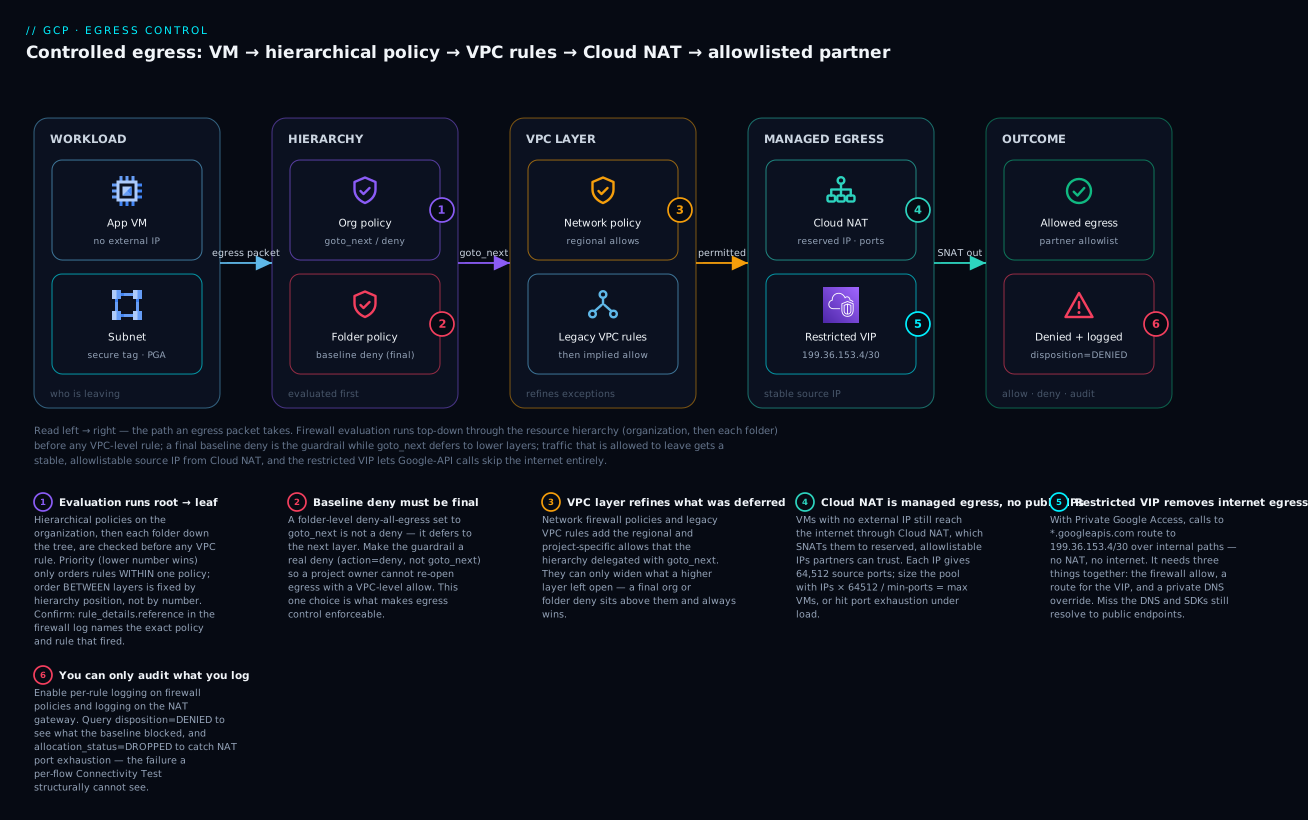
Read the diagram left → right as the journey of one egress packet: it leaves a VM that has no public IP, is evaluated first by the organization then folder hierarchical policies (where a final baseline deny is the guardrail and goto_next defers to lower layers), then by the VPC-level network and legacy rules that refine the exceptions; if it is permitted it exits through Cloud NAT with a reserved, allowlistable source IP — while Google-API calls take the restricted VIP and skip the internet — and either way the outcome (allowed to a partner, or denied) lands in the logs you audit.
Prerequisites and what you’ll be able to do
Know these first. You should be comfortable with basic VPC building blocks — subnets, CIDR ranges (10.0.0.0/8 and friends), and what a firewall rule is (allow or deny, matched on direction, protocol, port, and source/destination). You should also know GCP’s resource hierarchy: organization → folder → project. If any of that is fuzzy, these sibling lessons set it up:
- GCP VPC deep dive: subnets, routes, firewall & NAT — the network fundamentals this lesson layers governance on top of.
- Resource hierarchy & org-policy guardrails — how org/folder/project scoping and inherited guardrails work.
- Private Service Connect: producer & consumer — the PSC mechanism used in section 5.
- VPC Service Controls: perimeters & exfiltration prevention — the API-layer perimeter that complements IP-layer egress control.
After this lesson you will be able to:
- Predict exactly which rule — organization, folder, VPC, or the implied default — decides any given egress packet, and read the single log field that proves it.
- Author an org- or folder-level baseline egress-deny that project owners cannot silently override, with an explicit allowlist layered above it.
- Choose the right firewall target — secure tag vs network tag vs service account — and justify the choice on IAM grounds.
- Stand up Cloud NAT with reserved, allowlistable IPs and size the port pool so it will not exhaust under load.
- Remove internet egress for Google APIs entirely using Private Google Access, the restricted VIP, and a private DNS override.
- Prove the whole stack with Connectivity Tests before rollout and audit it continuously with firewall and NAT logs.
Most GCP egress incidents are not “the firewall was open.” They are “three layers of firewall disagreed, the route was asymmetric, and nobody could read the logs.” Controlled egress on Google Cloud is a stack: hierarchical firewall policies set the organizational baseline, network firewall policies handle the VPC-specific exceptions, Cloud NAT gives you a deterministic, allowlistable source IP, and Private Google Access plus PSC remove the need for internet egress entirely. This guide wires all of that together and shows you how to verify it before it pages you.
1. How firewall evaluation actually works
Before authoring a single rule, internalise the evaluation order. A packet on GCP is evaluated against rules from multiple sources, in this sequence:
- Hierarchical firewall policies attached to the organization, then each folder down the resource hierarchy (closest-to-root first).
- Global and regional network firewall policies attached to the VPC.
- Legacy VPC firewall rules (the old
compute.firewallsobjects). - An implied
allow egress/deny ingresspair at the very end.
Within any single policy, rules are sorted by priority (lower number wins; 0–2147483643). The first rule that matches the packet determines the action — unless that rule uses the special goto_next action, which delegates the decision to the next level down. So a hierarchical rule can either decide (allow/deny) or explicitly defer (goto_next).
The mental model that keeps you sane: hierarchical policies are for guardrails you never want a project owner to override (deny). Use
goto_nextfor everything you want lower levels to be able to decide. A baseline egress-deny that does not usegoto_nextis final and cannot be re-opened by a VPC-level allow.
This last point is the crux of egress control. If you put a low-priority (high-number) hierarchical “deny all egress” rule that is final, project teams literally cannot open egress without you editing the org policy. If you make it goto_next, they can.
One subtlety that trips up even experienced engineers: priority orders rules only within a single policy. The order between layers — org before folder before VPC — is fixed by hierarchy position, not by the priority number. A priority-100 rule in a VPC firewall policy does not beat a priority-2000 rule in the org policy, because the entire org policy is consulted before the VPC layer is ever reached. Priority is queue position inside one queue; the hierarchy decides which queue runs first.
2. Authoring an org/folder baseline egress deny
Create a hierarchical firewall policy and associate it with a folder (associating at the org node is also valid; folders give you blast-radius control during rollout). Hierarchical policies live under gcloud compute firewall-policies and require --organization for scope.
ORG_ID=123456789012
FOLDER_ID=987654321098

# 1. Create the policy container
gcloud compute firewall-policies create \
  --organization="$ORG_ID" \
  --short-name="egress-baseline" \
  --description="Org baseline: default-deny egress with explicit allowlist"

# Capture the generated policy ID (numeric)
POLICY=$(gcloud compute firewall-policies list \
  --organization="$ORG_ID" \
  --format="value(name)" \
  --filter="shortName=egress-baseline")
Now add rules. Lower-priority numbers are evaluated first, so put the explicit allows above the deny. A common baseline: allow egress to RFC 1918 internal ranges and to Google APIs, then deny the rest.
# Allow egress to internal RFC1918 (delegated decision -> let VPC policies refine)
gcloud compute firewall-policies rules create 1000 \
  --firewall-policy="$POLICY" --organization="$ORG_ID" \
  --direction=EGRESS --action=goto_next \
  --layer4-configs=all \
  --dest-ip-ranges=10.0.0.0/8,172.16.0.0/12,192.168.0.0/16 \
  --enable-logging

# Allow egress to Google's restricted VIP for Private Google Access
gcloud compute firewall-policies rules create 1100 \
  --firewall-policy="$POLICY" --organization="$ORG_ID" \
  --direction=EGRESS --action=allow \
  --layer4-configs=tcp:443 \
  --dest-ip-ranges=199.36.153.4/30 \
  --enable-logging

# Final baseline: deny all other egress (NOT goto_next -> this is the guardrail)
gcloud compute firewall-policies rules create 2147483643 \
  --firewall-policy="$POLICY" --organization="$ORG_ID" \
  --direction=EGRESS --action=deny \
  --layer4-configs=all \
  --dest-ip-ranges=0.0.0.0/0 \
  --enable-logging
Associate the policy with the folder. Until you associate it, it enforces nothing:
gcloud compute firewall-policies associations create \
  --firewall-policy="$POLICY" --organization="$ORG_ID" \
  --folder="$FOLDER_ID" \
  --name="egress-baseline-folder-assoc"
The 199.36.153.4/30 range is the restricted.googleapis.com VIP — the entry point for Private Google Access when you want to block all general internet egress but still reach Google APIs. (private.googleapis.com is 199.36.153.8/30; restricted is the stricter one that excludes APIs with no VPC-SC support.)
3. Targets: secure tags vs network tags vs service accounts
A firewall rule narrows what it applies to via targets. You have three options, and they are not interchangeable.
| Target type | Where it works | IAM-governed | Notes |
|---|---|---|---|
| Network tags | VPC firewall rules, network policies | No | Free-text strings on the instance; any editor can add one. Weakest control. |
| Service accounts | VPC rules, network + hierarchical policies | Yes (via SA usage) | Strong, but you burn a target SA and instances are limited in SA count. |
| Secure tags | Network + hierarchical policies | Yes (Tag User/Admin roles) | Key/value resource-manager tags, IAM-bound. The modern recommendation. |
For hierarchical and network firewall policies, prefer secure tags (resource-manager tags), referenced as --target-secure-tags. They are governed by IAM (a user needs roles/resourcemanager.tagUser to bind one), so a developer cannot silently grant their VM into a privileged rule the way they can with a network tag.
# Create a tag key/value (resource-manager tags)
gcloud resource-manager tags keys create egress-tier \
  --parent="organizations/$ORG_ID"

KEY=$(gcloud resource-manager tags keys list \
  --parent="organizations/$ORG_ID" \
  --format="value(name)" --filter="shortName=egress-tier")

gcloud resource-manager tags values create allow-internet \
  --parent="$KEY"

# Reference it as a firewall target (full value resource name)
VALUE=$(gcloud resource-manager tags values list --parent="$KEY" \
  --format="value(name)" --filter="shortName=allow-internet")

gcloud compute firewall-policies rules create 900 \
  --firewall-policy="$POLICY" --organization="$ORG_ID" \
  --direction=EGRESS --action=allow \
  --layer4-configs=tcp:443 \
  --dest-ip-ranges=0.0.0.0/0 \
  --target-secure-tags="$VALUE" \
  --enable-logging
Now only instances explicitly bound to the egress-tier=allow-internet tag can reach the internet on 443; everything else hits the deny-all. Tag binding to a VM is a separate gcloud resource-manager tags bindings create operation against the instance’s resource name.
4. Cloud NAT for deterministic, allowlistable IPs
Even with controlled egress, traffic that does leave needs a stable source IP so downstream partners can allowlist you. Default Cloud NAT auto-allocates ephemeral IPs that change. For deterministic egress, reserve static external addresses and pin them.
REGION=us-central1
ROUTER=nat-router
gcloud compute routers create "$ROUTER" \
  --network=prod-vpc --region="$REGION"

# Reserve static, allowlistable external IPs
gcloud compute addresses create nat-ip-1 nat-ip-2 --region="$REGION"

gcloud compute routers nats create prod-nat \
  --router="$ROUTER" --region="$REGION" \
  --nat-external-ip-pool=nat-ip-1,nat-ip-2 \
  --nat-all-subnet-ip-ranges \
  --enable-logging
Two operational dials matter for scale:
- Manual NAT (
--nat-external-ip-pool) gives you fixed IPs to hand to partners, but you must size the pool — each NAT IP provides 64,512 source ports, and Cloud NAT pre-allocates a per-VM minimum. --min-ports-per-vm(default 64) controls how many ports each VM reserves up front. Lower it to pack more VMs per IP; raise it for chatty workloads to avoid port exhaustion. With dynamic port allocation (--enable-dynamic-port-allocation), NAT scales a VM between--min-ports-per-vmand--max-ports-per-vmon demand, which is the better default for bursty fleets.
gcloud compute routers nats update prod-nat \
  --router="$ROUTER" --region="$REGION" \
  --min-ports-per-vm=64 --max-ports-per-vm=1024 \
  --enable-dynamic-port-allocation
Capacity math you should do before go-live: IPs * 64512 / min-ports-per-vm = max concurrent VMs. Two IPs at 64 min-ports supports ~2,016 VMs at minimum allocation. Under-size this and you get the most common NAT outage there is — port exhaustion under load, which presents as intermittent connection failures, not a clean error.
5. Eliminating internet egress with Private Google Access and PSC
The strongest egress posture is one where workloads never touch the internet for Google services. Two mechanisms:
Private Google Access (PGA) lets VMs without external IPs reach Google APIs over internal routing. Enable it per-subnet and route the restricted VIP:
gcloud compute networks subnets update prod-subnet \
  --region="$REGION" --enable-private-ip-google-access

# Route the restricted VIP via the default internet gateway (internal path)
gcloud compute routes create restricted-google-apis \
  --network=prod-vpc \
  --destination-range=199.36.153.4/32 \
  --next-hop-gateway=default-internet-gateway \
  --priority=1000
Pair this with a private DNS zone for googleapis.com whose records point *.googleapis.com (and the restricted A record) at 199.36.153.4, so SDK calls resolve to the restricted VIP rather than public endpoints. With PGA + restricted VIP + the firewall allow from step 2, a VM can call Storage, BigQuery, and Pub/Sub with zero internet egress.
Private Service Connect (PSC) extends the same idea to published services and supported Google APIs via a consumer endpoint with an IP inside your VPC:
gcloud compute addresses create psc-googleapis-ip \
  --region="$REGION" --subnet=prod-subnet \
  --addresses=10.0.0.50

gcloud compute forwarding-rules create psc-googleapis \
  --global \
  --network=prod-vpc \
  --address=psc-googleapis-ip \
  --target-google-apis-bundle=all-apis
Now all-apis is reachable at 10.0.0.50 — a routable internal IP you can allowlist in firewall rules and point DNS at, with no dependency on the Google VIP ranges at all.
6. Enabling and reading firewall + NAT logs
You cannot audit what you cannot see. Note the --enable-logging flag on every rule above — for policy rules, logging is per-rule. Firewall logs land in Cloud Logging under the compute.googleapis.com/firewall log; NAT logs require enabling on the NAT gateway and can filter to errors only (translation failures, dropped packets) to keep volume sane.
# What hit the baseline deny in the last hour?
gcloud logging read \
  'logName=~"compute.googleapis.com%2Ffirewall"
   AND jsonPayload.disposition="DENIED"' \
  --freshness=1h \
  --format="table(timestamp, jsonPayload.connection.dest_ip,
                  jsonPayload.connection.dest_port,
                  jsonPayload.rule_details.reference)"

# NAT allocation errors (port exhaustion shows here)
gcloud logging read \
  'resource.type="nat_gateway"
   AND jsonPayload.allocation_status="DROPPED"' \
  --freshness=1h --format=json
For NAT, you can scope logging to errors only to control cost:
gcloud compute routers nats update prod-nat \
  --router="$ROUTER" --region="$REGION" \
  --enable-logging --log-filter=ERRORS_ONLY
The rule_details.reference field tells you which policy and rule matched — invaluable when three layers are in play. Route a sink for disposition="DENIED" to BigQuery for longer-term egress audit.
7. Test the stack with Connectivity Tests before rollout
Network Intelligence Center’s Connectivity Tests run the configuration-plane analysis and a live data-plane probe across your firewall layers, so you can validate a rule stack before it bites. This is the single highest-leverage pre-rollout step.
gcloud network-management connectivity-tests create egress-to-partner \
  --source-instance=projects/PROJ/zones/us-central1-a/instances/app-vm \
  --destination-ip-address=203.0.113.10 \
  --destination-port=443 \
  --protocol=TCP

gcloud network-management connectivity-tests describe egress-to-partner \
  --format="value(reachabilityDetails.result)"
A result of REACHABLE confirms the path; UNREACHABLE returns the trace with the exact dropping rule (including hierarchical policy rules), which removes the guesswork. Run one test per intended egress flow and one negative test (expect UNREACHABLE) to prove the baseline deny actually blocks.
Enterprise scenario
A payments platform team rolled out the folder-level baseline deny across ~40 projects, validated every Connectivity Test, and shipped. Two weeks later a regional GKE fleet started throwing intermittent dial tcp: i/o timeout to an external KYC partner — but only under load, never in the canary. The baseline was fine; the partner’s allowlist was fine. The culprit was Cloud NAT port exhaustion that the per-flow Connectivity Tests structurally could not catch.
The fleet ran behind a single NAT IP at the default 64 min-ports-per-vm. The capacity formula said 64512 / 64 ≈ 1008 VMs, comfortably above the node count. What they missed: GKE pods using VPC-native (alias IP) networking each consume NAT ports independently, and a chatty workload opening many short-lived TLS connections to one destination IP:port tuple churns through the per-endpoint port range fast. The nat_gateway logs made it unambiguous — allocation_status="DROPPED" spiking only at peak.
The fix was dynamic port allocation plus enabling per-VM endpoint-independent mapping so reused tuples didn’t each grab fresh ports, and adding a second reserved IP (both still on the partner allowlist):
gcloud compute addresses create nat-ip-2 --region="$REGION"
gcloud compute routers nats update prod-nat \
  --router="$ROUTER" --region="$REGION" \
  --nat-external-ip-pool=nat-ip-1,nat-ip-2 \
  --min-ports-per-vm=64 --max-ports-per-vm=4096 \
  --enable-dynamic-port-allocation \
  --enable-endpoint-independent-mapping
The lasting lesson: a REACHABLE Connectivity Test proves the path, never the capacity. They added a dedicated alert on allocation_status="DROPPED" to the rollout checklist permanently.
Verify
Confirm the end-to-end posture from a workload instance and the control plane.
# 1. From an allowed VM: Google API over the private path succeeds
gcloud compute ssh app-vm --zone=us-central1-a --tunnel-through-iap \
  --command="curl -sS -o /dev/null -w '%{http_code}\n' https://storage.googleapis.com"

# 2. From a non-allowlisted VM: generic internet egress is denied (expect timeout/fail)
gcloud compute ssh locked-vm --zone=us-central1-a --tunnel-through-iap \
  --command="curl -sS --max-time 5 https://example.com || echo BLOCKED_AS_EXPECTED"

# 3. Confirm the NAT source IP is your reserved, allowlistable address
gcloud compute ssh app-vm --zone=us-central1-a --tunnel-through-iap \
  --command="curl -sS https://api.ipify.org"

# 4. Confirm associations are live
gcloud compute firewall-policies associations list --organization="$ORG_ID"
Step 3 should return one of nat-ip-1/nat-ip-2. If it returns something else, your route or NAT scope is wrong.
Going deeper
You now have a working stack. This section is the depth an experienced engineer needs to run it at scale without surprises — the precedence internals, the NAT edge cases, the scope boundaries with adjacent controls, and the IAM, cost, and Terraform realities.
The complete precedence picture
The four-source order in section 1 hides a second axis. Within a hierarchical or network firewall policy, rules are ranked by priority (lower first). Between policies, order is set by hierarchy — org, then every folder root-to-leaf, then the VPC’s network policies, then legacy VPC rules, then the implied pair. So the true evaluation is a two-level sort: hierarchy position first, priority second. Two consequences follow that people get wrong:
- A high-priority (low-number) VPC rule can never override a lower-priority org rule, because the org policy is fully evaluated first. If the org policy decides (allow or deny, not
goto_next), the VPC rule is never even reached. - Inside one policy, the first match wins, and
goto_nextis the only action that lets evaluation continue past a match. Anallowordenyis terminal for that packet at that layer — for hierarchical layersgoto_nextcontinues to the next layer; there is no “fall through to a lower-priority rule in the same policy after a match.”
Every VPC also carries two implied rules you never see in a list: implied allow egress to 0.0.0.0/0 and implied deny ingress from 0.0.0.0/0, both at priority 65535. Your baseline-deny works precisely by out-ranking and pre-empting that implied egress-allow from a higher layer. Separately, the auto-created default network ships default-allow-ssh, default-allow-rdp, default-allow-icmp, and default-allow-internal — delete or never use the default network in anything you intend to govern.
Cloud NAT internals that bite at scale
- Port consumption is per-endpoint. A source VM does not consume “a port”; it consumes a
(source-IP, source-port)for each distinct(dest-IP, dest-port, protocol)tuple. Ten thousand short-lived TLS connections to one partner endpoint still churn ports fast. Endpoint-independent mapping (--enable-endpoint-independent-mapping) makes NAT reuse the same external port for the same VM across destinations, which reduces churn but is incompatible with dynamic port allocation in some combinations — validate the pairing for your gateway. - GKE multiplies demand. With VPC-native (alias IP) clusters, each Pod IP is NAT-translated independently, so a node packed with Pods consumes far more ports than the node count suggests. Size NAT against Pod count, not node count. Private GKE clusters specifically need Cloud NAT (or a route to a proxy) for any non-Google internet egress.
- NAT Rules for destination-based IP selection. The newer NAT rules feature lets you choose which external IP a flow uses based on the destination — handy when partner A must see IP-1 and partner B must see IP-2 from the same subnet. This is
gcloud compute routers nats rules createwith a--matchexpression ondestination.ip. DROPPEDis the only clean exhaustion signal. There is no synchronous error to the app; the VM just sees timeouts.allocation_status="DROPPED"in thenat_gatewaylog is your single source of truth — alert on it.
Scope boundaries: what NAT and firewalls cannot do
This is the most valuable thing to internalise. Hierarchical/VPC firewall rules and Cloud NAT operate at L3/L4 — IP addresses and ports. They fundamentally cannot express “allow egress to github.com but nowhere else,” because a hostname is an L7 concept and CDN-fronted services sit behind large, rotating IP ranges. Three complementary controls fill the gaps:
| Control | Layer | Answers the question |
|---|---|---|
| Hierarchical / VPC firewall + Cloud NAT | L3/L4 (IP, port) | Which IPs and ports may traffic reach, and from what source IP does it leave? |
| Secure Web Proxy (SWP) | L7 (URL, FQDN, TLS) | Which domains/URLs may workloads reach? — the tool for FQDN allowlisting. |
| VPC Service Controls | API perimeter | Can data be exfiltrated to a Google project outside my perimeter? |
If your requirement is “only *.githubusercontent.com,” reach for Secure Web Proxy (or a forward/explicit proxy) with the firewall baseline-deny as the backstop for anything that tries to bypass the proxy. Do not try to encode a domain allowlist as an IP list — it is brittle and silently wrong the day the CDN re-IPs.
IAM, quotas, and cost
- Who can do what. Creating hierarchical policies is an org-level act:
roles/compute.orgFirewallPolicyAdminon the organization. Binding secure tags needsroles/resourcemanager.tagUser; creating tag keys/values needsroles/resourcemanager.tagAdmin. In a Shared VPC, firewall rules and NAT live in the host project — service-project owners cannot change them, which is exactly the separation of duties you want. - Quotas to watch. There are limits on rules per firewall policy, associations per policy, and attributes (secure tags, ranges) per rule. At org scale you plan policy structure against these limits, not just individual rules.
- Cost. Cloud NAT bills per gateway-hour and per GB of data processed — a chatty egress fleet can make NAT a real line item, which is another reason to route Google traffic over PGA/PSC (no NAT charge) and reserve NAT for genuine internet egress. Firewall and NAT logging bill as Cloud Logging ingestion;
ERRORS_ONLYon NAT and per-rule logging only where you need audit keeps the bill sane.
Manage it as code
At scale these objects are Terraform, not gcloud. The hierarchical baseline-deny and NAT translate directly (representative, schema-correct for the google provider):
resource "google_compute_firewall_policy" "egress_baseline" {
  parent      = "organizations/${var.org_id}"
  short_name  = "egress-baseline"
  description = "Org baseline: default-deny egress with explicit allowlist"
}

resource "google_compute_firewall_policy_rule" "deny_all_egress" {
  firewall_policy = google_compute_firewall_policy.egress_baseline.id
  priority        = 2147483643
  direction       = "EGRESS"
  action          = "deny"          # a real deny, NOT goto_next -> the guardrail
  enable_logging  = true
  match {
    dest_ip_ranges = ["0.0.0.0/0"]
    layer4_configs { ip_protocol = "all" }
  }
}

resource "google_compute_firewall_policy_association" "folder_assoc" {
  name              = "egress-baseline-folder-assoc"
  firewall_policy   = google_compute_firewall_policy.egress_baseline.id
  attachment_target = "folders/${var.folder_id}"
}

resource "google_compute_router_nat" "prod_nat" {
  name                               = "prod-nat"
  router                             = google_compute_router.nat_router.name
  region                             = var.region
  nat_ip_allocate_option             = "MANUAL_ONLY"
  nat_ips                            = google_compute_address.nat[*].self_link
  source_subnetwork_ip_ranges_to_nat = "ALL_SUBNETWORKS_ALL_IP_RANGES"
  enable_dynamic_port_allocation     = true
  min_ports_per_vm                   = 64
  max_ports_per_vm                   = 4096
  log_config {
    enable = true
    filter = "ERRORS_ONLY"
  }
}
The value of code here is not tidiness — it is that the association (which is what actually enforces the policy) is version-controlled and reviewed, so nobody detaches the guardrail with an untracked console click.
Practice challenges
Reading the stack is easy; predicting what a specific packet does and sizing the pieces is the skill. Work each challenge the way the lesson teaches — name the deciding layer, do the port math, pick the control that matches the layer — then open the solution. They escalate from an obvious call to genuine judgement, and a couple hide a distractor designed to tempt you toward the wrong tool.
Challenge 1 (beginner). An org hierarchical policy has one egress rule: priority 1000, goto_next, allow all. A folder policy below it has one egress rule: priority 2000, action deny, 0.0.0.0/0 (a final deny, not goto_next). A VPC firewall policy has priority 100, allow, to the same destination. A VM in that folder tries to reach the internet on 443. Does the packet leave?
<details> <summary>Model answer</summary>
No — it is denied. Evaluation is hierarchy-first: the org rule is goto_next (defers), so the folder policy runs next and returns a final deny. Because that deny is terminal, the VPC layer — and its priority-100 allow — is never consulted. The 100 is a distractor: priority only orders rules inside one policy; it cannot leapfrog a higher layer that already decided. This is the whole point of a final baseline deny.
</details>
Challenge 2 (beginner). Write the gcloud to reserve two static external IPs in us-central1 and create a Cloud NAT on router nat-router that uses only those two IPs (manual pool), NAT-ing all subnet ranges, with logging on.
<details> <summary>Model answer</summary>
gcloud compute addresses create nat-ip-1 nat-ip-2 --region=us-central1
gcloud compute routers nats create prod-nat \
  --router=nat-router --region=us-central1 \
  --nat-external-ip-pool=nat-ip-1,nat-ip-2 \
  --nat-all-subnet-ip-ranges \
  --enable-logging
Why: a manual --nat-external-ip-pool gives deterministic, allowlistable IPs (the default auto-allocation hands out ephemeral IPs that rotate, which partners cannot allowlist).
</details>
Challenge 3 (intermediate). A VM with no external IP must call Cloud Storage with zero internet egress. Name the three things you must configure, and the failure you get if you skip the third.
<details> <summary>Model answer</summary>
Three, all required: (1) enable Private Google Access on the subnet (--enable-private-ip-google-access); (2) a route sending 199.36.153.4/32 to default-internet-gateway (the internal path) plus a firewall allow to 199.36.153.4/30 on tcp:443; (3) a private DNS override so *.googleapis.com resolves to 199.36.153.4. Skip the DNS override and the SDK still resolves storage.googleapis.com to a public IP — which your baseline-deny now blocks — so calls that worked yesterday start timing out the moment you tighten egress. PGA is firewall plus routing plus DNS.
</details>
Challenge 4 (intermediate). You have 3 reserved NAT IPs and min-ports-per-vm=128 with dynamic port allocation disabled. What is the maximum number of VMs before port exhaustion, and what single flag lets you pack more without adding IPs?
<details> <summary>Model answer</summary>
3 × 64512 / 128 = 1512 VMs at the minimum allocation. Enable --enable-dynamic-port-allocation (with a higher --max-ports-per-vm): idle VMs then hold only the 128-port minimum while busy ones scale up on demand, so you stop reserving ports that sit unused. Why: with static allocation, every VM reserves its full min-ports whether it uses them or not, so the floor is the ceiling.
</details>
Challenge 5 (advanced). A workload must be allowed to reach *.githubusercontent.com and nothing else on the internet. Explain why a hierarchical firewall policy plus Cloud NAT cannot do this cleanly, and name the right tool.
<details> <summary>Model answer</summary>
Firewall rules and NAT match on IP and port (L3/L4), not hostname. *.githubusercontent.com is served from large, rotating CDN IP ranges, so any IP allowlist is both huge and stale the day the CDN re-IPs — brittle and wrong. Domain allowlisting is an L7 problem: use Secure Web Proxy (SWP) (or a forward/explicit proxy) to allow by FQDN, and keep the firewall baseline-deny as the backstop so anything that tries to bypass the proxy still dies. Reaching for an IP list here is the distractor.
</details>
Challenge 6 (advanced). Convert the org baseline egress-deny and its folder association to Terraform, and explain in one line why enable_logging = true on the deny rule matters operationally.
<details> <summary>Model answer</summary>
resource "google_compute_firewall_policy" "egress_baseline" {
  parent      = "organizations/${var.org_id}"
  short_name  = "egress-baseline"
  description = "Org baseline: default-deny egress with explicit allowlist"
}
resource "google_compute_firewall_policy_rule" "deny_all_egress" {
  firewall_policy = google_compute_firewall_policy.egress_baseline.id
  priority        = 2147483643
  direction       = "EGRESS"
  action          = "deny"
  enable_logging  = true
  match {
    dest_ip_ranges = ["0.0.0.0/0"]
    layer4_configs { ip_protocol = "all" }
  }
}
resource "google_compute_firewall_policy_association" "folder_assoc" {
  name              = "egress-baseline-folder-assoc"
  firewall_policy   = google_compute_firewall_policy.egress_baseline.id
  attachment_target = "folders/${var.folder_id}"
}
Why logging on the deny matters: it is what populates disposition="DENIED" in Cloud Logging — without it, a blocked flow is invisible, and you are debugging “why can’t this VM reach the partner” with no evidence that the guardrail is the one firing.
</details>
Common beginner mistakes
- “A hierarchical deny with
goto_nextblocks traffic.” It does the opposite —goto_nextdefers the decision to the next layer. Right model:goto_nextmeans “I’m not deciding, ask the layer below.” A guardrail deny must beaction=deny, nevergoto_next. - “Lower priority number means lower precedence.” Backwards. Lower number is evaluated first and wins. Right model: priority is queue position; position
0goes to the front. - “Priority ranks rules across the whole stack.” No — priority orders rules only within one policy. Order between org, folder, and VPC is fixed by hierarchy position. A priority-
100VPC rule never beats an org rule that already decided. - “Cloud NAT gives inbound access too.” NAT is egress-initiated only. It returns traffic for flows it started; it cannot accept new inbound connections. Inbound needs a load balancer or an external IP. Right model: NAT is a one-way outbound door with a return path.
- “No external IP means no internet access.” Not so — a private VM reaching the internet through Cloud NAT is exactly the intended design. Right model: external IP and internet access are decoupled; NAT provides the latter without the former.
- “Private Google Access is just a firewall allow.” It is firewall plus a route for the restricted VIP plus a private DNS override. Miss the DNS and SDKs resolve to public IPs and break the instant you tighten egress.
- “Blocking egress by IP address secures it.” IP allowlists are brittle for CDN-fronted services and cannot express “only
github.com.” Right model: IP/port is L3/L4; hostname filtering is an L7 job for Secure Web Proxy or a forward proxy. - “Creating the policy enforces it.” A hierarchical policy enforces nothing until you create an association to an org node or folder. The most common “my deny isn’t working” cause is a policy that was never associated.
Rollout checklist
Pitfalls
- Asymmetric routes. Cloud NAT only handles egress-initiated flows. If a workload needs inbound connections, NAT will not return that traffic — you need a load balancer or external IP. Mixing the two on one subnet produces flows that leave via NAT but expect to return via an external IP, and they silently fail.
- Port exhaustion. The default 64 min-ports plus a small IP pool caps your fleet far lower than people expect. Do the capacity math, enable dynamic port allocation, and alarm on
allocation_status="DROPPED". - Shadowed rules. A lower-numbered
allow 0.0.0.0/0placed above a narrower deny makes the deny unreachable — the broad rule wins on priority. Connectivity Tests’ returnedrule_details.referenceis how you catch which rule actually fired versus which you thought would. goto_nextconfusion. A hierarchical deny set togoto_nextis not a deny — it defers. Reservegoto_nextfor allows you want lower layers to refine; make guardrail denies final.- DNS, not just firewall. Private Google Access without the DNS override still resolves
googleapis.comto public IPs and breaks once you tighten egress. PGA is firewall plus routing plus DNS — all three.
Build it folder-first, prove every flow with a Connectivity Test, and keep the deny final. That combination gives you egress that is controlled, deterministic, and — most importantly when something breaks at 2 a.m. — readable.
Glossary
- Egress / Ingress — traffic leaving your VPC (egress) versus entering it (ingress). This lesson is about controlling egress.
- Hierarchical firewall policy — a firewall policy attached to the organization or a folder, evaluated before any VPC-level rule and inherited by everything beneath it. Where guardrails live.
- Network firewall policy — a firewall policy attached to a VPC (global or regional), the modern replacement for legacy VPC firewall rules; evaluated after the hierarchy.
- VPC firewall rule (legacy) — the original
compute.firewallsobjects on a network; still valid, evaluated after network firewall policies. - Priority — a number (0–2147483643) ordering rules within a single policy; lower is evaluated first and wins. Does not order rules between hierarchy layers.
goto_next— a firewall action that defers the decision to the next layer down instead of allowing or denying. The opposite of a guardrail.- Implied rules — every VPC’s built-in
allowegress anddenyingress at priority 65535, active unless a higher-precedence rule pre-empts them. - Secure tag — an IAM-governed key/value resource-manager tag used as a firewall target; requires
roles/resourcemanager.tagUserto bind. The recommended targeting mechanism. - Network tag — a free-text string on an instance used as a firewall target; not IAM-governed, so anyone with edit access can add one. Weakest targeting.
- Cloud NAT — a managed, distributed service that lets VMs without external IPs make outbound connections, translating them to a pool of external IPs (egress-initiated only).
- SNAT (source NAT) — rewriting the source IP/port of an outbound packet to the NAT gateway’s external IP, so replies return through the gateway.
- Reserved (static) external IP — an external IP you own and pin to the NAT pool so downstream partners can allowlist a stable, unchanging source address.
min-ports-per-vm— how many source ports Cloud NAT reserves per VM up front (default 64). The floor of the port-exhaustion formula.- Dynamic port allocation — Cloud NAT scaling a VM’s ports between
min-ports-per-vmandmax-ports-per-vmon demand, so idle VMs don’t hoard ports. - Endpoint-independent mapping — reusing the same external port for a VM across different destinations, reducing port churn.
- Port exhaustion — running out of NAT source ports under load, seen as intermittent timeouts (not a clean error) and logged as
allocation_status="DROPPED". - Private Google Access (PGA) — reaching Google APIs from VMs without external IPs over internal routing to the restricted VIP; requires firewall allow + route + private DNS.
- Restricted VIP (
199.36.153.4/30) — therestricted.googleapis.comvirtual IP range for PGA, excluding APIs without VPC-SC support (private.googleapis.comis199.36.153.8/30). - Private Service Connect (PSC) — exposing Google APIs or published services at a routable internal IP inside your VPC, removing any dependency on Google’s public VIP ranges.
- Connectivity Tests — Network Intelligence Center’s config-plane analysis plus live data-plane probe across all firewall layers; used to validate a rule stack before rollout.
disposition(DENIED) — the firewall-log field stating whether a flow was allowed or denied; filter onDENIEDto see what the baseline blocked.allocation_status(DROPPED) — the NAT-log field that flags port-allocation failure; the single reliable signal of port exhaustion.rule_details.reference— the firewall-log field naming the exact policy and rule that decided a packet — the answer to “which of my three layers fired?”- RFC 1918 — the private IPv4 ranges (
10.0.0.0/8,172.16.0.0/12,192.168.0.0/16) that internal traffic uses and that egress allows commonly reference. - Secure Web Proxy (SWP) — a managed L7 egress proxy that filters by URL/FQDN, the tool for domain-based allowlisting that IP-layer firewall rules cannot express.
- Organization / Folder / Project — GCP’s resource hierarchy; hierarchical firewall policies attach to the organization or folders and are inherited downward.