In a nutshell
Cloud SQL is Google’s managed relational database — you pick PostgreSQL, MySQL, or SQL Server, and Google runs the VM, the disk, the patching, and the backups for you. Spinning one up for a demo takes a minute. Making one you’d trust with real customer money is a different job entirely, and that job is what this lesson is about: surviving a datacenter hiccup, serving reports without slowing the app, hiding the database from the public internet, and being able to rewind after someone drops the wrong table.
Here’s the mental model. A demo instance is one shopkeeper behind one till: if they call in sick (a zone outage), the shop is shut; if a queue forms (read-heavy analytics), everyone waits behind the same person; the front door opens onto the public street (a public IP anyone can knock on); and there’s no recording of yesterday’s sales you’ve ever actually played back. A production Cloud SQL instance is a real store — a trained understudy stands ready to take over the same till in under a minute (the HA standby), extra tills handle the “just looking” browsers so the main till stays free for buyers (read replicas), customers come through a private staff entrance instead of the street (private IP / PSC), and there’s a nightly recording you have tested you can replay to any moment (backups + point-in-time recovery).
Four ideas carry the whole lesson, and beginners mix them up constantly: HA keeps you running through a zone failure. Read replicas add read capacity and seed a region failover. Private connectivity controls who can reach the database. Backups + PITR are the only thing that saves you from a bad change — because HA will happily copy your mistake to the standby in milliseconds. Different problems, different controls. Keep them separate in your head and the rest follows.
Level: Advanced · Time: ~35 min
Prerequisites & what you’ll be able to do
You’ll get the most from this if you already have:
- A working feel for VPCs, subnets, and private vs public IP — see VPC deep dive.
- The basics of a relational database: a primary that takes writes, and the idea of a replica that copies from it.
- A nodding acquaintance with Private Service Connect helps for section 4 — see PSC producer/consumer.
- If you want the engine-level fundamentals first, the Cloud SQL deep dive is the companion to this operations-focused lesson.
After working through it, you will be able to:
- Provision a regional HA instance and explain precisely what fails over and what stays the same.
- Add in-region and cross-region read replicas, route reads to them, and know when to promote one.
- Choose between Private IP (PSA) and PSC before create time — and explain why that choice is irreversible.
- Turn on backups + PITR and run a restore drill that produces a real RTO number, not a hope.
- Pin maintenance windows and deny periods, and cut failover downtime to near zero with Enterprise Plus plus connection pooling.
- Read replica lag as your cross-region RPO and stop a reconnect storm from turning a 60-second failover into a 10-minute outage.
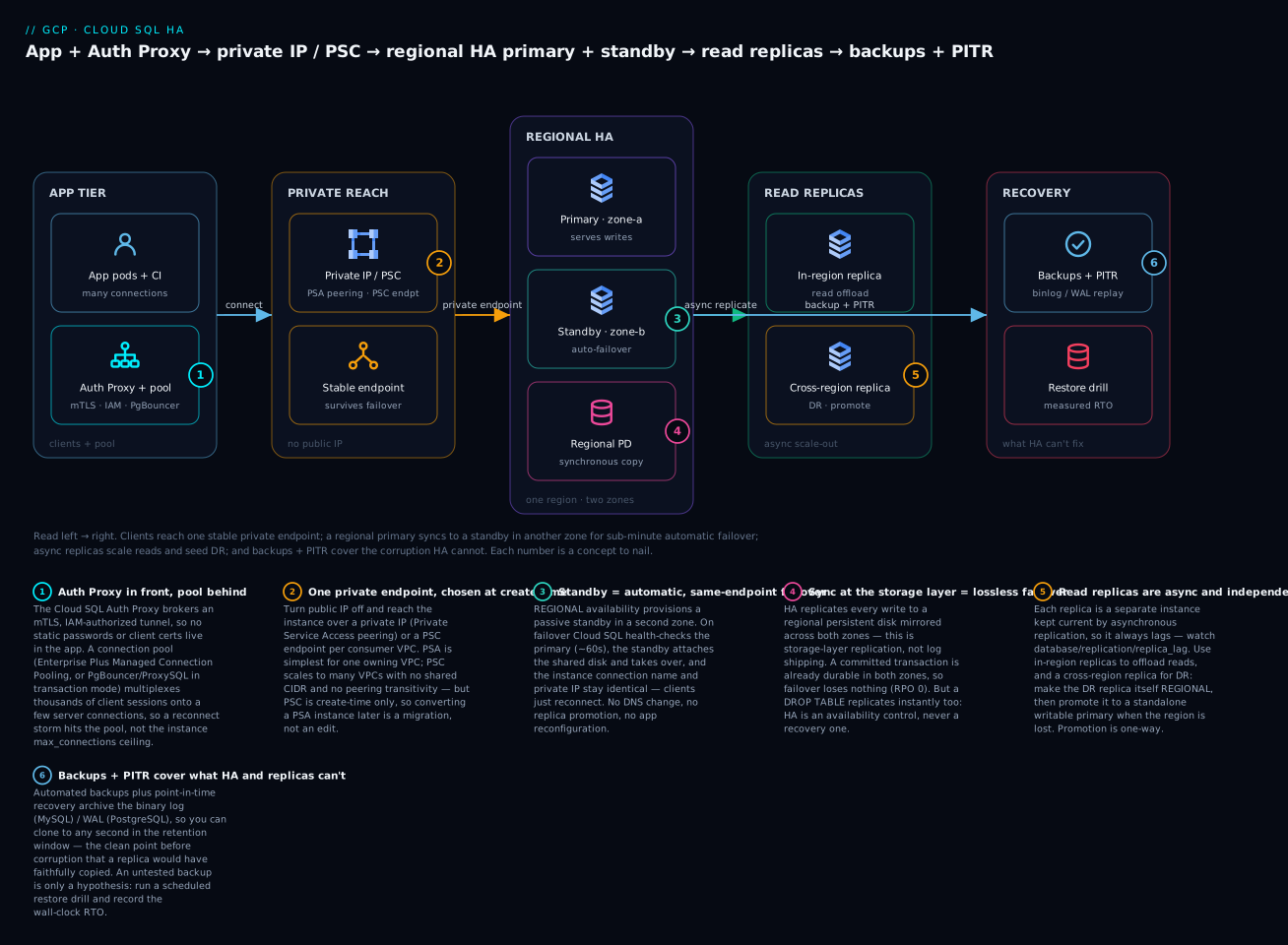
Read the diagram left → right: clients reach one stable private endpoint, a regional primary synchronously mirrors to a standby in another zone for sub-minute automatic failover, async read replicas scale reads and seed cross-region DR, and backups + PITR cover the logical corruption that HA and replicas would faithfully copy.
Cloud SQL is the default managed relational database on GCP, and the gap between a demo instance and a production one is enormous. A demo instance has a public IP, no replicas, a default maintenance window, and a backup nobody has ever restored. A production instance survives a zone outage in under a minute, serves analytics off replicas without touching the primary, is reachable only over private networking from multiple VPCs, takes patches inside a window you control, and has a restore objective you have actually measured. This walkthrough builds that production posture for Cloud SQL (PostgreSQL and MySQL), end to end, with the failure modes that bite teams in practice.
Commands are written against gcloud sql with parallel Terraform google_sql_database_instance where it clarifies intent. Everything here assumes Cloud SQL Enterprise or Enterprise Plus edition; I call out where the edition matters.
1. HA architecture: regional disk and failover mechanics
A standard Cloud SQL instance is a single VM in a single zone backed by a regional or zonal persistent disk. High availability changes the topology: HA provisions a primary in one zone and a standby in another zone of the same region, with data on a regional persistent disk that synchronously replicates every write across both zones. This is replication at the storage layer, not log shipping. The standby has no separate copy of the data it serves; it attaches the same regional disk on failover.
| Property | Single-zone | Regional HA |
|---|---|---|
| Failure domain | One zone | Two zones in a region |
| Data replication | None (single disk) | Synchronous, regional persistent disk |
| Failover target | None | Standby in second zone |
| Typical failover time | N/A | Tens of seconds to ~1-2 min |
| Cost | 1x compute + disk | ~2x compute, regional disk |
The mechanics matter because they shape your expectations. On failover, Cloud SQL detects the primary is unhealthy (the health check fails for roughly 60 seconds), the standby takes over the regional disk, and the instance connection name and private IP stay the same. Clients reconnect to the same endpoint. There is no DNS change and no promotion of a replica. Because replication is synchronous, failover is non-lossy: a committed transaction was already on the regional disk in both zones.
Create an HA instance with availability-type=REGIONAL:
gcloud sql instances create pg-prod \
  --project=app-data-prj \
  --database-version=POSTGRES_16 \
  --edition=ENTERPRISE_PLUS \
  --tier=db-perf-optimized-N-8 \
  --region=us-central1 \
  --availability-type=REGIONAL \
  --storage-type=SSD \
  --storage-size=100 \
  --storage-auto-increase \
  --enable-point-in-time-recovery \
  --backup-start-time=03:00 \
  --retained-backups-count=14 \
  --retained-transaction-log-days=7
The same in Terraform, where HA is a single nested field:
resource "google_sql_database_instance" "pg_prod" {
  name             = "pg-prod"
  database_version = "POSTGRES_16"
  region           = "us-central1"

  settings {
    edition           = "ENTERPRISE_PLUS"
    tier              = "db-perf-optimized-N-8"
    availability_type = "REGIONAL" # this one line is HA
    disk_type         = "PD_SSD"
    disk_size         = 100
    disk_autoresize   = true

    backup_configuration {
      enabled                        = true
      point_in_time_recovery_enabled = true
      start_time                     = "03:00"
      transaction_log_retention_days = 7
      backup_retention_settings {
        retained_backups = 14
      }
    }
  }

  deletion_protection = true
}
HA protects against zone failure, not region failure and not your own bad migration. A
DROP TABLEreplicates to the regional disk instantly. HA is an availability control, not a recovery control. You still need backups, PITR, and ideally a cross-region replica. Treat them as separate problems.
2. Read replicas: in-region, cross-region, and cascading
A read replica is a separate instance with its own data copy, kept current by asynchronous replication from a source. Unlike the HA standby, a replica is independently addressable, serves read traffic, and can live in another region. Use replicas to offload read-heavy analytics, to put data near a remote read audience, and to seed disaster recovery in a second region.
Create an in-region replica to absorb read load:
gcloud sql instances create pg-prod-replica-1 \
  --project=app-data-prj \
  --master-instance-name=pg-prod \
  --tier=db-perf-optimized-N-8 \
  --region=us-central1 \
  --availability-type=ZONAL
Create a cross-region replica in another region for DR and geo-local reads. The --region differs from the primary; everything else is inherited from the source:
gcloud sql instances create pg-prod-dr-east \
  --project=app-data-prj \
  --master-instance-name=pg-prod \
  --tier=db-perf-optimized-N-8 \
  --region=us-east4 \
  --availability-type=ZONAL
Three topology rules worth internalizing:
- A replica can itself be HA. Set
--availability-type=REGIONALon the replica so your DR region survives a zone outage after you promote it. A zonal DR replica is a single point of failure the day you need it most. - Cascading replicas are supported: a replica can be the source for another replica. Use this to fan out reads in a remote region without adding asynchronous load to the cross-region link from the primary. Replicate primary -> regional replica -> N local replicas.
- Replicas do not inherit backups. Replicas are not backed up by default. Your backup and PITR strategy lives on the primary.
Replication is asynchronous, so a replica is always slightly behind. The lag metric you watch is database/replication/replica_lag (seconds). Read-your-own-writes consistency is not guaranteed against a replica; route writes and read-after-write to the primary, and route eventually-consistent reads to replicas.
3. Connectivity: private IP, PSC, and the Auth Proxy compared
Cloud SQL exposes three connectivity models, and choosing wrong creates either a security gap or a networking dead-end you cannot undo without recreating the instance.
| Model | How clients reach it | Best for | Key constraint |
|---|---|---|---|
| Private IP (PSA) | Internal IP via VPC peering (private services access) | Single owning VPC, simple setup | Consumes a peered range; one VPC peering, transitivity limits |
| Private Service Connect (PSC) | PSC endpoint(s) in consumer VPCs | Multi-VPC, centralized, cross-org reach | Must be enabled at create time; you manage endpoints/DNS |
| Cloud SQL Auth Proxy / Connectors | Local proxy brokers an mTLS tunnel | IAM-authenticated, app-side, dev and CI | A sidecar/binary per client; not a network path by itself |
Private IP via private services access (PSA) is the common default: GCP allocates a peered range, and the instance gets an internal IP reachable from the peered VPC. It is simple but it bakes in a VPC peering relationship and the non-transitivity that comes with peering. If you need the database reachable from many VPCs that do not all peer with one host VPC, PSA fights you.
The Cloud SQL Auth Proxy (and the language-native Connectors) is orthogonal to the network model. It does not give you a network route; it brokers an encrypted, IAM-authorized tunnel over whichever path already exists, and it handles automatic certificate rotation and (optionally) IAM database authentication. Run it as a sidecar next to your app:
# v2 Auth Proxy: connect over the instance's private IP, IAM auth on
./cloud-sql-proxy \
  --private-ip \
  --auto-iam-authn \
  --port 5432 \
  app-data-prj:us-central1:pg-prod
Use the proxy for application pods and CI even when you have private IP, because it removes long-lived passwords and static client certs from the equation. Use PSC (next section) when the network reachability itself has to span many VPCs or organizational boundaries.
4. PSC connectivity for centralized, multi-VPC access
Private Service Connect lets a single Cloud SQL instance be reached by many consumer VPCs through per-VPC PSC endpoints, with no shared address space and no VPC peering transitivity. This is the right model for a centralized data platform serving tenant or app VPCs. The catch you must plan for: PSC must be enabled when the instance is created. You cannot convert a PSA instance to PSC in place.
Enable PSC and the allowed consumer projects at create time:
gcloud sql instances create pg-platform \
  --project=data-platform-prj \
  --database-version=POSTGRES_16 \
  --edition=ENTERPRISE_PLUS \
  --tier=db-perf-optimized-N-8 \
  --region=us-central1 \
  --availability-type=REGIONAL \
  --enable-private-service-connect \
  --allowed-psc-projects=tenant-a-prj,tenant-b-prj \
  --no-assign-ip \
  --enable-point-in-time-recovery
Cloud SQL publishes a service attachment for the instance. Retrieve it, then each consumer creates a PSC endpoint (a forwarding rule) pointing at that attachment in its own VPC:
# Platform team: get the service attachment URI for the instance
gcloud sql instances describe pg-platform \
  --project=data-platform-prj \
  --format='value(pscServiceAttachmentLink)'
# Consumer (tenant-a) creates a PSC endpoint to that attachment
gcloud compute addresses create psc-pg-platform-ip \
  --project=tenant-a-prj \
  --region=us-central1 \
  --subnet=tenant-a-subnet \
  --addresses=10.20.0.40

gcloud compute forwarding-rules create psc-pg-platform-fr \
  --project=tenant-a-prj \
  --region=us-central1 \
  --network=tenant-a-vpc \
  --address=psc-pg-platform-ip \
  --target-service-attachment=projects/data-platform-prj/regions/us-central1/serviceAttachments/<attachment-id>
Now 10.20.0.40 in tenant-a’s VPC reaches the instance, and tenant-b reaches the same instance through its own endpoint and its own IP. DNS hygiene is on you: create a private DNS zone (for example pg-platform.psc.internal) mapping a stable name to each consumer’s endpoint IP, so applications never hardcode the PSC IP. Treat the endpoint IP as a per-VPC implementation detail behind a name.
PSC also fixes the HA failover story for multi-VPC access. The service attachment is stable across failover, so consumer endpoints keep working when the primary fails over to its standby zone. You publish once and every consumer inherits the HA behavior.
5. Promoting replicas for DR and managing replication lag
A cross-region replica is your regional disaster recovery. When the primary’s region is impaired, you promote the replica, which severs replication and turns it into a standalone, writable primary. Promotion is one command and is not reversible: the old replication relationship is gone, and re-establishing it means rebuilding a fresh replica from the new primary.
gcloud sql instances promote-replica pg-prod-dr-east \
  --project=app-data-prj
Two things to get right before you ever promote:
- Drain or fence the application first. Promotion does not coordinate with your app. If the old primary is actually alive (a network partition, not a true regional loss), promoting creates a split brain where both instances accept writes. Have a runbook that stops writes to the old endpoint before promoting.
- Quantify lag, not just liveness. Because replication is asynchronous, the replica may be seconds behind at the moment of failure, and those unreplicated transactions are lost on promotion. Watch
database/replication/replica_lagcontinuously and alert on it; this number is effectively your cross-region RPO.
Set an alert on replica lag so DR readiness is measured, not assumed:
gcloud monitoring policies create --policy-from-file=- <<'EOF'
displayName: "Cloud SQL cross-region replica lag > 30s"
combiner: OR
conditions:
- displayName: "replica_lag high"
  conditionThreshold:
    filter: >
      resource.type="cloudsql_database"
      AND resource.labels.database_id="app-data-prj:pg-prod-dr-east"
      AND metric.type="cloudsql.googleapis.com/database/replication/replica_lag"
    comparison: COMPARISON_GT
    thresholdValue: 30
    duration: 120s
    aggregations:
    - alignmentPeriod: 60s
      perSeriesAligner: ALIGN_MEAN
EOF
For planned regional migrations (not a disaster), the same mechanism works in reverse: stand up a cross-region replica, let it catch up to near-zero lag, stop writes, promote, and cut traffic over. That is a controlled, near-lossless region move.
6. Maintenance windows, deny periods, and near-zero-downtime updates
Cloud SQL applies engine patches and infrastructure updates during a maintenance event, which on a standard instance involves a short restart. You control when this happens, and on Enterprise Plus you can largely eliminate the downtime.
Pin the maintenance window to your low-traffic hour and set the update timing preference. --maintenance-release-channel=stable takes updates later than preview, after they have soaked:
gcloud sql instances patch pg-prod \
  --project=app-data-prj \
  --maintenance-window-day=SUN \
  --maintenance-window-hour=4 \
  --maintenance-release-channel=stable
Layer deny maintenance periods on top to freeze updates entirely during a business-critical window (peak season, an audit, a launch). A deny period can span up to 90 days:
gcloud sql instances patch pg-prod \
  --project=app-data-prj \
  --deny-maintenance-period-start-date=2026-11-20 \
  --deny-maintenance-period-end-date=2026-12-31 \
  --deny-maintenance-period-time=00:00:00
The big lever is edition. Cloud SQL Enterprise Plus performs near-zero-downtime maintenance: the update is applied to a standby and the instance fails over to it, so the connection interruption is on the order of a second rather than the longer restart you get on Enterprise edition. If you have a hard availability SLO, Enterprise Plus plus connection pooling (next section) is how you hit it through routine patching. Always self-service planned maintenance on a staging instance first so you observe the actual blip your drivers experience.
7. Backups, PITR, and validating restore objectives
Automated backups plus point-in-time recovery (PITR) are what actually protect you from logical corruption and human error, the failures HA cannot touch. We enabled both in section 1: --enable-point-in-time-recovery turns on write-ahead/binary log archiving, and --retained-transaction-log-days (PostgreSQL) sets how far back you can replay. PITR lets you restore to any second within the retained log window by cloning to a new instance.
Restore to a point in time by cloning to a new instance (the source is never overwritten, which is the behavior you want during an incident):
gcloud sql instances clone pg-prod pg-prod-restore-20260608 \
  --project=app-data-prj \
  --point-in-time='2026-06-08T02:45:00Z'
The number that matters is not whether backups are enabled; it is whether you have restored from them recently and measured how long it took. An untested backup is a hypothesis. Run a scheduled restore drill that clones the latest backup into a throwaway instance, asserts a known row, and records the wall-clock duration as your real RTO:
# DR drill: list backups, clone the most recent into a scratch instance, time it
BACKUP_ID=$(gcloud sql backups list --instance=pg-prod \
  --project=app-data-prj --sort-by=~windowStartTime \
  --limit=1 --format='value(id)')

time gcloud sql backups restore "$BACKUP_ID" \
  --restore-instance=pg-prod-drill \
  --backup-instance=pg-prod \
  --project=app-data-prj
Cross-region DR has two independent layers and you want both: a cross-region read replica for fast failover (low RTO), and cross-region backup copies for the case where corruption silently replicated to the replica before you noticed. The replica gives you speed; the backups give you a clean point before the corruption. Neither substitutes for the other.
8. Connection pooling and avoiding failover storms
The failure mode that turns a 60-second failover into a 10-minute outage is the thundering herd: every application instance loses its connections at once, then every one of them tries to reconnect simultaneously the moment the standby comes up, and the fresh primary drowns in connection establishment before it can serve a single query. Cloud SQL has a hard max_connections ceiling, and PostgreSQL connections are expensive (each is a backend process).
Two defenses, used together:
- Pool connections in front of the database. Enterprise Plus instances offer Managed Connection Pooling built in; otherwise run PgBouncer (PostgreSQL) or ProxySQL (MySQL) in transaction-pooling mode. A pool multiplexes thousands of client sessions onto a small, bounded set of server connections, so a reconnect storm hits the pool, not the database. Bound the server-side pool well under
max_connections. - Reconnect with jitter and a cap. Set a sane connection-acquisition timeout, exponential backoff with randomized jitter, and a maximum in-flight reconnect rate in the client driver, so recovery is staggered instead of synchronized.
A minimal PgBouncer transaction-pool config that caps server-side connections regardless of client count:
[databases]
appdb = host=10.20.0.40 port=5432 dbname=appdb

[pgbouncer]
listen_addr = 0.0.0.0
listen_port = 6432
auth_type = scram-sha-256
pool_mode = transaction
max_client_conn = 5000
default_pool_size = 50
reserve_pool_size = 10
server_idle_timeout = 300
Transaction pooling fans 5000 client connections onto 50 server connections per database; raise default_pool_size only after measuring, and keep total server connections comfortably below the instance max_connections. Combine this with the Auth Proxy in front of the pool, and a failover becomes a brief stall, not an outage.
Going deeper
The eight sections above get a production instance stood up. This section is the layer underneath — the internals, the trade-offs, and the engine-specific detail that separate someone who configured HA from someone who can reason about it under pressure.
Failover internals — the RTO you actually measure
The “failover time” quoted in datasheets and the one your users feel are different numbers. Three things happen on a zone failure. First, Cloud SQL’s health check has to decide the primary is gone — that’s the ~60-second detection window, and it exists deliberately so a transient blip doesn’t trigger a needless failover. Second, the standby (a warm compute node that was doing nothing but waiting) attaches the shared regional disk and starts the engine. Third — and this is the part people forget — the standby’s in-memory cache is cold. PostgreSQL’s shared_buffers and MySQL’s InnoDB buffer pool start empty, so the first wave of queries after failover reads from disk and runs slow until the working set re-warms.
That cold-cache tax is exactly what Enterprise Plus removes: it keeps a warm data cache on the standby and does a sub-second, cache-preserving failover, versus the restart-style failover (tens of seconds to ~1-2 minutes, plus warm-up) on Enterprise. The practical rule: never quote a failover RTO you haven’t measured on your workload, with your pooling in place, by running an actual gcloud sql instances failover during a maintenance window.
The recovery matrix — match the failure to the control
The single most important idea in this lesson is that HA, replicas, and backups solve different failures. Put them in one table and the design writes itself:
| Failure | Right control | RPO (data loss) | RTO (time to recover) | Automatic? |
|---|---|---|---|---|
| Zone / AZ outage | Regional HA standby | 0 (synchronous) | <1-2 min (sub-second on Ent+) | Yes |
| Whole-region outage | Promote cross-region replica | = replica lag (seconds) | Minutes + runbook | No (manual) |
Bad migration / DROP / logical corruption |
PITR clone to new instance | Seconds within retention | Restore duration | No |
| Accidental instance deletion | deletion_protection + backup restore |
Last backup / PITR point | Restore duration | No |
| Read overload / slow analytics | Read replicas | n/a | n/a | n/a (capacity, not recovery) |
Read the table as a checklist: if you can’t point to a row’s control for each failure your service actually faces, you have a gap. HA covers exactly one row.
PostgreSQL vs MySQL — the replication details differ
The HA mechanism is engine-agnostic (both use the synchronous regional persistent disk), but read replication and PITR differ enough to matter:
| Aspect | PostgreSQL | MySQL |
|---|---|---|
| HA mechanism | Regional persistent disk, storage-layer sync | Same — regional persistent disk sync |
| Read-replica transport | Streaming (WAL) replication | Row-based binary log (binlog) with GTID |
| PITR log | WAL archived on the instance | Binary logs (enabling PITR enables binlogging) |
| Retention flag | --retained-transaction-log-days |
--retained-transaction-log-days |
| Replica apply | Single apply stream (can lag under heavy writes) | Parallel replication workers |
| Read-after-write | Not guaranteed on a replica (async lag) | Not guaranteed on a replica (async lag) |
Two facts hold for both engines and trip people up. The HA standby is not queryable — it serves no reads at all; only read replicas do. And instance flags do not propagate from primary to replica: if the primary runs a tuned max_connections or work_mem, set the same on every replica, or the replica behaves differently the moment you promote it.
Sizing, flags, and the connection ceiling
Every PostgreSQL connection is a backend OS process with its own memory, so max_connections scales with instance RAM and there’s a hard ceiling — you cannot simply raise it to infinity. A replica should be sized at least as large as the primary; because PostgreSQL applies replication on a single stream, an undersized replica falls behind under write bursts and your replica_lag (your RPO) climbs exactly when load is highest. This is the real reason pooling (section 8) is not optional at scale: a bounded pool of long-lived server connections is dramatically cheaper than thousands of short-lived ones fighting for the ceiling.
Cost mental model
Resilience has a bill, and “make everything regional with three replicas” is how you get a surprising one:
- Regional HA is roughly 2x the compute plus a two-zone regional disk versus a single-zone instance.
- Each read replica is another full instance (compute + storage). A cross-region replica adds cross-region replication egress on top.
- Enterprise Plus carries a per-vCPU premium, but it is what buys near-zero-downtime maintenance, the warm data cache, and Managed Connection Pooling.
- PITR stores transaction logs for the whole retention window — longer retention, more storage.
Right-size to the SLO each instance actually has: a batch reporting database does not need the same posture as the payments primary.
IAM database authentication
The Auth Proxy’s --auto-iam-authn is worth turning on deliberately, because it deletes an entire class of secret. Enable the instance flag, create IAM database principals, grant the connect role, and clients authenticate with short-lived OAuth tokens instead of a password you have to store and rotate:
# 1. Enable IAM auth on the instance (PostgreSQL and MySQL both use this flag)
gcloud sql instances patch pg-prod \
  --project=app-data-prj \
  --database-flags=cloudsql.iam_authentication=on

# 2. Add a service account as an IAM database user
gcloud sql users create svc-app@app-data-prj.iam.gserviceaccount.com \
  --project=app-data-prj \
  --instance=pg-prod \
  --type=CLOUD_IAM_SERVICE_ACCOUNT
Grant the identity roles/cloudsql.instanceUser (and cloudsql.instances.connect), and it connects through the proxy with no stored password at all. Note that --database-flags replaces the full flag set on the instance — pass every flag you want to keep in one command.
Quotas, editions, and API caveats
availability_typeisREGIONAL(HA) orZONAL;editionisENTERPRISEorENTERPRISE_PLUSand dictates the tier family (db-perf-optimized-N-*for Plus).- The data cache (
--enable-data-cache) and near-zero-downtime maintenance are Enterprise Plus only. - Managed Connection Pooling is an Enterprise Plus feature — confirm its current GA/preview status for your engine before you depend on it; PgBouncer/ProxySQL is the always-available fallback.
- PSC must be enabled at create time and cannot be added to a PSA instance in place — this is the single most expensive “we’ll do it later” in Cloud SQL.
- Read replicas per primary, PSC endpoints per instance, and transaction-log retention all carry quota limits — check current docs before designing a large fan-out. Deny maintenance periods span up to 90 days.
- SQL Server on Cloud SQL supports HA, but its read-replica model differs from Postgres/MySQL; this lesson targets PostgreSQL and MySQL.
Verify
Confirm each control is actually in effect, not just configured.
# 1. HA is regional and the standby is in a different zone
gcloud sql instances describe pg-prod --project=app-data-prj \
  --format='value(settings.availabilityType, gceZone, secondaryGceZone)'
# Expect: REGIONAL  <zone-a>  <zone-b>

# 2. Replicas exist and one is cross-region
gcloud sql instances describe pg-prod --project=app-data-prj \
  --format='value(replicaNames)'
gcloud sql instances describe pg-prod-dr-east --project=app-data-prj \
  --format='value(region, settings.availabilityType)'

# 3. PSC is on and the service attachment is published
gcloud sql instances describe pg-platform --project=data-platform-prj \
  --format='value(settings.ipConfiguration.pscConfig.pscEnabled, pscServiceAttachmentLink)'

# 4. Public IP is OFF (private/PSC only)
gcloud sql instances describe pg-prod --project=app-data-prj \
  --format='value(settings.ipConfiguration.ipv4Enabled)'
# Expect: False

# 5. Backups + PITR retention are set
gcloud sql instances describe pg-prod --project=app-data-prj \
  --format='value(settings.backupConfiguration.pointInTimeRecoveryEnabled,
    settings.backupConfiguration.transactionLogRetentionDays,
    settings.backupConfiguration.backupRetentionSettings.retainedBackups)'

# 6. Maintenance window and deny period are pinned
gcloud sql instances describe pg-prod --project=app-data-prj \
  --format='value(settings.maintenanceWindow.day, settings.maintenanceWindow.hour,
    settings.denyMaintenancePeriods)'
Then exercise the real behaviors: run a manual failover (gcloud sql instances failover pg-prod) during a maintenance window and time the client interruption with pooling in place; watch database/replication/replica_lag on the cross-region replica under load; and run one full restore drill end to end, recording the wall-clock RTO.
Enterprise scenario
A fintech platform team ran a central PostgreSQL instance on Cloud SQL reached over private services access from a single host VPC. As they onboarded business units, each new unit got its own VPC, and the peering-and-routing topology to reach the shared database became unmanageable: PSA’s one-VPC-peering model and peering non-transitivity meant they were stitching together routes per business unit, and a routine HA failover one evening surfaced a second problem. At failover, roughly 1,200 application pods lost their connections, then reconnected in unison; the fresh primary hit max_connections and rejected new connections for several minutes. A 70-second zone failover had turned into a 9-minute partial outage, and the postmortem flagged both the connectivity sprawl and the reconnect storm.
The constraint: they could not convert the existing PSA instance to PSC in place (PSC is create-time only), and they could not take extended downtime to re-platform. The fix was a controlled migration plus a pooling layer. They created a new Enterprise Plus instance with PSC enabled and the business-unit projects on the allowed list, used a cross-region-style cutover (replicate, catch up to near-zero lag, stop writes, promote, repoint) to move with a sub-minute write freeze, and put Managed Connection Pooling in front so reconnects hit the pool, not the database. Each business unit now reaches the database through its own PSC endpoint behind a stable private DNS name, and Enterprise Plus near-zero-downtime maintenance plus the pool meant the next failover was a sub-second stall in application logs.
# The decisive create-time choice: PSC + allowed consumer projects + HA
gcloud sql instances create pg-platform-v2 \
  --project=data-platform-prj \
  --database-version=POSTGRES_16 \
  --edition=ENTERPRISE_PLUS \
  --tier=db-perf-optimized-N-16 \
  --region=us-central1 \
  --availability-type=REGIONAL \
  --enable-private-service-connect \
  --allowed-psc-projects=bu-payments-prj,bu-lending-prj,bu-cards-prj \
  --no-assign-ip \
  --enable-point-in-time-recovery
The lesson the team took forward: connectivity model and edition are decisions you make at create time, and getting them wrong is a migration, not an edit. Default new production instances to PSC, Enterprise Plus, regional HA, and a pool from day one.
Practice challenges
Work these in order — they escalate from a single instance to a full disaster-recovery rehearsal. Every command uses placeholder project IDs; swap in your own. Try each before opening the solution.
Challenge 1 — Provision a regional HA instance (beginner)
Create a PostgreSQL 16 instance that survives a zone outage, with PITR on and 14 days of backup retention, in us-central1.
<details> <summary>Solution</summary>
gcloud sql instances create pg-prod \
  --project=app-data-prj \
  --database-version=POSTGRES_16 \
  --edition=ENTERPRISE_PLUS \
  --tier=db-perf-optimized-N-8 \
  --region=us-central1 \
  --availability-type=REGIONAL \
  --enable-point-in-time-recovery \
  --retained-backups-count=14 \
  --retained-transaction-log-days=7
Why: --availability-type=REGIONAL is the single flag that buys zone-failure survival; without it the instance is a single VM in one zone no matter how big the tier.
</details>
Challenge 2 — Prove HA is real (beginner)
Don’t trust the create command — confirm from the API that the instance is regional, find the two zones it spans, and confirm public IP is off.
<details> <summary>Solution</summary>
gcloud sql instances describe pg-prod --project=app-data-prj \
  --format='value(settings.availabilityType, gceZone, secondaryGceZone, settings.ipConfiguration.ipv4Enabled)'
# Expect: REGIONAL  <zone-a>  <zone-b>  False
Why: “Configured” and “in effect” are different things; secondaryGceZone must be a different zone from gceZone, or you don’t actually have a standby, and ipv4Enabled=False proves the public front door is shut.
</details>
Challenge 3 — Offload reads to a replica (intermediate)
Add an in-region read replica to absorb analytics traffic, then confirm you can watch its lag.
<details> <summary>Solution</summary>
gcloud sql instances create pg-prod-replica-1 \
  --project=app-data-prj \
  --master-instance-name=pg-prod \
  --tier=db-perf-optimized-N-8 \
  --region=us-central1 \
  --availability-type=ZONAL
Then watch cloudsql.googleapis.com/database/replication/replica_lag on pg-prod-replica-1 in Cloud Monitoring. Route writes and read-after-write to the primary; send only eventually-consistent reads here.
Why: a replica is a separate, addressable instance — unlike the HA standby you can query it — but it’s asynchronous, so read-your-own-writes is not safe against it. </details>
Challenge 4 — Private-only with IAM auth (intermediate)
Disable the public IP on pg-prod (assume private IP is already configured) and connect from a workload using the Auth Proxy with IAM authentication and no password.
<details> <summary>Solution</summary>
# 1. Shut the public front door (private IP must already be configured)
gcloud sql instances patch pg-prod --project=app-data-prj --no-assign-ip

# 2. Enable IAM auth on the instance and add the service account as a DB user
gcloud sql instances patch pg-prod --project=app-data-prj \
  --database-flags=cloudsql.iam_authentication=on
gcloud sql users create svc-app@app-data-prj.iam.gserviceaccount.com \
  --project=app-data-prj --instance=pg-prod --type=CLOUD_IAM_SERVICE_ACCOUNT

# 3. Connect over private IP with IAM auth — no stored password
./cloud-sql-proxy --private-ip --auto-iam-authn --port 5432 \
  app-data-prj:us-central1:pg-prod
Why: the proxy brokers an mTLS, IAM-authorized tunnel and rotates certs for you, so disabling the public IP costs you nothing operationally while removing long-lived passwords and static client certs entirely. </details>
Challenge 5 — Run a restore drill that yields a real RTO (advanced)
Backups you’ve never restored are a hypothesis. Clone the latest backup into a throwaway instance and measure how long a restore actually takes.
<details> <summary>Solution</summary>
BACKUP_ID=$(gcloud sql backups list --instance=pg-prod \
  --project=app-data-prj --sort-by=~windowStartTime \
  --limit=1 --format='value(id)')

time gcloud sql backups restore "$BACKUP_ID" \
  --restore-instance=pg-prod-drill \
  --backup-instance=pg-prod \
  --project=app-data-prj
Record the wall-clock time; assert a known row exists in pg-prod-drill; then delete the scratch instance. Schedule this to run periodically.
Why: the time output is your RTO for the corruption/deletion rows of the recovery matrix — an untested backup gives you no number to promise the business.
</details>
Challenge 6 — Region-failover game day (advanced)
Rehearse a regional disaster: you already have the cross-region replica pg-prod-dr-east. Promote it to a standalone primary, and describe the one guardrail that stops this from causing data loss or split brain.
<details> <summary>Solution</summary>
# Fence writes to the old primary FIRST (runbook step, not a gcloud command),
# confirm this is a true regional loss and not a network partition, then:
gcloud sql instances promote-replica pg-prod-dr-east --project=app-data-prj
The guardrail: stop/fence writes to the old primary before promoting. Promotion doesn’t coordinate with your app; if the old primary is actually alive (a partition, not a real outage) you get two writable primaries — split brain. Also note your data loss equals the replica_lag at the instant of failure (your RPO), and promotion is one-way — re-establishing DR means building a fresh replica from the new primary.
Why: this is the difference between a clean sub-RPO failover and an irreversible split-brain incident; the technical command is trivial, the sequencing runbook is the hard part. </details>
Common beginner mistakes
- “HA means my data is backed up.” No — HA replicates a
DROP TABLEto the standby’s regional disk in milliseconds. HA is an availability control (zone failure); backups and PITR are the recovery control (bad changes). You need both, for different failures. - “The standby is a read replica I can query to offload reads.” No — the HA standby is passive and not queryable. It shares the primary’s regional disk and only exists to take over on failover. Use separate read replicas for reads.
- “I’ll switch from Private IP to PSC later when we grow.” No — PSC is create-time only. Converting a PSA instance to PSC means creating a new instance and migrating. Decide the connectivity model before you press create.
- “Failover changes the endpoint, so my app needs new connection config.” No — the instance connection name and private IP stay identical across an HA failover (and the PSC service attachment is stable too). Clients just reconnect to the same address.
- “A read replica keeps its own backups.” No — replicas are not backed up by default. Your backup and PITR strategy lives on the primary; a promoted replica needs its own backup config set up afterward.
- “Replicas are in sync, so I can read my own writes off one.” No — replication is asynchronous; a replica always lags. Send writes and any read-after-write to the primary; route only eventually-consistent reads to replicas, and alert on
replica_lag. - “Promoting a replica is reversible — I’ll promote one to test.” No — promotion severs replication permanently. You can’t demote it back; re-establishing DR means rebuilding a fresh replica. And promoting while the old primary is alive causes split brain.
- “Turning on backups is enough for DR.” No — an untested backup is a hypothesis. Until you’ve run a restore drill and measured the wall-clock RTO, you don’t actually know your recovery time.
- “Enterprise Plus is just a pricier Enterprise.” No — Enterprise Plus is the availability lever: near-zero-downtime maintenance, a warm data cache (sub-second failover), and Managed Connection Pooling. If you have a hard SLO, that’s what buys it.
Glossary
- Cloud SQL — GCP’s managed relational database service for PostgreSQL, MySQL, and SQL Server; Google runs the VM, storage, patching, and backups.
- Availability type —
ZONAL(single zone, no standby) orREGIONAL(HA: primary + standby across two zones). The one setting that decides zone-failure survival. - High availability (HA) — a regional configuration with a passive standby in a second zone that takes over automatically on failure.
- Standby — the passive HA node in the second zone. Not queryable; it attaches the shared regional disk only when it takes over.
- Regional persistent disk — a disk synchronously mirrored across two zones. The storage-layer mechanism behind Cloud SQL HA.
- Synchronous replication — a write isn’t acknowledged until it’s durable in both zones; gives HA an RPO of 0.
- Asynchronous replication — the replica applies changes after the primary commits, so it lags. The mechanism behind read replicas.
- Failover — promotion of the standby to serve traffic after the primary is judged unhealthy. Same connection name and IP; clients just reconnect.
- Instance connection name — the stable
project:region:instanceidentifier that stays constant across failover; the Auth Proxy connects by it. - Read replica — a separate, independently addressable instance kept current asynchronously from a source; serves reads and can be cross-region.
- Cross-region replica — a read replica in a different region, used for geo-local reads and as the seed for regional DR.
- Cascading replica — a replica whose source is another replica, used to fan out reads in a remote region without loading the primary.
- Promote — convert a replica into a standalone writable primary; severs replication and is not reversible.
- Replica lag (
database/replication/replica_lag) — seconds a replica trails its source; on a DR replica it is effectively your cross-region RPO. - RPO (Recovery Point Objective) — how much data (in time) you can afford to lose. 0 for HA; equal to replica lag for cross-region promotion.
- RTO (Recovery Time Objective) — how long recovery is allowed to take. Measured by failover timing and restore drills, not assumed.
- PITR (point-in-time recovery) — restoring to any second within the retained log window by cloning to a new instance.
- WAL (write-ahead log) — PostgreSQL’s transaction log; archived for PITR and streamed to replicas.
- Binary log (binlog) — MySQL’s equivalent transaction log; underpins PITR and replication, tracked with GTIDs.
- Automated backup — a scheduled backup of the primary; retained per
--retained-backups-count. Replicas are not backed up by default. - Private Services Access (PSA) — private connectivity via a VPC peering and an allocated internal range; simple, but one-VPC and non-transitive.
- Private Service Connect (PSC) — per-consumer-VPC endpoints reaching one instance with no shared CIDR or peering; must be enabled at create time.
- Service attachment — the producer-side publish point Cloud SQL exposes for PSC; consumers point a forwarding rule at its URI.
- PSC endpoint — a forwarding rule + internal IP in a consumer VPC that reaches the instance through its service attachment.
- Cloud SQL Auth Proxy — a local binary/sidecar that brokers an mTLS, IAM-authorized tunnel and rotates certs; not a network path by itself.
- Connectors — language-native libraries that do what the Auth Proxy does, embedded in the application instead of a sidecar.
- IAM database authentication — logging in with short-lived IAM/OAuth tokens (
--auto-iam-authn) instead of stored passwords. - Maintenance window — the day/hour you allow Cloud SQL to apply patches; pin it to low-traffic hours.
- Maintenance release channel —
preview(earlier) orstable(later, soaked) timing for receiving updates. - Deny maintenance period — a freeze (up to 90 days) during which no maintenance is applied; for peak season, audits, launches.
- Enterprise / Enterprise Plus edition — Plus adds near-zero-downtime maintenance, a warm data cache, and Managed Connection Pooling; it’s the availability-SLO lever.
- Managed Connection Pooling — Enterprise Plus built-in connection pooling; PgBouncer (PostgreSQL) / ProxySQL (MySQL) are the always-available alternatives.
max_connections— the hard ceiling on concurrent server connections; each PostgreSQL connection is a backend process, so pooling stays below it.- Thundering herd / failover storm — every client reconnecting at once after failover, overwhelming the fresh primary; prevented with pooling plus backoff and jitter.
- Deletion protection — an instance flag that blocks accidental deletion; keep it on for every production primary.
- Split brain — two instances accepting writes at once (e.g., promoting a replica while the old primary is still alive), causing divergent, irreconcilable data.