Cloud Storage durability (eleven nines) protects you from disk failure. It does nothing for the threats that actually destroy data in production: a fat-fingered gsutil rm -r, a compromised service account running objects.delete across a bucket, a compliance auditor who needs to prove an object could not have been altered, or a regional outage during a sensitive batch window. Each of those is a different failure mode, and Cloud Storage gives you a different control for each. The mistake teams make is treating them as interchangeable. They are not. Versioning, soft delete, retention policies, object holds, and Object Retention are overlapping but distinct safety nets, and a serious design uses several of them at once. This guide walks each control, where it stops and the next one starts, and how to compose them into a ransomware-resilient bucket whose recovery you have actually rehearsed.
In a nutshell
Think of a Cloud Storage bucket like a bank’s document room. Durability — Google’s famous “eleven nines” — is the promise that the building won’t burn down and the paper won’t rot. That is genuinely valuable, but notice what it does not cover: a clerk who shreds the wrong file, a thief with a stolen keycard who empties a drawer, an auditor who needs proof a contract was never edited, or a flood that closes the whole branch for a day. None of those is a “disk failure,” and durability answers none of them.
Cloud Storage gives you a separate safety device for each of those human and operational failures, and the whole skill of this lesson is knowing which device answers which threat. Object versioning is the photocopier that keeps the previous draft every time you replace a page. Soft delete is the shredder’s undo bin — anything “deleted” sits recoverable for a set number of days. Retention policies with a lock are the sealed evidence box: once locked, nobody — not even an admin — can open or alter it until its time is up (that is what “WORM,” write-once-read-many, means). Object holds are a legal sticky-note freezing one specific file. Lifecycle rules are the clerk who moves old files to cheaper off-site storage and clears out stale drafts. And dual-region with turbo replication keeps a live copy in a second city so a flood in one branch never takes the records offline.
The trap almost everyone falls into is treating these as interchangeable — “I turned on versioning, so I’m protected.” They overlap but they are not the same, and a serious design runs several at once. This lesson walks each control, draws the exact line where one stops and the next begins, and then composes them into a bucket that survives the realistic nightmare: a ransomware actor with a stolen writer credential trying to encrypt-in-place and delete the originals.
Level: Advanced, with a beginner on-ramp · Time: ~25 min
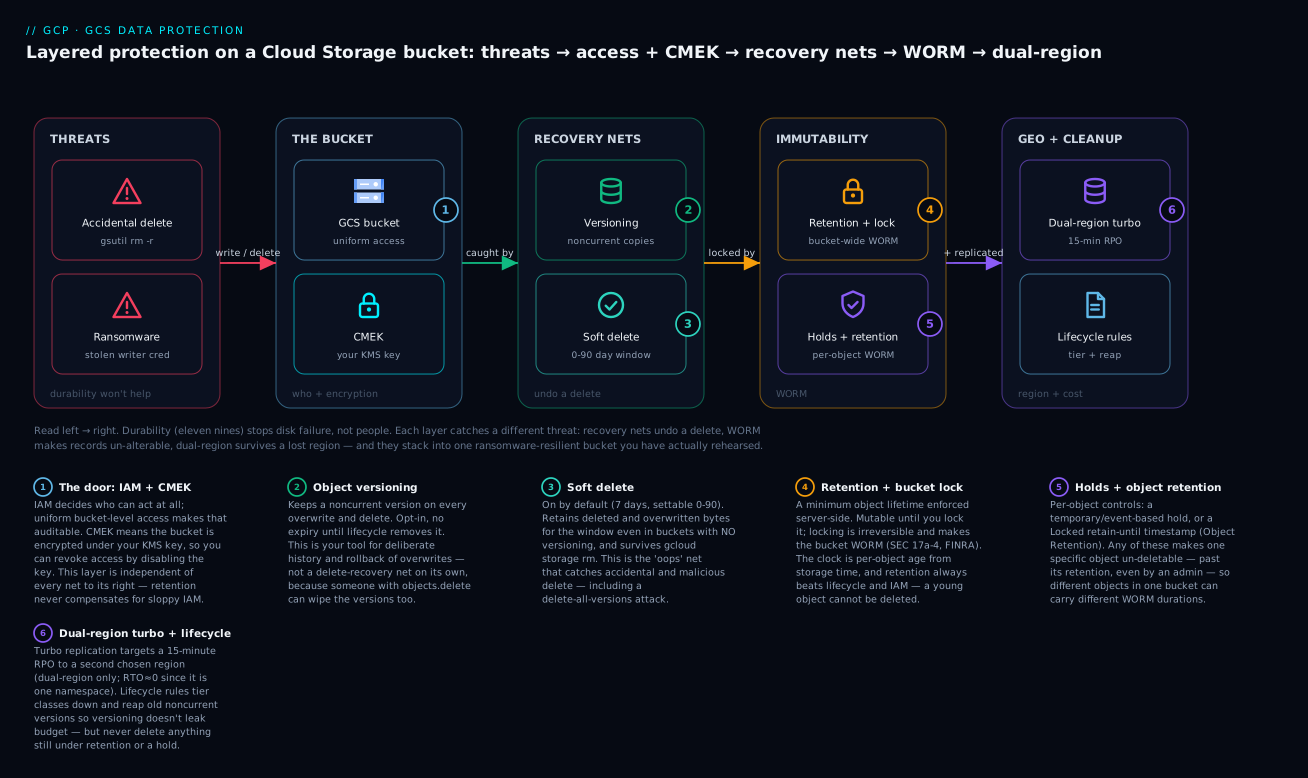
Read the diagram left to right: the two threats on the left (an accidental rm, a ransomware overwrite) hit the bucket, where IAM and CMEK decide who can act at all; then three bands of protection catch what gets through — recovery nets (versioning + soft delete) undo a delete, immutability (retention lock + holds) makes records un-alterable, and dual-region turbo keeps a 15-minute-fresh copy in a second region while lifecycle rules stop versioning from leaking budget.
Prerequisites & what you’ll be able to do
Before this lesson you should be comfortable creating and using a bucket (gcloud storage cp, ls, rm), and you should understand the basics of storage classes and encryption from the Cloud Storage deep dive. A working mental model of IAM roles and service accounts helps, because access control is the layer underneath every protection here. You do not need a GCP account open to follow along — every command below is real and current, and any representative output is labelled as such.
After this lesson you can:
- Choose the right control for a given threat — accidental delete, malicious delete, tamper-proofing, region loss — instead of reaching for the one you happen to know.
- Explain, precisely, how soft delete, versioning, and retention differ, and why a robust bucket runs more than one at a time.
- Apply and lock a retention policy for compliance immutability, and articulate why the lock is a one-way door.
- Set per-object WORM (Object Retention Lock) and holds for records with heterogeneous legal durations.
- Write lifecycle rules that reap noncurrent versions and tier classes down without ever violating a retention floor.
- Stand up a dual-region bucket with turbo replication and reason correctly about its RPO and RTO.
- Compose all of the above into a ransomware-resilient bucket and rehearse its recovery.
The controls at a glance: pick the right net
Before the deep dives, here is the whole toolbox on one page. Read it as “threat → control,” because that is how you should reach for these in a design review.
| Control | Default | Protects against | Time-boxed? | Beats IAM/admin? | Reach for it when… |
|---|---|---|---|---|---|
| Object versioning | Off | Overwrite, delete (keeps history) | No (until lifecycle) | No | You want deliberate version history and overwrite rollback |
| Soft delete | On (7 days) | Accidental & malicious delete/overwrite | Yes (0–90 days) | No | You want an “oops” net even without versioning |
| Retention policy | Off | Early deletion/overwrite of any object | Yes (min lifetime) | Yes (server-side) | Every object needs the same minimum lifetime |
| Bucket lock | Off | Someone shortening/removing retention | Permanent | Yes | Regulators require provable immutability (WORM) |
| Object hold | Off | Deletion of one object | No (until cleared) | Yes | Litigation/investigation freezes a specific object |
| Object Retention Lock | Off (creation-time opt-in) | Early deletion of one object | Yes (per-object) | Yes (Locked) | Objects in one bucket need different WORM durations |
| Lifecycle rules | Off | Cost creep, version sprawl | — | No (retention wins) | You must tier classes down and reap old versions |
| Dual-region + turbo | Off (creation-time) | Region outage | 15-min RPO | — | A sub-region RPO is a hard requirement |
| CMEK | Off (Google keys) | Loss of key control | — | — | You must hold/rotate/revoke the encryption key |
Two lines to internalise from this table, because they are the ones interviews and audits probe:
- Only the retention/hold family “beats admin.” Versioning and soft delete are recovery nets — a sufficiently privileged principal can still destroy what they hold. Retention policies, bucket lock, holds, and Locked object retention are immutability controls the platform enforces even against a project owner. If your requirement is “no human can alter this,” it lives in that family.
- Soft delete is the only one on by default. Every new bucket already has a 7-day soft-delete window; versioning, retention, and the rest are all opt-in. Knowing the default matters: you already have a small net, and you may need to widen it (or, rarely, turn it off to control cost).
1. Bucket retention policies and locking for compliance immutability
A bucket-level retention policy sets a minimum duration that every object in the bucket must persist before it can be deleted or replaced. It is a floor on object lifetime, enforced server-side. While the policy is in force, an object whose age is below the retention period cannot be deleted or overwritten, regardless of IAM.
# Apply a 7-year retention policy (in seconds) to a bucket
gcloud storage buckets update gs://kv-compliance-archive \
  --retention-period=220752000s

# Inspect it
gcloud storage buckets describe gs://kv-compliance-archive \
  --format="yaml(retentionPolicy)"
A retention policy on its own is mutable: an admin can shorten or remove it. For regulated immutability (SEC 17a-4, FINRA, many internal “legal hold infrastructure” requirements) you must lock it. Locking is irreversible. Once locked, the retention period can be increased but never decreased or removed, and the bucket itself cannot be deleted while it holds objects under retention.
# Irreversible. There is no undo. Increasing the period later is the only edit allowed.
gcloud storage buckets update gs://kv-compliance-archive --lock-retention-period
Treat
--lock-retention-periodlike a one-way door in a change ticket. I require a second approver and a written confirmation of the period, because the only way to “fix” an over-long locked period is to abandon the bucket once objects age out. Test the whole flow in a throwaway bucket first.
A subtle point that trips people up: the retention clock is based on each object’s creation/storage time, not when the policy was applied. Applying a 7-year policy today does not retroactively protect a 6-year-old object for 7 more years; that object already satisfies the floor and becomes deletable.
2. Object versioning vs soft delete: overlapping but distinct safety nets
Both protect against deletion and overwrite, but they answer different questions.
Object versioning keeps a noncurrent version every time you overwrite or delete a live object. It is opt-in, has no fixed expiry (versions live until lifecycle or you remove them), and is your primary tool for intentional version history and rollback of overwrites.
gcloud storage buckets update gs://kv-app-state --versioning
Soft delete is on by default for every new bucket and retains deleted and overwritten objects for a configurable window (default 7 days, settable from 0 to 90 days). Crucially it covers objects even in buckets without versioning, and it survives gcloud storage rm. It is your “oops” net for accidental and malicious deletes.
# Set a 30-day soft delete retention window
gcloud storage buckets update gs://kv-app-state \
  --soft-delete-duration=30d

# List soft-deleted objects and restore one
gcloud storage ls --soft-deleted gs://kv-app-state/
gcloud storage restore gs://kv-app-state/path/to/object.parquet
| Property | Versioning | Soft delete |
|---|---|---|
| Default state | Off | On (7 days) |
| Expiry | None (until lifecycle/manual) | 0-90 day window |
| Covers overwrite | Yes (noncurrent version) | Yes |
Covers rm of live object |
Yes | Yes |
| Cost model | You store all versions indefinitely | You store deleted bytes for the window |
| Best for | History, rollback | Accidental/malicious delete recovery |
They stack. Run both: versioning for deliberate history, soft delete as a time-boxed safety net that catches the case where someone deletes all versions.
3. Object holds: event-based and temporary holds for legal preservation
Holds are a per-object flag that blocks deletion and overwrite while set, independent of any retention period. They are how you preserve a specific object indefinitely (litigation, investigation) without imposing a bucket-wide policy.
- Temporary hold: a simple on/off latch. While set, the object cannot be deleted or replaced. Cleared manually.
- Event-based hold: also blocks deletion, and additionally resets the object’s retention period when the hold is released, so the retention clock starts from release time. This is the building block for record-keeping where the clock should start at an event (account closure, contract end), not at object creation.
# Place a temporary hold (e.g., a legal preservation request landed)
gcloud storage objects update gs://kv-records/case-4471/contract.pdf \
  --temporary-hold

# Release it later
gcloud storage objects update gs://kv-records/case-4471/contract.pdf \
  --no-temporary-hold

# Default new objects in a bucket to event-based hold on upload
gcloud storage buckets update gs://kv-records --default-event-based-hold
An object with any hold set will not be deleted even after its retention period expires. Holds win.
4. Lifecycle management: storage class transitions and noncurrent cleanup
Versioning without lifecycle is a slow-motion budget leak: every overwrite accretes a noncurrent version you pay Standard rates for forever. Lifecycle rules tier aging data down and reap old versions. The key conditions for a protection-tuned policy are daysSinceNoncurrentTime (age of a noncurrent version) and numNewerVersions (how many newer versions exist).
{
  "rule": [
    {
      "action": {"type": "SetStorageClass", "storageClass": "NEARLINE"},
      "condition": {"age": 30, "matchesStorageClass": ["STANDARD"]}
    },
    {
      "action": {"type": "SetStorageClass", "storageClass": "COLDLINE"},
      "condition": {"age": 90, "matchesStorageClass": ["NEARLINE"]}
    },
    {
      "action": {"type": "Delete"},
      "condition": {
        "daysSinceNoncurrentTime": 30,
        "numNewerVersions": 3,
        "isLive": false
      }
    }
  ]
}
gcloud storage buckets update gs://kv-app-state --lifecycle-file=lifecycle.json
The third rule keeps the three most recent noncurrent versions, then deletes older ones once they have been noncurrent for 30 days. Tune numNewerVersions to your recovery point objective for overwrites.
Lifecycle and retention interact with a hard guarantee: a
Deleteaction will never remove an object that is still under an active retention policy or hold. Retention always wins over lifecycle, so you can run aggressive cleanup rules on a locked bucket without fear of violating immutability. Also note Autoclass is the hands-off alternative to manual class transitions, but it cannot move objects to Archive and bills a per-object management fee; use explicit rules when you need Archive or predictable cost.
5. Dual-region buckets and turbo replication RPO/RTO characteristics
Region resilience is a location property set at bucket creation. A dual-region bucket stores data in two specific regions you choose (e.g., nam4 = us-central1 + us-east1, or a configurable dual-region). Standard async replication targets eventual consistency with no contractual recovery point.
Turbo replication adds an RPO guarantee: GCS targets replicating newly written objects to the second region within 15 minutes (a Recovery Point Objective, not RTO). It is available only on dual-region buckets and is set at creation.
# Create a configurable dual-region bucket with turbo replication
gcloud storage buckets create gs://kv-critical-pipeline \
  --location=us \
  --placement=us-central1,us-east1 \
  --rpo=ASYNC_TURBO \
  --uniform-bucket-level-access
# Check replication progress / per-object metadata
gcloud storage buckets describe gs://kv-critical-pipeline \
  --format="yaml(rpo,customPlacementConfig)"
Mental model for the geo controls:
- RPO (data-loss window): standard async is best-effort; turbo targets 15 minutes for new writes.
- RTO (time to serve from the other region): effectively zero from the application’s view because the bucket is a single namespace fronting both regions; a read served from the surviving region is transparent. There is no failover step to perform.
- Turbo only protects objects written after it is enabled and only on dual-region. Backfilling an existing single-region bucket means a new bucket plus a copy (
gcloud storage cpor Storage Transfer Service).
6. Object Retention Lock for per-object WORM requirements
Bucket retention applies one floor to the whole bucket. Object Retention (Object Retention Lock) sets a retain-until timestamp on individual objects, so different objects in the same bucket can carry different WORM durations. The bucket must have the object-retention capability enabled at creation; it cannot be turned on later.
# Object retention must be enabled at bucket creation
gcloud storage buckets create gs://kv-mixed-records \
  --enable-per-object-retention \
  --uniform-bucket-level-access
# Set an Unlocked retention until a date (can be shortened/removed while Unlocked)
gcloud storage objects update gs://kv-mixed-records/report-q1.pdf \
  --retain-until=2031-01-01T00:00:00Z \
  --retention-mode=Unlocked

# Promote to Locked: now it can only be extended, never reduced
gcloud storage objects update gs://kv-mixed-records/report-q1.pdf \
  --retention-mode=Locked
Unlocked lets you correct mistakes (shorten or clear the date); Locked is true per-object WORM that can only be lengthened. This is the right tool when a single bucket mixes records with heterogeneous legal hold durations and a one-size bucket policy would be wrong.
7. IAM and signed URLs: scoping access without weakening protection
Protection controls govern deletion and mutation; IAM governs who can do anything at all. They are independent layers, and a common error is to assume a retention policy compensates for sloppy IAM. It does not: an over-privileged principal can still read, exfiltrate, or (where retention does not apply) overwrite.
Principles I enforce:
- Uniform bucket-level access on protected buckets. It disables per-object ACLs so access is auditable purely through IAM. Required for most org-policy guardrails anyway.
- Split the delete permission out. The dangerous verb is
storage.objects.delete. Grant writersroles/storage.objectCreator(create only, no overwrite) rather thanroles/storage.objectAdminwherever the workload only appends. - No standing delete at the bucket level. Bucket deletion and policy changes belong to a separate, heavily audited admin identity, ideally gated behind VPC Service Controls.
# Append-only writer: can create objects but not delete or overwrite existing ones
gcloud storage buckets add-iam-policy-binding gs://kv-app-state \
  --member="serviceAccount:ingest@kv-prod.iam.gserviceaccount.com" \
  --role="roles/storage.objectCreator"
For sharing specific objects with external parties, use signed URLs rather than broadening IAM. A signed URL grants time-bounded access to a single operation on a single object and expires on its own. Scope it to GET and a short TTL.
# Read-only, 15-minute access to one object, no IAM change required
gcloud storage sign-url gs://kv-records/case-4471/contract.pdf \
  --http-verb=GET \
  --duration=15m \
  --impersonate-service-account=url-signer@kv-prod.iam.gserviceaccount.com
The signed URL never grants delete and never touches the bucket’s protection posture. That is the point: distribute access narrowly without loosening the controls in steps 1-6.
8. Designing a ransomware-resilient bucket and validating recovery
Compose the layers. A ransomware actor with a stolen writer credential will try to encrypt-in-place (overwrite) and then delete originals and versions. Defeat that with overlapping nets:
gcloud storage buckets create gs://kv-resilient \
  --location=us \
  --placement=us-central1,us-east1 \
  --rpo=ASYNC_TURBO \
  --uniform-bucket-level-access \
  --enable-per-object-retention

# Versioning (deliberate history) + a long soft-delete window (malicious-delete net)
gcloud storage buckets update gs://kv-resilient \
  --versioning \
  --soft-delete-duration=90d
- Overwrite attempt -> versioning preserves the prior version; the attacker cannot remove history without
objects.delete, which append-only writers do not have. - Delete-all-versions attempt -> soft delete retains them for 90 days; restoration is a
gcloud storage restoreaway. - Permanent-record subset -> Object Retention
Lockedmakes those objects un-deletable for their full term even by an admin. - Region failure during the attack window -> turbo replication keeps the second region within 15 minutes RPO, served transparently.
The control nobody tests is the one that fails in the incident. Rehearse it.
Verify
Confirm each net actually catches what it should:
# 1. Retention floor blocks early deletes (expect a failure on a young object)
gcloud storage rm gs://kv-compliance-archive/some-recent-object.bin

# 2. Soft delete caught a deleted object and you can restore it
gcloud storage ls --soft-deleted gs://kv-resilient/ | head
gcloud storage restore gs://kv-resilient/path/to/object.parquet

# 3. Versioning kept a prior generation; list and restore a specific generation
gcloud storage ls --all-versions gs://kv-resilient/path/to/object.parquet
gcloud storage cp \
  "gs://kv-resilient/path/to/object.parquet#1718000000000000" \
  gs://kv-resilient/path/to/object.parquet

# 4. Object Retention is Locked with the expected retain-until
gcloud storage objects describe gs://kv-mixed-records/report-q1.pdf \
  --format="yaml(retention)"

# 5. Turbo replication is configured and placement is correct
gcloud storage buckets describe gs://kv-resilient \
  --format="yaml(rpo,customPlacementConfig,softDeletePolicy,versioning)"
If gcloud storage rm on the young object in step 1 succeeds, the retention policy is not what you think it is; stop and re-inspect before declaring the bucket compliant.
Enterprise scenario
A fintech platform team I worked with had a single regional us-central1 bucket holding both transactional document records (SEC 17a-4: 6-year WORM) and high-churn ML feature exports that were rewritten hourly. They had naively applied a bucket-wide 6-year locked retention policy to satisfy the auditor. It passed compliance and quietly created a six-figure cost problem: every hourly feature overwrite became a new object the locked policy refused to let lifecycle delete, so the bucket grew unboundedly with data nobody needed for six years. They also had no region resilience for the records, which their DR standard now required.
The constraint: they could not loosen WORM on the records, could not co-mingle the cost profiles, and could not afford downtime to re-architect ingestion.
The fix was to stop using one bucket as one policy. They created a dual-region bucket with per-object retention enabled and turbo replication, moved the records into it, and set Locked retain-until per object so each record carried exactly its own 6-year clock and nothing else did. The feature exports moved to a separate, cheaply lifecycled bucket with no bucket-wide retention. The records bucket gained 15-minute RPO across regions for free, and the runaway cost vanished because the feature data was no longer trapped under a blanket policy.
# Records bucket: dual-region, turbo, per-object WORM, no blanket policy
gcloud storage buckets create gs://kv-records-worm \
  --location=us \
  --placement=us-central1,us-east1 \
  --rpo=ASYNC_TURBO \
  --enable-per-object-retention \
  --uniform-bucket-level-access

# Each record carries its own locked 6-year clock
gcloud storage objects update gs://kv-records-worm/2026/acct-88102.pdf \
  --retain-until=2032-06-08T00:00:00Z \
  --retention-mode=Locked
The lesson: bucket-wide retention is a blunt instrument. When durations are heterogeneous, per-object retention is both the compliant and the cost-correct answer.
Going deeper
Everything above is enough to build a correct bucket. This section is for the person who has to defend the design in an audit, a cost review, or a 2 a.m. incident — the internals and edge cases where the naive mental model quietly breaks.
How the retention clock actually works
The retention floor is evaluated per object as retentionExpirationTime = object storage time + retention period. “Storage time” is set when the object’s current generation is created — and crucially, a storage.objects.rewrite (which an in-place gcloud storage cp, or a storage-class change, performs) creates a new generation and resets that clock. That is a double-edged detail: a lifecycle SetStorageClass transition on a retention bucket rewrites the object and pushes its retention expiry forward, which is usually harmless for compliance (longer is fine) but can surprise a cost model that assumed objects would age out on the original schedule. Conversely, applying a policy never reaches back in time: an object already older than the new floor is immediately deletable, because it already satisfies the minimum. Inspect the truth per object rather than trusting the bucket policy alone:
gcloud storage objects describe gs://kv-compliance-archive/2026/record.pdf \
  --format="yaml(retentionExpirationTime,timeCreated,timeStorageClassUpdated)"
Soft delete: default-on, billed, and tuned at org scale
Soft delete is not free space. Deleted bytes stay billed at their storage class for the whole window, so a high-churn bucket with a long soft-delete window can carry a surprising “invisible” bill for data nobody can see in a normal ls. Google enabled soft delete by default across existing buckets, which for some estates raised costs noticeably overnight. The levers are the soft-delete cost analysis in the Console (backed by the storage.googleapis.com/storage/v2/deleted_bytes metric) and a per-bucket setting to shrink or disable the window where it isn’t earning its keep:
# Inspect the current window
gcloud storage buckets describe gs://kv-app-state \
  --format="yaml(softDeletePolicy)"

# Disable soft delete on a throwaway / high-churn bucket (0 = off)
gcloud storage buckets update gs://kv-scratch --soft-delete-duration=0
The judgement call: keep (or widen) soft delete on buckets holding anything you would cry about losing; shorten or disable it on scratch, cache, and reproducible-artefact buckets where the retained bytes are pure cost with no recovery value.
Dual-region is not multi-region, and turbo has an SLA
These two get conflated constantly, and the difference is exam- and audit-relevant. A multi-region bucket (--location=US, EU, ASIA) spreads data across a continent Google chooses; you get geo-redundancy but no turbo, no RPO SLA, and no control over which regions hold your data. A dual-region bucket (--location=us --placement=us-central1,us-east1, or a predefined code like nam4) pins two regions you pick and is the only configuration where turbo replication is available. Turbo’s guarantee is a target to replicate newly written objects to the second region within 15 minutes (the RPO), observable through the replication metrics and Storage Insights. Standard (non-turbo) dual- and multi-region replication is best-effort with no contractual RPO. And turbo is forward-only: enabling it does nothing for objects already in the bucket — a backfill is a fresh copy via Storage Transfer Service into the turbo bucket.
gcloud storage buckets describe gs://kv-critical-pipeline \
  --format="yaml(locationType,location,customPlacementConfig,rpo)"
CMEK internals and the availability trap
Under the hood every object is encrypted with a per-object data encryption key (DEK); CMEK swaps the key that wraps the DEK (the key-encryption key, or KEK) from a Google-managed key to your Cloud KMS key — classic envelope encryption. Three consequences experienced teams plan for:
- The bucket’s service agent needs
roles/cloudkms.cryptoKeyEncrypterDecrypteron the key, or writes fail with a permission error that looks nothing like a key problem. - Rotating the KMS key does not re-encrypt existing objects. New objects wrap under the new key version; old ones keep wrapping under the old version until they are rewritten. Key rotation is therefore not retroactive — a compliance requirement to “re-key everything” means a rewrite pass, not just a rotation.
- CMEK turns the KMS key into an availability dependency. Disable or destroy the key version and every object under it becomes unreadable. That is the point for crypto-shredding (destroy the key, the data is gone), but it is also a foot-gun: a fat-fingered key disable is an outage.
# Encrypt new objects in a bucket under your KMS key
gcloud storage buckets update gs://kv-app-state \
  --default-encryption-key=projects/kv-prod/locations/us/keyRings/kv/cryptoKeys/gcs
Enforce CMEK org-wide with the org policy constraints/gcp.restrictNonCmekServices, and pair it with a VPC Service Controls perimeter so a stolen credential cannot exfiltrate objects to a bucket outside the perimeter — the control that catches what IAM alone misses. For the key hierarchy, rotation policy, and external key managers, see the Cloud KMS / CMEK deep dive.
When controls collide: the precedence rules
Compose enough of these and they will intersect. The platform resolves conflicts with a fixed, memorable precedence — immutability always wins over cleanup:
- A hold (temporary or event-based) blocks deletion and overwrite — even after a retention period expires. Holds win outright.
- An active retention period (bucket or object) blocks deletion of anything younger than the floor — even a lifecycle
Deleteaction, which silently skips protected objects rather than erroring. - Lifecycle acts only on what 1 and 2 permit. It can move storage classes and reap unprotected noncurrent versions freely.
- Soft delete and versioning capture whatever does get deleted or overwritten, within their windows.
That ordering is why you can run an aggressive lifecycle Delete on a locked WORM bucket without fear: retention refuses the deletes it would violate, and lifecycle only reaps the rest. It is also why an object with a stray event-based hold “won’t age out” no matter how the lifecycle rule reads — the hold is beating your rule, exactly as designed. When a delete you expected didn’t happen, walk this list top-down; the answer is almost always a hold or a retention floor you forgot was there.
Practice challenges
Work these in order on throwaway buckets — several involve irreversible operations (a locked retention period, a locked object) that you never want to rehearse on real data. Each expands to a solution with the exact commands and a one-line “why.”
Challenge 1 — See your default net (beginner). On any test bucket, find the soft-delete window that is already there, then turn on versioning.
<details> <summary>Solution</summary>
gcloud storage buckets describe gs://kv-lab \
  --format="yaml(softDeletePolicy,versioning)"
gcloud storage buckets update gs://kv-lab --versioning
Every new bucket already reports a 7-day softDeletePolicy; versioning is absent until you enable it. Why: it proves soft delete is the one control on by default, and that versioning is a separate opt-in — the two are not the same switch.
</details>
Challenge 2 — Prove soft delete ≠ versioning (beginner → intermediate). Delete an object and all its versions, then recover it.
<details> <summary>Solution</summary>
# Even after removing the live + every noncurrent version...
gcloud storage rm --all-versions gs://kv-lab/report.csv
# ...soft delete still holds it for the window:
gcloud storage ls --soft-deleted gs://kv-lab/
gcloud storage restore gs://kv-lab/report.csv
Why: versioning alone cannot save you from someone with objects.delete who wipes the versions too — soft delete is the net that survives a delete-all-versions attack.
</details>
Challenge 3 — Reap versions without leaking budget (intermediate). Write a lifecycle rule that keeps the 3 newest noncurrent versions, deletes older ones after 30 days noncurrent, and tiers live objects to Nearline at 30 days; apply it.
<details> <summary>Solution</summary>
{"rule":[
  {"action":{"type":"SetStorageClass","storageClass":"NEARLINE"},
   "condition":{"age":30,"matchesStorageClass":["STANDARD"]}},
  {"action":{"type":"Delete"},
   "condition":{"daysSinceNoncurrentTime":30,"numNewerVersions":3,"isLive":false}}
]}
gcloud storage buckets update gs://kv-lab --lifecycle-file=lifecycle.json
Why: versioning without lifecycle is a slow budget leak; numNewerVersions is your overwrite recovery point and daysSinceNoncurrentTime is the grace period before old versions are reaped.
</details>
Challenge 4 — Make a young object un-deletable (intermediate → advanced). On a throwaway bucket, set a short retention period and prove a fresh object cannot be deleted. (Keep the period tiny — a locked long period traps the bucket.)
<details> <summary>Solution</summary>
gcloud storage buckets update gs://kv-lock-test --retention-period=1d
gcloud storage cp hello.txt gs://kv-lock-test/
gcloud storage rm gs://kv-lock-test/hello.txt      # expect a retention error, not success

# Optional and IRREVERSIBLE — only on a bucket you are willing to abandon:
gcloud storage buckets update gs://kv-lock-test --lock-retention-period
Why: retention is enforced server-side and beats IAM — the delete fails regardless of your role. Never lock a real bucket without a second approver; the only “undo” for an over-long locked period is waiting for objects to age out. </details>
Challenge 5 — Heterogeneous WORM in one bucket (advanced). Create a dual-region bucket with turbo replication and per-object retention, then Lock one object until a future date and verify it.
<details> <summary>Solution</summary>
gcloud storage buckets create gs://kv-worm-lab \
  --location=us --placement=us-central1,us-east1 \
  --rpo=ASYNC_TURBO --enable-per-object-retention \
  --uniform-bucket-level-access
gcloud storage objects update gs://kv-worm-lab/acct-88102.pdf \
  --retain-until=2032-06-08T00:00:00Z --retention-mode=Locked
gcloud storage objects describe gs://kv-worm-lab/acct-88102.pdf \
  --format="yaml(retention)"
Why: --enable-per-object-retention must be set at creation (you cannot add it later), and Locked per-object WORM lets records carry different clocks in one bucket — the cost- and compliance-correct answer to mixed durations.
</details>
Challenge 6 — Build and rehearse the resilient bucket (senior stretch). Compose every net, then run a recovery drill that exercises three of them.
<details> <summary>Solution</summary>
gcloud storage buckets create gs://kv-resilient \
  --location=us --placement=us-central1,us-east1 \
  --rpo=ASYNC_TURBO --uniform-bucket-level-access \
  --enable-per-object-retention
gcloud storage buckets update gs://kv-resilient \
  --versioning --soft-delete-duration=90d

# Drill — exercise three nets:
# 1. restore a deleted object from soft delete
gcloud storage restore gs://kv-resilient/path/object.parquet
# 2. roll a live object back to a prior generation
gcloud storage cp "gs://kv-resilient/path/object.parquet#<generation>" \
  gs://kv-resilient/path/object.parquet
# 3. confirm a retained object refuses deletion
gcloud storage rm gs://kv-resilient/<retained-object>       # must FAIL
Why: the control nobody tests is the one that fails in the incident — a bucket is only “resilient” once you have watched a real restore, a real rollback, and a real blocked delete each behave as intended. </details>
Common beginner mistakes
- “Eleven nines of durability means my data is safe.” Durability describes the odds Google loses a byte to hardware — it says nothing about a human or a compromised credential deleting or overwriting it. Right model: durability protects against the disk; versioning, soft delete, and retention protect against people. Different problems, different controls.
- “I turned on versioning, so deletes are covered.” Versioning keeps history, but a principal with
storage.objects.deletecan remove the noncurrent versions too — so versioning alone does not stop a determined or malicious delete. Right model: pair versioning (history) with soft delete (a time-boxed net that survives a delete-all-versions) and, for records, retention. - “My new retention policy protects the old objects too.” The retention clock is each object’s own age from storage time; applying a 7-year policy today does not give a 6-year-old object 7 more years — it already satisfies the floor and is deletable now. Right model: retention is a per-object floor, not a bucket-wide reset.
- “I can shorten the locked retention if we picked the wrong period.” Locking is irreversible: you can only increase a locked period, never decrease or remove it, and you cannot delete the bucket while it holds objects under retention. Right model: treat
--lock-retention-periodas a one-way door — second approver, written confirmation, rehearse in a throwaway bucket first. - “Turbo replication protects everything in my bucket.” Turbo only applies to objects written after it is enabled, and only on dual-region buckets. Right model: enabling turbo is forward-only; existing data needs a fresh copy (Storage Transfer Service) into a turbo bucket.
- “Multi-region gives me the 15-minute RPO.” It does not — multi-region has no turbo, no RPO SLA, and no choice of regions. Right model: only a dual-region bucket with
--rpo=ASYNC_TURBOcarries the 15-minute guarantee. - “Retention makes up for loose IAM.” Retention blocks deletion and mutation; it does nothing to stop an over-privileged principal reading or exfiltrating objects. Right model: IAM (who can act at all) and protection (what can be altered) are independent layers — you need both, plus VPC Service Controls for exfiltration.
- “I’ll enable per-object retention when we need it.” The object-retention capability can only be turned on at bucket creation and never afterward. Right model: decide up front — if there is any chance records will need heterogeneous WORM, create the bucket with
--enable-per-object-retention.
Glossary
- Durability — the probability Cloud Storage retains a stored byte against hardware failure (“eleven nines,” 99.999999999%). It does not protect against deletion, overwrite, or misconfiguration.
- Object versioning — a bucket setting that keeps a noncurrent version of an object each time it is overwritten or deleted, so you can roll back. Opt-in; versions persist until lifecycle or manual removal.
- Live (current) vs noncurrent version — the live version is what you get by default; each overwrite/delete pushes the old bytes to a noncurrent version identified by a generation number (
object#<generation>). - Soft delete — a bucket policy that retains deleted and overwritten objects for a set window (default 7 days, settable 0–90) so they can be restored — on by default, and independent of versioning.
- Retention policy — a bucket-level minimum lifetime every object must reach before it can be deleted or replaced, enforced server-side regardless of IAM.
- Bucket lock — making a retention policy irreversible: after
--lock-retention-periodthe period can only be increased, never shortened or removed. Turns the bucket into WORM. - WORM (write-once-read-many) — data that can be written and read but not altered or deleted for a defined period; the property regulators like SEC 17a-4 and FINRA require.
- Object hold — a per-object flag (temporary = manual on/off; event-based = also resets the retention clock on release) that blocks deletion/overwrite of one object, independent of any retention period.
- Object Retention Lock — a per-object retain-until timestamp (
Unlocked= editable,Locked= can only be extended) letting objects in one bucket carry different WORM durations. The bucket capability must be enabled at creation. - Lifecycle rule — a condition→action policy (e.g.
SetStorageClass,Delete) that tiers aging objects to cheaper classes and reaps old noncurrent versions; keyed by conditions likeage,daysSinceNoncurrentTime, andnumNewerVersions. - Storage class — the cost/access tier of an object (Standard, Nearline, Coldline, Archive); lifecycle rules move objects between them.
- Autoclass — a hands-off alternative that moves objects between classes automatically based on access; cannot move objects to Archive and charges a per-object management fee.
- Dual-region — a bucket pinned to two regions you choose (e.g.
us-central1+us-east1); the only configuration where turbo replication is available. - Multi-region — a bucket spread across a continent Google chooses (
US,EU,ASIA); geo-redundant, but with no turbo and no RPO SLA. - Turbo replication — a dual-region feature targeting replication of new objects to the second region within 15 minutes (an RPO guarantee); set at bucket creation via
--rpo=ASYNC_TURBO. - RPO (Recovery Point Objective) — the maximum acceptable data-loss window; turbo targets 15 minutes for new writes.
- RTO (Recovery Time Objective) — the time to resume serving after a failure; effectively zero for a dual/multi-region bucket because it is one namespace fronting both regions.
- CMEK (Customer-Managed Encryption Key) — encrypting a bucket’s objects under your Cloud KMS key instead of a Google-managed one, so you control rotation and revocation.
- CSEK (Customer-Supplied Encryption Key) — you provide the raw key on each request and Google never stores it (distinct from CMEK, where KMS holds the key).
- Envelope encryption — each object is encrypted with a data key (DEK) that is itself encrypted (wrapped) by a key-encryption key (KEK); CMEK swaps the KEK for your KMS key.
- Uniform bucket-level access — a bucket setting that disables per-object ACLs so all access is governed purely by IAM, making permissions auditable.
- Signed URL — a time-limited URL granting a single operation (e.g. GET) on a single object without changing IAM; expires on its own.
- VPC Service Controls — a security perimeter around GCP services (including Cloud Storage) that blocks data exfiltration to projects or buckets outside the perimeter, even with valid credentials.
- Service agent — the Google-managed service account a bucket uses on your behalf; for CMEK it needs the KMS encrypt/decrypt role on your key or writes fail.