In a nutshell
Imagine your database is a well-stocked supermarket across town. Every time your app needs a fact — a product price, a user’s session, today’s leaderboard — it drives there, parks, walks the aisles, queues at the till, and drives back. Correct, but slow; and if a thousand customers all want the same carton of milk each second, the supermarket buckles. A cache is the small fridge next to your desk: you keep the handful of things you reach for constantly right there, in RAM, and fetch them in under a millisecond. When something is not in the fridge (a miss), you make the trip to the supermarket once, drop a copy in the fridge, and every request after that is instant. Memorystore is Google Cloud’s managed version of that fridge — it runs the industry-standard cache engines for you, so you never patch, replicate or babysit a server.
The catch is that Memorystore is not one fridge but a small appliance showroom, and picking the wrong model is the classic beginner mistake. Memorystore for Redis is a smart fridge with lots of compartments (rich data structures) and an optional backup fridge that takes over if the first one dies (high availability). Memorystore for Redis Cluster — and its newer open-source twin Memorystore for Valkey — is a whole row of fridges sharing the load when one is not big enough (sharding, horizontal scale). Memorystore for Memcached is a plain, roomy chest freezer: no compartments, no backup, but simple, cheap and easy to line up several of. This lesson teaches you which appliance to buy, how to wire it safely into your private network, and how to stock it so it actually saves you trips instead of quietly filling up and jamming.
If you remember one thing: a cache holds a rebuildable copy of the truth, not the truth itself. Design it so that losing the fridge is an inconvenience — a few slow requests while it refills — never a catastrophe.
Level: Intermediate · Time: ~46 min · You’ll need: basic gcloud, IAM, and a working idea of what a VPC and a private IP are.
The fastest database query is the one you never run. When an application reads the same product catalogue, the same user session, or the same leaderboard thousands of times a second, paying the full cost of a relational query — parse, plan, disk, network — for every read is wasteful and, eventually, fatal to your database. The standard remedy is an in-memory cache: a tier of RAM-backed key/value storage that sits in front of the slow store and serves hot data in sub-millisecond time. On Google Cloud, the managed answer is Memorystore.
Memorystore is not one product but a family of three, and choosing badly among them is the most common Memorystore mistake. There is Memorystore for Redis (a managed single-shard Redis with an optional high-availability replica), Memorystore for Redis Cluster (a managed, horizontally sharded Redis that scales out to terabytes and far higher throughput), and Memorystore for Memcached (a managed, multi-node Memcached for simple, large, distributed caching). They share a goal — give you a fast in-memory tier without you patching, replicating or babysitting nodes — but differ sharply in data model, scaling model, durability and price.
This lesson is the exhaustive version. We will fix the vocabulary, compare the three offerings field by field, then walk every configuration option you set when you create and operate them: size and version, the maxmemory eviction policies, persistence (RDB snapshots and AOF), maintenance windows, and the full connectivity story — Private Service Access, Private Service Connect, the VPC plumbing, AUTH and in-transit TLS. We will cover scaling, the metrics that matter, and the cache patterns (cache-aside, write-through, session store) that decide whether your cache helps or hurts. We finish with the decision interviewers love: Redis or Memcached? Commands are real gcloud against current Memorystore (2026), with console names called out so you can follow along either way.
Learning objectives
By the end of this lesson you will be able to:
- Distinguish the three Memorystore offerings — Redis, Redis Cluster and Memcached — and pick the right one for a workload, including the Basic vs Standard (HA) tier decision for Redis.
- Configure a Memorystore instance end to end: memory size, version, eviction policy, persistence (RDB/AOF), maintenance window and node/shard layout.
- Explain how high availability and failover work for Standard-tier Redis and for Redis Cluster, and what an application must do to survive a failover.
- Choose and secure a connectivity model — Private Service Access, Private Service Connect, AUTH and in-transit TLS — and connect from GCE, GKE, Cloud Run and serverless.
- Reason about scaling (vertical resize, read replicas, cluster shard count) and read the monitoring signals (memory usage, hit ratio, evicted/expired keys, connections).
- Apply the right cache pattern (cache-aside, write-through, write-behind, session store, rate limiting, leaderboards) and decide confidently between Redis and Memcached.
Prerequisites & where this fits
You should be comfortable with the Google Cloud resource hierarchy (organisation, folders, projects) and basic IAM, have the gcloud CLI installed and initialised, and — crucially — understand what a VPC, a subnet and private connectivity are, because a Memorystore instance has no public endpoint and lives entirely inside your private network. A passing familiarity with key/value caching and the idea of a hash map will make the data-model sections concrete. This is the Databases lesson of the GCP Zero-to-Hero course that follows Cloud SQL (the relational store you will most often put a cache in front of) and Firestore (the document store), and precedes the Bigtable deep dive. The networking it depends on is covered in the VPC deep dive — read that if subnets, routes and private access are unfamiliar.
Core concepts: the mental model
Before the settings, fix the vocabulary. Most Memorystore confusion is a confusion of which product you are talking about and what “node”, “shard” and “replica” mean for each.
- In-memory cache. A store that keeps data in RAM rather than on disk. Reads and writes are sub-millisecond because there is no disk seek and (for a cache) no query planning. The trade-off is that RAM is volatile and expensive, so caches are typically bounded and evicting — they hold the hot subset of data, not everything.
- Redis. An in-memory data-structure server. It is not just strings: Redis natively stores strings, hashes, lists, sets, sorted sets, bitmaps, HyperLogLogs, streams and geospatial indexes, and offers atomic operations, pub/sub, Lua scripting, transactions and optional persistence. This richness is why Redis is used for far more than caching — sessions, queues, leaderboards, rate limiters, locks.
- Memcached. An older, deliberately simpler in-memory key/value cache. Values are opaque blobs; there are no rich data types, no persistence and no replication. Its simplicity is a feature: it is multi-threaded, trivially horizontally scalable, and very fast for the one thing it does — cache opaque objects keyed by a string.
- Node. One server (a managed VM under the hood) running the cache engine. A Memcached instance has multiple nodes; a Redis (non-cluster) instance is one node (plus an optional replica); a Redis Cluster has many nodes organised into shards.
- Shard (Redis Cluster). A subset of the keyspace. Redis Cluster splits the keyspace into 16,384 hash slots distributed across shards; each shard owns a slot range and holds that slice of the data. Adding shards adds both capacity and throughput — this is horizontal scale-out. A non-cluster Redis instance is effectively a single shard, so it scales only vertically (a bigger machine).
- Replica. A copy of a primary node’s data kept in sync for high availability (failover) and, optionally, for serving reads. Standard-tier Redis has one replica; Redis Cluster can have up to two replicas per shard; Memcached has no replicas (a node loss simply loses that node’s cache).
- Tier (Redis only). Basic = a single node, no replica, no failover (a cache that can vanish on maintenance or failure). Standard = primary + replica across zones, automatic failover, an SLA. The tier is the Redis HA decision and is fixed at creation for the legacy Redis product (you choose it up front).
- Eviction policy (
maxmemory-policy). What the engine does when it hits its memory ceiling and a new write needs room: evict the least-recently-used key, evict by TTL, refuse writes, etc. This single setting determines whether your cache behaves like a cache (evicts) or like a store (refuses writes when full). - Persistence. Whether Redis writes its in-memory data to disk so it can be reloaded after a restart — via RDB snapshots and/or the AOF append-only log. Off by default; turning it on changes a pure cache into something nearer a durable store. Memcached never persists.
The single most important early decision: which of the three products, and for legacy Redis, which tier. Get that wrong and no amount of tuning helps. The second most important: eviction policy and size, because a too-small instance with the wrong eviction policy is the classic 3 a.m. incident. We will return to both in depth.
The three offerings compared
Here is the field-by-field comparison. Read it before you create anything — it is the decision the rest of the lesson elaborates.
| Dimension | Memorystore for Redis | Memorystore for Redis Cluster | Memorystore for Memcached |
|---|---|---|---|
| Engine | Redis (single shard) | Redis (sharded, OSS Cluster API) | Memcached |
| Data types | Full Redis (strings, hashes, lists, sets, sorted sets, streams, …) | Full Redis | Opaque key/value only |
| Scaling model | Vertical (resize the node) | Horizontal (add/remove shards) + vertical | Horizontal (add/remove nodes) + per-node size |
| Max size (order of magnitude) | Up to ~300 GB per instance | Terabytes (many shards) | Large (multi-node; many GB per node × nodes) |
| High availability | Standard tier: primary + 1 replica, auto-failover | Built-in: up to 2 replicas per shard, auto-failover | None — node loss loses that node’s data |
| Read scaling | Read replicas (Standard, up to 5) | Replicas can serve reads | Reads spread across nodes by the client |
| Persistence | RDB and/or AOF (optional) | RDB and/or AOF (optional) | None |
| Single endpoint | Yes (primary endpoint; optional read endpoint) | Discovery endpoint (cluster-aware client) | Discovery endpoint (Auto Discovery) |
| In-transit TLS | Yes (optional, set at creation) | Yes | Yes |
| AUTH | Yes (optional) | IAM auth and/or Redis AUTH | SASL (optional) |
| Best for | General caching, sessions, queues, locks on a single logical Redis | Large, high-throughput Redis needing scale-out and resilience | Simple, large, distributed caching of opaque objects |
| Relative cost | Low–medium | Higher (multiple shards) | Low–medium (pay per node) |
The plain-English version:
- Default to Memorystore for Redis (Standard tier) for the large majority of caching, session and lightweight-queue workloads. It gives you the full Redis feature set with HA and is the cheapest path to a resilient cache.
- Choose Memorystore for Redis Cluster when one Redis node is not enough — you need more than a single machine’s RAM or throughput, you want to scale out and in without downtime, and you want shard-level resilience. It speaks the OSS Cluster API, so clients must be cluster-aware.
- Choose Memorystore for Memcached when you want a big, simple, multi-node cache of opaque blobs and you do not need data structures, persistence or replication — for example, a large fragment/object cache where losing a node is harmless because the data is just a rebuildable copy of something authoritative elsewhere.
Note the modern direction of travel: Redis Cluster is Google’s strategic Redis offering and where new capabilities land first. The single-node Redis product remains ideal when you genuinely need only one shard, but if you anticipate growth past one machine, design for Cluster from the start to avoid a migration.
The family has also grown beyond three. In 2024 the Redis source licence changed, and the open-source community — backed by Google, AWS and Oracle under the Linux Foundation — forked the last open-source Redis into Valkey. Google now offers Memorystore for Valkey, a fully open-source, wire-compatible, horizontally sharded engine that sits alongside Redis Cluster. If licensing or the newest multi-threaded performance matters to you, read the dedicated Valkey section below before you choose.
Memorystore for Redis: tiers, replicas and failover
This is the workhorse. Everything here is about a single logical Redis (one primary), optionally made highly available.
Service tiers
The tier is the headline choice and is set at creation.
| Tier | Topology | Failover | SLA | Use for |
|---|---|---|---|---|
| Basic | Single node, no replica | None — a maintenance event or failure causes a full cache flush and brief unavailability | No availability SLA | Dev/test, or a pure cache where losing all data on restart is acceptable |
| Standard | Primary + 1 replica in different zones of the region | Automatic failover to the replica; endpoint preserved | Availability SLA (e.g. 99.9%) | Anything production |
The Basic-tier gotcha is brutal and frequently learned the hard way: a Basic instance loses its entire dataset during scaling and during routine maintenance, because there is no replica to fail over to. Never put a Basic instance where a cold cache would cause a thundering-herd outage on your database. For production, Standard tier is the default.
Read replicas
Standard tier supports read replicas — you can configure 1 to 5 replicas (the replica count is the number of read replicas; with the read-replicas-mode enabled). This gives you two things: more read throughput (clients can issue reads against a read endpoint that load-balances across replicas) and faster failover resilience. There are two endpoints:
- Primary endpoint — read/write; always points at the current primary (preserved across failover).
- Read endpoint — read-only; load-balances across the replicas. Use it for read-heavy workloads that tolerate slight replication lag.
Reads from a replica are eventually consistent — replication is asynchronous, so a value written to the primary may not yet be visible on a replica for a few milliseconds. For a cache this is usually fine; for read-your-own-writes correctness, read from the primary.
How failover works
In Standard tier, the replica continuously receives the primary’s data stream. If the primary’s zone or node fails, Memorystore promotes the replica to primary automatically; the primary endpoint IP is preserved, so a well-written client reconnects to the same address and continues. The application’s job is simply to handle dropped connections and retry — connections are severed at failover, so your client library must reconnect (most do automatically) and your code must not assume a connection lives forever. You can also trigger a manual failover (for testing DR, or to force a primary onto a healthier zone) with gcloud redis instances failover.
A subtlety interviewers probe: during failover there may be a small window of unavailability (seconds) and, because replication is asynchronous, a small risk of losing the last few writes that had not yet reached the replica. HA protects availability and most data, not literally every last write. If you need stronger durability, enable AOF persistence (below).
Memorystore for Redis Cluster: sharding and scale-out
When a single Redis node is not enough, Redis Cluster spreads the keyspace across shards and runs them as one logical cluster.
- Hash slots. The keyspace is divided into 16,384 slots. Each key maps to a slot (CRC16 of the key, mod 16384); each shard owns a contiguous set of slots. A cluster-aware client knows the slot map and sends each command to the shard that owns the relevant slot.
- Shards and nodes. You choose the number of shards (this sets capacity and throughput) and the replica count per shard (0, 1 or 2). Each shard has one primary node and 0–2 replica nodes. More shards = more total RAM and more aggregate throughput; more replicas = more resilience and read capacity.
- Scale out and in. You can change the shard count on a running cluster; Memorystore rebalances the slots across the new layout online. This is the key advantage over single-node Redis: you grow (or shrink) capacity and throughput without a migration.
- Node type. Redis Cluster shards come in node types (sizes) that fix the per-shard memory and network capacity; total cluster memory ≈ node memory × shards.
- Resilience. With at least one replica per shard, a node failure triggers automatic failover within that shard, and the cluster keeps serving. Replicas can also serve reads.
- Discovery endpoint. The cluster exposes a single discovery endpoint; a cluster-aware client connects there, learns the topology, and routes commands. Clients must support Redis Cluster mode — this is the main application-side requirement and a frequent migration gotcha when moving from single-node Redis.
- Multi-key operations and hash tags. In a cluster, a command touching multiple keys only works if those keys live in the same slot. To force related keys onto one slot, wrap the common part in braces — a hash tag — e.g.
user:{42}:profileanduser:{42}:cartboth hash on42and land together. Without this, cross-slot multi-key commands fail. This is a real code change versus single-node Redis.
Redis Cluster supports the same persistence (RDB/AOF), in-transit TLS, and IAM/AUTH options as single-node Redis, plus zone distribution of shards/replicas for availability-zone resilience. It is the right starting point when you expect to outgrow one node.
Memorystore for Memcached: nodes and Auto Discovery
Memcached is the simplest offering and scales by nodes.
- Instance = N nodes. You choose the node count (1–20) and the per-node shape — vCPUs per node and memory per node (configured as memory-size-GB and CPU count). Total cache size = node memory × node count; total throughput scales with nodes and vCPUs (Memcached is multi-threaded, so vCPUs per node matter).
- No replication, no failover. Each node holds a slice of the cache. If a node fails, that node’s data is lost and the client redistributes keys across the survivors; the data simply repopulates from the authoritative source on the next miss. This is acceptable precisely because Memcached is used for rebuildable caches.
- Auto Discovery. Memorystore for Memcached exposes a discovery endpoint and supports the Memcached Auto Discovery protocol, so a compatible client (e.g. the
gcloud-recommended Auto Discovery clients) automatically learns the node list and consistently hashes keys across nodes — you do not hard-code node IPs. - Parameters. You can tune Memcached parameters (e.g.
max-item-size,track-sizes, idle-timeout, listen-backlog and similar) via the instance’s configurable parameters. - SASL auth. Optional SASL authentication can be enabled for access control.
Use Memcached when the workload is a large, flat, opaque cache and you value simplicity and horizontal scale over data structures, persistence and HA.
Memorystore for Valkey: the open-source engine
In March 2024, Redis Ltd. changed the Redis licence from the permissive BSD to a source-available pair (RSALv2 / SSPLv1), and the open-source community responded by forking the last BSD-licensed Redis (7.2.4) into Valkey, stewarded by the Linux Foundation with backing from Google, AWS, Oracle, Ericsson and others. Valkey is a drop-in, wire-compatible continuation of open-source Redis — the same commands, data structures and cluster protocol — under a permissive licence. Google shipped Memorystore for Valkey as a managed offering so teams who want to stay on genuinely open-source software (or who want Valkey’s newer performance work) have a first-class GCP option.
What it is, in Memorystore terms:
- A sharded, cluster-native engine, like Memorystore for Redis Cluster. You provision shards (each a primary plus 0–2 replicas) and scale out and in by changing the shard count online. There is no separate “single-node Valkey” product — Valkey on Memorystore is cluster-shaped from the start, which is the modern direction Google is steering all new Redis-family workloads toward.
- Wire-compatible with Redis. Existing Redis clients, libraries and cluster-aware drivers work unchanged; the OSS Cluster protocol, hash slots (16,384), hash tags and
MOVED/ASKredirection all behave exactly as on Redis Cluster. - Versions. Memorystore for Valkey supports Valkey 7.2 and Valkey 8.0. Valkey 8.0 is the reason many teams switch: it adds substantial multi-threading (async I/O and more parallel command handling), improved memory efficiency and faster failover, so a single node does materially more work per core than classic single-threaded Redis.
- HA, persistence and security parity. Automatic per-shard failover, optional RDB and AOF persistence, in-transit TLS, and IAM-based AUTH — the same resilience and security story as Redis Cluster.
- Connectivity via PSC. Like Redis Cluster, Valkey uses Private Service Connect endpoints (not the older VPC-peering PSA model) to expose its discovery and node endpoints privately in your VPC.
- Its own
gcloudsurface. Valkey introduced the unifiedgcloud memorystore instancescommand group (APImemorystore.googleapis.com), distinct from the legacygcloud redis instances(single-node Redis),gcloud redis clusters(Redis Cluster) andgcloud memcache instances(Memcached) groups.
A representative creation (schema-correct; not run here):
gcloud memorystore instances create lab-valkey \
  --location=us-central1 \
  --engine-version=VALKEY_8_0 \
  --shard-count=3 \
  --replica-count=1 \
  --node-type=highmem-medium
# Connectivity is attached via a Private Service Connect service-connection
# policy / auto-connection into your VPC (configured at creation).
When to choose Valkey. For a new large or growing Redis-family workload, Valkey is now the natural default: you get open-source licensing, the cluster scale-out model, and Valkey 8’s throughput gains. Choose Redis Cluster if you have a specific dependency on a Redis-only feature or an existing Redis Cluster you are extending; choose single-node Memorystore for Redis only when you are certain one shard is enough and you want the simplest possible topology; and choose Memcached only for the plain, opaque, no-HA cache case. When in doubt for something that must scale, design on Valkey (or Redis Cluster) from day one to avoid a later migration.
Sizing and versions: every setting
Across the products, sizing and version are core creation choices.
Capacity and node/shard layout
| Product | Capacity lever(s) | Notes |
|---|---|---|
| Redis (Basic/Standard) | Memory size (GB) — --size |
Single node; pick enough RAM for working set + overhead. Resizable later (scale up/down) within limits; resizing Standard is online, Basic flushes. |
| Redis (Standard) | Read replica count (1–5) | Read throughput + resilience. |
| Redis Cluster | Shard count + replicas per shard (0–2) + node type | Horizontal scale; rebalanced online. Total RAM ≈ node memory × shards. |
| Memcached | Node count (1–20) + vCPUs/node + memory/node | Horizontal; total RAM = memory/node × nodes. |
Always size for the working set plus headroom. Redis itself needs memory beyond your data for replication buffers, client buffers and (if enabled) the fork used by RDB/AOF rewrites. A common rule of thumb is to keep usage comfortably below the ceiling (e.g. target ~70–80% steady-state) so eviction and background saves have room. Undersizing forces constant eviction (and cache misses) or, with a non-evicting policy, write failures.
Engine version
You select a Redis version (e.g. Redis 7.x for the cluster/modern product; the single-node product supports a range of supported major versions) or a Memcached version at creation. Choose the latest supported version unless a specific client or feature pins you to an older one. Some features (e.g. certain persistence or TLS behaviours) require a minimum version. Major-version upgrades are supported as a managed operation but should be tested — Redis command/behaviour changes between majors are usually minor but not zero.
Region and zones
Memorystore is regional. You pick a region; for Standard-tier Redis you may specify the primary and replica zones (or let Google choose) to control zone placement, and for Redis Cluster you control zone distribution of shards/replicas across the region’s zones for availability-zone resilience. There is no cross-region replication built in — for multi-region you run independent instances and replicate at the application or data-pipeline layer.
Network and connectivity (set at creation)
Crucially, the connectivity model and the network are creation-time settings — you attach the instance to a VPC (and, for PSA, to an allocated IP range) when you create it. We cover this in full in the Connectivity section; just note here that you cannot bolt private connectivity on afterwards in the same way, so plan it up front.
Eviction: maxmemory policies in full
This is the setting that decides whether your Redis behaves like a cache or a store. When Redis reaches maxmemory and a new write needs space, the maxmemory-policy governs what happens. (Memcached has its own simpler LRU and does not expose this Redis setting.)
| Policy | What it evicts | Behaves like | When to use |
|---|---|---|---|
noeviction |
Nothing — write commands return errors when full (reads/deletes still work) | A store (never silently drops data) | When the data must not be evicted (e.g. Redis used as a durable-ish store/queue with persistence); you must size to fit and monitor closely |
allkeys-lru |
The least-recently-used key among all keys | A classic cache | General-purpose caching where any key may be dropped — the most common cache choice |
allkeys-lfu |
The least-frequently-used key among all keys | A cache that favours popular items | Caches with strong hot/cold skew where frequency predicts future use better than recency |
allkeys-random |
A random key among all keys | A cache (cheap eviction) | Rare; when access is uniform and you want minimal eviction overhead |
volatile-lru |
LRU only among keys with a TTL | A cache plus a protected no-TTL region | When some keys are “cache” (TTL set, evictable) and others are “permanent” (no TTL, never evicted) in the same instance |
volatile-lfu |
LFU among keys with a TTL | Same split, frequency-based | As above with hot/cold skew |
volatile-random |
Random among keys with a TTL | Same split, cheap | Rare |
volatile-ttl |
The key with the shortest remaining TTL | A cache that drops soonest-to-expire first | When you want to proactively shed near-expiry keys |
Two rules to internalise:
- A cache should use an
allkeys-*policy (usuallyallkeys-lru). If you leave the default and it isnoeviction(orvolatile-*) and you never set TTLs, the instance will fill up and start rejecting writes rather than evicting — the classic “Redis stopped accepting writes” incident. - The
volatile-*policies only evict keys that have a TTL. If you choose avolatile-*policy but set no TTLs, Redis has nothing eligible to evict and behaves likenoevictionwhen full. This trips up many teams.
You set the policy via the instance’s Redis configuration (--redis-config maxmemory-policy=allkeys-lru), and you can change it after creation. Memorystore manages the underlying maxmemory value relative to the instance size, reserving some memory for overhead — you tune the policy, not the raw byte ceiling.
Other useful Redis config you can set the same way includes maxmemory-gb behaviour (managed), notify-keyspace-events (keyspace notifications), timeout (idle client timeout), maxmemory-clients, and the active-expiration tuning — the supported set is documented per version, and unsupported/dangerous directives are blocked by the managed service.
Persistence: RDB snapshots and AOF
By default a Memorystore Redis instance is a pure in-memory cache — restart it and the data is gone. You can opt into persistence to survive restarts and reduce data loss on failover. (Memcached has no persistence.)
RDB — point-in-time snapshots
RDB (Redis Database) persistence periodically writes a compact binary snapshot of the entire dataset to disk. You configure a snapshot period — every 1, 6, 12 or 24 hours — and an optional start time. On restart (or when promoting after a failure), Redis can reload from the latest snapshot.
- Pros: compact, fast to load, low steady-state overhead (a background fork writes the snapshot).
- Cons: you lose everything written since the last snapshot — RDB is point-in-time, not continuous. A 6-hour snapshot period means up to ~6 hours of writes at risk.
- The fork cost: writing a snapshot forks the process; on a memory-heavy instance the fork briefly increases memory use (copy-on-write) and CPU — size with headroom.
AOF — append-only file
AOF (Append Only File) logs every write command to disk, so the dataset can be reconstructed by replaying the log. Memorystore offers AOF with an fsync policy (typically every second — appendfsync everysec), giving at most ~1 second of writes at risk.
- Pros: much smaller data-loss window (≈1 second), the most durable option Memorystore offers.
- Cons: higher disk I/O and overhead than RDB; the log is rewritten/compacted periodically (another fork); slightly slower restarts (replay).
- Availability note: Memorystore documents that enabling AOF can affect write performance and that there are version/tier prerequisites — test under load before relying on it.
Choosing
| Need | Choose |
|---|---|
| Pure cache; cold start on restart is fine | No persistence (default) — cheapest, fastest |
| Survive restarts but some loss acceptable | RDB (pick a snapshot period matching your tolerance) |
| Minimise data loss (≈1s) | AOF (everysec) — most durable |
| Maximum protection | AOF + RDB together (AOF for the small window, RDB for fast reload) |
Persistence turns Redis from a cache into something closer to a lightweight durable store — useful when Redis holds data you cannot trivially rebuild (e.g. a queue, or session state you do not want all users to lose on a restart). But remember: persistence is not a backup. For point-in-time recovery and protection against logical corruption, use Memorystore’s export/import (RDB to Cloud Storage) or the backup capability where available, on a schedule.
Maintenance windows
Memorystore performs managed maintenance (patching, minor upgrades) on a schedule. You control when with a maintenance window — a day of week and start time — so disruptive operations happen during your low-traffic period. For Standard-tier Redis and Redis Cluster, maintenance is failover-based and largely transparent (the replica takes over while a node updates), but connections may drop, so the same “retry on disconnect” discipline applies. For Basic tier, maintenance flushes the cache — another reason Basic is dev/test only. You can also view upcoming maintenance and, in some cases, reschedule a pending maintenance event. Set the window at creation with --maintenance-window-day, --maintenance-window-hour (and the equivalents for the cluster product).
Connectivity: every way to reach the instance
A Memorystore instance has no public IP. It is reachable only from inside your network via private connectivity. There are two mechanisms, and getting one of them right is half of operating Memorystore.
Private Service Access (PSA) — the classic model
Private Service Access is a one-time, per-VPC setup that lets Google-managed services (Cloud SQL, Memorystore, and others) get private IPs inside your VPC via VPC peering:
- Allocate an IP range for service producers in your VPC (
gcloud compute addresses create … --purpose=VPC_PEERING --prefix-length=…). Memorystore (legacy Redis and Memcached) draws its private IP from this reserved range. - Create the private connection (
gcloud services vpc-peerings connect --service=servicenetworking.googleapis.com …). This peers your VPC with Google’s service-producer VPC. - Create the instance attached to that VPC (
--network=projects/PROJECT/global/networks/VPC). Memorystore assigns it a private IP from the allocated range.
Clients in the same VPC (or a VPC connected to it appropriately) then reach the instance by its private IP. This is the established model for single-node Redis and Memcached.
Private Service Connect (PSC) — the modern model
Private Service Connect is the newer, more flexible private-connectivity model and is the model used by Memorystore for Redis Cluster and Memorystore for Valkey (and increasingly the recommended path). Instead of peering whole VPCs, PSC creates endpoints in your VPC that map to the service:
- You create service connection policies authorising Memorystore to create PSC endpoints in chosen subnets, then create the cluster with PSC connectivity. The cluster’s discovery endpoint and node endpoints are reached via PSC endpoints (private IPs) in your VPC.
- PSC avoids the IP-range allocation and VPC-peering transitivity limitations of PSA, scales better, and gives finer control over which subnets/projects can reach the service. For new designs — especially Redis Cluster and Valkey — PSC is the direction to take.
The deeper producer/consumer mechanics are covered in the Private Service Connect deep dive; the VPC deep dive covers the subnets, routes and firewall rules both models depend on.
Reaching Memorystore from each compute surface
Because the endpoint is private, where your client runs determines what plumbing you need:
| Client runs on | How it reaches Memorystore |
|---|---|
| GCE VM in the same VPC | Directly via the private IP — just open egress in the firewall to the instance’s port (6379 Redis / 11211 Memcached). |
| GKE (pods) | Pods are in the cluster’s VPC; reach the private IP directly (ensure the cluster is on the right VPC and firewall allows it). |
| Cloud Run / Cloud Functions (serverless) | Need Direct VPC egress or a Serverless VPC Access connector so the serverless workload can route into the VPC and reach the private IP. Without VPC egress, serverless cannot reach Memorystore. |
| On-prem / another VPC | Via the appropriate connection (Cloud VPN/Interconnect into the VPC for PSA; PSC endpoints for the cluster) — with routing and firewall configured. |
AUTH and in-transit TLS
Two security controls, both important and partly creation-time:
- AUTH. For Redis, you can enable AUTH — clients must present a password (auth string) to issue commands. For Redis Cluster, IAM-based authentication is available (clients authenticate with Google credentials/IAM rather than a static password), in addition to/instead of Redis AUTH. For Memcached, optional SASL authentication serves the same purpose. Enable AUTH/IAM auth so that mere network reachability is not enough to read or write the cache.
- In-transit encryption (TLS). You can enable in-transit TLS so traffic between client and instance is encrypted (Redis over TLS; Memcached over TLS). For Redis (legacy) this is typically set at creation and uses a server CA certificate your client must trust; clients connect with TLS enabled and validate the cert. For Redis Cluster, TLS is similarly configurable. Without TLS, traffic inside the VPC is unencrypted on the wire — acceptable for some threat models, but enable TLS for sensitive data or compliance.
Encryption at rest is handled by Google by default; for Redis Cluster and where supported you can use CMEK (customer-managed keys in Cloud KMS) to control the at-rest key.
Scaling: vertical, replicas and shards
Each product scales differently — match the lever to the product.
- Single-node Redis — vertical scaling (resize). Change the memory size (
gcloud redis instances update --size). On Standard tier this is an online operation (it scales the replica then fails over); on Basic tier it flushes the cache. You are bounded by the max instance size, after which you must move to Redis Cluster. You can also add/remove read replicas (within 0–5) to scale read throughput. - Redis Cluster — horizontal scaling (shards). Change the shard count (
gcloud redis clusters update --shard-count); Memorystore rebalances slots online. Add shards to grow RAM and throughput; remove them to shrink. Adjust replicas per shard for read capacity/resilience. This is the elastic path with no migration. - Memcached — horizontal scaling (nodes). Change the node count (
gcloud memcache instances update --node-count) or the per-node shape. Adding nodes grows total capacity and throughput; the consistent-hashing client redistributes keys (causing a brief, harmless miss spike as the ring changes).
A scaling gotcha worth stating: changing a Memcached node count or a Redis Cluster shard count reshuffles which keys live where, so a portion of the cache effectively “misses” until it warms — plan scaling for low-traffic windows and pre-warm if a cold portion would hurt the backing store.
Monitoring: the signals that matter
Memorystore publishes metrics to Cloud Monitoring (under the redis.googleapis.com, memorystore.googleapis.com and memcache.googleapis.com resource types). The ones to alert on:
| Metric | Why it matters | Alert when |
|---|---|---|
| Memory usage ratio (used / max) | The master health signal | Sustained > ~80% — you are about to evict heavily or reject writes |
| Cache hit ratio (hits / (hits+misses)) | Whether the cache is earning its keep | Drops — too-small instance, bad TTLs, or churn |
| Evicted keys | Pressure under an allkeys-* policy |
Rising — working set exceeds capacity; resize |
| Expired keys | TTL behaviour | Context for hit-ratio analysis |
| Connected clients | Connection-pool health | Near the connection limit — pool misconfig or leak |
| Blocked clients / rejected connections | Saturation | > 0 sustained — capacity or client problem |
| CPU utilisation (per node/shard) | Throughput ceiling | High → add shards/nodes (Memcached/Cluster) or resize |
| Replication lag / offset (Standard/Cluster) | Replica freshness, failover safety | Growing lag → replica struggling |
| Calls / commands per second | Load shape | For capacity planning |
| Keyspace / number of keys | Growth trend | Unbounded growth → missing TTLs |
The two you must never ignore are memory usage ratio (predicts eviction and write-rejection) and hit ratio (predicts whether the cache is actually offloading your database). A high memory ratio plus a low hit ratio means you are paying for a cache that is thrashing — resize, fix TTLs, or reconsider what you cache.
Cache patterns: using the cache correctly
Owning a fast cache is not the same as using it well. These are the standard patterns; the first is the one you will use most.
Cache-aside (lazy loading) — the default
The application is in charge. On a read: check the cache; on a hit, return it; on a miss, read the database, write the value into the cache with a TTL, and return it. On a write: update the database and invalidate (delete) or update the cached key.
def get_product(pid):
    key = f"product:{pid}"
    val = r.get(key)               # 1. try cache
    if val is not None:
        return deserialize(val)    #    hit
    row = db.query_product(pid)    # 2. miss -> read DB
    r.set(key, serialize(row), ex=300)  # 3. populate with 5-min TTL
    return row

def update_product(pid, data):
    db.update_product(pid, data)   # 1. write DB
    r.delete(f"product:{pid}")     # 2. invalidate cache (read repopulates)
- Pros: only requested data is cached; resilient to cache loss (a cold cache just misses and repopulates).
- Cons: the first read after a miss (or after eviction) is slow; risk of stale data between a DB write and the cache invalidation — mitigate with TTLs so staleness is bounded.
- Always set a TTL. A TTL is your safety net: even if invalidation is missed, the key self-corrects after it expires. This is also what makes
allkeys-lru/volatile-*eviction work sensibly.
Write-through and write-behind
- Write-through: the application writes to the cache and the cache (or app) synchronously writes to the database, keeping them consistent at the cost of write latency. Good for read-heavy data that must be fresh in cache.
- Write-behind (write-back): the application writes to the cache and the database is updated asynchronously later. Lowest write latency, highest risk (a cache loss before flush loses writes) — needs persistence and care.
Session store
Storing web session state in Redis is a canonical use. Sessions are small, accessed every request, and benefit from Redis’s TTL (expire idle sessions) and HA (don’t log everyone out on a failover). Use Standard tier with AOF if losing active sessions on a rare failure is unacceptable. This decouples sessions from app instances, enabling stateless, horizontally-scaled app servers — a key reason to reach for Redis over a local in-process cache. Memcached can also hold sessions but, having no HA or persistence, a node loss logs those users out.
Other Redis-native patterns
Because Redis has data structures, it does jobs Memcached cannot:
- Rate limiting — atomic
INCRwithEXPIREper user/IP per window. - Leaderboards / ranking — sorted sets (
ZADD/ZRANGE) give O(log n) ranked scores. - Queues / streams — lists (
LPUSH/BRPOP) or streams for lightweight job queues and event logs. - Distributed locks —
SET key val NX EX(or Redlock) for coordination. - Pub/Sub — fan-out messaging between services.
These are precisely the workloads where Redis beats Memcached — and where you should not use Basic tier without understanding the data-loss implications.
Embedded diagram
The diagram below maps the three Memorystore offerings side by side — single-node Redis (Standard with primary, replica and read endpoint), sharded Redis Cluster, and multi-node Memcached — together with how each connects privately into your VPC and how an application uses the cache-aside pattern in front of a database.
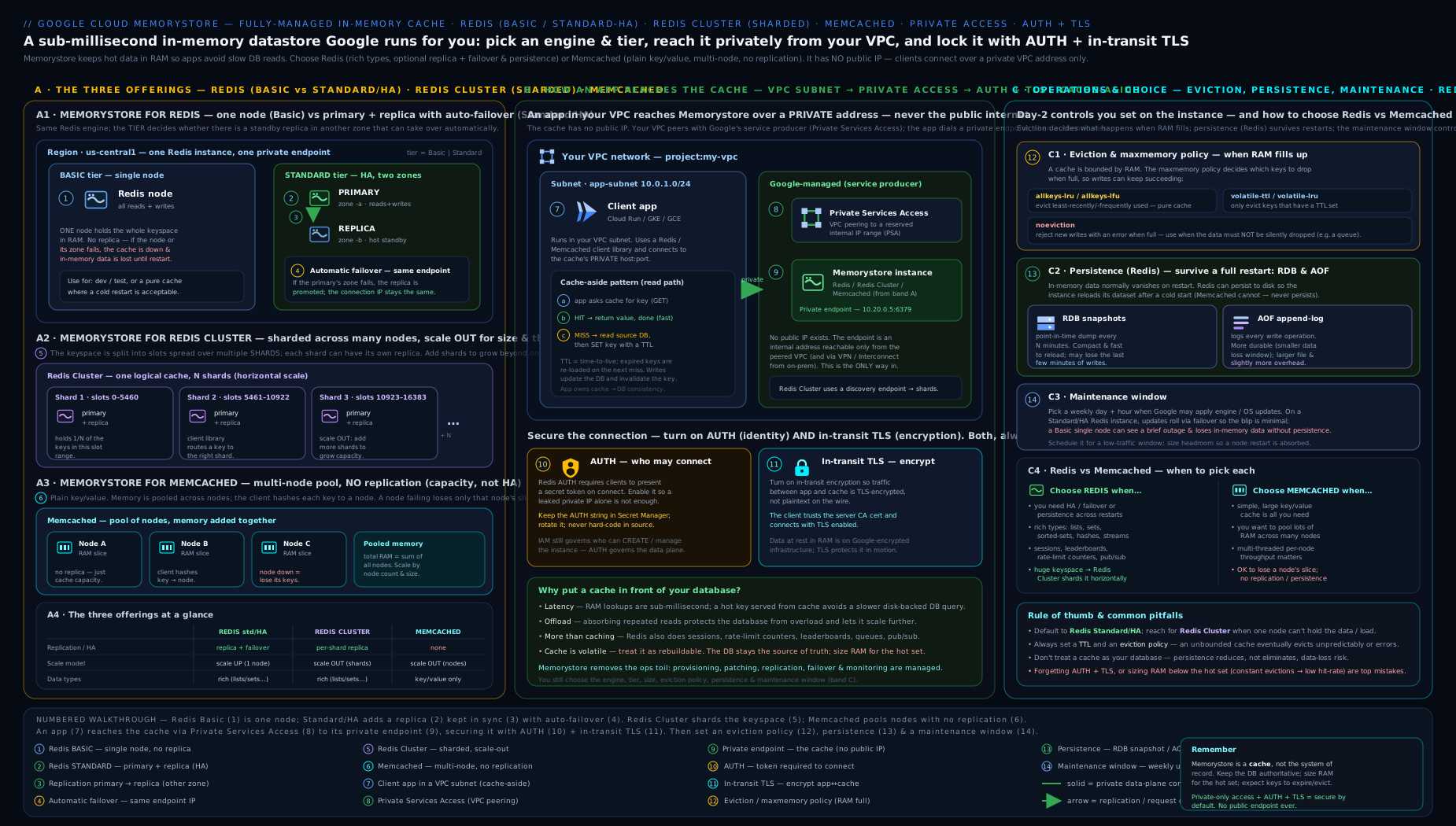
Read it left to right as the mental index for the whole lesson: pick the product (single-node Redis, sharded cluster, or Memcached), wire it privately into the VPC (PSA or PSC), then apply the right cache pattern (cache-aside in front of the database).
Going deeper: internals, edge cases and scale
This is the section for when the basics are not enough — when you are debugging a p99 latency spike, sizing a fleet, or defending a design in a Staff-level review. None of it is required to use Memorystore, but all of it decides whether your cache is fast at 3 a.m. under load.
Redis (and Valkey 7.2) execute commands on a single thread
Classic Redis runs your commands on one thread, in a single event loop. That is why it is so predictable — there are no lock-contention surprises — and also its sharpest edge: one slow command blocks every other client. A KEYS * on a big keyspace, a SMEMBERS on a million-element set, a FLUSHALL, or a heavy Lua script does not just slow itself down; it freezes the whole instance for its duration, and your tail latency (p99/p999) explodes for everyone. The disciplines that follow directly:
- Prefer O(1) or O(log N) commands. Never run
KEYSin production — useSCAN(cursor-based, incremental). Avoid unboundedSMEMBERS/HGETALL/LRANGE 0 -1on large collections. - Watch the
SLOWLOGand Cloud Monitoring latency metrics; a single big key or script is usually the culprit behind mysterious periodic stalls. - Redis 6+ added I/O threads that parallelise reading and writing sockets, but command execution stays single-threaded — I/O threading raises throughput on many small requests, it does not make a big command safe.
Valkey 8.0 changes this calculus. It adds asynchronous I/O threading and more parallel handling, so a single node scales further across cores before you must add shards — one concrete reason to prefer Valkey for throughput-bound workloads.
Copy-on-write forks: why saves spike memory
When Redis takes an RDB snapshot or rewrites the AOF, it calls fork(). The child gets a copy-on-write view of memory: pages are shared with the parent until the parent writes to them, at which point the OS copies the page. On a write-heavy instance during a save, many pages get copied, and resident memory (RSS) can balloon — toward 2× used_memory in the worst case. This is the real reason to size to ~70–80% steady-state and to watch latest_fork_usec: on a very large instance the fork itself is a latency event. It is also why enabling persistence is not free, and why you never run a busy instance at 95% memory.
“LRU” is approximate, and LFU is a decaying counter
Memorystore’s eviction is not a perfect global sort. Redis uses sampled (approximated) LRU: on each eviction it samples a handful of keys (maxmemory-samples, default 5) and evicts the best candidate among them. More samples = closer to true LRU = more CPU. LFU (allkeys-lfu) does not count exact accesses either; it keeps a small probabilistic logarithmic counter per key that decays over time (lfu-log-factor, lfu-decay-time), so a key that was hot yesterday but cold today loses priority. Knowing this stops two false expectations: that eviction is deterministic, and that LFU remembers ancient popularity forever.
Memory fragmentation: why RSS > used_memory
Redis allocates through jemalloc. After lots of writes, deletes and variable-sized values, the allocator holds memory the OS has given it that Redis is not currently using — external fragmentation. INFO memory exposes mem_fragmentation_ratio (RSS ÷ used_memory); a ratio well above ~1.5 means real RAM is being wasted on fragmentation, not data. Redis/Valkey can run active defragmentation (activedefrag yes) to compact live. The practical lesson: provisioned memory is consumed by data plus overhead plus fragmentation — another reason headroom is not optional.
Cluster redirections: MOVED vs ASK
A cluster-aware client caches the slot → node map, but the map changes as you reshard. Two redirections keep it honest:
| Redirect | Meaning | Client action |
|---|---|---|
MOVED <slot> <host:port> |
This slot now permanently lives on another node | Update the slot map and resend there (and future keys in that slot) |
ASK <slot> <host:port> |
This one key is mid-migration to another node right now | Send ASKING then the command to that node once; do not update the map |
A client that ignores redirections (or a non-cluster client pointed at a cluster) breaks the moment topology shifts. This is the mechanical reason “the client must be cluster-aware” — and why CROSSSLOT errors appear when a multi-key command spans slots that no single node owns. Hash tags ({...}) are the fix: they force related keys into one slot so multi-key ops and transactions stay legal.
The hot-key / hot-slot problem
Sharding balances load across keys, but a single celebrity key (one product on sale, one viral post’s counter) all hashes to one slot on one shard’s primary — and no amount of resharding can split it. Symptoms: one shard pegged at high CPU while the rest idle. Mitigations, in order of reach: add replicas and read the hot key from them; put a tiny near-cache (in-process, short TTL) in the app to absorb reads; split the key (e.g. shard a counter into counter:{0..N} and sum) to spread writes; or coalesce requests so concurrent readers share one backend fetch.
Cache stampede (thundering herd)
The nastiest cache failure mode: a popular key expires, and in the microsecond before anything repopulates it, thousands of concurrent requests all miss and hammer the database at once — often knocking over the very database the cache was protecting. Defences:
- Per-key mutex / single-flight — the first miss takes a short lock and recomputes; others wait briefly and read the fresh value.
- TTL jitter — never expire a whole class of keys at the same instant; add randomness (
ttl = base ± rand) so expiries spread out. - Probabilistic early expiration (the XFetch technique) — refresh a key slightly before it expires, with a probability that rises as expiry nears, so exactly one request tends to refresh it while it is still serving.
- Serve-stale-while-revalidate — return the slightly stale value and refresh asynchronously.
Interviewers love this one because the naive cache-aside code is correct yet still causes outages under load.
Durability nuance: async replication and WAIT
Standard-tier and cluster replication is asynchronous: the primary acknowledges your write immediately and streams it to replicas afterwards. So a failover can lose the last few writes that had not yet reached the replica — HA protects availability, not every last byte. If a write must be safer, the WAIT numreplicas timeout command blocks until that many replicas acknowledge, trading latency for durability. It is still not synchronous strong consistency (there is no rollback), but it closes most of the window. For real durability, layer AOF underneath.
Connections, buffers and quotas
Every client connection costs memory, and output buffers (especially for pub/sub subscribers and replicas) can grow without bound if a consumer stalls. Redis 7 added maxmemory-clients to cap and evict client buffers before they threaten the dataset. Practical guidance: pool connections (do not open one per request), watch connected_clients and blocked_clients, and remember Memorystore enforces per-project, per-region quotas on instance count and total size — large fleets need quota increases planned ahead, and the admin APIs are themselves rate-limited.
Cost and multi-region reality
You pay for provisioned capacity, not data volume. Standard tier roughly doubles the single-node price because it runs a replica; HA also incurs cross-zone egress for replication. There is no built-in cross-region replication for any Memorystore engine — for multi-region you run independent instances per region and reconcile at the application layer (each region caches from its own regional backing store), or use export/import (RDB to Cloud Storage) for cold migration/DR. Where supported (Redis Cluster, Valkey), CMEK in Cloud KMS lets you own the at-rest key for compliance. Model the bill as (node size × shards × (1 + replicas)) × hours, plus egress — a forgotten large cluster is an expensive mistake.
Hands-on lab
We will create a small Standard-tier Memorystore for Redis instance over Private Service Access, connect to it from a VM, exercise caching commands, set an eviction policy, then clean up. Everything is small and short-lived to stay within the GCP Free Tier / $300 credit — but note Memorystore itself is not in the always-free tier, so we keep the instance tiny and delete it promptly.
Prerequisites
gcloud auth login
gcloud config set project YOUR_PROJECT_ID
gcloud services enable redis.googleapis.com compute.googleapis.com servicenetworking.googleapis.com
Step 1 — Set up Private Service Access on the default VPC
# Reserve an IP range for Google service producers (Memorystore draws from this)
gcloud compute addresses create memorystore-psa-range \
  --global \
  --purpose=VPC_PEERING \
  --prefix-length=24 \
  --network=default

# Create the private connection (peering) to servicenetworking
gcloud services vpc-peerings connect \
  --service=servicenetworking.googleapis.com \
  --ranges=memorystore-psa-range \
  --network=default
Expected: both commands complete with a long-running operation that finishes done. You now have private connectivity for managed services on the default VPC.
Step 2 — Create a small Standard-tier Redis instance
gcloud redis instances create lab-cache \
  --size=1 \
  --region=us-central1 \
  --tier=standard \
  --redis-version=redis_7_0 \
  --network=default \
  --connect-mode=private-service-access \
  --redis-config maxmemory-policy=allkeys-lru \
  --maintenance-window-day=sunday \
  --maintenance-window-hour=3
This creates a 1 GB, HA (primary + replica) Redis 7 instance with an LRU eviction policy (so it behaves like a cache), maintenance on Sunday 03:00. Creation takes a few minutes.
Step 3 — Find the private endpoint
gcloud redis instances describe lab-cache --region=us-central1 \
  --format="value(host,port,authorizedNetwork,currentLocationId,replicaCount)"
Expected: a private IP (e.g. 10.x.x.x), port 6379, the network, the zone, and the replica count. Note the host and port.
Step 4 — Connect from a VM in the same VPC
# A tiny VM in the same region/VPC; install redis-cli
gcloud compute instances create lab-client \
  --zone=us-central1-a \
  --machine-type=e2-micro \
  --network=default

gcloud compute ssh lab-client --zone=us-central1-a --command='
  sudo apt-get update -qq && sudo apt-get install -y redis-tools
'
Now exercise the cache (replace REDIS_HOST with the IP from Step 3):
gcloud compute ssh lab-client --zone=us-central1-a --command='
  REDIS_HOST=10.x.x.x
  redis-cli -h $REDIS_HOST set product:1 "{\"name\":\"widget\"}" EX 300
  redis-cli -h $REDIS_HOST get product:1
  redis-cli -h $REDIS_HOST ttl product:1
  redis-cli -h $REDIS_HOST config get maxmemory-policy
  redis-cli -h $REDIS_HOST info stats | grep -E "keyspace_hits|keyspace_misses|evicted_keys"
'
Expected: OK on the set; the JSON value back on the get; a TTL counting down from ~300; maxmemory-policy reporting allkeys-lru; and hit/miss/eviction counters you can watch change.
Step 5 — Test a manual failover (HA)
gcloud redis instances failover lab-cache --region=us-central1
Expected: a long-running operation; the primary endpoint IP is preserved while the replica is promoted. Re-run the get from the client — it should still work (after a brief reconnect), demonstrating that a well-behaved client survives failover.
Validation
gcloud redis instances describe lab-cache --region=us-central1 --format="value(state)"returnsREADY.- The
redis-cliround-trip (Step 4) returns your value and a live TTL. - After failover, the same host/port still serves reads.
Cleanup
gcloud compute instances delete lab-client --zone=us-central1-a -q
gcloud redis instances delete lab-cache --region=us-central1 -q

# Optional: tear down PSA if you created it only for this lab
gcloud services vpc-peerings delete \
  --service=servicenetworking.googleapis.com --network=default -q
gcloud compute addresses delete memorystore-psa-range --global -q
Cost note
Memorystore is billed per GB-hour of provisioned capacity (Redis: per GB of instance size, doubled for Standard since it runs a replica; Memcached: per node-hour by shape; Redis Cluster: per shard). It is not in the always-free tier. A 1 GB Standard Redis runs only a few rupees/cents per hour, but a forgotten instance is a steady drain — delete it the moment the lab is done. There is no charge for the data; you pay for the provisioned RAM/nodes/shards, plus network egress for cross-zone traffic in HA. Persistence (RDB/AOF) adds modest disk/IO cost; in-transit TLS is free.
Practice challenges
Work these in a sandbox project (delete instances promptly — Memorystore is not free-tier). They escalate from beginner to advanced; each has a solution with a one-line why.
1 (Beginner) — Make an existing cache actually evict. You have a Standard-tier Redis instance lab-cache in us-central1 whose policy is the default. Change it to behave like a proper cache and verify.
<details> <summary>Show solution</summary>
gcloud redis instances update lab-cache --region=us-central1 \
  --update-redis-config maxmemory-policy=allkeys-lru
gcloud redis instances describe lab-cache --region=us-central1 \
  --format="yaml(redisConfigs)"
Why: allkeys-lru lets Redis evict any key when full, so the instance keeps accepting writes instead of returning OOM errors — the defining behaviour of a cache.
</details>
2 (Beginner) — Size it right. Your hot working set is ~6 GB and grows ~10% a quarter. What instance size do you provision, and why not exactly 6 GB?
<details> <summary>Show solution</summary>
Provision roughly 8–9 GB (target ~70–80% steady-state utilisation). Why: Redis needs memory beyond your data for replication buffers, client buffers and the copy-on-write fork during RDB/AOF saves; running near 100% forces constant eviction (misses) or write rejection and makes background saves spike RSS dangerously. </details>
3 (Intermediate) — Cache-aside with bounded staleness. Write pseudo-code for a read and a write path that caches a user profile for at most 5 minutes and never serves data more than 5 minutes stale after an update.
<details> <summary>Show solution</summary>
def get_profile(uid):
    key = f"user:{uid}:profile"
    v = r.get(key)
    if v is not None:
        return deserialize(v)              # hit
    row = db.get_profile(uid)              # miss -> DB
    r.set(key, serialize(row), ex=300)     # populate, 5-min TTL
    return row

def update_profile(uid, data):
    db.update_profile(uid, data)
    r.delete(f"user:{uid}:profile")        # invalidate; next read repopulates
Why: invalidate-on-write gives immediate correctness; the TTL is the safety net that bounds staleness to 5 minutes even if an invalidation is ever missed. </details>
4 (Intermediate) — Reach the cache from Cloud Run. A Cloud Run service returns connection timeouts to the Redis private IP. What is missing, and how do you fix it?
<details> <summary>Show solution</summary>
Cloud Run has no route into your VPC by default. Enable Direct VPC egress (or attach a Serverless VPC Access connector) on the service, pointing at the VPC/subnet that reaches the instance, and allow egress to port 6379. Why: the Memorystore endpoint is a private IP with no public route; serverless must be given VPC egress before it can reach it. </details>
5 (Advanced) — Keep a multi-key transaction legal on a cluster. In Redis Cluster you must MULTI/EXEC over a user’s cart and profile keys atomically, but you get CROSSSLOT errors. Design the key scheme.
<details> <summary>Show solution</summary>
Use a hash tag so both keys hash to the same slot:
user:{42}:profile
user:{42}:cart
Only the text inside {} is hashed, so both land in one slot and multi-key commands/transactions are permitted. Why: cluster multi-key ops must touch a single slot; the hash tag co-locates related keys deterministically.
</details>
6 (Advanced) — Survive a stampede on a viral key. One key (post:9:likes) is read 50k times/second and expires every 60 s; each expiry knocks your database over. Give two independent mitigations.
<details> <summary>Show solution</summary>
Any two of: (a) single-flight/mutex — the first miss takes a short lock and recomputes while others wait for the fresh value; (b) probabilistic early expiration (XFetch) — refresh just before expiry so one request renews the key while it is still serving; © TTL jitter — spread expiries so they never align; (d) a short-TTL in-process near-cache to absorb most of the 50k reads before they reach Redis. Why: correct cache-aside code still stampedes because thousands of requests miss in the same instant — you must ensure only one recomputes. </details>
Common beginner mistakes
These are conceptual traps — wrong mental models, not just operational symptoms (those are in the troubleshooting table below).
- “Redis is my database now.” A cache holds a rebuildable copy of authoritative data. Even with persistence, eviction and async-replication failover mean a cache can silently drop the newest or least-used data. Right model: the source of truth lives in Cloud SQL/Firestore/Bigtable; the cache is a fast, disposable copy. Design so that losing it is slow, not fatal.
- “Basic tier is fine, it’s just cheaper.” Basic has no replica, so it flushes its entire dataset on routine maintenance and on scaling. Right model: Basic is dev/test only; a cold production cache triggers a thundering herd on your database. Use Standard (or a cluster engine) for anything real.
- “I picked a
volatile-*eviction policy, so it will evict when full.”volatile-*policies only evict keys that have a TTL. Set no TTLs and there is nothing eligible — the instance behaves likenoevictionand rejects writes when full. Right model: for a general cache useallkeys-lru, and set TTLs anyway. - “More memory always means a faster cache.” A bigger instance with a low hit ratio (wrong keys cached, no TTL discipline, churn) just costs more while your database still does the work. Right model: cache the genuinely hot data with sensible TTLs; watch hit ratio, not just size.
- “Redis Cluster is a drop-in replacement for single-node Redis.” Clients must be cluster-aware, and any multi-key command whose keys span slots fails with
CROSSSLOT. Right model: moving to Cluster (or Valkey) is a client change — use a cluster driver and hash tags for related keys. - “My serverless app can just connect to the cache.” Cloud Run/Functions cannot reach a private IP without VPC egress. Right model: enable Direct VPC egress or a Serverless VPC Access connector first; network reachability is a prerequisite, not a given.
- “Persistence means I have a backup.” RDB/AOF protect against restarts and failover, not against a bad deploy that corrupts data or a fat-fingered
FLUSHALL. Right model: persistence ≠ backup — schedule export (RDB to Cloud Storage) for point-in-time recovery. - “A read from the replica is the same as a read from the primary.” Replication is asynchronous, so a read endpoint can return slightly stale data right after a write. Right model: for read-your-own-writes correctness, read from the primary; use the read endpoint only where mild staleness is acceptable.
Common mistakes & troubleshooting
| Symptom | Likely cause | Fix |
|---|---|---|
| Cache lost all data after maintenance/scaling | Basic tier (no replica) — it flushes on those events | Use Standard tier for anything you cannot afford to cold-start |
| Redis rejecting writes (“OOM command not allowed”) | maxmemory-policy=noeviction (or volatile-* with no TTLs) and the instance is full |
Switch to allkeys-lru, and/or resize larger; set TTLs |
| Serverless (Cloud Run/Functions) cannot connect | No VPC egress to the private IP | Enable Direct VPC egress or a Serverless VPC Access connector |
| Connection refused / timeout from a VM | Firewall blocks egress to 6379/11211, or wrong VPC | Allow egress to the instance port; ensure the client is in the connected VPC |
Redis Cluster client errors (MOVED/CROSSSLOT) |
Client is not cluster-aware, or multi-key op spans slots | Use a cluster-mode client; co-locate related keys with hash tags {...} |
| Stale values served from cache | Missing invalidation on write, or no TTL | Invalidate on write and set TTLs so staleness is bounded |
| Reads return old data intermittently | Reading from a replica/read endpoint (async lag) | Read from the primary when read-your-writes consistency is required |
| Connections drop periodically | A failover or maintenance event; or idle timeout | Ensure the client reconnects/retries; tune timeout; use connection pooling |
| Low hit ratio, high DB load | Instance too small (constant eviction) or wrong keys cached | Resize, fix TTL strategy, cache the genuinely hot data |
Best practices
- Pick the right product first. Single logical Redis with HA → Memorystore for Redis (Standard). Need to scale past one node → Redis Cluster or Valkey from the start. Big, simple, opaque cache → Memcached.
- Always Standard tier in production. The replica and automatic failover are what make a cache safe to depend on. Basic is dev/test.
- Set an eviction policy deliberately —
allkeys-lrufor a general cache — and always set TTLs. Never let a cache silently become anoevictionstore by accident. - Size for working set + headroom (~70–80% steady-state). Watch the memory usage ratio and evicted keys; resize before you thrash.
- Make clients failover-tolerant. Use a robust client with connection pooling, automatic reconnection and retries; never assume a connection is permanent.
- Use private connectivity end to end (PSA or PSC), enable AUTH/IAM auth, and enable in-transit TLS for sensitive data. Network reachability must not equal access.
- Design keys and TTLs intentionally — consistent prefixes (
product:,session:), sensible TTLs, and hash tags for cluster multi-key operations. - Turn on persistence only when you need it — AOF (
everysec) for the smallest loss window, RDB for cheap restart resilience — and remember persistence is not a backup (use export/scheduled backups). - Alert on the right metrics: memory usage ratio, hit ratio, evicted keys, connected clients, replication lag.
- Pre-warm or scale in low-traffic windows — resizing/resharding causes a temporary miss spike.
Security notes
- No public endpoint. Memorystore is private-only; reach it via Private Service Access (Redis/Memcached) or Private Service Connect (Redis Cluster/Valkey). Lock down firewall egress to just the instance port.
- Authentication. Enable Redis AUTH (or IAM authentication for Redis Cluster/Valkey) and SASL for Memcached. Treat the AUTH string as a secret — store it in Secret Manager, not in code or images.
- Encryption in transit. Enable in-transit TLS; distribute and trust the server CA certificate in clients. Without it, cache traffic is plaintext on the VPC.
- Encryption at rest is on by default; use CMEK (Cloud KMS) where supported (Redis Cluster/Valkey) to control the key and meet compliance/BYOK requirements.
- Least privilege IAM on the Memorystore admin surface (
roles/redis.admin,roles/redis.viewer,roles/memcache.admin, etc.) — separate who can manage instances from who can connect to them. - Don’t cache secrets unencrypted, and remember a cache may persist (RDB/AOF) — apply the same data-classification rules you would to the backing store.
- VPC Service Controls can place Memorystore APIs inside a perimeter to prevent exfiltration in regulated environments.
Interview & exam questions
-
What are the three Memorystore offerings and when do you use each? Memorystore for Redis (single logical Redis, optional HA) for general caching/sessions/queues; Memorystore for Redis Cluster (sharded, horizontally scalable) when you outgrow one node and need scale-out + resilience; Memorystore for Memcached (multi-node, opaque key/value) for big, simple, rebuildable caches without data structures or persistence. (And Memorystore for Valkey — the open-source, cluster-native fork — as the modern default for new large Redis-family workloads.)
-
Basic vs Standard tier for Redis — what’s the difference? Basic = single node, no replica, no failover, and it flushes the cache on maintenance/scaling (no SLA). Standard = primary + replica in different zones, automatic failover, an availability SLA. Production should always use Standard.
-
How does failover work in Standard-tier Redis, and what must the application do? The replica is promoted to primary automatically; the primary endpoint IP is preserved. The app must handle dropped connections and retry/reconnect — connections are severed at failover. Because replication is async, the last few unreplicated writes may be lost (mitigate with AOF).
-
What is the difference between a read replica and high availability in Memorystore for Redis? HA (the Standard-tier replica) is about availability — automatic failover at the same endpoint after a zone/node failure. Read replicas (1–5) add read throughput via a separate read endpoint (eventually consistent). One protects uptime; the other scales reads.
-
Explain Redis Cluster sharding. What changes for the client? The keyspace is split into 16,384 hash slots across shards; a key’s slot = CRC16(key) mod 16384. Clients must be cluster-aware (connect to the discovery endpoint, route by slot). Multi-key commands must touch one slot — use hash tags
{...}to co-locate related keys. You scale by changing shard count (online rebalance). -
What does the
maxmemory-policysetting control, and what’s the right value for a cache? It controls what Redis does when full: evict (LRU/LFU/random/TTL-based) or reject writes (noeviction). For a general cache useallkeys-lru. The classic bug is leaving it onnoeviction(orvolatile-*with no TTLs) so the instance stops accepting writes when full. -
What’s the difference between
allkeys-lruandvolatile-lru?allkeys-lrucan evict any key;volatile-lruevicts only keys that have a TTL. Withvolatile-*and no TTLs set, nothing is eligible — Redis behaves likenoevictionwhen full. -
RDB vs AOF persistence — when each? RDB = periodic binary snapshots (1/6/12/24h): compact, fast reload, but loses everything since the last snapshot. AOF = logs every write (fsync ~every second): ≈1s loss window, more durable, higher I/O. Use AOF when minimising data loss matters; RDB for cheap restart resilience; both for maximum protection. Neither is a backup.
-
How do you connect to Memorystore privately, and how from serverless? Via Private Service Access (allocate an IP range, create the peering — Redis/Memcached) or Private Service Connect (endpoints in your subnets — Redis Cluster/Valkey). From Cloud Run/Functions you additionally need Direct VPC egress or a Serverless VPC Access connector to route into the VPC and reach the private IP.
-
Redis or Memcached — how do you choose? Redis when you need data structures (hashes, sorted sets, streams), persistence, HA/failover, pub/sub, scripting, or anything beyond opaque blobs — i.e. most of the time. Memcached when you want a simple, multi-threaded, horizontally-scaled cache of opaque objects with no need for those features, and node loss is harmless.
-
What does Memorystore not do that you must design around? No built-in cross-region replication (run independent instances + app-level replication for multi-region), Memcached has no HA/persistence, and persistence is not a backup. Also, scaling Memcached/Redis Cluster reshuffles keys (a temporary miss spike).
-
Which metrics would you alert on for a production cache? Memory usage ratio (eviction/write-rejection risk), cache hit ratio (is the cache earning its keep), evicted keys (capacity pressure), connected clients / rejected connections, CPU per node/shard, and replication lag (failover safety).
-
What is Valkey, and why did Google add Memorystore for Valkey? Valkey is the Linux Foundation’s open-source fork of Redis 7.2, created after Redis’s 2024 licence change; it is wire-compatible with Redis. Memorystore for Valkey is a managed, sharded, cluster-native engine giving teams a permissively-licensed option plus Valkey 8.0’s multi-threading and efficiency gains — now the natural default for new, scalable Redis-family workloads.
Quick check
- Single-node, no replica, flushes the cache on maintenance — which Redis tier?
- You need to scale a Redis workload past a single machine’s RAM and throughput, online. Which offering?
- Your Redis “stopped accepting writes” when full. What is the most likely
maxmemory-policy, and what should it be for a cache? - True/false: a Cloud Run service can reach Memorystore over its private IP with no extra configuration.
- Which persistence option gives the smallest data-loss window, and roughly how small?
Answers
- Basic tier (single node, no failover, flushes on maintenance/scaling).
- Memorystore for Redis Cluster (or Valkey) — sharded, horizontally scalable, online resharding.
- Likely
noeviction(or avolatile-*policy with no TTLs); for a cache setallkeys-lru(and use TTLs). - False — Cloud Run needs Direct VPC egress or a Serverless VPC Access connector to reach the private IP.
- AOF with
appendfsync everysec— at most about 1 second of writes at risk.
Exercise
Design and partially build a resilient cache tier in a sandbox project, justifying every choice:
- Set up Private Service Access on a VPC, then create a Standard-tier Memorystore for Redis instance with
allkeys-lrueviction, a maintenance window, and in-transit TLS + AUTH enabled. - From a VM, implement cache-aside in a short script against a small “database” (a file or Cloud SQL): read-through with a TTL, and invalidate on write. Demonstrate a hit, a miss, and a stale-then-corrected read after the TTL expires.
- Add a read replica and show reads served from the read endpoint; observe eventual consistency by reading immediately after a write.
- Trigger a manual failover and prove your client reconnects and continues against the preserved endpoint.
- Enable AOF, write some keys, restart/failover, and show the data survived; then export an RDB snapshot to Cloud Storage as a “backup”.
- Now re-architect on paper for 10× scale: lay out a Redis Cluster or Valkey deployment (shard count, replicas per shard, hash-tag strategy for multi-key ops, PSC connectivity) and write a paragraph on what changes in the client.
- Tear everything down and confirm the bill stops.
Write a short justification for each resilience and security choice (tier, eviction, persistence, TLS/AUTH, connectivity) and which failure or threat each addresses.
Certification mapping
- Associate Cloud Engineer (ACE): provisioning and configuring Memorystore — choosing the offering and tier, sizing, eviction policy, private connectivity, and connecting from compute. Expect “which caching product” and “Basic vs Standard” style questions.
- Professional Cloud Architect (PCA): selecting the right caching/in-memory tier for an architecture (Redis vs Redis Cluster vs Valkey vs Memcached), designing for HA and failover, private connectivity (PSA/PSC), and where a cache fits in front of Cloud SQL/Firestore to meet latency and cost goals.
- Professional Cloud Database Engineer (PCDE): the deeper end — eviction strategy, persistence (RDB/AOF) trade-offs, scaling (resize vs resharding), monitoring signals, and cache-consistency patterns.
- Professional Cloud Network Engineer (PCNE) / Security Engineer (PCSE): the private-connectivity plumbing (PSA vs PSC, serverless VPC egress) and the security controls (AUTH/IAM auth, in-transit TLS, CMEK, VPC Service Controls).
Glossary
- Memorystore — Google Cloud’s managed in-memory service, comprising Redis, Redis Cluster, Valkey and Memcached offerings.
- Redis — an in-memory data-structure server (strings, hashes, lists, sets, sorted sets, streams, …) with optional persistence and HA.
- Memcached — a simpler, multi-threaded, in-memory key/value cache for opaque values; no data types, persistence or replication.
- Tier (Basic/Standard) — Redis HA setting: Basic = single node (no failover, flushes on maintenance); Standard = primary + replica with automatic failover.
- Read replica — a read-only copy serving a read endpoint for read scaling (eventually consistent); 1–5 on Standard Redis.
- Shard — a slice of the keyspace in Redis Cluster; the keyspace is 16,384 hash slots distributed across shards. Adding shards adds capacity and throughput.
- Hash tag —
{...}in a key forcing related keys onto the same slot so multi-key commands work in a cluster. - maxmemory-policy — the eviction policy when Redis is full (
allkeys-lru,volatile-ttl,noeviction, …). - RDB — periodic point-in-time snapshot persistence (1/6/12/24h).
- AOF — append-only file persistence logging every write (fsync ≈ every second); smallest data-loss window.
- Failover — automatic promotion of a replica to primary on failure, with the endpoint preserved.
- Private Service Access (PSA) — VPC-peering mechanism giving managed services (incl. Redis/Memcached) a private IP from an allocated range.
- Private Service Connect (PSC) — endpoint-based private connectivity used by Redis Cluster and Valkey (and increasingly preferred).
- AUTH / IAM auth — Redis password authentication / IAM-based authentication (Cluster/Valkey); SASL for Memcached.
- In-transit TLS — optional encryption of client↔instance traffic.
- Discovery endpoint — single endpoint a cluster-aware (Redis Cluster/Valkey) or Auto Discovery (Memcached) client connects to, learning the topology.
- Cache-aside — the lazy-loading pattern: read cache → on miss read DB and populate (with TTL); invalidate on write.
- Valkey — the open-source, permissively-licensed fork of Redis 7.2 stewarded by the Linux Foundation (created after Redis’s 2024 licence change); offered as Memorystore for Valkey, a sharded, cluster-native, Redis-wire-compatible engine.
- OSS Cluster protocol — the open Redis Cluster wire protocol (hash slots, discovery,
MOVED/ASKredirection) that cluster-aware clients speak; shared by Redis Cluster and Valkey. - MOVED / ASK — cluster client redirections: MOVED = a slot has permanently relocated (update your slot map); ASK = one key is mid-migration (send
ASKINGthen retry once, don’t update the map). - Copy-on-write (COW) fork — the
fork()Redis uses for RDB/AOF saves; the child shares parent memory until a page is written, which can spike RSS on write-heavy instances. - Approximated LRU — Redis’s sampled eviction: it evicts the best of
maxmemory-samples(default 5) candidates rather than a perfect global least-recently-used, trading accuracy for CPU. - Memory fragmentation — RAM held by the allocator (jemalloc) but not used for data; tracked by
mem_fragmentation_ratio, reclaimable withactivedefrag. - Cache stampede (thundering herd) — many concurrent misses on a just-expired hot key hammering the backing store at once; mitigated with single-flight locks, TTL jitter and probabilistic early expiration.
- Hot key / hot slot — a single very popular key that concentrates load on one shard and cannot be split by sharding; mitigated with replicas, near-caching or key-splitting.
- WAIT — a Redis command that blocks until N replicas acknowledge a write, trading latency for a smaller data-loss window on failover (not full strong consistency).
- Direct VPC egress / Serverless VPC Access connector — the two ways to give Cloud Run/Cloud Functions a route into your VPC so they can reach Memorystore’s private IP.
Next steps
- Network it properly: the VPC deep dive — subnets, routes, firewall and the private-access plumbing Memorystore depends on; and the Private Service Connect deep dive for the modern connectivity model.
- The store you cache in front of: the Cloud SQL deep dive — the relational database a cache most often protects.
- The wide-column store for huge throughput: continue to the Bigtable deep dive (
gcp-bigtable-deep-dive-schema-row-keys-app-profiles) — schema, row-key design, performance and replication for petabyte-scale NoSQL. </content> </invoke>