In a nutshell
Firestore is a serverless document database: you store JSON-like “documents” in named “collections”, and it fans your reads and writes out across Google’s machines automatically — no server to size, no capacity to plan. Picture a colossal, cloud-hosted filing cabinet. Each drawer is a collection (users, orders); each index-card in a drawer is a document (one user, one order) holding typed fields; and a card can have its own little drawer clipped to the back of it (a subcollection, like one user’s orders). You never see the cabinet or how many rooms it fills — you just ask for a card by its path, or ask for “all paid orders, newest first”, and cards come back in milliseconds whether the drawer holds ten cards or ten billion.
Two things make Firestore special, and both fall out of that picture. First, there is no rifling through a drawer: every question you can ask is answered by pre-sorted index tabs, so a query’s speed depends on how many cards it returns, never on how many the drawer holds. That is why Firestore sometimes stops and says “build me an index first” — it literally has no other way to answer. Second, the cabinet has live wires: a phone or browser can subscribe to a card and Firestore rings it back the instant the card changes (real-time listeners), and it keeps working even while the phone is offline. That live, direct-to-client model is Firestore’s signature — and it is why the security story is two separate locks, one for untrusted phones (Security Rules) and one for trusted servers (IAM).
Two decisions are poured in concrete the moment you create a database and can never be changed: its mode (Native vs Datastore) and its location (one region vs multi-region). Almost everything else you can evolve. Get those two right on day one and Firestore is astonishingly easy; get them wrong and your only fix is to build a new database and migrate. This lesson makes sure you get them right, then takes you all the way down to how the index tabs and the live wires actually work.
Level: Intermediate — written so a total beginner can follow, with an advanced Going deeper section (index internals, the 500/50/5 write-ramp, editions) for veterans · Time: ~52 min · You’ll need: a Google Cloud project and the gcloud CLI; the hands-on lab fits inside Firestore’s Always Free tier, so it costs nothing.
If you remember only one sentence: Firestore is a tree of collections and documents that you query through indexes (never scans), reach through two security gates (Rules for clients, IAM for servers), and configure with two permanent choices (mode and location) you must get right up front.
Most applications need somewhere to keep structured data that is not a spreadsheet and not a full relational schema — user profiles, chat messages, game state, shopping carts, IoT readings, the mutable “state of the app right now”. On Google Cloud the default answer for that shape of problem is Firestore: a fully managed, serverless, horizontally-scalable document database that stores JSON-like documents, scales reads and writes automatically with no servers to size, replicates synchronously across zones (and optionally regions) for very high availability, and — its signature feature — pushes real-time updates to connected clients so your UI re-renders the instant the data changes.
“Serverless document database” sounds simple, and the happy path genuinely is: you write a document, you read it back, it just works at any scale. But Firestore makes a small number of decisions for you that are very hard to undo, and it enforces a query model that is unfamiliar to anyone coming from SQL. The single hardest choice — Native mode versus Datastore mode — is fixed for the life of the database. The data model rewards (and the query engine requires) thinking in indexes from day one, because in Firestore “every query is served by an index” is not advice, it is the architecture. And the security story is genuinely two stories — Security Rules for apps that talk to Firestore directly from a phone or browser, IAM for trusted backends — that beginners routinely conflate and get badly wrong.
This is the exhaustive version. We will pin down Native versus Datastore mode with a comparison table and the rule for choosing; walk the full data model (collections, documents, fields, subcollections, references, and every data type); explain indexing completely (automatic single-field indexes, composite indexes, single-field exemptions, and the “queries need indexes” rule that surprises everyone); cover the query model and every limitation that bites — no native joins, the inequality-field rule, ordering and pagination with cursors; separate Security Rules from IAM precisely; cover transactions, batched writes, real-time listeners, TTL, backups/PITR, and how to choose a location; and finish with the architect’s decision — Firestore versus Bigtable versus Cloud SQL. Commands are real gcloud firestore against current Firestore (2026), with the console called out so you can follow along either way.
Learning objectives
By the end of this lesson you will be able to:
- Choose between Native mode and Datastore mode for a new database and explain why the choice is permanent.
- Model data correctly in Firestore’s collections → documents → fields hierarchy, using subcollections, document references and the right data types — and avoid the classic modelling mistakes (unbounded documents, deep nesting, hotspotted IDs).
- Explain how Firestore indexing works end to end: automatic single-field indexes, composite indexes, single-field exemptions, and why every query needs an index.
- Write queries with filters, ordering and cursor-based pagination, and recite the query limitations — no native joins, the inequality-field rule, the
in/array-containscaps. - Secure Firestore correctly for both access paths: Security Rules for client SDKs and IAM for server SDKs, knowing exactly which applies when.
- Use transactions, batched writes, real-time listeners, TTL policies, backups and point-in-time recovery, and select a location/multi-region with the right durability and latency.
- Decide confidently between Firestore, Bigtable and Cloud SQL for a given workload.
Prerequisites & where this fits
You should be comfortable with the Google Cloud resource hierarchy (organisation, folders, projects) and basic IAM, have the gcloud CLI installed and initialised, and understand JSON (Firestore documents are essentially typed JSON). A little experience with any database — SQL or NoSQL — helps the comparisons land, but no prior NoSQL knowledge is assumed; every term is defined. This is the Databases track of the GCP Zero-to-Hero course, sitting alongside the relational deep dive Google Cloud SQL, In Depth (gcp-cloud-sql-deep-dive-engines-ha-replicas-backups) — read that one for the relational side of the same decisions. After this, the in-memory caching companion Google Cloud Memorystore, In Depth (gcp-memorystore-deep-dive-redis-memcached-clusters) covers the cache layer that often sits in front of Firestore.
Core concepts: the mental model
Before any settings, fix the vocabulary — most Firestore confusion is vocabulary confusion, and the SQL terms you already know map only loosely.
- Database. The top-level container. A Cloud project can hold multiple Firestore databases (each named; one is
(default)), each independently in Native or Datastore mode, each in its own location. You used to get exactly one per project; multi-database is now standard and is the clean way to separate environments or tenants. - Mode. Native mode or Datastore mode — the API surface and feature set the database exposes. Chosen at database creation and immutable for that database. (More below; this is the load-bearing choice.)
- Collection. A named container of documents — the rough analogue of a SQL table, except it has no fixed schema. Collections are created implicitly: they exist as soon as they contain a document and vanish when the last document is deleted. You cannot store fields directly on a collection.
- Document. The unit of storage: a record identified by an ID, holding a set of fields. The analogue of a SQL row, except each document is schemaless (its own set of fields and types) and is itself a small JSON-like object. A document is also the unit of atomic read/write and the unit a listener watches. Hard limit: 1 MiB per document.
- Field. A typed key/value pair inside a document. Values can be scalars (string, number, boolean, timestamp…), a map (nested object), an array, a reference to another document, or
null. - Subcollection. A collection that lives underneath a document, giving you hierarchy:
users/{uid}/orders/{orderId}. Subcollections let one document own a nested set of documents without bloating the parent. Deleting the parent document does not delete its subcollections — they are independent and must be deleted explicitly. - Document path / reference. The full path
collection/docId/subcollection/docId/...uniquely identifies a document. A reference field stores such a path as a first-class typed value (a pointer to another document). - Index. A data structure Firestore maintains so that a query can be served efficiently. In Firestore every query is served by an index — there is no “table scan”. Some indexes are built automatically (single-field); others (composite) you must declare.
- Security Rules. A declarative rules language that governs access for client SDKs (mobile/web talking directly to Firestore). They run at the Firestore boundary and decide, per request, what an end user may read or write.
- IAM. Standard Google Cloud Identity and Access Management — governs access for server SDKs / Admin SDK and the
gcloudCLI. Security Rules do not apply to server access; IAM does. These are two separate gates for two separate access paths. - Strong consistency. A read in Firestore Native mode always reflects the latest committed write (within a transaction’s snapshot). You do not get the “stale read” surprises of eventually-consistent stores — except deliberately, on real-time listeners with local cache.
The single most important idea: Firestore is a tree of collections and documents, and you query it through indexes, not scans. Model your data around the queries you will run and the access path you will use (client vs server), and the rest follows.
Native mode vs Datastore mode: the permanent choice
This is the first and hardest decision, so we tackle it first. Both modes are the same underlying storage and scaling engine (“Firestore”), but they expose different APIs and feature sets, and the mode is fixed for the life of the database — you cannot flip a database from one to the other (you migrate data to a new database). Choose deliberately.
Native mode is the modern, full-featured experience. It is what you want for almost every new project. It gives you:
- Real-time listeners (the signature feature) — clients subscribe and receive live updates.
- Mobile and web client SDKs with offline persistence — apps keep working offline and sync when reconnected.
- Security Rules — direct, secure client access without a backend.
- The richer query surface (collection-group queries,
array-contains,in/not-in, aggregation queries likecount()/sum()/avg()).
Datastore mode exists for server-side workloads and for backward compatibility with the older Cloud Datastore API. It runs on the same modern Firestore backend (so it inherits strong consistency and the newer scaling), but it deliberately omits the client-facing features:
- No real-time listeners.
- No mobile/web client SDKs / no offline support.
- No Security Rules — access is governed solely by IAM (it is a server-only API).
- It keeps the Datastore query semantics and entity model (entities, kinds, keys) for apps already written against Datastore, and historically supported some query shapes Native did not.
| Dimension | Native mode | Datastore mode |
|---|---|---|
| Intended for | Mobile/web apps and servers; greenfield | Server-side only; lift-and-shift from legacy Cloud Datastore |
| Client SDKs (mobile/web) | Yes | No |
| Real-time listeners | Yes | No |
| Offline persistence | Yes | No |
| Access control | Security Rules (client) + IAM (server) | IAM only |
| Data model exposed | Collections / documents / fields | Entities / kinds / keys (Datastore API) |
| Consistency | Strongly consistent | Strongly consistent (modern backend) |
Aggregation (count/sum/avg) |
Yes | Yes (modern backend) |
| API | Firestore API | Datastore API |
| Mutable later? | No — mode is fixed at creation | No — mode is fixed at creation |
The rule for choosing: unless you are explicitly maintaining a legacy Cloud Datastore application, choose Native mode. It is the strict superset for new work — anything Datastore mode does for servers, Native mode also does, plus the client SDKs, real-time listeners and Security Rules. Pick Datastore mode only when you are migrating an existing App Engine / Cloud Datastore codebase that depends on the Datastore API and entity model. The choice is per-database and permanent, so getting it right at creation matters; if you chose wrong, you create a new database in the correct mode and migrate (export/import or Dataflow).
# Native mode (the default and recommended choice)
gcloud firestore databases create \
  --database='(default)' \
  --location=nam5 \
  --type=firestore-native

# Datastore mode (only for legacy Datastore compatibility)
gcloud firestore databases create \
  --database=legacy-ds \
  --location=us-central1 \
  --type=datastore-mode
The rest of this lesson is written for Native mode, which is what you will almost always use.
The data model: collections, documents, fields
Firestore stores a tree. Understanding the shape prevents most modelling mistakes.
The hierarchy
(root)
 └── users                    ← collection
       └── u_abc123           ← document (id = u_abc123)
             ├─ displayName: "Asha"          ← field (string)
             ├─ createdAt: <timestamp>       ← field (timestamp)
             ├─ prefs: { theme: "dark" }     ← field (map / nested object)
             ├─ roles: ["editor","admin"]    ← field (array)
             └── orders               ← subcollection (under the document)
                   └── o_001          ← document
                         ├─ total: 4999       ← field (integer)
                         └─ items: [...]      ← field (array of maps)
The rules of the tree:
- Collections contain only documents; documents contain only fields (and may have subcollections). You alternate collection → document → collection → document down the path. A path therefore always has an even number of segments to a document (
users/u_abc123) and an odd number to a collection (usersorusers/u_abc123/orders). - Documents are schemaless and independent. Two documents in the same collection can hold completely different fields. There is no
ALTER TABLE; you just write different fields. - A document is at most 1 MiB. This is a hard limit that shapes design: do not append unbounded data (a chat log, an event stream) into a single document’s array — you will hit the ceiling and every write rewrites the whole document. Put growing collections of things in a subcollection of small documents instead.
- Subcollections are independent of their parent. A parent document can even be a “phantom” — it can have subcollections without itself existing as a stored document. Deleting a parent does not cascade to subcollections; you must delete them yourself (or with a TTL policy / bulk delete).
- Document IDs. You either supply an ID or let Firestore auto-generate one. Auto-generated IDs are random (well-distributed) — prefer them for write-heavy collections. Avoid monotonically increasing IDs (timestamps, sequential counters) as document IDs in high-write collections: they create a hotspot because lexicographically-adjacent IDs land on the same storage range, capping throughput (the classic “500/50/5” ramp-up and hotspotting concern). Random IDs spread writes.
Data types
A Firestore field can hold any of these typed values. Knowing them — and how they sort — matters because ordering and range queries depend on type order.
| Type | What it is | Notes / gotchas |
|---|---|---|
| String | UTF-8 text | Up to ~1 MiB (within the document limit); sorts lexicographically by UTF-8 byte. |
| Integer | 64-bit signed | Distinct from floating-point in sort order within numbers. |
| Floating-point | 64-bit double | NaN sorts in a defined position; mixing int/float is fine — they sort together as numbers. |
| Boolean | true / false |
— |
| Timestamp | Date+time, microsecond precision | The correct type for “when”; use server timestamps to avoid client-clock skew. |
| Map | Nested object of fields | Nesting is allowed up to 20 levels deep; you can index and query nested fields by dotted path (prefs.theme). |
| Array | Ordered list of values | Query with array-contains / array-contains-any; arrays cannot be nested directly inside arrays; you cannot range-query inside an array. |
| Null | Absence of value | Sorts first; ==-queryable. |
| Bytes | Raw binary blob | Up to ~1 MiB; for small binaries — large blobs belong in Cloud Storage with a reference field. |
| Reference | Pointer to another document (a path) | First-class type; lets you “link” documents. Resolving it is a separate read — Firestore does not auto-join. |
| Geographical point | Latitude/longitude pair | Stored as a type; note Firestore has no native geo-radius query — use geohash techniques. |
Firestore defines a global type ordering (null < boolean < number < timestamp < string < bytes < reference < geopoint < array < map). When a field holds mixed types across documents, this ordering governs how they sort in a query — a subtle source of surprise, so prefer consistent types per field.
Modelling patterns (and anti-patterns)
- Embed vs reference. Embed data you read together and that is bounded (an address inside a user). Reference (or use a subcollection) for data that grows unbounded or is shared (a user’s thousands of orders). Embedding everything blows the 1 MiB limit; referencing everything costs extra reads. Choose per access pattern.
- Denormalise for reads. NoSQL has no joins, so you often duplicate data to serve a screen in one query (store the author’s display name on each post, not just an author reference). You trade write complexity (fan-out updates) for read simplicity and speed.
- Avoid deep nesting and unbounded arrays/maps. A growing array in one document is an anti-pattern (1 MiB cap, whole-document rewrites). Use a subcollection.
- Spread writes. Random document IDs and field values that distribute across the key space avoid hotspots. Sequential timestamps as IDs or as the leading sort key in a very high-write collection concentrate writes on one range.
Indexes: the heart of Firestore querying
This is the concept that surprises everyone from SQL. In Firestore, there is no table scan — every query reads from an index. If a query needs an index that does not exist, the query fails with an error that includes a link to create the exact index needed. So indexing is not an optimisation; it is how queries run at all.
There are two kinds of index, and one kind of exemption.
Single-field indexes (automatic)
By default Firestore automatically creates and maintains single-field indexes for every field in every document — actually two per field: one ascending and one descending (plus an array-contains index for array fields). This is why you can immediately filter or order by any single field with no setup. It is also why writes cost more than you might expect: each write updates the index entries for every indexed field, so a document with many fields incurs many index writes.
You generally leave single-field indexing on. You change it only through exemptions (below) when a field should not be indexed.
Composite indexes (you declare these)
A composite index spans multiple fields and is required whenever a query combines conditions that a single-field index cannot serve — most commonly a query that filters on one field and orders by another, or filters on two or more fields, or combines an equality with a range. Composite indexes are not created automatically (the combinatorial space is too large); you declare them.
You will rarely write them by hand. The normal workflow is:
- Run the query in development.
- If it needs a composite index, Firestore returns an error containing a direct console link that pre-fills the exact index definition.
- Click it (or run the CLI), and the index builds. While building, the query fails; once enabled, it serves.
You can also define them declaratively in a firestore.indexes.json file and deploy with the Firebase CLI, which is the right approach for source-controlled, repeatable environments:
{
  "indexes": [
    {
      "collectionGroup": "orders",
      "queryScope": "COLLECTION",
      "fields": [
        { "fieldPath": "status",    "order": "ASCENDING" },
        { "fieldPath": "createdAt", "order": "DESCENDING" }
      ]
    }
  ],
  "fieldOverrides": []
}
# Deploy declared indexes (Firebase CLI)
firebase deploy --only firestore:indexes

# Or list / inspect indexes via gcloud
gcloud firestore indexes composite list --database='(default)'
A few composite-index rules worth memorising:
- A composite index has an ordered list of fields, each with a direction (ascending/descending). The order of fields in the index matters and must align with the query’s equality-then-range/order shape.
- Composite indexes can be scoped to a single collection or to a collection group (the same-named collection at any depth — see collection-group queries below).
- There are limits: a cap on composite indexes per database (in the low thousands) and on index entries per document — usually only relevant when you over-index arrays/maps.
Index exemptions (single-field overrides)
Sometimes automatic single-field indexing is wrong for a field:
- A field holding large strings or blobs you never query on — indexing it wastes storage and slows writes.
- A field that is a large array or map — automatic array/map indexing can explode the index-entries-per-document count and even hit limits.
- A high-cardinality field written very frequently where the index write is pure overhead.
An index exemption (a single-field “field override”) lets you turn off ascending, descending and/or array-contains indexing for a specific field — reducing storage and write cost, at the price of not being able to query/order on that field.
# Exempt a field from automatic indexing (stop indexing the 'rawPayload' field)
gcloud firestore indexes fields update rawPayload \
  --collection-group=events \
  --database='(default)' \
  --disable-indexes
| Index type | Created by | Spans | Use it for | Cost lever |
|---|---|---|---|---|
| Single-field | Automatic (asc + desc, + array-contains) | One field | Filtering/ordering by any single field out of the box | Each adds write cost; exempt to reduce |
| Composite | You declare (console link / JSON) | Two or more fields | Filter+order on different fields, multi-field filters, equality+range | Storage + write cost per index |
| Exemption (field override) | You declare | One field (to disable) | Big/unused fields, large arrays/maps | Reduces storage + write cost |
The mental rule: single-field indexes are free to use and automatic; composite indexes you create on demand when a query asks for one; exemptions you create to stop indexing fields you never query.
Queries: filters, ordering, pagination — and the limits
Firestore queries read from indexes and return whole documents. The API is expressive but deliberately constrained so that every query stays fast regardless of dataset size — query latency depends on the size of the result set, not the size of the collection. The constraints are exactly what trips up SQL users, so learn them.
What you can do
- Equality and range filters on fields:
==,<,<=,>,>=,!=. - Membership:
in(field equals any value in a list),not-in,array-contains(array field contains a value),array-contains-any(array contains any of a list). - Ordering:
orderBy(field, asc|desc), including multiple order fields. - Limiting:
limit(n)andlimitToLast(n). - Pagination with cursors:
startAt/startAfter/endAt/endBeforeusing a value or a document snapshot. - Collection-group queries: query the same-named collection across all parents at any depth (every
orderssubcollection under every user) withcollectionGroup('orders')— requires a collection-group-scoped index. - Aggregation queries:
count(),sum(),avg()computed server-side without returning the documents (cheap, fast counts).
A query in the client SDK (illustrative, JavaScript):
import { collection, query, where, orderBy, limit, startAfter, getDocs } from "firebase/firestore";

const q = query(
  collection(db, "orders"),
  where("status", "==", "paid"),
  where("total", ">=", 1000),        // range on 'total'
  orderBy("total", "desc"),          // first order MUST be the range field
  orderBy("createdAt", "desc"),
  limit(25)
);
const snap = await getDocs(q);       // needs a composite index on (status, total, createdAt)
The limitations — every one that bites
This is the part to know cold for interviews and to internalise before you design.
- No native joins. Firestore cannot join collections. To combine data you denormalise (duplicate) or perform multiple reads in your code (read the order, then read each referenced product). There is no
JOIN, noGROUP BYbeyond the aggregation functions. - No
ORacross different fields (historically) — now limited. Firestore addedor()andinsupport, but disjunctions are still bounded: anorquery expands into multiple index scans and is capped (a limited number of disjunction clauses). Complex boolean logic is not its strength. - The inequality / range rule. A single query can have range or inequality filters on only specific fields together, and crucially: if you order by multiple fields, your first
orderBymust be on the field you applied the range/inequality filter to. Historically the rule was even stricter — range filters on at most one field per query; modern Firestore relaxed this to allow range filters on multiple fields, but the order-by-the-inequality-field-first discipline and the need for a matching composite index remain. This is the rule beginners hit constantly: “I filtered ontotal >= 1000and ordered bycreatedAtand it errored.” You mustorderBy('total')first. !=andnot-inexclude missing fields. A!=ornot-inquery only returns documents where the field exists and does not match. Documents lacking the field are not returned.not-inis also capped at a small list length.in/array-contains-anyare capped. The value list forin,not-inandarray-contains-anyis limited (currently up to 30 values). You also cannot combine multiple array-contains-style clauses freely.- One
array-containsper query. You cannot use twoarray-containsfilters in the same query. - No full-text search. Firestore does not do substring/full-text search. For search, mirror data into a dedicated search service (Algolia, Elasticsearch, or Vertex AI Search) — a documented pattern.
- No server-side aggregations beyond
count/sum/avg. No arbitraryGROUP BY ... HAVING. Pre-compute aggregates with counters or pipelines if you need more. - Queries are shallow by default. A query on a collection returns documents in that collection only, not its subcollections, unless you use a collection-group query.
- Latency scales with results, not data — but only because of indexes. This is the upside of the constraints: a query that returns 25 documents costs the same whether the collection has 1,000 or 1,000,000,000 documents, because it walks an index range. There is also no
OFFSETthat is free — skipping rows still reads (and bills for) the skipped index entries, so paginate with cursors, never offsets.
Pagination: use cursors, not offsets
Because there is no cheap offset, paginate by remembering the last document of a page and starting the next page after it:
// Page 1
let q = query(collection(db, "orders"), orderBy("createdAt", "desc"), limit(25));
let snap = await getDocs(q);
const lastDoc = snap.docs[snap.docs.length - 1];

// Page 2 — start after the last document of page 1 (cheap, index-anchored)
q = query(collection(db, "orders"), orderBy("createdAt", "desc"), startAfter(lastDoc), limit(25));
snap = await getDocs(q);
Cursor pagination is O(page size) regardless of how deep you are; offset pagination is O(offset) in both cost and latency. Always use cursors.
Security: Security Rules vs IAM (two gates, two paths)
This is the section that prevents data breaches, so be precise. Firestore has two completely separate access-control systems, and which one applies depends on how the caller connects.
Security Rules — for client SDKs
When a mobile or web app talks to Firestore directly (Firebase client SDKs), there is no trusted backend in the path — the code runs on the user’s device and cannot be trusted. Access is governed by Security Rules: a declarative language you deploy to the database that evaluates every read and write against the request, the authenticated user (via Firebase Authentication), and even the data being written. IAM does not gate client access in this model; Security Rules do, and they default to deny.
rules_version = '2';
service cloud.firestore {
  match /databases/{database}/documents {

    // A user can read and write only their own profile document.
    match /users/{uid} {
      allow read, write: if request.auth != null && request.auth.uid == uid;
    }

    // Orders are readable by their owner; writes must keep the owner field honest.
    match /users/{uid}/orders/{orderId} {
      allow read:  if request.auth != null && request.auth.uid == uid;
      allow create: if request.auth != null
                    && request.auth.uid == uid
                    && request.resource.data.total is int
                    && request.resource.data.total >= 0;
      allow update, delete: if false;          // immutable once created
    }
  }
}
Security Rules can match document paths (with wildcards), inspect request.auth (the signed-in user and custom claims), compare against existing data (resource.data) and incoming data (request.resource.data), call helper functions, and even perform get()/exists() lookups of other documents to make authorisation decisions. They are validation and authorisation. Deploy them with the Firebase CLI:
firebase deploy --only firestore:rules
Key truths about Security Rules:
- They are not a query filter. Rules do not narrow a query’s results; they allow or deny the query as a whole. A query that could return documents the rules forbid is rejected entirely — you must constrain the query so it only ever requests permitted documents. (“Rules are not filters” is the canonical gotcha.)
- They default deny — an empty ruleset blocks everything; the dangerous test-mode rule
allow read, write: if true;opens your database to the world (and Firebase warns you it expires). - They apply only to client SDK / REST access with end-user auth — never to the Admin SDK or server access.
IAM — for server SDKs and admins
When a trusted backend (the Admin SDK, a Cloud Function, a Cloud Run service, a server using a service account) or an operator (gcloud, the console) accesses Firestore, access is governed by IAM, and Security Rules are bypassed entirely — the Admin SDK has full data access subject only to the IAM role of its identity. The relevant predefined roles:
| Role | Grants | Typical holder |
|---|---|---|
roles/datastore.user |
Read/write access to data in any database | Application service accounts (backends, Cloud Functions) |
roles/datastore.viewer |
Read-only data access | Reporting/read-only services |
roles/datastore.owner |
Full data + admin (indexes, etc.) | Admins / setup automation |
roles/datastore.importExportAdmin |
Run managed export/import | Backup automation |
roles/datastore.indexAdmin |
Manage indexes only | CI that deploys indexes |
(Firestore’s IAM permissions live under the historical datastore.* namespace regardless of mode — a naming quirk, not a behaviour difference.)
The rule to never get wrong
Security Rules protect the untrusted path (client SDKs with end-user identity); IAM protects the trusted path (server/Admin SDK with a service-account identity). Datastore-mode databases have only the IAM path — no Security Rules exist there. The most common production breach in this area is shipping allow read, write: if true; rules to a Native-mode database that real users hit directly. Write least-privilege rules, and remember that a Cloud Function using the Admin SDK is not governed by your rules — secure it with IAM and your own code.
Transactions and batched writes
Firestore gives you two atomicity primitives.
Batched writes
A batched write groups up to 500 write operations (set/update/delete) into a single atomic commit — all succeed or all fail. There is no read involved and no contention check; it is simply “apply these N writes together”. Use it for fan-out denormalisation (update a username on the user doc and on every cached copy) and bulk imports.
import { writeBatch, doc } from "firebase/firestore";
const batch = writeBatch(db);
batch.set(doc(db, "users", uid), { displayName: "Asha" }, { merge: true });
batch.update(doc(db, "stats", "global"), { userCount: increment(1) });
batch.delete(doc(db, "temp", "draft"));
await batch.commit();   // all-or-nothing, up to 500 writes
Transactions
A transaction is a read-then-write unit with optimistic concurrency control. You read some documents, compute new values, and write — and Firestore guarantees the documents you read did not change between your read and your commit; if they did, it retries the transaction automatically. This is how you implement correct counters, inventory decrements, transfers and any “read-modify-write” that must not race.
import { runTransaction, doc } from "firebase/firestore";
await runTransaction(db, async (tx) => {
  const ref = doc(db, "inventory", "sku-42");
  const snap = await tx.get(ref);              // read
  const qty = snap.data().qty;
  if (qty < 1) throw new Error("out of stock");
  tx.update(ref, { qty: qty - 1 });            // write, only commits if 'ref' unchanged
});
Transaction rules and gotchas:
- All reads must happen before any writes within the transaction callback.
- Firestore retries on contention; keep the callback idempotent and free of side effects (no sending emails inside the transaction body — it may run several times).
- A transaction is limited (same ~500-write commit ceiling, document-size limits, and an overall time budget).
- For high-contention single counters, use a distributed counter pattern (shard the counter into N documents) — a single hot document caps at roughly one sustained write per second, the well-known per-document write limit.
Both batched writes and transactions are atomic and strongly consistent, and both can span multiple collections (unlike some databases, there is no “same partition” restriction for transactional writes).
Real-time listeners
The feature that sets Firestore apart: instead of polling, a client subscribes to a document or query and Firestore pushes changes as they happen. The listener fires once with the current state, then again on every change, delivering only the deltas (which documents were added/modified/removed).
import { collection, query, where, onSnapshot } from "firebase/firestore";
const q = query(collection(db, "messages"), where("room", "==", "general"));
const unsubscribe = onSnapshot(q, (snap) => {
  snap.docChanges().forEach((change) => {
    if (change.type === "added")    renderMessage(change.doc);
    if (change.type === "modified") updateMessage(change.doc);
    if (change.type === "removed")  removeMessage(change.doc);
  });
});
// later: unsubscribe();
Listener facts:
- Native mode only — Datastore mode has no listeners.
- They power live UIs (chat, dashboards, collaborative editing, game state) without a backend.
- Combined with offline persistence, the SDK serves reads from a local cache when offline and reconciles when reconnected; listeners fire from cache first (with a
fromCacheflag) then from the server. - Cost: a listener bills for the initial result set and then one document read per changed document delivered — efficient, but a listener on a large, churning query can be expensive. Scope queries tightly.
- Connection limits apply per client and per database; design fan-out (chat rooms, etc.) with that in mind.
TTL (time-to-live): automatic expiry
A TTL policy tells Firestore to automatically delete documents in a collection once a timestamp field you nominate passes. It is the clean way to expire sessions, ephemeral tokens, soft-deleted records or old events without writing a cleanup job.
# Delete documents in 'sessions' once their 'expireAt' timestamp is reached
gcloud firestore fields ttls update expireAt \
  --collection-group=sessions \
  --database='(default)' \
  --enable-ttl
TTL truths:
- The field must be a timestamp; documents are eligible for deletion after that time, but deletion is best-effort within ~24 hours, not instantaneous — do not rely on TTL for hard, immediate expiry (enforce that in queries/rules too).
- One TTL policy per collection group, on one field.
- TTL deletions still bill as deletes and still fire listeners and trigger any Firestore-triggered functions — useful, but account for the cost and side effects.
Backups, point-in-time recovery and exports
Three different durability tools — know what each protects against.
Scheduled backups & PITR
Firestore offers managed backups: you define a backup schedule (daily, or weekly with a retention window) and Firestore takes consistent backups of the whole database that you can restore into a new database. Separately, point-in-time recovery (PITR) retains a rolling window (up to 7 days) of fine-grained versions, letting you read or restore the database as of any minute within that window — the tool for “undo the bad bulk write from 40 minutes ago”.
# Enable PITR on a database
gcloud firestore databases update --database='(default)' \
  --enable-pitr

# Create a daily backup schedule retained for 7 days
gcloud firestore backups schedules create \
  --database='(default)' \
  --recurrence=daily \
  --retention=7d

# Restore a backup into a NEW database (restore is never in place)
gcloud firestore databases restore \
  --source-backup=projects/PRJ/locations/nam5/backups/BACKUP_ID \
  --destination-database=restored-db
Like Cloud SQL, restore creates a new database — it never overwrites the live one — so recovery is non-destructive: you restore to a fresh database, verify, then migrate or repoint.
Managed export/import
The older, still-useful tool is managed export/import: Firestore writes the database (or selected collections) to a Cloud Storage bucket, and you can import it back (into the same or a different database/project) or load it into BigQuery for analytics. Exports are not transactionally point-in-time consistent across the whole database unless you take them carefully, so prefer backups/PITR for disaster recovery and use export for migration, cross-project copies and analytics.
gcloud firestore export gs://my-firestore-exports/$(date +%F) \
  --database='(default)'
| Tool | Protects against | Restores to | Note |
|---|---|---|---|
| PITR | Recent logical errors (bad write/delete) | A new database, any minute in last 7 days | Rolling 7-day window |
| Scheduled backups | Data loss / corruption | A new database | Daily/weekly, retained per policy |
| Export/import | Migration, cross-project copy, analytics | Same/other DB, or BigQuery | Not a substitute for backups |
Location and multi-region: the durability/latency choice
When you create a database you pick a location, and like the mode it is permanent for that database. Two flavours:
- Regional location (e.g.
us-central1,europe-west1,asia-south1). Data lives in one region, replicated synchronously across zones within it. Lowest latency for clients near that region; survives a zone failure; cheaper. Carries the regional SLA. Best for single-region apps and the default for most workloads. - Multi-region location (e.g.
nam5= a US multi-region,eur3= a European multi-region). Data is replicated synchronously across multiple regions, surviving an entire region outage with the strongest availability SLA (99.999%). Higher write latency (cross-region consensus) and higher cost. Best for global, can’t-go-down workloads.
| Property | Regional | Multi-region |
|---|---|---|
| Failure domain tolerated | A zone in the region | An entire region |
| Replication | Synchronous across zones | Synchronous across regions |
| Availability SLA | Regional (high) | 99.999% (highest) |
| Write latency | Lower | Higher (cross-region consensus) |
| Cost | Lower | Higher |
| Choose for | Single-region apps, cost-sensitive | Global, mission-critical |
Two rules: the location is immutable (to move regions you create a new database and migrate via export/import), and for multi-database projects each database has its own location, so you can mix (a regional analytics DB next to a multi-region production DB). Pick the region nearest your users (and your other GCP services) to minimise latency and egress.
Embedded diagram
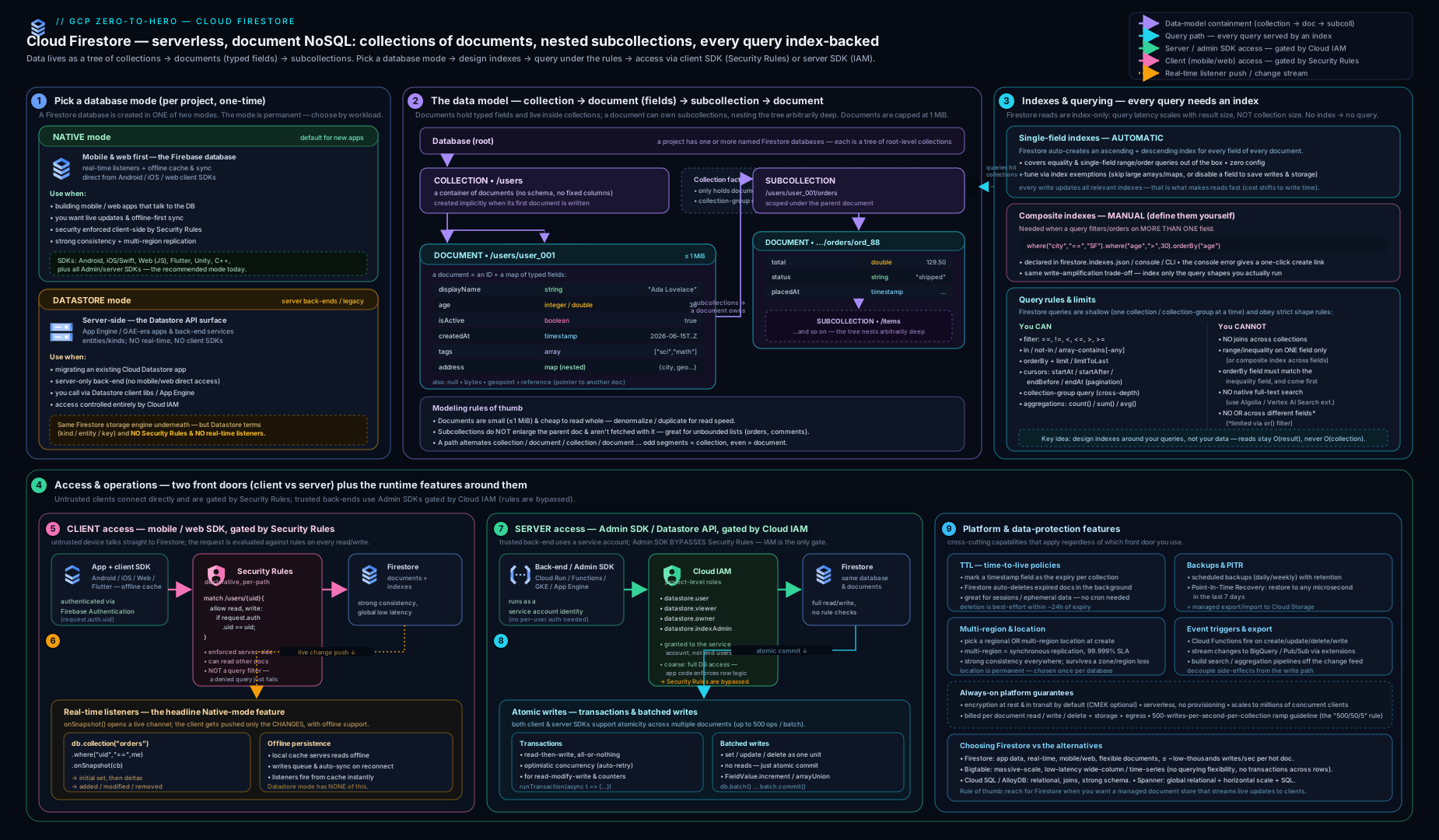
The diagram captures the whole model in one frame: the collection → document → field tree with a subcollection hanging off a document; the two access paths converging on the database — client SDKs gated by Security Rules on the left and server / Admin SDK gated by IAM on the right; the index layer underneath (automatic single-field plus declared composite) that every query reads from; and the durability stack — PITR, scheduled backups, export — with the regional vs multi-region replication choice. Keep this picture: a tree you query through indexes, two security gates for two callers, and a layered durability story.
Going deeper
The serverless surface hides a distributed database with real physics — key ranges, splits, sorted index tables, a commit protocol. Knowing that machinery turns “why is this slow / expensive / rejected?” from guesswork into diagnosis, and it is exactly the depth the Professional Cloud Architect and Professional Data Engineer exams probe.
How Firestore stores data, splits it, and the 500/50/5 rule
Firestore keeps both your documents and every index as entries in one giant, range-partitioned, sorted key-value space (the same lineage as Google’s Spanner/Bigtable infrastructure — strongly consistent, synchronously replicated). Contiguous ranges of that key space are grouped into splits (think “tablets”), and each split is served by one set of replicas. When a split grows too big or too hot, Firestore automatically splits it and rebalances the halves onto different servers. This auto-splitting is what lets one collection scale from ten documents to billions with no operator involvement.
The catch is that splitting takes time. A brand-new collection (or a new index) starts life as a single split on a single server. If you slam it with writes from a cold start, that one server is effectively the whole database and it saturates. Firestore’s guidance is the 500/50/5 rule: start a new collection at no more than 500 writes/second, then increase the rate by up to 50% every 5 minutes. Ramping gradually gives Firestore time to observe the load, split the range, and spread the new splits across servers — follow the ramp and you climb to hundreds of thousands of writes/sec; ignore it and you get errors and throttling on a cold collection.
Hotspotting is the same problem caused by where your keys land rather than how fast they arrive. Because the store is sorted, writes whose keys are monotonically increasing or sequential all land at the same end of the same split, so no amount of splitting helps — the hot edge just keeps moving to one server. Three classic ways to create a hotspot, and their fixes:
- Sequential document IDs (auto-increment counters,
msg-000001…, or timestamps as IDs). Adjacent IDs sort adjacently and pile onto one split. Fix: use Firestore’s auto-generated IDs, which are random and spread across the key space. - A monotonically increasing indexed field — e.g. every document carries
createdAt = now()and you index it. Even with random document IDs, the index oncreatedAtis hot at its tail because every new write appends to the same end. Fix: don’t index a high-write monotonic field you don’t need to range-query (add an exemption), or shard it (prefix with a random bucket). - Very high write rate to one document — the per-document ceiling is roughly 1 sustained write/second (a contention limit, not a hard quota). Fix: the sharded distributed counter pattern.
This is why “use random IDs, avoid monotonic index keys, shard hot counters” is repeated so often: all three are the same story about a sorted, range-split store.
How an index actually answers a query — and the index-merge trick
An index is just a sorted table whose rows are (indexed field value(s) … , document key). Answering a query is a single contiguous scan of a range of one such table: seek to the first matching entry, read forward until the filter stops matching or limit is hit, then fetch those documents by key. That single mechanism explains every query rule you learned:
- Latency depends on results, not collection size — you read only the slice of the index the results occupy.
- The inequality field must be the leading
orderBy— a range is a contiguous slice only if the index is sorted by that field first; order by anything else first and the matching rows are scattered through the index, so no single scan works, so Firestore demands a composite index shaped(equality fields…, range field, additional order fields…). - A composite index’s field order is load-bearing — it is the sort order of the concatenated key; it must match the query’s equalities → range/order shape.
The advanced nuance most people miss: Firestore does not always need a composite index for a multi-field query. For queries that are all equality filters, Firestore can perform a zig-zag merge join across several single-field indexes — it walks each field’s index in lock-step and emits only keys present in all of them — so where('a','==',1).where('b','==',2) often runs with no composite index. You need a composite index the moment a range/inequality or an orderBy on a different field enters the picture, because then a single sorted scan is required. (Overlapping array/in clauses also multiply the index scans, which is why those value lists are capped.)
Query Explain: proving what the planner did
You do not have to guess which index served a query. Firestore’s Query Explain returns the plan and, with analyze on, real execution stats — indexes used, index entries scanned, results returned, bytes, and billable reads — the direct analogue of SQL EXPLAIN ANALYZE.
# REST: run a query with analyze=true and read explainMetrics
curl -s -X POST \
  "https://firestore.googleapis.com/v1/projects/${PROJECT}/databases/(default)/documents:runQuery" \
  -H "Authorization: Bearer $(gcloud auth print-access-token)" -H "Content-Type: application/json" \
  -d '{ "explainOptions": { "analyze": true },
        "structuredQuery": { "from":[{"collectionId":"orders"}],
          "where":{"fieldFilter":{"field":{"fieldPath":"status"},"op":"EQUAL","value":{"stringValue":"paid"}}} } }'
The explainMetrics block reports indexesUsed, resultsReturned, and executionStats (read operations, index entries scanned, timing). If a query scans far more index entries than it returns, that is your signal to add a better composite index or tighten the filter. Use it in development to confirm a new index is doing what you think.
The cost model of the things you can’t see
Firestore bills document reads, writes, deletes and stored bytes — but three costs stay invisible until they bite:
- Index writes ride inside every write. Writing one document with N indexed fields performs the document write plus an index-entry write for each single-field index and each composite index that document participates in. A document with many indexed fields, or a large indexed array (each element is an index entry), can cost several times its “one write”. Exempt fields you never query, and watch the 40,000 index-entries-per-document limit on big arrays/maps.
get()/exists()in Security Rules are billed reads. Every rule lookup of another document (e.g. “is this user a member of the channel?”) is a real document read on the request’s critical path, and rules cap you at roughly 10 such lookups per single-document request (20 for a query). Denormalise membership (custom claims, or a field on the document) to avoid a read-per-check.- Aggregations are cheap but not free.
count(),sum(),avg()run server-side without returning documents, but they bill one document read per up to 1000 index entries scanned (rounded up). Counting a million matching documents is ~1000 reads, not one — still vastly cheaper than reading a million documents, but budget for it.
Firestore editions: Standard vs Enterprise (and MongoDB compatibility)
Everything above describes Firestore Standard edition — the classic document/collection API you reach through the Firebase and Admin SDKs. Firestore now also ships an Enterprise edition that exposes a MongoDB-compatible API: you connect with MongoDB drivers and the MongoDB Query Language (MQL) against a database backed by the same strongly-consistent, auto-scaling Firestore engine, gaining more expressive queries (a richer aggregation pipeline, operators the classic API lacks) and higher single-document throughput. Reach for Enterprise / MongoDB-compatibility when you are migrating a MongoDB workload or need its query expressiveness on a serverless GCP backend; stay on Standard for the Firebase client SDKs, real-time listeners and Security Rules, which are the Standard/Native experience. Like mode and location, the edition is a creation-time property of the database (current surface — confirm preview vs GA and per-region availability before you commit).
Triggers, change streams, and analytics
Firestore is an event source, not just a store:
- Cloud Functions triggers. A document create/update/delete can invoke a Cloud Function (2nd gen, via Eventarc) —
onDocumentCreated,onDocumentUpdated,onDocumentWritten, and so on. Note that TTL deletions and bulk deletes fire these triggers too, so a cleanup can cascade work; make handlers idempotent. - Streaming to BigQuery. The “Stream Firestore to BigQuery” Firebase Extension (and Dataflow templates) mirror document changes into BigQuery for analytics — the standard way to get the SQL, joins and
GROUP BY ... HAVINGthat Firestore itself won’t do. - Data bundles. You can serialise the result of a query into a bundle file, serve it from a CDN, and have clients load it locally — bootstrapping an app’s initial data with zero per-client reads. A strong cost optimisation for read-heavy, shared data (a product catalogue, a leaderboard).
Datastore mode’s quiet upgrade: strong consistency everywhere
A historical footnote that still surfaces in exams: legacy Cloud Datastore was only eventually consistent for global (non-ancestor) queries — you could write an entity and a subsequent query might not see it yet. Because Datastore mode now runs on the modern Firestore backend, that limitation is gone: all queries in Firestore-in-Datastore-mode are strongly consistent, ancestor or not. So “Datastore mode = eventual consistency” is outdated folklore; the only real reasons to choose Datastore mode remain backward compatibility with the Datastore API/entity model and server-only access.
Quotas and hard limits worth memorising
| Limit | Value | Why it matters |
|---|---|---|
| Document size | 1 MiB | Caps embedding; growing data → subcollection |
| Sustained writes to one document | ~1/second | Shard hot counters |
| New-collection write ramp | 500/50/5 | 500/s start, +50% every 5 min |
| Index entries per document | 40,000 | Big indexed arrays/maps blow this — exempt them |
| Composite indexes per database | 200 | Index deliberately; don’t over-index |
| Single-field index exemptions per database | 200 | — |
| Map / path nesting depth | 20 / 100 | Avoid deep nesting |
in / not-in / array-contains-any list length |
30 | Was 10; still bounded |
| Writes per batched write / ops per transaction | 500 | Split larger fan-outs |
| PITR window | 7 days | Rolling; enable in advance |
| TTL deletion latency | best-effort ~24 h | Not instant — enforce in queries too |
(These are current defaults; some are soft limits you can raise via a quota request. Always confirm against the live Firestore quotas page before designing to a specific number.)
Hands-on lab
We will create a Native-mode Firestore database, write and query documents with the CLI, trigger and create a composite index, set a TTL policy, enable PITR, and clean up. Firestore has a generous Always Free tier (a daily allowance of reads/writes/deletes and 1 GiB stored), so this lab typically costs nothing; we still clean up. Use a sandbox project.
0. Set context and enable the API.
gcloud config set project YOUR_SANDBOX_PROJECT
gcloud services enable firestore.googleapis.com
1. Create a Native-mode database in a region.
gcloud firestore databases create \
  --database='(default)' \
  --location=us-central1 \
  --type=firestore-native
Expected: the command reports the database created in firestore-native mode. Verify:
gcloud firestore databases describe --database='(default)' \
  --format="yaml(type, locationId, pointInTimeRecoveryEnablement)"
Expected: type: FIRESTORE_NATIVE, locationId: us-central1.
2. Write a few documents. (The gcloud firestore surface for document writes is limited; the simplest cross-platform way is the REST API via gcloud auth, but for the lab we use the Firebase CLI’s data tools or the console. Here we use gcloud to call the Firestore REST endpoint to create a document.)
ACCESS_TOKEN=$(gcloud auth print-access-token)
PROJECT=$(gcloud config get-value project)
curl -s -X POST \
  "https://firestore.googleapis.com/v1/projects/${PROJECT}/databases/(default)/documents/orders" \
  -H "Authorization: Bearer ${ACCESS_TOKEN}" -H "Content-Type: application/json" \
  -d '{ "fields": {
        "status":    { "stringValue": "paid" },
        "total":     { "integerValue": "4999" },
        "createdAt": { "timestampValue": "2026-06-15T09:00:00Z" } } }'
Expected: JSON describing the created document with an auto-generated name (path). Repeat with different status/total values to have data to query.
3. List the documents (a simple read).
curl -s \
  "https://firestore.googleapis.com/v1/projects/${PROJECT}/databases/(default)/documents/orders" \
  -H "Authorization: Bearer ${ACCESS_TOKEN}" | head -40
Expected: the documents you wrote.
4. Force a composite-index requirement. A query that filters on status and orders by createdAt needs a composite index. Run such a structured query and observe the error that hands you the index. (Using the runQuery REST endpoint.)
curl -s -X POST \
  "https://firestore.googleapis.com/v1/projects/${PROJECT}/databases/(default)/documents:runQuery" \
  -H "Authorization: Bearer ${ACCESS_TOKEN}" -H "Content-Type: application/json" \
  -d '{ "structuredQuery": {
        "from": [{ "collectionId": "orders" }],
        "where": { "fieldFilter": { "field": { "fieldPath": "status" },
                   "op": "EQUAL", "value": { "stringValue": "paid" } } },
        "orderBy": [{ "field": { "fieldPath": "createdAt" }, "direction": "DESCENDING" }] } }'
Expected: an error of type FAILED_PRECONDITION whose message contains a console URL to create the exact composite index (status ASC, createdAt DESC). Create it via CLI:
gcloud firestore indexes composite create \
  --database='(default)' \
  --collection-group=orders \
  --field-config=field-path=status,order=ascending \
  --field-config=field-path=createdAt,order=descending
Expected: the index is created and begins building. List it:
gcloud firestore indexes composite list --database='(default)' \
  --format="table(name.basename(), state)"
Expected: the index reaching state READY. Re-run the query from step 4 — it now succeeds.
5. Set a TTL policy. Suppose orders carry an expireAt timestamp; expire them automatically.
gcloud firestore fields ttls update expireAt \
  --collection-group=orders --database='(default)' --enable-ttl
gcloud firestore fields ttls list --collection-group=orders --database='(default)'
Expected: a TTL configuration on expireAt in state ACTIVE.
6. Enable point-in-time recovery.
gcloud firestore databases update --database='(default)' --enable-pitr
gcloud firestore databases describe --database='(default)' \
  --format="value(pointInTimeRecoveryEnablement)"
Expected: POINT_IN_TIME_RECOVERY_ENABLED.
7. Cleanup. Delete the documents you created (delete by path), remove the composite index, and — if this is a throwaway project — delete the database.
# Delete the composite index
gcloud firestore indexes composite list --database='(default)' --format="value(name)" \
  | xargs -I{} gcloud firestore indexes composite delete {} --quiet

# Delete the database entirely (only on a sandbox you own)
gcloud firestore databases delete --database='(default)' --quiet
Cost note. This lab fits inside the Firestore Always Free daily allowance (tens of thousands of reads/writes/deletes per day and 1 GiB storage), so it is normally free. Stored data, reads/writes beyond the free tier, PITR retention and multi-region replication are the things that cost money in production; the free tier easily covers a small lab. Deleting the database stops all storage charges.
Practice challenges
Work these in order — they escalate from beginner to advanced. Try each before opening the solution. No live runtime is assumed; every command is real and schema-correct, so you can run them in your own sandbox project. Replace (default), ${PROJECT} and placeholder IDs with your own.
Challenge 1 (beginner) — Stand up a Native-mode database and prove its mode. Create the (default) database in us-central1 in Native mode, then show its type and location.
<details> <summary>Solution</summary>
gcloud firestore databases create \
  --database='(default)' --location=us-central1 --type=firestore-native

gcloud firestore databases describe --database='(default)' \
  --format="yaml(type, locationId)"
Why: type and locationId are set once at creation and are permanent — this is the one command whose choices you can never undo, so verify them immediately.
</details>
Challenge 2 (beginner) — Read a path the way Firestore does. For workspaces/w1/channels/c9/messages/m42, state which segments are collections and which are documents, and whether workspaces/w1/channels names a document or a collection.
<details> <summary>Solution</summary>
Collections (odd positions): workspaces, channels, messages. Documents (even positions): w1, c9, m42. workspaces/w1/channels has three segments → it names a collection (a subcollection of document w1).
Why: paths alternate collection → document; an odd number of segments is always a collection and an even number a document — the rule that stops you trying to store a field directly on a collection. </details>
Challenge 3 (intermediate) — Earn a composite index. You run where('status','==','open').orderBy('createdAt','desc') on a tickets collection and it errors. Create the exact index from the CLI and confirm it reaches READY.
<details> <summary>Solution</summary>
gcloud firestore indexes composite create \
  --database='(default)' --collection-group=tickets \
  --field-config=field-path=status,order=ascending \
  --field-config=field-path=createdAt,order=descending

gcloud firestore indexes composite list --database='(default)' \
  --format="table(name.basename(), state)"
Why: filtering one field and ordering by another can’t be one contiguous scan of a single-field index, so Firestore requires a composite (status ASC, createdAt DESC) — automatic indexes only ever cover a single field.
</details>
Challenge 4 (intermediate) — Least-privilege rules, and why the broad query is rejected. Write Security Rules so a signed-in user can read and write only users/{uid} when uid is their own. Then explain why getDocs(collection(db,'users')) from a client fails, even though each user could read their own document.
<details> <summary>Solution</summary>
rules_version = '2';
service cloud.firestore {
  match /databases/{database}/documents {
    match /users/{uid} {
      allow read, write: if request.auth != null && request.auth.uid == uid;
    }
  }
}
Why: rules are not filters — the collection query could return other users’ documents, so Firestore rejects the whole query rather than trimming it. The client must scope the query (query only its own document/subcollection) so it never requests forbidden data. </details>
Challenge 5 (advanced) — Kill a write hotspot. An events collection uses event-<epochMillis> as the document ID and indexes a globally-incrementing seq field; at peak it throttles. Give three changes that remove the hotspot.
<details> <summary>Solution</summary>
# 1) Stop indexing the monotonic 'seq' field (removes the hot index tail)
gcloud firestore indexes fields update seq \
  --collection-group=events --database='(default)' --disable-indexes
- 2) Replace
event-<epochMillis>IDs with Firestore auto-generated IDs (random → spread across splits). - 3) If you must keep a per-second counter, use a sharded distributed counter (N shard docs, summed on read) instead of one document.
Why: a sorted, range-split store hotspots on monotonic keys and indexes and on any single document past ~1 write/sec — random IDs, an exemption on the monotonic index, and counter sharding attack all three surfaces at once. </details>
Challenge 6 (advanced) — Correct read-modify-write, plus a safety net. Write a transaction that decrements inventory/sku-42.qty only while it is above zero, explain why you must not send a confirmation email inside it, and enable PITR so a bad bulk write stays recoverable.
<details> <summary>Solution</summary>
await runTransaction(db, async (tx) => {
  const ref = doc(db, "inventory", "sku-42");
  const snap = await tx.get(ref);          // all reads first
  if (snap.data().qty < 1) throw new Error("out of stock");
  tx.update(ref, { qty: snap.data().qty - 1 });
});
gcloud firestore databases update --database='(default)' --enable-pitr
Why: transactions use optimistic concurrency and retry automatically on contention, so the callback can run several times — an email inside it would fire repeatedly; keep it pure. PITR (rolling 7 days) then lets you restore to a new database as of a minute before any bad write. </details>
Common beginner mistakes
These are misconceptions — the wrong mental model that produces the wrong instinct — not error messages. (For symptom → cause → fix, see the troubleshooting table below.)
- “Firestore is basically MongoDB / a SQL table, so I’ll just query however I like.” Firestore answers queries only from pre-built indexes, and it has no joins, no
GROUP BY ... HAVING, no substring search, and only boundedOR. Right model — design your documents around the exact queries and access path (client vs server) you’ll run; if you need joins or full-text, denormalise or mirror to BigQuery / a search service. - “I’ll pick Datastore mode because my app is server-side.” Native mode also serves servers, and it is a strict superset — clients, listeners and rules on top. Right model — choose Native for anything new; pick Datastore mode only to keep a legacy Cloud Datastore codebase alive. The choice is permanent.
- “Security Rules will filter each user down to the rows they’re allowed to see.” Rules allow or deny a whole operation; they are not a
WHEREclause. Right model — a query that could touch forbidden documents is rejected outright, so you must scope the query to only request permitted data, and then rules approve it. - “My Cloud Function ignores my Security Rules — that’s a bug.” The Admin SDK / server access bypasses rules entirely and is governed by IAM. Right model — rules guard untrusted clients; secure server code with a least-privilege
roles/datastore.userservice account and validate in your own code. - “I’ll keep the chat history in an array on the room document.” A growing array hits the 1 MiB document cap, and every append rewrites the whole document (and all its index entries). Right model — one subcollection document per message, queried by
createdAtwith cursors. - “Timestamps make great document IDs — they sort nicely.” Monotonic IDs (and monotonic indexed fields) concentrate every new write on one split → a hotspot no amount of scaling fixes. Right model — use auto-generated random IDs, exempt monotonic fields you don’t range-query, and shard hot counters.
- “
limit(20)makes the query cheap, and I’ll paginate with an offset.”limitbounds the result, and Firestore has no cheap offset — skipping rows still reads and bills them. Right model — paginate with cursors (startAfter(lastDoc)), which is O(page size) at any depth. - “Deleting the parent document deletes its subcollections.” It does not — subcollections are independent and survive the parent (even a non-existent “phantom” parent can own them). Right model — delete subcollection documents explicitly (recursive/bulk delete or a TTL policy).
Common mistakes & troubleshooting
| Symptom | Likely cause | Fix |
|---|---|---|
Query fails with FAILED_PRECONDITION: The query requires an index |
No composite index for that filter+order combination | Click the console link in the error (or gcloud firestore indexes composite create); wait for READY |
| “I filtered on a range and ordered by another field and it errors” | The inequality/range field must be the first orderBy |
orderBy the range field first, then the others; add the matching composite index |
| Client app can read data it shouldn’t (or all data) | Security Rules left in test mode (if true) or too permissive |
Write least-privilege rules; remember rules deny by default and are not filters |
| Admin SDK / Cloud Function ignores my Security Rules | IAM, not rules, governs server/Admin SDK access | Secure the service account’s IAM role (roles/datastore.user) and validate in code |
| Writes are slow / a document is a bottleneck | A single hot document (counter) hits the ~1 write/sec per-document limit | Use a sharded distributed counter; spread writes; use random IDs |
| Document write rejected — too large | Hit the 1 MiB document limit (unbounded array/map) | Move the growing data into a subcollection of small documents |
| Deleted a parent document but child data remains | Subcollections are not cascaded on parent delete | Delete subcollection documents explicitly (recursive delete / TTL / bulk delete) |
| Surprisingly high write bill | Every field is auto-indexed (asc + desc), so each write updates many index entries | Exempt large/unused fields from single-field indexing (gcloud firestore indexes fields update ... --disable-indexes) |
| Stale results in a real-time listener | Listener served from local cache (offline / fromCache) before server response |
Check the fromCache flag; the server snapshot follows |
not-in / != query missing some documents |
These operators exclude documents where the field is absent | Ensure the field exists, or model with a sentinel value |
Best practices
- Choose Native mode unless you are maintaining a legacy Cloud Datastore app — it is the superset and the choice is permanent.
- Model around your queries and access path. Decide embed-vs-reference per access pattern, denormalise for reads (no joins), and keep documents small and bounded — growing collections go in subcollections, not arrays.
- Use random/auto document IDs for write-heavy collections; avoid sequential/timestamp IDs to dodge hotspots; shard hot counters.
- Treat indexes as part of your schema. Source-control
firestore.indexes.json, deploy composite indexes through CI, and exempt big/unused fields to cut storage and write cost. - Paginate with cursors, never offsets; scope real-time listeners tightly to bound read cost.
- Write least-privilege Security Rules for client access (they default deny and are not filters) and least-privilege IAM for server access — never ship
allow ... if true. - Turn on PITR and scheduled backups for anything you would miss; remember restore is to a new database.
- Pick the location deliberately (regional for cost/latency, multi-region for region-failure survival) — it is permanent.
Security notes
- Two gates, two callers. Security Rules protect untrusted client SDK access (with Firebase Auth identities); IAM protects trusted server/Admin SDK access — the Admin SDK bypasses rules entirely.
- Default-deny rules. Start from deny and add the minimum; never deploy permissive test rules to production. Validate incoming data in rules (types, ownership, immutability), not just identity.
- Least-privilege IAM. Grant application service accounts
roles/datastore.user(orviewerfor read-only); reserveowner/admin roles for setup automation; use Workload Identity in GKE/Cloud Run so there are no service-account keys. - No secrets in documents. Keep credentials/keys in Secret Manager; large binaries belong in Cloud Storage with a reference field.
- Audit access with Cloud Audit Logs (admin activity on by default; enable data-access logs where required) and consider CMEK for regulated data and VPC Service Controls to prevent exfiltration.
- Rules are not query filters — a query that could return forbidden documents is rejected wholesale, so constrain queries to only ever request permitted data.
Cost & sizing
Firestore bills on operations and storage, not provisioned servers — there is nothing to size, so the levers are about how much you do:
- Document reads / writes / deletes. The primary cost. Every document a query returns is a read; every changed document a listener delivers is a read; every document write/delete is billed. Denormalise carefully (fan-out writes cost), scope queries and listeners tightly, and use aggregation queries (
count) instead of reading documents just to count them. - Index writes (hidden in write cost). Each indexed field adds index-entry writes per document write. Exempt fields you never query to cut this.
- Stored data. GiB-months of documents and indexes (indexes can be a large fraction of storage). PITR and backups add storage.
- Network egress. Reads to clients in other regions/continents incur egress; co-locate.
- Multi-region. Costs more than regional for both storage and writes (cross-region replication) — pay for it only where you need region-failure survival.
- Free tier. A daily Always Free allowance of reads/writes/deletes plus 1 GiB storage covers small apps and all labs.
Right-sizing in Firestore means modelling for fewer operations (the right denormalisation, the right indexes, cursor pagination, scoped listeners) rather than picking a machine.
Interview & exam questions
-
What is the difference between Firestore Native mode and Datastore mode, and can you switch? Both run on the same Firestore backend, but Native mode exposes client SDKs, real-time listeners, offline persistence and Security Rules; Datastore mode is server-only (IAM-only, no listeners/clients) and keeps the legacy Datastore entity/API for backward compatibility. The mode is fixed at database creation and cannot be changed — you migrate to a new database. Choose Native for new work.
-
Why does a Firestore query sometimes fail asking for an index? Because every query is served by an index — there are no scans. Single-field indexes are automatic, but a query that filters and orders on different fields (or filters on multiple fields) needs a composite index, which is not auto-created. Firestore returns a
FAILED_PRECONDITIONerror with a link to build the exact index. -
Explain the inequality/range-and-order rule. If a query uses a range/inequality filter on a field and also orders results, the first
orderBymust be on that same field, and a matching composite index must exist. Historically range filters were limited to one field per query; modern Firestore relaxed that, but the order-the-inequality-field-first discipline (and the index) remains. -
Security Rules vs IAM — which applies when? Security Rules govern client SDK access (mobile/web with Firebase Auth identities) and run at the Firestore boundary, default-deny. IAM governs server/Admin SDK and
gcloudaccess; the Admin SDK bypasses Security Rules and is limited only by its IAM role. Datastore mode has IAM only. -
Are Security Rules a query filter? No. Rules allow or deny an operation; they do not narrow results. A query that could return documents the rules forbid is rejected entirely, so you must constrain the query to only request permitted documents.
-
Batched write vs transaction? A batched write atomically applies up to 500 writes with no reads and no contention check. A transaction is a read-then-write with optimistic concurrency — it re-runs if any read document changed before commit, guaranteeing correct read-modify-write. Use transactions for counters/inventory; batches for fan-out and bulk writes.
-
What is the per-document write limit and how do you exceed a hot counter? A single document supports roughly one sustained write per second. For a high-write counter, use a sharded/distributed counter (split it into N documents and sum on read) to multiply throughput.
-
How do you paginate efficiently, and why not use offsets? Use cursors (
startAfterwith the last document or a field value). Offsets still read and bill the skipped entries (O(offset)); cursors are O(page size) and anchored in the index. -
Why can’t you store an ever-growing chat log in one document’s array? The 1 MiB document limit — and every write rewrites the whole document. Put each message in a subcollection of small documents instead.
-
What does TTL do and how immediate is it? A TTL policy auto-deletes documents once a nominated timestamp field passes. Deletion is best-effort within ~24 hours, not instant — enforce hard expiry in queries/rules too. TTL deletes still bill and fire listeners/triggers.
-
Regional vs multi-region Firestore? Regional replicates synchronously across zones in one region (zone-failure tolerant, lower cost/latency). Multi-region replicates synchronously across regions (region-failure tolerant, 99.999% SLA, higher cost/latency). The location is permanent.
-
When would you choose Firestore over Bigtable or Cloud SQL? Firestore for app/document data needing real-time sync, flexible schema, strong consistency and direct client access at moderate per-key throughput. Bigtable for massive, write-heavy, low-latency wide-column workloads (time-series, IoT, analytics keyed by row) at huge scale. Cloud SQL when you need a relational model with joins, transactions across rows, and SQL on a single-primary managed engine.
-
How do you recover from a bad bulk write made an hour ago? Use point-in-time recovery (rolling 7-day window) to restore the database as of a minute before the mistake into a new database, verify, then repoint — or restore a scheduled backup. Restore is never in place.
-
Does deleting a document delete its subcollections? No. Subcollections are independent; you must delete their documents explicitly (recursive delete, bulk delete, or a TTL policy).
-
Does a multi-field equality query always need a composite index? No. For all-equality filters Firestore can perform a zig-zag merge join across the automatic single-field indexes, so
where('a','==',1).where('b','==',2)often needs no composite index. You need one the moment a range/inequality or anorderByon a different field appears, because that requires a single sorted scan.
Quick check
- You are building a new mobile app that needs offline support and live updates — Native mode or Datastore mode?
- A query filters
where('status','==','open')andorderBy('createdAt','desc')and errors. What do you create, and why? - True/false: Security Rules act as a filter that trims a query’s results to the documents a user may see.
- Which atomicity primitive guarantees a correct read-modify-write of a counter under contention?
- You need to keep ever-growing per-user event records. Where do they go, and why not in the user document?
Answers
- Native mode — it is the only mode with client SDKs, offline persistence, real-time listeners and Security Rules.
- A composite index on
(status ASC, createdAt DESC)— every Firestore query is served by an index, and a filter-plus-order on different fields needs a composite one (not auto-created). - False — rules allow or deny an operation as a whole; they are not filters. A query that could return forbidden documents is rejected; you must constrain the query.
- A transaction (optimistic concurrency, automatic retry on conflict). For very high write rates, shard the counter.
- In a subcollection of small documents under the user (
users/{uid}/events/{eventId}) — a single document caps at 1 MiB and an unbounded array would blow it and rewrite the whole doc on every append.
Exercise
Design and partially build a small “team chat” data model in a sandbox project, Native mode:
- Create a Native-mode database in a region near you; enable PITR and a daily backup schedule.
- Model
workspaces/{wsId}/channels/{chId}/messages/{msgId}with messages carryingauthorId,text,createdAt, and anexpireAtfor ephemeral messages. - Write Security Rules so a user can read a channel only if they are a member (use a
get()lookup of a membership document) and can create messages only as themselves with a server timestamp; make messages immutable. - Add the composite index needed to list a channel’s messages by
createdAtfiltered byauthorId, deploying it from afirestore.indexes.json. - Exempt the
textfield from single-field indexing (you never query message text) and note the storage/write-cost effect. - Add a TTL policy on
expireAtfor ephemeral messages, and a sharded counter forchannels/{chId}unread-message counts. - Implement a transaction that decrements a user’s “daily message quota” document atomically when they post.
- Use PITR to “undo” a deliberately bad bulk delete by restoring to a new database and comparing.
Write a short paragraph for each of the two security gates (Rules vs IAM) explaining which callers each protects and what would break if you relied on the wrong one.
Certification mapping
- Associate Cloud Engineer (ACE): creating and managing Firestore databases, the Native-vs-Datastore-mode choice, basic IAM roles, backups/exports and locations appear directly.
- Professional Cloud Architect (PCA): choosing the right datastore (Firestore vs Bigtable vs Cloud SQL vs Spanner), designing for the data model and access path, multi-region durability, Security Rules vs IAM, and cost/scaling trade-offs.
- Professional Data Engineer (PDE): the data model, indexing and query limitations, transactions/consistency, TTL, and exporting Firestore to BigQuery for analytics.
- Professional Cloud Security Engineer (PCSE): Security Rules design, least-privilege IAM, CMEK, VPC Service Controls and audit logging for Firestore.
Glossary
- Database — a top-level Firestore container (a project may hold several); each has a fixed mode and location.
- Mode — Native (full features: clients, listeners, rules) or Datastore (server-only, legacy Datastore API); fixed at creation.
- Edition (Standard / Enterprise) — the Firestore feature tier: Standard is the classic document API; Enterprise adds MongoDB compatibility (MQL and MongoDB drivers). A creation-time property.
- Collection — a schemaless container of documents (loose analogue of a table); created/destroyed implicitly with its documents.
- Collection-group query — a query over every collection sharing a name at any depth (
collectionGroup('orders')); needs a collection-group-scoped index. - Document — a record of fields identified by an ID; the unit of atomic read/write and the listener target; max 1 MiB.
- Field — a typed key/value inside a document (string, number, boolean, timestamp, map, array, reference, geopoint, bytes, null).
- Subcollection — a collection nested under a document (
users/{uid}/orders); independent of the parent (not cascade-deleted). - Reference — a typed field holding a path to another document; resolving it is a separate read (no auto-join).
- Denormalisation — deliberately duplicating data across documents to serve a screen in one read (since Firestore has no joins); trades write fan-out for read speed.
- Single-field index — automatic ascending+descending (+array-contains) index on every field; enables ad-hoc filter/order.
- Composite index — a multi-field index you declare; required for filter-plus-order on different fields or multi-field filters (beyond a zig-zag merge join).
- Index exemption (field override) — disabling automatic indexing for a field to cut storage/write cost.
- Split (tablet) — a contiguous range of the sorted key space served by one replica set; Firestore auto-splits hot/large ranges.
- Hotspot — a concentration of reads/writes on one split caused by sequential/monotonic keys or indexes; the enemy of write throughput.
- 500/50/5 rule — ramp a new collection’s writes: start ≤500/sec, then +50% every 5 minutes, so Firestore can split and rebalance.
- Query Explain — Firestore’s
EXPLAIN/EXPLAIN ANALYZEequivalent: returns the plan, indexes used and (withanalyze) execution stats for a query. - Security Rules — declarative, default-deny access control for client SDK access (with Firebase Auth); not a query filter.
- IAM — Google Cloud access control for server/Admin SDK access (
roles/datastore.*); bypasses Security Rules. - Transaction — atomic read-then-write with optimistic concurrency and automatic retry on conflict.
- Optimistic concurrency — the transaction model: read, then commit only if the read documents were unchanged, else retry automatically.
- Batched write — up to 500 writes committed atomically with no reads/contention check.
- Real-time listener — a subscription that pushes live document/query changes to a client (Native mode only).
- Offline persistence — the Native-mode client SDK’s local cache that serves reads and queues writes while offline, reconciling on reconnect.
- Cursor — a pagination anchor (
startAfter/startAtwith a value or document snapshot) giving O(page-size) paging with no offset cost. - Aggregation query — server-side
count()/sum()/avg()returning a number without fetching documents (billed per up-to-1000 index entries). - Sharded (distributed) counter — spreading a high-write counter across N documents (summed on read) to beat the ~1 write/sec-per-document ceiling.
- TTL policy — automatic deletion of documents after a nominated timestamp field passes (best-effort within ~24h).
- PITR — point-in-time recovery, restoring the database as of any minute within a rolling 7-day window (to a new database).
- Strong consistency — a read always reflects the latest committed write; Firestore is strongly consistent by default in both modes on the modern backend.
- Regional / multi-region — synchronous replication across zones (regional) or across regions (multi-region, 99.999% SLA); permanent.
Next steps
- Add a cache layer: Google Cloud Memorystore, In Depth (
gcp-memorystore-deep-dive-redis-memcached-clusters) — Redis, Redis Cluster and Memcached for the cache that often fronts Firestore reads. - Compare the relational side: Google Cloud SQL, In Depth (
gcp-cloud-sql-deep-dive-engines-ha-replicas-backups) — engines, HA, read replicas and backups when you need joins and SQL. - Scale to wide-column or global: for massive write-heavy NoSQL look at Bigtable, and for globally-distributed strong consistency with SQL see Spanner schema design (
gcp-spanner-schema-design-interleaving-hotspot-avoidance).