In a nutshell
Imagine a mailroom. Instead of a clerk walking to the mailbox every fifteen minutes to check for post, a small bell rings the instant a letter drops through the slot. One clerk picks up that one letter, reads it, files it in the right cabinet, and sits back down. Nobody is paid to stand and wait; work happens only when a letter actually arrives. That is a serverless, event-driven data pipeline, and this lesson builds one on Google Cloud, piece by piece, with a real story to hang every decision on.
Here is the whole idea in one line: a file lands in storage, that arrival is an event, the event wakes up a small piece of code, the code cleans the data and drops it into a database you can chart. No servers you rent by the hour, no timer script polling in the background, no machine idling overnight. You pay only for the seconds your code runs and the data you keep — which, at a small organisation’s volume, is pennies a month.
The shape you will see over and over is Cloud Storage → Pub/Sub → Cloud Functions → BigQuery → a dashboard. Each arrow is one stage handing off to the next, and each stage is a managed Google service you never patch or babysit. Do not worry if those names are new — every one of them is explained as we go, and there is a plain-language glossary at the end.
By the time you finish, you will know why a message queue (Pub/Sub) sits in the middle rather than wiring the bucket straight to your code, why “the same file arrived twice” is normal and how to make that completely harmless, roughly what the whole thing costs, and when to put the toy down and reach for the heavier tool (Dataflow) instead.
Level: Beginner · Time: ~30 min
Before you start — you’ll get the most from this if you’ve already met a few basics: what a Cloud Storage bucket is (a durable container of files), the idea of an IAM role and a service account (a non-human identity your code runs as), and enough Python and SQL to read a short snippet without panic. None of these are strictly required — we explain each one where it first appears — but a nodding acquaintance helps.
After this lesson you’ll be able to:
- Explain, in plain words, why event-driven beats a scheduled cron job for file-arrival work.
- Stand up the five-service pipeline — Cloud Storage, Pub/Sub, Cloud Functions (2nd gen), BigQuery, Looker Studio — with real
gcloudandbqcommands. - Wire a Cloud Storage object-finalize event through Pub/Sub to a function, including the one IAM grant everyone forgets.
- Make a load idempotent so at-least-once delivery can never double-count a delivery.
- Keep BigQuery cost measured in coins using partitioning, clustering, and a required partition filter.
- Decide when to stay on Cloud Functions and when a workload has outgrown it and belongs on Dataflow.
The problem, in one scene
A regional agribusiness cooperative — 18,000 member farmers selling grain to a network of silos and processors — has a problem that sounds boring and is actually expensive. Every truck that crosses a weighbridge produces a CSV: load weight, moisture, protein, grade, the member ID, the silo, a timestamp. Those files arrive all day from forty sites, by FTP, email attachment, and a phone app, and today they pile up in a shared drive until someone copies them into a spreadsheet on Friday. By the time the cooperative knows that one silo’s moisture readings drifted out of spec, three days of intake have already been mispriced, and a member dispute is already a phone call away. The head of operations asks for something modest and exact: “When a weighbridge file lands, I want it in our reporting database within a minute, validated, and on a dashboard the regional managers can open — and I do not want to hire a data-engineering team to babysit it.”
That last clause is the whole brief. The cooperative has two developers and no appetite for servers to patch. This is the perfect shape for a serverless, event-driven data pipeline on Google Cloud — the canonical starter ETL: a file lands in Cloud Storage, an event fires, a Cloud Function validates and transforms it, the row lands in BigQuery, and Looker Studio draws the picture. No clusters, no nightly cron job, no machine sitting idle at 3 a.m. waiting for work. You pay for the seconds your code runs and the bytes you store and scan, and nothing else. This article builds that pipeline the way a junior engineer should learn it — simple at the core, but with the security and operational habits that keep it from becoming a liability the day it actually matters.
Why event-driven, and why not a cron job
The instinct for a first pipeline is a scheduled script: every fifteen minutes, list the new files, process them, sleep. It works in a demo and fails in three predictable ways. It adds up to fifteen minutes of latency to every file even when the bus is empty — the opposite of “within a minute.” It does redundant work scanning an unchanged bucket, and it is fragile: if one malformed file throws, the whole batch can die, and the next run may reprocess or skip depending on how carefully you wrote it. Worst of all, scaling it means making the schedule tighter, which makes the wasted scanning worse.
Event-driven inverts all of that. The arrival of a file is the trigger. Cloud Storage emits an event the instant an object is finalized; that event runs exactly one function invocation for exactly that one file; and if forty files land in the same second, the platform runs forty invocations in parallel without you configuring a thing. There is nothing running between events, so the idle cost is zero. This is the core lesson of serverless: stop polling for work and let the work announce itself.
| Approach | Latency per file | Idle cost | Behavior under a burst | Failure blast radius |
|---|---|---|---|---|
| Scheduled cron script on a VM | Up to the interval | Pay 24/7 for the VM | Queues behind one worker; slows down | One bad file can kill the batch |
| Event-driven serverless | Seconds | Zero between events | Auto-parallel, one invocation per file | One bad file fails alone, routed to a dead-letter queue |
Architecture overview
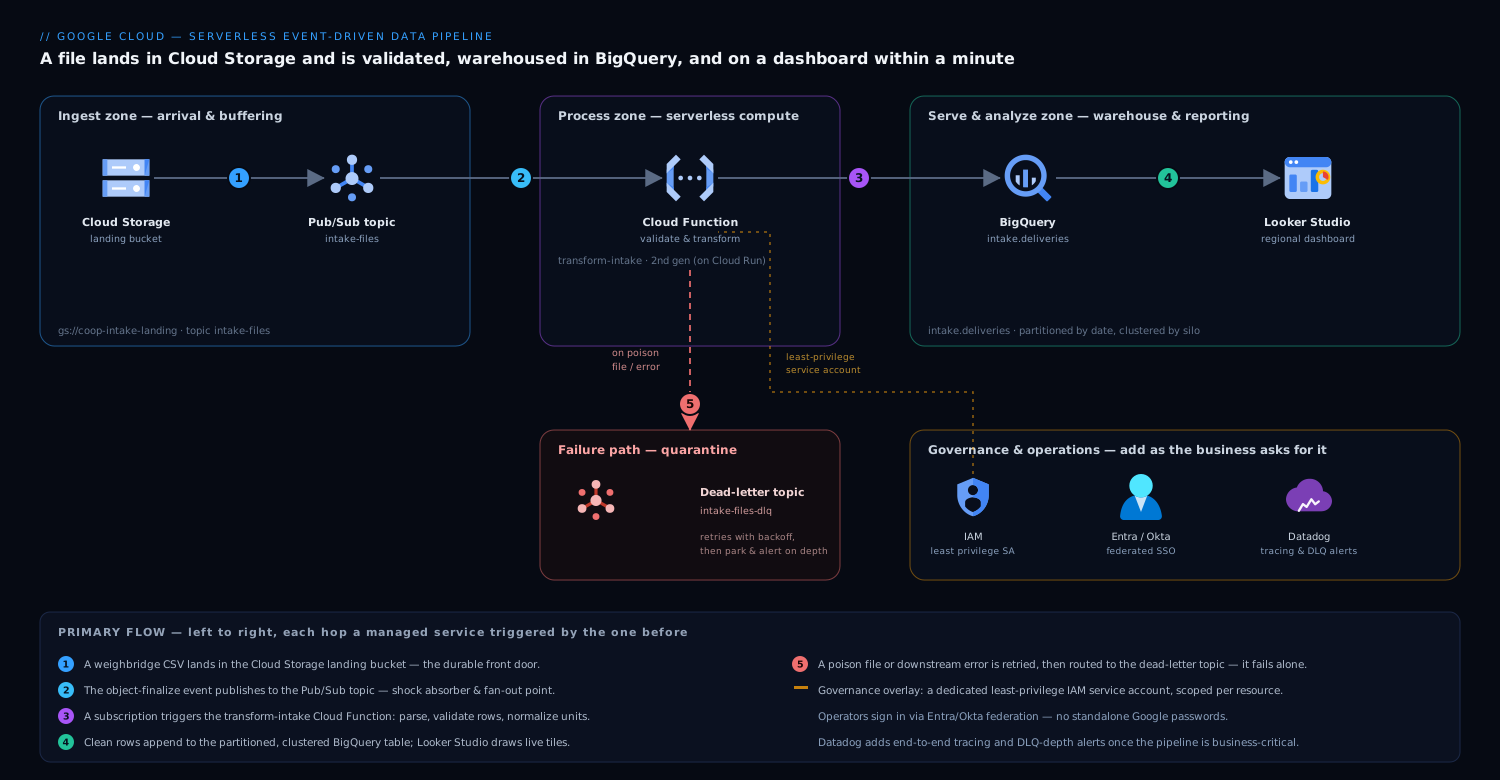
The pipeline is a short, one-directional flow — data moves left to right through five managed services you never run yourself: a file lands in Cloud Storage, its arrival is announced on Pub/Sub, a Cloud Function validates and shapes it, clean rows land in BigQuery, and Looker Studio draws the picture. Read it as a relay race where each runner hands off the baton and stops — nothing sits idle between events waiting for work.
-
A weighbridge file lands in Cloud Storage. Each site’s app or FTP gateway writes its CSV into a single landing bucket, namespaced by site and date (
gs://coop-intake-landing/site=silo-07/dt=2026-06-10/run-1432.csv). The bucket is the front door and the durable record — the raw file is never deleted, only processed. -
The finalize event flows through Pub/Sub. Rather than wiring the bucket directly to a function, the object-finalize notification publishes to a Pub/Sub topic (
intake-files). This single indirection is the most important design choice in the whole pipeline, and we will justify it in its own section. For now: Pub/Sub is the shock absorber and the fan-out point. -
A Cloud Function validates and transforms. A subscription on that topic triggers the
transform-intakeCloud Function (2nd gen, which runs on Cloud Run underneath and gives you concurrency and proper scaling). The function reads the file from Cloud Storage, parses the CSV, checks each row (is moisture a number between 0 and 100? is the member ID known? is the grade in the allowed set?), normalizes units, and shapes each row to match the BigQuery schema. Clean rows go forward; a file that fails parsing is rejected as a unit. -
Clean rows land in BigQuery. The function inserts the validated rows into a BigQuery table (
intake.deliveries), partitioned by delivery date and clustered by silo. BigQuery is the warehouse and the query engine in one — serverless, no instance to size, billed by storage plus bytes scanned per query. -
Looker Studio draws the dashboard. A Looker Studio report connects straight to the BigQuery table. Regional managers open one URL and see live tiles: intake volume by silo today, moisture trend per site, rejected-load count, top members by tonnage. No export, no spreadsheet, no Friday.
-
Bad messages go to a dead-letter topic. If the function throws — a corrupt file, a transient BigQuery error, a bug — Pub/Sub retries with backoff, and after a set number of attempts the message is routed to a dead-letter topic (
intake-files-dlq) instead of being lost or retried forever. That queue is where you look on Monday morning, and it is what lets one bad file fail alone.
The control flow is just as short: there is no orchestrator, no scheduler, no always-on coordinator. Each component is triggered by the one before it and does exactly one job. That is what “event-driven” buys you — the architecture diagram and the runtime behavior are the same shape.
Why Pub/Sub in the middle, not a direct trigger
You can point a Cloud Function straight at a bucket. For a learning exercise that is fine. For the cooperative’s real pipeline, the Pub/Sub hop earns its place, and understanding why is the difference between a toy and a system.
It decouples arrival from processing. If a deploy is mid-flight, or BigQuery has a momentary hiccup, or you simply pushed a bug, a direct trigger can drop or mishandle the event. With Pub/Sub, the message sits durably in the topic until a healthy subscriber acknowledges it. Files that arrive during a thirty-second deploy are processed thirty seconds later, not lost.
It gives you retries and a dead-letter queue for free. Pub/Sub redelivers an unacknowledged message with exponential backoff and, after a configured maximum, parks it in the dead-letter topic. You get at-least-once delivery and a quarantine for poison messages without writing a line of retry logic.
It is the natural fan-out point. Today one function consumes intake-files. Tomorrow the cooperative wants a second consumer that pushes high-moisture alerts to operations, and a third that mirrors raw events to a compliance archive. With Pub/Sub you add a second subscription to the same topic — the new consumer gets its own copy of every event, and the original pipeline never knows or cares. A direct bucket-to-function trigger cannot do this; you would be back to re-architecting. Decoupling now is cheap; retrofitting it later is not.
# transform-intake — Cloud Function (2nd gen), Python, triggered by Pub/Sub
import base64, csv, io, json
from google.cloud import storage, bigquery

storage_client = storage.Client()
bq = bigquery.Client()
TABLE = "coop-data-prod.intake.deliveries"

def handle_event(cloud_event):
    # Pub/Sub delivers the GCS finalize notification as the message payload
    msg = json.loads(base64.b64decode(cloud_event.data["message"]["data"]))
    bucket, name = msg["bucket"], msg["name"]

    raw = storage_client.bucket(bucket).blob(name).download_as_text()
    rows, errors = [], []
    for i, r in enumerate(csv.DictReader(io.StringIO(raw))):
        ok, cleaned = validate_and_normalize(r)        # business rules live here
        (rows if ok else errors).append(cleaned or {"line": i, "raw": r})

    if rows:
        # insert_rows_json fails loudly -> Pub/Sub retries -> DLQ after max attempts
        if bq.insert_rows_json(TABLE, rows):
            raise RuntimeError("BigQuery insert failed; let Pub/Sub retry")
    log_rejects(bucket, name, errors)                  # rejects are data, not crashes
Notice the two failure styles in that snippet. A whole-file failure (cannot download, BigQuery insert errors) raises, so Pub/Sub retries and eventually dead-letters — the right move for transient or systemic problems. A single-row failure (one truck’s moisture is the string “wet”) is data, not a crash: the row is logged to a rejects table and the rest of the file proceeds. Beginners often conflate these and let one bad row kill 500 good ones. Separate them.
Wiring the event trigger — from bucket to function
We keep saying “the bucket publishes to a topic and a subscription triggers the function,” but what actually connects those pieces? It is four commands, and doing them by hand once is the fastest way to understand what any Terraform or console click is really setting up. This is the plumbing behind the diagram.
# 1) The topic the bucket will announce arrivals on
gcloud pubsub topics create intake-files

# 2) Let Cloud Storage publish to that topic — the step everyone forgets.
#    Cloud Storage publishes as its own "service agent" identity. Find it:
gcloud storage service-agent --project=coop-data-prod
#    ...then grant that agent Publisher on the topic:
gcloud pubsub topics add-iam-policy-binding intake-files \
  --member="serviceAccount:service-PROJECT_NUMBER@gs-project-accounts.iam.gserviceaccount.com" \
  --role="roles/pubsub.publisher"

# 3) Tell the bucket to announce every finalized object to that topic
gcloud storage buckets notifications create gs://coop-intake-landing \
  --topic=intake-files \
  --event-types=OBJECT_FINALIZE

# 4) Deploy the 2nd-gen function, triggered by the topic
gcloud functions deploy transform-intake \
  --gen2 \
  --region=us-central1 \
  --runtime=python312 \
  --source=. \
  --entry-point=handle_event \
  --trigger-topic=intake-files \
  --service-account=sa-transform-intake@coop-data-prod.iam.gserviceaccount.com \
  --max-instances=50
Step 2 is the classic beginner trap: you wire everything up, upload a file, and nothing happens — no error, no invocation, just silence. The reason is almost always that the Cloud Storage service agent was never granted roles/pubsub.publisher on the topic, so the bucket’s announcements are dropped on the floor. The bucket cannot publish to a topic it has no permission on, and Storage does not shout about it. Grant the publisher role and the file that “did nothing” suddenly flows.
Step 4 quietly does more than it looks. A 2nd-gen function triggered with --trigger-topic is wired through Eventarc: the deploy creates an Eventarc trigger, which in turn creates a Pub/Sub push subscription that POSTs each message to the function’s private Cloud Run URL. You do not manage that subscription day to day, but knowing it exists explains where retries, the ack deadline, and the dead-letter policy get configured. For the full mechanics of triggers, runtimes, and Eventarc routing, see Cloud Functions (2nd gen) & Eventarc.
IAM and least privilege — the part you cannot skip
The pipeline is small, which makes it tempting to give the function broad permissions “to keep moving.” Resist. The cooperative is handling member-linked commercial data, and the security posture is set here at the start, cheaply, or bolted on later, painfully. The rule is least privilege: every identity gets exactly the permissions it needs and nothing more.
Give the function its own dedicated service account — never the default Compute service account, which is over-permissioned by design. Grant it precisely four things, scoped to the specific resources:
| Identity | Role | Scoped to | Why this and nothing more |
|---|---|---|---|
sa-transform-intake |
roles/storage.objectViewer |
the landing bucket only | Read the file it was told about — not write, not delete, not other buckets |
sa-transform-intake |
roles/pubsub.subscriber |
the intake-files subscription |
Pull and ack its own messages |
sa-transform-intake |
roles/bigquery.dataEditor |
the intake dataset only |
Append rows to its tables — not to every dataset in the project |
sa-transform-intake |
roles/bigquery.jobUser |
the project | Run the insert job |
# Terraform — a function identity that can do its job and nothing else
resource "google_service_account" "transform_intake" {
  account_id   = "sa-transform-intake"
  display_name = "Intake transform function"
}

resource "google_bigquery_dataset_iam_member" "writer" {
  dataset_id = google_bigquery_dataset.intake.dataset_id   # dataset scope, not project
  role       = "roles/bigquery.dataEditor"
  member     = "serviceAccount:${google_service_account.transform_intake.email}"
}

resource "google_storage_bucket_iam_member" "reader" {
  bucket = google_storage_bucket.landing.name              # this bucket only
  role   = "roles/storage.objectViewer"
  member = "serviceAccount:${google_service_account.transform_intake.email}"
}
Two habits make this real. First, define it in Terraform, not by clicking in the console — the access becomes reviewable, diffable, and reproducible, and an over-broad grant shows up in a pull request instead of in an incident. Second, scope at the resource level (this bucket, this dataset), never the project, so a future bug or a leaked token cannot reach beyond the one job. The humans who operate the pipeline get their own access through your corporate identity provider — the cooperative federates Google Cloud sign-in through Microsoft Entra ID (or Okta, the same pattern) so the two developers log in with their managed company accounts and conditional-access rules, and there are no standalone Google passwords to leak or to forget to revoke when someone leaves.
Cost — why this is nearly free at the cooperative’s size
The headline reason a junior team should reach for this architecture is that at low-to-moderate volume it costs almost nothing, because every component bills per use and the per-use rates are tiny.
- Cloud Storage charges for bytes stored. A few hundred MB of daily CSVs is cents a month; lifecycle-tier the raw files to cheaper storage after 30 days.
- Pub/Sub bills per message volume. Tens of thousands of small intake events a day sit comfortably inside the free tier or just past it — single-digit currency.
- Cloud Functions (2nd gen) bills per invocation and per GB-second of compute, with a generous free tier. A function that runs for two seconds, a few tens of thousands of times a month, is again single-digit cost. There is no charge while no files are arriving — the defining economic property versus an always-on VM.
- BigQuery bills for storage plus bytes scanned per query. This is the one line that can surprise you, and the mitigations are simple and central to the design.
The reason the table is partitioned by delivery date and clustered by silo is cost, not just tidiness. A Looker Studio tile asking for “today’s intake at silo-07” scans only today’s partition for that silo — kilobytes — instead of the entire history. Without partitioning, every dashboard refresh scans the whole table and the bill scales with your data’s age, not the question. Partition-and-cluster on day one and the cooperative’s BigQuery cost stays measured in coins even as years of intake accumulate. As scale grows toward steady, high-volume querying, switch BigQuery from on-demand to a capacity/slot model for predictable spend — but that is a later optimization, not a starting concern.
Scaling, failure modes, and what they look like
Scaling is mostly automatic, with two knobs you must set. Cloud Functions scale out by running more concurrent instances as Pub/Sub delivers more messages — a forty-file burst becomes parallel invocations with no configuration. The catch is the thing downstream of the function: BigQuery streaming inserts and any external system have limits, and an unbounded swarm of function instances can overwhelm them. So set a maximum instance count on the function as a safety valve, and set a sane Pub/Sub acknowledgment deadline so a slow invocation is retried rather than double-counted. These two limits are the difference between graceful load and a self-inflicted stampede.
Name the failure modes before they page you:
- A poison file — a CSV with a wrong delimiter or a header the parser chokes on. The function raises, Pub/Sub retries a few times, and the message lands in the dead-letter topic
intake-files-dlq. Mitigation: alert on DLQ depth so a human triages it Monday morning, and keep the raw file in the bucket so it can be reprocessed after a fix. - A duplicate event — Pub/Sub guarantees at-least-once, not exactly-once, so a function can occasionally see the same file twice. Mitigation: make the load idempotent — derive a deterministic row ID from the file name plus a line hash, or stage-then-
MERGEinto BigQuery, so a replay overwrites rather than duplicates. This is the single most important correctness habit in event-driven pipelines, and beginners skip it. - A schema drift — a site updates its app and adds a column. Mitigation: validate against an explicit schema and route unexpected shapes to the rejects table rather than letting them silently corrupt the warehouse.
- A downstream outage — BigQuery is briefly unavailable. Mitigation: you already have it — the insert raises, Pub/Sub holds the message durably and redelivers, and nothing is lost. This is precisely what the Pub/Sub hop bought you.
Idempotency by example — making at-least-once safe
The duplicate-event bullet above is the one beginners wave past, so let us slow down and make it concrete, because it is the correctness idea the whole pattern stands on.
What “at-least-once” actually means. Pub/Sub promises to deliver each message one or more times — almost always exactly once, but occasionally twice. It happens when your function is slow to acknowledge a message, the ack deadline lapses, and Pub/Sub, assuming the message was lost, redelivers it just as your original run finishes. The push subscriptions that Eventarc creates for a function are at-least-once; there is no exactly-once mode on that path. So you do not prevent duplicates — you make them harmless. The precise guarantees, and how the pull path can offer exactly-once and ordering, are covered in Pub/Sub: exactly-once, ordering & dead-letter flow control.
The trick: a deterministic ID plus an insert-if-absent write. Give every row an ID computed only from stable inputs — here, the file name and the line number. The same file reprocessed produces the exact same IDs, every time. That determinism is the whole game.
import hashlib

def row_id(file_name: str, line_no: int) -> str:
    # Same file + same line -> same ID, every time. That determinism is the whole trick.
    return hashlib.sha256(f"{file_name}:{line_no}".encode()).hexdigest()
Then, instead of blindly appending, the function stages each run’s rows in a small per-run table and folds them into deliveries with a MERGE that inserts only IDs it has never seen:
-- The function writes each batch to a per-run staging table, then runs this MERGE.
MERGE `coop-data-prod.intake.deliveries` AS target
USING `coop-data-prod.intake._staging_run1432` AS source
ON target.row_id = source.row_id
WHEN NOT MATCHED THEN
  INSERT (row_id, member_id, silo, delivery_date, weight_kg, moisture_pct, protein_pct, grade)
  VALUES (source.row_id, source.member_id, source.silo, source.delivery_date,
          source.weight_kg, source.moisture_pct, source.protein_pct, source.grade);
Read the MERGE in plain English: for each staged row, if a row with that row_id already exists, do nothing; otherwise insert it. Deliver the same file twice and the second run’s rows all match what is already there, so WHEN NOT MATCHED fires for none of them — zero duplicates. You have turned at-least-once delivery into an exactly-once effect without any exactly-once machinery. If a site can legitimately correct an earlier file (a re-weigh), add a WHEN MATCHED THEN UPDATE SET ... clause and the same pattern becomes a safe upsert. This one habit is what separates a pipeline you can trust with member payments from one that quietly overcounts.
Going deeper
Everything above ships the cooperative’s pipeline. This section is for the reader who wants to know what is happening under the managed surface, where the sharp edges are, and how the same shape holds up under real load. Skip it on a first read; come back when the pipeline is live.
What “2nd gen” actually is (Cloud Run and Eventarc underneath)
A 2nd-gen Cloud Function is not a separate runtime — it is a Cloud Run service with an Eventarc trigger in front of it. --trigger-topic provisions an Eventarc trigger that creates a Pub/Sub push subscription; that subscription POSTs each event to the service’s private URL with an OIDC identity token so only Eventarc can invoke it. Because the compute is Cloud Run, you inherit Cloud Run’s knobs: --concurrency (how many events one instance handles at once), --cpu / --memory, --min-instances and --max-instances, and long request timeouts. The practical upshot: for I/O-bound work like reading a file and inserting rows, raising concurrency lets a single warm instance chew through many messages, which cuts both cold starts and cost.
Cold starts, concurrency, and the min-instances tradeoff
A cold start is the extra time the first invocation pays to boot a fresh instance and import your libraries after a period of idle. For near-real-time file intake, a second or two on the occasional cold start is invisible — the operations lead cannot tell a 1.2-second file from a 2.8-second one. If you did need consistently warm latency, --min-instances=1 keeps one instance alive, but you then pay for idle CPU and memory around the clock, which quietly reverses the “zero idle cost” win. The beginner instinct is to crank min-instances up “to be safe”; the right instinct is to leave it at zero for this workload and only add warm instances if you measure a latency problem that matters.
How rows reach BigQuery: streaming vs load jobs vs the Storage Write API
The sample uses insert_rows_json, the legacy streaming API, because it is the shortest thing to teach. In production you should know the three ways rows reach BigQuery and what each costs — this is the one place the “nearly free” story has a caveat.
| Ingestion path | Latency | Ingestion cost | Best for |
|---|---|---|---|
Batch load job (bq load / load API) |
Seconds to a couple of minutes | Free (no per-byte ingestion charge) | One file → one load job; near-real-time and cost-sensitive |
Legacy streaming (insertAll / insert_rows_json) |
Immediate | Small per-GB ingestion charge | Row-at-a-time, sub-minute freshness |
| Storage Write API | Immediate | Cheaper than legacy streaming; supports stream offsets | High throughput; exactly-once at the API layer |
The insight most beginners miss: a load job per file is free and only slightly less immediate than streaming, so for a per-file pipeline it is often the cheaper and simpler choice — you hand BigQuery the object and let it ingest. Reach for streaming (or, better, the modern Storage Write API) only when you genuinely need row-level, sub-minute freshness. Two more nuances worth carrying: freshly streamed rows sit in a streaming buffer that some operations do not see for a short window, and the insertId field gives only best-effort dedup over roughly a minute — never a substitute for your own idempotency. Partitioning, clustering, slots and pricing get the full treatment in BigQuery deep dive: datasets, partitioning, slots & pricing.
Pub/Sub delivery guarantees, ordering, and exactly-once
The function path is at-least-once and that is that — hence idempotency. Pub/Sub does offer exactly-once and ordered delivery, but only on pull subscriptions with specific settings, and ordering requires an ordering key and reduces throughput. If you truly need in-order, deduplicated processing, you consume with a pull client or Dataflow, not a push-triggered function. Two knobs shape duplicate behavior even on the push path: the ack deadline (set it comfortably above your P99 processing time, or extend it in code — too short means needless redelivery and more duplicates), and flow control / max outstanding messages, which bounds how many un-acked messages a subscriber holds so you do not overwhelm BigQuery during a burst.
Dataflow vs Cloud Functions vs Cloud Run — the honest decision
| Signal | Cloud Functions (2nd gen) | Cloud Run (service or job) | Dataflow |
|---|---|---|---|
| Natural work unit | One event → one short run | Event or HTTP, more control, longer runs | Continuous stream or a large batch |
| Transform weight | Light per-file validation | Light-to-medium, custom dependencies | Heavy: joins, windows, millions of rows |
| State across events | Stateless | Mostly stateless | Windowing, aggregation, exactly-once state |
| Operational load | Zero infrastructure | A container you build and ship | Managed, but a real system to learn |
| Reach for it when | The 80% case in this article | You outgrow function limits but not scale | Per-file breaks down; you need windowed streaming |
The quiet superpower is that Pub/Sub composes with all three: the same intake-files topic can feed a function today and a Dataflow job tomorrow, side by side, because a new consumer is just a new subscription. You never rebuild the front of the pipeline to change the back. When the transformation grows into cross-file joins or genuine windowed aggregation, graduate the heavy consumer to Dataflow and leave the light one on a function — see the Dataflow deep dive: Apache Beam, streaming & batch.
Security and cost guardrails at scale
Three settings turn the starter into something a security reviewer signs off on. A VPC Service Controls perimeter around Cloud Storage and BigQuery blocks data exfiltration even if a token leaks. CMEK (customer-managed encryption keys) on the bucket and dataset satisfies key-custody requirements. And --require_partition_filter on the table is both a cost guard and a mild exposure guard — it rejects any query that forgets to filter on the partition column, so no dashboard or curious analyst can accidentally scan (and bill for, and read) the entire history in one shot. Add an org policy that blocks public buckets and you have closed the three mistakes that most often turn a small pipeline into an incident.
Quotas and limits to know before they bite
Serverless hides the servers, not the ceilings. BigQuery streaming has per-table and per-project rate quotas; Cloud Functions has per-region instance limits (and your own --max-instances cap); Pub/Sub subscriptions have throughput limits; and object-finalize notifications fire per object, so a bulk backfill of ten thousand files is ten thousand events in a burst. Know roughly where these ceilings sit and request increases before a seasonal harvest spike, not during one at 2 a.m.
How this grows up — where the enterprise tools fit
The pipeline above is genuinely production-ready at the cooperative’s scale. The honest beginner question is “what changes when this matters more?” — and the answer is that you add capabilities around the same core, you do not rebuild it. Here is the map, naming what each tool actually does so a junior engineer knows where the lines are:
- CI/CD instead of console deploys. Move the function and Terraform into a repo and let GitHub Actions build, test, and deploy on every merge, authenticating to Google Cloud via Workload Identity Federation so there is no service-account key sitting in a secret store waiting to leak. For Kubernetes-hosted variants, Argo CD does GitOps continuous delivery and Jenkins is the on-prem alternative; the cooperative’s two-developer team starts with GitHub Actions and grows into the rest.
- Infrastructure as code. Everything you provisioned by hand — buckets, topics, the function, IAM — lives in Terraform so it is reviewable and reproducible; Ansible handles configuration management on any VMs or appliances that neighbor the pipeline (an FTP ingest gateway, say).
- Real secrets management. When the function needs credentials to a third-party system — a processor’s API, a payments feed — those belong in HashiCorp Vault (or Secret Manager), leased and rotated, never hard-coded in the function or committed to git.
- Security posture and code scanning. Wiz continuously scans the cloud posture and flags the exact mistake this article warns against — an over-permissioned service account, a bucket drifting to public, a misconfigured IAM binding — and Wiz Code catches insecure infrastructure-as-code in the pull request before it ever ships. CrowdStrike Falcon provides runtime threat detection on any VMs or containers that sit alongside the serverless core, feeding alerts to the security team.
- Observability beyond the built-in logs. Cloud Monitoring covers the basics, but as the pipeline becomes business-critical, Datadog (or Dynatrace) gives end-to-end tracing across the GCS-to-Pub/Sub-to-Function-to-BigQuery hops, dashboards on intake latency and DLQ depth, and anomaly alerts so a moisture-data outage pages someone in seconds rather than surfacing on Friday.
- Operational workflow. A DLQ alert or a failed load auto-raises a ticket in ServiceNow, so triage is a tracked work item with an owner, not a log line someone hopes to notice.
- Edge and delivery. If the Looker Studio dashboards are ever wrapped in a member-facing portal, Akamai sits at the edge for caching, TLS, and bot/WAF protection in front of that origin.
- Enablement. The cooperative trains its forty site operators on the new file-naming and upload conventions through Moodle courses, so the data arriving at the front door is clean by habit, not by luck.
None of these are required to ship the starter pipeline — and that is the point. You begin with five managed Google Cloud services and a hundred lines of Python, then bolt on identity federation, posture scanning, observability, and ITSM in the order the business actually feels the need, on top of an architecture that never has to change shape.
Explicit tradeoffs
What you accept by going serverless and event-driven. You give up fine-grained control of the runtime — no long-lived process, a cold-start penalty on the first invocation after idle, and execution-time limits that make this pattern wrong for a single job that runs for hours (that is a Dataflow or batch-cluster problem, not a Cloud Function one). You accept at-least-once delivery, which forces you to write idempotent loads — a real engineering discipline, not an optional nicety. And you accept that debugging is reading logs and traces across hops rather than attaching a debugger to one server, which is why the observability investment above arrives the moment the pipeline matters.
When a different shape wins. If files arrive in genuinely large batches and the transformation is heavy — joins across millions of rows, complex windowing — a managed pipeline service like Dataflow is the better tool, and it composes with this one (Pub/Sub can feed Dataflow instead of a function). If the cooperative needed sub-second streaming analytics rather than near-real-time batch-per-file, you would lean harder on streaming inserts and materialized views. And if the data never needed to be queried ad hoc — only moved A-to-B — you might skip BigQuery entirely. The starter pattern here is deliberately the 80% case: discrete files, light-to-moderate transformation, near-real-time freshness, ad-hoc reporting. That is the cooperative’s reality, and it is most organizations’ first data pipeline.
The shape of the win
The payoff for the cooperative is not “a pipeline.” It is that a weighbridge file from silo-07 lands at 2:31 p.m., is validated and in BigQuery by 2:31:40, and the regional manager watching the Looker Studio moisture tile sees the drift that afternoon — in time to flag the silo, re-grade the next loads, and avoid three days of mispriced intake and the member dispute that follows. Two developers built it, no server is patched, and the bill is coins a month at today’s volume. Everything that makes it trustworthy — the dedicated least-privilege service account, the Pub/Sub dead-letter queue, the idempotent load, the partitioned table, and later the Entra-federated sign-in, the Wiz posture scan, and the Datadog traces — is there to let the operations lead, and eventually a security reviewer, say yes. Start with the five Google Cloud services and the hundred lines of Python. The rest you add as the work asks for it, on a core that was right the first time.
Practice challenges
Work these in order — each builds on the last, and together they stand up the whole pipeline. Every command uses placeholder names (coop-data-prod, coop-intake-landing); swap in your own project and bucket. There is no cluster or live account behind this article, so treat the commands as the real, schema-correct shapes to run in your own project, and the outputs as representative. Try each before opening the solution.
1. (Warm-up) Create the front door and the warehouse. Make the landing bucket and the BigQuery dataset that will hold deliveries.
<details> <summary>Solution</summary>
gcloud storage buckets create gs://coop-intake-landing \
  --location=us-central1 --uniform-bucket-level-access

bq --location=US mk --dataset coop-data-prod:intake
Why: everything downstream needs a durable front door for raw files and a home for rows; --uniform-bucket-level-access keeps permissions on IAM only, avoiding legacy per-object ACLs.
</details>
2. (Beginner) Announce arrivals. Create the intake-files topic and make the bucket publish an event for every finalized object.
<details> <summary>Solution</summary>
gcloud pubsub topics create intake-files

# Grant the Cloud Storage service agent permission to publish, or nothing flows:
gcloud pubsub topics add-iam-policy-binding intake-files \
  --member="serviceAccount:service-PROJECT_NUMBER@gs-project-accounts.iam.gserviceaccount.com" \
  --role="roles/pubsub.publisher"

gcloud storage buckets notifications create gs://coop-intake-landing \
  --topic=intake-files --event-types=OBJECT_FINALIZE
Why: without the publisher grant on the Storage service agent, the bucket silently publishes nothing — the number-one “why isn’t my trigger firing?” cause. </details>
3. (Intermediate) Run the code on a least-privilege identity. Deploy the gen2 transform-intake function on its own dedicated service account, triggered by the topic, capped at 50 instances.
<details> <summary>Solution</summary>
gcloud iam service-accounts create sa-transform-intake \
  --display-name="Intake transform function"

# Scope each grant to a resource, never the whole project:
gcloud storage buckets add-iam-policy-binding gs://coop-intake-landing \
  --member="serviceAccount:sa-transform-intake@coop-data-prod.iam.gserviceaccount.com" \
  --role="roles/storage.objectViewer"

gcloud functions deploy transform-intake \
  --gen2 --region=us-central1 --runtime=python312 \
  --source=. --entry-point=handle_event \
  --trigger-topic=intake-files \
  --service-account=sa-transform-intake@coop-data-prod.iam.gserviceaccount.com \
  --max-instances=50
Why: the dedicated SA is your blast-radius guard and --max-instances is your stampede guard — a burst scales out, but not far enough to overwhelm BigQuery.
</details>
4. (Intermediate) Quarantine poison files. Add a dead-letter topic so a message that keeps failing is parked after 5 attempts instead of retried forever.
<details> <summary>Solution</summary>
gcloud pubsub topics create intake-files-dlq

gcloud pubsub subscriptions update intake-files-sub \
  --dead-letter-topic=intake-files-dlq \
  --max-delivery-attempts=5 \
  --ack-deadline=60

# Pub/Sub's own service account must be able to publish to the DLQ and ack the sub:
gcloud pubsub topics add-iam-policy-binding intake-files-dlq \
  --member="serviceAccount:service-PROJECT_NUMBER@gcp-sa-pubsub.iam.gserviceaccount.com" \
  --role="roles/pubsub.publisher"
Why: at-least-once without a DLQ retries a poison message endlessly; the dead-letter policy gives one bad file a place to fail alone after a bounded number of tries. </details>
5. (Advanced) Make the load idempotent. Create the destination table partitioned by date, clustered by silo, with a required partition filter — then write the MERGE that dedups by row_id.
<details> <summary>Solution</summary>
bq mk --table \
  --time_partitioning_field=delivery_date --time_partitioning_type=DAY \
  --clustering_fields=silo --require_partition_filter \
  coop-data-prod:intake.deliveries \
  row_id:STRING,member_id:STRING,silo:STRING,delivery_date:DATE,weight_kg:NUMERIC,moisture_pct:FLOAT64,protein_pct:FLOAT64,grade:STRING
MERGE `coop-data-prod.intake.deliveries` AS t
USING `coop-data-prod.intake._staging_run1432` AS s
ON t.row_id = s.row_id
WHEN NOT MATCHED THEN INSERT ROW;
Why: a deterministic row_id (file name + line hash) plus WHEN NOT MATCHED turns at-least-once delivery into an exactly-once effect, and --require_partition_filter stops any query from silently scanning all history.
</details>
6. (Advanced / stretch) Prove partition pruning. Use a dry run to show that a single-silo, single-day query scans one partition, not the whole table — and contrast it with an unfiltered query.
<details> <summary>Solution</summary>
# Scans one day's partition — bytes reported should be tiny:
bq query --use_legacy_sql=false --dry_run \
  'SELECT SUM(weight_kg) FROM `coop-data-prod.intake.deliveries`
   WHERE delivery_date = "2026-06-10" AND silo = "silo-07"'

# Without the partition filter this errors, thanks to --require_partition_filter —
# which is exactly the runaway-cost query you wanted to make impossible.
Why: the dry-run’s “will process N bytes” line is your bill preview; partition pruning is the difference between kilobytes and gigabytes, and the required filter makes the expensive version fail loudly instead of quietly. </details>
Common beginner mistakes
- “Just trigger the function straight from the bucket — Pub/Sub is extra.” Why it’s wrong: a direct trigger has no durable buffer, no free retries or dead-letter queue, and cannot fan out to a second consumer. The right model: the topic is a shock absorber and a branch point; that one indirection is what makes it a system rather than a demo.
- “At-least-once means duplicates are rare, so I’ll ignore them.” Why it’s wrong: rare is not never, and one double-counted delivery is a mispriced member payment. The right model: assume every message can arrive twice and make the write idempotent (deterministic ID +
MERGE) so a replay is a no-op. - “One bad row should fail the whole file.” Why it’s wrong: 499 good deliveries should not die because one truck’s moisture was typed “wet.” The right model: a file problem (can’t download, BigQuery is down) raises and retries; a row problem is data — log it to a rejects table and keep going.
- “Use the default Compute service account, it already works.” Why it’s wrong: it is broadly permissioned, so a bug or a leaked token reaches far beyond this one job. The right model: a dedicated service account with four resource-scoped roles and nothing else.
- “BigQuery is serverless, so queries are basically free.” Why it’s wrong: you pay per byte scanned, and a
SELECT *dashboard on an unpartitioned table re-scans all history on every refresh. The right model: partition by date, cluster by silo, set--require_partition_filter, and select only the columns you actually chart. - “Cold starts make serverless too slow for real work.” Why it’s wrong: a one-off second on the first invocation after idle is invisible for near-real-time file intake. The right model: cold start matters for user-facing request latency; for batch-per-file work it is noise — reach for
--min-instancesonly if you measure a problem. - “I’ll deploy from the console and remember what I clicked.” Why it’s wrong: console clicks are not reviewable or reproducible, and the over-broad grant stays invisible until an incident. The right model: define it in Terraform so every permission shows up in a pull request.
Glossary
- Serverless — you run code without renting, sizing, or patching servers; the platform scales it and bills you per use.
- Event-driven — work starts when something happens (a file arrives), not on a timer.
- ETL — Extract, Transform, Load: pull data in, clean and shape it, store it for querying.
- Cloud Storage bucket — Google’s object store; a “bucket” is a durable, effectively unlimited container of files.
- Object finalize — the event Cloud Storage emits the moment a newly uploaded object is fully written.
- Pub/Sub — a managed message queue; publishers send to a topic, subscribers read through a subscription.
- Topic / Subscription — the shared mailbox (topic) and each reader’s own independent feed from it (subscription).
- Cloud Functions (2nd gen) — small, event-triggered units of code that run on Cloud Run underneath.
- Eventarc — the routing glue that delivers an event (like a GCS finalize) to a target such as your function.
- BigQuery — serverless data warehouse: store tables, query them with SQL, pay per byte scanned.
- Partition — a table sliced by a column (here, delivery date) so a query reads only the slice it needs.
- Clustering — sorting a table’s storage by columns (here, silo) so filtered scans touch fewer blocks.
- Required partition filter — a table setting that rejects any query which does not filter on the partition column.
- Looker Studio — Google’s free, BigQuery-connected dashboard tool.
- Dead-letter topic (DLQ) — where a message is parked after too many failed deliveries, so it stops retrying forever.
- At-least-once delivery — the queue guarantees each message arrives one or more times (occasionally duplicated).
- Idempotency — a property of an operation you can safely repeat; running it twice has the same effect as once.
- Service account — a non-human identity that your code runs as.
- Least privilege — grant exactly the permissions needed, scoped to exact resources, and nothing more.
- IAM role — a named bundle of permissions you bind to an identity on a resource.
- Cold start — the extra time the first invocation pays to initialize after the function has been idle.
- Streaming insert — writing rows to BigQuery immediately (small per-GB charge), versus a free batch load job.
- Storage Write API — BigQuery’s modern, cheaper streaming-ingestion path, with exactly-once stream options.
- Dataflow — managed Apache Beam service for heavy or windowed stream and batch processing.
- Workload Identity Federation — lets external systems (e.g., GitHub Actions) obtain GCP tokens without a stored key.
- Backoff — waiting progressively longer between successive retries.
- Ack deadline — how long a subscriber has to acknowledge a message before Pub/Sub assumes it was lost and redelivers.