In a nutshell
A load balancer is the single front door that catches every request to your app and hands it to a healthy server that can answer it. The global external Application Load Balancer (ALB) is Google Cloud’s biggest, smartest version of that door: one internet address that works from anywhere on Earth, in front of servers spread across many regions, with a caching layer and a web firewall built into the doorway itself.
Picture a global hotel chain with one phone number. A guest in Tokyo and a guest in London both dial the same number, but each call is answered by the nearest front desk — that shared number is the global anycast IP. The operator who picks up decides where to route you: room service to the kitchen, housekeeping to the cleaning team — that is the URL map, routing by what you asked for. Before the operator even connects you, a security guard at the door turns away obvious troublemakers (that is Cloud Armor, the web firewall), and a concierge answers common questions instantly from a printed sheet instead of calling the back office every time (that is Cloud CDN, the cache). If one city’s front desk is overwhelmed or closed for the night, the same number quietly rings the next-nearest desk — that is capacity-based cross-region routing and failover.
The thing that trips people up is that it is not one resource. It is a chain of five: a forwarding rule → a target proxy → a URL map → a backend service → the actual backends (NEGs or instance groups). Each link is a separate object you create and tune, and each one quietly controls something that shows up later as tail latency, blast radius during an outage, or a surprise on the bill. Get the chain right and you have a fast, global, self-defending front door. Get one link wrong — a regional forwarding rule instead of global, the wrong load-balancing scheme, FORCE_CACHE_ALL near a login page — and it silently misbehaves in ways that are maddening to debug.
Why a beginner should care: almost every internet-facing GCP app sits behind this thing. Understanding the chain is the difference between “I clicked buttons until it worked” and “I know exactly which of the five links is misbehaving and why.”
Level: Advanced (the mental model is beginner-friendly; the tuning is deep) · Time: ~40 min to read and work the challenges
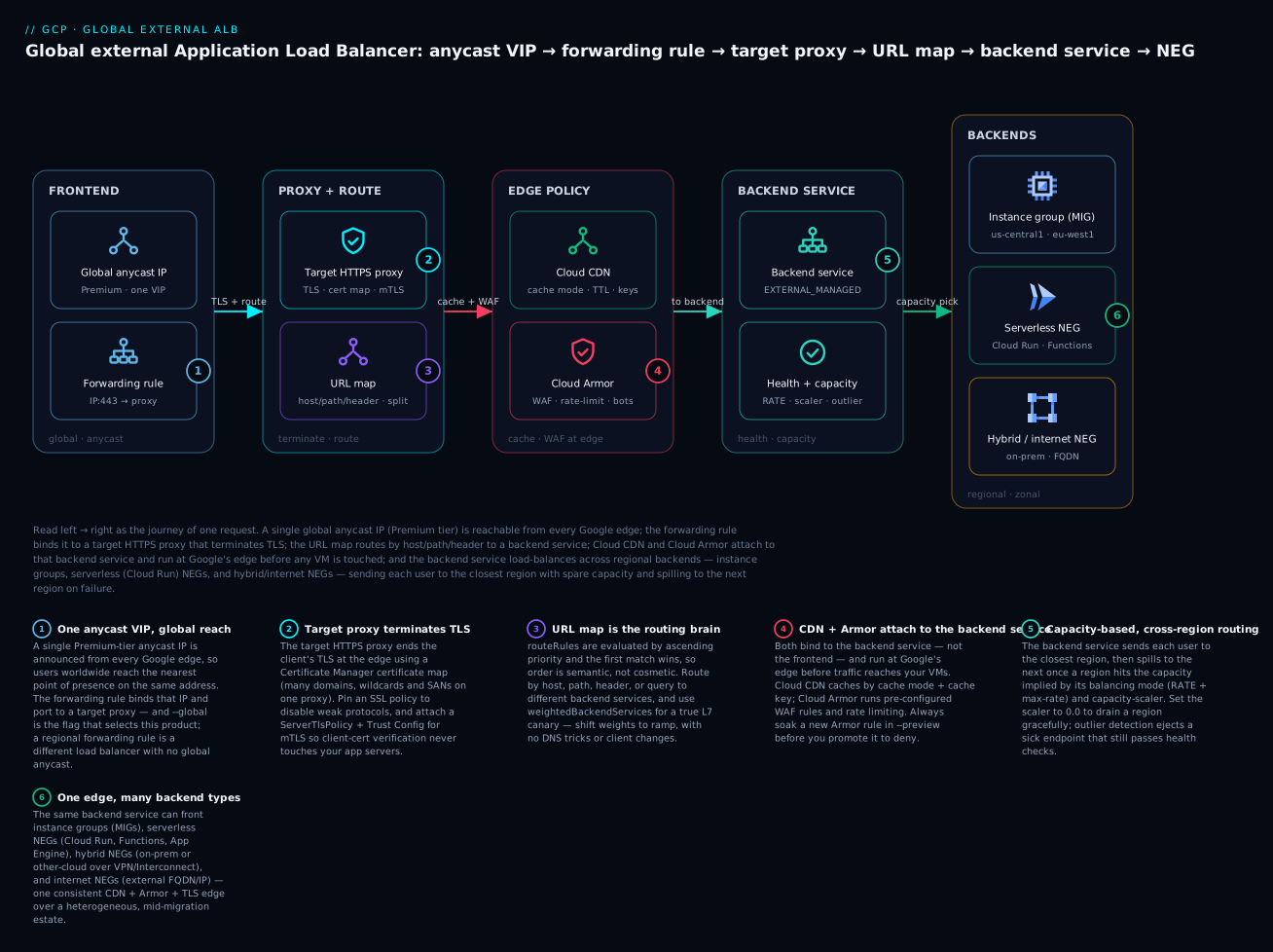
Read the diagram left → right as the life of one request: it arrives at a single global anycast IP at the nearest Google edge, the forwarding rule hands it to a target HTTPS proxy that terminates TLS, the URL map routes it by host/path/header, Cloud CDN and Cloud Armor (both attached to the backend service) serve-from-cache or block-at-edge, and finally the backend service picks the closest region with spare capacity and sends it to a backend — an instance group, a serverless NEG, or a hybrid/internet NEG.
Prerequisites and what you’ll be able to do
Know these first. You should be comfortable with the basics of how an HTTP request works (client, TLS, host header, path), and with GCP networking fundamentals — a VPC, a subnet, a firewall rule, and the idea of regions and zones. You should know what a managed instance group (MIG) is (a fleet of identical VMs behind one handle) and, ideally, have met Cloud Run as a way to run containers. If any of that is fuzzy, these sibling lessons set it up:
- Cloud Load Balancing deep dive: global vs regional types — the whole load-balancer family and where this one fits; read it first if load balancing is new.
- VPC deep dive: subnets, routes, firewall & NAT — the network the ALB and its backends live in.
- Regional managed instance groups: autohealing & canary — the instance-group backends this ALB fronts.
- Cloud Run deep dive: services, jobs, scaling, traffic — the serverless backends you reach through a serverless NEG.
After this lesson you will be able to:
- Name every link in the forwarding-rule → target-proxy → URL-map → backend-service → NEG chain, and say what each one controls.
- Build a global external ALB end to end with
gcloud, and know which single flag (--global,EXTERNAL_MANAGED,--network-tier=PREMIUM) selects the right product every time. - Route by host, path, header, and query, and split traffic for a canary at the edge with no DNS changes.
- Front a mixed estate — instance groups, Cloud Run, on-prem, and third-party origins — behind one IP using the four NEG types.
- Turn on Cloud CDN and Cloud Armor safely, choosing a cache mode and cache key deliberately and soaking every WAF rule in preview first.
- Terminate TLS with managed certificates and a certificate map, pin a modern SSL policy, and add mTLS with a Trust Config.
- Tune capacity, drain a region gracefully, and read
statusDetailsto triage a 5xx to the exact failing layer.
The global external Application Load Balancer (ALB) is the front door for most internet-facing workloads on GCP, and it is deceptively deep. It is not one resource but a graph: a global anycast IP fronts a target proxy, which references a URL map, which routes to backend services, which point at backends spread across regions. Each layer has tuning knobs that quietly determine your tail latency, your blast radius during a regional outage, and your bill. This walkthrough builds one end to end against the Envoy-based global ALB, then layers on the controls a platform team needs in production: balancing modes, header-based routing, hybrid NEGs, Cloud CDN, Cloud Armor at the edge, mTLS, and the observability to debug it at 2 a.m.
This is the global external Application Load Balancer, the modern successor to the classic HTTP(S) load balancer: global anycast, Envoy data plane, advanced traffic management. Its components live in the global scope, which matters for every command below.
Step 1: Understand the resource graph
Before any gcloud, internalize the chain. A request flows through five distinct resources:
| Resource | Role | Scope |
|---|---|---|
| Forwarding rule | Binds the global anycast IP + port to a target proxy | Global |
| Target proxy | Terminates TLS (HTTPS proxy) or plain HTTP; references the URL map | Global |
| URL map | Routes by host/path/header/query to backend services | Global |
| Backend service | Health checks, balancing mode, CDN, Cloud Armor, timeouts | Global |
| Backend (NEG/MIG) | The actual endpoints: instance groups, serverless, hybrid, internet | Regional or zonal |
Two rules save hours of confusion. First, the global ALB uses global backend services and forwarding rules; create a regional forwarding rule by accident and you get the regional ALB, a different product with no global anycast. Second, Cloud CDN and Cloud Armor attach to the backend service, not the proxy, so caching and WAF policy are per-backend, not per-frontend.
# Reserve the global anycast IP first; everything else references it.
gcloud compute addresses create web-ip \
  --ip-version=IPV4 \
  --network-tier=PREMIUM \
  --global
Premium tier is mandatory for the global ALB; Standard tier only supports regional load balancing. The --global flag is the tell that you are on the right product in every command below.
Step 2: Build and tune backend services
The backend service is where most production decisions live. Start with a health check and a service, then tune the balancing behavior.
gcloud compute health-checks create http web-hc \
  --port=8080 \
  --request-path="/healthz" \
  --check-interval=5s \
  --timeout=5s \
  --healthy-threshold=2 \
  --unhealthy-threshold=3 \
  --global

gcloud compute backend-services create web-bes \
  --protocol=HTTP \
  --port-name=http \
  --health-checks=web-hc \
  --global \
  --load-balancing-scheme=EXTERNAL_MANAGED \
  --timeout=30s
EXTERNAL_MANAGED is the load balancing scheme for the Envoy-based global ALB. The older EXTERNAL scheme selects the classic HTTP(S) load balancer and locks you out of advanced traffic management. Get this wrong and you will not understand why header routing silently does nothing.
Balancing mode and capacity scaler
When you add a backend, the balancing mode decides how the ALB measures whether a backend is “full.” For an ALB the choice is usually RATE (requests per second) or UTILIZATION (backend CPU). RATE is more predictable for stateless web tiers because it does not depend on noisy CPU signals.
gcloud compute backend-services add-backend web-bes \
  --instance-group=web-mig-usc1 \
  --instance-group-region=us-central1 \
  --balancing-mode=RATE \
  --max-rate-per-instance=200 \
  --capacity-scaler=1.0 \
  --global

# Repeat add-backend per region (e.g. europe-west1) for global spread.
The global ALB prefers the region closest to the user, then spills to the next-closest region once a region hits its configured capacity. The capacity scaler (0.0 to 1.0) is your pressure-relief valve: it scales the effective max-rate down without redeploying. Setting a backend’s scaler to 0.0 drains it gracefully — new connections stop arriving while existing ones finish — which is how you cordon a region for maintenance. Leave the others at 1.0 and the ALB rebalances automatically.
Capacity scaler is the single most useful operational knob on the ALB. Wire
update-backend --capacity-scaler=0.0into your regional-drain runbook; it is far gentler than deleting a backend and faster than scaling a MIG to zero.
Outlier detection and connection draining
Health checks catch a dead instance; outlier detection catches a sick one — an endpoint returning 5xx or gateway errors while still passing health checks. It ejects the bad endpoint from the load balancing pool for a cooldown, much like a circuit breaker.
gcloud compute backend-services update web-bes --global \
  --connection-draining-timeout=60s \
  --outlier-detection-consecutive-errors=5 \
  --outlier-detection-interval=10s \
  --outlier-detection-base-ejection-time=30s \
  --outlier-detection-max-ejection-percent=50
Connection draining gives in-flight requests up to the timeout to finish when an endpoint is removed or a MIG scales in, so rolling deploys do not sever live requests. Outlier detection plus draining is the difference between one bad pod causing a brief blip versus a sustained error rate.
Step 3: Route with URL maps
The URL map is the routing brain. The simplest form sends everything to one backend; the interesting form routes by host, path, header, and query, and splits traffic for canaries.
gcloud compute url-maps create web-urlmap --default-service=web-bes --global
For anything beyond a default service, export the URL map to YAML, edit, and re-import. This is the only sane way to manage host rules, path matchers, and header routing, and it is reviewable in git.
gcloud compute url-maps export web-urlmap --global --destination=urlmap.yaml
A URL map that routes /api to an API backend, header-routes a beta cohort, and canaries 5% of root traffic to a new backend looks like this:
defaultService: global/backendServices/web-bes
hostRules:
  - hosts: ["app.example.com"]
    pathMatcher: app-matcher
pathMatchers:
  - name: app-matcher
    defaultService: global/backendServices/web-bes
    routeRules:
      # Header-based routing: beta cohort to a separate backend.
      - priority: 10
        matchRules:
          - prefixMatch: "/"
            headerMatches:
              - headerName: "X-Canary"
                exactMatch: "beta"
        service: global/backendServices/web-beta-bes
      # Path-based routing for the API tier.
      - priority: 20
        matchRules:
          - prefixMatch: "/api/"
        service: global/backendServices/api-bes
      # Weighted traffic split: 5% canary on the root path.
      - priority: 30
        matchRules:
          - prefixMatch: "/"
        routeAction:
          weightedBackendServices:
            - backendService: global/backendServices/web-bes
              weight: 95
            - backendService: global/backendServices/web-canary-bes
              weight: 5
routeRules are evaluated by ascending priority, and the first match wins — order is semantic, not cosmetic. Put specific matches (headers, exact paths) at low priority numbers and catch-alls last. weightedBackendServices is true L7 traffic splitting at the edge: no client changes, no DNS tricks, just shift the weights to ramp a canary and watch your SLOs. You can match on queryParameterMatches the same way, and add routeAction.urlRewrite to rewrite host or path before the request reaches the backend.
gcloud compute url-maps import web-urlmap --global \
  --source=urlmap.yaml --quiet
Step 4: Hybrid and internet NEGs
Backends are not limited to GCP instance groups. Network Endpoint Groups (NEGs) let the same ALB front serverless services, on-prem systems, and arbitrary internet endpoints — one consistent edge (CDN + Cloud Armor + TLS) in front of a heterogeneous estate during a migration.
Hybrid NEGs (NON_GCP_PRIVATE_IP_PORT) point at on-prem or other-cloud backends reachable over Cloud VPN or Interconnect — the canonical strangler-fig pattern: new paths to GCP, legacy paths to the data center, all behind one IP.
gcloud compute network-endpoint-groups create onprem-neg \
  --network-endpoint-type=NON_GCP_PRIVATE_IP_PORT \
  --zone=us-central1-a \
  --network=hub-vpc \
  --subnet=prod-usc1

gcloud compute network-endpoint-groups update onprem-neg \
  --zone=us-central1-a \
  --add-endpoint="ip=10.50.0.10,port=8080"
Internet NEGs (INTERNET_FQDN_PORT or INTERNET_IP_PORT) reference an external endpoint by FQDN or IP — useful for fronting a third-party API or an external origin with Cloud CDN and Cloud Armor in front of it.
gcloud compute network-endpoint-groups create ext-origin-neg \
  --network-endpoint-type=INTERNET_FQDN_PORT \
  --global

gcloud compute network-endpoint-groups update ext-origin-neg --global \
  --add-endpoint="fqdn=origin.partner.example.com,port=443"
Hybrid NEGs require an EXTERNAL_MANAGED backend service and a distributed Envoy health check with a proxy-only subnet in the relevant region. Internet NEGs are global and cannot be health-checked by the ALB — it trusts the endpoint’s availability — so pair them with outlier detection to eject a failing origin.
There is a fourth NEG you meet constantly: the serverless NEG (--network-endpoint-type=serverless), which points at a Cloud Run service, a Cloud Functions function, or an App Engine app instead of an IP. It is regional, has no health check (the platform manages availability), and is how you put Cloud CDN, Cloud Armor, a custom domain, and a shared IP in front of a serverless backend:
gcloud compute network-endpoint-groups create run-neg \
  --region=us-central1 \
  --network-endpoint-type=serverless \
  --cloud-run-service=web-api

gcloud compute backend-services add-backend web-bes --global \
  --network-endpoint-group=run-neg \
  --network-endpoint-group-region=us-central1
So the four NEG types — zonal (GCE VMs by IP:port), serverless (Cloud Run/Functions/App Engine), hybrid (NON_GCP_PRIVATE_IP_PORT, on-prem/other-cloud), and internet (INTERNET_FQDN_PORT/INTERNET_IP_PORT) — plus classic instance-group backends, let one URL map fan out to anything, anywhere, behind one anycast IP.
Step 5: Cloud CDN
Cloud CDN is a flag on the backend service plus a cache policy. The cache mode is the first decision and the easiest to get wrong.
gcloud compute backend-services update web-bes --global \
  --enable-cdn \
  --cache-mode=CACHE_ALL_STATIC \
  --default-ttl=3600 \
  --max-ttl=86400 \
  --client-ttl=3600 \
  --negative-caching \
  --serve-while-stale=86400
| Cache mode | Behavior |
|---|---|
USE_ORIGIN_HEADERS |
Cache only what the origin marks cacheable via Cache-Control. Safest; origin is authoritative. |
CACHE_ALL_STATIC |
Cache static content types automatically; honor origin headers for the rest. Good default for web. |
FORCE_CACHE_ALL |
Cache every response regardless of headers. Dangerous near auth-gated content — you can cache a logged-in user’s page and serve it to others. |
negative-caching caches error responses (404, 410, 5xx) for a short TTL so a thundering herd for a missing object does not hammer the origin. serve-while-stale keeps serving slightly-stale content while revalidating in the background, protecting you during an origin blip.
Cache keys
By default the cache key includes the full host, path, and query string. If your URLs carry per-user or tracking query params, every variation becomes a distinct cache entry and your hit rate collapses. Strip what does not change the response.
gcloud compute backend-services update web-bes --global \
  --cache-key-include-protocol \
  --cache-key-include-host \
  --no-cache-key-include-query-string
To key on only specific params (for example a v cache-buster) use --cache-key-query-string-whitelist=v. Getting the cache key right is usually the single biggest lever on hit ratio.
Signed URLs
For paywalled or time-limited assets, signed URLs (or signed cookies) let the CDN serve private content without an origin round-trip per request. Attach a signing key with gcloud compute backend-services add-signed-url-key web-bes --global --key-name=key1 --key-file=cdn-key.b64; requests must then carry a valid Expires, KeyName, and Signature query string, and the CDN rejects anything expired or tampered before it reaches your origin.
Step 6: Cloud Armor at the edge
Cloud Armor is a security policy attached to the backend service, enforced at Google’s edge before traffic reaches your backends. Build the policy, add rules, then bind it.
gcloud compute security-policies create web-armor \
  --description="Edge WAF + rate limiting for web tier"

# Pre-configured WAF rule: block SQL injection at sensitivity 1.
gcloud compute security-policies rules create 1000 \
  --security-policy=web-armor \
  --expression="evaluatePreconfiguredWaf('sqli-v33-stable', {'sensitivity': 1})" \
  --action=deny-403

# Per-client rate limiting: throttle abusive IPs.
gcloud compute security-policies rules create 2000 \
  --security-policy=web-armor \
  --src-ip-ranges="*" \
  --action=throttle \
  --rate-limit-threshold-count=100 \
  --rate-limit-threshold-interval-sec=60 \
  --conform-action=allow \
  --exceed-action=deny-429 \
  --enforce-on-key=IP
The pre-configured WAF rules implement the OWASP ModSecurity Core Rule Set (sqli, xss, lfi, rfi, rce, and more). Sensitivity is the false-positive dial: move to --action=deny-403 only after a soak in preview mode (--preview), because a too-aggressive WAF blocks legitimate traffic that happens to look like an attack.
Rate limiting supports throttle (cap the rate) and rate-based-ban (block an offender entirely once they exceed a threshold). --enforce-on-key controls the bucket: IP, HTTP-HEADER, XFF-IP, or HTTP-COOKIE to limit per authenticated user rather than per source IP.
For bot management, layer in reCAPTCHA-based rules and Google’s threat intelligence feeds, then bind the policy to the backend service:
# Block known malicious IPs via Google threat intelligence.
gcloud compute security-policies rules create 500 \
  --security-policy=web-armor \
  --expression="evaluateThreatIntelligence('iplist-known-malicious-ips')" \
  --action=deny-403

gcloud compute backend-services update web-bes --global \
  --security-policy=web-armor
Always deploy a new WAF rule with
--previewfirst, then read theverdict = preview-denyentries in the load balancer logs for a few days. Promoting straight todenyis how you take down checkout during a sale because someone’s coupon code matched an SQLi signature.
Step 7: TLS termination, certificate maps, and mTLS
The HTTPS target proxy terminates TLS. Use Google-managed certificates so you never rotate manually. The modern path uses the Certificate Manager API and a certificate map, which lets one proxy serve many domains and handles wildcard plus SAN combinations cleanly.
gcloud certificate-manager certificates create web-cert \
  --domains="app.example.com,www.example.com"

gcloud certificate-manager maps create web-cert-map

gcloud certificate-manager maps entries create web-primary \
  --map=web-cert-map \
  --certificates=web-cert \
  --hostname="app.example.com"

gcloud compute target-https-proxies create web-https-proxy \
  --url-map=web-urlmap \
  --certificate-map=web-cert-map \
  --global

gcloud compute forwarding-rules create web-https-fr \
  --address=web-ip \
  --target-https-proxy=web-https-proxy \
  --ports=443 \
  --load-balancing-scheme=EXTERNAL_MANAGED \
  --global
Managed certificates require the domain to resolve to the ALB IP for validation, so create the A record before expecting ACTIVE status. Pin a modern TLS policy with --ssl-policy to disable TLS 1.0/1.1 and weak ciphers; the default profile is permissive.
mTLS with Trust Config
For mutual TLS — verifying client certificates at the edge — the global ALB uses Certificate Manager Trust Config (a store of root and intermediate CAs) plus a ServerTlsPolicy that references it. Validation happens before the request hits your backend, and the result is passed downstream as a header.
# Trust config holds the CA bundle that signs valid client certs.
gcloud certificate-manager trust-configs import client-trust \
  --source=trust-config.yaml

# ServerTlsPolicy ties the trust config to a validation mode.
gcloud network-security server-tls-policies import mtls-policy \
  --source=server-tls-policy.yaml \
  --location=global
A minimal server-tls-policy.yaml enforcing client certs looks like:
name: mtls-policy
mtlsPolicy:
  clientValidationMode: REJECT_INVALID
  clientValidationTrustConfig: "projects/PROJECT/locations/global/trustConfigs/client-trust"
REJECT_INVALID drops connections without a valid client cert at the edge; ALLOW_INVALID_OR_MISSING_CLIENT_CERT lets them through but stamps the validation outcome into a header (X-Client-Cert-*) so the backend decides. Attach the ServerTlsPolicy to the target HTTPS proxy, and client-cert verification stays off your application servers entirely.
Verify
Prove each layer independently before declaring victory.
# Frontend chain resolves and the cert is ACTIVE.
gcloud compute target-https-proxies describe web-https-proxy --global \
  --format="value(sslCertificates,certificateMap)"
gcloud certificate-manager certificates describe web-cert \
  --format="value(managed.state)"

# Backends are HEALTHY in every region.
gcloud compute backend-services get-health web-bes --global

# End-to-end request; inspect status, CDN cache, and timing.
curl -sS -o /dev/null -w "code=%{http_code} ttfb=%{time_starttransfer}s\n" \
  https://app.example.com/

# Confirm CDN is serving from cache (look for the cache header).
curl -sSI https://app.example.com/static/app.js | grep -i "x-cache\|age\|cache-control"

# Header routing actually splits to the beta backend.
curl -sSI -H "X-Canary: beta" https://app.example.com/ | grep -i "via\|server"
For any failure, the load balancer log’s jsonPayload.statusDetails gives the verdict, and httpRequest.cacheHit tells you CDN hit versus miss (covered next).
Observability and 5xx triage
Enable logging on the backend service with a sample rate; 100% is fine to start, then dial down for cost.
gcloud compute backend-services update web-bes --global \
  --enable-logging \
  --logging-sample-rate=1.0
The ALB log’s statusDetails field is the fastest 5xx triage tool on GCP because it distinguishes who failed. A 502 with failed_to_connect_to_backend is a backend or firewall problem; 502 with backend_timeout means your --timeout is shorter than the backend’s real latency; 503 with no_healthy_upstream means health checks are failing across the board. The latency breakdown separates frontend RTT from backend latency, so you can tell a slow client from a slow service.
resource.type="http_load_balancer"
httpRequest.status>=500
| project timestamp, httpRequest.status, jsonPayload.statusDetails,
          httpRequest.requestUrl, httpRequest.latency
Enterprise scenario
A retail platform team ran a global ALB fronting a regional GKE service in us-central1 and europe-west1, with Cloud CDN on the static backend and Cloud Armor in front. Black Friday traffic tripled and they began seeing sporadic 502s — but only on the API path, never on static assets, and only under load. Their first instinct was “the ALB is overwhelmed,” which sent them chasing capacity that was not the problem.
The log told the real story. Every failing request carried jsonPayload.statusDetails = "backend_timeout". The backend timeout was the default-ish 30s, but the API’s p99 under peak load had drifted to ~34s because a downstream dependency was slow. The ALB did exactly what it was told: cut the connection at the timeout and return 502. Static assets never tripped it because they were served from the CDN edge and never reached the origin.
Raising the timeout blindly would have masked the latency regression, so they did two things. They bumped the timeout to a deliberate 45s to stop severing nearly-complete requests, and they enabled the outlier detection from Step 2 so a single slow pod got ejected instead of dragging down the pool:
gcloud compute backend-services update api-bes --global --timeout=45s
They also wired a Cloud Monitoring alert on backend 5xx rate broken down by statusDetails, so the next incident would name its own root cause. The lesson: on the global ALB, a 502 is not one failure mode — statusDetails tells you whether it is connectivity, timeout, or health, and the backend timeout is a latency contract you set on purpose, not inherit.
Going deeper
You now have a working ALB. This section is the depth an experienced engineer needs to run it at scale without surprises — the classic-vs-global distinction, the Envoy data plane, how cross-region routing actually decides, the timeout internals, and the cost, quota, IAM, and Terraform realities.
Classic vs global: what actually changed
The word “external HTTP(S) load balancer” covers three products, and mixing them up is the root of most confusion. The distinction is the load-balancing scheme and the data plane.
| Classic external ALB | Global external ALB (this lesson) | Regional external ALB | |
|---|---|---|---|
| Scheme | EXTERNAL |
EXTERNAL_MANAGED |
EXTERNAL_MANAGED (regional) |
| Data plane | Google Front Ends (GFE) | GFE + Envoy, global | Envoy, single region |
| Anycast VIP | Global (Premium) | Global (Premium) | Regional |
| Advanced traffic mgmt | No (limited) | Yes (header/weight/mirroring/rewrite) | Yes |
| Proxy-only subnet in your VPC | No | No | Yes (required) |
| Cross-region failover | Yes | Yes | No (one region) |
| Serverless / hybrid / internet NEGs | Partial | Full | Full (regional) |
Three practical takeaways. First, EXTERNAL_MANAGED is the modern global product and the one you want for a new global app — the classic EXTERNAL scheme is on a deprecation path and lacks routeRules-based advanced traffic management. Second, unlike the regional Envoy load balancers, the global external ALB does not require you to provision a proxy-only subnet in your VPC — its Envoy proxies live in Google’s edge, not your network (the hybrid-NEG health-check path in Step 4 is the one place a regional proxy-only subnet enters the picture). Third, if you ever see routeRules “silently do nothing,” check the scheme first — that symptom is almost always a backend service still on EXTERNAL.
Inside the Envoy data plane
A request does not travel to your region and back on every hop. It lands on the nearest Google Front End (GFE) — the same anycast edge that fronts Search — which terminates TLS close to the user, then forwards over Google’s private backbone to an Envoy proxy layer that applies the URL map, Cloud Armor, and CDN logic, and finally to your backend. This is why terminating TLS at the edge cuts handshake RTT dramatically for distant users: the expensive round trips happen on the last mile to the nearest POP, not across an ocean to your origin.
Two knobs ride on this. HTTP/3 (QUIC) is a one-line enable on the target proxy and shines on lossy mobile networks because it removes head-of-line blocking:
gcloud compute target-https-proxies update web-https-proxy --global \
  --quic-override=ENABLE
And backend protocol is independent of client protocol — clients can speak HTTP/2 or HTTP/3 to the edge while the ALB speaks HTTP/1.1 or HTTP/2 to your VMs (--protocol=HTTP2 on the backend service, needed for gRPC backends). The edge is a protocol translator, not a passthrough.
How cross-region routing actually decides
The “closest region, then spill” behavior in Step 2 is worth making precise, because it is what determines your failover behavior:
- The ALB computes, per request, the closest region with a healthy backend that has spare capacity. “Capacity” is
max-rate × capacity-scaler(forRATEmode) summed across the region’s backends. - If the closest region is at capacity, the request overflows to the next-closest region — automatically, per request, no config.
- If every backend in a region fails health checks, that region is removed from the pool entirely and traffic fails over to the next region. This is your regional-outage story: it is automatic, but only if you have a second region with capacity.
- Outlier detection operates a layer finer — it ejects an individual sick endpoint that still passes health checks, without taking the whole region out.
The trap: a single-region backend service has no failover, full stop. Global anycast gets the request to Google’s edge worldwide, but if all your backends are in us-central1, a us-central1 outage is an outage. Cross-region resilience is a property of having backends in multiple regions with headroom, not of the ALB being “global.” Size each region to absorb at least one peer’s traffic (the classic N+1) or the failover just moves the overload.
Timeouts, deadlines, and streaming
The backend service --timeout is not an idle timeout — it is the maximum time for the backend to return a full response (a request deadline). For a normal request/response API this is your latency contract, as the enterprise scenario showed. But it bites two workloads specifically:
- Streaming / long-poll / SSE / WebSocket responses can legitimately run longer than any sane request timeout. For WebSockets the ALB honors the connection for the timeout duration, so a chat backend needs a deliberately long
--timeout(or a dedicated backend service) — the default 30s will sever idle sockets. routeAction.timeoutin the URL map can override the backend-service timeout per route, so a slow report endpoint can get 120s while the rest of the API keeps a tight 10s. Prefer per-route timeouts over one loose global timeout.
There is also a separate frontend idle timeout (default ~10 minutes for the HTTP connection between client and GFE) that you do not usually touch. When someone says “the load balancer timed out,” always ask which timeout — backend response deadline, route timeout, or frontend idle — because the fix differs for each.
Cost, quotas, and IAM
- Cost shape. The global ALB bills for forwarding-rule hours plus data processed (per GB of inbound traffic), on top of Premium-tier egress. Cloud CDN adds cache-egress, cache-fill, and lookup charges — but a good hit ratio reduces origin egress and compute, so CDN usually pays for itself on static-heavy traffic. Cloud Armor bills per policy per month plus per million requests evaluated. The lever: a high CDN hit ratio and logging sample rate below 1.0 are the two biggest bill controls.
- Quotas. There are per-project limits on forwarding rules, backend services, and backends per backend service, and per-URL-map limits on host rules, path matchers, and route rules. At scale you design URL-map structure against these limits, not just individual routes — a monolithic URL map with thousands of route rules will hit the ceiling.
- IAM. Building this touches several roles:
roles/compute.loadBalancerAdmin(forwarding rules, proxies, URL maps, backend services),roles/compute.securityAdmin(Cloud Armor policies),roles/certificatemanager.editor(certs, maps, trust configs), androles/compute.networkAdminfor the surrounding VPC. In a Shared VPC, the load balancer and its backends live in the host project’s network — plan the role split accordingly.
Manage it as code
At scale the whole chain is Terraform, not gcloud — and because the objects reference each other, code makes the graph explicit and reviewable. This is a representative, schema-correct skeleton for the google provider:
resource "google_compute_global_address" "web_ip" {
  name = "web-ip"
}

resource "google_compute_health_check" "web_hc" {
  name = "web-hc"
  http_health_check {
    port         = 8080
    request_path = "/healthz"
  }
}

resource "google_compute_backend_service" "web_bes" {
  name                  = "web-bes"
  protocol              = "HTTP"
  port_name             = "http"
  load_balancing_scheme = "EXTERNAL_MANAGED"   # the global Envoy ALB
  timeout_sec           = 30
  health_checks         = [google_compute_health_check.web_hc.id]
  enable_cdn            = true
  security_policy       = google_compute_security_policy.web_armor.id

  backend {
    group                 = google_compute_region_instance_group_manager.web_usc1.instance_group
    balancing_mode        = "RATE"
    max_rate_per_instance = 200
    capacity_scaler       = 1.0
  }
}

resource "google_compute_url_map" "web" {
  name            = "web-urlmap"
  default_service = google_compute_backend_service.web_bes.id
}

resource "google_compute_target_https_proxy" "web" {
  name            = "web-https-proxy"
  url_map         = google_compute_url_map.web.id
  certificate_map = "projects/${var.project}/locations/global/certificateMaps/web-cert-map"
}

resource "google_compute_global_forwarding_rule" "web" {
  name                  = "web-https-fr"
  load_balancing_scheme = "EXTERNAL_MANAGED"
  ip_address            = google_compute_global_address.web_ip.address
  port_range            = "443"
  target                = google_compute_target_https_proxy.web.id
}
The value of code here is not tidiness — it is that the references (which proxy points at which URL map, which URL map at which backend service) are version-controlled and reviewed, so nobody re-points production at a stale backend with an untracked console click.
Practice challenges
Reading the chain is easy; building the right link and reasoning about failure is the skill. Work each challenge the way the lesson teaches — name the resource, pick the scheme/flag, do the capacity math — then open the solution. They escalate from an obvious call to genuine judgement, and a couple hide a distractor designed to tempt the wrong answer.
Challenge 1 (beginner). You created a backend service with --load-balancing-scheme=EXTERNAL and now your routeRules header routing does nothing. What is wrong, and what is the correct scheme for the global Envoy ALB?
<details> <summary>Model answer</summary>
EXTERNAL selects the classic HTTP(S) load balancer, which lacks routeRules-based advanced traffic management — so header routing is silently ignored. The global Envoy ALB requires --load-balancing-scheme=EXTERNAL_MANAGED on both the backend service and the forwarding rule. Why: the scheme is what picks the product; the classic scheme is a different data plane that never evaluates your route rules.
</details>
Challenge 2 (beginner). Write the gcloud to reserve the global anycast IP the ALB will use, on the correct network tier.
<details> <summary>Model answer</summary>
gcloud compute addresses create web-ip \
  --ip-version=IPV4 \
  --network-tier=PREMIUM \
  --global
Why: the global ALB requires Premium tier (Standard supports only regional load balancing), and --global is what makes the address an anycast VIP rather than a regional one.
</details>
Challenge 3 (intermediate). Author the URL-map routeRules fragment that sends /api/ to api-bes and canaries 10% of root-path traffic to web-canary-bes (90% stays on web-bes). Explain why the two rules cannot be in the wrong order.
<details> <summary>Model answer</summary>
routeRules:
  - priority: 10
    matchRules:
      - prefixMatch: "/api/"
    service: global/backendServices/api-bes
  - priority: 20
    matchRules:
      - prefixMatch: "/"
    routeAction:
      weightedBackendServices:
        - backendService: global/backendServices/web-bes
          weight: 90
        - backendService: global/backendServices/web-canary-bes
          weight: 10
Why order matters: routeRules are evaluated by ascending priority, first match wins. prefixMatch: "/" matches everything, so if it had the lower priority number it would swallow /api/ too and the API rule would never run. Specific matches must sit at lower priority numbers than catch-alls.
</details>
Challenge 4 (intermediate). A region (europe-west1) is going into a maintenance window. You must stop sending it new traffic but let in-flight requests finish, without deleting the backend or scaling the MIG to zero. What is the single command?
<details> <summary>Model answer</summary>
gcloud compute backend-services update-backend web-bes --global \
  --instance-group=web-mig-euw1 \
  --instance-group-region=europe-west1 \
  --capacity-scaler=0.0
Why: setting the capacity scaler to 0.0 drains the backend gracefully — the ALB stops routing new requests to it (its effective capacity is now zero, so all traffic overflows to other regions) while existing connections finish. It is reversible in one command (set it back to 1.0), unlike deleting the backend.
</details>
Challenge 5 (advanced). Under load you see 502s whose ALB log shows jsonPayload.statusDetails = "backend_timeout", while a different incident shows 503 with no_healthy_upstream. Diagnose each, and give the fix for the first that does not simply mask a latency regression.
<details> <summary>Model answer</summary>
502 backend_timeout: the backend took longer than the backend-service--timeoutto return a full response — the ALB severed the connection at the deadline. The right fix is not to blindly raise the timeout (that hides the regression) but to (a) set a deliberate timeout that reflects the real p99 latency contract, e.g.--timeout=45s, and (b) enable outlier detection so a single slow endpoint is ejected instead of dragging the pool — then alert on the latency regression separately.503 no_healthy_upstream: health checks are failing across all backends, so the pool is empty. Fix the health check target/path/port or the firewall allowing health-check probes; no timeout change helps.
Why: statusDetails names which layer failed — timeout (latency contract) vs health (empty pool) — so the two 5xxs have completely different fixes.
</details>
Challenge 6 (advanced). You must put one anycast IP, with Cloud CDN and Cloud Armor, in front of both an on-prem service (reachable over Interconnect) and a Cloud Run service. Name the NEG type for each backend and the extra requirement the on-prem one carries.
<details> <summary>Model answer</summary>
- On-prem → a hybrid NEG (
--network-endpoint-type=NON_GCP_PRIVATE_IP_PORT) whose endpoints are the on-premip:port, reachable over Cloud VPN/Interconnect. Extra requirement: it needs anEXTERNAL_MANAGEDbackend service and a distributed Envoy health check with a proxy-only subnet in the relevant region. - Cloud Run → a serverless NEG (
--network-endpoint-type=serverless --cloud-run-service=...), regional, no health check (the platform manages availability).
Both attach as backends to backend services under one URL map; CDN and Armor bind to those backend services, giving one edge over a heterogeneous estate. Why: NEGs are exactly the abstraction that lets the ALB front non-VM, non-GCP, and serverless endpoints uniformly. </details>
Common beginner mistakes
- “Regional and global external ALBs are the same product.” They are not. A regional forwarding rule gives you the single-region Envoy ALB with no global anycast and no cross-region failover. The
--globalflag on the forwarding rule, address, proxy, URL map, and backend service is what selects the global product. Right model:--globaleverywhere = one product; a stray regional resource = a different one. - “
EXTERNALis the scheme for an external load balancer.”EXTERNALis the classic load balancer; the modern global Envoy ALB isEXTERNAL_MANAGED. PickEXTERNALand your advanced traffic management silently does nothing. - “Cloud CDN and Cloud Armor attach to the frontend / proxy.” They attach to the backend service. Caching and WAF are per-backend, which is why two backend services behind one URL map can have different cache and security policies.
- “
routeRulesorder is cosmetic.” It is semantic: ascending priority, first match wins. A catch-allprefixMatch: "/"at a low priority number swallows everything after it. Put specific matches first (low numbers), catch-alls last. - “Higher priority number wins.” Backwards — lower priority number is evaluated first. Priority is queue position; position
10runs before20. - “
FORCE_CACHE_ALLis a safe way to boost hit ratio.” It caches every response regardless of headers — including authenticated pages. You can cache one logged-in user’s page and serve it to another. UseCACHE_ALL_STATICorUSE_ORIGIN_HEADERSnear anything auth-gated. - “The backend timeout is a safety net I inherit.” It is a latency contract you set. Too low and it severs slow-but-valid requests as
502; the fix is a deliberate value plus outlier detection, not a blind bump. - “A managed certificate goes ACTIVE right after I create it.” It stays
PROVISIONINGuntil the domain’sA/AAAArecord points at the ALB IP so Google can validate ownership. Create the DNS record first, then wait. - “Standard network tier is fine to save money.” The global ALB requires Premium tier; Standard only supports regional load balancing. Reserve the IP with
--network-tier=PREMIUM. - “Internet NEGs are health-checked by the ALB.” They are not — the ALB trusts the external endpoint’s availability. Pair an internet NEG with outlier detection so a failing origin is ejected instead of returned to users.
- “Global anycast means my app survives a regional outage.” Anycast gets the request to Google’s edge worldwide, but failover needs backends in more than one region with spare capacity. A single-region backend set has no failover.
Checklist
Closing notes
Treat the global ALB as a configurable distributed system, not a black-box appliance. Three layers deserve attention from day one: the backend timeout as an explicit latency contract, the cache key as your hit-ratio lever, and Cloud Armor preview mode as the seatbelt before you arm a WAF rule. Manage the URL map and security policy as code, alert on statusDetails rather than raw 5xx counts, and use capacity scaler for graceful regional drains.
Glossary
- Global external Application Load Balancer (ALB) — GCP’s Envoy-based, global, L7 (HTTP/HTTPS) load balancer with a single anycast IP; the modern successor to the classic HTTP(S) load balancer. Selected by
EXTERNAL_MANAGED+--global. - Anycast VIP — one IP address announced from many Google edge locations at once, so every user reaches the nearest point of presence on the same address. Requires Premium network tier.
- Premium / Standard network tier — Premium routes traffic over Google’s private backbone and enables global anycast (required here); Standard is cheaper but regional-only.
- Forwarding rule — the frontend object binding the anycast IP and a port to a target proxy. Global for this ALB; a regional forwarding rule is a different product.
- Target proxy — the object that terminates the client connection (TLS for an HTTPS proxy) and references the URL map. Global.
- URL map — the routing brain: matches host, path, header, and query and sends the request to a backend service; supports weighted splits and rewrites.
routeRules/ priority — ordered routing rules inside a URL map, evaluated by ascending priority, first match wins. Order is semantic.weightedBackendServices— a URL-map construct that splits traffic across backend services by weight (e.g. 95/5) for an edge-native canary — no DNS or client changes.- Backend service — the object holding health checks, balancing mode, timeout, Cloud CDN, and Cloud Armor; the anchor most production tuning lives on. Global.
- Backend — an entry on a backend service pointing at a group of endpoints (a MIG or a NEG) with its own balancing mode, max-rate, and capacity scaler.
- Network Endpoint Group (NEG) — a group of endpoints used as a backend. Types: zonal (GCE IP:port), serverless (Cloud Run/Functions/App Engine), hybrid (
NON_GCP_PRIVATE_IP_PORT, on-prem/other-cloud), internet (INTERNET_FQDN_PORT/INTERNET_IP_PORT). - Managed instance group (MIG) — a fleet of identical VMs managed as one unit; the classic instance-group backend for an ALB.
EXTERNAL_MANAGEDvsEXTERNAL— the load-balancing scheme.EXTERNAL_MANAGED= the modern Envoy global (or regional) ALB with advanced traffic management;EXTERNAL= the classic HTTP(S) load balancer.- Balancing mode — how the ALB measures a backend as “full”:
RATE(requests/sec, predictable for web) orUTILIZATION(backend CPU). max-rate/ capacity scaler — the per-backend capacity (max-rate × capacity-scaler) the ALB routes against. Set the scaler to0.0to drain a region gracefully.- Outlier detection — ejects an individual endpoint returning errors while still passing health checks (a circuit breaker), without removing the whole region.
- Connection draining — lets in-flight requests finish (up to a timeout) when a backend is removed or scales in, so deploys don’t sever live requests.
- Cross-region failover / overflow — the ALB routes to the closest region with healthy, spare-capacity backends and spills to the next region on capacity or health failure. Needs multi-region backends to be real.
- Cloud CDN — Google’s content delivery cache, enabled as a flag on the backend service; governed by cache mode and cache key.
- Cache mode —
USE_ORIGIN_HEADERS(origin authoritative),CACHE_ALL_STATIC(safe default), orFORCE_CACHE_ALL(caches everything — dangerous near auth). - Cache key — the set of request attributes (protocol, host, path, query) that identify a cache entry; stripping non-varying query params protects hit ratio.
- Signed URL / signed cookie — a time-limited, tamper-evident token that lets the CDN serve private content without an origin round-trip per request.
- Cloud Armor — the edge WAF and DDoS/rate-limiting security policy attached to a backend service, enforced at Google’s edge before traffic reaches backends.
- Pre-configured WAF rule — Cloud Armor’s OWASP ModSecurity Core Rule Set expressions (
sqli,xss,lfi,rfi,rce) with a tunable sensitivity. - Preview mode —
--previewon a Cloud Armor rule logs what it would block (verdict = preview-deny) without enforcing — the mandatory soak before armingdeny. enforce-on-key— the rate-limit bucket key:IP,XFF-IP,HTTP-HEADER, orHTTP-COOKIE(e.g. to throttle per authenticated user).- Certificate Manager / certificate map — the modern managed-cert system; a certificate map lets one proxy serve many domains, wildcards, and SANs cleanly.
- Managed certificate — a Google-provisioned, auto-renewed TLS cert; stays
PROVISIONINGuntil the domain’s DNS points at the ALB IP for validation. - SSL policy — a profile pinned to the target proxy that disables weak TLS versions and ciphers (the default profile is permissive).
- mTLS / Trust Config / ServerTlsPolicy — mutual TLS at the edge: a Trust Config holds the CA bundle, a ServerTlsPolicy sets the validation mode (
REJECT_INVALIDorALLOW_INVALID_OR_MISSING_CLIENT_CERT) and attaches to the proxy. statusDetails— the ALB log field naming which layer produced a response (backend_timeout,failed_to_connect_to_backend,no_healthy_upstream) — the fastest 5xx triage tool on GCP.- Backend timeout — the maximum time a backend has to return a full response (a request deadline, not idle timeout); a latency contract you set deliberately.
- Envoy / Google Front End (GFE) — the proxy layers behind the ALB: GFEs terminate TLS at the anycast edge; Envoy applies the URL map, CDN, and Armor logic.
- Proxy-only subnet — a subnet reserved for Envoy proxies; required by regional Envoy load balancers, not by the global external ALB itself.
- HTTP/3 (QUIC) — a UDP-based HTTP transport (
--quic-override=ENABLEon the proxy) that removes head-of-line blocking, helping on lossy mobile networks.