In a nutshell
A Managed Instance Group (MIG) is a shift manager for a team of identical workers. You write one job description (an instance template), tell the manager how many workers you want, and from then on the manager does the tedious parts for you: it hires the right number of identical VMs, spreads them across different buildings (zones) so one building losing power doesn’t send everyone home, quietly replaces any worker who stops responding, hires more when the queue gets long and lets some go when it’s quiet, and — when you publish a new job description — swaps the team over to it a few workers at a time instead of firing everyone at once.
Do this well and a fleet of plain virtual machines starts behaving like a managed platform: it self-heals, scales on demand, and ships new versions with a canary, all without a human babysitting gcloud. Do it badly and one bad image or one mis-set timer takes the whole zone down with it. This lesson builds a production-grade regional MIG end to end and, just as importantly, explains the handful of settings (initial delay, surge vs unavailable, two different health checks) that are easy to get subtly wrong.
The mental model to hold the whole time: a MIG is a control loop. It constantly compares what is (how many VMs, which template, which are healthy) against what you declared (target size, target template, “healthy means passes this check”) and takes the smallest action to close the gap. Every setting in this lesson is really you telling that loop how aggressive to be and where its guardrails are.
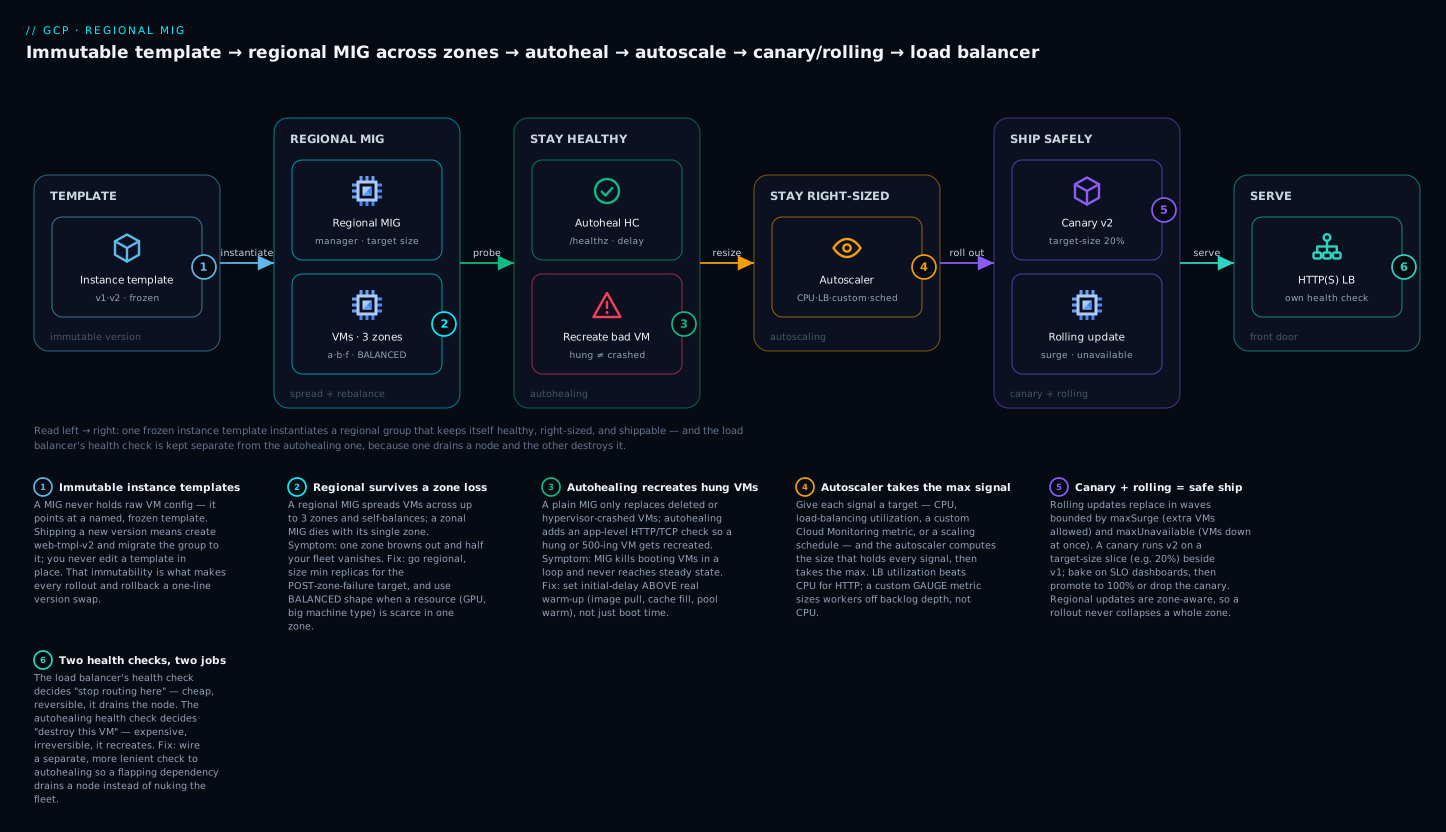
Read the diagram left to right: one immutable template instantiates a regional MIG spread across three zones, which keeps itself healthy (autohealing recreates hung VMs), right-sized (the autoscaler resizes on CPU / LB / custom / schedule signals), and shippable (canary and rolling updates roll new versions in waves) — while the load balancer out front keeps its own health check, separate from the autohealing one, because one merely stops routing to a VM and the other destroys it.
Level: Advanced · Time: ~35 min
Prerequisites: You should be comfortable creating a single Compute Engine VM, know what a boot image and a startup script are, and understand roughly what an HTTP(S) load balancer and a health check do. If any of that is shaky, read Compute Engine deep dive: machine types, disks, images and Cloud Load Balancing deep dive first. Basic gcloud fluency is assumed; a little Terraform helps for the HCL blocks but isn’t required.
After this lesson you can:
- Choose regional vs zonal deliberately and pin zones with the right distribution shape.
- Wire autohealing with a health check whose initial delay exceeds real warm-up, and explain why that one number matters so much.
- Run a rolling update with a defined disruption budget (
maxSurge/maxUnavailable) and stop a bad one instantly. - Ship a canary on a percentage slice, bake it on SLOs, then promote or roll back with scripted commands.
- Autoscale on the right signal — CPU, load-balancing utilization, a custom metric, or a schedule — and cap scale-in.
- Convert a group to a stateful MIG that preserves disks and IPs, and size its update budget to protect quorum.
A Managed Instance Group (MIG) is Compute Engine’s unit of fleet management: it owns a set of identical VMs derived from an instance template, keeps them at a target size, repairs them when they fail, and rolls new versions out gradually. Get this layer right and a VM-based service behaves like a managed platform: it self-heals, scales on demand, and ships canaries without a human babysitting gcloud. Get it wrong and you have a fragile fleet that takes the whole zone down with one bad image.
This walkthrough builds a production-grade regional MIG end to end: zone distribution, templates and update strategy, autohealing, rolling updates, canaries, autoscaling, and stateful configuration. Commands are written against gcloud compute instance-groups managed and a parallel Terraform google_compute_region_instance_group_manager.
Step 1: Regional vs zonal, and why regional wins for production
A zonal MIG places all instances in one zone. If that zone has an outage, your service is gone. A regional MIG spreads instances across multiple zones in a region (up to three by default) and keeps them balanced, so a single-zone failure takes out only a fraction of capacity.
| Property | Zonal MIG | Regional MIG |
|---|---|---|
| Failure domain | One zone | Multiple zones in a region |
| Max size | 1000-ish | Larger; spread across zones |
| Recommended for prod | No | Yes |
| Update unit | Per zone | Across zones, zone-aware |
Create a regional MIG and pin the zones explicitly so you control placement instead of letting Compute Engine pick:
gcloud compute instance-groups managed create web-mig \
  --project=PROJECT_ID \
  --region=us-central1 \
  --template=web-tmpl-v1 \
  --size=6 \
  --zones=us-central1-a,us-central1-b,us-central1-f
The default distribution policy is EVEN: with size 6 across three zones you get 2 instances per zone. The target shape controls how the group reconciles when a zone is short on capacity. EVEN insists on balance; ANY and BALANCED let the group prefer availability over perfect symmetry, which matters when one zone can’t fulfill a resource request (common with GPUs or large machine types).
# Prefer availability when a zone can't satisfy the request
gcloud compute instance-groups managed update web-mig \
  --region=us-central1 \
  --target-distribution-shape=BALANCED
Rule of thumb: production fleets are regional with three zones and
BALANCEDshape unless you have a hard reason (data locality, licensing) to pin a single zone.
Step 2: Instance templates and the update model
A MIG never references a raw VM config; it references an instance template, which is immutable. You don’t edit a template, you create a new one and tell the MIG to migrate to it. That immutability is the whole basis of safe rollouts: every version is a named, frozen artifact.
gcloud compute instance-templates create web-tmpl-v2 \
  --project=PROJECT_ID \
  --machine-type=e2-standard-4 \
  --image-family=debian-12 \
  --image-project=debian-cloud \
  --boot-disk-size=50GB \
  --boot-disk-type=pd-balanced \
  --tags=http-server \
  --metadata=startup-script-url=gs://PROJECT_ID-cfg/startup.sh \
  --region=us-central1
The MIG’s update policy has two type modes that decide when instances move to a new template:
PROACTIVE- the MIG actively replaces instances to converge on the target version. This is what you want for a real rollout.OPPORTUNISTIC- the MIG does nothing on its own; instances only adopt the new template when they happen to be recreated (autohealing, autoscaling scale-up, manual recreate). Use this when you want to stage a version and let it bleed in, or when you’ll drive the rollout yourself withupdate-instances.
You set this on the group, then trigger rollouts by changing the version. The start-update (a.k.a. rolling-action) form makes the intent explicit:
gcloud compute instance-groups managed rolling-action start-update web-mig \
  --region=us-central1 \
  --version=template=web-tmpl-v2 \
  --type=proactive \
  --max-surge=2 \
  --max-unavailable=0
Step 3: Autohealing with a health check and an initial delay
By default a MIG only recreates instances that are deleted or whose VM crashes at the hypervisor level. That does not catch an app that’s hung, deadlocked, or returning 500s. Autohealing fixes that: you attach an HTTP/TCP health check and the MIG recreates any instance the check reports unhealthy.
Create a health check that probes the application, not just the port:
gcloud compute health-checks create http web-autoheal-hc \
  --project=PROJECT_ID \
  --port=8080 \
  --request-path=/healthz \
  --check-interval=10s \
  --timeout=5s \
  --healthy-threshold=2 \
  --unhealthy-threshold=3
Then bind it to the MIG with an initial delay. This is the single most-misconfigured field on a MIG. The initial delay is how long after an instance boots the MIG waits before autohealing starts judging it. Set it shorter than your real warm-up (image pull, JIT warm, cache fill, DB connection pool) and the MIG will kill healthy-but-still-booting instances in a loop, never reaching steady state.
gcloud compute instance-groups managed update web-mig \
  --region=us-central1 \
  --health-check=web-autoheal-hc \
  --initial-delay=300
Important: use a separate, more lenient health check for autohealing than the one your load balancer uses for routing. The LB check decides “stop sending traffic” (cheap, reversible). The autoheal check decides “destroy this VM” (expensive, irreversible). A flapping dependency should drain a node, not nuke it.
Step 4: Rolling updates - maxSurge, maxUnavailable, and minimal disruption
A rolling update replaces instances in waves governed by two knobs:
maxSurge- how many extra instances above target the MIG may create temporarily. Surge first, then delete old, so capacity never dips.maxUnavailable- how many instances may be down (being replaced) at once.
The combination defines your disruption budget. For zero-capacity-loss rollouts, surge and keep unavailable at zero:
gcloud compute instance-groups managed rolling-action start-update web-mig \
  --region=us-central1 \
  --version=template=web-tmpl-v2 \
  --max-surge=3 \
  --max-unavailable=0 \
  --min-ready=120 \
  --replacement-method=substitute
Key fields:
--min-readyholds a freshly created, health-check-passing instance in service for that long before the MIG counts it “ready” and proceeds. This catches versions that pass health checks immediately but fall over under real traffic a minute later.--replacement-method=substitutecreates a new instance to replace an old one (new name, new IP unless stateful). The alternative,recreate, reuses the same instance name in place and is required for stateful MIGs.
In a regional MIG the update is zone-aware: the MIG won’t take down more than the allowed fraction in any single zone at once, so a rollout never collapses an availability zone. You don’t configure this; it’s inherent to regional groups respecting the distribution policy.
To stop a bad rollout immediately:
gcloud compute instance-groups managed rolling-action stop-proactive-update web-mig \
  --region=us-central1
Step 5: Canary releases with two template versions
A canary runs the new template on a slice of the fleet while the bulk stays on the known-good version. The MIG models this natively with two versions on the same group, where the canary version carries a target-size:
gcloud compute instance-groups managed rolling-action start-update web-mig \
  --region=us-central1 \
  --version=template=web-tmpl-v1 \
  --canary-version=template=web-tmpl-v2,target-size=20% \
  --type=proactive \
  --max-surge=1 \
  --max-unavailable=0 \
  --min-ready=180
Now 20% of instances run v2 and 80% run v1. You watch metrics, error rates, and latency on the canary slice. If it’s healthy, promote by making v2 the sole version (target-size 100%, no canary); if not, drop the canary and the fleet is already fully on v1.
# Promote: v2 becomes the whole fleet
gcloud compute instance-groups managed rolling-action start-update web-mig \
  --region=us-central1 \
  --version=template=web-tmpl-v2 \
  --type=proactive --max-surge=3 --max-unavailable=0

# Or roll back: drop the canary, fleet stays on v1
gcloud compute instance-groups managed rolling-action start-update web-mig \
  --region=us-central1 \
  --version=template=web-tmpl-v1 \
  --type=proactive --max-surge=3 --max-unavailable=0
target-size accepts a percentage or a fixed count. Percentages are evaluated against the current group size, so a canary scales with the fleet - useful when an autoscaler is also resizing during the bake.
Step 6: Autoscaling on CPU, LB utilization, and custom metrics
Attach an autoscaler so the group resizes on demand. The cleanest mental model: pick one or more signals, give each a target, and the autoscaler computes the size that holds every signal at its target, then takes the max.
CPU utilization is the default starting point:
gcloud compute instance-groups managed set-autoscaling web-mig \
  --region=us-central1 \
  --min-num-replicas=6 \
  --max-num-replicas=30 \
  --target-cpu-utilization=0.6 \
  --cool-down-period=90
For a group behind an HTTP(S) load balancer, load-balancing utilization is usually a better signal than CPU because it tracks the serving capacity you defined on the backend service (e.g., max RPS per instance):
gcloud compute instance-groups managed set-autoscaling web-mig \
  --region=us-central1 \
  --min-num-replicas=6 --max-num-replicas=30 \
  --target-load-balancing-utilization=0.8 \
  --cool-down-period=90
For queue-driven or app-specific load, scale on a custom Cloud Monitoring metric - this is how you size workers off backlog depth rather than CPU:
gcloud compute instance-groups managed set-autoscaling worker-mig \
  --region=us-central1 \
  --min-num-replicas=2 --max-num-replicas=50 \
  --custom-metric-utilization='metric=custom.googleapis.com/app/queue_depth,utilization-target=100,utilization-target-type=GAUGE' \
  --cool-down-period=120
utilization-target-type matters: GAUGE targets the instantaneous per-instance value (100 messages each), DELTA_PER_SECOND/DELTA_PER_MINUTE target a rate. Pick the one that matches how your metric is emitted, or the autoscaler will chase the wrong number.
Scheduled autoscaling for predictable peaks
Metric-based scaling reacts after load arrives, which means the ramp is always a step behind a sharp, predictable spike (market open, a nightly batch, an exam window). A scaling schedule raises the floor for a recurring window so capacity is already warm when the wave hits. It doesn’t cap anything — it guarantees a minimum for the duration, and the metric-based signals still scale you higher if needed.
# Guarantee at least 20 replicas on weekday business hours (08:00-19:00 CT)
gcloud compute instance-groups managed create-scaling-schedule web-mig \
  --region=us-central1 \
  --scaling-schedule=weekday-peak \
  --schedule='0 8 * * MON-FRI' \
  --time-zone='America/Chicago' \
  --duration-sec=39600 \
  --min-required-replicas=20
--scheduleis a standard cron expression for when the window starts;--duration-sec(here 11 hours) is how long it stays in effect.--min-required-replicasis the floor during the window. The autoscaler holdsmax(all active schedules, all metric signals), so if CPU demands 26 you get 26; if it demands 12 you still get 20 because the schedule floor wins.- A schedule can never scale you below the autoscaler’s own
--min-num-replicas, and never above--max-num-replicas. Overlapping schedules stack by taking the highest floor.
List and remove schedules with the sibling verbs:
gcloud compute instance-groups managed describe web-mig --region=us-central1 \
  --format='yaml(autoscaler.autoscalingPolicy.scalingSchedules)'

gcloud compute instance-groups managed delete-scaling-schedule web-mig \
  --region=us-central1 --scaling-schedule=weekday-peak
Capping scale-in so you don’t thrash
By default the autoscaler will remove instances as fast as the signal drops. For stateful-ish or slow-draining workloads that is dangerous: a brief dip can evict half the fleet, and then the next spike has to cold-start it all back. A scale-in control caps how many instances the autoscaler may remove within a trailing time window, so scale-down is gentle while scale-up stays instant.
# Never remove more than 10% of the fleet within any 10-minute window
gcloud compute instance-groups managed update-autoscaling web-mig \
  --region=us-central1 \
  --scale-in-control=max-scaled-in-replicas-percent=10,time-window=600
Production note: keep
min-num-replicashigh enough to survive the loss of one zone in a regional group. If you need 6 instances to serve peak and you run three zones, a floor of 6 means losing a zone drops you to ~4 until repair - size the floor for the post-failure target, not the happy path.
Step 7: Stateful MIGs - preserved disks, stateful IPs, per-instance configs
Default MIGs are stateless: replace an instance and it gets a fresh disk and a new internal IP. That’s wrong for stateful workloads (databases, brokers, anything with identity or local data). A stateful MIG preserves named resources across recreate and update.
Two layers of statefulness:
- Stateful policy on the group - a blanket rule that all instances keep their data disk(s) and (optionally) internal IP across updates.
- Per-instance configs - individual overrides naming the exact disk and metadata for one instance, so VM
web-mig-abcalways reattaches its disk.
Set a group-wide stateful policy preserving a data disk and the boot disk:
gcloud compute instance-groups managed update web-mig \
  --region=us-central1 \
  --stateful-disk=device-name=data,auto-delete=never \
  --stateful-internal-ip=interface-name=nic0,auto-delete=on-permanent-instance-deletion
Pin a specific disk and a stable IP to one named instance with a per-instance config:
gcloud compute instance-groups managed instance-configs create web-mig \
  --region=us-central1 \
  --instance=web-mig-7x2q \
  --stateful-disk=device-name=data,source=projects/PROJECT_ID/zones/us-central1-a/disks/web-data-7x2q,mode=rw,auto-delete=never \
  --stateful-metadata=role=primary
Critically, stateful MIGs must use recreate as the replacement method, not substitute - the instance name is preserved so its identity and preserved resources survive. Updates on stateful groups are also non-disruptive only to the extent the workload tolerates an in-place recreate; plan rollouts with maxUnavailable sized to your quorum (e.g., for a 3-node quorum, never take down more than 1).
resource "google_compute_region_instance_group_manager" "stateful" {
  name               = "web-mig"
  region             = "us-central1"
  base_instance_name = "web-mig"
  target_size        = 3

  version {
    instance_template = google_compute_instance_template.web_v2.id
  }

  stateful_disk {
    device_name = "data"
    delete_rule = "NEVER"
  }

  stateful_internal_ip {
    interface_name = "nic0"
    delete_rule    = "ON_PERMANENT_INSTANCE_DELETION"
  }

  update_policy {
    type                  = "PROACTIVE"
    minimal_action        = "RESTART"
    replacement_method    = "RECREATE"   # required for stateful
    max_surge_fixed       = 0            # cannot surge a stateful group
    max_unavailable_fixed = 1
  }

  auto_healing_policies {
    health_check      = google_compute_health_check.autoheal.id
    initial_delay_sec = 300
  }
}
Note max_surge_fixed = 0: a stateful group can’t surge because the preserved identity/disk can’t be duplicated, so you trade availability headroom for max_unavailable. Size it to protect quorum.
Step 8: Draining, surge protection, and validating safely
Before any update touches production traffic, make sure removed instances drain instead of dropping connections. Connection draining lives on the backend service, not the MIG - set it so an instance being replaced finishes in-flight requests:
gcloud compute backend-services update web-backend \
  --global \
  --connection-draining-timeout=120
The safe-rollout pattern that ties the whole article together:
- Build
web-tmpl-vN+1, validate it boots and passes/healthzin a scratch MIG or a single test instance. - Start a canary at 10-20% with
max-unavailable=0, a realmin-ready, and surge enabled (stateless) so capacity never dips. - Bake against SLO dashboards for the canary slice; watch error rate and p99, not just “instances healthy.”
- Promote to 100% proactively, or
stop-proactive-update+ roll back to the prior template on regression. - For stateful groups, drive
max-unavailable=1,recreate, and verify quorum after each wave.
Verify
Confirm the group, its versions, health, and per-instance state:
# Group summary: target size, versions, instance template(s) in use
gcloud compute instance-groups managed describe web-mig \
  --region=us-central1

# Per-instance status: which template each VM runs and its current/standby action
gcloud compute instance-groups managed list-instances web-mig \
  --region=us-central1 \
  --format='table(instance, status, currentAction, version.name, instanceHealth[0].detailedHealthState)'
Healthy steady state shows every instance RUNNING, currentAction=NONE, and detailedHealthState=HEALTHY. During a rollout you’ll see CREATING, DELETING, RECREATING, or VERIFYING actions - if instances are stuck in VERIFYING or churning in RECREATING, your initial delay or health check is wrong (revisit Step 3).
Check that the autoscaler is making decisions you expect:
gcloud compute instance-groups managed describe web-mig \
  --region=us-central1 \
  --format='yaml(autoscaler.status, autoscaler.statusDetails)'
For stateful groups, confirm the per-instance config actually pinned the disk:
gcloud compute instance-groups managed instance-configs describe web-mig \
  --region=us-central1 \
  --instance=web-mig-7x2q
Enterprise scenario
A payments platform team ran a fraud-scoring service on a regional MIG of 24 GPU-backed instances (a2 family) across three zones in us-central1. They hit two compounding problems during a model-image rollout.
First, the rollout deadlocked on capacity. They used max-surge=4 to keep capacity flat, but a2 GPUs were constrained in us-central1-a that afternoon. Surging needs spare capacity to create new instances before deleting old ones; with no GPU headroom, the new instances sat in CREATING and the rollout stalled at 30%, holding double cost on the instances that did surge.
Second, the new image pulled a 9 GB model from GCS on boot and took ~6 minutes to warm. Their autoheal initial-delay was 180 seconds - so the MIG started recreating instances that were still loading the model, and the regional group churned through GPU quota trying (and failing) to land healthy nodes.
The fix was a deliberate switch in strategy for a capacity-constrained, slow-warming fleet:
# 1. Raise the autoheal initial delay above real warm-up time
gcloud compute instance-groups managed update fraud-mig \
  --region=us-central1 \
  --health-check=fraud-warmup-hc \
  --initial-delay=480

# 2. Roll WITHOUT surge: delete-then-create using the unavailable budget,
#    one instance at a time, so it never needs spare GPU capacity to proceed
gcloud compute instance-groups managed rolling-action start-update fraud-mig \
  --region=us-central1 \
  --version=template=fraud-tmpl-v7 \
  --type=proactive \
  --max-surge=0 \
  --max-unavailable=1 \
  --min-ready=300
By moving from a surge-based to an max-unavailable=1, surge-zero rollout, the update never required free GPU capacity to make forward progress - it reused the slot freed by each deleted instance. Pairing that with an initial-delay of 480s (comfortably above the 6-minute warm) stopped the autoheal churn. The rollout completed in ~3 hours at a controlled 1-in-24 disruption, and they accepted the brief single-instance capacity dip because the service ran with enough margin at min replicas to absorb it. The lesson: surge trades capacity headroom for speed; when capacity is the scarce resource, max-unavailable is the safer lever - and your autoheal initial delay must always exceed real warm-up, not just boot.
Going deeper
This is the layer that separates “I can create a MIG” from “I can run one under load without surprises.”
How autohealing actually decides — and why it is not the LB’s decision
Autohealing is a control loop that runs inside the MIG and is completely independent of any load balancer. The MIG periodically evaluates each instance against the health check attached to its auto_healing_policies. Two subtleties trip people up:
- The initial-delay timer starts when the instance is created, not when your app finishes booting. Compute Engine has no way to know your app is “ready”; it only knows the VM exists. So the delay must cover the entire cold path: VM boot + image/layer pull + config fetch + JIT/cache warm + connection-pool fill. Measure the real p95 of that path and set initial-delay comfortably above it. Under-set, and the loop recreates instances mid-warm-up, which resets the timer on the replacement and produces the classic never-reaches-steady-state churn.
- Autohealing is throttled, but it is not bounded by the update policy’s
maxUnavailable. Rolling updates respectmaxUnavailable; repairs are a separate mechanism the MIG rate-limits on its own so a bad dependency that fails every instance’s check at once doesn’t nuke the whole fleet simultaneously. Do not assume amaxUnavailable=1update policy protects you from a mass autoheal event — protect against that with a lenient autoheal check (higherunhealthy-threshold, longer interval) so transient blips never cross the “destroy” line.
LB health check vs autohealing health check — same resource type, opposite blast radius
Both are google_compute_health_check resources of the same shape. What differs is who consumes the verdict and what that verdict does:
| LB / backend-service health check | Autohealing health check | |
|---|---|---|
| Attached to | The backend service | The MIG’s auto_healing_policies |
| Verdict means | “Stop / resume routing traffic here” | “This VM is dead — recreate it” |
| Blast radius | Reversible: node drains, comes back when healthy | Irreversible: VM is destroyed and rebuilt |
| Right tuning | Sensitive (fast to pull a bad node from rotation) | Lenient (slow to destroy; must clear transient blips) |
| Cost of a false positive | A node briefly out of rotation | A needless recreate, warm-up, and possible churn loop |
The correct production pattern is two distinct health checks: a tight one on the backend service that quickly stops routing to a struggling node, and a loose one on autohealing that only fires when a node is genuinely, persistently broken. Sharing one check forces a single sensitivity setting to serve two opposite jobs — and whichever way you tune it, one of the two behaviors is wrong.
The update policy beyond surge and unavailable
maxSurge/maxUnavailable get the attention, but the update policy has three more fields that decide how an instance changes:
minimal-action(NONE→REFRESH→RESTART→REPLACE) — the least disruptive action the MIG is allowed to take to apply a change. If a new template differs only in metadata or labels, the MIG can apply it with aREFRESH(no reboot) instead of replacing the VM. Set this to the smallest action your change actually needs.most-disruptive-allowed-action— the ceiling. Set it toREFRESHand a change that would require aREPLACEwill fail loudly instead of silently rebuilding your fleet. This is a guardrail: it lets you assert “this rollout must not recreate VMs.”instance-redistribution-type(PROACTIVE|NONE) — for regional groups, whether the MIG actively moves instances between zones to restore balance (e.g., after a zone recovers). SetNONEon stateful or IP-sensitive fleets where you don’t want the MIG relocating instances on its own.
# A metadata-only change that must never rebuild a VM:
gcloud compute instance-groups managed rolling-action start-update web-mig \
  --region=us-central1 \
  --version=template=web-tmpl-v3 \
  --minimal-action=refresh \
  --most-disruptive-allowed-action=refresh
Autoscaler internals: max-of-signals, cool-down, and stabilization
The autoscaler recomputes a recommendation on a short interval. With multiple signals it computes the required size for each independently and takes the maximum — signals never average or cancel. Two timing knobs shape its behavior:
cool-down-period— how long after a new instance becomes ready the autoscaler ignores that instance’s metrics, giving your app time to warm before its cold CPU drags the average down and triggers a phantom scale-up. Set it near your warm-up time.- Scale-in stabilization — the autoscaler is deliberately asymmetric: it scales out fast on the peak of recent demand but scales in slowly, only after demand has stayed low for a stabilization window (~10 min of look-back). Layer
--scale-in-controlon top to cap how much it can remove per window. The result you want: instant up, gentle down.
Because scaling schedules and metric signals both feed the same max, a schedule is a floor, never a cap — it cannot prevent the metric signals from scaling you higher, and it cannot push you above max-num-replicas.
Standby pools: pre-warmed capacity for fast scale-out
For workloads with a long cold-start (large images, big model loads), booting fresh VMs on every scale-out is slow. Compute Engine lets a MIG hold part of its capacity as stopped or suspended VMs — a standby pool — so a scale-out resumes an existing VM in seconds instead of provisioning a new one. You size it with --stopped-size / --suspended-size and a standby policy; the trade-off is you pay for disks (and, for suspended, memory) while VMs idle in the pool. Reach for this only when cold-start latency is the constraint and the standby cost is worth it.
The full autoscaler in Terraform (schedules + scale-in in one place)
The gcloud set-autoscaling command hides that the autoscaler is a separate resource from the MIG. In Terraform that separation is explicit — a google_compute_region_autoscaler targets the group manager:
resource "google_compute_region_autoscaler" "web" {
  name   = "web-autoscaler"
  region = "us-central1"
  target = google_compute_region_instance_group_manager.web.id

  autoscaling_policy {
    min_replicas    = 6
    max_replicas    = 30
    cooldown_period = 90

    cpu_utilization {
      target = 0.6
    }

    # Gentle scale-in: at most 10% removed per 10-minute window
    scale_in_control {
      max_scaled_in_replicas {
        percent = 10
      }
      time_window_sec = 600
    }

    # Predictable weekday peak: floor of 20 for 11 hours
    scaling_schedules {
      name                  = "weekday-peak"
      min_required_replicas = 20
      schedule              = "0 8 * * MON-FRI"
      time_zone             = "America/Chicago"
      duration_sec          = 39600
    }
  }
}
Quotas, IAM, and cost you should size for up front
- Quota is the real ceiling. A
max-num-replicasof 100 is meaningless if your regional CPU/GPU/IP quota can’t fund it, or if a single zone in the region is capacity-constrained — the group will simply fail to reach target and logQUOTA_EXCEEDED/ZONE_RESOURCE_POOL_EXHAUSTEDin its status. Check and raise quota before the peak, and preferBALANCEDshape so the group can lean on zones that do have room. - IAM: two identities. The operator needs
compute.instanceGroupManagers.update(bundled inroles/compute.instanceAdmin.v1) to trigger rollouts and edit the group. Separately, every VM the template stamps out runs as the service account named in the template — grant that SA only what the app needs (least privilege), because a bad template hands that identity to every instance. - Surge costs double, briefly. A
max-surge=Nrollout runs up tosize + Ninstances until old ones drain — real money on expensive machine types. On GPU or large fleets,max-surge=0+max-unavailableavoids the double spend (at the cost of a capacity dip), which is exactly the trade the enterprise scenario above made.
Checklist
Practice challenges
Work these against a scratch project (or just write the command and check it against the solution). They escalate from a first regional group to a stateful, quorum-aware fleet.
1. Create a regional MIG (beginner). Stand up a group named shop-mig of 6 instances from template shop-tmpl-v1, spread across us-central1-a, -b, and -f.
<details> <summary>Solution</summary>
gcloud compute instance-groups managed create shop-mig \
  --project=PROJECT_ID \
  --region=us-central1 \
  --template=shop-tmpl-v1 \
  --size=6 \
  --zones=us-central1-a,us-central1-b,us-central1-f
Why: a regional group (note --region, not --zone) spreads the 6 VMs across three zones, so losing one zone costs you ~2 instances, not the whole service.
</details>
2. Add autohealing that catches a hung app (beginner→intermediate). Create an HTTP health check probing /healthz on port 8080, then bind it to shop-mig with a 5-minute initial delay.
<details> <summary>Solution</summary>
gcloud compute health-checks create http shop-autoheal-hc \
  --port=8080 --request-path=/healthz \
  --check-interval=10s --timeout=5s \
  --healthy-threshold=2 --unhealthy-threshold=3

gcloud compute instance-groups managed update shop-mig \
  --region=us-central1 \
  --health-check=shop-autoheal-hc \
  --initial-delay=300
Why: without an autoheal health check the MIG only replaces deleted/crashed VMs, never a hung one that still answers TCP. The 300s initial delay must exceed real warm-up or the MIG recreates booting VMs in a loop. </details>
3. Autoscale on serving capacity, not CPU (intermediate). The group sits behind an HTTP(S) load balancer. Configure autoscaling to hold load-balancing utilization at 0.75, floor 6, ceiling 40.
<details> <summary>Solution</summary>
gcloud compute instance-groups managed set-autoscaling shop-mig \
  --region=us-central1 \
  --min-num-replicas=6 --max-num-replicas=40 \
  --target-load-balancing-utilization=0.75 \
  --cool-down-period=90
Why: for an HTTP service, LB utilization tracks the RPS-per-instance capacity you defined on the backend service — a truer measure of “am I full?” than CPU, which can be low while you’re latency-bound on I/O. </details>
4. Guarantee capacity for a known peak (intermediate→advanced). Sales run 08:00–19:00 America/Chicago on weekdays. Guarantee at least 20 replicas during that window without changing the metric-based ceiling, and explain what happens if CPU demands 26.
<details> <summary>Solution</summary>
gcloud compute instance-groups managed create-scaling-schedule shop-mig \
  --region=us-central1 \
  --scaling-schedule=weekday-peak \
  --schedule='0 8 * * MON-FRI' \
  --time-zone='America/Chicago' \
  --duration-sec=39600 \
  --min-required-replicas=20
Why: the schedule raises the floor to 20 for 11 hours (39600s). The autoscaler always holds max(schedule floor, metric signals), so if CPU demands 26 you get 26 — the schedule pre-warms the baseline but never caps growth, and never exceeds --max-num-replicas.
</details>
5. Ship a zero-downtime canary, then script both exits (advanced). Run shop-tmpl-v2 on 20% of the fleet with no capacity loss and a 3-minute bake, then give the promote and rollback commands.
<details> <summary>Solution</summary>
# Canary: 20% on v2, 80% stays on v1, capacity never dips
gcloud compute instance-groups managed rolling-action start-update shop-mig \
  --region=us-central1 \
  --version=template=shop-tmpl-v1 \
  --canary-version=template=shop-tmpl-v2,target-size=20% \
  --type=proactive --max-surge=1 --max-unavailable=0 --min-ready=180

# Promote: v2 becomes the whole fleet
gcloud compute instance-groups managed rolling-action start-update shop-mig \
  --region=us-central1 \
  --version=template=shop-tmpl-v2 \
  --type=proactive --max-surge=3 --max-unavailable=0

# Roll back: drop the canary, fleet is already on v1
gcloud compute instance-groups managed rolling-action start-update shop-mig \
  --region=us-central1 \
  --version=template=shop-tmpl-v1 \
  --type=proactive --max-surge=3 --max-unavailable=0
Why: the two-version model bakes v2 on a real slice under real traffic. max-unavailable=0 + surge keeps capacity flat; min-ready=180 makes each canary VM prove itself for 3 minutes before the MIG counts it ready. Rollback is instant because 80% never left v1.
</details>
6. Make it stateful and quorum-safe (advanced). Convert db-mig (3 nodes) to preserve a data disk (device-name=data) and its internal IP across updates, and set an update policy that never breaks a 3-node quorum. Explain the two required settings.
<details> <summary>Solution</summary>
gcloud compute instance-groups managed update db-mig \
  --region=us-central1 \
  --stateful-disk=device-name=data,auto-delete=never \
  --stateful-internal-ip=interface-name=nic0,auto-delete=on-permanent-instance-deletion
update_policy {
  type                  = "PROACTIVE"
  replacement_method    = "RECREATE"   # keep the instance name → keep identity + disk
  max_surge_fixed       = 0            # a preserved identity/disk cannot be duplicated
  max_unavailable_fixed = 1            # never take down >1 of 3 → quorum survives
}
Why: stateful groups must use RECREATE (the name is preserved so the disk/IP reattach) and therefore cannot surge (max_surge=0). With no surge headroom, your only disruption lever is max_unavailable; sizing it to 1 keeps 2 of 3 nodes up, preserving quorum through every wave.
</details>
Common beginner mistakes
- “Autohealing catches app crashes automatically.” No — a plain MIG only recreates VMs that are deleted or crash at the hypervisor level. An app that hangs, deadlocks, or serves 500s while the VM stays up is invisible to it. You must attach an application-level health check (
/healthz) toauto_healing_policiesfor the MIG to notice and recreate a logically dead node. - “Set the initial delay low so bad instances get killed fast.” Backwards. Initial delay is a grace period for warm-up, and the timer starts at VM creation, not app-ready. Set it below real warm-up and the MIG destroys instances that were merely still booting — then destroys their replacements, forever. The right instinct is lenient: set it comfortably above the p95 cold path.
- “One health check is enough — reuse the LB’s for autohealing.” The LB check decides drain (reversible: stop routing, resume later); the autoheal check decides destroy (irreversible: rebuild the VM). They want opposite sensitivities. Share one and a flapping downstream dependency won’t just pull nodes from rotation — it will recreate your entire fleet.
- “Ship a new version by editing the instance template.” Templates are immutable; you can’t edit one. Create
web-tmpl-v2and roll the group to it. That immutability is a feature — every version is a frozen, named artifact you can roll back to in one command. - “
max-surge=0andmax-unavailable=0is the safest rollout.” It’s a deadlock. With no surge the MIG can’t add a replacement, and with no unavailable budget it can’t remove an old instance to make room — so the update can never make progress. At least one must be non-zero (and a stateful group forcesmax-surge=0, so it must usemax-unavailable≥1). - “A 20% canary is a fixed number of instances.”
target-size=20%is evaluated against the current group size every time it reconciles. If the autoscaler grows the fleet from 10 to 20 during the bake, the canary grows from 2 to 4 with it. Use a fixed count if you need an exact number pinned regardless of scaling. - “A high
min-num-replicasjust wastes money.” The floor exists to survive failure, not to serve the happy path. In a 3-zone regional group, losing a zone removes ~1/3 of capacity — so if you need 6 healthy instances at peak, a floor of 6 leaves you at ~4 during a zone outage. Size the floor for the post-failure target.
Glossary
- Managed Instance Group (MIG) — A Compute Engine control loop that maintains a set of identical VMs at a target size from an instance template, repairing, scaling, and updating them automatically.
- Instance template — An immutable, named definition of a VM (machine type, image, disks, tags, metadata, service account). A MIG points at a template; you never edit one, you create a new version.
- Zonal vs regional MIG — A zonal MIG lives in one zone (single failure domain); a regional MIG spreads VMs across up to three zones in a region and rebalances them, surviving a single-zone outage.
- Distribution policy / target shape — How a regional MIG places instances across zones.
EVENinsists on equal spread;BALANCED/ANYprefer availability when a zone can’t satisfy a resource request. - Autohealing — The MIG feature that recreates any instance an attached health check reports unhealthy, catching app-level failures a plain MIG (which only handles deleted/crashed VMs) would miss.
- Health check (autoheal vs LB) — A probe of a VM’s health. The autohealing check decides “destroy and rebuild this VM” (irreversible); the load-balancer check decides “stop/resume routing to this VM” (reversible). Use separate checks with different sensitivities.
- Initial delay — Grace period after an instance is created before autohealing starts judging it. Must exceed real warm-up (boot + image pull + cache/pool warm) or the MIG kills booting VMs in a loop.
- Rolling update — Migrating a MIG to a new template in waves, bounded by
maxSurgeandmaxUnavailable, so the service updates without a full outage. - maxSurge — How many extra instances above target the MIG may temporarily create during an update. Surge-first keeps capacity flat but needs spare quota. Not allowed on stateful groups.
- maxUnavailable — How many instances may be down at once during an update. The disruption lever you use when you can’t surge (e.g., capacity-constrained or stateful fleets).
- min-ready — How long a new, health-check-passing instance must serve before the MIG counts it “ready” and proceeds — catches versions that pass checks but fail under real traffic.
- Replacement method —
SUBSTITUTEbuilds a new instance (new name/IP) to replace an old one;RECREATEreuses the same instance name in place and is required for stateful groups. - Canary — Running a new template on a slice of the fleet (
target-size, e.g. 20%) alongside the known-good version, to bake the new version on real traffic before promoting or rolling back. - Autoscaler — A separate resource targeting the MIG that resizes it to hold one or more signals at target, taking the maximum required size across all signals.
- Load-balancing utilization — An autoscaling signal that tracks how full each instance is relative to the serving capacity (e.g., max RPS) defined on the backend service — usually better than CPU for HTTP.
- Custom metric utilization (GAUGE vs DELTA) — Scaling on a Cloud Monitoring metric.
GAUGEtargets an instantaneous per-instance value (e.g., 100 queued items each);DELTA_PER_SECOND/_MINUTEtarget a rate. - Cool-down period — How long after a new instance becomes ready the autoscaler ignores its metrics, so a cold instance’s low utilization doesn’t trigger a phantom scale-up.
- Scaling schedule — A recurring window (cron + duration + time zone) that raises the autoscaler’s floor (
min-required-replicas) to pre-warm capacity for predictable peaks; never a cap. - Scale-in control — A cap on how many instances the autoscaler may remove within a trailing time window, keeping scale-down gentle while scale-up stays instant.
- Stateful MIG — A MIG that preserves named resources (data disks, internal IP, metadata) across recreate and update, for workloads with identity or local data.
- Stateful policy / per-instance config — The group-wide rule (all VMs keep their disk/IP) versus an individual override that pins a specific disk and metadata to one named instance.
- Connection draining — A backend-service setting (not on the MIG) that lets an instance being removed finish in-flight requests before it’s torn down.
- minimal-action / most-disruptive-allowed-action — Update-policy bounds on how a change is applied: the least disruptive action allowed (
NONE→REFRESH→RESTART→REPLACE) and a ceiling that makes an over-disruptive change fail instead of silently rebuilding VMs. - Standby pool — Stopped or suspended VMs a MIG holds in reserve (
--stopped-size/--suspended-size) so scale-out resumes them in seconds instead of provisioning fresh, trading idle cost for faster cold-start.