In a nutshell
Every other lesson in this course builds something. This lesson is about watching the things you built — knowing whether they are alive, fast, and behaving, and having the evidence to explain what went wrong when they aren’t. That is observability, and on Google Cloud it is delivered by the Cloud Operations suite (the product family once called Stackdriver).
The whole suite is easiest to hold in your head as the instrument panel of a car that also has a flight recorder:
- Cloud Monitoring is the set of gauges — numbers that move over time (CPU %, requests per second, queue depth). You watch trends and set a red line that trips an alarm.
- Cloud Logging is the flight recorder — the exact, timestamped written record of every event (“request received”, “payment declined”, “who changed this firewall rule”). When something breaks at 03:00, this is the tape you replay.
- Cloud Trace follows one request as it hops across services, like tracing a single parcel across every sorting depot to find where it got stuck.
- Cloud Profiler is an always-on fuel-efficiency scan of your running code, showing which functions burn the most CPU or memory in production.
- Error Reporting is the complaints desk that bundles a million identical crashes into one ticket with a count and a sample stack trace.
- Alerting policies and uptime checks are the smoke alarm plus the night guard who tries the front door every few minutes and pages a human when something is actually wrong.
You do not install most of this. Google Cloud services emit their metrics and many of their logs automatically; you only add the Ops Agent when you need the view from inside a virtual machine (memory, disk, your app’s own logs). A beginner can start by just reading a dashboard and searching logs; an SRE uses the very same suite to run error budgets and page precisely on user pain. This lesson takes you the whole way.
Level: Intermediate · Time: ~50 min read · You will need: any Google Cloud project (the free-trial credit covers the lab).
You cannot operate what you cannot see. Every other lesson in this course builds something — a VM, a Cloud Run service, a BigQuery dataset, a GKE cluster — and the moment that thing is in production, the questions change from “how do I create it?” to “is it healthy, is it fast, is it about to fall over, and when it broke at 03:00 what actually happened?”. Answering those questions is the job of the Google Cloud Operations suite, the umbrella name for Google’s built-in observability stack: Cloud Monitoring, Cloud Logging, Cloud Trace, Cloud Profiler, and Error Reporting, fed by the Ops Agent on VMs and by automatic instrumentation everywhere else.
If you have been around Google Cloud for a while you will know this suite by its old name, Stackdriver — Google acquired the company Stackdriver in 2014, rebranded the products to “Cloud Monitoring”, “Cloud Logging” and so on around 2020, and grouped them under “Google Cloud’s operations suite”. The Stackdriver name is gone from the console but lingers in old blog posts, in some API names, and in the muscle memory of every engineer who has been doing this longer than five years. When you see “Stackdriver Monitoring” anywhere, read it as “Cloud Monitoring”.
This lesson is deliberately exhaustive. The goal is that after reading it once you understand every important option in the suite — every metric type, the difference between MQL and PromQL, every field on an alerting policy, what a metrics scope actually is, the full log-routing model from log entry to sink to bucket, log-based metrics, Log Analytics, the three application-performance tools, and the audit-log taxonomy that auditors will ask you about. That is enough to operate these services in production, answer an interviewer’s probing follow-ups, and pass the observability sections of the Associate Cloud Engineer (ACE) and Professional Cloud DevOps Engineer (PCDE) exams.
Learning objectives
By the end of this lesson you will be able to:
- Explain the architecture of the Operations suite and how a metrics scope lets one project monitor many.
- Read and write MQL and PromQL queries against Cloud Monitoring, and know when each is the right tool.
- Build dashboards, configure alerting policies (metric-threshold, MQL/PromQL, and log-based) with the right notification channels, and create uptime checks.
- Define SLIs, SLOs and error budgets and attach burn-rate alerts the way an SRE team would.
- Describe the full Cloud Logging routing model —
_Defaultand_Requiredbuckets, log sinks, inclusion and exclusion filters, aggregated org/folder sinks — and route logs to BigQuery, Cloud Storage, Pub/Sub or another bucket. - Create log-based metrics, query logs in the Logs Explorer, and run SQL over logs with Log Analytics.
- Instrument applications with Cloud Trace and Cloud Profiler, triage crashes with Error Reporting, and install/configure the Ops Agent.
- Distinguish Admin Activity, Data Access, System Event and Policy Denied audit logs and configure their collection.
Prerequisites
You should be comfortable with the Google Cloud resource hierarchy (organisation → folders → projects), with IAM roles and service accounts, and with the gcloud CLI from the first-steps lesson. A throwaway project with the $300 free-trial credit (or any project you can spend a few rupees in) is enough for the lab. In the Zero-to-Hero course this is the Operations lesson of the Intermediate tier — it is the capability that makes every prior compute, storage, data and networking lesson operable, and it is assumed by the troubleshooting playbooks that follow it.
Core concept: the suite and where each piece fits
The Operations suite is five products that share one mental model: signals about your workloads flow into Google-managed backends, where you can query, visualise and alert on them. It is useful to anchor each product to the classic “three pillars of observability” plus a couple of extras:
| Product | Pillar / job | What it stores | Free allotment (per billing account, monthly) |
|---|---|---|---|
| Cloud Monitoring | Metrics | Time series (numbers over time) | All Google Cloud metrics free; first 150 MiB of chargeable (custom/agent/Prometheus) metrics free |
| Cloud Logging | Logs | Log entries (structured events) | First 50 GiB of log ingestion free |
| Cloud Trace | Traces | Latency spans of distributed requests | First 2.5 million spans ingested free |
| Cloud Profiler | Continuous profiling | CPU/heap flame graphs from production | Free — no charge for Profiler |
| Error Reporting | Error aggregation | Grouped, deduplicated exceptions | Free — built on Logging |
Two architectural facts shape everything else and are worth fixing in your mind now:
- Most Google Cloud signals are collected automatically. Every Google Cloud service emits platform metrics (CPU, request count, queue depth) to Cloud Monitoring and many emit logs to Cloud Logging without you installing anything. You install the Ops Agent only to get guest-level signals from inside a VM — memory, disk, process, and application logs — which the hypervisor cannot see. Serverless products (Cloud Run, Cloud Functions, App Engine, GKE Autopilot) need no agent at all.
- Monitoring is organised around a “scope”; logging is organised around “routing”. These are the two ideas people get wrong. A metrics scope is a list of projects whose metrics a single “scoping project” can see — that is how you build a single pane of glass across many projects. Log routing is the pipeline
log entry → Log Router → sink → destinationthat decides where each log line is stored, copied, or dropped. Get those two right and the rest is detail.
Core concept: metric types, resources, and metrics scopes
A metric in Cloud Monitoring is a named measurement with a defined kind and value type — for example compute.googleapis.com/instance/cpu/utilization. A time series is the stream of timestamped values for one metric for one specific resource (this VM, that bucket), distinguished by labels (key/value pairs such as instance_name, zone).
There are several families of metrics, and knowing which is which tells you what is free and what you must instrument:
| Metric family | Source | Examples | Cost |
|---|---|---|---|
| Google Cloud (platform) metrics | Emitted by Google services automatically | compute…/cpu/utilization, loadbalancing…/https/request_count, pubsub…/subscription/num_undelivered_messages |
Free |
| Agent metrics | Ops Agent inside a VM | agent.googleapis.com/memory/percent_used, …/disk/percent_used |
Chargeable (counts toward the 150 MiB free tier) |
| Custom metrics | Your code via the API/OpenTelemetry, prefix custom.googleapis.com/ or workload.googleapis.com/ |
custom…/orders_processed |
Chargeable |
| Prometheus metrics | Google Cloud Managed Service for Prometheus | prometheus.googleapis.com/… |
Chargeable, priced per sample |
| External / BindPlane metrics | Third-party integrations | varies | Chargeable |
Every metric also has a metric kind and value type, and you must understand the kinds because they change how you query and chart them:
- GAUGE — a value measured at a point in time (CPU %, memory used, queue length). Most platform metrics.
- DELTA — the change in a value over the sample interval (e.g. requests in the last 60s).
- CUMULATIVE — a value that only increases from a start point (a counter). To make it useful you compute a rate or delta over it. Prometheus counters are cumulative — this is why you wrap them in
rate().
Value types are BOOL, INT64, DOUBLE, STRING, DISTRIBUTION (a histogram — latency metrics are distributions, which is what lets you compute the 95th/99th percentile), and MONEY.
Monitored resources
Every time series is attached to a monitored resource — a typed object such as gce_instance, gae_app, k8s_container, cloud_run_revision, gcs_bucket, or the catch-all global. The resource type plus its labels (project, location, instance id) is how Monitoring knows what a number describes. When you write queries you filter and group by these resource labels constantly.
Metrics scopes (the multi-project single pane of glass)
By default a project’s Monitoring console shows only that project’s metrics. A metrics scope changes this: it is a configuration object owned by one scoping project that lists the projects (and AWS accounts, historically via connected accounts) whose metrics are visible together. The classic pattern is to create a dedicated monitoring/observability project, make it the scoping project, and add all your workload projects to its scope — now one dashboard, one alerting policy, one Logs-adjacent view spans the estate.
Key rules an interviewer will check:
- A project’s metrics can belong to the scope of many scoping projects (it is many-to-many up to the documented limit — currently up to 375 monitored projects in one scope).
- Adding a project to a scope requires the
roles/monitoring.editor(or admin) permission on the scoping project and at least viewer on the monitored project. - Alerting policies and dashboards are evaluated in the scoping project and can reference any project in its scope.
- Logs are not governed by metrics scopes — that is a Monitoring concept only. For cross-project log viewing you use the Logs Explorer’s project selector or Log Analytics linked datasets / log views, and for cross-project log collection you use aggregated sinks (covered below).
# Add a workload project into a monitoring project's metrics scope
gcloud beta monitoring metrics-scopes create \
  projects/WORKLOAD_PROJECT_ID \
  --project=OBSERVABILITY_PROJECT_ID
Cloud Monitoring querying: Console, MQL and PromQL
There are three ways to ask Cloud Monitoring a question, and a serious engineer knows all three.
1. The Metrics Explorer (visual query builder). In the console you pick a metric, choose how to align each series into a regular grid (the aligner — rate, mean, max, percentile_99, etc., over an alignment period like 60s), and then reduce/group across series (the reducer — sum, mean, count, group by zone). Alignment then reduction is the universal two-step of time-series math; every backend forces a series onto a regular time grid (alignment) before combining series (reduction).
2. Monitoring Query Language (MQL). MQL is Google’s own pipe-based query language, powerful for ratios, joins across metrics, and time-shifted comparisons that the visual builder cannot express. It reads left to right with | stages:
fetch gce_instance
| metric 'compute.googleapis.com/instance/cpu/utilization'
| align rate(1m)
| every 1m
| group_by [resource.zone], [mean: mean(value.utilization)]
A ratio — error rate as a fraction of total requests — shows why MQL exists:
fetch https_lb_rule
| metric 'loadbalancing.googleapis.com/https/request_count'
| filter metric.response_code_class = 500
| align rate(1m)
| group_by [resource.url_map_name], [errs: sum(value.request_count)]
| join
  (fetch https_lb_rule
   | metric 'loadbalancing.googleapis.com/https/request_count'
   | align rate(1m)
   | group_by [resource.url_map_name], [total: sum(value.request_count)])
| value [ratio: errs / total]
3. PromQL (via Managed Service for Prometheus). If your team comes from Kubernetes/Prometheus, you can query Cloud Monitoring with PromQL — both your Prometheus-format metrics and Google Cloud metrics (which are mapped into the Prometheus data model). This is enormously valuable because you can reuse existing Grafana dashboards and Prometheus alerting rules unchanged:
# 99th percentile request latency over 5 minutes
histogram_quantile(0.99, sum by (le) (rate(http_request_duration_seconds_bucket[5m])))
When to choose which:
| Need | Use |
|---|---|
| Quick ad-hoc chart, no syntax | Metrics Explorer (visual) |
| Ratios, joins, time-shift, complex Google-metric math | MQL |
Reuse Prometheus/Grafana, Kubernetes-native team, counters with rate()/histogram_quantile() |
PromQL |
Note the direction of history: Google is investing heavily in Managed Service for Prometheus and PromQL as the strategic query path, especially for GKE. MQL remains fully supported and is still the most expressive option for cross-metric Google-Cloud math, but if you are starting fresh on Kubernetes, lead with PromQL.
Cloud Monitoring: dashboards
A dashboard is a saved collection of widgets. There are two kinds:
- Google-defined (curated) dashboards appear automatically for services you use (Compute Engine, Cloud SQL, GKE, Cloud Run, Load Balancing). They are read-only but excellent starting points.
- Custom dashboards you build from widgets: line/stacked-area/bar charts, heatmaps (great for latency distributions), scorecards (a single big number with optional spark-line and threshold colouring), gauges, text/markdown notes, alert-chart and incident widgets, log-panel widgets (embed a Logs query), and tables.
Each chart can be backed by the visual builder, MQL, or PromQL. Dashboards support dashboard-level filters and template variables (e.g. a zone or namespace picker that re-scopes every widget at once), and a time-range control shared across widgets. Crucially, dashboards are resources you can define as code — export any dashboard to JSON and manage it in Terraform via google_monitoring_dashboard, which is the right way to keep dashboards reproducible across environments.
gcloud monitoring dashboards create --config-from-file=dashboard.json
gcloud monitoring dashboards list
Cloud Monitoring: alerting policies
An alerting policy is the rule that decides when something is wrong and who finds out. Master its anatomy because every field is fair game in an exam and in production.
A policy contains one or more conditions, combined with a policy-level combiner (AND / OR — trigger when any or all conditions are met). Each condition has a type:
| Condition type | What it watches | Typical use |
|---|---|---|
| Metric threshold | A metric crosses above/below a value | CPU > 80%, error rate > 1%, queue depth > 1000 |
| Metric absence | A metric stops reporting for a duration | A job that should emit a heartbeat went silent |
| Forecast (predictive) | Projected to cross a threshold within a window | Disk will fill within 4 hours |
| MQL / PromQL condition | An arbitrary query result crosses a threshold | Ratios, multi-metric logic, Prometheus rules |
| Log-based (log match) | A matching log entry appears | “FATAL” log line, a specific audit event |
| SLO burn-rate | An SLO’s error budget is burning too fast | SRE-style alerting (covered below) |
| Uptime-check failure | An uptime check fails from N locations | Public endpoint is down |
For a metric-threshold condition the fields you set are:
- Target — the metric + resource + any filters (which time series this watches).
- Aligner & alignment period — how raw points are rolled up (e.g.
rate,meanover 60s). - Cross-series reducer / group-by — collapse many series, or alert per series (per VM) by grouping.
- Threshold value and comparison —
>,<,>=,<=. - Retest / duration window — how long the condition must hold before firing (e.g. “above 80% for 5 minutes”), which kills flapping on momentary spikes.
- Trigger — fire if any time series, or a count/percent of series, breach.
Policy-level settings:
- Notification channels — who gets told (see below). A policy can have several.
- Documentation — Markdown (with variable substitution like
${metric.label.instance_name}) shown in the alert. This is where you put the runbook link — do this for every policy. - Auto-close duration — if the condition clears, how long until Monitoring auto-closes the incident (default 7 days; set it lower, e.g. 30 min, so stale incidents don’t linger).
- Severity label, user labels, and a notification rate limit to avoid storms.
- Snoozes — temporarily silence a policy (planned maintenance) without deleting it.
Notification channels
A notification channel is a destination configured once and reused by many policies:
| Channel | Notes |
|---|---|
| Simplest; good for low-volume | |
| SMS | Verified numbers |
| Slack | Via the Monitoring Slack integration |
| PagerDuty / other on-call | The production answer for paging |
| Pub/Sub | Programmatic — fan out to anything (Cloud Functions, ServiceNow, custom) |
| Webhook | POST to an HTTP endpoint (optionally with basic auth) |
| Google Chat | Webhook into a space |
| Mobile app | The Google Cloud mobile app push |
# Create an email channel, then a CPU-threshold policy that uses it
gcloud beta monitoring channels create \
  --display-name="SRE email" --type=email \
  --channel-labels=email_address=sre@example.com

gcloud alpha monitoring policies create --policy-from-file=cpu-policy.yaml
Best practice: define channels and policies as code (Terraform
google_monitoring_notification_channel,google_monitoring_alert_policy). Alert config drifting between environments is a classic cause of “prod didn’t page”.
Cloud Monitoring: uptime checks
An uptime check actively probes an endpoint from Google’s global infrastructure and reports availability and latency. You configure:
- Target — a URL (
HTTP/HTTPS) or aTCPport, against a hostname, an App Engine app, a Cloud Run service, a load balancer, or an instance. - Path, port, and request method (GET/POST, optional body and headers, including auth headers).
- Check frequency — 1, 5, 10, or 15 minutes.
- Regions / checker locations — global or specific continents; a check is considered down only when it fails from a configurable number of locations, which avoids false alarms from one flaky probe.
- Response validation — required status codes (e.g. 2xx), and optional content matching (must contain / must not contain a string, or a regex) so you catch a “200 OK but the page says ERROR” situation.
- SSL certificate validation and certificate-expiry checking — alert before a TLS cert lapses.
- Timeout and authentication (basic auth, or a service-account identity token for IAP/private endpoints).
An uptime check does nothing on its own — pair it with an uptime-check-failure alerting condition so a failure pages someone. Uptime checks can also reach private endpoints when configured with the appropriate connectivity.
gcloud monitoring uptime create "homepage-https" \
  --resource-type=uptime-url \
  --resource-labels=host=example.com \
  --protocol=https --path=/ --port=443 --period=5
Cloud Monitoring: SLOs, SLIs and error budgets
This is the SRE heart of the suite and a guaranteed PCDE exam topic. The vocabulary:
- An SLI (Service Level Indicator) is a measured ratio of good events to valid events — e.g. (requests served < 300 ms) / (all requests), or (successful requests) / (all requests). It is a number between 0 and 1.
- An SLO (Service Level Objective) is a target for the SLI over a window — e.g. “99.9% of requests succeed over a rolling 28 days”.
- The error budget is
1 − SLO— the amount of unreliability you are allowed. A 99.9% SLO grants a 0.1% error budget. Spend it on releases and risk; when it runs out, you freeze risky changes. - Burn rate is how fast you are consuming the budget relative to “steady”. A burn rate of 1 means you will exactly exhaust the budget by the window’s end; a burn rate of 14.4 means you are burning 14.4× too fast and something is badly wrong right now.
In Cloud Monitoring you create a Service (which can be auto-detected for Cloud Run, GKE, App Engine, or custom), then attach SLOs to it. For each SLO you choose:
- SLI type — availability (good = non-error responses) or latency (good = responses faster than a threshold), built on request-based or windows-based counting; or a custom SLI from any metric (good-count / total-count, or a distribution cut).
- Goal — the target (e.g. 99.9%) and the compliance period — a rolling window (e.g. last 28 days) or a calendar window (this calendar month/week).
Then you create burn-rate alerting policies. The recommended pattern is multi-window, multi-burn-rate alerts: a fast-burn alert (e.g. burn rate ≥ 14.4 over a 1-hour window → page immediately, you’d exhaust a month’s budget in ~2 days) and a slow-burn alert (e.g. burn rate ≥ 1 over 6 hours → ticket, not a page). This gives you urgency without flapping.
# List services Monitoring knows about, then inspect SLOs on one
gcloud monitoring services list
gcloud monitoring slos list --service=SERVICE_ID
Interview gold: “What’s the difference between an SLA, an SLO and an SLI?” — An SLI is the measurement, an SLO is your internal target, an SLA is the contractual promise to a customer (with penalties) — and your SLO should be stricter than your SLA so you have warning before you breach the contract.
Cloud Logging: the routing model
Cloud Logging’s architecture confuses people until they see the pipeline drawn once. Every log entry, the moment it is ingested by the Log Router, is compared against the inclusion/exclusion filters of every sink in the resource. Sinks decide where entries go.
log entry  →  Log Router  →  [each sink's filter]  →  destination(s)
                                                      ├─ Logging bucket (default)
                                                      ├─ BigQuery dataset
                                                      ├─ Cloud Storage bucket
                                                      ├─ Pub/Sub topic
                                                      └─ another GCP project / Logging bucket
Log buckets
Logs are stored in log buckets — Logging-specific storage, not to be confused with Cloud Storage buckets. Every project has two created automatically:
| Bucket | Contents | Retention | Can you delete/change it? |
|---|---|---|---|
_Required |
Admin Activity, System Event and Access Transparency audit logs | 400 days, fixed | No — cannot be modified or deleted, and is free |
_Default |
Everything else that isn’t routed elsewhere | 30 days by default (configurable 1–3650 days) | Retention is editable; the bucket itself can be disabled via the _Default sink |
You can create your own user-defined buckets with custom retention (1 to 3650 days), choose their region (data residency), and enable two important options:
- Log Analytics — upgrades the bucket so you can run SQL over its logs (see below). Optionally link a BigQuery dataset so the same data is queryable from BigQuery with no extra storage cost.
- CMEK — encrypt the bucket with your own Cloud KMS key.
- Locked retention — make the bucket immutable for its retention period (compliance/WORM); once locked it cannot be unlocked or shortened, which is exactly what auditors want.
Sinks
A sink has an inclusion filter (a Logging-query-language expression selecting which entries it captures), optional exclusion filters, and a destination. Two automatic sinks exist: _Required (routes the mandated audit logs to the _Required bucket; immutable) and _Default (routes everything else to the _Default bucket; you can edit or disable it — e.g. add an exclusion to stop ingesting noisy logs and save money).
Destinations:
| Destination | Why | Watch out for |
|---|---|---|
| Logging bucket | Keep in Logging, custom retention/region, enable Log Analytics | The default home |
| BigQuery dataset | SQL analytics, joins with business data, long retention | Streaming-insert/storage cost; schema per log type |
| Cloud Storage bucket | Cheap long-term/compliance archive | Hourly batched objects; not query-friendly raw |
| Pub/Sub topic | Stream to Splunk/Datadog/SIEM or custom processing | You build the consumer |
| Another project / log bucket | Centralisation | Needs cross-project IAM (granted automatically to the sink’s writer identity) |
Every sink runs under a writer identity (a service account, often p<project-number>-…@gcp-sa-logging.iam.gserviceaccount.com or a per-sink service account). You must grant that identity write permission on the destination (e.g. roles/bigquery.dataEditor, roles/storage.objectCreator, roles/pubsub.publisher). The gcloud command prints the writer identity on creation — copy it and grant the role, or the sink silently drops everything.
# Route all GCE audit + serious app logs to a BigQuery dataset
gcloud logging sinks create app-to-bq \
  bigquery.googleapis.com/projects/PROJECT_ID/datasets/logs_dataset \
  --log-filter='resource.type="gce_instance" AND severity>=WARNING'

# gcloud prints the writerIdentity; grant it BigQuery write:
gcloud projects add-iam-policy-binding PROJECT_ID \
  --member='serviceAccount:<writerIdentity-from-output>' \
  --role='roles/bigquery.dataEditor'
Aggregated sinks (org- and folder-level centralisation)
The single most important production pattern is the aggregated sink at the organisation or folder level. With --include-children, one sink at the org node captures logs from every project under it and routes them to a central destination — a security/logging project’s BigQuery dataset or a dedicated log bucket. This is the foundation of a governed logging lake: every project’s logs land in one tamper-resistant place the SOC can query, regardless of who created the project. This pattern is the entire subject of Centralized Logging Lake on GCP for Security and Compliance — read it next if you are responsible for an estate rather than a single project.
gcloud logging sinks create org-audit-lake \
  bigquery.googleapis.com/projects/SECURITY_PROJECT/datasets/org_logs \
  --organization=ORG_ID --include-children \
  --log-filter='logName:"cloudaudit.googleapis.com"'
Cloud Logging: querying, exclusions and retention
Logs Explorer and the Logging query language
The Logs Explorer is where you read logs interactively. It uses the Logging query language (LQL) — a filter syntax over the structured fields of a LogEntry:
resource.type="cloud_run_revision"
severity>=ERROR
jsonPayload.message=~"timeout|deadline"     -- regex match
timestamp>="2026-06-14T00:00:00Z"
labels."run.googleapis.com/execution_name"="job-x-abc"
Key fields you filter on constantly: resource.type, resource.labels.*, severity (DEFAULT < DEBUG < INFO < NOTICE < WARNING < ERROR < CRITICAL < ALERT < EMERGENCY), logName, textPayload, jsonPayload.*, protoPayload.* (audit logs live here), labels.*, httpRequest.*, and trace. The Explorer gives you a histogram of volume over time, a field-summary side panel for fast facet filtering, and saved/recent queries.
Exclusions (cost control)
Not every log is worth storing. An exclusion is a rule on the _Default sink (or any sink) that drops matching entries before ingestion, so you are not billed for them. Classic targets: health-check requests to a load balancer, verbose INFO/DEBUG from a chatty service, Dataflow shuffler logs. You can exclude all or a percentage (sample, e.g. keep 10%). Exclusions are the first lever to pull when your Logging bill surprises you.
gcloud logging sinks update _Default \
  --add-exclusion=name=drop-lb-healthchecks,filter='httpRequest.requestUrl="/healthz"'
Retention
Retention is set per bucket (1–3650 days). _Required is fixed at 400 days and free. The _Default bucket defaults to 30 days. Beyond your chosen retention you keep logs cheaply by routing a copy to Cloud Storage (with object lifecycle and Bucket Lock for WORM) or BigQuery for queryable history. Ingestion is billed once at intake; storing beyond the first 30 days incurs a per-GiB retention charge, which is why archiving to GCS for multi-year compliance is usually cheaper than long bucket retention.
Cloud Logging: log-based metrics
A log-based metric turns log volume or extracted values into a Cloud Monitoring metric so you can chart and alert on it. Two kinds:
| Type | What it produces | Example |
|---|---|---|
| Counter | A count of log entries matching a filter | Number of severity=ERROR lines per minute → alert when it spikes |
| Distribution | A histogram of a numeric value extracted from logs | Latency parsed out of a log field → percentile charts |
You can attach labels to a log-based metric (extracted from log fields with a regex or field path) so the resulting metric is dimensioned — e.g. count of 5xx broken down by status_code. There are system-defined log-based metrics (e.g. logging.googleapis.com/byte_count) and user-defined ones you create. This is the bridge from the logging world into the alerting world: when the only signal you have is a log line, a counter log-based metric + a threshold alert is how you page on it.
gcloud logging metrics create error_count \
  --description="App error log lines" \
  --log-filter='severity>=ERROR AND resource.type="cloud_run_revision"'
Cloud Logging: Log Analytics
Log Analytics lets you run standard SQL (BigQuery’s engine) directly over a log bucket, instead of LQL filters. Enable it per-bucket; you then query the logs as a table — JOIN, GROUP BY, window functions, the lot — which is far more powerful than the Explorer for aggregations like “top 20 user agents hitting 404 this week” or “p99 latency per endpoint per hour”. You can optionally create a linked BigQuery dataset so the same data is reachable from BigQuery and joinable with your business tables, at no additional storage cost (the data still lives in the log bucket). Log Analytics is the modern replacement for “route everything to BigQuery just so I can SQL it” — for analysis you often no longer need the BigQuery export at all.
-- In Log Analytics: 5xx count per Cloud Run service, last 24h
SELECT resource.labels.service_name AS svc,
       COUNT(*) AS errors
FROM   `PROJECT_ID.global._Default._AllLogs`
WHERE  http_request.status >= 500
  AND  timestamp > TIMESTAMP_SUB(CURRENT_TIMESTAMP(), INTERVAL 24 HOUR)
GROUP BY svc
ORDER BY errors DESC;
Cloud Trace, Cloud Profiler and Error Reporting
The application-performance trio answers “why is this request slow / crashing / hot?”.
Cloud Trace
Cloud Trace is distributed tracing: it records the spans of a request as it fans out across services and shows you a waterfall of where the latency went (which downstream call, which database query). It is fed by OpenTelemetry (the strategic, vendor-neutral standard) or the older Cloud Trace client libraries, and it is automatic for App Engine, Cloud Run, Cloud Functions and load balancers, which propagate the traceparent/X-Cloud-Trace-Context header for you. Trace gives you per-endpoint latency distributions, the ability to drill from a slow latency bucket into an exemplar trace, and trace ↔ log correlation (a log entry carrying a trace field links straight to its trace). It samples (you tune the rate) to keep cost and overhead low.
Cloud Profiler
Cloud Profiler is continuous, low-overhead production profiling. A small library in your app (Go, Java, Python, Node.js) periodically samples CPU time, heap allocation, contention and wall-clock, and renders flame graphs in the console so you can see which functions burn CPU or allocate memory in production, over time, comparable across versions. Overhead is a few percent, it is free, and it is the tool that finds the hot function you would never reproduce in a load test. There is nothing to query — you read flame graphs and filter by version/zone/profile-type.
Error Reporting
Error Reporting automatically aggregates and deduplicates exceptions and stack traces from your logs into error groups — so a million instances of the same NullPointerException become one entry with a count, a first/last-seen timestamp, a sparkline, and a sample stack trace. It works out of the box for crashes logged in the right structured format from App Engine, Cloud Run, Cloud Functions, GKE and Compute Engine, and lets you set notifications on new error types, mark issues resolved/muted, and link to the offending source. It is the fastest way to answer “what’s broken right now and is it new?”.
The Ops Agent
For Compute Engine VMs (and on-prem/other-cloud hosts via BindPlane), the Ops Agent is the single agent that collects both guest metrics and logs and ships them to Cloud Monitoring and Cloud Logging. It replaces the two legacy agents (the old Monitoring Agent based on collectd and the Logging Agent based on Fluentd), which are deprecated — on any new VM, install the Ops Agent, not the legacy pair. The Ops Agent is built on OpenTelemetry Collector (metrics) and Fluent Bit (logs).
What it gives you that the platform cannot see from outside the VM:
- Memory utilisation, disk usage/IO, swap, process-level metrics, network — the guest-OS view.
- System logs (syslog, journald, Windows Event Log) and application logs via configurable receivers.
- Built-in integrations for common workloads (NGINX, Apache, MySQL, PostgreSQL, Redis, JVM, and dozens more) that scrape their metrics and parse their logs with one config block.
Configuration lives in /etc/google-cloud-ops-agent/config.yaml with two stanzas: logging (receivers → processors → service pipelines) and metrics (receivers → processors → service pipelines) — the OpenTelemetry shape. You can install it interactively, or at scale via the Ops Agent policy (a VM Manager / OS Config feature that auto-installs and keeps it updated across a fleet by label).
# Install the Ops Agent on a Linux VM
curl -sSO https://dl.google.com/cloudagents/add-google-cloud-ops-agent.sh
sudo bash add-google-cloud-ops-agent.sh --also-install
sudo systemctl status google-cloud-ops-agent"*"
The VM’s service account needs roles/monitoring.metricWriter and roles/logging.logWriter; the default Compute service account has these, but locked-down VMs often do not — a top cause of “agent installed but no data”.
Cloud Audit Logs
Audit logs are a distinct, security-critical class of logs that record who did what, where and when in your Google Cloud. There are four types and you must know which are on by default and which cost money:
| Audit log type | Records | Default | Configurable? | Cost |
|---|---|---|---|---|
| Admin Activity | API calls that modify config/metadata (create VM, change IAM) | Always on, cannot be disabled | No | Free |
| System Event | Google-system actions (live migration, automatic actions) | Always on | No | Free |
| Data Access | API calls that read config or read/write data (read a GCS object, query BigQuery) | Off by default (except BigQuery) | Yes — enable per service, per type (ADMIN_READ / DATA_READ / DATA_WRITE), with exemptions | Chargeable (high volume) |
| Policy Denied | When a request is denied by a security policy (VPC Service Controls, org policy) | On when applicable | Exemptable | Chargeable |
Admin Activity and System Event logs route to the immutable _Required bucket (400 days, free) — you cannot turn them off, which is exactly what you want for forensics. Data Access logging is where the judgement call lives: it is invaluable for compliance and breach investigation but can be enormous and expensive, so enable it selectively (the services that touch sensitive data) via the project/org IAM audit config, and consider routing it straight to cheap Cloud Storage. Access to audit logs is gated by separate roles — roles/logging.privateLogViewer is required to read Data Access logs, separating “can see app logs” from “can see who-touched-what”.
# Read recent Admin Activity audit logs
gcloud logging read \
  'logName:"cloudaudit.googleapis.com%2Factivity"' \
  --limit=10 --format='table(timestamp, protoPayload.methodName, protoPayload.authenticationInfo.principalEmail)'
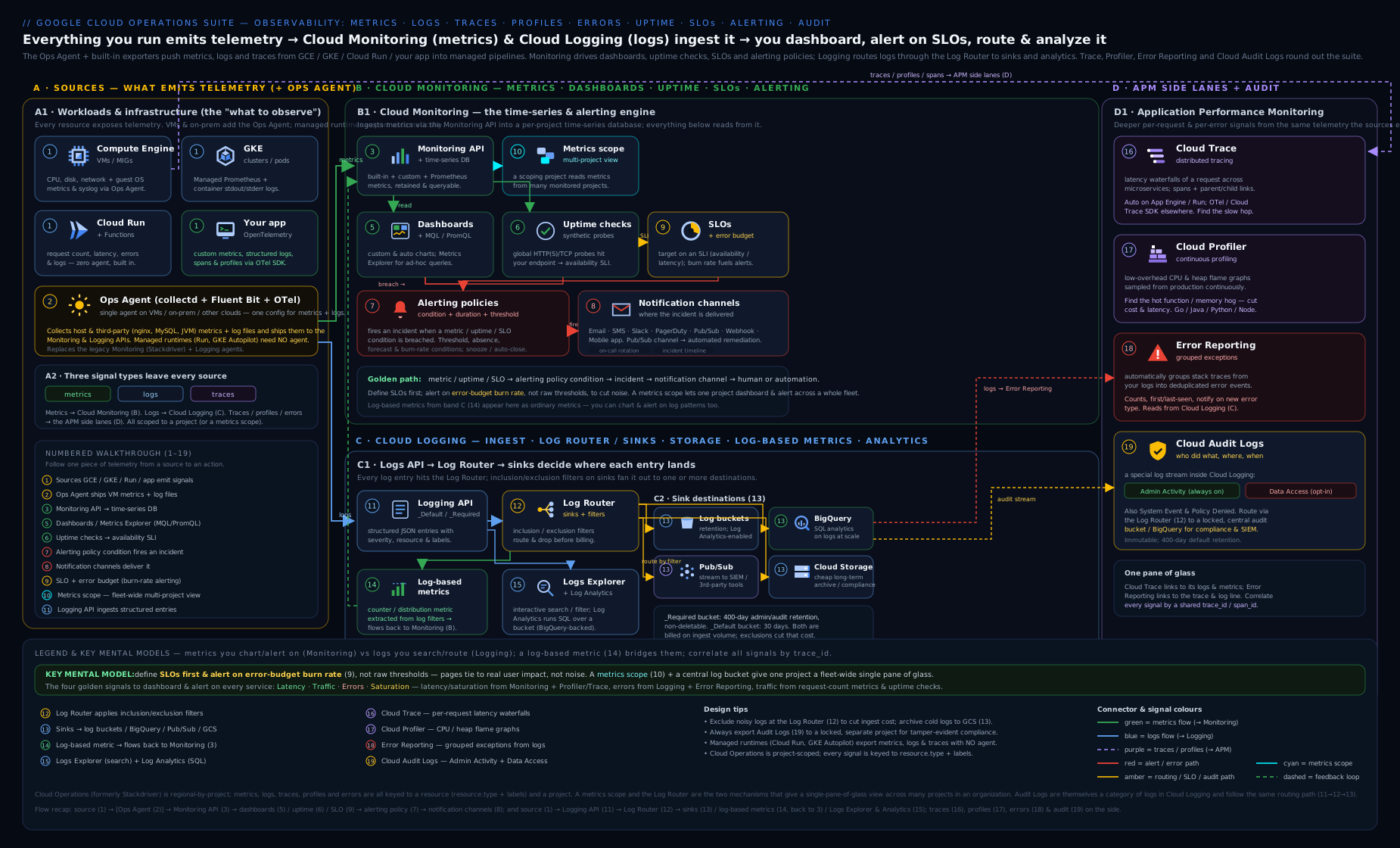
The diagram above ties the suite together: workloads emit metrics, logs and traces; the Ops Agent adds guest signals from VMs; logs flow through the Log Router to buckets, BigQuery, Cloud Storage or Pub/Sub while feeding log-based metrics; and Monitoring layers dashboards, alerting policies, uptime checks and SLOs on top — all viewable across projects through a metrics scope.
Going deeper
Everything above is enough to operate the suite. This section is the layer that separates someone who uses Cloud Operations from someone who can run it at scale without a surprise bill or a missed page — the internals, the cost mechanics, the quotas, and the API caveats.
The cost model, precisely
Two of these products can generate real spend, and they meter you in ways beginners rarely predict:
| Signal | You are billed on | Free allotment (representative) | The trap |
|---|---|---|---|
| Google Cloud metrics | nothing | all free | — |
| Chargeable metrics (custom, agent, external) | volume of samples ingested (MiB) | first 150 MiB/month per billing account | high write frequency × many series |
| Managed Service for Prometheus | number of samples ingested | metered per million samples | scrape interval × active series |
| Log ingestion | GiB ingested (billed once, at intake) | first 50 GiB/month per project | verbose logs, broad Data Access logging |
| Log retention | GiB-month beyond the default | 30 days included on _Default |
long custom retention instead of GCS archive |
| Log Analytics / BigQuery export | bytes scanned / stored | Log Analytics query included on the bucket | SELECT * over months of logs |
The mental shift: logging is billed at ingestion, not at query. Once a log line is in, searching it in the Logs Explorer or Log Analytics is (mostly) free — so the lever is what you ingest, via exclusions and sampling, not how often you look. Metrics are the opposite: cheap to store, but every extra time series you create costs on the write side and, more painfully, on query latency. (Exact prices move; treat the figures above as representative and confirm the current Cloud Monitoring/Logging pricing before you model a bill.)
Cardinality: the mistake that quietly 100×'s your bill
A time series is one metric for one unique combination of resource labels and metric labels. Add a label with 10 values and you have 10× the series; add a user_id or request_id label with a million values and you have created a million time series for a single metric. This “cardinality explosion” is the number-one self-inflicted wound in metrics:
- It multiplies chargeable-sample volume and Managed-Prometheus cost.
- It slows every query and dashboard that touches the metric.
- It can hit per-metric time-series limits and start dropping data.
The rule: metric labels must be low-cardinality and bounded (region, status_code, method, version). Anything unbounded and per-request — user IDs, order IDs, full URLs, trace IDs — belongs in logs and traces, not in a metric label. Metrics answer “how many / how fast, sliced by a few dimensions”; logs and traces answer “what happened to this specific request”.
Alignment, reduction, and why percentiles are approximate
Every time-series query is two steps, always in this order:
- Alignment puts each raw series onto a regular time grid using a per-series aligner over an alignment period —
ALIGN_RATE(per-second rate of a counter),ALIGN_MEAN,ALIGN_MAX,ALIGN_PERCENTILE_99,ALIGN_DELTA. Cumulative metrics are meaningless until aligned withALIGN_RATE/ALIGN_DELTA; this is the machine version of “wrap the counter inrate()”. - Reduction combines aligned series across the group with a reducer (
REDUCE_SUM,REDUCE_MEAN,REDUCE_PERCENTILE_95) and a group-by on the labels you keep.
A subtlety that catches senior engineers: latency percentiles come from DISTRIBUTION metrics (histograms with exponential buckets). A p99 computed from a distribution is an approximation interpolated within a bucket, and a percentile of already-aggregated distributions is not the true global percentile. It is close enough to alert on, but do not treat a dashboard p99 as an exact number, and never average percentiles.
How Google Cloud metrics map into PromQL
Managed Service for Prometheus can query both your Prometheus metrics and native Google Cloud metrics, because Google maps its metrics into the Prometheus data model. The translation, roughly: the metric type compute.googleapis.com/instance/cpu/utilization becomes a PromQL series named compute_googleapis_com:instance_cpu_utilization (dots and slashes become underscores, the final path segment separated by a colon), the monitored-resource fields become labels, and you select them with the usual {label="value"} matchers. That is what lets a Kubernetes-native team point an existing Grafana panel or Prometheus alert rule at Cloud Monitoring with almost no change.
# The same CPU signal as the MQL example earlier, but in PromQL over GMP
avg by (zone)(
  compute_googleapis_com:instance_cpu_utilization{monitored_resource="gce_instance"}
)
Note a timing reality that governs alert design: platform metrics have ingestion delay (seconds to a few minutes depending on the metric). An alert with a 1-minute duration on a metric that lands 3 minutes late will feel sluggish — factor ingestion latency into fast-burn windows.
Managed Service for Prometheus: the three collection modes
“Managed Service for Prometheus” (GMP) is Google’s Prometheus-compatible backend built on Monarch (the same planet-scale store behind Cloud Monitoring). You feed it one of three ways:
| Mode | How it works | Use when |
|---|---|---|
| Managed collection | Google-run collectors on GKE, configured with PodMonitoring/ClusterPodMonitoring CRDs |
GKE — the default, least-ops choice |
| Self-deployed collection | You run the drop-in gmp/prometheus binary that remote-writes to GMP |
GKE with custom scrape needs, or non-GKE |
| OpenTelemetry | An OTel Collector with the googlemanagedprometheus exporter |
you have already standardised on OTel pipelines |
GMP advantages worth knowing: very high cardinality tolerance (Monarch is built for it — though you still pay per sample), global querying across projects and regions from one endpoint, 24-month retention, and a managed rule-evaluator for recording and alerting rules. It is the strategic path Google points Kubernetes users toward; MQL remains for cross-metric Google-Cloud math.
Log routing edge cases the docs bury
- Fan-out is the default. One log entry is tested against every sink independently, so it can be delivered to several destinations at once (a bucket and BigQuery and Pub/Sub). Exclusions on
_Defaultdo not stop a different sink from also capturing the entry. - Exclusions drop before storage and before log-based metrics. A counter log-based metric only counts logs that were actually routed — if you exclude a log, you also stop metering it. Order matters.
- Unique writer identities. Modern sinks can each run under their own dedicated service account (
--unique-writer-identity, and--custom-writer-identityfor cross-org delivery) instead of the shared logging service agent — better least-privilege, but you must grant IAM to the right identity, which the create command prints. - Intercepting sinks. An org/folder aggregated sink created with
--intercept-childrenpulls matching logs up and stops them from also landing in each child project’s_Defaultbucket — centralising without double-storing. Regular aggregated sinks copy; intercepting sinks divert. _Requiredis untouchable. You cannot edit or disable the_Requiredsink/bucket; that immutability is deliberate so no one can route the audit trail away.
Burn-rate math: where 14.4 comes from
For a 99.9% SLO the error budget is 0.1% of events over the window (say 30 days). A fast-burn alert should fire when you would exhaust a meaningful slice of that budget very quickly — the SRE-workbook choice is “2% of a 30-day budget in 1 hour”. The burn rate that does this:
burn rate = (budget fraction consumed) ÷ (window fraction of the SLO period)
          = 0.02 ÷ (1 hour ÷ 720 hours)
          = 0.02 × 720
          = 14.4
The canonical multi-window, multi-burn-rate ladder:
| Alert | Long window | Short window | Burn rate | Budget burned | Action |
|---|---|---|---|---|---|
| Fast | 1 hour | 5 min | 14.4 | 2% in 1h | Page now |
| Medium | 6 hours | 30 min | 6 | 5% in 6h | Page / urgent ticket |
| Slow | 3 days | 6 hours | 1 | 10% in 3d | Ticket |
The short window is an “is it still happening?” guard: both the long and short window must be burning before the alert fires, which stops a spike that already ended from paging you. Request-based SLIs count good/valid events directly; windows-based SLIs count “good minutes”, which is smoother but coarser.
IAM roles and quotas that bite in production
| Task | Role |
|---|---|
| Read metrics/dashboards | roles/monitoring.viewer |
| Build dashboards, policies, scopes | roles/monitoring.editor |
| Let an agent or app write metrics | roles/monitoring.metricWriter |
| Read ordinary logs | roles/logging.viewer |
| Read Data Access logs | roles/logging.privateLogViewer |
| Let a VM/app write logs | roles/logging.logWriter |
| Create sinks / log-based metrics / buckets | roles/logging.configWriter (or admin) |
Quotas and limits to design around: up to 375 monitored projects per metrics scope; a project can appear in multiple scopes; Monitoring API read and time-series-write have per-minute quotas that a chatty custom exporter can exhaust; and there are ceilings on time series per metric and on labels — another reason to keep cardinality bounded. Alerting conditions also cap the number of time series they will evaluate, so an over-broad group_by can silently stop watching some series. When an estate-wide incident spans several services, the same signals feed the cross-service RCA method in Troubleshooting Complex GCP Incidents.
API surface and branding caveats
- Some commands still live under alpha/beta:
gcloud beta monitoring channels ...,gcloud alpha monitoring policies ...,gcloud beta monitoring metrics-scopes .... Dashboards, uptime, and logging sinks/metrics/reads are GA. Prefer the Monitoring/Logging v3 APIs or Terraform for anything you automate. - MQL is stable but feature-frozen; Google’s investment is in PromQL + Managed Service for Prometheus. Start new Kubernetes work in PromQL; reach for MQL when you need cross-metric joins/ratios on Google-Cloud metrics that PromQL cannot express.
- OpenTelemetry is the strategic instrumentation standard for both custom metrics and traces; the older OpenCensus and per-language Cloud Trace/Monitoring client libraries still work but are legacy.
- The umbrella brand is drifting from “operations suite” toward “Google Cloud Observability” in the console and docs — same products, newer label, just as “Stackdriver” became “Cloud Monitoring/Logging”. Read them as synonyms.
Hands-on lab
We will install the Ops Agent on a tiny VM, generate a log, build a log-based metric, create an alerting policy with an email channel, add an uptime check, and clean everything up. Costs are pennies and fit inside the free trial; an e2-micro in an eligible region is in the always-free tier.
0. Set your project and enable the APIs.
export PROJECT_ID=$(gcloud config get-value project)
gcloud services enable \
  compute.googleapis.com monitoring.googleapis.com logging.googleapis.com
1. Create a small VM (the Ops Agent target).
gcloud compute instances create ops-lab \
  --zone=us-central1-a --machine-type=e2-micro \
  --image-family=debian-12 --image-project=debian-cloud
2. Install the Ops Agent.
gcloud compute ssh ops-lab --zone=us-central1-a --command='
  curl -sSO https://dl.google.com/cloudagents/add-google-cloud-ops-agent.sh &&
  sudo bash add-google-cloud-ops-agent.sh --also-install &&
  systemctl is-active google-cloud-ops-agent'
Expected: active. Within a couple of minutes, agent metrics like agent.googleapis.com/memory/percent_used appear for this instance in Metrics Explorer.
3. Generate a log line we can meter on.
gcloud compute ssh ops-lab --zone=us-central1-a --command='
  logger -p user.err "KLOUDVIN_LAB synthetic error event"'
4. Create a counter log-based metric for that event.
gcloud logging metrics create kloudvin_lab_errors \
  --description="Lab synthetic errors" \
  --log-filter='resource.type="gce_instance" AND textPayload:"KLOUDVIN_LAB"'
5. Create an email notification channel and capture its id.
CH=$(gcloud beta monitoring channels create \
  --display-name="Lab email" --type=email \
  --channel-labels=email_address="$(gcloud config get-value account)" \
  --format='value(name)')
echo "$CH"
6. Create an alerting policy on the log-based metric. Write the policy file, then create it:
cat > /tmp/lab-policy.json <<EOF
{
  "displayName": "Lab error spike",
  "combiner": "OR",
  "conditions": [{
    "displayName": "errors > 0",
    "conditionThreshold": {
      "filter": "metric.type=\"logging.googleapis.com/user/kloudvin_lab_errors\" AND resource.type=\"gce_instance\"",
      "comparison": "COMPARISON_GT",
      "thresholdValue": 0,
      "duration": "0s",
      "aggregations": [{"alignmentPeriod": "60s", "perSeriesAligner": "ALIGN_SUM"}]
    }
  }],
  "notificationChannels": ["$CH"],
  "alertStrategy": {"autoClose": "1800s"}
}
EOF
gcloud alpha monitoring policies create --policy-from-file=/tmp/lab-policy.json
Generate the log line again (step 3) and within a few minutes you should receive an email and see an open incident in Monitoring → Alerting.
7. Add an uptime check (optional, public endpoint).
gcloud monitoring uptime create "lab-uptime" \
  --resource-type=uptime-url \
  --resource-labels=host=cloud.google.com \
  --protocol=https --path=/ --port=443 --period=5
Validation. In the console: Monitoring → Metrics Explorer shows agent.googleapis.com/* for ops-lab; Logging → Logs Explorer filtered to textPayload:"KLOUDVIN_LAB" shows your line; Monitoring → Alerting lists the policy and (after re-triggering) an incident; Monitoring → Uptime shows the check passing.
Cleanup. Order matters only in that the VM is the costly bit.
gcloud compute instances delete ops-lab --zone=us-central1-a --quiet
gcloud logging metrics delete kloudvin_lab_errors --quiet
# delete the policy and uptime check by id from the list commands:
gcloud alpha monitoring policies list --format='value(name,displayName)'
gcloud alpha monitoring policies delete POLICY_ID --quiet
gcloud monitoring uptime list-configs --format='value(name,displayName)'
gcloud monitoring uptime delete UPTIME_ID
gcloud beta monitoring channels delete "$CH" --quiet
Cost note. The e2-micro is free-tier-eligible in eligible US regions; otherwise it is roughly ₹500–₹700/month if left running, so delete it. Agent metrics and the few log lines are well within the 150 MiB metrics and 50 GiB logs free allotments. Uptime checks at this volume are free. Total lab spend if you clean up the same day: effectively zero.
Practice challenges
Work these in a throwaway project. Each has a hidden solution — try first, then expand it. They escalate from “read a signal” to “run an SRE cost-and-alerting decision”.
1. Beginner — read the last five error logs from a Cloud Run service. Use only the CLI.
<details> <summary>Solution</summary>
gcloud logging read \
  'resource.type="cloud_run_revision" AND severity>=ERROR' \
  --limit=5 \
  --format='table(timestamp, resource.labels.service_name, textPayload)'
Why: filtering LogEntry fields with the Logging query language (resource.type, severity>=) is the single most-used logging skill — everything else builds on it.
</details>
2. Beginner → Intermediate — turn “error log lines” into a metric you can alert on. Create a counter log-based metric for severity>=ERROR on that service.
<details> <summary>Solution</summary>
gcloud logging metrics create cr_error_count \
  --description="Cloud Run error lines" \
  --log-filter='resource.type="cloud_run_revision" AND severity>=ERROR'
Then alert on logging.googleapis.com/user/cr_error_count. Why: logs cannot be alerted on directly at scale — a counter log-based metric is the bridge from Logging into Monitoring’s alerting.
</details>
3. Intermediate — compute an error ratio, not a raw count. Write a query for 5xx responses ÷ total requests on an HTTPS load balancer, and say why you cannot do it in the visual builder.
<details> <summary>Solution (MQL)</summary>
fetch https_lb_rule
| metric 'loadbalancing.googleapis.com/https/request_count'
| filter metric.response_code_class = 500
| align rate(1m)
| group_by [resource.url_map_name], [errs: sum(value.request_count)]
| join
  (fetch https_lb_rule
   | metric 'loadbalancing.googleapis.com/https/request_count'
   | align rate(1m)
   | group_by [resource.url_map_name], [total: sum(value.request_count)])
| value [ratio: errs / total]
Why: the visual builder aligns and reduces a single metric stream — a ratio joins two streams, which needs MQL (or PromQL’s / between two rate()s). Ratios are the basis of every availability SLI.
</details>
4. Intermediate → Advanced — centralise logs org-wide. Route every project’s audit logs under an organisation into one BigQuery dataset, and make the delivery actually work.
<details> <summary>Solution</summary>
gcloud logging sinks create org-audit-lake \
  bigquery.googleapis.com/projects/SECURITY_PROJECT/datasets/org_logs \
  --organization=ORG_ID --include-children \
  --log-filter='logName:"cloudaudit.googleapis.com"'

# Grant the writer identity the create command printed:
gcloud projects add-iam-policy-binding SECURITY_PROJECT \
  --member='serviceAccount:<writerIdentity-from-output>' \
  --role='roles/bigquery.dataEditor'
Why: --include-children is the aggregated-sink pattern, but a sink whose writer identity lacks IAM on the destination silently drops everything — the grant is not optional.
</details>
5. Advanced — design a fast-burn alert for a 99.9% SLO. State the burn-rate threshold and window, and why you also need a short window.
<details> <summary>Solution</summary>
Fire when you would burn 2% of a 30-day budget in 1 hour → burn rate 14.4 over a 1-hour long window, gated by a 5-minute short window that must also be burning. 14.4 = 0.02 ÷ (1/720). Pair it with a slow-burn ticket (burn rate 1 over 3 days). Why: a single-threshold alert either flaps on spikes or reacts too slowly; multi-window multi-burn-rate gives urgency (fast page) without paging on a blip that already stopped (the short-window gate).
</details>
6. Advanced — cut a surprise logging bill without going blind. Find the noisiest log source, then stop paying for it while keeping errors.
<details> <summary>Solution</summary>
Find the top producers in Log Analytics:
SELECT log_name, COUNT(*) AS lines
FROM   `PROJECT_ID.global._Default._AllLogs`
WHERE  timestamp > TIMESTAMP_SUB(CURRENT_TIMESTAMP(), INTERVAL 24 HOUR)
GROUP BY log_name
ORDER BY lines DESC
LIMIT 10;
Then drop the culprit (say load-balancer health checks) at ingestion:
gcloud logging sinks update _Default \
  --add-exclusion=name=drop-lb-healthchecks,filter='resource.type="http_load_balancer" AND httpRequest.requestUrl:"/healthz"'
Why: logging is billed at ingestion, so an exclusion on _Default — optionally sampling a percentage rather than 100% — cuts cost immediately, and excluding health checks removes noise without touching error logs.
</details>
Common beginner mistakes
These are misconceptions — wrong mental models — as opposed to the symptom→fix table below. Fix the model and the symptoms never appear.
-
“Installing the Ops Agent gives me all my metrics.” No. Platform metrics (CPU, request count, disk throughput at the hypervisor) arrive automatically with no agent. The Ops Agent adds only the guest view the platform cannot see from outside: memory used, in-guest disk usage, per-process stats, and your application’s own logs. Right model: agent = inside-the-VM signals only; serverless products need no agent at all.
-
“A metrics scope controls my logs too.” They are different systems. Monitoring uses a scope (which projects’ metrics one project can see). Logging uses routing (where each log line is stored). Adding a project to your metrics scope does nothing for its logs; cross-project logs come from the Logs Explorer’s project picker, log views, or aggregated sinks. Right model: scope = metrics visibility; routing = log destinations.
-
“A log bucket is a Cloud Storage bucket.” It is not — a log bucket is Logging-managed storage with its own retention and region, addressed like
projects/P/locations/global/buckets/_Default. Routing logs to a Cloud Storage bucket is a separate, different destination. Right model: two unrelated things that share the word “bucket”. -
“Creating the sink is the job done.” A sink is a filter plus a destination plus an identity. If the sink’s writer identity lacks IAM on the destination (BigQuery/GCS/Pub/Sub), every entry is silently dropped — no error, just an empty destination. Right model: create the sink, read the printed writer identity, grant it the destination role.
-
“More logs = better observability, so log everything at DEBUG forever.” You are billed at ingestion, and a firehose of DEBUG buries the one line that matters. Right model: log with intent (structured, at sensible severity), exclude/sample noise, and turn the signals you alert on into log-based metrics.
-
“Alert on CPU and every resource that moves.” Paging on causes (a CPU blip, one slow node) produces alert fatigue and still misses user pain. Right model: alert on symptoms — SLO burn rate and user-facing error/latency — and let dashboards, not pagers, hold the cause metrics.
-
“A counter metric can be charted as-is.” A CUMULATIVE counter only ever rises; charted raw it is a meaningless ramp. You must take a rate or delta (
ALIGN_RATE, or PromQLrate()). Right model: counters become rates before they mean anything. -
“Put user_id / request_id on the metric as a label.” That is a cardinality explosion — each unique value is a new time series, inflating cost and slowing queries until data is dropped. Right model: high-cardinality identifiers live in logs and traces, never in metric labels; metric labels stay low-cardinality (region, code, version).
-
“An SLA and an SLO are the same thing.” An SLO is your internal reliability target; an SLA is the external contractual promise with penalties. Right model: set the SLO stricter than the SLA so you get warning before you breach the contract.
Common mistakes & troubleshooting
| Symptom | Likely cause | Fix |
|---|---|---|
| Sink “created” but destination is empty | The sink’s writer identity lacks write permission on the destination | Grant the printed writer identity roles/bigquery.dataEditor / storage.objectCreator / pubsub.publisher |
| Ops Agent installed, no memory/disk metrics | VM service account missing monitoring.metricWriter / logging.logWriter |
Add the roles, or use a SA that has them; restart the agent |
| Alerting policy never fires | duration/retest window too long, wrong aligner, or grouping hides the breach |
Lower the duration, verify the metric in Metrics Explorer first, check group-by |
| Alert storm / flapping | No retest window and no rate-limit; alerting on raw noisy points | Add a “for N minutes” duration, a notification rate limit, sensible auto-close |
| Logging bill spikes | Verbose/health-check logs ingested; Data Access logs enabled broadly | Add exclusions on _Default; scope Data Access logging to sensitive services only |
| “No data” on a custom/Prometheus metric chart | Metric not yet written, wrong metric kind in query (counter not wrapped in rate()) |
Confirm ingestion; use rate()/ALIGN_RATE on cumulative metrics |
| Can’t see another project’s metrics | Project not in this project’s metrics scope | Add it to the scope from the scoping/observability project |
| Audit log “missing” for a data read | Data Access logging is off by default | Enable DATA_READ for that service in the IAM audit config |
| Uptime check flaps as “down” | Failing from a single region / strict content match | Require failure from multiple locations; relax/verify the content matcher |
Best practices
- Build a dedicated observability/security project and put your whole estate in its metrics scope; create an org-level aggregated log sink into that project’s BigQuery dataset / locked bucket.
- Everything as code. Manage dashboards, alerting policies, notification channels, log-based metrics, sinks and SLOs in Terraform so prod and non-prod never drift.
- Alert on symptoms, not causes — page on user-facing SLO burn rate and error rate, not on every CPU blip. Use multi-window multi-burn-rate SLO alerts: fast-burn pages, slow-burn tickets.
- Put a runbook link in every policy’s documentation field, with severity and owner labels.
- Control log cost deliberately: exclude health checks and chatty INFO, sample where you can, archive long-term to GCS with Bucket Lock, and use Log Analytics instead of a BigQuery export when you only need to query.
- Set sane retention and auto-close — don’t leave
_Defaultat 30 days if compliance needs more; don’t leave incidents open for 7 days. - Standardise on OpenTelemetry for custom metrics and traces; on Kubernetes lead with Managed Service for Prometheus + PromQL.
- Correlate the pillars: emit a
tracefield in app logs so a log links to its trace; let Error Reporting group your exceptions; keep Profiler always on.
Security notes
- Audit logs are your forensic record. Admin Activity and System Event logs are always-on, immutable in
_Required(400 days). Enable Data Access logging on sensitive services; understand it is the trail that shows who read what. - Separate log-reader privilege:
roles/logging.viewersees ordinary logs;roles/logging.privateLogVieweris required for Data Access logs — grant the latter sparingly. - Protect the lake: route org logs to a locked Cloud Storage bucket (WORM) or immutable log bucket so an attacker with project access cannot erase their tracks; wrap the central project in VPC Service Controls to prevent exfiltration.
- Least privilege for sinks and agents: a sink’s writer identity should have only write on its destination; a VM’s SA should have only metric/log writer.
- Encrypt with CMEK where required (log buckets and BigQuery destinations support customer-managed keys).
- Notification-channel hygiene: secure webhook/Pub/Sub channels; alerts can carry sensitive context (hostnames, IDs) in their documentation substitutions.
Interview & exam questions
-
What is a metrics scope and why would you create a separate monitoring project? A metrics scope is a list of projects whose metrics a single scoping project can view, chart and alert on together. A dedicated monitoring project as the scoping project gives you one pane of glass over many workload projects; alerting policies and dashboards in the scoping project can reference any project in its scope (up to ~375).
-
Explain the Cloud Logging routing model end to end. Every ingested entry hits the Log Router and is matched against each sink’s inclusion/exclusion filter. Matching entries go to the sink’s destination — a log bucket, BigQuery, Cloud Storage, Pub/Sub, or another project. Two sinks exist automatically:
_Required(mandated audit logs → immutable_Requiredbucket) and_Default(everything else →_Defaultbucket, editable). Each sink runs as a writer identity that needs IAM on the destination. -
_Requiredvs_Defaultbucket?_Requiredstores Admin Activity, System Event and Access Transparency logs for a fixed 400 days, is free, and cannot be modified or deleted._Defaultstores everything else at 30 days by default (configurable 1–3650), and can be edited or disabled. -
What’s an aggregated sink and when do you use it? A sink at the organisation or folder level with
--include-childrenthat captures logs from all descendant projects into one central destination — the basis of a centralised logging lake for security and compliance. -
MQL vs PromQL vs the visual builder — when each? Visual builder for quick ad-hoc charts; MQL for ratios, cross-metric joins and time-shifts on Google Cloud metrics; PromQL (via Managed Service for Prometheus) to reuse Prometheus/Grafana assets and for Kubernetes-native teams.
-
Define SLI, SLO, error budget and burn rate. SLI = measured good/valid ratio; SLO = target for that SLI over a window; error budget = 1 − SLO (allowed unreliability); burn rate = how fast you’re spending the budget relative to steady (1 = exactly on track to exhaust it by window end).
-
How do you alert on SLOs without flapping? Multi-window, multi-burn-rate alerts: a fast-burn condition (high burn rate over a short window) pages immediately; a slow-burn condition (low burn rate over a long window) opens a ticket. This balances urgency against noise.
-
Difference between an SLA and an SLO? An SLO is your internal reliability target; an SLA is the external, contractual promise (with penalties). Your SLO should be stricter than your SLA so you get warning before breaching the contract.
-
What are the four audit-log types and which cost money? Admin Activity (writes, always-on, free), System Event (Google actions, always-on, free), Data Access (reads/data, off by default except BigQuery, chargeable, configurable), Policy Denied (denied requests, chargeable). Admin Activity and System Event are immutable in
_Required. -
Ops Agent vs the legacy agents, and what does it add? The Ops Agent is the single modern agent (OpenTelemetry + Fluent Bit) replacing the deprecated collectd Monitoring Agent and Fluentd Logging Agent. It adds guest-OS signals the platform can’t see — memory, disk, process metrics and system/app logs — plus built-in integrations for NGINX, MySQL, etc.
-
A sink shows no data in BigQuery — what’s the first thing you check? The sink’s writer identity’s IAM on the dataset.
gcloudprints the writer identity at creation; it needsroles/bigquery.dataEditoron the destination or all entries are silently dropped. -
What is a log-based metric and why use one? It converts log matches into a Cloud Monitoring metric — a counter (count of matching entries) or a distribution (histogram of an extracted value). It is how you alert/chart when your only signal is a log line, bridging Logging into Monitoring’s alerting.
-
Trace vs Profiler vs Error Reporting? Trace shows per-request latency waterfalls across services (distributed tracing). Profiler shows continuous production flame graphs of CPU/heap/contention to find hot code. Error Reporting aggregates and deduplicates exceptions into counted error groups with sample stack traces.
-
How would you cut a surprise Cloud Logging bill? Add exclusion filters on
_Defaultfor health checks and chatty INFO/DEBUG (optionally sampling a percentage), scope Data Access logging to sensitive services only, shorten non-compliance retention, and archive long-term data to Cloud Storage rather than paying for long bucket retention.
Quick check
- Which bucket is immutable, free, and retains Admin Activity logs for 400 days?
- You need to view CPU metrics from 30 projects on one dashboard. What configuration makes that possible?
- Which query language would you use to reuse existing Prometheus alerting rules against Cloud Monitoring?
- What permission must a log sink’s writer identity hold to deliver to a Pub/Sub topic?
- In SLO terms, what does an error budget of 0.1% correspond to as an SLO target?
Answers
- The
_Requiredlog bucket. - Add all 30 projects to the metrics scope of a single scoping (observability) project, then build the dashboard there.
- PromQL, via Google Cloud Managed Service for Prometheus.
roles/pubsub.publisheron the destination topic.- A 99.9% SLO (error budget = 1 − SLO).
Exercise
In a sandbox project, build a miniature SRE setup for a Cloud Run service (deploy gcr.io/cloudrun/hello if you don’t have one):
- Create a Service in Monitoring for the Cloud Run service and attach a latency SLO (e.g. 99% of requests under 500 ms over a rolling 7-day window).
- Add a fast-burn and a slow-burn burn-rate alerting policy, each wired to an email notification channel, with a runbook link in the documentation field.
- Create an uptime check against the service’s URL with content matching, and an uptime-failure alert.
- Create a counter log-based metric on
severity>=ERRORfor the service and a threshold alert on it. - Route the service’s logs via a sink into a new Log Analytics-enabled bucket and write one SQL query computing p95 latency per hour.
- Export your dashboard and one alerting policy to JSON and re-create them with
gcloud— proving you can manage them as code. Then delete everything.
Write down: which alert fired first when you sent error traffic, and whether the SLO or the log-based metric gave earlier warning.
Certification mapping
- Associate Cloud Engineer (ACE) — “Setting up cloud monitoring”: viewing metrics and creating charts, creating/customising alerts, configuring log sinks, log-based metrics, viewing logs, and understanding audit logs. This lesson covers the whole domain.
- Professional Cloud DevOps Engineer (PCDE) — the suite is central: SLIs/SLOs/error budgets/burn-rate alerting, building monitoring and alerting, log management and routing, the Ops Agent, Trace/Profiler/Error Reporting, and incident response built on these signals.
- Professional Cloud Architect (PCA) — observability and operational excellence in solution design: centralised logging, monitoring strategy, audit logging for compliance.
- Professional Cloud Security Engineer (PCSE) — audit logs (the four types, Data Access logging), log retention/immutability, and routing logs to a secured SIEM/lake.
Glossary
- Stackdriver — the former name of the Operations suite (pre-2020); read as “Cloud Monitoring/Logging”.
- Cloud Operations suite / Cloud Observability — Google’s umbrella brand for Monitoring, Logging, Trace, Profiler and Error Reporting; “Observability” is the newer console label.
- Metrics scope — the set of projects a single scoping project can monitor together.
- Time series — values of one metric for one resource over time, keyed by labels.
- Monitored resource — the typed object (e.g.
gce_instance,cloud_run_revision) a time series is attached to; its labels say what a number describes. - Metric kind — GAUGE (point-in-time), DELTA (change per interval), CUMULATIVE (ever-increasing counter).
- Distribution metric — a histogram-valued metric (exponential buckets) from which percentiles like p99 are computed (approximately).
- Cardinality — the number of distinct time series a metric produces; high-cardinality labels (IDs) explode cost and query time.
- Metrics Explorer — the visual query builder for charting metrics without writing MQL/PromQL.
- Aligner / alignment period — the per-series function (rate, mean, percentile) and interval that put raw points on a regular grid before charting or reducing.
- Reducer — the function (sum, mean, percentile) that combines aligned series across a group.
- MQL — Monitoring Query Language, Google’s pipe-based metrics query language.
- PromQL — Prometheus Query Language, usable via Managed Service for Prometheus.
- Managed Service for Prometheus (GMP) — Google’s Prometheus-compatible, globally-queryable metrics backend built on Monarch; queried with PromQL.
- OpenTelemetry (OTel) — the vendor-neutral standard for emitting metrics and traces; Google’s strategic instrumentation path.
- Alerting policy — the rule (conditions + combiner + channels + documentation) that fires incidents.
- Incident — an open alert instance created when a policy’s condition is met; auto-closes when it clears.
- Metric absence — an alert condition that fires when a metric stops reporting (a missing heartbeat).
- Snooze — a temporary silence on an alerting policy (e.g. planned maintenance) without deleting it.
- Notification channel — a reusable alert destination (email, Slack, PagerDuty, Pub/Sub, webhook…).
- Uptime check — an active probe of an endpoint from Google’s global locations.
- SLI / SLO / error budget / burn rate — measured ratio / target / allowed unreliability (1−SLO) / rate of spend.
- Multi-window multi-burn-rate — the SRE alerting pattern combining a fast-burn page and a slow-burn ticket, each gated by a short window.
- Log Router — the component that matches every log entry against sinks.
- Sink — a routing rule: inclusion/exclusion filter + destination, run by a writer identity.
- Writer identity — the service account a sink runs as; it must hold IAM on the destination or entries are dropped.
- Intercepting sink — an org/folder aggregated sink (
--intercept-children) that diverts matching logs up and out of child projects’_Defaultbuckets. - Exclusion — a rule that drops matching log entries before ingestion (and before billing and log-based metrics).
- Log bucket — Logging storage with configurable retention/region;
_Requiredand_Defaultare automatic. - Log view — a scoped, IAM-controlled window onto a subset of a log bucket’s entries.
- Aggregated sink — an org/folder sink with
--include-childrenthat centralises descendant projects’ logs. - Log-based metric — a Monitoring metric (counter or distribution) derived from matching log entries.
- Log Analytics — SQL (BigQuery engine) over a log bucket, optionally linked to a BigQuery dataset.
- LogEntry / protoPayload — the structured record of one log line; audit logs carry their detail in
protoPayload. - Ops Agent — the unified VM agent (OpenTelemetry + Fluent Bit) for guest metrics and logs.
- Audit logs — Admin Activity / System Event / Data Access / Policy Denied records of who did what.
- Access Transparency logs — records of Google staff access to your data, stored (with audit logs) in
_Required. - Span / trace waterfall — one timed operation within a request; Cloud Trace stacks spans into a waterfall showing where latency went.
- Flame graph — Cloud Profiler’s view of which functions consume CPU/memory, stacked by call depth.
- Error group — Error Reporting’s deduplicated cluster of identical exceptions, with a count and sample stack trace.
- CMEK — customer-managed encryption keys (Cloud KMS) usable on log buckets and BigQuery destinations.
Next steps
- Centralized Logging Lake on GCP for Security and Compliance — turn the routing concepts here into a governed, org-wide logging lake with aggregated sinks, immutable retention, VPC Service Controls and a SIEM export.
- Google Cloud Troubleshooting Playbooks: IAM, VPC, Compute, Cloud SQL & GKE — apply this observability toolkit to diagnose real incidents across the services you’ve learned.