Google Kubernetes Engine (GKE) is Google Cloud’s managed Kubernetes — the same Kubernetes you would run yourself, but with Google operating the control plane, patching it, scaling it, and (in Autopilot) running the nodes too. Kubernetes itself came out of Google’s internal Borg system, and GKE is the most opinionated, most automated managed Kubernetes of the big three: it ships secure defaults, two genuinely different operating modes, an eBPF dataplane, and keyless identity for pods, all wired together out of the box.
This lesson is the exhaustive version. By the end you will know every meaningful knob you set when you create a cluster and a node pool, the load-bearing concepts an interviewer probes (Autopilot vs Standard, zonal vs regional, VPC-native, Workload Identity), what you can and cannot change after the fact, and the cost mechanics that quietly drive the bill. It is beginner-accessible — every term is defined — but complete enough to operate GKE in production and to answer the hard questions on the Associate Cloud Engineer and Professional Cloud Architect exams.
In a nutshell
Imagine you run a busy restaurant. You could own the whole building — hire cooks, buy the ovens, fix the plumbing, decide how many burners to keep lit at 3 a.m. — or you could rent a fully-staffed kitchen where you just hand over recipes and portion sizes and someone else keeps the ovens running, and you pay only for the ingredients you actually cook with. GKE gives you exactly those two choices. Standard is owning the building: you pick the machines (nodes), decide how many, and pay for them whether they are busy or idle. Autopilot is the fully-staffed kitchen: you hand Google your recipes (pods with resource requests) and pay only for what those recipes consume — Google provisions, patches, sizes and repairs the kitchen for you.
Underneath either choice, GKE is managed Kubernetes: Google runs the “brain” — the control plane, the API server and database that decide what runs where — so you never patch or babysit it, and you talk to it with kubectl. Your job is the workloads on top: what to run, how much they need, who they may talk to, and which Google APIs they may call.
Everything else in this lesson is detail on those two ideas — how the nodes are grouped (node pools), how pods get real network addresses (VPC-native), how traffic is filtered in the kernel (Dataplane V2 / eBPF), how the cluster grows and shrinks on its own (autoscaling), and how a pod proves who it is to Google without a password file (Workload Identity). If you remember one sentence, make it this: on Standard you optimise how full your nodes are; on Autopilot you optimise how honest your pod requests are.
Level: Intermediate · Time: ~48 min (read + optional lab)
Learning objectives
- Decide between Autopilot and Standard and justify the choice on operations, security, cost and flexibility.
- Explain the control-plane topology — zonal vs regional clusters — and its availability and cost implications.
- Configure a node pool end to end: machine type, image, autoscaling, node auto-provisioning, auto-upgrade, auto-repair, surge upgrades, Spot VMs, taints, labels and node-system config.
- Design GKE networking: VPC-native (alias IP) clusters, the pod/service/node ranges, Dataplane V2 (eBPF) and network policy, private clusters, and Gateway vs Ingress vs Service load balancing.
- Use Workload Identity Federation for GKE so pods call Google APIs with no service-account keys.
- Harden a cluster (Shielded GKE nodes, Binary Authorization, Security Posture, node auto-upgrade) and pick a release channel.
- Control GKE cost with the right mode, machine families, Spot, autoscaling, and cluster-fee awareness.
Prerequisites & where this fits
You should be comfortable with the GCP resource hierarchy and IAM, with a VPC and subnets (this lesson leans on alias IP ranges and Cloud NAT), and with the absolute basics of Kubernetes — what a Pod, Deployment and Service are, and that kubectl talks to an API server. If those are fuzzy, skim the VPC and IAM fundamentals first. In the Zero-to-Hero programme this is the Containers lesson of the Intermediate tier: it follows Cloud Load Balancing (GKE leans on the same load-balancer building blocks) and precedes BigQuery. The two advanced follow-ons — Autopilot production hardening and Workload Identity in depth — assume you have the fundamentals on this page.
Core concepts
A cluster is a control plane plus a set of worker nodes. The control plane runs the Kubernetes API server, scheduler, controller-manager and etcd; in GKE it is fully managed by Google — you never SSH it, and Google patches and scales it. You talk to it with kubectl, which hits the cluster’s API endpoint.
A node is a Compute Engine VM that runs your pods via the kubelet and a container runtime (containerd). In Standard mode you group nodes into node pools — sets of identical nodes (same machine type, image, disk, settings) that scale and upgrade together. In Autopilot mode there are no visible node pools: Google provisions, sizes, patches and scales nodes for you, and you pay for the resources your pods request, not for nodes.
VPC-native is the modern networking model: pods get real IP addresses from a secondary (alias) IP range on the subnet, so pod traffic is first-class in your VPC and routable to on-prem and peered networks without extra routes. Workload Identity Federation for GKE lets a Kubernetes ServiceAccount act as (federate to) a Google service account, so pods authenticate to Google APIs using short-lived tokens and no downloaded keys. Release channels (Rapid, Regular, Stable, plus Extended) control how quickly your cluster auto-upgrades through Kubernetes versions. Keep these terms in mind — every section below is one of these boxes or the wiring between two of them.
Autopilot vs Standard: the whole decision
GKE has two modes of operation, chosen at cluster creation and (with rare exceptions) fixed for the cluster’s life — you cannot flip a Standard cluster to Autopilot in place; you create a new cluster and migrate workloads.
- Autopilot is a hands-off, pod-centric mode. Google owns node provisioning, sizing, bin-packing, patching and repair. You submit pods with resource requests; Google finds or creates capacity. You are billed per vCPU/memory/ephemeral-storage requested by running pods (rounded and with minimums), plus the flat cluster management fee. Many security controls are on by default and cannot be turned off (Shielded nodes, Workload Identity, a hardened, locked-down node OS — no SSH, no privileged pods, no host namespaces, no arbitrary DaemonSets that touch the host).
- Standard is the classic, node-centric mode. You define node pools, choose machine types and counts, and you are billed for node VMs (whatever you provision) plus the cluster fee. You own utilisation/bin-packing, you can SSH nodes, run privileged DaemonSets, attach GPUs with custom drivers, run Windows node pools, and tune the node OS. Maximum flexibility, maximum responsibility.
| Dimension | Autopilot | Standard |
|---|---|---|
| Who runs nodes | Google provisions, sizes, scales, repairs | You size node pools and scale them (autoscaler optional) |
| Billing unit | Pod resource requests (vCPU/mem/ephemeral) + cluster fee | Node VM-hours (provisioned) + cluster fee |
| Bin-packing | Google packs and scales for you | Your responsibility |
| Node access | No SSH; privileged/host-namespace pods blocked | SSH, privileged pods, host DaemonSets allowed |
| Security defaults | Shielded nodes, Workload Identity, hardened OS — enforced | Opt-in (most are recommended defaults but changeable) |
| GPUs / TPUs | Supported via requests (managed) | Full control incl. custom drivers |
| Windows nodes | Not supported | Supported |
| DaemonSets | Restricted (no host access) | Full |
| SLA | Pod-level + control-plane SLA | Control-plane (+ node) SLA |
| Best for | Teams wanting platform discipline without node ops | Teams needing host access, special hardware, extreme packing |
The mental shift: on Standard you optimise node utilisation; on Autopilot you optimise request accuracy, because over-requesting is the cost. A useful middle ground exists on Standard — compute classes and node auto-provisioning bring much of Autopilot’s automation while keeping node access — but the billing model and the node-access contract are the things that actually differ. Default to Autopilot unless you have a concrete reason (host-level DaemonSets, custom GPU drivers, Windows, or bin-packing you must control) to take node ownership.
The control plane: zonal vs regional
When you create a cluster you choose its location type, which determines where the control plane (and, for Standard, the default nodes) live. This is one of the highest-leverage availability decisions, and it is immutable — you cannot convert zonal to regional after creation.
| Location type | Control plane | Default node placement | Control-plane HA | Use when |
|---|---|---|---|---|
| Zonal (single-zone) | One replica in one zone | Nodes in that one zone | None — control plane down during that zone’s outage/upgrade | Dev/test, cost-sensitive, non-critical |
| Zonal (multi-zonal) | One replica in one zone | Nodes spread across several zones | None (plane still single-zone) | You want node spread but accept a single-zone plane |
| Regional | 3 replicas across 3 zones in the region | Nodes replicated across zones (×3 by default on Standard) | Yes — survives a zone failure, zero-downtime control-plane upgrades | Production |
Two consequences people miss. First, a regional control plane gives you a highly available API endpoint and no control-plane downtime during upgrades — worth it for anything production. Second, on Standard regional clusters, a node pool’s node count is per-zone: ask for 1 node in a 3-zone region and you get 3 nodes. Autopilot clusters are regional by design (the node concept is hidden, and Google spreads pods across zones). The cluster management fee is the same flat hourly fee for zonal and regional (and for Autopilot and Standard) — what differs is the node/pod compute you pay underneath.
Creating a cluster: every setting that matters
Whether you use the Console wizard or gcloud, these are the fields you set. The Console groups them under Cluster basics, Fleet, Networking, Security, Metadata and Features; the flags below mirror them.
| Setting | What it is / choices | Default | When / trade-off / gotcha |
|---|---|---|---|
| Mode | Autopilot vs Standard | Console offers Autopilot first | Immutable; drives the whole billing and ops model |
| Name / location | Cluster name; zone (zonal) or region (regional) | — | Location type is immutable; pick region for prod |
| Release channel | Rapid / Regular / Stable / Extended (or static, Standard only) | Regular | Channel = auto-upgrade cadence; static versions on Standard reach end-of-life and force upgrades |
| Control-plane version | Specific minor/patch within the channel | Channel default | You can set a target, but the channel keeps it current |
| Network / subnet | Which VPC and subnet the cluster uses | default |
Choose a real subnet with sized secondary ranges |
| Network policy / dataplane | Legacy (Calico) vs Dataplane V2 (eBPF) | Dataplane V2 on new clusters | DPv2 also gives network-policy logging and better observability |
| Cluster IP allocation | VPC-native (alias IP) vs routes-based (legacy) | VPC-native | Routes-based is legacy; always pick VPC-native |
| Pod range / Service range | Secondary ranges (or auto-created) sizing pod and ClusterIP space | Auto | These cap pods-per-cluster and services; immutable — size up front (see networking) |
| Private cluster | Nodes get internal IPs only; control-plane access via private endpoint | Off (public nodes) | Recommended for prod; pair with Cloud NAT for egress |
| Control-plane authorized networks | CIDR allow-list for the public API endpoint | Off | Strongly recommended even on public clusters |
| Workload Identity | Federate K8s SAs to Google SAs | On (enforced on Autopilot) | Enable on Standard at create; the keyless standard |
| Shielded GKE nodes | Secure/measured boot + integrity monitoring for nodes | On (enforced on Autopilot) | Keep on; cheap integrity guarantee |
| Binary Authorization | Admission policy: only signed/attested images run | Off | Turn on for supply-chain control in prod |
| Security posture / vuln scanning | Built-in misconfig + workload vuln dashboard | Basic on | Standard tier adds deeper scanning |
| Cluster autoscaler / NAP | Per-pool autoscale; node auto-provisioning creates pools on demand | Off (Standard) | Autopilot does this implicitly; enable on Standard for elasticity |
| Maintenance window / exclusions | When auto-upgrades may run; blackout windows | Any time | Set a window + freeze around peak events |
| Fleet registration | Join the cluster to a fleet (multi-cluster mgmt) | Optional | Needed for Config Management, multi-cluster services, Gateway |
A minimal Autopilot cluster:
gcloud container clusters create-auto demo-auto \
  --region=us-central1 \
  --release-channel=regular \
  --enable-private-nodes
A minimal production-shaped Standard regional cluster (VPC-native, private nodes, Dataplane V2, Workload Identity, Shielded nodes):
gcloud container clusters create demo-std \
  --region=us-central1 \
  --release-channel=regular \
  --enable-ip-alias \
  --enable-dataplane-v2 \
  --enable-private-nodes \
  --master-ipv4-cidr=172.16.0.0/28 \
  --workload-pool=$(gcloud config get-value project).svc.id.goog \
  --shielded-secure-boot --shielded-integrity-monitoring \
  --num-nodes=1 \
  --machine-type=e2-standard-4
(--num-nodes=1 on a 3-zone region creates 3 nodes — one per zone.)
Node pools, in depth (Standard)
A node pool is a group of identical nodes managed as a unit. A cluster always has at least one (the default pool created with the cluster); you add more to mix machine types, attach GPUs, use Spot, or isolate workloads with taints. Autopilot has no user-visible node pools — skip this section if you run Autopilot. Every setting below is per-pool.
| Node-pool setting | What it is / choices | Default | When / trade-off / gotcha |
|---|---|---|---|
| Machine type / family | E2, N2, N2D, C3, C3D, T2D (general/compute/memory/Arm), plus A-series/accelerator for GPU/TPU; custom types allowed | e2-medium |
Match CPU:RAM to the workload; reserve some capacity for system pods |
| Image type | Container-Optimized OS (cos_containerd, default & recommended), Ubuntu (ubuntu_containerd), Windows | COS | COS is minimal/auto-updating; Ubuntu only if you need its packages/kernel modules |
| Boot disk | pd-standard / pd-balanced / pd-ssd; size; CMEK | pd-balanced, 100 GB | SSD for I/O-heavy nodes; size for image cache + ephemeral storage |
| Node count | Fixed size of the pool (per-zone on regional) | 3 | With autoscaler this is the starting size |
| Autoscaling (min/max) | Cluster autoscaler grows/shrinks the pool by pending-pod pressure | Off | Set sane max; scale-down respects PodDisruptionBudgets and safe-to-evict |
| Location policy | BALANCED vs ANY (where the autoscaler adds nodes) | BALANCED | ANY helps land scarce capacity (e.g. Spot/GPU) |
| Auto-upgrade | Nodes auto-upgraded toward the control-plane version | On (required on channels) | Keeps nodes patched; control the timing with maintenance windows |
| Auto-repair | Unhealthy nodes auto-recreated | On | Repairs failed/NotReady nodes; expect occasional node churn |
| Surge upgrade | max-surge (extra temp nodes) + max-unavailable during upgrades |
surge 1 / unavailable 0 | Higher surge = faster, more cost during upgrade; or use blue-green node-pool upgrades |
| Spot VMs | Preemptible, deeply discounted, can be reclaimed any time (no 24h cap) | Off | Up to ~60–91% cheaper; only for fault-tolerant/stateless work; combine with on-demand pool |
| Taints | `key=value:NoSchedule | PreferNoSchedule | NoExecute` to repel pods lacking the matching toleration |
| Labels | Node labels for nodeSelector/affinity |
GKE adds some | Use for scheduling and cost attribution |
| Node metadata / SA | The node’s Compute Engine service account & scopes; metadata concealment | default CE SA | Give nodes a least-privilege SA; pods get Google access via Workload Identity, not node scopes |
node-system-config |
sysctls and kubelet config (e.g. --max-pods-per-node) |
Platform defaults | Max-pods-per-node is set at pool creation and constrains the alias range |
| Confidential nodes | Memory encrypted in use (AMD SEV) | Off | For sensitive workloads; small overhead |
Add a Spot, GPU-style or autoscaling pool:
# Autoscaling on-demand pool
gcloud container node-pools create web-pool \
  --cluster=demo-std --region=us-central1 \
  --machine-type=e2-standard-4 \
  --enable-autoscaling --min-nodes=1 --max-nodes=6 \
  --enable-autoupgrade --enable-autorepair \
  --max-surge-upgrade=2 --max-unavailable-upgrade=0

# Spot pool, tainted so only tolerant pods land here
gcloud container node-pools create spot-pool \
  --cluster=demo-std --region=us-central1 \
  --machine-type=e2-standard-4 --spot \
  --enable-autoscaling --min-nodes=0 --max-nodes=10 \
  --node-taints=cloud.google.com/gke-spot=true:NoSchedule
Cluster autoscaler vs node auto-provisioning
The cluster autoscaler (CA) scales node counts within pools you already defined, up to each pool’s max, based on pending (unschedulable) pods, and scales down underused nodes when their pods can move elsewhere. Node auto-provisioning (NAP) goes further: it creates and deletes whole node pools automatically with machine shapes that fit pending pods — closer to the Autopilot experience while keeping node access. Enable NAP with resource limits:
gcloud container clusters update demo-std --region=us-central1 \
  --enable-autoprovisioning --min-cpu=1 --max-cpu=64 --min-memory=1 --max-memory=256
Pod autoscaling: HPA, VPA, and the two layers
The cluster autoscaler and NAP add and remove nodes. They say nothing about how many pods you run — that is the job of two other autoscalers that operate one layer up, on your workloads:
- Horizontal Pod Autoscaler (HPA) changes the number of replicas of a Deployment (or StatefulSet) based on a metric — CPU or memory utilisation by default, or custom/external metrics (requests-per-second, queue depth) through the Custom Metrics and External Metrics APIs. More load → more pods. It is the everyday autoscaler for stateless services.
- Vertical Pod Autoscaler (VPA) changes the CPU/memory requests of the pods themselves — right-sizing them so you neither over-request (waste — and on Autopilot that waste is the bill) nor under-request (throttling/OOM). VPA runs in
Off(recommendation-only),Initial(set requests at admission), orAuto/Recreate(evict and resize) modes.
The two compose into a pipeline: HPA adds pods → the pods are Pending because nodes are full → the cluster autoscaler (or NAP, or Autopilot) adds nodes → the pods schedule. That is the whole elasticity story — workload-level autoscaling creates demand, node-level autoscaling supplies capacity.
Two rules keep you out of trouble. First, never point HPA and VPA at the same resource (both on CPU) — they fight; use HPA on CPU/RPS and VPA on memory, or use the Multidimensional Pod Autoscaler (MPA), which scales horizontally on CPU and vertically on memory in a single object. Second, on Autopilot HPA and VPA work identically but the node layer is implicit — Autopilot supplies capacity for whatever the pods request, so VPA-driven request accuracy moves your bill directly. HPA is built into Kubernetes; VPA and MPA are GKE-managed add-ons you enable per cluster.
Networking: VPC-native, ranges, Dataplane V2, private clusters
VPC-native and the three IP ranges
A VPC-native cluster draws from three address pools that you must size up front, because the pod and service ranges are effectively immutable for the cluster’s life:
- Node range — the subnet’s primary range; one IP per node.
- Pod range — a secondary (alias) IP range on the subnet; pods get real, routable VPC IPs from it. The pod range size and the per-node max-pods together cap how many pods/nodes you can run. GKE reserves an alias block per node sized at roughly 2× max-pods-per-node (default max-pods 110 → /24 per node).
- Service range — a second secondary range backing ClusterIP Services (virtual IPs, never assigned to a node/pod).
Size the pod range with headroom: a /16 pod range with the default 110 max-pods-per-node supports a few hundred nodes; shrinking max-pods-per-node packs more nodes into the same range. Because you cannot grow the pod or service range later, over-provision deliberately. Pods getting real VPC IPs is what makes GKE traffic routable to on-prem, peered VPCs and Private Google Access without per-pod routes — the big advantage over the legacy routes-based model.
Dataplane V2 (eBPF)
Dataplane V2 replaces the old kube-proxy/iptables and Calico stack with an eBPF dataplane built on Cilium. It is the default on new clusters and brings: scalable Service/load-balancing handling, built-in NetworkPolicy enforcement (no separate Calico add-on), network policy logging, and better visibility. NetworkPolicy is how you implement pod-to-pod firewalling (default-deny then allow):
gcloud container clusters create demo-dpv2 --region=us-central1 \
  --enable-dataplane-v2 --enable-ip-alias
Private clusters
In a private cluster, nodes have internal IPs only (no public IPs), shrinking the attack surface. You then control how you reach the control plane:
- Public endpoint with authorized networks — API reachable from allow-listed CIDRs.
- Private endpoint — API reachable only from within the VPC/peered networks (most locked-down). Set
--master-ipv4-cidrfor the control-plane subnet and--enable-private-endpointto disable the public one.
Because private nodes have no public IP, outbound internet (pulling images from non-Artifact-Registry registries, calling third-party APIs) needs Cloud NAT, and access to Google APIs/Artifact Registry needs Private Google Access (on by default for GKE subnets). This is the standard production shape: private nodes + authorized networks (or private endpoint) + Cloud NAT.
Exposing workloads: Service, Ingress, Gateway
| Mechanism | Layer | What it creates | Use when |
|---|---|---|---|
| Service type LoadBalancer | L4 | A passthrough/internal Network LB to the pods | Simple TCP/UDP exposure of one Service |
| Ingress (GKE Ingress) | L7 | A Google Application Load Balancer via HTTP(S) | HTTP routing, managed certs, Cloud CDN/Armor; the long-standing default |
| Gateway API (GKE Gateway) | L7/L4 | LBs driven by the standard Gateway/HTTPRoute CRDs | Modern, role-oriented, multi-cluster traffic, finer control |
| Container-native LB (NEGs) | — | LB sends traffic directly to pod IPs (skips node hop) | Default with VPC-native; better latency, accurate health checks |
GKE Ingress and Gateway both lean on the same Cloud Load Balancing building blocks (forwarding rule → target proxy → URL map → backend service → NEG of pod IPs). Container-native load balancing via Network Endpoint Groups (NEGs) — automatic in VPC-native clusters — routes the LB straight to pod IPs, which is why VPC-native matters for ingress too. Gateway is the forward-looking choice for new platforms; Ingress remains fully supported.
Workload Identity Federation for GKE
The single most important security feature: Workload Identity Federation for GKE lets a Kubernetes ServiceAccount impersonate a Google service account, so pods call Google APIs (Cloud Storage, Pub/Sub, BigQuery…) with short-lived, automatically-rotated credentials and no downloaded JSON keys. It replaces the bad old pattern of mounting a service-account key into a pod (a long-lived secret that leaks and never rotates) and the blunt pattern of granting the node’s service account broad scopes (which gives every pod on the node the same access).
It is on and enforced in Autopilot; on Standard you enable it on the cluster (--workload-pool=PROJECT.svc.id.goog) and on each node pool. The wiring is a three-step bind:
# 1. Allow the K8s SA (namespace/ksa) to impersonate the Google SA
gcloud iam service-accounts add-iam-policy-binding \
  app-gsa@$PROJECT.iam.gserviceaccount.com \
  --role=roles/iam.workloadIdentityUser \
  --member="serviceAccount:$PROJECT.svc.id.goog[my-ns/app-ksa]"

# 2. Annotate the Kubernetes ServiceAccount to point at the Google SA
kubectl annotate serviceaccount app-ksa -n my-ns \
  iam.gke.io/gcp-service-account=app-gsa@$PROJECT.iam.gserviceaccount.com

# 3. Grant the Google SA only the roles the workload needs (least privilege)
gcloud projects add-iam-policy-binding $PROJECT \
  --member="serviceAccount:app-gsa@$PROJECT.iam.gserviceaccount.com" \
  --role=roles/storage.objectViewer
Pods running under app-ksa then authenticate to Google APIs as app-gsa automatically — no keys anywhere. (The depth lesson on Workload Identity walks through troubleshooting, the metadata server, and migration; this is the fundamentals.)
Security: the controls worth enabling
GKE ships more secure defaults than self-managed Kubernetes, but production warrants going further. The major controls:
- Shielded GKE nodes — secure boot, vTPM and integrity monitoring so a node’s boot integrity is verifiable. On by default on Autopilot; enable on Standard.
- Workload Identity — keyless pod-to-Google-API auth (above). The default for service access.
- Private cluster + authorized networks — internal-only nodes and a locked-down API endpoint (above).
- Binary Authorization — an admission controller that only admits container images that are signed/attested by your build pipeline, blocking unvetted images (supply-chain control).
- GKE Security Posture dashboard — built-in detection of workload misconfigurations and container vulnerabilities, with a standard tier for deeper scanning.
- Node auto-upgrade — keeps nodes patched against CVEs automatically (required on release channels); pair with maintenance windows so it happens on your schedule.
- NetworkPolicy (Dataplane V2) — default-deny pod-to-pod traffic and allow only what’s needed.
- Least-privilege node service account — give nodes a custom SA with minimal roles (not the default Compute SA, and never the broad
cloud-platformscope) and rely on Workload Identity for pod-level access. - Confidential GKE nodes — encrypt node memory in use for sensitive data.
Release channels and upgrades
A release channel subscribes the cluster to an upgrade cadence; Google then auto-upgrades the control plane (and, with auto-upgrade, the nodes) along that channel, having validated each version.
| Channel | Cadence / maturity | Use when |
|---|---|---|
| Rapid | Newest versions soonest (incl. latest minor) | Test/staging, early access to features |
| Regular | Balanced — proven a few weeks after Rapid | Default for most production |
| Stable | Most conservative, longest soak | Risk-averse production |
| Extended | Longer support window for a version (extra cost) | Workloads that need to pin a version longer |
| Static (no channel) | Standard only; you pin a version manually | Avoid — versions reach end-of-life and force upgrades |
Control upgrade timing with maintenance windows (when upgrades may run) and maintenance exclusions (blackout periods — e.g. freeze during a launch or peak shopping week). For nodes, choose the upgrade strategy per pool: surge upgrades (extra temporary nodes drain-and-replace gradually) or blue-green (stand up a parallel set, shift, then tear down the old) for safer, reversible rollouts. Regional control planes upgrade with zero API downtime; zonal planes are briefly unavailable during the control-plane upgrade.
Architecture at a glance
The diagram below contrasts the two operating modes and shows the shared building blocks — the Google-managed control plane on top, then Autopilot (Google-run nodes, pay-per-pod-request) beside Standard (your node pools on Compute Engine VMs, pay-per-node), with VPC-native pod/service ranges, Dataplane V2, a private-cluster boundary, and Workload Identity linking a pod’s Kubernetes ServiceAccount to a Google service account so it calls Google APIs without a key.
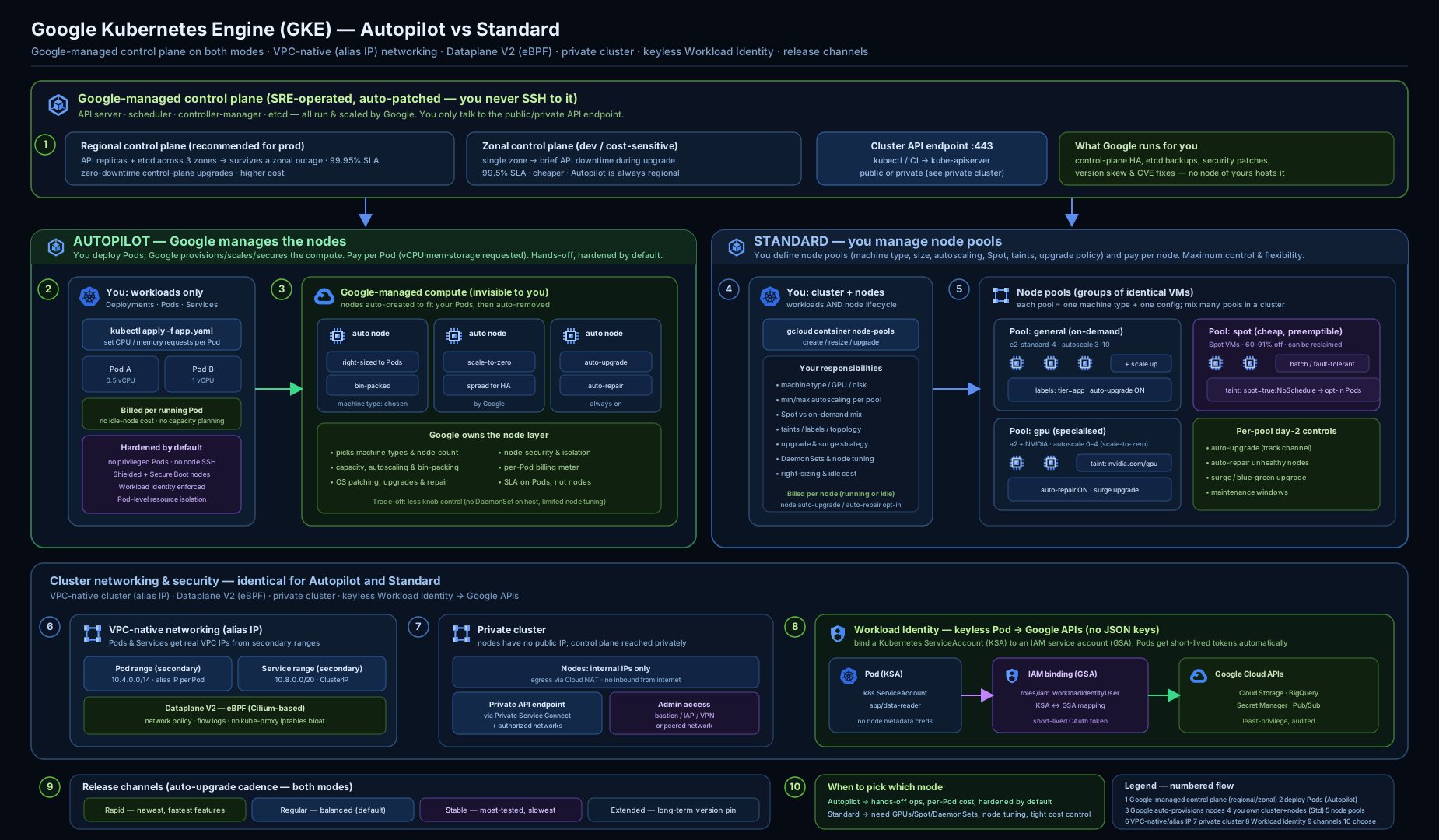
Keep this picture in mind: almost every setting on this page configures one of these boxes — the control plane, a node pool, an IP range, the dataplane, the cluster boundary, or the identity link — or the wiring between two of them.
Going deeper
Everything above is enough to create and operate a cluster. This section is for when you need to reason about what GKE is doing under the managed surface — the internals interviewers probe and the knobs that decide whether a large or high-stakes cluster behaves.
What “managed control plane” actually hides
When GKE says the control plane is managed, it is running etcd, the API server, the scheduler and the controller-manager for you, sizing them to your cluster and patching them. On a regional cluster there are three API-server/etcd replicas across three zones behind a single regional endpoint, so a zone loss leaves the API reachable and upgrades roll one replica at a time with no API downtime; a zonal cluster has one replica, so its API is unavailable during that zone’s outage or its control-plane upgrade. The published GKE SLA reflects this: 99.95% for a regional control plane, 99.5% for a zonal one, and Autopilot adds a pod-level uptime SLA (99.9% for pods spread across zones). Newer private clusters reach that endpoint over Private Service Connect rather than the older VPC-peering mechanism. One rule the managed plane enforces quietly: version skew — GKE always upgrades the control plane first and keeps nodes within 2 minor versions of it, which is why a stale node pool eventually must upgrade.
Autopilot internals, compute classes and pod bursting
Autopilot’s scheduler bin-packs your pods onto node shapes it picks and hides; a general-purpose profile is the default. When a workload needs specific hardware you request a compute class — Balanced, Scale-Out (Arm/Tau for throughput-per-cost), Performance, or Accelerator (GPU/TPU) — and Autopilot provisions matching capacity. Pods have minimum requests and Autopilot rounds requests to increments, so tiny pods still bill a floor; over-requesting is pure cost. Autopilot also supports pod bursting (a pod may use idle node capacity above its requests, up to its limits) and Spot pods for interruptible work. The newest primitive, custom compute classes (GA, and usable on Standard too), lets you declare an ordered list of node preferences with automatic fallback and active migration — e.g. “try this Spot family, then that Spot family, then on-demand” — which is how you chase scarce or cheap capacity without hand-managing pools.
Node internals: allocatable, COS, image streaming, sandbox
A node never offers pods its full machine size. GKE reserves CPU and memory for the kubelet, the OS and an eviction threshold (system-reserved + kube-reserved + eviction), so an e2-standard-4 exposes noticeably less than 4 vCPU / 16 GB as allocatable — this is why “the node is only 70% used” can still be full. Nodes run Container-Optimized OS (COS) with containerd: a minimal, read-only-root, auto-updating image on cgroup v2. Two features earn their keep at scale: Image streaming starts containers by streaming image data on demand from Artifact Registry, so large images cold-start in seconds rather than minutes; and GKE Sandbox (gVisor) wraps untrusted pods in a user-space kernel for defence-in-depth isolation (at some syscall overhead). NodeLocal DNSCache puts a DNS cache on every node to cut latency and load on kube-dns.
Networking internals at scale
The alias-range math is worth internalising: GKE gives each node an alias block sized to the next power of two ≥ 2× max-pods-per-node, so the default 110 max-pods rounds up to a /24 (256 addresses) per node, while dropping max-pods to 64 gives a /25 (128). That is the lever for packing more nodes into a fixed, immutable pod range — shrink max-pods-per-node. If a cluster is genuinely running out, you can attach additional pod ranges to new node pools (discontiguous multi-pod-CIDR) rather than rebuild. Dataplane V2 is Cilium/eBPF and kube-proxy-less, and beyond NetworkPolicy it offers FQDN-based egress policies, network-policy logging and DPv2 observability; VPC-native clusters can run dual-stack IPv4/IPv6, and multi-network pods can carry extra NICs for specialised data planes. Container-native LB via NEGs points the load balancer straight at pod IPs, giving lower latency and pod-accurate health checks. Max pods per node reaches 256 on Dataplane V2 with a large enough alias range.
Scale limits and stateful DR
GKE Standard scales to very large clusters — up to 15,000 nodes with the required configuration — while Autopilot scales pods for you within account quotas. For stateful workloads, remember that regional describes the control plane, not your data: use regional persistent disks / Hyperdisk so a volume survives a zone failure, and Backup for GKE to snapshot workloads and their PersistentVolumes for disaster recovery or cluster migration. Real application HA is your job even on a regional cluster: multiple replicas + PodDisruptionBudgets + topology-spread constraints so a zone loss or a node drain never takes the last replica.
Security internals
Workload Identity works through the node’s metadata server running in GKE_METADATA mode: the metadata endpoint is intercepted so a pod’s tokens are minted for its federated Google SA, not the node SA — which is exactly why you lock the node service account down and do identity per pod. Node scopes are for the kubelet; Workload Identity is for your workloads. Shielded nodes combine secure boot, a vTPM and integrity monitoring; Confidential GKE nodes encrypt memory in use (AMD SEV / SEV-SNP, Intel TDX on supported families); Binary Authorization enforces signed attestations at admission; and the Security Posture dashboard (standard tier) adds workload vulnerability scanning and deeper misconfiguration detection. Finally, two authorization systems overlap and you need both: IAM governs who can call the GKE API (create clusters, get credentials), while Kubernetes RBAC governs what a subject can do inside the cluster — Google Groups for GKE ties an IAM identity to in-cluster RBAC.
Upgrade internals and GKE editions
Node upgrades honour your PodDisruptionBudgets while draining, and you pick the strategy per pool: surge (add temporary nodes, drain-and-replace gradually) or blue-green (stand up a parallel pool, shift, roll back if needed). Maintenance windows and exclusions decide when any of this runs. If you must pin a version longer, the Extended channel / LTS minor versions extend patch support (for an extra per-vCPU fee). One more axis affects both features and cost: GKE editions. Standard edition is the per-cluster fee discussed here; GKE Enterprise adds fleet management, Config Sync / Policy Controller, a managed service mesh, multi-cluster Gateway and services, and team scoping — billed per vCPU on top. Choose Enterprise only when you actually run a fleet or need those governance features.
Hands-on lab
Create an Autopilot cluster (lowest-friction, pay-per-pod), deploy and expose an app, demonstrate Workload Identity, then clean up. Run this in Cloud Shell, where gcloud and kubectl are pre-installed and you are already authenticated. Autopilot bills per pod request; a tiny deployment for an hour is a rupee or two, and the cluster fee is the free first-cluster fee on many accounts — we delete everything at the end. (New accounts get the $300 free-trial credit; the GKE free tier also offsets one cluster’s management fee per month.)
Step 1 — Set the project and a region.
gcloud config set project "$(gcloud config get-value project)"
REGION=us-central1
Expected: Updated property [core/project].
Step 2 — Create an Autopilot cluster (a few minutes).
gcloud container clusters create-auto demo-auto \
  --region=$REGION --release-channel=regular
Expected: progress lines ending in Created and a RUNNING status with an endpoint IP.
Step 3 — Get credentials so kubectl targets the cluster.
gcloud container clusters get-credentials demo-auto --region=$REGION
kubectl get nodes
Expected: kubeconfig entry generated, then one or more nodes Ready (Autopilot provisions them as workloads land).
Step 4 — Deploy a sample app and expose it with an external L4 Service.
kubectl create deployment hello --image=us-docker.pkg.dev/google-samples/containers/gke/hello-app:1.0
kubectl set resources deployment hello --requests=cpu=250m,memory=256Mi
kubectl expose deployment hello --type=LoadBalancer --port=80 --target-port=8080
kubectl get service hello -w
Expected: the Service shows <pending> then an EXTERNAL-IP. Press Ctrl-C, then curl http://EXTERNAL_IP returns Hello, world! with the version and hostname.
Step 5 — Prove Workload Identity (pod authenticates as a Google SA).
# Create a Google SA and allow the default KSA in 'default' to impersonate it
PROJECT=$(gcloud config get-value project)
gcloud iam service-accounts create wi-demo
gcloud iam service-accounts add-iam-policy-binding \
  wi-demo@$PROJECT.iam.gserviceaccount.com \
  --role=roles/iam.workloadIdentityUser \
  --member="serviceAccount:$PROJECT.svc.id.goog[default/default]"
kubectl annotate serviceaccount default \
  iam.gke.io/gcp-service-account=wi-demo@$PROJECT.iam.gserviceaccount.com

# Run a Cloud SDK pod and check which identity it is
kubectl run wi-test --rm -it --restart=Never \
  --image=google/cloud-sdk:slim -- \
  gcloud auth list
Expected: the active account is wi-demo@$PROJECT.iam.gserviceaccount.com — the pod authenticated with no key file.
Validation. kubectl get deploy,svc shows hello available with an external IP; kubectl get nodes shows Autopilot-managed nodes; the gcloud auth list output inside the pod shows the federated Google SA.
Cleanup.
kubectl delete service hello
kubectl delete deployment hello
gcloud iam service-accounts delete wi-demo@$PROJECT.iam.gserviceaccount.com --quiet
gcloud container clusters delete demo-auto --region=$REGION --quiet
Cost note. Deleting the cluster stops the management fee and all pod billing. The external load balancer and its forwarding rule bill while they exist, so delete the Service before (or with) the cluster. With Autopilot you were charged only for the pod’s small CPU/memory request for the time it ran — typically a rupee or two for this lab.
Common mistakes & troubleshooting
| Symptom | Likely cause | Fix |
|---|---|---|
Pods stuck Pending, “Insufficient cpu/memory” |
Standard pool too small / autoscaler off or at max | Enable/raise pool autoscaling or NAP; on Autopilot check requests vs quotas |
| Cannot grow pod IP space / nodes capped | Pod (alias) range or max-pods-per-node sized too small — and immutable | Plan ranges with headroom at creation; rebuild with a larger range |
| Private-cluster nodes can’t pull public images | No Cloud NAT / image not in Artifact Registry | Add Cloud NAT for egress; mirror images to Artifact Registry (Private Google Access covers Google) |
| Pod gets 403 calling a Google API | Workload Identity binding/annotation missing or wrong SA roles | Re-check the workloadIdentityUser binding, the KSA annotation, and the Google SA’s roles |
kubectl times out connecting to API |
Private endpoint + your IP not in authorized networks | Add your CIDR to control-plane authorized networks, or use the private endpoint from inside the VPC |
| Cluster auto-upgraded during peak traffic | No/loose maintenance window | Set a maintenance window and an exclusion around peak periods |
| Spot-pool pods evicted constantly | Spot reclamation under capacity pressure | Tolerate disruption (PDBs, replicas) and add an on-demand pool as fallback; set min-nodes appropriately |
| Tried to switch Standard → Autopilot in place | Mode is fixed at creation | Create a new Autopilot cluster and migrate workloads |
Common beginner mistakes
These are conceptual traps — the wrong mental model, not just a wrong command. Each is a belief worth un-learning.
- “The cluster autoscaler will scale my pods.” It scales nodes, not pods; replica count is the Horizontal Pod Autoscaler’s job. The right model is two layers: HPA/VPA size the workload; the cluster autoscaler / NAP / Autopilot supply nodes to fit it. Confuse them and you wait for a scale-up that will never come.
- “
--num-nodes=1means one node.” On a regional cluster the count is per zone, so1becomes 3 (and2becomes 6). The right model: multiply your per-pool count by the number of zones — usually 3 — to get the real node, and cost, footprint. - “Autopilot is just Standard with autoscaling turned on.” It changes what you pay for (pod requests, not node VMs) and what you’re allowed to do (no SSH, no privileged or host-namespace pods). It is a different contract, not a toggle.
- “I’ll grow the pod IP range once the cluster gets bigger.” The pod and service secondary ranges are immutable for the cluster’s life. The right model: size ranges (and choose max-pods-per-node) for your maximum future scale on day one; the only escapes are attaching extra pod ranges to new node pools, or rebuilding.
- “Resource requests are optional — I’ll set them later.” On Autopilot, requests are the bill and the scheduling contract; leave them off and Autopilot injects defaults you didn’t choose. On Standard, missing requests break the scheduler’s and the autoscaler’s math. Set realistic CPU/memory requests on every workload — and let VPA help you tune them.
- “A regional cluster makes my app highly available.” Regional refers to the control plane (3 replicas) and default node spread — not your workload. A single-replica Deployment still dies with its pod. App HA = multiple replicas + PodDisruptionBudgets + topology-spread, on top of a regional cluster.
- “Spot VMs are just cheaper nodes.” Spot capacity can be reclaimed at any time with ~30 seconds’ notice and carries no availability guarantee. It is for fault-tolerant, stateless, restartable work: taint a Spot pool, tolerate disruption, and keep an on-demand pool for anything that must not be evicted.
- “Workload Identity is an optional hardening step.” It is the default and the only key-free way for pods to reach Google APIs; mounted SA keys and broad node scopes are the anti-patterns. Enable it at cluster creation and give each workload its own least-privilege Google SA.
- “
kubectlconnects to my nodes.”kubectltalks to the control-plane API endpoint — which on a private cluster may be unreachable from your laptop unless your IP is an authorized network. The API server is the single front door; nodes are cattle you rarely touch directly.
Best practices
- Default to Autopilot; pick Standard only for host-level DaemonSets, custom GPU drivers, Windows, or bin-packing you must own.
- Regional clusters for production — HA control plane and zero-downtime upgrades.
- Always use VPC-native and size the pod/service ranges with headroom (they’re immutable).
- Enable Dataplane V2 and write default-deny NetworkPolicies, opening only required flows.
- Make clusters private with authorized networks (or a private endpoint) and add Cloud NAT for egress.
- Use Workload Identity everywhere; never mount service-account keys or rely on broad node scopes.
- Subscribe to a release channel (Regular for most), set a maintenance window + exclusions, and keep auto-upgrade/auto-repair on.
- On Standard, turn on cluster autoscaler (and consider NAP) with sane maxima; right-size machine types and set resource requests on every workload.
- Give nodes a least-privilege service account; turn on Shielded nodes, and for high-assurance pipelines Binary Authorization.
Security notes
GKE’s defaults do a lot, but the responsibility line is real: Google secures and patches the control plane; you secure your workloads, IAM, network policy and image supply chain. The non-negotiables: Workload Identity (no keys), private nodes + restricted API access, node auto-upgrade (CVE patching), and Shielded nodes. Layer on NetworkPolicy for east-west segmentation, Binary Authorization to admit only trusted images, and the Security Posture dashboard to catch misconfigurations and vulnerable workloads. Audit access with Cloud Audit Logs, and keep the node service account and pod-level Google access least-privilege and separate — node scopes are for the kubelet, Workload Identity is for your pods.
Cost & sizing
The levers that move a GKE bill:
- Mode. Autopilot bills pod requests (so accuracy of requests is everything); Standard bills node VMs (so utilisation/bin-packing is everything). Pick the model whose discipline your team can sustain.
- Cluster management fee. A flat hourly fee per cluster (same for zonal/regional, Autopilot/Standard). The GKE free tier offsets the fee for one cluster per billing account per month — consolidate where reasonable rather than sprawling clusters.
- Machine family (Standard). E2 is the cheap general-purpose default; T2D/N2D (AMD) often win on price/performance; C3 for compute-heavy; right-size to the workload’s CPU:RAM.
- Spot VMs. Up to ~60–91% off for fault-tolerant, stateless or batch work — taint a Spot pool and tolerate disruption; keep an on-demand pool for the things that must not be evicted.
- Autoscaling. Cluster autoscaler/NAP (Standard) and Autopilot’s implicit scaling cut idle spend; scale-to-zero pools (min-nodes=0) for spiky/batch workloads.
- Committed-use discounts / Sustained-use. CUDs on Standard node VMs cut steady-state compute materially.
- Networking. External load balancers, Cloud NAT and cross-zone/egress traffic all bill — delete LBs you don’t need and prefer container-native LB (NEGs) to avoid extra hops.
Interview & exam questions
-
What is the core difference between GKE Autopilot and Standard? Autopilot is pod-centric — Google runs and scales the nodes and you pay for pod resource requests; Standard is node-centric — you manage node pools and pay for node VMs. Autopilot enforces secure defaults and removes node access; Standard gives full node control and responsibility. Mode is fixed at creation.
-
Zonal vs regional cluster — what changes? A regional cluster runs three control-plane replicas across three zones, surviving a zone failure and upgrading with zero API downtime; a zonal cluster has a single-zone control plane that is unavailable during its zone’s outage or control-plane upgrade. On Standard regional, node counts are per-zone (1 → 3 nodes across 3 zones).
-
What does “VPC-native” mean and why does it matter? Pods get real IPs from a secondary (alias) range on the subnet, making pod traffic routable across the VPC, peered networks and on-prem with no extra routes, and enabling container-native load balancing (NEGs). The legacy alternative is routes-based; always choose VPC-native. Pod and service ranges are immutable, so size them with headroom.
-
Why is mounting a service-account key into a pod bad, and what replaces it? A mounted key is a long-lived secret that doesn’t rotate and leaks easily; it also can’t be scoped per pod easily. Workload Identity Federation for GKE replaces it: a Kubernetes SA federates to a Google SA and pods get short-lived, auto-rotated tokens with no keys.
-
Cluster autoscaler vs node auto-provisioning? The cluster autoscaler scales node counts within existing pools based on pending pods. Node auto-provisioning additionally creates and removes whole pools with shapes that fit pending pods — closer to Autopilot while keeping node access.
-
What is Dataplane V2 and what do you get from it? An eBPF/Cilium dataplane (default on new clusters) replacing kube-proxy/iptables and Calico. It brings scalable service handling, built-in NetworkPolicy enforcement and network-policy logging, and better observability.
-
How do you upgrade nodes safely with minimal disruption? Use surge upgrades (
max-surge/max-unavailable) to add temporary nodes and drain-and-replace gradually, or blue-green node-pool upgrades for a parallel, reversible rollout. Pair with PodDisruptionBudgets, maintenance windows and exclusions. Regional control-plane upgrades have no API downtime. -
What does a private cluster need to reach the internet and Google APIs? Private nodes have no public IP, so outbound internet needs Cloud NAT; access to Google APIs/Artifact Registry uses Private Google Access (on for GKE subnets). Restrict the control plane with authorized networks or a private endpoint.
-
What are taints and tolerations used for in node pools? A taint on a pool repels pods that lack a matching toleration, letting you dedicate pools (Spot, GPU, Windows) so only opted-in workloads schedule there.
-
Name three security controls you’d enable on a production GKE cluster and why. Workload Identity (keyless API access), private nodes + restricted API endpoint (smaller attack surface), and node auto-upgrade (CVE patching) — plus Shielded nodes, NetworkPolicy and Binary Authorization for defence in depth.
-
What do release channels do, and which would you pick? They subscribe the cluster to an auto-upgrade cadence (Rapid/Regular/Stable, plus Extended). Regular is the balanced default for most production; Stable for risk-averse; Rapid for test/early access. Static (no channel) is discouraged — versions reach end-of-life.
-
How is GKE billed, and what’s the cluster fee? A flat per-cluster management fee (same across zonal/regional, Autopilot/Standard) plus, underneath, pod requests (Autopilot) or node VM-hours (Standard). The free tier offsets one cluster’s fee per account per month.
-
How do HPA, VPA and the cluster autoscaler differ? HPA scales the number of pod replicas on a metric; VPA right-sizes each pod’s CPU/memory requests; the cluster autoscaler scales the number of nodes to fit pending pods. HPA/VPA operate on workloads, the cluster autoscaler on capacity — and HPA scaling up is a common trigger for the cluster autoscaler. Don’t run HPA and VPA on the same resource; use the Multidimensional Pod Autoscaler if you need both dimensions.
-
Why is a node’s “allocatable” less than its machine size? GKE reserves CPU and memory for the kubelet, the OS and an eviction threshold (system-reserved + kube-reserved + eviction), so pods can schedule to less than the raw machine total — which you must account for when sizing pools and requests.
Quick check
- You need a production cluster that survives a single zone failing and upgrades without API downtime. What location type do you choose, and how many control-plane replicas does it have?
- True or false: you can convert an existing Standard cluster to Autopilot in place.
- A pod returns 403 calling Cloud Storage. You’re using Workload Identity. Name the three things to verify.
- Why must you size the pod (alias) IP range carefully at creation rather than later?
- You want batch jobs to run on cheap, interruptible capacity but never have your API pods evicted. How do you structure node pools?
Answers
- Regional, with three control-plane replicas across three zones. It survives a zone outage and upgrades the control plane with zero API downtime.
- False. Mode is fixed at creation; you create a new Autopilot cluster and migrate workloads.
- The
workloadIdentityUserIAM binding from the Google SA to the K8s SA member, theiam.gke.io/gcp-service-accountannotation on the Kubernetes ServiceAccount, and the Google SA’s IAM roles (e.g.storage.objectViewer). - The pod and service ranges are immutable for the cluster’s life; the pod range plus max-pods-per-node cap how many pods and nodes you can ever run, so over-provision with headroom up front.
- Run a Spot node pool (tainted, e.g. min-nodes=0) for the batch jobs (which tolerate the taint and disruption) and a separate on-demand pool for the API pods, so eviction of Spot capacity never touches them.
Practice challenges
Work these in Cloud Shell, easiest first. Each has a hidden solution — try before you peek. Replace $PROJECT / $BUCKET with your own values.
Challenge 1 — Spin up Autopilot (beginner). Create an Autopilot cluster ch1 in us-central1 on the Regular channel, fetch credentials, and confirm kubectl can see nodes.
<details> <summary>Solution</summary>
gcloud container clusters create-auto ch1 --region=us-central1 --release-channel=regular
gcloud container clusters get-credentials ch1 --region=us-central1
kubectl get nodes
Why: Autopilot is the lowest-friction path to a working, secure-by-default cluster — no node-pool decisions to make. </details>
Challenge 2 — Predict the node count (beginner). On a Standard regional cluster in a 3-zone region you run gcloud container clusters create ... --num-nodes=2. How many nodes appear, and why? How would you instead get roughly 2 total?
<details> <summary>Solution</summary>
You get 6 nodes — --num-nodes is per zone, and the region has 3 zones (2 × 3 = 6). For ~2 total, use a zonal cluster: gcloud container clusters create ... --zone=us-central1-a --num-nodes=2.
Why: regional node counts are always per-zone; forgetting it silently triples your node bill. </details>
Challenge 3 — Tainted, autoscaling Spot pool (intermediate). On a Standard cluster ch3, add an autoscaling Spot node pool (min 0, max 5) tainted so only opted-in pods land on it, then schedule a Deployment that tolerates the taint and confirm placement.
<details> <summary>Solution</summary>
gcloud container node-pools create spot --cluster=ch3 --region=us-central1 \
  --spot --enable-autoscaling --min-nodes=0 --max-nodes=5 \
  --node-taints=cloud.google.com/gke-spot=true:NoSchedule
Pod spec toleration + selector:
spec:
  tolerations:
  - key: cloud.google.com/gke-spot
    operator: Equal
    value: "true"
    effect: NoSchedule
  nodeSelector:
    cloud.google.com/gke-spot: "true"
Verify: kubectl get pods -o wide and kubectl get nodes -L cloud.google.com/gke-spot.
Why: the taint repels everything without the matching toleration, dedicating cheap interruptible capacity to work that can absorb eviction. </details>
Challenge 4 — Node auto-provisioning (intermediate). Enable NAP on ch3 with CPU 1–48 and memory 1–192 GB, then submit a pod requesting 20 vCPU that no existing pool can fit, and watch NAP create a pool.
<details> <summary>Solution</summary>
gcloud container clusters update ch3 --region=us-central1 \
  --enable-autoprovisioning --min-cpu=1 --max-cpu=48 --min-memory=1 --max-memory=192
kubectl run big --image=nginx --restart=Never \
  --overrides='{"spec":{"containers":[{"name":"big","image":"nginx","resources":{"requests":{"cpu":"20"}}}]}}'
kubectl get events -w     # watch the scale-up and new pool appear
Why: NAP creates whole pools sized to pending pods — the Standard feature that most resembles Autopilot’s elasticity. </details>
Challenge 5 — Workload Identity end to end, then break it (advanced). Bind a KSA reader in namespace app to a Google SA that can read a GCS bucket, prove access from a pod, then remove the annotation and observe the failure.
<details> <summary>Solution</summary>
kubectl create namespace app
kubectl create serviceaccount reader -n app
gcloud iam service-accounts create gcs-reader
gcloud storage buckets add-iam-policy-binding gs://$BUCKET \
  --member="serviceAccount:gcs-reader@$PROJECT.iam.gserviceaccount.com" \
  --role=roles/storage.objectViewer
gcloud iam service-accounts add-iam-policy-binding \
  gcs-reader@$PROJECT.iam.gserviceaccount.com \
  --role=roles/iam.workloadIdentityUser \
  --member="serviceAccount:$PROJECT.svc.id.goog[app/reader]"
kubectl annotate serviceaccount reader -n app \
  iam.gke.io/gcp-service-account=gcs-reader@$PROJECT.iam.gserviceaccount.com

# prove it (pod runs as the 'reader' KSA)
kubectl run t --rm -it --restart=Never -n app \
  --overrides='{"spec":{"serviceAccountName":"reader"}}' \
  --image=google/cloud-sdk:slim -- gcloud storage ls gs://$BUCKET

# break it
kubectl annotate serviceaccount reader -n app iam.gke.io/gcp-service-account-
After removing the annotation the pod falls back to the node SA and gcloud storage ls returns a 403.
Why: it isolates the three moving parts — the IAM binding, the KSA annotation, and the Google SA’s roles — so you can debug each independently. </details>
Challenge 6 — Size the immutable IP ranges (advanced). You must support 200 nodes at 64 pods/node on a cluster whose ranges can never be resized. What --default-max-pods-per-node do you set, what alias block does each node reserve, and what pod secondary range covers it with headroom?
<details> <summary>Solution</summary>
Set --default-max-pods-per-node=64. GKE reserves an alias block sized to the next power of two ≥ 2 × max-pods → 2 × 64 = 128 → a /25 (128 addresses) per node. 200 nodes need 200 /25 blocks; a /16 pod range holds 512 of them (65,536 ÷ 128 = 512), so a /16 covers 200 nodes with room to ~512. Create with a /16 pod range (--cluster-ipv4-cidr or a named secondary range) plus a separate service range (e.g. /20).
Why: pod and service ranges are immutable, so the power-of-two-per-node math must be finished before create, not discovered after.
</details>
Exercise
In Cloud Shell, create a Standard regional cluster with --enable-ip-alias, --enable-dataplane-v2, --enable-private-nodes, --workload-pool, Shielded-node flags and --num-nodes=1 in us-central1 (note you get 3 nodes). Then: (a) add a second, autoscaling Spot node pool (--spot --enable-autoscaling --min-nodes=0 --max-nodes=4) tainted cloud.google.com/gke-spot=true:NoSchedule; (b) deploy an app with a matching toleration and confirm it lands on the Spot pool with kubectl get pods -o wide and kubectl get nodes -L cloud.google.com/gke-spot; © apply a default-deny NetworkPolicy in its namespace and verify cross-pod traffic is blocked; (d) bind a Workload Identity Google SA to the app’s KSA and prove access with gcloud auth list inside a pod; (e) clean up with gcloud container clusters delete. Bonus: enable node auto-provisioning with CPU/memory limits and observe the autoscaler create a pool for a pending pod.
Certification mapping
- Associate Cloud Engineer (ACE) — Setting up and configuring a cloud solution / Deploying and implementing: create and configure GKE clusters and node pools (
gcloud container clusters/node-pools create), choose Autopilot vs Standard and zonal vs regional, deploy and expose workloads (Deployments, Services, Ingress), configure autoscaling and node auto-repair/upgrade, and manage access withget-credentials. Networking (VPC-native, private clusters) and Workload Identity are squarely in scope. - Professional Cloud Architect (PCA) — Designing and planning a cloud solution architecture / Ensuring reliability / security & compliance: choosing the mode and location type for availability and cost, designing VPC-native networking and private clusters, planning release channels and maintenance windows, and applying Workload Identity, Binary Authorization, Shielded nodes and NetworkPolicy as part of a secure, reliable, cost-optimised platform.
Glossary
- GKE — Google Kubernetes Engine, Google Cloud’s managed Kubernetes service.
- Control plane — the managed Kubernetes brain (API server, scheduler, controllers,
etcd); Google-operated in GKE. - Node — a Compute Engine VM that runs pods via the kubelet and containerd.
- Node pool — a group of identical nodes managed together (Standard only).
- Autopilot — hands-off mode: Google runs nodes; you pay for pod requests.
- Standard — node-centric mode: you manage node pools; you pay for node VMs.
- Zonal / regional cluster — control plane in one zone vs replicated across three zones in a region.
- VPC-native — cluster where pods get real alias IPs from a subnet secondary range.
- Pod / Service range — secondary ranges backing pod IPs and ClusterIP Services (immutable; size up front).
- Max-pods-per-node — cap on pods per node; with the pod range, bounds cluster size (set at pool creation).
- Dataplane V2 — GKE’s eBPF/Cilium dataplane with built-in NetworkPolicy and logging.
- NetworkPolicy — Kubernetes pod-to-pod firewall rules (enforced by Dataplane V2).
- Private cluster — cluster whose nodes have internal IPs only; API access via authorized networks or a private endpoint.
- Authorized networks — CIDR allow-list for the cluster’s public API endpoint.
- Cluster autoscaler — scales node counts within existing pools by pending-pod pressure.
- Node auto-provisioning (NAP) — auto-creates/deletes whole node pools to fit pending pods.
- Spot VM — deeply discounted, reclaimable node VM for fault-tolerant work.
- Taint / toleration — a node-pool repellent and the pod opt-in that lets it schedule there.
- Surge / blue-green upgrade — gradual drain-and-replace vs parallel reversible node-pool upgrade.
- Workload Identity Federation for GKE — lets a Kubernetes SA act as a Google SA so pods call Google APIs keylessly.
- Shielded GKE nodes — secure/measured boot and integrity monitoring for nodes.
- Binary Authorization — admission control that admits only signed/attested images.
- Release channel — Rapid/Regular/Stable/Extended auto-upgrade cadence for the cluster.
- NEG (Network Endpoint Group) — pod-IP backends enabling container-native load balancing.
- Cloud NAT — managed egress so private nodes can reach the internet.
- Private Google Access — lets internal-only nodes reach Google APIs/Artifact Registry.
- kubelet — the per-node agent that starts pods and reports node/pod health to the control plane.
- containerd — the container runtime GKE nodes use (via Container-Optimized OS) to run containers.
- Container-Optimized OS (COS) — Google’s minimal, auto-updating, read-only-root node OS; the default image type.
- Node allocatable — the CPU/memory a node offers pods after GKE reserves capacity for the kubelet, OS and eviction (always less than the machine’s raw size).
- Horizontal Pod Autoscaler (HPA) — scales the number of pod replicas on CPU/memory/custom metrics.
- Vertical Pod Autoscaler (VPA) — right-sizes pods’ CPU/memory requests (recommend or auto modes).
- Multidimensional Pod Autoscaler (MPA) — scales horizontally on CPU and vertically on memory in one object.
- PodDisruptionBudget (PDB) — a floor on how many replicas must stay up during voluntary disruptions (drains, upgrades).
- Compute class — a hardware profile you request for a workload (Balanced, Scale-Out, Performance, Accelerator).
- Custom compute class — a user-defined, ordered list of node preferences with automatic fallback (e.g. Spot family → on-demand).
- Image streaming — starts containers by streaming image data on demand from Artifact Registry, cutting cold-start time for large images.
- GKE Sandbox (gVisor) — a user-space kernel that isolates untrusted pods for defence in depth.
- NodeLocal DNSCache — a per-node DNS cache that reduces DNS latency and load on kube-dns.
- Gateway API — the standard Gateway/HTTPRoute CRDs GKE implements for role-oriented, multi-cluster L7/L4 load balancing.
- Ingress (GKE Ingress) — the older CRD that provisions a Google Application Load Balancer for HTTP(S) routing.
- Fleet — a group of clusters managed together (for Config Management, multi-cluster services and Gateway).
- GKE Enterprise — the paid edition adding fleet management, Config Sync/Policy Controller, managed service mesh and multi-cluster features.
- Committed-use discount (CUD) — a 1- or 3-year commitment that discounts steady-state node VM spend on Standard.
- Metadata server /
GKE_METADATA— the intercepted node metadata endpoint that hands pods their Workload-Identity tokens instead of the node SA’s. - Confidential GKE node — a node that encrypts memory in use (AMD SEV/SEV-SNP, Intel TDX) for sensitive workloads.
- Cloud Shell — the browser-based shell with
gcloud/kubectlpre-installed and pre-authenticated.
Next steps
You now know GKE end to end — both modes, the control-plane topology, node pools, networking, identity, security and cost. The natural follow-ons go deeper on running it well and on locking down identity: