In a nutshell
Imagine you need somewhere to live for a while. You have three broad options, and they map almost perfectly onto the three ways to run software in the cloud.
- Build and own a whole house — a virtual machine. You get the entire building: foundations, plumbing, walls, the lot. Total freedom to knock down a wall or install anything you like — but you also mow the lawn, fix the boiler, and pay the bills whether you are home or not. A virtual machine (VM) is your own complete computer in the cloud, with its own operating system that you boot, secure, patch, and keep alive. Maximum control, maximum chores.
- Rent a furnished apartment — a container. You get your own lockable space, but you share the building’s foundations, roof, and plumbing with the other tenants. Far less upkeep than a house, you move in fast, and the landlord maintains the structure — but because you share the building, a fault in the shared plumbing can affect everyone. A container packages your app so it moves in anywhere in seconds, sharing the host machine’s core — its “kernel” — with the other containers on it.
- Book a hotel room by the night — serverless. You show up, the room is ready, everything is handled, and you pay only for the nights you actually stay. You cannot repaint the walls and there is a checkout time — but you never think about the boiler. Serverless runs your code on demand, shrinks to nothing when idle, and bills you per request. Least control, least effort.
None of these is “best.” You would not book a hotel room for a family of five staying ten years, and you would not buy a house for one night in another city. The entire skill this lesson teaches is matching the workload to the right kind of home — and, as you will see, a real system usually ends up using all three at once.
Level: Junior · Time: ~30 min · Prerequisites: none are strictly required, but knowing what a container and an image are (see Containers & Docker basics) makes the middle option concrete, and having met Kubernetes before (see What is Kubernetes?) lets a couple of the deeper sections land faster.
After this lesson you will be able to:
- Explain the difference between a VM, a container, and serverless to a colleague without hand-waving.
- Look at a workload’s traffic shape, statefulness, and packaging and name the compute model that fits.
- Justify a mixed-compute architecture — and recognise when standardising on a single model is the smarter call.
- Reason about the hidden costs juniors miss: cold starts, idle spend, operational burden, and security blast radius.
The argument every team eventually has
A national grocery chain’s e-commerce team has one question in their architecture review and they cannot agree on the answer: when a customer hits “place order,” what kind of compute should run the code that reserves stock, charges the card, and books a delivery slot? One engineer wants to lift the existing app onto a couple of large virtual machines because that is what they know. Another wants Kubernetes because “everyone uses containers.” A third has read about Lambda and wants the whole thing serverless so they “never patch a server again.” All three are partly right, and the disagreement is costing weeks. This article is the decision framework that resolves it — not by declaring a winner, but by showing what each compute model actually is, what it costs you in money and operational effort, and which parts of a real retail workload each one fits.
The grocer’s situation is the one every team meets eventually. Their traffic is brutally spiky: a Tuesday afternoon is quiet, but a Friday-evening “weekend shop” rush and a one-day promotion can drive ten times the normal load for a few hours. Their operations team is small — eight engineers, no dedicated platform team, and a CFO who reads the monthly cloud bill line by line. And they have a mix of workloads that genuinely differ: a always-on product catalogue API, a bursty checkout flow, a nightly batch job that re-prices thousands of SKUs, and a legacy warehouse-integration component that ships as a vendor virtual appliance they cannot containerise. One compute model will not serve all four well, and the real skill is matching each workload to the right one.
The three models, in one breath each
Before the tradeoffs, the definitions — because half of every compute argument is two people meaning different things by the same word.
A virtual machine (VM) is a whole emulated computer: its own operating system, kernel, and disk, that you boot, patch, and own. On AWS that is EC2, on Azure Virtual Machines, on GCP Compute Engine. You get total control and you carry total responsibility — the OS is yours to secure and keep alive.
A container packages your application and its dependencies into an image that shares the host’s kernel but runs isolated. You no longer manage an OS per app, but you do run an orchestrator that schedules containers across a pool of machines: ECS or EKS on AWS, AKS on Azure, GKE on GCP (all three “K” services are managed Kubernetes). The unit of deployment is an image; the unit you still operate is the cluster.
Serverless (specifically Functions-as-a-Service) means you hand the platform a function, and it runs on demand, scales to zero when idle, and bills per invocation and millisecond. AWS Lambda, Azure Functions, GCP Cloud Functions. There is no server for you to see — hence the name — and no cluster to operate. The platform owns everything below your code. A middle ground, container-based serverless — AWS Fargate, Azure Container Apps, GCP Cloud Run — runs your container image with serverless scaling and no node management, blending two of the models.
The honest mental model is a spectrum of how much of the stack you operate versus how much the cloud operates for you. VMs put almost everything on you; serverless puts almost nothing on you; containers sit in between, and exactly where depends on whether you self-manage the cluster or let the cloud do it.
Architecture overview
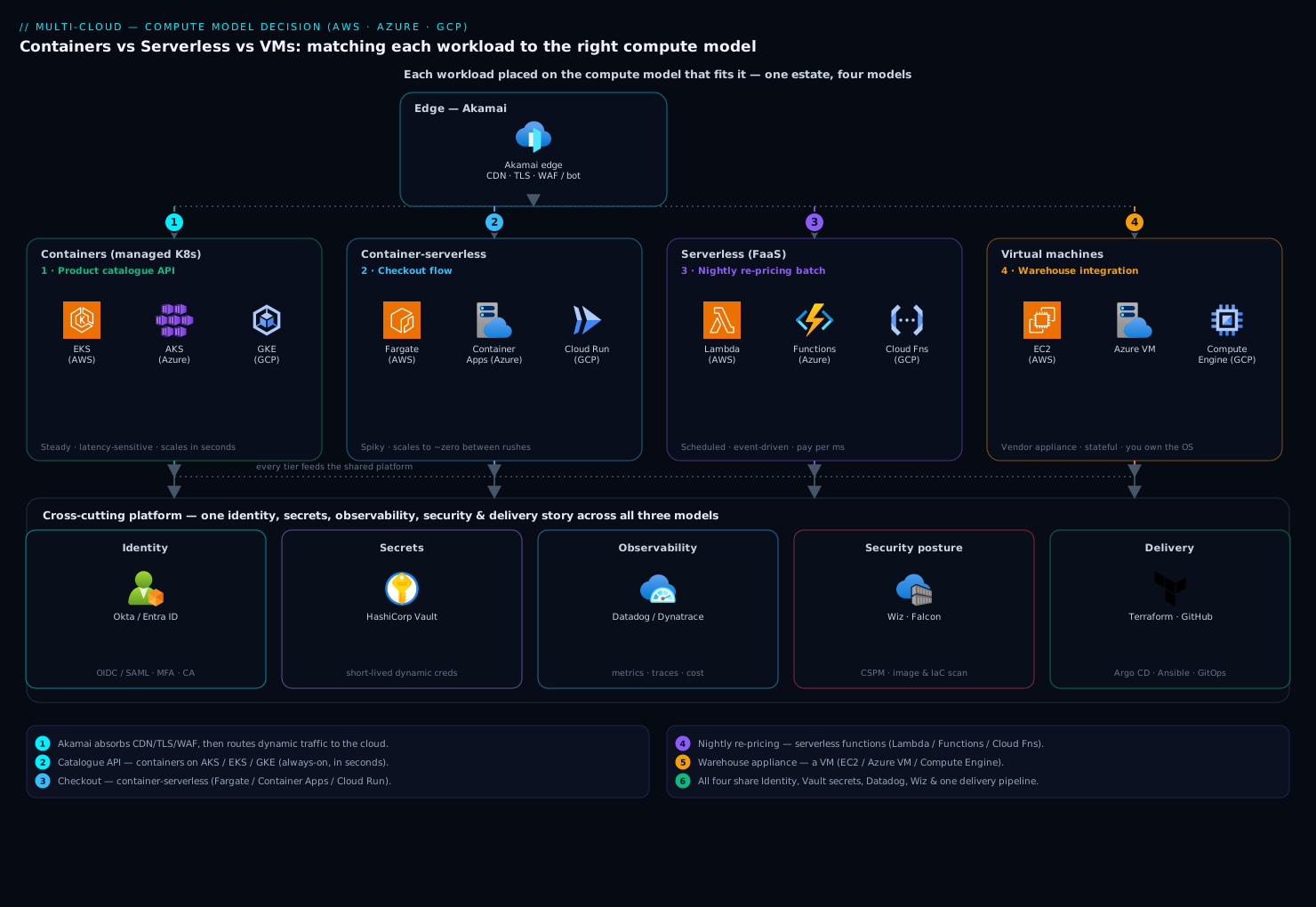
Rather than force the whole grocer onto one model, the reference architecture places each of the four workloads on the model that fits it — which is what a real production estate looks like, and exactly the lesson a junior architect needs. Trace the request and you can see why each choice lands where it does.
A customer’s browser hits Akamai at the edge first — CDN caching for static product images and pages, TLS termination, and WAF/bot mitigation so credential-stuffing and scraping traffic is absorbed before it reaches any of your compute. Akamai routes dynamic requests to the cloud, and from there the four workloads diverge:
-
Product catalogue API — containers (managed Kubernetes). This service is always on, gets steady high traffic, and runs many small replicas behind a load balancer. It lives on AKS / EKS / GKE as a Deployment with a horizontal pod autoscaler. Containers fit because the workload is continuous (so serverless’s pay-per-call offers little, and cold starts would hurt a latency-sensitive read path) and because the team wants fast, image-based rollouts and easy horizontal scaling.
-
Checkout flow — container-based serverless (Cloud Run / Container Apps / Fargate). This is the spiky one: near-zero between rushes, then a wall of traffic during a promotion. It runs as a container image but on a scale-to-zero serverless runtime, so the grocer pays almost nothing on a quiet Tuesday and the platform absorbs the Friday spike automatically with no nodes to pre-provision. Packaging it as a container (rather than a raw function) keeps it portable and lets it share the same image build as the rest of the estate.
-
Nightly re-pricing batch — serverless functions. A scheduled job fans out over thousands of SKUs once a night. Lambda / Azure Functions / Cloud Functions triggered on a schedule, fanning out across many parallel invocations, is ideal: it runs for minutes a day and bills only for those minutes, with massive built-in parallelism and nothing running the other 23 hours.
-
Warehouse integration — a virtual machine. The vendor ships this as a virtual appliance — a pre-built VM image with a kernel and drivers the supplier supports and you may not modify. It has no container build, it holds a long-lived stateful connection to the warehouse system, and the support contract is void if you re-platform it. It runs on EC2 / Azure VM / Compute Engine, full stop. This is the workload that proves “serverless everything” is a fantasy: some software only ships as a VM.
Every one of these authenticates the same way and is observed the same way, which is the second half of the picture. Workforce and customer identity flow through Okta (or Entra ID on Azure) as the identity provider — Okta issues the OIDC/SAML tokens that the catalogue and checkout services validate, so a model choice never means a separate auth story. Application secrets — database passwords, the payment-gateway API key — come from HashiCorp Vault, which issues short-lived dynamic credentials to the containers, functions, and VMs alike rather than baking secrets into an image or a VM disk. And every tier emits telemetry to Datadog (or Dynatrace), so one dashboard spans all three compute models — VM host metrics, container/pod metrics, and per-function invocation traces in a single pane.
How they compare on what matters
The three properties a junior architect should weigh first are operational burden, scaling behaviour, and cost shape. Here they are side by side.
| Dimension | Virtual machines | Containers (managed K8s) | Serverless (FaaS) |
|---|---|---|---|
| You operate | OS, patching, runtime, app, scaling | Cluster, node pools, images, app | Just your function code |
| Cloud operates | Hardware, hypervisor | Hardware, control plane | Everything below your code |
| Scaling unit | Whole VM (minutes) | Pod / container (seconds) | Invocation (milliseconds) |
| Scale to zero | No (you pay while it runs) | Rarely (nodes stay up) | Yes (pay only on use) |
| Cold starts | None (always warm) | None once pods are up | Yes — tens of ms to seconds |
| Cost shape | Pay for reserved time | Pay for the node pool | Pay per request + duration |
| Portability | Image is cloud-specific-ish | High (image runs anywhere) | Low (vendor-specific triggers) |
| Best for | Legacy, stateful, appliances, special hardware | Steady, microservices, mixed languages | Spiky, event-driven, glue, batch |
A second table reframes the same trade as the question you should ask yourself, because matching is easier than memorising.
| Ask yourself | If yes, lean toward |
|---|---|
| Is traffic spiky or near-zero between bursts? | Serverless |
| Is it event-driven or scheduled (a queue, a timer, a file upload)? | Serverless |
| Is it always-on with steady, latency-sensitive traffic? | Containers |
| Do I run many services in different languages I want deployed uniformly? | Containers |
| Is it a vendor appliance, a legacy app, or does it need a specific kernel/GPU/driver? | VMs |
| Is it stateful with long-lived in-process connections? | VMs (or stateful containers) |
| Is my ops team tiny and I want minimal infrastructure to run? | Serverless first, then container-serverless |
A decision model you can actually use
The two tables above tell you what each model is and is good for. Here is how to turn that into a decision you can defend in a review — applied strictly in order, so that the first rule to fire wins and you never agonise over a workload that was always going to be a VM.
- Is it forced onto a VM? If the software ships as a vendor virtual appliance, needs a specific kernel module or driver, requires a GPU or other special hardware, is a legacy monolith that will not containerise, or runs kernel-level code (a custom filesystem, a low-level agent), the decision is made: VM. Stop here — no amount of “but serverless is cheaper” survives a support contract that is void the moment you re-platform.
- Is it event-driven, scheduled, spiky, or low-volume — and does it tolerate statelessness and the odd cold start? A queue consumer, a timer job, a file-upload handler, a webhook, a nightly batch: serverless functions. It scales to zero, bills only for what runs, and hands the platform every layer of operations.
- Is it spiky like (2), but you want container packaging, longer runtimes, or portability across clouds? Container-based serverless (Cloud Run / Fargate / Azure Container Apps): scale-to-zero economics with your own image and no node pool to run.
- Is it always-on with steady, latency-sensitive traffic — or do you run many services in different languages you want deployed and scaled uniformly? Containers on an orchestrator (managed Kubernetes, or a smaller platform). Warm pods, fast image-based rollouts, and efficient bin-packing at steady scale.
- Now sanity-check the winner against three forces. Volume: at sustained high request rates, re-run the cost crossover — a reserved container fleet can beat per-invocation serverless. Team size: every layer you operate is a layer you get paged for, so a tiny team should bias toward whoever operates the most for them. State: long-lived in-process connections and local state push you away from functions and toward containers or VMs.
Run the model on a workload the grocer never mentioned, to see it work on fresh input: a real-time chat feature that holds a WebSocket open for every online user and pushes messages instantly. Rule 1: it is not a forced VM. Rule 2: it is not a clean fit for functions — a WebSocket is a long-lived, stateful connection, and classic FaaS is built around short, stateless invocations, so you would be fighting the platform’s timeouts and connection model the whole way. Rules 3–4: the traffic is steady through the day and the connections are long-lived, so containers win — a Deployment of chat pods behind a load balancer that supports sticky, long-lived connections, autoscaled on concurrent-connection count. Four questions get you there, and — crucially — they tell you why, which is the part that survives the architecture review.
What “operational burden” really means
This is the dimension juniors underestimate most, so make it concrete. With the warehouse VM, the grocer owns the operating system: every month there is OS patching, kernel CVEs to track, the runtime to upgrade, and capacity to size by hand. CrowdStrike Falcon runs as an endpoint agent on that VM for runtime threat detection precisely because the OS is now attackable surface that the team owns. The VM never scales itself; if the warehouse job needs more headroom, someone resizes the instance.
With the catalogue running on managed Kubernetes, the cloud runs the control plane, but the team still owns node pools, cluster upgrades, ingress, and autoscaler tuning — real work, just less than a fleet of hand-patched VMs. Kubernetes is powerful and genuinely complicated, and “we picked Kubernetes” quietly signs the team up for that complexity. The container images themselves get scanned by Wiz (specifically Wiz Code in the pipeline) for vulnerable dependencies and misconfigurations before they ship, so a known-bad base image never reaches the cluster.
With the checkout and re-pricing on serverless, there is no OS, no patching, and no cluster — the platform absorbs all of it, which is exactly why a small team reaches for it. The burden that remains is different: you must design for statelessness, accept the platform’s limits, and reason about cold starts. The burden does not vanish; it moves.
A blunt way to put it to the team: every layer you operate is a layer you patch, secure, scale, and get paged for. Choosing a compute model is largely choosing how many of those layers you want to own.
Cold starts — the serverless catch juniors miss
The headline objection to serverless is the cold start: when a function has been idle and a request arrives, the platform must spin up an execution environment before your code runs, adding latency from tens of milliseconds to a couple of seconds depending on language, package size, and whether it sits in a VPC.
For the nightly re-pricing batch, this is a non-issue — a few hundred milliseconds of warm-up on a job that runs for minutes at 2 a.m. is invisible. For checkout, it could matter: a customer waiting two extra seconds at “place order” is a real problem during a promotion. The mitigations are standard and worth knowing: provisioned concurrency (Lambda) or minimum instances (Cloud Run / Container Apps) keep a few environments permanently warm, trading some of serverless’s pay-per-use savings for predictable latency. The grocer keeps a small warm pool on checkout during business hours and lets it scale to zero overnight.
The general rule: serverless is excellent for spiky, event-driven, and batch work where occasional cold-start latency is acceptable, and a poorer fit for a steady low-latency hot path — which is exactly why the always-on catalogue is on containers, not functions.
Cost — three different bill shapes
Cost is where the CFO’s line-by-line reading bites, and the three models bill so differently that comparing them needs the workload’s shape, not a sticker price.
-
VMs bill for reserved time. You pay for the instance whether it is busy or idle. An always-on VM at low utilisation is the classic waste — paying 24/7 for a box that is busy 15% of the time. VMs win on cost only when utilisation is high and steady (commit to a 1- or 3-year reserved instance / savings plan and the hourly rate drops sharply), or when a workload simply must be a VM.
-
Containers bill for the node pool. You pay for the worker nodes the cluster runs on, sized to hold your pods. Bin-packing many services onto shared nodes gives strong economics at steady scale, but an over-provisioned cluster idling overnight is the same waste as idle VMs. Cluster autoscaling and scaling node pools down off-peak are the levers.
-
Serverless bills per request and per millisecond of execution. Idle costs nothing. This is unbeatable for spiky and low-volume work — the checkout flow costs almost nothing on a quiet day. But at sustained high volume, per-invocation pricing can cost more than a well-utilised reservation. The re-pricing batch is cheap on serverless because it runs briefly; a hypothetical always-on service doing billions of calls might be cheaper on containers.
The crossover is the lesson: serverless is cheapest at low and spiky volume; reserved containers or VMs win at high and steady volume. Tag every resource by workload and pipe spend into Datadog cloud-cost dashboards so the team sees, per workload, whether it sits on the right side of that crossover — and revisits the choice as volume grows.
| Workload | Shape | Model chosen | Why it is cost-optimal |
|---|---|---|---|
| Catalogue API | Steady, always-on | Containers | High utilisation amortises the node pool |
| Checkout | Spiky, bursty | Container-serverless | Scales to ~zero between rushes |
| Re-pricing batch | Minutes/day | Serverless functions | Pays only for the nightly run |
| Warehouse integration | Constant, stateful | VM (reserved) | Must be a VM; reservation cuts the rate |
Security and the shared-responsibility line
The compute model changes where the line falls between what you secure and what the cloud secures — and a junior architect must know which side they are on.
On a VM, you own the OS and everything in it: patching, hardening, the runtime, and runtime threat detection via a CrowdStrike Falcon agent on the instance. On containers, you own the image and the workload; Wiz Code scans images and IaC for vulnerabilities and misconfigurations in the pipeline, and Falcon can run as a node/runtime sensor, while the cloud secures the control plane. On serverless, the platform owns the runtime and host entirely, so your security surface shrinks to your code, its dependencies, and its IAM permissions — get the function’s least-privilege role wrong and that is your exposure.
Three controls span all three models and keep the security story uniform regardless of compute choice. Identity is centralised in Okta / Entra ID, so every service validates the same tokens and there is one place to enforce MFA and conditional access. Secrets come from HashiCorp Vault as short-lived dynamic credentials — the checkout function, the catalogue pod, and the warehouse VM each fetch a database credential at runtime rather than carrying a baked-in password, so a leaked image or snapshot does not leak a standing secret. And Wiz runs continuous posture management (CSPM) across the whole estate — VMs, clusters, and serverless functions — flagging an over-permissive IAM role or a publicly exposed resource no matter which model it lives on.
Failure modes worth naming
Each model fails in a characteristic way; recognising the signature is half of operating it.
- VM: the box dies, and so does everything on it. A single VM is a single point of failure — patch it wrong, fill its disk, or lose the host, and the workload is down. Mitigation: run at least two across availability zones behind a load balancer or in a scaling group, and never treat a VM as a pet.
- Containers: a node fails or the cluster is misconfigured. A bad node drains its pods (Kubernetes reschedules them — usually graceful), but a misconfigured autoscaler, an exhausted node pool, or a control-plane issue can stall deploys or starve the service. Mitigation: pod anti-affinity across zones, sane resource requests/limits, and autoscaler headroom.
- Serverless: throttling and downstream overload. Functions scale so fast they can overwhelm a database or hit a concurrency limit and start returning throttle errors. The classic incident is a spike fanning out thousands of concurrent functions that exhaust the database connection pool. Mitigation: reserved/maximum concurrency caps, a connection proxy (e.g. RDS Proxy) in front of the database, and queues to smooth bursts.
When any of these trips, Datadog / Dynatrace is the common nervous system — host metrics for the VM, pod and cluster events for containers, and invocation traces with cold-start timing for functions — and a breach auto-raises a ServiceNow incident so on-call gets a ticket with context, not just a pager buzz. New production deployments and any change to the warehouse VM also pass through a ServiceNow change request, giving a small team a lightweight but real approval gate.
Build and deploy — the same pipeline, three targets
The reassuring part for a junior team is that the delivery path is largely shared. Infrastructure for all three models is declared in Terraform — the VMs and their networking, the Kubernetes cluster and node pools, and the serverless functions and their triggers all live as code in one repository, reviewed and reproducible — with Ansible handling in-guest configuration of the warehouse VM (the one place a config-management tool still earns its keep, since there is an OS to configure). The application pipeline runs in GitHub Actions (or Jenkins): it builds and tests, runs Wiz Code as a security gate on images and IaC, and then deploys — pushing container images that Argo CD rolls out to the Kubernetes cluster via GitOps, and publishing function packages to the serverless platform. One team, one pipeline, three deployment targets — which is the practical reason a mixed estate is manageable for eight engineers rather than overwhelming.
A minimal Terraform sketch makes the “all three as code” point concrete:
# Always-on catalogue → managed Kubernetes (containers)
resource "aws_eks_node_group" "catalogue" {
  cluster_name   = aws_eks_cluster.main.name
  instance_types = ["m6i.large"]

  scaling_config {
    min_size     = 3
    max_size     = 12
    desired_size = 3
  }
}

# Spiky checkout → container-serverless (scales to zero)
resource "aws_ecs_service" "checkout" {
  name        = "checkout"
  launch_type = "FARGATE"
  # autoscaling target tracks request count; min can be 0 off-peak
}

# Nightly re-pricing → serverless function on a schedule
resource "aws_lambda_function" "reprice" {
  function_name = "nightly-reprice"
  timeout       = 900 # minutes-long batch
  memory_size   = 1024
}

# Warehouse appliance → a plain VM (vendor image, reserved)
resource "aws_instance" "warehouse_gw" {
  ami           = var.vendor_appliance_ami # cannot be containerised
  instance_type = "m6i.xlarge"
}
Going deeper
Everything above is enough to make a good call. This section is for the reader who wants to know why the models behave the way they do — the isolation boundaries underneath them, what a cold start really is, how the numbers move at scale, and how far a breach can spread. It is the most advanced part of the lesson; skim it now and come back when you are running these in anger.
The isolation spectrum: what actually keeps workloads apart
Every compute model is, underneath, an answer to a single question: when my code and your code run on the same physical server, what stops mine from reading your memory, your files, or your network traffic? The strength of that answer — the isolation boundary — is the most important thing separating the models, and it runs along a spectrum from “share almost nothing” to “share the entire kernel.”
- Virtual machines — hardware-level isolation. A hypervisor (KVM, Xen, Hyper-V, VMware ESXi) gives each VM its own kernel and virtualised hardware, and traps the privileged instructions a guest tries to run. The boundary is the virtual-hardware interface — narrow and battle-hardened. To break out of a VM you need a hypervisor escape, which is rare and high-value. The price is weight: every VM carries a full OS, so it boots in tens of seconds and reserves hundreds of megabytes to gigabytes of RAM before your app does anything.
- Containers — OS-level isolation, one shared kernel. Every container on a host shares the same Linux kernel. What isolates them are kernel features, not virtual hardware: namespaces decide what a process can see (its own PID tree, network stack, mount table, hostname, users), cgroups decide what it can use (CPU, memory, I/O), and capabilities, seccomp, and AppArmor/SELinux shrink what it can ask the kernel to do. This is why containers are so light — no second kernel, megabyte-scale overhead, sub-second start — but it is also why the boundary is the kernel’s entire system-call surface. A single kernel vulnerability can become a container escape that reaches the host and every neighbour on it. Shared kernel, shared fate.
- microVMs — Firecracker and Kata: VM isolation at container speed. What if each container could have its own kernel and still start almost as fast? That is a microVM: a stripped-down guest with only the devices a container needs. Firecracker — the open-source VMM behind AWS Lambda and Fargate — boots a microVM in around 125 ms and packs thousands onto one host. Kata Containers implements the OCI runtime spec, so Kubernetes can schedule pods that are secretly microVMs, selected per workload with a
RuntimeClass. You pay a little startup and memory over a plain container and get a hypervisor boundary back. This is how public serverless platforms run your code next to a stranger’s safely. - Sandboxes — gVisor: a user-space kernel in front of the real one. gVisor (
runsc) takes a third route: rather than a second kernel in a VM, it puts a user-space re-implementation of the Linux ABI between the container and the host. Your container’s syscalls hit gVisor, which services most of them itself and forwards only a narrow, guarded set to the host kernel — shrinking the attack surface without a full VM. It powers GKE Sandbox and Google Cloud Run’s first-generation sandbox. The trade is some syscall overhead and occasional compatibility gaps for exotic workloads.
| Model | Isolation mechanism | Own kernel? | Typical start | Isolation strength | Overhead |
|---|---|---|---|---|---|
| Virtual machine | Hypervisor (virtual hardware) | Yes | Tens of seconds | Strongest | Highest (full OS each) |
| microVM (Firecracker / Kata) | Lightweight hypervisor | Yes (minimal) | ~100–150 ms | Very strong | Low–moderate |
| gVisor sandbox | User-space kernel (runsc) |
Partial (intercepts syscalls) | Sub-second | Strong | Low–moderate (syscall cost) |
| Container | Namespaces + cgroups (shared kernel) | No | Milliseconds–seconds | Moderate (shared kernel) | Lowest |
Why this belongs in a Kubernetes course: the choice is not always “container or VM.” On a modern cluster you can run a hardened sandbox for the untrusted workload and a plain container for the trusted one, side by side, chosen per pod. You register the alternative runtime once as a RuntimeClass, then any pod opts in by name:
apiVersion: node.k8s.io/v1
kind: RuntimeClass
metadata:
  name: gvisor
handler: runsc # gVisor sandbox runtime, configured on the nodes' containerd
---
apiVersion: v1
kind: Pod
metadata:
  name: untrusted-report-renderer
spec:
  runtimeClassName: gvisor # omit this field and the pod is a normal container
  containers:
    - name: renderer
      image: registry.example.com/report-renderer:1.4.2
(Representative manifest, valid for Kubernetes 1.29+. RuntimeClass has been stable under node.k8s.io/v1 since 1.20. The runsc handler — or kata for Kata Containers — must first be configured on the nodes’ container runtime, e.g. containerd, for the class to schedule.)
Cold starts, for real this time
The earlier section named the cold start; here is what actually happens in the milliseconds you are paying attention to. A cold invocation walks five steps: the platform (1) allocates an execution environment — on Lambda, a Firecracker microVM — then (2) downloads your code or image, (3) starts the language runtime, (4) runs your initialization — the module-level code that imports libraries and opens connections — and only then (5) runs your handler. Two surprises live in there. First, step 4 is often the biggest slice, and it is your code: a fat dependency tree or a synchronous database connection at import time can dwarf the platform’s own overhead. Second, once warm, an environment is reused for many requests, so cold starts are a tail-latency problem — the unlucky first request — not an average one.
Numbers, representative and current: a lean Node.js or Python function cold-starts in roughly 100–400 ms; a JVM or .NET function can take one to several seconds because the runtime itself is heavy; a large container-image function adds image-pull time, mitigated by the platform’s lazy, block-level image loading. VPC attachment, once a notorious multi-second penalty, is now typically sub-100 ms extra after AWS re-architected it. The mitigations climb a ladder of cost: keep dependencies small and defer connection setup out of init (free); use SnapStart, where Lambda snapshots the initialized microVM with Firecracker and restores it, cutting Java cold starts dramatically (and since extended to other runtimes); or pin capacity with provisioned concurrency / minimum instances, paying to keep environments always-warm and trading the scale-to-zero saving for flat latency.
Kubernetes has the same physics under a different name. A pod scaling from zero — via Knative or KEDA — pays image pull + container start + readiness-probe wait + app warm-up before it serves: the identical five steps wearing cluster clothes. Cold starts are not a serverless quirk; they are the cost of scaling to zero, wherever you do it.
Density, cost, and performance at scale
Three numbers move together as you scale, and juniors usually track only one.
Density is how many workloads fit on one host. A VM’s full-OS weight means low density — a handful of big guests per server, each reserving RAM for a kernel you pay for but do not use. Containers, sharing the kernel, bin-pack by the hundred; this is the core economic argument for Kubernetes, which exists in large part to pack many containers onto few nodes efficiently. Serverless hides density from you, but under the hood the platform is bin-packing microVMs at enormous scale — your “no servers” is someone else’s very dense server.
Cost follows density and utilisation. The real waste metric is not price-per-hour, it is paid-for capacity you did not use. A VM at 15% utilisation wastes 85% of its bill; bin-packed containers push utilisation up and the waste down; serverless charges ~nothing when idle, so its utilisation is effectively 100% — but at a premium per unit of work. That premium is why the crossover exists. Illustratively: a function billed per request plus per-GB-second is almost free at a few thousand calls a day and can cost more than a reserved node fleet at billions of calls a day. The lesson is to locate each workload on that curve and re-check as volume grows — a service that was correctly serverless at launch can quietly cross into “should be containers” a year later.
Performance is the third corner. A dedicated VM gives the most predictable latency — no cold starts, and no noisy neighbour if it is not shared. Containers share a node, so without honest resource requests and limits one pod’s spike can starve another — the classic “noisy neighbour” — but set them and you regain predictability while keeping density. Serverless trades predictability for effectively infinite burst: it fans out to thousands of concurrent executions in seconds, but with a cold-start tail and less control over when that tail bites. Fast-but-spiky, steady-and-dense, or dedicated-and-predictable — you are usually choosing two of the three.
Blast radius: what a breach can reach
Isolation strength and blast radius — how far an attacker gets once they are in — are two ends of the same fact.
- VM. Compromise one app and the attacker owns that OS and everything on that VM, but the hypervisor contains them: barring a rare hypervisor escape, neighbours on other VMs are untouched. The catch is that you patch that whole OS, so there is more surface to get wrong in the first place.
- Container. Compromise plus a kernel escape can reach the host and every co-located container — shared kernel, shared blast radius. This is why hardening matters so much for containers: run as non-root, drop Linux capabilities, mount the root filesystem read-only, apply a seccomp profile, and never bind-mount the container runtime’s socket or host paths. For genuinely untrusted or multi-tenant code, promote the isolation to a microVM or gVisor sandbox so an escape hits a disposable guest, not the node.
- Serverless. The code surface is smallest — no OS you own, an ephemeral environment discarded after use — so the blast radius collapses onto the function’s IAM permissions and its dependencies. The signature serverless breach is not a kernel exploit; it is an over-permissioned execution role letting a compromised function read a bucket it never needed, or a poisoned dependency in the deployment package. Least-privilege on the role is your perimeter.
The through-line: weaker isolation buys density and speed but widens the blast radius, which is precisely why the platforms that rent you the most convenience — Lambda, Cloud Run — quietly run your “container” inside the strongest practical isolation, a Firecracker microVM or a gVisor sandbox. They are absorbing the blast-radius cost of a shared kernel so that you never see it.
Explicit tradeoffs
Accept these, or pick differently. A mixed estate — the architecture above — fits each workload optimally but costs you cognitive and tooling breadth: your team must understand VMs, Kubernetes, and serverless, and operate monitoring and security across all three. The alternative, standardising on one model, trades fit for simplicity: an all-Kubernetes shop runs even the batch job as a CronJob and the spiky checkout as a pod (over-paying a little for idle nodes) but only has to master one platform — a defensible choice for a small team that values focus over per-workload optimisation. There is no universally correct answer; there is the answer that fits your workload shapes and your team’s size.
The honest cautions per model. Serverless buys the least operational burden and the best spiky-cost story, but pays in cold starts, execution and statelessness limits, and vendor lock-in — a Lambda’s triggers and event shapes are AWS-specific, and moving to another cloud is a rewrite, not a redeploy. Containers buy portability and clean scaling but make you operate Kubernetes, which is real, ongoing complexity that a team must be honest about resourcing. VMs buy total control and run literally anything — legacy apps, vendor appliances, special kernels and GPUs — but hand you the entire OS to patch, secure, and scale, which is the most operational burden of the three.
When each clearly wins. Reach for serverless when the workload is event-driven, scheduled, spiky, or low-volume, and the team is small — it is the lowest-effort starting point and scales to zero when idle. Reach for containers when you run many always-on services, want them deployed uniformly across languages, and need portability and steady-state scaling efficiency. Reach for VMs when something must be a VM — a vendor virtual appliance like the warehouse gateway, a legacy monolith that will not containerise, a stateful service with long-lived connections, or a workload needing a specific kernel, driver, or GPU. Most real estates, like the grocer’s, end up using all three — and the mark of a good architect is not loyalty to one model but the judgement to put each workload where it belongs.
Common beginner mistakes
These are the misconceptions that lead to bad model choices — distinct from the operational failure signatures above. Each is the wrong mental model, why it is wrong, and the picture to replace it with.
- “Serverless means there are no servers.” There are servers — many of them — you just do not operate or see them. The name describes your experience, not the architecture. The correct model: serverless is someone else’s densely-packed fleet of microVMs, rented to you by the invocation. Believing there is genuinely “no server” is how people forget that connection pools, cold starts, and regional capacity still exist and still bite.
- “Containers are just lightweight VMs.” They share the host kernel; a VM does not. That one difference drives everything above — startup time, density, and the entire isolation-and-blast-radius conversation. Treating a container as a mini-VM leads teams to run it as root with a fat OS baked inside and skip the hardening that a shared kernel demands.
- “Kubernetes is the default; pick it first.” Kubernetes is a powerful orchestrator, but choosing it commits a team to operating clusters, node pools, upgrades, and autoscalers. For a spiky, event-driven, or tiny workload, that is a large standing tax for capability you may not need. Pick the lowest-operational-burden model that fits, then move up only when the workload forces you to.
- “Serverless is always cheaper.” It is cheaper when idle and at low or spiky volume; at sustained high volume, per-invocation pricing can exceed a well-utilised reserved fleet. Cost depends on the workload’s shape, not on the model’s brochure — which is exactly why the cost crossover is a thing you re-check, not a thing you decide once.
- “Cold starts are a serverless-only problem.” Anything that scales to zero pays a cold start when it scales back up — including Kubernetes pods behind Knative or KEDA. Cold starts are the price of scaling to zero, not a defect unique to functions.
- “Pick one model and standardise everything on it.” Sometimes right (a tiny team that values focus), often wrong (forcing a vendor appliance into a container, or a steady high-QPS hot path onto per-call serverless). Real estates usually run all three; the skill is matching, not loyalty.
Practice challenges
Work these top to bottom — they escalate from the analogy to a real isolation and cost decision. Try each before opening its solution; the value is in justifying the choice, not just naming it.
Challenge 1 — Beginner: match the analogy. Map each need to a home (house / apartment / hotel) and to a compute model (VM / container / serverless): (a) you need total control of the OS to install a custom kernel driver; (b) you want to move in fast and are happy sharing the building’s plumbing; © you want to pay only for the nights you actually stay.
<details><summary>Solution</summary>
(a) house → VM; (b) apartment → container; © hotel → serverless. The mapping is control-versus-upkeep-versus-pay-per-use: the house gives you everything and every chore, the apartment trades some control for far less upkeep by sharing structure, and the hotel charges only for use but lets you change nothing. </details>
Challenge 2 — Beginner→Intermediate: pick the model. A workload resizes and watermarks images the instant a user uploads one to a bucket. A few hundred uploads on a normal day, tens of thousands during a campaign, no long-lived state. Which model, and why?
<details><summary>Solution</summary>
Serverless functions. It is event-driven (an object-created trigger), spiky (idle, then bursty), stateless, and short-running — the textbook FaaS fit. It scales to zero between uploads and fans out automatically during a campaign, and cold-start latency on a background image job is invisible to the user. </details>
Challenge 3 — Intermediate: rebut the obvious-but-wrong answer. A team wants to run their always-on, latency-sensitive product-search API — steady thousands of requests per second, a strict p99 latency SLA — on Lambda “to save money.” Give the two-sentence rebuttal and the model you would choose.
<details><summary>Solution</summary>
Containers (managed Kubernetes). At sustained high QPS, per-invocation pricing likely costs more than a well-utilised node pool, and the cold-start tail threatens a p99 SLA on a hot read path. Warm, bin-packed pods behind an autoscaler give both predictable latency and better economics at steady scale. </details>
Challenge 4 — Intermediate: the forced VM. A monitoring vendor ships a network-analysis appliance as a pre-built image with a custom kernel module, and the support contract forbids modification. The platform team insists “everything goes in a container.” Who is right, and which rule decides it?
<details><summary>Solution</summary>
The appliance stays a VM. Rule 1 of the decision model fires: software that needs a specific kernel module and ships as an unmodifiable appliance is a forced VM — containerising it voids support and is likely impossible anyway, since a container shares the host kernel and cannot safely load an arbitrary kernel module of its own. No cost or tidiness argument overrides a rule-1 constraint. </details>
Challenge 5 — Advanced: isolation for multi-tenancy. You run a platform that executes customer-supplied code — think CI jobs, or a plugins marketplace — on shared Kubernetes nodes. Plain containers make you nervous. What are your two realistic options, and what do they cost you?
<details><summary>Solution</summary>
Run the untrusted pods under a gVisor sandbox (runtimeClassName: gvisor) or as Kata microVMs (runtimeClassName: kata). Both restore a sandbox-or-hypervisor boundary, so a container escape lands in a disposable guest rather than on the node and its neighbours. The cost is some startup latency, extra memory, and — for gVisor — occasional syscall-compatibility gaps. This is precisely the trade the public FaaS platforms already make on your behalf with Firecracker.
</details>
Challenge 6 — Advanced: the cost crossover. A service launches at 50,000 requests/day (spiky) and is put on serverless — correctly. Eighteen months later it runs 2 billion requests/day, steady and flat around the clock. What should the architect do, and what is the underlying principle?
<details><summary>Solution</summary>
Re-run the cost crossover and very likely migrate to a reserved container (or VM) fleet. At sustained, flat, high volume, per-invocation plus per-GB-second pricing tends to exceed a highly-utilised reserved node pool, and the “scales to zero” benefit is worthless for a workload that never idles. Principle: a compute choice is correct for a traffic shape, and traffic shapes change — revisit the decision as volume grows rather than treating the launch-day choice as permanent. </details>
Glossary
- Virtual machine (VM): a whole emulated computer — its own OS, kernel, and disk — that you boot, patch, and own. EC2 / Azure VM / Compute Engine.
- Container: your app and its dependencies packaged into an image that shares the host’s kernel but runs isolated from other containers. Light and fast to start.
- Image: the packaged, immutable bundle a container starts from — code plus the exact dependencies it needs.
- Kernel: the core of the operating system that talks to the hardware. VMs each have their own; containers on a host all share one.
- Serverless / FaaS (Functions-as-a-Service): you hand the platform a function; it runs on demand, scales to zero when idle, and bills per invocation and millisecond. Lambda / Azure Functions / Cloud Functions.
- Container-based serverless: run your container image with serverless scale-to-zero and no nodes to manage. Fargate / Cloud Run / Azure Container Apps.
- Orchestrator: the system that schedules containers across a pool of machines and keeps the desired number running. Kubernetes is the common one.
- Kubernetes (K8s): the dominant container orchestrator; managed flavours are EKS (AWS), AKS (Azure), GKE (GCP).
- Pod: the smallest deployable unit in Kubernetes — one or more containers scheduled and networked together.
- Node pool: the group of worker VMs a Kubernetes cluster runs your pods on; you pay for these whether or not they are busy.
- Control plane: the brains of a cluster (API server, scheduler, controllers); on managed Kubernetes the cloud runs it for you.
- Hypervisor: the layer that creates and isolates VMs on physical hardware, giving each guest its own virtual machine. KVM, Xen, Hyper-V, ESXi.
- Namespaces (Linux): kernel feature that controls what a process can see — its own view of processes, network, filesystem mounts, hostname, users. A pillar of container isolation.
- cgroups: kernel feature that controls what a process can use — CPU, memory, and I/O limits. The other pillar of container isolation.
- seccomp: a filter that restricts which system calls a container may make, shrinking the kernel attack surface.
- RuntimeClass: a Kubernetes object that lets a pod pick an alternative container runtime — e.g. a gVisor sandbox or a Kata microVM — via
runtimeClassName. - microVM: a stripped-down, fast-booting VM with only the devices a container needs; combines VM-grade isolation with near-container startup. Firecracker, Kata Containers.
- Firecracker: AWS’s open-source micro-VMM (boots in ~125 ms) that runs Lambda and Fargate under the hood.
- Kata Containers: an OCI-compatible runtime that runs each container inside a lightweight VM, selectable in Kubernetes via RuntimeClass.
- gVisor (
runsc): a user-space re-implementation of the Linux kernel ABI that sandboxes a container by intercepting its syscalls. Powers GKE Sandbox and Cloud Run’s first-generation sandbox. - Container escape: an exploit that breaks out of a container to reach the shared host kernel and, potentially, its neighbours.
- Cold start: the extra latency when an idle serverless environment (or a scaled-to-zero pod) must be created and initialized before it can serve a request.
- Provisioned concurrency / minimum instances: keeping a few execution environments permanently warm to remove cold-start latency, at the cost of the scale-to-zero saving.
- Scale to zero: shrinking a workload to no running capacity (and no cost) when idle; the source of both serverless’s cheapness and its cold starts.
- Bin-packing: fitting many workloads efficiently onto fewer hosts to raise utilisation — the core economic reason to use containers/Kubernetes.
- Noisy neighbour: one workload’s spike starving another that shares the same host; prevented by honest resource requests and limits.
- Blast radius: how far an attacker can reach once they compromise a workload — bounded by the isolation boundary of the compute model.
- Reserved instance / savings plan: a 1- or 3-year commitment that sharply cuts the hourly rate for steady, always-on capacity.
- IAM role / least privilege: the identity and permissions a workload runs with; on serverless, the function’s role is its main security perimeter, so it should grant the minimum needed.
- Shared-responsibility line: the boundary between what you secure and what the cloud secures; it moves toward the cloud as you go VM → container → serverless.
The shape of the win
For the grocer’s review, the resolution is not “the VM person won” or “serverless won” — it is that the argument was the wrong shape. The catalogue goes on containers because it is always on and latency-sensitive; checkout goes on container-serverless because it is spiky and the team should not pay for idle capacity; the nightly re-pricing goes on serverless functions because it runs for minutes a day; and the warehouse appliance stays a VM because the vendor ships it as one and the support contract demands it. Underneath, one identity layer in Okta / Entra ID, one secrets layer in HashiCorp Vault, one observability layer in Datadog, one security posture in Wiz, and one delivery pipeline in GitHub Actions / Argo CD with Terraform make a three-model estate operable by eight people. The lesson a junior architect should carry out of this is the durable one: a compute model is not a religion to adopt but a tool to match — to the workload’s traffic shape, its statefulness, its packaging, and the size of the team that has to run it at 3 a.m.