eksctl create cluster gives you a control plane and some nodes. It does not give you a platform. The gap between a demo cluster and one that runs hundreds of services across thousands of pods comes down to four decisions you make early and rarely revisit cheaply: how identity flows to workloads, how the data plane allocates IPs, how nodes appear and disappear, and how you keep the whole thing current. Get any of them wrong and the cluster runs — until a morning traffic ramp wedges pods in Pending, a flipped config bricks RBAC, or a single ingress quietly spawns forty load balancers and the bill arrives.
This guide walks each decision with the commands and manifests I actually ship, and — because you will reach for this mid-incident — it lays the option matrices, error references, limits, and a symptom→cause→confirm→fix playbook out as scannable tables. Read the prose once to build the mental model, then keep the tables open. Assume EKS 1.31+, the AWS VPC CNI, Karpenter v1, and EKS Pod Identity throughout. Every knob gets the value, the default, when to change it, the trade-off, and the limit that bites — not just the happy path.
By the end you will provision a cluster whose auth lives in CloudTrail-audited access entries instead of a single fragile ConfigMap, whose workloads assume IAM roles with no ServiceAccount annotations, whose nodes are right-sized and consolidated by Karpenter against a wide instance pool, and whose IP plan survives peak pod count rather than today’s. You will also know exactly which of the dozen ways this stalls at scale you are looking at, and the one command that confirms it.
In a nutshell
New to running Kubernetes on AWS? Start here. EKS is Amazon’s managed Kubernetes: AWS runs the control plane, you run the apps. Standing up a cluster takes one command. Running one that reliably hosts hundreds of applications is a different skill — and it comes down to four decisions this lesson walks through: how apps prove who they are to AWS, how the cluster hands out network addresses, how it adds and removes servers, and how you keep it patched.
Picture the difference between a single house and a large apartment building. A demo cluster is the house: two or three people, plenty of parking, one key under the mat, and you add a room by hand when you need one. Production EKS is the apartment complex — hundreds of tenants (pods), a proper front-desk keycard system instead of a shared key (access entries replacing the old aws-auth file), every tenant with their own mailbox key to the outside world (Pod Identity — each app gets its own AWS identity, no sticky-note annotations), a parking lot that fills up fast unless you plan it (IP addresses — every pod needs a real one, and you will run out), and a building manager who adds and removes whole floors as tenants arrive and leave (Karpenter — it right-sizes the servers to fit the pods, then tidies up).
The four decisions in plain words: access entries give the cluster a keycard system that logs every grant and can’t be bricked by one typo. Pod Identity gives each app its own AWS ID badge, so it can call S3 or a database without per-cluster plumbing. The VPC CNI with prefix delegation is how you fit enough network addresses onto each server that pods never wait for one. And Karpenter launches the cheapest servers that fit the work, then removes them when the work is gone. Get these right early and the cluster scales quietly; get one wrong and it runs fine — until the morning a traffic spike wedges pods in Pending, one edit locks everyone out, or a single app quietly spawns forty load balancers.
Don’t worry if terms like ENI, IRSA, or CNI are new — every one is defined in plain language in the Glossary at the end, and the many tables are reference material, not a reading assignment. Beginners: read the prose, skim the tables, and try the first two practice challenges. Experienced operators: the option matrices, limits, and the symptom→confirm→fix playbook are built to keep open mid-incident. This lesson is the integrated, at-scale view; each decision also has its own deep-dive — IRSA → Pod Identity migration, VPC CNI prefix delegation & IP exhaustion, and Karpenter consolidation, Spot & disruption budgets.
Level: Advanced–Expert · Time: ~50 min read · You’ll need: comfort with core Kubernetes objects and AWS VPC/IAM basics (covered in Prerequisites below).
What problem this solves
A cluster that “works” in a sandbox hides every decision that matters at scale, because at low pod counts nothing is constrained: IPs are plentiful, one node group is enough, the aws-auth ConfigMap has three lines, and IRSA’s per-cluster OIDC plumbing is invisible because there is one cluster. Scale changes all four into walls you hit simultaneously, usually on the same busy morning.
What breaks without these decisions: a single bad kubectl edit configmap aws-auth locks every admin out with no API error to catch the typo; the VPC CNI burns a /24 per large node and pods sit Pending with InsufficientIPs while CPU idles at 50%; Cluster Autoscaler can only add node shapes you predeclared, so it bin-packs poorly and overprovisions; every team’s Ingress spins its own ALB until you hit the per-region ENI quota; and a year of skipped upgrades forces a panicked four-version jump across breaking API removals. None of these are exotic failures — they are the predictable consequence of carrying demo-grade defaults into production.
Who hits this: any team operating EKS as a real internal platform — multi-tenant clusters, dozens-to-hundreds of services, Spot-heavy batch tiers, regulated workloads that need per-pod security groups, and anyone doing chargeback. The fix is almost never “make the cluster bigger.” It is choosing the boring, correct mechanism for each of the four decisions and codifying it in IaC so a typo returns an API error instead of an outage.
To frame the whole field before the deep dive, here is each decision, its legacy default, what actually scales, and the single failure that forces the change:
| Decision | Legacy default | What scales | The failure that forces it |
|---|---|---|---|
| Cluster auth | aws-auth ConfigMap |
Access entries (access-management API) | One bad edit bricks all RBAC |
| Workload identity | IRSA (OIDC + per-SA role) | EKS Pod Identity (association API) | N clusters × N trust policies to maintain |
| Pod networking | One IP per ENI slot | VPC CNI prefix delegation (+ custom networking) | InsufficientIPs, pods Pending at 50% CPU |
| Node lifecycle | Managed node groups + Cluster Autoscaler | Karpenter with consolidation | Poor bin-packing, overprovisioned spend |
| Add-on lifecycle | Loose manifests / kubectl apply |
EKS managed add-ons + quarterly cadence | Version drift, incompatible-with-control-plane |
| Ingress | One ALB per Ingress |
ALB Controller + IngressGroups, target-type: ip |
ALB/ENI sprawl, cost + quota |
And here is the same field as failure classes — the way the platform actually presents when one of these decisions was made wrong, with the first place to look. Keep this open at 02:14:
| Symptom class | What you observe | First question | First place to look | Most common cause |
|---|---|---|---|---|
| RBAC lockout | Unauthorized for admins |
Did auth mode flip before migration? | aws eks describe-cluster … accessConfig |
API set before aws-auth migrated |
| IP exhaustion | Pods Pending, CPU idle |
Does advertised capacity exceed real IPs? | kubectl describe pod + ipamd logs |
Prefix delegation, stale --max-pods |
Identity AccessDenied |
Pod’s AWS calls 403 | Which role is the pod actually using? | sts get-caller-identity in-pod |
Missing agent / leftover IRSA annotation |
| Bad/costly capacity | Big half-empty nodes | Is the pool wide + consolidating? | kubectl get nodeclaim |
Narrow NodePool, no consolidation |
| LB sprawl | Many ALBs, ENI quota hit | Are Ingresses sharing an ALB? | aws elbv2 describe-load-balancers |
No group.name annotation |
| DNS / add-on break | Cluster-wide resolution fails | Did an add-on drift past the minor? | kubectl get pods -n kube-system |
Add-on version mismatch after upgrade |
Learning objectives
By the end of this article you can:
- Provision an EKS cluster on the access-management API (
authenticationMode: API) and grant RBAC via access entries + access-policy associations, codified in Terraform, instead of theaws-authConfigMap. - Migrate workloads from IRSA to EKS Pod Identity safely, understand the credential precedence between them, and know the few cases where IRSA still wins.
- Tune the VPC CNI for density: enable prefix delegation, size
--max-podsconsistently, and reach for custom networking or security groups for pods only when a real constraint demands it. - Drive node lifecycle with Karpenter — author
EC2NodeClass+NodePool, set a wide instance pool, enable consolidation, and protect sensitive pods withdo-not-disruptand PDBs. - Manage core add-ons (CoreDNS, kube-proxy, VPC CNI, EBS CSI) through EKS with
--resolve-conflicts PRESERVE, and run a one-minor-at-a-time upgrade runbook. - Expose services with the AWS Load Balancer Controller using
target-type: ipand IngressGroups to avoid load-balancer sprawl. - Diagnose the dozen ways an EKS platform stalls at scale — IP exhaustion, RBAC lockout, Pod Identity
AccessDenied, Karpenter mis-provisioning, ALB sprawl — and confirm each with an exact command.
Prerequisites & where this fits
You should already be comfortable with core Kubernetes objects (Deployments, ServiceAccounts, namespaces, RBAC, PodDisruptionBudgets) and with kubectl. On the AWS side you should know VPCs, subnets, ENIs, security groups, IAM roles and trust policies, and how to read aws CLI JSON output. You should have run an EKS cluster at least once — this guide is about operating one at scale, not first contact.
This sits at the top of the EKS track. The compute-model decision is upstream of it (AWS Compute: EC2 vs Lambda vs ECS vs EKS and ECS vs EKS vs Fargate: Choosing Your Container Path). The networking foundations come from the AWS VPC Deep Dive: Subnets, Routing, IGW, NAT & Endpoints and Security Groups & NACLs Deep Dive. Identity rests on IAM Fundamentals: Users, Roles, Policies & Evaluation and IAM Least Privilege & Permission Boundaries. Ingress builds on Elastic Load Balancing: ALB, NLB & GWLB Deep Dive.
A quick map of which layer owns each failure class, so you page the right person fast:
| Layer | What lives here | Who usually owns it | Failure classes it causes |
|---|---|---|---|
| Control plane / auth | API server, access entries, RBAC | Platform team | Lockout, Unauthorized, stale aws-auth |
| VPC / CNI | Subnets, ENIs, prefixes, IP plan | Network + platform | InsufficientIPs, pods Pending |
| Compute / Karpenter | NodePool, EC2NodeClass, EC2 |
Platform team | Bad shapes, overprovision, Spot churn |
| Workload identity | Pod Identity / IRSA, IAM roles | App + platform | AccessDenied, wrong assumed role |
| Add-ons | CoreDNS, kube-proxy, CNI, CSI | Platform team | Version drift, DNS failures |
| Ingress / egress | ALB Controller, NLB, NAT | Network + platform | ALB sprawl, 502, ENI quota |
Core concepts
Five mental models make every later decision obvious.
Auth is two questions, and EKS now answers the first as real AWS resources. Authentication (which IAM principal are you?) and authorization (what Kubernetes RBAC do you get?) used to be welded together in the aws-auth ConfigMap — an unvalidated YAML blob where one typo locks everyone out. The access-management API splits them cleanly: an access entry maps an IAM principal to the cluster, and an access-policy association grants it AWS-managed or custom RBAC. A bad input now returns an API error instead of bricking the cluster, and every grant is auditable in CloudTrail and expressible in Terraform.
Workload identity should not need per-cluster plumbing. IRSA works by giving each cluster its own IAM OIDC provider and hardcoding that provider’s URL plus the ServiceAccount sub into every role’s trust policy. EKS Pod Identity replaces the OIDC dance: a node-level agent vends credentials, and a single API call associates an IAM role with a (namespace, ServiceAccount) pair. The role’s trust policy points at the EKS service (pods.eks.amazonaws.com), so the same trust policy works on every cluster and the ServiceAccount needs no annotation.
Every pod gets a real VPC IP, and IPs are finite. The AWS VPC CNI hands each pod a routable VPC address — great for native security groups and flow logs, brutal for exhaustion. By default each ENI carries a fixed number of usable secondary IPs, so pod density per node is capped by the instance’s ENI/IP limits and a big node eats a /24 fast. Prefix delegation assigns each ENI a /28 (16 IPs) instead of single IPs, multiplying density and slashing EC2 API calls during scale-up — but it makes --max-pods a derived number you must recompute, not a default you inherit.
Capacity is provisioned to fit the pods, not the other way round. Cluster Autoscaler scales predeclared node groups. Karpenter watches for unschedulable pods and provisions right-sized nodes directly against EC2 from a broad instance pool, then consolidates — replacing or removing nodes when workloads no longer justify them. Two CRDs drive it: EC2NodeClass (the AWS template: AMI, subnets, SGs, role) and NodePool (the scheduling policy and constraints). The advertised node capacity must agree with what the CNI can physically allocate, or the scheduler overcommits IPs you do not have.
The platform stays current one minor at a time. EKS ships a new Kubernetes minor roughly quarterly, each with a support window after which extended-support charges apply. Control-plane upgrades are one minor at a time and non-skippable; add-ons go first, then the control plane, then the data plane. A planned quarterly bump beats a panicked annual four-version jump across removed APIs every time.
Pin down every moving part before the deep sections — the mental model side by side:
| Concept | One-line definition | Where it lives | Why it matters at scale |
|---|---|---|---|
| Access entry | IAM principal → cluster mapping | EKS API resource | Replaces aws-auth; typo-proof, audited |
| Access policy assoc. | Grants AWS-managed/custom RBAC | EKS API resource | Cluster/namespace-scoped authorization |
authenticationMode |
Which auth mechanism the cluster honours | Cluster accessConfig |
API vs API_AND_CONFIG_MAP vs CONFIG_MAP |
| IRSA | OIDC + per-SA role trust | IAM OIDC provider + role | Legacy; N clusters = N trust policies |
| Pod Identity | Agent vends role creds per SA pair | eks-pod-identity-agent + assoc |
No SA annotation; one trust policy everywhere |
| VPC CNI | DaemonSet that wires pod ENIs/IPs | aws-node DaemonSet |
Owns IP allocation; exhaustion source |
| Prefix delegation | /28 per ENI instead of single IPs |
CNI env var | Density + fewer EC2 API calls |
--max-pods |
Pod cap advertised per node | kubelet / EC2NodeClass |
Must match CNI’s real IP capacity |
| Karpenter | Provisions/consolidates nodes vs EC2 | Controller + 2 CRDs | Right-sizing and cost lever |
EC2NodeClass / NodePool |
AWS template / scheduling policy | Karpenter CRDs | Define AMI/subnets and instance constraints |
| Managed add-on | EKS-versioned core component | EKS API | Tracks control-plane compatibility |
| ALB Controller | Reconciles Ingress→ALB, Svc→NLB | In-cluster controller | target-type: ip, IngressGroups |
Step 1 — Cluster provisioning with access entries
The aws-auth ConfigMap was the original way to map IAM principals to Kubernetes RBAC. It is a single YAML blob with no validation: one bad edit locks every admin out of the cluster, and because it is a Kubernetes object, the only way back in is often a support case or a break-glass principal you hopefully set up in advance. The access-management API replaces it with first-class AWS resources you manage via the API, CLI, or IaC.
Create the cluster with the API-based authentication mode. With eksctl:
# cluster.yaml
apiVersion: eksctl.io/v1alpha5
kind: ClusterConfig
metadata:
  name: platform-prod
  region: us-east-1
  version: "1.31"
accessConfig:
  authenticationMode: API_AND_CONFIG_MAP
  bootstrapClusterCreatorAdminPermissions: true
vpc:
  clusterEndpoints:
    publicAccess: true
    privateAccess: true
addons:
  - name: vpc-cni
  - name: coredns
  - name: kube-proxy
  - name: eks-pod-identity-agent
eksctl create cluster -f cluster.yaml
API_AND_CONFIG_MAP lets both mechanisms coexist while you migrate; flip to API once nothing reads the ConfigMap. Grant a role cluster-admin via an access entry plus an access policy association:
aws eks create-access-entry \
  --cluster-name platform-prod \
  --principal-arn arn:aws:iam::111122223333:role/platform-admins

aws eks associate-access-policy \
  --cluster-name platform-prod \
  --principal-arn arn:aws:iam::111122223333:role/platform-admins \
  --policy-arn arn:aws:eks::aws:cluster-access-policy/AmazonEKSClusterAdminPolicy \
  --access-scope type=cluster
In Terraform the same grant is two declarative resources — the payoff is that a typo fails plan/apply, not RBAC:
resource "aws_eks_access_entry" "admins" {
  cluster_name  = "platform-prod"
  principal_arn = "arn:aws:iam::111122223333:role/platform-admins"
  type          = "STANDARD"
}

resource "aws_eks_access_policy_association" "admins" {
  cluster_name  = "platform-prod"
  principal_arn = "arn:aws:iam::111122223333:role/platform-admins"
  policy_arn    = "arn:aws:eks::aws:cluster-access-policy/AmazonEKSClusterAdminPolicy"
  access_scope { type = "cluster" }
}
Choosing the authentication mode
The mode is a one-way ratchet toward API — you can move forward but downgrading is disruptive. Pick deliberately and migrate before you tighten:
authenticationMode |
aws-auth honoured? |
Access entries honoured? | When to use | Risk |
|---|---|---|---|---|
CONFIG_MAP |
Yes | No | Legacy only; do not start here | One bad edit bricks RBAC |
API_AND_CONFIG_MAP |
Yes | Yes | Migration window — default to start | Two sources of truth; drift |
API |
No | Yes | Steady state once nothing reads the CM | Anything still reading CM loses access |
Access policies and scopes
AWS-managed access policies map to predictable RBAC and cover most needs; reach for a STANDARD entry bound to your own Kubernetes group only for bespoke RBAC. The scope decides where the grant applies:
| Access policy | Effective RBAC | Typical principal | Scope to use |
|---|---|---|---|
AmazonEKSClusterAdminPolicy |
cluster-admin |
Platform admins, break-glass | type=cluster |
AmazonEKSAdminPolicy |
Admin minus a few cluster-wide verbs | Senior operators | cluster or namespace |
AmazonEKSEditPolicy |
Edit most namespaced objects | App teams (their namespaces) | type=namespace |
AmazonEKSViewPolicy |
Read-only | Auditors, dashboards | cluster or namespace |
AmazonEKSAdminViewPolicy |
View incl. cluster-scoped resources | SRE on-call read access | type=cluster |
(none — STANDARD entry) |
Whatever your RBAC binds to the group | Custom roles | Bind by kubernetesGroups |
The access-entry type also matters — it is how nodes and Fargate join, not just humans:
| Entry type | Purpose | Needs policy association? | Example principal |
|---|---|---|---|
STANDARD |
Human/role RBAC via group or policy | Optional (policy or own RBAC) | role/platform-admins |
EC2_LINUX |
Linux worker nodes join the cluster | No (implicit node permissions) | Karpenter/MNG node role |
EC2_WINDOWS |
Windows worker nodes join | No | Windows node role |
FARGATE_LINUX |
Fargate pod execution | No | Fargate pod execution role |
The payoff: access is auditable in CloudTrail, expressible in Terraform (aws_eks_access_entry / aws_eks_access_policy_association), and a typo returns an API error instead of bricking RBAC. For namespace-scoped grants, set --access-scope type=namespace,namespaces=team-a,team-b.
The access-management API surface you’ll actually use — the commands worth memorizing for an incident:
| Command | What it does | When you reach for it |
|---|---|---|
aws eks list-access-entries --cluster-name … |
List all mapped principals | First check during a lockout |
aws eks create-access-entry … |
Map a principal to the cluster | Onboard a role; restore admin |
aws eks associate-access-policy … |
Grant RBAC to an entry | Give a role cluster/namespace access |
aws eks list-associated-access-policies … |
Show what RBAC a principal has | Audit over-broad grants |
aws eks describe-cluster --query cluster.accessConfig |
Show the current authenticationMode |
Confirm before/after a flip |
aws eks update-cluster-config --access-config authenticationMode=API |
Flip the auth mode | Only after migration verified |
aws eks disassociate-access-policy … |
Revoke an RBAC grant | Offboard; tighten access |
aws eks delete-access-entry … |
Remove a principal entirely | Decommission a role |
Step 2 — Workload identity: IRSA to EKS Pod Identity
IRSA works: annotate a ServiceAccount with a role ARN, the pod gets a projected token, and the SDK exchanges it via the cluster’s OIDC provider. The operational cost shows up at scale. Every cluster needs its own IAM OIDC provider, and every role’s trust policy hardcodes that provider’s URL plus the SA sub. Replicate a workload across ten clusters and you maintain ten trust policies per role.
EKS Pod Identity removes the OIDC plumbing. A node-level agent (the eks-pod-identity-agent add-on) vends credentials, and a single API call associates a role with a (namespace, ServiceAccount) pair. The role’s trust policy points at the EKS service, not a cluster-specific OIDC URL.
The trust policy is identical across every cluster:
{
  "Version": "2012-10-17",
  "Statement": [
    {
      "Effect": "Allow",
      "Principal": { "Service": "pods.eks.amazonaws.com" },
      "Action": ["sts:AssumeRole", "sts:TagSession"]
    }
  ]
}
Create the association:
aws eks create-pod-identity-association \
  --cluster-name platform-prod \
  --namespace payments \
  --service-account checkout-sa \
  --role-arn arn:aws:iam::111122223333:role/checkout-app
resource "aws_eks_pod_identity_association" "checkout" {
  cluster_name    = "platform-prod"
  namespace       = "payments"
  service_account = "checkout-sa"
  role_arn        = aws_iam_role.checkout_app.arn
}
The ServiceAccount needs no annotation — the binding lives in EKS, not on the SA. Application code is unchanged: the AWS SDK (a recent version) resolves Pod Identity credentials transparently.
IRSA vs Pod Identity — the decision
Pod Identity is the lower-maintenance default for in-cluster workloads; IRSA survives where you genuinely need cross-account assume-role chains or non-EKS consumers of the same role. Side by side:
| Dimension | IRSA | EKS Pod Identity |
|---|---|---|
| Per-cluster setup | IAM OIDC provider per cluster | One agent add-on per cluster |
| Trust policy | Hardcodes OIDC URL + SA sub |
Static pods.eks.amazonaws.com |
| Reuse across clusters | New trust statement per cluster | Same trust policy everywhere |
| ServiceAccount config | eks.amazonaws.com/role-arn annotation |
No annotation (assoc in EKS API) |
| Credential delivery | Projected token → STS web identity | Node agent vends creds |
| Cross-account assume-role | First-class | Use IRSA or chain from the assumed role |
| Non-EKS consumers of role | Supported | Not the target use case |
| Session tags | Limited | sts:TagSession supported |
| Min SDK version | Older SDKs fine | Recent SDK required |
| Best for | Cross-account, legacy, shared roles | Default for in-cluster pods |
Migration sequence and credential precedence
A practical migration sequence:
- Install the
eks-pod-identity-agentadd-on. - For one workload, retarget its IAM role trust policy to
pods.eks.amazonaws.comand create the association. - Roll the pods, confirm AWS calls still succeed, then remove the IRSA SA annotation.
- Repeat per workload; decommission the IAM OIDC provider only after the last IRSA consumer is gone.
If you leave both signals on one ServiceAccount you get confusing precedence. Know which wins and verify with sts get-caller-identity:
| State on the ServiceAccount | What the SDK resolves | Symptom if wrong | Fix |
|---|---|---|---|
| Pod Identity assoc only | Associated role | — (target state) | — |
| IRSA annotation only | Annotated role via OIDC | — (legacy, works) | Migrate when ready |
| Both present | Pod Identity takes precedence | Surprise role / wrong perms | Remove the SA annotation |
| Neither | Node instance-profile role | AccessDenied or over-broad node perms |
Add an association |
| Agent add-on missing | Falls back to node role | sts get-caller-identity shows node role |
Install eks-pod-identity-agent |
The commands that prove (or disprove) the identity chain, and what each result tells you:
| Check | Command | Healthy result | If it’s wrong |
|---|---|---|---|
| Agent running | kubectl get ds eks-pod-identity-agent -n kube-system |
Desired = ready on all nodes | Add-on missing → install it |
| Association exists | aws eks list-pod-identity-associations --cluster-name … |
Your (ns, SA) listed |
Create the association |
| In-pod identity | aws sts get-caller-identity (in pod) |
assumed-role/<your-role>/… |
Node role → agent/annotation issue |
| SA is clean | kubectl get sa <name> -n <ns> -o yaml |
No role-arn annotation |
Remove the IRSA annotation |
| Role trust | aws iam get-role --role-name … --query Role.AssumeRolePolicyDocument |
pods.eks.amazonaws.com principal |
Fix trust to the EKS service |
| Permissions | aws iam list-attached-role-policies --role-name … |
Scoped policy attached | Attach least-privilege policy |
Keep IRSA where you genuinely need cross-account
sts:AssumeRolechains or non-EKS consumers of the same role. For in-cluster workloads, Pod Identity is the lower-maintenance default.
Step 3 — VPC CNI tuning: prefix delegation and beyond
The AWS VPC CNI gives every pod a routable VPC IP — great for native security groups and flow logs, brutal for IP exhaustion. By default each ENI carries a fixed number of usable IPs, so pod density per node is capped by ENI/IP limits, and large nodes burn through a /24 fast.
Prefix delegation assigns each ENI a /28 prefix (16 IPs) instead of single IPs, multiplying pod density and slashing EC2 API calls during scale-up. Enable it on the add-on:
kubectl set env daemonset aws-node -n kube-system \
  ENABLE_PREFIX_DELEGATION=true

# Warm capacity so pod scheduling never blocks on a slow ENI attach
kubectl set env daemonset aws-node -n kube-system \
  WARM_PREFIX_TARGET=1
Prefix delegation also changes how you size the --max-pods value on each node — derive it from the instance’s ENI and prefix limits rather than leaving the old per-IP default. AWS publishes a max-pods-calculator helper for this; bake the result into your node bootstrap.
The CNI environment variables that matter
The CNI’s behaviour is almost entirely env vars on the aws-node DaemonSet. These are the ones you actually touch — what each does, the default, when to change, and the trade-off:
| Env var | What it does | Default | When to change | Trade-off / gotcha |
|---|---|---|---|---|
ENABLE_PREFIX_DELEGATION |
/28 prefixes per ENI vs single IPs |
false |
Almost always on (density) | Must recompute --max-pods |
WARM_PREFIX_TARGET |
Spare prefixes kept attached | 0 (with PD) |
1 so scheduling never waits |
Holds a few extra IPs idle |
WARM_IP_TARGET |
Spare individual IPs to keep | unset | Tight IP budgets, no PD | Frequent ENI churn if too low |
MINIMUM_IP_TARGET |
Floor of IPs to pre-allocate | unset | Smooth startup bursts | Reserves IPs up front |
ENABLE_POD_ENI |
Branch ENIs for SG-per-pod | false |
Per-pod security groups needed | Nitro-only; uses ENI budget |
AWS_VPC_K8S_CNI_CUSTOM_NETWORK_CFG |
Pods on ENIConfig subnet/SG |
false |
Node subnets too small | Adds ENIConfig CRDs to manage |
ENI_CONFIG_LABEL_DEF |
Maps nodes→ENIConfig by label |
unset | With custom networking | Usually topology.kubernetes.io/zone |
AWS_VPC_K8S_CNI_EXTERNALSNAT |
Disable source-NAT in the CNI | false |
Egress via NAT GW / on-prem | Pods need a NAT path for egress |
WARM_ENI_TARGET |
Spare ENIs to keep attached | 1 |
Rarely; PD changes the math | Each ENI costs IP budget |
Prefix delegation vs the default — what changes
The single decision is “single IPs” versus “prefixes.” The numbers are what convince teams:
| Aspect | Default (single IPs) | Prefix delegation (/28) |
|---|---|---|
| IPs per ENI slot | One usable IP per slot | 16 IPs per /28 prefix |
| Pods per large node | Capped low by IP slots | Several × higher |
| EC2 API calls on scale-up | One per IP (chatty) | One per prefix (far fewer) |
--max-pods source |
Per-IP formula | Prefix-aware formula (recompute) |
| Subnet IP consumption | Sparse, fragmented | /28 blocks — plan CIDRs for it |
| Throttling risk at scale | Higher (API churn) | Lower |
| Best for | Tiny clusters, tight subnets | Almost every real cluster |
Custom networking and security groups for pods
Two adjacent features worth knowing:
- Custom networking places pods on a different subnet (and security group) than the node’s primary ENI, via
ENIConfigCRDs. Reach for it when your node subnets are small and you want pods in a separate, larger CIDR — often a secondary VPC CIDR like100.64.0.0/16. - Security groups for pods lets you attach EC2 security groups directly to pods through a
SecurityGroupPolicy, so database access rules target the pod, not the whole node. It requiresENABLE_POD_ENI=trueon the CNI and is supported on a subset of (mostly Nitro) instance types.
apiVersion: vpcresources.k8s.aws/v1beta1
kind: SecurityGroupPolicy
metadata:
  name: payments-db-access
  namespace: payments
spec:
  podSelector:
    matchLabels:
      app: checkout
  securityGroups:
    groupIds:
      - sg-0abc123def4567890
When to reach for each CNI feature — and what it costs you in moving parts:
| Feature | Solves | Requires | Constraint / limit | Reach for it when… |
|---|---|---|---|---|
| Prefix delegation | IP density, API throttling | CNI ≥ supported version | Recompute --max-pods |
Almost always |
| Custom networking | Small node subnets | ENIConfig per AZ, label def |
Pods lose node’s primary SG | Node subnets can’t hold pods |
Secondary CIDR (100.64/16) |
Run out of RFC1918 space | VPC secondary CIDR + routing | Not internet-routable | Private IP space is scarce |
| Security groups for pods | Per-pod egress/ingress rules | ENABLE_POD_ENI=true, Nitro |
Branch ENI per pod (budget) | Regulated DB access per app |
| External SNAT | Egress via NAT GW / on-prem | NAT path for pod subnets | Pods need routed egress | Centralised egress inspection |
Prefix delegation is the one almost everyone needs; custom networking and security-groups-for-pods are situational. Turn them on only when a real constraint demands it — each adds moving parts to the data plane.
Step 4 — Node lifecycle with Karpenter
Cluster Autoscaler scales node groups you predefine: it can only add nodes of a shape you already declared, and it bin-packs poorly across many instance types. Karpenter watches for unschedulable pods and provisions right-sized nodes directly against EC2, picks instance types from a broad pool, and consolidates — replacing or removing nodes when workloads no longer justify them.
Two CRDs drive it. EC2NodeClass is the AWS-specific template (AMI, subnets, security groups, IAM role). NodePool is the scheduling policy and constraints.
apiVersion: karpenter.k8s.aws/v1
kind: EC2NodeClass
metadata:
  name: default
spec:
  role: "KarpenterNodeRole-platform-prod"
  amiSelectorTerms:
    - alias: al2023@latest
  subnetSelectorTerms:
    - tags:
        karpenter.sh/discovery: "platform-prod"
  securityGroupSelectorTerms:
    - tags:
        karpenter.sh/discovery: "platform-prod"
---
apiVersion: karpenter.sh/v1
kind: NodePool
metadata:
  name: default
spec:
  template:
    spec:
      nodeClassRef:
        group: karpenter.k8s.aws
        kind: EC2NodeClass
        name: default
      requirements:
        - key: kubernetes.io/arch
          operator: In
          values: ["amd64", "arm64"]
        - key: karpenter.sh/capacity-type
          operator: In
          values: ["spot", "on-demand"]
        - key: karpenter.k8s.aws/instance-category
          operator: In
          values: ["c", "m", "r"]
        - key: karpenter.k8s.aws/instance-generation
          operator: Gt
          values: ["5"]
  disruption:
    consolidationPolicy: WhenEmptyOrUnderutilized
    consolidationAfter: 1m
  limits:
    cpu: "1000"
Karpenter vs Cluster Autoscaler
If you are coming from Cluster Autoscaler, the model is fundamentally different — Karpenter is groupless and EC2-native:
| Dimension | Cluster Autoscaler | Karpenter |
|---|---|---|
| Unit of scaling | Predefined node groups / ASGs | Individual nodes vs EC2 directly |
| Instance variety | What the ASG(s) declare | Broad pool from NodePool requirements |
| Bin-packing | Per-group, often poor | Across the whole pool, tight |
| Scale-down | Remove from ASG when idle | Consolidation (replace + remove) |
| Spot handling | ASG mixed instances | Native interruption handling + fallback |
| Provisioning speed | ASG/launch-template latency | Direct CreateFleet, faster |
| Right-sizing | Coarse (group shapes) | Fine (picks the cheapest fit) |
| Config surface | ASG + CA flags | EC2NodeClass + NodePool |
NodePool requirements — the keys that shape your fleet
Each requirement narrows or widens the pool. Keep it wide; constrain only what the workload truly needs. The well-known keys you will actually set:
| Requirement key | What it constrains | Example values | Keep wide unless… |
|---|---|---|---|
kubernetes.io/arch |
CPU architecture | amd64, arm64 |
Binary is arch-specific |
karpenter.sh/capacity-type |
Spot vs on-demand | spot, on-demand |
Workload can’t tolerate Spot |
karpenter.k8s.aws/instance-category |
Family class | c, m, r |
Need GPU (g,p) or burstable (t) |
karpenter.k8s.aws/instance-generation |
Min generation | Gt: ["5"] |
Older AMIs/drivers required |
karpenter.k8s.aws/instance-cpu |
vCPU bounds | In/Gt/Lt |
Pin a size band |
karpenter.k8s.aws/instance-memory |
RAM bounds (MiB) | Gt: ["8192"] |
Memory-heavy pods |
topology.kubernetes.io/zone |
AZ placement | subset of AZs | Zonal data locality / EBS |
kubernetes.io/os |
OS | linux, windows |
Windows workloads |
Disruption and consolidation
This is where the savings live. Karpenter proactively replaces a lightly-loaded node with a smaller/cheaper one — but you must let it, and protect the pods that can’t move:
| Disruption control | What it does | Values / default | When to tune |
|---|---|---|---|
consolidationPolicy |
When to consolidate | WhenEmptyOrUnderutilized / WhenEmpty |
Use the former for savings |
consolidationAfter |
Idle wait before acting | e.g. 1m (none = 0s) |
Raise to dampen churn |
expireAfter |
Max node lifetime | e.g. 720h, Never |
Force periodic AMI refresh |
budgets |
Cap % nodes disrupted at once | e.g. nodes: "10%" |
Protect availability during churn |
karpenter.sh/do-not-disrupt (pod) |
Pin a pod against eviction | annotation | Long jobs, singletons |
| PodDisruptionBudget | Min available during voluntary eviction | per workload | Always for stateful/critical |
Design notes from running this in anger:
- Let the pool be wide. Listing many instance families and both
spotandon-demandgives Karpenter room to bin-pack cheaply and to ride out Spot interruptions by falling back to on-demand. Constrain only what the workload actually requires (arch, GPU, local NVMe). WhenEmptyOrUnderutilizedis where the savings live. Karpenter will proactively replace a lightly-loaded node with a smaller/cheaper one. Protect pods that must not be evicted withkarpenter.sh/do-not-disrupt: "true"and rely on PodDisruptionBudgets.- Spot is safe for stateless tiers. Karpenter consumes the EC2 interruption signal and cordons/drains ahead of reclamation. Keep stateful or long-running jobs on on-demand via a separate
NodePool. - Use
limitsas a guardrail. A runaway controller creating pods can otherwise provision unbounded capacity; a CPU cap on the pool is your circuit breaker.
Install Karpenter via its Helm chart, ensuring the controller has its own IAM permissions (a Pod Identity association is the clean way) and that the node role is registered as an EKS access entry of type EC2_LINUX so nodes can join. When prefix delegation is on, pin maxPods in the EC2NodeClass kubelet config so Karpenter’s advertised capacity matches the CNI:
apiVersion: karpenter.k8s.aws/v1
kind: EC2NodeClass
metadata:
  name: default
spec:
  kubelet:
    maxPods: 110   # derived from max-pods-calculator with prefix delegation
Step 5 — Managing core add-ons and the upgrade cadence
CoreDNS, kube-proxy, the VPC CNI, and the EBS CSI driver are EKS managed add-ons — version them through EKS rather than as loose manifests, so the control plane tracks compatibility.
List what an add-on supports for your cluster version, then update:
aws eks describe-addon-versions \
  --addon-name aws-ebs-csi-driver \
  --kubernetes-version 1.31 \
  --query 'addons[].addonVersions[].addonVersion'

aws eks update-addon \
  --cluster-name platform-prod \
  --addon-name aws-ebs-csi-driver \
  --addon-version v1.35.0-eksbuild.1 \
  --resolve-conflicts PRESERVE
--resolve-conflicts PRESERVEkeeps your field-level customizations (replica counts, tolerations) instead of clobbering them with add-on defaults. UseOVERWRITEdeliberately, when you want to reset to defaults.
The EBS CSI driver needs IAM permissions to manage volumes — wire it with a Pod Identity association to its controller ServiceAccount rather than node-instance-profile permissions, so the blast radius stays narrow.
The core managed add-ons
These four are the baseline of every cluster; know what each does and how it gets its IAM:
| Add-on | Role in the cluster | IAM need | Wire IAM via | Failure if mis-versioned |
|---|---|---|---|---|
vpc-cni |
Pod ENIs/IPs (prefix delegation) | ENI/IP management | Pod Identity / node role | IP allocation breaks, pods Pending |
coredns |
In-cluster DNS | None | — | Service discovery fails cluster-wide |
kube-proxy |
Service VIP routing (iptables/IPVS) | None | — | Service traffic blackholes |
aws-ebs-csi-driver |
Dynamic EBS volumes | Create/attach EBS | Pod Identity (narrow) | PVCs stuck Pending |
eks-pod-identity-agent |
Vends pod credentials | None (it’s the broker) | — | Workloads fall back to node role |
aws-efs-csi-driver (opt) |
Shared EFS volumes | EFS access | Pod Identity | EFS mounts fail |
--resolve-conflicts behaviour
The single most misunderstood flag in add-on management. Get it wrong and you silently revert your replica counts and tolerations:
| Value | What it does on conflict | Keeps your customizations? | Use when |
|---|---|---|---|
PRESERVE |
Keeps your field-level changes | Yes | Default for production updates |
OVERWRITE |
Resets fields to add-on defaults | No | You want a clean reset |
NONE |
Fails the update on any conflict | n/a (aborts) | CI gate — surface drift, decide manually |
Upgrade cadence and version support
Upgrade cadence: EKS ships a new Kubernetes minor roughly every quarter, and each version has a support window after which extended support charges apply. Plan one planned upgrade per quarter rather than a panicked annual jump across four versions. Control-plane upgrades are one minor at a time and non-skippable.
| Phase | What you upgrade | Order | Why this order | Skip-allowed? |
|---|---|---|---|---|
| Standard support | — (in-window, no surcharge) | — | Cheapest place to live | — |
| Extended support | — (older minor, surcharge applies) | — | Avoid by upgrading on cadence | — |
| Add-ons | CNI, CoreDNS, kube-proxy, CSI | First | Compatible with target minor | One step each |
| Control plane | API server / managed masters | Second | Drives version compatibility | No — one minor at a time |
| Data plane | Nodes (Karpenter drift / MNG roll) | Third | Nodes within one minor of CP | Roll gradually under PDBs |
Step 6 — Ingress with the AWS Load Balancer Controller
The AWS Load Balancer Controller reconciles Kubernetes Ingress objects into ALBs and Service type: LoadBalancer into NLBs, with target-type ip registering pod IPs directly (no extra node hop). Give its controller an IAM role via Pod Identity, then drive everything with annotations:
apiVersion: networking.k8s.io/v1
kind: Ingress
metadata:
  name: checkout
  namespace: payments
  annotations:
    alb.ingress.kubernetes.io/scheme: internet-facing
    alb.ingress.kubernetes.io/target-type: ip
    alb.ingress.kubernetes.io/group.name: shared-public
    alb.ingress.kubernetes.io/listen-ports: '[{"HTTPS":443}]'
    alb.ingress.kubernetes.io/certificate-arn: arn:aws:acm:us-east-1:111122223333:certificate/abcd-1234
    alb.ingress.kubernetes.io/healthcheck-path: /healthz
spec:
  ingressClassName: alb
  rules:
    - host: checkout.example.com
      http:
        paths:
          - path: /
            pathType: Prefix
            backend:
              service:
                name: checkout
                port:
                  number: 80
Use IngressGroups (alb.ingress.kubernetes.io/group.name) to merge multiple Ingress resources onto one shared ALB — otherwise every Ingress spins up its own load balancer and the bill (and ENI consumption) climbs fast.
target-type: ip vs instance
The target type decides whether traffic double-hops through a node port or lands on the pod directly:
| Aspect | target-type: instance |
target-type: ip |
|---|---|---|
| Target registered | NodePort on each node | Pod IP directly |
| Network path | LB → node → kube-proxy → pod | LB → pod (one hop) |
| Requires | NodePort service |
VPC-CNI pod IPs (default on EKS) |
| Latency | Extra hop | Lower |
| Fargate support | No | Yes |
| Health checks | Against node port | Against pod |
| Recommended | Legacy / non-CNI | Default for EKS |
The ALB Controller annotations that matter
Most ingress behaviour is annotations. The high-value ones — and the one that prevents sprawl:
| Annotation | Controls | Example | Why it matters |
|---|---|---|---|
group.name |
Shared ALB membership | shared-public |
Stops one-ALB-per-Ingress sprawl |
target-type |
Pod-IP vs node-port | ip |
One hop, Fargate support |
scheme |
Public vs internal | internet-facing / internal |
Exposure boundary |
listen-ports |
Listeners | [{"HTTPS":443}] |
TLS termination port |
certificate-arn |
ACM cert for TLS | arn:aws:acm:… |
HTTPS at the edge |
healthcheck-path |
Target health probe | /healthz |
Fast, shallow → no flapping |
ssl-redirect |
Force HTTP→HTTPS | '443' |
No cleartext |
load-balancer-attributes |
Idle timeout, logs | idle_timeout.timeout_seconds=60 |
Long-poll tuning, access logs |
For Service type: LoadBalancer (an NLB), the controller reads service.beta.kubernetes.io/aws-load-balancer-* annotations instead — the L4 equivalents:
| NLB annotation | Controls | Example | Why it matters |
|---|---|---|---|
…/aws-load-balancer-type |
Use the AWS LB Controller | external |
Opt out of legacy in-tree NLB |
…/aws-load-balancer-nlb-target-type |
Pod-IP vs node-port | ip |
Direct pod targets, Fargate |
…/aws-load-balancer-scheme |
Public vs internal | internal |
Exposure boundary |
…/aws-load-balancer-internal |
Internal NLB shorthand | 'true' |
Private L4 endpoint |
…/aws-load-balancer-ssl-cert |
ACM cert for TLS listener | arn:aws:acm:… |
TLS at L4 |
…/aws-load-balancer-healthcheck-protocol |
Health-check protocol | HTTP |
Probe a real path, not just TCP |
…/aws-load-balancer-cross-zone-load-balancing-enabled |
Spread across AZs | 'true' |
Even distribution (data charge) |
…/aws-load-balancer-attributes |
Misc NLB attributes | access_logs.s3.enabled=true |
Flow logging |
Architecture at a glance
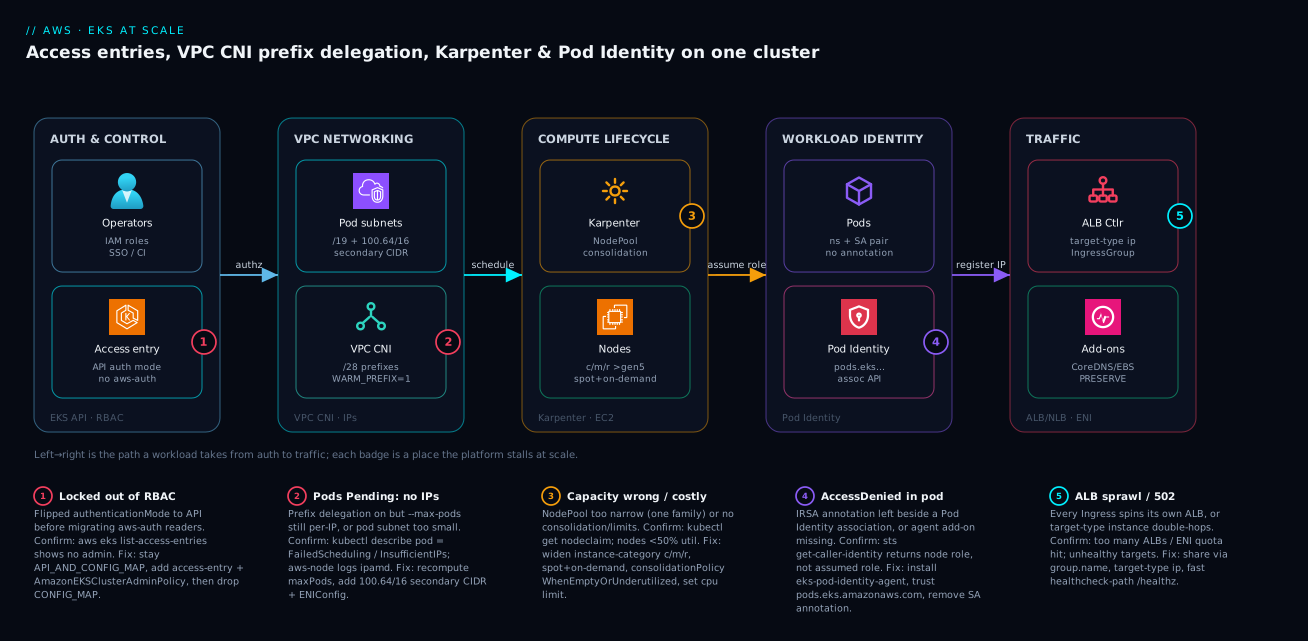
The diagram below traces a single workload from authentication to live traffic, left to right, across the five tiers a scaled EKS platform actually has. It starts in AUTH & CONTROL, where operators (IAM roles, SSO, CI) reach the cluster through access entries under authenticationMode: API — no aws-auth ConfigMap in the path. From there a scheduling request enters VPC NETWORKING: pods draw addresses from dedicated pod subnets (a /19 plus a 100.64.0.0/16 secondary CIDR for headroom), and the VPC CNI hands them out as /28 prefixes with WARM_PREFIX_TARGET=1 so scheduling never blocks on a slow ENI attach. The COMPUTE LIFECYCLE tier is Karpenter watching for unschedulable pods and launching right-sized EC2 nodes from a wide c/m/r, Spot-plus-on-demand pool, then consolidating them as load falls. In WORKLOAD IDENTITY, each pod assumes its IAM role through Pod Identity — bound by a (namespace, ServiceAccount) association, no annotation on the SA — and finally TRAFFIC flows through the ALB Controller registering pod IPs directly (target-type: ip, one shared ALB via IngressGroup), with the core add-ons (CoreDNS, EBS CSI) versioned through EKS using --resolve-conflicts PRESERVE.
The five numbered badges mark exactly where this path stalls at scale, and the legend narrates each as symptom · confirm · fix. Badge 1 sits on the access entry — flip authenticationMode to API before migrating everything that reads aws-auth and you lock yourself out. Badge 2 sits on the CNI — prefix delegation without a recomputed --max-pods (or a pod subnet that is too small) produces Pending pods with InsufficientIPs. Badge 3 marks Karpenter mis-provisioning: a NodePool constrained to one family, or with no consolidation and no limits, runs hot and costly. Badge 4 is on Pod Identity — an IRSA annotation left beside a Pod Identity association, or a missing agent add-on, surfaces as AccessDenied and a sts get-caller-identity that returns the node role. Badge 5 is on the ALB Controller — without group.name every Ingress spawns its own ALB until the ENI quota bites. Trace the arrows once and you have both the system and its failure map in one picture.
Real-world scenario
A fintech platform team — call them Ledgerline — ran 40+ services on a single EKS cluster and started seeing pods stuck Pending during morning traffic ramps, but only on their m6i.4xlarge nodes, never the smaller ones. The constraint wasn’t compute; CPU and memory sat at 50%. It was IP exhaustion masked by a subtle interaction: they had enabled ENABLE_PREFIX_DELEGATION=true on the VPC CNI but never recalculated --max-pods, which Karpenter was still deriving from the old per-IP ENI formula. So a node advertised capacity for ~110 pods, but the CNI could only attach enough /28 prefixes for ~58 before hitting the per-instance ENI limit. The kubelet kept scheduling; the CNI kept failing IP allocation, leaving pods wedged.
The on-call engineer’s first instinct was the wrong one — scale the cluster out — which did nothing, because every new m6i.4xlarge hit the same ceiling. The confirming evidence came from two places: kubectl describe pod on a wedged pod showed FailedCreatePodSandBox with the CNI’s InsufficientNumberOfIPs, and the aws-node (ipamd) logs on the node showed prefix attachment failing at the ENI limit. The advertised --max-pods (110) and the physically attachable prefixes (≈58 pods) simply disagreed.
The fix was to make Karpenter compute --max-pods consistently with prefix delegation by setting maxPods explicitly in the EC2NodeClass kubelet config, derived from AWS’s max-pods-calculator --cni-version 1.x --instance-type m6i.4xlarge --cni-prefix-delegation-enabled:
apiVersion: karpenter.k8s.aws/v1
kind: EC2NodeClass
metadata:
  name: default
spec:
  kubelet:
    maxPods: 110
After applying it, Karpenter drifted the old nodes out under PDBs and the Pending storm disappeared. Ledgerline also added a 100.64.0.0/16 secondary CIDR with custom networking so future growth wasn’t bounded by the original node subnets, and wired a CloudWatch alarm on the CNI’s awscni_total_ip_addresses vs awscni_assigned_ip_addresses gap so the next IP squeeze would page before pods wedged. The lesson: prefix delegation and --max-pods are one decision, not two — and Karpenter’s advertised capacity must agree with what the CNI can physically allocate, or the scheduler will happily overcommit IPs you don’t have.
Advantages and disadvantages
The modern EKS-at-scale stack (access entries + Pod Identity + Karpenter + tuned CNI) is the right default, but it is not free of trade-offs. The honest two-column view:
| Advantages | Disadvantages |
|---|---|
| Auth is auditable (CloudTrail) and typo-proof (API errors, not lockout) | One-way ratchet to API mode; migration discipline required |
| Pod Identity = one trust policy across all clusters, no SA annotations | Needs recent SDKs; cross-account still wants IRSA |
| Karpenter right-sizes and consolidates → real compute savings | Groupless model is unfamiliar; needs limits/PDB guardrails |
| Prefix delegation multiplies pod density, cuts EC2 API churn | --max-pods becomes a derived number you must maintain |
| Managed add-ons track control-plane compatibility | Quarterly upgrade cadence is non-negotiable work |
target-type: ip + IngressGroups → fewer LBs, lower latency |
Misconfigured ingress still sprawls ALBs/ENIs |
| Everything is IaC-expressible (Terraform/eksctl) | More CRDs and controllers to understand and operate |
| Spot-heavy pools cut cost dramatically for stateless tiers | Spot needs interruption handling + on-demand fallback design |
Where each matters: the auth and identity wins compound with cluster count — at one cluster IRSA is fine, at ten Pod Identity saves you ninety trust-policy edits. The Karpenter and CNI wins compound with node count and pod density — they are invisible on a three-node cluster and dominant at three hundred. The disadvantages are mostly operational discipline (cadence, guardrails, derived values) rather than hard limits, which is exactly why they bite teams that treat the platform as set-and-forget.
Hands-on lab
A free-tier-conscious walk-through. EKS itself has an hourly control-plane charge, so tear down at the end; keep the node count tiny. This builds a cluster with access entries and Pod Identity, enables prefix delegation, and proves the identity chain end to end.
1. Create a small cluster on the access-management API.
cat > cluster.yaml <<'EOF'
apiVersion: eksctl.io/v1alpha5
kind: ClusterConfig
metadata:
  name: lab-eks
  region: us-east-1
  version: "1.31"
accessConfig:
  authenticationMode: API_AND_CONFIG_MAP
  bootstrapClusterCreatorAdminPermissions: true
managedNodeGroups:
  - name: ng-small
    instanceType: t3.medium
    desiredCapacity: 2
addons:
  - name: vpc-cni
  - name: coredns
  - name: kube-proxy
  - name: eks-pod-identity-agent
EOF
eksctl create cluster -f cluster.yaml
Expected: EKS cluster "lab-eks" in "us-east-1" region is ready after ~15 minutes.
2. Grant a teammate read access via an access entry (no aws-auth edit).
aws eks create-access-entry --cluster-name lab-eks \
  --principal-arn arn:aws:iam::111122223333:role/dev-readers
aws eks associate-access-policy --cluster-name lab-eks \
  --principal-arn arn:aws:iam::111122223333:role/dev-readers \
  --policy-arn arn:aws:eks::aws:cluster-access-policy/AmazonEKSViewPolicy \
  --access-scope type=cluster
aws eks list-access-entries --cluster-name lab-eks   # both principals listed
3. Enable prefix delegation and confirm it.
kubectl set env daemonset aws-node -n kube-system ENABLE_PREFIX_DELEGATION=true WARM_PREFIX_TARGET=1
kubectl get daemonset aws-node -n kube-system -o yaml | grep -i ENABLE_PREFIX_DELEGATION
# → value: "true"
4. Create a role + Pod Identity association and prove the chain.
# (role trust policy = pods.eks.amazonaws.com; attach AmazonS3ReadOnlyAccess for the demo)
kubectl create namespace lab
kubectl create serviceaccount s3-reader -n lab
aws eks create-pod-identity-association --cluster-name lab-eks \
  --namespace lab --service-account s3-reader \
  --role-arn arn:aws:iam::111122223333:role/lab-s3-reader

kubectl run sts-check --rm -it --restart=Never \
  --image=public.ecr.aws/aws-cli/aws-cli \
  --overrides='{"spec":{"serviceAccountName":"s3-reader"}}' \
  -n lab -- sts get-caller-identity
Expected: the returned Arn is …assumed-role/lab-s3-reader/… — proof the credential chain works with no SA annotation.
5. (Optional) Install Karpenter via Helm with a Pod Identity association for its controller and an EC2_LINUX access entry for the node role, then apply the EC2NodeClass/NodePool from Step 4.
6. Teardown — do not skip (the control plane bills hourly).
kubectl delete namespace lab
aws eks delete-pod-identity-association --cluster-name lab-eks \
  --association-id <id-from-list>
eksctl delete cluster -f cluster.yaml   # removes nodes, VPC, control plane
Practice challenges
Work these in order — they climb from “read one value” to “design a fleet,” and each maps to one of the platform decisions, so finishing all six means you’ve touched auth, identity, networking, compute, and ingress. No cluster needed: every answer is a real, current command or manifest you can check against the tables above; the outputs shown are representative.
1. (Beginner) Confirm a cluster’s auth mode before you touch anything. You’ve inherited platform-prod and need to know whether it honours aws-auth, access entries, or both. What single command tells you, and what are you reading in the output?
<details> <summary>Solution</summary>
aws eks describe-cluster --name platform-prod \
  --query cluster.accessConfig
# → { "authenticationMode": "API_AND_CONFIG_MAP", ... }   (representative)
Read authenticationMode: CONFIG_MAP (legacy), API_AND_CONFIG_MAP (both — the migration window), or API (entries only). Why: it’s the first thing to check before any auth change — and the first thing to check during a lockout.
</details>
2. (Beginner) Grant a teammate read-only access without editing aws-auth. Give the IAM role arn:aws:iam::111122223333:role/dev-readers cluster-wide view access.
<details> <summary>Solution</summary>
aws eks create-access-entry --cluster-name platform-prod \
  --principal-arn arn:aws:iam::111122223333:role/dev-readers
aws eks associate-access-policy --cluster-name platform-prod \
  --principal-arn arn:aws:iam::111122223333:role/dev-readers \
  --policy-arn arn:aws:eks::aws:cluster-access-policy/AmazonEKSViewPolicy \
  --access-scope type=cluster
Why: two API calls — a mapping (the entry) and a grant (the policy association). A typo fails the API call instead of bricking RBAC, and both are recorded in CloudTrail. Scope to a namespace instead with --access-scope type=namespace,namespaces=team-a.
</details>
3. (Intermediate) Prove which IAM role a pod actually uses. A pod in namespace payments with ServiceAccount checkout-sa should assume role/checkout-app via Pod Identity. How do you verify the chain end to end from inside the pod, and what result means it’s broken?
<details> <summary>Solution</summary>
kubectl run id-check --rm -it --restart=Never \
  --image=public.ecr.aws/aws-cli/aws-cli \
  --overrides='{"spec":{"serviceAccountName":"checkout-sa"}}' \
  -n payments -- sts get-caller-identity
# Healthy:  "Arn": ".../assumed-role/checkout-app/..."
# Broken:   "Arn": ".../assumed-role/<node-instance-role>/..."
Why: sts get-caller-identity reports the effective identity. If it returns the node role, the eks-pod-identity-agent add-on is missing or a leftover IRSA annotation is taking a different path — not the association you created.
</details>
4. (Intermediate) Turn on prefix delegation the right way. You enable ENABLE_PREFIX_DELEGATION=true to fit more pods per node. What second thing must you do, and why does skipping it wedge pods?
<details> <summary>Solution</summary>
kubectl set env daemonset aws-node -n kube-system \
  ENABLE_PREFIX_DELEGATION=true WARM_PREFIX_TARGET=1
Then recompute --max-pods for the instance type (AWS’s max-pods-calculator --cni-prefix-delegation-enabled …) and pin it so the kubelet’s advertised cap matches what the CNI can attach:
apiVersion: karpenter.k8s.aws/v1
kind: EC2NodeClass
metadata:
  name: default
spec:
  kubelet:
    maxPods: 110   # derived, not the inherited default
Why: prefix delegation changes per-node IP capacity, so the old --max-pods is wrong. Advertise more pods than the CNI can hand IPs to and the scheduler overcommits — pods sit Pending with InsufficientNumberOfIPs while CPU idles.
</details>
5. (Advanced) Design a cost-optimized NodePool for a stateless tier. Author a Karpenter NodePool that bin-packs cheaply across a wide instance pool, prefers Spot but can fall back to on-demand, consolidates idle capacity, and can’t run away past 500 vCPU.
<details> <summary>Solution</summary>
apiVersion: karpenter.sh/v1
kind: NodePool
metadata:
  name: stateless-spot
spec:
  template:
    spec:
      nodeClassRef:
        group: karpenter.k8s.aws
        kind: EC2NodeClass
        name: default
      requirements:
        - key: kubernetes.io/arch
          operator: In
          values: ["amd64", "arm64"]
        - key: karpenter.sh/capacity-type
          operator: In
          values: ["spot", "on-demand"]
        - key: karpenter.k8s.aws/instance-category
          operator: In
          values: ["c", "m", "r"]
        - key: karpenter.k8s.aws/instance-generation
          operator: Gt
          values: ["5"]
  disruption:
    consolidationPolicy: WhenEmptyOrUnderutilized
    consolidationAfter: 1m
  limits:
    cpu: "500"
Why: the wide c/m/r + spot/on-demand pool lets Karpenter pick the cheapest fit and ride out Spot reclaims via on-demand fallback; WhenEmptyOrUnderutilized is where the savings come from; limits.cpu is the circuit breaker against a runaway controller. Keep stateful work on a separate on-demand pool and protect it with a PodDisruptionBudget.
</details>
6. (Advanced) Merge two services onto one shared ALB. Two teams each ship an Ingress (checkout in payments, catalog in storefront) and you’re burning one ALB — and ENIs — per Ingress. Put both behind a single internet-facing ALB with pod-direct targets.
<details> <summary>Solution</summary>
Give both Ingresses the same group.name; the ALB Controller merges them onto one load balancer:
# checkout (payments namespace)
metadata:
  annotations:
    alb.ingress.kubernetes.io/scheme: internet-facing
    alb.ingress.kubernetes.io/target-type: ip
    alb.ingress.kubernetes.io/group.name: shared-public
---
# catalog (storefront namespace) — identical group.name
metadata:
  annotations:
    alb.ingress.kubernetes.io/scheme: internet-facing
    alb.ingress.kubernetes.io/target-type: ip
    alb.ingress.kubernetes.io/group.name: shared-public
Why: group.name is the annotation that stops one-ALB-per-Ingress sprawl — the biggest silent driver of LB cost and ENI-quota exhaustion. target-type: ip registers pod IPs directly (one hop, Fargate-compatible). Confirm with aws elbv2 describe-load-balancers showing a single ALB for the group.
</details>
Common beginner mistakes
These are misconceptions, not symptoms — the wrong mental model that leads a beginner to the wrong move. (For a symptom→confirm→fix incident playbook, see the troubleshooting table below.)
- “Pods are
Pending, so I need more (or bigger) nodes.” When CPU and memory sit idle but pods won’t schedule, it’s almost never a compute shortage — it’s IP exhaustion, and every new node of the same type hits the same ENI/prefix ceiling. Right model: pod density is capped by IP capacity (--max-podsversus what the CNI can physically attach), so fix the IP math — prefix delegation plus a recomputed--max-pods, maybe a secondary CIDR — instead of scaling out. - “Pod Identity and IRSA both grant AWS access, so I’ll set both to be safe.” Two identity signals on one ServiceAccount don’t add up — they compete, Pod Identity wins, and the pod quietly assumes a role you didn’t expect. Right model: one identity mechanism per ServiceAccount; once the association exists, remove the IRSA
role-arnannotation. - “
authenticationMode: APIis more secure, so I’ll switch to it right away.” Flipping toAPIbefore every reader of theaws-authConfigMap is migrated locks those principals out — possibly including you. Right model:API_AND_CONFIG_MAPis the migration runway; move toAPIonly after every reader is migrated and verified, and always keep a break-glass admin entry. - “Karpenter saves money automatically once it’s installed.” Out of the box it just adds nodes like the old autoscaler; without a wide instance pool it can’t bin-pack cheaply, without consolidation it never reclaims idle capacity, and without
limitsa runaway workload provisions unbounded EC2. Right model: the savings come fromWhenEmptyOrUnderutilizedconsolidation plus a broadc/m/rSpot pool, withlimits.cpuas a circuit breaker. - “Each app should get its own load balancer — that’s cleaner.” One ALB per
Ingresssilently multiplies LB-hour charges and consumes ENIs until you hit the per-region quota. Right model: a load balancer is shared infrastructure; group Ingresses onto one ALB withgroup.nameand split only when you need a real isolation boundary. - “I’ll skip a couple of EKS versions and catch up in the next maintenance window.” Control-plane upgrades are one minor at a time and non-skippable, so “catching up” means a painful multi-hop jump across removed APIs — and extended-support surcharges while you drift. Right model: one minor per quarter, add-ons first, treated as routine maintenance rather than a project.
Common mistakes & troubleshooting
The dozen ways an EKS platform stalls at scale, as a playbook. Find your symptom, confirm with the exact command, apply the real fix — not the band-aid:
| # | Symptom | Root cause | Confirm (exact command / path) | Fix |
|---|---|---|---|---|
| 1 | Every admin gets Unauthorized after a change |
Flipped authenticationMode: API before migrating aws-auth readers |
aws eks describe-cluster --name … --query cluster.accessConfig; aws eks list-access-entries shows no admin |
Recreate access entry + AmazonEKSClusterAdminPolicy; use break-glass principal; stay API_AND_CONFIG_MAP until migrated |
| 2 | Pods stuck Pending, CPU/RAM idle |
Prefix delegation on, --max-pods still per-IP (or subnet too small) |
kubectl describe pod → FailedCreatePodSandBox / InsufficientNumberOfIPs; aws-node ipamd logs |
Recompute maxPods with max-pods-calculator; pin in EC2NodeClass; add 100.64/16 secondary CIDR |
| 3 | Pod gets AccessDenied calling AWS |
IRSA annotation left beside Pod Identity assoc, or agent add-on missing | sts get-caller-identity from pod returns node role, not assumed role; kubectl get ds eks-pod-identity-agent -n kube-system |
Install agent add-on; remove SA annotation; verify association |
| 4 | Nodes huge and half-empty / costly | NodePool too narrow or no consolidation/limits |
kubectl get nodeclaim; node utilization <50%; pool lists one family |
Widen instance-category (c/m/r), spot+on-demand; consolidationPolicy: WhenEmptyOrUnderutilized; set limits.cpu |
| 5 | Dozens of ALBs appear; ENI quota hit | Per-Ingress ALBs (no group.name) |
aws elbv2 describe-load-balancers count; ENI quota in Service Quotas |
Add alb.ingress.kubernetes.io/group.name to merge onto a shared ALB |
| 6 | Intermittent 502 from the ALB | target-type: instance double-hop or slow / health check |
ALB target health unhealthy; healthcheck path is / |
Use target-type: ip; point healthcheck-path at a fast /healthz |
| 7 | PVCs stuck Pending |
EBS CSI controller lacks IAM | kubectl describe pvc → could not create volume; CSI controller logs AccessDenied |
Pod Identity association on the EBS CSI controller SA |
| 8 | Cluster-wide name resolution fails | CoreDNS add-on incompatible / crashlooping after upgrade | kubectl get pods -n kube-system -l k8s-app=kube-dns; CoreDNS logs |
Update CoreDNS add-on to a version matching the minor; --resolve-conflicts PRESERVE |
| 9 | Spot nodes vanish, pods evicted hard | No interruption handling / no on-demand fallback | kubectl get events rebalance/interruption; NodePool Spot-only |
Keep Karpenter interruption handling on; add on-demand to capacity-type |
| 10 | Your replica/toleration tweaks revert after add-on update | Updated add-on with --resolve-conflicts OVERWRITE |
Compare add-on config before/after; settings reset to defaults | Re-apply with PRESERVE; use NONE in CI to surface drift |
| 11 | Control-plane upgrade rejected | Tried to skip a minor (e.g. 1.30 → 1.32) | aws eks update-cluster-version error; version gap |
Upgrade one minor at a time; add-ons first, then control plane |
| 12 | Karpenter provisions nothing for Pending pods |
Node role not an EC2_LINUX access entry, or discovery tags missing |
Karpenter controller logs; aws eks list-access-entries; subnet/SG karpenter.sh/discovery tags |
Add EC2_LINUX entry for node role; tag subnets/SGs for discovery |
A few of these deserve their own note:
- Flipping
authenticationModetoAPItoo early. Anything still readingaws-auth(some older controllers, bootstrap scripts) loses access. Migrate, verify, then dropCONFIG_MAP. - Leaving IRSA annotations alongside a Pod Identity association. Mixed signals on the same SA cause confusing credential precedence (Pod Identity wins). Pick one per workload.
- Skipping the
--max-podsrecalculation after prefix delegation. You either under-utilize big nodes or oversubscribe IPs and stall scheduling. - Per-Ingress ALBs. Without IngressGroups, dozens of load balancers appear silently and dominate the bill and the ENI quota.
- Karpenter with no
limitsand no PDBs. One is a cost safety net, the other prevents consolidation from evicting pods that can’t tolerate it.
Best practices
- Start
API_AND_CONFIG_MAP, endAPI. Provision on the access-management API, migrate everyaws-authreader, verify, then dropCONFIG_MAP. Codify access entries and policy associations in Terraform. - Keep a break-glass principal. An IAM role with a cluster-admin access entry, used by no automation, so a botched RBAC change never locks you out entirely.
- Default to Pod Identity for in-cluster workloads. One trust policy across clusters, no SA annotations. Keep IRSA only for cross-account chains and non-EKS consumers.
- Enable prefix delegation and treat
--max-podsas derived. Recompute it withmax-pods-calculatorand pin it in theEC2NodeClassso Karpenter and the CNI agree. - Plan IP space for peak pod count, not today’s. Use a secondary
100.64.0.0/16CIDR + custom networking before you run out of RFC1918 space. - Let Karpenter’s pool be wide; constrain only what the workload needs. Many families, Spot + on-demand, generation
>5. Addlimitsas a circuit breaker and PDBs on anything stateful. - Enable consolidation (
WhenEmptyOrUnderutilized). It is the single biggest compute-cost lever; protect pinned pods withdo-not-disrupt. - Manage core add-ons through EKS with
--resolve-conflicts PRESERVE. Neverkubectl applyloose manifests for CNI/CoreDNS/kube-proxy/CSI. - Use
target-type: ipand IngressGroups. One shared ALB per group, pod-direct targets, fast shallow health checks. - Upgrade one minor per quarter. Add-ons first, control plane second, data plane third — before extended-support charges hit.
- Wire IAM narrowly via Pod Identity for controllers. EBS CSI, ALB Controller, and Karpenter each get their own scoped role, not node-instance-profile permissions.
- Alert on leading indicators. CNI IP-pool headroom, Karpenter provisioning errors, ALB unhealthy targets, and node utilization — not just “pods Pending.”
Security notes
- Least-privilege workload identity. Each
(namespace, ServiceAccount)association binds a role scoped to exactly what that workload needs — never reuse one broad role across services, and never rely on the node instance profile for app permissions. - Lock the cluster endpoint. Prefer private endpoint access (or public-with-CIDR-allowlist) so the API server isn’t openly reachable; pair with access entries for who, security groups/CIDRs for from-where.
- Per-pod security groups for sensitive tiers. Use
SecurityGroupPolicy(ENABLE_POD_ENI=true) so a database’s ingress rule targets the checkout pod, not the whole node — a tighter blast radius than node-level SGs. - Scope controller IAM tightly. The ALB Controller, EBS CSI, and Karpenter roles are powerful (create LBs, attach volumes, launch EC2). Grant them via Pod Identity with the minimum policy and condition keys where possible.
- Encrypt everything at rest. Enable EKS secrets encryption with KMS (envelope encryption of Kubernetes secrets), and use KMS-encrypted EBS/EFS volumes via the CSI drivers. See KMS Encryption Deep Dive: Keys, Policies, Envelope & Rotation.
- Keep secrets out of manifests. Pull real secrets from Secrets Manager / Parameter Store at runtime via the workload’s Pod Identity role rather than baking them into ConfigMaps. See Secrets Manager & Parameter Store Deep Dive.
- Audit with CloudTrail + control-plane logging. Enable EKS control-plane logs (api, audit, authenticator) and treat access-entry changes as security-relevant events.
The security controls that also keep the platform resilient — they pull in the same direction:
| Control | Mechanism | Secures against | Also prevents |
|---|---|---|---|
| Access entries + scopes | EKS access-management API | Over-broad / stale RBAC | ConfigMap-edit lockout |
| Pod Identity per SA | Association + scoped role | Lateral movement via node role | AccessDenied from wrong creds |
| Per-pod security groups | SecurityGroupPolicy + branch ENI |
Node-wide DB exposure | Noisy-neighbour egress |
| Private endpoint + CIDR allowlist | Cluster endpoint config | Public API-server exposure | Accidental internet reachability |
| KMS secrets encryption | Envelope encryption | Plaintext etcd secrets | — |
| Control-plane audit logs | EKS logging → CloudWatch | Unaudited changes | Blind upgrades/incidents |
Cost & sizing
The bill drivers and how they interact with the fixes:
- Compute (EC2 nodes) dominates. Karpenter consolidation and a Spot-heavy pool for stateless tiers are the two biggest levers — measure node utilization before and after enabling
WhenEmptyOrUnderutilized. - The control plane is a flat hourly charge per cluster — small relative to compute, but real, which is why lab clusters must be torn down.
- Extended support adds a per-hour surcharge on out-of-window minors — the cheapest fix is to upgrade on cadence and never get there.
- Load balancers and NAT add up. Per-ALB and per-NLB hourly + LCU charges make IngressGroups a direct saving; NAT Gateway egress is per-GB, so consider VPC endpoints for AWS-service traffic.
- Observability ingestion is per-GB — Container Insights and control-plane logs are worth it, but sample/filter high-volume streams.
Enable Split Cost Allocation Data for EKS in the billing console to attribute shared node cost down to pods by namespace and label — this is what turns “the cluster costs X” into per-team chargeback. Tag EC2NodeClass-provisioned instances so Cost Explorer can group by team.
| Cost driver | What you pay for | Rough monthly (USD) | What reduces it | Watch-out |
|---|---|---|---|---|
| EKS control plane | Per-cluster hour | ~$73/cluster | Fewer clusters; multi-tenant | Flat — tear down labs |
| Worker nodes (on-demand) | EC2 instance-hours | Workload-dependent | Karpenter consolidation; right-size | Overprovisioned NodePool |
| Worker nodes (Spot) | Discounted EC2-hours | 60–90% off on-demand | Spot for stateless tiers | Needs interruption design |
| ALB / NLB | LB-hour + LCU | ~$16–25/LB + traffic | IngressGroups (share ALBs) | Per-Ingress sprawl |
| NAT Gateway | Hour + per-GB egress | ~$32 + data | VPC endpoints for AWS traffic | Chatty egress costs |
| Extended support | Surcharge on old minor | Per-cluster-hour add-on | Upgrade on cadence | Easy to drift into |
| EBS volumes (CSI) | GB-month + IOPS | Volume-dependent | Right-size; gp3 over gp2 | Orphaned PVs |
| Container Insights / logs | Per-GB ingestion | Volume-dependent | Sample/filter | Verbose audit logs |
The limits and quotas that wall you in — what they bound, the kind of number to plan against, and how to push it:
| Limit / quota | What it bounds | Typical value / behaviour | How to raise / mitigate |
|---|---|---|---|
| Per-instance ENIs × IPs | Pods per node (no PD) | Instance-type-specific (low for small types) | Enable prefix delegation |
/28 prefixes per ENI |
Pods per node (with PD) | 16 IPs per prefix × ENI slots | Bigger instance / more ENIs |
--max-pods ceiling |
Scheduler’s advertised cap | Default 110 unless derived | Recompute; pin in EC2NodeClass |
| VPC CIDR / subnet size | Total routable pod IPs | Your CIDR plan (e.g. /19 per AZ) |
Secondary 100.64/16 + custom networking |
| ENIs per region (quota) | ALBs/NLBs + SG-per-pod budget | Soft quota, account-scoped | Service Quotas increase; IngressGroups |
| EBS volumes attached / instance | PVs per node | Instance + driver dependent | Right-size; consolidate volumes |
Karpenter limits.cpu |
Max provisioned vCPU (your cap) | You set it (e.g. 1000) |
Raise deliberately as a circuit breaker |
| Nodes per cluster (practical) | Data-plane scale | Thousands (watch controller throughput) | Multiple NodePools; shard clusters |
| Control-plane minor skipping | Upgrade path | One minor at a time, non-skippable | Upgrade on quarterly cadence |
IP space is the usual wall — even with prefix delegation, plan VPC CIDRs (and secondary CIDRs / custom networking) for peak pod count. Watch per-node --max-pods, per-ENI prefix limits, ENIs per region (ALB/NLB and SG-per-pod consume them), EBS volume and ELB service quotas, and Karpenter’s own controller throughput when scaling thousands of nodes. Service quotas bite at the data-plane edges before the control plane does.
Interview & exam questions
1. Why are access entries preferred over the aws-auth ConfigMap? The ConfigMap is an unvalidated YAML blob where one bad edit locks every admin out with no API error. Access entries are first-class AWS resources (aws_eks_access_entry + policy association) that are typo-proof (bad input fails the API call), auditable in CloudTrail, and expressible in Terraform. You migrate via API_AND_CONFIG_MAP, then flip to API.
2. What does EKS Pod Identity change versus IRSA? IRSA needs a per-cluster IAM OIDC provider and bakes that provider’s URL plus the SA sub into every role’s trust policy. Pod Identity uses a node agent and a (namespace, ServiceAccount) association, so the trust policy is a static pods.eks.amazonaws.com that works on every cluster and the ServiceAccount needs no annotation. Keep IRSA for cross-account chains.
3. A pod gets AccessDenied calling S3 despite a Pod Identity association. What do you check? Run aws sts get-caller-identity from inside the pod — if it returns the node role instead of the associated role, either the eks-pod-identity-agent add-on is missing or there’s a leftover IRSA annotation taking a different path. Install the agent, remove any SA annotation, and confirm the association exists.
4. What is prefix delegation and why must you recompute --max-pods? Prefix delegation assigns each ENI a /28 (16 IPs) instead of single IPs, multiplying pod density and cutting EC2 API calls. Because the per-node IP capacity changes, the old per-IP --max-pods formula is wrong — advertise too many and the scheduler overcommits IPs the CNI can’t allocate, wedging pods in Pending. Recompute with max-pods-calculator and pin it in the EC2NodeClass.
5. How does Karpenter differ from Cluster Autoscaler? Cluster Autoscaler scales predefined node groups and can only add shapes you declared, bin-packing poorly. Karpenter is groupless: it provisions right-sized nodes directly against EC2 from a broad instance pool and consolidates by replacing/removing underutilized nodes. It’s driven by two CRDs — EC2NodeClass (AWS template) and NodePool (scheduling policy).
6. Why keep the Karpenter NodePool wide, and what guardrails are mandatory? A wide pool (many families, Spot + on-demand, generation >5) lets Karpenter bin-pack cheaply and ride out Spot interruptions via on-demand fallback. Mandatory guardrails: limits (e.g. cpu) as a circuit breaker against runaway provisioning, and PodDisruptionBudgets plus do-not-disrupt so consolidation doesn’t evict pods that can’t move.
7. What does --resolve-conflicts PRESERVE do on an add-on update? It keeps your field-level customizations (replica counts, tolerations) instead of overwriting them with add-on defaults. OVERWRITE resets to defaults deliberately; NONE fails the update on any conflict (useful as a CI gate to surface drift). Use PRESERVE for routine production updates.
8. Describe the EKS upgrade order and why it’s fixed. Add-ons first (to versions compatible with the target minor), then the control plane (one minor at a time, non-skippable), then the data plane (Karpenter drift / managed-node-group roll under PDBs). Nodes must stay within one minor of the control plane. Upgrading out of order risks incompatible components or rejected control-plane updates.
9. Why does one Ingress per ALB become a problem, and what fixes it? Each Ingress without a shared group spins up its own ALB, multiplying LB-hour charges and consuming ENIs until you hit the per-region quota. The fix is alb.ingress.kubernetes.io/group.name to merge multiple Ingress resources onto one shared ALB.
10. What’s the difference between target-type: ip and instance for the ALB Controller? instance registers a NodePort, so traffic hops LB → node → kube-proxy → pod. ip registers pod IPs directly (one hop, lower latency, Fargate-compatible), which is the EKS default given the VPC CNI assigns routable pod IPs. Health checks then probe the pod directly.
11. How would you give the EBS CSI driver permission to create volumes, and why that way? Create a Pod Identity association binding a narrowly-scoped IAM role to the EBS CSI controller’s ServiceAccount, rather than granting volume permissions on the node instance profile. This keeps the blast radius to the controller, not every pod on the node.
12. A control-plane upgrade from 1.30 to 1.32 is rejected. Why? EKS control-plane upgrades are one minor at a time and non-skippable — you must go 1.30 → 1.31 → 1.32, upgrading compatible add-ons before each step. The version gap is the rejection cause.
These map primarily to the AWS Certified DevOps Engineer – Professional (DOP-C02) and Solutions Architect – Professional (SAP-C02) for the platform/operations depth, with the IAM/identity and networking angles touching Security – Specialty (SCS) and Advanced Networking – Specialty (ANS). A compact cert mapping:
| Question theme | Primary cert | Objective area |
|---|---|---|
| Access entries, RBAC, upgrade cadence | DOP-C02 | SDLC automation; resilient operations |
| Pod Identity vs IRSA, controller IAM | SCS / SAP-C02 | Identity & access management |
| VPC CNI, prefix delegation, secondary CIDR | ANS-C01 | Network design at scale |
| Karpenter, consolidation, Spot | DOP-C02 / SAP-C02 | Cost-optimized, resilient compute |
| ALB Controller, target-type, IngressGroups | ANS-C01 | Connectivity & load balancing |
Quick check
- You flipped
authenticationModetoAPIand now every admin getsUnauthorized. What happened, and what’s the recovery? - A pod with a Pod Identity association still gets
AccessDenied. What’s the one command you run inside the pod to diagnose it, and what result points to the cause? - True or false: scaling the cluster out with more
m6i.4xlargenodes fixes pods stuckPendingwithInsufficientIPsafter enabling prefix delegation. - Dozens of ALBs appeared and you’re nearing the ENI quota. What single annotation prevents this?
- In what order do you upgrade EKS components, and what’s the one rule about control-plane minors?
Answers
- You flipped to
APIbefore everything reading theaws-authConfigMap was migrated, so those principals lost access. Recovery: use a break-glass principal (or recreate an access entry +AmazonEKSClusterAdminPolicyfor an admin role), and stay onAPI_AND_CONFIG_MAPuntil the migration is verified. - Run
aws sts get-caller-identityfrom inside the pod. If it returns the node instance-profile role instead of the associated role, theeks-pod-identity-agentadd-on is missing or a leftover IRSA annotation is taking precedence — install the agent and remove the SA annotation. - False. Every new
m6i.4xlargehits the same per-instance ENI/prefix ceiling. The fix is to recompute--max-podswith prefix delegation and pin it in theEC2NodeClass(and add a secondary CIDR for headroom), not to scale out. alb.ingress.kubernetes.io/group.name— it merges multipleIngressresources onto one shared ALB instead of one ALB per Ingress.- Add-ons first, then the control plane, then the data plane. The rule: control-plane upgrades are one minor at a time and non-skippable (no 1.30 → 1.32 jump).
Glossary
- Access entry — a first-class EKS resource mapping an IAM principal to the cluster; replaces a row in the
aws-authConfigMap. - Access policy association — grants an access entry AWS-managed or custom RBAC, cluster- or namespace-scoped.
authenticationMode— cluster setting choosingCONFIG_MAP,API_AND_CONFIG_MAP, orAPI; a one-way ratchet towardAPI.aws-authConfigMap — the legacy, unvalidated YAML mapping of IAM principals to RBAC; one bad edit bricks cluster access.- IRSA (IAM Roles for Service Accounts) — workload identity via a per-cluster OIDC provider and per-SA role trust; still used for cross-account chains.
- EKS Pod Identity — workload identity via a node agent and a
(namespace, ServiceAccount)association; static trust policy, no SA annotation. eks-pod-identity-agent— the add-on (a DaemonSet) that vends IAM credentials to pods for Pod Identity.- VPC CNI (
aws-node) — the DaemonSet that attaches ENIs and assigns routable VPC IPs to pods. - Prefix delegation — CNI mode assigning each ENI a
/28(16 IPs) instead of single IPs; multiplies density, cuts EC2 API calls. --max-pods— the pod cap advertised per node; a derived number under prefix delegation that must match the CNI’s real IP capacity.- Custom networking /
ENIConfig— places pods on a different (often larger, secondary-CIDR) subnet than the node’s primary ENI. - Security groups for pods — attaching EC2 security groups to pods via
SecurityGroupPolicy(ENABLE_POD_ENI=true), Nitro-only. - Karpenter — a groupless autoscaler that provisions right-sized EC2 nodes from a broad pool and consolidates underutilized ones.
EC2NodeClass/NodePool— Karpenter CRDs: the AWS template (AMI, subnets, SGs, role) and the scheduling policy/constraints.- Consolidation — Karpenter replacing/removing underutilized nodes (
WhenEmptyOrUnderutilized) to cut compute cost. - Managed add-on — an EKS-versioned core component (CNI, CoreDNS, kube-proxy, EBS CSI) that tracks control-plane compatibility.
--resolve-conflicts— add-on-update flag:PRESERVE(keep your changes),OVERWRITE(reset to defaults),NONE(fail on conflict).- AWS Load Balancer Controller — reconciles
Ingress→ALB andService type: LoadBalancer→NLB; supportstarget-type: ipand IngressGroups. - IngressGroup —
group.nameannotation merging multiple Ingress resources onto one shared ALB. - Extended support — the post-standard-support window for an EKS minor, billed at a per-hour surcharge.
- ENI (Elastic Network Interface) — a virtual network card attached to an EC2 instance; each ENI carries a limited number of IPs, which is what caps how many pods a node can hold.
- OIDC provider — the per-cluster identity endpoint IRSA registers so a pod’s projected token can be exchanged for AWS credentials; Pod Identity removes the need to run one.
- ServiceAccount (SA) — the in-cluster identity a pod runs as; the
(namespace, ServiceAccount)pair is what a Pod Identity association binds an IAM role to. - DaemonSet — a workload that runs exactly one pod on every node; the VPC CNI (
aws-node) and theeks-pod-identity-agentare both DaemonSets. - Spot instance — spare EC2 capacity at a steep discount (often 60–90% off) that AWS can reclaim with about two minutes’ notice; ideal for stateless, interruption-tolerant tiers.
- PodDisruptionBudget (PDB) — a policy capping how many pods of a workload may be voluntarily evicted at once, so consolidation and upgrades never take a service below its minimum available.
- NodeClaim — the Karpenter object representing a single node it has requested from EC2;
kubectl get nodeclaimshows in-flight and active Karpenter nodes. - Fargate — serverless compute for pods where AWS provisions and runs the underlying node for you; works with
target-type: ipbut notinstance.
Next steps
You can now make the four decisions that turn a cluster into a platform. Build outward:
- Upstream: AWS Compute: EC2 vs Lambda vs ECS vs EKS and ECS vs EKS vs Fargate: Choosing Your Container Path — confirm EKS is the right model before scaling it.
- Networking foundation: AWS VPC Deep Dive: Subnets, Routing, IGW, NAT & Endpoints and Security Groups & NACLs Deep Dive — the IP and SG plan the CNI depends on.
- Identity: IAM Least Privilege & Permission Boundaries — scope the Pod Identity and controller roles tightly.
- Ingress: Elastic Load Balancing: ALB, NLB & GWLB Deep Dive — the load balancers the ALB Controller provisions.
- GitOps & autoscaling on top: Argo CD App-of-Apps & Multi-Cluster GitOps and GitHub Actions ARC Runners with Karpenter Autoscaling — deploy onto and scale CI on the platform you just built.