In a nutshell
If you are new to EKS, start here. An EKS cluster has two halves: a control plane — the Kubernetes “brain” (the API server and its database) that AWS runs and patches for you, and which you never log into — and worker nodes, the ordinary EC2 virtual machines where your app’s containers actually run. “Upgrading the cluster” means moving both halves to a newer Kubernetes version (the 1.x number, e.g. 1.31 → 1.32).
The one rule that makes everything else fall into place: upgrade the brain first, then the workers — never the other way round. It is like updating a phone: you update the operating system before the apps, not after. And like a phone OS, the control plane only steps up one version at a time and — the part that scares people — cannot be rolled back. Once you are on 1.32 there is no going back to 1.31; your only “undo” is to keep moving forward. That single fact is why every serious upgrade checks first and moves in small steps.
Three things trip up almost everyone. Version skew: the pieces are only allowed to be so many versions apart (nodes may trail the control plane by up to three minors, and one helper, kube-proxy, must never be newer than the brain). Add-on compatibility: EKS ships built-in plugins for pod networking (VPC CNI), in-cluster DNS (CoreDNS), and service routing (kube-proxy), and each must be on a build that matches the new version. Removed APIs: every new Kubernetes version quietly deletes some old configuration formats, and any app still using one simply stops working — with no error at upgrade time. So the real skill of an EKS upgrade is not the one command; it is scanning for those landmines beforehand, moving layer by layer in the right order, and — across many clusters — never letting one drift so far behind that it costs 6× more or gets force-upgraded by AWS.
Everything below is the full runbook for doing exactly that, safely, across a whole fleet. Read this box, then keep the tables open during a real change window.
Level: Advanced (beginner on-ramp included) · Time: ~60 min read + ~1 hr optional hands-on lab
A single aws eks update-cluster-version call looks trivial. The risk is never the control-plane API call itself — AWS performs that in a managed, rolling fashion behind the scenes. The risk is everything around it: an admission webhook that stops answering mid-upgrade, a CSI driver that skews past the API server, a DaemonSet that won’t drain because nobody set a PodDisruptionBudget, a policy/v1beta1 object that the target version removed out from under a running controller, and the slow bleed of clusters parked on a version that slid into extended support at six times the hourly rate. One cluster, those are footguns. Across a forty-cluster fleet they multiply by cluster count and become a budget line and an on-call rotation. This is the runbook I use to move a fleet forward one minor version at a time without paging anyone.
An EKS upgrade is four upgrades that must happen in a fixed order: the control plane, the managed add-ons (VPC CNI, CoreDNS, kube-proxy, EBS CSI), the node groups (the kubelet), and then kube-proxy trailing last. Get the order wrong — bump nodes before the control plane, or let kube-proxy get newer than the API server — and you manufacture skew violations that the platform will not let you create but a hand-rolled script happily will. Layer on top of that the one-way door at the centre of the whole thing: the EKS control plane cannot be downgraded. Once you are on 1.32 you stay on 1.32. Your only “rollback” is forward. That single fact is why every gate in this runbook — the deprecated-API scan, the add-on compatibility check, the canary ring, the soak window — is non-negotiable rather than nice-to-have.
By the end you will treat a fleet upgrade as a quiet series of reviewed pull requests, not a heroic weekend. You will know exactly where every cluster sits in its support window, which clusters are bleeding money in extended support, how to hunt down a removed API before it breaks a workload, how to read the add-on compatibility matrix instead of guessing, how to roll node groups and Karpenter-managed capacity without an availability dip, and how to promote a version through rings so a regression stops at one non-prod cluster instead of taking the fleet. Assume EKS 1.31+ as a baseline and kubectl, eksctl, and AWS CLI v2 on the operator workstation throughout. Because this is a reference you will keep open mid-wave, the lifecycle windows, the skew rules, the add-on matrix, the drain failure modes and the ring gates are all laid out as scannable tables — read the prose once, then keep the tables open during the change window.
To frame the whole field before the deep dive, here are the four ordered phases of an EKS upgrade, what each one moves, the hard rule that governs it, and the single thing most likely to bite:
| Phase | What moves | Hard rule | Most common failure |
|---|---|---|---|
| 0 — Readiness | Nothing (scan only) | Every removed/deprecated API remediated first | A policy/v1beta1 PDB removed in the target version |
| 1 — Control plane | API server + etcd (managed) | One minor at a time; needs free subnet IPs | Subnet IP exhaustion refuses the upgrade |
| 2 — Add-ons | VPC CNI, CoreDNS, kube-proxy, EBS CSI | kube-proxy never newer than the control plane |
OVERWRITE clobbers a tuned CNI/Corefile |
| 3 — Node groups | kubelet (data plane) | Kubelet within 3 minors of the control plane | Unsatisfiable PDB stalls the drain forever |
| 3b — kube-proxy last | kube-proxy to match nodes | ≤ control plane, ≤3 minors behind | Skew left in place; DNS/networking flakes |
What problem this solves
EKS hides the control plane so completely that the upgrade looks like a one-line version bump — and that is exactly the trap. The managed control-plane roll is the easy, safe part; AWS does it for you with no downtime. The hard part is the blast radius in your cluster: the workloads, controllers, webhooks, CSI drivers and DaemonSets that were written against an API surface that the new Kubernetes minor quietly changed or removed. The update-cluster-version call succeeds, the console says Successful, and three hours later a Helm-managed controller that still calls autoscaling/v2beta2 stops reconciling, or a node drain hangs forever on a single-replica Deployment behind a minAvailable: 1 PDB, and now you are debugging a “successful” upgrade.
What breaks without a disciplined runbook: a removed API silently kills a workload (the number-one cause of a broken upgrade); a drain stalls and a node group roll wedges half-cordoned; an add-on update with --resolve-conflicts OVERWRITE reverts a hand-tuned VPC CNI prefix-delegation config and the cluster runs out of pod IPs; kube-proxy drifts newer than the control plane and networking goes flaky; and — the quiet, expensive one — clusters slide from standard support into extended support and the per-cluster control-plane charge jumps from ~$72 to ~$432 a month while nobody notices, until finance does.
Who hits this: every team running EKS past day one. It bites hardest on fleets (the per-cluster math compounds), on clusters with stateful or single-replica workloads (the PDB traps), on teams that hand-tuned add-ons (the OVERWRITE reversion), and on anyone who let cadence slip during a hiring freeze (the extended-support surprise plus the forced AWS auto-upgrade when a version finally ages out). The fix is almost never heroics — it is sequencing and gating: scan before you move, advance the control plane one minor at a time, reconcile add-ons against the compatibility matrix, drain behind PDBs, and promote through rings on a GitOps diff.
A quick map of the moving parts, who owns each, and the failure class it can cause, so you call the right person fast during a wave:
| Layer | What lives here | Who usually owns it | Failure class it can cause |
|---|---|---|---|
| Control plane (managed) | API server, etcd, scheduler | AWS (platform) | Upgrade refused on subnet IP exhaustion |
| Managed add-ons | CNI, CoreDNS, kube-proxy, CSI | Platform team | Skew violation; tuned config reverted |
| Node groups / kubelet | The data plane VMs | Platform / infra | Drain stalls; surge too aggressive |
| Workload manifests | Deployments, PDBs, HPAs | App teams | Removed-API breakage; unsatisfiable PDB |
| Admission webhooks | Validating/mutating controllers | Platform / security | Webhook unavailable blocks all writes |
| GitOps / IaC | Cluster + add-on versions | Platform team | Drift; unreviewed imperative changes |
| Billing / support tier | Standard vs extended support | FinOps + platform | 6× control-plane cost; forced auto-upgrade |
Learning objectives
By the end of this article you can:
- Read the EKS version lifecycle — standard vs extended support windows, the cost delta, and the forced auto-upgrade — and set a cadence that keeps every cluster perpetually in standard support.
- Inventory a fleet’s versions and support status in one pass, and rank clusters by upgrade urgency and cost exposure.
- Hunt down removed and deprecated APIs before touching the control plane using
kube-no-trouble,pluto, and server-side EKS upgrade insights as a hard gate. - Upgrade the control plane respecting the one-minor-at-a-time rule and the kubelet skew window (control plane up to three minors ahead of nodes on EKS 1.28+).
- Reconcile the four gating managed add-ons against the per-version compatibility matrix and choose the right
--resolve-conflictsmode for each. - Roll node groups safely across managed node groups (surge), Karpenter (drift + disruption budgets), and Bottlerocket (BRUPOP) — and drain behind satisfiable PodDisruptionBudgets.
- Orchestrate a fleet with GitOps and staged ring rollouts, gating each ring on the previous one’s soak, so a regression stops at one cluster.
- State the rollback boundary plainly (the control plane is one-way) and recover forward by rolling nodes back within the skew window while you fix the workload.
Prerequisites & where this fits
You should already be comfortable operating an EKS cluster: kubectl against a context, reading aws eks describe-cluster output, and the basic objects — Deployments, DaemonSets, Services. You should know what a minor version is (the 1.x in 1.32), that Kubernetes deprecates and then removes beta APIs on minor bumps, and that EKS exposes a managed control plane you never SSH into. Familiarity with Helm (charts render manifests that may carry old apiVersions), with PodDisruptionBudgets, and with at least one of managed node groups or Karpenter will let you apply every section directly. AWS CLI v2, eksctl, kubent, and pluto on your workstation are assumed throughout.
This sits in the day-two / fleet-operations track. It assumes the managed-Kubernetes fundamentals from Understanding Managed Kubernetes: AKS vs EKS vs GKE Compared and the broader day-two checklist in Kubernetes Production Readiness: Day-2 Operations Checklist. It pairs tightly with EKS at Scale: Pod Identity, Karpenter, and Networking and Deploy Karpenter on EKS: Consolidation, Spot, and Disruption Budgets, because how your nodes are provisioned dictates the upgrade strategy. When a drain stalls or DNS breaks post-upgrade, lean on Kubernetes Troubleshooting Methodology: Pods, Nodes, Networking, Storage, RBAC. The Azure-shop equivalent of this exact runbook is AKS Day-Two: Upgrades and Fleet Operations — the sequencing rules rhyme.
Where each tool fits in the upgrade pipeline, so you reach for the right one at the right phase:
| Tool | Phase it serves | What it does | When you run it |
|---|---|---|---|
aws eks describe-cluster-versions |
Plan | Lists versions + support status | Before planning the wave |
kube-no-trouble (kubent) |
Readiness | Scans live cluster + Helm for removed APIs | Pre-upgrade gate, per cluster |
pluto |
Readiness | Scans live clusters and static charts in CI | Pre-upgrade + every CI render |
| EKS upgrade insights | Readiness | Server-side deprecated-API detection | Hard gate; treat non-PASSING as blocker |
aws eks update-cluster-version |
Control plane | Rolls the API server one minor up | Phase 1 |
aws eks describe-addon-versions |
Add-ons | Returns compatible builds for a target | Before each add-on update |
aws eks update-addon |
Add-ons | Updates an add-on with a conflict mode | Phase 2 |
aws eks update-nodegroup-version |
Nodes | Rolling, surge-based managed-node roll | Phase 3 |
| Karpenter drift + budgets | Nodes | Replaces drifted nodes within a budget | Phase 3 (Karpenter fleets) |
| Argo CD / Flux + Terraform | Orchestration | Version as a reviewed declarative diff | All phases, fleet-wide |
Core concepts
Five mental models make every later decision obvious.
An upgrade is four ordered upgrades, not one. The control plane, the add-ons, the kubelet, and kube-proxy move in sequence, each constrained by version-skew rules. The control plane leads; the data plane is allowed to lag (within the skew window); kube-proxy trails. You never bump nodes ahead of the control plane, and you never let kube-proxy get newer than the API server. The platform enforces some of this; a hand-rolled script enforces none of it.
The control plane is a one-way door. EKS upgrades the control plane one minor at a time and cannot downgrade it. To cross two minors you issue two sequential update-cluster-version calls. Once a control-plane upgrade completes there is no aws eks downgrade-cluster-version — it does not exist. “Rollback” means rolling nodes back to the prior AMI (still legal within the skew window) and reverting add-on versions while you fix the workload. This is why readiness scanning and a canary ring are mandatory, not optional.
Kubernetes removes APIs, and removal is silent until something calls it. On a minor bump, superseded beta APIs are removed: policy/v1beta1 PodDisruptionBudget → policy/v1, autoscaling/v2beta2 HPA → autoscaling/v2, old Ingress and CRD groups, and so on. Any manifest, Helm chart, or controller still calling the removed group/version simply stops working after the upgrade — no warning at upgrade time, just a workload that quietly fails to reconcile. You catch this before the control plane moves with kubent, pluto, and server-side insights, or you debug it in production.
Kubelet skew is the lever that lets you stage. On EKS 1.28 and newer, managed and Fargate nodes tolerate the control plane being up to three minor versions ahead of the kubelet. So you can advance the control plane 1.29 → 1.30 → 1.31 while nodes stay on 1.29, then catch nodes up afterward. Skew tolerance applies only to the data plane lagging — it never lets you skip control-plane versions, and kube-proxy must never be newer than the control plane and no more than three minors behind it.
Draining is where availability is won or lost, and the control is the PDB. A node upgrade cordons and drains nodes; the PodDisruptionBudget is what stops a drain from taking all replicas of a workload down at once. A PDB that can never be satisfied (minAvailable: 1 on a single-replica Deployment) blocks the drain forever and wedges the roll. Every critical workload needs a satisfiable PDB; every single-replica workload needs auditing before you roll.
The vocabulary in one table
Before the deep sections, pin down every moving part. The glossary repeats these for lookup; this table is the mental model side by side:
| Concept | One-line definition | Where it lives | Why it matters to upgrades |
|---|---|---|---|
| Minor version | The 1.x in 1.32 |
Cluster + nodes | You upgrade one minor at a time |
| Standard support | ~14-month full-support window | Per cluster version | Plan cadence to stay inside it |
| Extended support | +12 months at 6× control-plane cost | Per cluster version | Idle months become a budget line |
| Control plane | Managed API server + etcd | AWS-managed | One-way: cannot be downgraded |
| Kubelet skew | Allowed control-plane-ahead-of-node gap | Data plane | Up to 3 minors lets you stage |
| Removed API | A beta group/version deleted on a bump | Manifests/charts/controllers | Silent breakage; scan first |
| Managed add-on | EKS-versioned CNI/CoreDNS/kube-proxy/CSI | Cluster add-on API | Gated by a compatibility matrix |
--resolve-conflicts |
How add-on update treats your edits | Add-on update call | OVERWRITE clobbers tuned config |
| PodDisruptionBudget | Cap on simultaneous evictions | policy/v1 object |
Unsatisfiable PDB stalls the drain |
| Surge / maxUnavailable | How many nodes roll at once | Managed node group config | Too high evicts hard; too low crawls |
| Karpenter drift | Node replacement on AMI change | NodePool/EC2NodeClass | Upgrade mechanism for Karpenter |
| Upgrade insights | Server-side readiness checks | EKS control plane | Hard gate; non-PASSING blocks |
| Ring rollout | Staged promotion across the fleet | Your orchestration | A regression stops at one ring |
Common beginner mistakes
These are misconceptions, not symptoms — the wrong mental model that walks a beginner straight into the traps the troubleshooting table further down has to catch. Fix the model and the symptom never happens.
- “The upgrade is just
update-cluster-version— one command and I’m done.” That call only rolls the control plane, the easy, AWS-managed 10%. The real work is the other three phases (add-ons, nodes,kube-proxy) and the readiness scan before any of it. Right model: one upgrade is four ordered upgrades. - “The console said
Successful, so my workloads are fine.”Successfulmeans the control-plane roll finished — nothing about whether your apps survived it. A removed API breaks a workload silently, hours later, with no upgrade-time error. Right model: scan for removed APIs before, and verify every layer after. - “If it breaks, I’ll just roll back.” There is no
downgrade-cluster-version; the control plane is a one-way door. Recovery is forward — roll nodes back within the skew window and fix the workload, then re-advance. Right model: you cannot undo, so you gate with a canary. - “I’ll jump straight from 1.30 to 1.32 to catch up.” EKS refuses skipped minors. Crossing two versions is two sequential
update-cluster-versioncalls, each finishing first. Right model: one minor at a time, always. - “I’ll upgrade the nodes first — they’re what runs my apps.” Nodes must never be ahead of the control plane, and
kube-proxygoes last. Leading with nodes manufactures a skew violation. Right model: control plane leads; the data plane lags within the skew window. - “
OVERWRITEsounds like the clean, authoritative choice for add-ons.”OVERWRITEsilently resets any field you tuned — prefix delegation on the VPC CNI, a custom CoreDNS Corefile — back to EKS defaults, which can strand pods without IPs or break DNS cluster-wide. Right model:PRESERVEfor anything hand-tuned;OVERWRITEonly when EKS truly owns the config. - “
minAvailable: 1is the safe, conservative PDB.” On a single-replica workload it is unsatisfiable — eviction would drop below the floor — so the node drain waits forever and wedges the roll. Right model: a PDB must be satisfiable; scale single-replica critical apps to ≥2 first.
1. Understand the version lifecycle before you plan anything
EKS supports each Kubernetes minor version for a fixed window, and the window — not feature envy — is what drives your cadence.
- Standard support lasts roughly 14 months from when the version becomes available in EKS. Control-plane cost is $0.10 per cluster per hour (~$72/month).
- Extended support then runs a further 12 months. The control-plane price jumps to $0.60 per cluster per hour (~$432/month) — a 6× increase. Worker-node and data-transfer costs are unchanged; only the per-cluster control-plane charge moves.
- A version that exits extended support is auto-upgraded by AWS to the next minor on a schedule you do not control. You do not want that to be your upgrade strategy.
The practical takeaway: standard support gives you runway to land roughly one minor upgrade per quarter and stay perpetually within it. The moment a cluster crosses into extended support, every idle month is real money — and across a fleet that delta becomes a budget line, not a rounding error.
The lifecycle phases, what each costs, and what you should be doing in each:
| Phase | Duration (approx) | Control-plane cost | AWS behaviour | Your action |
|---|---|---|---|---|
| Standard support | ~14 months | $0.10/hr (~$72/mo) | Full support, patches | Upgrade ~1 minor/quarter; stay inside |
| Extended support | +12 months | $0.60/hr (~$432/mo) | Security backports only | Treat as a deadline; budget the 6× |
| End of extended | — | (forced bump) | Auto-upgrades to next minor | Never reach here on purpose |
| Standard window of next minor | resets ~14 months | $0.10/hr | New runway | Land here before the old one expires |
The cost delta made concrete across a fleet — this is the table finance actually reacts to:
| Clusters in extended support | Monthly delta vs standard | Annualised delta | Equivalent |
|---|---|---|---|
| 1 | ~$360 | ~$4,320 | A small managed service |
| 6 | ~$2,160 | ~$25,920 | A junior engineer’s tooling budget |
| 12 | ~$4,320 | ~$51,840 | A meaningful line in the cloud bill |
| 23 | ~$8,280 | ~$99,360 | An “explain this” finance escalation |
Check exactly where every cluster sits before you plan the wave:
# What versions exist, and which are in extended support?
aws eks describe-cluster-versions \
  --query 'clusterVersions[].{Version:clusterVersion,Status:status,Support:versionStatus,EndStd:endOfStandardSupportDate}' \
  --output table

# Inventory the fleet's current versions in one pass
for c in $(aws eks list-clusters --query 'clusters[]' --output text); do
  v=$(aws eks describe-cluster --name "$c" --query 'cluster.version' --output text)
  printf '%-28s %s\n' "$c" "$v"
done
Turn that inventory into an action list by ranking clusters on urgency — the wave plan falls out of this table:
| Cluster state | Support status | Urgency | Action this quarter |
|---|---|---|---|
| On N or N-1, standard | Healthy | Low | Routine: roll one minor on cadence |
| On N-2, standard, near end | Aging | Medium | Schedule before standard window closes |
| In extended support | Costing 6× | High | Prioritise; stop the bleed |
| Near end of extended | Auto-upgrade imminent | Critical | Drop everything; AWS will move it for you |
| Two+ minors behind fleet | Tooling fork risk | Medium | Catch up; cap fleet spread at 2 minors |
Rule of thumb: never carry more than two distinct minor versions across the fleet at once. The more spread you allow, the more your add-on compatibility matrix and tooling fork.
2. Pre-upgrade readiness: hunt down removed and deprecated APIs
The number-one cause of a “successful” upgrade that breaks workloads is a removed API. Kubernetes removes superseded beta APIs on minor bumps, and any manifest, Helm chart, or controller still calling the old group/version simply stops working. Catch this before you touch the control plane.
Two tools cover this. kube-no-trouble (kubent) scans live cluster state and Helm releases; pluto scans both live clusters and static manifests/charts in CI.
# kube-no-trouble: scan the live cluster (Helm v3 + collected manifests)
kubent --context platform-prod

# Pluto: detect deprecated/removed APIs against a TARGET version
pluto detect-all-in-cluster --target-versions k8s=v1.32

# Pluto in CI: scan rendered manifests before they ever reach a cluster
helm template ./charts/payments | pluto detect - --target-versions k8s=v1.32
Both report the offending object, the deprecated apiVersion, and the version where it is removed. The fix is almost always a chart bump or an apiVersion rewrite. The migrations you will hit most, with the version each beta group is removed in:
| Old apiVersion | Kind | Replace with | Removed in | Typical source |
|---|---|---|---|---|
policy/v1beta1 |
PodDisruptionBudget | policy/v1 |
1.25 | Hand-written manifests, old charts |
autoscaling/v2beta2 |
HorizontalPodAutoscaler | autoscaling/v2 |
1.26 | Legacy HPA definitions |
autoscaling/v2beta1 |
HorizontalPodAutoscaler | autoscaling/v2 |
1.25 | Very old HPAs |
batch/v1beta1 |
CronJob | batch/v1 |
1.25 | Older job manifests |
discovery.k8s.io/v1beta1 |
EndpointSlice | discovery.k8s.io/v1 |
1.25 | Service-mesh / controller internals |
networking.k8s.io/v1beta1 |
Ingress / IngressClass | networking.k8s.io/v1 |
1.22 | Ancient ingress definitions |
flowcontrol.apiserver.k8s.io/v1beta2 |
FlowSchema / PriorityLevel | .../v1 |
1.29 | APF config |
flowcontrol.apiserver.k8s.io/v1beta3 |
FlowSchema / PriorityLevel | .../v1 |
1.32 | APF config (newer) |
apiextensions.k8s.io/v1beta1 |
CustomResourceDefinition | apiextensions.k8s.io/v1 |
1.22 | Old operator CRDs |
admissionregistration.k8s.io/v1beta1 |
Validating/MutatingWebhookConfiguration | .../v1 |
1.22 | Old webhook configs |
coordination.k8s.io/v1beta1 |
Lease | coordination.k8s.io/v1 |
1.22 | Leader-election internals |
rbac.authorization.k8s.io/v1beta1 |
Role / ClusterRole / bindings | .../v1 |
1.22 | Legacy RBAC manifests |
storage.k8s.io/v1beta1 |
CSIStorageCapacity | storage.k8s.io/v1 |
1.27 | CSI driver internals |
How the three scanners differ, and why you run all three rather than picking one:
| Scanner | Scans | Sees CI charts? | Sees live clients? | Role in the gate |
|---|---|---|---|---|
kubent |
Live cluster state + Helm v3 releases | No | Partially (stored manifests) | Fast per-cluster pre-flight |
pluto |
Live clusters and static manifests/charts | Yes (rendered templates) | No | CI gate + pre-flight |
| EKS upgrade insights | Server-side, control-plane-observed API calls | No | Yes (actual requests) | Catches clients you forgot exist |
EKS also runs upgrade insights server-side. Pull them as a hard gate — they flag deprecated API usage observed by the control plane itself, which catches clients you forgot existed:
aws eks list-insights --cluster-name platform-prod \
  --filter '{"categories":["UPGRADE_READINESS"]}'

aws eks describe-insight --cluster-name platform-prod --id <insight-id> \
  --query 'insight.{Name:name,Status:insightStatus.status,Reason:insightStatus.reason}'
Treat any insight not in PASSING as a release blocker. The insight statuses and what each means for go/no-go:
| Insight status | Meaning | Gate decision |
|---|---|---|
PASSING |
No deprecated/removed API usage observed | Proceed |
WARNING |
Deprecated (not yet removed) APIs in use | Remediate before this minor compounds |
ERROR |
APIs removed in the target version still called | Block — fix before upgrading |
UNKNOWN |
Insufficient data / recently created | Re-check after a soak; do not assume safe |
Remediate, redeploy, and re-scan until clean. The readiness checklist as a gate table — every box must be green before Phase 1:
| Readiness gate | How to confirm | Blocks upgrade if… |
|---|---|---|
| No removed APIs in live state | kubent clean |
Any object on a removed group/version |
| No removed APIs in CI charts | pluto detect on rendered templates clean |
A chart still renders an old apiVersion |
| No removed APIs observed server-side | Insights UPGRADE_READINESS all PASSING |
Any insight in ERROR |
| Webhooks tolerate the new minor | Vendor compatibility note checked | Admission controller pinned below target |
| Control-plane subnets have free IPs | describe-subnets available-IP count > 0 |
Subnets exhausted (upgrade refused) |
| CRDs/controllers support target | Operator release notes checked | Controller incompatible with target |
3. Upgrade the control plane and respect the skip-version rules
EKS upgrades the control plane one minor version at a time — you cannot jump from 1.30 to 1.32 in a single API call. To cross two versions you issue two sequential updates, each completing before the next.
aws eks update-cluster-version \
  --name platform-prod \
  --kubernetes-version 1.32

# Watch the update to completion (status goes InProgress -> Successful)
aws eks describe-update \
  --name platform-prod \
  --update-id <update-id> \
  --query 'update.{Status:status,Type:type,Errors:errors}'
The ordering rule that trips people up is kubelet skew. On EKS 1.28 and newer, managed and Fargate nodes tolerate the control plane being up to three minor versions ahead of the kubelet. So you can advance the control plane 1.29 → 1.30 → 1.31 while nodes stay on 1.29, then catch the nodes up after. It does not let you skip control-plane versions — only the data plane is allowed to lag. The correct order of operations is always:
- Control plane up one minor version (repeat as needed).
- Node groups (kubelet) up to a version within the skew window.
kube-proxylast, never newer than the control plane and no more than three minors behind it.
The complete skew matrix you must keep legal at all times:
| Component | Allowed relative to control plane | Direction | Violation symptom |
|---|---|---|---|
| kubelet (nodes) | Up to 3 minors behind (EKS 1.28+) | Lag only | Nodes NotReady; pods unschedulable |
| kube-proxy | ≤ control plane, ≤3 minors behind | Lag only, never ahead | Service routing / iptables flakiness |
| kubectl (client) | ±1 minor of the API server | Either way | kubectl warnings; odd API errors |
| CoreDNS | Per add-on compatibility matrix | Version-gated | DNS resolution failures |
| VPC CNI | Per add-on compatibility matrix | Version-gated | Pods stuck ContainerCreating (no IP) |
| Control plane itself | One minor per update; never downgrade | Forward only | API call rejected if you skip a minor |
What describe-update reports while the roll is in flight, and what each status means for you:
| Update status | Meaning | What to do |
|---|---|---|
InProgress |
AWS is rolling the control plane | Wait; it is a managed, no-downtime roll |
Successful |
Control plane is on the new minor | Proceed to add-ons (Phase 2) |
Failed |
Pre-flight or roll failed | Read errors[]; commonly subnet IPs |
Cancelled |
Update aborted | Re-check readiness, re-issue |
EKS pre-flight checks the control-plane upgrade for you: it requires free IP addresses in your control-plane subnets and will refuse the upgrade if the subnets are exhausted, so confirm subnet headroom first. The pre-flight conditions EKS enforces, and the fix for each:
| Pre-flight condition | Why it exists | How to confirm | Fix if it fails |
|---|---|---|---|
| Free IPs in control-plane subnets | New ENIs for the upgraded control plane | aws ec2 describe-subnets --query '...AvailableIpAddressCount' |
Free IPs / add a larger subnet |
| Security groups allow control-plane traffic | New control-plane ENIs must reach nodes | Cluster SG rules | Restore required 443/10250 rules |
Cluster in ACTIVE state |
No concurrent operation | describe-cluster --query cluster.status |
Wait for the in-flight op to finish |
| Subnets in supported AZs | Control plane spans ≥2 AZs | Subnet AZ list | Add a subnet in a second AZ |
4. Reconcile EKS managed add-ons and version skew
The four add-ons that gate a clean upgrade are VPC CNI, CoreDNS, kube-proxy, and the EBS CSI driver. Manage them as EKS managed add-ons so AWS exposes a per-version compatibility matrix. Ask AWS which build is compatible with the target version — do not guess:
# What add-on versions are compatible with the target cluster version?
aws eks describe-addon-versions \
  --kubernetes-version 1.32 \
  --addon-name kube-proxy \
  --query 'addons[].addonVersions[].{Version:addonVersion,Default:compatibilities[0].defaultVersion}' \
  --output table
The four gating add-ons, what each does, how strict its version coupling is, and what breaks if it skews:
| Add-on | Role | Version strictness | Symptom if skewed/broken |
|---|---|---|---|
VPC CNI (vpc-cni) |
Assigns pod IPs from the VPC | Looser, but config-sensitive | Pods stuck ContainerCreating, no IP |
CoreDNS (coredns) |
In-cluster DNS | Version-gated, looser | Name resolution fails cluster-wide |
kube-proxy (kube-proxy) |
Service VIP → pod routing (iptables/IPVS) | Strict: ≤ control plane, ≤3 behind | Service traffic blackholes intermittently |
EBS CSI (aws-ebs-csi-driver) |
Dynamic EBS volume provisioning | Version-gated, looser | PVCs stuck Pending; volumes won’t attach |
kube-proxy is the strict one: it must not be newer than the control-plane minor version, and must not be more than three minors older. CoreDNS and the CSI drivers are looser but still version-gated. Update each add-on to a compatible build, choosing your conflict-resolution mode deliberately:
aws eks update-addon \
  --cluster-name platform-prod \
  --addon-name kube-proxy \
  --addon-version v1.32.0-eksbuild.2 \
  --resolve-conflicts PRESERVE
The --resolve-conflicts flag has three values and the choice matters:
| Value | Behavior | Use when |
|---|---|---|
NONE |
EKS does not touch changed fields; update may fail on conflict | You want a hard stop if anything was hand-edited |
OVERWRITE |
EKS resets changed fields to its defaults | The add-on config is fully owned by EKS / IaC |
PRESERVE |
EKS keeps your out-of-band edits across the update | You have intentional custom config (e.g. CNI env, CoreDNS Corefile) |
If you have tuned the VPC CNI for prefix delegation or edited the CoreDNS Corefile, PRESERVE keeps the upgrade from silently reverting it. Use OVERWRITE only when you are certain EKS defaults are correct — it clobbers any field set through the Kubernetes API rather than the add-on API. The custom config that OVERWRITE will silently revert, so you know what is at stake per add-on:
| Add-on | Common custom config | What OVERWRITE does to it |
Recommended mode |
|---|---|---|---|
| VPC CNI | ENABLE_PREFIX_DELEGATION, WARM_*, custom networking env |
Resets env to EKS defaults → IP-density loss | PRESERVE |
| CoreDNS | Edited Corefile (stub domains, forward, cache) | Reverts to default Corefile → resolution gaps | PRESERVE |
| kube-proxy | Mode (iptables/IPVS), config tuning | Resets to defaults | PRESERVE if tuned, else OVERWRITE |
| EBS CSI | Custom StorageClass params, tolerations | Add-on-managed fields reset | OVERWRITE usually safe |
Confirm every add-on landed ACTIVE on a compatible build before you move to nodes:
aws eks list-addons --cluster-name platform-prod --query 'addons[]' --output text \
  | xargs -n1 -I{} aws eks describe-addon --cluster-name platform-prod \
      --addon-name {} --query 'addon.{Addon:addonName,Ver:addonVersion,Status:status}'
The add-on update states and what each means for go/no-go to Phase 3:
| Add-on status | Meaning | Decision |
|---|---|---|
ACTIVE |
Running on the requested build | Good; proceed |
UPDATING |
Roll in progress | Wait |
DEGRADED |
Running but unhealthy | Investigate before nodes |
CREATE_FAILED / UPDATE_FAILED |
Update did not apply | Read health.issues[]; fix and retry |
5. Upgrade node groups: managed rolling updates, Karpenter drift, Bottlerocket
Once the control plane is ahead, bring the kubelet forward. Pick the strategy that matches how the nodes were provisioned.
The three provisioning models and how each upgrades — choose your row, then read its detail:
| Provisioning model | Upgrade mechanism | Blast-radius control | Best for |
|---|---|---|---|
| Managed node group | update-nodegroup-version (surge roll) |
maxUnavailable[Percentage] |
Stable, statically-sized pools |
| Karpenter | AMI change → drift replacement | NodePool disruption budgets | Dynamic, bin-packed, spot-heavy fleets |
| Self-managed / ASG | Custom (rotate launch template + drain) | Your own automation | Bespoke needs; you own the orchestration |
| Bottlerocket | Any of the above + BRUPOP | PDB-aware operator | OS patches decoupled from the K8s bump |
Managed node groups do a rolling, surge-based replacement. EKS launches new nodes on the target version, cordons and drains the old ones respecting PodDisruptionBudgets, then terminates them:
# Bump the AMI/version on a managed node group; EKS rolls it
aws eks update-nodegroup-version \
  --cluster-name platform-prod \
  --nodegroup-name core-2024 \
  --kubernetes-version 1.32
Tune the surge so the roll is fast but bounded. maxUnavailablePercentage caps how many nodes drain at once; without a sane cap a large node group either crawls or evicts too aggressively:
aws eks update-nodegroup-config \
  --cluster-name platform-prod \
  --nodegroup-name core-2024 \
  --update-config maxUnavailablePercentage=10
The managed-node-group roll knobs and how to reason about each:
| Setting | What it controls | Default | Valid range | When to change |
|---|---|---|---|---|
maxUnavailable |
Absolute nodes down at once | 1 | 1–100 (≤ group size) | Small fixed-size groups |
maxUnavailablePercentage |
% of nodes down at once | — | 1–100 | Large groups; bound the churn |
force (update flag) |
Evict even if a PDB blocks | off | on/off | Last resort; breaks PDB guarantees |
| AMI type | EKS-optimized AL2023 / BR / GPU | per group | per group | Match workload + target version |
| Launch template version | Pinned LT for the roll | latest | any LT version | Pin for reproducible rolls |
Karpenter-managed nodes upgrade through drift, not a node-group API. When you change the AMI the NodePool/EC2NodeClass references, Karpenter marks existing nodes drifted and replaces them. Pin the AMI explicitly so upgrades are intentional, not a surprise on the next AMI release:
apiVersion: karpenter.k8s.aws/v1
kind: EC2NodeClass
metadata:
  name: default
spec:
  amiSelectorTerms:
    # Pin to the EKS-optimized AL2023 AMI for the TARGET version
    - alias: al2023@v20260601
  role: KarpenterNodeRole-platform-prod
Control the blast radius with a NodePool disruption budget so drift does not recycle the whole fleet at once. A budget scoped to the Drifted reason throttles upgrade churn while leaving normal consolidation alone:
apiVersion: karpenter.sh/v1
kind: NodePool
metadata:
  name: default
spec:
  disruption:
    consolidationPolicy: WhenEmptyOrUnderutilized
    budgets:
      - nodes: "10%"        # default safety net for all reasons
      - nodes: "3"          # at most 3 nodes drifting at once
        reasons: ["Drifted"]
How Karpenter disruption budgets behave during an upgrade, by the reasons you scope them to:
Budget reasons |
Throttles | Leaves alone | Use during an upgrade |
|---|---|---|---|
| (unset / all) | Every disruption (drift, consolidation, expiry) | Nothing | A blanket safety net |
["Drifted"] |
Only AMI-drift replacement (the upgrade) | Normal consolidation | The precise upgrade throttle |
["Empty"] |
Reclaiming empty nodes | Drift, underutilized | Rarely for upgrades |
["Underutilized"] |
Bin-pack consolidation | Drift | Pause cost-churn during a wave |
Bottlerocket nodes can be driven the same ways, plus the in-cluster Bottlerocket update operator (BRUPOP), which coordinates host updates and reboots while respecting PDBs — useful when you want OS patches decoupled from the Kubernetes minor bump. The node-strategy decision as a quick grid:
| If your nodes are… | Roll them via | Key safety control | Watch for |
|---|---|---|---|
| Managed node groups | update-nodegroup-version |
maxUnavailablePercentage |
force silently breaking PDBs |
| Karpenter-provisioned | Pin AMI → drift | Drifted disruption budget |
Unpinned AMI = surprise drift |
| Bottlerocket + want OS/K8s split | BRUPOP for OS, drift/MNG for K8s | PDB-aware operator | Two cadences to coordinate |
| Self-managed ASG | Rotate LT + cordon/drain | Your automation + PDBs | No platform safety net at all |
6. Drain safely: PodDisruptionBudgets, surge, and autoscaler interplay
Draining is where availability is won or lost. The control is the PodDisruptionBudget. Every critical workload needs one, or a node drain can take all replicas down at once:
apiVersion: policy/v1
kind: PodDisruptionBudget
metadata:
  name: checkout
spec:
  minAvailable: 2          # never let eviction drop below 2 healthy pods
  selector:
    matchLabels:
      app: checkout
PDB sizing by workload shape — pick the row that matches the replica count and criticality:
| Workload shape | Replicas | Recommended PDB | Why |
|---|---|---|---|
| Critical, horizontally scaled | ≥3 | minAvailable: <N-1> or maxUnavailable: 1 |
Keeps quorum during drain |
| Stateless web tier | ≥2 | maxUnavailable: 25% |
Bounded eviction, fast roll |
| Single-replica (anti-pattern) | 1 | Scale to 2 first, then a PDB | minAvailable: 1 on 1 replica blocks drain |
| Quorum system (etcd-like) | 3/5 | maxUnavailable: 1 |
Never lose more than one member |
| Batch/best-effort | any | No PDB or maxUnavailable: 100% |
Eviction is acceptable |
Two failure modes to design out:
- A PDB that can never be satisfied — for example
minAvailable: 1on a single-replica Deployment — blocks the drain forever. The node stays cordoned and the upgrade stalls. Audit single-replica workloads with restrictive PDBs before you roll. - Autoscaler fighting the drain. With Cluster Autoscaler, scaling and your drain can race; pause aggressive scale-down during the wave or rely on managed node group surge for replacements. With Karpenter this is mostly a non-issue — draining a drifted node provisions replacement capacity first and honors PDBs — provided the disruption budget above is set.
The drain failure modes as a symptom → cause → confirm → fix playbook:
| # | Symptom | Root cause | Confirm (exact cmd) | Fix |
|---|---|---|---|---|
| 1 | Node stuck SchedulingDisabled, drain hangs forever |
Unsatisfiable PDB (minAvailable: 1 on 1 replica) |
kubectl get pdb -A -o wide (ALLOWED DISRUPTIONS = 0) |
Scale to ≥2; relax PDB |
| 2 | Drain blocked on one pod, “cannot evict” | PDB at its floor; no headroom | kubectl get pdb <name> -o yaml |
Add replicas or maxUnavailable |
| 3 | Pods evicted but never reschedule | No spare capacity / taints mismatch | kubectl get events --field-selector reason=FailedScheduling |
Scale nodes; fix tolerations |
| 4 | Roll crawls; one node at a time | maxUnavailable=1 on a big group |
aws eks describe-nodegroup ... updateConfig |
Raise maxUnavailablePercentage |
| 5 | Autoscaler removes the node you’re draining | Cluster Autoscaler racing the drain | CA logs; scale-down events | Pause CA scale-down during the wave |
| 6 | Eviction stalls on a webhook | Admission webhook down mid-roll | kubectl get validatingwebhookconfigurations |
Make webhook HA / failurePolicy aware |
| 7 | DaemonSet pods block drain | DaemonSet not drain-tolerant | kubectl drain --ignore-daemonsets |
Use --ignore-daemonsets (managed roll does) |
| 8 | Local-storage pod blocks drain | emptyDir/local data on the node |
kubectl drain --delete-emptydir-data |
Accept data loss or migrate off local |
Watch evictions live and pounce on anything stuck:
kubectl get events -A --field-selector reason=Evicted --watch
# A drain that won't progress almost always means an unsatisfiable PDB:
kubectl get pdb -A -o wide
How the two autoscalers interact with a drain, side by side:
| Aspect | Cluster Autoscaler | Karpenter |
|---|---|---|
| Replacement capacity | Reacts after pods go pending | Provisions before draining a drifted node |
| PDB awareness | Honors PDBs | Honors PDBs + disruption budgets |
| Upgrade mechanism | Node-group AMI roll | AMI drift |
| Risk during a wave | Scale-down can race the drain | Mostly self-coordinating |
| Mitigation | Pause/limit scale-down | Set a Drifted budget |
7. Fleet-scale orchestration: GitOps and staged ring rollouts
One cluster is a runbook. Forty clusters is an orchestration problem, and clicking through them by hand guarantees drift and human error. Two patterns make a fleet tractable.
GitOps as the source of truth. Express cluster and add-on versions declaratively (EKS Blueprints / Terraform for the cluster, Argo CD or Flux for in-cluster add-ons), so an upgrade is a reviewed pull request, not a command run from someone’s laptop:
module "eks" {
  source          = "terraform-aws-modules/eks/aws"
  cluster_name    = "platform-prod"
  cluster_version = "1.32"   # the upgrade is this one-line diff, reviewed in a PR

  cluster_addons = {
    coredns    = { addon_version = "v1.11.4-eksbuild.1" }
    kube-proxy = { addon_version = "v1.32.0-eksbuild.2", resolve_conflicts_on_update = "PRESERVE" }
    vpc-cni    = { addon_version = "v1.19.2-eksbuild.1", resolve_conflicts_on_update = "PRESERVE" }
    aws-ebs-csi-driver = { addon_version = "v1.38.1-eksbuild.1" }
  }
}
Imperative versus GitOps-driven upgrades, and why the fleet needs the latter:
| Dimension | Imperative (aws eks update-...) |
GitOps / Terraform diff |
|---|---|---|
| Reviewability | None — runs from a laptop | Pull request with diff + approval |
| Auditability | Scattered CloudTrail entries | Git history is the audit log |
| Reproducibility | Per-operator, drift-prone | Same module across every cluster |
| Rollback of intent | Manual re-run | Revert the commit |
| Fleet scale | Linear human toil | One module, N clusters via variables |
| Drift detection | Manual | Argo/Flux reconcile flags drift |
Ring rollouts. Never move the whole fleet at once. Promote the version through rings, gating each ring on the previous one passing its smoke tests:
| Ring | Scope | Gate to promote |
|---|---|---|
| 0 — canary | 1 non-prod cluster | kubent/pluto clean, smoke tests green, soak 24h |
| 1 — early | low-traffic prod | no SLO regression, soak 48h |
| 2 — broad | bulk of prod | error budget intact |
| 3 — final | highest-criticality | change window, full sign-off |
Encode the ring as a variable so the same module rolls each tier on its own schedule — you upgrade by merging the version bump ring by ring, never a fleet-wide script. What each ring is actually checking before it lets the version through:
| Ring | Soak | Signals watched | Promote only if |
|---|---|---|---|
| 0 — canary | 24h | Smoke suite, pod health, DNS, insights | All green, zero scanner findings |
| 1 — early | 48h | SLOs (latency, error rate), saturation | No SLO regression vs baseline |
| 2 — broad | per change policy | Error budget burn rate | Budget intact, no new alerts |
| 3 — final | change window | Full golden signals + sign-off | Business approval + clean rings 0–2 |
Going deeper: Fargate pods, blue/green clusters, and EKS Auto Mode
The phases above cover the mainstream path — a managed or Karpenter data plane upgraded in place. Three situations sit outside that path and are worth knowing before you meet them in production.
Fargate pods upgrade by recycling, not by draining. There is no node to roll for a Fargate pod — AWS owns the microVM underneath it, and you never cordon or drain it. Upgrading the control plane does not move a running Fargate pod’s kubelet; the pod keeps its old version until it is replaced. So after the control plane lands on the new minor, you move Fargate workloads forward by recycling the pods — kubectl rollout restart deployment/<name> (or deleting the pods) — which reschedules them onto fresh, new-version Fargate infrastructure. Forget this and a “fully upgraded” cluster quietly runs Fargate pods a minor or two behind until something restarts them.
Blue/green cluster migration is the escape hatch when in-place is too slow or too risky. If a cluster is four or five minors behind, in-place means that many sequential control-plane rolls plus a node roll each — long, and every step is a one-way door. The alternative is to stand up a new cluster already on the target version and migrate workloads onto it (re-apply the same GitOps repo, then shift traffic at the load balancer or DNS), keeping the old cluster as an instant, genuine rollback until the new one proves out. It trades one-way risk for the cost and effort of briefly running two clusters — worth it for far-behind or business-critical clusters where you want a real undo button.
EKS Auto Mode hands node upgrades to AWS entirely. In Auto Mode, AWS manages the compute: nodes have a bounded maximum lifetime and are continuously recycled and patched, so the “roll the node groups” phase largely disappears — you upgrade the control plane and AWS brings the managed nodes forward on its own, honoring your PodDisruptionBudgets and node disruption settings as it recycles. Your job shifts from running the node roll to making it safe to happen at any time: every critical workload still needs a satisfiable PDB, because Auto Mode will recycle nodes underneath you whether or not you are watching.
How the node-upgrade responsibility shifts across these models:
| Data plane | Who moves the nodes | You still own | Watch for |
|---|---|---|---|
| Managed node group | You (update-nodegroup-version) |
Surge, PDBs, timing | force breaking PDB guarantees |
| Karpenter | You (pin AMI → drift) | AMI pin, Drifted budget |
Unpinned AMI = surprise drift |
| Fargate | You (recycle the pods) | Restarting pods after the control-plane bump | Pods left stranded on the old version |
| EKS Auto Mode | AWS (continuous recycle) | A satisfiable PDB on every critical app | Nodes recycling when you didn’t expect it |
Architecture at a glance
The diagram traces an EKS upgrade as it actually flows, left to right, through the four ordered phases plus the orchestration plane that drives them all. Read it as a pipeline. On the far left, the plan & readiness zone is where every upgrade starts: aws eks describe-cluster-versions tells you the support window, and kubent / pluto / upgrade insights scan for removed APIs — this is the gate, and nothing moves until it is clean. The arrow into the control plane zone is the one-way door: update-cluster-version rolls the managed API server one minor up, pre-flighted on free subnet IPs. From there the path fans into the add-ons zone — VPC CNI, CoreDNS, and the strict kube-proxy — each reconciled against the compatibility matrix with a deliberate --resolve-conflicts mode. Only then does flow reach the data plane zone, where managed node groups surge-roll and Karpenter replaces drifted nodes behind PDBs and disruption budgets.
Above the whole pipeline sits the orchestration plane — Argo CD / Terraform and the ring controller — because in a fleet none of these phases is a manual command; each is a reviewed diff promoted ring by ring. The numbered badges mark the five places this goes wrong: a removed API that the scan missed (1), the control-plane upgrade refused on subnet IP exhaustion (2), kube-proxy skewing newer than the control plane (3), a drain wedged on an unsatisfiable PDB (4), and the fleet-wide regression that a ring rollout is designed to contain (5). The legend narrates each as symptom · confirm · fix. The whole method is in the left-to-right order: scan, then control plane, then add-ons, then nodes, then kube-proxy last — each gated, each a pull request.
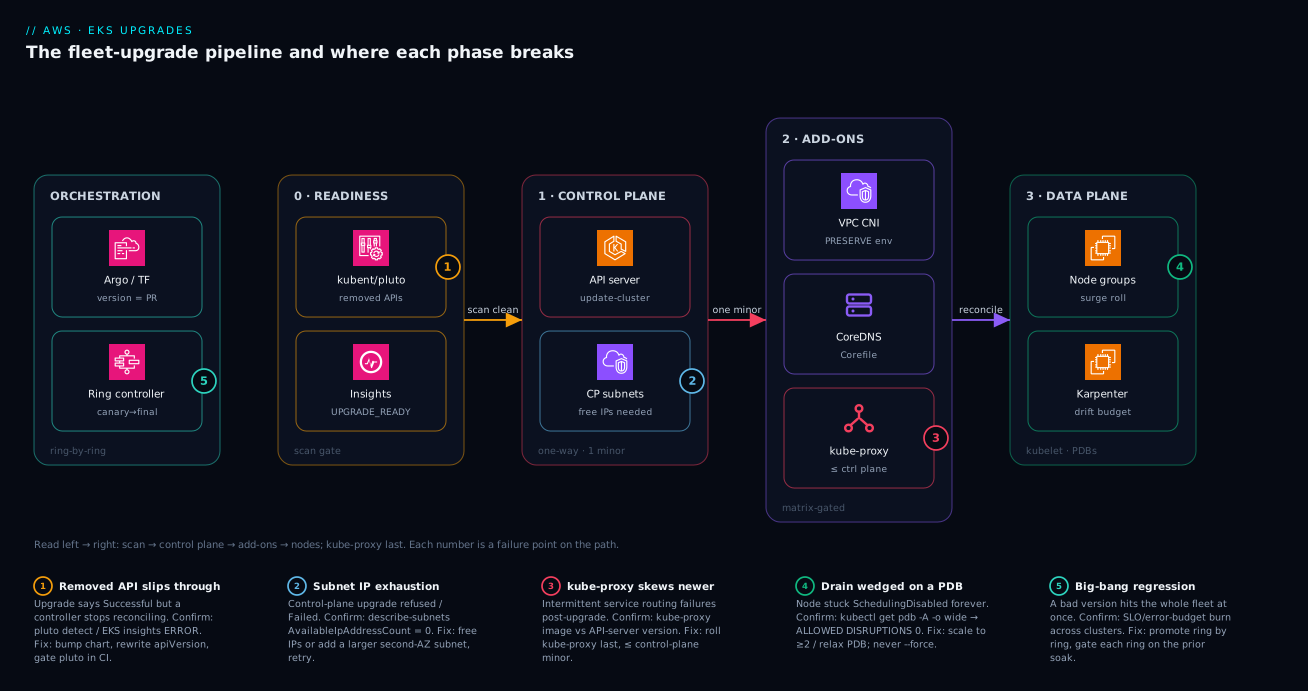
Real-world scenario
A media company ran 23 EKS clusters and let the cadence slip during a hiring freeze. Six drifted onto a version that aged out of standard support; the per-cluster control-plane bill jumped from ~$72 to ~$432/month and finance flagged the ~$2,160/month surprise. Worse, two were now inside the window where AWS would auto-upgrade them on its own schedule — an unplanned minor bump on a payments-adjacent cluster, exactly the kind of change you want to schedule yourself.
The constraint: a three-person platform team could not take the big-bang risk of catching every cluster up in one weekend. The hidden landmine surfaced when the first canary stalled — a billing service ran a single replica behind a policy/v1beta1 PDB with minAvailable: 1, so the node drain could never complete (the node sat cordoned indefinitely), and that API version was also removed in the target release. Both problems lived in the same manifest: an unsatisfiable PDB and a removed API, on the most sensitive workload in the fleet. kubectl get pdb -A -o wide showed ALLOWED DISRUPTIONS: 0; pluto detect flagged the policy/v1beta1 object as removed in the target. The canary did exactly its job — it caught both in a non-prod cluster instead of a 02:00 page.
They fixed it structurally, not per-cluster. The version became a per-ring Terraform variable so the same module rolled each tier on its own gated schedule, and a CI step ran pluto against every rendered chart so a removed API could never reach a cluster again:
variable "cluster_version" {
  type        = string
  description = "Set per ring; promote ring N+1 only after ring N soaks clean."
}

module "eks" {
  source          = "terraform-aws-modules/eks/aws"
  cluster_name    = var.cluster_name
  cluster_version = var.cluster_version   # 1.32 in canary first, then promoted by PR
}
The PDB trap was fixed at the source — scale to two replicas and move the manifest to policy/v1:
apiVersion: policy/v1            # was policy/v1beta1 (removed in the target minor)
kind: PodDisruptionBudget
metadata:
  name: billing
spec:
  minAvailable: 1                # now satisfiable: the Deployment runs 2 replicas
  selector:
    matchLabels:
      app: billing
With the canary ring proving each step and pluto gating CI, they caught the remaining five clusters up over three weeks of reviewed pull requests, ended the extended-support charges (~$2,160/month recovered), and took the auto-upgrade risk off the table. The durable fix was the ring variable plus the CI gate, not a heroic weekend. The incident, as a timeline, because the order of moves is the lesson:
| Stage | State | Action taken | Effect | What it should have been |
|---|---|---|---|---|
| Drift | 6 clusters in extended support | (cadence slipped) | +$2,160/mo, 2 near auto-upgrade | Cap fleet at 2 minors; cadence per quarter |
| Canary | Ring-0 cluster upgraded | Roll the target on 1 non-prod | Drain stalls immediately | (This is the canary working) |
| Diagnose | Drain wedged | kubectl get pdb -A -o wide |
ALLOWED DISRUPTIONS: 0 found |
— |
| Diagnose | Removed API found | pluto detect on the chart |
policy/v1beta1 flagged removed |
Should have been a CI gate already |
| Fix source | Both bugs in one manifest | Scale to 2; move to policy/v1 |
Drain completes | Fix at the source, not per cluster |
| Structural | Repeatable rollout | Ring variable + pluto in CI |
Removed API can’t reach a cluster | The durable fix |
| Complete | 5 clusters remaining | Promote ring by ring over 3 weeks | Extended-support charges ended | A series of reviewed PRs |
Advantages and disadvantages
The managed-control-plane, version-gated, add-on model both de-risks the upgrade and introduces its own sharp edges. Weigh it honestly:
| Advantages (why this model helps you) | Disadvantages (why it bites) |
|---|---|
| AWS rolls the control plane with zero downtime — the riskiest part is managed | The control plane is one-way: no downgrade, ever; mistakes are forward-only |
| Server-side upgrade insights catch deprecated-API clients you forgot exist | Removed-API breakage is silent at upgrade time — you only see it when a workload fails to reconcile |
| Managed add-ons expose a per-version compatibility matrix so you don’t guess | --resolve-conflicts OVERWRITE silently reverts hand-tuned CNI/CoreDNS config |
| Kubelet skew (3 minors) lets you stage control plane ahead of nodes | The skew rules are easy to violate with a hand-rolled script (e.g. kube-proxy newer than the API server) |
| Managed node groups + Karpenter drain behind PDBs automatically | An unsatisfiable PDB stalls the drain forever and wedges the roll |
| Standard support gives a predictable ~14-month runway per minor | Slipping into extended support silently 6×s the per-cluster control-plane bill |
| GitOps makes a fleet upgrade a reviewed diff, not laptop commands | If you don’t adopt GitOps, fleet drift and human error compound by cluster count |
The model is right for any team past day one that wants the control plane operated for them and a clear compatibility contract for add-ons. It bites hardest on fleets that let cadence slip (extended-support cost, forced auto-upgrade), on clusters with single-replica or stateful workloads (PDB traps), and on teams that hand-tuned add-ons then upgraded with OVERWRITE. Every disadvantage is manageable — but only if you know it exists and gate for it, which is the entire point of the runbook.
Hands-on lab
Stand up a tiny EKS cluster, practise the exact readiness-and-upgrade sequence — scan, control plane, add-on, verify — then tear it down. Keep it small (two nodes) so the bill is a few dollars for an hour. Run from a workstation with AWS CLI v2, eksctl, kubectl, and pluto installed.
Step 1 — Create a small cluster one minor behind the latest, so there is something to upgrade.
eksctl create cluster --name eks-upgrade-lab \
  --region ap-south-1 --version 1.31 \
  --nodes 2 --node-type t3.medium --managed
Expected: ~15 minutes; eksctl writes your kubeconfig. Confirm: kubectl get nodes shows two Ready nodes on v1.31.x.
Step 2 — Plant a removed-API landmine and catch it with pluto. Apply a PDB on the old policy/v1beta1 group (removed in later minors), then scan against the target:
cat <<'EOF' | kubectl apply -f -
apiVersion: policy/v1beta1
kind: PodDisruptionBudget
metadata: { name: legacy-pdb }
spec:
  minAvailable: 1
  selector: { matchLabels: { app: nope } }
EOF

pluto detect-all-in-cluster --target-versions k8s=v1.32
# Expected: legacy-pdb flagged — policy/v1beta1 removed in the target.
The scanner names the object, the deprecated apiVersion, and the removal version — exactly the pre-upgrade gate. Remediate by deleting it (or migrating to policy/v1):
kubectl delete pdb legacy-pdb
Step 3 — Check EKS readiness insights and the add-on matrix.
aws eks list-insights --cluster-name eks-upgrade-lab \
  --filter '{"categories":["UPGRADE_READINESS"]}'

# Which kube-proxy build is compatible with the target?
aws eks describe-addon-versions --kubernetes-version 1.32 \
  --addon-name kube-proxy \
  --query 'addons[].addonVersions[0].addonVersion' --output text
Expected: insights PASSING (you removed the landmine), and a concrete compatible kube-proxy build string.
Step 4 — Upgrade the control plane one minor (1.31 → 1.32) and watch it.
aws eks update-cluster-version --name eks-upgrade-lab --kubernetes-version 1.32
aws eks describe-cluster --name eks-upgrade-lab --query 'cluster.{Status:status,Version:version}'
# Status flips ACTIVE -> UPDATING -> ACTIVE; this takes several minutes.
Step 5 — Reconcile the add-on, then the nodes. Update kube-proxy to the compatible build, then roll the managed node group:
aws eks update-addon --cluster-name eks-upgrade-lab \
  --addon-name kube-proxy --addon-version <build-from-step-3> \
  --resolve-conflicts PRESERVE

eksctl upgrade nodegroup --cluster eks-upgrade-lab \
  --name <nodegroup-name> --kubernetes-version 1.32
Step 6 — Verify every layer agrees and the data plane is healthy.
kubectl version -o json | jq -r '.serverVersion.gitVersion'        # control plane on 1.32
kubectl get nodes -o custom-columns='NODE:.metadata.name,KUBELET:.status.nodeInfo.kubeletVersion'
kubectl get pods -n kube-system                                    # all Running, no CrashLoop
kubectl run dns-probe --rm -it --restart=Never --image=busybox:1.36 -- \
  nslookup kubernetes.default.svc.cluster.local                    # CoreDNS resolves
Expected: control plane and kubelet both on v1.32.x, kube-system healthy, DNS resolves. The lab steps mapped to what each proves:
| Step | What you did | What it proves | Real-world analogue |
|---|---|---|---|
| 1 | Create a cluster one minor behind | There is a real upgrade to perform | Any cluster on N-1 |
| 2 | Plant + scan a policy/v1beta1 PDB |
Removed-API detection is real and specific | The number-one upgrade breakage |
| 3 | Check insights + add-on matrix | Readiness is a gate, compatibility is queryable | The pre-flight that blocks bad upgrades |
| 4 | Control plane 1.31 → 1.32 | The one-way roll is one minor at a time | Phase 1 of every upgrade |
| 5 | Reconcile kube-proxy, roll nodes |
Add-ons then kubelet, in order | Phases 2–3 |
| 6 | Verify versions + DNS | “Successful” ≠ healthy; you confirm | The post-upgrade smoke check |
Teardown (avoid lingering control-plane + node charges):
eksctl delete cluster --name eks-upgrade-lab --region ap-south-1
Cost note. One control plane at $0.10/hr plus two t3.medium nodes runs well under ~$1–2 for an hour; deleting the cluster stops every charge. There is no free tier for the EKS control plane, so do not leave the lab running overnight.
Common mistakes & troubleshooting
This is the playbook — the part you bookmark. First as a scannable table you can read mid-change-window, then the entries that bite hardest expanded with the full reasoning.
| # | Symptom | Root cause | Confirm (exact cmd / path) | Fix |
|---|---|---|---|---|
| 1 | Upgrade “Successful” but a controller stops reconciling | Removed API still called by a chart/controller | pluto detect-all-in-cluster --target-versions k8s=<target>; insights ERROR |
Bump chart / rewrite apiVersion; redeploy; re-scan |
| 2 | update-cluster-version refused / Failed |
Control-plane subnets out of free IPs | aws ec2 describe-subnets --query '...AvailableIpAddressCount' |
Free IPs / add a larger subnet, retry |
| 3 | Node drain hangs; node stuck SchedulingDisabled |
Unsatisfiable PDB (minAvailable: 1 on 1 replica) |
kubectl get pdb -A -o wide (ALLOWED DISRUPTIONS = 0) |
Scale to ≥2; relax PDB; never --force blindly |
| 4 | Pods ContainerCreating, no IP, after add-on update |
VPC CNI custom config reverted by OVERWRITE |
kubectl get ds aws-node -n kube-system -o yaml (env reset) |
Re-apply CNI env; re-run update with PRESERVE |
| 5 | Intermittent service routing failures post-upgrade | kube-proxy skewed newer than the control plane |
kubectl get ds kube-proxy -n kube-system; compare to API version |
Downgrade kube-proxy to ≤ control plane build |
| 6 | DNS resolution broken cluster-wide after upgrade | CoreDNS Corefile reverted / version skew | kubectl get cm coredns -n kube-system -o yaml; CoreDNS logs |
Restore Corefile; update to compatible build |
| 7 | PVCs stuck Pending after upgrade |
EBS CSI driver incompatible/not updated | kubectl get pods -n kube-system -l app=ebs-csi-controller |
Update aws-ebs-csi-driver to compatible build |
| 8 | All API writes fail mid-upgrade | Admission webhook unavailable during node roll | kubectl get validating/mutatingwebhookconfigurations |
Make webhook HA; review failurePolicy |
| 9 | Karpenter recycles too many nodes during upgrade | No Drifted disruption budget |
kubectl get nodepool -o yaml (no budget) |
Add a Drifted budget (nodes: "3" etc.) |
| 10 | Unexpected minor bump on a cluster | Version aged out of extended support → AWS auto-upgraded | aws eks describe-cluster --query cluster.version; support status |
Never reach end-of-extended; upgrade on cadence |
| 11 | Bill jumped ~6× on some clusters | Clusters slid into extended support | aws eks describe-cluster-versions vs cluster versions |
Upgrade the stragglers; cap fleet spread |
| 12 | Managed node roll crawls one node at a time | maxUnavailable=1 on a large group |
aws eks describe-nodegroup --query '...updateConfig' |
Set maxUnavailablePercentage (e.g. 10) |
| 13 | Pods evicted but never reschedule | No spare capacity or taint/toleration mismatch | kubectl get events --field-selector reason=FailedScheduling |
Add capacity; fix tolerations/affinity |
| 14 | kubectl warns “deprecated” or odd API errors |
Client skewed >1 minor from the API server | kubectl version (compare client/server) |
Update kubectl to within ±1 minor |
The expanded form, with the full reasoning for the entries that cost the most time:
1. Upgrade reports Successful but a controller silently stops reconciling.
Root cause: A Helm chart or controller still calls an API removed in the target minor (e.g. policy/v1beta1, autoscaling/v2beta2). The control plane upgraded fine; the client is now talking to an endpoint that no longer exists.
Confirm: pluto detect-all-in-cluster --target-versions k8s=<target> and kubent flag the object and the removal version; EKS upgrade insights show an ERROR for UPGRADE_READINESS.
Fix: Bump the chart or rewrite the apiVersion, redeploy, and re-scan until clean. Add pluto to CI so a removed API can never reach a cluster again — this is the durable fix, not a per-cluster patch.
2. aws eks update-cluster-version is refused or returns Failed.
Root cause: EKS pre-flight requires free IP addresses in the control-plane subnets to place new control-plane ENIs; exhausted subnets refuse the upgrade.
Confirm: aws ec2 describe-subnets --subnet-ids <ids> --query 'Subnets[].{Id:SubnetId,Free:AvailableIpAddressCount}' shows zero or near-zero free IPs; describe-update --query update.errors names the condition.
Fix: Free up IPs (clean up stale ENIs) or add a larger/extra subnet in a second AZ to the cluster, then retry.
3. A node drain hangs and the node sits SchedulingDisabled indefinitely.
Root cause: A PodDisruptionBudget that can never be satisfied — classically minAvailable: 1 on a single-replica Deployment. Eviction would drop below the floor, so the API server refuses it forever, and the roll wedges.
Confirm: kubectl get pdb -A -o wide shows ALLOWED DISRUPTIONS: 0 for the offending PDB; kubectl get nodes | grep SchedulingDisabled shows the cordoned node.
Fix: Scale the workload to at least two replicas (so the PDB becomes satisfiable) or relax the PDB. Audit single-replica workloads before the roll. Do not reach for --force — it evicts past the PDB and breaks the very guarantee you set.
4. After an add-on update, pods are stuck ContainerCreating with no IP.
Root cause: The add-on update ran with --resolve-conflicts OVERWRITE and reverted a hand-tuned VPC CNI config (e.g. ENABLE_PREFIX_DELEGATION, WARM_*), collapsing IP density so new pods can’t get an address.
Confirm: kubectl get ds aws-node -n kube-system -o yaml shows the env reset to defaults; pod events show “failed to assign an IP”.
Fix: Re-apply the CNI configuration and re-run the add-on update with --resolve-conflicts PRESERVE. Going forward, keep the CNI env in IaC and always use PRESERVE for tuned add-ons.
5. Intermittent service-routing failures appear right after the upgrade.
Root cause: kube-proxy ended up newer than the control plane (or more than three minors behind it) — a skew the platform won’t create but a hand-rolled order can.
Confirm: kubectl get ds kube-proxy -n kube-system -o jsonpath='{.spec.template.spec.containers[0].image}' versus the API-server version from kubectl version.
Fix: Set kube-proxy to a build ≤ the control-plane minor (the compatible build from describe-addon-versions). Always roll kube-proxy last and never ahead of the API server.
6. DNS resolution breaks cluster-wide after the upgrade.
Root cause: The CoreDNS Corefile was reverted by an OVERWRITE update (losing stub domains / forwarders) or CoreDNS skewed off a compatible build.
Confirm: kubectl get cm coredns -n kube-system -o yaml shows the default Corefile; kubectl logs -n kube-system -l k8s-app=kube-dns shows resolution errors; the nslookup probe fails.
Fix: Restore the Corefile and update CoreDNS to the matrix-compatible build with PRESERVE.
10–11. A cluster bumps a minor on its own, or the bill jumps ~6×.
Root cause: The cluster aged out of extended support, so AWS auto-upgraded it on its own schedule (10); or several clusters slid into extended support and the per-cluster control-plane charge went from ~$72 to ~$432/month (11).
Confirm: aws eks describe-cluster --query cluster.version against aws eks describe-cluster-versions support status; the surprise line on the bill.
Fix: There is no after-the-fact fix beyond upgrading the stragglers. Prevent it: upgrade on a quarterly cadence, cap fleet spread at two minors, and rank clusters by support status every wave.
Best practices
- Cap fleet version spread at two minors. More spread forks your add-on matrix and tooling and multiplies the readiness work.
- Scan before you move — every time, in CI. Make
kubent/plutoclean and EKS insightsPASSINGa hard, automated gate, not a manual step someone can skip. - Treat the control plane as one-way. Plan as if there is no rollback (there isn’t). The forward-only nature is why the canary ring is mandatory.
- Advance one minor at a time, in order: control plane → add-ons → node groups →
kube-proxylast. Never bump nodes ahead of the control plane. - Use
PRESERVEfor any hand-tuned add-on.OVERWRITEonly when EKS defaults are authoritative for that add-on. Keep add-on config in IaC. - Give every critical workload a satisfiable PDB, and audit single-replica workloads for the
minAvailable: 1trap before each roll. - Pin Karpenter AMIs (
alias/version) so upgrades are intentional drift, and scope aDrifteddisruption budget to bound the churn. - Bound the managed-node-group surge with
maxUnavailablePercentageso the roll is fast but never evicts the fleet at once. - Express the version as a reviewed GitOps/Terraform diff, per ring, never an imperative one-off from a laptop.
- Promote through rings with explicit soak windows and gates — a regression should stop at one non-prod cluster.
- Verify every layer post-upgrade (control plane, kubelet, add-ons, DNS, smoke tests) —
Successfulis necessary, not sufficient. - Watch the support clock per cluster. Standard support is the runway; never let a cluster reach end-of-extended and get auto-upgraded.
Security notes
Upgrades are a security event in both directions: they close known CVEs and, done carelessly, they can widen access or break the guardrails that protect the cluster.
- Stay in support for the patches. Standard (and extended) support is what delivers Kubernetes and AMI security backports. A cluster past end-of-support stops receiving them — staying current is a security control, not just a feature one.
- Least privilege for the upgrade pipeline. The IAM principal that runs
update-cluster-version/update-addonshould be scoped to exactly those actions on the target clusters, not a broadeks:*. In GitOps, the CI role assumes a narrowly-scoped role per environment. - Webhooks and Pod Security during the roll. A node roll can momentarily take an admission webhook offline; a
failurePolicy: Failwebhook then blocks all writes (a fail-closed safety property), whileIgnorefails open and could let non-compliant pods through mid-roll. Make security webhooks highly available so the upgrade never forces that trade-off. - Re-validate Pod Security Admission and policy after a minor bump. PSA levels and policy-engine (Kyverno/Gatekeeper) behaviour can shift across minors; confirm
restricted/baselineenforcement still holds post-upgrade. - IRSA / Pod Identity continuity. Confirm workload identity still resolves after the upgrade — see EKS IRSA to Pod Identity Migration: Fine-Grained Access. A broken OIDC/identity path post-upgrade can fail closed (workloads lose AWS access) or, worse, mask a misconfiguration.
- Audit the change. Because the upgrade is a reviewed Git diff and CloudTrail records the API calls, you have a complete audit trail of who promoted which version where — keep it that way rather than running imperative commands that scatter the record.
Cost & sizing
What drives the bill on an EKS upgrade is rarely the upgrade itself — it is the support tier you let clusters fall into, plus transient capacity during node rolls.
The cost levers, what each costs, and how to control it:
| Cost driver | What it costs | Driven by | How to control |
|---|---|---|---|
| Control plane (standard) | $0.10/cluster/hr (~$72/mo) | Each running cluster | Baseline; consolidate idle clusters |
| Control plane (extended) | $0.60/cluster/hr (~$432/mo) | Versions out of standard support | Upgrade on cadence; never slip |
| Surge nodes during a roll | Extra node-hours while old+new overlap | maxUnavailable/surge + group size |
Bound surge; roll in off-peak |
| Karpenter drift churn | Replacement node-hours | Drift recycling capacity | Drifted disruption budget |
| Data transfer | Unchanged by upgrade | Workload traffic | Not an upgrade lever |
| EBS volumes for new nodes | gp3 GB-month during overlap | Surge + drift node disks | Bound surge; reclaim promptly |
| NAT data processing | Per-GB during image re-pull | New nodes pulling images | Pre-pull / cache base images |
| Extended-support delta (fleet) | ~$360/cluster/mo over standard | Number of clusters in extended | Rank + upgrade stragglers first |
Right-sizing the upgrade, not the cluster — keep the wave cheap:
- Eliminate extended support first. The single biggest dollar lever is moving stragglers back into standard support; each cluster recovered is ~$360/month.
- Bound surge to control transient node cost. A
maxUnavailablePercentageof ~10% overlaps far fewer extra nodes than an unbounded roll; the trade-off is a slightly longer roll. - Roll node groups in off-peak windows so surge capacity overlaps the cheapest hours and the smallest live footprint.
- There is no free tier for the control plane. Lab clusters cost from the moment they exist — delete them after use (the hands-on lab tears down for exactly this reason).
Rough INR framing for an India-region fleet: a single cluster’s control plane runs roughly ₹6,000/month in standard support and ₹36,000/month in extended — so six stragglers in extended support are about ₹1,80,000/month of avoidable spend, which is precisely the kind of number that turns an upgrade backlog into a funded project.
Interview & exam questions
1. Why can’t you upgrade an EKS control plane from 1.30 directly to 1.32?
EKS upgrades the control plane one minor version at a time. To cross two minors you issue two sequential update-cluster-version calls, each completing before the next. This mirrors upstream Kubernetes’s supported upgrade path and keeps API/feature transitions incremental. (CKA / EKS practitioner.)
2. What is the kubelet skew rule on EKS, and how do you exploit it during a fleet upgrade?
On EKS 1.28+, nodes tolerate the control plane being up to three minor versions ahead of the kubelet. You exploit it by advancing the control plane multiple minors first (e.g. 1.29 → 1.30 → 1.31) while nodes stay put, then catching nodes up — never the reverse, and kube-proxy is never newer than the control plane.
3. A cluster upgrade reports Successful but a controller stops working. What happened and how would you have prevented it?
A Kubernetes minor bump removed a beta API the controller still called (e.g. policy/v1beta1, autoscaling/v2beta2). Prevention is a pre-upgrade scan — kubent/pluto plus EKS upgrade insights as a hard CI gate — remediating every removed-API usage before touching the control plane.
4. Explain the three --resolve-conflicts modes for EKS add-ons and when each is correct.
NONE fails the update on any hand-edited field (a hard stop). OVERWRITE resets changed fields to EKS defaults (use when EKS owns the config). PRESERVE keeps your out-of-band edits across the update (use for tuned VPC CNI / CoreDNS). OVERWRITE on tuned config silently reverts it.
5. Which add-on is the strict one for version skew, and what is its rule?
kube-proxy. It must not be newer than the control-plane minor and not more than three minors older. CoreDNS and the CSI drivers are version-gated but looser. Roll kube-proxy last.
6. A node drain hangs forever during an upgrade. What is the most likely cause and the fix?
An unsatisfiable PodDisruptionBudget — classically minAvailable: 1 on a single-replica Deployment — so eviction would breach the floor and the API server refuses it indefinitely. Fix: scale to ≥2 replicas (or relax the PDB). kubectl get pdb -A -o wide showing ALLOWED DISRUPTIONS: 0 confirms it.
7. How do Karpenter-managed nodes upgrade, and how do you bound the churn?
Through drift: when the AMI referenced by the EC2NodeClass/NodePool changes, Karpenter marks existing nodes drifted and replaces them. Bound it with a disruption budget scoped to the Drifted reason (e.g. nodes: "3") so only a few nodes recycle at once.
8. What is the cost difference between standard and extended support, and why does it matter at fleet scale? Standard control plane is $0.10/cluster/hr; extended is $0.60/cluster/hr — a 6× jump (~$72 → ~$432/month). Across a fleet, every cluster that slips into extended support adds ~$360/month, turning a missed cadence into a real budget line. (FinOps / EKS.)
9. Can you roll back an EKS control-plane upgrade? What is the recovery path if a workload breaks? No — the control plane cannot be downgraded. Recovery is forward: roll nodes back to the prior AMI (still legal within the three-minor skew window) and revert add-on versions while you fix the workload, then re-advance. This one-way property is why readiness scanning and a canary ring are mandatory.
10. What pre-flight condition most commonly blocks a control-plane upgrade, and how do you confirm it?
Subnet IP exhaustion — EKS needs free IPs in the control-plane subnets for new ENIs and refuses the upgrade otherwise. Confirm with aws ec2 describe-subnets checking AvailableIpAddressCount; fix by freeing IPs or adding a larger/second-AZ subnet.
11. Describe a ring rollout and why a fleet needs one. Promote the version through rings — canary (1 non-prod) → early (low-traffic prod) → broad → final — gating each on the previous ring soaking clean (scanners green, no SLO regression, error budget intact). It contains a regression to one cluster instead of the fleet and turns the upgrade into reviewed PRs.
12. Why express the upgrade as a GitOps/Terraform diff instead of aws eks update-cluster-version?
It makes the change reviewable, auditable, and reproducible across the fleet: a one-line cluster_version bump in a PR, the same module for N clusters via a per-ring variable, Git history as the audit log, and revert-the-commit as the rollback of intent. Imperative commands scatter the record and invite drift.
Quick check
- In what order do you upgrade the four moving parts of an EKS cluster, and which one goes last?
- How many minor versions can the EKS control plane be ahead of the kubelet (on 1.28+), and can the data plane ever be ahead?
- You hand-tuned the VPC CNI for prefix delegation. Which
--resolve-conflictsmode do you use when updating the add-on, and why? - A managed node group’s drain has wedged with a node stuck
SchedulingDisabled. What is the first command you run, and what are you looking for? - What happens to a cluster that reaches the end of its extended-support window, and what does that cost compared to standard support?
Answers
- Control plane → managed add-ons → node groups (kubelet) →
kube-proxylast.kube-proxytrails because it must never be newer than the control plane. - Up to three minors ahead (nodes lag the control plane). The data plane may only lag, never lead — and you can never skip control-plane minors.
PRESERVE. It keeps your out-of-band CNI config across the update;OVERWRITEwould silently reset the env to EKS defaults and collapse IP density, leaving pods stuck without an IP.kubectl get pdb -A -o wide, looking for a PDB withALLOWED DISRUPTIONS: 0— an unsatisfiable PodDisruptionBudget (oftenminAvailable: 1on a single replica) blocking the eviction. Fix by scaling to ≥2 or relaxing the PDB.- AWS auto-upgrades it to the next minor on a schedule you don’t control. While it sat in extended support it cost $0.60/cluster/hr (~$432/month) versus $0.10/hr (~$72/month) in standard — a 6× control-plane premium.
Practice challenges
Six exercises, easy to hard. Try each before opening the solution — they use the same tools and manifests as the runbook, and none needs a live cluster except where noted.
1 (Beginner) — Find the money leak. In one pass, list every cluster in the account with its current version, then work out which of those versions are in extended support (the 6× ones).
<details><summary>Show solution</summary>
# Current version of every cluster
for c in $(aws eks list-clusters --query 'clusters[]' --output text); do
  v=$(aws eks describe-cluster --name "$c" --query 'cluster.version' --output text)
  printf '%-28s %s\n' "$c" "$v"
done

# Which Kubernetes versions are in standard vs extended support today
aws eks describe-cluster-versions \
  --query 'clusterVersions[].{Version:clusterVersion,Support:versionStatus,EndStd:endOfStandardSupportDate}' \
  --output table
Cross-reference the two: any cluster whose version shows as extended support is billing ~$432/mo instead of ~$72. Why: you cannot plan a wave — or justify it to finance — without knowing where every cluster sits. </details>
2 (Beginner) — Name the order. Without looking back, write the four things an EKS upgrade moves, in order, and say which goes last and why.
<details><summary>Show solution</summary>
Control plane → managed add-ons → node groups (kubelet) → kube-proxy last. kube-proxy trails because it must never be newer than the control plane (and no more than three minors behind it). Why: the whole method is the order — get it wrong and you manufacture a skew violation the platform would otherwise have prevented.
</details>
3 (Intermediate) — Gate a chart in CI. You have a Helm chart at ./charts/payments. Prove, without deploying it, that it carries no API removed in the 1.32 target.
<details><summary>Show solution</summary>
helm template ./charts/payments | pluto detect - --target-versions k8s=v1.32
A clean exit means no removed apiVersions in the rendered manifests; a finding names the object and the removal version. Why: removed-API breakage is silent at upgrade time — catching it in CI is the durable fix, not a per-cluster scramble later. </details>
4 (Intermediate) — Cross two minors. A cluster is on 1.30; the target is 1.32. Write the exact control-plane calls, and say what the nodes are allowed to do meanwhile.
<details><summary>Show solution</summary>
aws eks update-cluster-version --name platform-prod --kubernetes-version 1.31   # wait for Successful
aws eks update-cluster-version --name platform-prod --kubernetes-version 1.32   # only then, this one
Two sequential calls — you cannot skip 1.31. Meanwhile the nodes may stay on 1.30 the whole time (up to three minors behind on EKS 1.28+) and be caught up afterwards. Why: the control plane moves one minor at a time and is one-way; kubelet skew is exactly what lets you stage it ahead of the nodes. </details>
5 (Advanced) — Defuse the classic double landmine. A canary drain has wedged. A single-replica billing Deployment sits behind a PDB that is both policy/v1beta1 (removed in the target) and minAvailable: 1. Fix both problems at the source.
<details><summary>Show solution</summary>
Scale the Deployment to two replicas, then migrate the PDB to policy/v1 so it is both satisfiable and on a supported API:
apiVersion: policy/v1        # was policy/v1beta1 (removed in the target minor)
kind: PodDisruptionBudget
metadata:
  name: billing
spec:
  minAvailable: 1            # now satisfiable — the Deployment runs 2 replicas
  selector:
    matchLabels:
      app: billing
Confirm with kubectl get pdb billing -o wide — ALLOWED DISRUPTIONS should now read ≥ 1. Why: an unsatisfiable PDB blocks the drain forever and the removed API would break reconciliation; both live in one manifest and both are fixed at the source, not per cluster.
</details>
6 (Advanced) — Throttle a Karpenter upgrade. On a Karpenter fleet, make an AMI upgrade intentional and cap it to three nodes replacing at once — without slowing normal consolidation.
<details><summary>Show solution</summary>
Pin the AMI so the bump is a deliberate drift event, and scope a disruption budget to the Drifted reason only:
apiVersion: karpenter.k8s.aws/v1
kind: EC2NodeClass
metadata:
  name: default
spec:
  role: KarpenterNodeRole-platform-prod
  amiSelectorTerms:
    - alias: al2023@v20260601      # pin to the target-version AMI
---
apiVersion: karpenter.sh/v1
kind: NodePool
metadata:
  name: default
spec:
  disruption:
    budgets:
      - nodes: "10%"               # blanket safety net for all reasons
      - nodes: "3"                 # at most 3 at once…
        reasons: ["Drifted"]       # …but only for AMI-drift (the upgrade)
Why: drift is Karpenter’s upgrade mechanism; scoping the budget to Drifted throttles only the upgrade churn and leaves cost-saving consolidation untouched.
</details>
Glossary
- Standard support — the ~14-month window in which EKS fully supports a Kubernetes minor; control plane at $0.10/cluster/hr.
- Extended support — the +12-month window after standard, at $0.60/cluster/hr (6×), delivering security backports only.
- Kubelet skew — the allowed gap by which the control plane may run ahead of node kubelets (up to 3 minors on EKS 1.28+); the data plane may only lag.
- Removed API — a Kubernetes beta group/version deleted on a minor bump (e.g.
policy/v1beta1→policy/v1); calling it post-upgrade silently fails. - Upgrade insights — EKS server-side readiness checks (
UPGRADE_READINESS) that flag deprecated/removed API usage observed by the control plane. kubent(kube-no-trouble) — a scanner for removed/deprecated APIs in live cluster state and Helm releases.pluto— a scanner for removed/deprecated APIs in live clusters and static manifests/charts, suitable as a CI gate.- Managed add-on — an EKS-versioned cluster component (VPC CNI, CoreDNS, kube-proxy, EBS CSI) with a per-version compatibility matrix.
--resolve-conflicts— the add-on-update flag governing how EKS treats your hand-edits:NONE,OVERWRITE, orPRESERVE.- PodDisruptionBudget (PDB) — a
policy/v1object capping simultaneous voluntary evictions; an unsatisfiable PDB blocks a drain forever. maxUnavailablePercentage— managed-node-group surge control bounding how many nodes drain at once during a roll.- Karpenter drift — Karpenter’s upgrade mechanism: an AMI change marks existing nodes drifted and triggers replacement.
- Disruption budget (Karpenter) — a NodePool control limiting node disruption, optionally scoped to reasons like
Drifted. - BRUPOP — the Bottlerocket update operator, coordinating PDB-aware host OS updates decoupled from the Kubernetes minor bump.
- Ring rollout — staged fleet promotion (canary → early → broad → final), each ring gated on the previous one soaking clean.
- Control plane — the AWS-managed Kubernetes brain (API server + etcd) that you never SSH into; upgraded first and can never be downgraded.
- Node group — a set of worker EC2 instances that run your pods; a managed node group is one EKS provisions and rolls for you.
- Version skew — the allowed version distance between the control plane and the pieces around it (kubelet ≤3 minors behind,
kube-proxynever newer,kubectlwithin ±1 minor). - Cordon & drain — cordon marks a node unschedulable; drain evicts its pods (honoring PDBs) so the node can be replaced — the core of a node upgrade.
- Canary — the first, non-production cluster (ring 0) you upgrade, so a regression is caught there instead of in prod.
- Soak — the observation window after upgrading a ring, during which you watch smoke tests and SLOs before promoting to the next ring.
- GitOps — declaring cluster and add-on versions in Git so an upgrade is a reviewed pull request that Argo CD or Flux reconciles, not a laptop command.
Next steps
- Provision and scale the node layer this runbook upgrades: EKS at Scale: Pod Identity, Karpenter, and Networking and Deploy Karpenter on EKS: Consolidation, Spot, and Disruption Budgets.
- Solve the IP-exhaustion pre-flight that blocks upgrades head-on in EKS VPC CNI: Prefix Delegation, Custom Networking, and IP Exhaustion.
- Wire the GitOps engine that turns each upgrade into a reviewed diff: GitOps with Argo CD: App-of-Apps and Progressive Delivery or Flux CD GitOps: Monorepo, Kustomize, and Multi-Tenancy.
- When an upgrade goes sideways, work the failure with Kubernetes Troubleshooting Methodology: Pods, Nodes, Networking, Storage, RBAC.
- Put a number on the extended-support and surge cost with Kubernetes Cost Allocation and Rightsizing with Kubecost, and see the Azure-shop equivalent runbook in AKS Day-Two: Upgrades and Fleet Operations.