In a nutshell
In EKS, every pod gets its own real VPC IP address — the same kind of private address an EC2 server gets — handed out by a component called the Amazon VPC CNI. That is convenient: your pods behave like first-class citizens on the network, with real IPs, security groups, and flow logs. But it hides a trap. Because pods (not just nodes) each consume an address, a busy cluster can run out of IP addresses long before it runs out of CPU or memory.
Picture your network’s private IPv4 addresses as a jar of coins your whole company shares — some coins are spent on-prem, some by other AWS accounts, all drawn from the same finite jar. You are used to thinking one coin per server. In EKS you spend one coin per pod, and a busy cluster has thousands of pods. The jar empties while your servers sit half-idle. The nasty part: no default dashboard shows the coin count, so the first symptom is pods stuck in ContainerCreating with plenty of CPU free — a shortage that looks nothing like its cause.
This lesson teaches the three ways to fix it, plus the exact math to size each. Prefix delegation hands out coins in rolls of sixteen instead of one at a time — fewer trips to the bank, far more pods per server. Custom networking lets pods spend from a separate, private jar of addresses (the 100.64.0.0/10 range) that nobody else needs, so your shared jar stops draining. And IPv6 mode swaps the jar for an ocean — so much address space you never have to count again. A fourth idea threads through all of it: security groups for pods, which give one sensitive workload its own network identity instead of borrowing the whole node’s.
If you are new here, read this section and the first three headings, then jump to the Practice challenges near the end — they are pure IP arithmetic and lock in the mental model. If you are mid-incident, skip straight to Common mistakes & troubleshooting.
Level: Expert — with a beginner on-ramp here and graded practice below · Time: ~65 min read
The first time an EKS cluster runs out of IPs, it is never obvious. Pods stick in ContainerCreating, the events say failed to assign an IP address to container, and the node has plenty of CPU and memory free. The cluster autoscaler or Karpenter sees no pressure, so it adds nothing. You are not out of compute; you are out of the one resource nobody put on a dashboard: VPC IPv4 addresses. Every pod in default EKS gets a real, routable VPC IP from the node’s subnet — that is the Amazon VPC CNI’s headline feature and its hidden trap. At a hundred nodes packing thirty pods each on a /22, you do not run out of nodes; you run out of address space, and the failure mode looks nothing like the cause.
This is the playbook I use to push pod density up and IP burn down on EKS. There are exactly three levers, and the whole game is knowing what each one does, where its ceiling is, and how they stack. Prefix delegation changes the unit of IP allocation from one address to a /28 block of sixteen, multiplying pods-per-node without touching subnet size. Custom networking moves pod IPs entirely off the routable node subnet onto a separate, non-routable secondary CIDR (typically the 100.64.0.0/10 CGNAT range) so pod IPs cost you nothing in routable inventory. Security groups for pods give a specific workload its own SG via branch ENIs, so a pod can talk to an RDS instance whose SG trusts a tight source — without hairpinning through a load balancer. And there is a fourth, cleaner answer if you can adopt it: IPv6 mode, where the address space is so vast that the other three become unnecessary.
By the end you will stop guessing why pods will not schedule. You will read ipamd logs and tell InsufficientFreeAddressesInSubnet (the subnet is full) apart from InsufficientCidrBlocks (no contiguous /28 for prefix mode — a fragmentation signal, not an exhaustion one). You will size subnets so prefixes never fail to allocate, tune the WARM targets so idle nodes do not hoard addresses, and know exactly which instance types double their pod capacity under prefix delegation and which were already at the ceiling. Every setting comes with its default, its valid range, the trade-off, and the exact aws/kubectl/Terraform to set it — and because this is a reference you will return to mid-incident, the playbook, the limits, and the env-var matrix are all laid out as tables. Read the prose once; keep the tables open at 02:14.
What problem this solves
EKS hides a brutal arithmetic problem behind a friendly abstraction. You ask Kubernetes to schedule a pod; Kubernetes asks the node; the node asks ipamd; ipamd asks EC2 for an IP; and EC2 hands one out only if the node has a free secondary IP slot on an attached Elastic Network Interface (ENI) and the subnet has a free address. Either of those running dry stalls the pod — and the two failures look identical from kubectl describe pod. Meanwhile your dashboards show green: CPU 30%, memory 40%, node count steady. Nothing on a standard EKS dashboard tells you that a /24 pod subnet has eleven addresses left.
What breaks without this knowledge is predictable and expensive. Teams fragment workloads across oversized instances purely to buy more ENIs (a m5.4xlarge running twelve pods because that is the only way to get IPs is pure waste). They burn through a routable CIDR that the networking team carved from a Transit-Gateway-connected supernet — address space that is inventory, shared with on-prem, impossible to grow. They hairpin pod-to-RDS traffic through a Network Load Balancer to fake a source SG. And when pods finally stop scheduling, the on-call reflex is to add nodes, which makes it worse: more nodes claim more warm-pool IPs from the same exhausted subnet.
Who hits this: anyone running EKS at more than a handful of nodes on anything smaller than a /16 per AZ. It bites hardest on IPv4-constrained VPCs (hybrid networks where every routable IP is accounted for), high-density clusters (many small pods per node), and regulated environments where a workload needs a dedicated security-group boundary the node SG cannot express. The fix is almost never “bigger instances” or “more nodes” — it is changing the unit of allocation, the source of pod IPs, or the address family itself.
To frame the whole field before the deep dive, here is every lever this article covers, the exact problem it attacks, and its one hard ceiling:
| Lever | What it changes | The problem it solves | Hard ceiling / gotcha | Reversible? |
|---|---|---|---|---|
| Prefix delegation | Allocation unit: 1 IP → /28 (16 IPs) per slot |
Low pods-per-node on small/medium instances | Needs contiguous /28 blocks; max-pods must be raised manually |
Yes (toggle env, recycle nodes) |
| Custom networking | Pod IPs source: node subnet → secondary CIDR | Routable IP exhaustion; small primary VPC CIDR | Wastes the primary ENI for pods; only affects new nodes | Yes (remove ENIConfig, recycle) |
| Security groups for pods | Per-pod SG via trunk + branch ENIs | A workload needs its own SG (RDS, compliance) | Branch-ENI budget is far smaller than max-pods; Nitro-only | Yes (delete SecurityGroupPolicy) |
| IPv6 mode | Address family: IPv4 → IPv6 (/80 per ENI) |
Eliminates IP scarcity entirely | Permanent for the cluster’s life; IPv4-only egress needs a translation path | No — set at cluster creation |
| WARM target tuning | How many IPs/prefixes a node pre-allocates | Idle nodes hoarding addresses | Too low → EC2 API calls in the pod-create hot path | Yes (env change) |
Learning objectives
By the end of this article you can:
- Explain exactly how the VPC CNI’s
ipamdallocates ENIs and secondary IPs, and compute max-pods for any instance type in both secondary-IP and prefix-delegation modes. - Enable prefix delegation correctly through the managed add-on (so it survives upgrades), raise
--max-podsto match, and tuneWARM_PREFIX_TARGETversusWARM_IP_TARGET/MINIMUM_IP_TARGETwithout letting them fight. - Stand up custom networking on a
100.64.0.0/xsecondary CIDR with per-AZENIConfigs selected automatically by the zone label, and recycle nodes so it actually takes effect. - Apply security groups for pods via
SecurityGroupPolicy, reason about the branch-ENI limit per instance type, and fix off-VPC egress withPOD_SECURITY_GROUP_ENFORCING_MODE. - Read
ipamdlogs and CNI metrics to tell subnet exhaustion (InsufficientFreeAddressesInSubnet) apart from prefix fragmentation (InsufficientCidrBlocks) and ENI-limit-reached, and confirm each with an exact command. - Decide between prefix delegation + custom networking and a clean IPv6 cluster for a given workload, and state the trade-offs of each plainly.
- Wire the CloudWatch and Prometheus alarms (
awscni_assigned_ip_addresses, subnetAvailableIpAddressCount) that catch IP pressure before pods stop scheduling.
Prerequisites & where this fits
You should already understand EKS basics: a cluster runs a managed control plane and you attach node groups (managed, self-managed, or Karpenter-provisioned) of EC2 instances. You should know that the VPC CNI (aws-node, a DaemonSet) is the default networking plugin, how to run aws and kubectl against a cluster, and how to read JSON with jq. Comfort with VPC fundamentals — subnets, CIDRs, ENIs, route tables — is assumed; if those are shaky, read AWS VPC Deep Dive: Subnets, Routing, IGW, NAT & Endpoints first.
This sits in the EKS networking track. It assumes the pod-networking mental model from Kubernetes CNI & the Pod Networking Model Internals and the managed-Kubernetes landscape from Understanding Managed Kubernetes: AKS vs EKS vs GKE Compared. It pairs tightly with EKS at Scale: Pod Identity, Karpenter & Networking, because Karpenter’s node churn is exactly what you use to recycle a fleet after enabling custom networking. The CIDR-planning discipline behind it lives in VPC IPAM: CIDR Management, Allocation & BYOIP at Scale, and the SG mechanics underneath security-groups-for-pods come from AWS Security Groups & NACLs Deep Dive.
A quick map of who owns what during an IP-exhaustion incident, so you escalate to the right team fast:
| Layer | What lives here | Who usually owns it | Failure classes it causes |
|---|---|---|---|
| VPC CIDR plan | Primary + secondary CIDRs, subnet sizing | Network / platform team | Routable exhaustion; no room to grow |
| Subnet (per AZ) | Free-IP count, /28 fragmentation |
Network team | InsufficientFreeAddressesInSubnet, InsufficientCidrBlocks |
| VPC CNI add-on | ipamd, ENI attach, WARM targets |
EKS / platform team | Hoarding, wrong mode, env drift on upgrade |
| Node group / Karpenter | --max-pods, instance type, launch template |
Platform / app team | Density too low, ENI ceiling |
| Service Quotas | ENIs per region, EIPs | Account / cloud team | L-DF5E4CA3 trunk/branch ENI cap |
| Workload SG posture | SecurityGroupPolicy, branch ENIs | App + security team | RDS reachability, branch-ENI exhaustion |
Core concepts
Five mental models make every later decision obvious.
Every pod gets a real VPC IP, and that IP comes from a finite, shared pool. The VPC CNI gives each pod a routable secondary IP from the node’s subnet. The component doing the work is ipamd inside each aws-node pod: it attaches ENIs to the EC2 instance, pulls secondary IPs onto them, and maintains a warm pool so pod creation does not block on an EC2 API call. The pool is bounded by two independent ceilings — instance ENI limits and subnet free addresses — and either one stalls a pod with the identical failed to assign an IP address event.
Two hard EC2 limits, both fixed by instance type, govern density. ENIs per instance is fixed (an m5.large gets 3; an m5.4xlarge gets 8). IPs per ENI is also fixed (an m5.large gets 10 per ENI; one is the ENI’s primary, leaving 9 for pods). In default secondary-IP mode, max-pods = (ENIs × (IPs_per_ENI − 1)) + 2. For an m5.large: (3 × 9) + 2 = 29. The +2 is for host-network pods (kube-proxy, aws-node) that consume no secondary IP. AWS ships this as max-pods-calculator.sh in the amazon-vpc-cni-k8s repo — always confirm against it rather than trusting a table.
Prefix delegation changes the unit, not the slot count. Instead of one IP per ENI slot, the CNI assigns a /28 prefix — 16 contiguous addresses — per slot. The slot count stays the same; each slot now holds 16 IPs. An m5.large’s 9 usable slots become 9 × 16 = 144 IPs per ENI, far more than you need, so the practical limit becomes the EKS recommendation of 110 pods per node (250 on instances large enough). Prefix mode is what turns a t3.medium from 17 pods into 110. The catch: a prefix needs a contiguous /28, so a fragmented subnet can refuse a prefix even with scattered free IPs.
Custom networking decouples pod IPs from the node’s subnet. With AWS_VPC_K8S_CNI_CUSTOM_NETWORK_CFG=true, the CNI stops using the node’s primary ENI/subnet for pods and instead reads an ENIConfig custom resource (selected per node by a label) that names the subnet and SGs for the secondary ENIs carrying pods. Node primary IPs stay on the routable subnet; pod IPs live on a separate CIDR you never have to advertise. The cost: the primary ENI no longer serves pods, so per-node density drops by one ENI’s worth unless you combine it with prefix delegation (which you should).
Security groups for pods are a separate, scarcer budget. Normally every pod shares the node’s SG. To give a pod its own SG, the CNI creates a trunk ENI on the node and attaches branch ENIs (one per matched pod), each carrying the SGs from a SecurityGroupPolicy. Branch ENIs come from a much smaller per-instance budget than regular secondary IPs (roughly 9 on small types, 54+ on large ones) and require a Nitro instance. Apply it only to workloads that genuinely need isolation; everything else keeps the node SG and consumes no branch-ENI budget.
The vocabulary in one table
Before the deep sections, pin down every moving part. The glossary repeats these for lookup; this table is the mental model side by side:
| Concept | One-line definition | Where it lives | Why it matters to IP exhaustion |
|---|---|---|---|
VPC CNI (aws-node) |
Default EKS networking DaemonSet | kube-system on every node |
Allocates the IPs that run out |
ipamd |
IP-address-management daemon in aws-node |
Per node | Attaches ENIs, pulls IPs, holds the warm pool |
| ENI | Elastic Network Interface on the instance | EC2 instance | Carries secondary IPs/prefixes; count is capped per type |
| Secondary IP slot | A per-ENI address slot | On each ENI | The unit of allocation in default mode |
/28 prefix |
16 contiguous IPs in one slot | On each ENI (prefix mode) | Multiplies density ×16; needs contiguity |
| Warm pool | Pre-allocated IPs a node holds idle | Per node | Hoarding here drains the subnet |
WARM_PREFIX_TARGET |
Extra whole prefixes kept warm | CNI env | 1 = safe floor; higher = more waste |
WARM_IP_TARGET |
Extra individual IPs kept warm | CNI env | Tighter packing in prefix mode |
MINIMUM_IP_TARGET |
Floor of IPs a node pre-provisions | CNI env | Avoids churn on small nodes |
| Custom networking | Pods on a secondary-CIDR ENI | CNI env + ENIConfig |
Moves pod IPs off routable space |
ENIConfig |
CRD naming pod subnet + SGs | Cluster (per AZ) | The map the CNI reads for custom networking |
| Trunk ENI | Parent interface for branch ENIs | Node (Nitro) | Enables security groups for pods |
| Branch ENI | Per-pod interface carrying its SG | Node (Nitro) | Scarce budget; the real SG-for-pods limit |
SecurityGroupPolicy |
CRD selecting pods → SGs | Namespace | Declares which pods get branch ENIs |
| IPv6 mode | One IPv6 per pod from a /80 |
Set at cluster creation | Sidesteps IPv4 scarcity entirely |
How the VPC CNI allocates ENIs and IPs
The Amazon VPC CNI (aws-node, a DaemonSet) gives every pod a real VPC IP from the node’s subnet. That is the feature and the trap. The component doing the work is ipamd inside each aws-node pod. It attaches ENIs to the EC2 instance and pulls secondary IPs onto them, maintaining a warm pool so pod creation does not wait on an EC2 API call.
Two hard EC2 limits govern this in the default “secondary IP” mode. ENIs per instance is fixed by instance type: an m5.large gets 3 ENIs, an m5.4xlarge gets 8. IPs per ENI is also fixed by instance type: an m5.large gets 10 per ENI, one of which is the ENI’s primary, leaving 9 usable for pods. Max pods in secondary-IP mode is therefore (ENIs × (IPs_per_ENI − 1)) + 2; for an m5.large that is (3 × 9) + 2 = 29. The +2 accounts for host-network pods (kube-proxy, aws-node) that do not consume a secondary IP.
The problem at scale is subnet consumption. Each node holds a warm pool of pre-allocated IPs it is not using yet. With defaults (WARM_ENI_TARGET=1), a freshly scheduled node can claim a whole extra ENI worth of IPs just to keep one warm. Multiply by hundreds of nodes and a /24 subnet (251 usable) evaporates. You see free IPs pinned to ENIs on idle nodes while new pods elsewhere cannot schedule.
Inspect what a node actually holds:
# IPs and prefixes currently attached, per ENI, on a node
kubectl exec -n kube-system aws-node-xxxxx -c aws-node -- \
  curl -s http://localhost:61679/v1/enis | jq '.ENIs[] | {eni: .ID, ips: (.IPv4Addresses | length), prefixes: (.IPv4Prefixes | length)}'
The lifecycle of an IP request
Walking the path once makes every later failure legible. When the kubelet asks the CNI to wire a new pod, the request flows through these stages — and a stall at any one produces the same opaque ContainerCreating:
| Stage | What happens | Who acts | Fails when… | Surfaces as |
|---|---|---|---|---|
| 1. Pod scheduled | Scheduler binds pod to a node | kube-scheduler | Node has no allocatable pods left | Pending (not CNI’s fault) |
| 2. CNI ADD called | kubelet invokes the CNI binary | kubelet → aws-node |
Binary/DaemonSet down | aws-node CrashLoop |
| 3. IP requested | CNI asks ipamd for an address |
CNI → ipamd gRPC |
ipamd not ready |
add cmd: failed to assign |
| 4. Warm-pool hit | ipamd serves a pre-warmed IP |
ipamd |
Pool empty → go to step 5 | (transparent) |
| 5. ENI/IP attach | EC2 attaches ENI or assigns IP/prefix | ipamd → EC2 API |
ENI cap or subnet full | InsufficientFreeAddresses… / InsufficientCidrBlocks |
| 6. Branch ENI (if SG-for-pods) | Trunk attaches a branch ENI for the pod | ipamd → EC2 API |
Branch-ENI budget exhausted | Isolated pod stuck ContainerCreating |
| 7. Wire namespace | IP plumbed into the pod netns | CNI | Rare; routing/SG misconfig | Pod up but no connectivity |
| 8. Pod Running | kubelet reports Ready | kubelet | Readiness probe fails | Running but 0/1 Ready (app, not CNI) |
The WARM/MINIMUM target knobs
ipamd’s pre-allocation is governed by a small family of env vars. They interact, and setting the wrong pair against each other is the most common self-inflicted wound. The full set:
| Env var | What it controls | Default | Valid range | When to raise | Trade-off |
|---|---|---|---|---|---|
WARM_ENI_TARGET |
Whole spare ENIs kept warm | 1 |
≥0 | Bursty scheduling on big nodes | A whole ENI’s IPs sit idle |
WARM_IP_TARGET |
Spare individual IPs kept warm | unset | ≥0 | Tight IP budgets | EC2 calls in the hot path if too low |
MINIMUM_IP_TARGET |
Floor of total IPs provisioned | unset | ≥0 | Avoid churn on small nodes | Slightly more idle IPs |
WARM_PREFIX_TARGET |
Spare whole /28 prefixes warm |
1 (prefix mode) |
≥1 | Bursty pod creation | Up to 15 wasted IPs/node |
MAX_ENI |
Cap ENIs the CNI will attach | instance max | 1–instance max | Reserve ENIs for other uses | Lowers max-pods |
A short decision table for which warm model to run:
| Cluster situation | Use this model | Concrete setting |
|---|---|---|
| IP-abundant, bursty workloads | WARM_PREFIX_TARGET |
WARM_PREFIX_TARGET=1 |
| IP-starved, steady workloads | WARM_IP_TARGET + MINIMUM_IP_TARGET |
WARM_IP_TARGET=2, MINIMUM_IP_TARGET=10 |
| Many tiny nodes (t3.small) | MINIMUM_IP_TARGET floor |
MINIMUM_IP_TARGET=8 |
| Default / unsure | WARM_PREFIX_TARGET floor |
WARM_PREFIX_TARGET=1 |
The complete set of VPC CNI feature-flag env vars you will touch across this article, with the value each must hold and what silently happens if you leave it at the default:
| Env var | Feature it gates | Set to enable | Default | If left default |
|---|---|---|---|---|
ENABLE_PREFIX_DELEGATION |
Prefix delegation | "true" |
"false" |
Secondary-IP mode (low density) |
WARM_PREFIX_TARGET |
Prefix warm pool | "1" |
"1" |
One /28 kept warm |
AWS_VPC_K8S_CNI_CUSTOM_NETWORK_CFG |
Custom networking | "true" |
"false" |
Pods stay on node subnet |
ENI_CONFIG_LABEL_DEF |
ENIConfig selection | topology.kubernetes.io/zone |
unset | Manual node labeling required |
ENABLE_POD_ENI |
Security groups for pods | "true" |
"false" |
All pods share the node SG |
POD_SECURITY_GROUP_ENFORCING_MODE |
SG-for-pods egress | "standard" |
"strict" |
No SNAT egress for branch pods |
AWS_VPC_K8S_CNI_EXTERNALSNAT |
External SNAT | "true" |
"false" |
CNI SNATs off-VPC traffic |
WARM_ENI_TARGET |
ENI warm pool | (tune) | "1" |
One spare ENI kept warm |
DISABLE_NETWORK_RESOURCE_PROVISIONING |
Offline IP mgmt | "false" |
"false" |
Normal EC2-backed provisioning |
Enabling prefix delegation (/28 prefixes)
Prefix delegation changes the unit of allocation. Instead of assigning individual secondary IPs to an ENI, the CNI assigns /28 IPv4 prefixes — 16 contiguous addresses per prefix. The EC2 limit on slots per ENI stays the same, but now each slot holds a prefix (16 IPs) instead of one IP. That multiplies addressable pods per ENI by up to 16 without attaching more ENIs.
The math: an m5.large ENI has 10 slots, minus 1 for the primary = 9 prefixes = 9 × 16 = 144 IPs per ENI. Across 3 ENIs that is far more than you need, so the practical limit becomes the EKS recommendation of 110 pods per node (or 250 on instances with enough capacity). Prefix mode is what makes a c5.large run 110 pods instead of 29.
Enable it on the add-on. The two knobs are ENABLE_PREFIX_DELEGATION and WARM_PREFIX_TARGET:
kubectl set env daemonset aws-node -n kube-system \
  ENABLE_PREFIX_DELEGATION=true \
  WARM_PREFIX_TARGET=1
Or, the way you should actually do it — through the managed add-on config so it survives upgrades:
aws eks update-addon \
  --cluster-name prod-use1 \
  --addon-name vpc-cni \
  --resolve-conflicts OVERWRITE \
  --configuration-values '{"env":{"ENABLE_PREFIX_DELEGATION":"true","WARM_PREFIX_TARGET":"1"}}'
The same, as Terraform, so the configuration is reviewed in a PR and never drifts:
resource "aws_eks_addon" "vpc_cni" {
  cluster_name             = aws_eks_cluster.this.name
  addon_name               = "vpc-cni"
  addon_version            = "v1.18.0-eksbuild.1"
  resolve_conflicts_on_update = "OVERWRITE"

  configuration_values = jsonencode({
    env = {
      ENABLE_PREFIX_DELEGATION = "true"
      WARM_PREFIX_TARGET       = "1"
    }
  })
}
Tuning the warm targets
WARM_PREFIX_TARGET=1 keeps one full extra prefix (16 IPs) warm. That is the AWS-recommended floor and the safest setting — it guarantees a node can always burst at least 16 pods without an EC2 call. The trade-off is up to 15 wasted IPs per node when pods are sparse.
For tighter packing, switch to IP-level targets, which work in prefix mode too:
kubectl set env daemonset aws-node -n kube-system \
  WARM_IP_TARGET=5 \
  MINIMUM_IP_TARGET=10
Do not set
WARM_PREFIX_TARGETandWARM_IP_TARGETto fight each other. IfWARM_IP_TARGET/MINIMUM_IP_TARGETare set, the CNI rounds up to whole prefixes to satisfy them and ignoresWARM_PREFIX_TARGET. Use one model. I useMINIMUM_IP_TARGET+WARM_IP_TARGETon IP-starved clusters andWARM_PREFIX_TARGET=1everywhere else.
How the two warm models compare in practice, on an m5.large running ~40 pods:
| Dimension | WARM_PREFIX_TARGET=1 |
WARM_IP_TARGET=5 + MINIMUM_IP_TARGET=10 |
|---|---|---|
| Unit pre-allocated | Whole /28 (16 IPs) |
Individual IPs (rounded to prefixes) |
| Idle IPs on a 40-pod node | Up to 15 | ~5 |
| EC2 API calls under burst | Fewest | More frequent if burst > warm |
| Subnet pressure | Higher | Lower |
| Risk if subnet fragmented | Same (still needs /28) |
Same |
| Best for | IP-abundant clusters | IP-starved clusters |
There is one real constraint people miss: prefix delegation needs contiguous /28 blocks. On a subnet fragmented by years of churn, EC2 may fail to find a free contiguous prefix even when scattered IPs exist. Fresh, generously sized subnets are a prerequisite, not a nicety. The failure mode is specific:
| Subnet condition | Free IPs present? | Contiguous /28 available? |
Prefix attach result |
|---|---|---|---|
Fresh /24, lightly used |
Yes | Yes | Succeeds |
Heavily fragmented /24 |
Yes (scattered) | No | InsufficientCidrBlocks |
Nearly full /24 |
Few | Maybe | Intermittent failures |
| Exhausted subnet | No | No | InsufficientFreeAddressesInSubnet |
You must also bump the node’s --max-pods kubelet flag, because the default Bottlerocket/AL2 bootstrap computes max-pods for secondary-IP mode. With managed node groups, pass it through the AMI bootstrap:
# AL2/AL2023 bootstrap arguments for a launch template
--use-max-pods false --kubelet-extra-args '--max-pods=110'
How the max-pods override differs by AMI family — get this wrong and the node advertises the low secondary-IP number, capping density even though the IPs exist:
| AMI family | Bootstrap mechanism | How to set max-pods | Default if you forget |
|---|---|---|---|
| Amazon Linux 2 | bootstrap.sh |
--use-max-pods false --kubelet-extra-args '--max-pods=110' |
Secondary-IP value (e.g. 29) |
| Amazon Linux 2023 | nodeadm YAML |
kubelet.config.maxPods: 110 |
Secondary-IP value |
| Bottlerocket | TOML settings | settings.kubernetes.max-pods = 110 |
Secondary-IP value |
| Karpenter (any) | EC2NodeClass |
kubelet.maxPods: 110 |
Computed per instance |
Per-instance pod density: with and without prefix delegation
The gap is dramatic, and it changes your instance selection. A representative set of types, showing the secondary-IP ceiling versus what prefix delegation unlocks:
| Instance type | ENIs | IPs/ENI | Max pods (secondary IP) | Max pods (prefix delegation) | Density multiplier |
|---|---|---|---|---|---|
| t3.small | 3 | 4 | 11 | 110 | 10× |
| t3.medium | 3 | 6 | 17 | 110 | 6.5× |
| t3.large | 3 | 12 | 35 | 110 | 3.1× |
| m5.large | 3 | 10 | 29 | 110 | 3.8× |
| c5.large | 3 | 10 | 29 | 110 | 3.8× |
| r5.large | 3 | 10 | 29 | 110 | 3.8× |
| m5.xlarge | 4 | 15 | 58 | 110 | 1.9× |
| c5.xlarge | 4 | 15 | 58 | 110 | 1.9× |
| m5.2xlarge | 4 | 15 | 58 | 110 | 1.9× |
| c5.2xlarge | 4 | 15 | 58 | 110 | 1.9× |
| m5.4xlarge | 8 | 30 | 234 | 250 | 1.07× |
| c5.9xlarge | 8 | 30 | 234 | 250 | 1.07× |
| c5.18xlarge | 15 | 50 | 250 (capped) | 250 (capped) | 1× |
| m5.24xlarge | 15 | 50 | 250 (capped) | 250 (capped) | 1× |
The headline: small and medium instances are transformed. A t3.medium going from 17 to 110 pods means you stop fragmenting workloads across oversized nodes just to get IPs. EKS caps the recommendation at 110 below 30 vCPUs and 250 above, because kubelet and kube-proxy performance degrade past that, not because the CNI cannot allocate more.
Where prefix delegation does and does not move the needle, as a decision table:
| If your instances are… | Prefix delegation gives you… | Recommendation |
|---|---|---|
| Small (t3.small/medium) | 6–10× more pods | Enable — biggest win |
| Medium (m5.large, c5.large) | ~3–4× more pods | Enable — clear win |
| Large (m5.xlarge–2xlarge) | ~2× more pods | Enable if density-bound |
| Very large (4xlarge+) | Marginal (already near 250 cap) | Optional; little IP benefit |
| Already at the 250 cap | Nothing | Skip; you are kubelet-bound |
Always confirm with the calculator rather than trusting a table:
# from the amazon-vpc-cni-k8s repo
./max-pods-calculator.sh --instance-type m5.large --cni-version 1.18.0 --cni-prefix-delegation-enabled
Custom networking: pods on a secondary CIDR
Prefix delegation conserves IPs but still draws them from the node’s subnet. If your primary VPC CIDR is small (a /20 shared with on-prem via Transit Gateway, say), you cannot grow it. Custom networking solves this by putting pods on a separate, larger CIDR — typically the non-routable 100.64.0.0/10 (CGNAT) range added as a secondary VPC CIDR. Node primary IPs stay on the routable subnet; pod IPs live in space you do not have to advertise anywhere.
How it works: with AWS_VPC_K8S_CNI_CUSTOM_NETWORK_CFG=true, the CNI stops using the node’s primary ENI/subnet for pods. Instead it reads an ENIConfig custom resource (selected per node via a label) that tells it which subnet and security groups to use for the secondary ENIs that carry pods.
The CIDR ranges worth knowing when you choose where pod IPs live:
| CIDR range | RFC | Routable? | Typical use here | Watch-out |
|---|---|---|---|---|
10.0.0.0/8 |
1918 | Yes (private) | Node subnets, small VPCs | Often already carved up |
172.16.0.0/12 |
1918 | Yes (private) | Node subnets | Conflicts with Docker bridge defaults |
192.168.0.0/16 |
1918 | Yes (private) | Small clusters | Tiny; rarely enough |
100.64.0.0/10 |
6598 (CGNAT) | Yes, but non-advertised | Pod subnets via custom networking | Some on-prem firewalls treat it oddly |
198.18.0.0/15 |
2544 (benchmarking) | Non-advertised | Alt pod space if CGNAT taken | Reserved for benchmarking; use sparingly |
240.0.0.0/4 |
Class E (reserved) | Not generally usable | Avoid | Many stacks reject it; do not use |
Pod-dedicated /16 |
— | Choose | Pods only | Must not overlap peered VPCs |
Add the secondary CIDR and subnets
aws ec2 associate-vpc-cidr-block \
  --vpc-id vpc-0abc123 \
  --cidr-block 100.64.0.0/16

# create one pod subnet per AZ inside the new CIDR
aws ec2 create-subnet --vpc-id vpc-0abc123 \
  --cidr-block 100.64.0.0/19 --availability-zone us-east-1a
The same in Terraform, which keeps the per-AZ subnets and the association in one reviewed module:
resource "aws_vpc_ipv4_cidr_block_association" "pods" {
  vpc_id     = aws_vpc.this.id
  cidr_block = "100.64.0.0/16"
}

resource "aws_subnet" "pods" {
  for_each          = { a = "100.64.0.0/19", b = "100.64.32.0/19", c = "100.64.64.0/19" }
  vpc_id            = aws_vpc.this.id
  cidr_block        = each.value
  availability_zone = "us-east-1${each.key}"
  depends_on        = [aws_vpc_ipv4_cidr_block_association.pods]
  tags = { Name = "eks-pods-1${each.key}" }
}
Sizing the pod subnets is the planning step that prevents the next exhaustion. A /19 (8,190 usable) per AZ against 110 pods/node sustains ~74 fully packed nodes per AZ. Plan with headroom, because prefix delegation reserves whole /28s:
| Pod subnet size | Usable IPs | Nodes @110 pods (no waste) | Realistic w/ /28 warm pools |
Good for |
|---|---|---|---|---|
/24 |
251 | ~2 | ~1–2 | A tiny cluster only |
/22 |
1,019 | ~9 | ~6–8 | Small cluster per AZ |
/20 |
4,091 | ~37 | ~28–33 | Mid cluster per AZ |
/19 |
8,190 | ~74 | ~55–66 | Recommended default |
/18 |
16,382 | ~148 | ~110–130 | Large cluster per AZ |
/16 |
65,534 | ~595 | ~440–520 | Very large; whole-cluster CGNAT |
Enable custom networking and create ENIConfigs
kubectl set env daemonset aws-node -n kube-system \
  AWS_VPC_K8S_CNI_CUSTOM_NETWORK_CFG=true \
  ENI_CONFIG_LABEL_DEF=topology.kubernetes.io/zone
ENI_CONFIG_LABEL_DEF=topology.kubernetes.io/zone is the trick that makes this maintainable: the CNI matches the node’s well-known zone label to an ENIConfig named after the zone, so you do not have to label nodes manually. Create one ENIConfig per AZ, named exactly for the zone:
apiVersion: crd.k8s.amazonaws.com/v1alpha1
kind: ENIConfig
metadata:
  name: us-east-1a
spec:
  subnet: subnet-0podsubneta
  securityGroups:
    - sg-0nodesharedsg
---
apiVersion: crd.k8s.amazonaws.com/v1alpha1
kind: ENIConfig
metadata:
  name: us-east-1b
spec:
  subnet: subnet-0podsubnetb
  securityGroups:
    - sg-0nodesharedsg
The two CNI env vars that drive custom networking, and what each must be set to:
| Env var | Purpose | Set to | Failure if wrong |
|---|---|---|---|
AWS_VPC_K8S_CNI_CUSTOM_NETWORK_CFG |
Turn on custom networking | "true" |
Pods stay on node subnet (no effect) |
ENI_CONFIG_LABEL_DEF |
Node label that selects the ENIConfig |
topology.kubernetes.io/zone |
CNI cannot match → pod IP fails |
ENIConfig.name |
Must equal the label value | us-east-1a, etc. |
Mismatch → no config found |
ENIConfig.subnet |
Pod subnet in the secondary CIDR | subnet-0pod... |
Pods on wrong/empty subnet |
ENIConfig.securityGroups |
SGs for the pod ENIs | node shared SG (+app SGs) | Broken DNS / health checks |
Two gotchas that cost people a day each. First, custom networking “wastes” the node’s primary ENI for pods — pods only land on secondary ENIs — so your per-node pod count drops by one ENI’s worth unless you combine it with prefix delegation (which you should). Second, this only applies to nodes launched after you enable it; existing nodes must be recycled.
What changes the moment you enable custom networking, summarized:
| Aspect | Before (default) | After (custom networking) |
|---|---|---|
| Pod IP source | Node’s primary subnet | ENIConfig secondary-CIDR subnet |
| Primary ENI serves pods? | Yes | No (reserved for the node) |
| Per-node max pods | Full | Drops by ~one ENI’s worth |
| Routable IP usage | High (node + pods) | Low (node only) |
| Effect on existing nodes | n/a | None until recycled |
| Recommended companion | — | Prefix delegation (recover density) |
Security groups for pods
By default every pod on a node shares the node’s security group. When a specific workload needs its own ingress/egress posture — say it talks to an RDS instance whose SG only allows a tight source — you want security groups at the pod level. EKS supports this through the CNI’s ENI trunking feature plus a SecurityGroupPolicy CRD.
Mechanically: the CNI creates a trunk ENI on the node and attaches branch ENIs to it, one per pod that matches a policy. Each branch ENI carries the SGs you specify. This is gated by a flag and supported only on Nitro instances:
kubectl set env daemonset aws-node -n kube-system \
  ENABLE_POD_ENI=true
Then declare which pods get which SGs. The policy selects pods by label or service account:
apiVersion: vpcresources.k8s.aws/v1beta1
kind: SecurityGroupPolicy
metadata:
  name: payments-db-access
  namespace: payments
spec:
  podSelector:
    matchLabels:
      app: ledger-api
  securityGroups:
    groupIds:
      - sg-0ledgerpodsg
      - sg-0clustersharedsg
Pods matched by this policy get a branch ENI with sg-0ledgerpodsg (which the RDS SG trusts) instead of the node SG. Include the cluster shared SG too, or you break node-to-pod health checks and DNS.
The SecurityGroupPolicy fields and how to reason about each:
| Field | What it does | Required? | Gotcha |
|---|---|---|---|
podSelector.matchLabels |
Select pods by label | one selector | Empty selector matches all pods in ns |
serviceAccountSelector |
Select by SA instead of labels | one selector | Cannot combine both selectors |
securityGroups.groupIds |
SGs the branch ENI carries | Yes | Omit cluster SG → broken DNS/health |
| (namespace) | Policy is namespace-scoped | Yes | Must live in the pod’s namespace |
The trunk interface limit is the real constraint
Branch ENIs come from a separate, smaller budget than regular ENIs. The number of branch ENIs (pods with their own SGs) per node is not the same as max-pods — it ranges from about 9 on smaller types to 54+ on large ones. Check it:
aws ec2 describe-instance-types --instance-types m5.large \
  --query 'InstanceTypes[].NetworkInfo.[MaximumNetworkInterfaces,Ipv4AddressesPerInterface]'
Representative branch-ENI budgets, so you size isolation against the right ceiling:
| Instance type | Standard ENIs | Branch ENIs (SG-for-pods capacity) | Pods w/ own SG before exhaustion |
|---|---|---|---|
| m5.large | 3 | ~9 | ~9 |
| m5.xlarge | 4 | ~18 | ~18 |
| m5.2xlarge | 4 | ~38 | ~38 |
| m5.4xlarge | 8 | ~54 | ~54 |
| m5.8xlarge | 8 | ~84 | ~84 |
| c5.large | 3 | ~9 | ~9 |
| c5.xlarge | 4 | ~18 | ~18 |
| c5.4xlarge | 8 | ~54 | ~54 |
| r5.2xlarge | 4 | ~38 | ~38 |
Because branch ENIs are scarce, apply SecurityGroupPolicy only to workloads that genuinely need isolation, not the whole cluster. Pods without a matching policy keep using the node SG and do not consume the branch-ENI budget.
There are also behavioral caveats: with security groups for pods, source NAT for off-VPC traffic and certain NetworkPolicy interactions change. If a branch-ENI pod needs internet egress, set POD_SECURITY_GROUP_ENFORCING_MODE=standard so traffic still SNATs through the primary ENI:
kubectl set env daemonset aws-node -n kube-system \
  POD_SECURITY_GROUP_ENFORCING_MODE=standard
The two enforcing modes and what each does to traffic — the difference that decides whether your isolated pods can reach the internet:
| Behavior | strict (default) |
standard |
|---|---|---|
| Inbound/outbound SG enforcement | Branch-ENI SG enforces both | Branch-ENI SG enforces, but… |
| Off-VPC (internet) egress | Does not SNAT via primary ENI | SNATs via node primary ENI |
| NetworkPolicy + SG-for-pods | Stricter interaction | More permissive egress |
| Use when | Pods stay in-VPC | Pods need internet egress |
| Typical RDS-only workload | Fine | Fine (and safe default) |
Combining the features, and the IPv6 alternative
These three features stack. Prefix delegation + custom networking is the default endgame for large IPv4 clusters: pods on a roomy 100.64.0.0/x CIDR, packed 110+ per node via /28 prefixes, node IPs staying small on routable subnets. Enable both; they do not conflict. Add security groups for pods on top for the handful of workloads needing isolation — branch ENIs honor the custom networking subnet too.
How the levers combine, and whether each pairing is recommended:
| Combination | Result | Conflict? | Verdict |
|---|---|---|---|
| Prefix delegation alone | High density, pods still on node subnet | No | Good if routable space is ample |
| Custom networking alone | Pods off routable space, but density drops | No | Rarely alone — pair with prefixes |
| Prefix + custom networking | High density and pods off routable space | No | The IPv4 endgame |
| SG-for-pods + prefix | Isolation + density | No | Fine; mind branch-ENI budget |
| SG-for-pods + custom networking | Isolation + secondary-CIDR pods | No | Fine; branch ENIs use the pod subnet |
| All three | Density + off-routable + per-pod SG | No | Full IPv4 production posture |
| IPv6 mode + any of the above | n/a — IPv6 makes them moot | — | Choose IPv6 instead, at creation |
But there is a cleaner answer if you can adopt it: IPv6 mode. An IPv6 EKS cluster gives every pod a globally unique IPv6 address from a /80 per ENI — the address space is so vast that prefix delegation, custom networking, and WARM-target tuning all become unnecessary. You set it at cluster creation (it cannot be toggled later):
aws eks create-cluster \
  --name prod-v6 \
  --kubernetes-network-config ipFamily=ipv6 \
  --resources-vpc-config subnetIds=subnet-a,subnet-b \
  --role-arn arn:aws:iam::111122223333:role/eksClusterRole \
  --version 1.30
IPv4 prefix delegation + custom networking versus a clean IPv6 cluster, head to head:
| Dimension | IPv4 (prefix + custom networking) | IPv6 mode |
|---|---|---|
| Pod address space | Bounded by your CGNAT CIDR | Effectively unlimited (/80 per ENI) |
| WARM-target tuning needed | Yes | No |
| Prefix fragmentation risk | Yes | No |
| Reach IPv4-only endpoints | Native | Needs egress translation (NAT64/DNS64) |
| Toggle on an existing cluster | Yes | No — creation-time only |
| Node/pod max-pods cap | 110/250 | 110/250 (kubelet, not IPs) |
| Operational complexity | Higher (3 features to manage) | Lower once running |
| Best for | IPv4 baggage, legacy partners | Greenfield, modern workloads |
The trade-off is real and worth stating plainly: IPv4-only services (legacy partners, some SaaS endpoints, RDS without dual-stack) require an egress path, and IPv6 mode is permanent for the cluster’s life. I reach for IPv6 on greenfield clusters with modern workloads and stick with prefix delegation + custom networking when there is IPv4 baggage.
To make the IPv4-lever payoff concrete, here is the same 40-microservice cluster on a /22 VPC under each configuration — the numbers that justify the migration:
| Metric | Default (secondary IP) | + Prefix delegation | + Custom networking | + SG-for-pods |
|---|---|---|---|---|
| Pods/node (m5.large) | ~29 | 110 | 110 | 110 |
| Nodes for the workload | ~180 | ~60 | ~60 | ~60 |
| Routable IPs used by pods | High (all) | High (all) | None | None |
| Pod IP source | Node subnet | Node subnet | 100.64.0.0/19 |
100.64.0.0/19 |
| Routable subnet utilization | ~100% (exhausted) | ~100% | < 15% | < 15% |
| Per-workload SG possible? | No | No | No | Yes (ledger) |
| NLB hairpin to RDS needed? | Yes | Yes | Yes | No |
| Existing nodes need recycle? | n/a | No | Yes | Yes (for policy) |
Architecture at a glance
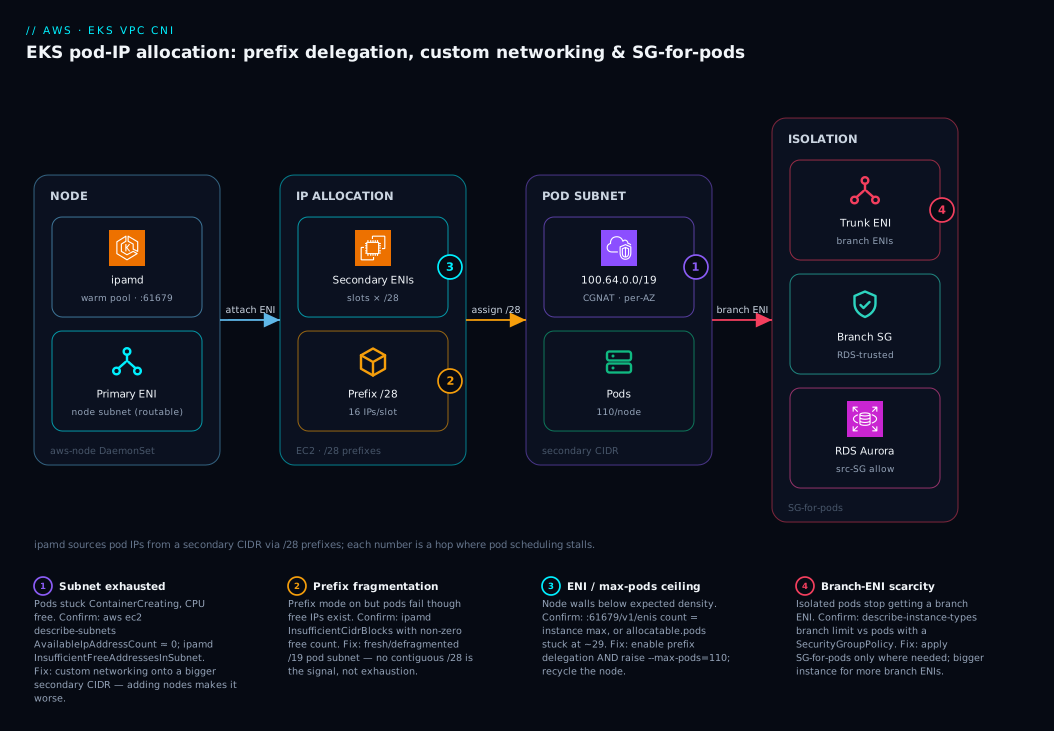
The diagram traces a single pod-IP request from the moment the scheduler binds a pod, left to right through the four zones where IPs are sourced, allocated, and can run out. Read it as the path ipamd actually walks. On the left, the node runs the aws-node DaemonSet whose ipamd owns the warm pool; its primary ENI stays on the routable node subnet (and in custom-networking mode serves no pods). In the center, ipamd reaches into EC2 to attach secondary ENIs carrying /28 prefixes drawn from the pod subnet — a 100.64.0.0/19 slice of the CGNAT secondary CIDR, not the routable space. For the one workload that needs isolation, a trunk ENI sprouts branch ENIs, each carrying the SG that the RDS target trusts. The badges mark the four hops where this stalls: subnet exhaustion, prefix fragmentation, the ENI ceiling, and branch-ENI scarcity.
Follow the flow and the diagnostic map falls out of it. The first question on any ContainerCreating is “which ceiling did I hit?” — and the zone where the request died tells you which: a full pod subnet (badge 1) versus no contiguous /28 (badge 2) are different fixes (custom networking onto a bigger CIDR versus a fresh, defragmented subnet), even though kubectl describe pod shows the same event for both. The legend narrates each badge as symptom, the exact command that confirms it, and the fix — so you localize the failure to one hop and act, instead of adding nodes and making it worse.
Real-world scenario
Meridian Pay, a fintech platform team, ran a shared-services EKS cluster in a /22 VPC — the largest block their networking team would carve from a Transit-Gateway-connected supernet, because every routable IP was inventory shared with on-prem. The cluster carried about 40 microservices across three node subnets (/24 each, ~251 usable). They were at 180 nodes when payments rollouts started failing: nodes had free CPU and memory, but the three node subnets were exhausted. New pods stuck in ContainerCreating with failed to assign an IP address to container, and scaling the node group — the on-call reflex — made it worse, because every new node grabbed a warm-pool ENI from the already-empty subnets.
Worse, one workload made the incident two-headed. The ledger service needed a dedicated security group because the RDS Aurora cluster it called only trusted a specific source SG, and the team had been hairpinning ledger traffic through an internal NLB to fake an acceptable source. That NLB was both a latency tax and a single point of failure, and it had nothing to do with the IP shortage — except that both problems traced back to the node SG being the only network identity a pod could have.
The first move was diagnosis, not action. They pulled ipamd logs and saw InsufficientFreeAddressesInSubnet — not InsufficientCidrBlocks — confirming true subnet exhaustion rather than prefix fragmentation, so the fix was more address space, not defragmentation. aws ec2 describe-subnets on the three node subnets returned AvailableIpAddressCount in single digits. Two changes fixed both problems without renumbering the VPC. First, they associated 100.64.0.0/16 as a secondary CIDR and stood up /19 pod subnets per AZ, then enabled custom networking with zone-named ENIConfigs and prefix delegation together. Pod IPs moved entirely off the routable space; node count for the same workload dropped because each node now held 110 pods instead of ~30. Second, they applied a SecurityGroupPolicy to the ledger pods so they got branch ENIs carrying the SG Aurora trusted — deleting the NLB hairpin entirely.
The combined add-on config they standardized on:
{
  "env": {
    "ENABLE_PREFIX_DELEGATION": "true",
    "WARM_PREFIX_TARGET": "1",
    "AWS_VPC_K8S_CNI_CUSTOM_NETWORK_CFG": "true",
    "ENI_CONFIG_LABEL_DEF": "topology.kubernetes.io/zone",
    "ENABLE_POD_ENI": "true",
    "POD_SECURITY_GROUP_ENFORCING_MODE": "standard"
  }
}
The one painful detail: enabling custom networking only affected new nodes, so they drained the fleet through a Karpenter-driven node rollout over a weekend rather than in place. Six months later the routable subnets sat below 15% utilization, node count for the same workload had fallen from 180 to roughly 60, and the ledger team had a clean SG boundary with no NLB hairpin. The retro line on the wall: “ContainerCreating with free CPU is an address-space incident, not a compute one — and the fix is the source or the unit of the IP, never more nodes.”
The incident as a timeline, because the order of moves is the lesson:
| Time | Symptom | Action taken | Effect | What it should have been |
|---|---|---|---|---|
| T+0 | Pods ContainerCreating, CPU free |
(alert fires on scheduling lag) | — | Ask: which ceiling — subnet or ENI? |
| T+10m | More pods stuck | Scale node group +20 | Worse (new nodes drain subnet) | Don’t add nodes blind |
| T+30m | Rollout fully stalled | Read ipamd logs |
InsufficientFreeAddressesInSubnet |
This was the breakthrough |
| T+40m | Root cause clear | describe-subnets → single-digit free |
Subnet exhaustion confirmed | — |
| T+1h | Plan formed | Associate 100.64.0.0/16, build pod subnets |
Address space secured | Correct first fix |
| T+2h | Mitigating | Enable custom networking + prefix delegation | New nodes pull pod IPs off CGNAT | — |
| Weekend | Rolled out | Karpenter drain of full fleet | 180 → ~60 nodes, routable freed | Recycle is mandatory |
| +1 week | Hardened | SecurityGroupPolicy on ledger; delete NLB |
Clean RDS boundary | The structural fix |
Advantages and disadvantages
The VPC CNI’s “every pod gets a real VPC IP” model is both why EKS networking is so simple to reason about and why it runs out of addresses. Weigh it honestly:
| Advantages (why this model helps you) | Disadvantages (why it bites) |
|---|---|
| Pods are first-class VPC citizens — real IPs, security groups, flow logs, no overlay to debug | Pod IPs consume routable VPC address space, which exhausts fast at scale |
| Prefix delegation multiplies density 6–10× on small nodes with one env change | Prefix mode needs contiguous /28 blocks; fragmented subnets fail to allocate |
| Custom networking moves pod IPs off routable space without renumbering the VPC | Custom networking wastes the primary ENI and only affects newly launched nodes |
| Security groups for pods give true per-workload network identity (no NLB hairpins) | Branch ENIs are a far smaller budget than max-pods; Nitro-only |
| WARM targets are tunable, so you can trade idle IPs for fewer EC2 calls | Misconfigured WARM targets silently hoard IPs or add latency to pod creation |
| IPv6 mode eliminates the whole problem class | IPv6 is permanent at creation and needs translation for IPv4-only endpoints |
Everything is observable via ipamd metrics and CloudWatch subnet counts |
The default dashboards show none of it — exhaustion is invisible until pods stall |
The model is right when you want pods to be ordinary VPC endpoints — reachable, securable, and auditable like any EC2 ENI — and you are willing to plan address space deliberately. It bites hardest on IPv4-constrained hybrid networks, high-density clusters of small pods, and teams that deploy with defaults and never tune WARM targets or raise --max-pods. Every disadvantage here is manageable — but only if you know the ceiling exists before you hit it, which is the entire point of this article.
Going deeper: why freed IPs don’t come back to the subnet
Everything above is about allocation. The advanced surprise is de-allocation — and it is where a subnet stays drained long after the load that drained it is gone. When a pod is deleted, ipamd does not immediately hand its IP back to EC2 and the subnet. The address first sits in a short cooldown cache (roughly 30 seconds) so a just-freed IP is not instantly reused by a different pod — a safety margin against connection-tracking races. Only after cooldown does the IP return to the node’s warm pool, and only when that pool exceeds the node’s WARM_* target by a whole ENI or prefix does ipamd release the block back to EC2. A node that spiked to 100 pods and drained back to 10 can therefore keep most of its IPs attached — the subnet does not refill just because the pods left.
Prefix delegation sharpens this into a bin-packing problem. A /28 prefix is released as a unit: EC2 takes it back only when all sixteen of its addresses are free. So a single long-lived pod whose IP falls in an otherwise-empty prefix pins the whole /28 — fifteen idle addresses held hostage by one pod. Under churn, pods scatter across prefixes and a node can hold far more prefixes than its live pod count suggests, quietly inflating subnet pressure. This is why WARM_IP_TARGET + MINIMUM_IP_TARGET (which bound how many loose IPs a node keeps) often beat WARM_PREFIX_TARGET on IP-starved clusters, and why draining-and-recycling nodes is the only way to fully reclaim stranded prefixes.
| Event | Secondary-IP mode | Prefix-delegation mode |
|---|---|---|
| Pod deleted | IP → ~30 s cooldown → warm pool | IP → cooldown → warm pool; prefix stays attached |
| IP reusable by another pod | After cooldown | After cooldown (within the same prefix) |
| Block returned to EC2 / subnet | When free IPs exceed the WARM target by ≥1 ENI | Only when a whole /28 is entirely free |
| One lingering pod’s effect | Holds 1 IP | Pins all 16 IPs in its prefix |
| Full reclaim of stranded space | Recycle the node | Recycle the node |
The practical rule: measure awscni_assigned_ip_addresses against awscni_total_ip_addresses (not against your live pod count), and read a large gap after a scale-down as stranded prefixes, not a leak. On genuinely IP-tight clusters, prefer the IP-level warm targets and lean on node recycling to defragment.
Hands-on lab
Enable prefix delegation on a cluster, prove the density jump, then stand up custom networking onto a CGNAT secondary CIDR and watch a pod get an IP from it. Free-tier-adjacent (EKS control plane and a couple of small nodes cost a few rupees per hour; tear down at the end). Run in a shell with aws, kubectl, eksctl, and jq.
Step 1 — Point at a cluster and confirm the current (secondary-IP) ceiling.
CLUSTER=lab-eks
REGION=us-east-1
aws eks update-kubeconfig --name $CLUSTER --region $REGION
kubectl get node -o custom-columns='NODE:.metadata.name,MAXPODS:.status.allocatable.pods'
# On m5.large you'll see ~29 — the secondary-IP number.
Step 2 — Enable prefix delegation on the managed add-on (survives upgrades).
aws eks update-addon --cluster-name $CLUSTER --addon-name vpc-cni \
  --resolve-conflicts OVERWRITE \
  --configuration-values '{"env":{"ENABLE_PREFIX_DELEGATION":"true","WARM_PREFIX_TARGET":"1"}}'
kubectl rollout status ds/aws-node -n kube-system
Expected: the aws-node DaemonSet rolls and reaches Ready on every node.
Step 3 — Confirm prefixes (not just IPs) are now attached.
POD=$(kubectl get pod -n kube-system -l k8s-app=aws-node -o jsonpath='{.items[0].metadata.name}')
kubectl exec -n kube-system $POD -c aws-node -- \
  curl -s http://localhost:61679/v1/enis | jq '.ENIs[].IPv4Prefixes'
# Expected: arrays of /28 prefixes appear, e.g. [{"address":"100.64.3.0/28"}, ...]
Step 4 — Recycle one node with raised max-pods (Karpenter or a new node group). For a managed node group, update the launch template bootstrap:
# AL2 bootstrap extra args for the launch template user data
--use-max-pods false --kubelet-extra-args '--max-pods=110'
After the node rolls, re-run Step 1: MAXPODS should now read 110.
Step 5 — Add a secondary CIDR and a pod subnet (custom networking).
VPC=$(aws eks describe-cluster --name $CLUSTER --query cluster.resourcesVpcConfig.vpcId --output text)
aws ec2 associate-vpc-cidr-block --vpc-id $VPC --cidr-block 100.64.0.0/16
SUBNET=$(aws ec2 create-subnet --vpc-id $VPC --cidr-block 100.64.0.0/19 \
  --availability-zone ${REGION}a --query Subnet.SubnetId --output text)
echo "pod subnet: $SUBNET"
Step 6 — Turn on custom networking and create the ENIConfig.
kubectl set env daemonset aws-node -n kube-system \
  AWS_VPC_K8S_CNI_CUSTOM_NETWORK_CFG=true \
  ENI_CONFIG_LABEL_DEF=topology.kubernetes.io/zone

NODE_SG=$(aws eks describe-cluster --name $CLUSTER \
  --query cluster.resourcesVpcConfig.clusterSecurityGroupId --output text)

cat <<EOF | kubectl apply -f -
apiVersion: crd.k8s.amazonaws.com/v1alpha1
kind: ENIConfig
metadata:
  name: ${REGION}a
spec:
  subnet: ${SUBNET}
  securityGroups:
    - ${NODE_SG}
EOF
Step 7 — Recycle a node, schedule a pod, and confirm its IP is on the CGNAT CIDR.
# After a node in us-east-1a is recycled so it picks up custom networking:
kubectl run netcheck --image=public.ecr.aws/docker/library/busybox:1.36 \
  --overrides='{"spec":{"nodeSelector":{"topology.kubernetes.io/zone":"'${REGION}'a"}}}' \
  -- sleep 3600
kubectl get pod netcheck -o wide
# Expected: pod IP is in 100.64.0.0/19; the NODE's IP is still in the routable subnet.
Validation checklist. You raised density from ~29 to 110 with one add-on change, proved prefixes are attached via the ipamd introspection endpoint, then moved pod IPs entirely off routable space onto a CGNAT secondary CIDR — and saw a pod land there while its node stayed routable. What each step proves:
| Step | What you did | What it proves | Real-world analogue |
|---|---|---|---|
| 1 | Read allocatable.pods |
The secondary-IP ceiling is real and low | First “why won’t pods schedule?” |
| 2–3 | Enable prefix delegation; see prefixes | The unit changed from IP to /28 |
The density fix |
| 4 | Raise --max-pods |
The kubelet cap must be raised too | The forgotten half of prefix mode |
| 5–6 | Secondary CIDR + ENIConfig | Pod IPs can come from elsewhere | Conserving routable inventory |
| 7 | Pod IP on 100.64.x |
Custom networking actually took effect | The endgame in production |
Cleanup (avoid lingering charges).
kubectl delete pod netcheck --ignore-not-found
kubectl delete eniconfig ${REGION}a
aws ec2 delete-subnet --subnet-id $SUBNET
aws ec2 disassociate-vpc-cidr-block --association-id <assoc-id-from-describe-vpcs>
# If the cluster was created only for this lab:  eksctl delete cluster --name $CLUSTER
Cost note. The EKS control plane is ~$0.10/hour (~₹9/hour); two m5.large nodes are a few rupees per hour. An hour of this lab is well under ₹150. Deleting the cluster (or just the nodes) stops everything — secondary CIDRs and subnets are free, but the cluster and EC2 are not.
Practice challenges
Six graded exercises, beginner to advanced — mostly pencil-and-paper IP arithmetic you can check without a cluster. Every formula was taught above; each solution shows the working and a one-line “why.” Write your own answer before revealing.
1. (Beginner) Max-pods in secondary-IP mode. A c5.large has 3 ENIs and 10 IPs per ENI. How many pods can it run in the default (secondary-IP) VPC CNI mode?
<details> <summary>Show solution</summary>
(ENIs × (IPs_per_ENI − 1)) + 2 = (3 × 9) + 2 = 29. Subtract one IP per ENI for the ENI’s own primary address; add 2 for host-network pods (kube-proxy, aws-node) that consume no secondary IP. Why: ENIs and IPs-per-ENI are fixed by instance type — this is the ceiling you hit before CPU.
</details>
2. (Beginner) Usable IPs in a subnet. You carve a /24 pod subnet. It holds 256 addresses — but how many can pods actually use, and why not 256?
<details> <summary>Show solution</summary>
251. AWS reserves 5 addresses in every subnet regardless of size: the network address, the VPC router, the Amazon-provided DNS address, one reserved for future use, and the broadcast address. So usable = 256 − 5 = 251. Why: every sizing calculation starts from usable, not total — forgetting the five is a classic off-by-a-handful. </details>
3. (Intermediate) The density that didn’t materialize. You turned on prefix delegation across a fleet of t3.medium nodes, but kubectl get node still shows allocatable.pods: 17. What should the number be, and what did you forget?
<details> <summary>Show solution</summary>
It should be 110 (prefix mode multiplies each slot ×16, then EKS caps the recommendation at 110 below 30 vCPUs). 17 is the secondary-IP number for a t3.medium — (3 × 5) + 2. You forgot to raise the kubelet --max-pods; the default bootstrap still computes it for secondary-IP mode. Fix: --use-max-pods false --kubelet-extra-args '--max-pods=110' (AL2), or the AL2023/Bottlerocket/Karpenter equivalent, then recycle the node. Why: prefix delegation is two knobs — the CNI allocation unit and the kubelet cap.
</details>
4. (Intermediate) Size the pod subnet. You will run 50 m5.large nodes in one AZ, each packed to 110 pods via prefix delegation, with WARM_PREFIX_TARGET=1. What is the smallest pod-subnet CIDR that comfortably holds every pod IP?
<details> <summary>Show solution</summary>
Each node needs ceil(110 / 16) = 7 prefixes to serve 110 IPs, plus 1 warm prefix = 8 /28s = 128 IPs reserved per node. Across 50 nodes: 50 × 128 = 6,400 IPs. A /20 gives only ~4,091 usable — too small. A /19 (8,192 addresses, ~8,190 usable) holds 6,400 with headroom. Answer: /19 — exactly the lesson’s recommended default. Why: size for reserved prefixes (whole /28s), not live pods, or the next spike exhausts you.
</details>
5. (Advanced) Branch-ENI budget. On an m5.2xlarge (≈38 branch ENIs) you deploy 60 pods that all match a single SecurityGroupPolicy. What happens?
<details> <summary>Show solution</summary>
Only about 38 pods get a branch ENI and their own SG; the remaining ~22 stall in ContainerCreating — branch-ENI exhaustion, a separate and far smaller budget than max-pods. The pods are healthy; there is simply no branch ENI left to give them. Fix: apply SecurityGroupPolicy only to workloads that genuinely need isolation, or move dense isolated workloads to a larger instance with more branch ENIs. Why: isolation is rationed by branch ENIs, not by pod count — budget it like a scarce resource.
</details>
6. (Advanced) Diagnose the exhaustion, then fix without renumbering. A /22 VPC carved into three /24 node subnets (≈251 usable each) runs 180 m5.large nodes in default secondary-IP mode, each holding ~29 pod IPs. Show the arithmetic of why pods stopped scheduling, and give the fix that does not renumber the VPC.
<details> <summary>Show solution</summary>
Demand: 180 nodes × ~29 IPs ≈ 5,220 pod IPs. Supply: three /24s = 3 × 251 = 753 usable addresses (and the nodes’ own primary IPs eat into that too). Demand exceeds supply ~7×, so the subnets exhaust and new pods hang in ContainerCreating with CPU free — ipamd logs InsufficientFreeAddressesInSubnet. Fix without renumbering: enable custom networking to move pod IPs onto a 100.64.0.0/16 secondary CIDR (non-advertised CGNAT space), paired with prefix delegation to raise density and drop node count. Adding nodes makes it worse — each new node claims warm-pool IPs from the same empty subnets. Why: ContainerCreating + free CPU is an address-space incident — change the source or unit of the IP, never add nodes.
</details>
Common beginner mistakes
These are misconceptions, not symptoms — the wrong mental model a beginner brings, why it is wrong, and the model to replace it with. (The symptom → confirm → fix playbook is the next section.)
- “Pods won’t schedule — add more nodes.” The reflex assumes a scheduling failure means a compute shortage. But when the block is IP address space, a new node grabs a warm pool of IPs from the same exhausted subnet and makes it worse — and the autoscaler, seeing free CPU, will not add nodes anyway. Right model:
ContainerCreatingwith free CPU is an address-space incident; check the subnet’s free-IP count first, then change the source or unit of the IP. - “I enabled prefix delegation, so density went up.” Setting
ENABLE_PREFIX_DELEGATION=truechanges what the CNI allocates, but the node still advertises the oldallocatable.podsbecause the kubelet--max-podswas computed by the bootstrap for secondary-IP mode. Right model: prefix delegation is two independent knobs — the CNI allocation unit and the kubelet cap — and you must raise both, then recycle the node. - “Custom-networking pods use a non-routable CIDR, so they’re isolated/secure.”
100.64.0.0/10is merely non-advertised; those pods are still reachable inside the VPC and across peering / Transit Gateway routes. Right model: isolation comes from security groups and NetworkPolicy, never from an address being “non-routable.” The CGNAT range saves routable inventory, not security. - “I set the env with
kubectl set env, so the cluster is configured.” DaemonSet env is wiped the next time the managed VPC CNI add-on upgrades, silently reverting you to secondary-IP mode. Right model: the add-on’sconfiguration-valuesis the source of truth; set feature flags there so they survive upgrades. - “Bigger warm targets are safer, so I’ll crank them up.” A larger warm pool hoards IPs on idle nodes and drains the shared subnet faster — and setting
WARM_PREFIX_TARGETandWARM_IP_TARGETtogether makes them fight (one is ignored). Right model: pick one warm model; the warm pool trades idle IPs for fewer EC2 calls, so tune it to your IP budget, not to “more is safer.” - “I flipped on custom networking — done.” The change affects only newly launched nodes; every existing node keeps putting pods on the node subnet until it is recycled. Right model: config plus a deliberate node roll (Karpenter drain or rolling update) — the recycle is mandatory, not optional.
Common mistakes & troubleshooting
This is the playbook — the part you bookmark. First as a scannable table you can read at 02:14, then the highest-impact entries expanded with the full confirm-command detail.
| # | Symptom | Root cause | Confirm (exact cmd) | Fix |
|---|---|---|---|---|
| 1 | Pods ContainerCreating, CPU/mem free, autoscaler quiet |
Subnet out of free IPs | aws ec2 describe-subnets --subnet-ids subnet-x --query 'Subnets[].AvailableIpAddressCount' |
Custom networking onto a secondary CIDR; adding nodes won’t help |
| 2 | Prefix mode on, but pods still fail with InsufficientCidrBlocks |
No contiguous /28 (fragmented subnet) |
ipamd.log shows InsufficientCidrBlocks; compare to free-IP count |
Fresh/defragmented subnet; or larger pod subnet |
| 3 | Enabled prefix delegation but density didn’t rise | --max-pods still at secondary-IP value |
kubectl get node -o custom-columns=...allocatable.pods shows ~29 |
Set --max-pods=110 in bootstrap/launch template; recycle |
| 4 | Custom networking enabled, existing nodes unchanged | Only new nodes pick it up | Pod IP still in node subnet on old nodes | Recycle nodes (Karpenter/rolling update) |
| 5 | Node hits a wall well below max-pods | ENI limit reached for instance type | curl :61679/v1/enis ENI count = instance max |
Prefix delegation or a bigger instance |
| 6 | WARM tuning ignored, IPs still hoarded | WARM_IP_TARGET set and WARM_PREFIX_TARGET set |
kubectl set env ... --list shows both |
Use one model only |
| 7 | SG-for-pods pods can’t reach DNS or fail health checks | Cluster shared SG omitted from policy | kubectl describe sgp lacks shared SG |
Add sg-0clustersharedsg to groupIds |
| 8 | SG-for-pods pods have no internet egress | POD_SECURITY_GROUP_ENFORCING_MODE=strict |
env shows strict; egress to 0.0.0.0/0 fails |
Set mode standard (SNAT via primary ENI) |
| 9 | Branch ENIs stop attaching; some isolated pods stuck | Branch-ENI budget exhausted | describe-instance-types branch limit vs pods w/ policy |
Apply policy only where needed; bigger instance |
| 10 | Large fleet: NetworkInterfaceLimitExceeded at account level |
Region ENI quota hit | Service Quotas L-DF5E4CA3 near limit |
Request a quota increase |
| 11 | After add-on upgrade, density/custom-networking reverted | Env set on DaemonSet, not add-on config | aws eks describe-addon config lacks env |
Set env via add-on configuration-values |
| 12 | aws-node CrashLoopBackOff, no pod gets an IP |
CNI/IRSA perms or version mismatch | kubectl logs -n kube-system ds/aws-node |
Fix IRSA policy; match add-on version to cluster |
| 13 | Pods on new nodes wait seconds for an IP under burst | WARM targets too low → EC2 call in hot path | ipamd.log shows on-demand AssignPrivateIpAddresses |
Raise WARM_IP_TARGET/WARM_PREFIX_TARGET |
| 14 | IPv6 cluster: pods can’t reach an IPv4-only SaaS/RDS | No egress translation for IPv4-only target | Pod has only an IPv6 addr; target is v4-only | NAT64/DNS64 egress path; or dual-stack target |
The expanded form, with full reasoning for the entries that bite hardest:
1. Pods stick in ContainerCreating with free CPU and a quiet autoscaler.
Root cause: The subnet is out of free IPs. The autoscaler/Karpenter sees no CPU/memory pressure, so it adds nothing — and even if it did, new nodes would draw warm-pool IPs from the same empty subnet.
Confirm: aws ec2 describe-subnets --subnet-ids subnet-x --query 'Subnets[].AvailableIpAddressCount' near zero; ipamd.log shows InsufficientFreeAddressesInSubnet.
Fix: Custom networking onto a secondary CIDR (move pod IPs off the routable subnet). Adding nodes is the wrong reflex.
2. Prefix delegation is on, but pods fail with InsufficientCidrBlocks even though the subnet has free IPs.
Root cause: Prefix mode needs a contiguous /28. A subnet fragmented by churn can have plenty of scattered free addresses and still not offer 16 in a row.
Confirm: ipamd.log line InsufficientCidrBlocks; cross-check AvailableIpAddressCount (it’ll be non-trivial) — the mismatch is the signature.
Fix: Use a fresh, generously sized pod subnet, or defragment by recycling nodes off the old one. This is why custom networking onto a clean /19 is the durable answer.
3. You enabled prefix delegation but per-node density didn’t change.
Root cause: The kubelet --max-pods is still computed for secondary-IP mode by the default bootstrap, so the node advertises ~29 allocatable pods no matter how many IPs the CNI can attach.
Confirm: kubectl get node -o custom-columns='NODE:.metadata.name,MAXPODS:.status.allocatable.pods' shows the low number.
Fix: Pass --use-max-pods false --kubelet-extra-args '--max-pods=110' (AL2) or the equivalent for AL2023/Bottlerocket/Karpenter, then recycle the node.
4. Custom networking is enabled but existing nodes still put pods on the node subnet.
Root cause: Custom networking applies only to nodes launched after you enable it. The CNI does not retroactively move pods off existing nodes.
Confirm: kubectl get pod -o wide on an old node shows pod IPs in the node subnet, not the CGNAT range.
Fix: Recycle the fleet — a Karpenter-driven drain or a managed-node-group rolling update. Plan it; it is mandatory, not optional.
9. Branch ENIs stop attaching and some isolated pods stall.
Root cause: The branch-ENI budget (separate and far smaller than max-pods) is exhausted — too many pods matched a SecurityGroupPolicy on one instance type.
Confirm: aws ec2 describe-instance-types --instance-types m5.large --query 'InstanceTypes[].NetworkInfo' for the branch limit; count pods with a matching policy on the node.
Fix: Apply SecurityGroupPolicy only to workloads that genuinely need isolation; move dense isolated workloads to a larger instance type with more branch ENIs.
Decoding ipamd allocation failures
When pods stick in ContainerCreating with failed to assign an IP address to container, the exact ipamd error string tells you which ceiling you hit — and the fixes diverge sharply. Walk the log at /var/log/aws-routed-eni/ipamd.log (or via kubectl logs -n kube-system ds/aws-node):
ipamd / EC2 error |
Meaning | What it is NOT | Confirm | Fix |
|---|---|---|---|---|
InsufficientFreeAddressesInSubnet |
Subnet has no free IPs | Not fragmentation | describe-subnets free count ≈ 0 |
Custom networking / bigger CIDR |
InsufficientCidrBlocks |
No contiguous /28 for a prefix |
Not true exhaustion | Free count > 0 but no /28 |
Fresh/defragmented subnet |
NetworkInterfaceLimitExceeded |
Region ENI quota hit | Not a subnet issue | Service Quotas L-DF5E4CA3 |
Request quota increase |
| ENI count = instance max (no error) | Per-instance ENI ceiling | Not a quota issue | :61679/v1/enis count |
Prefix delegation / bigger instance |
failed to assign IP: …RequestLimitExceeded |
EC2 API throttling | Not exhaustion | Throttle metrics climbing | Raise WARM targets (fewer calls) |
add cmd: failed to assign an IP (generic) |
Catch-all wrapper | — | Read the cause line above it | Match the specific cause |
The four-step triage order when you do not yet know which it is:
| # | Check | Command | If true → |
|---|---|---|---|
| 1 | ipamd error class |
kubectl logs -n kube-system ds/aws-node | grep -iE 'insufficient|limit' |
Read the specific string above |
| 2 | Subnet free IPs | aws ec2 describe-subnets --subnet-ids subnet-x --query 'Subnets[].AvailableIpAddressCount' |
Near 0 → custom networking |
| 3 | ENI limit | kubectl exec ... -- curl -s :61679/v1/enis | jq '.ENIs | length' |
= instance max → prefix/bigger node |
| 4 | Account quota | aws service-quotas get-service-quota --service-code ec2 --quota-code L-DF5E4CA3 |
Near limit → quota increase |
Verify
After enabling the features, confirm the data plane actually behaves rather than trusting the config:
# 1. Confirm prefix delegation: ENIs should show IPv4 prefixes, not just IPs
kubectl exec -n kube-system aws-node-xxxxx -c aws-node -- \
  curl -s http://localhost:61679/v1/enis | jq '.ENIs[].IPv4Prefixes'

# 2. Confirm a pod got an IP from the secondary (custom networking) CIDR
kubectl get pod ledger-api-xxxx -n payments -o wide
#   the pod IP should be in 100.64.0.0/x, the node IP in the routable subnet

# 3. Confirm security groups for pods: branch ENI exists with the right SG
kubectl describe pod ledger-api-xxxx -n payments | grep -A2 'vpc.amazonaws.com/pod-eni'

# 4. Watch ipamd allocate without errors
kubectl logs -n kube-system aws-node-xxxxx -c aws-node | grep -i 'prefix\|assign' | tail -20
The CNI metrics are exported on 127.0.0.1:61678/metrics (Prometheus). The signals worth alarming on:
| Metric / source | What it tells you | Alert threshold | Why it’s leading |
|---|---|---|---|
awscni_assigned_ip_addresses (per node) |
Pods approaching the node IP ceiling | > 90% of awscni_total_ip_addresses |
Catches density limits before stalls |
awscni_total_ip_addresses (per node) |
IPs the node can currently serve | (compare to assigned) | Denominator for the ratio above |
awscni_ipamd_error_count |
ipamd allocation errors |
> 0 sustained | First sign of exhaustion/fragmentation |
Subnet AvailableIpAddressCount (CloudWatch) |
Free IPs per subnet | < 10% of subnet | The VPC-level early warning |
awscni_eni_allocated vs max |
ENIs attached vs ceiling | at instance max | Confirms ENI-limit (not subnet) cause |
awscni_no_available_ip_addresses |
Times a pod found no free IP | > 0 | Direct hit-the-wall counter |
awscni_ec2api_latency_seconds |
Latency of EC2 assign/attach calls | sustained high | Throttling / hot-path EC2 calls |
EC2 RequestLimitExceeded (CloudTrail) |
API throttling on assigns | any spike | WARM targets too low |
A CloudWatch Metrics Insights query for pod density approaching the node ceiling:
-- pod density approaching the node ceiling, via Container Insights
SELECT AVG(awscni_assigned_ip_addresses)
FROM SCHEMA("ContainerInsights", ClusterName)
WHERE ClusterName = 'prod-use1'
Best practices
- Size pod subnets for contiguous
/28prefixes from day one. A/19per AZ is the sane default; never run prefix delegation on fragmented legacy subnets that cannot offer 16 contiguous addresses. - Set CNI env via the managed add-on
configuration-values, not the DaemonSet. Env set withkubectl set envis wiped on the next add-on upgrade; add-on config survives. - Choose exactly one warm model.
WARM_PREFIX_TARGETorWARM_IP_TARGET/MINIMUM_IP_TARGET— never both, or they silently fight and one is ignored. - Raise
--max-podswhenever you enable prefix delegation. The default bootstrap computes it for secondary-IP mode; without the override the density gain never materializes. - Associate the secondary CIDR and build per-AZ pod subnets before enabling custom networking. And recycle every existing node afterward — custom networking only affects newly launched nodes.
- Name
ENIConfigs for the zone and setENI_CONFIG_LABEL_DEF=topology.kubernetes.io/zone. This removes manual node labeling and is the only maintainable pattern at scale. - Apply
SecurityGroupPolicyonly where isolation is genuinely required. Branch ENIs are a scarce, separate budget; blanket policies exhaust it and add no value for pods that are happy on the node SG. - Always include the cluster shared SG in any
SecurityGroupPolicy. Omitting it breaks DNS and node-to-pod health checks — a self-inflicted outage. - Set
POD_SECURITY_GROUP_ENFORCING_MODE=standardwhen isolated pods need internet egress. It SNATs off-VPC traffic through the primary ENI;strictdoes not. - Alarm on
awscni_assigned_ip_addresses(per node) and subnetAvailableIpAddressCount. These are the only signals that catch IP pressure before pods stop scheduling; standard dashboards show neither. - Evaluate IPv6 for greenfield clusters. It eliminates the entire problem class — but only at creation time, and only if you can translate to IPv4-only endpoints.
- Manage the whole CNI config (env + add-on version + ENIConfigs) as Terraform. A reviewed PR is the difference between a planned density change and a 2 a.m. surprise after an upgrade.
Security notes
- Security groups for pods are a real isolation boundary — use them for least privilege, not convenience. Give the ledger pod the narrow SG that RDS trusts and nothing more; do not reuse a broad node SG as a pod SG just because it is handy.
- Keep the cluster shared SG minimal but present. It must allow DNS (UDP/TCP 53 to CoreDNS) and the kubelet/health-check paths; every
SecurityGroupPolicyshould include it, but it should not be a catch-all “allow VPC.” - Non-routable pod CIDRs are not a security control.
100.64.0.0/10pods are still reachable within the VPC and via peering/Transit Gateway routes — isolation comes from SGs and NetworkPolicy, not from the address being “non-routable.” - Pair security groups for pods with Kubernetes NetworkPolicy. SGs gate L3/L4 at the ENI; NetworkPolicy (via the VPC CNI’s network-policy engine or Cilium) expresses pod-identity-aware rules. Use both; they are complementary, not redundant. See Kubernetes Network Policies with Cilium L7 & Default-Deny.
- Lock the
ipamdintrospection endpoint to localhost.:61679/:61678are bound to127.0.0.1by design; never expose them via a hostPort or proxy — they reveal the node’s full ENI/IP topology. - Scope the CNI’s IAM via IRSA or Pod Identity, not the node role. The
aws-nodeservice account needsAmazonEKS_CNI_Policy(assign/unassign IPs, create/attach ENIs) — grant it to the SA, not the whole node, so a compromised pod cannot manipulate ENIs. See EKS: From IRSA to Pod Identity for Fine-Grained Access. - Watch the blast radius of
POD_SECURITY_GROUP_ENFORCING_MODE=standard. SNAT via the primary ENI means egress is governed by the node SG for off-VPC traffic — make sure that SG’s egress is itself least-privilege.
The security controls that also prevent IP/SG incidents — secure and reliable pull the same way here:
| Control | Mechanism | Secures against | Also prevents |
|---|---|---|---|
| Per-pod SG | SecurityGroupPolicy + branch ENI |
Over-broad node SG reaching RDS | NLB hairpins (a fragile SPOF) |
| Shared SG in every policy | groupIds includes cluster SG |
— | Broken DNS/health → false outages |
| IRSA/Pod Identity for CNI | SA-scoped AmazonEKS_CNI_Policy |
Pod manipulating ENIs/IPs | Node-role privilege creep |
| Localhost-only introspection | :61679 bound to loopback |
Topology disclosure | — |
| NetworkPolicy + SG-for-pods | Cilium/VPC-CNI policy engine | Lateral movement | Accidental cross-namespace reach |
| Least-privilege node egress SG | Node SG egress rules | Data exfiltration via SNAT | standard-mode egress surprises |
Cost & sizing
The bill drivers here are subtle — the CNI itself is free, but the choices it forces have real cost and savings:
- Node count is the dollar lever, and density is how you pull it. Prefix delegation packing a
t3.mediumfrom 17 to 110 pods can cut your node count 3–6×, and EC2 is the dominant EKS cost. This is the single biggest saving in the whole article — fewer, denser nodes for the same workload. - Routable IP space is “free” until it is a project. You do not pay AWS for VPC addresses, but exhausting a routable CIDR shared with on-prem can mean a months-long renumbering or a Transit-Gateway redesign. Custom networking onto a CGNAT secondary CIDR is free and sidesteps that entirely — a near-zero-cost move with large avoided cost.
- Secondary CIDRs and subnets cost nothing. Associating
100.64.0.0/16and carving/19s adds no charge. The only related cost is if pod egress goes through a NAT Gateway (per-hour + per-GB) — but that is an egress-architecture choice, not a custom-networking one. - Branch ENIs are free but capacity-bounded. Security groups for pods add no direct charge; the “cost” is the scarce branch-ENI budget per instance, which can push you to a larger (pricier) instance type if many pods need isolation.
- IPv6 mode has no IP-related charge and removes WARM-tuning waste. On greenfield, it can be the cheapest long-term posture; the only cost is any NAT64/egress path for IPv4-only targets.
A rough monthly picture for a mid-size cluster (~60 nodes after densification, us-east-1), to ground the trade-offs:
| Cost driver | What you pay for | Rough INR / month | What it buys / saves | Watch-out |
|---|---|---|---|---|
| EKS control plane | $0.10/hr per cluster | ~₹6,500 | Managed control plane | Per-cluster; multi-cluster multiplies |
| Densified nodes (60× m5.large) | EC2 on-demand/Savings Plan | ~₹4.0–5.0L | 3–6× fewer nodes vs no prefix mode | Right-size after densifying |
| Same workload, no prefix mode (~180 nodes) | EC2 for the fragmented fleet | ~₹12–15L | (the cost you avoid) | The “do nothing” baseline |
| Secondary CIDR + pod subnets | Nothing | ₹0 | Frees routable IP inventory | NAT GW only if pods egress |
| NAT Gateway (if pods egress) | Hourly + per-GB | ~₹3,000–8,000+ | Internet egress for pods | Per-GB adds up at scale |
| Security groups for pods | Nothing (branch ENIs free) | ₹0 | Per-workload SG; kills NLB hairpin | May force bigger instances |
| CloudWatch Container Insights | Per-metric ingestion | ~₹2,000–6,000 | IP-pressure alarms | Scope metrics to control cost |
The headline: the densification from prefix delegation is usually a net cost reduction (fewer nodes), and custom networking is free. Money is rarely the constraint on these changes — address space and operational risk are.
Interview & exam questions
1. Why does a default EKS cluster run out of IPs before it runs out of CPU? Because the VPC CNI gives every pod a real, routable secondary IP from the node’s subnet, and that draws from a finite, shared VPC address pool that no standard dashboard surfaces. At scale, hundreds of nodes — each holding a warm pool of pre-allocated IPs — exhaust a small subnet while CPU and memory sit half-used.
2. Compute max-pods for an m5.large in secondary-IP mode and explain the formula. (ENIs × (IPs_per_ENI − 1)) + 2 = (3 × 9) + 2 = 29. ENIs and IPs-per-ENI are fixed by instance type; you subtract one IP per ENI for the ENI’s primary, and add 2 for host-network pods (kube-proxy, aws-node) that consume no secondary IP.
3. What does prefix delegation change, and what does it not change? It changes the unit of allocation from one IP to a /28 prefix (16 contiguous IPs) per ENI slot. It does not change the number of slots per ENI or the ENI count per instance. So density multiplies up to ×16 per ENI, capped in practice at the EKS recommendation of 110 (or 250) pods per node.
4. You enabled prefix delegation but density didn’t rise. Why? The kubelet --max-pods is still computed for secondary-IP mode by the default bootstrap, so the node advertises the low allocatable-pods number regardless of available IPs. You must pass --use-max-pods false --kubelet-extra-args '--max-pods=110' (or the AL2023/Bottlerocket/Karpenter equivalent) and recycle the node.
5. InsufficientFreeAddressesInSubnet vs InsufficientCidrBlocks — what’s the difference and the fix for each? The first means the subnet has no free IPs at all (true exhaustion → custom networking onto a bigger/secondary CIDR). The second means prefix mode could not find a contiguous /28 even though scattered IPs exist (fragmentation → a fresh, generously sized subnet). The free-IP count tells them apart: near-zero for the first, non-trivial for the second.
6. What problem does custom networking solve, and what does it cost you? It moves pod IPs off the node’s routable subnet onto a separate secondary CIDR (e.g. 100.64.0.0/10), conserving routable inventory without renumbering the VPC. The cost: the node’s primary ENI no longer serves pods (density drops by one ENI’s worth) and it only affects newly launched nodes, so you must recycle the fleet.
7. How does ENI_CONFIG_LABEL_DEF=topology.kubernetes.io/zone make custom networking maintainable? The CNI matches each node’s well-known zone label value to an ENIConfig named exactly for that zone, so you create one ENIConfig per AZ and never label nodes manually. New nodes in any AZ automatically pick the right pod subnet and SGs.
8. How do security groups for pods work under the hood, and what’s the real limit? The CNI creates a trunk ENI on the node and attaches branch ENIs (one per matched pod), each carrying the SGs from a SecurityGroupPolicy. The real constraint is the branch-ENI budget — far smaller than max-pods (≈9 on small types, 54+ on large) and Nitro-only — so isolation is rationed, not free.
9. An isolated (SG-for-pods) pod can’t reach the internet. What’s wrong and how do you fix it? The default POD_SECURITY_GROUP_ENFORCING_MODE=strict does not SNAT off-VPC traffic through the primary ENI, so branch-ENI pods have no egress path. Set the mode to standard, which SNATs internet-bound traffic via the node’s primary ENI while still enforcing the branch SG.
10. When would you choose IPv6 mode over prefix delegation + custom networking? On greenfield clusters with modern workloads, where the vast IPv6 space eliminates IP scarcity and all WARM-target tuning. You avoid it when you have IPv4 baggage (legacy partners, IPv4-only SaaS/RDS) needing an egress translation path, and remember it is permanent — set only at cluster creation.
11. Why is adding nodes the wrong reflex when pods won’t get IPs? Because the bottleneck is address space, not compute. New nodes each grab a warm-pool ENI of IPs from the same exhausted subnet, accelerating the shortage. The autoscaler also sees no CPU/memory pressure, so it would not add them anyway — the fix is the source or unit of the IP.
12. How do you make a prefix-delegation change survive a CNI add-on upgrade? Set the env (ENABLE_PREFIX_DELEGATION, WARM targets) via the managed add-on’s configuration-values (aws eks update-addon --configuration-values ... or the Terraform aws_eks_addon.configuration_values), not with kubectl set env on the DaemonSet — DaemonSet env is overwritten on the next add-on update.
These map to the AWS Certified Advanced Networking – Specialty (ANS-C01) — hybrid/VPC design, CIDR planning, EKS networking — and the container portions of AWS Certified Solutions Architect – Professional (SAP-C02). A compact cert-mapping for revision:
| Question theme | Primary cert | Objective area |
|---|---|---|
| ENI/IP math, prefix delegation | ANS-C01 | VPC & EKS networking internals |
Insufficient... decoding, exhaustion |
ANS-C01 | Troubleshoot network connectivity |
| Custom networking, secondary CIDRs | ANS-C01 / SAP-C02 | Hybrid IP conservation |
| Security groups for pods | SAP-C02 | Secure container workloads |
| IPv6 mode trade-offs | ANS-C01 | Dual-stack / IPv6 design |
| Add-on config durability | SAP-C02 | Operational excellence on EKS |
Quick check
- An
m5.largenode showsallocatable.pods: 29after you enabled prefix delegation. Density didn’t rise — what’s the one thing you forgot, and how do you confirm? - Pods are stuck in
ContainerCreatingwith free CPU. Theipamdlog saysInsufficientCidrBlocksand the subnet’sAvailableIpAddressCountis 140. Is the subnet exhausted? What’s the fix? - True or false: enabling custom networking immediately moves pods on existing nodes onto the secondary CIDR.
- An isolated pod using security groups for pods can reach RDS but not the internet. Name the setting to change and its value.
- You set both
WARM_PREFIX_TARGET=1andWARM_IP_TARGET=5. What happens?
Answers
- You forgot to raise the kubelet
--max-pods— the default bootstrap computes it for secondary-IP mode, so the node advertises ~29 no matter how many IPs the CNI can attach. Confirm withkubectl get node -o custom-columns='NODE:.metadata.name,MAXPODS:.status.allocatable.pods'; fix by passing--use-max-pods false --kubelet-extra-args '--max-pods=110'and recycling. - No — 140 free IPs means it is not exhausted; the problem is fragmentation (no contiguous
/28for a prefix). The fix is a fresh, generously sized pod subnet (or defragment by recycling nodes off the old one), not more address space.InsufficientFreeAddressesInSubnetwould be true exhaustion;InsufficientCidrBlocksis fragmentation. - False. Custom networking only affects newly launched nodes. Existing nodes keep putting pods on the node subnet until you recycle them (Karpenter drain or rolling node-group update).
- Set
POD_SECURITY_GROUP_ENFORCING_MODE=standard(default isstrict).standardSNATs off-VPC traffic through the node’s primary ENI so the isolated pod gets internet egress while still enforcing its branch-ENI SG. - They fight, and
WARM_PREFIX_TARGETis ignored. When IP-level targets (WARM_IP_TARGET/MINIMUM_IP_TARGET) are set, the CNI rounds up to whole prefixes to satisfy them and disregardsWARM_PREFIX_TARGET. Pick exactly one model.
Glossary
- VPC CNI (
aws-node) — the default EKS networking plugin, a DaemonSet that gives every pod a real VPC IP viaipamd. ipamd— the IP-address-management daemon inside eachaws-nodepod; attaches ENIs, assigns secondary IPs/prefixes, and maintains the warm pool.- ENI (Elastic Network Interface) — a virtual NIC on an EC2 instance; carries secondary IPs or
/28prefixes. Count per instance is fixed by type. - Secondary IP — an additional private IP assigned to an ENI beyond its primary; the unit of pod-IP allocation in default mode.
- Prefix delegation — assigning
/28prefixes (16 contiguous IPs) to ENI slots instead of single IPs, multiplying pod density up to ×16 per ENI. /28prefix — a block of 16 contiguous IPv4 addresses; the allocation unit in prefix-delegation mode. Requires contiguity in the subnet.- Warm pool — IPs/prefixes a node pre-allocates and holds idle so pod creation doesn’t wait on an EC2 API call.
WARM_PREFIX_TARGET— CNI env var: number of whole spare/28prefixes kept warm (default 1 in prefix mode).WARM_IP_TARGET/MINIMUM_IP_TARGET— CNI env vars for IP-level warm pooling and a provisioning floor; mutually exclusive in intent withWARM_PREFIX_TARGET.- Custom networking — putting pods on a separate secondary-CIDR subnet (via
ENIConfig) so pod IPs leave the routable node subnet. ENIConfig— a CRD naming the subnet and SGs for pod-carrying secondary ENIs; selected per node by a label, conventionally the zone.- Secondary CIDR — an additional CIDR block associated with a VPC (e.g.
100.64.0.0/16) used to host pod subnets. 100.64.0.0/10(CGNAT) — RFC 6598 shared address space, commonly used as the non-advertised secondary CIDR for pod IPs.- Security groups for pods — assigning a workload its own SG via a trunk ENI + per-pod branch ENIs, declared by a
SecurityGroupPolicy. - Trunk ENI / branch ENI — the parent interface and per-pod child interfaces that implement security groups for pods (Nitro-only); branch ENIs are a scarce, separate budget.
SecurityGroupPolicy— a CRD that selects pods (by label or service account) and the SGs their branch ENIs carry.POD_SECURITY_GROUP_ENFORCING_MODE— CNI env var (strict/standard);standardSNATs off-VPC traffic through the primary ENI for branch-ENI pods.- IPv6 mode — an EKS cluster mode giving each pod a globally unique IPv6 from a
/80per ENI; set only at cluster creation, eliminates IPv4 scarcity. InsufficientFreeAddressesInSubnet— theipamd/EC2 error meaning the subnet has no free IPs (true exhaustion).InsufficientCidrBlocks— the error meaning prefix mode found no contiguous/28even though scattered IPs exist (fragmentation).- max-pods — the kubelet’s cap on pods per node; must be raised manually to realize prefix-delegation density.
- DaemonSet — a Kubernetes workload that runs exactly one copy of a pod on every node; the VPC CNI (
aws-node) is deployed this way so each node has its ownipamd. WARM_ENI_TARGET— CNI env var for how many whole spare ENIs a node keeps warm (default 1); the coarsest warm-pool knob, superseded by IP/prefix targets when those are set.- SNAT (source NAT) — rewriting a packet’s source address as it leaves; here, branch-ENI pod traffic to the internet is SNAT’d through the node’s primary ENI when
POD_SECURITY_GROUP_ENFORCING_MODE=standard. - Nitro instance — AWS’s modern hardware/hypervisor platform; security groups for pods (trunk and branch ENIs) require a Nitro-based instance type.
- Karpenter — an open-source EKS node autoscaler that provisions and drains nodes just-in-time; its node churn is how you recycle a fleet so custom networking takes effect.
- NAT64 / DNS64 — a translation pair that lets IPv6-only pods reach IPv4-only endpoints; the egress path an IPv6 EKS cluster needs for legacy targets.
- Cooldown cache — the brief window (~30 s) a freed pod IP is held before reuse, so a new pod does not inherit an address still draining connections.
Next steps
You can now diagnose any EKS IP-allocation failure and pick the right lever — unit, source, or address family — to fix it. Build outward:
- Next: EKS at Scale: Pod Identity, Karpenter & Networking — the node-churn machinery you use to recycle a fleet after enabling custom networking.
- Related: Kubernetes CNI & the Pod Networking Model Internals — the cross-distro mental model beneath the VPC CNI’s behavior.
- Related: VPC IPAM: CIDR Management, Allocation & BYOIP at Scale — plan secondary CIDRs and pod subnets so you never exhaust them.
- Related: IPv6 & Dual-Stack VPC/VNet Design & Migration — the deeper IPv6 path if you choose to sidestep IPv4 scarcity entirely.
- Related: Deploy Karpenter on EKS: Consolidation, Spot & Disruption Budgets — drive the controlled node rollout that makes custom networking take effect.