In a nutshell
Karpenter is a just-in-time node autoscaler for Kubernetes on AWS. In plain terms: it watches for pods that have nowhere to run, and within seconds it launches a brand-new EC2 instance sized and priced exactly for those pods — then, as the cluster empties out, it packs the surviving pods onto fewer machines and sends the empty ones home. You describe the kinds of nodes it’s allowed to create; Karpenter works out the rest.
The analogy: think of the older Cluster Autoscaler as a bus company that owns a fixed fleet of identical 40-seat buses. When a crowd shows up it adds another 40-seater — even for six passengers — and it can only add the one model it owns. Karpenter is a ride-hailing dispatcher. The moment riders appear it sends the right-sized vehicle — a car for three, a van for eight, a coach for fifty — chooses whichever is cheapest and actually on the road right now (including heavily discounted “Spot” vehicles), and when the crowd thins it consolidates the stragglers into one vehicle and releases the empties. No pre-bought fleet, no fixed sizes, no waiting for a depot to dispatch.
Why a beginner should care: two of the biggest, most stubborn Kubernetes problems are cost (you pay for nodes that sit half-empty) and speed (a traffic spike waits minutes for capacity). Karpenter attacks both at once — right-sizing and Spot for cost, direct EC2 provisioning for speed — which is why it has become the default way to run compute on EKS.
Everything in this lesson hangs off two objects you write yourself: a NodePool (the rules for what nodes may exist and when they may be disrupted) and an EC2NodeClass (the AWS-specific recipe — which AMI, subnets, and security groups a node gets). Learn those two and the rest is detail.
Level: Advanced · Time: ~33 min read · builds on Kubernetes autoscaling: HPA, KEDA, and Karpenter and EKS at scale: Pod Identity, Karpenter, and networking.
A retail SaaS platform team runs a 60-node EKS cluster behind a single overprovisioned managed node group of m5.2xlarge On-Demand instances. Bin-packing is poor, nodes sit at 35% utilization through the night, and every traffic spike means a 4-minute wait while the Cluster Autoscaler asks an Auto Scaling Group to add a node of the one fixed shape it knows. The monthly compute bill is the second-largest line in the AWS invoice, and the FinOps lead has flagged it twice. The brief is concrete: cut steady-state compute cost by moving the right workloads onto Spot, scale in seconds instead of minutes, and right-size automatically as load falls — without paging the on-call team every time a Spot instance is reclaimed. This guide installs Karpenter to do exactly that, with consolidation to claw back the idle capacity, Spot diversification so a single capacity pool drying up does not stall the cluster, and disruption budgets so the churn never breaches the platform’s availability SLO.
Prerequisites
- An existing EKS cluster on Kubernetes 1.29+ with the EKS Pod Identity Agent add-on installed (this guide uses Pod Identity, not IRSA).
awsCLI v2,kubectl,helmv3.14+,eksctl, andjqinstalled and authenticated against the target account.- Cluster admin on the cluster and IAM permissions to create roles, instance profiles, and SQS queues in the account.
- The cluster’s VPC subnets and node security group tagged with
karpenter.sh/discovery: <cluster-name>so Karpenter can discover where to launch nodes. - An OCI-capable registry path to
public.ecr.aws/karpenterreachable from the cluster. - Environment seed values:
export CLUSTER_NAME="saas-prod"
export AWS_REGION="ap-south-1"
export AWS_ACCOUNT_ID="$(aws sts get-caller-identity --query Account --output text)"
export KARPENTER_VERSION="1.3.3"
export K8S_VERSION="1.31"
# AL2023 EKS-optimized AMI alias Karpenter will resolve at launch
export AMI_ALIAS="al2023@latest"
By the end of this lesson you will be able to:
- Explain how Karpenter provisions nodes from pending-pod requirements, and how that differs from the Cluster Autoscaler.
- Install the Karpenter controller on an existing EKS cluster with EKS Pod Identity.
- Author v1
NodePoolandEC2NodeClassresources that diversify across Spot and On-Demand. - Turn on consolidation and bound its churn with disruption budgets, PodDisruptionBudgets, and
do-not-disrupt. - Reason confidently about drift, Spot interruption handling, and weighted NodePools for production.
Target topology
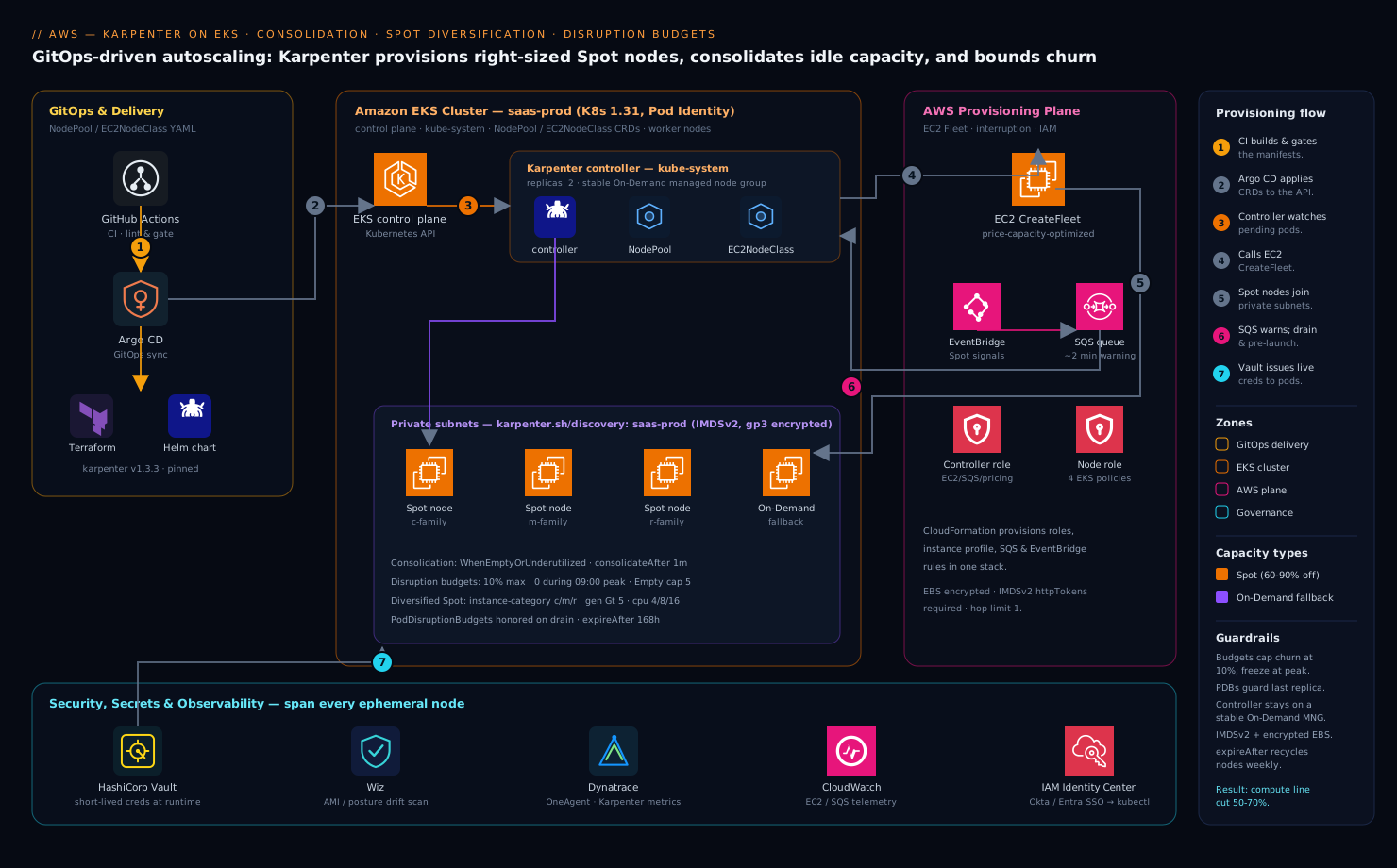
Karpenter runs as a two-replica Deployment on a small, stable managed node group that you keep On-Demand on purpose — the controller must survive a Spot reclamation event, so it never schedules itself onto the capacity it manages. From that foothold it watches the Kubernetes API for unschedulable pods, and instead of resizing an Auto Scaling Group it calls the EC2 CreateFleet API directly to launch a right-sized node that fits the pending pods’ exact CPU, memory, architecture, and topology requirements. It owns the full node lifecycle: provisioning, in-place consolidation to pack workloads onto fewer or cheaper nodes, and graceful disruption with cordon-and-drain. An SQS interruption queue fed by EventBridge gives Karpenter ~2 minutes of warning on a Spot rebalance recommendation or reclaim, so it can cordon, drain, and pre-launch a replacement before the instance disappears. Two custom resources drive everything: a NodePool (what kinds of nodes may exist, and the rules for disrupting them) and an EC2NodeClass (the AWS-specific launch template — AMI, subnets, security groups, instance profile). Around the cluster, HashiCorp Vault issues the short-lived database and third-party API credentials the workloads consume so no static secret rides a Spot node to its grave, Dynatrace OneAgent (deployed by a DaemonSet that tolerates every node) traces pods across the constant node churn, Wiz continuously scans the running node AMIs and Kubernetes posture for drift, and the whole configuration ships through a GitHub Actions plus Argo CD GitOps pipeline rather than kubectl apply by hand.
The mental model: how Karpenter thinks
Before the hands-on, hold the whole system in your head with three objects and one loop. Once these click, every manifest below reads as an obvious consequence rather than a wall of YAML.
| Object | Analogy | What it declares | API group/version |
|---|---|---|---|
| NodePool | The menu + house rules | Which nodes may exist (instance families, sizes, arch, capacity type), resource limits, and disruption rules |
karpenter.sh/v1 |
| EC2NodeClass | The kitchen recipe | The AWS launch details a node is built from: AMI family/alias, subnets, security groups, instance profile, disk, IMDS | karpenter.k8s.aws/v1 |
| NodeClaim | The order ticket | One concrete request for a node that satisfies a NodePool; Karpenter creates it, EC2 fulfils it, it becomes a Node | karpenter.sh/v1 |
You write NodePools and EC2NodeClasses. Karpenter creates NodeClaims for you — you rarely touch them directly, but watching them (kubectl get nodeclaims) is how you see provisioning happen in real time. A NodePool without an EC2NodeClass is a menu with no kitchen; an EC2NodeClass without a NodePool is a recipe no one is allowed to order. You always define both, and a NodePool points at an EC2NodeClass through its nodeClassRef.
The provisioning loop, in one breath: the kube-scheduler fails to place some pods and marks them unschedulable → Karpenter notices, and batches the pending pods for a few seconds so it can decide once, well → it runs an in-memory scheduling simulation to work out how many nodes of what shape would satisfy every pod’s CPU, memory, architecture, and topology requirements → it intersects those needs with each NodePool’s allowed requirements to get a list of viable EC2 instance types → it asks EC2 for the cheapest available capacity across that list and your subnets/AZs, launches the node, and the pending pods bind to it. On a healthy cluster this is a seconds-scale loop, not the minutes the Cluster Autoscaler takes.
The mirror image is consolidation: when pods go away and nodes fall idle, the same brain runs in reverse — can these pods fit elsewhere? then delete this node; could one cheaper node replace two expensive ones? then do that. Provisioning and consolidation are the two halves of Karpenter, and almost everything else in this lesson is about controlling them safely.
Here is the forward loop in action, a representative view right after scaling a workload up (output shape is real; values are illustrative, not from a live cluster):
$ kubectl get nodeclaims          # representative output
NAME                 TYPE          CAPACITY   ZONE          NODE                   READY   AGE
general-spot-8x2kv   c6g.2xlarge   spot       ap-south-1b   ip-10-0-2-77.ec2...    True    38s
general-spot-lm4qd   r6g.xlarge    spot       ap-south-1a   ip-10-0-1-12.ec2...    True    41s
Two differently shaped Spot nodes in two AZs, chosen because they were the cheapest available pools that fit the pending pods — that diversity is Karpenter’s whole risk strategy, and you configure it in step 6.
1. Create the Karpenter controller and node IAM roles
Karpenter needs two identities: a controller role the pod assumes (to call EC2/SQS/pricing APIs) and a node role the launched EC2 instances run under. eksctl ships a Karpenter-aware command that creates both plus the SQS interruption queue and EventBridge rules in one shot. Run it against the existing cluster:
eksctl create iamidentitymapping \
  --cluster "$CLUSTER_NAME" --region "$AWS_REGION" \
  --arn "arn:aws:iam::${AWS_ACCOUNT_ID}:role/KarpenterNodeRole-${CLUSTER_NAME}" \
  --group system:bootstrappers --group system:nodes \
  --username "system:node:{{EC2PrivateDNSName}}"
If you are starting clean, the supported path is the CloudFormation template Karpenter publishes — it provisions KarpenterNodeRole-<cluster>, KarpenterControllerRole-<cluster>, the instance profile, the Karpenter-<cluster> SQS queue, and the EventBridge rules for Spot interruption, rebalance, instance state-change, and scheduled-change events:
curl -fsSL "https://raw.githubusercontent.com/aws/karpenter-provider-aws/v${KARPENTER_VERSION}/website/content/en/preview/getting-started/getting-started-with-karpenter/cloudformation.yaml" \
  -o /tmp/karpenter-cfn.yaml

aws cloudformation deploy \
  --stack-name "Karpenter-${CLUSTER_NAME}" \
  --template-file /tmp/karpenter-cfn.yaml \
  --capabilities CAPABILITY_NAMED_IAM \
  --parameter-overrides "ClusterName=${CLUSTER_NAME}" \
  --region "$AWS_REGION"
The node role needs the four EKS-managed policies (AmazonEKSWorkerNodePolicy, AmazonEKS_CNI_Policy, AmazonEC2ContainerRegistryReadOnly, AmazonSSMManagedInstanceCore) — the CloudFormation template attaches them. Confirm the queue exists before continuing:
aws sqs get-queue-url --queue-name "Karpenter-${CLUSTER_NAME}" --region "$AWS_REGION"
2. Associate the controller role with Pod Identity
Bind the controller role to the karpenter service account in the kube-system namespace using EKS Pod Identity — simpler than IRSA because there is no OIDC trust policy to hand-edit:
aws eks create-pod-identity-association \
  --cluster-name "$CLUSTER_NAME" --region "$AWS_REGION" \
  --namespace kube-system \
  --service-account karpenter \
  --role-arn "arn:aws:iam::${AWS_ACCOUNT_ID}:role/KarpenterControllerRole-${CLUSTER_NAME}"
The controller role’s trust policy must allow the Pod Identity principal pods.eks.amazonaws.com to assume it with both sts:AssumeRole and sts:TagSession — the CloudFormation template sets this. Verify the association:
aws eks list-pod-identity-associations \
  --cluster-name "$CLUSTER_NAME" --region "$AWS_REGION" \
  --query "associations[?serviceAccount=='karpenter']"
3. Tag subnets and security groups for discovery
Karpenter finds where to launch nodes through tag selectors, not hardcoded IDs. Tag the private subnets and the cluster node security group so the EC2NodeClass in step 5 can select them:
# Tag the cluster's private subnets
for subnet in $(aws eks describe-cluster --name "$CLUSTER_NAME" --region "$AWS_REGION" \
    --query "cluster.resourcesVpcConfig.subnetIds[]" --output text); do
  aws ec2 create-tags --region "$AWS_REGION" --resources "$subnet" \
    --tags "Key=karpenter.sh/discovery,Value=${CLUSTER_NAME}"
done

# Tag the shared node security group
NODE_SG=$(aws eks describe-cluster --name "$CLUSTER_NAME" --region "$AWS_REGION" \
  --query "cluster.resourcesVpcConfig.clusterSecurityGroupId" --output text)
aws ec2 create-tags --region "$AWS_REGION" --resources "$NODE_SG" \
  --tags "Key=karpenter.sh/discovery,Value=${CLUSTER_NAME}"
Use only private subnets — launching Spot nodes into public subnets is both a cost and a security mistake. Wiz will flag any node that lands on a public subnet, but it is cheaper to never tag them in the first place.
4. Install Karpenter with Helm
Install the controller chart from the public ECR OCI registry, pinned to the exact version. Note that the controller is scheduled with a nodeAffinity onto the existing managed node group via the karpenter.sh/nodepool DoesNotExist rule so it never runs on nodes it manages — and replicas: 2 so it tolerates the loss of one:
helm upgrade --install karpenter \
  oci://public.ecr.aws/karpenter/karpenter \
  --version "$KARPENTER_VERSION" \
  --namespace kube-system \
  --set "settings.clusterName=${CLUSTER_NAME}" \
  --set "settings.interruptionQueue=Karpenter-${CLUSTER_NAME}" \
  --set "controller.resources.requests.cpu=1" \
  --set "controller.resources.requests.memory=1Gi" \
  --set "controller.resources.limits.cpu=1" \
  --set "controller.resources.limits.memory=1Gi" \
  --set "replicas=2" \
  --wait
Confirm both replicas are running and leader election settled:
kubectl -n kube-system rollout status deploy/karpenter --timeout=180s
kubectl -n kube-system logs -l app.kubernetes.io/name=karpenter -c controller --tail=20
5. Define the EC2NodeClass
The EC2NodeClass is the AWS-specific half: which AMI family, which subnets and security groups (by the tags from step 3), the instance profile, and disk. Pin the AL2023 family and an explicit AMI alias so a silent base-image change can never roll the fleet underneath you — let your pipeline bump it deliberately. Apply:
# ec2nodeclass.yaml
apiVersion: karpenter.k8s.aws/v1
kind: EC2NodeClass
metadata:
  name: default
spec:
  role: "KarpenterNodeRole-saas-prod"
  amiFamily: AL2023
  amiSelectorTerms:
    - alias: al2023@latest
  subnetSelectorTerms:
    - tags:
        karpenter.sh/discovery: "saas-prod"
  securityGroupSelectorTerms:
    - tags:
        karpenter.sh/discovery: "saas-prod"
  blockDeviceMappings:
    - deviceName: /dev/xvda
      ebs:
        volumeType: gp3
        volumeSize: 50Gi
        encrypted: true       # EBS-at-rest encryption is non-negotiable for the security review
        deleteOnTermination: true
  metadataOptions:
    httpTokens: required        # IMDSv2 only — blocks SSRF-style credential theft
    httpPutResponseHopLimit: 1
  tags:
    team: platform
    managed-by: karpenter
kubectl apply -f ec2nodeclass.yaml
httpTokens: required forces IMDSv2 so a compromised pod cannot reach the node’s credentials over the legacy metadata endpoint — exactly the kind of finding Wiz raises if you leave it on the default.
6. Define a NodePool with Spot diversification
The NodePool is the Kubernetes-facing contract: the universe of instance types Karpenter may pick from, the capacity types it may use, and the disruption rules. The single most important lever for Spot resilience is diversification — give Karpenter a broad set of instance families and sizes so its Spot allocation strategy (price-capacity-optimized under the hood) can draw from many capacity pools. A NodePool locked to one instance type on Spot is fragile; a NodePool spanning a dozen is resilient.
# nodepool-general.yaml
apiVersion: karpenter.sh/v1
kind: NodePool
metadata:
  name: general-spot
spec:
  template:
    metadata:
      labels:
        workload-class: general
    spec:
      nodeClassRef:
        group: karpenter.k8s.aws
        kind: EC2NodeClass
        name: default
      requirements:
        - key: kubernetes.io/arch
          operator: In
          values: ["amd64"]
        - key: karpenter.sh/capacity-type
          operator: In
          values: ["spot", "on-demand"]   # prefer spot; fall back to on-demand
        - key: karpenter.k8s.aws/instance-category
          operator: In
          values: ["c", "m", "r"]          # broad families = many Spot pools
        - key: karpenter.k8s.aws/instance-generation
          operator: Gt
          values: ["5"]                     # gen 6+ for price/perf
        - key: karpenter.k8s.aws/instance-cpu
          operator: In
          values: ["4", "8", "16"]
      expireAfter: 168h                      # recycle nodes weekly for patching
      terminationGracePeriod: 5m
  limits:
    cpu: "400"                               # hard ceiling on this pool's total vCPU
  disruption:
    consolidationPolicy: WhenEmptyOrUnderutilized
    consolidateAfter: 1m
kubectl apply -f nodepool-general.yaml
Two things make this safe and cheap. Listing both spot and on-demand lets Karpenter prefer Spot but fall back to On-Demand when no Spot capacity is available, so workloads never get stuck pending. The broad instance-category / instance-generation / instance-cpu requirements expand the pool count dramatically — Karpenter weighs ~hundreds of viable types and picks the cheapest that fits, then provisions from the deepest Spot pool. The limits.cpu is your blast-radius cap: Karpenter will never grow this pool past 400 vCPU regardless of pending demand.
For workloads that genuinely cannot tolerate interruption — the Karpenter controller’s own node group aside, things like stateful singletons — run a separate On-Demand-only NodePool with a taint and schedule only those pods there with a matching toleration, so Spot churn never touches them.
7. Turn on consolidation and bound it with disruption budgets
Consolidation is what recovers the idle 35% from the opening scenario. With consolidationPolicy: WhenEmptyOrUnderutilized (set in step 6), Karpenter continuously looks for nodes it can delete (their pods fit elsewhere) or replace with a cheaper node, and acts after consolidateAfter: 1m of stability. Left unbounded, that is dangerous — a cluster-wide repack could cordon and drain a large fraction of nodes at once and breach your availability SLO. Disruption budgets cap how much voluntary churn Karpenter may cause at any moment. Patch the NodePool to add them:
# nodepool-general-budgets.yaml (merge into spec.disruption)
spec:
  disruption:
    consolidationPolicy: WhenEmptyOrUnderutilized
    consolidateAfter: 1m
    budgets:
      - nodes: "10%"                 # at most 10% of this pool's nodes disrupting at once
      - nodes: "0"                   # freeze all voluntary disruption during business peak
        schedule: "0 9 * * mon-fri"
        duration: 9h
        reasons: ["Underutilized", "Drifted"]
      - nodes: "5"                   # but always allow empty-node cleanup, capped at 5
        reasons: ["Empty"]
kubectl apply -f nodepool-general-budgets.yaml
Read the budgets top to bottom — Karpenter takes the most restrictive matching budget at any instant. The first line is the always-on ceiling: never disrupt more than 10% of the pool’s nodes simultaneously. The second freezes consolidation and drift disruptions for a 9-hour window every weekday from 09:00 (cron is in the controller’s UTC unless you set a timezone), so the cluster holds steady through peak trading hours — but it scopes reasons to Underutilized and Drifted, deliberately not Empty, so the third budget still lets Karpenter reap genuinely empty nodes (up to 5 at a time) even during the freeze. That combination — froze the risky repacking, kept the free cleanup — is the practical sweet spot.
Pair this with PodDisruptionBudgets on your actual workloads. Karpenter honors PDBs during drain, so a minAvailable on each Deployment is the second, app-level guardrail that stops a node drain from taking the last healthy replica:
apiVersion: policy/v1
kind: PodDisruptionBudget
metadata:
  name: web-pdb
spec:
  minAvailable: 2
  selector:
    matchLabels:
      app: web
Critical pods that must never be evicted by consolidation get the annotation karpenter.sh/do-not-disrupt: "true" on the pod template — use it sparingly, since every annotated pod pins its node.
Validation
Prove the three behaviors end to end. First, scale-up: deploy a pause workload that cannot fit on current nodes and watch Karpenter launch a right-sized one in seconds.
kubectl create deployment inflate --image=public.ecr.aws/eks-distro/kubernetes/pause:3.7 --replicas=0
kubectl set resources deployment/inflate --requests=cpu=1,memory=1.5Gi
kubectl scale deployment/inflate --replicas=12

# Watch a new NodeClaim go from pending to ready
kubectl get nodeclaims -w
kubectl -n kube-system logs -l app.kubernetes.io/name=karpenter -c controller -f \
  | grep -E "launched|registered|initialized"
Confirm the new node is Spot and a diversified type:
kubectl get nodes -L karpenter.sh/capacity-type,node.kubernetes.io/instance-type,topology.kubernetes.io/zone
Then consolidation: scale the workload down and watch Karpenter delete or replace nodes after the stabilization window.
kubectl scale deployment/inflate --replicas=0
# After ~1m, expect NodeClaims to be deleted via consolidation
kubectl get nodeclaims -w
kubectl -n kube-system logs -l app.kubernetes.io/name=karpenter -c controller \
  | grep -i "disrupting\|consolidat"
Finally, confirm the interruption path is live by checking the controller picked up the SQS queue, and inspect disruption-budget state:
kubectl -n kube-system logs -l app.kubernetes.io/name=karpenter -c controller | grep -i "interruption"
kubectl get nodepool general-spot -o jsonpath='{.status.conditions}' | jq .
Karpenter exports Prometheus metrics on :8080/metrics; scrape karpenter_nodes_allocatable, karpenter_nodeclaims_disrupted_total, and karpenter_pods_state into Dynatrace to alert when pending-pod time or Spot-fallback rate climbs.
Going deeper
Everything above gets a production cluster onto Karpenter. This section is for the engineer who now has to operate it — the internals that explain why Karpenter chooses what it chooses, and the knobs that keep it from surprising you at 2 a.m.
The provisioning loop in detail
When the kube-scheduler cannot place a pod, it leaves it Pending with an Unschedulable condition. Karpenter watches for exactly these pods. Rather than react to each one, it opens a short batching window — roughly one second of idle time, extended up to about ten seconds if pods keep arriving — so a Deployment scaled from 0 to 50 becomes one provisioning decision instead of fifty racing node launches.
With the batch in hand, Karpenter runs an in-memory scheduling simulation. It replays the real scheduler’s rules — resource requests, nodeSelector, node affinity/anti-affinity, taints and tolerations, topologySpreadConstraints, and pod affinity — against hypothetical nodes to answer one question: what is the smallest, cheapest set of nodes on which every one of these pods can actually run? This is why accurate resource requests matter so much — Karpenter packs against requests, not observed usage. Under-set them and it will cram too many pods per node; leave them empty and it cannot size a node at all.
It then intersects the pods’ hard constraints with each NodePool’s requirements to produce a candidate set of instance types — often hundreds of them for a broad NodePool. It hands that whole set, plus your discovered subnets, to the EC2 CreateFleet API in instant mode. For Spot, Karpenter uses the price-capacity-optimized allocation strategy, which balances lowest price against how deep (interruption-resistant) each capacity pool is; for On-Demand it takes lowest price. EC2 returns capacity from the pool it picks, Karpenter records a NodeClaim, the instance boots the AL2023 AMI, the kubelet registers, and the pending pods bind. No Auto Scaling Group is ever involved — this “groupless” design is why Karpenter provisions in seconds and can choose from the entire EC2 catalog rather than one ASG’s fixed shape.
Bin-packing math and startup latency
Take the validation workload: 12 pods, each requesting 1 vCPU and 1.5 GiB. That is 12 vCPU and 18 GiB of pod demand. A naive reading says “any 12-vCPU node.” But a node’s allocatable capacity is always less than its raw size: the AL2023 AMI, kube-reserved and system-reserved, the eviction threshold, and every DaemonSet (kube-proxy, the VPC CNI, Dynatrace OneAgent, Wiz’s sensor) all take a bite first. Karpenter models this overhead, so it will reject a node that looks big enough on paper but isn’t once the daemons land — which is exactly why “my pod requests 16Gi but won’t schedule on a 16GiB node” is a FAQ, not a bug.
Karpenter simulates the options and picks the cheapest that genuinely fits — perhaps a single c6g.4xlarge (16 vCPU / 32 GiB) on Spot, leaving headroom for the DaemonSets, rather than two m5.2xlarge (8 vCPU each) the way a fixed node group would. Contrast the Cluster Autoscaler: tied to an ASG of one instance type, it would add whole 8-vCPU nodes and strand the remainder. The deeper you understand requests-versus-allocatable, the less any node choice surprises you — the sibling lesson on VPA, right-sizing, and bin-packing goes further on setting requests that pack well.
On startup latency: because there is no ASG round-trip, a Karpenter node typically goes from NodeClaim to Ready in well under two minutes — AMI boot, kubelet join, and CNI readiness are the long poles (representative: ~40–90 s). For truly latency-critical scale-out, keep a small buffer of overprovisioning pause pods at a low PriorityClass, so real pods preempt them instantly while Karpenter grows the node in the background.
Consolidation types and policies
consolidationPolicy has two settings. WhenEmpty is conservative: Karpenter only removes nodes that have zero non-DaemonSet pods. WhenEmptyOrUnderutilized (used in this lesson, renamed from the old WhenUnderutilized in v1) is active: it also repacks underutilized nodes. Under it, Karpenter continuously evaluates three moves:
- Empty-node consolidation — a node whose only pods are DaemonSets is drained and deleted outright.
- Single-node consolidation — one node at a time: can all its pods reschedule onto existing capacity (delete the node), or onto one cheaper replacement node (replace it)? Deletion is always preferred over replacement, because it removes cost without launching anything.
- Multi-node consolidation — can several nodes be removed together and their pods repacked onto one cheaper node? This catches the classic “three third-full nodes → one full node” waste.
consolidateAfter (a required field in v1) is the stabilization timer: a node must sit in a consolidatable state for that long before Karpenter acts, which damps thrash on bursty workloads. A subtle but important rule governs Spot-to-Spot single-node consolidation: Karpenter will only replace a Spot node with a cheaper Spot node when at least 15 cheaper instance types remain available in the NodePool’s flexibility. That guard stops it from trading a deep, interruption-resistant pool for a shallow one just to shave a few cents — and it is one more reason a broad NodePool matters.
Drift: the third kind of voluntary disruption
Alongside consolidation and expiration, Karpenter constantly checks for drift — a node whose live configuration no longer matches its NodePool or EC2NodeClass. Change the AMI alias, edit requirements, swap a security group, retag a subnet, or simply let al2023@latest resolve to a newly published AMI, and Karpenter marks the affected nodes Drifted and replaces them (honoring disruption budgets and PDBs). In v1 drift is always evaluated — there is no switch to turn it off — which is exactly why the “AMI @latest with no pipeline gate” pitfall bites: publishing a new EKS-optimized AMI is a drift event that can roll your whole fleet unattended. Pin a specific AMI ID and bump it through CI, and drift becomes a deliberate, budgeted rollout instead of a surprise.
Spot interruption handling
Spot capacity is borrowed, and AWS can reclaim it. Two signals arrive on the SQS interruption queue (fed by EventBridge) that you wired up in step 1:
- A Rebalance Recommendation — an early, soft “this instance is at elevated risk” that can arrive well before any reclaim.
- A Spot interruption notice — the mandatory two-minute warning before the instance is forcibly stopped.
On either, Karpenter immediately cordons and drains the node and launches a replacement, so pods reschedule gracefully instead of vanishing. Crucially, this involuntary disruption path ignores disruption budgets — budgets only govern voluntary actions. Your protection against involuntary loss is elsewhere: multiple replicas, multi-AZ spread, PodDisruptionBudgets, and diversification so a single pool drying up never takes a large share of your nodes at once. The terminationGracePeriod on the NodePool caps how long a drain may take before Karpenter force-terminates — set it comfortably above your pods’ terminationGracePeriodSeconds so graceful shutdown completes, but below the two-minute Spot deadline so you are never caught mid-drain when the instance disappears.
Disruption budgets, PDBs, and do-not-disrupt — how they combine
These three controls operate at different layers, and production safety comes from stacking them rather than picking one:
| Control | Scope | Stops | Does not stop |
|---|---|---|---|
Disruption budget (spec.disruption.budgets) |
Per NodePool | Too many voluntary disruptions at once (consolidation, drift, expiration) | Spot interruption / node failure (involuntary) |
| PodDisruptionBudget | Per workload | A drain from dropping below minAvailable / above maxUnavailable |
Involuntary loss beyond the budget; a stuck PDB is overridden by terminationGracePeriod |
karpenter.sh/do-not-disrupt |
Per pod (or node) | Karpenter voluntarily disrupting the node running that pod | Spot interruption; and it too yields to terminationGracePeriod |
Budgets are evaluated most-restrictive-wins: at any instant Karpenter takes the smallest allowance among all matching budgets. reasons scopes a budget to Empty, Underutilized, or Drifted (omit reasons and it applies to all), and schedule + duration create recurring windows — evaluated in UTC unless you prefix the cron with a timezone, for example TZ=Asia/Kolkata 0 9 * * mon-fri. The pattern from step 7 — a permanent 10% ceiling, a weekday freeze on Underutilized/Drifted, and an always-open lane for Empty — is the production sweet spot: it throttles risky repacking during business hours while never paying for genuinely empty nodes.
do-not-disrupt is a scalpel, not a blanket. Every annotated pod pins its node out of consolidation, so a handful of careless annotations can quietly erase most of your savings. Prefer PDBs (which bound churn) over do-not-disrupt (which forbids it) wherever you can, and reserve the annotation for genuine singletons mid-critical-operation.
Weighted NodePools
When several NodePools could satisfy a pod, spec.weight (1–100) decides the order — Karpenter tries the highest weight first and only spills to the next when the preferred pool hits its limits. This unlocks the standard production tiering: put committed capacity you have already paid for (Reserved Instances, a Savings Plan, or EC2 Capacity Blocks, expressed as an On-Demand NodePool) at weight: 100 with a limits.cpu matching your commitment, a diversified Spot pool at weight: 50, and a plain On-Demand catch-all at weight: 10. Karpenter then exhausts your discount first, overflows to cheap Spot, and only reaches full-price On-Demand when both are unavailable — all automatically.
# committed-first.yaml — try reserved/committed capacity before Spot
apiVersion: karpenter.sh/v1
kind: NodePool
metadata:
  name: committed-ondemand
spec:
  weight: 100
  template:
    spec:
      nodeClassRef:
        group: karpenter.k8s.aws
        kind: EC2NodeClass
        name: default
      requirements:
        - key: karpenter.sh/capacity-type
          operator: In
          values: ["on-demand"]
      expireAfter: 168h
  limits:
    cpu: "64"          # size to your Savings Plan / RI commitment
  disruption:
    consolidationPolicy: WhenEmptyOrUnderutilized
    consolidateAfter: 1m
Paired with the general-spot pool at a lower weight, this fills the 64 committed vCPU before a single Spot node is launched.
Karpenter vs Cluster Autoscaler vs EKS Auto Mode
| Dimension | Cluster Autoscaler | Karpenter (this lesson) | EKS Auto Mode |
|---|---|---|---|
| Scaling model | Node groups / ASGs of fixed shapes | Groupless — launches any allowed instance type on demand | AWS runs Karpenter for you |
| Instance selection | One (or few) types per ASG | The whole EC2 catalog, filtered by NodePool requirements |
AWS-managed defaults; limited tuning |
| Scale-up speed | Minutes (ASG indirection) | Seconds (direct CreateFleet) |
Seconds |
| Consolidation | None (only removes empty / low-util nodes crudely) | Yes — empty, single-node, multi-node | Yes |
| Who operates the controller | You | You (install + upgrade the chart) | AWS (managed) |
| Spot handling | Per-ASG mixed instances policy | Native diversification + interruption queue | Managed |
| Node customization | Full (your AMIs, bootstrap) | Full (EC2NodeClass) | Limited (AWS-owned AMIs, ~21-day max node age) |
| Extra cost | None beyond EC2 | None beyond EC2 | EC2 + a management fee |
| Best when | Legacy / simple, fixed shapes | You want cost + speed and will operate it | You want autoscaling with near-zero ops |
EKS Auto Mode (GA at re:Invent 2024) is Karpenter’s engine run as an AWS-managed service: AWS owns the controller, the node AMIs, and core add-ons; you get a curated NodePool surface, and you pay a per-vCPU management fee on top of EC2. If this whole lesson reads as “powerful, but that is a lot of moving parts to own,” Auto Mode is the trade — less control, less to operate. Everything you learn here about NodePools, requirements, and disruption still applies; you just stop running the controller yourself.
IRSA vs Pod Identity for the controller
The Karpenter controller needs AWS credentials to call EC2, Fleet, pricing, and SQS. There are two ways to grant them, and this lesson uses the newer one:
- IRSA (IAM Roles for Service Accounts) federates the cluster’s OIDC provider to IAM: the controller role’s trust policy names the OIDC issuer and the
karpenterservice account, and the pod callssts:AssumeRoleWithWebIdentity. It works everywhere but means editing per-cluster OIDC trust policies. - EKS Pod Identity (used here) uses the Pod Identity Agent add-on plus a simple association between the service account and the role — no OIDC trust policy to hand-edit, and the same role definition is reusable across clusters. Its trust policy just allows
pods.eks.amazonaws.comtosts:AssumeRoleandsts:TagSession.
Either way, keep the controller role (assumed by the pod) and the node role (attached to the launched instances) distinct — the node role deliberately cannot create fleets or pass itself, which limits the blast radius if a node is compromised.
Rollback / teardown
To back out, scale Karpenter to zero first so it stops provisioning while you remove its resources — otherwise it will fight you by relaunching nodes:
kubectl -n kube-system scale deploy/karpenter --replicas=0

# Delete NodePools and NodeClasses; Karpenter-owned nodes drain and terminate
kubectl delete nodepool general-spot
kubectl delete ec2nodeclass default

# Confirm all Karpenter-managed nodes are gone
kubectl get nodes -l karpenter.sh/nodepool

# Remove the controller, Pod Identity association, and CloudFormation stack
helm uninstall karpenter -n kube-system
aws eks delete-pod-identity-association --cluster-name "$CLUSTER_NAME" --region "$AWS_REGION" \
  --association-id "$(aws eks list-pod-identity-associations --cluster-name "$CLUSTER_NAME" \
    --region "$AWS_REGION" --query "associations[?serviceAccount=='karpenter'].associationId" --output text)"
aws cloudformation delete-stack --stack-name "Karpenter-${CLUSTER_NAME}" --region "$AWS_REGION"
Before deleting NodePools, make sure your original managed node group still has headroom to absorb the rescheduled pods, or the teardown drain will leave pods pending. Deleting the EC2NodeClass while NodeClaims still reference it is blocked by a finalizer, which is the safe behavior — delete the NodePool first and let nodes drain.
Common pitfalls
- Karpenter scheduling onto its own nodes. If the controller lands on a Spot node it manages, a reclaim can take out the brain that would replace it. Keep it on a stable On-Demand managed node group, with
replicas: 2. - Forgetting subnet/SG tags. Without
karpenter.sh/discoverytags, the EC2NodeClass selects nothing and every NodeClaim fails withno subnets found. This is the number-one first-run failure. - Too-narrow NodePool requirements. Pinning one instance type on Spot defeats diversification — a single pool drying up stalls scale-up. Span families
c/m/r, multiple generations, and several sizes. - No disruption budget plus no PDBs. Consolidation can then drain too many nodes at once. Always set a NodePool
budgetand per-workload PodDisruptionBudgets. consolidateAftertoo aggressive. A value like30scauses node thrash on bursty workloads — nodes are created and reaped minutes apart, which costs more (per-second billing has a 60s minimum) than it saves. Start at1m–5m.- Ignoring the interruption queue. If
settings.interruptionQueueis unset, Karpenter gets no Spot warning and pods die hard instead of being drained gracefully. - AMI
@latestwith no pipeline gate. Convenient, but a new EKS-optimized AMI can roll your whole fleet unattended. Pin a specific AMI ID in production and bump it through CI.
Security notes
Karpenter’s controller role is powerful — it can launch EC2 and pass the node role — so scope it to the cluster’s resources and let Wiz continuously check the running node AMIs, IMDS configuration, and Kubernetes RBAC for posture drift, alerting if a node ever launches without IMDSv2 or with public exposure. Enforce IMDSv2 (httpTokens: required) and a hop limit of 1 on the EC2NodeClass so a compromised pod cannot steal node credentials. Encrypt the EBS root volume (encrypted: true) to satisfy the at-rest control. Because nodes are ephemeral and constantly recycled, never bake secrets into the AMI or a node bootstrap script — have workloads pull short-lived database and third-party API credentials from HashiCorp Vault at runtime (Vault Agent sidecar or the Vault CSI provider), so a reclaimed Spot node carries nothing of value to its termination. Human and service access to the cluster federates through your IdP — Okta or Entra ID brokered to AWS IAM Identity Center — so the same SSO and conditional-access policy that governs the console governs kubectl, and there are no long-lived IAM users.
Cost notes
The win comes from three compounding levers. Spot diversification typically lands instances at 60–90% off On-Demand, and the broad NodePool keeps that discount available because Karpenter always draws from the deepest, cheapest pool. Consolidation recovers the idle headroom — the opening cluster’s 35%-utilized nodes get repacked onto fewer, smaller instances, and WhenEmptyOrUnderutilized keeps doing it as load ebbs, so you stop paying for capacity you booked for a peak that passed. Right-sizing at launch means Karpenter picks the smallest instance that fits the pending pods rather than a fixed 2xlarge, so the fleet shape tracks demand minute to minute. Set limits.cpu per NodePool as a hard spend ceiling, set expireAfter to recycle nodes weekly (patching plus a natural nudge toward newer, cheaper generations), and pipe Karpenter’s metrics to Dynatrace alongside AWS Cost Explorer so the FinOps lead sees blended Spot discount and consolidation savings on one dashboard. Teams that move a general workload pool from a fixed On-Demand managed node group to a diversified, consolidating Karpenter NodePool routinely cut that compute line 50–70% — which is the number that closes the ticket the FinOps lead opened twice.
Common beginner mistakes
Distinct from the symptom-oriented pitfalls above, these are misconceptions — wrong mental models that quietly steer beginners into trouble:
- “Karpenter autoscales my pods.” It does not. Karpenter scales nodes; the HPA, KEDA, and VPA scale pods and replicas. The right model is a supply chain: a pod autoscaler creates demand (more pending pods), and Karpenter supplies the nodes to run them. If your pods are not scaling, that is an HPA/KEDA problem, not a Karpenter one — see Kubernetes autoscaling: HPA, KEDA, and Karpenter.
- “Pinning one instance type is safer.” Backwards on Spot. A single type means a single capacity pool; when it dries up, scale-up stalls. Breadth across families, generations, and sizes gives Karpenter many pools to draw from — more choice is more resilient and usually cheaper. The thing to constrain is genuine workload need (architecture, no burstable
t-family for steady load, GPU), not the pool count. - “Requests are optional; Karpenter figures out sizing.” Karpenter bin-packs against requests, not live usage. Omit them and it cannot size a node; set them too low and it overpacks; too high and it over-provisions. Accurate requests are the input the whole system runs on.
- “Consolidation won’t touch my stateful pod.” It absolutely will, unless you tell it not to. Consolidation is aggressive by design — it will drain the node under a StatefulSet replica or a database primary to save money. Guard those workloads explicitly with a PDB, a
karpenter.sh/do-not-disruptannotation, or a dedicated On-Demand tainted NodePool. Assuming “important” pods are automatically spared is how a Postgres primary ends up failing over at 2 a.m. - “Spot means constant crashes.” With diversification, the interruption queue, and PDBs, an interruption is a graceful event: ~2 minutes’ warning, cordon-drain, and a replacement pre-launched. For stateless, replicated, multi-AZ workloads Spot is boring in the best way. The failure mode is not Spot itself — it is running Spot without those guardrails.
- “Disruption budgets protect me from Spot reclaims.” No — budgets bound only voluntary disruption (consolidation, drift, expiry). A Spot reclaim or hardware failure is involuntary and ignores budgets entirely. Replicas, multi-AZ spread, and PDBs are what protect you there.
- “Editing a NodePool is harmless.” In v1, drift is always on. Change a NodePool or EC2NodeClass — or let
@latestresolve a new AMI — and Karpenter will roll the affected nodes to match. That is a feature (config stays truthful), but budget it: make edits during a window where disruption budgets and PDBs keep the roll gentle.
Practice challenges
Work these against the manifests you built above. Each solution is one collapsed block — try it before you open it.
Challenge 1 (Beginner). A NodePool lists only spot under karpenter.sh/capacity-type, and a teammate reports pods stuck Pending during a regional Spot shortage. What is happening, and what is the one-line fix?
<details> <summary>Solution</summary>
With only spot allowed, Karpenter has no fallback when every matching Spot pool is exhausted, so pods stay Pending. Allow On-Demand as a fallback — Karpenter still prefers Spot when it is available:
- key: karpenter.sh/capacity-type
  operator: In
  values: ["spot", "on-demand"]
Why: listing both lets Karpenter prefer the cheaper Spot pools but fall back to On-Demand rather than stall. </details>
Challenge 2 (Beginner). Write a PodDisruptionBudget for a 4-replica Deployment labelled app: web that lets Karpenter take at most one replica down at a time.
<details> <summary>Solution</summary>
apiVersion: policy/v1
kind: PodDisruptionBudget
metadata:
  name: web-pdb
spec:
  maxUnavailable: 1
  selector:
    matchLabels:
      app: web
Why: maxUnavailable: 1 caps concurrent voluntary evictions at one, so a node drain can never take a second web pod until the first is Ready elsewhere. (minAvailable: 3 expresses the same intent for a fixed 4-replica set.)
</details>
Challenge 3 (Intermediate). Author a NodePool requirements block for a Graviton-only service: ARM64, instance generation 6+, 4 or 8 vCPU, Spot-first with On-Demand fallback, families c/m/r.
<details> <summary>Solution</summary>
requirements:
  - key: kubernetes.io/arch
    operator: In
    values: ["arm64"]
  - key: karpenter.sh/capacity-type
    operator: In
    values: ["spot", "on-demand"]
  - key: karpenter.k8s.aws/instance-category
    operator: In
    values: ["c", "m", "r"]
  - key: karpenter.k8s.aws/instance-generation
    operator: Gt
    values: ["5"]
  - key: karpenter.k8s.aws/instance-cpu
    operator: In
    values: ["4", "8"]
Why: arch: arm64 restricts to Graviton; Gt 5 selects generation 6+; the c/m/r spread across two sizes still yields dozens of Spot pools for resilience. (Your workload images must have ARM64 builds, or pods will fail to pull.)
</details>
Challenge 4 (Intermediate). During weekday business hours (09:00–18:00 IST) you want zero consolidation or drift disruption, but empty nodes should still be reaped. Write the budgets.
<details> <summary>Solution</summary>
budgets:
  - nodes: "10%"                       # always-on ceiling
  - nodes: "0"                         # freeze repack + drift during peak
    schedule: "TZ=Asia/Kolkata 0 9 * * mon-fri"
    duration: 9h
    reasons: ["Underutilized", "Drifted"]
  - nodes: "5"                         # but always reap empties
    reasons: ["Empty"]
Why: most-restrictive-wins, so the "0" budget blocks Underutilized/Drifted in the window while the Empty-scoped budget stays open; the TZ= prefix pins the cron to IST instead of UTC.
</details>
Challenge 5 (Advanced). You have a Savings Plan covering 64 vCPU. Configure Karpenter to consume that committed On-Demand capacity before launching any Spot. Sketch the NodePool and explain the ordering.
<details> <summary>Solution</summary>
Create a committed On-Demand NodePool with a high weight, referencing the same EC2NodeClass as general-spot:
apiVersion: karpenter.sh/v1
kind: NodePool
metadata: { name: committed-ondemand }
spec:
  weight: 100
  template:
    spec:
      nodeClassRef: { group: karpenter.k8s.aws, kind: EC2NodeClass, name: default }
      requirements:
        - { key: karpenter.sh/capacity-type, operator: In, values: ["on-demand"] }
  limits: { cpu: "64" }
  disruption: { consolidationPolicy: WhenEmptyOrUnderutilized, consolidateAfter: 1m }
…and drop the existing general-spot pool to weight: 50.
Why: Karpenter tries the highest-weight NodePool first, so it fills committed-ondemand up to its 64-vCPU limits (spending capacity you have already paid for) before spilling to the cheaper-but-interruptible Spot pool at weight 50.
</details>
Challenge 6 (Advanced). Your Postgres primary — a StatefulSet pod labelled role: primary — keeps getting evicted by consolidation, forcing failovers. Give three ways to stop it and the trade-off of each.
<details> <summary>Solution</summary>
karpenter.sh/do-not-disrupt: "true"on the pod template — Karpenter will never voluntarily disrupt its node. Trade-off: that node is pinned out of consolidation, so you lose the savings on it, and it is still not protected from a Spot reclaim (run it On-Demand).- A PodDisruptionBudget (
minAvailable: 1) — blocks a voluntary drain from taking the primary. Trade-off: for a single-primary StatefulSet a PDB bounds but does not pin the node; combine it with the annotation for belt-and-braces. - A dedicated On-Demand, tainted NodePool + a matching toleration on the StatefulSet — isolates stateful workloads from all Spot churn and from consolidation of the general pool. Trade-off: highest cost (On-Demand, less bin-packing), but the cleanest isolation for data-critical singletons.
Why: the three trade cost for safety on a sliding scale — the annotation is cheapest to add but bluntest, a dedicated pool is the most robust but the most expensive. </details>
Glossary
- Karpenter — An open-source, groupless node autoscaler for Kubernetes on AWS that provisions right-sized EC2 nodes directly from pending-pod requirements and consolidates them as load falls.
- NodePool (
karpenter.sh/v1) — The Kubernetes-facing policy object: which instance types/arches/capacity types Karpenter may create, resourcelimits, anddisruptionrules. - EC2NodeClass (
karpenter.k8s.aws/v1) — The AWS-specific launch recipe: AMI family/alias, subnet and security-group selectors, instance profile, disk, and IMDS settings. - NodeClaim (
karpenter.sh/v1) — Karpenter’s internal request for a single node that satisfies a NodePool; it becomes a Node once EC2 fulfils it. Watch these to see provisioning happen. - Provisioning — The forward loop: batch unschedulable pods → simulate scheduling → solve for viable instance types →
CreateFleet→ bind pods. - Consolidation — The reverse loop: delete empty nodes, delete nodes whose pods fit elsewhere, or replace nodes with cheaper ones, to cut waste.
consolidationPolicy—WhenEmpty(remove only empty nodes) orWhenEmptyOrUnderutilized(also repack underutilized nodes).consolidateAfter— Required stabilization delay a node must sit consolidatable before Karpenter acts; damps thrash.- Drift — Karpenter’s detection that a node no longer matches its NodePool/EC2NodeClass; drifted nodes are replaced. Always evaluated in v1.
- Disruption budget — A per-NodePool cap (
nodesas a % or count, optionalschedule/duration/reasons) on how much voluntary disruption may happen at once; most-restrictive-wins. - Voluntary vs involuntary disruption — Voluntary = Karpenter’s own actions (consolidation, drift, expiry), governed by budgets. Involuntary = Spot reclaim / hardware failure, which budgets do not limit.
- PodDisruptionBudget (PDB) — A workload-level guarantee (
minAvailable/maxUnavailable) Karpenter honors during drain. karpenter.sh/do-not-disrupt— Pod (or node) annotation that forbids voluntary disruption of the node; pins the node out of consolidation.terminationGracePeriod— NodePool cap on total drain time; once exceeded, Karpenter force-terminates even past PDBs /do-not-disrupt.- Capacity type —
spot(interruptible, deeply discounted) oron-demand(stable, full price); selected underkarpenter.sh/capacity-type. - Spot interruption / Rebalance Recommendation — The ~2-minute forced-reclaim warning, and the earlier soft “at-risk” signal; both reach Karpenter via the interruption queue.
- Interruption queue — The SQS queue (fed by EventBridge) Karpenter watches for Spot and instance-health events; set via
settings.interruptionQueue. price-capacity-optimized— The EC2 Spot allocation strategy Karpenter uses, balancing lowest price against pool depth (interruption resistance).- Diversification — Allowing a broad set of instance families/generations/sizes so Karpenter can draw from many Spot pools; the core Spot-resilience lever.
- Bin-packing — Fitting pods (by their resource requests) onto the fewest/cheapest nodes; the optimization Karpenter runs both when provisioning and when consolidating.
- Allocatable — A node’s capacity minus AMI/kube/system reservations and DaemonSet overhead; what pods actually schedule against.
- Weighted NodePool (
spec.weight) — Priority (1–100) deciding which NodePool Karpenter tries first; higher wins until it hitslimits. - Groupless — Karpenter’s design of launching individual instances via
CreateFleetwith no Auto Scaling Group, enabling any instance type and seconds-scale scale-up. - Cluster Autoscaler — The older, ASG-based autoscaler that adds/removes whole nodes of fixed shapes; slower and without real consolidation.
- EKS Auto Mode — AWS’s managed offering that runs Karpenter and node lifecycle for you, trading control for near-zero ops, at a management fee above EC2.
- EKS Pod Identity — The mechanism binding the controller’s ServiceAccount to an IAM role via an association (no OIDC trust-policy editing); the alternative to IRSA.
- IRSA — IAM Roles for Service Accounts; OIDC-federated pod credentials, the older alternative to Pod Identity.
- IMDSv2 — Session-token-protected instance metadata (
httpTokens: required); blocks SSRF-style credential theft from a node.