There is a specific moment when a Python script stops being yours. You wrote it to parse a log file at 2am during an incident. It worked. Someone saw the output in Slack and asked for it. Now it lives in a repo, three people run it, and one of them has wired it into a CI job.
And suddenly all the things you got away with are bugs. There’s no --help, so people read your source to find the flags. It prints diagnostics and data into the same stream, so piping it into jq returns a parse error. It exits 0 even when it found forty errors, so the CI job that depends on it has been green for a month while quietly failing. Someone passed a token as --token sk-live-... and it’s now in the shell history of a shared bastion and in every ps listing on the box.
None of that is a Python problem. It’s a contract problem. A command-line tool has a contract with the shell that ran it, with the pipe on its right-hand side, and with the CI runner that checks its exit code — and that contract is older than Python and completely unforgiving. This lesson teaches the contract, and the two libraries that let you honour it without writing a parser by hand.
Everything here targets Python 3.12+. argparse and sys are standard library — no install. The click sections need pip install click inside a virtual environment; version notes call out anything that differs by version. Every snippet, every line of --help, and every exit code below was executed on Python 3.12.3 with click 8.4.2 — the outputs are real, including the surprising ones.
Why this matters
A script and a tool are different objects. A script is something you run, from a directory you’re already standing in, remembering what it wants. A tool is something someone else runs — possibly a machine, possibly at 3am, possibly with the wrong arguments. The gap between them is almost entirely interface.
Here’s the thing worth internalising early: the interface is the part of your tool that people actually touch. Your parsing logic can be brilliant, but if the flag is --lvl and the error is a raw KeyError, the tool is bad. Conversely a modest tool with an honest --help, a --json mode, and a correct exit code will get adopted, wrapped, scheduled, and depended on. For a cloud or DevOps engineer this is the whole game: the Python you write that has the longest life is almost never a web app — it’s the little command that checks a thing, and gets called from a pipeline for the next four years.
The mental model to carry through this lesson is a pipe with three lanes. Your tool receives a list of strings (argv) and possibly a stream (stdin). Your tool emits three separate things that people confuse constantly: data on stdout, messages on stderr, and a single integer — the exit code — that the shell reads. Every design rule in this lesson falls out of keeping those three lanes clean. When mytool | jq breaks, someone mixed lane 1 and lane 2. When CI stays green on a failure, someone forgot lane 3.
The libraries — argparse, click — are just ergonomics on top of that contract. They matter, and we’ll go deep on both. But they are the easy half. The contract is the half that makes the tool good.
sys.argv: what you actually get
Before any library, understand the raw material. When you type a command, the shell splits it into words and hands your process a list of strings. Python exposes that list as sys.argv. That is all you get. There is no magic, no types, no structure:
# argv_demo.py — the raw material every CLI starts from.
import sys

print("argv     =", sys.argv)
print("script   =", sys.argv[0])
print("args     =", sys.argv[1:])
$ python3 argv_demo.py report.log --level ERROR -v
argv     = ['argv_demo.py', 'report.log', '--level', 'ERROR', '-v']
script   = argv_demo.py
args     = ['report.log', '--level', 'ERROR', '-v']

$ python3 argv_demo.py
argv     = ['argv_demo.py']
args     = []
Look carefully at what the shell did and did not do. It split on whitespace (respecting your quotes) and it expanded globs — *.log becomes a list of filenames before Python sees it. That’s it. It did not notice that --level and ERROR belong together. It did not convert anything to an int. sys.argv[0] is the script name, which is why every real parse starts at [1:].
So if you want --level ERROR to mean something, you write that code. Here’s the honest version of what “just parse it myself” looks like:
# The hand-rolled parser. This is the code argparse deletes.
import sys

args = sys.argv[1:]
path, level, verbose = None, "INFO", False

i = 0
while i < len(args):
    a = args[i]
    if a in ("-v", "--verbose"):
        verbose = True
    elif a == "--level":
        i += 1
        level = args[i]          # IndexError if --level is last
    elif a.startswith("-"):
        print(f"unknown option: {a}")
        sys.exit(2)
    else:
        path = a
    i += 1

print(f"path={path} level={level} verbose={verbose}")
$ python3 argv_hand.py app.log --level ERROR -v
path=app.log level=ERROR verbose=True
It works! Now run it the way a tired user will:
$ python3 argv_hand.py app.log --level
Traceback (most recent call last):
  File "/home/you/argv_hand.py", line 16, in <module>
    level = args[i]          # IndexError if --level is last
            ~~~~^^^
IndexError: list index out of range
A traceback. For a typo. That’s the tell — the user made an ordinary mistake and got a Python stack trace instead of an error message. And that’s the smallest of the problems. Count what this 20-line parser still doesn’t do:
| Your users will expect | Hand-rolled | Cost to add by hand |
|---|---|---|
--help that lists every flag |
❌ | Write and maintain it, forever, by hand |
--level=ERROR (equals form) |
❌ | Split on = everywhere |
-v and -vvv and -qv bundling |
Partly | Character-by-character parsing |
--lev (unambiguous prefix) |
❌ | Prefix-match against all option names |
type=int conversion + a clean error |
❌ | try/except around every conversion |
| “must be one of DEBUG/INFO/…” | ❌ | Membership check + message per option |
| Required vs optional enforcement | ❌ | Post-parse validation block |
-- to end option parsing |
❌ | A special case |
| Exit 2 on a usage error (the convention) | ❌ | Remember it every time |
| Usage line printed to stderr | ❌ | Easy to get wrong, invisible when you do |
Subcommands (tool add, tool rm) |
❌ | A second parser layer |
Every row is a thing argparse already does, tested, in the standard library, for free. The reason to use a parser isn’t laziness — it’s that a hand-rolled parser silently has a different interface from every other tool on the machine, and your users have to learn yours specifically.
argparse: the standard library’s parser
argparse ships with Python. No install, no dependency, works on any machine that has Python at all. For a script you scp onto a box, that property alone often decides it.
The whole library is three moves: make a parser, add arguments, parse.
# logstat_v1.py — the same CLI, in argparse.
import argparse

parser = argparse.ArgumentParser(
    prog="logstat",
    description="Summarise a log file.",
    epilog="Example: logstat app.log --level ERROR -v",
)
parser.add_argument("path", help="log file to read")
parser.add_argument("--level", default="INFO",
                    choices=["DEBUG", "INFO", "WARNING", "ERROR"],
                    help="minimum level to count (default: %(default)s)")
parser.add_argument("-v", "--verbose", action="store_true",
                    help="show per-line detail")

args = parser.parse_args()
print(args)
print(f"path={args.path} level={args.level} verbose={args.verbose}")
Ten lines. Here’s what you got for them — and nobody wrote this help text:
$ python3 logstat_v1.py --help
usage: logstat [-h] [--level {DEBUG,INFO,WARNING,ERROR}] [-v] path

Summarise a log file.

positional arguments:
  path                  log file to read

options:
  -h, --help            show this help message and exit
  --level {DEBUG,INFO,WARNING,ERROR}
                        minimum level to count (default: INFO)
  -v, --verbose         show per-line detail

Example: logstat app.log --level ERROR -v
The usage: line, the bracket-means-optional convention, the {choices} display, -h/--help itself — all generated from your add_argument calls. The %(default)s in your help string was interpolated to INFO, so the help can never drift from the code.
And the errors are now errors, not tracebacks:
$ python3 logstat_v1.py app.log --level ERROR -v
Namespace(path='app.log', level='ERROR', verbose=True)
path=app.log level=ERROR verbose=True

$ python3 logstat_v1.py                       # forgot the required positional
usage: logstat [-h] [--level {DEBUG,INFO,WARNING,ERROR}] [-v] path
logstat: error: the following arguments are required: path
$ echo $?
2

$ python3 logstat_v1.py app.log --level TRACE  # not in choices
usage: logstat [-h] [--level {DEBUG,INFO,WARNING,ERROR}] [-v] path
logstat: error: argument --level: invalid choice: 'TRACE' (choose from 'DEBUG', 'INFO', 'WARNING', 'ERROR')
$ echo $?
2

$ python3 logstat_v1.py app.log --level        # the IndexError case, handled
usage: logstat [-h] [--level {DEBUG,INFO,WARNING,ERROR}] [-v] path
logstat: error: argument --level: expected one argument
$ echo $?
2
Three things to notice, because they’re the conventions you’re inheriting for free. The usage line goes to stderr, not stdout — so it doesn’t pollute a pipe. The exit code is 2, the long-standing UNIX convention for usage error (as opposed to 1, “ran fine, found a problem”). And parse_args() exits the process on bad input; it does not return, and it does not raise something you’re expected to catch.
Version note: in Python 3.13+ the invalid-choice message drops the quotes —
(choose from DEBUG, INFO, WARNING, ERROR)instead of 3.12’s(choose from 'DEBUG', 'INFO', 'WARNING', 'ERROR'). Cosmetic, but it will fail a naiveassertin a test that string-matches the message. Match on the exit code, not the prose.
ArgumentParser(...): the constructor
| Parameter | What it does | Notes |
|---|---|---|
prog= |
The program name in usage/errors | Defaults to sys.argv[0]'s basename — set it explicitly so it doesn’t say logstat_v1.py |
description= |
Text above the options | Shown on --help |
epilog= |
Text below the options | Good place for examples |
formatter_class= |
Help layout | RawDescriptionHelpFormatter keeps your newlines; ArgumentDefaultsHelpFormatter auto-appends defaults |
add_help= |
Auto -h/--help |
Set False when you need -h for something else |
parents=[...] |
Inherit args from another parser | The clean way to share flags across subcommands (used in the lab) |
allow_abbrev= |
Accept --lev for --level |
Default True. Set False for strict tools |
conflict_handler= |
What to do on a duplicate option string | 'resolve' lets a later add_argument win |
add_argument(...): positional vs optional
This is the one distinction that trips everyone. argparse decides by the leading dash, and nothing else:
| You write | argparse calls it | Required by default? | Access as |
|---|---|---|---|
add_argument("path") |
Positional | ✅ Yes | args.path |
add_argument("--level") |
Optional | ❌ No | args.level |
add_argument("-l", "--level") |
Optional (short + long) | ❌ No | args.level ← long name wins |
add_argument("path", nargs="?") |
Positional, optional | ❌ No | args.path (None if absent) |
add_argument("--level", required=True) |
Optional but mandatory | ✅ Yes | args.level |
Note the vocabulary trap in row 5: an “optional argument” that is required=True. argparse’s “optional” means starts with a dash, not you may omit it. Everyone stumbles here once.
The add_argument parameter matrix
This table is the reference you’ll come back to:
| Parameter | Purpose | Example | Gotcha |
|---|---|---|---|
help= |
Help text | help="log file" |
%(default)s / %(prog)s interpolate; a literal % must be %% |
type= |
Convert the string | type=int, type=Path |
It’s any callable. Raise ArgumentTypeError — see below |
default= |
Value when absent | default="INFO" |
Applied without type= conversion if you pass a non-string |
choices= |
Restrict values | choices=["a","b"] |
Any container; checked after type= runs |
required= |
Force an optional | required=True |
Only for --flags; positionals are already required |
dest= |
Name in the Namespace | dest="output_path" |
Auto: --log-level → args.log_level |
metavar= |
Name in --help only |
metavar="FILE" |
Cosmetic; doesn’t change dest |
nargs= |
How many values | nargs="+" |
See the table below |
action= |
What to do with it | action="store_true" |
See the table below |
const= |
Value for nargs="?"/store_const |
const="CONST" |
Used when the flag is present with no value |
type= deserves a demonstration, because it has a genuinely surprising failure mode. It’s any callable that takes a string — including your own function:
import argparse, re
from datetime import timedelta

UNITS = {"s": "seconds", "m": "minutes", "h": "hours", "d": "days"}

def since_valueerror(spec):
    m = re.fullmatch(r"(\d+)([smhd])", spec)
    if not m:
        raise ValueError(f"bad --since {spec!r}: use like 30s, 15m, 24h, 7d")
    return timedelta(**{UNITS[m.group(2)]: int(m.group(1))})

def since_argtypeerror(spec):
    m = re.fullmatch(r"(\d+)([smhd])", spec)
    if not m:
        raise argparse.ArgumentTypeError(f"{spec!r} is not a duration: use 30s, 15m, 24h, 7d")
    return timedelta(**{UNITS[m.group(2)]: int(m.group(1))})

p = argparse.ArgumentParser(prog="t")
p.add_argument("--a", type=since_valueerror)
p.add_argument("--b", type=since_argtypeerror)
print(p.parse_args())
$ python3 t.py --a 5x
t: error: argument --a: invalid since_valueerror value: '5x'      # your message is GONE

$ python3 t.py --b 5x
t: error: argument --b: '5x' is not a duration: use 30s, 15m, 24h, 7d   # survives

$ python3 t.py --a 90m --b 24h
Namespace(a=datetime.timedelta(seconds=5400), b=datetime.timedelta(days=1))
argparse catches ValueError and TypeError from your type= callable and throws your message away, replacing it with a generic invalid <function name> value. It uses the function’s name in the message, which is why you get the useless invalid since_valueerror value. Only argparse.ArgumentTypeError passes your text through. This is worth remembering: if you’ve ever wondered why your carefully-worded validation message never appears, this is why.
nargs=: how many values
nargs |
Means | args.x is |
Example |
|---|---|---|---|
| (omitted) | Exactly one | the value | --tag x → 'x' |
N (int) |
Exactly N | a list of N | nargs=2 → ['a','b'] |
"?" |
0 or 1 | value, or const if bare, or default if absent |
See below |
"*" |
0 or more | a list (possibly empty) | --tags → [] |
"+" |
1 or more | a list; errors if empty | --tags a b → ['a','b'] |
argparse.REMAINDER |
Everything left, raw | a list | Legacy; prefer parse_known_args |
nargs="?" has three outcomes, which is exactly why it confuses people:
p.add_argument("--opt", nargs="?", const="CONST", default="DEF")
$ python3 demo.py                 # flag absent      -> default
Namespace(opt='DEF')
$ python3 demo.py --opt           # flag, no value   -> const
Namespace(opt='CONST')
$ python3 demo.py --opt VALUE     # flag with value  -> the value
Namespace(opt='VALUE')
And nargs="+" has a trap that will cost you an afternoon the first time. A greedy + eats the positional that follows it:
p = argparse.ArgumentParser(prog="swallow")
p.add_argument("--tags", nargs="+", default=[])
p.add_argument("path")
$ python3 swallow.py --tags a b app.log
usage: swallow [-h] [--tags TAGS [TAGS ...]] path
swallow: error: the following arguments are required: path
app.log was swallowed into --tags (it became ['a','b','app.log']), leaving nothing for path. There is no error at the swallow — you only find out because a later argument is missing, which makes the message actively misleading. Two fixes:
$ python3 swallow.py app.log --tags a b        # positional first
Namespace(tags=['a', 'b'], path='app.log')

$ python3 swallow.py --tags a b -- app.log     # -- ends option parsing
Namespace(tags=['a', 'b'], path='app.log')
action=: what to do with the value
action |
Effect | Default you should set | Result |
|---|---|---|---|
"store" |
Store the value | — | The default action |
"store_true" |
True if present |
implicit False |
--json → True |
"store_false" |
False if present |
implicit True |
--no-cache → False |
"store_const" |
Store const |
default= |
With const="X" |
"append" |
Collect repeats into a list | default=[] |
--tag x --tag y → ['x','y'] |
"count" |
Count repeats | default=0 |
-vvv → 3 |
"version" |
Print version, exit 0 | — | version="%(prog)s 1.2.0" |
"help" |
Print help, exit 0 | — | What -h uses |
"extend" |
Like append but flattens | default=[] |
3.8+ |
BooleanOptionalAction |
Adds --x and --no-x |
default=True |
3.9+; the clean toggle |
All of it in one run:
p.add_argument("files", nargs="+")
p.add_argument("--tag", action="append", default=[])
p.add_argument("-v", "--verbose", action="count", default=0)
p.add_argument("--retries", type=int, default=3, metavar="N")
p.add_argument("--out", dest="output_path", metavar="PATH")
p.add_argument("--version", action="version", version="%(prog)s 1.2.0")
$ python3 demo.py a.log b.log --tag x --tag y -vvv --retries 5 --out /tmp/o.json
Namespace(files=['a.log', 'b.log'], tag=['x', 'y'], verbose=3, retries=5,
          output_path='/tmp/o.json')

$ python3 demo.py --version
demo 1.2.0
$ echo $?
0

$ python3 demo.py a.log --retries abc
demo: error: argument --retries: invalid int value: 'abc'
Note -vvv → 3 (bundled short flags, counted), --out landing in args.output_path because of dest=, and --version exiting 0 — a version query is a success, not an error.
⚠️ The store_true + default=True trap. This is one of the most common argparse bugs, and it fails silently:
p.add_argument("--color", action="store_true", default=True) # BUG: always True
$ python3 traps.py            # flag absent -> your default
Namespace(color=True)
$ python3 traps.py --color    # flag present -> store_true
Namespace(color=True)
There is no way to get False. store_true means “if present, set True”; your default=True covers the absent case. The flag does nothing at all. The fixes:
# Fix A — the paired flag (explicit, works everywhere)
p.add_argument("--color", action="store_true", default=True)
p.add_argument("--no-color", dest="color", action="store_false")

# Fix B — BooleanOptionalAction (3.9+, generates both)
p.add_argument("--check", action=argparse.BooleanOptionalAction, default=True)
$ python3 traps.py --no-color
Namespace(color=False, check=True)
$ python3 traps.py --no-check
Namespace(color=True, check=False)

$ python3 traps.py --help
options:
  --color
  --no-color
  --check, --no-check          # BooleanOptionalAction documents both for you
parse_args() → Namespace
parse_args() returns a Namespace — a plain object whose attributes are your dest names. You read values with args.level, turn the whole thing into a dict with vars(args), and check whether an option was supplied with if args.since is not None (which only works if you set default=None). Two forms matter: parse_args() reads sys.argv[1:], while parse_args(["app.log", "-v"]) parses a list you hand it — that second form is what makes the tests in this lesson possible.
The --log-level → log_level rename causes a very common typo, and 3.12 is kind about it:
p.add_argument("--log-level", default="INFO")
args = p.parse_args()
print(args.loglevel)     # BUG: no underscore
Traceback (most recent call last):
  File "/home/you/typo.py", line 6, in <module>
    print(a.loglevel)    # BUG
          ^^^^^^^^^^
AttributeError: 'Namespace' object has no attribute 'loglevel'. Did you mean: 'log_level'?
That Did you mean: suggestion is a 3.12 nicety. It’s also the reason to prefer args.log_level over vars(args)["log_level"] — a typo’d attribute gives you a helpful AttributeError, a typo’d dict key gives you a bare KeyError.
Reading a file argument: FileType vs Path
argparse offers argparse.FileType("r"), which opens the file for you and understands - as stdin:
p.add_argument("infile", type=argparse.FileType("r"), nargs="?", default=sys.stdin)
$ python3 ft.py sample.log
type: TextIOWrapper
first line: 2026-07-15 ERROR db timeout

$ echo "piped line one" | python3 ft.py -        # '-' means stdin
type: TextIOWrapper
first line: piped line one

$ python3 ft.py nope.log
ft: error: argument infile: can't open 'nope.log': [Errno 2] No such file or directory: 'nope.log'
Convenient — and I’d still steer you to type=Path for anything real:
argparse.FileType("r") |
type=Path |
|
|---|---|---|
| Opens the file | ✅ At parse time | ❌ You open it |
Understands - as stdin |
✅ Free | ❌ You check for it |
| Closes the file | ❌ Never — no context manager | ✅ Your with block |
| Fails when | At parse time | When you open it |
| Error message | argparse’s, exit 2 | Yours, exit code of your choosing |
| Opens a file you may not use | ⚠️ Yes — e.g. on a --dry-run |
✅ No |
Works with pathlib |
❌ You get a file object | ✅ .exists(), .stat(), .suffix |
| Good for | Tiny filter scripts | Anything you’ll maintain |
The killer is row 3: FileType gives you an open handle with no way to close it deterministically, so you leak descriptors and Windows keeps the file locked. Row 6 matters too — parse-time opening means a --dry-run that shouldn’t touch the file still opens it. Path costs you three lines and gives you control — including the encoding= and errors= decisions that a log-reading tool genuinely needs to make (covered in the File I/O lesson; FileType hides them from you):
p.add_argument("infile", type=Path)
args = p.parse_args()
print("type:", type(args.infile).__name__, "| exists:", args.infile.exists())
$ python3 pt.py sample.log
type: PosixPath | exists: True
$ python3 pt.py nope.log
type: PosixPath | exists: False        # no error yet — YOU decide when and how
Subcommands: the git-style CLI
Once a tool does more than one thing, you want logstat summary and logstat top, not logstat --summary and logstat --top (which are mutually exclusive flags pretending to be verbs). This is the git add / git commit shape, and add_subparsers() builds it.
The key move — and the reason this section exists — is set_defaults(func=...). It attaches the handler function to the Namespace, so dispatch is one line instead of an if/elif ladder:
import argparse

def cmd_summary(args):
    print(f"summary: path={args.path} since={args.since}")
    return 0

def cmd_top(args):
    print(f"top: path={args.path} n={args.n}")
    return 0

parser = argparse.ArgumentParser(prog="logstat", description="Log statistics.")
parser.add_argument("--version", action="version", version="%(prog)s 1.0.0")
sub = parser.add_subparsers(dest="command", metavar="COMMAND", required=True)

p_sum = sub.add_parser("summary", help="count lines by level")
p_sum.add_argument("path")
p_sum.add_argument("--since", default="1h")
p_sum.set_defaults(func=cmd_summary)          # <- the dispatch table

p_top = sub.add_parser("top", help="show the noisiest messages")
p_top.add_argument("path")
p_top.add_argument("-n", type=int, default=5)
p_top.set_defaults(func=cmd_top)

args = parser.parse_args()
raise SystemExit(args.func(args))             # <- the whole dispatcher
You now have a two-level help system, generated:
$ python3 logstat_sub.py --help
usage: logstat [-h] [--version] COMMAND ...

Log statistics.

positional arguments:
  COMMAND
    summary   count lines by level
    top       show the noisiest messages

options:
  -h, --help  show this help message and exit
  --version   show program's version number and exit

$ python3 logstat_sub.py top --help
usage: logstat top [-h] [-n N] path

positional arguments:
  path

options:
  -h, --help  show this help message and exit
  -n N
$ python3 logstat_sub.py summary app.log --since 24h
summary: path=app.log since=24h
$ echo $?
0

$ python3 logstat_sub.py bogus
logstat: error: argument COMMAND: invalid choice: 'bogus' (choose from 'summary', 'top')
⚠️ required=True on add_subparsers is not the default. Omit it and logstat with no subcommand parses happily, args.func doesn’t exist, and you get an AttributeError — or worse, if you guarded with hasattr, a tool that silently does nothing and exits 0. Always pass required=True.
| Subparser API | What it does |
|---|---|
parser.add_subparsers(dest="command") |
Creates the subcommand slot; dest records which was chosen |
..., required=True |
Set this. Forces a subcommand |
..., metavar="COMMAND" |
Cleans up the usage line (else it lists every command in braces) |
sub.add_parser("name", help="…") |
A full ArgumentParser for that verb |
..., parents=[common] |
Inherit shared flags — see the lab |
..., aliases=["ls"] |
Alternative names for the same command |
p.set_defaults(func=handler) |
Attach anything to the Namespace; the dispatch idiom |
Argument groups and mutual exclusion
Two different tools that look similar. add_argument_group is cosmetic — it only organises --help. add_mutually_exclusive_group is semantic — it enforces that at most one is given:
p = argparse.ArgumentParser(prog="grp")
src = p.add_argument_group("input", "where the data comes from")
src.add_argument("--path")
src.add_argument("--url")
out = p.add_argument_group("output", "how it is rendered")
out.add_argument("--json", action="store_true")

mx = p.add_mutually_exclusive_group()          # semantic: -q XOR -v
mx.add_argument("-q", "--quiet", action="store_true")
mx.add_argument("-v", "--verbose", action="count", default=0)
$ python3 grp.py --help
usage: grp [-h] [--path PATH] [--url URL] [--json] [-q | -v]
                                                    ^^^^^^^^ the XOR shows in usage
options:
  -h, --help     show this help message and exit
  -q, --quiet
  -v, --verbose

input:
  where the data comes from

  --path PATH
  --url URL

output:
  how it is rendered

  --json

$ python3 grp.py -q -v
grp: error: argument -v/--verbose: not allowed with argument -q/--quiet
-q | -v in the usage line is argparse telling the user about the constraint automatically. Note the groups only reordered the help; --path and --url are still independent options.
⚠️ A mutually-exclusive group means “at most one”, not “exactly one” — passing neither is fine. Add required=True to the group for “exactly one”. And a common misuse: putting positionals in a mutex group only works if they can be omitted (nargs="?"), otherwise argparse raises ValueError at setup time.
parse_known_args: when you’re a wrapper
parse_args() errors on unrecognised arguments. parse_known_args() returns them instead — which is exactly what you want when your tool wraps another one (a test runner, a linter, kubectl):
p.add_argument("--level", default="INFO")
args, extra = p.parse_known_args()
print("args =", args)
print("extra =", extra)
$ python3 known.py --level ERROR --pytest-flag -x foo
args = Namespace(level='ERROR')
extra = ['--pytest-flag', '-x', 'foo']
You’d forward extra straight to the subprocess. Use it deliberately — it also means a typo’d flag of yours (--levle) sails through into extra instead of erroring.
click: the decorator model
click is the most widely-used third-party CLI library (it’s what flask, black, and pip-tools use). Where argparse is imperative — you call add_argument in a loop of statements — click is declarative: you decorate the function that does the work, and the decorators describe the interface.
⚠️ click is a dependency. Use a virtual environment:
python3 -m venv .venv
source .venv/bin/activate          # Windows: .venv\Scripts\activate
pip install click
# logstat_click.py — the same CLI, in click.
import click

@click.command()
@click.argument("path", type=click.Path(exists=True, dir_okay=False))
@click.option("--level", default="INFO",
              type=click.Choice(["DEBUG", "INFO", "WARNING", "ERROR"]),
              show_default=True, help="minimum level to count")
@click.option("-v", "--verbose", is_flag=True, help="show per-line detail")
def main(path, level, verbose):
    """Summarise a log file."""
    click.echo(f"path={path} level={level} verbose={verbose}")

if __name__ == "__main__":
    main()
$ python3 logstat_click.py --help
Usage: logstat_click.py [OPTIONS] PATH

  Summarise a log file.

Options:
  --level [DEBUG|INFO|WARNING|ERROR]
                                  minimum level to count  [default: INFO]
  -v, --verbose                   show per-line detail
  --help                          Show this message and exit.
The differences from argparse are immediately visible. The docstring became the help text. The parameters arrive as function arguments, not a Namespace — so your function is a normal, callable, testable Python function. And main() is called with no arguments; click reads sys.argv itself.
The errors are friendlier, and click.Path(exists=True) validates before your code runs:
$ python3 logstat_click.py nope.log
Usage: logstat_click.py [OPTIONS] PATH
Try 'logstat_click.py --help' for help.

Error: Invalid value for 'PATH': File 'nope.log' does not exist.
$ echo $?
2

$ python3 logstat_click.py sample.log --level TRACE
Error: Invalid value for '--level': 'TRACE' is not one of 'DEBUG', 'INFO', 'WARNING', 'ERROR'.

$ python3 logstat_click.py
Error: Missing argument 'PATH'.
Note the Try '... --help' for help. line — click adds that automatically, and it measurably reduces “how do I use this” messages.
The click decorator map
| Decorator | Purpose | argparse equivalent |
|---|---|---|
@click.command() |
Turn a function into a CLI | ArgumentParser() |
@click.group() |
A command with subcommands | add_subparsers() |
@click.argument("name") |
Positional | add_argument("name") |
@click.option("--name") |
Optional flag | add_argument("--name") |
@click.version_option("1.0") |
--version |
action="version" |
@click.pass_context |
Inject the Context |
(no equivalent) |
@click.confirmation_option() |
“Are you sure?” gate | (hand-rolled) |
@cli.command() |
Attach a subcommand to a group | sub.add_parser() |
@click.option parameters
| Parameter | Effect | Example |
|---|---|---|
default= |
Value when absent | default="INFO" |
show_default=True |
Print it in --help |
[default: INFO] |
type= |
A click type or a Python type | type=int, type=click.Choice([...]) |
is_flag=True |
Boolean flag | --json |
count=True |
Countable | -vvv → 3 |
multiple=True |
Repeatable → tuple | --tag x --tag y → ('x','y') |
nargs=N |
Fixed number of values | nargs=2 → tuple |
required=True |
Must be given | — |
prompt= |
Ask if missing | prompt="Username" |
hide_input=True |
Don’t echo (passwords) | — |
confirmation_prompt=True |
Ask twice | — |
envvar= |
Read from the environment | envvar="LOGSTAT_LEVEL" |
metavar= |
Name in help | metavar="DUR" |
help= |
Help text | — |
"--json", "as_json" |
Explicit param name | Avoids shadowing json |
click’s types
| Type | Validates | Notes |
|---|---|---|
click.STRING |
Nothing | Default |
click.INT / int |
Integer | A bare int works |
click.FLOAT, click.BOOL |
— | BOOL accepts yes/no/true/1/0 |
click.Choice([...]) |
Membership | case_sensitive=False available |
click.IntRange(0, 10) |
Bounds | clamp=True to clip instead of error |
click.Path(exists=True) |
Filesystem | dir_okay=, file_okay=, writable=, readable=, allow_dash=, path_type=Path |
click.File("r") |
Opens the file | Context-managed by click — unlike argparse’s FileType |
click.DateTime(formats=[...]) |
Parses a date | Returns datetime |
click.UUID |
A UUID | — |
click.Path(path_type=Path) is the sweet spot: click validates existence and hands you a pathlib.Path. And unlike argparse.FileType, click.File is closed for you when the command ends — click ties it to the context lifetime.
Groups: click’s subcommands
import click

@click.group()
@click.version_option("1.0.0", prog_name="logstat")
@click.option("-v", "--verbose", count=True, help="repeatable: -vvv")
@click.pass_context
def cli(ctx, verbose):
    """Log statistics."""
    ctx.ensure_object(dict)
    ctx.obj["verbose"] = verbose          # share state with subcommands

@cli.command()
@click.argument("path")
@click.option("--since", default="1h", show_default=True)
@click.pass_context
def summary(ctx, path, since):
    """Count lines by level."""
    click.echo(f"summary: path={path} since={since} v={ctx.obj['verbose']}")

@cli.command()
@click.argument("path")
@click.option("-n", default=5, show_default=True)
def top(path, n):
    """Show the noisiest messages."""
    click.echo(f"top: path={path} n={n}")

if __name__ == "__main__":
    cli(obj={})
$ python3 logstat_grp.py --help
Usage: logstat_grp.py [OPTIONS] COMMAND [ARGS]...

  Log statistics.

Options:
  --version      Show the version and exit.
  -v, --verbose  repeatable: -vvv
  --help         Show this message and exit.

Commands:
  summary  Count lines by level.
  top      Show the noisiest messages.

$ python3 logstat_grp.py -vv summary app.log --since 24h
summary: path=app.log since=24h v=2

$ python3 logstat_grp.py --version
logstat, version 1.0.0
@cli.command() — decorating with the group object — is what registers a subcommand. The Commands: list is built from the docstrings’ first lines. @click.pass_context + ctx.obj is how a group-level flag (-vv) reaches a subcommand.
The option-name → parameter-name mapping
This surprises everyone once, so learn it here rather than in a stack trace:
@click.command()
@click.option("--log-level", default="INFO")      # -> log_level
@click.option("--dry-run", is_flag=True)          # -> dry_run
@click.option("-n", "--max-count", default=5)     # -> max_count (LONG name wins)
@click.option("--json", "as_json", is_flag=True)  # explicit rename
def main(log_level, dry_run, max_count, as_json):
    click.echo(f"{log_level=} {dry_run=} {max_count=} {as_json=}")
$ python3 names.py --log-level ERROR --dry-run -n 9 --json
log_level='ERROR' dry_run=True max_count=9 as_json=True
The rules: dashes → underscores, leading dashes stripped, and the longest option name wins (so -n, --max-count → max_count, not n). The fourth line shows the escape hatch — a second string argument sets the parameter name explicitly. You need it for --json, because a parameter named json shadows the json module inside your function. If your function signature doesn’t match, you get TypeError: main() got an unexpected keyword argument.
Prompts and passwords
click’s prompt= family is the single best argument for using it on an interactive tool:
@click.command()
@click.option("--user", prompt="Username")
@click.option("--password", prompt=True, hide_input=True,
              confirmation_prompt=True, help="never pass this as a flag!")
def main(user, password):
    click.echo(f"user={user} password={'*' * len(password)}")
$ python3 prompt.py
Username: vinod
Password:                          # not echoed
Repeat for confirmation:           # not echoed
user=vinod password=*******

$ python3 prompt.py                # mismatched confirmation
Username: vinod
Password:
Repeat for confirmation:
Error: The two entered values do not match.
Password:                          # click re-asks automatically
Repeat for confirmation:
user=vinod password=*******
That’s three real behaviours for free: no echo, a confirmation round, and an automatic retry loop on mismatch. Note prompt=True only prompts when the option is missing — --password hunter2 still works on the command line, which is exactly the problem we address in the security section below.
click.echo, colours, and progress bars
click.echo is not print with extra steps. It writes to stdout like print, but takes err=True to switch to stderr; it strips ANSI colour codes automatically when the output isn’t a terminal; and it handles Windows colour support and the broken-pipe/encoding edge cases that you’d otherwise write yourself.
That auto-stripping is the one worth dwelling on:
import click
click.secho("ERROR: db timeout", fg="red", bold=True)
click.secho("OK: 12 lines parsed", fg="green")
click.echo(click.style("warn", fg="yellow") + " mixed into a line")
Under a terminal you get colour. Piped, click strips the codes — verified with cat -v, which would show ^[[31m if any escape survived:
$ python3 color.py | cat -v
ERROR: db timeout
OK: 12 lines parsed
warn mixed into a line
That auto-stripping is genuinely valuable: colour codes written into a log file are a classic own-goal, and click.echo prevents it without you thinking about it.
⚠️ But click does not honour NO_COLOR. The no-color.org convention says any non-empty NO_COLOR env var should disable colour. Tested on click 8.4.2, under a real terminal:
$ NO_COLOR=1 python3 color.py | cat -v
^[[31m^[[1mERROR: db timeout^[[0m         # still coloured!
^[[32mOK: 12 lines parsed^[[0m
You have to wire it yourself. It’s five lines, and a well-behaved tool includes them:
import os, sys, click

def color_enabled() -> bool:
    if os.environ.get("NO_COLOR"):      # any value, per no-color.org
        return False
    if os.environ.get("TERM") == "dumb":
        return False
    return sys.stdout.isatty()          # never colour a pipe

@click.command()
def main():
    c = color_enabled()
    click.secho("ERROR: db timeout", fg="red", bold=True, color=c)
    click.secho("OK: 12 lines parsed", fg="green", color=c)
$ python3 nocolor2.py | cat -v            # under a terminal: coloured
^[[31m^[[1mERROR: db timeout^[[0m
$ NO_COLOR=1 python3 nocolor2.py | cat -v # honoured
ERROR: db timeout
OK: 12 lines parsed
Progress bars have a similarly thoughtful default:
with click.progressbar(range(50), label="Scanning logs") as bar:
    for _ in bar:
        time.sleep(0.005)
click.echo("done")
# at a terminal — redraws in place:
Scanning logs  [####################################]  100%
done

# piped — the bar AUTO-HIDES, only the label survives:
$ python3 prog.py | cat
Scanning logs
done
That auto-hide is the behaviour you want: a progress bar redrawing with \r into a CI log produces thousands of useless lines. click checks isatty() for you.
argparse vs click vs typer vs fire
The honest comparison. All four were run for this lesson; the claims below are from actual behaviour, not vibes.
typer builds on click and reads your type hints as the spec:
from typing import Annotated
import typer

app = typer.Typer(help="Log statistics.", add_completion=False)

@app.command()
def summary(
    path: str,
    level: Annotated[str, typer.Option(help="minimum level")] = "INFO",
    number: Annotated[int, typer.Option("-n", help="how many")] = 5,
    verbose: Annotated[bool, typer.Option("-v", "--verbose")] = False,
):
    """Count lines by level."""
    typer.echo(f"path={path} level={level} n={number} verbose={verbose}")

if __name__ == "__main__":
    app()
$ python3 typer_demo.py app.log --level ERROR -n 3 -v
path=app.log level=ERROR n=3 verbose=True

$ python3 typer_demo.py app.log -n abc
│ Invalid value for '-n': 'abc' is not a valid integer.
The int validation came from the annotation — nothing declared it. typer’s --help is rendered by rich in boxes.
fire turns any function or class into a CLI by reflection — zero declaration:
import fire

def summary(path, level="INFO", verbose=False):
    """Count lines by level."""
    return f"path={path} level={level} verbose={verbose}"

if __name__ == "__main__":
    fire.Fire(summary)
$ python3 fire_demo.py app.log --level ERROR --verbose
path=app.log level=ERROR verbose=True
Impressive for thirty seconds of work — and note the interface is now your function signature, so a refactor is a breaking API change.
| argparse | click | typer | fire | |
|---|---|---|---|---|
| Install | stdlib — none | pip install click |
pip install typer |
pip install fire |
| Style | Imperative | Decorators | Type hints | Reflection |
| Spec lives in | add_argument calls |
Decorators | Function annotations | The signature itself |
| Help text from | help= strings |
Docstrings | Docstrings | Docstrings |
| Subcommands | add_subparsers (verbose) |
@group (clean) |
@app.command (clean) |
Automatic (a class) |
| Type validation | type= callable |
type=/click types |
From the hint | Guessed from the value |
| Shared flags | parents=[...] |
Decorator stacking | Dependency-ish | n/a |
| Shell completion | ❌ hand-rolled | ✅ built in | ✅ built in | Partial |
| Colour / progress bar | ❌ | ✅ | ✅ (via rich) | ❌ |
| Testing story | parse_args([...]) |
CliRunner |
CliRunner |
subprocess |
| Prompts / passwords | ❌ (getpass by hand) |
✅ prompt=, hide_input= |
✅ | ❌ |
| Nested/complex CLIs | Painful | Good | Good | Unpredictable |
| Interface stability | Explicit | Explicit | Explicit | ⚠️ Your signature IS the API |
| Choose it when | Zero deps matter: a script you scp to a box, a bootstrap tool, anything that runs before pip |
Ergonomics matter: a real multi-command tool with a team behind it | You already write type hints and want a modern feel | Throwaway: exposing an internal function for a one-off |
The short version. Use argparse when a dependency would be a problem — inside a container’s entrypoint, in an installer, on a locked-down host, in a single-file script you’ll copy around. It’s less pretty and it’s always there. Use click when the tool is a real product with subcommands, prompts, and a team — the ergonomics and CliRunner pay for the dependency within a week. Use typer if your codebase is type-hinted and you want click’s power with less ceremony; it is click underneath, so you’re not betting on anything exotic. Use fire for a genuine throwaway, and don’t ship it — reflection-based interfaces break when you rename a parameter, and nobody expects that.
There’s no shame in argparse. pip, ansible, and most of the stdlib’s own python -m tools use it.
The UNIX contract: what makes it a good tool
Library choice is taste. This section is not taste — these are the rules that decide whether your tool composes with everything else on the machine.
Here’s the whole path of a command, and where each rule lives:
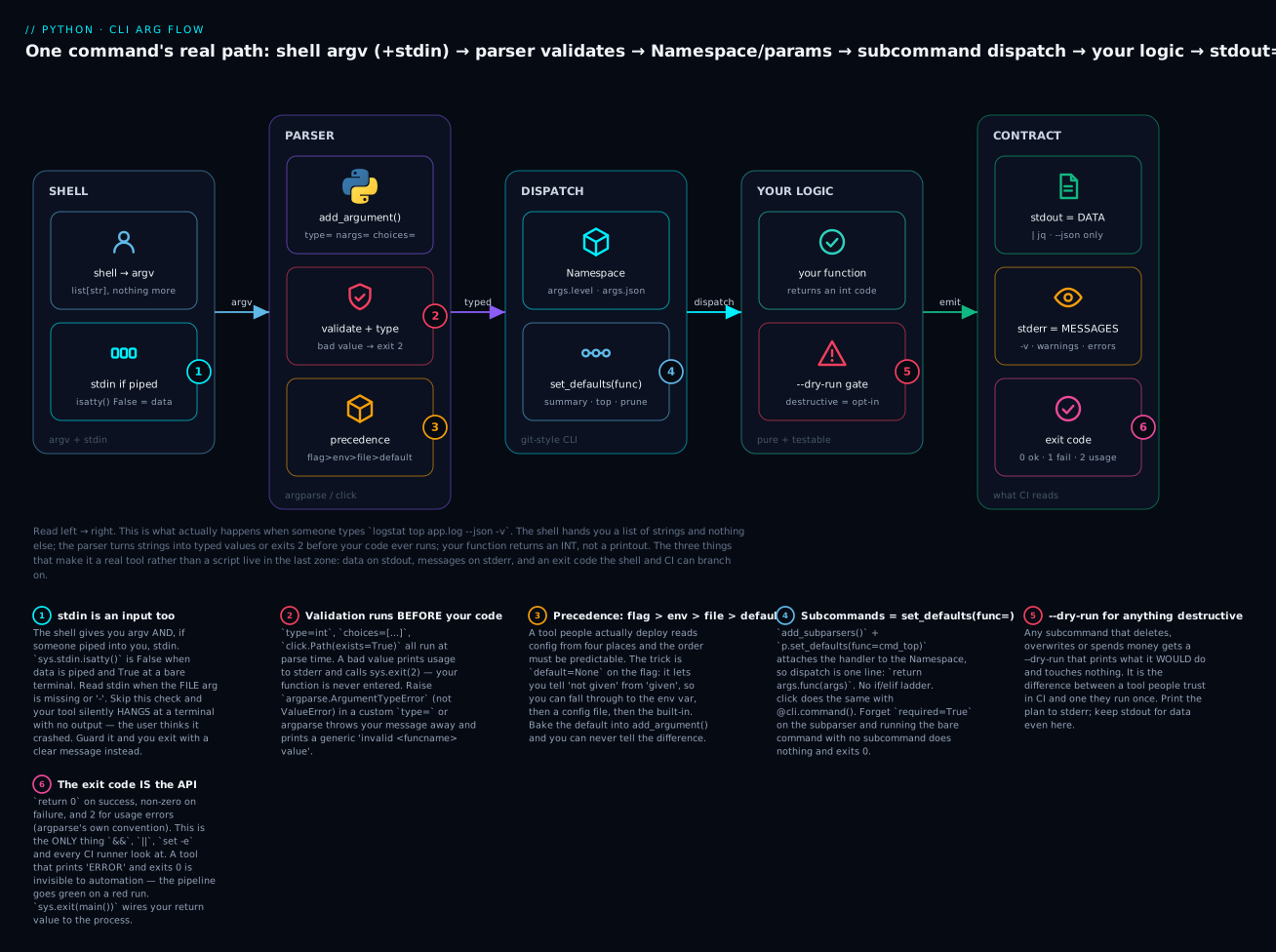
Read it left to right. The shell hands you argv and possibly stdin (1); the parser validates and types before your code runs (2), resolving config in a fixed precedence (3); the Namespace is dispatched to a handler (4) which returns an integer; destructive work sits behind a --dry-run gate (5); and the tool’s real output is three separate lanes — data, messages, and the exit code that automation reads (6).
Exit codes: the only thing CI reads
Your tool’s return value to the outside world is a single integer. 0 means success. Anything else means failure. This is not a Python convention — it’s how &&, ||, set -e, make, and every CI runner on earth decide what happens next.
import sys
n_errors = int(sys.argv[1]) if len(sys.argv) > 1 else 0
print(f"errors: {n_errors}")
sys.exit(1 if n_errors else 0)
$ python3 exit_demo.py 0
errors: 0
$ echo $?
0

$ python3 exit_demo.py 3
errors: 3
$ echo $?
1

$ python3 exit_demo.py 0 && echo "PIPELINE CONTINUES"
errors: 0
PIPELINE CONTINUES

$ python3 exit_demo.py 3 && echo "you will NOT see this"
errors: 3
That last pair is the entire point. The shell branched on your integer. If you had printed ERROR and exited 0, the pipeline would have continued — green on a red run, which is worse than no check at all.
| Code | Meaning | How you produce it |
|---|---|---|
0 |
Success — even if it found nothing | return 0; or sys.exit(0) |
1 |
Failure / found a problem | return 1; sys.exit("msg") prints to stderr and exits 1 |
2 |
Usage error (bad flags) | argparse and click do this for you |
3–125 |
Your own meanings | Document them in --help |
126 / 127 |
Not executable / not found | Shell-generated, not yours |
130 |
Ctrl-C (128+SIGINT) |
Let KeyboardInterrupt propagate |
141 |
SIGPIPE (128+13) |
Downstream closed the pipe (` |
| (any) | Traceback + exit 1 |
An uncaught exception — ugly, but at least non-zero |
⚠️ 0 |
The silent killer | return 1 from main() with nothing wired to sys.exit() |
The structural advice: make main() return an int, and wire it once.
def main(argv=None) -> int:
    args = build_parser().parse_args(argv)
    return args.func(args)          # each handler returns a code

if __name__ == "__main__":
    sys.exit(main())                # the ONE place that touches the process
This keeps every handler testable (call it, check the int) and gives exactly one exit point.
stdout is data, stderr is messages
The rule: stdout carries the answer; stderr carries everything else. Progress, warnings, errors, verbose logging — all stderr. This is what makes mytool | jq work.
import json, sys
print("scanning...", file=sys.stderr)            # message -> stderr
json.dump({"ERROR": 3, "INFO": 12}, sys.stdout)  # data -> stdout
print()
$ python3 streams.py | python3 -m json.tool
scanning...                    # stderr: still on your terminal
{
    "ERROR": 3,
    "INFO": 12
}
scanning... appeared on screen and the JSON flowed cleanly through the pipe, because they’re different file descriptors. Now the bug — one line moved:
print("WARNING: 2 lines were unparseable")     # BUG: message on stdout
json.dump({"ERROR": 3}, sys.stdout); print()
$ python3 badstream.py | python3 -m json.tool
Expecting value: line 1 column 1 (char 0)
The warning became the first line of “the JSON”. Your tool is now unpipeable, and the error message blames the parser, which is why this takes so long to debug when it happens in someone else’s pipeline.
| Stream / shell form | Carries — or does | Test |
|---|---|---|
| stdout | The answer: JSON, CSV, the table, the value | “Would I want this in the file if I ran tool > out.txt?” |
| stderr | Progress, warnings, errors, -v output, prompts |
“Is this about the run rather than the result?” |
| Neither | Secrets | See the security section below |
tool > out.txt |
stdout to file; stderr still on screen | The default split |
tool 2> err.txt |
stderr to file; stdout on screen | — |
tool > out.txt 2>&1 |
Both to the file | Order matters; 2>&1 must come last |
tool 2>/dev/null |
Discard messages, keep data | The debug trick: if output is clean now, you found the leak |
tool | jq |
Only stdout enters the pipe | This is why the rule exists |
tool | head -2 |
Closes the pipe early → BrokenPipeError |
Guard it (below) |
That last one deserves a guard. When the reader on the right of your pipe exits early, Python raises BrokenPipeError, and the default handling prints an ugly Exception ignored block at shutdown. It’s a good example of an exception you catch narrowly and on purpose rather than with a bare except: (see the Exceptions lesson for why the bare version would also swallow your SystemExit). The idiom:
try:
    return args.func(args)
except BrokenPipeError:
    # Downstream (e.g. `| head`) went away. Redirect stdout to devnull so the
    # interpreter's final flush doesn't raise again, and use the SIGPIPE code.
    os.dup2(os.open(os.devnull, os.O_WRONLY), sys.stdout.fileno())
    return 141
Reading stdin when piped
A tool that only reads files can’t sit in the middle of a pipeline. The conventions are strict and worth memorising: no file argument, or a file argument of -, means read stdin. And you detect “is there actually a pipe?” with isatty():
import sys
print("stdin.isatty() =", sys.stdin.isatty())
$ python3 tty.py                     # run at a terminal
stdin.isatty() = True                # nobody piped anything -> DON'T read stdin

$ echo hi | python3 tty.py           # piped
stdin.isatty() = False               # there IS data -> read it
Skip that check and you get the single most confusing CLI bug there is. Here’s a tool with no guard, run at a terminal with no input:
import sys
data = sys.stdin.read()      # no isatty() guard: blocks forever on a terminal
print(f"read {len(data)} bytes")
$ python3 hang.py
                    <- nothing. No output, no error, no prompt. It just sits there.
                       (Verified: killed after 4s having printed nothing at all.)
To the user, the tool is broken. It’s actually waiting politely for input they don’t know they’re supposed to type. The guard turns that into an instant, honest failure:
import sys
if sys.stdin.isatty():
    sys.exit("mytool: no input. Give a FILE or pipe data in.")
print(f"read {len(sys.stdin.read())} bytes")
$ python3 nohang.py
mytool: no input. Give a FILE or pipe data in.
$ echo $?
1

$ echo "hello" | python3 nohang.py    # and it still works when piped
read 6 bytes
The combined helper — file, -, or stdin — is short:
def read_lines(path: Path | None) -> list[str]:
    """Read from a file, or from stdin when path is None or '-'."""
    if path is None or str(path) == "-":
        if sys.stdin.isatty():
            raise SystemExit("logstat: no input. Give a FILE or pipe data in.")
        return sys.stdin.read().splitlines()
    return path.read_text(encoding="utf-8", errors="replace").splitlines()
The flags a good tool has
| Flag | Why it exists | Note |
|---|---|---|
--help / -h |
Discovery | Free from argparse/click. Never hand-write it |
--version |
Bug reports, CI pins | action="version" / @click.version_option |
--json |
Machines | Human tables are unparseable. Give both |
-v / --verbose |
Diagnosis | Repeatable (-vv); maps to log levels |
-q / --quiet |
Cron | Suppress messages, keep data and exit code |
--dry-run |
Trust | Mandatory for anything destructive |
--no-color / NO_COLOR |
Pipes, CI, accessibility | Plus an isatty() check |
- as a filename |
Composability | Means stdin |
-- |
Escape hatch | Ends option parsing; lets a file be called --weird |
--verbose and --quiet should drive the logging module rather than a pile of if verbose: branches — count the flags and map them to a level. (This ties directly to the Logging & Debugging lesson, which is where the handler/level machinery is explained.)
import logging
# -v -> INFO, -vv -> DEBUG, -q -> ERROR only. stderr, so stdout stays clean.
level = logging.ERROR if args.quiet else {0: logging.WARNING,
         1: logging.INFO}.get(args.verbose, logging.DEBUG)
logging.basicConfig(level=level, stream=sys.stderr,
                    format="%(levelname)s %(name)s: %(message)s")
--dry-run for anything destructive
⚠️ Any subcommand that deletes files, overwrites data, calls a paid API, or changes infrastructure gets a --dry-run that prints its plan and touches nothing. This is the flag that gets your tool approved for CI.
def cmd_prune(args) -> int:
    """Deletes rotated logs. Destructive -> --dry-run is the safe path."""
    victims = sorted(Path(".").glob("*.log.[0-9]"))
    for v in victims:
        if args.dry_run:
            print(f"[dry-run] would delete {v}", file=sys.stderr)
        else:
            v.unlink()                                  # ⚠️ irreversible
            print(f"deleted {v}", file=sys.stderr)
    return 0
$ logstat prune --dry-run
[dry-run] would delete app.log.1
[dry-run] would delete app.log.2
2 file(s) (dry-run, nothing deleted)
$ ls app.log.*
app.log.1  app.log.2          # still there

$ logstat prune
deleted app.log.1
deleted app.log.2
2 file(s) deleted
Note the plan goes to stderr — even here, stdout stays reserved for data.
Config precedence: flag > env > file > default
A tool people deploy reads settings from four places, and the order must be predictable. The universal convention:
| Priority | Source | Why it wins | Example |
|---|---|---|---|
| 1 (highest) | CLI flag | Most specific, this run only | --level ERROR |
| 2 | Environment variable | Per-shell / per-container | LOGSTAT_LEVEL=ERROR |
| 3 | Config file | Per-project, committed | logstat.toml |
| 4 (lowest) | Built-in default | Always works with no setup | "INFO" |
The implementation trick is default=None on the flag — it’s the only way to distinguish “not given” from “given”:
import argparse, os, tomllib
from pathlib import Path

DEFAULTS = {"level": "INFO", "number": 5}

def load_config(path=Path("logstat.toml")):
    if not path.exists():
        return {}
    with path.open("rb") as f:                 # tomllib needs BINARY mode
        return tomllib.load(f).get("logstat", {})

def resolve():
    p = argparse.ArgumentParser(prog="logstat")
    p.add_argument("--level", default=None)    # None = "the user didn't say"
    p.add_argument("-n", "--number", type=int, default=None)
    args = p.parse_args()

    cfg = load_config()
    env = {k[8:].lower(): v for k, v in os.environ.items() if k.startswith("LOGSTAT_")}

    out = {}
    for key in DEFAULTS:
        cli_val = getattr(args, key)
        out[key] = (cli_val if cli_val is not None                 # 1. flag
                    else env.get(key) if key in env                # 2. env
                    else cfg.get(key) if key in cfg                # 3. file
                    else DEFAULTS[key])                            # 4. default
    return out
With logstat.toml containing level = "WARNING" and number = 10, all four layers resolve exactly as promised:
$ python3 prec.py                                  # no file, no env, no flag
level    = INFO     (from default)
number   = 5        (from default)

$ python3 prec.py                                  # logstat.toml present
level    = WARNING  (from file)
number   = 10       (from file)

$ LOGSTAT_LEVEL=ERROR python3 prec.py              # env beats file
level    = ERROR    (from env)
number   = 10       (from file)

$ LOGSTAT_LEVEL=ERROR python3 prec.py --level DEBUG -n 3   # flag beats all
level    = DEBUG    (from flag)
number   = 3        (from flag)
tomllib is stdlib from 3.11+ (read-only; use tomli-w or pip install tomli for writing/older versions). click shortcuts layer 2 entirely with envvar="LOGSTAT_LEVEL" on the option.
⚠️ Never take a secret as a CLI argument
This is the security rule of the lesson, and it is absolute. Command-line arguments are public on the machine. Not “hard to see” — public, readable by any user, via ps:
import sys, time
print("connecting with token:", sys.argv[1][:4] + "...")
time.sleep(3)
$ python3 secret.py "sk-live-SUPERSECRET-42" &
$ ps -eo pid,args | grep [s]ecret.py
95314 /usr/local/bin/python3 secret.py sk-live-SUPERSECRET-42
                                       ^^^^^^^^^^^^^^^^^^^^^^
                                       every user on this box can read this
That’s a real ps line from running this section. The token is in plain text. And ps is only the first leak — argv also lands in ~/.bash_history and ~/.zsh_history (on disk, often backed up), in CI build logs (runners echo the command they ran, forever), in docker inspect, and in the argv capture of many crash reporters and APM agents. One flag, six copies you didn’t intend.
| Approach | Safe? | Use when / why |
|---|---|---|
--token sk-live-... |
❌ Never | Leaks to ps, /proc/<pid>/cmdline, history, CI logs, docker inspect |
--token-file /run/secrets/tok |
✅ Best for CI | Mounted secret, mode 0600. Only the path is public |
LOGSTAT_TOKEN env var |
✅ Good | Containers. Not in ps — but does inherit to child processes |
getpass.getpass() prompt |
✅ Best interactive | A human is present; never echoed, never in history |
| Read from stdin | ✅ Good | cat tok | tool --token-stdin — composable, nothing on disk |
| A keyring / secrets manager | ✅ Best | Production: keyring, Vault, cloud secret stores |
The layered helper, which is what a real tool ships:
import os, sys, getpass
from pathlib import Path

def get_token(token_file: str | None = None) -> str:
    # 1. a file (best for CI: mounted secret, mode 0600)
    if token_file:
        return Path(token_file).read_text().strip()
    # 2. an env var (fine; not in ps, but inherits to child processes)
    if tok := os.environ.get("LOGSTAT_TOKEN"):
        return tok
    # 3. an interactive prompt (never echoed, never in history)
    if sys.stdin.isatty():
        return getpass.getpass("Token: ")
    raise SystemExit("logstat: no token. Set LOGSTAT_TOKEN or use --token-file")
$ LOGSTAT_TOKEN="sk-live-SUPERSECRET-42" python3 safe.py
token starts with: sk-l

$ umask 077; echo 'sk-file-TOKEN-99' > token.txt; ls -l token.txt
-rw-------  token.txt                       # 0600: only you

$ python3 safe.py < /dev/null               # non-TTY, no env, no file
logstat: no token. Set LOGSTAT_TOKEN or use --token-file
$ echo $?
1
Note the last case: it refuses cleanly rather than hanging on a prompt that nobody can answer. That’s the isatty() rule again, applied to secrets.
If you must accept --token for compatibility, at minimum warn on stderr — and never --password with click’s prompt=, since prompt= only fires when the flag is absent.
Packaging it: from python script.py to a real command
Everything so far still runs as python3 logstat.py. A tool people actually use is typed as logstat. That’s what [project.scripts] in pyproject.toml gives you — and it’s three lines. (The packaging machinery itself — build backends, wheels, src/ layout — is covered in the Project Structure & Packaging lesson; here we only need the entry-point part.)
[build-system]
requires = ["hatchling"]
build-backend = "hatchling.build"

[project]
name = "logstat"
version = "1.0.0"
description = "Summarise and rank log files."
requires-python = ">=3.10"
dependencies = []                  # argparse edition needs nothing!

[project.scripts]
logstat = "logstat.cli:main"       # command = "package.module:function"

[tool.hatch.build.targets.wheel]
packages = ["src/logstat"]
The magic line is logstat = "logstat.cli:main", and the format is exact: command-name = "importable.module:callable". The part before the colon is a module path; the part after is a function in it that takes no arguments.
$ pip install -e .
$ which logstat
/path/to/.venv/bin/logstat

$ logstat --version
logstat 1.0.0
$ logstat summary app.log
LEVEL      COUNT
DEBUG        1
INFO         4
WARNING      2
ERROR        3
--------------
TOTAL       10
$ echo $?
1
There’s no mystery to what pip built. Look at the file it dropped in bin/:
$ cat .venv/bin/logstat
#!/path/to/.venv/bin/python
import sys
from logstat.cli import main
if __name__ == '__main__':
    sys.argv[0] = sys.argv[0].removesuffix('.exe')
    sys.exit(main())
That’s the whole trick — a generated shim that imports your function and passes its return value to sys.exit. Which is exactly why main() must return an int: pip already wired sys.exit(main()) for you. A main() that returns None always exits 0, no matter what it printed.
| Field | Value | Notes |
|---|---|---|
[project.scripts] |
logstat = "logstat.cli:main" |
Console command. The common case |
[project.gui-scripts] |
Same format | Windows: no console window |
| Callable takes | No arguments | Reads sys.argv itself |
| Return value | Passed to sys.exit() |
int → exit code; None → 0 |
| Where it lands | .venv/bin/ (Unix), .venv\Scripts\ (Windows) |
On PATH when the venv is active |
| Rebuild after edit? | ❌ Not with pip install -e . |
Editable install points at your source |
| Multiple commands | Add more lines | logstat-web = "logstat.web:main" |
pipx: for tools, not libraries
A CLI tool has different needs from a library. You don’t want it in your project’s venv — you want it everywhere, without its dependencies colliding with anything. That’s pipx:
pipx install logstat        # own venv, command on your PATH globally
pipx list                   # what's installed
pipx upgrade logstat
pipx run logstat --version  # run once WITHOUT installing
pipx uninstall logstat
pip install |
pipx install |
|
|---|---|---|
| Installs into | The current environment | A dedicated venv per tool |
| Command on PATH | Only when that venv is active | Always |
| Dependency conflicts | Shared with your project | Isolated per tool |
| For | Libraries you import |
Applications you run |
| Typical users | requests, pandas |
black, ruff, httpie, your logstat |
The rule: if you import it, pip install it. If you type it, pipx install it.
Testing a CLI
CLIs get tested badly, usually via subprocess.run(["mytool", ...]) — which is slow, hides your coverage, and turns every assertion into string matching. Both libraries have a much better way: test the parser and the logic directly, in-process.
The single most important design move is the one the lab uses: main(argv=None). Accepting an argument list makes the whole CLI callable from a test.
def main(argv: list[str] | None = None) -> int:
    args = build_parser().parse_args(argv)   # None -> sys.argv[1:]
    return args.func(args)
argparse: call parse_args([...])
def test_parser_defaults():
    args = build_parser().parse_args(["summary", "app.log"])
    assert args.level == "DEBUG" and args.json is False and args.verbose == 0

def test_parser_bad_choice_exits_2():
    with pytest.raises(SystemExit) as e:            # parse_args EXITS
        build_parser().parse_args(["summary", "app.log", "--level", "TRACE"])
    assert e.value.code == 2

def test_main_exit_code_1_when_errors(capsys):
    assert main(["summary", "app.log"]) == 1        # ERRORs -> non-zero
    assert "ERROR" in capsys.readouterr().out

def test_verbose_goes_to_stderr_not_stdout(capsys):
    main(["summary", "app.log", "--json", "-v"])
    cap = capsys.readouterr()
    json.loads(cap.out)                # stdout still parses as JSON
    assert "parsed" in cap.err         # the chatter went to stderr
Note pytest.raises(SystemExit) — a usage error exits, so that’s how you assert on it. And that last test is the good one: it’s a regression test for the pipe contract. If someone later “helpfully” changes a file=sys.stderr to a bare print, the JSON parse fails and CI catches it.
click: CliRunner
from click.testing import CliRunner

def test_click_help():
    r = CliRunner().invoke(cli, ["--help"])
    assert r.exit_code == 0 and "Summarise and rank log files" in r.output

def test_click_json_stdout_clean():
    r = CliRunner().invoke(cli, ["summary", "app.log", "--json", "-v"])
    assert json.loads(r.stdout)["counts"]["ERROR"] == 3   # stdout: data only
    assert "parsed" in r.stderr                            # stderr: messages

def test_click_isolated_filesystem():
    runner = CliRunner()
    with runner.isolated_filesystem():          # a temp cwd, cleaned up after
        open("t.log", "w").write("2026-07-15 09:00:00 ERROR boom\n")
        r = runner.invoke(cli, ["summary", "t.log", "--json"])
        assert json.loads(r.stdout)["counts"]["ERROR"] == 1
CliRunner |
Gives you |
|---|---|
r.exit_code |
The int your command exited with |
r.output |
stdout + stderr, interleaved |
r.stdout / r.stderr |
Each stream separately |
r.exception |
The exception object, if one escaped |
runner.invoke(cli, args, input="y\n") |
Feed stdin (answers prompts!) |
runner.isolated_filesystem() |
Run in a temp cwd |
runner.invoke(cli, [...], env={...}) |
Set env vars for the run |
Version note:
CliRunner(mix_stderr=False)was removed in click 8.2. On 8.2+ it raisesTypeError: CliRunner.__init__() got an unexpected keyword argument 'mix_stderr'. The streams are now always separable viar.stdout/r.stderr, withr.outputas the combined view. Lots of tutorials still show the old parameter.
As a rule of thumb: use parse_args([...]) or CliRunner for ~95% of your tests (about 1ms each), call your logic functions directly for the actual algorithm (keep them argv-free and they’re trivially testable), and reserve subprocess.run([...]) — at ~100ms a pop — for a single smoke test that the installed command exists and runs. The 13 tests in the lab below run in 0.02 seconds precisely because none of them spawn a process.
Hands-on lab
You’ll build logstat — a real tool with subcommands, stdin support, --json, correct exit codes, and a --dry-run — twice: once in argparse, once in click. Then you’ll package it and install it as a real command.
⚠️ Step 8 deletes files matching *.log.[0-9] in the lab directory. It’s your scratch directory and the tool has a --dry-run, but read before you run.
Step 1 — Set up
mkdir -p ~/logstat-lab/src/logstat && cd ~/logstat-lab
python3 -m venv .venv
source .venv/bin/activate           # Windows: .venv\Scripts\activate
python -V                           # want 3.10+; this lab was run on 3.12.3
cat > app.log <<'EOF'
2026-07-15 09:01:12 INFO  api request ok path=/health
2026-07-15 09:01:15 INFO  api request ok path=/orders
2026-07-15 09:02:01 WARNING cache miss key=user:42
2026-07-15 09:02:44 ERROR db timeout after 5000ms
2026-07-15 09:03:02 INFO  api request ok path=/health
2026-07-15 09:03:30 ERROR db timeout after 5000ms
2026-07-15 09:04:11 DEBUG pool size=8 idle=3
2026-07-15 09:05:00 ERROR upstream 502 from payments
2026-07-15 09:05:31 WARNING cache miss key=user:42
2026-07-15 09:06:02 INFO  api request ok path=/orders
EOF
wc -l app.log
10 app.log
What just happened: a venv and ten lines of realistic log — 3 ERRORs, 2 WARNINGs, 4 INFOs, 1 DEBUG.
Step 2 — The core logic (no argv, no printing)
This separation is the whole reason the tests are fast. Nothing here knows a CLI exists.
# src/logstat/cli.py
#!/usr/bin/env python3
"""logstat — summarise log files. The argparse edition."""
from __future__ import annotations

import argparse, json, os, re, sys
from collections import Counter
from datetime import datetime, timedelta
from pathlib import Path

# Defined here (not imported from the package) so this file runs BOTH as a plain
# script — `python src/logstat/cli.py` — and as an installed command after step 9.
__version__ = "1.0.0"

LEVELS = ["DEBUG", "INFO", "WARNING", "ERROR"]
LINE_RE = re.compile(
    r"^(?P<ts>\d{4}-\d{2}-\d{2} \d{2}:\d{2}:\d{2})\s+"
    r"(?P<level>DEBUG|INFO|WARNING|ERROR)\s+"
    r"(?P<msg>.*)$"
)

# ---------- core logic (no printing, no argv — this is the testable part) ----------

def parse_since(spec: str) -> timedelta:
    """'90m' -> timedelta(minutes=90). ArgumentTypeError keeps our message."""
    m = re.fullmatch(r"(\d+)([smhd])", spec)
    if not m:
        raise argparse.ArgumentTypeError(
            f"{spec!r} is not a duration: use 30s, 15m, 24h, 7d")
    n, unit = int(m.group(1)), m.group(2)
    return timedelta(**{{"s": "seconds", "m": "minutes",
                         "h": "hours", "d": "days"}[unit]: n})

def read_lines(path: Path | None) -> list[str]:
    """Read from a file, or from stdin when path is None or '-'."""
    if path is None or str(path) == "-":
        if sys.stdin.isatty():
            raise SystemExit("logstat: no input. Give a FILE or pipe data in.")
        return sys.stdin.read().splitlines()
    return path.read_text(encoding="utf-8", errors="replace").splitlines()

def parse_records(lines: list[str]) -> tuple[list[dict], int]:
    recs, bad = [], 0
    for line in lines:
        m = LINE_RE.match(line)
        if not m:
            bad += 1
            continue
        recs.append({"ts": datetime.strptime(m["ts"], "%Y-%m-%d %H:%M:%S"),
                     "level": m["level"], "msg": m["msg"].strip()})
    return recs, bad

def filter_records(recs, min_level="DEBUG", since=None, now=None):
    floor = LEVELS.index(min_level)
    out = [r for r in recs if LEVELS.index(r["level"]) >= floor]
    if since is not None:
        now = now or max((r["ts"] for r in recs), default=datetime.now())
        out = [r for r in out if r["ts"] >= now - since]
    return out

def summarise(recs) -> dict:
    c = Counter(r["level"] for r in recs)
    return {lvl: c.get(lvl, 0) for lvl in LEVELS}

def top_messages(recs, n=5):
    c = Counter(r["msg"] for r in recs)
    return [{"count": k, "message": m} for m, k in c.most_common(n)]
Also create the package marker — an __init__.py is what makes src/logstat/ an importable package in step 9:
echo '"""logstat — summarise log files."""' > src/logstat/__init__.py
What just happened: pure functions — strings in, data out. Nothing here touches sys.argv or prints, which is exactly why the tests in step 11 are instant. parse_since raises ArgumentTypeError so our message survives.
Step 3 — Rendering and the command handlers
Append to src/logstat/cli.py. Every handler returns an int.
# ---------- rendering ----------

def render_summary_table(counts: dict, total: int) -> str:
    rows = [f"{lvl:<8} {counts[lvl]:>5}" for lvl in LEVELS]
    return "LEVEL      COUNT\n" + "\n".join(rows) + f"\n{'-'*14}\n{'TOTAL':<8} {total:>5}"

def render_top_table(rows: list[dict]) -> str:
    if not rows:
        return "(no messages)"
    out = ["COUNT  MESSAGE"]
    out += [f"{r['count']:>5}  {r['message']}" for r in rows]
    return "\n".join(out)

# ---------- command handlers: return an EXIT CODE ----------

def cmd_summary(args) -> int:
    recs, bad = parse_records(read_lines(args.path))
    recs = filter_records(recs, args.level, args.since)
    counts = summarise(recs)
    if args.verbose:
        print(f"parsed {len(recs)} records ({bad} unparseable)", file=sys.stderr)
    if args.json:
        json.dump({"counts": counts, "total": len(recs), "unparseable": bad},
                  sys.stdout, indent=2)
        print()
    else:
        print(render_summary_table(counts, len(recs)))
    return 1 if counts["ERROR"] else 0          # <- errors found = non-zero

def cmd_top(args) -> int:
    recs, bad = parse_records(read_lines(args.path))
    recs = filter_records(recs, args.level, args.since)
    rows = top_messages(recs, args.number)
    if args.verbose:
        print(f"ranking {len(recs)} records", file=sys.stderr)
    if args.json:
        json.dump(rows, sys.stdout, indent=2)
        print()
    else:
        print(render_top_table(rows))
    return 0

def cmd_prune(args) -> int:
    """Deletes rotated logs. Destructive -> --dry-run is the default-safe path."""
    victims = sorted(Path(".").glob("*.log.[0-9]"))
    if not victims:
        print("nothing to prune", file=sys.stderr)
        return 0
    for v in victims:
        if args.dry_run:
            print(f"[dry-run] would delete {v}", file=sys.stderr)
        else:
            v.unlink()                                   # ⚠️ irreversible
            print(f"deleted {v}", file=sys.stderr)
    print(f"{len(victims)} file(s)" +
          (" (dry-run, nothing deleted)" if args.dry_run else " deleted"),
          file=sys.stderr)
    return 0
What just happened: handlers return codes instead of calling sys.exit. Data goes to stdout; every message goes to stderr.
Step 4 — The parser
# ---------- the parser ----------

def build_parser() -> argparse.ArgumentParser:
    parser = argparse.ArgumentParser(
        prog="logstat",
        description="Summarise and rank log files. Reads a FILE or stdin.",
        epilog="stdout is data, stderr is messages: logstat top app.log --json | jq .",
    )
    parser.add_argument("--version", action="version", version=f"%(prog)s {__version__}")

    # parents= : define the shared flags ONCE, reuse in every subcommand
    common = argparse.ArgumentParser(add_help=False)
    common.add_argument("path", nargs="?", type=Path, default=None,
                        metavar="FILE", help="log file, or '-'/omitted for stdin")
    common.add_argument("--level", default=os.environ.get("LOGSTAT_LEVEL", "DEBUG"),
                        choices=LEVELS, help="minimum level (default: %(default)s)")
    common.add_argument("--since", type=parse_since, default=None, metavar="DUR",
                        help="only lines newer than e.g. 30m, 24h, 7d")
    common.add_argument("--json", action="store_true", help="machine-readable output")
    noise = common.add_mutually_exclusive_group()
    noise.add_argument("-v", "--verbose", action="count", default=0, help="repeatable")
    noise.add_argument("-q", "--quiet", action="store_true", help="suppress messages")

    sub = parser.add_subparsers(dest="command", metavar="COMMAND", required=True)

    p_sum = sub.add_parser("summary", parents=[common], help="count lines by level")
    p_sum.set_defaults(func=cmd_summary)

    p_top = sub.add_parser("top", parents=[common], help="rank the noisiest messages")
    p_top.add_argument("-n", "--number", type=int, default=5, metavar="N",
                       help="how many (default: %(default)s)")
    p_top.set_defaults(func=cmd_top)

    p_prune = sub.add_parser("prune", help="delete rotated logs (DESTRUCTIVE)")
    p_prune.add_argument("--dry-run", action="store_true", help="show, don't delete")
    p_prune.set_defaults(func=cmd_prune, verbose=0, quiet=False)
    return parser

def main(argv: list[str] | None = None) -> int:
    parser = build_parser()
    args = parser.parse_args(argv)              # argv=None -> sys.argv[1:]
    try:
        return args.func(args)
    except BrokenPipeError:
        os.dup2(os.open(os.devnull, os.O_WRONLY), sys.stdout.fileno())
        return 141
    except (OSError, ValueError) as e:
        print(f"logstat: {e}", file=sys.stderr)
        return 2

if __name__ == "__main__":
    sys.exit(main())
Now look at the help you never wrote:
$ python src/logstat/cli.py --help
usage: logstat [-h] [--version] COMMAND ...

Summarise and rank log files. Reads a FILE or stdin.

positional arguments:
  COMMAND
    summary   count lines by level
    top       rank the noisiest messages
    prune     delete rotated logs (DESTRUCTIVE)

options:
  -h, --help  show this help message and exit
  --version   show program's version number and exit

stdout is data, stderr is messages: logstat top app.log --json | jq .

$ python src/logstat/cli.py summary --help
usage: logstat summary [-h] [--level {DEBUG,INFO,WARNING,ERROR}] [--since DUR]
                       [--json] [-v | -q]
                       [FILE]

positional arguments:
  FILE                  log file, or '-'/omitted for stdin

options:
  -h, --help            show this help message and exit
  --level {DEBUG,INFO,WARNING,ERROR}
                        minimum level (default: DEBUG)
  --since DUR           only lines newer than e.g. 30m, 24h, 7d
  --json                machine-readable output
  -v, --verbose         repeatable
  -q, --quiet           suppress messages
What just happened: parents=[common] put FILE, --level, --since, --json, -v/-q into both subcommands from one definition. [-v | -q] shows the mutex. main(argv=None) is what makes step 9’s tests possible.
Step 5 — Run it: human vs machine
$ python src/logstat/cli.py summary app.log
LEVEL      COUNT
DEBUG        1
INFO         4
WARNING      2
ERROR        3
--------------
TOTAL       10
$ echo $?
1
Exit 1 — because it found ERRORs. That’s the tool being useful to CI.
$ python src/logstat/cli.py summary app.log --json
{
  "counts": {
    "DEBUG": 1,
    "INFO": 4,
    "WARNING": 2,
    "ERROR": 3
  },
  "total": 10,
  "unparseable": 0
}

$ python src/logstat/cli.py top app.log -n 3
COUNT  MESSAGE
    2  api request ok path=/health
    2  api request ok path=/orders
    2  cache miss key=user:42
--level filters by minimum level, so --level ERROR keeps only the ERROR lines — the counts above it go to zero rather than disappearing, which keeps the JSON shape stable for machines:
$ python src/logstat/cli.py summary app.log --level ERROR
LEVEL      COUNT
DEBUG        0
INFO         0
WARNING      0
ERROR        3
--------------
TOTAL        3

$ python src/logstat/cli.py summary app.log --since 2m
LEVEL      COUNT
DEBUG        1
INFO         1
WARNING      1
ERROR        1
--------------
TOTAL        4
What just happened: --since 2m measured back from the newest record (09:06:02) and kept the last four. The same data rendered two ways — table for you, JSON for a machine.
Step 6 — Prove the pipe and the exit code
This is the step that proves you have a tool.
$ python src/logstat/cli.py top app.log -n 2 --json | python -m json.tool
[
    {
        "count": 2,
        "message": "api request ok path=/health"
    },
    {
        "count": 2,
        "message": "api request ok path=/orders"
    }
]
Now with -v — the chatter must not break the pipe:
$ python src/logstat/cli.py summary app.log --json -v | python -m json.tool
parsed 10 records (0 unparseable)        <- stderr: on your screen, NOT in the pipe
{
    "counts": {
        "DEBUG": 1,
And stdin, both ways:
$ cat app.log | python src/logstat/cli.py summary --level ERROR
LEVEL      COUNT
DEBUG        0
INFO         0
WARNING      0
ERROR        3
--------------
TOTAL        3

$ cat app.log | python src/logstat/cli.py summary -      # explicit '-'
(same output)
The exit code driving a shell decision:
$ python src/logstat/cli.py summary app.log --level ERROR >/dev/null 2>&1 \
    && echo "clean" || echo "ERRORS FOUND -> exit $?"
ERRORS FOUND -> exit 1

$ python src/logstat/cli.py summary app.log --level ERROR --since 1s >/dev/null 2>&1 \
    && echo "clean (no recent errors)" || echo "errors"
clean (no recent errors)
What just happened: the same command, two exit codes, two branches — with no output parsing. That’s what an exit code buys.
Step 7 — Meet the errors
$ python src/logstat/cli.py summary app.log --since 5x
usage: logstat summary [-h] [--level {DEBUG,INFO,WARNING,ERROR}] [--since DUR]
                       [--json] [-v | -q]
                       [FILE]
logstat summary: error: argument --since: '5x' is not a duration: use 30s, 15m, 24h, 7d
$ echo $?
2

$ python src/logstat/cli.py summary app.log -v -q
logstat summary: error: argument -q/--quiet: not allowed with argument -v/--verbose

$ python src/logstat/cli.py
usage: logstat [-h] [--version] COMMAND ...
logstat: error: the following arguments are required: COMMAND
What just happened: our ArgumentTypeError message survived. Every usage error exits 2, prints to stderr, and never enters your handler.
Step 8 — --dry-run on the destructive command
$ touch app.log.1 app.log.2
$ python src/logstat/cli.py prune --dry-run
[dry-run] would delete app.log.1
[dry-run] would delete app.log.2
2 file(s) (dry-run, nothing deleted)
$ ls app.log.*
app.log.1  app.log.2                    # still there

$ python src/logstat/cli.py prune       # ⚠️ for real
deleted app.log.1
deleted app.log.2
2 file(s) deleted
$ ls app.log.*
zsh: no matches found: app.log.*
What just happened: the plan went to stderr, and --dry-run touched nothing.
Step 9 — Package it into a real command
# pyproject.toml
[build-system]
requires = ["hatchling"]
build-backend = "hatchling.build"

[project]
name = "logstat"
version = "1.0.0"
description = "Summarise and rank log files."
requires-python = ">=3.10"
dependencies = []

[project.scripts]
logstat = "logstat.cli:main"

[tool.hatch.build.targets.wheel]
packages = ["src/logstat"]
pip install -e .
$ which logstat
/home/you/logstat-lab/.venv/bin/logstat

$ logstat --version
logstat 1.0.0

$ logstat summary app.log
LEVEL      COUNT
DEBUG        1
INFO         4
WARNING      2
ERROR        3
--------------
TOTAL       10
$ echo $?
1

$ logstat top app.log --json -n 2 | python -m json.tool
[
    {
        "count": 2,
        "message": "api request ok path=/health"
    },
    {
        "count": 2,
        "message": "api request ok path=/orders"
    }
]

$ cat app.log | logstat summary --level ERROR
LEVEL      COUNT
DEBUG        0
INFO         0
WARNING      0
ERROR        3
--------------
TOTAL        3
It’s a real command now. Look at what pip generated:
$ cat .venv/bin/logstat
#!/home/you/logstat-lab/.venv/bin/python
import sys
from logstat.cli import main
if __name__ == '__main__':
    sys.argv[0] = sys.argv[0].removesuffix('.exe')
    sys.exit(main())
What just happened: [project.scripts] generated a shim that calls sys.exit(main()). Your return 1 became the process’s exit code. -e means editable — edit cli.py and logstat changes immediately, no reinstall.
Step 10 — The same CLI in click
pip install click
# logstat_click.py  (at the project root)
"""logstat — the click edition. Same CLI, same behaviour, same exit codes."""
from __future__ import annotations
import json
from pathlib import Path
import click

from logstat.cli import (LEVELS, filter_records, parse_records, parse_since,
                         read_lines, render_summary_table, render_top_table,
                         summarise, top_messages)

def _shared(f):
    """The options both subcommands share (click has no `parents=`)."""
    f = click.argument("path", required=False, default=None,
                       type=click.Path(exists=True, dir_okay=False,
                                       allow_dash=True, path_type=Path))(f)
    f = click.option("--level", default="DEBUG", show_default=True,
                     type=click.Choice(LEVELS), envvar="LOGSTAT_LEVEL",
                     help="minimum level")(f)
    f = click.option("--since", default=None, metavar="DUR",
                     help="only lines newer than e.g. 30m, 24h")(f)
    f = click.option("--json", "as_json", is_flag=True, help="machine-readable")(f)
    f = click.option("-v", "--verbose", count=True, help="repeatable")(f)
    return f

@click.group(context_settings={"help_option_names": ["-h", "--help"]})
@click.version_option("1.0.0", prog_name="logstat")
def cli():
    """Summarise and rank log files. Reads a FILE or stdin."""

@cli.command()
@_shared
def summary(path, level, since, as_json, verbose):
    """Count lines by level."""
    recs, bad = parse_records(read_lines(path))
    recs = filter_records(recs, level, parse_since(since) if since else None)
    counts = summarise(recs)
    if verbose:
        click.echo(f"parsed {len(recs)} records ({bad} unparseable)", err=True)
    if as_json:
        click.echo(json.dumps({"counts": counts, "total": len(recs),
                               "unparseable": bad}, indent=2))
    else:
        click.echo(render_summary_table(counts, len(recs)))
    raise SystemExit(1 if counts["ERROR"] else 0)

@cli.command()
@_shared
@click.option("-n", "--number", default=5, show_default=True, metavar="N")
def top(path, level, since, as_json, verbose, number):
    """Rank the noisiest messages."""
    recs, bad = parse_records(read_lines(path))
    recs = filter_records(recs, level, parse_since(since) if since else None)
    rows = top_messages(recs, number)
    if verbose:
        click.echo(f"ranking {len(recs)} records", err=True)
    click.echo(json.dumps(rows, indent=2) if as_json else render_top_table(rows))

if __name__ == "__main__":
    cli()
$ python logstat_click.py --help
Usage: logstat_click.py [OPTIONS] COMMAND [ARGS]...

  Summarise and rank log files. Reads a FILE or stdin.

Options:
  --version   Show the version and exit.
  -h, --help  Show this message and exit.

Commands:
  summary  Count lines by level.
  top      Rank the noisiest messages.
Now the payoff — prove the two editions are the same tool:
$ diff <(python src/logstat/cli.py summary app.log 2>/dev/null) \
       <(python logstat_click.py summary app.log 2>/dev/null) && echo "IDENTICAL"
IDENTICAL

$ diff <(python src/logstat/cli.py top app.log -n 3 --json 2>/dev/null) \
       <(python logstat_click.py top app.log -n 3 --json 2>/dev/null) && echo "JSON IDENTICAL"
JSON IDENTICAL

$ LOGSTAT_LEVEL=ERROR python logstat_click.py summary app.log   # envvar= for free
LEVEL      COUNT
DEBUG        0
INFO         0
WARNING      0
ERROR        3
--------------
TOTAL        3

$ python logstat_click.py summary nope.log
Error: Invalid value for '[PATH]': File 'nope.log' does not exist.
$ echo $?
2
What just happened: byte-identical output from two different libraries — because the logic never knew which parser called it. Compare the two files honestly: click gave you envvar=, -h via help_option_names, and path validation for free; argparse gave you parents= and zero dependencies. Note click has no parents=, so shared options need that _shared decorator-stacking helper — the one place argparse is genuinely tidier.
Step 11 — Test both, fast
pip install pytest
# test_cli.py — note what is NOT here: no subprocess, no shell.
import json
import pytest
from click.testing import CliRunner

from logstat.cli import build_parser, main, parse_since
import logstat_click

SAMPLE = "app.log"

# ---------- argparse: call parse_args([...]) directly ----------

def test_parser_defaults():
    args = build_parser().parse_args(["summary", SAMPLE])
    assert args.level == "DEBUG" and args.json is False and args.verbose == 0

def test_parser_flags():
    args = build_parser().parse_args(["top", SAMPLE, "-n", "3", "--json", "-vv"])
    assert args.number == 3 and args.json is True and args.verbose == 2

def test_parser_bad_choice_exits_2():
    with pytest.raises(SystemExit) as e:
        build_parser().parse_args(["summary", SAMPLE, "--level", "TRACE"])
    assert e.value.code == 2

def test_parser_mutex_exits_2():
    with pytest.raises(SystemExit) as e:
        build_parser().parse_args(["summary", SAMPLE, "-v", "-q"])
    assert e.value.code == 2

def test_since_type():
    assert parse_since("90m").total_seconds() == 5400
    with pytest.raises(Exception):
        parse_since("5x")

def test_main_exit_code_1_when_errors(capsys):
    code = main(["summary", SAMPLE])
    assert code == 1                       # ERRORs present -> non-zero
    assert "ERROR" in capsys.readouterr().out

def test_main_json_is_valid_on_stdout(capsys):
    main(["summary", SAMPLE, "--json"])
    data = json.loads(capsys.readouterr().out)   # stdout must be PURE json
    assert data["counts"]["ERROR"] == 3

def test_verbose_goes_to_stderr_not_stdout(capsys):
    main(["summary", SAMPLE, "--json", "-v"])
    cap = capsys.readouterr()
    json.loads(cap.out)                     # stdout still parses
    assert "parsed" in cap.err              # the chatter went to stderr

# ---------- click: CliRunner ----------

def test_click_help():
    r = CliRunner().invoke(logstat_click.cli, ["--help"])
    assert r.exit_code == 0 and "Summarise and rank log files" in r.output

def test_click_exit_code():
    r = CliRunner().invoke(logstat_click.cli, ["summary", SAMPLE])
    assert r.exit_code == 1

def test_click_json_stdout_clean():
    r = CliRunner().invoke(logstat_click.cli, ["summary", SAMPLE, "--json", "-v"])
    assert json.loads(r.stdout)["counts"]["ERROR"] == 3   # stdout: data only
    assert "parsed" in r.stderr                            # stderr: messages

def test_click_bad_path_exits_2():
    r = CliRunner().invoke(logstat_click.cli, ["summary", "nope.log"])
    assert r.exit_code == 2 and "does not exist" in r.output

def test_click_isolated_filesystem():
    runner = CliRunner()
    with runner.isolated_filesystem():
        open("t.log", "w").write("2026-07-15 09:00:00 ERROR boom\n")
        r = runner.invoke(logstat_click.cli, ["summary", "t.log", "--json"])
        assert json.loads(r.stdout)["counts"]["ERROR"] == 1
$ python -m pytest test_cli.py -q
.............                                                            [100%]
13 passed in 0.02s
What just happened: 13 tests covering both editions in 0.02 seconds — no process spawned. Two of them (test_main_json_is_valid_on_stdout, test_verbose_goes_to_stderr_not_stdout) are regression tests for the pipe contract: if anyone ever prints a message to stdout, CI fails.
Common mistakes and troubleshooting
| Symptom / traceback | Cause | Fix |
|---|---|---|
argparse.ArgumentError: argument -h/--host: conflicting option string: -h |
You used -h for your own option; argparse already owns it |
ArgumentParser(add_help=False) then add --help back with action="help" — or use -H/--host |
--color flag does nothing; always True |
action="store_true", default=True — no path sets False |
Add a paired --no-color with action="store_false", dest="color", or use action=argparse.BooleanOptionalAction |
error: the following arguments are required: path — but you passed it |
nargs="+" swallowed the positional |
Put the positional first, or separate with --, or use action="append" instead of nargs="+" |
error: argument --since: invalid parse_since value: '5x' — your nice message vanished |
argparse catches ValueError/TypeError from type= and replaces the text with the function’s name |
raise argparse.ArgumentTypeError("...") instead |
AttributeError: 'Namespace' object has no attribute 'loglevel'. Did you mean: 'log_level'? |
--log-level becomes args.log_level; dashes → underscores |
Use the underscored name, or set dest="loglevel" explicitly |
ValueError: mutually exclusive arguments must be optional |
You put a required positional in a mutex group | Only --flags (or nargs="?" positionals) can be mutually exclusive |
AttributeError: 'Namespace' object has no attribute 'func' |
No subcommand given, and add_subparsers() wasn’t required=True |
Pass required=True — otherwise the tool silently no-ops and exits 0 |
mytool | jq → parse error: Invalid numeric literal |
A message/warning was printed to stdout, corrupting the data stream | Every non-data line gets file=sys.stderr (or click.echo(..., err=True)) |
| CI is green but the tool clearly failed | main() returns 1 but nothing wires it — or you only print("ERROR") |
sys.exit(main()); return non-zero on failure |
| Tool prints nothing and hangs forever at a terminal | sys.stdin.read() with no isatty() guard — it’s waiting for input |
if sys.stdin.isatty(): sys.exit("no input...") before reading |
TypeError: main() got an unexpected keyword argument 'log_level' (click) |
click derives the param name from the longest option; your signature doesn’t match | Match the derived name, or set it explicitly: @click.option("--json", "as_json", ...) |
Secret visible in ps -ef / CI logs / shell history |
You accepted --token VALUE on the command line |
Env var, --token-file, getpass.getpass(), or stdin. Never argv |
TypeError: CliRunner.__init__() got an unexpected keyword argument 'mix_stderr' |
mix_stderr was removed in click 8.2 |
Drop it; use r.stdout / r.stderr (already separate) |
Exception ignored ... BrokenPipeError on mytool | head |
The reader closed the pipe; Python’s final flush raises | Catch BrokenPipeError, os.dup2 devnull onto stdout, exit 141 |
ANSI escapes (^[[31m) inside a redirected log file |
You colour unconditionally | click.echo strips on non-TTY; for NO_COLOR add the check yourself |
ModuleNotFoundError: No module named 'logstat' after pip install -e . |
src/ layout not declared to the build backend |
Add [tool.hatch.build.targets.wheel] packages = ["src/logstat"] |
The three that will actually cost you a day
1. The stdout/stderr mix-up, because it fails in someone else’s pipeline. Your tool works perfectly for you. Six weeks later a colleague reports “your tool outputs invalid JSON.” It doesn’t — it outputs valid JSON plus a friendly Loaded config from ~/.logstat.toml line that you added on a Tuesday and that jq now chokes on. The reason this hurts is the error message blames the parser, not you, so nobody suspects the tool. Defence: the assertion in test_main_json_is_valid_on_stdout — json.loads(capsys.readouterr().out) — fails the build the instant anyone prints to the wrong stream. Write that test on day one.
2. The exit code that’s always 0, because it fails silently and forever. This is the worst bug in the lesson, because there is no symptom. The pipeline is green. The dashboard is green. Everyone believes the check is running — and it is running, and finding problems, and reporting success. The cause is almost always one of two things: a main() that returns an int nobody wired to sys.exit, or a handler that prints an error and falls off the end (returning None, which becomes 0). Defence: sys.exit(main()) as the only exit point, plus one test that asserts a failing input produces a non-zero code. Then actually verify it: mytool bad-input; echo $?.
3. store_true with default=True, because the code reads correctly. Every reviewer’s eye slides right over action="store_true", default=True. It looks like “colour is on by default and --color turns it on” — which is true, and useless, because nothing turns it off. There’s no error, no warning; the flag simply has no effect. Defence: learn the rule — store_true implies default=False, so writing any default= next to it is a bug in every case except False. Use BooleanOptionalAction and let argparse generate the --no- twin.
Cheat-sheet
argparse
| Syntax | Does |
|---|---|
p = argparse.ArgumentParser(prog="x", description="…") |
Make a parser |
p.add_argument("path") |
Positional, required |
p.add_argument("path", nargs="?", default=None) |
Positional, optional |
p.add_argument("--level", default="INFO") |
Optional with a default |
p.add_argument("-v", "--verbose", action="store_true") |
Boolean flag |
p.add_argument("-v", action="count", default=0) |
-vvv → 3 |
p.add_argument("--tag", action="append", default=[]) |
Repeatable → list |
p.add_argument("--n", type=int, choices=range(1,11)) |
Typed + restricted |
p.add_argument("--x", action=argparse.BooleanOptionalAction, default=True) |
--x / --no-x |
p.add_argument("--version", action="version", version="%(prog)s 1.0") |
--version, exits 0 |
p.add_argument("f", type=Path) |
A pathlib.Path |
raise argparse.ArgumentTypeError("msg") |
Custom type= error that survives |
g = p.add_mutually_exclusive_group() |
At most one |
p.add_argument_group("title") |
Help cosmetics only |
sub = p.add_subparsers(dest="cmd", required=True) |
Subcommands |
c = sub.add_parser("run", parents=[common]) |
A subcommand + shared flags |
c.set_defaults(func=cmd_run) |
Dispatch table |
args = p.parse_args() |
Parse sys.argv[1:]; exits 2 on error |
args = p.parse_args(["a", "-v"]) |
Parse a list — for tests |
args, extra = p.parse_known_args() |
Keep unknown args |
vars(args) |
Namespace → dict |
click
| Syntax | Does |
|---|---|
@click.command() |
Function → CLI |
@click.group() / @cli.command() |
Subcommands |
@click.argument("path") |
Positional |
@click.option("--level", default="INFO", show_default=True) |
Option + shown default |
@click.option("-v", "--verbose", is_flag=True) |
Boolean |
@click.option("-v", count=True) |
-vvv → 3 |
@click.option("--tag", multiple=True) |
Repeatable → tuple |
@click.option("--json", "as_json", is_flag=True) |
Explicit param name |
type=click.Choice([...]) / click.IntRange(0,10) |
Validation |
type=click.Path(exists=True, path_type=Path) |
Validated Path |
@click.option("--pw", prompt=True, hide_input=True, confirmation_prompt=True) |
Password |
envvar="LOGSTAT_LEVEL" |
Read from env |
@click.version_option("1.0", prog_name="x") |
--version |
click.echo("data") / click.echo("msg", err=True) |
stdout / stderr |
click.secho("bad", fg="red", bold=True) |
Colour (stripped when piped) |
with click.progressbar(items, label="…") as b: |
Progress (auto-hides when piped) |
@click.pass_context + ctx.obj |
Share group state |
context_settings={"help_option_names": ["-h", "--help"]} |
Add -h |
CliRunner().invoke(cli, ["--help"]) |
Test it |
The UNIX contract + packaging
| Rule | Code |
|---|---|
| Data → stdout | print(data) / click.echo(data) |
| Messages → stderr | print(msg, file=sys.stderr) / click.echo(msg, err=True) |
| Success | return 0 |
| Failure | return 1 |
| Usage error | exit 2 (parsers do it for you) |
| Wire it up | sys.exit(main()) |
| Quick error + exit 1 | sys.exit("mytool: something broke") |
| Read stdin when piped | if not sys.stdin.isatty(): sys.stdin.read() |
- means stdin |
if path in (None, "-"): … |
| Colour only for humans | sys.stdout.isatty() and not os.environ.get("NO_COLOR") |
| Config precedence | flag > env > file > default (default=None on the flag) |
| Secrets | env / file / getpass / stdin — never argv |
| Destructive | --dry-run first |
| Check it | mytool …; echo $? |
| Ship a command | [project.scripts] → logstat = "logstat.cli:main" |
| Develop it | pip install -e . — editable, no rebuild on edit |
| Install it globally | pipx install logstat (own venv, always on PATH) |
| Run it once | pipx run logstat --version — without installing |
Interview and exam questions
Q: What exactly does sys.argv contain, and what has the shell already done to it?
A: A list of strings. sys.argv[0] is the script name; [1:] are the arguments. The shell has already split on whitespace (honouring quotes) and expanded globs — *.log arrives as a list of filenames. It has done no typing, pairing, or validation. Everything else is your parser’s job.
Q: Why is argparse’s exit code for a bad flag 2 and not 1?
A: The UNIX convention: 2 means usage error (you called me wrong), 1 means failure (I ran correctly and the answer is bad). Keeping them distinct lets a caller tell “my script has a bug in how it invokes this tool” from “the tool found real problems.” --help and --version exit 0 — asking a question successfully is a success.
Q: Your tool prints JSON, but mytool | jq . fails with a parse error. What’s the bug?
A: Something non-JSON is on stdout — a progress line, a warning, a “loaded config” note. Only the data belongs on stdout; every message goes to stderr (print(..., file=sys.stderr) or click.echo(..., err=True)). Diagnose with mytool 2>/dev/null — if the output is now clean JSON, you’ve found it.
Q: A CI job runs your checker and is always green, but the checker definitely finds errors. Why?
A: It exits 0. Either main() returns a code that nobody passes to sys.exit(), or the handler prints an error and returns None (→ 0). CI reads only the exit code, never your output. Fix: sys.exit(main()) and return 1 on failure. Verify with mytool bad-input; echo $?.
Q: What’s wrong with add_argument("--color", action="store_true", default=True)?
A: It can never be False. store_true sets True when present, and the default=True covers absence — so the flag is a no-op. Use a paired --no-color (action="store_false", dest="color") or action=argparse.BooleanOptionalAction, which generates --color/--no-color and documents both.
Q: Why should a custom type= callable raise ArgumentTypeError rather than ValueError?
A: argparse catches ValueError and TypeError from type= and discards your message, printing a generic invalid <function_name> value: 'x'. argparse.ArgumentTypeError passes your text through verbatim — so the user reads “‘5x’ is not a duration: use 30s, 15m, 24h, 7d” instead of “invalid parse_since value”.
Q: How do you build a git-style CLI in argparse without an if/elif ladder?
A: sub = parser.add_subparsers(dest="cmd", required=True), then for each verb p = sub.add_parser("top") and p.set_defaults(func=cmd_top). set_defaults attaches the handler to the Namespace, so dispatch is return args.func(args). Share common flags with a parents=[common] parser built with add_help=False.
Q: When would you choose argparse over click?
A: When a dependency is a liability — a single-file script you scp to a host, a container entrypoint, a bootstrap tool that runs before pip, or a locked-down environment. argparse is always there. Choose click when the tool is a real product: subcommands, prompts, colour, shell completion, and CliRunner justify the dependency quickly. typer if you’re already type-hinted (it’s click underneath). fire only for throwaways — its API is your function signature, so a rename is a breaking change.
Q: How should a CLI accept an API token, and why not --token?
A: Never argv. Command lines are world-readable via ps and /proc/<pid>/cmdline, they land in shell history, and CI runners echo them into build logs. Use (in order) a --token-file pointing at a 0600/mounted secret, an env var, an interactive getpass.getpass() prompt, or stdin. Note that click’s prompt=True does not protect you — it only prompts when the flag is absent; --token X still works.
Q: Your tool prints nothing and hangs when run with no arguments. What happened?
A: It called sys.stdin.read() with no isatty() guard, so it’s blocking on a terminal waiting for input the user doesn’t know to type. Guard it: if sys.stdin.isatty(): sys.exit("no input. Give a FILE or pipe data in."). Read stdin only when isatty() is False (piped) or the user explicitly passed -.
Q (coding): Write a CLI that accepts one or more files and an optional --out, defaulting to stdout, and exits 1 if any file is missing.
A:
import argparse, sys
from pathlib import Path

def main(argv=None) -> int:
    p = argparse.ArgumentParser(prog="cat2")
    p.add_argument("files", nargs="+", type=Path, metavar="FILE")
    p.add_argument("--out", type=Path, default=None, help="default: stdout")
    args = p.parse_args(argv)

    missing = [f for f in args.files if not f.exists()]
    if missing:
        for f in missing:
            print(f"cat2: {f}: No such file", file=sys.stderr)
        return 1                                   # failure, not a usage error

    text = "".join(f.read_text() for f in args.files)
    if args.out:
        args.out.write_text(text)
    else:
        sys.stdout.write(text)                     # data -> stdout
    return 0

if __name__ == "__main__":
    sys.exit(main())
The points being tested: nargs="+", type=Path, errors to stderr, exit 1 (not 2 — the invocation was valid, the files weren’t), stdout as the default sink, and main(argv) + sys.exit(main()).
Q (coding): Given mytool --level ERROR with LOGSTAT_LEVEL=INFO set and level = "WARNING" in a config file, what wins — and how do you implement that?
A: The flag wins: ERROR. Precedence is flag > env > file > default. The implementation trick is default=None on the option, which is the only way to distinguish “the user didn’t pass it” from “the user passed the default value”:
p.add_argument("--level", default=None)
...
level = (args.level                       # 1. flag
         or os.environ.get("LOGSTAT_LEVEL")  # 2. env
         or cfg.get("level")              # 3. file
         or "INFO")                       # 4. default
(Use explicit is not None checks rather than or if "" or 0 are legal values — or treats them as falsy and skips to the next layer.)
Key takeaways
sys.argvis just a list of strings. The shell splits and globs; it does not type, pair, or validate. A parser isn’t laziness — it’s how your tool gets the same interface as every other tool on the machine.- Pick the parser by your dependency budget, not fashion.
argparseis stdlib and always there —add_argumentgives you--help,type=,choices=,nargs=,action=, exit-2-on-usage-error and the stderr conventions for free, andadd_subparsers+set_defaults(func=...)is the wholegit-style dispatcher.clickbuys real ergonomics for one dependency: docstring help,envvar=,click.Path(exists=True), password prompts, colour that strips itself when piped, andCliRunner. typer is click with type hints; fire is for throwaways only. - stdout is data, stderr is messages. This one rule is what makes
mytool | jqwork. One strayprintof a warning and your tool is unpipeable — and the error blames the parser, not you. - The exit code is your API.
0success,1failure,2usage. It’s the only thing&&,set -e, and CI read. A tool that prints “ERROR” and exits 0 is invisible to automation — green on a red run. Wire it once:sys.exit(main()). - Never take a secret as a CLI argument. argv is world-readable via
ps, lands in shell history, and gets echoed into CI logs. Env var, file,getpass, or stdin. - The flag set that gets a tool adopted rather than tolerated:
--jsonfor machines,--dry-runon anything destructive,--version,-v/-qwired to logging, and stdin support — read it when the file arg is missing or-, guarded bysys.stdin.isatty(), or your tool silently blocks at a terminal and looks broken. [project.scripts]turns a script into a command.logstat = "logstat.cli:main"makes pip generate a shim that callssys.exit(main())— which is exactly whymain()must return an int. Usepipxfor tools you type,pipfor libraries you import.- Test the parser, not a subprocess.
parse_args([...])andCliRunnerrun in ~1ms. Makemain(argv=None)accept a list, and assert on exit codes and stream separation — 13 tests in 0.02s beats 13 subprocesses in 2s.