Your program has data that must outlive the process. So far you have written it to a file — a JSON dump, a CSV, a pickle. That works beautifully right up to the day it doesn’t, and the day it doesn’t looks like this:
import json
orders = json.load(open("orders.json"))
orders.append({"id": "ORD-1001", "total": 484.00})
json.dump(orders, open("orders.json", "w"))
Read the whole file, change one item, write the whole file back. Now run two copies at once. One reads 900 orders, the other reads the same 900, both append, both write — and one order is gone forever with no error, no log, nothing. Now make the file 4 GB and ask “which orders did Asha place in March?” Now crash the process between open(..., "w") (which truncates the file to zero bytes) and json.dump finishing.
This lesson is about the tool built for exactly this problem, by people who have been arguing about it since 1974. By the end you will have written a real SQL injection against your own database, fixed it, watched your data vanish because you forgot one method call, and made a query 15 times faster with one line — all measured, on your own machine.
Why this matters
A database is not “a file format with extra steps.” It is four guarantees you cannot get from json.dump, and every one of them is a bug you would otherwise write yourself.
Concurrency. Two writers to one JSON file silently destroy each other’s work. A database serialises writes so the last one in does not erase the one before it. This is the guarantee people underestimate most, because the failure is invisible — nothing raises, you just quietly have less data than you should.
Integrity. In a dict, {"author_id": 999} is fine even when author 999 was deleted last week. In a database, a foreign key makes that row impossible to insert. This is the same idea as the domain modelling in OOP Part 4 — make illegal states unrepresentable — except the database enforces it for every program that ever touches the data, including the intern’s script and the migration you run at 2 a.m.
Queries. “Which authors have more than five books published after 1960, sorted by count?” is one SQL statement the database answers using indexes. In Python over a JSON file, it is a nested loop that reads all 4 GB and takes a minute. The database is not just storing your data, it is searching it, and it has thirty years of clever people making that fast.
Durability. A transaction either fully happens or fully doesn’t, even if the power dies mid-write. Your json.dump has a window — right after truncate, before the bytes land — where a crash leaves an empty file. That window is small. It is not zero, and file systems are patient.
Here is the honest comparison, because a file really is the right answer sometimes:
| Need | JSON / CSV file | Database |
|---|---|---|
| Two processes writing | ❌ Silent data loss | ✅ Serialised, or an explicit error |
| Partial write on crash | ❌ Truncated/corrupt file | ✅ Transaction rolls back |
| “Rows where X and Y, sorted by Z” | ❌ Load everything, loop | ✅ One query, indexed |
| Enforced relationships | ❌ Hope | ✅ FOREIGN KEY refuses bad rows |
| Change one row of 10 million | ❌ Rewrite the whole file | ✅ Touch one page |
| Type/uniqueness rules | ❌ Your code, everywhere | ✅ NOT NULL, UNIQUE, CHECK, once |
| Human-editable in vim | ✅ Yes | ❌ No |
| Config, fixtures, small exports | ✅ Use a file | ❌ Overkill |
Data you must git diff |
✅ Use a file | ❌ Binary |
The last three rows matter. Do not put your settings.json in PostgreSQL. But the moment two things write, or you find yourself writing a loop to answer a question, or one record’s absence would ruin someone’s day — you want a database.
And the good news, which surprises people: you already have one. It is in the standard library, it needs no server, no install, no password, and it is not a toy.
sqlite3: a real database, already installed
SQLite is a C library that reads and writes a database in one ordinary file. There is no server, no port, no daemon, no pg_hba.conf. Your process opens the file and is the database. Python ships a driver for it in the stdlib, and it is the most widely deployed database engine on earth — it is in your phone, your browser, and every aircraft you have flown on.
import sqlite3

conn = sqlite3.connect("library.sqlite3")     # creates the file if missing
cur = conn.cursor()
cur.execute("CREATE TABLE t (id INTEGER PRIMARY KEY, name TEXT)")
cur.execute("INSERT INTO t (name) VALUES (?)", ("milk",))
print("lastrowid:", cur.lastrowid, "| rowcount:", cur.rowcount)
# => lastrowid: 1 | rowcount: 1
conn.commit()
conn.close()
Two objects do all the work, and the split confuses everyone at first:
- A connection is the database session. It owns the transaction and knows how to
commit()androllback(). - A cursor is one statement’s execution and its result set. It is where you find
fetchone(),rowcount,lastrowid, anddescription.
The ":memory:" filename is a genuinely useful special case: a full database that lives in RAM and evaporates when you close it. It is the perfect thing for tests and for the examples below — every snippet here starts from a clean database in microseconds.
conn = sqlite3.connect(":memory:") # a real DB, gone when you close it
sqlite3.connect() parameter |
Default | What it does |
|---|---|---|
database |
— | Path, or ":memory:", or "file:x.db?mode=ro" with uri=True |
timeout |
5.0 |
Seconds to wait for a write lock before OperationalError: database is locked |
isolation_level |
"" |
Legacy transaction control. None = autocommit. See the transactions section |
autocommit |
LEGACY_TRANSACTION_CONTROL |
3.12+: the PEP 249 replacement for isolation_level |
check_same_thread |
True |
Refuse use from another thread. Set False only with your own locking |
detect_types |
0 |
PARSE_DECLTYPES / PARSE_COLNAMES for converters |
uri |
False |
Enables file: URIs — read-only mode, shared cache, private in-memory |
factory |
Connection |
Custom Connection subclass |
Getting rows out
execute() returns the cursor, so you can chain. Then you choose how much to pull:
cur.execute("SELECT * FROM t")
print(cur.fetchone())        # => (1, 'milk')          one row, or None
print(cur.fetchmany(2))      # => [(2, 'rice'), (3, 'dal')]   a list, at most n
print(cur.fetchall())        # => []                   the REST — already exhausted
print(cur.fetchone())        # => None                 no exception, just None
Note that fourth line. An exhausted cursor returns None, not an error — which is exactly why row = cur.fetchone() followed by row["name"] gives you TypeError: 'NoneType' object is not subscriptable when the row doesn’t exist. That traceback means “no such row”, every single time.
| Method | Returns | Use when |
|---|---|---|
fetchone() |
one row, or None |
You expect 0 or 1 (a lookup by ID) |
fetchmany(n) |
list of ≤ n rows |
Batching; n defaults to cursor.arraysize (1) |
fetchall() |
list of all remaining rows |
The result is small and you know it |
for row in cur: |
rows lazily, one at a time | The default choice. Constant memory |
cur.rowcount |
rows changed by the last DML | After UPDATE/DELETE. Meaningless for SELECT |
cur.lastrowid |
the last INSERT’s PK |
Getting the ID you just created |
cur.description |
7-tuples per column | Column names: [d[0] for d in cur.description] |
The most important row there is the fourth. A cursor is an iterator, and iterating it pulls rows as you go:
cur = conn.execute("SELECT i FROM big")       # 1,000,000 rows — no problem
first3 = [next(cur)[0] for _ in range(3)]
print(first3)                                 # => [0, 1, 2]     three rows read
for row in cur:                               # the rest, one at a time
    ...
fetchall() on a million-row table builds a million-tuple list in RAM and your container gets OOM-killed. for row in cur: reads a few at a time and never grows. Reach for fetchall() only when you know the result is small.
row_factory = sqlite3.Row — do this immediately
By default every row is a plain tuple, which means your code fills up with row[3] and breaks the day someone adds a column. One line fixes it forever:
conn.row_factory = sqlite3.Row               # set on the CONNECTION, before cursors
cur = conn.cursor()
row = cur.execute("SELECT * FROM authors WHERE name = ?", ("R K Narayan",)).fetchone()

print(row["name"])        # => R K Narayan      by name
print(row[1])             # => R K Narayan      still works by index
print(row.keys())         # => ['id', 'name', 'country']
print(dict(row))          # => {'id': 1, 'name': 'R K Narayan', 'country': 'IN'}
sqlite3.Row gives you name access, index access, keys(), and dict() conversion, at C speed and with less memory than a dict. It is strictly better than the tuple default. Two sharp edges: lookup is case-insensitive for names, and a missing key raises IndexError: No item with that key — not KeyError, which trips up except KeyError handlers. There is also no .get(); convert with dict(row) if you need one.
Printing a Row is disappointing (<sqlite3.Row object at 0x102fa9150>) because it has no __repr__ — wrap it in dict() when debugging.
executemany for bulk inserts
cur.executemany("INSERT INTO t (name) VALUES (?)", [("rice",), ("dal",)])
print(cur.rowcount)      # => 2
executemany prepares the statement once and binds each parameter set against it. It takes any iterable — including a generator, so you can stream a million rows from a CSV without building a list. Do not loop execute() for bulk work; executemany inside one transaction is dramatically faster because it commits once instead of a thousand times.
Types: SQLite is more relaxed than you expect
| Python | SQLite storage class | Coming back |
|---|---|---|
None |
NULL |
None |
int |
INTEGER |
int |
float |
REAL |
float |
str |
TEXT |
str |
bytes |
BLOB |
bytes |
bool |
INTEGER (1/0) |
int — True comes back as 1 |
Decimal |
❌ InterfaceError |
Store as TEXT, convert on read |
datetime |
⚠️ deprecated adapter | Store .isoformat() as TEXT |
Two of those rows deserve a warning. bool round-trips as int, so row["is_active"] is True is False — compare truthily instead. And in Python 3.12 the default datetime adapter is deprecated:
conn.execute("INSERT INTO d VALUES (?)", (datetime.datetime(2026, 7, 15, 10, 30),))
# DeprecationWarning: The default datetime adapter is deprecated as of Python 3.12;
# see the sqlite3 documentation for suggested replacement recipes
Store ISO strings yourself. It is one call each way, it sorts correctly as text, and it is not going anywhere:
conn.execute("INSERT INTO d2 VALUES (?)", (datetime.datetime(2026, 7, 15, 10, 30).isoformat(),))
raw = conn.execute("SELECT ts FROM d2").fetchone()[0]
print(repr(raw), "->", datetime.datetime.fromisoformat(raw))
# => '2026-07-15T10:30:00' -> 2026-07-15 10:30:00
Now the genuinely surprising one. SQLite uses type affinity, not type enforcement — a column type is a suggestion:
conn.execute("CREATE TABLE typed (n INTEGER, t TEXT)")
conn.execute("INSERT INTO typed VALUES (?, ?)", ("not-a-number", 42))
print(conn.execute("SELECT n, t FROM typed").fetchone())
# => ('not-a-number', '42')      a string in the INTEGER column, and 42 became '42'
Since SQLite 3.37 you can opt out with a STRICT table, and you should for anything real:
conn.execute("CREATE TABLE s (n INTEGER, t TEXT) STRICT")
conn.execute("INSERT INTO s VALUES (?, ?)", ("not-a-number", "x"))
# sqlite3.IntegrityError: cannot store TEXT value in INTEGER column s.n
SQL injection: the bug that has outlived every framework
This section is the most important one in the lesson. SQL injection has been in the OWASP top ten since the list existed, in 1998. It is not exotic, it is not hard to exploit, and it is caused by one habit: building SQL with string formatting.
Here is a search function of the kind that exists in every codebase:
def search_bad(conn, term):                  # ⚠️ VULNERABLE — never write this
    sql = f"SELECT title, year FROM books WHERE title LIKE '%{term}%'"
    return conn.execute(sql).fetchall()
It works perfectly:
1. honest search for 'Guide'
    SQL: SELECT title, year FROM books WHERE title LIKE '%Guide%'
    -> 1 rows: ['The Guide']
Now I am your user, and I type ' OR '1'='1 into your search box:
2. ATTACK — dump the whole table
    SQL: SELECT title, year FROM books WHERE title LIKE '%' OR '1'='1%'
    -> 8 rows: ['Swami and Friends', 'The Guide', 'The Man-Eater of Malgudi', 'The God of Small Things'] ...
Read the SQL that got built. My quote closed your string early, and everything after it stopped being data and became code. LIKE '%' OR '1'='1%' is “match anything, or true” — the entire table. On a users table with WHERE username = '{u}' AND password = '{p}', that same trick is a login bypass: the OR '1'='1 makes the password check irrelevant and you are logged in as the first user, who is usually the admin.
It gets worse than reading one table:
3. ATTACK — steal another table (UNION)
    SQL: SELECT title, year FROM books WHERE title LIKE '%zzz' UNION SELECT name, id FROM authors--%'
    -> leaked: ['Amitav Ghosh', 'Arundhati Roy', 'R K Narayan', 'Ursula K Le Guin']
I just read rows out of a table your function never mentions. zzz matches nothing, UNION SELECT bolts on a second query against any table I like, and -- comments out the rest of your SQL so the leftover %' can’t cause a syntax error. Swap authors for users and I have your password hashes. This is how credentials leak.
| Payload | What the parser sees | Damage |
|---|---|---|
' OR '1'='1 |
An always-true condition | Dumps the table; bypasses login |
' -- |
Rest of the query commented out | Skips the password check entirely |
' UNION SELECT name, id FROM users-- |
A second query, stapled on | Reads any table — hashes, tokens, PII |
'; DROP TABLE books;-- |
A second statement | Destroys data (see the caveat below) |
' AND (SELECT COUNT(*) FROM users) > 5-- |
A true/false oracle | Blind injection: extract data one bit at a time |
' OR 1=1; UPDATE users SET role='admin'-- |
A write | Privilege escalation |
The fix: parameterised queries
def search_good(conn, term):                 # ✅ parameterised
    sql = "SELECT title, year FROM books WHERE title LIKE ?"
    return conn.execute(sql, (f"%{term}%",)).fetchall()
The same three attacks, against the same data:
4. the SAME attacks against the parameterised version
    'Guide'                                          -> 1 rows
    "' OR '1'='1"                                    -> 0 rows
    "zzz' UNION SELECT name, id FROM authors--"      -> 0 rows
Zero rows. Not “escaped”, not “sanitised” — inert. The attack string was compared against book titles as a literal 11-character string, matched nothing, and returned nothing.
Notice what did not change: the % wildcards are still there, and still Python. The rule is not “never use f-strings near SQL.” It is the SQL sentence is a constant; only values are parameters. f"%{term}%" builds a value — fine and correct. Formatting term into the statement is the bug.
Why parameters are safe
This part is worth understanding, because “it escapes the quotes” is wrong and leads people to write their own escaping.
When you call conn.execute(sql, params), two separate things go to the database. First the SQL text — with the ? still in it — is parsed and planned. At that moment the database has never seen your value, and the shape of the query is already final: which tables, which conditions, how many statements. Then the value is handed over as data and bound into the hole.
There is no parse step left to hijack. A quote in the value cannot close a string, because the parser finished before the value arrived. There is nothing to escape, because the value is never in the sentence.
You can watch the split happen. SQLAlchemy’s echo=True logs both halves:
INSERT INTO authors (name) VALUES (?)
[generated in 0.00005s] ("vinod' OR '1'='1",)
The statement and the values are two different objects, all the way down to the C driver. That is the whole defence, and why parameters beat escaping: no quoting to get wrong, no character-set edge case, no call site you forgot.
The diagram below is that path end to end — your objects, through SQLAlchemy or the raw driver, to the moment the statement and the values split apart, through the pooled connection to the database and back as rows. Follow badge 1 (the f-string, where injection is born) and then badges 2 and 3 (the split, where it dies).
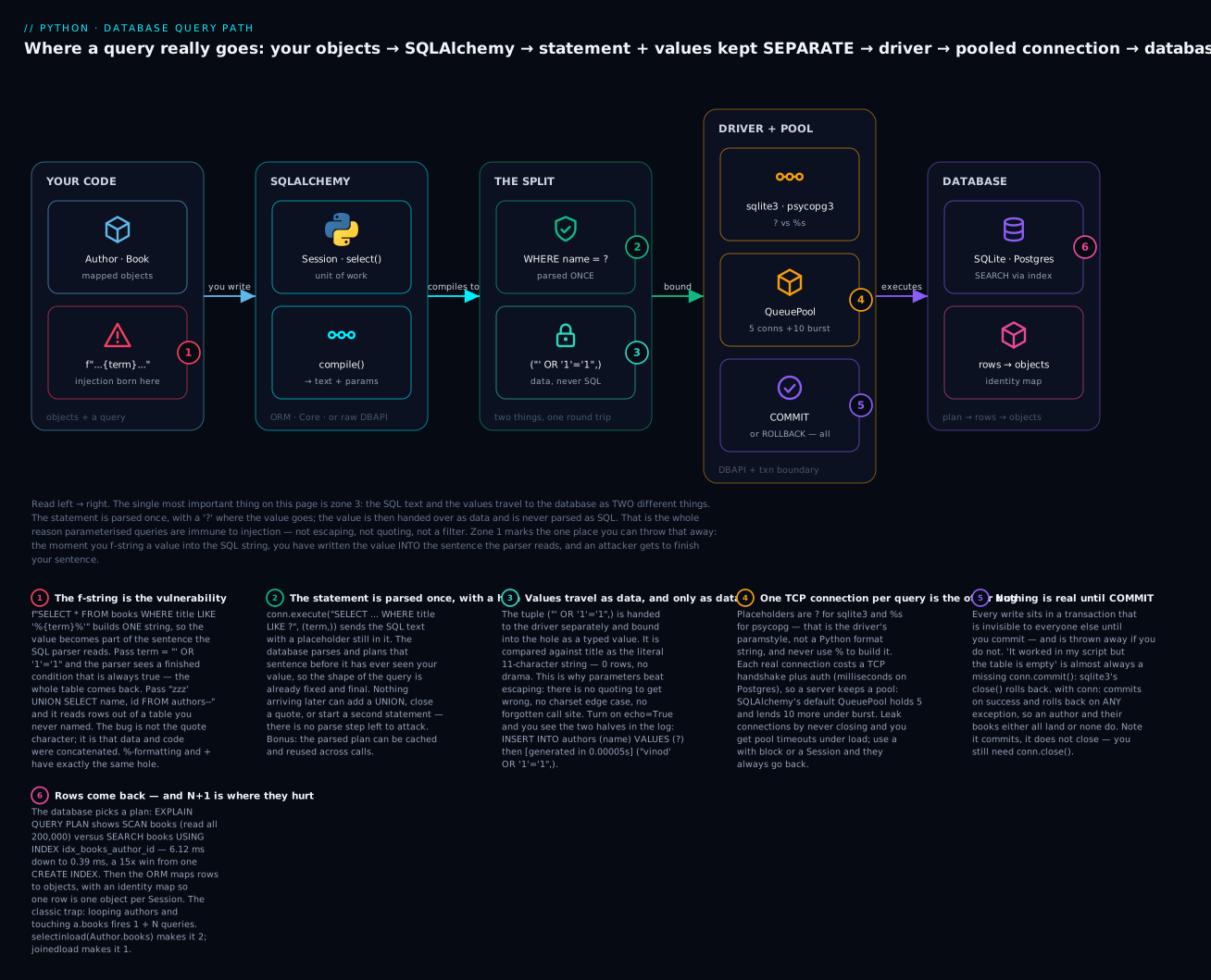
The six badges are the whole lesson in miniature: the f-string is the vulnerability (1); the statement is parsed once with a hole in it (2); the values arrive afterwards as data and are never parsed as SQL (3); real connections are expensive so a pool lends them out (4); nothing is real until COMMIT (5); and the plan the database picks — SCAN versus SEARCH ... USING INDEX — is the difference between 6.12 ms and 0.39 ms (6).
The placeholder is the driver’s, not Python’s
Every driver has a paramstyle, and it is not a Python format string:
| Driver | Database | paramstyle | Positional | Named |
|---|---|---|---|---|
sqlite3 |
SQLite | qmark |
? |
:name |
psycopg (v3) |
PostgreSQL | pyformat |
%s |
%(name)s |
psycopg2 |
PostgreSQL | pyformat |
%s |
%(name)s |
mysqlclient |
MySQL | format |
%s |
— |
oracledb |
Oracle | named |
— | :name |
| SQLAlchemy | any | (abstracts it) | :name in text() |
:name |
psycopg’s %s looks exactly like %-formatting and is the source of a thousand tragedies. It is not. That % would be Python string formatting, and you would have written the injection straight back in. The %s stays in the string; the value goes in the second argument:
cur.execute("SELECT * FROM books WHERE author_id = %s", (author_id,))   # ✅ comma
cur.execute("SELECT * FROM books WHERE author_id = %s" % author_id)     # ⚠️ INJECTION
One character apart. sqlite3 also takes named parameters, which are much easier to read past three values:
conn.execute("INSERT INTO u (name) VALUES (:n)", {"n": "ghee"})
What parameters can not do: identifiers
Parameters bind values. They cannot bind table names, column names, or SQL keywords, because those decide the shape of the query — and the shape is what gets parsed first:
conn.execute("SELECT * FROM ?", ("books",))
# sqlite3.OperationalError: near "?": syntax error
So how do you write “sort by whichever column the user picked”? With an allow-list — never interpolate the user’s string; use it to select one of your own:
ALLOWED_SORT = {"title", "id", "author_id"}

def search(conn, sort_by="id"):
    if sort_by not in ALLOWED_SORT:
        raise ValueError(f"invalid sort column: {sort_by!r}")
    return f"SELECT * FROM books ORDER BY {sort_by}"    # safe: it came from the set
SELECT * FROM books ORDER BY title
ValueError: invalid sort column: 'id; DROP TABLE books--'
The f-string is still there, but the value in it is one of your three strings, chosen by the user’s input rather than supplied by it — the difference between a lookup and an interpolation.
psycopg gives you a proper tool for this, which quotes identifiers safely:
from psycopg import sql
q = sql.SQL("SELECT * FROM books ORDER BY {col}").format(col=sql.Identifier("title"))
print(q.as_string())      # => SELECT * FROM books ORDER BY "title"

evil = sql.SQL("SELECT * FROM books ORDER BY {col}").format(
    col=sql.Identifier("title; DROP TABLE books--"))
print(evil.as_string())   # => SELECT * FROM books ORDER BY "title; DROP TABLE books--"
The injection became a quoted identifier — a column name that doesn’t exist, so the query errors out instead of dropping your table. Prefer the allow-list anyway: a clean ValueError beats a database error, and it documents what is sortable.
One mercy, and why you must not rely on it
The classic Bobby Tables payload — Robert'); DROP TABLE students;-- — needs a second statement. sqlite3.execute() refuses:
conn.execute("SELECT * FROM users WHERE username = 'x'; DROP TABLE users;")
# sqlite3.ProgrammingError: You can only execute one statement at a time.
Do not celebrate. executescript() has no such limit, and it is right there:
name = "Robert'); DROP TABLE students;--"
conn.executescript(f"INSERT INTO students (name) VALUES ('{name}')")
conn.execute("SELECT * FROM students")
# sqlite3.OperationalError: no such table: students
The table is gone. PostgreSQL and MySQL run stacked statements in many configurations anyway, so the one-statement rule is a driver quirk, not a defence — and as the UNION attack showed, an attacker limited to one statement can still read your entire users table.
The rule has no exceptions: values go in parameters, always, even when the value is “obviously safe.” An integer from your own database today is a user-controlled string after next quarter’s refactor.
Transactions: commit, rollback, and “but it worked!”
Here is the single most common beginner bug with databases, and it has no error message:
conn = sqlite3.connect("db-vanish.sqlite3")
conn.execute("CREATE TABLE notes (body TEXT)")
conn.execute("INSERT INTO notes VALUES ('important')")
print(conn.execute("SELECT * FROM notes").fetchall())   # => [('important',)]  it's there!
conn.close()

conn2 = sqlite3.connect("db-vanish.sqlite3")
print(conn2.execute("SELECT * FROM notes").fetchall())  # => []                it's gone.
The row was visible. You selected it back. Then it evaporated — and note that the table survived, so you get an empty table rather than a helpful error. Nothing raised at any point.
You never committed. Every write lives inside a transaction that only your connection can see. close() does not commit — it rolls back. The fix is one line:
conn.execute("INSERT INTO notes VALUES ('important')")
conn.commit()                                            # <- this
conn.close()
# after reopen => [('important',)]
If your data “isn’t saving” and there is no traceback, this is why, and it is why roughly 100% of the time.
ACID, honestly
The guarantee is called ACID, and the marketing has flattened it into a buzzword. Here is what each letter actually buys you:
| Letter | Means | The concrete promise |
|---|---|---|
| Atomicity | All or nothing | 5 inserts, the 3rd fails → all 5 undone. No half-written order |
| Consistency | Constraints always hold | A transaction cannot end with a broken FK or a duplicate UNIQUE |
| Isolation | Concurrent txns don’t see each other’s mess | Your reader never sees my half-finished transfer |
| Durability | Committed means committed | Power cut one microsecond after COMMIT → the data is there |
The honest paragraph: Isolation is the leaky one. A/C/D behave as advertised in SQLite and PostgreSQL. Isolation comes in levels, and the default is usually not the strictest. PostgreSQL defaults to READ COMMITTED, where two transactions reading-then-writing the same row can still produce a lost update — the classic balance = read(); write(balance - 100) race, which is real and which you fix with SELECT ... FOR UPDATE or SERIALIZABLE, not with hope. SQLite is simpler and stricter: it allows exactly one writer at a time for the whole database, so it is effectively serialisable for writes and the failure shows up as database is locked instead of as corruption. That trade is the core of the SQLite-vs-Postgres decision later in this lesson.
The API
| Call | Effect |
|---|---|
conn.commit() |
Make every change since the last commit permanent and visible |
conn.rollback() |
Throw all of them away |
conn.close() |
Rolls back any open transaction. Does not commit |
with conn: |
commit() on success, rollback() on any exception. Does not close |
conn.in_transaction |
True if a transaction is open right now (read-only) |
conn.isolation_level |
"" legacy implicit, None autocommit, or "DEFERRED"/"IMMEDIATE"/"EXCLUSIVE" |
conn.autocommit |
3.12+: True/False/LEGACY_TRANSACTION_CONTROL (the default) |
with conn: is the one you want, and it is worth being precise about what it does:
with conn:
    conn.execute("INSERT INTO k VALUES ('one')")
# committed here

try:
    with conn:
        conn.execute("INSERT INTO k VALUES ('two')")
        conn.execute("INSERT INTO k VALUES ('one')")     # UNIQUE violation
except sqlite3.IntegrityError as e:
    print("IntegrityError:", e)
# => IntegrityError: UNIQUE constraint failed: k.v
print(conn.execute("SELECT * FROM k").fetchall())
# => [('one',)]        'two' is GONE — the whole block rolled back
'two' inserted successfully and was still thrown away, because the block failed. That is atomicity doing its job, and it is exactly what you want when the “block” is “create the order and its five line items.”
⚠️ with conn: does not close the connection. This is the trap in an otherwise lovely API — with open(...) closes the file, so everyone assumes with conn: closes the connection. It commits. The connection is still open and still usable afterwards, and you still owe it a close(). Use contextlib.closing(conn) around it, or just close it in a finally.
sqlite3’s transaction quirk
sqlite3 has a legacy behaviour that surprises everyone once:
conn = sqlite3.connect(":memory:")
print(conn.in_transaction)                    # => False
conn.execute("CREATE TABLE z (a INT)")        # DDL
print(conn.in_transaction)                    # => False   <- no transaction!
conn.execute("INSERT INTO z VALUES (1)")      # DML
print(conn.in_transaction)                    # => True    <- now there is
With the default isolation_level = "", the driver implicitly opens a transaction before INSERT/UPDATE/DELETE/REPLACE — and not before anything else. CREATE TABLE runs in autocommit and is instantly permanent. SELECT doesn’t start one either. This is why CREATE TABLE survived in the vanishing-data demo above while the INSERT did not: they were on opposite sides of this rule.
Python 3.12 added a proper autocommit attribute, and the default is the old behaviour so nothing breaks:
print(conn.autocommit, sqlite3.LEGACY_TRANSACTION_CONTROL) # => -1 -1
| Mode | Set it with | Behaviour |
|---|---|---|
| Legacy (default) | autocommit=LEGACY_TRANSACTION_CONTROL |
Implicit BEGIN before DML only; DDL autocommits |
| Autocommit | autocommit=True, or isolation_level=None |
Every statement commits itself. You do BEGIN by hand |
| Manual | autocommit=False |
PEP 249 correct: a transaction is always open, incl. DDL and SELECT |
For new code on 3.12+, autocommit=False is the predictable choice: transactions behave the way the rest of the Python database world says they should. isolation_level=None (autocommit) is the right pick for bulk loads where you want to control BEGIN/COMMIT yourself around a batch.
Connections, pools and threads
A connection is a real resource. For SQLite it is a file handle plus lock state; for PostgreSQL it is a TCP socket, a TLS handshake, an authentication round trip, and — this is the expensive part — a whole forked process on the server. Opening one costs milliseconds and a few megabytes of server RAM. Opening one per request is how you take a database down.
Leaking them is just as bad. Every unclosed connection holds locks and a server slot until the garbage collector happens to notice, which may be never:
def get_user(uid):
    conn = sqlite3.connect("app.db")            # ⚠️ never closed
    return conn.execute("SELECT * FROM users WHERE id = ?", (uid,)).fetchone()
Call that in a loop and you accumulate connections until something breaks. Close them, and let a context manager do it so an exception can’t skip it:
from contextlib import closing

with closing(sqlite3.connect("app.db")) as conn:   # closes, guaranteed
    with conn:                                     # commits or rolls back
        conn.execute("INSERT INTO users (name) VALUES (?)", ("asha",))
That double-with looks odd and is exactly right. The two context managers do different jobs:
| Context manager | On success | On exception | Closes? |
|---|---|---|---|
with sqlite3.connect(...) as conn: |
commit() |
rollback() |
❌ No |
with conn: |
commit() |
rollback() |
❌ No |
with closing(conn): |
close() |
close() |
✅ Yes |
with conn.cursor() as cur: (psycopg) |
closes cursor | closes cursor | cursor only |
with psycopg.connect(...) as conn: |
commit() and closes |
rollback() and closes |
✅ Yes |
psycopg’s connection context manager both commits and closes, which is friendlier than sqlite3’s. Do not carry the habit across in the wrong direction.
Threads
sqlite3 connections are guarded: they refuse to be used from a thread other than the one that made them.
conn = sqlite3.connect(":memory:")
# ... from another thread:
conn.execute("INSERT INTO t VALUES (1)")
# sqlite3.ProgrammingError: SQLite objects created in a thread can only be used in
# that same thread. The object was created in thread id 8486149504 and this is
# thread id 6181564416.
check_same_thread=False removes the guard — it does not make the connection thread-safe. It transfers responsibility to you, and now you need your own lock around every use. The right answer is almost always one connection per thread, or a pool that hands out one connection at a time.
print(sqlite3.threadsafety) # => 3 on Python 3.12 with a serialised SQLite build
threadsafety is a DB-API level: 1 = module only, 2 = module + connections, 3 = fully serialised. Since 3.11 it reflects what the underlying SQLite library actually reports rather than a hardcoded guess.
Pools
A connection pool keeps N connections open and lends them out. Your code borrows one, runs a query, returns it. The handshake cost is paid once at startup instead of once per request, and the pool caps how many connections your app can possibly open — which protects the database from your own traffic spike.
SQLAlchemy pools by default, and picks the right pool for the driver:
create_engine("sqlite:///library.sqlite3")   # -> QueuePool size=5 overflow_max=10 timeout=30.0
create_engine("sqlite://")                   # -> SingletonThreadPool   (in-memory: one conn)
create_engine pool option |
Default | What it means |
|---|---|---|
pool_size |
5 |
Connections kept open permanently |
max_overflow |
10 |
Extra connections allowed under burst, closed after use |
pool_timeout |
30 |
Seconds to wait for a free connection before TimeoutError |
pool_recycle |
-1 (off) |
Reconnect a connection older than N seconds — set it behind a proxy that idles you out |
pool_pre_ping |
False |
Test the connection before lending it; costs a round trip, kills stale-connection errors |
poolclass=NullPool |
— | No pooling. Correct for serverless/Lambda, where processes are recycled |
pool_pre_ping=True and a pool_recycle under your infrastructure’s idle timeout are the two settings that prevent the classic 3 a.m. “server closed the connection unexpectedly” after a quiet night.
PostgreSQL with psycopg 3
SQLite’s one limitation is the big one: one writer at a time, and everyone must be able to reach the same file. When you have several application servers, or many concurrent writers, you need a database server — and the default answer is PostgreSQL.
The driver is psycopg version 3 (the package is psycopg; psycopg2 is the older, still-common one — the import name tells you which you have).
python3 -m venv .venv
source .venv/bin/activate          # Windows: .venv\Scripts\activate
pip install "psycopg[binary]"      # [binary] ships the compiled libpq — no build tools needed
The shape is the DB-API you already know, with %s instead of ?:
import psycopg

with psycopg.connect("postgresql://appuser:s3cret@db.example.com:5432/shop") as conn:
    with conn.cursor() as cur:
        cur.execute("SELECT title FROM books WHERE author_id = %s", (author_id,))
        for row in cur:                       # lazy, like sqlite3
            print(row)
    conn.commit()
The DSN (connection string) is postgresql://user:password@host:port/dbname, optionally with ?sslmode=require. It can also be a keyword string ("host=db.example.com dbname=shop"), or omitted entirely so libpq reads PGHOST/PGUSER/PGPASSWORD from the environment — which is the pattern you want, for reasons in the secrets section below.
What psycopg gives you that sqlite3 doesn’t
Dict rows, properly. Instead of sqlite3’s Row, you choose a row factory:
from psycopg.rows import dict_row

with psycopg.connect(DSN, row_factory=dict_row) as conn:
    row = conn.execute("SELECT * FROM authors WHERE id = %s", (1,)).fetchone()
    print(row["name"])        # a real dict
Available factories: dict_row, namedtuple_row, class_row, scalar_row, args_row, kwargs_row, tuple_row. class_row(Author) maps straight onto a dataclass, which is a lovely middle ground between raw SQL and a full ORM.
RETURNING — get the generated row back from the write, in one round trip:
cur.execute(
    "INSERT INTO authors (name, country) VALUES (%s, %s) RETURNING id, name",
    ("Amitav Ghosh", "IN"),
)
print(cur.fetchone())          # => (12, 'Amitav Ghosh')
No lastrowid dance, no second SELECT, and it works for UPDATE ... RETURNING and DELETE ... RETURNING too. SQLite has supported RETURNING since 3.35 as well, and it is strictly better than lastrowid when you need more than the ID.
Server-side cursors for results too big for RAM. A normal cursor pulls the entire result to the client before you see row one — fetchone() on a 50-million-row SELECT will still OOM your process, because the transfer already happened. A named cursor keeps the result on the server and streams it:
with psycopg.connect(DSN) as conn:
    with conn.cursor(name="big_export") as cur:      # name= makes it a ServerCursor
        cur.itersize = 5_000                         # rows per network round trip
        cur.execute("SELECT * FROM events")          # 50M rows — fine
        for row in cur:
            process(row)                             # constant memory
The name= argument is the entire difference between a client cursor and a ServerCursor. It must run inside a transaction, and you cannot use it after a commit.
| psycopg 3 | sqlite3 equivalent | Note |
|---|---|---|
psycopg.connect(dsn) |
sqlite3.connect(path) |
psycopg’s with also closes |
%s, %(name)s |
?, :name |
Never %-format it |
row_factory=dict_row |
conn.row_factory = sqlite3.Row |
Set per connection or per cursor |
conn.cursor(name="x") |
— | Server-side streaming cursor |
RETURNING id |
cur.lastrowid (or RETURNING, 3.35+) |
RETURNING is better |
autocommit=False (default) |
isolation_level="" (legacy) |
psycopg is PEP 249-correct by default |
psycopg.errors.UniqueViolation |
sqlite3.IntegrityError |
psycopg has one class per SQLSTATE |
psycopg_pool.ConnectionPool |
— | Real pooling; SQLite doesn’t need it |
psycopg.sql.Identifier("col") |
allow-list | Safe identifier quoting |
psycopg’s error classes are much more precise than sqlite3’s single IntegrityError: UniqueViolation, ForeignKeyViolation, NotNullViolation, CheckViolation, UndefinedTable, and one for every SQLSTATE the server defines. except psycopg.errors.UniqueViolation: lets you write “this username is taken” without string-matching an error message.
SQLite vs PostgreSQL: choosing honestly
SQLite is not a toy. It is a fully ACID, fully transactional, fully indexed relational database that outperforms client/server databases for most single-machine reads, and it is tested more thoroughly than almost any software on earth. The reason to leave it is concurrency and reach, not seriousness.
| SQLite | PostgreSQL | |
|---|---|---|
| Deployment | A file. Zero setup | A server: install, tune, back up, monitor |
| Concurrent readers | Many | Many |
| Concurrent writers | One, database-wide | Many, row-level locking |
| Network access | ❌ Local file only (never on NFS) | ✅ TCP, from anywhere |
| Multiple app servers | ❌ No | ✅ Yes |
| Types | Affinity; STRICT since 3.37 |
Strong, enforced, rich |
| Type set | 5 storage classes | jsonb, arrays, uuid, inet, ranges, geometry (PostGIS) |
ALTER TABLE |
Limited (add/rename/drop column) | Full |
| Concurrency model | WAL: readers never block; one writer | MVCC: readers and writers rarely block |
| Full-text search | ✅ FTS5, excellent | ✅ tsvector, excellent |
| Right for | CLIs, desktop apps, tests, caches, embedded, single-server sites, files-as-data | Web apps at scale, multi-writer, multi-server, anything with an ops team |
| Wrong for | Multi-writer web apps; anything on network storage | A CLI tool; a unit test suite; a phone |
The practical advice: start on SQLite, develop on SQLite, test on SQLite, and move to PostgreSQL when you have a second writer or a second server. With SQLAlchemy that move is a change to one connection string plus a migration. Do not start with PostgreSQL “because we might scale” and pay the ops tax for two years.
Two SQLite settings are worth knowing before you dismiss it. PRAGMA journal_mode = WAL lets readers and the single writer work at the same time (the default rollback journal blocks readers during a write), and PRAGMA synchronous = NORMAL with WAL is a large speed win for a small, well-defined durability trade. Those two lines cover a surprising fraction of “SQLite is too slow” complaints.
Schema: keys, constraints, and the index that changes everything
The schema is where you push rules down so that no program — not yours, not the intern’s — can write a bad row.
CREATE TABLE authors (
    id      INTEGER PRIMARY KEY,
    name    TEXT    NOT NULL UNIQUE,
    country TEXT    NOT NULL DEFAULT 'IN'
);
CREATE TABLE books (
    id        INTEGER PRIMARY KEY,
    title     TEXT    NOT NULL,
    year      INTEGER NOT NULL CHECK (year BETWEEN 1400 AND 2100),
    author_id INTEGER NOT NULL REFERENCES authors(id) ON DELETE CASCADE
);
| Constraint | Guarantees | Costs |
|---|---|---|
PRIMARY KEY |
Unique, not null, the row’s identity | An index (free — you need it) |
INTEGER PRIMARY KEY (SQLite) |
Aliases the internal rowid — fastest possible lookup |
Nothing |
FOREIGN KEY / REFERENCES |
The referenced row exists | An index check per write |
NOT NULL |
No missing values | Nothing |
UNIQUE |
No duplicates | An index |
CHECK (...) |
Any boolean rule (year BETWEEN 1400 AND 2100) |
A cheap evaluation per write |
DEFAULT |
A value when you omit the column | Nothing |
ON DELETE CASCADE |
Children die with the parent | Careful — it is silent and permanent |
⚠️ SQLite does not enforce foreign keys unless you ask. This is the single most surprising default in the whole engine, kept for backwards compatibility since 2009:
conn = sqlite3.connect(":memory:")
conn.executescript(DDL)
print(conn.execute("PRAGMA foreign_keys").fetchone()[0])       # => 0     OFF!
conn.execute("INSERT INTO books (title, author_id) VALUES ('Ghost', 999)")
print(conn.execute("SELECT * FROM books").fetchall())
# => [(1, 'Ghost', 999)]      an orphan row, no author 999, no complaint
Turn it on per connection, every time — it is not a property of the file:
conn.execute("PRAGMA foreign_keys = ON")
conn.execute("INSERT INTO books (title, author_id) VALUES ('Ghost', 999)")
# sqlite3.IntegrityError: FOREIGN KEY constraint failed
Put it in the function that makes connections and never think about it again. If you have been running without it, your “impossible” orphan rows are already in there.
The N+1 query problem
This is the performance bug you will write, and then write again. It looks completely innocent:
authors = conn.execute("SELECT id, name FROM authors").fetchall()   # 1 query
for a in authors:
    books = conn.execute(Q, (a["id"],)).fetchall()                  # + N queries
One query for the list, then one more per row. With 500 authors that is 501 queries. Measured against 200,000 books:
--- N+1: one query per author (500 authors) ---
      501 queries, 200000 books, 3010 ms
--- fixed: ONE query with a JOIN ---
      1 query, 200000 books, 120 ms  (25x faster)
Same data, same answer, 25x. And this is the flattering measurement, because SQLite is an in-process library — there is no network. Against PostgreSQL over a network, each of those 501 queries costs a round trip of a millisecond or more, so the same loop becomes 501 ms of pure waiting no matter how fast the server is. The fix is one query that lets the database do the join:
rows = conn.execute("""SELECT a.name, b.title FROM authors a
                       JOIN books b ON b.author_id = a.id""").fetchall()
The N+1 signature is always the same: a query inside a loop. Learn to see it. In an ORM it hides even better, because the query doesn’t look like a query — it looks like an attribute access. We will find and fix exactly that in a moment.
Indexes: measure, don’t guess
An index is a sorted lookup structure over a column. Without one, finding author_id = 42 means reading every row — a full table scan. EXPLAIN QUERY PLAN tells you which is happening, and it is the most useful four words in SQLite:
for r in conn.execute("EXPLAIN QUERY PLAN SELECT id, title FROM books WHERE author_id = ?", (1,)):
    print(r["detail"])
Before, and after one CREATE INDEX, on 200,000 books:
--- BEFORE the index ---
       SCAN books
       6.12 ms per query
--- AFTER CREATE INDEX idx_books_author_id ON books(author_id) ---
       SEARCH books USING INDEX idx_books_author_id (author_id=?)
       0.39 ms per query   (15x faster)
SCAN means “read the whole table.” SEARCH ... USING INDEX means “jump straight there.” One line of DDL, 15x, and it gets better as the table grows: a scan is O(n) and an index lookup is O(log n), so at 2 million rows the gap is 10x wider again. (Your exact numbers will differ — the shape won’t.)
Indexes are not free, which is why the database doesn’t just make them all:
| Index costs | Detail |
|---|---|
| Disk | A copy of the column plus row pointers |
| Write speed | Every INSERT/UPDATE/DELETE updates every index on the table |
| Planner time | More choices to evaluate |
| Nothing, if unused | …except the two above. An unused index is pure loss |
The rule: index your foreign keys and the columns you filter, join, and sort on. Then measure. And know the cases where your index will be silently ignored:
| Query | Index used? | Why |
|---|---|---|
WHERE author_id = ? |
✅ SEARCH ... USING INDEX |
Direct match |
WHERE author_id > ? |
✅ | Ranges work — the index is sorted |
ORDER BY author_id |
✅ | Already in order |
WHERE author_id + 0 = ? |
❌ | A function on the column kills it |
WHERE LOWER(name) = ? |
❌ (unless an expression index) | Same reason |
WHERE title LIKE '%book%' |
❌ SCAN books |
Leading wildcard — nothing to seek to |
WHERE title LIKE 'book%' |
✅ | Trailing wildcard is a range |
WHERE a = ? AND b = ? with INDEX(a, b) |
✅ | Composite, left-to-right |
WHERE b = ? with INDEX(a, b) |
❌ | Can’t skip the leading column |
That last pair is the composite-index rule, and it catches everyone: an index on (a, b) helps WHERE a = ? and WHERE a = ? AND b = ?, but does nothing at all for WHERE b = ?. Think of a phone book sorted by (surname, first name): brilliant for “Narayan, R K”, useless for “everyone called R K”.
PostgreSQL’s equivalent is EXPLAIN ANALYZE, which actually runs the query and reports real timings and row counts — read it for Seq Scan (bad, usually) versus Index Scan (good).
SQLAlchemy: Core, ORM, and choosing honestly
Raw SQL is fine. Past a certain size it is also a lot of manual mapping: tuples to objects, objects to INSERT statements, and a rewrite every time you support a second database. SQLAlchemy is the library the Python world settled on, and it is really two libraries stacked:
- Core — a SQL expression language. You still think in tables, joins and columns; Python builds the SQL text and handles parameters, dialects, and pooling.
- ORM — object-relational mapping, built on Core. You think in objects; it tracks changes and emits the SQL.
pip install sqlalchemy # 2.0+; the 2.0 style below is not the old query() API
| Core | ORM | |
|---|---|---|
| You think in | Tables, columns, joins | Classes, attributes, relationships |
| Returns | Row tuples |
Your mapped objects |
| Change tracking | ❌ You write the UPDATE |
✅ Unit of work — session.commit() figures it out |
| Identity map | ❌ | ✅ One row = one object per Session |
| Relationship loading | ❌ You write the join | ✅ relationship() + loader strategies |
| Surprise SQL | ❌ Never — you wrote it | ⚠️ Yes — lazy loads, autoflush |
| Best for | Reports, ETL, bulk ops, analytics | Application domain logic, CRUD |
Mapping your domain objects
The models look like the dataclasses from OOP Part 4, because that is the point — these are your domain objects, with a table behind them:
from sqlalchemy import create_engine, String, ForeignKey, select
from sqlalchemy.orm import (DeclarativeBase, Mapped, mapped_column,
                            relationship, Session, selectinload, joinedload)

class Base(DeclarativeBase):
    pass

class Author(Base):
    __tablename__ = "authors"
    id: Mapped[int] = mapped_column(primary_key=True)
    name: Mapped[str] = mapped_column(String, unique=True)
    country: Mapped[str] = mapped_column(String, default="IN")
    books: Mapped[list["Book"]] = relationship(back_populates="author")

    def __repr__(self) -> str:
        return f"Author(id={self.id!r}, name={self.name!r})"

class Book(Base):
    __tablename__ = "books"
    id: Mapped[int] = mapped_column(primary_key=True)
    title: Mapped[str] = mapped_column(String)
    year: Mapped[int]
    author_id: Mapped[int] = mapped_column(ForeignKey("authors.id"))
    author: Mapped["Author"] = relationship(back_populates="books")
The Mapped[int] annotations do real work here, not decoration: SQLAlchemy 2.0 reads them to infer the column type and — importantly — nullability. Mapped[int] is NOT NULL; Mapped[int | None] is nullable. back_populates links the two sides so appending to author.books also sets book.author.
The engine is the factory for connections and the home of the pool. Create it once, at import time, for the whole application — never per request:
engine = create_engine("sqlite:///library.sqlite3")           # SQLite: file
engine = create_engine("postgresql+psycopg://u:p@host/db")    # PostgreSQL via psycopg 3
Base.metadata.create_all(engine)                              # CREATE TABLE IF NOT EXISTS
The URL is dialect+driver://user:pass@host:port/database. That string is the only thing that changes between SQLite and PostgreSQL — which is the entire argument for developing on SQLite.
CRUD, and the Session
The Session is a workspace: it holds objects, tracks what you changed, and writes it all out at commit().
with Session(engine) as s:
    s.add(Author(name="Kamala Das", country="IN"))
    s.commit()                                    # INSERT

    a = s.scalars(select(Author).where(Author.name == "Kamala Das")).one()
    print(a)                                      # => Author(id=501, name='Kamala Das')

    a.country = "IN-KL"                           # just... assign
    s.commit()                                    # UPDATE, generated for you
    print(s.get(Author, a.id).country)            # => IN-KL

    s.delete(a)
    s.commit()                                    # DELETE
You never wrote an UPDATE. That is the unit of work: the Session noticed a.country changed and emitted the SQL at commit time. The identity map means one database row is exactly one Python object within a Session:
with Session(engine) as s:
    x = s.get(Author, 1)
    y = s.scalars(select(Author).where(Author.id == 1)).one()
    print(x is y)            # => True     same row, same object — not a copy
That is not a cache trick; it is what makes change tracking possible at all. If two queries returned two objects for one row, “what changed?” would be unanswerable.
| Session state | Meaning | Gets there by |
|---|---|---|
| Transient | A plain object, no Session, no row | Author(name="x") |
| Pending | In a Session, not yet flushed | session.add(obj) |
| Persistent | Has a row, tracked | flush()/commit(), or loaded by a query |
| Detached | Has a row, no Session | session.close(), or leaving a with block |
That last state has a famous error attached to it.
DetachedInstanceError
with Session(engine) as s:
    a = s.scalars(select(Author).order_by(Author.id)).first()
# session closed here

print(a.name)      # => author-0001      fine — it was already loaded
a.books            # DetachedInstanceError: Parent instance <Author at 0x1032623c0>
                   # is not bound to a Session; lazy load operation of attribute
                   # 'books' cannot proceed
Look at what works and what doesn’t. a.name is fine — loaded while the Session was alive, sitting in the object. a.books was never loaded; loading it needs a query, and the Session that could run one is gone.
There is a second, nastier version. Session.commit() expires every attribute by default (expire_on_commit=True), so after a commit even a plain column needs a re-fetch:
with Session(engine) as s:
    a = s.scalars(select(Author)).first()
    s.commit()                     # every attribute now expired
a.name
# DetachedInstanceError: Instance <Author at 0x102ae6ab0> is not bound to a Session;
# attribute refresh operation cannot proceed
Same exception, different sentence: “attribute refresh” rather than “lazy load”. The cure is not expire_on_commit=False (that gives you stale objects). It is scope: do your work inside the Session, and if something must escape, take the value, not the object — a dict, a dataclass. Load relationships eagerly when you know you need them, which brings us to the payoff.
N+1 in an ORM, and the fix
Here is the N+1 again, but disguised. Nothing in this code looks like a query:
with Session(engine) as s:
    authors = s.scalars(select(Author).order_by(Author.id).limit(5)).all()
    out = [(a.name, len(a.books)) for a in authors]      # <- a.books queries. Every time.
a.books is a lazy load: touching the attribute fires a SELECT. In a loop, that is one query per author. Counting the statements:
lazy (N+1)               6 queries     19.0 ms
selectinload             2 queries     11.7 ms
joinedload               1 queries     11.5 ms
Six queries for five authors — 1 + N, exactly as the raw-SQL version. And you can see them:
    SELECT authors.id, authors.name, authors.country
    SELECT books.id AS books_id, books.title AS books_title, books.y
    SELECT books.id AS books_id, books.title AS books_title, books.y
    SELECT books.id AS books_id, books.title AS books_title, books.y
The fix is to tell the query what you intend to touch:
stmt = select(Author).options(selectinload(Author.books)) # 2 queries, always
selectinload issues a second query — SELECT ... FROM books WHERE author_id IN (1, 2, 3, 4, 5) — and distributes the rows onto the right parents. Two queries whether you have 5 authors or 5,000.
Be honest about that timing: 19 ms versus 12 ms is not the headline. SQLite runs inside your process, so a query costs microseconds and 6-vs-2 barely registers. The number that matters is 6 queries versus 2, because against PostgreSQL each one is a network round trip. A page firing 200 lazy loads is 200 round trips and 200+ ms of waiting — the difference between a fast page and a slow one.
| Loader strategy | Queries | How | Use when |
|---|---|---|---|
lazy="select" (default) |
1 + N | A query per parent, on access | Rarely. This is the N+1 |
selectinload(X.y) |
2 | Second query with WHERE fk IN (...) |
The default fix. Collections (one-to-many) |
joinedload(X.y) |
1 | LEFT OUTER JOIN, one result set |
Many-to-one / one-to-one; small collections |
subqueryload(X.y) |
2 | Second query with a subquery | Legacy; selectinload is usually better |
raiseload(X.y) |
0 | Raises on lazy access | ⭐ Testing and strict services — makes N+1 impossible |
lazy="dynamic" |
0 | Attribute is a query object | Huge collections you always filter |
Two notes from experience. joinedload on a one-to-many multiplies parent rows by children (5 authors × 400 books = 2,000 rows, sending one author’s name 400 times), which is why it needs .unique() and why selectinload is the better default for collections. And raiseload is underused: put it on your relationships in tests and every accidental lazy load becomes a loud failure instead of a slow page.
Core, when the ORM is the wrong shape
For reports, bulk work and analytics, objects are overhead. Core gives you the SQL expression language with none of the mapping:
from sqlalchemy import MetaData, Table, Column, Integer, String, ForeignKey, insert, select, func

md = MetaData()
authors = Table("authors", md,
    Column("id", Integer, primary_key=True),
    Column("name", String(100), nullable=False, unique=True))
books = Table("books", md,
    Column("id", Integer, primary_key=True),
    Column("title", String(200), nullable=False),
    Column("author_id", Integer, ForeignKey("authors.id"), nullable=False))

with engine.begin() as conn:                       # begin() = commit at the end
    aid = conn.execute(insert(authors).returning(authors.c.id),
                       {"name": "R K Narayan"}).scalar_one()
    conn.execute(insert(books), [{"title": "The Guide", "author_id": aid},
                                 {"title": "Swami and Friends", "author_id": aid}])

with engine.connect() as conn:
    stmt = (select(authors.c.name, func.count(books.c.id).label("n"))
            .join_from(authors, books).group_by(authors.c.name))
    print(conn.execute(stmt).all())     # => [('R K Narayan', 2)]
And Core parameterises everything, automatically. Compile a statement and look:
print(str(select(books).where(books.c.title == "' OR '1'='1").compile()))
# => SELECT books.id, books.title, books.author_id
#    FROM books
#    WHERE books.title = :title_1
:title_1 — a bound parameter, not your string. The injection is gone by construction; you would have to go out of your way to write an unsafe Core query.
Raw SQL is still available and still safe, as long as you use text() with bound parameters:
from sqlalchemy import text
with engine.connect() as conn:
    rows = conn.execute(text("SELECT * FROM authors WHERE name = :n"),
                        {"n": "' OR '1'='1"}).fetchall()
    print(rows)      # => []      inert, exactly like sqlite3's ?
⚠️ text(f"SELECT * FROM authors WHERE name = '{evil}'") is just as injectable as everything else in this lesson. text() is not a safety feature; the bound parameters are.
The honest decision table
| Reach for | When | Why |
|---|---|---|
Raw SQL (sqlite3/psycopg) |
Scripts, one-file tools, migrations, DBA-tuned queries | Zero dependencies, zero magic, total control |
| SQLAlchemy Core | Reports, ETL, bulk insert/update, analytics, dynamic queries | SQL semantics + composability, parameters, dialects, pooling; no object overhead |
| SQLAlchemy ORM | Application domain logic, CRUD, anything with relationships | Objects, change tracking, identity map, relationships. The default for an app |
| Mix them | Almost always | ORM for domain logic; session.execute(text(...)) for the one gnarly report |
That last row is the real answer, not a cop-out. Using the ORM does not forbid raw SQL — session.execute(text("..."), params) runs in the same transaction as everything else. The failure mode is the team that fights the ORM to express a five-way join with window functions when twenty lines of SQL would have been clearer and faster.
You still need to know SQL. An ORM does not save you from learning it; it saves you from typing it. Every hard ORM problem — N+1, a slow query, a lock — is diagnosed by reading the SQL it generated. echo=True on the engine, or the before_cursor_execute event used above, is how you look.
Alembic: migrations
Your schema changes. Base.metadata.create_all() only creates tables that don’t exist — it will never add your new column to a table that already has data. Alembic (by SQLAlchemy’s author) is the tool for that.
pip install alembic
alembic init migrations                                   # once, per project
alembic revision --autogenerate -m "add country to authors"
alembic upgrade head                                      # apply
alembic downgrade -1                                      # undo one
alembic current                                           # what's applied?
The mechanism: a table called alembic_version in your database holds the ID of the last applied migration. Each migration file has upgrade() and downgrade(), and forms a linked list back to the beginning. --autogenerate diffs your models against the live database and writes a first draft.
| Command | Does |
|---|---|
alembic init migrations |
Scaffold the migrations directory and alembic.ini |
alembic revision -m "msg" |
An empty migration you fill in |
alembic revision --autogenerate -m "msg" |
Diff models vs. database and draft it |
alembic upgrade head |
Apply everything outstanding |
alembic upgrade +1 / downgrade -1 |
One step at a time |
alembic history / current |
The graph / what’s applied |
alembic stamp head |
Mark as applied without running — adopting an existing DB |
Three rules that will save you a bad afternoon:
Always read what --autogenerate wrote. It is a first draft, not an answer. It reliably misses column renames (it sees a drop plus an add — and drops your data), server defaults, CHECK constraints, and most index changes. Review every generated file as if a stranger wrote it, because one did.
Never edit a migration that has shipped. Once a migration has run anywhere you don’t control — a colleague’s laptop, staging, production — it is immutable history. Those databases already recorded it as applied and will never run it again, so your edit takes effect only on fresh databases, and now your environments have silently different schemas. Fix it forward with a new migration. Always.
Migrations run on real data. A migration that works on your empty dev database can take a table lock for twenty minutes on ten million production rows. Adding a NOT NULL column with no default fails outright when rows exist. The safe shape is a sequence: add nullable → backfill in batches → add the constraint. And write the downgrade() — the one time you need it, you will need it very quickly.
Where secrets live
The DSN in the code above has a password in it. It must never be in git. Not in a variable, not in a comment, not in settings.py, not in a notebook, not in the test fixtures. Git remembers forever: a password committed once and removed in the next commit is still in the history, still on every clone, and still on GitHub.
DSN = "postgresql://appuser:s3cret@db.example.com/shop" # ⚠️ NEVER
Read it from the environment:
import os
DSN = os.environ["DATABASE_URL"]              # KeyError at startup if missing — good
engine = create_engine(DSN)
os.environ[...] over os.environ.get(...) is deliberate: a KeyError at startup is infinitely better than an app that boots and silently connects to the wrong database. This is the same “fail loudly at the boundary” instinct as raising early in custom exceptions.
| Where | Good for | Notes |
|---|---|---|
| Environment variable | The default. 12-factor, works everywhere | Visible in ps//proc on some systems |
.env + python-dotenv |
Local dev | .env in .gitignore. Commit a .env.example with fake values |
| Cloud secret manager | Production | Azure Key Vault, AWS Secrets Manager, GCP Secret Manager. Rotatable, audited |
| Managed identity / IAM auth | Best in cloud | No password exists at all — the DB trusts the workload identity |
~/.pgpass, PGPASSWORD |
CLI tools, psql |
libpq reads them; psycopg inherits that for free |
| Hardcoded in source | ❌ Never | Ends up in git, logs, screenshots, Stack Overflow questions |
| In a Docker image | ❌ Never | docker history shows it; the image gets pushed |
Two habits worth building. Log the DSN carefully — SQLAlchemy already does the right thing, which tells you it is a real hazard:
from sqlalchemy.engine import make_url
url = make_url("postgresql+psycopg://appuser:s3cret@db.example.com:5432/shop")
print(repr(url))    # => postgresql+psycopg://appuser:***@db.example.com:5432/shop
The password is masked in repr. Follow that lead: never print(DSN) in an error handler, because that is exactly where it ends up in a log aggregator that half the company can read.
And if a credential has ever been committed, it is burned. Removing it in a later commit does nothing; rewriting history does not clean up the clones and forks that already exist. The only fix is to rotate the password at the database and treat the old one as public.
Hands-on lab
You will build a small library database, attack it, fix it, make it fast, and then do the whole thing again through the ORM. Everything runs on SQLite — no server, no password.
⚠️ Everything here is created inside one throwaway folder, and the last step deletes it.
Step 0 — set up.
mkdir db-lab && cd db-lab
python3 -m venv .venv
source .venv/bin/activate         # Windows: .venv\Scripts\activate
pip install sqlalchemy            # only needed for Step 6
python -c "import sqlite3; print(sqlite3.sqlite_version)"
3.45.1
What just happened: sqlite3 needed no install — it is stdlib. The venv is only for SQLAlchemy. You need SQLite 3.35+ for RETURNING and 3.37+ for STRICT; anything from 2022 onward is fine.
Step 1 — the schema, with a foreign key that actually works. Save as schema.py:
"""Step 1 — create the database and its schema."""
import sqlite3
from pathlib import Path

DB = Path("library.sqlite3")

DDL = """
CREATE TABLE IF NOT EXISTS authors (
    id      INTEGER PRIMARY KEY,
    name    TEXT    NOT NULL UNIQUE,
    country TEXT    NOT NULL DEFAULT 'IN'
);
CREATE TABLE IF NOT EXISTS books (
    id        INTEGER PRIMARY KEY,
    title     TEXT    NOT NULL,
    year      INTEGER NOT NULL CHECK (year BETWEEN 1400 AND 2100),
    author_id INTEGER NOT NULL REFERENCES authors(id) ON DELETE CASCADE
);
"""

def connect(path: Path = DB) -> sqlite3.Connection:
    conn = sqlite3.connect(path)
    conn.execute("PRAGMA foreign_keys = ON")   # OFF by default — you MUST do this
    conn.row_factory = sqlite3.Row             # dict-like rows
    return conn

if __name__ == "__main__":
    DB.unlink(missing_ok=True)
    with connect() as conn:
        conn.executescript(DDL)
    print(f"created {DB}")
    with connect() as conn:
        for row in conn.execute("SELECT name FROM sqlite_master WHERE type='table' ORDER BY name"):
            print("  table:", row["name"])
        print("  foreign_keys =", conn.execute("PRAGMA foreign_keys").fetchone()[0])
created library.sqlite3
  table: authors
  table: books
  foreign_keys = 1
What just happened: one connect() function is now the only way this app gets a connection, so the FK pragma and Row factory can never be forgotten. sqlite_master is SQLite’s catalogue — a real table you can query.
Step 2 — parameterised CRUD with sqlite3.Row. Save as crud.py:
"""Step 2 — parameterised CRUD with sqlite3.Row."""
import sqlite3
from schema import connect

AUTHORS = [("R K Narayan", "IN"), ("Arundhati Roy", "IN"), ("Ursula K Le Guin", "US")]
BOOKS = [
    ("Swami and Friends", 1935, "R K Narayan"),
    ("The Guide", 1958, "R K Narayan"),
    ("The Man-Eater of Malgudi", 1961, "R K Narayan"),
    ("The God of Small Things", 1997, "Arundhati Roy"),
    ("The Left Hand of Darkness", 1969, "Ursula K Le Guin"),
    ("The Dispossessed", 1974, "Ursula K Le Guin"),
]

def seed(conn: sqlite3.Connection) -> None:
    with conn:                                   # commit on success, rollback on error
        conn.executemany(
            "INSERT OR IGNORE INTO authors (name, country) VALUES (?, ?)", AUTHORS
        )
        ids = {r["name"]: r["id"] for r in conn.execute("SELECT id, name FROM authors")}
        conn.executemany(
            "INSERT INTO books (title, year, author_id) VALUES (?, ?, ?)",
            [(t, y, ids[a]) for t, y, a in BOOKS],
        )

def books_by(conn, author_name: str):
    return conn.execute(
        """SELECT b.title, b.year FROM books b
           JOIN authors a ON a.id = b.author_id
           WHERE a.name = ? ORDER BY b.year""",
        (author_name,),                          # a TUPLE — the comma matters
    ).fetchall()

if __name__ == "__main__":
    conn = connect()
    conn.execute("DELETE FROM books"); conn.execute("DELETE FROM authors"); conn.commit()
    seed(conn)

    row = conn.execute("SELECT * FROM authors WHERE name = ?", ("R K Narayan",)).fetchone()
    print("row       :", row)
    print("by name   :", row["name"], "| by index:", row[1], "| keys:", row.keys())
    print("as a dict :", dict(row))

    print("\nbooks by R K Narayan:")
    for b in books_by(conn, "R K Narayan"):
        print(f"   {b['year']}  {b['title']}")

    cur = conn.execute("UPDATE books SET year = ? WHERE title = ?", (1937, "Swami and Friends"))
    print("\nUPDATE rowcount:", cur.rowcount)
    conn.commit()
    print("counts:", dict(conn.execute(
        "SELECT (SELECT COUNT(*) FROM authors) AS authors, (SELECT COUNT(*) FROM books) AS books"
    ).fetchone()))
    conn.close()
row       : <sqlite3.Row object at 0x102a459c0>
by name   : R K Narayan | by index: R K Narayan | keys: ['id', 'name', 'country']
as a dict : {'id': 1, 'name': 'R K Narayan', 'country': 'IN'}

books by R K Narayan:
   1935  Swami and Friends
   1958  The Guide
   1961  The Man-Eater of Malgudi

UPDATE rowcount: 1
counts: {'authors': 3, 'books': 6}
What just happened: every value went in as a parameter — note ("R K Narayan",) with its lonely comma. Row prints uselessly but is a dict in every way that matters. And rowcount told you the UPDATE hit exactly one row: a cheap assertion worth making.
Step 3 — a transaction that rolls back. Save as txn.py:
"""Step 3 — a transaction that rolls back on error (all-or-nothing)."""
import sqlite3
from schema import connect

def add_author_with_books(conn, name, country, books):
    """Either the author AND all their books land, or nothing does."""
    with conn:                                        # BEGIN ... COMMIT / ROLLBACK
        cur = conn.execute(
            "INSERT INTO authors (name, country) VALUES (?, ?)", (name, country)
        )
        author_id = cur.lastrowid
        for title, year in books:
            conn.execute(
                "INSERT INTO books (title, year, author_id) VALUES (?, ?, ?)",
                (title, year, author_id),
            )
        return author_id

def counts(conn):
    r = conn.execute("SELECT (SELECT COUNT(*) FROM authors) a, (SELECT COUNT(*) FROM books) b").fetchone()
    return f"authors={r['a']} books={r['b']}"

if __name__ == "__main__":
    conn = connect()
    print("before        :", counts(conn))

    aid = add_author_with_books(conn, "Amitav Ghosh", "IN",
                                [("The Shadow Lines", 1988), ("The Hungry Tide", 2004)])
    print("after good add:", counts(conn), f"(author_id={aid})")

    try:
        add_author_with_books(conn, "Salman Rushdie", "IN",
                              [("Midnight's Children", 1981),
                               ("Impossible Book", 3999)])      # CHECK: year <= 2100
    except sqlite3.IntegrityError as e:
        print("IntegrityError:", e)

    print("after bad add :", counts(conn), "<- unchanged: the whole txn rolled back")
    gone = conn.execute("SELECT * FROM authors WHERE name = ?", ("Salman Rushdie",)).fetchone()
    mc = conn.execute("SELECT * FROM books WHERE title = ?", ("Midnight's Children",)).fetchone()
    print("Rushdie row   :", gone, "| Midnight's Children:", mc)
    conn.close()
before        : authors=3 books=6
after good add: authors=4 books=8 (author_id=4)
IntegrityError: CHECK constraint failed: year BETWEEN 1400 AND 2100
after bad add : authors=4 books=8 <- unchanged: the whole txn rolled back
Rushdie row   : None | Midnight's Children: None
What just happened: this is atomicity. The Rushdie INSERT succeeded. Midnight's Children succeeded. Then Impossible Book hit the CHECK constraint, and with conn: rolled back all three — no Rushdie, no Midnight’s Children, and crucially not a half-written author with one book, which is exactly the corruption a JSON file would have left you. Note the CHECK fired at all: the rule lives in the schema, so no program can write a book published in 3999.
Step 4 — break it, then fix it. Save as injection.py:
"""Step 4 — reproduce a REAL SQL injection, then fix it. ⚠️ Never write search_bad()."""
from schema import connect

def search_bad(conn, term):                       # ⚠️ VULNERABLE — never do this
    sql = f"SELECT title, year FROM books WHERE title LIKE '%{term}%'"
    print(f"    SQL: {sql}")
    return conn.execute(sql).fetchall()

def search_good(conn, term):                      # ✅ parameterised
    sql = "SELECT title, year FROM books WHERE title LIKE ?"
    return conn.execute(sql, (f"%{term}%",)).fetchall()

def show(rows):
    print(f"    -> {len(rows)} rows:", [r["title"] for r in rows][:4],
          "..." if len(rows) > 4 else "")

if __name__ == "__main__":
    conn = connect()

    print("1. honest search for 'Guide'")
    show(search_bad(conn, "Guide"))

    print("\n2. ATTACK — dump the whole table")
    show(search_bad(conn, "' OR '1'='1"))

    print("\n3. ATTACK — steal another table (UNION)")
    rows = search_bad(conn, "zzz' UNION SELECT name, id FROM authors--")
    print("    -> leaked:", [r["title"] for r in rows])

    print("\n4. the SAME attacks against the parameterised version")
    for term in ["Guide", "' OR '1'='1", "zzz' UNION SELECT name, id FROM authors--"]:
        rows = search_good(conn, term)
        print(f"    {term!r:48s} -> {len(rows)} rows")

    print("\n5. the attack string is stored as DATA, not executed")
    with conn:
        conn.execute("INSERT INTO authors (name, country) VALUES (?, ?)",
                     ("Robert'); DROP TABLE books;--", "US"))
    r = conn.execute("SELECT id, name FROM authors WHERE name LIKE ?", ("Robert%",)).fetchone()
    print("    stored verbatim:", dict(r))
    print("    books table still here:", conn.execute("SELECT COUNT(*) c FROM books").fetchone()["c"], "rows")
    with conn:
        conn.execute("DELETE FROM authors WHERE id = ?", (r["id"],))
    conn.close()
1. honest search for 'Guide'
    SQL: SELECT title, year FROM books WHERE title LIKE '%Guide%'
    -> 1 rows: ['The Guide']

2. ATTACK — dump the whole table
    SQL: SELECT title, year FROM books WHERE title LIKE '%' OR '1'='1%'
    -> 8 rows: ['Swami and Friends', 'The Guide', 'The Man-Eater of Malgudi', 'The God of Small Things'] ...

3. ATTACK — steal another table (UNION)
    SQL: SELECT title, year FROM books WHERE title LIKE '%zzz' UNION SELECT name, id FROM authors--%'
    -> leaked: ['Amitav Ghosh', 'Arundhati Roy', 'R K Narayan', 'Ursula K Le Guin']

4. the SAME attacks against the parameterised version
    'Guide'                                          -> 1 rows
    "' OR '1'='1"                                    -> 0 rows
    "zzz' UNION SELECT name, id FROM authors--"      -> 0 rows

5. the attack string is stored as DATA, not executed
    stored verbatim: {'id': 5, 'name': "Robert'); DROP TABLE books;--"}
    books table still here: 8 rows
What just happened: you wrote a working SQL injection. Attack 2 returned all 8 books from a search that matches 1. Attack 3 read the authors table, which search_bad never mentions — printed under the heading title, because UNION doesn’t care what you call things. Change authors to users and those are credentials. Then the same three strings hit search_good and did nothing: they were compared against titles as literal text. Step 5 is the proof — Bobby Tables went in as a name, sat there as 30 harmless characters, and books still has all 8 rows.
Step 5 — the N+1, and an index you can measure. Save as perf.py:
"""Step 5 — the N+1 problem, and an index you can MEASURE."""
import random, time
from schema import connect

def bulk_load(conn, n_authors=500, n_books=200_000):
    with conn:
        conn.execute("DELETE FROM books"); conn.execute("DELETE FROM authors")
        conn.executemany("INSERT INTO authors (name, country) VALUES (?, 'IN')",
                         [(f"author-{i:04d}",) for i in range(1, n_authors + 1)])
        ids = [r["id"] for r in conn.execute("SELECT id FROM authors")]
        rng = random.Random(7)
        conn.executemany("INSERT INTO books (title, year, author_id) VALUES (?, ?, ?)",
                         [(f"book-{i:06d}", rng.randint(1950, 2020), rng.choice(ids))
                          for i in range(n_books)])

def plan(conn, sql, args=(1,)):
    for r in conn.execute("EXPLAIN QUERY PLAN " + sql, args):
        print("      ", r["detail"])

def bench(conn, sql, ids, n=200):
    rng = random.Random(1)
    t = time.perf_counter()
    for _ in range(n):
        conn.execute(sql, (rng.choice(ids),)).fetchall()
    return (time.perf_counter() - t) / n * 1000

if __name__ == "__main__":
    conn = connect()
    print("loading 200,000 books...")
    bulk_load(conn)
    ids = [r["id"] for r in conn.execute("SELECT id FROM authors")]
    Q = "SELECT id, title FROM books WHERE author_id = ?"

    print("\n--- N+1: one query per author (500 authors) ---")
    t = time.perf_counter()
    authors = conn.execute("SELECT id, name FROM authors").fetchall()
    total = 0
    for a in authors:                                   # <- the +N
        total += len(conn.execute(Q, (a["id"],)).fetchall())
    n_plus_1 = time.perf_counter() - t
    print(f"      {1 + len(authors)} queries, {total} books, {n_plus_1*1000:.0f} ms")

    print("--- fixed: ONE query with a JOIN ---")
    t = time.perf_counter()
    rows = conn.execute("""SELECT a.name, b.title FROM authors a
                           JOIN books b ON b.author_id = a.id""").fetchall()
    one = time.perf_counter() - t
    print(f"      1 query, {len(rows)} books, {one*1000:.0f} ms  ({n_plus_1/one:.0f}x faster)")

    print("\n--- BEFORE the index ---")
    plan(conn, Q)
    slow = bench(conn, Q, ids)
    print(f"       {slow:.2f} ms per query")

    conn.execute("CREATE INDEX idx_books_author_id ON books (author_id)")
    conn.commit()

    print("--- AFTER CREATE INDEX idx_books_author_id ON books(author_id) ---")
    plan(conn, Q)
    fast = bench(conn, Q, ids)
    print(f"       {fast:.2f} ms per query   ({slow/fast:.0f}x faster)")

    print("\n--- an index the query CANNOT use ---")
    plan(conn, "SELECT id FROM books WHERE title LIKE ?", ("%book-000042%",))
    conn.close()
loading 200,000 books...

--- N+1: one query per author (500 authors) ---
      501 queries, 200000 books, 3010 ms
--- fixed: ONE query with a JOIN ---
      1 query, 200000 books, 120 ms  (25x faster)

--- BEFORE the index ---
       SCAN books
       6.12 ms per query
--- AFTER CREATE INDEX idx_books_author_id ON books(author_id) ---
       SEARCH books USING INDEX idx_books_author_id (author_id=?)
       0.39 ms per query   (15x faster)
What just happened: two of the biggest performance lessons in this course, measured on your own machine. N+1: 501 queries took 3 seconds; the same 200,000 books via one JOIN took 120 ms — and that is SQLite, with no network to cross. The index: EXPLAIN QUERY PLAN said SCAN books (all 200,000 rows, every time), and one CREATE INDEX turned it into SEARCH books USING INDEX — 6.12 ms to 0.39 ms. The last plan shows the other half: LIKE '%...' still says SCAN, because a leading wildcard gives the index nothing to seek to. Your numbers will differ; the two words that matter, SCAN and SEARCH, will not.
Step 6 — the same database, through the ORM. Save as orm.py:
"""Step 6 — the same database through SQLAlchemy's ORM: N+1, then the fix."""
import time
from sqlalchemy import create_engine, String, ForeignKey, select, event, func
from sqlalchemy.orm import (DeclarativeBase, Mapped, mapped_column, relationship,
                            Session, selectinload, joinedload)

class Base(DeclarativeBase):
    pass

class Author(Base):
    __tablename__ = "authors"                      # maps onto the table you already built
    id: Mapped[int] = mapped_column(primary_key=True)
    name: Mapped[str] = mapped_column(String, unique=True)
    country: Mapped[str] = mapped_column(String, default="IN")
    books: Mapped[list["Book"]] = relationship(back_populates="author")
    def __repr__(self) -> str:
        return f"Author(id={self.id!r}, name={self.name!r})"

class Book(Base):
    __tablename__ = "books"
    id: Mapped[int] = mapped_column(primary_key=True)
    title: Mapped[str] = mapped_column(String)
    year: Mapped[int]
    author_id: Mapped[int] = mapped_column(ForeignKey("authors.id"))
    author: Mapped["Author"] = relationship(back_populates="books")
    def __repr__(self) -> str:
        return f"Book(id={self.id!r}, title={self.title!r})"

engine = create_engine("sqlite:///library.sqlite3")

QUERIES: list[str] = []
@event.listens_for(engine, "before_cursor_execute")
def _count(conn, cursor, statement, params, context, executemany):
    QUERIES.append(statement.split("\n")[0])

def run(label, options=()):
    QUERIES.clear()
    t = time.perf_counter()
    with Session(engine) as s:
        stmt = select(Author).order_by(Author.id).limit(5)
        for o in options:
            stmt = stmt.options(o)
        authors = s.scalars(stmt).unique().all()
        out = [(a.name, len(a.books)) for a in authors]
    ms = (time.perf_counter() - t) * 1000
    print(f"{label:22s} {len(QUERIES):3d} queries  {ms:7.1f} ms   {out[:2]} ...")

if __name__ == "__main__":
    run("lazy (N+1)")
    run("selectinload", [selectinload(Author.books)])
    run("joinedload", [joinedload(Author.books)])

    print("\n--- the N+1 queries, in the raw ---")
    QUERIES.clear()
    with Session(engine) as s:
        for a in s.scalars(select(Author).order_by(Author.id).limit(3)).all():
            _ = a.books
    for q in QUERIES:
        print("   ", q[:64])

    print("\n--- identity map: one row, one object ---")
    with Session(engine) as s:
        x = s.get(Author, 1)
        y = s.scalars(select(Author).where(Author.id == 1)).one()
        print("    x is y:", x is y)

    print("\n--- DetachedInstanceError ---")
    with Session(engine) as s:
        a = s.scalars(select(Author).order_by(Author.id)).first()
    print("    a.name outside the session:", a.name, "(already loaded — fine)")
    try:
        a.books
    except Exception as e:
        print(f"    a.books -> {type(e).__name__}: {str(e)[:78]}...")

    print("\n--- CRUD ---")
    with Session(engine) as s:
        s.add(Author(name="Kamala Das", country="IN"))
        s.commit()
        a = s.scalars(select(Author).where(Author.name == "Kamala Das")).one()
        print("    inserted:", a)
        a.country = "IN-KL"
        s.commit()
        print("    updated :", s.get(Author, a.id).country)
        s.delete(a)
        s.commit()
        print("    deleted :", s.scalars(select(Author).where(Author.name == "Kamala Das")).first())
        print("    total   :", s.scalar(select(func.count()).select_from(Author)), "authors")
lazy (N+1)               6 queries     19.0 ms   [('author-0001', 387), ('author-0002', 412)] ...
selectinload             2 queries     11.7 ms   [('author-0001', 387), ('author-0002', 412)] ...
joinedload               1 queries     11.5 ms   [('author-0001', 387), ('author-0002', 412)] ...

--- the N+1 queries, in the raw ---
    SELECT authors.id, authors.name, authors.country
    SELECT books.id AS books_id, books.title AS books_title, books.y
    SELECT books.id AS books_id, books.title AS books_title, books.y
    SELECT books.id AS books_id, books.title AS books_title, books.y

--- identity map: one row, one object ---
    x is y: True

--- DetachedInstanceError ---
    a.name outside the session: author-0001 (already loaded — fine)
    a.books -> DetachedInstanceError: Parent instance <Author at 0x1032623c0> is not bound to a Session; lazy load o...

--- CRUD ---
    inserted: Author(id=501, name='Kamala Das')
    updated : IN-KL
    deleted : None
    total   : 500 authors
What just happened: the ORM mapped straight onto the tables you already created with raw SQL — no create_all(); __tablename__ = "authors" was the whole handshake. Then [(a.name, len(a.books)) for a in authors] — a comprehension with no SQL in sight — fired 6 queries for 5 authors, and the event listener printed them so you could see the 1 + N shape yourself. selectinload took it to 2, joinedload to 1, with identical results. x is y proved the identity map: two different queries for row 1 returned the same object, which is what makes a.country = "IN-KL" plus s.commit() enough to write an UPDATE you never typed. And the DetachedInstanceError shows the trap precisely — a.name worked outside the Session because it was already loaded, but a.books needed a query and the Session was gone. That asymmetry is why the error feels random in production: whether it fires depends on what you happened to touch earlier.
Step 7 — clean up.
cd .. && rm -rf db-lab # ⚠️ deletes the folder, the venv and the database
Common mistakes and troubleshooting
| Symptom / traceback | Cause | Fix |
|---|---|---|
Login works with password ' OR '1'='1 |
SQL injection. You f-stringed a value into the SQL | execute(sql_with_?, (value,)). Never f"", %, +, .format() on SQL |
| Data is there, then gone after restart. No error | Never committed. close() rolls back |
conn.commit(), or wrap the writes in with conn: |
sqlite3.OperationalError: database is locked |
Another connection holds the write lock; often a long/forgotten transaction | Commit sooner; timeout=30; PRAGMA journal_mode=WAL; find the connection you never closed |
sqlite3.ProgrammingError: Incorrect number of bindings supplied. The current statement uses 1, and there are 4 supplied. |
You passed ("milk") — a string, iterated as 4 chars |
("milk",) — the trailing comma makes it a tuple |
sqlite3.ProgrammingError: Incorrect number of bindings supplied... (n vs m) |
Placeholder count ≠ value count | Count your ?s; use named :params past three values |
sqlite3.IntegrityError: FOREIGN KEY constraint failed |
Parent row doesn’t exist (or you’re deleting a referenced parent) | Insert the parent first; or ON DELETE CASCADE. And PRAGMA foreign_keys = ON |
| Orphan rows exist that “can’t” exist | SQLite FKs are OFF by default | conn.execute("PRAGMA foreign_keys = ON") on every connection |
sqlite3.IntegrityError: UNIQUE constraint failed: authors.name |
Duplicate value in a UNIQUE column |
INSERT OR IGNORE, ON CONFLICT DO UPDATE (upsert), or check first |
sqlite3.IntegrityError: CHECK constraint failed: ... |
A value broke a CHECK |
Fix the value. The schema is right — that’s why it’s there |
sqlite3.OperationalError: near "?": syntax error |
You tried to parameterise a table/column name | Parameters bind values only. Use an allow-list (or psycopg.sql.Identifier) |
sqlite3.ProgrammingError: You can only execute one statement at a time. |
Two statements in one execute() |
Two calls, or executescript() — ⚠️ which is injectable, never f-string into it |
TypeError: 'NoneType' object is not subscriptable after fetchone() |
No row matched — fetchone() returns None |
if row is None: ... before using it |
IndexError: No item with that key on a Row |
Wrong column name. Row raises IndexError, not KeyError |
Check row.keys(); except IndexError |
| Process OOM-killed on a big query | fetchall() on a huge table built a giant list |
for row in cur:, or fetchmany(1000), or a psycopg server-side cursor |
sqlite3.ProgrammingError: SQLite objects created in a thread can only be used in that same thread. |
Sharing a connection across threads | One connection per thread. check_same_thread=False removes the guard, not the race |
Slow query, high CPU, EXPLAIN QUERY PLAN says SCAN |
No usable index — full table scan | CREATE INDEX on the filter/join column. Then re-check the plan |
Index exists but the plan still says SCAN |
Function on the column, leading % wildcard, or a composite index’s leading column skipped |
Rewrite the predicate; index the expression; reorder the composite |
| 500 queries on one page; each is fast | N+1 — a query inside a loop | One JOIN; in the ORM, selectinload(). Use raiseload() in tests to catch it |
sqlalchemy.orm.exc.DetachedInstanceError: ... is not bound to a Session; lazy load operation of attribute 'books' cannot proceed |
Touched an unloaded relationship after the Session closed | Work inside the Session; selectinload() up front; or return values, not objects |
DetachedInstanceError: ... attribute refresh operation cannot proceed |
commit() expired the attributes (expire_on_commit=True) |
Read before commit, eager-load, or return a dict/dataclass |
Pool timeouts, TimeoutError: QueuePool limit of size 5 overflow 10 reached |
Connection leak — sessions/connections never returned | Always with Session(engine) / with closing(conn). One engine per app, not per request |
OperationalError: server closed the connection unexpectedly after idle |
Stale pooled connection killed by the DB or a proxy | pool_pre_ping=True and pool_recycle= under the idle timeout |
| Password shows up in a log or traceback | You logged the DSN | Read it from os.environ; mask it. Rotate it if it reached git |
DeprecationWarning: The default datetime adapter is deprecated as of Python 3.12 |
Passing datetime to sqlite3 directly |
Store .isoformat() text; read with datetime.fromisoformat() |
A string sits happily in an INTEGER column |
SQLite type affinity — types are suggestions | CREATE TABLE ... STRICT (SQLite 3.37+) |
Four of these are worth more than a table row.
1. Injection is not about quotes. People “fix” injection by stripping apostrophes, and it does not work — every escaping scheme has holes (numeric contexts need no quotes at all: WHERE id = {uid} with uid = "1 OR 1=1" needs nothing escaped), and it only takes one call site you forgot. The bug is structural: you concatenated code and data, so the parser cannot tell them apart. Parameters fix it structurally — the statement is parsed before the value exists, so there is no parse step left to attack. The rule is mechanical, which is its virtue: values go in parameters, always, no judgement calls. And the linters agree — ruff/bandit flag S608 (hardcoded SQL expression) on exactly this pattern. Turn it on.
2. database is locked is a transaction you forgot to end. SQLite allows exactly one writer for the whole database. The message says “locked”, which sounds like a mysterious concurrency problem, but the cause is nearly always mundane: some connection opened a write transaction and never committed. Remember that sqlite3 opens a transaction implicitly on your first INSERT — so a script that does one insert and then sits in a 10-minute loop is holding a write lock for 10 minutes, and everything else gets OperationalError: database is locked once timeout expires. Commit as soon as the unit of work is done, not “at the end”. Then set PRAGMA journal_mode = WAL so readers don’t block, and raise timeout so brief contention waits instead of failing. If you genuinely need many concurrent writers, you have outgrown SQLite — that is the whole PostgreSQL decision.
3. The lonely comma. ("milk") is not a tuple. It is the string "milk" in redundant parentheses, and the driver dutifully iterates it as four characters:
sqlite3.ProgrammingError: Incorrect number of bindings supplied.
The current statement uses 1, and there are 4 supplied.
“4 supplied” from one value is the tell — the number is the length of your string. ("milk",) is the tuple. This is the single most-hit sqlite3 error by beginners, and it is the same one-element-tuple rule that bites everywhere in Python; the database just makes it loud. Named parameters sidestep it entirely: {"name": "milk"} is unambiguous.
4. The ORM’s SQL is invisible until you look. Every hard ORM problem is an SQL problem you can’t see. a.books inside a loop is 500 queries and looks like an attribute. DetachedInstanceError is a query trying to run without a Session. A page that got slow after a “harmless” refactor is a loader strategy that changed. The fix is always the same first step: make the SQL visible. create_engine(url, echo=True) prints every statement with its parameters; the before_cursor_execute event counts them; and raiseload() turns an accidental lazy load into a loud exception during tests instead of a slow page in production. If you cannot say how many queries your endpoint runs, you do not know whether it is fast.
Cheat-sheet
| Syntax | What it does |
|---|---|
sqlite3.connect("app.db") |
Open/create a database file. ":memory:" = RAM, gone on close |
conn.row_factory = sqlite3.Row |
Do this first. Dict-like rows: row["name"], dict(row), row.keys() |
conn.execute("PRAGMA foreign_keys = ON") |
FKs are OFF by default. Per connection, every time |
conn.execute(sql, (a, b)) |
Run one statement with parameters. Returns a cursor |
conn.executemany(sql, seq) |
Bulk: prepare once, bind many. Takes a generator |
conn.executescript(ddl) |
Multiple statements. ⚠️ Never f-string into this |
? / :name |
sqlite3 placeholders (positional / named) |
%s / %(name)s |
psycopg placeholders. Not Python %-formatting |
("x",) |
A one-element tuple. The comma is the point |
cur.fetchone() |
One row or None. None = no such row |
cur.fetchmany(n) / cur.fetchall() |
n rows / all remaining. ⚠️ fetchall() on a big table = OOM |
for row in cur: |
Lazy iteration, constant memory. The default choice |
cur.rowcount / cur.lastrowid |
Rows changed by the last DML / the new PK |
[d[0] for d in cur.description] |
Column names |
conn.commit() |
Make it real. Without this, nothing persists |
conn.rollback() / conn.close() |
Undo / close (close rolls back) |
with conn: |
Commit on success, rollback on exception. ⚠️ Does not close |
with closing(conn): |
Closes. Combine both: with closing(conn): with conn: |
conn.in_transaction |
Is a transaction open right now? |
sqlite3.connect(db, autocommit=False) |
3.12+: PEP 249-correct transactions (DDL included) |
EXPLAIN QUERY PLAN SELECT ... |
SCAN = full table read. SEARCH ... USING INDEX = good |
CREATE INDEX ix ON t (col) |
Index the columns you filter/join/sort on. Measure after |
CREATE TABLE t (...) STRICT |
Enforce column types (SQLite 3.37+) |
PRAGMA journal_mode = WAL |
Readers don’t block the single writer. Set it once, per database |
INSERT ... RETURNING id |
Get the new row back (SQLite 3.35+, all Postgres) |
psycopg.connect(dsn) |
PostgreSQL. with commits and closes |
psycopg.connect(dsn, row_factory=dict_row) |
Real dict rows; also class_row(MyDataclass) |
conn.cursor(name="big") |
Server-side cursor — stream millions of rows |
psycopg.errors.UniqueViolation |
One exception class per SQLSTATE |
psycopg.sql.Identifier("col") |
Safely quote an identifier (params can’t) |
create_engine(url) |
SQLAlchemy engine + pool. One per app, at import time |
create_engine(url, echo=True) |
Log every statement + params. The ORM debugging tool |
sqlite:///file.db / postgresql+psycopg://u:p@h/db |
The only line that changes between the two |
Base.metadata.create_all(engine) |
CREATE TABLE IF NOT EXISTS. Never migrates — that’s Alembic |
id: Mapped[int] = mapped_column(primary_key=True) |
A column. Mapped[int] = NOT NULL, Mapped[int | None] = nullable |
relationship(back_populates="author") |
The other side of a FK, as objects |
with Session(engine) as s: |
Unit of work. Do your work inside it |
s.scalars(select(Author)).all() |
2.0-style query → objects |
s.get(Author, 1) |
By PK, from the identity map if already loaded |
s.add(obj) / s.delete(obj) / s.commit() |
Insert / delete / write everything out |
.options(selectinload(Author.books)) |
The N+1 fix. 2 queries, any number of parents |
.options(joinedload(Author.books)) |
1 query via LEFT JOIN. Needs .unique() for collections |
.options(raiseload(Author.books)) |
Raise on lazy access — makes N+1 impossible in tests |
session.execute(text("..."), {"n": v}) |
Raw SQL, safely, inside the ORM’s transaction |
alembic revision --autogenerate -m "msg" |
Draft a migration. Read it before committing |
alembic upgrade head / downgrade -1 |
Apply / undo. Never edit a shipped migration |
os.environ["DATABASE_URL"] |
Where the DSN lives. Never hardcode a password |
Interview and exam questions
Q: Why use a database instead of a JSON file?
A: Four guarantees you would otherwise write yourself, badly. Concurrency — two processes rewriting one JSON file silently destroy each other’s writes, with no error; a database serialises them. Integrity — a foreign key makes an orphan row impossible for every program touching the data, not just the one you remembered to check. Queries — “authors with >5 books after 1960” is one indexed statement instead of loading 4 GB and looping. Durability — a transaction survives a crash mid-write; json.dump has a window right after truncation where a crash leaves an empty file. The counter-case: for config, fixtures and anything a human should git diff, a file is the right answer.
Q: What is SQL injection, and why do parameterised queries stop it? Isn’t it just escaping quotes?
A: Injection is what happens when you concatenate a value into the statement — f"... WHERE title LIKE '%{term}%'". The value becomes part of the sentence the parser reads, so ' OR '1'='1 closes your string early and appends an always-true condition (dumping the table, or bypassing a login), and ' UNION SELECT name, id FROM users-- staples on a second query against a table you never named. And no, it is not escaping. With execute(sql, params) the SQL text goes to the database with the ? still in it and is parsed and planned before your value exists — the query’s shape is already final. Then the value is bound in as typed data. There is no parse step left to attack, no quoting to get wrong, no charset edge case. Escaping is a filter you can defeat; parameters are a structural separation you cannot — and escaping doesn’t even apply in numeric contexts, where WHERE id = {uid} with uid = "1 OR 1=1" needs no quote at all.
Q: My script inserts rows, prints them back, and after restart the table is empty. No exception. Why?
A: You never called conn.commit(). Writes live in a transaction only your connection can see, and conn.close() rolls back. You could SELECT the row back because you were inside that same transaction. Fix it with conn.commit(), or with conn: — which commits on success, rolls back on any exception, and ⚠️ does not close (that’s closing(conn); psycopg’s with does both). What makes it extra confusing: sqlite3’s default isolation_level="" opens a transaction implicitly before INSERT/UPDATE/DELETE but not before DDL — so CREATE TABLE autocommits and survives, and you get an empty existing table rather than a helpful “no such table”. On 3.12+, autocommit=False puts everything, DDL included, in a transaction.
Q: Explain ACID. Which letter is the leaky one?
A: Atomicity — all or nothing; 5 inserts with the 3rd failing undoes all 5. Consistency — a transaction cannot end with a violated constraint. Isolation — concurrent transactions don’t see each other’s half-finished work. Durability — after COMMIT, a power cut can’t lose it. Isolation is the leaky one: it comes in levels and the default usually isn’t the strictest. PostgreSQL defaults to READ COMMITTED, where a read-then-write on the same row can still lose an update — the classic balance = read(); write(balance - 100) race — which you fix with SELECT ... FOR UPDATE or SERIALIZABLE, not hope. SQLite dodges it by allowing one writer database-wide, so contention surfaces as database is locked rather than corruption.
Q: When is SQLite the right choice, and when do you need PostgreSQL?
A: SQLite is a real, fully ACID, fully indexed database — not a toy — and it’s excellent for CLIs, desktop apps, test suites, caches and single-server sites. It’s a file: zero setup, zero ops. You outgrow it for exactly two reasons. One writer at a time database-wide (readers are unlimited, and PRAGMA journal_mode=WAL stops them blocking), so many concurrent writers means contention and database is locked. And it’s a local file, so multiple application servers can’t share it (and never put it on NFS). PostgreSQL adds richer types (jsonb, arrays, uuid), full ALTER TABLE and row-level MVCC. Practical advice: develop and test on SQLite, switch when you have a second writer or a second server — with SQLAlchemy that’s one connection string plus a migration.
Q: What is the N+1 query problem? Show it in an ORM and fix it.
A: One query for a list, then one more per item — 501 queries for 500 authors. In raw SQL it’s visibly a query inside a loop. In an ORM it’s invisible, because it looks like an attribute: [(a.name, len(a.books)) for a in authors] fires a lazy SELECT on every a.books — 6 queries for 5 authors. The fix is declaring what you’ll touch: select(Author).options(selectinload(Author.books)) → 2 queries regardless of parent count (it issues WHERE author_id IN (...) and distributes the rows). joinedload does it in 1 via LEFT OUTER JOIN, but on a one-to-many it multiplies parent rows by children and needs .unique() — so selectinload for collections, joinedload for many-to-one. The right metric is query count, not milliseconds: on in-process SQLite 6-vs-2 is invisible, but over a network each query is a round trip, so 200 lazy loads is 200+ ms of waiting. raiseload() in tests turns an accidental lazy load into a loud failure.
Q: A query got slow. Walk me through diagnosing it.
A: Read the plan first — EXPLAIN QUERY PLAN on SQLite, EXPLAIN ANALYZE on PostgreSQL. SCAN books means every row; SEARCH books USING INDEX idx_books_author_id (author_id=?) means seek. On 200,000 rows I measured 6.12 ms → 0.39 ms (15x) from one CREATE INDEX, and the gap widens as the table grows — a scan is O(n), an index lookup O(log n). Then check why an existing index isn’t used: a function on the column (WHERE LOWER(name) = ?), a leading wildcard (LIKE '%x%' can’t seek — 'x%' can), or a composite index whose leading column you skipped (an index on (a, b) does nothing for WHERE b = ? — a phone book sorted by surname is useless for “everyone called R K”). Indexes cost disk and slow every write, so index foreign keys and what you filter/join/sort on, then measure. And confirm it is the query: 500 fast queries (N+1) look identical to one slow page.
Q: Core vs ORM vs raw SQL — how do you choose?
A: Raw SQL for scripts, one-file tools and migrations: zero dependencies, zero magic. Core for reports, ETL, bulk work and analytics: the SQL expression language with parameters, dialects and pooling handled, no object overhead — you still think in tables and joins. ORM for application domain logic and CRUD: objects, change tracking (assign a.country, commit() writes the UPDATE), an identity map (one row = one object, which is what makes change tracking possible), relationships. The real answer is mix them — ORM for domain logic, session.execute(text(...), params) for the one gnarly report, in the same transaction. And you still need SQL: an ORM saves you typing it, not learning it, because every hard ORM problem is diagnosed by reading the SQL it generated (echo=True).
Q: What is DetachedInstanceError and how do you avoid it?
A: You touched an attribute needing a database query on an object whose Session is gone. Two flavours, same class. Lazy load: a.books after the with Session(...) block. Note a.name still works if already loaded — which is why the error feels random; it depends on what you happened to touch earlier. Attribute refresh: commit() expires every attribute by default (expire_on_commit=True), so even a plain column needs a re-fetch. The fix isn’t expire_on_commit=False (stale objects) — it’s scope. Work inside the Session, eager-load with selectinload() what you know you need, and let values escape — a dict or a dataclass — not mapped objects.
Q: Where do database credentials live, and what do you do if one is committed?
A: Environment variables by default (os.environ["DATABASE_URL"] — index, not .get(), so a missing one is a KeyError at startup rather than a silent connection to the wrong database); .env + python-dotenv for local dev, .env in .gitignore, a fake .env.example committed; a cloud secret manager in production; best of all managed identity / IAM auth, where no password exists and the database trusts the workload identity. Never in source, never in a Docker image (docker history shows it). Don’t log the DSN either — SQLAlchemy masks it (repr(url) → appuser:***@...), which tells you it’s a real hazard. And if a credential ever reached git it is burned: deleting it later does nothing, and rewriting history doesn’t reach the clones and forks that already exist. Rotate it, and treat the old one as public.
Q (coding): What’s wrong with each of these, and what’s the exception?
cur.execute("INSERT INTO t (name) VALUES (?)", ("milk"))
cur.execute("SELECT * FROM users WHERE id = %s" % user_id)
cur.execute("SELECT * FROM ?", ("books",))
A: One — ("milk") is a string in parentheses, not a tuple, so the driver iterates it as 4 characters: sqlite3.ProgrammingError: Incorrect number of bindings supplied. The current statement uses 1, and there are 4 supplied. The “4” is the length of your string — that’s the tell. Fix: ("milk",). Two — that % is Python %-formatting, so user_id is concatenated into the SQL: full injection, and the fact that psycopg’s placeholder is also %s is what makes this so easy to write. Fix: a comma, not a percent — cur.execute("... = %s", (user_id,)). Three — you can’t parameterise an identifier: sqlite3.OperationalError: near "?": syntax error. Parameters bind values only; use an allow-list or psycopg.sql.Identifier.
Q (coding): Write a function that atomically creates an author with their books, and explain what happens on failure. A:
def add_author_with_books(conn, name, country, books):
    with conn:                                   # BEGIN ... COMMIT / ROLLBACK
        cur = conn.execute(
            "INSERT INTO authors (name, country) VALUES (?, ?)", (name, country)
        )
        author_id = cur.lastrowid
        for title, year in books:
            conn.execute(
                "INSERT INTO books (title, year, author_id) VALUES (?, ?, ?)",
                (title, year, author_id),
            )
        return author_id
with conn: opens a transaction, commits if the block finishes, and rolls back on any exception. If the third book violates the CHECK constraint, the IntegrityError propagates to the caller and the author and the two already-inserted books are undone — the database goes back to exactly its prior state, with no half-written author. lastrowid gives the generated PK without a second query (or use RETURNING id on SQLite 3.35+/Postgres). Every value is parameterised, and the caller’s connection must have had PRAGMA foreign_keys = ON set for the FK to mean anything.
Key takeaways
- A database buys four things a file cannot: concurrency, integrity, queries and durability. Two processes rewriting one JSON file destroy each other’s writes silently; a foreign key makes an orphan row impossible for every program, forever; an indexed query beats a loop over 4 GB. Keep files for config, fixtures and anything a human should
git diff. - SQLite is a real database and it’s already installed — no server, no password, one file. Set
conn.row_factory = sqlite3.Rowon line one andPRAGMA foreign_keys = ONon every connection: FKs are OFF by default, so your “impossible” orphan rows are already in there. UseSTRICTtables to get column types enforced. - Never build SQL with a string. Values go in parameters — always.
f"...'{term}'"lets' OR '1'='1dump your table and' UNION SELECT name, id FROM users--read one you never named. Parameters aren’t escaping: the statement is parsed before your value exists, so there’s no parse step left to attack.?for sqlite3,%sfor psycopg — and that%sis not Python formatting;"... = %s" % xputs the hole straight back. Identifiers can’t be parameterised: allow-list them. - “It worked but the data’s gone” is always a missing
commit(). Writes live in a transaction only your connection sees, andclose()rolls back.with conn:commits on success and rolls back on any exception — an author and their five books all land or none do — but ⚠️ it does not close; that’sclosing(conn). On 3.12+,autocommit=Falseis the predictable choice. - Connections are expensive; pools are not optional at scale. A PostgreSQL connection is a TCP handshake, auth and a forked server process. One per request takes the database down; leaking them gives you
QueuePool limit of size 5 overflow 10 reached. One engine per application,withblocks everywhere,pool_pre_ping=True+pool_recycleto survive idle timeouts. - Start on SQLite; move to PostgreSQL for a second writer or a second server. That is the whole decision. SQLite allows one writer database-wide (WAL keeps readers unblocked) and is a local file; PostgreSQL brings row-level MVCC, network access,
jsonb/arrays/uuidand fullALTER TABLE— at the cost of an ops team. With SQLAlchemy the move is one connection string plus a migration. - Measure, don’t guess: read the plan and count the queries.
SCAN booksmeans every row;SEARCH ... USING INDEXmeans seek — 6.12 ms → 0.39 ms (15x) from oneCREATE INDEXon 200k rows. Index your foreign keys and what you filter/join/sort on, and know what kills an index: a function on the column, a leading%wildcard, a composite index’s skipped leading column. Separately, N+1 turns one page into 501 queries — a query inside a loop, which an ORM disguises as an attribute access. - SQLAlchemy: ORM for domain logic, Core for reports, raw SQL when it’s clearer — mix them freely. The unit of work writes the
UPDATEyou never typed; the identity map (x is yfor one row) is what makes that possible. The costs are surprise SQL and Session scope:selectinload()is the N+1 fix,raiseload()makes N+1 impossible in tests, andDetachedInstanceErrormeans you touched an unloaded attribute after the Session closed — so work inside the Session and let values escape, not mapped objects.echo=Trueis how you see any of it. Schema changes go through Alembic: read what--autogeneratedrafted, and never edit a shipped migration — fix it forward.
The database is now the third place your program’s data can live, after memory and a file — and it is the first one that defends itself. The schema rejects bad rows, the transaction refuses to half-finish, and the parameterised query treats your attacker’s cleverness as nothing more interesting than a string. That defensiveness is the same instinct as a frozen Money dataclass that will not hold a negative amount, pushed down one more layer, where it protects every program that ever touches the data — including the one you have not written yet.