Here is a loop you have written a thousand times:
for line in open("app.log"):
    print(line)
And here is the uncomfortable question: what does for do? Not what does it mean — what does it actually call? A file is not a list. It has no len(), no [0], no index to walk. Yet the same for that walks a list walks a file, a dict, a range, a CSV reader, a database cursor, and a socket — objects sharing no common storage, no common length, and sometimes no data at all until you ask.
There is one answer, and it fits in a sentence: for calls iter() once, then calls next() over and over until it catches StopIteration. That is the entire mechanism. Everything else in this lesson — generators, yield, yield from, laziness, itertools, the RuntimeError you got last Tuesday — is a consequence of that one sentence.
This is the lesson where a pile of unrelated Python mysteries collapses into a single idea. Why does looping a list twice work but looping a generator twice silently return nothing? Why does len() fail on the thing your function returned? Why did your function print nothing until you called next() on it? Why does groupby shred your data? Same fact, four angles.
And the payoff, measured rather than asserted: the same “read a 400,000-line log, filter the errors, parse them, count by hour” job costs 41.22 MiB written the obvious way and 0.02 MiB written as a generator pipeline. Same answer, same file, a 1,675× cut — from changing where the data lives, not what it computes.
This lesson assumes you have met generator expressions —
(x*x for x in xs)— in Comprehensions & Generator Expressions. That lesson taught the bracket; this one teaches the machine underneath it, and theyieldkeyword that lets you build your own.
Why this matters
Every program that processes more data than it can hold has the same shape: pull a piece, handle it, forget it, repeat. Log processing, ETL, streaming an API’s pages, reading a 50 GB CSV, walking a directory tree, tailing a socket — all of them are “one at a time, please.” The alternative is to load everything first, and that stops working the moment “everything” exceeds your RAM.
Python builds that shape into the language itself — not as a library you import, but as the meaning of for. Once you know the protocol, you can make any object work with for, in, zip, sorted, sum, unpacking, and every function in itertools, by writing two methods. And once you know yield, you can do it without even writing the class.
The mental model to hold: an iterator is a cursor with a next button and no rewind. It knows where it is. It does not know where it has been, it usually does not know how many are left, and it cannot go backwards. Ask it for the next value and it either hands you one or announces it is done. That is the whole contract, and its poverty is the point — a contract this small is one that a list, a file, an infinite counter, and a network stream can all honour.
The distinction that unlocks everything, and the one this lesson drills hardest: an iterable is not an iterator. An iterable is a collection that can produce cursors; an iterator is the cursor itself. Ask a list for a cursor and it makes you a fresh one — which is why you can loop it forever. Ask a generator and it hands you itself, already partly used — which is why the second loop gets nothing. Two loops, two outcomes, one word of difference.
What for actually does
Take the most ordinary loop in Python:
nums = [10, 20, 30]
for x in nums:
    print(x)
10
20
30
Now here is that loop with the sugar removed. This is not an analogy or a rough equivalent — it is what CPython does, expressed in Python:
nums = [10, 20, 30]

it = iter(nums)              # 1. ONCE: ask the iterable for a cursor
while True:
    try:
        x = next(it)         # 2. pull exactly one item
    except StopIteration:    # 3. the cursor says "done"
        break                #    -> for catches this and exits, silently
    print(x)                 # 4. the loop body
10
20
30
Identical output, because it is the identical machinery. Every surprising behaviour in this lesson is one of these four being taken literally:
iter(x)is called once, before the first pass. Not once per item — once per loop.next(it)is called repeatedly, each call producing exactly one value. No batching, no lookahead.StopIterationis the terminator. It is an exception deliberately, so “I have a value” and “I am finished” travel by different channels — no sentinel like-1orNonecan be confused with real data.- The loop body runs between
next()calls. The iterator is frozen while your body runs.
The third point is worth dwelling on. StopIteration is a normal exception you can catch, raise, and inspect — and for catching it for you is the only reason you have never had to think about it. Step outside a for loop and it becomes yours to handle:
it = iter([1])
print(next(it))        # => 1
print(next(it))        # raises
Traceback (most recent call last):
  File "/home/you/tb.py", line 3, in <module>
    print(next(it))
          ^^^^^^^^
StopIteration
Note the last line: StopIteration with no message — it is not an error, it is punctuation. exc.args is an empty tuple.
next() also takes an optional second argument, a default, which converts the exception into a value. This is the polite way to peek at something that might be empty:
print(next(iter([]), "EMPTY"))       # => EMPTY      no exception
print(next(iter([1, 2]), "EMPTY"))   # => 1
for loop step |
The call underneath | When | Notes |
|---|---|---|---|
for x in src: |
it = iter(src) |
Once, before the loop | TypeError: 'X' object is not iterable if it has no __iter__/__getitem__ |
| each pass | x = next(it) |
Once per item | Calls it.__next__(); one value, no batch |
| loop ends | except StopIteration: break |
Once, at the end | Caught silently — you never see it |
break |
(nothing) | — | The iterator is abandoned mid-stream, still holding its position |
else: clause |
runs after StopIteration |
Once | Skipped if you break — that is exactly what for/else means |
That last row is a small gift: for/else has confused generations of Python programmers, and the protocol explains it in one line. The else runs when the loop ended by StopIteration rather than by break. “Else” was a bad name — “nobreak” would have been better — but once you see that the loop has exactly two exits, the rule is obvious.
Two functions, two dunders
iter() and next() are builtins, and like most Python builtins they are thin wrappers that call a dunder method on the object:
| Builtin | Calls | Must return | Raises if missing |
|---|---|---|---|
iter(obj) |
obj.__iter__() |
An iterator | TypeError: 'X' object is not iterable |
next(it) |
it.__next__() |
The next value | TypeError: 'X' object is not an iterator |
next(it, default) |
it.__next__() |
Next value, or default on StopIteration |
Same |
Call them on the wrong thing and the two error messages are one word apart — and that word is the whole lesson:
iter(42)
TypeError: 'int' object is not iterable
next(42)
TypeError: 'int' object is not an iterator
“not iterable” means it cannot give you a cursor. “not an iterator” means it is not itself a cursor. The missing article is the diagnosis.
Iterable vs iterator: the distinction that unlocks everything
Here is the fact that explains more Python behaviour per byte than any other in this lesson:
nums = [10, 20, 30]
print(iter(nums) is iter(nums))     # => False    two calls, two DIFFERENT cursors
Ask a list for an iterator twice and you get two separate objects. Each starts at index 0. Each has its own position. They know nothing about each other. That single False is why this works:
nums = [10, 20, 30]
print([x for x in nums])        # => [10, 20, 30]
print([x for x in nums])        # => [10, 20, 30]     works forever
Each loop calls iter(nums), each gets a brand-new cursor, each walks from the start. The list is not consumed by being read, any more than a book is consumed by being read. The bookmark moves; the book does not change.
Now the other half:
gen = (n for n in nums)
print(iter(gen) is gen)         # => True     it handed back ITSELF
iter(gen) is gen → True. A generator, asked for a cursor, returns itself, because it already is one. And that one line is the complete explanation of the most-reported generator bug in Python:
gen = (n for n in nums)
print(list(gen))                # => [10, 20, 30]
print(list(gen))                # => []              no error. no warning.
The second list() called iter(gen), got the same exhausted generator back, called next() once, received StopIteration immediately, and correctly reported that there was nothing there. Nothing malfunctioned. You asked a used-up cursor for more items and it truthfully said there were none.
The rule, worth memorising verbatim:
- An iterable’s
__iter__returns a NEW iterator. Loop it as often as you like. - An iterator’s
__iter__returnsself. Loop it twice and the second loop starts wherever the first stopped — usually the end.
Every iterator is also an iterable (that is why for works on one directly), but almost no iterable is an iterator. The relationship is one-way, and Python will tell you which is which:
nums = [10, 20, 30]
it = iter(nums)

print(hasattr(nums, "__iter__"), hasattr(nums, "__next__"))    # => True False
print(hasattr(it,   "__iter__"), hasattr(it,   "__next__"))    # => True True
print(type(it).__name__)                                        # => list_iterator
A list has __iter__ but no __next__ — it is a container, not a cursor. You cannot call next([1,2,3]); that is the TypeError: 'list' object is not an iterator from the last section. The list_iterator has both.
The standard library will also answer the question directly, with one trap worth knowing:
from collections.abc import Iterable, Iterator

print(isinstance([], Iterable))          # => True
print(isinstance([], Iterator))          # => False    a list is NOT an iterator
print(isinstance(iter([]), Iterator))    # => True
| Object | __iter__ |
__next__ |
iter(x) is x |
Loop twice? |
|---|---|---|---|---|
list, tuple, str, dict, set |
Yes → new iterator | No | False |
Yes — fresh cursor each time |
range(5) |
Yes → new iterator | No | False |
Yes — and it stores no items |
list_iterator (from iter([])) |
Yes → self | Yes | True |
No — one-shot |
Generator ((x for x in ...)) |
Yes → self | Yes | True |
No — one-shot |
| Generator function’s result | Yes → self | Yes | True |
No — one-shot |
open(path) file object |
Yes → self | Yes | True |
No — one-shot until f.seek(0) |
map / filter / zip / enumerate |
Yes → self | Yes | True |
No — one-shot |
itertools.* (almost all) |
Yes → self | Yes | True |
No — one-shot |
dict.keys() / .values() / .items() |
Yes → new iterator | No | False |
Yes — a view, not an iterator |
Two rows in that table bite in production.
The file object is an iterator. This is why for line in f: works, and why doing it twice in the same with block silently gives you nothing the second time. A file is a cursor over bytes — the OS file position is the iterator state. f.seek(0) is the rewind that generators do not have.
dict.items() is a view, not an iterator. Views are iterable-but-not-iterators, so they behave like lists: loop them as often as you like. They are also live — a view reflects later changes to the dict.
And the map/filter/zip row explains a bug that reads as impossible:
doubled = map(lambda n: n * 2, [1, 2, 3])
print(list(doubled))            # => [2, 4, 6]
print(list(doubled))            # => []          the SAME bug, wearing a different hat
In Python 2, map returned a list and this worked twice. In Python 3 it returns a one-shot iterator. If a decade-old snippet from the internet behaves strangely, this is often why.
The fix: an iterable is a factory
If you need to iterate the same data twice, you need something that can make cursors, not a cursor. There are exactly two ways to get one, and they are the two halves of this lesson:
# Way 1: materialise it. Costs memory, buys random access and infinite re-reads.
gen = (n for n in nums)         # a FRESH one — the old gen is drained for good
rows = list(gen)
print(len(rows), rows[0])       # => 3 10       now it has len() and indexing

# Way 2: keep a FACTORY — a function that returns a fresh generator on each call.
def numbers():
    return (n for n in [10, 20, 30])

print(list(numbers()))          # => [10, 20, 30]
print(list(numbers()))          # => [10, 20, 30]     fresh every call
Way 2 is the one people miss, and it is usually the right answer. numbers is not a generator — it is a generator factory, and calling it is iter() by another name. This is precisely what a list does for you automatically, and it costs O(1) memory instead of O(n). A generator is a one-time pipe, not a container: never store one where a collection is expected.
The protocol by hand: __iter__ and __next__
Time to build one. You will do this exactly once in your career and then never again — the point of the exercise is to feel the boilerplate that generators delete.
The rules are the two you already know. To be an iterator, an object needs __next__(self) (return the next value, or raise StopIteration when there are none) and __iter__(self) (return self, because an iterator must also be iterable). Here is a countdown done properly, the iterable and the iterator as separate objects:
class Countdown:
    """The ITERABLE. Holds the data. Makes cursors."""
    def __init__(self, start):
        self.start = start

    def __iter__(self):
        return CountdownIterator(self.start)     # a NEW cursor, every time


class CountdownIterator:
    """The ITERATOR. Holds the position. Knows how to advance."""
    def __init__(self, current):
        self.current = current

    def __iter__(self):
        return self                              # an iterator returns itself

    def __next__(self):
        if self.current <= 0:
            raise StopIteration                  # the only way to end
        self.current -= 1
        return self.current + 1


print(list(Countdown(3)))       # => [3, 2, 1]
c = Countdown(3)
print(list(c), list(c))         # => [3, 2, 1] [3, 2, 1]     reusable, like a list
Sixteen lines and two classes to count backwards from three. Nearly every line is ceremony: self.current exists only to remember the position between calls, __iter__ returning self only to satisfy the protocol, and raise StopIteration is a manual termination you must not forget.
But look at what those sixteen lines bought: list(c) twice gives the full answer twice. Countdown behaves exactly like a list, because it does what a list does — hands out a fresh cursor per iter() call.
Now collapse it into one class, with __iter__ returning self, which is the shortcut everyone reaches for:
class OneShot:
    def __init__(self, n):
        self.n = n
    def __iter__(self):
        return self                              # <- the whole difference
    def __next__(self):
        if self.n <= 0:
            raise StopIteration
        self.n -= 1
        return self.n + 1

o = OneShot(3)
print(list(o), list(o))         # => [3, 2, 1] []      <- one-shot!
There it is, in a class you wrote. The only difference between the reusable version and the one-shot version is whether __iter__ builds a new cursor or returns self. This is not a generator quirk — it is what happens when you merge the collection and the cursor into one object, and generators do exactly that merge. You have just written the generator bug from scratch, deliberately.
| Design | __iter__ returns |
State lives in | Reusable? | Real example |
|---|---|---|---|---|
| Iterable + separate iterator | A new iterator object | The iterator | Yes | list, range, dict |
Single class, __iter__ → self |
self |
The object itself | No — one-shot | file objects, map, generators |
| Generator function | self (it is an iterator) |
The paused frame | No — one-shot | anything with yield |
| Generator factory function | n/a — call it again | A fresh frame per call | Yes | the fix for the above |
The __getitem__ fallback
Before __iter__ existed, Python iterated with integers. That path still works, and you will meet it in old code and in classes that only implement indexing:
class OldSchool:
    def __init__(self, data):
        self.data = data
    def __getitem__(self, i):
        print(f"   __getitem__({i})")
        return self.data[i]                      # IndexError ends the loop

for x in OldSchool(["a", "b"]):
    print("got", x)
   __getitem__(0)
got a
   __getitem__(1)
got b
   __getitem__(2)
No __iter__ anywhere, and for worked. When iter() finds no __iter__, it falls back to __getitem__ and builds a cursor that calls it with 0, 1, 2, … until it raises IndexError — which is the sequence world’s StopIteration. Look at the trace: it called __getitem__(2), took the IndexError, and stopped. The extra call is not a bug; it is how the loop learns it is done.
in, list(), and unpacking all use this fallback. But it has a sharp edge:
from collections.abc import Iterable
print(isinstance(OldSchool([]), Iterable))       # => False   (!)
print(hasattr(OldSchool, "__iter__"))            # => False
isinstance(x, Iterable) returns False for an object that for can iterate perfectly well, because the ABC checks for __iter__ and nothing else. This is a documented wart. If you must ask “can I loop this?”, the honest test is try: iter(x) / except TypeError:, not an isinstance check.
| Path | Requires | Ends on | isinstance(x, Iterable) |
Use it? |
|---|---|---|---|---|
__iter__ + __next__ |
Both dunders | StopIteration |
True | Yes — the modern protocol |
__getitem__ fallback |
__getitem__ taking 0,1,2… |
IndexError |
False — the wart | Only for real sequences |
| Generator function | yield anywhere in the body |
return / falling off the end |
True | Yes — the default choice |
The rule for your own classes: implement __iter__. __getitem__ should mean “this is a sequence with indexing,” and if it happens to also be iterable, that is a bonus, not the plan. If dunder methods and how Python wires them to builtins are still new, OOP: Classes, Objects, Attributes & Methods covers the model these hang off.
Generators: the same iterator, twelve lines shorter
Every line of that Countdown class was bookkeeping. Python has a keyword that does the bookkeeping for you. Here are the two versions, side by side, doing exactly the same job:
# ---------- THE CLASS: 16 lines, 2 classes ----------
class Countdown:
    def __init__(self, start):
        self.start = start
    def __iter__(self):
        return CountdownIterator(self.start)

class CountdownIterator:
    def __init__(self, current):
        self.current = current
    def __iter__(self):
        return self
    def __next__(self):
        if self.current <= 0:
            raise StopIteration
        self.current -= 1
        return self.current + 1

# ---------- THE GENERATOR: 4 lines ----------
def countdown(start):
    while start > 0:
        yield start
        start -= 1

print(list(Countdown(3)), list(countdown(3)))    # => [3, 2, 1] [3, 2, 1]
Sixteen lines become four, and the four are the only four that were ever about counting down. No self.current, because start is just a local variable. No raise StopIteration, because falling off the end does it. No __iter__, no __next__, no second class. The while loop is the logic, written the way you would write it if nobody were watching.
That is what yield buys: the boilerplate you deleted was the state machine, and the generator’s paused frame replaced it.
yield makes a factory, not a function
The first surprise, and the one that trips everybody:
def countdown(start):
    print("BODY RUNNING")
    while start > 0:
        yield start
        start -= 1

print("about to call countdown(3)")
gen = countdown(3)
print("called it. did you see BODY RUNNING?")
print(type(gen))
about to call countdown(3)
called it. did you see BODY RUNNING?
<class 'generator'>
The body did not run. Not one line. print("BODY RUNNING") is the first statement in the function and it did not execute, because calling a generator function does not call the function. The yield keyword changed what def builds: countdown is no longer a function that returns a value, it is a factory that returns a generator object. The call allocates a frame, points it at line one, and hands it back frozen.
The body starts only when something asks for a value:
print(next(gen))
BODY RUNNING
3
This has a real diagnostic consequence: argument validation in a generator function never fires at call time.
def take(items, n):
    if n < 0:
        raise ValueError("n must be >= 0")       # will NOT raise at call time
    for i, x in enumerate(items):
        if i >= n:
            return
        yield x

g = take([1, 2, 3], -1)         # no error. none at all.
print("no exception yet")
list(g)                          # NOW it raises
no exception yet
Traceback (most recent call last):
  File "/home/you/tb.py", line 11, in <module>
    list(g)
  File "/home/you/tb.py", line 3, in take
    raise ValueError("n must be >= 0")
ValueError: n must be >= 0
The ValueError arrives at list(g) — possibly in a different function, module, or stack frame from the bad call. The traceback still points at take, but the caller it blames is whoever consumed it. The standard fix is to split the function: a plain wrapper that validates eagerly and returns an inner generator.
def take(items, n):
    if n < 0:
        raise ValueError("n must be >= 0")       # eager: raises at call time
    return _take(items, n)                       # plain function -> no yield here

def _take(items, n):
    for i, x in enumerate(items):
        if i >= n:
            return
        yield x
What yield actually does: suspend, don’t exit
return destroys a function’s frame. yield freezes it. Watch the control flow bounce:
def traced():
    print("   A: start")
    yield 1
    print("   B: resumed after 1st yield")
    yield 2
    print("   C: resumed after 2nd yield, returning")

t = traced()
print("created (nothing ran)")
print("next ->", next(t))
print("next ->", next(t))
try:
    next(t)
except StopIteration:
    print("StopIteration")
created (nothing ran)
   A: start
next -> 1
   B: resumed after 1st yield
next -> 2
   C: resumed after 2nd yield, returning
StopIteration
Trace it carefully — this table is the whole model:
| Event | Runs from | Stops at | You get | Frame after |
|---|---|---|---|---|
traced() |
— nothing runs | paused before line 1 | the generator object | GEN_CREATED |
next() #1 |
the top | yield 1 |
1 |
Frozen at yield 1 |
next() #2 |
the line after yield 1 (prints “B”) |
yield 2 |
2 |
Frozen at yield 2 |
next() #3 |
the line after yield 2 (prints “C”) |
falls off the end | StopIteration |
GEN_CLOSED, gi_frame → None |
Between calls, that frame sits in memory with all of its local variables intact. This is not a metaphor — you can open it up and read them:
def counter():
    n = 0
    while True:
        yield n
        n += 1

c = counter()
next(c); next(c); next(c)
print(c.gi_frame.f_locals)      # => {'n': 2}
{'n': 2} — the local variable n, alive, in a function that is not running. That is what replaced self.current in the class version. You did not write the state machine because the frame is the state machine.
| Concept | Class version | Generator version |
|---|---|---|
| Where state lives | self.current — you declare and update it |
The frame’s locals — automatic |
| How you pause | You return; the method has ended | yield — the frame stays alive |
| How you resume | __next__ is called from the top again |
Resumes at the line after the yield |
| How you end it | raise StopIteration — manually |
return, or fall off the end |
| Local variables | Lost between calls unless stored on self |
All preserved, automatically |
| Lines for a countdown | 16 | 4 |
Loops (while, nested for) |
Must be turned inside-out into a state machine | Written normally |
That last row is where the class approach stops being merely verbose and starts being genuinely hard. A generator that walks a nested tree is a five-line recursion. The equivalent class must maintain an explicit stack, because __next__ cannot pause in the middle of a recursive call. Generators let you keep the loop; classes make you dismantle it.
So when do you write the class? Rarely — and the honest answer is “when you need the thing a generator structurally cannot be: reusable, or an object with other behaviour on it.”
| You want | Write | Because |
|---|---|---|
| A quick lazy map/filter over one source | Generator expression (f(x) for x in xs) |
One line, no def — see the comprehensions lesson |
The result twice, indexed, sorted, or len()-ed |
List comprehension [f(x) for x in xs] |
Only a materialised collection can do any of these |
Multi-step logic, while, recursion, try/finally |
Generator function (yield) |
Keeps the loop; the frame holds state for you |
| A reusable lazy source (loop it many times) | Class with __iter__ returning a new generator |
Best of both — see below |
| A generator plus other methods/attributes | Class with a generator __iter__ |
An object can carry behaviour; a generator cannot |
| Fine-grained control of the cursor’s state | Class with __iter__/__next__ |
The only time the raw protocol earns its keep |
That fourth row is the pattern worth stealing, because it beats both versions you have seen — a class whose __iter__ is a generator function, giving list-like reusability with generator-sized code:
class Countdown:
    def __init__(self, start):
        self.start = start
    def __iter__(self):                  # a generator function...
        n = self.start
        while n > 0:
            yield n                      # ...so each call returns a FRESH generator
            n -= 1

c = Countdown(3)
print(list(c), list(c))         # => [3, 2, 1] [3, 2, 1]     reusable!
Six lines, one class, no __next__, no raise StopIteration — and reusable, because every iter(c) call runs __iter__ again and builds a new paused frame. This is how you should write custom iterables in real code.
return in a generator, and StopIteration.value
A return inside a generator ends it early. A return with a value does something stranger and more useful — it stows the value on the exception:
def parse_until_blank(lines):
    count = 0
    for line in lines:
        if not line.strip():
            return f"stopped after {count}"       # <- a RETURN VALUE
        count += 1
        yield line.strip()

g = parse_until_blank(["a", "b", "", "c"])
print(next(g))                  # => a
print(next(g))                  # => b
try:
    next(g)
except StopIteration as exc:
    print(repr(exc.value))      # => 'stopped after 2'
return v becomes StopIteration(v), and exc.value is how you read it. for throws this away — it catches StopIteration and discards the payload, so a for loop can never see a generator’s return value. Only two things can: manual except StopIteration as exc, and yield from, which is the whole point of the feature and which we get to shortly.
| Statement in a generator | Effect | Value visible where |
|---|---|---|
yield v |
Suspend, hand v to the caller |
The for variable / next() result |
return (bare) |
End it | StopIteration with value = None |
return v |
End it, carrying v |
StopIteration.value; the result of yield from |
| falling off the end | End it | StopIteration with value = None |
raise SomeError |
Propagates to the caller of next() |
Normal exception handling |
The generator state machine
A generator is always in exactly one of four states, and inspect.getgeneratorstate() will tell you which:
import inspect

def g():
    yield 1
    yield 2

gen = g()
print(inspect.getgeneratorstate(gen))    # => GEN_CREATED
next(gen)
print(inspect.getgeneratorstate(gen))    # => GEN_SUSPENDED
gen.close()
print(inspect.getgeneratorstate(gen))    # => GEN_CLOSED
The fourth state, GEN_RUNNING, is the one you can only see from the inside — because if the generator is running, you are not:
def selfaware():
    while True:
        print("   inside, state =", inspect.getgeneratorstate(s))
        yield

s = selfaware()
next(s)                          # => inside, state = GEN_RUNNING
| State | Meaning | gi_frame |
Legal next move |
|---|---|---|---|
GEN_CREATED |
Made, never started | Frame at line 1 | next(), send(None), close(), throw() |
GEN_RUNNING |
Executing right now | Live | Nothing — only visible from inside |
GEN_SUSPENDED |
Paused at a yield |
Alive, holds locals | next(), send(v), throw(), close() |
GEN_CLOSED |
Finished, closed, or raised | None |
next() → StopIteration; close() → no-op |
gi_frame going to None on close is how a generator releases its memory. While suspended, that frame — and everything its locals point at — stays alive. A suspended generator holding a 2 GB DataFrame keeps that DataFrame alive. Abandoned generators are a real and underdiagnosed source of memory retention.
close() — and why finally still runs
close() tells a suspended generator to stop. It throws GeneratorExit in at the paused yield, which means your cleanup code runs:
def with_cleanup():
    try:
        yield 1
        yield 2
    finally:
        print("   CLEANUP RAN")

w = with_cleanup()
print(next(w))                  # => 1
w.close()                       # => CLEANUP RAN
1
   CLEANUP RAN
This is the guarantee that makes with open(...) safe inside a generator. Abandon a half-read file generator and GeneratorExit fires on garbage collection, the with block unwinds, and the file closes. Not instant, not something to lean on — but not a leak.
One rule: do not yield inside a finally during GeneratorExit. Trying to continue after being told to stop earns RuntimeError: generator ignored GeneratorExit. Cleanup means cleanup.
throw() — inject an exception at the yield
throw() raises an exception inside the generator, at the suspended yield, giving the generator a chance to catch it:
def catcher():
    while True:
        try:
            yield "ok"
        except ValueError as e:
            print("   caught inside:", e)
            yield "recovered"

ct = catcher()
print(next(ct))                        # => ok
print(ct.throw(ValueError("boom")))
ok
   caught inside: boom
recovered
The ValueError materialised at the yield, the generator’s own except caught it, and the next yield supplied the value throw() returned. You will use throw() approximately never — it exists for framework authors, and it is how asyncio cancels a coroutine.
send() — a generator you can talk to
Every yield you have written was a statement. yield is also an expression, and its value is whatever you send() in:
def echo():
    received = None
    while True:
        received = yield received       # yield OUT, then receive IN
        print("   got:", received)

e = echo()
print("prime:", next(e))        # => prime: None
print("send returns:", e.send("hello"))
prime: None
   got: hello
send returns: hello
Read received = yield received in two halves — it is two events separated by a pause. First, yield received hands the current value out and freezes. Later, send(v) resumes the frame, the whole yield expression evaluates to v, and that gets assigned.
The next(e) first is not optional — it is called priming. A brand-new generator is paused before line one, not at a yield, so there is no yield expression for a value to arrive at. Skip it and Python is admirably clear:
e2 = echo()
e2.send("early")
TypeError: can't send non-None value to a just-started generator
send(None) is exactly equivalent to next(), which is why priming is often written gen.send(None).
| Method | Does | Returns | Common error |
|---|---|---|---|
next(gen) |
Resume; yield evaluates to None |
Next yielded value | StopIteration when done |
gen.send(v) |
Resume; yield evaluates to v |
Next yielded value | TypeError: can't send non-None value to a just-started generator |
gen.send(None) |
Identical to next(gen) |
Next yielded value | — |
gen.throw(E) |
Raise E at the paused yield |
Next yielded value, if caught | E propagates out if uncaught |
gen.close() |
Throw GeneratorExit at the yield |
None |
RuntimeError: generator ignored GeneratorExit |
The honest verdict on send(). It turns a generator into a coroutine — something you push values into as well as pull them out of — and for a few years this was how asynchronous Python was written: yield from plus send() was the engine under early asyncio.
That era is over. async/await replaced it in 3.5, @asyncio.coroutine was removed in 3.11, and generator-based coroutines are legacy. Learn send() because you will meet it in older code, it is a genuine interview question, and it explains what await does underneath — but do not build new concurrent code on it. For two-way communication with a paused computation today, you want async def. Everything in this lesson up to send() is current practice; send() itself is history worth knowing.
PEP 479: a leaked StopIteration is now a RuntimeError
This one has a real trap in it, and the trap is that the obvious code is wrong:
def bad():
    it = iter([1])
    while True:
        yield next(it)          # when 'it' runs out, next() raises StopIteration

for x in bad():
    print(x)
1
Traceback (most recent call last):
  File "/home/you/tb.py", line 4, in bad
    yield next(it)
          ^^^^^^^^
StopIteration

The above exception was the direct cause of the following exception:

Traceback (most recent call last):
  File "/home/you/tb.py", line 6, in <module>
    for x in bad():
RuntimeError: generator raised StopIteration
Look at the chained traceback — it tells the whole story. A StopIteration was raised by next(it) inside the generator body, and Python converted it into RuntimeError: generator raised StopIteration, keeping the original as __cause__.
Why the conversion? Because before Python 3.7, that StopIteration would have propagated out of the generator and been indistinguishable from the generator ending normally. The for loop would have caught it and exited quietly, and your pipeline would have silently truncated at the first stage that ran dry. A bug that ends your loop early with no error is the worst kind, so PEP 479 made it loud.
The fix is to catch it and return, which says “this generator is finished” explicitly:
def good():
    it = iter([1])
    while True:
        try:
            yield next(it)
        except StopIteration:
            return              # explicit, and correct

print(list(good()))             # => [1]
Better still, do not call next() manually: for x in it: yield x, or yield from it, both handle exhaustion correctly by construction.
| Python version | StopIteration escaping a generator body |
Behaviour |
|---|---|---|
| ≤ 3.5 | Propagates | Generator ends silently — truncated data, no error |
| 3.5 – 3.6 | Opt-in via from __future__ import generator_stop |
RuntimeError if enabled |
| 3.7+ | Always converted | RuntimeError: generator raised StopIteration, with __cause__ set |
⚠️ This bites hardest in code that calls next(it) inside a generator to “peek ahead” or to grab a header line before a loop. If you have a helper doing header = next(rows) inside a generator and the input is ever empty, you will get a RuntimeError in production that never appeared in tests. Wrap it in try/except StopIteration and decide what an empty input means.
yield from: delegation that actually delegates
When one generator needs to yield everything from another, the obvious code works:
def chain_manual(a, b):
    for x in a:
        yield x
    for x in b:
        yield x
And yield from says the same thing in half the lines:
def chain_from(a, b):
    yield from a
    yield from b

print(list(chain_from([1, 2], [3, 4])))     # => [1, 2, 3, 4]
If shortening the loop were all it did, yield from would be a nicety. It is not. It opens a transparent two-way channel between the outermost caller and the innermost generator: for x in sub: yield x forwards only values, while yield from also forwards send(), throw(), close(), and the sub-generator’s return value.
It earns its keep first in recursion. Flattening an arbitrarily nested list is five lines:
def flatten(nested):
    for item in nested:
        if isinstance(item, list):
            yield from flatten(item)     # recurse — the sub-generator's items flow through
        else:
            yield item

tree = [1, [2, [3, [4, [5, 6]], 7]], 8]
print(list(flatten(tree)))      # => [1, 2, 3, 4, 5, 6, 7, 8]
Five levels deep, flattened lazily, with no intermediate list at any level. Write that as an __iter__/__next__ class and you will be maintaining an explicit stack of iterators within minutes. This is the “generators let you keep the loop” claim, cashed.
The delegation the manual loop cannot do
Here is the difference made visible — a sub-generator that both receives a send() and returns a value:
def inner():
    x = yield "inner-1"
    print("   inner got:", x)
    return "INNER-RETURN"

def outer():
    result = yield from inner()          # <- evaluates to inner's RETURN value
    print("   yield from evaluated to:", result)
    yield "outer-done"

o = outer()
print(next(o))                  # => inner-1
print(o.send("sent-value"))
inner-1
   inner got: sent-value
   yield from evaluated to: INNER-RETURN
outer-done
Two things happened that a manual for loop cannot reproduce:
send("sent-value")went straight throughouterintoinnerand landed oninner’syieldexpression.outerdid not handle it, did not know about it, and did not have to.yield from inner()evaluated to"INNER-RETURN"— the sub-generator’sreturnvalue, surfaced as the value of the expression. This is the only reasonStopIteration.valueexists.
That second point is the design in a nutshell: return v in a generator packs v into StopIteration.value, and yield from unpacks it. They are two halves of one feature.
| Feature | for x in sub: yield x |
yield from sub |
|---|---|---|
| Forwards values | Yes | Yes |
Evaluates to sub’s return value |
No — discarded | Yes — result = yield from sub |
Forwards send() |
No — lands on the wrapper’s yield |
Yes — straight to the sub |
Forwards throw() |
No — raised in the wrapper | Yes — raised in the sub |
Forwards close() |
No — sub may be left open | Yes — closes the chain |
| Speed | Slower — one Python-level loop per layer | Faster — the chain is short-circuited |
| Lines | 2 | 1 |
yield from also accepts any iterable, not just generators, which makes it the tidiest way to re-emit a collection:
def read_lines(path):
    with path.open() as f:
        yield from f            # a file is an iterator — yield each line
That four-line function is worth studying. The with block stays open across every suspension, so the file closes when the generator finishes or is closed — including when a consumer breaks out early and drops it. It is the cleanest lazy file reader in Python, and it is the first stage of the pipeline in the next section. If file handling and its failure modes are still shaky, File I/O: Text, Binary & Error Handling is the companion lesson.
Laziness in practice: infinite sources and lazy pipelines
Everything so far has been mechanism. Here is what it buys.
Infinite is cheap
A generator that never ends is not a hang — it is a normal object that costs nothing until you pull:
import itertools

evens = (n for n in itertools.count(0, 2))     # infinite. and instant.
print(list(itertools.islice(evens, 5)))        # => [0, 2, 4, 6, 8]
print(next(evens))                             # => 10     resumes where islice stopped
itertools.count(0, 2) yields 0, 2, 4, … forever, and wrapping it in a generator expression is free. islice takes the first five. Then next(evens) gives 10 — the generator kept its position, because islice copied nothing, it just stopped pulling.
⚠️ Never call list() on an infinite generator. There is no polite MemoryError — the OS memory-pressure killer takes the process first: Killed: 9, exit code 137, no traceback. islice is the only safe way to slice a lazy source.
The pipeline
Here is the pattern that pays for this entire lesson. Four small generators, wired together, each one lazy:
from pathlib import Path
from collections import Counter

def read_lines(path):
    with path.open() as f:
        yield from f                                     # 1 line at a time

def only_errors(lines):
    for line in lines:
        if " ERROR " in line:
            yield line                                   # filter

def parse(lines):
    for line in lines:
        yield {"hour": line[11:13], "host": line.split()[2]}      # parse

def count_by_hour(path):
    return Counter(rec["hour"] for rec in parse(only_errors(read_lines(path))))
Each function does one thing, is independently testable, and holds nothing. Wiring them up builds no data — parse(only_errors(read_lines(path))) creates three paused frames and returns instantly, having read zero bytes.
Then Counter pulls, and the pull travels down the whole chain: Counter asks the genexpr, which asks parse, which asks only_errors, which asks read_lines, which reads one line off the disk. That line comes back up, gets counted, and is released. Then the next one. At no instant does more than one line exist.
This diagram is the whole lesson in one picture: for desugaring into iter() + next(), one item pulled at a time through the lazy chain, paused frames holding their state between pulls, and StopIteration ending it.
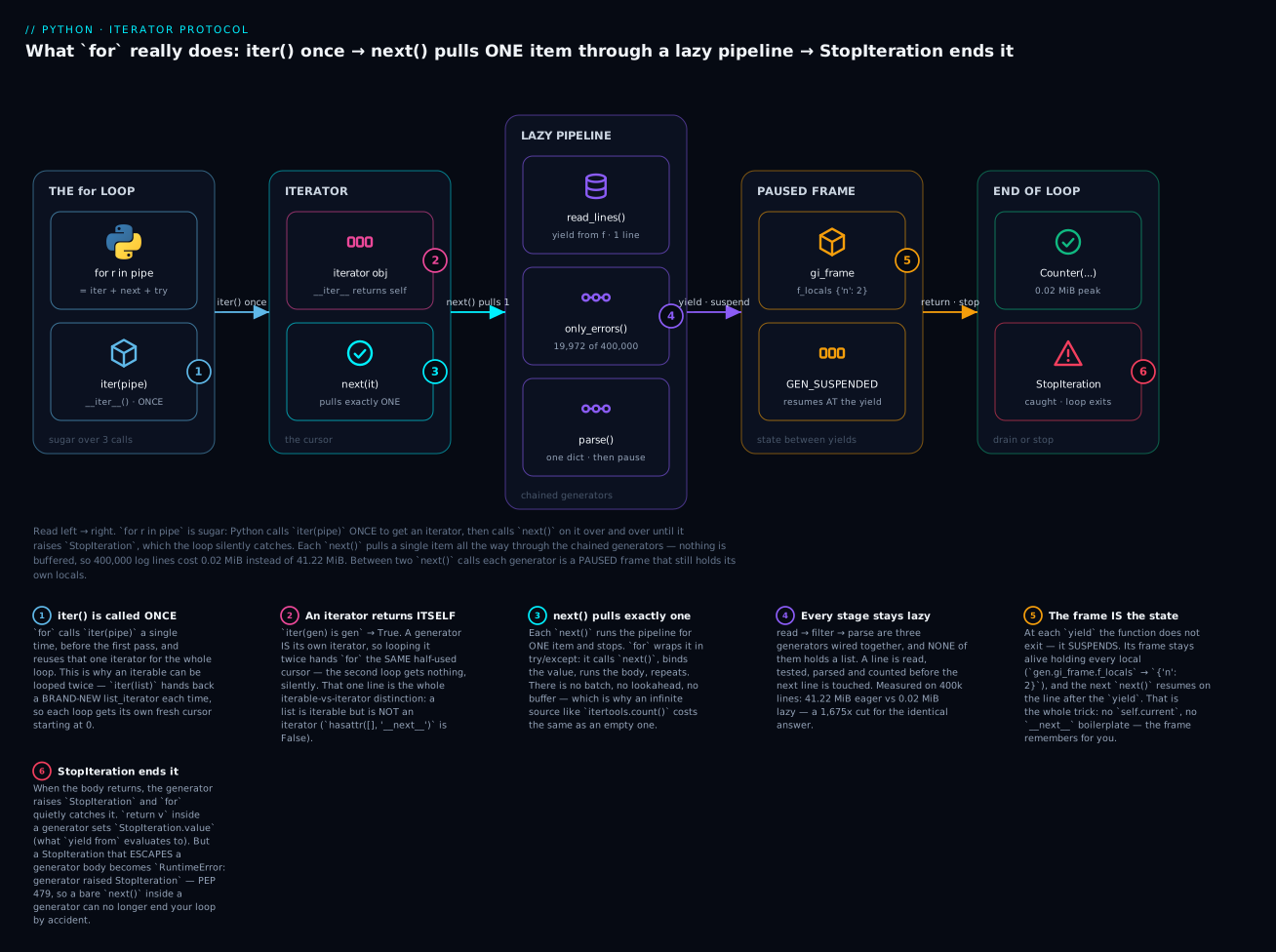
The six badges mark what actually matters. iter() is called once per loop (1). An iterator returns itself, which is the entire one-shot story (2). Each next() pulls exactly one item, so infinite sources cost nothing (3). Every stage stays lazy, so 400,000 lines never coexist (4). The suspended frame is the state you would otherwise hand-write (5). And StopIteration ends the loop — unless it escapes a generator body, where PEP 479 turns it into a RuntimeError (6).
Measured: 41.22 MiB versus 0.02 MiB
The lab builds all three versions and measures them. The headline, on a 17.7 MB / 400,000-line log:
| Implementation | Peak memory | Time | Errors found |
|---|---|---|---|
Eager lists (readlines() + 2 list comps) |
43,217,923 B — 41.22 MiB | 0.223 s | 19,972 |
| Hand-written iterator class | 25,924 B — 0.02 MiB | 0.131 s | 19,972 |
| Generator pipeline (3 chained generators) | 25,807 B — 0.02 MiB | 0.181 s | 19,972 |
| Ratio (eager ÷ pipeline) | 1,675× | — | identical |
Three findings worth more than the numbers.
Memory is O(1) versus O(n), and that is a category difference. The eager version’s peak scales with the file: a 10× bigger log means 412 MiB, then 4 GiB, then a dead process. The lazy versions do not move — 0.02 MiB is the buffer for one line plus the Counter, and it stays there for a 17 MB log or a 17 GB one. This is not an optimisation, it is the difference between “runs on any machine” and “runs until the file grows.”
The class and the pipeline are within 120 bytes of each other. That is the honest lesson about why it is fast: nothing here is magic about yield. Laziness is what saves the memory, and both lazy designs get identical results. yield is not faster than the class — it is shorter, and it is where the 16-lines-to-4 argument lives, not the memory argument.
The lazy versions are also faster here, which contradicts the usual “generators trade time for memory” line — and both facts are true. Per item, a resume-and-suspend genuinely costs more than a list append; that is why sum(genexpr) loses to sum([listcomp]) on in-memory data. But this job never had the data in memory: the eager version had to allocate 400,000 string objects before filtering, and that allocation dwarfs the per-item overhead. The trade-off turns on whether materialising was work you needed anyway. When it is not, lazy wins on both axes.
| Situation | Eager list | Lazy pipeline |
|---|---|---|
| Data fits comfortably in RAM, used once | Fine — often marginally faster | Fine — ~5-10% slower per item |
| Data is large / unbounded / streaming | O(n) — dies as input grows | O(1) — flat forever |
| You filter out most of it early | Allocates everything, then discards | Never allocates the discards |
You need len(), indexing, sorting, two passes |
Required | Impossible — materialise first |
| Source is infinite | Impossible — process killed | Natural |
You want to stop early (any, take, break) |
Computes everything first | Stops pulling immediately |
| Debugging | Easy — print(lst) shows values |
Harder — printing it consumes it |
That last row is a real cost. A generator is hostile to debugging: print(gen) shows <generator object ...>, and print(list(gen)) shows the values but destroys them. Insert a debug stage that prints each item and yields it unchanged, rather than draining the pipe to look inside it.
The itertools toolkit
itertools is the standard library’s collection of iterator building blocks. Everything in it is lazy, almost everything in it is one-shot, and all of it composes with everything else. These are the ones worth knowing by name:
| Tool | Does | Example | Result |
|---|---|---|---|
count(start, step) |
Infinite counter | islice(count(0, 5), 4) |
[0, 5, 10, 15] |
cycle(iterable) |
Infinite repeat of a sequence | islice(cycle("AB"), 5) |
['A','B','A','B','A'] |
repeat(x, n) |
x, n times (or forever) |
repeat("x", 3) |
['x', 'x', 'x'] |
islice(it, stop) |
Lazy slice — the only safe way to slice a generator | islice(count(10), 3) |
[10, 11, 12] |
islice(it, start, stop, step) |
Lazy slice with a step | islice(range(20), 2, 10, 3) |
[2, 5, 8] |
chain(a, b, ...) |
Concatenate iterables lazily | chain([1,2], [3], [4]) |
[1, 2, 3, 4] |
chain.from_iterable(its) |
Flatten one level, lazily | chain.from_iterable([[1,2],[3]]) |
[1, 2, 3] |
groupby(it, key) |
Group consecutive equal keys | see below | Needs sorted input |
tee(it, n) |
Split one iterator into n | tee(range(5)) |
2 independent cursors |
zip_longest(a, b, fillvalue) |
zip that pads instead of truncating |
zip_longest([1,2,3], "ab", fillvalue="-") |
[(1,'a'), (2,'b'), (3,'-')] |
product(a, b) |
Cartesian product — nested loops | product("ab", [1,2]) |
[('a',1), ('a',2), ('b',1), ('b',2)] |
combinations(it, r) |
r-length subsets, order-independent | combinations("abc", 2) |
[('a','b'), ('a','c'), ('b','c')] |
permutations(it, r) |
r-length orderings | permutations("abc", 2) |
[('a','b'), ('a','c'), ('b','a'), ...] |
pairwise(it) 3.10+ |
Overlapping adjacent pairs | pairwise([1,2,3,4]) |
[(1,2), (2,3), (3,4)] |
accumulate(it) |
Running totals | accumulate([1,2,3,4]) |
[1, 3, 6, 10] |
accumulate(it, func) |
Running fold | accumulate([3,1,4,1,5], max) |
[3, 3, 4, 4, 5] |
batched(it, n) 3.12+ |
Fixed-size chunks; last may be short | batched("ABCDEFG", 3) |
[('A','B','C'), ('D','E','F'), ('G',)] |
takewhile(pred, it) |
Yield until the first failure, then stop | takewhile(lambda n: n<3, [1,2,3,1]) |
[1, 2] |
dropwhile(pred, it) |
Skip until the first failure, then yield all | dropwhile(lambda n: n<3, [1,2,3,1]) |
[3, 1] |
filterfalse(pred, it) |
The complement of filter |
filterfalse(lambda n: n%2, range(6)) |
[0, 2, 4] |
compress(data, selectors) |
Keep where the selector is truthy | compress("abcd", [1,0,1,0]) |
['a', 'c'] |
starmap(f, tuples) |
f(*args) per tuple |
starmap(pow, [(2,3), (3,2)]) |
[8, 9] |
Two of these have traps sharp enough to deserve their own treatment.
groupby requires sorted input — and fails silently
groupby groups consecutive items with the same key. It does not group all items with the same key; it starts a new group every time the key changes. On unsorted input, that is not what anyone wants:
from itertools import groupby

rows = [("web01", 3), ("db01", 1), ("web01", 4), ("db01", 1), ("cache01", 5), ("web01", 2)]

broken = {k: sum(v for _, v in grp) for k, grp in groupby(rows, key=lambda r: r[0])}
print(broken)
{'web01': 2, 'db01': 1, 'cache01': 5}
Sort first, and the same expression is right:
fixed = {k: sum(v for _, v in grp)
         for k, grp in groupby(sorted(rows, key=lambda r: r[0]), key=lambda r: r[0])}
print(fixed)
print(len(broken), len(fixed))
{'cache01': 5, 'db01': 2, 'web01': 9}
3 3
Study that, because it is a genuinely vicious bug. web01 should total 9; the broken version says 2. db01 should be 2; it says 1. And yet both dicts have three keys — the shape is right, the hosts are right, only the numbers are wrong.
The mechanism is a double failure. groupby produced six groups of one item each (the key changes at every row), so the dict comprehension got web01 three separate times — and a dict comprehension keeps the last duplicate key, silently discarding the first two. The result looks plausible, passes a length check, and is wrong. Always use the same key for sorted and groupby, or use Counter/defaultdict, which ignore order entirely.
There is a second groupby trap, and it catches people who try to be careful:
saved = list(groupby(sorted(rows, key=lambda r: r[0]), key=lambda r: r[0]))
print([(k, list(grp)) for k, grp in saved])
[('cache01', []), ('db01', []), ('web01', [])]
Every group is empty. The group iterator is not a list — it is a lazy window onto the shared underlying iterator, and it is invalidated the moment groupby advances to the next key. Calling list() on the outer groupby advanced past every group before you read any of them. If you need to keep groups around, materialise as you go: [(k, list(g)) for k, g in groupby(...)] in one expression, never list(groupby(...)) first.
tee buffers — measured
tee splits one iterator into several independent ones. It looks free. It is not:
import tracemalloc
from itertools import tee

def lockstep():
    a, b = tee(range(1_000_000))
    return sum(x + y for x, y in zip(a, b))     # consumed TOGETHER

def sequential():
    a, b = tee(range(1_000_000))
    total = sum(a)                              # drain a FULLY first
    return total + sum(b)                       # b now reads from a 1M-item buffer
lock-step       peak=       3,480 B (  0.00 MiB)  result=999999000000
one-then-other  peak=  40,974,550 B ( 39.08 MiB)  result=999999000000
Same answer. 3,480 bytes or 39.08 MiB, decided entirely by consumption order. tee cannot rewind the source, so it buffers every item that the fastest cursor has seen and the slowest has not. Read the two in lock-step and the buffer holds one item. Drain one completely first and the buffer holds the entire stream — you have built a list with extra steps.
The rule: tee is for cursors that move together. If one consumer will run ahead, list() the source and be honest about the memory. And one more edge — after tee(src), never touch src again:
src = iter([1, 2, 3])
a, b = tee(src)
print(next(src))                # => 1        stolen from BOTH tees
print(list(a), list(b))         # => [2, 3] [2, 3]
The 1 is gone from both branches, permanently. Here is every itertools trap in this section, in one place:
| Trap | What you see | Why | Fix |
|---|---|---|---|
groupby on unsorted input |
Right key count, wrong totals (web01: 2, not 9) |
Groups consecutive keys only; the dict comp then keeps the last duplicate | sorted(it, key=k) with the same k — or Counter/defaultdict(list) |
list(groupby(...)) first |
Every group is empty | Groups are lazy windows on the shared source; advancing kills them | [(k, list(g)) for k, g in groupby(...)] in one expression |
tee with uneven consumers |
39.08 MiB instead of 3,480 B | Buffers everything the fast cursor read and the slow one hasn’t | Consume in lock-step (zip), or just list() the source |
Touching the source after tee |
An item vanishes from all branches | tee and src share one underlying cursor |
Never reuse src after tee(src) |
list() on count/cycle/repeat |
Killed: 9, exit 137, no traceback |
Infinite source; the OS killer beats MemoryError |
islice(it, n) — the only safe way to truncate |
Hands-on lab
Pure standard library — nothing to install. (If you want the habit: python3 -m venv .venv && source .venv/bin/activate, or .venv\Scripts\activate on Windows, where the command is python, not python3.)
Check your version first — every number below was measured on 3.12.3:
python3 --version
# Python 3.12.3
Create iter_lab.py and append each step as you go, running python3 iter_lab.py after each one. Every output below is exact and reproducible except the timings in Steps 4-7 and the last few digits of the peak byte counts — those depend on your machine and its allocator state. Compare the ratios and orders of magnitude, not individual bytes or seconds.
Step 1 — Build a big log.
import random
from pathlib import Path

LOG = Path("big.log")

def make_log(path, n=400_000):
    random.seed(42)                                   # deterministic
    levels = ["INFO"] * 85 + ["WARN"] * 10 + ["ERROR"] * 5
    hosts = ["web01", "web02", "db01", "cache01"]
    msgs = ["connection timeout", "disk full", "auth failed", "upstream 502", "slow query"]
    with path.open("w") as f:
        for i in range(n):
            hour = (i * 24) // n
            f.write(f"2026-07-15T{hour:02d}:{random.randint(0, 59):02d}:{random.randint(0, 59):02d} "
                    f"{random.choice(levels)} {random.choice(hosts)} {random.choice(msgs)}\n")

if not LOG.exists():
    make_log(LOG)

print(f"{LOG.stat().st_size:,} bytes")
print(LOG.open().readline().rstrip())
17,717,345 bytes
2026-07-15T00:40:07 INFO db01 disk full
What just happened: 400,000 lines, ~17.7 MB, about 5% of them ERROR. random.seed(42) makes it byte-identical on every machine, so every number in this lab is reproducible. ⚠️ This writes a 17.7 MB file to your current directory — Step 12 deletes it.
Step 2 — Rebuild for from parts.
nums = [10, 20, 30]
it = iter(nums)
while True:
    try:
        x = next(it)
    except StopIteration:
        break
    print(x)
10
20
30
What just happened: that is a for loop, with the sugar off. iter() once, next() repeatedly, StopIteration to stop. Everything else in this lab is a consequence of these three calls.
Step 3 — Prove iterable ≠ iterator.
print(iter(nums) is iter(nums))                # two calls -> two cursors
i1 = iter(nums)
print(iter(i1) is i1)                          # an iterator returns ITSELF
print(type(i1).__name__)
print(hasattr(nums, "__next__"), hasattr(i1, "__next__"))

g = (n for n in nums)
print(iter(g) is g)
print(list(g), list(g))
False
True
list_iterator
False True
True
[10, 20, 30] []
What just happened: the whole lesson in six lines. iter(list) gives a new cursor each time (False) → loop it forever. iter(gen) is gen (True) → the second list() gets the same drained cursor and returns [], no error. A list has no __next__: container, not cursor.
Step 4 — Way 1: eager lists.
import time, tracemalloc
from collections import Counter

def count_eager(path):
    with path.open() as f:
        lines = f.readlines()                                   # ALL 400k lines
    errors = [line for line in lines if " ERROR " in line]      # a 2nd list
    parsed = [{"hour": line[11:13], "host": line.split()[2]} for line in errors]
    return Counter(p["hour"] for p in parsed)

def measure(fn, path):
    tracemalloc.start()
    t0 = time.perf_counter()
    result = fn(path)
    elapsed = time.perf_counter() - t0
    _, peak = tracemalloc.get_traced_memory()
    tracemalloc.stop()
    return result, peak, elapsed

res, peak, dt = measure(count_eager, LOG)
print(f"eager    peak={peak:>12,} B  ({peak / 1024 / 1024:7.2f} MiB)  {dt:.3f}s  errors={sum(res.values())}")
eager peak= 43,217,923 B ( 41.22 MiB) 0.223s errors=19972
What just happened: readlines() allocated 400,000 string objects before a single one was filtered — 41.22 MiB peak for a 17.7 MB file, because Python string objects carry overhead. It found 19,972 errors, and it is the version almost everyone writes first.
Step 5 — Way 2: a hand-written iterator class.
class ErrorHours:
    def __init__(self, path):
        self._f = path.open()
    def __iter__(self):
        return self                      # one-shot: it IS the cursor
    def __next__(self):
        for line in self._f:             # keeps reading until a match
            if " ERROR " in line:
                return line[11:13]
        self._f.close()
        raise StopIteration              # manual termination

def count_class(path):
    return Counter(ErrorHours(path))

res, peak, dt = measure(count_class, LOG)
print(f"class    peak={peak:>12,} B  ({peak / 1024 / 1024:7.2f} MiB)  {dt:.3f}s  errors={sum(res.values())}")
class peak= 25,924 B ( 0.02 MiB) 0.131s errors=19972
What just happened: 41.22 MiB → 0.02 MiB, same answer. Nothing here is a generator — it is the raw protocol, __iter__ returning self and __next__ raising StopIteration by hand. Laziness did that, not yield. Note the cost: you had to manage self._f, remember to close it, and remember to raise.
Step 6 — Way 3: a generator pipeline.
def read_lines(path):
    with path.open() as f:
        yield from f

def only_errors(lines):
    for line in lines:
        if " ERROR " in line:
            yield line

def parse(lines):
    for line in lines:
        yield {"hour": line[11:13], "host": line.split()[2]}

def count_pipeline(path):
    return Counter(rec["hour"] for rec in parse(only_errors(read_lines(path))))

res, peak, dt = measure(count_pipeline, LOG)
print(f"pipeline peak={peak:>12,} B  ({peak / 1024 / 1024:7.2f} MiB)  {dt:.3f}s  errors={sum(res.values())}")
pipeline peak= 25,807 B ( 0.02 MiB) 0.181s errors=19972
What just happened: three generators, each one job, each independently testable, no class, no self, no manual StopIteration, no explicit close — and it beat the class by 117 bytes. The with in read_lines closes the file when the pipeline finishes or is dropped.
Step 7 — The verdict.
results = {}
for name, fn in [("eager", count_eager), ("class", count_class), ("pipeline", count_pipeline)]:
    res, peak, dt = measure(fn, LOG)
    results[name] = res
    print(f"{name:<9} peak={peak:>12,} B  ({peak / 1024 / 1024:7.2f} MiB)  {dt:.3f}s  errors={sum(res.values())}")
print("identical:", results["eager"] == results["class"] == results["pipeline"])
print("busiest hours:", sorted(results["pipeline"].items(), key=lambda kv: -kv[1])[:3])
eager     peak=  43,217,923 B  (  41.22 MiB)  0.223s  errors=19972
class     peak=      25,924 B  (   0.02 MiB)  0.131s  errors=19972
pipeline  peak=      25,807 B  (   0.02 MiB)  0.181s  errors=19972
identical: True
busiest hours: [('10', 871), ('15', 868), ('08', 856)]
What just happened: 1,675× less memory for the identical answer. The two lazy versions are within 120 bytes of each other — proof that laziness saves the memory and yield saves the typing. The eager version’s peak grows with the file; the other two do not move.
Step 8 — One-shot exhaustion, and the fix.
pipe = only_errors(read_lines(LOG))
print(sum(1 for _ in pipe))         # first pass
print(sum(1 for _ in pipe))         # second pass — no error
print(list(islice(pipe, 3)))

def fresh():
    return only_errors(read_lines(LOG))      # a FACTORY

print(sum(1 for _ in fresh()), sum(1 for _ in fresh()))
Add from itertools import islice at the top of the file first.
19972
0
[]
19972 19972
What just happened: the second sum returned 0 and the second read returned [] — no exception, no warning. That is the bug that ships: “the report came out blank” and “the count is zero” instead of a traceback. The fix is not to re-run it; it is to keep a factory (fresh()), which builds a new pipeline per call, exactly like iter(list) does.
Step 9 — yield from flattening.
def flatten(nested):
    for item in nested:
        if isinstance(item, list):
            yield from flatten(item)
        else:
            yield item

tree = [1, [2, [3, [4, [5, 6]], 7]], 8]
print(list(flatten(tree)))
[1, 2, 3, 4, 5, 6, 7, 8]
What just happened: five levels of nesting, flattened lazily, in five lines, with no intermediate list at any depth. yield from flatten(item) re-emits the whole sub-generator into the parent’s stream. Try this as an __iter__/__next__ class and you will be hand-rolling a stack of iterators.
Step 10 — The groupby bug.
from itertools import groupby

rows = [("web01", 3), ("db01", 1), ("web01", 4), ("db01", 1), ("cache01", 5), ("web01", 2)]
broken = {k: sum(v for _, v in grp) for k, grp in groupby(rows, key=lambda r: r[0])}
fixed = {k: sum(v for _, v in grp)
         for k, grp in groupby(sorted(rows, key=lambda r: r[0]), key=lambda r: r[0])}
print(broken)
print(fixed)
print(len(broken), len(fixed))

saved = list(groupby(sorted(rows, key=lambda r: r[0]), key=lambda r: r[0]))
print([(k, list(grp)) for k, grp in saved])
{'web01': 2, 'db01': 1, 'cache01': 5}
{'cache01': 5, 'db01': 2, 'web01': 9}
3 3
[('cache01', []), ('db01', []), ('web01', [])]
What just happened: two disasters. First, groupby on unsorted input groups only consecutive matches — it made six groups of one, and the dict comprehension silently kept the last of each duplicate key. web01 reports 2 instead of 9, and both dicts have three keys, so a length check would pass. Second, list(groupby(...)) returned three empty groups, because a group is a lazy window onto the shared source and dies when groupby advances.
Step 11 — The tee trap, measured.
from itertools import tee

def lockstep():
    a, b = tee(range(1_000_000))
    return sum(x + y for x, y in zip(a, b))

def sequential():
    a, b = tee(range(1_000_000))
    return sum(a) + sum(b)

for name, fn in [("lock-step", lockstep), ("one-then-other", sequential)]:
    tracemalloc.start()
    out = fn()
    _, peak = tracemalloc.get_traced_memory()
    tracemalloc.stop()
    print(f"{name:<15} peak={peak:>12,} B ({peak / 1024 / 1024:6.2f} MiB)  result={out}")
lock-step       peak=       3,480 B (  0.00 MiB)  result=999999000000
one-then-other  peak=  40,974,550 B ( 39.08 MiB)  result=999999000000
What just happened: identical answers, 3,480 bytes versus 39.08 MiB, and the only difference is consumption order. tee buffers everything the fast cursor has read and the slow one has not — drain one branch first and the buffer becomes the whole stream. tee is for cursors that advance together.
Step 12 — Clean up.
LOG.unlink(missing_ok=True)
print("removed big.log")
⚠️ unlink() permanently deletes the file — it does not go to the trash. This is safe here because make_log recreates it byte-for-byte from seed(42).
You have now, in twelve steps, rebuilt for from its three primitives, proved the iterable/iterator split in your own interpreter, written the same job three ways, and measured a 1,675× memory cut — then broken it three more ways on purpose.
Common mistakes and troubleshooting
| Symptom / traceback | Cause | Fix |
|---|---|---|
Generator works once, then everything is empty or 0 |
Generators are iterators: iter(gen) is gen, so the 2nd loop gets the same drained cursor |
Keep a factory (def fresh(): return (…)) and call it per pass, or rows = list(gen) once |
for over the same generator twice: silently no output |
Same thing. The first loop drained it; the second sees StopIteration immediately |
Same fix. Never store a generator where a collection is expected |
TypeError: 'generator' object is not subscriptable |
gen[0] — nothing exists yet to index |
next(gen) for the first item, or list(gen)[0], or itertools.islice(gen, 0, 1) |
TypeError: object of type 'generator' has no len() |
len(gen) — a generator does not know its length, and often cannot |
len(list(gen)) (consumes it) or sum(1 for _ in gen) (also consumes it) |
| Generator function prints nothing / never validates its arguments | The body does not run until the first next(). Calling it only builds the object |
Split it: an eager plain function that validates, returning an inner generator |
RuntimeError: generator raised StopIteration |
PEP 479 — a StopIteration escaped a generator body, usually a bare next(it) inside it |
try: yield next(it) / except StopIteration: return. Better: yield from it |
| Loop ends early with no error (on Python ≤3.6) | Pre-PEP 479: a leaked StopIteration looked exactly like the generator finishing |
Upgrade. On 3.7+ this is the RuntimeError above — loud instead of silent |
TypeError: 'X' object is not iterable |
No __iter__ and no __getitem__; iter() had nothing to call |
Add __iter__, or pass something iterable |
TypeError: 'X' object is not an iterator |
Called next() on an iterable (e.g. next([1,2])) — no __next__ |
next(iter(x)). The missing article is the diagnosis |
TypeError: iter() returned non-iterator of type 'X' |
__iter__ returned something without __next__ — usually return self on a class that has no __next__ |
Return a real iterator, or add __next__ |
groupby gives fragmented groups / wrong totals, right key count |
groupby groups consecutive keys only; the dict comp then kept the last duplicate |
sorted(rows, key=k) with the same key, or use Counter/defaultdict(list) |
groupby groups are all empty |
Group iterators are lazy windows on the shared source, invalidated when groupby advances |
[(k, list(g)) for k, g in groupby(...)] in one expression. Never list(groupby(...)) first |
tee uses as much memory as a list |
One branch was drained before the other; tee buffered the entire stream |
Consume branches in lock-step (zip), or just list() the source and stop pretending |
RuntimeError: dictionary changed size during iteration |
Added/removed keys while looping the dict | Iterate a snapshot: for k in list(d): |
RuntimeError: Set changed size during iteration |
Mutated the set while looping it | for x in set(s): or build a new set |
| List loses items / skips them, no error at all | Mutating a list while iterating: the cursor is an index, and remove() shifts everything left |
Loop a copy (for x in xs[:]) or rebuild: xs = [x for x in xs if keep(x)] |
MemoryError, or Killed: 9 / exit 137 with no traceback |
list() on a huge or infinite generator; the OS killer beat MemoryError |
itertools.islice(gen, n), or stream it. You cannot except a SIGKILL |
TypeError: can't send non-None value to a just-started generator |
send(v) before priming — there is no suspended yield to receive it |
next(gen) (or gen.send(None)) first |
RuntimeError: generator ignored GeneratorExit |
yield inside finally (or catching GeneratorExit and continuing) during close() |
Clean up and let it die. Do not yield after being told to stop |
isinstance(x, Iterable) is False but for x in … works |
The object uses the old __getitem__ fallback; the ABC only checks __iter__ |
Test with try: iter(x) / except TypeError:. In your own classes, implement __iter__ |
| Memory not released after a loop | A suspended generator keeps its frame — and everything its locals reference — alive | gen.close(), or let it fall out of scope. Do not park half-drained generators on objects |
Three of these cost the most hours.
1. The exhausted generator. The nastiest bug here, because there is no error. You build a pipeline, hand it to a function that counts it, then hand it to another that lists it — and the second gets nothing. Just 0 or [] flowing downstream until a number looks wrong three functions later. The silence is correct, which is what makes it so hard: “drained” and “empty” are the same state, and sum() of nothing genuinely is 0. Decide at the boundary — the moment a generator escapes the expression that consumes it, make it a list or make it a factory.
2. The body that never ran. A generator function that validates its arguments, opens a file, or logs “starting” does none of it at call time. take([1,2,3], -1) returns happily; the ValueError surfaces later, at list(g), in whatever code happened to consume it. This turns a clean “bad argument at line 12” into a traceback that blames an innocent consumer. The two-function split — eager validator, lazy inner generator — is the standard cure and it is worth the extra def.
3. Mutating while iterating. Dicts and sets defend themselves with RuntimeError: dictionary changed size during iteration. Lists do not. A list’s iterator is a bare index, so deleting the item at position i shifts everything left while the index marches right, and you silently skip items:
xs = [1, 2, 4, 5]
for x in xs:
    if x % 2 == 0:
        xs.remove(x)
print(xs)                       # => [1, 4, 5]     the 4 SURVIVED
The 4 is even and it is still there. No error. Removing 2 shifted 4 into index 1, the cursor moved to index 2, and 4 was never examined. It gets worse with adjacent matches — for y in ys: ys.remove(y) over ['a','b','c','d'] leaves ['b','d'], having removed exactly half. Never mutate a list you are iterating. Rebuild it with a comprehension, or iterate a copy with xs[:]. If list aliasing and slice-copies are still fuzzy, Lists & Tuples: Indexing, Slicing, Methods & Immutability covers the model.
Cheat-sheet
| Syntax / call | What it does |
|---|---|
iter(x) |
Calls x.__iter__() → an iterator. TypeError: not iterable if absent |
next(it) |
Calls it.__next__() → one value; raises StopIteration when done |
next(it, default) |
Same, but returns default instead of raising |
for x in src: |
it = iter(src); x = next(it) repeatedly; catch StopIteration |
for…else: |
The else runs when the loop ended by StopIteration, not by break |
iter(x) is x |
True → it is an iterator (one-shot). False → it is an iterable (reusable) |
hasattr(x, "__next__") |
The honest “is this a cursor?” test |
isinstance(x, Iterator) |
From collections.abc. Note: Iterable is False for __getitem__ objects |
iter(callable, sentinel) |
Two-arg form: call callable() until it returns sentinel |
__iter__ returns self |
The object is its own cursor → one-shot |
__iter__ returns a new object |
The object is a factory → reusable, like a list |
__next__ |
Return the next value or raise StopIteration |
__getitem__ |
Legacy fallback: iter() calls it with 0,1,2… until IndexError |
def f(): yield v |
Makes a generator factory. Calling f() runs no code |
next(gen) (1st time) |
Now the body starts, and runs to the first yield |
yield v |
Suspend the frame, hand v out. Resume on the next line |
x = yield v |
Yield v out; x becomes whatever send() passes in |
return in a generator |
Ends it → StopIteration(None) |
return v in a generator |
Ends it → StopIteration.value == v |
yield from sub |
Delegate: forwards values, send, throw, close; evaluates to sub’s return value |
yield from iterable |
Also works on any iterable — the tidiest re-emit |
gen.gi_frame.f_locals |
The suspended frame’s locals — the state you didn’t write |
inspect.getgeneratorstate(g) |
GEN_CREATED / GEN_RUNNING / GEN_SUSPENDED / GEN_CLOSED |
gen.send(v) |
Resume; the yield expression evaluates to v. Prime with next() first |
gen.throw(E) |
Raise E at the paused yield |
gen.close() |
Throw GeneratorExit at the yield; finally blocks do run |
itertools.islice(gen, n) |
The only safe way to slice or truncate a lazy/infinite source |
itertools.count(a, b) |
Infinite counter |
itertools.chain(a, b) |
Concatenate lazily; chain.from_iterable(its) flattens one level |
itertools.groupby(it, key) |
Groups consecutive keys — sorted(it, key=key) first, same key |
itertools.tee(it, n) |
n cursors — buffers the whole stream unless consumed in lock-step |
itertools.pairwise(it) |
3.10+ — adjacent overlapping pairs |
itertools.batched(it, n) |
3.12+ — fixed-size chunks; the last may be short |
itertools.accumulate(it) |
Running totals; accumulate(it, max) for a running fold |
collections.Counter(gen) |
Counts a lazy stream in O(1) extra memory — no sorting needed |
tracemalloc.get_traced_memory() |
(current, peak) — the honest memory measurement |
list(gen) on an infinite source |
Never. Killed: 9, exit 137, no traceback |
Interview and exam questions
Q: What does for x in src: actually do?
A: Three things. It calls iter(src) once to get an iterator; it calls next(it) repeatedly, binding each result to x and running the body; and it catches StopIteration to exit. Written out: it = iter(src) / while True: / try: x = next(it) / except StopIteration: break / <body>. StopIteration is an exception rather than a sentinel value so that “finished” can never be confused with real data — and for/else is explained by the same fact: the else runs when the loop ended via StopIteration rather than break.
Q: What is the difference between an iterable and an iterator — and why can you loop a list twice but not a generator?
A: An iterable has __iter__ returning a new iterator each call — a factory for cursors (list, range, dict). An iterator has __iter__ returning self plus __next__ — it is the cursor, and it is one-shot. Every iterator is iterable; almost no iterable is an iterator. That single fact answers both halves: iter(nums) is iter(nums) → False, so each loop over a list gets a fresh cursor at index 0, while iter(g) is g → True, so the second loop over a generator gets the same drained cursor and gets StopIteration immediately — returning [] or 0 with no error. Test with iter(x) is x. Fix: list() it, or keep a factory function returning a fresh generator per call.
Q: Write an iterator class for a countdown, then the generator equivalent.
A: The class needs __iter__ returning self, __next__ decrementing and returning, and an explicit raise StopIteration at zero — plus a second class if you want it reusable, because a single class with __iter__ returning self is one-shot. That is 16 lines. The generator is four: def countdown(start): / while start > 0: / yield start / start -= 1. The state (self.current) is replaced by an ordinary local variable held in the suspended frame, and falling off the end raises StopIteration for you.
Q: What happens when you call a generator function?
A: Nothing runs. yield anywhere in the body makes def build a generator factory; calling it allocates a frame paused before line one and returns a generator object. The body starts on the first next(). The practical consequence: argument validation inside a generator function never fires at call time — take([1,2,3], -1) returns happily and the ValueError surfaces later at list(g), blaming the consumer. Fix by splitting into an eager validating wrapper plus a lazy inner generator.
Q: What does yield do to the function’s frame, and how do you prove it?
A: It suspends rather than exits. The frame stays alive with all locals intact, and the next next() resumes on the line after the yield. Proof: c = counter(); next(c); next(c); next(c); print(c.gi_frame.f_locals) → {'n': 2} — a live local variable in a function that is not running. inspect.getgeneratorstate(c) reports GEN_SUSPENDED; after close() it reports GEN_CLOSED and gi_frame becomes None.
Q: What does return value do inside a generator?
A: It ends the generator and stores value on the exception: StopIteration.value. A for loop cannot see it (it catches StopIteration and discards the payload). Only two things can read it — an explicit except StopIteration as exc: exc.value, and yield from, whose entire expression evaluates to the sub-generator’s return value. return and yield from are two halves of one feature.
Q: How is yield from sub different from for x in sub: yield x?
A: The manual loop forwards only values. yield from opens a transparent channel: it forwards send(), throw() and close() to the sub-generator, and evaluates to the sub’s return value. It is also faster (the chain is short-circuited rather than one Python loop per layer) and it accepts any iterable. It is what makes recursive generators — like a five-line lazy flatten — practical.
Q: Why does StopIteration inside a generator now raise RuntimeError?
A: PEP 479, unconditional since Python 3.7. Before it, a StopIteration leaking out of a generator body was indistinguishable from the generator finishing normally, so a bare next(it) on an exhausted source would end the caller’s loop silently — truncating data with no error. Now it is converted to RuntimeError: generator raised StopIteration, with the original as __cause__. Fix: try: yield next(it) / except StopIteration: return, or avoid manual next() and use yield from it.
Q (coding): sum(1 for _ in pipe) returns 19,972 and then 0. Explain and fix.
A: pipe is a generator, so it is its own iterator; the first sum drained it and the second got the same exhausted cursor. 0 is the correct sum of nothing — no error, which is why this ships. Fix: keep a factory — def fresh(): return only_errors(read_lines(LOG)) — and call fresh() per pass; each call builds new frames and re-reads the file in O(1) memory. Or rows = list(pipe) once if you can afford the memory and need random access.
Q (coding): This dict comprehension over groupby gives the right keys and wrong totals. Why?
A: groupby groups consecutive equal keys only — it is uniq, not SQL’s GROUP BY. On unsorted input it emits a new group every time the key changes, so web01 appears three separate times, and the dict comprehension keeps the last duplicate key. Measured: web01 reports 2 instead of 9, and both dicts have three keys, so a length check passes. Fix: groupby(sorted(rows, key=k), key=k) with the same k, or Counter/defaultdict(list) — O(n) and order-independent. Second trap: never list(groupby(...)) — groups are lazy windows on the shared source and go empty once groupby advances.
Q: When does itertools.tee cost more than a list?
A: Whenever the branches are consumed at different speeds. tee cannot rewind the source, so it buffers everything the fastest cursor has read and the slowest has not. Measured over 1M items with the same answer: 3,480 bytes consumed in lock-step via zip, 39.08 MiB when one branch is drained first. Draining one branch first makes tee a list with extra steps. Also: after tee(src), never touch src again — next(src) steals the item from every branch.
Q: What is send(), and should you use it?
A: send(v) resumes a generator with the paused yield expression evaluating to v — x = yield out yields out and receives v. It must be primed with next() (or send(None)) first, otherwise TypeError: can't send non-None value to a just-started generator, because a fresh generator is paused before line one, not at a yield. It turns a generator into a coroutine and was the engine of early asyncio. Do not build new code on it: async/await replaced it in 3.5, and @asyncio.coroutine was removed in 3.11. Know it for legacy code, interviews, and understanding await.
Key takeaways
foris sugar for three calls.it = iter(src)once, thennext(it)repeatedly, catchingStopIterationto exit. Write that loop by hand once and every iterator mystery becomes a consequence of it — includingfor/else, whoseelseruns only when the loop ended byStopIterationrather thanbreak.- Iterable ≠ iterator, and this is the whole lesson. An iterable’s
__iter__returns a new cursor (loop it forever); an iterator’s returnsself(one-shot).iter(x) is xsettles it:Falsefor a list,Truefor a generator. That one line explains why the secondlist(gen)returns[]with no error — and whymap,filter,zipand open files do the same. - Write the protocol by hand once, then never again.
__iter__+__next__+ a manualraise StopIterationis 16 lines for a countdown; the generator is 4. The frame’s locals replaceself.current, andgen.gi_frame.f_locals→{'n': 2}proves it: a live local in a function that is not running. For a reusable lazy source, make__iter__itself a generator function. - Calling a generator function runs no code. It builds a paused frame and hands it back — so argument validation inside a generator never fires at call time, and the
ValueErrorsurfaces later atlist(g), blaming the consumer. Split it: eager wrapper, lazy inner generator. yield fromdelegates, it doesn’t just forward. Unlikefor x in sub: yield x, it passessend/throw/closethrough and evaluates to the sub-generator’sreturnvalue — which is whatStopIteration.valueis for. It makes recursive generators, like a five-line lazyflatten, practical.- Laziness saves the memory;
yieldsaves the typing. Measured on 400,000 log lines: eager lists 41.22 MiB, iterator class 0.02 MiB, generator pipeline 0.02 MiB — identical answers, a 1,675× cut, and the two lazy versions within 120 bytes of each other. Chain small single-purpose generators and nothing is ever buffered.itertools.isliceis the only safe way to slice an infinite source. - Know the two
itertoolstraps.groupbygroups only consecutive keys — it isuniq, notGROUP BY— so unsorted input silently yields fragmented groups with the right shape and wrong totals (web01: 2 instead of 9). Andteebuffers the whole stream unless the branches move in lock-step: 3,480 B versus 39.08 MiB for the same answer. - The silent failures outnumber the loud ones. An exhausted generator returns
0and[], not an exception. A mutated list skips items with no error ([1,2,4,5]minus evens →[1,4,5]) while dicts and sets at least raiseRuntimeError. The loud one is PEP 479:StopIterationescaping a generator body is nowRuntimeError— deliberately, because before 3.7 it truncated your loop and said nothing.