You have an Order object. It holds a datetime, a Decimal, and a tuple of tags. You want to save it. So you reach for the file skills you already have, and you write this:
with open("order.json", "w", encoding="utf-8") as f:
    f.write(order)          # TypeError: write() argument must be str, not Order
That TypeError is the beginning of this lesson. A file holds bytes. Your object is not bytes — it is a live thing in your process’s memory, a bundle of references pointing at other live things. There is no obvious way to write it down, and the moment your process exits it is gone. The work of converting between “a live object” and “a sequence of bytes you can store or send” is called serialization, and it is the bridge between every program and every other program that will ever read its output.
This lesson covers the three tools you will actually use: json (how your program talks to other people’s programs), csv (how your program talks to spreadsheets and analysts), and pickle (how your program talks to itself, later, with a loaded gun on the table). By the end you will know exactly which one to reach for, and — more importantly — exactly what each one silently throws away.
Everything here targets Python 3.12+ and is pure standard library: no pip install, no virtual environment needed. It assumes you are comfortable with file I/O and with, with dicts, and with dataclasses.
Why this matters
Programs are not islands. The report you generate is opened in Excel by someone in finance. The config your service reads was written by a different team in a different language. The API you call returns a blob of text that has to become Python objects before you can do anything with it. The model you trained at 2 a.m. has to still exist at 9 a.m. Every one of those hand-offs is a serialization boundary, and every one of them is a place where data quietly changes shape.
Here is the mental model to carry through the whole lesson. An object in memory is a graph, not a value. Your Order doesn’t contain a customer name; it holds a reference to a str object that lives somewhere else in RAM. That str might be shared with three other objects. The whole structure is held together by memory addresses that are meaningless the instant your process ends — and utterly meaningless to a program written in Go running on another continent.
So serialization has to do something violent: flatten the graph into a linear sequence of bytes, throwing away every address and keeping only the values. Deserialization does the reverse — reads the bytes and builds a brand-new graph that hopefully resembles the old one. The word “hopefully” is doing enormous work in that sentence, and this lesson is largely about the gap between the object you saved and the object you got back.
That gap is where the bugs live, and they are unusually nasty bugs, because they are silent. A tuple goes into JSON and comes back a list — no error, no warning, and your == check fails three functions later. A Decimal("0.10") goes in and comes back as the float 0.1, which is not 0.10 and never was, and now your invoice totals are off by a paisa in a way nobody can reproduce. A CSV round-trip turns the integer 3 into the string "3", and "3" + 1 explodes somewhere far from the read. None of these announce themselves. You have to know.
Serialization: why you can’t just write an object to disk
Let’s make the problem concrete before we solve it. Here is an object and four attempts to save it:
from dataclasses import dataclass
from datetime import datetime
from decimal import Decimal

@dataclass
class Order:
    order_id: str
    placed_at: datetime
    total: Decimal

o = Order("A-1001", datetime(2026, 7, 15, 9, 14, 2), Decimal("1240.50"))

print(o)                  # this LOOKS like it could be saved...
print(str(o))             # ...and str() gives you text!
Order(order_id='A-1001', placed_at=datetime.datetime(2026, 7, 15, 9, 14, 2), total=Decimal('1240.50'))
Order(order_id='A-1001', placed_at=datetime.datetime(2026, 7, 15, 9, 14, 2), total=Decimal('1240.50'))
That text is readable, so a beginner reasonably asks: why not just write that string to a file? Because there is no reliable way to read it back. repr() is designed for humans and debuggers, not machines. To reverse it you’d need to write a parser for Python’s repr syntax — and eval()ing it is both fragile and a security hole. repr() is a one-way street: easy to produce, hopeless to consume.
What you need is a format with a defined grammar that a parser can reverse. That is precisely what serialization formats are. And the moment you demand “reversible,” you inherit a hard constraint: the format must have a type system, and it will not be Python’s.
| Object in memory | Bytes on disk / on the wire | |
|---|---|---|
| What it is | A graph of references | A flat, ordered sequence of 0–255 |
| Types available | Every Python type, plus yours | Whatever the format defines — usually 5-8 |
| Identity | a is b is meaningful |
❌ Gone. Only values survive |
| Shared references | Two names, one object | ❌ Usually duplicated into two objects |
Cycles (a.b = a) |
Fine | ❌ Infinite loop unless the format handles it |
| Lifetime | Dies with the process | Outlives it — that’s the point |
| Readable by other languages | ❌ No | ✅ If the format is standard |
Read the “Types available” row again, because it is the whole lesson. Python has datetime, Decimal, set, tuple, bytes, complex, and every class you have ever written. JSON has six types. CSV has one (string). Something has to give, and you decide what — or the library decides for you, silently.
This is the round trip, end to end, with the losses marked:
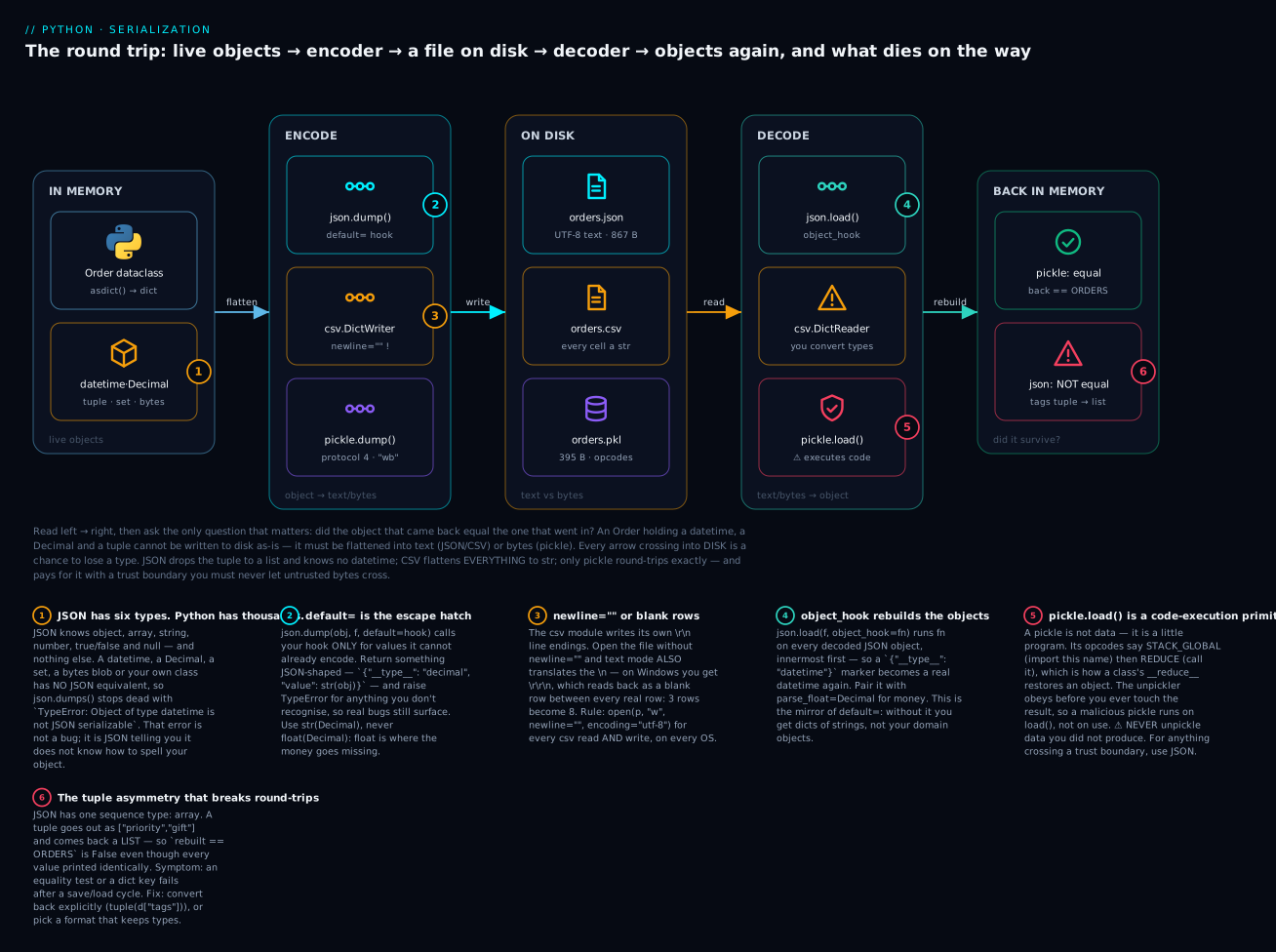
Follow it left to right. The Order on the left is flattened by asdict() into a plain dict, and then one of three encoders turns that into a file. The only question that matters is on the far right: does the object that comes back equal the one that went in? Pickle says True. JSON says False — because tags went out as a JSON array and came back a list, not a tuple.
The badges mark the six things that bite. JSON simply has no spelling for a datetime, a Decimal, or a set (1), which is what the default= hook exists to fix (2). CSV needs newline="" or you get blank rows (3). Decoding needs object_hook to rebuild real objects rather than dicts of strings (4). pickle.load() is not parsing — it is executing (5). And the tuple→list asymmetry is the silent equality-breaker (6).
JSON: the four functions and the six types
JSON (JavaScript Object Notation) won the interchange war. It is text, it is human-readable, every language on earth can parse it, and it is what virtually every web API speaks. Python’s json module is stdlib — import json and you’re done.
The entire module is really four functions, and the naming trips up every beginner exactly once. The rule: the s stands for “string.”
| Function | Direction | Input | Output | Mnemonic |
|---|---|---|---|---|
json.dump(obj, f) |
Python → JSON | object + a file object | None (writes to f) |
dump to a file |
json.dumps(obj) |
Python → JSON | object | a str |
dump to a string |
json.load(f) |
JSON → Python | a file object | object | load from a file |
json.loads(s) |
JSON → Python | str, bytes, or bytearray |
object | load from a string |
So dumps is not “dumps” the plural verb — it is “dump-s”, dump-to-string. Get that and you never mix them up again. The two mistakes:
import json

# ❌ json.loads(f) — passing a FILE to the string version
with open("orders.json", encoding="utf-8") as f:
    json.loads(f)
# TypeError: the JSON object must be str, bytes or bytearray, not TextIOWrapper

# ❌ json.dump(obj) — forgetting the file argument
json.dump({"a": 1})
# TypeError: dump() missing 1 required positional argument: 'fp'
Now the type system. Here is the complete mapping in both directions — this table is the most important one in the lesson, because the asymmetries in the right-hand column are where round-trips break:
| Python | → JSON | → back to Python | Lossless? |
|---|---|---|---|
dict |
object {...} |
dict |
✅ (but see keys, below) |
list |
array [...] |
list |
✅ |
tuple |
array [...] |
list |
❌ Type changes! |
str |
string "..." |
str |
✅ |
int |
number | int |
✅ |
float |
number | float |
⚠️ Precision — see below |
True / False |
true / false |
bool |
✅ |
None |
null |
None |
✅ |
Enum subclasses of str/int |
string / number | str / int |
❌ Enum-ness lost |
Both list and tuple become a JSON array, because JSON has exactly one sequence type. Encoding is many-to-one, so decoding cannot possibly restore which one you started with — it always picks list. Watch it happen:
import json

original = {"tags": ("priority", "gift")}          # a TUPLE
roundtrip = json.loads(json.dumps(original))

print("original :", original)
print("roundtrip:", roundtrip)
print("equal?   :", original == roundtrip)
print("type     :", type(roundtrip["tags"]).__name__)
original : {'tags': ('priority', 'gift')}
roundtrip: {'tags': ['priority', 'gift']}
equal?   : False
type     : list
No exception. No warning. The values printed almost identically — only the brackets changed — and yet == is now False. If those tags were a dict key or part of an equality check in a test, you have just spent an afternoon. This is the single most common silent JSON bug, and it applies to any code that saves a tuple and expects a tuple back.
There is a second, quieter asymmetry: dict keys. JSON object keys must be strings, so Python coerces them:
import json

print(json.dumps({1: "one", 2: "two"}))            # int keys -> string keys
print(json.loads('{"1": "one"}'))                  # ...and they stay strings
print(json.dumps({(1, 2): "tuple key"}))
{"1": "one", "2": "two"}
{'1': 'one'}
Traceback (most recent call last):
  ...
TypeError: keys must be str, int, float, bool or None, not tuple
So {1: "one"} round-trips into {"1": "one"} — your integer keys are now strings, and d[1] raises KeyError. Tuple keys don’t even encode. If your dict is keyed by anything but strings, JSON will change it or refuse it.
What has no JSON equivalent at all
Everything above at least converts. These do not — json.dumps() stops with a TypeError:
| Python type | Error | The standard fix |
|---|---|---|
datetime / date |
TypeError: Object of type datetime is not JSON serializable |
.isoformat() → "2026-07-15T09:14:02"; back with datetime.fromisoformat() |
Decimal |
TypeError: Object of type Decimal is not JSON serializable |
str(d), never float(d). Back with Decimal(s) |
set / frozenset |
TypeError: Object of type set is not JSON serializable |
sorted(s) → array; back with set(...) |
bytes |
TypeError: Object of type bytes is not JSON serializable |
base64.b64encode(b).decode("ascii") |
complex |
TypeError: Object of type complex is not JSON serializable |
[z.real, z.imag] |
| Your own class | TypeError: Object of type Order is not JSON serializable |
dataclasses.asdict(), or a default= hook |
| A dataclass instance | TypeError: Object of type P is not JSON serializable |
⚠️ asdict() first — json does not know dataclasses |
That last row surprises people. Dataclasses are not magic to json; they are ordinary objects. json.dumps(Order(...)) fails exactly like any other class. You must call dataclasses.asdict() first.
Read the error message as a sentence — Object of type X is not JSON serializable — and it tells you precisely what it means: JSON has no way to spell an X. It is not a bug. It is JSON declining to guess.
Formatting: the four keyword arguments worth knowing
dumps() takes a pile of keyword arguments. Four matter:
| Argument | Default | Effect | Use it when |
|---|---|---|---|
indent |
None (one line) |
indent=2 pretty-prints with newlines |
Config files, debugging, anything a human reads or a diff touches |
sort_keys |
False |
Sorts object keys alphabetically | Deterministic output — stable git diffs, hashing, snapshot tests |
separators |
(", ", ": "), or (",", ": ") with indent |
Item and key separators | (",", ":") for the most compact possible payload |
ensure_ascii |
True |
Escapes every non-ASCII char to \uXXXX |
⚠️ Set False for human-readable non-English text |
import json
order = {"id": "A-1001", "customer": "Ananya", "qty": 3, "paid": True}

print(json.dumps(order))
print(json.dumps(order, sort_keys=True))
print(json.dumps(order, separators=(",", ":")))
print(json.dumps(order, indent=2))
{"id": "A-1001", "customer": "Ananya", "qty": 3, "paid": true}
{"customer": "Ananya", "id": "A-1001", "paid": true, "qty": 3}
{"id":"A-1001","customer":"Ananya","qty":3,"paid":true}
{
  "id": "A-1001",
  "customer": "Ananya",
  "qty": 3,
  "paid": true
}
sort_keys=True deserves emphasis. Python dicts preserve insertion order, so two runs that build the same dict differently produce byte-different JSON. That makes every commit a diff, breaks content hashing, and makes snapshot tests flap. sort_keys=True costs nothing and makes the output a function of the data. (One catch: it raises TypeError: '<' not supported between instances of 'str' and 'int' on mixed-type keys — which is a good reason not to have those.)
ensure_ascii is the one that generates confused bug reports. The default mangles non-English text:
import json
row = {"city": "Bengaluru", "note": "paid ₹1,240 — thanks!", "jp": "日本"}

print("default          :", json.dumps(row))
print("ensure_ascii=False:", json.dumps(row, ensure_ascii=False))
print("same after loads? ", json.loads(json.dumps(row)) == json.loads(json.dumps(row, ensure_ascii=False)))
default          : {"city": "Bengaluru", "note": "paid \u20b91,240 \u2014 thanks!", "jp": "\u65e5\u672c"}
ensure_ascii=False: {"city": "Bengaluru", "note": "paid ₹1,240 — thanks!", "jp": "日本"}
same after loads?  True
Note the last line: both are correct JSON and both decode to the identical string. ₹ is ₹. This is not a data-loss bug — it is a readability bug. The default exists because ASCII-only bytes survive any transport, however broken. But it makes your file unreadable to a human and bigger on the wire (86 bytes vs 74 here, and far worse for CJK text — 日本 costs 12 bytes escaped against 6 as UTF-8). If you control both ends and you’re writing UTF-8 — and you are — pass ensure_ascii=False.
What JSON refuses (and what it shouldn’t allow but does)
JSON’s grammar is famously strict. Everything a developer instinctively types is illegal:
| You wrote | Legal JSON? | What happens |
|---|---|---|
{"a": 1,} — trailing comma |
❌ | JSONDecodeError: Expecting property name enclosed in double quotes: line 1 column 9 (char 8) |
{'a': 1} — single quotes |
❌ | JSONDecodeError: Expecting property name enclosed in double quotes: line 1 column 2 (char 1) |
{"a": 1 // note} — comments |
❌ | JSONDecodeError: Expecting ',' delimiter: line 1 column 9 (char 8) |
{"a": 1, "a": 2} — duplicate keys |
⚠️ Accepted | Silently keeps the last: {'a': 2}. Use object_pairs_hook to reject |
NaN, Infinity |
⚠️ Accepted by Python | Not in the JSON spec — other parsers will reject your output |
{"a": 1} with a BOM |
❌ | JSONDecodeError: Expecting value: line 1 column 1 (char 0) — use utf-8-sig |
The duplicate-key row is a genuine hazard: json.loads('{"a": 1, "a": 2}') returns {'a': 2} with no complaint. If a config file has an accidental duplicate, the last one silently wins.
The NaN row cuts the other way — Python is too permissive:
import json

print(json.dumps([float("inf"), float("nan")]))     # not valid JSON!
try:
    json.dumps(float("nan"), allow_nan=False)
except ValueError as exc:
    print("ValueError:", exc)
[Infinity, NaN]
ValueError: Out of range float values are not JSON compliant: nan
Infinity and NaN are not in the JSON spec. Python emits them by default, and Python reads them back — so your round-trip passes and your JavaScript consumer throws a parse error in production. If your JSON crosses a language boundary, pass allow_nan=False and find out at write time.
When JSON says no: custom encoding and decoding
So json.dumps() refused your datetime. You have four options, and picking the right one is most of the skill.
| Approach | How | Best for |
|---|---|---|
| Convert by hand | d["at"] = d["at"].isoformat() before dumping |
One field, one place. Doesn’t scale |
default= hook |
json.dumps(obj, default=fn) |
✅ The workhorse. A function per project |
Subclass JSONEncoder |
json.dumps(obj, cls=MyEncoder) |
Reusable, importable, works with dump/dumps alike |
dataclasses.asdict() |
Flatten your objects first, then use a hook for the leaves | ✅ Combine with default= — this is the real answer |
default= is a fallback, not a filter. This is the key insight and it’s easy to miss: your function is called only for objects json cannot already handle. It never sees your strings, ints, lists or dicts — only the things that would otherwise raise TypeError. That makes it cheap and hard to get wrong.
import json
from datetime import datetime
from decimal import Decimal

def encode_unknown(obj):
    """Called ONLY for objects json can't already encode."""
    if isinstance(obj, datetime):
        return {"__type__": "datetime", "value": obj.isoformat()}
    if isinstance(obj, Decimal):
        return {"__type__": "decimal", "value": str(obj)}   # str(), NOT float()!
    # Anything we don't recognise: raise, exactly as json would have.
    raise TypeError(f"Object of type {obj.__class__.__name__} is not JSON serializable")

payload = {"at": datetime(2026, 7, 15, 9, 14, 2), "total": Decimal("1240.50")}
print(json.dumps(payload, default=encode_unknown))
{"at": {"__type__": "datetime", "value": "2026-07-15T09:14:02"}, "total": {"__type__": "decimal", "value": "1240.50"}}
Two design decisions in there are worth stealing. First, str(obj) for Decimal, never float(obj) — the whole point of a Decimal is that it is not a float, and converting to float at the boundary throws away the exactness you chose Decimal for. Second, the raise at the end. It is tempting to write return str(obj) as a catch-all so nothing ever fails. Don’t: that turns “I forgot to handle set” into a string that looks like "{1, 2}" in your output file, and you’ll find out in a month. Let unknown types raise. The TypeError is a feature.
The {"__type__": ..., "value": ...} shape is a type tag. Plain .isoformat() would give you a bare "2026-07-15T09:14:02", which is smaller and nicer to read — but on the way back it is indistinguishable from a customer who happens to be named that. The tag makes decoding unambiguous and mechanical. Use bare strings for output others consume; use tags when you will read it back.
The JSONEncoder subclass does the same job as an importable object:
import json
from datetime import datetime, date
from decimal import Decimal

class OrderEncoder(json.JSONEncoder):
    def default(self, o):                       # note: same name, same contract
        if isinstance(o, (datetime, date)):
            return o.isoformat()
        if isinstance(o, Decimal):
            return str(o)
        if isinstance(o, set):
            return sorted(o)
        return super().default(o)               # ← lets json raise the real TypeError

print(json.dumps({"at": datetime(2026, 7, 15), "tags": {"b", "a"}}, cls=OrderEncoder))
{"at": "2026-07-15T00:00:00", "tags": ["a", "b"]}
That super().default(o) on the last line is the idiom. It hands unknown types back to the base class, which raises the standard TypeError: Object of type Foo is not JSON serializable. Miss it and you get a confusing None in your output instead of an error.
Decoding: object_hook and friends
Encoding is only half a round trip. load/loads take hooks too:
| Hook | Signature | Called for | Typical use |
|---|---|---|---|
object_hook |
fn(dict) -> Any |
Every decoded JSON object, innermost first | ✅ Rebuild your objects from type tags |
object_pairs_hook |
fn(list[tuple]) -> Any |
Same, but gets ordered pairs; wins over object_hook |
Detecting duplicate keys; ordered structures |
parse_float |
fn(str) -> Any |
Every JSON number with a . or exponent |
✅ parse_float=Decimal for money |
parse_int |
fn(str) -> Any |
Every JSON number without a . |
Rare — bounds-checking huge ints |
parse_constant |
fn(str) -> Any |
NaN, Infinity, -Infinity |
Rejecting non-spec values on read |
object_hook is the mirror of default=, and its “innermost first” ordering is what makes it work — nested objects are rebuilt before their parents:
import json
from datetime import datetime
from decimal import Decimal

def decode_unknown(dct):
    match dct.get("__type__"):
        case "datetime":
            return datetime.fromisoformat(dct["value"])
        case "decimal":
            return Decimal(dct["value"])
        case _:
            return dct                    # not ours -> leave it a plain dict

blob = '{"at": {"__type__": "datetime", "value": "2026-07-15T09:14:02"}, "n": 3}'
print(json.loads(blob, object_hook=decode_unknown))
{'at': datetime.datetime(2026, 7, 15, 9, 14, 2), 'n': 3}
The case _: return dct is mandatory. object_hook is called for every object in the document, including the outer one — if you forget to return it unchanged, everything you didn’t tag becomes None.
The float problem: never put money in a JSON number
This is the one that costs real money, so it gets its own section. JSON has a single number type, and Python decodes any number containing a . into a float — a binary approximation. 0.1 is not 0.1:
import json
from decimal import Decimal

invoice = {"line1": 0.1, "line2": 0.2}
blob = json.dumps(invoice)

back = json.loads(blob)
print("as float  :", back["line1"] + back["line2"], "== 0.3?", back["line1"] + back["line2"] == 0.3)

back_d = json.loads(blob, parse_float=Decimal)
print("as Decimal:", back_d["line1"] + back_d["line2"], "== 0.3?", back_d["line1"] + back_d["line2"] == Decimal("0.3"))
as float  : 0.30000000000000004 == 0.3? False
as Decimal: 0.3 == 0.3? True
parse_float=Decimal tells the decoder to build a Decimal from the original text of every fractional number rather than a float. Because it parses the string the file actually contains, no binary approximation ever happens. It even preserves significant trailing zeros:
import json
from decimal import Decimal

raw = '{"total": 1240.50, "big": 9007199254740993}'
print("default   :", json.loads(raw))
print("as Decimal:", json.loads(raw, parse_float=Decimal))
default   : {'total': 1240.5, 'big': 9007199254740993}
as Decimal: {'total': Decimal('1240.50'), 'big': 9007199254740993}
Look closely: the default gives 1240.5 — the trailing zero is gone, because floats have no concept of significant digits. Decimal('1240.50') keeps it, which matters when you print an invoice. (Note parse_int is untouched — that 17-digit integer survives exactly, because Python ints are arbitrary-precision. It is specifically float that is lossy. A JavaScript client, whose numbers are all doubles, would mangle it.)
The rule for money in JSON: write it as a string, read it with Decimal. {"total": "1240.50"} — quoted — is unambiguous, survives every language’s parser, and cannot be silently turned into a double by anything in the chain. If you must accept bare JSON numbers from someone else’s API, parse_float=Decimal is your defence.
JSON Lines: the format for streams
A JSON array has a fatal property for logs: you cannot append to it. The ] is at the end, so adding a record means rewriting the file — and reading one means parsing the whole thing into memory. For a 10 GB event log that is a non-starter.
JSON Lines (.jsonl, sometimes .ndjson) fixes it with one idea: one complete JSON value per line, no wrapping array, no commas.
{"order_id":"A-1001","total":"1240.50"}
{"order_id":"A-1002","total":"99.00"}
{"order_id":"A-1003","total":"15750.25"}
Now appending is f.write(line + "\n"), and reading is a loop that holds one record in memory at a time regardless of file size. It composes with grep, head, wc -l and split. It is how virtually every log pipeline, ML dataset and bulk API export ships data.
JSON array (.json) |
JSON Lines (.jsonl) |
|
|---|---|---|
| Append a record | ❌ Rewrite the file | ✅ f.write(line + "\n") |
| Read memory | ⚠️ The whole document | ✅ One record |
| One corrupt record | ❌ Whole file unparseable | ✅ Skip that line, keep the rest |
Unix tools (grep/head/wc) |
❌ Meaningless | ✅ Line = record |
| Is the file itself valid JSON? | ✅ Yes | ❌ No — each line is |
| Use for | Config, API responses, small documents | Logs, events, datasets, bulk exports |
The per-line resilience is underrated: one truncated line in a JSON array kills the entire file, whereas in JSONL you log the bad line and carry on. That’s the difference between losing one event and losing the day.
Honest notes on the json module
Two things the docs won’t tell you loudly enough.
It is not fast. The stdlib json module has a C accelerator and is perfectly fine for config files and normal API payloads. At scale it becomes your bottleneck. Measured on 1,000 records (81 KB of JSON):
| Library | dumps |
loads |
Notes |
|---|---|---|---|
json (stdlib) |
0.75 ms | 0.57 ms | ✅ Always there. Correct. The default answer |
orjson |
0.08 ms (~9× faster) | 0.25 ms (~2× faster) | Rust. Returns bytes, not str. Native datetime/UUID. No Decimal |
ujson |
faster than stdlib | faster than stdlib | Older, laxer; historically had correctness edge cases |
Those are real numbers from a 3.12 run, not folklore — but treat them as a shape, not a promise: your payload’s mix of strings, numbers and nesting moves them a lot. Reach for orjson only when you have measured that JSON is your bottleneck. And know the two API differences that bite: orjson.dumps() returns bytes (so open(..., "wb")), and it refuses Decimal — TypeError: Type is not JSON serializable: decimal.Decimal — which, given the money rule above, may be a dealbreaker.
It is strict, deliberately. No comments, no trailing commas. This is a constant irritation in config files, where you desperately want to explain a setting — and it is the single best reason to use TOML or YAML for configuration instead. JSON was designed as a data interchange format, not a human-authored one. Use it for machine-to-machine; use TOML for things people hand-edit.
One free tool: json.tool pretty-prints and validates from the shell.
echo '{"b":2,"a":[1,2]}' | python3 -m json.tool --sort-keys
{
    "a": [
        1,
        2
    ],
    "b": 2
}
CSV: the format that looks trivial and isn’t
CSV is comma-separated values. Every field on a line, split by commas. It is so obviously simple that every programmer’s first instinct is to skip the library:
# ❌ NEVER do this.
for line in open("orders.csv"):
    fields = line.strip().split(",")
This is wrong, and here is the proof:
import csv

line = 'A-1001,"Iyer, Ananya","said ""thanks""",1240.50'

print("naive split:", line.split(","))
print("csv.reader :", next(csv.reader([line])))
naive split: ['A-1001', '"Iyer', ' Ananya"', '"said ""thanks"""', '1240.50']
csv.reader : ['A-1001', 'Iyer, Ananya', 'said "thanks"', '1240.50']
split(",") found five fields where there are four. It tore "Iyer, Ananya" in half, left quote characters embedded in the data, and produced garbage that will flow silently into your database. And that is the easy case. Here’s the one that ends the argument:
import csv, io

raw = 'id,note\nA-1,"line one\nline two"\n'

print("raw text has", len(raw.splitlines()), "lines")
print("csv.reader sees", len(list(csv.reader(io.StringIO(raw)))), "rows:", list(csv.reader(io.StringIO(raw))))
raw text has 3 lines
csv.reader sees 2 rows: [['id', 'note'], ['A-1', 'line one\nline two']]
A CSV record is not a line. A quoted field may contain newlines, so “read the file line by line and split” is not merely fragile — it is structurally incapable of parsing CSV. There is no regex that fixes this. Use the module.
| The data contains | line.split(",") gives |
csv.reader gives |
|---|---|---|
Iyer, Ananya (a comma) |
Two broken fields | ✅ One field |
said "thanks" (quotes) |
Quotes left in the string | ✅ Unescaped correctly |
| A newline inside a field | ❌ Two “rows” | ✅ One row |
An empty field a,,b |
✅ ['a', '', 'b'] |
✅ ['a', '', 'b'] |
A ; delimiter (German Excel) |
❌ One giant field | ✅ delimiter=";" |
| A UTF-8 BOM | Corrupts the first column name | ✅ encoding="utf-8-sig" |
The csv module
Four classes do everything:
| Object | Gives / takes | When |
|---|---|---|
csv.reader(f) |
Iterator of list[str] |
Positional data, no header |
csv.writer(f) |
.writerow(seq) / .writerows(seqs) |
Positional output |
csv.DictReader(f) |
Iterator of dict[str, str], keyed by the header |
✅ The default choice |
csv.DictWriter(f, fieldnames=[...]) |
.writeheader(), .writerow(dict) |
✅ The default choice |
Prefer the Dict variants. row["total"] survives someone inserting a column; row[3] does not. It is the same argument as named arguments over positional ones, and CSV files get columns inserted constantly.
import csv

rows = [
    {"order_id": "A-1001", "customer": "Iyer, Ananya", "total": "1240.50"},
    {"order_id": "A-1002", "customer": 'Rao "Kiran"', "total": "99.00"},
]

with open("orders.csv", "w", newline="", encoding="utf-8") as f:
    w = csv.DictWriter(f, fieldnames=["order_id", "customer", "total"])
    w.writeheader()                       # ← easy to forget; writes the header row
    w.writerows(rows)

with open("orders.csv", "r", newline="", encoding="utf-8") as f:
    for row in csv.DictReader(f):         # fieldnames come from the header
        print(row)
{'order_id': 'A-1001', 'customer': 'Iyer, Ananya', 'total': '1240.50'}
{'order_id': 'A-1002', 'customer': 'Rao "Kiran"', 'total': '99.00'}
Note DictWriter quoted Iyer, Ananya and escaped Rao "Kiran" into "Rao ""Kiran""" on disk, then DictReader undid both. That is the whole value proposition.
The parameters worth knowing:
| Parameter | Default | What it does |
|---|---|---|
delimiter |
"," |
Field separator. "\t" for TSV, ";" for European Excel |
quotechar |
'"' |
The quoting character |
doublequote |
True |
A literal " is written "". Alternative: escapechar |
escapechar |
None |
Escape prefix. Required with QUOTE_NONE |
lineterminator |
"\r\n" |
What writer emits. Why newline="" is mandatory |
quoting |
QUOTE_MINIMAL |
When to quote — see below |
skipinitialspace |
False |
Strip the space after a delimiter (a, b) |
restval (DictWriter) |
"" |
Value for missing keys |
extrasaction (DictWriter) |
"raise" |
Extra keys → ValueError, or "ignore" |
restkey / restval (DictReader) |
None / None |
Where extra/missing fields go on ragged rows |
⚠️ newline="": the argument everyone forgets
This is the most-forgotten argument in the standard library, and the bug it causes is bizarre enough to be worth memorising.
The csv writer emits \r\n at the end of each row — that’s lineterminator, and it’s correct, because RFC 4180 says CSV lines end in CRLF. But text mode also translates newlines. With the default newline=None, writing \n produces os.linesep, which on Windows is \r\n. So csv writes \r\n, text mode turns the \n into \r\n, and you get \r\r\n on disk. Every reader then sees a blank row between every real row.
import csv
from pathlib import Path

rows = [["id", "qty"], ["A-1", "3"], ["A-2", "5"]]

# ✅ CORRECT: newline="" -> text mode does NOT touch line endings
with open("good.csv", "w", newline="", encoding="utf-8") as f:
    csv.writer(f).writerows(rows)

# ❌ WRONG: what newline=None does on Windows. We force the same
#    translation here with newline="\r\n" so it reproduces anywhere.
with open("bad.csv", "w", newline="\r\n", encoding="utf-8") as f:
    csv.writer(f).writerows(rows)

print("good:", Path("good.csv").read_bytes())
print("bad :", Path("bad.csv").read_bytes())

for name in ("good.csv", "bad.csv"):
    with open(name, newline="", encoding="utf-8") as f:
        print(f"{name}: {len(list(csv.reader(f)))} rows ->", list(csv.reader(open(name, newline=''))))
good: b'id,qty\r\nA-1,3\r\nA-2,5\r\n'
bad : b'id,qty\r\r\nA-1,3\r\r\nA-2,5\r\r\n'
good.csv: 3 rows -> [['id', 'qty'], ['A-1', '3'], ['A-2', '5']]
bad.csv: 6 rows -> [['id', 'qty'], [], ['A-1', '3'], [], ['A-2', '5'], []]
There it is: \r\r\n, three rows becoming six, with an empty [] between each. Your colleague opens it in Excel and sees a blank line between every row. You cannot reproduce it, because you’re on a Mac.
And newline="" matters on read too — this one bites on every platform, not just Windows. Universal-newline translation runs before csv sees the text, so a \r\n inside a quoted field gets silently rewritten:
import csv
from pathlib import Path

with open("emb.csv", "w", newline="", encoding="utf-8") as f:
    csv.writer(f).writerows([["id", "note"], ["A-1", "line one\r\nline two"]])

with open("emb.csv", newline="", encoding="utf-8") as f:
    print("newline='' :", list(csv.reader(f))[1])
with open("emb.csv", encoding="utf-8") as f:                 # newline=None
    print("newline=None:", list(csv.reader(f))[1])
newline='' : ['A-1', 'line one\r\nline two']
newline=None: ['A-1', 'line one\nline two']
The data changed. Silently. On macOS. The rule is unconditional: newline="" on every open() you hand to the csv module, reading and writing, on every OS. Note this is the opposite of the advice for ordinary text files, where universal newlines is exactly what you want. CSV is the exception because the csv module handles line endings itself.
Quoting and dialects
quoting decides when the writer adds quotes:
| Constant | Quotes what | Output for ["A-1", "Iyer, Ananya", 3, ""] |
|---|---|---|
QUOTE_MINIMAL (default) |
Only fields containing delimiter/quote/newline | A-1,"Iyer, Ananya",3, |
QUOTE_ALL |
Everything | "A-1","Iyer, Ananya","3","" |
QUOTE_NONNUMERIC |
All non-numeric fields; on read, converts unquoted to float |
"A-1","Iyer, Ananya",3,"" |
QUOTE_NONE |
Nothing — needs escapechar |
A-1,Iyer\, Ananya,3, |
QUOTE_STRINGS (3.12+) |
Strings only; None stays empty |
"A-1","Iyer, Ananya",3,"" |
QUOTE_NOTNULL (3.12+) |
Everything except None |
"A-1","Iyer, Ananya","3","" |
QUOTE_NONNUMERIC has a side effect people trip over: on read it converts every unquoted field to float, raising ValueError if it can’t. That’s the only automatic typing the csv module offers, and it’s a blunt instrument — 3 becomes 3.0, not 3.
A dialect is a named bundle of those settings:
| Dialect | Delimiter | Line terminator | Quoting | Output |
|---|---|---|---|---|
excel (default) |
, |
\r\n |
QUOTE_MINIMAL |
A-1,"Iyer, Ananya",3\r\n |
excel-tab |
\t |
\r\n |
QUOTE_MINIMAL |
A-1\tIyer, Ananya\t3\r\n |
unix |
, |
\n |
QUOTE_ALL |
"A-1","Iyer, Ananya","3"\n |
For anything else, pass the parameters directly (delimiter=";") or register your own with csv.register_dialect(). And if you genuinely don’t know the shape of an incoming file, csv.Sniffer guesses:
import csv

sample = 'id;name\r\nA-1;Ananya\r\n'
print("delimiter:", repr(csv.Sniffer().sniff(sample).delimiter))
print("header?  :", csv.Sniffer().has_header(sample))
delimiter: ';'
header?  : True
⚠️ Sniffer is a heuristic. It is genuinely useful for exploring an unknown file by hand; it is a liability in a production pipeline, where a file with no commas in the sample can be sniffed wrong and silently parsed into one giant column. If you know the format, state it.
Encoding, the BOM, and Excel
CSV has no encoding declaration. The file does not say what it is; you must know. And the most common producer of CSVs on earth — Excel — writes something surprising.
| Encoding | When you need it |
|---|---|
"utf-8" |
✅ Your default for anything you produce |
"utf-8-sig" |
⚠️ Reading or writing for Excel. Handles the BOM |
"cp1252" / "latin-1" |
Legacy Windows/European exports. latin-1 never raises — it may silently produce mojibake |
"utf-16" |
Excel’s “Unicode Text (.txt)” export — tab-delimited |
Excel’s “CSV UTF-8” export starts the file with a byte-order mark: three invisible bytes, \xef\xbb\xbf. Decode that as plain utf-8 and it becomes a real character glued to your first column name:
import csv
from pathlib import Path

Path("bom.csv").write_bytes(b'\xef\xbb\xbfid,name\r\nA-1,Ananya\r\n')

with open("bom.csv", newline="", encoding="utf-8") as f:
    row = next(csv.DictReader(f))
    print("keys:", list(row.keys()))
    try:
        print(row["id"])
    except KeyError as exc:
        print("KeyError:", exc)

with open("bom.csv", newline="", encoding="utf-8-sig") as f:
    print("utf-8-sig keys:", list(next(csv.DictReader(f)).keys()))
keys: ['\ufeffid', 'name']
KeyError: 'id'
utf-8-sig keys: ['id', 'name']
Your first column is named '\ufeffid', so row["id"] raises KeyError — while the file looks perfect in every editor, because the BOM is invisible. encoding="utf-8-sig" eats it on read and writes it on write. Write with utf-8-sig if the file is destined for Excel; without the BOM, Excel on Windows assumes the local code page and your ₹ and é turn into mojibake.
The other direction fails loudly, which is kinder:
# read_latin.py
from pathlib import Path
Path("latin.csv").write_bytes(b'id,name\r\nA-1,Ren\xe9\r\n')

open("latin.csv", newline="", encoding="utf-8").read()
Traceback (most recent call last):
  File "/home/vinod/python-ser-lab/read_latin.py", line 5, in <module>
    open("latin.csv", newline="", encoding="utf-8").read()
  File "<frozen codecs>", line 322, in decode
UnicodeDecodeError: 'utf-8' codec can't decode byte 0xe9 in position 16: invalid continuation byte
Byte 0xe9 is é in latin-1. The bytes aren’t corrupt — you brought the wrong decoder. encoding="latin-1" reads it correctly.
Everything is a string
csv does no type conversion. Not for numbers, not for booleans, not for dates. Every value from a DictReader is a str, always:
import csv, io

data = 'order_id,qty,total,paid\nA-1001,3,1240.50,False\n'
row = next(csv.DictReader(io.StringIO(data)))

print("row  :", row)
print("types:", {k: type(v).__name__ for k, v in row.items()})
print()
print('qty * 2      :', repr(row["qty"] * 2), "  <-- string repetition!")
print('bool("False"):', bool(row["paid"]), "        <-- THE TRAP")
try:
    row["qty"] + 1
except TypeError as exc:
    print("qty + 1      -> TypeError:", exc)
row  : {'order_id': 'A-1001', 'qty': '3', 'total': '1240.50', 'paid': 'False'}
types: {'order_id': 'str', 'qty': 'str', 'total': 'str', 'paid': 'str'}

qty * 2      : '33'   <-- string repetition!
bool("False"): True         <-- THE TRAP
qty + 1      -> TypeError: can only concatenate str (not "int") to str
row["qty"] * 2 gives '33', not 6 — string repetition, no error, wrong answer. And bool("False") is True, because every non-empty string is truthy. That one is genuinely dangerous: if row["paid"]: is True for "False", "no", "0" and every other value a human might type. Conversion is your job:
| Column | ❌ Wrong | ✅ Right |
|---|---|---|
| Integer | int(row["qty"]) — fine, but crashes on "" |
int(row["qty"]) if row["qty"] else None |
| Money | float(row["total"]) — precision loss |
Decimal(row["total"]) |
| Boolean | bool(row["paid"]) — always True |
row["paid"] == "True", or a lookup dict |
| Date | datetime.strptime(...) with a guessed format |
datetime.fromisoformat(row["placed_at"]) if you wrote ISO |
| List | row["tags"].split(",") — collides with the delimiter |
Join on | or store JSON in the cell |
| Empty cell | Assuming None |
It is "". Decide explicitly |
The empty-cell row matters more than it looks: CSV cannot represent None. An empty cell is an empty string, and there is no way to tell “the field was blank” from “the field was NULL”. If that distinction matters, CSV is the wrong format.
When to use pandas instead
The csv module is a parser. It reads rows. If you want to analyse the data, pandas is a different tool:
csv module |
pandas.read_csv() |
|
|---|---|---|
| Dependency | ✅ Stdlib | pip install pandas (~50 MB with numpy) |
| Memory | ✅ One row at a time | ⚠️ Whole frame in RAM (often 2-5× the file) |
| Type conversion | ❌ You do it | ✅ Inferred (sometimes wrongly — see dtype=) |
| Aggregation/joins/pivots | ❌ Write it yourself | ✅ The entire point |
| Startup cost | Instant | ~1s import |
| Best for | Streaming, ETL, a script, a 10 GB file | Analysis, notebooks, files that fit in RAM |
The heuristic: transforming rows one at a time → csv. Asking questions of a table → pandas. A 10 GB log you’re filtering into a smaller file is a csv job. A 200 MB dataset you’re grouping and plotting is a pandas job. (And watch pandas’ type inference: it will happily read an order ID of 007 as the integer 7, and turn a money column into float64. dtype=str then convert deliberately.)
pickle: exact round-trips, and a loaded gun
Everything so far has been about loss. JSON drops your tuple; CSV drops every type you had. pickle is the answer to “but I want my objects back exactly” — and it delivers, at a price that you must understand before you type import pickle.
import pickle
from dataclasses import dataclass
from datetime import datetime
from decimal import Decimal

@dataclass
class Order:
    order_id: str
    placed_at: datetime
    total: Decimal
    tags: tuple[str, ...]

o = Order("A-1001", datetime(2026, 7, 15, 9, 14, 2), Decimal("1240.50"), ("priority", "gift"))
back = pickle.loads(pickle.dumps(o))

print("equal?    :", back == o)
print("tags type :", type(back.tags).__name__)
print("total type:", type(back.total).__name__, "->", back.total)
equal?    : True
tags type : tuple
total type: Decimal -> 1240.50
No hooks. No encoder. No conversion. The tuple is a tuple, the Decimal is a Decimal with its trailing zero, the datetime is a datetime. Pickle handles nearly every Python object, plus two things no text format can:
import pickle, json

shared = ["audit"]
graph = {"left": shared, "right": shared}      # ONE list, two references
graph["self"] = graph                          # a CYCLE

rt = pickle.loads(pickle.dumps(graph))
print("shared identity kept?", rt["left"] is rt["right"])
print("cycle kept?          ", rt["self"] is rt)

try:
    json.dumps(graph)
except ValueError as exc:
    print("json ->", type(exc).__name__ + ":", exc)
shared identity kept? True
cycle kept?           True
json -> ValueError: Circular reference detected
Pickle preserved object identity (is, not just ==) and a self-referential cycle. JSON gives up on the cycle entirely, and would have duplicated shared into two independent lists — a real bug if anything mutates one.
The API mirrors json, with one critical difference: pickle is bytes, so every file must be opened "wb" / "rb".
| Call / constant | Notes |
|---|---|
pickle.dump(obj, f, protocol=None) |
f must be opened "wb" |
pickle.dumps(obj, protocol=None) |
Returns bytes |
pickle.load(f) |
f must be opened "rb". ⚠️ Executes code — see below |
pickle.loads(b) |
Takes bytes. ⚠️ Same warning |
pickle.DEFAULT_PROTOCOL |
4 on 3.12 |
pickle.HIGHEST_PROTOCOL |
5 on 3.12 |
pickletools.dis(blob) |
Disassemble a pickle into its opcodes |
| protocol 0, 1 | Ancient ASCII / old binary. Only for extreme back-compat |
| protocol 2 (Py 2.3) | New-style classes |
| protocol 3 (Py 3.0) | bytes support. Python 3 only |
| protocol 4 (Py 3.4) | The 3.12 default. Large objects, more efficient |
| protocol 5 (Py 3.8) | Out-of-band buffers (zero-copy for numpy/Arrow) |
Mixing the modes gives confusing errors — TypeError: write() argument must be str, not bytes on write, and on read a UnicodeDecodeError: 'utf-8' codec can't decode byte 0x80 in position 0: invalid start byte, where 0x80 is literally pickle’s protocol marker.
The compatibility rule is one-directional: a newer Python reads old protocols; an older Python cannot read a newer one. Write protocol 5 and hand it to a Python 3.7 process and you get ValueError: unsupported pickle protocol: 5. If a pickle crosses versions, pin protocol= to the lowest Python in play — or, better, don’t send pickles across a version boundary at all.
⚠️ SECURITY: pickle.load() executes code
Never unpickle data you did not create. Not from a user upload, not from an API, not from a URL, not from a message queue that anything untrusted can write to. This is not a hardening tip. It is the difference between loading data and running a stranger’s program.
Here is why, demonstrated with a completely harmless payload — the mechanism, with nothing weaponised:
import pickle, pickletools

class Greeting:
    def __reduce__(self):
        # __reduce__ returns (callable, args). The UNPICKLER calls callable(*args).
        return (print, ("*** this ran during pickle.loads() ***",))

blob = pickle.dumps(Greeting())
print("the payload is just bytes:", blob[:38], "...")

print("\nno function call in this line. Only a load:")
pickle.loads(blob)
the payload is just bytes: b'\x80\x04\x95C\x00\x00\x00\x00\x00\x00\x00\x8c\x08builtins\x94\x8c\x05print\x94\x93\x94\x8c&*** ' ...

no function call in this line. Only a load:
*** this ran during pickle.loads() ***
Read that output again. pickle.loads() — a function whose name promises to load data — called print(). Nothing else in the program did. The call was in the file.
The mechanism is __reduce__, the hook a class defines to say “to rebuild me, call this with these arguments.” It is what makes pickling custom objects possible, and it is unrestricted: the “callable” can be any importable name. The opcodes make it explicit:
import pickletools, pickle
pickletools.dis(pickle.dumps(len))          # even pickling a builtin shows it
    0: \x80 PROTO      4
    2: \x95 FRAME      20
   11: \x8c SHORT_BINUNICODE 'builtins'
   21: \x94 MEMOIZE    (as 0)
   22: \x8c SHORT_BINUNICODE 'len'
   27: \x94 MEMOIZE    (as 1)
   28: \x93 STACK_GLOBAL
   29: \x94 MEMOIZE    (as 2)
   30: .    STOP
highest protocol among opcodes = 4
STACK_GLOBAL means “import this module and look up this name.” Add a REDUCE opcode and it means “now call it.” A pickle is not a data structure — it is a little stack program, and load() is its interpreter. If builtins.print can be named there, so can any other importable callable, with any arguments. The unpickler obeys before you ever inspect the result, so validating the loaded object afterwards protects nothing.
Every defence a beginner reaches for fails, and it is worth knowing why. Inspecting the object afterwards is too late, and so is wrapping load() in try/except: the payload runs before either gets a turn, because catching exceptions handles failure — it does not prevent execution. The extension and the file size are irrelevant; the bytes are the program. An HMAC stops tampering with data you produced, not a malicious sender trusted to sign. A restricted Unpickler that allow-lists names in find_class() is real, but expert-only and easy to get subtly wrong. The one defence that always works: don’t unpickle — use JSON, whose parser cannot call anything.
The rule, and it’s a good one: pickle is for YOUR data, between YOUR processes, on YOUR machine. JSON is for interchange. If the bytes cross a trust boundary — a network, a user, another organisation — they must not be a pickle. multiprocessing and joblib use pickle internally and that’s fine: those processes are yours. A .pkl model file downloaded from the internet is a program you are about to run as yourself.
What pickle can’t do
Pickle serialises values, and some objects are inseparable from live OS state:
import pickle

for label, obj in [
    ("a lambda", lambda x: x * 2),
    ("an open file", open("orders.csv", encoding="utf-8")),
    ("a generator", (x for x in range(3))),
]:
    try:
        pickle.dumps(obj)
    except Exception as exc:
        print(f"{label:14} -> {type(exc).__name__}: {exc}")
a lambda       -> PicklingError: Can't pickle <function <lambda> at 0x100f4cea0>: attribute lookup <lambda> on __main__ failed
an open file   -> TypeError: cannot pickle 'TextIOWrapper' instances
a generator    -> TypeError: cannot pickle 'generator' object
(The hex address varies per run.) The lambda message is the interesting one. Pickle stores functions and classes by name, not by code — that’s what STACK_GLOBAL does. So a function is picklable only if it can be found again by module.name on load. A lambda is anonymous, so there is no name to store, and the lookup for <lambda> fails. Same for a function defined inside another function: AttributeError: Can't pickle local object 'outer.<locals>.inner'.
| Object | Picklable? | Why / what to do |
|---|---|---|
int, str, list, dict, set, tuple, bytes, None |
✅ | Built in |
datetime, Decimal, complex, range |
✅ | Exactly — no hooks needed |
| Dataclass / normal class instances | ✅ | Stores __dict__; the class is stored by name |
| Module-level functions & classes | ✅ | By name — the code is not stored |
lambda |
❌ | PicklingError — anonymous, no name to look up |
| Nested / local functions | ❌ | AttributeError: Can't pickle local object ... |
| Open files, sockets, DB connections | ❌ | TypeError: cannot pickle 'TextIOWrapper' instances — live OS handles |
| Generators, iterators | ❌ | TypeError: cannot pickle 'generator' object — a live frame |
| Threads, locks | ❌ | OS state |
The “by name, not by code” rule has a second edge that bites in production: the pickle does not contain your class. Rename Order, move it to another module, or delete it, and loading an old pickle gives AttributeError: Can't get attribute 'Order' on <module '__main__'>. The class must be importable at the same path at load time. This makes pickle a poor choice for long-term storage: your own refactor breaks last year’s files.
Choosing a format
| Format | Human-readable? | Keeps types? | Cross-language? | Safe to load? | Use for |
|---|---|---|---|---|---|
| JSON | ✅ Yes | ⚠️ 6 types; tuple→list, no date/Decimal | ✅ Universal | ✅ Yes | APIs, interchange, anything crossing a trust boundary |
| JSON Lines | ✅ Yes | ⚠️ Same as JSON | ✅ Yes | ✅ Yes | Logs, events, datasets, streams, appendable data |
| CSV | ✅ Yes | ❌ Everything is str; no None |
✅ Yes (dialects vary) | ✅ Yes | Tables, Excel, analysts, one flat rectangle of data |
| pickle | ❌ Binary | ✅ Exact — incl. identity & cycles | ❌ Python only | ⚠️ NO — executes code | Your own caches/checkpoints, multiprocessing, same-version internals |
| YAML | ✅ Very | ⚠️ Superset of JSON; +dates | ✅ Yes | ⚠️ Only with safe_load() |
Human-authored config, k8s, CI (pip install pyyaml) |
| TOML | ✅ Very | ⚠️ +dates; no None |
✅ Yes | ✅ Yes | pyproject.toml, app config. tomllib is stdlib (3.11+) but READ-ONLY |
| Parquet | ❌ Binary | ✅ Real column types | ✅ Yes | ✅ Yes | Analytics at scale — columnar, compressed, 5-10× smaller than CSV |
Three notes on that table. YAML’s load() is pickle-grade dangerous — historically it could construct arbitrary Python objects, which is why yaml.safe_load() exists and why you should never call plain load() on a file you didn’t write. tomllib is read-only: it’s in the stdlib since 3.11 and parses pyproject.toml beautifully, but tomllib.dumps doesn’t exist (AttributeError) — you need the third-party tomli-w to write. And Parquet is what CSV should have been for analytics: typed columns, compression, and column pruning, at the cost of not being readable in a text editor.
The decision tree in one breath: Is it a flat table for a human or a spreadsheet? CSV. Does it cross a process, language, or trust boundary? JSON — JSON Lines if it streams. Is it a human-authored config? TOML. Is it your own object graph, staying on your own machine, between your own processes, at the same Python version? Pickle. Is it big and analytical? Parquet.
Hands-on lab
You’ll take one list of dataclasses and push it through all three formats, watching exactly what survives each trip. All stdlib — no pip install, no venv needed. About 15 minutes.
Step 1 — Make a lab directory.
mkdir ~/python-ser-lab && cd ~/python-ser-lab
python3 -V
# Python 3.12.3      # any 3.12+ is fine. On Windows: py -3 -V
What just happened: Your cwd is the lab, so every relative filename below lands here.
Step 2 — The domain object (model.py).
# model.py — the object we will serialize every which way
from dataclasses import dataclass
from datetime import datetime
from decimal import Decimal


@dataclass
class Order:
    order_id: str
    customer: str
    placed_at: datetime          # JSON has no date type
    total: Decimal               # JSON has no exact decimal type
    tags: tuple[str, ...]        # JSON has no tuple
    paid: bool


ORDERS = [
    Order("A-1001", "Iyer, Ananya", datetime(2026, 7, 15, 9, 14, 2),
          Decimal("1240.50"), ("priority", "gift"), True),
    Order("A-1002", 'Rao "Kiran"', datetime(2026, 7, 15, 11, 2, 47),
          Decimal("99.00"), ("standard",), False),
    Order("A-1003", "Bhat, Meera", datetime(2026, 7, 15, 18, 30, 0),
          Decimal("15750.25"), (), True),
]
What just happened: Nothing runs yet. Note the deliberate landmines: a comma in Iyer, Ananya, quotes in Rao "Kiran", an empty tuple, and three types JSON cannot express.
Step 3 — The codec (codec.py).
# codec.py — the two hooks that teach json about our types
from datetime import datetime
from decimal import Decimal


def encode_unknown(obj):
    """default= : called ONLY for objects json cannot already handle."""
    if isinstance(obj, datetime):
        return {"__type__": "datetime", "value": obj.isoformat()}
    if isinstance(obj, Decimal):
        return {"__type__": "decimal", "value": str(obj)}   # str(), NOT float()!
    raise TypeError(f"Object of type {obj.__class__.__name__} is not JSON serializable")


def decode_unknown(dct):
    """object_hook : runs on EVERY decoded JSON object, innermost first."""
    match dct.get("__type__"):
        case "datetime":
            return datetime.fromisoformat(dct["value"])
        case "decimal":
            return Decimal(dct["value"])
        case _:
            return dct          # not ours -> leave it alone
What just happened: Two mirror-image functions. encode_unknown raises for anything it doesn’t know, so a forgotten type fails loudly instead of becoming a wrong string.
Step 4 — Encode to JSON (to_json.py).
# to_json.py — dataclass -> dict -> JSON, with a custom encoder
import json
from dataclasses import asdict
from codec import encode_unknown
from model import ORDERS

# 1. dataclass -> plain dict. asdict() is recursive.
plain = [asdict(o) for o in ORDERS]
print("asdict[0]:", plain[0])

# 2. Dump it as-is. This FAILS.
try:
    json.dumps(plain)
except TypeError as exc:
    print("naive dumps ->", type(exc).__name__ + ":", exc)

# 3. Same call, plus default= -> the hook handles what json can't.
with open("orders.json", "w", encoding="utf-8") as f:
    json.dump(plain, f, default=encode_unknown, indent=2, ensure_ascii=False)

print("wrote orders.json")
$ python3 to_json.py
asdict[0]: {'order_id': 'A-1001', 'customer': 'Iyer, Ananya', 'placed_at': datetime.datetime(2026, 7, 15, 9, 14, 2), 'total': Decimal('1240.50'), 'tags': ('priority', 'gift'), 'paid': True}
naive dumps -> TypeError: Object of type datetime is not JSON serializable
wrote orders.json
What just happened: asdict() gave a plain dict but did not convert the leaves — the datetime, Decimal and tuple are still Python objects, which is why the naive dumps died on the first one it met. Adding default= fixed it without touching anything else. Open orders.json: the tuple is now a JSON array and each special value is a tagged object.
Step 5 — Decode from JSON, and meet the tuple trap (from_json.py).
# from_json.py — JSON -> dicts -> dataclasses, and the tuple trap
import json
from codec import decode_unknown
from model import Order, ORDERS

with open("orders.json", "r", encoding="utf-8") as f:
    plain = json.load(f, object_hook=decode_unknown)

print("decoded[0]:", plain[0])

rebuilt = [Order(**d) for d in plain]
print("rebuilt[0]:", rebuilt[0])
print("equal to the original?", rebuilt == ORDERS)
print("tags type :", type(rebuilt[0].tags).__name__, "<-- it was a tuple!")

# Fix the ONE field JSON could not represent
fixed = [Order(**{**d, "tags": tuple(d["tags"])}) for d in plain]
print("after tuple() fix, equal?", fixed == ORDERS)
print("total     :", type(fixed[0].total).__name__, "->", fixed[0].total)
$ python3 from_json.py
decoded[0]: {'order_id': 'A-1001', 'customer': 'Iyer, Ananya', 'placed_at': datetime.datetime(2026, 7, 15, 9, 14, 2), 'total': Decimal('1240.50'), 'tags': ['priority', 'gift'], 'paid': True}
rebuilt[0]: Order(order_id='A-1001', customer='Iyer, Ananya', placed_at=datetime.datetime(2026, 7, 15, 9, 14, 2), total=Decimal('1240.50'), tags=['priority', 'gift'], paid=True)
equal to the original? False
tags type : list <-- it was a tuple!
after tuple() fix, equal? True
total     : Decimal -> 1240.50
What just happened: This is the money step. object_hook rebuilt the datetime and Decimal perfectly — 1240.50 even kept its trailing zero. And still rebuilt == ORDERS was False, because tags came back a list. Nothing raised. Everything printed nearly identically. Only tuple() on the way in made it True. Stare at this until it’s reflex: JSON round-trips are not identity round-trips.
Step 6 — Write CSV, and prove the newline="" bug (to_csv.py).
# to_csv.py — flatten to CSV with DictWriter, and prove the newline="" bug
import csv
from dataclasses import asdict
from pathlib import Path
from model import ORDERS

FIELDS = ["order_id", "customer", "placed_at", "total", "tags", "paid"]


def flatten(o):
    """CSV is a grid of strings: every value must become ONE scalar."""
    d = asdict(o)
    d["placed_at"] = o.placed_at.isoformat()
    d["total"] = str(o.total)          # str(), never float()
    d["tags"] = "|".join(o.tags)       # a list must be encoded into one cell
    return d


rows = [flatten(o) for o in ORDERS]

# ✅ CORRECT: newline="" hands line endings to the csv module
with open("orders.csv", "w", newline="", encoding="utf-8") as f:
    w = csv.DictWriter(f, fieldnames=FIELDS)
    w.writeheader()
    w.writerows(rows)

# ❌ WRONG: newline=None. On Windows this translates csv's \n into \r\n,
#    producing \r\r\n. We force the same translation here to SHOW the bug.
with open("orders_bad.csv", "w", newline="\r\n", encoding="utf-8") as f:
    w = csv.DictWriter(f, fieldnames=FIELDS)
    w.writeheader()
    w.writerows(rows)

# show the header line ONLY, bytes and all
print("correct  :", Path("orders.csv").read_bytes().split(b"A-1001")[0])
print("windows  :", Path("orders_bad.csv").read_bytes().split(b"A-1001")[0], "<-- \\r\\r\\n!")
print()
for name in ("orders.csv", "orders_bad.csv"):
    with open(name, newline="", encoding="utf-8") as f:
        n = len(list(csv.reader(f)))
    print(f"{name:15} -> {n} rows read")
$ python3 to_csv.py
correct  : b'order_id,customer,placed_at,total,tags,paid\r\n'
windows  : b'order_id,customer,placed_at,total,tags,paid\r\r\n' <-- \r\r\n!

orders.csv      -> 4 rows read
orders_bad.csv  -> 8 rows read
What just happened: 4 rows versus 8. Identical data, identical writer — the only difference is what text mode did to the line endings. The bad file has a \r\r\n after every row, which every CSV reader on earth (including Excel) sees as a blank record. Also note flatten(): the tuple had to be squashed into "priority|gift" because a CSV cell cannot hold a list. Look at orders.csv — "Iyer, Ananya" got quoted and Rao "Kiran" became "Rao ""Kiran""" automatically.
Step 7 — Read CSV back (from_csv.py).
# from_csv.py — DictReader gives you strings. ALL of them. Always.
import csv
from datetime import datetime
from decimal import Decimal
from model import Order, ORDERS

with open("orders.csv", "r", newline="", encoding="utf-8") as f:
    raw = list(csv.DictReader(f))

print("raw[0]      :", raw[0])
print("value types :", {k: type(v).__name__ for k, v in raw[0].items()})
print()
print("  arithmetic:", repr(raw[0]["total"]), "* 2 =", repr(raw[0]["total"] * 2))
print('  bool("False") is', bool("False"), "<-- the trap: EVERY non-empty string is truthy")


def revive(row: dict[str, str]) -> Order:
    """Type conversion is YOUR job. The csv module will not help."""
    return Order(
        order_id=row["order_id"],
        customer=row["customer"],
        placed_at=datetime.fromisoformat(row["placed_at"]),
        total=Decimal(row["total"]),
        tags=tuple(row["tags"].split("|")) if row["tags"] else (),
        paid=row["paid"] == "True",          # NOT bool(row["paid"])
    )


revived = [revive(r) for r in raw]
print()
print("revived[0]  :", revived[0])
print("equal to the original?", revived == ORDERS)
$ python3 from_csv.py
raw[0]      : {'order_id': 'A-1001', 'customer': 'Iyer, Ananya', 'placed_at': '2026-07-15T09:14:02', 'total': '1240.50', 'tags': 'priority|gift', 'paid': 'True'}
value types : {'order_id': 'str', 'customer': 'str', 'placed_at': 'str', 'total': 'str', 'tags': 'str', 'paid': 'str'}

  arithmetic: '1240.50' * 2 = '1240.501240.50'
  bool("False") is True <-- the trap: EVERY non-empty string is truthy

revived[0]  : Order(order_id='A-1001', customer='Iyer, Ananya', placed_at=datetime.datetime(2026, 7, 15, 9, 14, 2), total=Decimal('1240.50'), tags=('priority', 'gift'), paid=True)
equal to the original? True
What just happened: Every single value came back str — 'True' is a string, and '1240.50' * 2 is string repetition, not arithmetic. DictReader did unquote Iyer, Ananya correctly. revive() did all six conversions by hand, and only then did == ORDERS hold. That function is the tax CSV charges: it round-trips perfectly, but you wrote the type system.
Step 8 — Pickle: exact, and picky (to_pickle.py).
# to_pickle.py — pickle keeps EVERY type, and refuses some objects entirely
import pickle
from pathlib import Path
from model import ORDERS

# 1. Round-trip: note "wb"/"rb" — pickle is BYTES, not text.
with open("orders.pkl", "wb") as f:
    pickle.dump(ORDERS, f, protocol=pickle.DEFAULT_PROTOCOL)

with open("orders.pkl", "rb") as f:
    back = pickle.load(f)

print("protocol   :", pickle.DEFAULT_PROTOCOL, "| highest:", pickle.HIGHEST_PROTOCOL)
print("size       :", Path("orders.pkl").stat().st_size, "bytes")
print("equal?     :", back == ORDERS, "  <-- no hooks, no conversion, no loss")
print("tags type  :", type(back[0].tags).__name__)
print("total type :", type(back[0].total).__name__, "->", back[0].total)
print("placed_at  :", type(back[0].placed_at).__name__, "->", back[0].placed_at)

# 2. Shared references survive — JSON cannot do this at all.
shared = ["audit-log"]
graph = {"left": shared, "right": shared}
rt = pickle.loads(pickle.dumps(graph))
print()
print("shared identity kept?", rt["left"] is rt["right"], "(json would give you two lists)")

# 3. Things pickle REFUSES.
print()
for label, obj in [
    ("a lambda", lambda x: x * 2),
    ("an open file", open("orders.csv", encoding="utf-8")),
    ("a generator", (x for x in range(3))),
]:
    try:
        pickle.dumps(obj)
    except Exception as exc:
        print(f"  {label:14} -> {type(exc).__name__}: {exc}")
$ python3 to_pickle.py
protocol   : 4 | highest: 5
size       : 395 bytes
equal?     : True   <-- no hooks, no conversion, no loss
tags type  : tuple
total type : Decimal -> 1240.50
placed_at  : datetime -> 2026-07-15 09:14:02

shared identity kept? True (json would give you two lists)

  a lambda       -> PicklingError: Can't pickle <function <lambda> at 0x100f4cea0>: attribute lookup <lambda> on __main__ failed
  an open file   -> TypeError: cannot pickle 'TextIOWrapper' instances
  a generator    -> TypeError: cannot pickle 'generator' object
What just happened: equal? True on the first try, with zero hooks — compare that to Step 5’s False. The tuple is a tuple; the Decimal kept its trailing zero. Then the refusals: the lambda has no name to store (pickle saves functions by name, not by code), and the open file and generator are live OS/interpreter state that cannot be frozen. Your hex address will differ.
Step 9 — ⚠️ Why you never unpickle strangers’ data (unpickle_danger.py).
⚠️ This payload is deliberately harmless — it calls
print(). That is the entire point: if a pickle can makeloads()call.pklyou didn’t create.
# unpickle_danger.py — WHY "never unpickle untrusted data" is not a suggestion.
import pickle, pickletools


class Greeting:
    def __reduce__(self):
        # __reduce__ returns (callable, args_tuple).
        # The UNPICKLER will call callable(*args) while loading.
        return (print, ("*** this ran during pickle.loads() ***",))


blob = pickle.dumps(Greeting())
print("the payload is just bytes:", blob[:40], "...")
print("\nnobody called print() yet. Now we ONLY load the data:")
pickle.loads(blob)          # <-- no function call in sight. It still ran.

print("\nthe opcodes that did it:")
pickletools.dis(blob)
$ python3 unpickle_danger.py
the payload is just bytes: b'\x80\x04\x95C\x00\x00\x00\x00\x00\x00\x00\x8c\x08builtins\x94\x8c\x05print\x94\x93\x94\x8c&*** th' ...

nobody called print() yet. Now we ONLY load the data:
*** this ran during pickle.loads() ***

the opcodes that did it:
    0: \x80 PROTO      4
    2: \x95 FRAME      67
   11: \x8c SHORT_BINUNICODE 'builtins'
   21: \x94 MEMOIZE    (as 0)
   22: \x8c SHORT_BINUNICODE 'print'
   29: \x94 MEMOIZE    (as 1)
   30: \x93 STACK_GLOBAL
   31: \x94 MEMOIZE    (as 2)
   32: \x8c SHORT_BINUNICODE '*** this ran during pickle.loads() ***'
   72: \x94 MEMOIZE    (as 3)
   73: \x85 TUPLE1
   74: \x94 MEMOIZE    (as 4)
   75: R    REDUCE
   76: \x94 MEMOIZE    (as 5)
   77: .    STOP
What just happened: pickle.loads() called a function that was named in the file. pickletools.dis shows the program: STACK_GLOBAL (“import builtins.print”) then REDUCE (“call it”). Swap print for anything else importable and you understand the entire vulnerability class. Note there was no chance to inspect anything first — the code ran during the load, which is why post-load validation is worthless.
Step 10 — JSON Lines and a resilient stream (jsonl_demo.py).
# jsonl_demo.py — JSON Lines: one JSON value per line, streamable
import json
from dataclasses import asdict
from decimal import Decimal
from pathlib import Path
from codec import encode_unknown
from model import ORDERS

# WRITE: one compact JSON object per line. Appendable, unlike a JSON array.
with open("orders.jsonl", "w", encoding="utf-8") as f:
    for o in ORDERS:
        line = json.dumps(asdict(o), default=encode_unknown,
                          separators=(",", ":"), ensure_ascii=False)
        f.write(line + "\n")               # the newline is ON YOU

print("jsonl:", Path("orders.jsonl").stat().st_size,
      "bytes vs indented json:", Path("orders.json").stat().st_size, "bytes")

# A real feed has junk in it. Add a blank line and a broken record.
with open("orders.jsonl", "a", encoding="utf-8") as f:
    f.write("\n")
    f.write('{"order_id": "A-1004", "total": \n')

# READ: one line at a time -> constant memory on a 10 GB file
print("\nstreaming:")
total = Decimal("0")
with open("orders.jsonl", "r", encoding="utf-8") as f:
    for n, line in enumerate(f, 1):
        line = line.strip()
        if not line:
            print(f"  line {n}: blank -> skipped")
            continue
        try:
            rec = json.loads(line)
        except json.JSONDecodeError as exc:
            print(f"  line {n}: BAD -> {exc.msg}")
            continue
        total += Decimal(rec["total"]["value"])
        print(f"  line {n}: {rec['order_id']} {rec['total']['value']:>9}")
print("  total:", total)
$ python3 jsonl_demo.py
jsonl: 582 bytes vs indented json: 867 bytes

streaming:
  line 1: A-1001   1240.50
  line 2: A-1002     99.00
  line 3: A-1003  15750.25
  line 4: blank -> skipped
  line 5: BAD -> Expecting value
  total: 17089.75
What just happened: Three real records, one blank line, one truncated record — and the loop finished, producing a correct total. Had this been a JSON array, that one bad record would have made the entire file unparseable and you’d have lost all three good ones. Note the memory profile: for line in f holds one record at a time, so this identical loop works on a 10 GB feed. And separators=(",", ":") made it 582 bytes against 867 for the indented array.
Step 11 — Clean up.
cd ~ && rm -rf ~/python-ser-lab # Windows: rmdir /s /q %USERPROFILE%\python-ser-lab
⚠️ Check the path before you press Enter —
rm -rfhas no undo.
Common mistakes and troubleshooting
| Symptom / traceback | Cause | Fix |
|---|---|---|
TypeError: Object of type datetime is not JSON serializable |
JSON has no date type (same for Decimal, set, bytes, your classes) |
Pass default=fn, or cls=MyEncoder. .isoformat() for dates, str() for Decimal, sorted() for sets, base64 for bytes |
TypeError: Object of type Order is not JSON serializable on a dataclass |
json doesn’t know dataclasses — they’re ordinary objects |
json.dumps(dataclasses.asdict(o)) — then default= for the leaves |
x == loaded_x is False after a JSON round-trip, values look identical |
Tuple → list. JSON has one sequence type | tuple(d["tags"]) on the way back, or use pickle |
KeyError: 1 after loading JSON |
Dict keys became strings ({1: "a"} → {"1": "a"}) |
{int(k): v for k, v in d.items()}, or key by string throughout |
json.JSONDecodeError: Expecting value: line 1 column 1 (char 0) |
The “JSON” is empty, or is an HTML error page, or has a BOM | print(repr(text[:200])) — you’ll usually find <!DOCTYPE html> or ''. Check the HTTP status. For a BOM use encoding="utf-8-sig" |
json.JSONDecodeError: Expecting property name enclosed in double quotes: line 1 column 9 (char 8) |
Trailing comma ({"a": 1,}) or single quotes |
JSON allows neither. Use e.lineno/e.colno/e.pos to find it |
Non-ASCII saved as \u20b9, \u65e5\u672c |
ensure_ascii=True is the default |
json.dumps(x, ensure_ascii=False) — both decode identically, but this is readable |
Money is off by 0.00000000001; 0.1 + 0.2 != 0.3 |
JSON numbers decode to binary floats | Write money as a string; read with json.loads(s, parse_float=Decimal). Never float(Decimal) |
Trailing zero vanished (1240.50 → 1240.5) |
Same — floats have no significant digits | parse_float=Decimal preserves it |
| Blank row between every CSV row (esp. Windows/Excel) | Missing newline="" — text mode turned csv’s \r\n into \r\r\n |
open(p, "w", newline="", encoding="utf-8"). Always, both directions |
_csv.Error: field larger than field limit (131072) |
One field exceeds 128 KiB — often an embedded doc, or a broken quote making the parser swallow the file | First check for an unbalanced ". If genuine: csv.field_size_limit(10_000_000) |
CSV in Excel shows ₹ / Renأ© (mojibake) |
No BOM — Excel assumed the local code page | Write with encoding="utf-8-sig" |
KeyError: 'id' but the header clearly says id |
BOM decoded as text: the key is '\ufeffid' |
Read with encoding="utf-8-sig" |
UnicodeDecodeError: 'utf-8' codec can't decode byte 0xe9 in position 16: invalid continuation byte |
The CSV is latin-1/cp1252, not UTF-8 | encoding="latin-1" or "cp1252"; or errors="replace" to salvage |
| CSV fields torn at commas; quotes in the data | You used line.split(",") |
Use csv.reader/DictReader. There is no regex that works |
if row["paid"]: is True for "False" |
Every non-empty string is truthy; csv returns only strings |
row["paid"] == "True", or a {"True": True, "False": False} lookup |
TypeError: can only concatenate str (not "int") to str after a CSV read |
Everything from csv is a str |
Convert explicitly: int(...), Decimal(...), fromisoformat(...) |
⚠️ pickle.load() on a file from a user/API/URL |
Not a bug — a remote-code-execution hole. load() runs the payload |
Never unpickle untrusted data. Use JSON. Post-load validation is too late |
PicklingError: Can't pickle <function <lambda> at 0x...>: attribute lookup <lambda> on __main__ failed |
Pickle stores functions by name; a lambda has none | Use a module-level def; or functools.partial; or don’t pickle the function |
AttributeError: Can't pickle local object 'outer.<locals>.inner' |
Same rule — a nested function isn’t importable | Move it to module level |
TypeError: cannot pickle 'TextIOWrapper' instances / 'generator' object |
Live OS/interpreter state can’t be frozen | Exclude it (__getstate__), store the path/params, reopen after load |
ValueError: unsupported pickle protocol: 5 |
Written by a newer Python than the reader | Pin protocol= to the oldest Python in play. Newer reads older, never the reverse |
AttributeError: Can't get attribute 'Order' on <module '__main__'> |
Pickle stores the class by name; it moved, was renamed, or is gone | Import the class at the same path before loading. Don’t use pickle for long-term storage |
UnicodeDecodeError: ... byte 0x80 in position 0 when loading a pickle |
Opened "r" instead of "rb" — 0x80 is pickle’s protocol marker |
open(p, "rb") |
_csv.Error: iterable expected, not int / one char per column |
writerow("abc") — a string is iterable |
writerow(["abc"]) |
Four of these deserve more than a table row.
1. The tuple asymmetry is the bug you will actually ship. Every other JSON problem raises. This one doesn’t. json.dumps maps both list and tuple onto the JSON array, so decoding is a coin flip that always lands on list. Your data is correct — same values, same order — but your == is False, your set of tuples won’t build, and your dict keyed on a tuple raises TypeError: unhashable type: 'list'. The tell: a test that passes on fresh objects and fails on loaded ones. The fix is to be explicit at the boundary (tuple(d["tags"])), and the deeper lesson is to have one function that converts a dict into your object rather than passing raw JSON dicts around your codebase.
2. newline="" is not optional, and the bug travels. The csv module writes its own \r\n line endings; text mode with newline=None also translates \n on write. On Windows those compose into \r\r\n, so every reader sees a blank row between real rows — 3 rows become 8. It is invisible to you on macOS/Linux, which is what makes it vicious: your tests pass, your colleague’s Excel shows a striped file, and nobody can reproduce it. Reading is just as bad, on every platform: universal newlines rewrites \r\n inside quoted fields before csv ever sees them, silently editing your data. The rule has no exceptions: newline="" on every open() you hand to csv.
3. Money is not a float, and JSON is where it stops being a Decimal. You carefully use Decimal all through your code, then serialize with float(d) in a default= hook, and every guarantee evaporates at the boundary — because 0.1 is not 0.1 in binary and never will be. Decimal("1240.50") becomes 1240.5, and the trailing zero on your invoice is gone. Two rules cover it: write money as a JSON string ({"total": "1240.50"}), and read with parse_float=Decimal when you’re consuming someone else’s bare numbers. parse_float works because it builds the Decimal from the file’s original text, so no float ever exists to round.
4. “Never unpickle untrusted data” is a load-bearing rule. pickle.load() is not a parser — it’s an interpreter for a little stack language whose opcodes include “import this name” (STACK_GLOBAL) and “call it” (REDUCE). That is how __reduce__ restores your objects, and it is completely unrestricted. The payload runs during load(), before you can inspect anything, so wrapping it in try/except or validating the result afterwards protects nothing at all. The danger is not exotic: a .pkl model from a random repo, a cache in a shared directory another user can write to, a .pkl upload endpoint. If bytes cross a trust boundary, they must not be a pickle. (YAML’s plain load() has the same problem — use yaml.safe_load().)
Cheat-sheet
| JSON | What it does |
|---|---|
json.dumps(obj) |
Python → str (the s = string) |
json.dump(obj, f) |
Python → file (f opened in text mode) |
json.loads(s) |
str/bytes → Python |
json.load(f) |
file → Python |
json.dumps(x, indent=2) |
Pretty-print for humans and diffs |
json.dumps(x, sort_keys=True) |
✅ Deterministic output — stable diffs, hashing |
json.dumps(x, separators=(",", ":")) |
Most compact payload |
json.dumps(x, ensure_ascii=False) |
✅ Real ₹/日本 instead of \uXXXX |
json.dumps(x, allow_nan=False) |
Reject NaN/Infinity (not valid JSON!) |
json.dumps(x, default=fn) |
✅ Hook for types json can’t encode |
json.dumps(x, cls=MyEncoder) |
Reusable encoder; end default with super().default(o) |
json.loads(s, object_hook=fn) |
✅ Rebuild objects; runs on every object, innermost first |
json.loads(s, parse_float=Decimal) |
✅ Money. Exact, from the original text |
json.loads(s, object_pairs_hook=fn) |
Catch duplicate keys (plain loads keeps the last!) |
dataclasses.asdict(o) |
Dataclass → dict (recursive). Do this first |
dt.isoformat() / datetime.fromisoformat(s) |
The datetime round-trip |
str(d) / Decimal(s) |
The Decimal round-trip. ⚠️ Never float(d) |
python3 -m json.tool --sort-keys |
Pretty-print/validate from the shell |
| JSON Lines | One JSON value per line: appendable, streamable, one bad line ≠ dead file |
| CSV & pickle | What it does |
|---|---|
open(p, "w", newline="", encoding="utf-8") |
⚠️ newline="" ALWAYS — read and write, every OS |
csv.reader(f) / csv.writer(f) |
Iterate/write list[str] |
csv.DictReader(f) |
✅ Rows as dict keyed by the header |
csv.DictWriter(f, fieldnames=[...]) |
✅ + .writeheader() — easy to forget |
w.writerow(x) / w.writerows(xs) |
One row / many. writerow("abc") → three columns! |
delimiter="\t" / ";" |
TSV / European Excel |
quoting=csv.QUOTE_MINIMAL |
Default. Also QUOTE_ALL, QUOTE_NONNUMERIC, QUOTE_NONE |
dialect="excel" / "unix" |
Bundled settings (\r\n + minimal / \n + all) |
encoding="utf-8-sig" |
⚠️ Excel — writes/strips the BOM. Fixes KeyError: 'id' |
csv.field_size_limit(10_000_000) |
Raise the 131072-byte field cap |
csv.Sniffer().sniff(sample) |
Guess the dialect. ⚠️ Heuristic — not for production |
Every value is a str |
int(), Decimal(), fromisoformat() are your job |
⚠️ bool("False") is True |
Use row["x"] == "True" |
pickle.dumps(o) / pickle.loads(b) |
Python ↔ bytes. Exact: types, identity, cycles |
pickle.dump(o, f) / pickle.load(f) |
⚠️ f must be "wb" / "rb" |
pickle.DEFAULT_PROTOCOL = 4, HIGHEST_PROTOCOL = 5 |
Newer Python reads older protocols, never the reverse |
pickletools.dis(blob) |
Disassemble a pickle — see STACK_GLOBAL + REDUCE |
⚠️⚠️ pickle.load(untrusted) |
Executes code. Never. Use JSON across trust boundaries |
| ❌ Can’t pickle | lambdas, nested funcs, open files, sockets, generators, locks |
tomllib.load(f) |
Stdlib TOML (3.11+), read-only, "rb" |
Interview and exam questions
Q: What is serialization, and why can’t you just write an object to a file?
A: Serialization converts an in-memory object into a flat sequence of bytes that can be stored or transmitted, and deserialization rebuilds an object from those bytes. You can’t write an object directly because a file holds only bytes, while an object is a graph of references — memory addresses that are meaningless outside your running process, let alone to a program in another language. str(obj) looks tempting but is one-way: repr has no defined grammar to parse back, and eval()ing it is fragile and unsafe. A real format supplies a reversible grammar — and, unavoidably, its own much smaller type system.
Q: json.dumps() raises TypeError: Object of type datetime is not JSON serializable. Explain and fix it.
A: JSON’s type system has six types and no date. The fix is the default= hook: json.dumps(obj, default=fn) calls fn only for values json can’t already encode, and you return something JSON-shaped — typically obj.isoformat(), or a tagged {"__type__": "datetime", "value": ...} if you need to decode it back unambiguously with object_hook. Always raise TypeError at the end of the hook for types you don’t recognise (or return super().default(o) in a JSONEncoder subclass) so genuine mistakes still surface instead of turning into wrong strings.
Q: You save a dataclass to JSON and load it back, but loaded == original is False. Everything prints the same. Why?
A: A tuple field. It was serialized to a JSON array and decoded to a list, so the values are identical but the type isn’t, and == between a tuple and a list is False. Fix by converting explicitly on the way back (tuple(d["tags"])) — ideally inside one “dict → object” constructor function rather than scattered through the codebase. If you need exact type fidelity and the data never leaves your own processes, pickle round-trips it perfectly.
Q: How should money be stored in JSON, and why?
A: As a string — {"total": "1240.50"} — and read back with Decimal(s). A bare JSON number decodes to a binary float, so 0.1 + 0.2 != 0.3, and 1240.50 silently loses its trailing zero because floats have no significant digits. If you must consume bare numbers from someone else’s API, pass parse_float=Decimal to loads — it constructs the Decimal from the number’s original text, so no float is ever created and even 1240.50 survives intact. Never call float() on a Decimal in an encoder hook: that’s throwing away the exact thing you chose Decimal for.
Q: Why is line.split(",") never an acceptable CSV parser?
A: Because CSV has quoting. A quoted field can contain commas ("Iyer, Ananya" splits into two broken fields), doubled quotes ("" means a literal "), and — fatally — newlines, which means a CSV record is not a line. Any “read line by line and split” approach is structurally incapable of parsing it, and no regex fixes it. csv.reader implements the state machine correctly. The failures are silent: you get plausible-looking garbage, not an exception.
Q: What is newline="" and why does the csv module insist on it?
A: It disables text mode’s newline translation. csv writes its own \r\n line terminators; with the default newline=None, text mode also translates \n to os.linesep on write, so on Windows you get \r\r\n and every reader sees a blank row between real rows (3 rows read back as 6). On read, universal newlines rewrites \r\n to \n inside quoted fields before csv sees them — silently corrupting data on every platform, macOS included. So: newline="" on every open() handed to csv, reading and writing, everywhere.
Q: A colleague’s CSV opens in Excel with ₹ everywhere, and row["id"] raises KeyError though the header says id. One root cause — what?
A: The BOM. Excel writes “CSV UTF-8” with a leading \xef\xbb\xbf; read as plain utf-8 that becomes a real character on the first header name, so the key is '\ufeffid' and row["id"] misses — while the file looks perfect in any editor, because the BOM is invisible. Conversely, writing UTF-8 without a BOM makes Excel on Windows assume the local code page, producing the mojibake. encoding="utf-8-sig" fixes both: it strips the BOM on read and writes it on write.
Q: What does the csv module do about types?
A: Nothing. Every value from csv.reader/DictReader is a str, including numbers, booleans and dates — conversion is entirely your job. The trap is bool: bool("False") is True, because every non-empty string is truthy, so if row["paid"]: fires for "False", "no" and "0". Use row["paid"] == "True" or a lookup dict. Also note CSV cannot represent None — an empty cell is "", indistinguishable from a genuinely blank string. (QUOTE_NONNUMERIC will coerce unquoted fields to float on read, but it’s blunt: 3 becomes 3.0.)
Q: Why is unpickling untrusted data dangerous? Can you make it safe with try/except or by validating the result?
A: No to both. A pickle isn’t a data structure — it’s a small stack program, and pickle.load() is its interpreter. The opcodes include STACK_GLOBAL (“import this name”) and REDUCE (“call it”), which is exactly how a class’s __reduce__ rebuilds objects. Any importable callable can be named with any arguments, and it runs during load() — before an exception handler could see anything, and long before you could validate the returned object. Post-hoc checks protect nothing. The only real answer is not to unpickle data you didn’t create: use JSON, which cannot call anything. (Plain yaml.load() has the same flaw; use yaml.safe_load().)
Q: Which of these can’t be pickled, and why: a Decimal, a lambda, an open file, a datetime, a generator?
A: Decimal and datetime pickle fine — exactly, with no hooks. The other three fail. A lambda raises PicklingError because pickle stores functions by name (module.qualname), not by code, and a lambda is anonymous — same reason a nested function gives AttributeError: Can't pickle local object 'outer.<locals>.inner'. An open file raises TypeError: cannot pickle 'TextIOWrapper' instances and a generator TypeError: cannot pickle 'generator' object, because both are live OS/interpreter state (a file descriptor, a suspended frame) that has no meaning in another process.
Q (coding): Write save(orders, path) / load(path) for a list of Order dataclasses (with datetime, Decimal, and a tuple field) such that load(save(x)) == x, using JSON.
A:
import json
from dataclasses import asdict
from datetime import datetime
from decimal import Decimal
from pathlib import Path

def _encode(obj):
    if isinstance(obj, datetime):
        return {"__type__": "datetime", "value": obj.isoformat()}
    if isinstance(obj, Decimal):
        return {"__type__": "decimal", "value": str(obj)}    # str, not float
    raise TypeError(f"Object of type {obj.__class__.__name__} is not JSON serializable")

def _decode(dct):
    match dct.get("__type__"):
        case "datetime": return datetime.fromisoformat(dct["value"])
        case "decimal":  return Decimal(dct["value"])
        case _:          return dct

def save(orders: list[Order], path: Path) -> None:
    with open(path, "w", encoding="utf-8") as f:
        json.dump([asdict(o) for o in orders], f,
                  default=_encode, indent=2, ensure_ascii=False, sort_keys=True)

def load(path: Path) -> list[Order]:
    with open(path, "r", encoding="utf-8") as f:
        raw = json.load(f, object_hook=_decode)
    # tags came back a LIST -> restore the tuple, or equality fails
    return [Order(**{**d, "tags": tuple(d["tags"])}) for d in raw]
What’s being tested: asdict() first (json doesn’t know dataclasses); default=/object_hook as mirror images; str() not float() for Decimal; the raise for unknown types; ensure_ascii=False; and above all remembering the tuple — without that one tuple() call the round-trip returns equal-looking objects that compare False.
Q (coding): Read a possibly-huge, possibly-dirty .jsonl feed and sum a money field, skipping bad lines. Must run in constant memory.
A:
import json
from decimal import Decimal

def total_from_feed(path) -> Decimal:
    total = Decimal("0")
    with open(path, "r", encoding="utf-8") as f:
        for n, line in enumerate(f, 1):        # one line at a time -> O(1) memory
            line = line.strip()
            if not line:
                continue                       # blank -> JSONDecodeError otherwise
            try:
                rec = json.loads(line)
            except json.JSONDecodeError as exc:
                print(f"line {n}: skipped ({exc.msg})")
                continue                       # one bad line must not kill the run
            total += Decimal(rec["total"])     # money arrives as a STRING
    return total
The points: iterate the file rather than read()/readlines() (a JSON array couldn’t be streamed at all); catch JSONDecodeError per line so one truncated record costs one record; skip blanks explicitly; and keep money in Decimal from a string. This is exactly why log pipelines use JSON Lines instead of a JSON array.
Key takeaways
- Serialization is lossy translation, not saving. An object is a graph of references; a file is flat bytes. Every format has its own — much smaller — type system, and the only question that matters is: does the object that came back equal the one that went in?
json’s four functions: thesmeans string.dumps→str,dump→file,loads←str,load←file. JSON has exactly six types — object, array, string, number, bool, null — anddatetime,Decimal,set,bytesand your own classes are not among them.TypeError: Object of type X is not JSON serializableis JSON telling you it can’t spell an X.- The tuple → list asymmetry is the silent bug. Both encode to a JSON array, so decoding always returns a
listand your==fails with no error at all. Non-string dict keys become strings too. Convert explicitly at the boundary. default=andobject_hookare mirror images.default=fires only for types json can’t encode — return JSON-shaped data andraise TypeErrorfor the rest.object_hookruns on every decoded object, innermost first — always return the dict unchanged in the fallback case. Callasdict()on dataclasses first;jsonhas never heard of them.- Money is a string in JSON, and a
Decimalin Python. Bare JSON numbers decode to binary floats:0.1 + 0.2 != 0.3, and1240.50loses its trailing zero. Useparse_float=Decimalwhen consuming someone else’s numbers, and neverfloat()aDecimalin an encoder. - The
csvmodule is not optional, andnewline=""is not either. Quoted fields hold commas, quotes and newlines — a record is not a line, soline.split(",")is structurally broken and fails silently. UseDictReader/DictWriterand key by name. Withoutnewline="", Windows writes\r\r\nand every row gains a blank row after it, while on read universal newlines rewrites\r\ninside quoted fields on every OS. Andcsvdoes no typing: everything is astr,bool("False")isTrue, and an empty cell is"", neverNone. - ⚠️
pickle.load()executes code — never unpickle untrusted data. It’s an interpreter for opcodes that import a name (STACK_GLOBAL) and call it (REDUCE); the payload runs during the load, sotry/exceptand post-load validation protect nothing. In exchange, pickle is the only format that round-trips arbitrary objects, identity and cycles exactly — but it’s Python-only, breaks when you rename a class, and can’t be read by an older protocol. - Pickle is for YOUR data between YOUR processes; JSON is for interchange. Flat table for a human or Excel → CSV. Crossing a process, language or trust boundary → JSON, or JSON Lines if it streams or appends. Human-authored config → TOML. Big and analytical → Parquet.