Two of Python’s standard library modules have a reputation for eating whole afternoons: datetime and re. They earn it for the same reason. Both look easy in the tutorial and both punish you later, in production, with bugs that don’t crash — they just quietly return the wrong answer.
They also belong together in one lesson, because they meet in the single most common task in operations work: you have a pile of text, and the interesting part of it is a timestamp. A log file, an audit trail, a CSV export, a webhook payload. Regex pulls the fields out; datetime turns the timestamp into something you can compare, subtract and bucket. Get either half wrong and your incident report is fiction.
This lesson covers both from first principles, and it is honest about where each one bites. Every snippet was run on Python 3.12 and shows its real output.
Why this matters
Here is a bug I have watched cost a team an entire day. An alert fires at 04:30. An engineer greps the logs, finds nothing at 04:30, and concludes the alert is broken. It wasn’t. The logs were UTC, the alert was IST, and 04:30 IST is 23:00 the previous day in the log file. Nobody was wrong about the code; everybody was wrong about what a timestamp means.
That is the whole datetime problem in one sentence. datetime(2026, 7, 14, 23, 0) looks like a moment in time. It isn’t. It is five numbers with no anchor. Is 23:00 in Kolkata? In UTC? On the machine that wrote it? Nothing in the object says, so the same value means a different instant on every machine that reads it. Python calls this a naive datetime, and the word is a warning, not a description.
The re problem is different but rhymes. A regex is a tiny program written in an extremely dense language, embedded in a string, with no syntax highlighting and no error until run time. It will happily match something — just not what you meant. re.match looks like “does this match?” but silently anchors at the start of the string. .* looks like “some characters” but grabs everything and backtracks. Both misunderstandings produce working code that returns wrong data.
The mental models to carry through, one per half:
- A datetime without a timezone is a number, not a moment. Attach a zone at the boundary, compute in UTC, render local. Everything in Part A is a consequence.
- A regex describes a machine that walks the string. Once you can see the walk — where it starts, what it grabs, where it backs up — greedy matching,
\b, and the pattern that hangs your server all stop being mysteries.
Part A — the four types (and the fifth that gives them meaning)
The datetime module gives you four concrete types and one abstract one. Almost every beginner mistake is reaching for the wrong one.
| Type | Represents | Example | Has a timezone? |
|---|---|---|---|
date |
A calendar day. No time at all | date(2026, 7, 15) |
No — and it can’t |
time |
A wall-clock time of day. No date | time(21, 58, 12) |
Optional, rarely useful |
datetime |
A day and a time — the one you want 95% of the time | datetime(2026, 7, 15, 21, 58, 12) |
Optional — this is the whole story |
timedelta |
A duration: days, seconds, microseconds | timedelta(hours=3, minutes=30) |
N/A — a span, not a point |
tzinfo |
Abstract base class: “what is the offset here?” | timezone.utc, ZoneInfo("Asia/Kolkata") |
It is the timezone |
The distinction that matters most: datetime is a point on a line; timedelta is a length of the line. Subtracting two points gives you a length. Adding a length to a point gives you another point. Adding two points is meaningless and Python says so.
from datetime import date, time, datetime, timedelta, timezone

point = datetime(2026, 7, 15, 21, 58, 12, tzinfo=timezone.utc)
span = timedelta(hours=3, minutes=30)

print(point + span)          # => 2026-07-16 01:28:12+00:00      point + span = point
print(point - point)         # => 0:00:00                        point - point = span
print(span * 2)              # => 7:00:00                        span * n = span
point + point
TypeError: unsupported operand type(s) for +: 'datetime.datetime' and 'datetime.datetime'
tzinfo is the fifth type and the only one that is abstract — you never instantiate tzinfo itself. You use an implementation: timezone.utc for UTC, timezone(timedelta(hours=5, minutes=30)) for a fixed offset, or — the one you actually want — ZoneInfo("Asia/Kolkata") from zoneinfo, which knows the rules, not just today’s offset.
Getting the current time. There are more ways than there should be, and exactly one of them is right:
| Call | Returns | Aware? | Verdict |
|---|---|---|---|
datetime.now(timezone.utc) |
Current instant in UTC | Yes | This one. The default for everything |
datetime.now(UTC) |
Identical — UTC is an alias added in 3.11 |
Yes | Same thing, shorter |
datetime.now(ZoneInfo("Asia/Kolkata")) |
Current instant, IST wall clock | Yes | Fine when a human needs it now |
datetime.now() |
Local wall clock, no zone attached | No | Almost always a bug |
datetime.utcnow() |
UTC values, no zone attached | No | Deprecated in 3.12. Never |
datetime.today() |
Same as datetime.now() |
No | Confusing name, avoid |
date.today() |
Today’s date, local | N/A | Fine — but “today” is zone-dependent |
datetime.fromtimestamp(ts, tz=timezone.utc) |
A Unix timestamp → aware datetime | Yes | Correct form — always pass tz |
datetime.utcfromtimestamp(ts) |
Naive UTC | No | Deprecated in 3.12. Never |
Two rows on that list are deprecated and they are, historically, the two most-used. That deserves its own explanation.
Naive vs aware: the distinction everything else depends on
Every datetime object is one of two kinds, and you tell them apart by one attribute:
from datetime import datetime, timezone
from zoneinfo import ZoneInfo

naive = datetime(2026, 7, 15, 10, 0)
aware = datetime(2026, 7, 15, 10, 0, tzinfo=ZoneInfo("Asia/Kolkata"))

print(naive.tzinfo, "|", aware.tzinfo)             # => None | Asia/Kolkata
print(naive.utcoffset(), "|", aware.utcoffset())   # => None | 5:30:00
| Naive | Aware | |
|---|---|---|
tzinfo |
None |
A tzinfo instance |
utcoffset() |
None |
A timedelta |
| What it represents | Five numbers. A wall clock with no wall | An unambiguous instant in time |
| Means the same thing everywhere? | No — reader-dependent | Yes |
| Safe to compare / subtract / sort? | Only against other naive ones, and only if you know they share a zone | Always |
| Safe to store in a DB or send over an API? | No | Yes |
| Convert to another zone? | Impossible — there’s nothing to convert from | .astimezone(other) |
The phrase to remember: a naive datetime is a number with no meaning. It is not “UTC by default” and it is not “local time” — it is genuinely undefined, and its interpretation depends on which function you hand it to. naive.timestamp() assumes local time. naive.astimezone(tz) also assumes local time. datetime.utcnow() produced naive values that were actually UTC, so those two methods interpreted them wrongly — which is precisely why it’s now deprecated.
Python protects you at exactly one place, and it is the error everybody hits:
from datetime import datetime, timezone
from zoneinfo import ZoneInfo

naive = datetime(2026, 7, 15, 10, 0)
aware = datetime(2026, 7, 15, 10, 0, tzinfo=ZoneInfo("Asia/Kolkata"))

aware - naive
Traceback (most recent call last):
  File "/tmp/demo.py", line 7, in <module>
    aware - naive
    ~~~~~~^~~~~~~
TypeError: can't subtract offset-naive and offset-aware datetimes
naive < aware
TypeError: can't compare offset-naive and offset-aware datetimes
Beginners read that as Python being obstructive. It is the opposite: it is the one place Python refuses to guess. There is no correct answer — the naive value could be any of 38 wall clocks — so instead of returning a plausible wrong number, it stops. Every other silent timezone bug you will ever have is Python not being able to raise this error.
Here is the full matrix of what mixes and what doesn’t:
| Operation | naive ⊕ naive | aware ⊕ aware | naive ⊕ aware |
|---|---|---|---|
a - b |
timedelta (trusts you) |
timedelta (correct) |
TypeError |
a < b, a == b |
Compares the numbers | Compares the instants | < → TypeError · == → False |
sorted([...]) |
Sorts the numbers | Sorts by instant | TypeError |
a + timedelta(...) |
Fine | Fine (wall-clock arithmetic — see DST) | N/A |
min() / max() |
Fine | Fine | TypeError |
a.astimezone(tz) |
Assumes local, silently | Converts correctly | N/A |
Note the sharp edge in row 2. < raises, but == does not — it quietly returns False, because two objects of “different kinds” are simply never equal. So a naive/aware mix crashes loudly in a sort and fails silently in an if a == b or a in check on a list. That asymmetry has shipped a lot of bugs.
The rule that follows: make datetimes aware at the boundary — the moment they enter your program — and never let a naive one into your logic. Parse it aware, or attach a zone immediately. If you find yourself catching that TypeError, you are treating the symptom.
zoneinfo, UTC, and the golden rule
Since Python 3.9, the timezone database is in the standard library, via zoneinfo. This changed the correct answer to “how do I do timezones in Python”, and a lot of tutorials haven’t caught up.
from datetime import datetime, timezone
from zoneinfo import ZoneInfo

# CORRECT with zoneinfo: passing tzinfo= directly just works.
ist = ZoneInfo("Asia/Kolkata")
event = datetime(2026, 7, 15, 10, 0, tzinfo=ist)

print(event)                                # => 2026-07-15 10:00:00+05:30
print(event.utcoffset())                    # => 5:30:00
print(event.tzname())                       # => IST
print(event.astimezone(timezone.utc))       # => 2026-07-15 04:30:00+00:00
ZoneInfo takes an IANA key — "Asia/Kolkata", "America/New_York", "Europe/London", "UTC". Not an abbreviation. "IST" is not a key (and would be ambiguous anyway: India, Ireland, and Israel all claim it). A wrong key raises immediately:
ZoneInfo("Asia/Bangalore")
zoneinfo._common.ZoneInfoNotFoundError: 'No time zone found with key Asia/Bangalore'
⚠️ Windows has no system tz database.
zoneinforeads the OS copy on Linux/macOS, but on Windows there isn’t one, so everyZoneInfo(...)call raisesZoneInfoNotFoundError. Fix:pip install tzdata, the PyPI package that ships the IANA database as a fallback. Add it torequirements.txtfor any project that might run on Windows or in a slim container — manypython:*-slimand Alpine images have no tzdata either.
Why pytz is legacy — and why its API looked so strange
For a decade the answer was pip install pytz. You will still find it in old code and old Stack Overflow answers, and copying that code is a live trap, because pytz cannot be used the way every other tzinfo can. Watch:
# pytz -- the LEGACY library. This is the classic bug.
import pytz
from datetime import datetime

ist = pytz.timezone("Asia/Kolkata")

wrong = datetime(2026, 7, 15, 10, 0, tzinfo=ist)     # the obvious thing to write
print(wrong)                # => 2026-07-15 10:00:00+05:53   <- +05:53?!
print(wrong.utcoffset())    # => 5:53:00

right = ist.localize(datetime(2026, 7, 15, 10, 0))   # the pytz dance
print(right)                # => 2026-07-15 10:00:00+05:30   <- correct
+05:53 is Local Mean Time for Bombay, as it stood in 1884. A pytz timezone object isn’t a timezone — it’s a collection of every historical offset that region has ever used, and when you pass it to tzinfo= it hands over the first one in the list. So the code that looks right gives you an offset that was abolished before the telephone reached India, and it’s off by 23 minutes — small enough to survive review, big enough to break your SLA maths. America/New_York does the same thing: -04:56.
That is why every pytz tutorial drills localize() and normalize() into you. Those methods exist to work around a design that predates PEP 495 (2015), which gave Python the fold attribute that a correct tzinfo needs. zoneinfo was built after PEP 495, so it needs no dance:
zoneinfo.ZoneInfo (3.9+) |
pytz (legacy) |
datetime.timezone |
dateutil.tz |
|
|---|---|---|---|---|
| Install | Stdlib (tzdata on Windows) |
pip install pytz |
Stdlib | pip install python-dateutil |
tzinfo=ZoneInfo(...) works? |
Yes | No — gives LMT (+05:53) |
Yes | Yes |
Needs localize() / normalize() |
No | Yes, always | No | No |
| Knows DST rules | Yes | Yes | No — fixed offset only | Yes |
| Handles ambiguous times | fold=0/1 (PEP 495) |
is_dst= flag |
N/A | fold + tz.datetime_ambiguous() |
| Use it for | Everything | Legacy code only | UTC, and parsing %z |
Fine; zoneinfo made it optional |
The upstream pytz docs now recommend zoneinfo for new code. If you maintain something on pytz, the migration is mostly mechanical: pytz.timezone(k) → ZoneInfo(k), and delete the localize() calls.
Note the one row where timezone (not ZoneInfo) is the right tool: fixed offsets. timezone.utc is the canonical UTC object, and strptime’s %z produces timezone(timedelta(...)) objects. A fixed offset is fine when you genuinely mean “+05:30 forever” — a stored offset from a log line. It is wrong when you mean “wherever Kolkata is, whatever the government does next year”, which needs ZoneInfo.
The golden rule
Store and compute in UTC. Render in local. Convert only at the edges.
UTC has no DST, no politics, one offset forever, and it is monotonic — which makes it the only sane basis for comparison, subtraction, sorting, and database columns. Local time is a presentation format, like a thousands separator. You wouldn’t store "1,234,567" in a database; don’t store "2026-07-15 10:00" either.
from datetime import datetime, timezone
from zoneinfo import ZoneInfo

# 1. INPUT: attach a zone at the boundary.
booked_local = datetime(2026, 7, 15, 10, 0, tzinfo=ZoneInfo("Asia/Kolkata"))

# 2. STORE + COMPUTE: normalise to UTC. This is what goes in the DB.
booked_utc = booked_local.astimezone(timezone.utc)
print(booked_utc.isoformat())        # => 2026-07-15T04:30:00+00:00

# 3. RENDER: convert back, per reader, at the last moment.
print(booked_utc.astimezone(ZoneInfo("America/New_York")).strftime("%d %b %H:%M %Z"))
# => 15 Jul 00:30 EDT
print(booked_utc.astimezone(ZoneInfo("Europe/London")).strftime("%d %b %H:%M %Z"))
# => 15 Jul 05:30 BST
One instant, three wall clocks, zero ambiguity. The diagram below is that pipeline, plus the two places it goes wrong.
Read it left to right. The top-left is the failure mode — a naive datetime that never got a zone — and the rest is the correct path: raw text arrives, strptime/fromisoformat turns it into a datetime, zoneinfo anchors it to a real place, everything is normalised to UTC for storage and arithmetic, and only the final step converts back to a human’s wall clock. The two red nodes downstream are the DST fold/gap and the naive⊕aware TypeError — the two ways this pipeline fails in production.
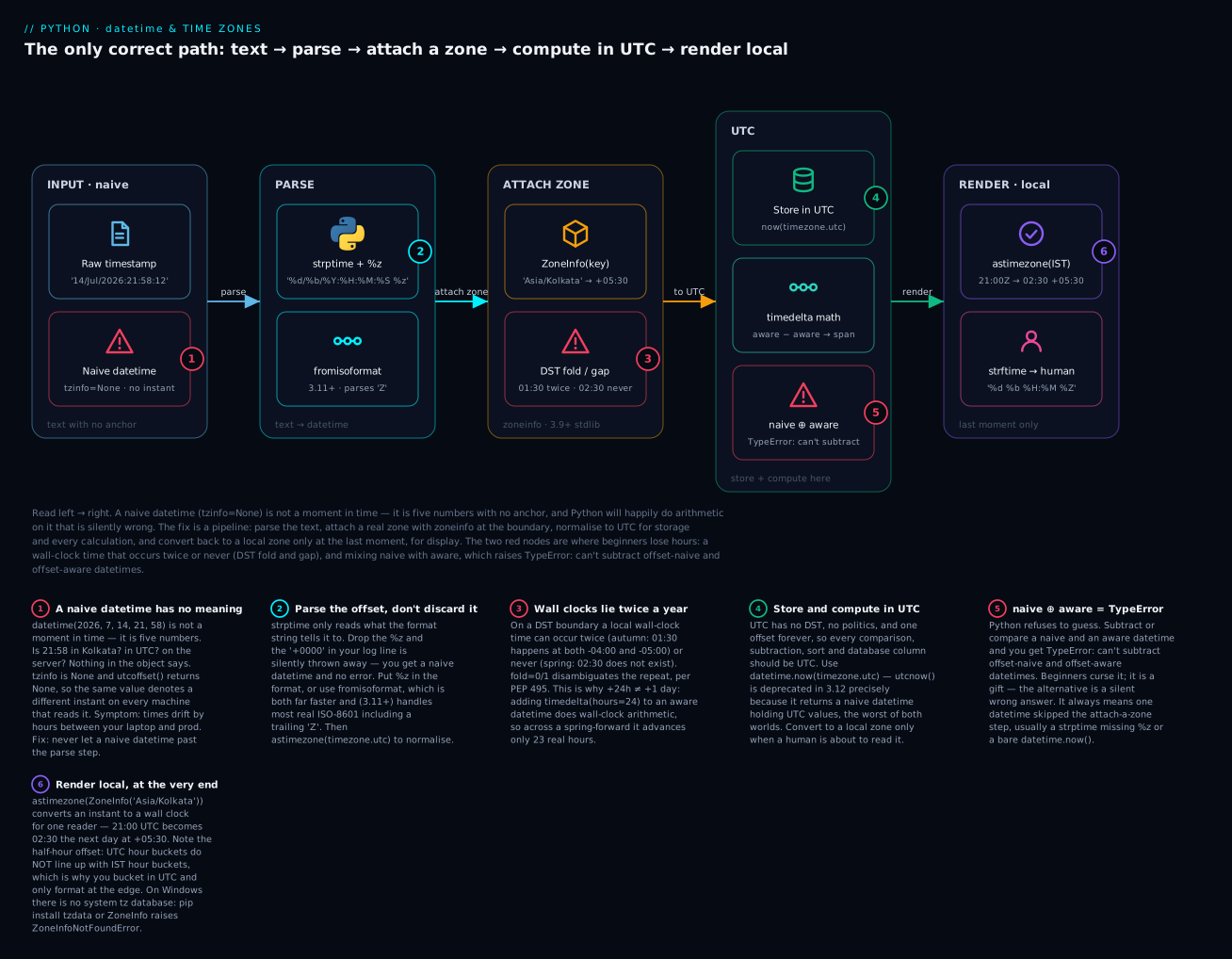
The badges mark the six things that actually bite: a naive datetime means nothing (1); strptime silently drops the offset if you forget %z (2); wall clocks repeat or vanish at a DST boundary (3); UTC is the only safe place to store and compute (4); mixing naive and aware raises rather than guessing (5); and local rendering happens once, at the very end — where a half-hour offset like IST reveals that UTC hour buckets don’t line up with local ones (6).
utcnow() is deprecated — use now(timezone.utc)
This is the most consequential deprecation in the module’s history, because the old call is in every tutorial written before 2024.
from datetime import datetime

print(datetime.utcnow())
demo.py:3: DeprecationWarning: datetime.datetime.utcnow() is deprecated and scheduled for removal in a future version. Use timezone-aware objects to represent datetimes in UTC: datetime.datetime.now(datetime.UTC).
  print(datetime.utcnow())
2026-07-15 14:05:25.540361
Look at what it returned: 2026-07-15 14:05:25.540361 — with no offset. It gave you UTC values in a naive object. That is the worst of both worlds, because every downstream method that touches a naive datetime assumes local time. So datetime.utcnow().timestamp() is wrong by your machine’s UTC offset — off by 5.5 hours in Mumbai, 0 in London, and correct on the CI box, which is how it survives review.
from datetime import datetime, timezone, UTC

now = datetime.now(timezone.utc)     # correct, works on 3.2+
now = datetime.now(UTC)              # identical; UTC alias added in 3.11

print(now.tzinfo)                    # => UTC
The same applies to datetime.utcfromtimestamp(ts) → use datetime.fromtimestamp(ts, tz=timezone.utc). Both were deprecated in 3.12 and both emit the warning above.
| Old (deprecated in 3.12) | New | Why |
|---|---|---|
datetime.utcnow() |
datetime.now(timezone.utc) |
Old returns naive values that lie about being local |
datetime.utcfromtimestamp(ts) |
datetime.fromtimestamp(ts, tz=timezone.utc) |
Same — naive, so .timestamp() round-trips wrong |
datetime.now() (not deprecated, still wrong) |
datetime.now(timezone.utc) |
Naive local time — meaningless once it leaves the process |
pytz.timezone(k) + .localize(dt) |
ZoneInfo(k) + tzinfo= |
No dance, no LMT bug, no dependency |
To find these in your own codebase before they bite: python -W error::DeprecationWarning -m pytest turns the warning into a failure, and grep -rn "utcnow()" . finds them in one pass.
timedelta: durations, and the months problem
A timedelta is a duration. Internally it stores exactly three numbers — days, seconds, microseconds — and normalises everything you give it into those:
from datetime import timedelta

d = timedelta(days=2, hours=3, minutes=30)
print(d)                    # => 2 days, 3:30:00
print(repr(d))              # => datetime.timedelta(days=2, seconds=12600)
print(d.total_seconds())    # => 185400.0

print(timedelta(hours=50))          # => 2 days, 2:00:00     <- normalised on the way in
print(repr(timedelta(hours=50)))    # => datetime.timedelta(days=2, seconds=7200)
Note that hours= is a constructor argument, not an attribute — there is no .hours. This trips people up, and negative deltas make it worse:
neg = timedelta(hours=-1)
print(neg)              # => -1 day, 23:00:00     <- prints strangely but is correct
print(neg.days)         # => -1
print(neg.seconds)      # => 82800                <- NOT -3600!
print(neg.total_seconds())   # => -3600.0         <- what you actually wanted
.days and .seconds are the internal representation, normalised so 0 <= seconds < 86400. Always use .total_seconds() for a duration as a single number; reach for .days/.seconds only when you’re formatting the components deliberately.
| Operation | Result | Example |
|---|---|---|
datetime - datetime |
timedelta |
d2 - d1 → datetime.timedelta(days=1) |
date - date |
timedelta (whole days) |
date(2026,7,15) - date(2026,1,1) → timedelta(days=195) |
datetime + timedelta |
datetime |
d + timedelta(days=1) |
datetime - timedelta |
datetime |
Back in time |
timedelta ± timedelta |
timedelta |
Add up durations |
timedelta * int/float |
timedelta |
timedelta(minutes=15) * 3 → 0:45:00 |
timedelta / timedelta |
float |
timedelta(hours=1) / timedelta(minutes=15) → 4.0 |
timedelta // timedelta |
int |
timedelta(hours=1) // timedelta(minutes=25) → 2 |
timedelta / int |
timedelta |
Split a span |
abs(timedelta), -timedelta |
timedelta |
Direction-free durations |
datetime + datetime |
TypeError |
Meaningless — points don’t add |
timedelta / timedelta returning a float is the elegant bit — “how many 15-minute slots fit in an hour?” is just division.
Months and years are not timedeltas
timedelta(months=1)
TypeError: 'months' is an invalid keyword argument for __new__()
This looks like an omission. It is a deliberate refusal, and it is correct: a month is not a duration. It’s 28, 29, 30 or 31 days depending on which month, and “one month after 31 January” has no defined answer — there is no 31 February. Since timedelta must store a fixed number of days, “1 month” is unrepresentable. So datetime doesn’t offer it, and the honest workaround is arithmetic you can see:
from datetime import date, timedelta

jan31 = date(2026, 1, 31)
print(jan31 + timedelta(days=30))    # => 2026-03-02   "a month later"? not really
print(jan31 + timedelta(days=31))    # => 2026-03-03
When you genuinely need calendar arithmetic — billing cycles, subscription renewals, “same day next month” — that’s what dateutil.relativedelta is for. It encodes a policy (clamp to the end of the month) rather than pretending months are durations:
python3 -m venv .venv && source .venv/bin/activate    # Windows: .venv\Scripts\activate
pip install python-dateutil
from datetime import date
from dateutil.relativedelta import relativedelta

jan31 = date(2026, 1, 31)
print(jan31 + relativedelta(months=1))     # => 2026-02-28   clamped -- no 31 Feb
print(jan31 + relativedelta(months=2))     # => 2026-03-31
print(date(2024, 2, 29) + relativedelta(years=1))   # => 2025-02-28   leap day clamped

# The sting: month arithmetic is NOT associative.
print(jan31 + relativedelta(months=1) + relativedelta(months=1))   # => 2026-03-28
print(jan31 + relativedelta(months=2))                             # => 2026-03-31
Read those last two lines twice. +1 month +1 month is not +2 months, because the first step clamped 31 → 28 and the information was lost. This isn’t a dateutil bug — it’s the truth about calendars, and it’s why billing systems store an anchor day rather than iterating. If your subscription code loops renewal += relativedelta(months=1), every customer who signed up on the 31st drifts to the 28th and stays there forever.
| Need | Tool | Notes |
|---|---|---|
| Days, hours, minutes, seconds, weeks | timedelta |
Stdlib. weeks= is accepted (it’s just days=7*n) |
| Months, years | relativedelta |
pip install python-dateutil. Clamps; not associative |
| “Same wall clock, next day” | dt.replace(day=...) or + timedelta(days=1) |
Wall-clock arithmetic — not 24 real hours across DST |
| “Exactly 24 hours later” | (dt.astimezone(utc) + timedelta(hours=24)).astimezone(tz) |
Real elapsed time |
| Elapsed time in code | time.perf_counter() |
Never wall-clock. See below |
| Difference between two calendar dates | date - date → timedelta |
Whole days, no zone involved |
Parsing and formatting
Text in, datetime out is strptime (parse). Datetime in, text out is strftime (format). Both use the same directive language, borrowed from C.
from datetime import datetime

d = datetime.strptime("2026-07-15 10:30:45", "%Y-%m-%d %H:%M:%S")
print(repr(d))                                    # => datetime.datetime(2026, 7, 15, 10, 30, 45)
print(d.strftime("%A, %d %B %Y at %H:%M"))        # => Wednesday, 15 July 2026 at 10:30
Notice what strptime returned there: a naive datetime. The format string had no %z, so no zone was parsed and none was invented. That is the single most common way a naive datetime gets into a program.
The directive table
| Directive | Means | Example output |
|---|---|---|
%Y |
Year, 4 digits | 2026 |
%y |
Year, 2 digits (ambiguous — avoid) | 26 |
%m |
Month, zero-padded number | 07 |
%B / %b |
Month name, full / abbreviated | July / Jul |
%d |
Day of month, zero-padded | 15 |
%j |
Day of year (1–366) | 196 |
%H |
Hour, 24-hour clock | 14 |
%I |
Hour, 12-hour clock — needs %p |
02 |
%p |
AM/PM — useless without %I |
PM |
%M |
Minute | 30 |
%S |
Second | 45 |
%f |
Microsecond, 6 digits | 123456 |
%z |
UTC offset — this is what makes it aware | +0530 |
%Z |
Timezone name — output only, don’t parse with it | IST |
%A / %a |
Weekday name, full / abbreviated | Wednesday / Wed |
%w |
Weekday number, Sunday=0 | 3 |
%u |
ISO weekday number, Monday=1 | 3 |
%U / %W |
Week of year (Sunday-/Monday-first) | 28 / 28 |
%G / %V |
ISO year / ISO week — use these as a pair | 2026 / 29 |
%c / %x / %X |
Locale datetime / date / time (locale-dependent!) | Wed Jul 15 14:30:45 2026 |
%% |
A literal % |
% |
Three traps in that table. %y is a two-digit year and you should never write it — it’s how Y2K happened, and Python’s cutoff rule (69–99 → 19xx, 00–68 → 20xx) is arbitrary. %Z is output-only in practice: strptime accepts a few hard-coded names like UTC and GMT, but “IST” or “CST” are ambiguous across countries and it will not reliably parse them — parse %z (the numeric offset), display %Z. And %U/%W are not %V: ISO weeks (%V) must pair with the ISO year (%G), because the first days of January can belong to the previous ISO year. Mixing %Y with %V produces wrong answers at year boundaries.
from datetime import datetime
from zoneinfo import ZoneInfo

d = datetime(2026, 7, 15, 14, 30, 45, 123456, tzinfo=ZoneInfo("Asia/Kolkata"))
print(d.strftime("%G-W%V-%u"))    # => 2026-W29-3    ISO year-week-day, correct pairing
print(d.isocalendar())            # => datetime.IsoCalendarDate(year=2026, week=29, weekday=3)
%d/%m vs %m/%d — the ambiguity that never errors
from datetime import datetime

s = "03/04/2026"
print(datetime.strptime(s, "%d/%m/%Y").date())    # => 2026-04-03    3 April  (most of the world)
print(datetime.strptime(s, "%m/%d/%Y").date())    # => 2026-03-04    4 March  (US)
Both parse. Neither errors. They differ by a month. For 144 days a year — every day where both numbers are ≤ 12 — a wrong format string produces a valid, plausible, wrong date, and nothing in your test suite will notice unless you specifically test a day past the 12th. On the other 221 days you get a crash instead, which is the lucky outcome:
datetime.strptime("25/12/2026", "%m/%d/%Y")
ValueError: time data '25/12/2026' does not match format '%m/%d/%Y'
That error message is telling you a data bug, not a code bug. This is why ISO-8601 (YYYY-MM-DD) exists and why you should demand it at every interface you control: it is unambiguous, it sorts correctly as a string, and there is no dialect. When you can’t control the input, find out the source’s locale from documentation, not from a sample — a sample of 03/04/2026 tells you nothing.
fromisoformat — the fast path
For ISO-8601 input, don’t use strptime at all:
from datetime import datetime, date

print(repr(datetime.fromisoformat("2026-07-15T10:30:45")))
# => datetime.datetime(2026, 7, 15, 10, 30, 45)                                  naive!
print(repr(datetime.fromisoformat("2026-07-15T10:30:45+05:30")))
# => datetime.datetime(2026, 7, 15, 10, 30, 45, tzinfo=datetime.timezone(datetime.timedelta(seconds=19800)))
print(repr(datetime.fromisoformat("2026-07-15T10:30:45Z")))       # 3.11+
# => datetime.datetime(2026, 7, 15, 10, 30, 45, tzinfo=datetime.timezone.utc)
print(repr(datetime.fromisoformat("20260715T103045Z")))           # 3.11+ basic format
# => datetime.datetime(2026, 7, 15, 10, 30, 45, tzinfo=datetime.timezone.utc)
print(repr(date.fromisoformat("2026-07-15")))
# => datetime.date(2026, 7, 15)
fromisoformat is written in C and is roughly an order of magnitude faster than strptime, which builds and caches a regex from your format string. It is also the exact inverse of .isoformat(), so datetime.fromisoformat(d.isoformat()) == d round-trips.
The version story matters here:
| Python | fromisoformat accepts |
|---|---|
| 3.7–3.10 | Only what .isoformat() emits. Z raises ValueError — the famous Invalid isoformat string: '...Z' |
| 3.11+ | Most of ISO-8601: Z suffix, basic format (20260715T103045), fractional seconds of any length, week dates |
On 3.10 and earlier the standard workaround was s.replace("Z", "+00:00") — you will see that line in a lot of code and now you know why. On 3.11+ it is unnecessary. When you’re targeting 3.12, fromisoformat handles essentially every timestamp a modern API emits.
It is strict, though — that’s the point:
datetime.fromisoformat("15/07/2026")
ValueError: Invalid isoformat string: '15/07/2026'
| Input shape | Use | Why |
|---|---|---|
ISO-8601 (2026-07-15T10:30:45Z) |
datetime.fromisoformat |
Fastest, strict, no format string to get wrong (3.11+ for Z) |
| A known fixed format (log lines) | datetime.strptime(s, fmt) |
Explicit. Always include %z if the offset is there |
| A Unix timestamp | datetime.fromtimestamp(ts, tz=timezone.utc) |
Always pass tz |
| Unknown / human-typed / mixed | dateutil.parser.parse |
Convenient — and dangerous, see below |
| RFC 2822 email dates | email.utils.parsedate_to_datetime |
Stdlib, purpose-built |
dateutil.parser.parse deserves the warning. It’s a fuzzy parser that guesses:
from dateutil import parser

print(parser.parse("2026-07-15T10:30:45Z"))       # => 2026-07-15 10:30:45+00:00
print(parser.parse("July 15, 2026 10:30 AM"))     # => 2026-07-15 10:30:00
print(parser.parse("03/04/2026"))                 # => 2026-03-04 00:00:00   <- it GUESSED US format
print(parser.parse("03/04/2026", dayfirst=True))  # => 2026-04-03 00:00:00
It guessed a month. It’ll guess differently for different rows in the same file. It’s the right tool for a one-off script over human-entered data, and the wrong tool for a pipeline, where a format you can state is worth far more than a parser that never complains.
Unix timestamps
A Unix timestamp is seconds since 1970-01-01 00:00:00 UTC. It is an instant — inherently unambiguous, no zone needed:
from datetime import datetime, timezone
from zoneinfo import ZoneInfo

u = datetime(2026, 7, 15, 10, 30, 0, tzinfo=timezone.utc)
ts = u.timestamp()
print(ts)                                                   # => 1784111400.0
print(datetime.fromtimestamp(ts, tz=timezone.utc))          # => 2026-07-15 10:30:00+00:00
print(datetime.fromtimestamp(ts, tz=ZoneInfo("Asia/Kolkata")))  # => 2026-07-15 16:00:00+05:30
One instant, two renderings. But hand timestamp() a naive datetime and it assumes local time:
naive = datetime(2026, 7, 15, 10, 30, 0)
print(naive.timestamp())        # => 1784091600.0   on a machine set to IST
                                # different number on a machine in London!
Same code, same input, different output depending on TZ. And datetime.fromtimestamp(ts) without tz= gives you a naive local datetime — the same bug, reversed. Always pass tz=.
DST: where wall clocks lie
Twice a year, for one hour, the local wall clock is not a function. This is not a Python problem — it’s a civil-time problem — but Python is where you meet it.
The hour that happens twice
from datetime import datetime, timezone
from zoneinfo import ZoneInfo

NY = ZoneInfo("America/New_York")

# 1 Nov 2026: US clocks go BACK at 02:00. So 01:30 happens TWICE.
first  = datetime(2026, 11, 1, 1, 30, tzinfo=NY, fold=0)   # the first 01:30 (EDT)
second = datetime(2026, 11, 1, 1, 30, tzinfo=NY, fold=1)   # the second 01:30 (EST)

print(first,  first.tzname(),  first.utcoffset())   # => 2026-11-01 01:30:00-04:00 EDT -1 day, 20:00:00
print(second, second.tzname(), second.utcoffset())  # => 2026-11-01 01:30:00-05:00 EST -1 day, 19:00:00

print(first == second)                              # => True    <- !!
print(first.astimezone(timezone.utc))               # => 2026-11-01 05:30:00+00:00
print(second.astimezone(timezone.utc))              # => 2026-11-01 06:30:00+00:00
print(second.astimezone(timezone.utc) - first.astimezone(timezone.utc))   # => 1:00:00
Stare at that. first == second is True, but converted to UTC they are an hour apart. Two different instants that compare equal. This is PEP 495’s documented (and slightly horrifying) compromise: equality between same-zone aware datetimes compares wall clocks, so fold is deliberately ignored — otherwise == would break in the other direction. Compare in UTC and it behaves.
The fold attribute (added in 3.6) is how you say which 01:30 you mean. Default is fold=0, the first one.
The hour that never happens
# 8 Mar 2026: US clocks go FORWARD at 02:00. So 02:30 does not exist.
gap0 = datetime(2026, 3, 8, 2, 30, tzinfo=NY, fold=0)
gap1 = datetime(2026, 3, 8, 2, 30, tzinfo=NY, fold=1)

print(gap0, gap0.tzname())       # => 2026-03-08 02:30:00-05:00 EST
print(gap1, gap1.tzname())       # => 2026-03-08 02:30:00-04:00 EDT
print(gap0.astimezone(timezone.utc))    # => 2026-03-08 07:30:00+00:00
print(gap1.astimezone(timezone.utc))    # => 2026-03-08 06:30:00+00:00
Python does not raise for a time that doesn’t exist. It constructs it happily and gives you something — and note the inversion: in a gap, fold=1 maps to the earlier UTC instant. If your form lets a user schedule 02:30 on 8 March in New York, you have a data problem that datetime will not report.
| Situation | When | fold=0 |
fold=1 |
Detect it |
|---|---|---|---|---|
| Ambiguous (clock back) | Autumn, 1 hour | The first pass (DST still on) | The second pass (DST off) | dt.utcoffset() != dt.replace(fold=1).utcoffset() |
| Non-existent (clock forward) | Spring, 1 hour | Maps to the later UTC instant | Maps to the earlier UTC instant | Round-trip: dt.astimezone(utc).astimezone(tz) != dt |
| Normal time | The other 8,758 hours | Identical | Identical | fold is ignored |
Here’s the detector, which is worth keeping:
from datetime import datetime, timezone
from zoneinfo import ZoneInfo

def is_ambiguous(dt: datetime) -> bool:
    """True if this wall clock occurs twice in its zone (autumn fold)."""
    return dt.utcoffset() != dt.replace(fold=1).utcoffset()

def is_imaginary(dt: datetime) -> bool:
    """True if this wall clock never occurs in its zone (spring gap)."""
    return dt.astimezone(timezone.utc).astimezone(dt.tzinfo) != dt

NY = ZoneInfo("America/New_York")
print(is_ambiguous(datetime(2026, 11, 1, 1, 30, tzinfo=NY)))   # => True
print(is_ambiguous(datetime(2026, 7, 15, 1, 30, tzinfo=NY)))   # => False
print(is_imaginary(datetime(2026, 3, 8, 2, 30, tzinfo=NY)))    # => True
print(is_imaginary(datetime(2026, 7, 15, 2, 30, tzinfo=NY)))   # => False
Adding 24 hours is not adding a day
This is the one that breaks schedulers.
from datetime import datetime, timedelta, timezone
from zoneinfo import ZoneInfo

NY = ZoneInfo("America/New_York")
start = datetime(2026, 3, 7, 12, 0, tzinfo=NY)     # noon, the day before spring-forward
print(start, start.tzname())                       # => 2026-03-07 12:00:00-05:00 EST

# Wall-clock arithmetic: +24h lands on the same wall clock...
plus24 = start + timedelta(hours=24)
print(plus24, plus24.tzname())                     # => 2026-03-08 12:00:00-04:00 EDT

# ...but only 23 REAL hours elapsed:
print(plus24.astimezone(timezone.utc) - start.astimezone(timezone.utc))   # => 23:00:00

# Real elapsed time: do the arithmetic in UTC.
correct = (start.astimezone(timezone.utc) + timedelta(hours=24)).astimezone(NY)
print(correct, correct.tzname())                   # => 2026-03-08 13:00:00-04:00 EDT
Arithmetic on an aware datetime with a ZoneInfo is wall-clock arithmetic: it adds to the naive fields, keeps the same tzinfo, then re-derives the offset. So start + timedelta(hours=24) gives you “same time tomorrow” (23 real hours) and (start.astimezone(utc) + timedelta(hours=24)).astimezone(NY) gives you “24 real hours later” (13:00 wall clock). Both are correct — for different questions.
| You mean | Write | Across a spring-forward |
|---|---|---|
| “Same time tomorrow” (a calendar promise) | dt + timedelta(days=1) |
23 real hours. Correct for “the 09:00 standup” |
| “Exactly 24 hours from now” (a duration) | (dt.astimezone(utc) + timedelta(hours=24)).astimezone(tz) |
24 real hours, wall clock shifts to 13:00 |
| “Token expires in 1 hour” | Compute in UTC | Never touch local time for expiry |
| “Every day at 09:00 in Kolkata” | Store time(9, 0) + zone key, resolve per day |
Never store a fixed UTC time for a local recurrence |
That last row is the scheduler bug. If you store “runs at 03:30 UTC” because that was 09:00 IST when you set it up, you’re fine — India has no DST. Do the same for a New York job and it silently drifts to 08:00 or 10:00 twice a year. Recurring local events store a wall clock plus a zone key, and resolve to an instant per occurrence.
Never measure elapsed time with a wall clock
datetime.now() reads a clock that NTP can step backwards, that DST can shift, and that a sysadmin can set. Using it to time an operation can produce a negative duration.
import time

t0 = time.perf_counter()
sum(range(2_000_000))
print(f"elapsed: {time.perf_counter() - t0:.4f} s")     # => elapsed: 0.0208 s
| Clock | Measures | Can jump? | Use for |
|---|---|---|---|
datetime.now(timezone.utc) |
Civil time | Yes — NTP, admin, DST | Timestamps to store or display |
time.time() |
Unix seconds (a float) | Yes — same clock | Timestamps, interop |
time.monotonic() |
Seconds from an arbitrary point | No — never goes backwards | Timeouts, retries, rate limits |
time.perf_counter() |
Same, highest resolution | No | Benchmarking, elapsed time |
time.process_time() |
CPU time of this process | No | CPU profiling (excludes sleep/IO) |
The rule: wall clocks answer “when”, monotonic clocks answer “how long”. Never mix them.
Part B — when regex is the right tool, and when it is not
A regular expression is a pattern that describes a set of strings, compiled into a small state machine that walks your text. It is astonishingly good at one job: finding and extracting structured fragments from flat text.
It is also the most over-applied tool in programming, so let’s do the “when not” first, honestly:
| Task | Regex? | Use instead |
|---|---|---|
| Extract fields from a log line | Yes — this is the job | — |
| Validate/extract a fixed-shape ID, code, version | Yes | — |
| Find-and-replace with context | Yes (re.sub) |
— |
| Split on a variable separator | Yes (re.split) |
— |
| Tokenise a simple DSL | Yes, with finditer |
— |
| Parse HTML/XML | NO | html.parser, lxml, BeautifulSoup |
| Parse JSON | NO | json |
| Parse CSV | NO | csv — it handles quoted commas; you won’t |
| Parse URLs | No | urllib.parse |
| Parse dates | No | datetime.strptime / fromisoformat |
| Validate email addresses | No (RFC 5322 is ~6,000 chars of regex) | Check for @, then send a confirmation mail |
| Simple substring test | Overkill | "x" in s, s.startswith(...) |
| Fixed split | Overkill | s.split(","), s.partition("=") |
The HTML/JSON/CSV rule isn’t snobbery — it’s a theory result. Those formats are recursively nested, and regular expressions by definition cannot count nesting depth. A regex that “works” on your HTML sample is matching a coincidence, and the moment a tag nests, an attribute contains >, or a CSV field contains a quoted comma, it silently returns garbage. You’ll find no bug report; you’ll find bad data three months later.
And note the last two rows. if "ERROR" in line is faster and clearer than re.search(r"ERROR", line). Reach for str methods first — see Strings In Depth for the full toolkit. Regex earns its complexity when the shape varies.
Raw strings are mandatory
Regex is full of backslashes. Python string literals also use backslashes. These two facts collide, and the result is the single most common regex bug in beginner code.
import re

print(re.findall("\bcat\b", "cat concatenate"))     # => []          <- silently nothing!
print(re.findall(r"\bcat\b", "cat concatenate"))    # => ['cat']

print(repr("\bcat\b"))    # => '\x08cat\x08'   <- \b became a BACKSPACE character
print(len("\bcat\b"), len(r"\bcat\b"))   # => 5 7
\b is a valid Python escape meaning backspace (\x08). So "\bcat\b" never reaches re as a word-boundary pattern at all — re receives literal backspace characters and dutifully finds none. No error, no warning, just an empty result.
Some escapes are noisier. \d isn’t a valid Python escape, so 3.12 warns:
p = "\d+"
demo.py:1: SyntaxWarning: invalid escape sequence '\d'
  p = "\d+"
It still works today (the backslash survives), but the Python docs state that unrecognised escapes are slated to become a SyntaxError. So there are two failure modes and the quiet one is worse:
| Pattern in a normal string | What Python does | What re sees |
Outcome |
|---|---|---|---|
"\d+" |
\d is not a valid escape → survives + SyntaxWarning |
\d+ |
Works for now; future SyntaxError |
"\bcat\b" |
\b is valid → becomes \x08 |
\x08cat\x08 |
Silently matches nothing |
"\n" |
Valid → becomes a newline | a newline | Matches a literal newline, not the escape |
"C:\path" |
\p invalid, but \t/\f in other paths are valid |
corrupted | Silent corruption |
r"\bcat\b" |
Raw: backslash stays a backslash | \bcat\b |
Correct |
The rule has no exceptions: every regex pattern gets an r prefix. Type the r before you type the quote, every time, even for r"hello" where it makes no difference — the habit is what protects you.
The re API
Nine functions cover everything. The first three are where the confusion lives.
| Function | Returns | Use when |
|---|---|---|
re.search(p, s) |
First Match anywhere, or None |
The default. “Is it in there, and where?” |
re.match(p, s) |
Match only if it matches at the start, or None |
You mean “starts with” — rare |
re.fullmatch(p, s) |
Match only if the whole string matches |
Validation |
re.findall(p, s) |
list of strings (or tuples — see below) |
You want all the values, not positions |
re.finditer(p, s) |
Iterator of Match objects |
All matches, lazily, with positions/groups |
re.sub(p, repl, s) |
New string, all matches replaced | Replace. repl may be a function |
re.subn(p, repl, s) |
(new_string, count) tuple |
When you need the count |
re.split(p, s) |
list of pieces |
Split on a pattern |
re.compile(p) |
A Pattern object |
Hot loops, or a named, reusable pattern |
re.escape(s) |
Pattern-safe literal | Building a pattern from user input |
search vs match — the classic confusion
import re

text = "order id 42 confirmed"

print(re.search(r"\d+", text))       # => <re.Match object; span=(9, 11), match='42'>
print(re.match(r"\d+", text))        # => None      <- !!
print(re.fullmatch(r"\d+", "42"))    # => <re.Match object; span=(0, 2), match='42'>
re.match returned None even though the string obviously contains digits. re.match anchors at position 0 — it’s search with an implicit ^. The name is a lie inherited from Perl, and it has probably wasted more collective hours than any other API in the stdlib.
search— matches anywhere. This is what you want ~90% of the time.match— must match at the start. Only when you truly mean “begins with”.fullmatch— must match the entire string. This is the one for validation.
The fullmatch distinction is a real security point. re.match(r"\d+", user_input) returns a match for "42; DROP TABLE" — it matched the 42 and stopped, ignoring the rest. re.fullmatch(r"\d+", user_input) returns None. Validate with fullmatch (or anchor explicitly with ^...$).
findall vs finditer
import re

s = "a=1, b=22, c=333"

print(re.findall(r"\d+", s))            # => ['1', '22', '333']            no groups -> whole matches
print(re.findall(r"(\d+)", s))          # => ['1', '22', '333']            1 group -> that group
print(re.findall(r"(\w)=(\d+)", s))     # => [('a', '1'), ('b', '22'), ('c', '333')]   2 groups -> TUPLES

for m in re.finditer(r"(\w)=(\d+)", s):
    print(m.group(0), m.groups(), m.span())
# => a=1 ('a', '1') (0, 3)
# => b=22 ('b', '22') (5, 9)
# => c=333 ('c', '333') (11, 16)
findall’s return type depends on how many groups your pattern has — a genuinely surprising API:
| Groups in pattern | findall returns |
|---|---|
| 0 | List of whole matches: ['1', '22', '333'] |
| 1 | List of that group only: ['1', '22', '333'] |
| 2+ | List of tuples, one per match: [('a', '1'), ...] |
So adding a group to a working pattern can change your return type from list[str] to list[tuple] and break the code downstream. That’s why finditer is the better default for anything non-trivial: it always yields Match objects, it’s lazy (matters on big files), and you get .group(), .groupdict() and .span(). If you need a group for grouping but not for capturing, make it non-capturing: (?:...).
sub, subn, split
import re

print(re.sub(r"\s+", " ", "too   many\t\tspaces"))     # => too many spaces
print(re.subn(r"o", "0", "foo boo"))                   # => ('f00 b00', 4)

# Backreferences in the replacement: \1, \2 ... or \g<name>
print(re.sub(r"(\w+)@(\w+)", r"\2:\1", "user@host"))               # => host:user
print(re.sub(r"(?P<y>\d{4})-(?P<m>\d{2})", r"\g<m>/\g<y>", "2026-07"))   # => 07/2026

# repl can be a FUNCTION -- it receives the Match. This is the power feature.
def bump(m: re.Match) -> str:
    return str(int(m.group()) + 1)

print(re.sub(r"\d+", bump, "v1 build 9"))              # => v2 build 10

print(re.split(r"[,;]\s*", "a, b;c ,d"))               # => ['a', 'b', 'c ', 'd']
print(re.split(r"(\d)", "a1b2c"))                      # => ['a', '1', 'b', '2', 'c']  captured seps KEPT
Two things to note. The replacement string is also a string literal, so it needs r"" too — "\1" is a valid escape (\x01). And re.sub with a function argument is the feature people forget exists: any transformation you can write in Python can be applied to every match, which beats a chain of six str.replace calls.
re.compile and re.escape
Module-level functions cache compiled patterns (512 of them by default), so re.compile is not primarily about speed — but it does help in a hot loop, and it’s about naming:
import re, time

t0 = time.perf_counter()
for _ in range(200_000):
    re.search(r"\d+", "abc 123")
t1 = time.perf_counter()

pattern = re.compile(r"\d+")
for _ in range(200_000):
    pattern.search("abc 123")
t2 = time.perf_counter()

print(f"module-level : {(t1-t0)*1000:.1f} ms")    # => module-level : 62.3 ms
print(f"precompiled  : {(t2-t1)*1000:.1f} ms")    # => precompiled  : 35.0 ms
print(f"ratio        : {(t1-t0)/(t2-t1):.2f}x")   # => ratio        : 1.78x
~1.8× — the cache lookup isn’t free. The real reason to compile is that a module-level LOG_LINE = re.compile(...) with a name and a comment is documentation, and it fails at import time rather than deep in a loop.
re.escape is the one you must not skip when a pattern contains user input:
import re

print(re.escape("price: $3.50 (USD)?"))    # => price:\ \$3\.50\ \(USD\)\?
print(bool(re.fullmatch(re.escape("a.b"), "a.b")))    # => True
print(bool(re.fullmatch(re.escape("a.b"), "axb")))    # => False   <- '.' is now literal
Without it, a user searching for "a.b" gets . as “any character”, and a user searching for "(" gets re.error: missing ), unterminated subpattern at position 0. Any pattern built from a variable goes through re.escape.
Pattern syntax
Character classes
| Pattern | Matches |
|---|---|
abc |
The literal text abc |
. |
Any character except newline (any at all with re.S) |
[abc] / [^abc] |
One of these / any except these — ^ inside [] negates |
[a-z], [0-9] |
A range |
[.+*] |
Inside [], most metacharacters are literal — no escaping needed |
\d / \D |
A digit / not a digit. Unicode-aware: \d also matches ٣, ৩ |
\w / \W |
Word character — [a-zA-Z0-9_] plus Unicode letters / not one |
\s / \S |
Whitespace (space, tab, newline, \r, \f, \v) / not whitespace |
a|b |
a or b — alternation, lowest precedence |
(?:a|b)c |
Group the alternation, then c — without (?:...), a|bc means a or bc |
Two things to carry forward. The [^>] idiom is worth internalising now: a negated character class is usually better than a lazy quantifier, because it can’t backtrack. And \d/\w being Unicode-aware surprises people — re.fullmatch(r"\d+", "٣٤") matches Eastern Arabic numerals, and int("٣٤") even parses them. If you mean ASCII, say so with re.ASCII or use [0-9].
Anchors — and \b, the one everybody misses
| Anchor | Means | Zero-width? |
|---|---|---|
^ |
Start of string (start of every line with re.M) |
Yes |
$ |
End of string, or before a trailing newline (every line-end with re.M) |
Yes |
\b |
Word boundary: between a \w and a non-\w |
Yes |
\B |
Not a word boundary | Yes |
\A / \Z |
Absolute start / end — unaffected by re.M |
Yes |
import re

print(re.findall(r"cat", "cat concatenate category"))      # => ['cat', 'cat', 'cat']
print(re.findall(r"\bcat\b", "cat concatenate category"))  # => ['cat']
Three matches versus one. \b is a zero-width assertion — it consumes nothing, it just asserts that the position sits on the edge of a word. Without it, cat cheerfully matches inside concatenate and category. This is the fix for the classic “my find-and-replace mangled every word containing the search term” bug, and it’s the reason \b is the most valuable two characters in regex.
$ has a quirk worth knowing: it matches before a final newline, so re.fullmatch(r"\d+$", "42\n") succeeds. Use \Z when you mean the absolute end.
Quantifiers, and greedy vs lazy — the #1 regex bug
| Quantifier | Repeats | Greedy form | Lazy form |
|---|---|---|---|
* |
0 or more | a* |
a*? |
+ |
1 or more | a+ |
a+? |
? |
0 or 1 (optional) | a? |
a?? |
{n} |
Exactly n |
a{3} |
— |
{n,} |
n or more |
a{2,} |
a{2,}? |
{n,m} |
Between n and m |
a{2,4} |
a{2,4}? |
{,m} |
Up to m |
a{,4} |
a{,4}? |
Every quantifier is greedy by default: it takes as much as it can, then backtracks only as far as it must. Adding ? makes it lazy: take as little as possible, then expand only as needed.
import re

html = '<b>bold</b> and <i>italic</i>'

print(re.findall(r"<.*>", html))     # => ['<b>bold</b> and <i>italic</i>']   ONE match!
print(re.findall(r"<.*?>", html))    # => ['<b>', '</b>', '<i>', '</i>']
print(re.findall(r"<[^>]*>", html))  # => ['<b>', '</b>', '<i>', '</i>']
The greedy .* swallowed the entire string, then backtracked to the last >. One giant wrong match instead of four right ones. Here it is in a context you’ll actually hit:
log = "user=ada action=delete target=prod-db"

print(re.search(r"user=(.*)\s", log).group(1))     # => ada action=delete    <- WRONG
print(re.search(r"user=(.*?)\s", log).group(1))    # => ada
print(re.search(r"user=(\S+)", log).group(1))      # => ada                  <- best
Note the third line. \S+ beats .*? here — instead of “anything, reluctantly”, it says “non-whitespace”, which is what you actually mean, can’t over-match, and can’t backtrack. The hierarchy, best first:
- Be specific:
\S+,\d+,[^,]+,[^>]*— say what the field is. - Lazy:
.*?— when the terminator is the only thing you know. - Greedy
.*— when you genuinely want everything to the last occurrence.
Most .* in real code should be a negated character class. And as the next section shows, that isn’t only about correctness.
Groups
| Syntax | Does | Access via |
|---|---|---|
(...) |
Capturing group — numbered from 1, left to right by ( |
m.group(1), \1 in sub |
(?:...) |
Non-capturing — groups for precedence/repetition only | Not captured |
(?P<name>...) |
Named capturing group — use these | m["name"], m.group("name"), m.groupdict(), \g<name> |
(?P=name) |
Backreference inside the pattern | Matches what name matched |
\1, \2 |
Numbered backreference inside the pattern | — |
(?#...) |
A comment | — |
import re

m = re.search(r"(?P<user>\w+)@(?P<host>[\w.]+)", "mail ada@example.com now")
print(m.group(0))       # => ada@example.com            group 0 = the whole match
print(m.group("user"))  # => ada
print(m["host"])        # => example.com                Match supports [] since 3.6
print(m.groupdict())    # => {'user': 'ada', 'host': 'example.com'}
print(m.span())         # => (5, 20)

print(re.findall(r"(?:ab)+(c)", "ababc"))   # => ['c']   (?:ab) repeats but doesn't capture
Use named groups. m["level"] survives someone inserting a group in front of it; m.group(3) does not. groupdict() gives you a dict ready to feed a dataclass — which is exactly what the lab does.
Flags
| Flag | Short | Does |
|---|---|---|
re.IGNORECASE |
re.I |
Case-insensitive |
re.MULTILINE |
re.M |
^/$ match at every line boundary |
re.DOTALL |
re.S |
. also matches newline |
re.VERBOSE |
re.X |
Ignore whitespace + allow # comments in the pattern |
re.ASCII |
re.A |
\d\w\s\b become ASCII-only |
re.UNICODE |
re.U |
Default in Py3 — redundant |
import re

print(re.findall(r"^\w+", "one two\nthree four", re.M))     # => ['one', 'three']
print(bool(re.search(r"a.b", "a\nb")))                      # => False
print(bool(re.search(r"a.b", "a\nb", re.S)))                # => True
print(re.findall(r"HELLO", "hello Hello HELLO", re.I))      # => ['hello', 'Hello', 'HELLO']
re.VERBOSE is the flag that turns regex from write-only into reviewable code, and it’s criminally underused:
import re

# Unreadable:
PHONE = re.compile(r"(\d{3})-(\d{4})")

# Same pattern, reviewable:
PHONE = re.compile(r"""
    (?P<area>\d{3})   # area code
    -
    (?P<num>\d{4})    # subscriber number
""", re.VERBOSE)

print(PHONE.search("call 555-1234").groupdict())    # => {'area': '555', 'num': '1234'}
Under re.X, unescaped whitespace in the pattern is ignored and # starts a comment. If you need a literal space, use \ , [ ], or \s. Any pattern longer than about 30 characters should be verbose — you’ll read it far more often than you wrote it.
Lookahead and lookbehind
Zero-width assertions that check what’s around a position without consuming it:
| Syntax | Means | Example |
|---|---|---|
(?=...) |
Positive lookahead — followed by | \d+(?= USD) → the number before " USD" |
(?!...) |
Negative lookahead — not followed by | \b(?!test)\w+\b → words not starting with “test” |
(?<=...) |
Positive lookbehind — preceded by (fixed width) | (?<=\$)\d+ → digits after a $ |
(?<!...) |
Negative lookbehind — not preceded by (fixed width) | (?<!-)\d+ → numbers without a minus |
import re

print(re.findall(r"\d+(?= USD)", "30 USD 40 EUR 50 USD"))    # => ['30', '50']
print(re.findall(r"(?<=\$)\d+", "$30 and 40"))               # => ['30']
print(re.findall(r"\b(?!test)\w+\b", "test prod testing"))   # => ['prod']
Because they’re zero-width, the $ isn’t in the result — you matched around it. The catch is that re requires lookbehind to be fixed-width:
re.compile(r"(?<=a+)b")
re.error: look-behind requires fixed-width pattern
(?<=\$) is fine (one char), (?<=a+) is not. The third-party regex module lifts this restriction if you truly need it.
Match objects and the None crash
Everything that finds something returns a Match; everything that doesn’t returns None.
| Method | Returns |
|---|---|
m.group() / m.group(0) |
The whole match |
m.group(n) / m.group("name") / m["name"] |
One group |
m.group(1, 2) |
A tuple of several |
m.groups() |
Tuple of all groups (not group 0) |
m.groupdict() |
dict of named groups |
m.start(), m.end(), m.span() |
Positions — span() → (start, end) |
m.re, m.string |
The pattern / the subject string |
| No match | None — not an empty Match |
That last row is the beginner crash in the re module:
import re

re.search(r"\d+", "no digits here").group()
Traceback (most recent call last):
  File "/tmp/demo.py", line 3, in <module>
    re.search(r"\d+", "no digits here").group()
    ^^^^^^^^^^^^^^^^^^^^^^^^^^^^^^^^^^^^^^^^
AttributeError: 'NoneType' object has no attribute 'group'
If you have written Python, you have seen this traceback. It reads like a bug in re and it isn’t: re.search returned None, and None has no .group(). It means “no match”, every time. The message never says “no match” because Python doesn’t know that’s what you were doing — you called a method on None.
Never chain off a search. Three correct shapes:
import re

# 1. Check first -- the default.
m = re.search(r"\d+", line)
if m:
    print(m.group())

# 2. Walrus, when it reads well (3.8+).
if (m := re.search(r"\d+", line)):
    print(m.group())

# 3. Return None and let the caller decide -- best for parsers.
def extract_id(line: str) -> str | None:
    m = re.search(r"\bid=(?P<id>\d+)", line)
    return m["id"] if m else None     # m["id"] = m.group("id")
(Careful with that subscript: m[1] is group 1, but m["1"] looks for a group named "1" and raises IndexError: no such group. Named groups avoid the whole question.)
One more sharp edge: a group that participated in no match gives None rather than "", so optional groups need care:
import re

m = re.fullmatch(r"(\d+)(?:\.(\d+))?", "42")
print(m.groups())                # => ('42', None)      <- not ('42', '')
print(m.group(2))                # => None
print(m.groups(default="0"))     # => ('42', '0')       <- default= fills them
print(int(m.group(2) or 0))      # => 0                 <- the idiom
int(None) would raise TypeError: int() argument must be a string, a bytes-like object or a real number, not 'NoneType' — so or 0, or groups(default=...). (For handling these cleanly, see Exceptions.)
Catastrophic backtracking: the regex that hangs your server
This is a security topic, not a performance footnote. It has a CVE class of its own: ReDoS (Regular expression Denial of Service).
Python’s re uses a backtracking engine. When a quantifier can match in more than one way, it tries one, and if the overall match fails, it backs up and tries another. Nest two quantifiers so that the same text can be divided many ways, and the number of paths explodes exponentially.
The textbook example is ^(a+)+$ — an inner a+ inside an outer +:
import re, time

evil = re.compile(r"^(a+)+$")

for n in range(18, 27):
    s = "a" * n + "!"          # the "!" guarantees failure -- forcing every path to be tried
    t0 = time.perf_counter()
    evil.search(s)
    print(f"{n:<3} {time.perf_counter() - t0:.4f}")
18  0.0112
19  0.0198
20  0.0379
21  0.0714
22  0.1416
23  0.2862
24  0.5724
25  1.1418
26  2.3274
Every extra character doubles the time. That’s O(2ⁿ) staring right at you: 26 characters take 2.3 seconds; 40 characters would take about ten hours; 50 would outlive the hardware. On 26 bytes of input. If that pattern validates a form field, one request — well under any size limit — pins a CPU core forever, and a handful of them take the service down. No exploit, no payload, just "aaaa…!".
The cause: (a+)+ means the string aaaa can be split as (aaaa), (aaa)(a), (aa)(aa), (a)(aaa), (a)(a)(a)(a)… — 2ⁿ⁻¹ ways, all equivalent, all tried before the engine concludes the ! will never match $.
The fix is to remove the ambiguity, not to optimise:
import re, time

safe = re.compile(r"^a+$")          # ONE way to match. No nested quantifier.
s = "a" * 60_000 + "!"
t0 = time.perf_counter()
safe.search(s)
print(f"safe on 60,000 chars: {time.perf_counter() - t0:.6f}s")
# => safe on 60,000 chars: 0.000239s
60,000 characters in a quarter of a millisecond, versus 26 characters in 2.3 seconds. Same job, same input alphabet, no clever tuning — just a pattern with one way to match instead of 2ⁿ.
The dangerous shapes to recognise in review:
| Pattern shape | Why it explodes | Safe rewrite |
|---|---|---|
(a+)+, (a*)* |
Nested quantifier over the same char | a+ |
(\w+\s?)*$ |
\w and \s? overlap, * multiplies the ways |
[\w\s]*$ |
(a|a)*, (a|ab)* |
Alternatives that match the same text | Make the branches disjoint |
.*foo.*bar |
Two greedy .* both scanning |
[^f]*foo[^b]*bar, or two in checks |
^(\d+,?)+$ |
Optional separator inside a repeat | ^\d+(,\d+)*$ |
The tells: a quantifier inside a quantifier, and alternatives that can match the same text. The rule of thumb — for any input, is there exactly one way for the engine to match it? If yes, you’re linear. If a human can see two ways, the engine sees thousands.
Practical defences, in order:
- Don’t nest quantifiers. Fixes it at the source.
- Be specific instead of using
.*—[^,]+can’t backtrack into a comma;.*can backtrack into anything. - Cap the input length before matching.
if len(s) > 200: reject. - Anchor and bound:
^\d{1,10}$beats^\d+$for a field with a known limit. - Never build a pattern from user input without
re.escape— otherwise the user brings their own(a+)+. - If you need guaranteed-linear matching, the third-party
regexmodule offers atomic groups(?>...)and possessive quantifiersa++, which forbid backtracking. Python’s stdlibrehas neither.
⚠️ Pattern-matching untrusted input with a backtracking engine is an availability risk. Audit any regex applied to user-supplied strings — a
(a+)+in a login form is a one-packet outage.
Hands-on lab
You’ll build a real log analyser: regex out the fields with named groups, land them in a dataclass, parse the timestamps into aware UTC datetimes, bucket by hour with timedelta, render in Asia/Kolkata — and prove the naive-vs-aware TypeError, then fix it.
Everything is standard library, so no pip install and no venv needed. (Want one anyway? python3 -m venv .venv && source .venv/bin/activate; Windows: .venv\Scripts\activate.)
Requires Python 3.12+ — check with python3 -V (Windows: py -V). On Windows also run pip install tzdata, or ZoneInfo will raise ZoneInfoNotFoundError.
Step 1 — Working directory and a log file.
mkdir -p ~/pylab/datetime-regex && cd ~/pylab/datetime-regex
Create app.log:
[14/Jul/2026:21:58:12 +0000] INFO api.orders - order 10021 accepted for user 4471
[14/Jul/2026:22:04:03 +0000] INFO api.orders - order 10022 accepted for user 3980
[14/Jul/2026:22:41:55 +0000] WARN api.payments - retry 1 for txn 88213
[14/Jul/2026:23:02:31 +0000] ERROR api.payments - gateway timeout for txn 88213
[14/Jul/2026:23:09:17 +0000] INFO api.orders - order 10023 accepted for user 4471
[14/Jul/2026:23:47:02 +0000] ERROR api.orders - order 10024 rejected: card declined
[15/Jul/2026:00:15:44 +0000] INFO api.health - heartbeat ok
[15/Jul/2026:00:58:09 +0000] ERROR api.payments - gateway timeout for txn 88301
-- log rotated by logrotate --
[15/Jul/2026:01:03:12 +0000] WARN api.orders - slow query 2.4s
[15/Jul/2026:01:22:38 +0000] ERROR api.payments - gateway timeout for txn 88302
[15/Jul/2026:01:44:50 +0000] ERROR api.payments - gateway timeout for txn 88304
That’s the Apache/nginx-style timestamp format you’ll meet constantly. Note line 9 — real log files always have a line that isn’t a log line.
Step 2 — Parse with named groups into a dataclass. Each event becomes a frozen dataclass whose at field is guaranteed aware and UTC — the type is where you enforce the rule. Create parse_log.py:
from __future__ import annotations

import re
from dataclasses import dataclass
from datetime import datetime, timezone
from pathlib import Path
from zoneinfo import ZoneInfo

IST = ZoneInfo("Asia/Kolkata")
TS_FORMAT = "%d/%b/%Y:%H:%M:%S %z"          # the %z is what makes the result AWARE

LOG_LINE = re.compile(
    r"""
    ^\[
    (?P<ts>[^\]]+)          # 14/Jul/2026:21:58:12 +0000  -- [^\]]+ can't over-run the ]
    \]\s+
    (?P<level>[A-Z]+)\s+
    (?P<logger>[\w.]+)
    \s+-\s+
    (?P<message>.*)$
    """,
    re.VERBOSE,             # whitespace ignored, # comments allowed
)


@dataclass(frozen=True, slots=True)
class LogEvent:
    at: datetime            # ALWAYS timezone-aware, ALWAYS normalised to UTC
    level: str
    logger: str
    message: str

    @property
    def at_ist(self) -> datetime:
        return self.at.astimezone(IST)


def parse_line(line: str) -> LogEvent | None:
    m = LOG_LINE.match(line)
    if m is None:                           # no match -> None, NOT an exception
        return None
    at = datetime.strptime(m["ts"], TS_FORMAT).astimezone(timezone.utc)
    return LogEvent(at=at, level=m["level"], logger=m["logger"], message=m["message"])


def parse_file(path: Path) -> tuple[list[LogEvent], list[str]]:
    events, skipped = [], []
    for line in path.read_text(encoding="utf-8").splitlines():
        if not line.strip():
            continue
        event = parse_line(line)
        if event is None:
            skipped.append(line)
        else:
            events.append(event)
    return events, skipped


if __name__ == "__main__":
    events, skipped = parse_file(Path("app.log"))
    print(f"parsed {len(events)} events, skipped {len(skipped)} unparseable line(s)")
    for line in skipped:
        print(f"  skipped: {line!r}")
    print()
    first = events[0]
    print("first event:")
    print(f"  repr    : {first.at!r}")
    print(f"  tzinfo  : {first.at.tzinfo}   <- NOT None: this datetime is aware")
    print(f"  utc     : {first.at.isoformat()}")
    print(f"  kolkata : {first.at_ist.isoformat()}")
    print(f"  level   : {first.level}  logger: {first.logger}")
    print(f"  message : {first.message}")
python3 parse_log.py
parsed 11 events, skipped 1 unparseable line(s)
  skipped: '-- log rotated by logrotate --'

first event:
  repr    : datetime.datetime(2026, 7, 14, 21, 58, 12, tzinfo=datetime.timezone.utc)
  tzinfo  : UTC   <- NOT None: this datetime is aware
  utc     : 2026-07-14T21:58:12+00:00
  kolkata : 2026-07-15T03:28:12+05:30
  level   : INFO  logger: api.orders
  message : order 10021 accepted for user 4471
What just happened: the verbose regex read like code, groupdict-style named access (m["ts"]) fed the fields in by name, and strptime with %z produced an aware datetime that .astimezone(timezone.utc) normalised to UTC. Note the explicit encoding="utf-8" on read_text — never rely on the platform default, which differs on Windows (see File I/O). Note the last event line: 21:58 on 14 July UTC is 03:28 on 15 July in Kolkata — the date rolled over. That’s the alert-at-04:30 bug from the top of this lesson, and your parser just got it right. The junk line returned None and was collected, not crashed on.
Step 3 — Prove the TypeError, then fix it. Create naive_trap.py:
from datetime import datetime, timezone

from parse_log import LOG_LINE, TS_FORMAT

# A FIXED reference point so your output matches the lesson exactly.
# Real code would use datetime.now(timezone.utc).
REPORT_AT = datetime(2026, 7, 15, 6, 0, tzinfo=timezone.utc)

LINE = "[14/Jul/2026:21:58:12 +0000] INFO api.orders - order 10021 accepted for user 4471"
ts = LOG_LINE.match(LINE)["ts"]

# The BUG: this format string has no %z, so the "+0000" is never parsed.
naive = datetime.strptime(ts.removesuffix(" +0000"), "%d/%b/%Y:%H:%M:%S")
aware = datetime.strptime(ts, TS_FORMAT)

print(f"naive = {naive!r}")
print(f"        tzinfo={naive.tzinfo}  utcoffset={naive.utcoffset()}   <- a number with no meaning")
print(f"aware = {aware!r}")
print(f"        tzinfo={aware.tzinfo}  utcoffset={aware.utcoffset()}")
print()

print("How old was this event at report time?")
try:
    age = REPORT_AT - naive
except TypeError as exc:
    print(f"  REPORT_AT - naive  -> TypeError: {exc}")

print()
print("Fix: parse the offset at the boundary, then subtract.")
age = REPORT_AT - aware
print(f"  REPORT_AT - aware  -> {age}  ({age.total_seconds():,.0f} s)")
python3 naive_trap.py
naive = datetime.datetime(2026, 7, 14, 21, 58, 12)
        tzinfo=None  utcoffset=None   <- a number with no meaning
aware = datetime.datetime(2026, 7, 14, 21, 58, 12, tzinfo=datetime.timezone.utc)
        tzinfo=UTC  utcoffset=0:00:00

How old was this event at report time?
  REPORT_AT - naive  -> TypeError: can't subtract offset-naive and offset-aware datetimes

Fix: parse the offset at the boundary, then subtract.
  REPORT_AT - aware  -> 8:01:48  (28,908 s)
What just happened: both datetimes hold the identical numbers — 2026, 7, 14, 21, 58, 12. The only difference is that one knows what they mean. Dropping %z from the format string is all it took, and there was no error at parse time. The TypeError came later, at the subtraction — far from the cause. Fix it at the boundary, not at the error.
Step 4 — Bucket by hour and render in Kolkata. Create report.py:
from collections import Counter
from datetime import datetime, timedelta
from pathlib import Path

from parse_log import IST, LogEvent, parse_file


def hour_bucket(event: LogEvent) -> datetime:
    """Floor an event's UTC instant to the top of its hour."""
    return event.at.replace(minute=0, second=0, microsecond=0)


events, _ = parse_file(Path("app.log"))
events.sort(key=lambda e: e.at)          # aware datetimes sort by real instant

buckets: dict[datetime, Counter] = {}
for event in events:
    buckets.setdefault(hour_bucket(event), Counter())[event.level] += 1

start, end = min(buckets), max(buckets)

print(f"{'HOUR (UTC)':<14}{'HOUR (Asia/Kolkata)':<22}{'INFO':>5}{'WARN':>6}{'ERROR':>7}  BAR")
print("-" * 62)

cursor = start
while cursor <= end:                      # timedelta walks the range -- empty hours included
    counts = buckets.get(cursor, Counter())
    utc_str = f"{cursor:%d %b %H:%M}"
    ist_str = f"{cursor.astimezone(IST):%d %b %H:%M %Z}"
    bar = "#" * sum(counts.values())
    print(
        f"{utc_str:<14}{ist_str:<22}"
        f"{counts['INFO']:>5}{counts['WARN']:>6}{counts['ERROR']:>7}  {bar}"
    )
    cursor += timedelta(hours=1)

total = Counter()
for counts in buckets.values():
    total.update(counts)

print("-" * 62)
print(f"{'TOTAL':<14}{'':<22}{total['INFO']:>5}{total['WARN']:>6}{total['ERROR']:>7}")
print()
print(f"window UTC : {start.isoformat()} .. {(end + timedelta(hours=1)).isoformat()}")
print(f"window IST : {start.astimezone(IST).isoformat()} .. {(end + timedelta(hours=1)).astimezone(IST).isoformat()}")
worst = max(buckets.items(), key=lambda kv: kv[1]["ERROR"])
print(f"worst hour : {worst[0]:%H:%M} UTC = {worst[0].astimezone(IST):%H:%M} IST "
      f"({worst[1]['ERROR']} ERRORs)")
python3 report.py
HOUR (UTC)    HOUR (Asia/Kolkata)    INFO  WARN  ERROR  BAR
--------------------------------------------------------------
14 Jul 21:00  15 Jul 02:30 IST          1     0      0  #
14 Jul 22:00  15 Jul 03:30 IST          1     1      0  ##
14 Jul 23:00  15 Jul 04:30 IST          1     0      2  ###
15 Jul 00:00  15 Jul 05:30 IST          1     0      1  ##
15 Jul 01:00  15 Jul 06:30 IST          0     1      2  ###
--------------------------------------------------------------
TOTAL                                   4     2      5

window UTC : 2026-07-14T21:00:00+00:00 .. 2026-07-15T02:00:00+00:00
window IST : 2026-07-15T02:30:00+05:30 .. 2026-07-15T07:30:00+05:30
worst hour : 23:00 UTC = 04:30 IST (2 ERRORs)
What just happened: four ideas landed at once. replace(minute=0, second=0, microsecond=0) floored each instant to its hour — the bucket key. timedelta(hours=1) walked the range, so an hour with no events would still print a row. sort(key=lambda e: e.at) worked because aware datetimes compare by instant — with naive ones it would have raised. And astimezone(IST) rendered only at the edge.
Now look at the IST column: every bucket lands on :30. India is UTC+5:30, so a UTC hour boundary is never an IST hour boundary. If you had bucketed in local time you’d have got different totals — and the worst hour line shows exactly why the alert at 04:30 IST found nothing at 04:30 in a UTC log. Bucket in UTC, format at the edge.
Step 5 — Feel the ReDoS. Create redos.py:
import re, time

evil = re.compile(r"^(a+)+$")        # nested quantifier: 2^n ways to match

print("n   time(s)")
for n in range(18, 27):
    s = "a" * n + "!"                # the "!" forces every path to be tried
    t0 = time.perf_counter()
    evil.search(s)
    elapsed = time.perf_counter() - t0
    print(f"{n:<3} {elapsed:.4f}")
    if elapsed > 3:                  # safety brake -- do not let this run away
        break

safe = re.compile(r"^a+$")           # exactly ONE way to match
s = "a" * 60_000 + "!"
t0 = time.perf_counter()
safe.search(s)
print(f"\nsafe ^a+$ on 60,000 chars: {time.perf_counter() - t0:.6f}s")
python3 redos.py
n   time(s)
18  0.0112
19  0.0198
20  0.0379
21  0.0714
22  0.1416
23  0.2862
24  0.5724
25  1.1418
26  2.3274

safe ^a+$ on 60,000 chars: 0.000239s
⚠️ Keep the
break. Without the safety brake, bumpingrangeto 40 will hang your terminal for hours —Ctrl+Cmay not even interrupt it, because backtracking happens inside C code that doesn’t check for signals until the match completes.
What just happened: your absolute times will differ — watch the doubling. Each extra a doubles the work: that is O(2ⁿ), and it’s why (a+)+ on a 40-character input is a ten-hour CPU burn. The safe pattern did 2,300× more characters in 1/10,000th of the time. The difference is one nested quantifier.
Common mistakes and troubleshooting
| Symptom / traceback | Cause | Fix |
|---|---|---|
TypeError: can't subtract offset-naive and offset-aware datetimes |
Mixing a naive and an aware datetime — usually a strptime missing %z or a bare datetime.now() |
Make it aware at the boundary: add %z, or .replace(tzinfo=...) if you know the zone. Don’t catch the error |
TypeError: can't compare offset-naive and offset-aware datetimes |
Same cause, hit by <, sorted(), min(), max() |
Same fix. Note == does not raise — it silently returns False |
DeprecationWarning: datetime.datetime.utcnow() is deprecated ... |
utcnow() returns UTC values in a naive object; deprecated in 3.12 |
datetime.now(timezone.utc). Also utcfromtimestamp(ts) → fromtimestamp(ts, tz=timezone.utc) |
| Dates are wrong by a month, no error | %d/%m vs %m/%d — "03/04/2026" parses as both 3 Apr and 4 Mar |
Confirm the source’s locale from docs, not a sample. Demand ISO-8601 (%Y-%m-%d) wherever you control the interface |
ValueError: time data '2026-07-15' does not match format '%Y-%m-%d %H:%M:%S' |
The string doesn’t match the format — extra/missing fields, wrong separator | Print repr(s) to see hidden whitespace/\r; match the format to the data exactly |
ValueError: time data '25/12/2026' does not match format '%m/%d/%Y' |
Month 25 doesn’t exist — you have %d/%m swapped |
The error is telling you the format is wrong, not the data |
ValueError: Invalid isoformat string: '2026-07-15T10:30:45Z' |
fromisoformat on Python ≤ 3.10 can’t take the Z suffix |
Upgrade to 3.11+, or s.replace("Z", "+00:00") on old versions |
zoneinfo._common.ZoneInfoNotFoundError: 'No time zone found with key ...' |
Bad IANA key, or no system tz database (Windows, slim/Alpine containers) | Use a real key (Asia/Kolkata, not IST); pip install tzdata |
Offset is +05:53 / -04:56 |
pytz timezone passed to tzinfo= — that’s 1884 Local Mean Time |
Use ZoneInfo(key). With legacy pytz you must call tz.localize(dt) |
| Scheduled job drifts by an hour twice a year | Stored a fixed UTC time for a local recurrence | Store wall clock + IANA zone key; resolve to an instant per occurrence |
+ timedelta(hours=24) didn’t advance 24 hours |
Aware arithmetic is wall-clock arithmetic; across a spring-forward it’s 23 real hours | Decide which you mean. Real duration: (dt.astimezone(utc) + delta).astimezone(tz) |
| A duration came out negative | Timed something with datetime.now() / time.time(); NTP stepped the clock |
time.perf_counter() or time.monotonic() — never a wall clock |
TypeError: 'months' is an invalid keyword argument for __new__() |
Months aren’t durations — 28/29/30/31 days | dateutil.relativedelta(months=1). Beware: +1mo +1mo ≠ +2mo |
re.match(...) returns None but the text is clearly there |
re.match anchors at position 0 — it’s search with an implicit ^ |
Use re.search. Use fullmatch for validation |
AttributeError: 'NoneType' object has no attribute 'group' |
search/match found nothing and returned None; you chained .group() |
Never chain. if (m := re.search(...)): then use m |
| Regex matches nothing, no error, pattern looks fine | Forgot r"": "\bcat\b" → \b is a backspace (\x08) |
r"\bcat\b". Always. Check with repr(pattern) |
SyntaxWarning: invalid escape sequence '\d' |
Regex in a normal string; \d isn’t a Python escape |
r"\d+". Slated to become a SyntaxError |
.* grabbed far too much |
Quantifiers are greedy — .* takes everything then backtracks to the last match |
Be specific (\S+, [^>]*, [^,]+); lazy .*? second choice |
findall returned tuples, not strings |
The pattern has 2+ groups — findall’s return type depends on group count |
Use finditer + m["name"], or make groups non-capturing with (?:...) |
An optional group is None, and int() crashes on it |
A group that didn’t participate returns None, not "" |
m.group(2) or "", or m.groups(default="") |
| The program hangs on a short input | Catastrophic backtracking (ReDoS) — a nested quantifier like (a+)+ |
Remove the nesting; be specific; cap input length; re.escape user input |
re.error: missing ), unterminated subpattern at position 0 |
A pattern built from user input containing ( |
re.escape(user_text) before interpolating |
re.error: look-behind requires fixed-width pattern |
(?<=a+) — re needs fixed-width lookbehind |
Restructure, or use the third-party regex module |
$ matched even with a trailing \n |
$ matches before a final newline by design |
Use \Z for the absolute end |
Four of these deserve more than a table row.
1. The TypeError is a feature; fix it upstream. The reflex is to make the error go away — .replace(tzinfo=timezone.utc) on whichever datetime is naive. Sometimes that’s right; usually it’s a lie you just told the computer. That naive datetime came from somewhere — a strptime without %z, a datetime.now(), a DB driver returning naive columns — and slapping UTC on it asserts something you haven’t checked. If it was really local time, you just introduced a silent 5.5-hour error and made it permanent. Walk upstream to where the value entered the program and make it aware there, once, where you actually know the answer.
2. %d/%m vs %m/%d is a data-loss bug that passes tests. It only errors on days > 12 — so a test suite using 2026-01-05 is green forever, and 40% of your production rows are silently wrong by up to eleven months. Worse, they’re plausible, so nobody notices until someone reconciles a report. The defence isn’t better testing (though a strptime("25/12/2026", fmt) test is cheap and catches the swap immediately) — it’s refusing ambiguous formats at the interface. ISO-8601 in, ISO-8601 out, and if a partner sends 03/04/2026, get the answer in writing.
3. Forgetting r"" fails two different ways, and the quiet one is worse. "\d+" gives a SyntaxWarning and keeps working — annoying, visible, fine. "\bcat\b" gives no warning at all, because \b is a perfectly valid Python escape for backspace. Your pattern becomes \x08cat\x08, re searches for literal backspace characters, finds none, and findall returns []. There’s no traceback to search for; there’s just a function that returns nothing and a developer who starts doubting the regex itself. Same for \a (bell), \f (form feed), \v (vertical tab), \n, \t. If a pattern mysteriously matches nothing, print(repr(pattern)) is the ten-second diagnostic.
4. Greedy .* returns wrong data, not an error. re.search(r"user=(.*)\s", "user=ada action=delete target=prod-db").group(1) gives 'ada action=delete'. It matched. It returned a string. The string is wrong, and it will flow into your database looking exactly like a username. The habit that prevents it: when you write ., ask what you actually mean. Nine times in ten it’s “not a comma” ([^,]), “not whitespace” (\S), or “not a closing bracket” ([^>]) — all of which are more precise, faster, and immune to backtracking. .* is the regex equivalent of except: with no exception type.
Cheat-sheet
datetime
| Syntax | What it does |
|---|---|
datetime.now(timezone.utc) |
Current instant, aware. The default for everything |
datetime.now(ZoneInfo("Asia/Kolkata")) |
Current instant in a real zone |
datetime.utcnow() · datetime.utcfromtimestamp() |
⛔ Deprecated in 3.12 — naive, misinterpreted downstream |
ZoneInfo("Area/City") |
Stdlib zone from an IANA key (3.9+; pip install tzdata on Windows) |
timezone.utc · UTC |
The UTC singleton (UTC alias is 3.11+) |
timezone(timedelta(hours=5, minutes=30)) |
A fixed offset — no DST rules |
dt.tzinfo is None |
The naive test |
dt.astimezone(tz) |
Convert an aware instant to another zone |
dt.replace(tzinfo=tz) |
Assert a zone on a naive dt — only if you know it’s true |
dt.isoformat() / datetime.fromisoformat(s) |
The round trip. Fast, strict; 3.11+ parses Z + basic format |
datetime.strptime(s, fmt) |
Parse a fixed format. Include %z or you get naive |
dt.strftime(fmt) |
Format for humans |
dt.timestamp() / datetime.fromtimestamp(ts, tz=...) |
Unix seconds ↔ datetime. Always pass tz= |
dt2 - dt1 → timedelta |
Points subtract to a span |
dt + timedelta(days=1) |
Wall-clock arithmetic (≠ 24h across DST) |
td.total_seconds() |
A duration as one number — not .seconds |
timedelta(hours=-1).seconds → 82800 |
Why: normalised so 0 <= seconds < 86400 |
relativedelta(months=1) |
Calendar months (python-dateutil); clamps, not associative |
dt.replace(minute=0, second=0, microsecond=0) |
Floor to the hour — the bucketing idiom |
datetime(..., fold=1) |
The second pass of an ambiguous wall clock (PEP 495) |
dt.utcoffset() != dt.replace(fold=1).utcoffset() |
Ambiguous-time detector |
time.perf_counter() · time.monotonic() |
Elapsed time. Never a wall clock |
%Y %m %d %H %M %S · %f · %z · %Z |
Year month day hour min sec · µs · offset (makes it aware) · name (display only) |
%A %B %j · %G-W%V-%u |
Weekday · month name · day-of-year · ISO year-week-day |
regex — always r"..."
| Syntax | What it does |
|---|---|
re.search(p, s) |
First match anywhere → Match or None. The default |
re.match(p, s) |
Anchored at position 0 — search with an implicit ^ |
re.fullmatch(p, s) |
The whole string must match — use for validation |
re.findall(p, s) |
List of strings — tuples if 2+ groups |
re.finditer(p, s) |
Lazy iterator of Match — the better default |
re.sub(p, repl, s) · re.subn |
Replace all · (result, count). repl can be a function |
re.split(p, s) |
Split on a pattern; captured separators are kept |
re.compile(p, flags) |
Named, reusable, ~1.8× faster in a loop |
re.escape(s) |
Mandatory for any pattern built from user input |
. \d \w \s |
Any (not \n) · digit · word char · whitespace (all Unicode-aware) |
\D \W \S |
The negations |
[abc] [^abc] [a-z] |
Class · negated class · range |
^ $ \A \Z |
Line/string start · end · absolute start · absolute end |
\b \B |
Word boundary (the one everybody forgets) · not a boundary |
* + ? {n,m} |
0+ · 1+ · optional · bounded — all greedy |
*? +? ?? {n,m}? |
The lazy forms — take as little as possible |
(...) (?:...) (?P<name>...) |
Capturing · non-capturing · named — use these |
(?=...) (?!...) (?<=...) (?<!...) |
Lookahead · negative · lookbehind (fixed-width) · negative |
a|b |
Alternation — lowest precedence, so group it |
re.I re.M re.S re.X |
Ignore case · ^$ per line · . matches \n · verbose + comments |
m.group(0) · m["name"] · m.groups() · m.groupdict() · m.span() |
Whole match · named group · all groups · dict · (start, end) |
if (m := re.search(p, s)): |
The safe idiom — never chain .group() off a search |
(a+)+ · (\w+\s?)* |
ReDoS. Nested quantifiers = O(2ⁿ). Rewrite as a+, [\w\s]* |
Interview and exam questions
Q: What is the difference between a naive and an aware datetime, and why does it matter?
A: An aware datetime has a tzinfo and its utcoffset() returns a timedelta, so it denotes an unambiguous instant. A naive datetime has tzinfo = None — it’s five numbers with no anchor, so the same value means a different instant on every machine. It matters because a naive datetime can’t be safely compared, subtracted, stored, or transmitted, and because functions silently guess about it: naive.timestamp() and naive.astimezone() both assume local time. The rule is to make datetimes aware at the boundary and never let a naive one into your logic.
Q: Why does aware - naive raise TypeError, and is that good design?
A: TypeError: can't subtract offset-naive and offset-aware datetimes — because there’s no correct answer. The naive value could be any wall clock on earth, so Python refuses to guess. It’s excellent design: the alternative is a plausible wrong number. Note the asymmetry: < and sorted() raise, but == silently returns False (objects of different kinds are never equal), so the mix crashes loudly in a sort and fails quietly in an equality check.
Q: Why is datetime.utcnow() deprecated in 3.12, and what replaces it?
A: It returned UTC values in a naive object — the worst combination, because every downstream method that touches a naive datetime assumes local time. So datetime.utcnow().timestamp() is wrong by your machine’s offset: 5.5 hours out in Mumbai, 0 in London, and correct on a UTC CI box, which is how it survives review. Replacement: datetime.now(timezone.utc) (or datetime.now(UTC) on 3.11+). Same for utcfromtimestamp(ts) → fromtimestamp(ts, tz=timezone.utc).
Q: Why prefer zoneinfo over pytz?
A: zoneinfo is stdlib since 3.9 and works the way every other tzinfo does — datetime(..., tzinfo=ZoneInfo("Asia/Kolkata")) is simply correct. pytz predates PEP 495 and its timezone objects carry every historical offset, so passing one to tzinfo= hands you the first one: +05:53, Bombay’s 1884 Local Mean Time. That’s why pytz requires tz.localize(dt) and normalize(). The bug is 23 minutes — small enough to pass review, big enough to break SLA maths. pytz’s own docs now point to zoneinfo. One caveat: zoneinfo needs a system tz database, so pip install tzdata on Windows and slim containers.
Q: A scheduled job fires an hour late twice a year. What’s the bug?
A: A fixed UTC time was stored for a local recurrence. “09:00 New York” is 13:00 UTC in winter and 12:00 UTC in summer; store either and it’s wrong for half the year. The fix is to store the wall clock plus an IANA zone key (time(9, 0), "America/New_York") and resolve to an instant per occurrence. Related: dt + timedelta(hours=24) on an aware datetime does wall-clock arithmetic, so across a spring-forward it advances only 23 real hours. For a true duration, convert to UTC, add, convert back.
Q: What is fold, and what problem does it solve?
A: Twice a year a local wall clock isn’t a function. In autumn 01:30 happens twice; fold=0 is the first pass (DST still on), fold=1 the second. fold (PEP 495, Python 3.6) disambiguates them. The oddity: two same-zone datetimes differing only in fold compare equal even though they’re an hour apart in UTC — equality deliberately ignores fold. So compare in UTC. In spring, the mirror problem: 02:30 never exists, and Python constructs it anyway without complaint. Detect ambiguity with dt.utcoffset() != dt.replace(fold=1).utcoffset().
Q: Why is there no timedelta(months=1)?
A: Because a month isn’t a duration — it’s 28 to 31 days depending on which one, and “one month after 31 January” has no defined answer. timedelta stores a fixed number of days, so months are unrepresentable and timedelta(months=1) raises TypeError. Calendar arithmetic needs a policy, which is what dateutil.relativedelta provides: date(2026,1,31) + relativedelta(months=1) clamps to 28 February. Note the consequence: +1mo +1mo gives 28 March, +2mo gives 31 March — month arithmetic isn’t associative, because the first clamp lost information.
Q: How would you time how long an operation takes?
A: time.perf_counter(), never a wall clock. datetime.now() and time.time() read civil time, which NTP can step backwards, DST can shift, and an admin can set — so an elapsed time computed from them can come out negative. perf_counter and monotonic are guaranteed never to go backwards. Wall clocks answer “when”; monotonic clocks answer “how long”.
Q: What’s the difference between re.search, re.match and re.fullmatch?
A: search finds a match anywhere — the one you want ~90% of the time. match anchors at position 0; it’s search with an implicit ^, and the name is a Perl inheritance that has misled generations. fullmatch requires the entire string to match. The distinction is a security point for validation: re.match(r"\d+", "42; DROP TABLE") returns a match (it matched 42 and stopped); re.fullmatch returns None. Validate with fullmatch or anchor with ^...$.
Q: Why must regex patterns be raw strings?
A: Because Python and regex both use backslashes, and Python gets there first. "\bcat\b" never reaches re as a word-boundary pattern — \b is a valid Python escape for backspace, so re receives \x08cat\x08 and matches nothing, with no warning. "\d+" is luckier: \d isn’t a valid Python escape, so it survives with a SyntaxWarning (and is slated to become a SyntaxError). The quiet failure is the dangerous one, so every pattern gets an r prefix, without exception.
Q (coding): This hangs. Why, and how do you fix it?
re.fullmatch(r"^(\w+\s?)*$", "a" * 40 + "!")
A: Catastrophic backtracking. \w and \s? overlap, and the outer * means the same text can be partitioned exponentially many ways — roughly 2ⁿ. Because the trailing ! guarantees failure, the engine tries every partition before giving up. Measured on the sibling pattern ^(a+)+$, each added character doubles the time: 26 chars take ~2.3 s, so 40 would take hours. Fix by removing the ambiguity — ^[\w\s]*$ has exactly one way to match any input and runs in linear time. Defences in general: don’t nest quantifiers, prefer specific classes to .*, cap input length, and re.escape anything user-supplied. Python’s re has no atomic groups; the third-party regex module does.
Q (coding): Extract the timestamp and level from [14/Jul/2026:21:58:12 +0000] ERROR api.payments - gateway timeout as an aware UTC datetime.
A:
import re
from datetime import datetime, timezone

LINE = re.compile(r"^\[(?P<ts>[^\]]+)\]\s+(?P<level>[A-Z]+)\s+(?P<logger>[\w.]+)")

m = LINE.match("[14/Jul/2026:21:58:12 +0000] ERROR api.payments - gateway timeout")
at = datetime.strptime(m["ts"], "%d/%b/%Y:%H:%M:%S %z").astimezone(timezone.utc)

print(repr(at))     # => datetime.datetime(2026, 7, 14, 21, 58, 12, tzinfo=datetime.timezone.utc)
print(m["level"])   # => ERROR
The points being tested: r""; [^\]]+ rather than .* so it can’t over-run the ]; named groups; and %z in the format string, which is what makes the result aware — drop it and you get a naive datetime that raises TypeError the first time you compare it to now().
Q (coding): What does this print, and why?
print(re.findall(r"(\w)=(\d+)", "a=1, b=22"))
print(re.findall(r"\w=\d+", "a=1, b=22"))
A: [('a', '1'), ('b', '22')] then ['a=1', 'b=22']. findall’s return type depends on the group count: 0 groups → whole matches; 1 group → that group; 2+ groups → tuples. So adding a capturing group to a working pattern silently changes your return type and breaks the caller. Use finditer with named groups for anything non-trivial, or make groups non-capturing with (?:...).
Key takeaways
- A naive datetime is a number with no meaning.
tzinfo=Nonemeans “undefined”, not “UTC” and not “local” — and.timestamp()/.astimezone()will silently assume local. Make datetimes aware at the boundary; never let a naive one into your logic. TypeError: can't subtract offset-naive and offset-aware datetimesis a gift, not an obstacle. It’s the one place Python refuses to guess. Fix it upstream where the value entered the program, not at the subtraction. Watch the asymmetry:<raises,==silently returnsFalse.- Store and compute in UTC; render local at the very end.
datetime.now(timezone.utc)—utcnow()is deprecated in 3.12 for the exact reason above. Use stdlibzoneinfo(3.9+), notpytz, whosetzinfo=gives you 1884’s+05:53unless you do thelocalize()dance. - Wall clocks lie twice a year. A local time can occur twice (
fold=1picks the second) or never — and Python constructs the impossible one without complaint.+ timedelta(hours=24)is wall-clock arithmetic: across a spring-forward it advances 23 real hours. Decide whether you mean “same time tomorrow” or “24 hours later”; they’re different questions. - Months aren’t timedeltas — 28 to 31 days, so
timedelta(months=1)is aTypeErrorby design.relativedeltaadds a clamping policy, and clamping makes month arithmetic non-associative:+1mo +1mo ≠ +2mo. perf_counterfor “how long”, wall clocks for “when”. NTP can steptime.time()backwards and hand you a negative duration.%zis what makesstrptimeaware;%d/%mvs%m/%dis wrong 40% of the year with no error. Preferfromisoformat(faster, strict, and on 3.11+ it eatsZand basic format), and demand ISO-8601 at every interface you control.- Every regex gets an
rprefix."\d+"warns;"\bcat\b"becomes\x08cat\x08and silently matches nothing. The quiet one costs the afternoon. re.searchanywhere,re.matchonly at position 0,re.fullmatchfor validation — andsearchreturnsNone, soAttributeError: 'NoneType' object has no attribute 'group'always means “no match”. Never chain.group(); useif (m := re.search(...)):. Use named groups:m["level"]survives refactoring,m.group(3)doesn’t.- Greedy
.*is the #1 regex bug and nested quantifiers are a CVE..*grabs everything then backtracks to the last match, returning wrong data with no error — be specific (\S+,[^>]*) rather than lazy. And(a+)+on 26 characters takes 2.3 seconds whilea+does 60,000 in 0.2 ms: that’s ReDoS, and one HTTP request is enough. - Regex is for flat, structured fragments — not HTML, JSON, or CSV. Those nest, and a regex provably cannot count depth. Use a parser; reach for
strmethods beforere.