Look in the folder where you keep your Python scripts. If you have been at this a while, I can guess what’s in there:
wordcount.py
wordcount_v2.py
wordcount_old.py
wordcount_backup.py
wordcount_final.py
wordcount_final_v2_REALLY_final.py
Every one of those files is a commit message written in the worst possible place: the filename. _v2 means “I changed something.” _old means “I was scared to delete this.” _REALLY_final means “I was wrong about _final.” And not one of them tells you what changed, why, or which one currently works.
This is version control done by hand, and it fails at exactly the moment you need it. You can’t diff two of them without squinting. You can’t undo half a change. You can’t hand the folder to a colleague. And when the thing that worked on Tuesday is broken on Thursday, you have six candidate files and no way to bisect them.
Git replaces all of it. But Git has a reputation for being confusing, and that reputation is earned — not because the commands are hard, but because almost every tutorial teaches the commands without teaching the model underneath. This lesson teaches the model first. Everything here was run against git 2.50.1 on a real Python project, and every line of output is copied from a terminal, including the errors.
Why this matters
Here’s what those six files cost you. You want to know what changed between wordcount_final.py and wordcount_final_v2_REALLY_final.py. You open both, scroll, and compare by eye. Maybe you spot the difference. Maybe you miss the one-character change in a regex on line 84.
Now here’s the same question with Git:
git diff HEAD~1 HEAD -- wordcount.py
The machine answers, exactly, in a fraction of a second, and it is never wrong about what changed. That’s the entire pitch — but it undersells it, because Git doesn’t just tell you what changed. It tells you when, who, and — if you write your commit messages properly — why.
| Copying files by hand | Git |
|---|---|
_v2, _final, _REALLY_final in filenames |
One filename. Every version is in history |
| “What changed?” → compare by eye | git diff — exact, instant, never wrong |
| “When did this break?” → guess | git bisect — finds it in log₂(n) steps |
| “Who wrote this line and why?” → nobody knows | git blame → commit → message |
| Undo a change → hope you kept a backup | git revert / git restore / git reflog |
| Two people editing → one overwrites the other | Merge, with conflicts made explicit |
| Try a risky idea → copy the whole folder | git switch -c experiment — free, instant |
| Ship to a colleague → zip the directory | git clone — full history included |
The one that matters most is the second-to-last row. Branching is what version control is actually for. Copying a folder to try an idea is expensive enough that you don’t do it, so you experiment in-place on code that works, and then you can’t get back. A branch costs nothing — we’ll see in a moment that it is literally a 41-byte file — so you take the risk, and if it fails you delete the branch and lose nothing.
But there’s a second reason this lesson exists in a Python course rather than being outsourced to a generic Git tutorial. A Python project generates an enormous amount of stuff that must never be committed, and the defaults are against you:
git status --porcelain --untracked-files=all | wc -l
1035
One thousand and thirty-five untracked files in a project whose source is two files. That’s __pycache__/, a 15 MB .venv/, and the .pyc files Python compiled behind your back. Commit that and your repo is unusable — full of binaries built for your CPU, absolute paths from your laptop, and quite possibly your database password. Getting this right is Python-specific, it is not optional, and it is the part generic Git tutorials skip.
So: the model, then the loop, then the Python parts, then the parts that save you when it goes wrong.
The three trees: the model that explains everything
Here is the claim this whole lesson rests on. Git manages three trees, and every confusing command is just a copy between two of them. Learn the trees and the commands stop needing memorisation, because you can derive them.
| Tree | Where it lives | What it is | Question it answers |
|---|---|---|---|
| Working directory | Your folder, on disk | The files you edit. Ordinary files | “What does my code look like right now?” |
| Staging area (the index) | .git/index — one binary file |
The next commit, under construction | “What will I commit if I commit now?” |
| Repository | .git/objects/ |
Every commit ever made, immutable | “What is the permanent record?” |
The middle one is where everyone gets lost, because no other tool has it. Your editor has a file (working directory) and a saved file (repository, roughly). Git inserts a third thing in between — a staging area you build up deliberately — and beginners reasonably ask why.
The answer: the index is what lets a commit be a deliberate act rather than a snapshot of your mess. You’ve been editing for an hour. You fixed a bug, renamed a variable, added a function, and left a print() in. Without an index, commit would mean “record all of that as one lump.” With an index, you choose: stage the bug fix, commit it, stage the function, commit it, and leave the debug print() unstaged. Two clean commits from one messy hour of work. That’s not bureaucracy — that’s what makes git log readable a year later, and what makes git bisect able to find anything.
The index is not a metaphor. It’s a real file, and you can read it:
git ls-files --stage
100644 e0259c648d5da3bbd5073e01ea9c5e1b272bd365 0	.gitignore
100644 48e79743ec69c8dc5f75f8586d6a6af92dd2b368 0	test_wordcount.py
100644 0b9e38df35c968e2e22a5f803607d1ae17e153db 0	wordcount.py
Three files, each with a mode, a SHA-1 hash of its content, and a stage number. That’s the next commit, sitting on disk, waiting.
Now the diagram. Read it left to right: your edits start in the working directory, git add copies them into the index, git commit freezes the index into the repository, and git push sends the repository to GitHub. The arrows go both ways — that’s the half people miss, and it’s the half you need when something goes wrong.
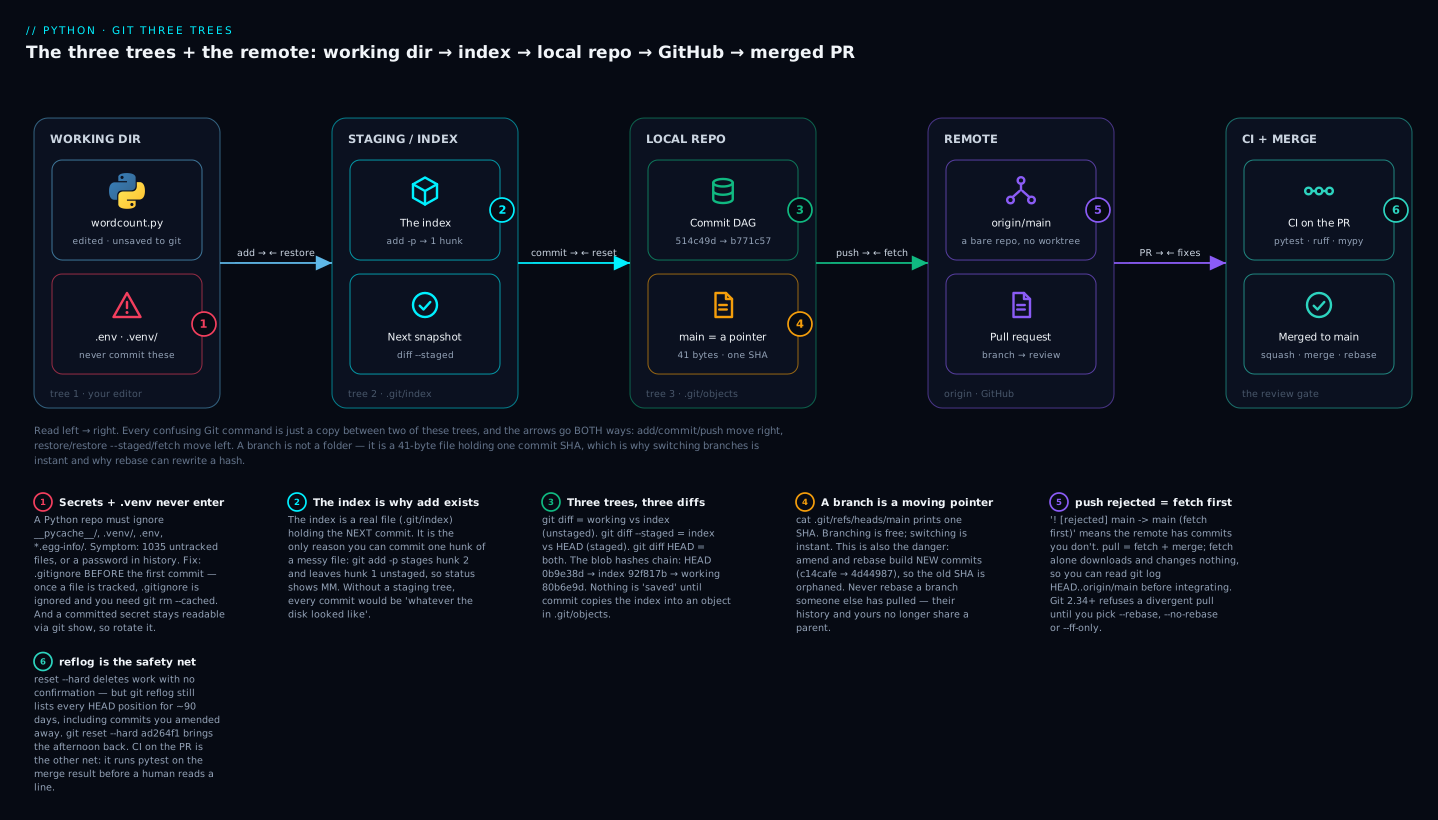
The six badges are the six things that actually bite: a Python repo must exclude .venv/ and .env from the very first commit or you’re rewriting history later (1); the index exists so you can commit one hunk of a messy file (2); three trees mean three different diffs, which is why git diff sometimes prints nothing when you know you changed something (3); a branch is a moving pointer, which is why rebasing rewrites hashes and why you never rebase a shared branch (4); push is rejected when the remote has commits you don’t, and fetch is how you look before you leap (5); and reflog is the safety net that makes even reset --hard survivable (6).
Three trees, three diffs
This is the single most useful consequence of the model, and the source of a genuinely common “Git is broken” moment. Let’s make a file that has both a staged change and an unstaged change — which is legal, normal, and confusing the first time:
git status
On branch main
Changes to be committed:
  (use "git restore --staged <file>..." to unstage)
	modified:   wordcount.py

Changes not staged for commit:
  (use "git add <file>..." to update what will be committed)
  (use "git restore <file>..." to discard changes in working directory)
	modified:   wordcount.py
The same file is listed twice. That is not a bug and it is not a weird edge case — it’s the three trees becoming visible. wordcount.py differs from the index (unstaged change), and the index differs from HEAD (staged change). Two different comparisons, two different answers.
So “show me the diff” is an ambiguous request, and Git makes you say which pair you mean:
| Command | Compares | Shows you |
|---|---|---|
git diff |
working dir ↔ index | What you’d lose with restore. Unstaged only |
git diff --staged |
index ↔ HEAD | What you’d commit right now. Staged only (--cached is a synonym) |
git diff HEAD |
working dir ↔ HEAD | Everything since the last commit |
git diff <sha> |
working dir ↔ that commit | Everything since some older point |
git diff main..feature |
tip of main ↔ tip of feature | What the branch would bring |
git diff --stat HEAD |
as above, summarised | Files + line counts, no content |
Watch the blob hashes in the real output — they tell the whole story:
git diff # working vs index
diff --git a/wordcount.py b/wordcount.py
index 92f817b..80b6e9d 100644
@@ -11,3 +11,8 @@ def count_words(text: str) -> Counter:
 def top_n(path: Path, n: int = 5) -> list[tuple[str, int]]:
     """Return the n most common words in the file at path."""
     return count_words(path.read_text()).most_common(n)
+
+
+def total_words(path: Path) -> int:
+    """Return the total number of words in the file."""
+    return sum(count_words(path.read_text()).values())
git diff --staged # index vs HEAD
diff --git a/wordcount.py b/wordcount.py
index 0b9e38d..92f817b 100644
@@ -8,6 +8,6 @@ def count_words(text: str) -> Counter:
     return Counter(text.lower().split())


-def top_n(path: Path, n: int = 3) -> list[tuple[str, int]]:
+def top_n(path: Path, n: int = 5) -> list[tuple[str, int]]:
     """Return the n most common words in the file at path."""
     return count_words(path.read_text()).most_common(n)
Read the index lines. git diff compares 92f817b..80b6e9d. git diff --staged compares 0b9e38d..92f817b. The hashes chain: 0b9e38d (HEAD) → 92f817b (index) → 80b6e9d (working directory). Three trees, three blobs, and git diff HEAD simply skips the middle one and compares 0b9e38d..80b6e9d.
This is why “I changed the file but git diff shows nothing” happens: you already ran git add, so the working directory and the index now match. Nothing changed between those two trees. The change is real and it’s sitting in git diff --staged. Nothing is lost; you just asked the wrong question.
What a commit actually is
While we’re under the hood — a commit isn’t a diff. It’s a snapshot plus metadata, and you can read it directly:
git cat-file -p HEAD
tree 65b207abefa23a3a267b4e0cd70fdb021b6b1753
author Lab User <lab@example.com> 1784124359 +0530
committer Lab User <lab@example.com> 1784124359 +0530

feat: add word counter with case-insensitive counting

Counts words in a text file and returns the most common ones.
Splitting on whitespace is deliberate for now — punctuation
handling is a separate concern and gets its own commit.
A pointer to a tree (the whole directory, snapshotted), the author, the committer, and the message. A second commit would also carry a parent line — and that chain of parents is the history. Git shows you diffs because diffs are useful to humans, but it stores snapshots. That distinction explains why git checkout of a 5-year-old commit is instant: it isn’t replaying 5 years of patches, it’s just unpacking one tree.
The core loop: add, commit, log, diff
Ninety percent of your Git use is five commands in a cycle. Here’s the whole loop, and then the parts worth dwelling on.
| Command | Which trees it touches | What it does |
|---|---|---|
git init |
creates .git/ |
Start tracking this directory. Once, per project |
git status |
all three | What state am I in? Run it constantly |
git add <file> |
working → index | Stage a file for the next commit |
git add -p |
working → index | Stage selected hunks interactively |
git commit -m "…" |
index → repo | Freeze the index as a permanent snapshot |
git log |
repo | Show history |
git diff |
working ↔ index | What have I changed and not staged? |
git show <sha> |
repo | One commit: message + full diff |
git init is unglamorous and instant:
git init
Initialized empty Git repository in /Users/you/wordcount/.git/
That’s it — a .git/ directory appeared. Delete .git/ and it’s an ordinary folder again with no history. Nothing else on your machine changed, nothing phoned home, and there is no server involved. Git is local. GitHub comes later and is optional.
git status is the command you should run more than any other. It’s not just informational — it tells you the command you need next, in the parenthetical hints. Beginners skim past those hints for months and then discover them. Read them.
git add -p: the reason the index exists
git add . stages everything. It’s what you’ll type most of the time and that’s fine. But the moment you have an hour of mixed work in one file, -p (--patch) is what turns that mess into a readable history. Git walks you through each hunk and asks:
git add -p wordcount.py
@@ -1,4 +1,4 @@
-"""Count words in a text file."""
+"""Count words in a text file (v2)."""
 import string
 from collections import Counter
(1/2) Stage this hunk [y,n,q,a,d,j,J,g,/,e,p,?]? n

@@ -19,3 +19,8 @@ def top_n(path: Path, n: int = 5) -> list[tuple[str, int]]:
+
+
+def unique_words(path: Path) -> int:
+    """Return the count of distinct words in the file."""
+    return len(count_words(path.read_text()))
(2/2) Stage this hunk [y,n,q,a,d,K,g,/,e,p,?]? y
Answer n to the docstring tweak and y to the new function, and now:
git status --short
MM wordcount.py
Two letters, and they’re the three trees again: the first M is the index vs HEAD (staged), the second M is the working directory vs the index (unstaged). One file, half of it staged. Commit, and you get an atomic commit containing only the new function — the docstring tweak stays in flight for its own commit.
| Key | Meaning |
|---|---|
y |
Stage this hunk |
n |
Don’t stage it |
q |
Quit; keep what’s already staged |
a |
Stage this hunk and all remaining in this file |
d |
Skip this hunk and all remaining in this file |
s |
Split into smaller hunks (only offered when possible) |
e |
Edit the hunk by hand — surgical, occasionally essential |
? |
Help |
s is the one worth remembering. When two unrelated changes are close enough that Git offers them as one hunk, s splits them apart.
git log, made readable
Bare git log is verbose. This is the form to memorise:
git log --oneline --graph --all
*   4d76d5d Merge branch 'feature/min-length'
|\
| * 235d027 feat: add min_length filter to skip stop-words
* | 0c1cc6f feat: ignore punctuation when counting words
|/
* b771c57 feat: add total_words and raise top_n default to 5
* 514c49d feat: add word counter with case-insensitive counting
That’s the actual shape of the history — a fork and a join, drawn in ASCII. --all matters: without it you only see the current branch, which is how people convince themselves a branch “disappeared.”
| Flag | Effect |
|---|---|
--oneline |
One line per commit: short SHA + subject |
--graph |
Draw the branch/merge topology |
--all |
All branches, not just the current one |
-n 5 |
Last 5 commits |
-p |
Show the full diff of each commit |
--stat |
Files changed + line counts |
-S "text" |
Pickaxe: commits that added/removed that string |
-G "regex" |
Same, but regex |
--author="Vinod" |
Filter by author |
--since="2 weeks ago" |
Filter by date |
-- path/to/file.py |
Only commits touching that path |
--format="%h %an %s" |
Custom format |
-S is a genuine superpower and almost unknown. “When did string.digits get into this file?” is not a question you answer by reading; it’s one command:
git log --oneline -S "string.digits" -- wordcount.py
3d29c1c refactor: extend character stripping in count_words
One commit. That’s the moment the string entered the codebase, found by content rather than by memory.
.gitignore for Python (and the secret you already committed)
Back to those 1035 files. A Python project produces a mountain of generated junk, and Git will happily track all of it unless you tell it not to. This is the real .gitignore — not a minimal example, the actual one you should paste into every Python project on the first day:
# Byte-compiled / cache
__pycache__/
*.py[cod]

# Virtual environments
.venv/
venv/
env/

# Secrets — never commit
.env

# Packaging / build output
*.egg-info/
build/
dist/

# Tool caches
.pytest_cache/
.mypy_cache/
.ruff_cache/
.coverage
htmlcov/

# Notebooks
.ipynb_checkpoints/

# Editors / OS
.idea/
.vscode/
.DS_Store
The effect is immediate and dramatic:
git status --short
?? .gitignore
?? test_wordcount.py
?? wordcount.py
1035 → 3. Now git status is a tool you can actually read, which matters more than it sounds: a status you can’t read is a status you stop reading, and that’s how the .env gets committed.
Here’s what each entry is protecting you from, and why it’s not optional:
| Pattern | What it is | Why it must never be committed |
|---|---|---|
__pycache__/ · *.py[cod] |
Bytecode Python compiles automatically | Regenerated on every run. Pure churn — and a frequent source of pointless merge conflicts |
.venv/ · venv/ · env/ |
Your virtual environment | 15 MB, ~1000 files, absolute paths and binaries for your CPU. Useless on any other machine |
.env |
Secrets: DB URLs, API keys | A leak. Once pushed, assume it’s compromised — see below |
*.egg-info/ · build/ · dist/ |
Packaging output | Build artifacts. Regenerated by pip install -e . or a build |
.pytest_cache/ · .mypy_cache/ · .ruff_cache/ |
Tool caches | Machine-local, huge, worthless to anyone else |
.coverage · htmlcov/ |
Coverage data + report | Regenerated per run; the report is hundreds of files |
.ipynb_checkpoints/ |
Jupyter autosaves | Duplicate notebooks, guaranteed conflicts |
.idea/ · .vscode/ |
Editor config | Yours, not the project’s. (Teams sometimes commit a curated .vscode/settings.json — that’s a deliberate exception) |
.DS_Store |
macOS folder metadata | Pure noise. Put this in a global gitignore too |
The *.py[cod] pattern is a character class covering .pyc, .pyo and .pyd in one line — a small piece of shell-glob syntax that shows up in every Python .gitignore and confuses people who read it as a typo.
The .venv/ row deserves its own sentence, because it connects directly to what you already know about environments. A venv is build output, not source. It’s reproducible from requirements.txt in ten seconds. Committing it is like committing your compiler. If that reasoning isn’t yet second nature, pip & Virtual Environments: Isolating Dependencies the Right Way is the lesson that makes it click — and it ends with the same rule.
When you want to know why a file is being ignored (or why it stubbornly isn’t), check-ignore names the exact rule and line number:
git check-ignore -v .venv/bin/python __pycache__/wordcount.cpython-312.pyc
.gitignore:6:.venv/	.venv/bin/python
.gitignore:2:__pycache__/	__pycache__/wordcache.cpython-312.pyc
File, line number, pattern, match. No guessing.
The trap: .gitignore does nothing to tracked files
This is the number one .gitignore complaint, it hits everyone once, and it isn’t a bug. Suppose you commit first and add the .gitignore afterwards — the overwhelmingly common order:
git add -A && git commit -m "initial commit"   # oops: .env went in
printf '.env\n__pycache__/\n' > .gitignore
git add .gitignore && git commit -m "chore: add gitignore"
echo "NEW_KEY=sk-live-changed" >> .env
git status --short
M .env
.gitignore did nothing. The file is still tracked and Git is still reporting changes to it.
The rule is simple once stated: .gitignore only controls whether untracked files get mentioned. It has no authority over a file Git is already tracking. Ignoring is about what to start tracking, not what to stop.
The fix is to untrack it explicitly, which --cached does without deleting your local copy:
git rm --cached .env
git rm --cached -r __pycache__
git commit -m "chore: untrack .env and __pycache__"
git ls-files
.gitignore
app.py
ls -a | grep env
.env
Gone from Git, still on your disk — which is exactly what you want, because your app needs to read it. --cached is the whole point. Plain git rm .env would delete the file from disk too, and that’s a genuinely bad afternoon. ⚠️ Always include --cached when untracking something you still need locally.
⚠️ The secret is still in history
Here is the part that people get wrong, and it’s the most expensive mistake in this lesson. You just untracked .env. Your working tree is clean. The file isn’t in git ls-files. It feels handled.
It is not handled:
git log --oneline --all -- .env
a6080b1 chore: untrack .env and __pycache__
1344fb3 initial commit
git show 1344fb3:.env
DB_URL=postgres://admin:hunter2@prod-db.internal:5432/app
API_KEY=sk-live-51H8xQ2eZvKYlo2C
There’s the password. In plain text. Retrievable by anyone with the repo, forever, with one command. And they don’t even need to know the filename — the pickaxe finds it by content:
git log --oneline -S "hunter2" --all
a6080b1 chore: untrack .env and __pycache__
1344fb3 initial commit
git rm --cached removed the secret from the future, not from the past. Commits are immutable; that’s the whole value proposition of the tool. The history is doing precisely its job.
So what do you actually do? In this order, and the first step is the one that matters:
| Step | Action | Why |
|---|---|---|
| 1 | Rotate the credential. Immediately | The only step that actually works. Assume it’s compromised the moment it was pushed. Everything else is cleanup |
| 2 | git rm --cached .env + add to .gitignore |
Stops it recurring |
| 3 | Commit and push the untracking | Now the tip is clean |
| 4 | Optionally rewrite history: git filter-repo or BFG Repo-Cleaner |
Scrubs the old blobs. Rewrites every SHA after the touched commit |
| 5 | Force-push, and tell every collaborator to re-clone | Their clones still have the secret, and a stale clone can push it back |
Step 4 is the one people jump to, and it’s worth being honest about what it costs. git filter-repo (the modern tool; git filter-branch is deprecated and slow) and BFG rewrite history, which means every commit hash after the touched one changes. Every open PR breaks. Every collaborator’s clone is now incompatible. Forks keep the old objects. On GitHub, the original commit may remain reachable by SHA until support garbage-collects it.
And after all of that, the secret was still public for however long it was public. Scrapers watch new public commits for exactly this and act within minutes. Rotation is the fix. History rewriting is hygiene. Do it in that order, and never in the other.
The real lesson is upstream of all of it: write the .gitignore before the first commit. A repo whose first commit is git add -A on a Python project is a repo with a .venv and a secret in it.
Branching, merging, and the conflict you have to resolve
A branch is a pointer. That’s the whole thing
Branches sound heavy. They’re not, and the reason is worth seeing rather than being told:
cat .git/refs/heads/main
b771c574b534bbc8d76e3298e74c9f641615a792
That’s the branch. A file containing one 40-character SHA. 41 bytes with the newline. Creating a branch writes another such file; deleting one deletes a 41-byte file. This is why branching in Git is instant while it was a nightmare in older tools that copied whole directories.
And HEAD — the thing that decides which branch you’re “on” — is another tiny file, pointing at the branch rather than at a commit:
cat .git/HEAD
ref: refs/heads/main
So the chain is: HEAD → a branch → a commit → its parents → …. Now “commit” has a precise definition: write a new commit object whose parent is wherever the branch points, then update the branch file to the new SHA. The branch moves. That’s what makes it a branch rather than a bookmark — and it’s why git log on a branch shows history: it’s walking the parent chain backwards from that one SHA.
The commands are in the cheat-sheet; the one distinction worth prose is switch vs checkout. git checkout does too many unrelated things — switch branches, restore files, create branches, detach HEAD — and that overloading caused real accidents (git checkout . silently destroying work). Git 2.23 split it into git switch (branches) and git restore (files). Both are stable and no longer experimental. Learn switch/restore; recognise checkout because every tutorial written before 2019 uses it and it isn’t going anywhere.
Fast-forward vs merge commit
Merge two branches and you get one of two very different results, depending on whether the base moved. If main hasn’t moved since you branched:
git merge feature/strip-punctuation
Updating b771c57..0c1cc6f
Fast-forward
 wordcount.py | 6 ++++--
 1 file changed, 4 insertions(+), 2 deletions(-)
Fast-forward. No merge commit was created, because none was needed — main was an ancestor of the feature branch, so Git just slid the main pointer forward. Nothing was combined; the history stays a straight line.
If main has moved (someone else committed), a fast-forward is impossible and Git must build a real merge commit with two parents:
git cat-file -p HEAD | head -3
tree 09c5e7de545c07b996487ee8cb56fd2c10be7472
parent 0c1cc6f266c145412f4279df02cf9bd2b3ea6054
parent 235d027b69d915fab622af4308a6edb19eb7e7be
Two parent lines. That’s the join, permanently recorded.
| Fast-forward | Merge commit | |
|---|---|---|
| When | Base branch hasn’t moved | Both branches have new commits |
| Creates a commit? | No — just moves the pointer | Yes — with two parents |
| History shape | Straight line | Fork and join, visible in --graph |
| Force it | git merge --ff-only (fail if not possible) |
git merge --no-ff (always make one) |
| Trade-off | Clean, but the branch vanishes from history | Preserves “this was a feature”, adds noise |
--no-ff is worth knowing: many teams use it so that every feature is a visible bubble in the graph even when a fast-forward was possible, which makes reverting a whole feature a single command.
Merge vs rebase, honestly
This is the argument people have on the internet. The technical difference is not ambiguous at all — only the taste is. Same two branches, both approaches:
############ MERGE ############
*   2327565 Merge branch 'feature'
|\
| * c14cafe test: cover parser
| * 11792c2 feat: add parser
* | d0eda85 fix: main hotfix
|/
* 2f47c96 feat: base
############ REBASE ############
* 4d44987 test: cover parser
* cf4c577 feat: add parser
* d0eda85 fix: main hotfix
* 2f47c96 feat: base
Look carefully at the hashes. Before the rebase, the feature commits were 11792c2 and c14cafe. After, the same two changes are cf4c577 and 4d44987. New hashes. The content is identical; the commits are not. A commit’s identity includes its parent, so replaying it onto a new parent necessarily creates a new commit. The originals are orphaned.
That single fact drives the entire debate:
git merge |
git rebase |
|
|---|---|---|
| History | Preserves exactly what happened | Rewrites — linear, tidy fiction |
| Commit hashes | Unchanged | All rewritten (c14cafe → 4d44987) |
| Adds a commit? | Yes (unless fast-forward) | No |
| Graph | Forks and joins | Straight line |
| Conflicts | Resolve once, at the merge | Possibly once per replayed commit |
| Safe on a shared branch? | Yes | NO. Never |
| Reverting the whole feature | One revert -m 1 of the merge |
Revert each commit |
| Best for | Merging a finished feature into main |
Tidying your own branch before a PR |
| Honest downside | Graph gets busy on active repos | You are editing the past. Mistakes are real |
The golden rule: never rebase commits that anyone else has pulled. Not a style preference — a correctness rule. Rebasing gives every commit a new SHA. If a colleague already has the old SHAs, their history and yours no longer share a parent, and their next pull will merge the two versions together and duplicate every commit. You’ll spend an afternoon untangling it.
The practical compromise most teams land on: rebase your own feature branch to clean it up and keep it current with main before you open a PR (nobody else has those commits yet, so rewriting is free), then merge it into main (which is shared, so it never gets rewritten). Tidy branches, honest trunk.
A real merge conflict
Two branches, both editing count_words(). One strips punctuation, one adds a min_length filter. Git tries, and can’t:
git merge feature/min-length
Auto-merging wordcount.py
CONFLICT (content): Merge conflict in wordcount.py
Automatic merge failed; fix conflicts and then commit the result.
A conflict is not a failure, and it’s not Git being difficult. It means two commits changed the same lines, and Git refuses to guess which is right. The alternative — picking one silently — is far worse. git status explains the situation and the exits:
On branch main
You have unmerged paths.
  (fix conflicts and run "git commit")
  (use "git merge --abort" to abort the merge)

Unmerged paths:
  (use "git add <file>..." to mark resolution)
	both modified:   wordcount.py
git merge --abort is your undo. It puts everything back exactly as it was. Nothing here is a trap — the merge is paused, not applied, and you can walk away at any time.
Now the file itself:
<<<<<<< HEAD
def count_words(text: str) -> Counter:
    """Return a Counter of lowercased words in text, ignoring punctuation."""
    cleaned = text.lower().translate(str.maketrans("", "", string.punctuation))
    return Counter(cleaned.split())
=======
def count_words(text: str, min_length: int = 1) -> Counter:
    """Return a Counter of lowercased words in text, skipping short words."""
    words = [w for w in text.lower().split() if len(w) >= min_length]
    return Counter(words)
>>>>>>> feature/min-length
| Marker | Meaning |
|---|---|
<<<<<<< HEAD |
Start of your version (the branch you’re on, “ours”) |
======= |
The divider. Not a change — just the separator |
>>>>>>> feature/min-length |
End of their version (the branch being merged, “theirs”) |
||||||| base |
The common ancestor — only shown in diff3/zdiff3 style |
That last row is the setting that turns conflict resolution from guesswork into reading. Turn it on:
git config --global merge.conflictStyle zdiff3
Now conflicts show what both sides changed from:
<<<<<<< ours
def count_words(text: str) -> Counter:
    """Return a Counter of lowercased words in text, ignoring punctuation."""
    cleaned = text.lower().translate(str.maketrans("", "", string.punctuation))
    return Counter(cleaned.split())
||||||| base
def count_words(text: str) -> Counter:
    """Return a Counter of lowercased words in text."""
    return Counter(text.lower().split())
=======
def count_words(text: str, min_length: int = 1) -> Counter:
    """Return a Counter of lowercased words in text, skipping short words."""
    words = [w for w in text.lower().split() if len(w) >= min_length]
    return Counter(words)
>>>>>>> theirs
With the base visible, the answer is obvious rather than a coin flip: ours added punctuation stripping, theirs added a length filter, and neither touched what the other touched. So the correct resolution isn’t “pick one” — it’s both:
def count_words(text: str, min_length: int = 1) -> Counter:
    """Return a Counter of lowercased words, ignoring punctuation and short words."""
    cleaned = text.lower().translate(str.maketrans("", "", string.punctuation))
    words = [w for w in cleaned.split() if len(w) >= min_length]
    return Counter(words)
This is the thing beginners most need to hear: resolving a conflict means writing the correct code, not choosing a side. --ours and --theirs are tempting and usually wrong. You are the merge algorithm now; Git handed you the problem precisely because it can’t be solved mechanically.
Delete every marker, run the code, then mark it resolved:
python -m pytest -q
.                                                                        [100%]
1 passed in 0.00s
git add wordcount.py
git status
On branch main
All conflicts fixed but you are still merging.
  (use "git commit" to conclude merge)
git commit --no-edit
git add is what marks a conflict resolved — there’s no separate “resolve” command. And note the order: run the tests before git add, not after git commit. A resolution that doesn’t run is a broken commit in permanent history.
While the conflict is unresolved, the index holds three versions of the file at once — the one place where stage numbers stop being trivia:
git ls-files --stage wordcount.py
100644 80b6e9d0eac02759a790b502d91efce5fae5de56 1	wordcount.py
100644 95894da41d1b31588f32b0f59d5af0d48fc88dab 2	wordcount.py
100644 8ccdbb72a16752fd32356898aeb9c5400532ef3f 3	wordcount.py
Stage 1 = base, 2 = ours, 3 = theirs. (Remember the normal output had stage 0 — that’s “no conflict”.) The markers in your file are just a rendering of these three blobs.
⚠️ The Python-specific conflict trap
Conflict markers are not comments. They are not valid Python. Leave one in a file and the language tells you immediately — but what it says depends on where the marker landed, which surprises people:
  File "wordcount.py", line 7
    <<<<<<< HEAD
    ^^
SyntaxError: invalid syntax
At module level you get SyntaxError: invalid syntax. But when the conflict is inside a function body, Python reaches for a different complaint entirely:
  File "leftover.py", line 2
    <<<<<<< HEAD
    ^
IndentationError: expected an indented block after function definition on line 1
IndentationError, pointing at a line you never wrote. If you’re merging under pressure and see either of these, look for <<<<<<< before you debug anything else. The fastest check is a search, and it costs nothing:
git grep -n "^<<<<<<< \|^>>>>>>> "
Better still, make it impossible to commit one — which is exactly what pre-commit is for, a few sections down.
Undo: the table you will actually need
Git’s undo commands are its worst-named feature. reset, revert, restore and checkout all sound like “undo” and do four different things — and one of them destroys work. This is the table to bookmark, and the three-trees model is what makes it memorable: each command is defined by which trees it touches.
| I want to… | Command | Trees touched | Safe? |
|---|---|---|---|
| Discard my edits to a file | git restore <file> |
index → working | ⚠️ Working change is gone — it was never in Git |
| Unstage a file (keep the edit) | git restore --staged <file> |
HEAD → index | ✅ Working dir untouched |
| Unstage and discard | git restore --staged --worktree <file> |
HEAD → index → working | ⚠️ Destructive |
| Fix the last commit’s message | git commit --amend -m "…" |
repo | ⚠️ Rewrites — local only |
| Add a forgotten file to the last commit | git add f && git commit --amend --no-edit |
index → repo | ⚠️ Rewrites — local only |
| Undo a pushed commit | git revert <sha> |
repo (new commit) | ✅ The safe one. Public-safe |
| Un-commit, keep everything staged | git reset --soft HEAD~1 |
repo | ✅ Nothing lost |
| Un-commit, keep changes unstaged | git reset HEAD~1 (--mixed, default) |
repo → index | ✅ Nothing lost |
| Un-commit and delete the changes | git reset --hard HEAD~1 |
all three | 🔴 DESTRUCTIVE |
| Park work temporarily | git stash push -m "wip" |
working + index → stash | ✅ Recoverable |
| Bring it back | git stash pop |
stash → working | ✅ |
| Recover from any of the above | git reflog → git reset --hard <sha> |
— | ✅ The safety net |
The three resets, demonstrated
reset --soft / --mixed / --hard is where people get burned, so here they are from an identical starting point — one commit that we un-commit three different ways:
git reset --soft HEAD~1   # scratch.txt still exists
git status --short
A scratch.txt
git reset --mixed HEAD~1  # (the default)
git status --short
?? scratch.txt
git reset --hard HEAD~1
git status --short
ls scratch.txt
ls: scratch.txt: No such file or directory
Three commands, three outcomes, one difference — how far down the trees the reset propagates:
| Mode | Moves the branch | Index | Working dir | Result |
|---|---|---|---|---|
--soft |
✅ | untouched | untouched | Changes staged (A), ready to re-commit. Perfect for redoing a commit |
--mixed (default) |
✅ | reset | untouched | Changes present but unstaged (??). Re-add what you want |
--hard |
✅ | reset | reset | 🔴 Work destroyed. No confirmation, no prompt |
--soft is the “I want to redo that commit properly” button. --hard is the one that ends afternoons. Note that --hard gave no warning — Git assumed you meant it.
restore: the two flags that matter
git status --short # both staged AND unstaged changes
MM wordcount.py
git restore --staged wordcount.py    # unstage; working dir untouched
git status --short
M wordcount.py
git restore wordcount.py             # ⚠️ discard the working change
git status --short                   # (clean)
MM → M → clean. Read the flags through the trees: --staged copies HEAD → index (undoing add), and bare restore copies index → working (undoing your edit). The first is always safe. The second permanently destroys an uncommitted edit — it was never in Git, so reflog can’t help you. ⚠️ It is the one command here with no undo.
amend rewrites; revert appends
Two “undo the last commit” commands, opposite in every way. --amend:
hash before amend: 09342db437f2f7a1ce5a1575d9f8fe438041be23
hash after  amend: 8bddf10405835f8e690ffdb16d33b7bc8b51e32f
git log --oneline -2
8bddf10 docs: add README and CHANGELOG
4d76d5d Merge branch 'feature/min-length'
One commit, new hash. The stuff commit with the bad message is gone from the branch — --amend doesn’t edit a commit (commits are immutable), it builds a replacement and moves the branch to it. Which is exactly why it’s local-only: if you amend something you’ve pushed, your history and the remote’s have diverged, and your next push is rejected.
git revert is the opposite, and it’s the one that’s safe in public:
git revert --no-edit HEAD
git log --oneline -3
6a5c261 Revert "perf: cap counting at first 10 words"
359f1fd perf: cap counting at first 10 words
8bddf10 docs: add README and CHANGELOG
Both commits are there. revert doesn’t remove the bad commit; it appends a new commit whose diff is the inverse. Nothing is rewritten, so nobody’s clone breaks. History records that you made a mistake and fixed it — which is the truth, and truth is what history is for.
git commit --amend |
git revert <sha> |
git reset --hard <sha> |
|
|---|---|---|---|
| Effect | Replaces the last commit | Adds an inverse commit | Moves the branch back |
| History | Rewritten | Appended | Rewritten |
| Old commit visible? | No (reflog only) | Yes — both are | No (reflog only) |
| Safe if pushed? | ❌ | ✅ Yes | ❌ Never |
| Use for | Typo in your last local commit | Undoing anything public | Local dead-ends only |
Rule of thumb: if it’s pushed, revert. If it’s local and unpushed, amend/reset are fine.
reflog: the safety net that makes Git forgiving
Now the demo that changes how people feel about Git. Two commits of real work — a CLI and its tests — then a reset --hard that destroys it:
git reset --hard HEAD~2
ls cli.py
HEAD is now at 6a5c261 Revert "perf: cap counting at first 10 words"
ls: cli.py: No such file or directory
An afternoon, gone, with no confirmation prompt. Now watch:
git reflog
6a5c261 HEAD@{0}: reset: moving to HEAD~2
ad264f1 HEAD@{1}: commit: test: cover punctuation and min_length
5176c97 HEAD@{2}: commit: feat: add argparse CLI entry point
6a5c261 HEAD@{3}: checkout: moving from 359f1fd to main
359f1fd HEAD@{4}: checkout: moving from main to 359f1fd
6a5c261 HEAD@{7}: revert: Revert "perf: cap counting at first 10 words"
359f1fd HEAD@{8}: commit: perf: cap counting at first 10 words
8bddf10 HEAD@{9}: commit (amend): docs: add README and CHANGELOG
09342db HEAD@{10}: commit: stuff
4d76d5d HEAD@{11}: commit (merge): Merge branch 'feature/min-length'
0c1cc6f HEAD@{12}: merge feature/strip-punctuation: Fast-forward
Every position HEAD has ever held, still there. Read HEAD@{1} — that’s the “lost” commit, ad264f1. Recovery is one command:
git reset --hard ad264f1
ls cli.py && python -m pytest -q
HEAD is now at ad264f1 test: cover punctuation and min_length
cli.py
...                                                                      [100%]
3 passed in 0.00s
The afternoon is back. And look further down that reflog: HEAD@{10} is 09342db stuff — the commit we amended away two sections ago. It’s still reachable. git reset --hard didn’t delete commits; it moved a pointer, and the objects stayed in .git/objects waiting for garbage collection (~90 days by default, gc.reflogExpire).
| Command | What it does |
|---|---|
git reflog |
Every position of HEAD, newest first |
git reflog show <branch> |
Every position of that branch |
git reset --hard HEAD@{2} |
Jump the branch back to that position |
git branch rescue <sha> |
Safer: give the lost commit a branch instead |
git fsck --lost-found |
Find dangling commits missing even from the reflog |
git branch rescue <sha> is the better instinct than another --hard: it creates a branch pointing at the lost commit and touches nothing else. Look first, then move.
The catch worth internalising: reflog only knows about commits. It records where HEAD pointed. Work you never committed — edits destroyed by git restore, or uncommitted changes wiped by reset --hard — was never in Git and cannot be recovered. That’s the real argument for committing early and often on your own branch: a commit makes work nearly indestructible. Messy commits can always be tidied later with rebase -i or --amend. Uncommitted work has no such second chance.
Remotes, GitHub, and the PR workflow
Everything so far was local. git init created no account and contacted no server. A remote is just another copy of the repository that yours knows about — and GitHub is a remote with a nice website attached.
git remote add origin https://github.com/you/wordcount.git
git push -u origin main
 * [new branch]      main -> main
branch 'main' set up to track 'origin/main'.
origin is a name, not a keyword — pure convention for “where I cloned from”. The -u (--set-upstream) is the bit worth understanding, because it’s why git push with no arguments works forever after:
git branch -vv
* main 04d724b [origin/main] feat: add unique_words helper
git status | head -3
On branch main
Your branch is up to date with 'origin/main'.
[origin/main] is the tracking relationship -u established. It’s what lets Git say “up to date”, “2 commits ahead”, or “diverged” without you naming a remote every time.
The other thing worth knowing: the remote is a bare repository — same objects, no working directory. Nobody edits files on the server. It’s a place for commits to meet, nothing more.
fetch vs pull — and why fetch is the professional habit
They are not synonyms. pull is literally fetch + merge. The difference is that fetch changes nothing of yours, which makes it the safe way to look before you leap:
git fetch origin
From github.com/you/wordcount
   04d724b..b224729  main       -> origin/main
git log --oneline -1 # your branch: untouched
35bf0c2 docs: changelog for unique_words
git log --oneline -1 origin/main # but origin/main moved
b224729 docs: add contributing note
Your work is exactly where you left it. Only the read-only pointer origin/main moved. Now you can inspect the incoming work before integrating it — and these two commands are worth committing to memory:
git log --oneline HEAD..origin/main # what they have that I don't
b224729 docs: add contributing note
git log --oneline origin/main..HEAD # what I have that they don't
35bf0c2 docs: changelog for unique_words
The .. range syntax reads naturally: “commits reachable from the right, but not from the left.” One divergent commit each way. git status agrees:
Your branch and 'origin/main' have diverged,
and have 1 and 1 different commits each, respectively.
fetch + log HEAD..origin/main + then integrate is the habit that separates people who are comfortable with Git from people who type git pull and hope.
The divergent-pull error (new-ish, and it confuses everyone)
Modern Git refuses to guess how to reconcile a divergence:
git pull origin main
hint: You have divergent branches and need to specify how to reconcile them.
hint: You can do so by running one of the following commands sometime before
hint: your next pull:
hint:
hint:   git config pull.rebase false  # merge
hint:   git config pull.rebase true   # rebase
hint:   git config pull.ff only       # fast-forward only
hint:
fatal: Need to specify how to reconcile divergent branches.
Not a bug — a deliberate change in Git 2.34+. pull used to silently create merge commits, and enough people were surprised by that that Git now makes you choose. Choose once, globally:
| Setting | Behaviour | Who it’s for |
|---|---|---|
git config --global pull.rebase true |
pull = fetch + rebase |
Most people. Linear history, no “Merge branch ‘main’ of…” noise |
git config --global pull.ff only |
Fail unless fast-forward | The cautious choice — never integrates without you deciding |
git config --global pull.rebase false |
pull = fetch + merge |
The old default |
With pull.rebase true, your local commit gets replayed on top of theirs:
git pull --rebase origin main
Successfully rebased and updated refs/heads/main.
git log --oneline --graph -3
* 4cc55cd docs: changelog for unique_words
* b224729 docs: add contributing note
* 04d724b feat: add unique_words helper
Linear — and note 35bf0c2 became 4cc55cd. Your commit was rewritten. That’s fine and safe because it was only ever yours; nobody had pulled it. This is precisely the “rebase your own work, merge shared work” rule in action.
The push that gets rejected
The most common remote error, and now you can predict it exactly:
git push origin main
 ! [rejected]        main -> main (fetch first)
error: failed to push some refs to 'https://github.com/you/wordcount.git'
hint: Updates were rejected because the remote contains work that you do not
hint: have locally. This is usually caused by another repository pushing to
hint: the same ref. If you want to integrate the remote changes, use
hint: 'git pull' before pushing again.
Read (fetch first). The remote has commits you don’t have, and accepting your push would mean losing them. Git is protecting your colleague’s work. The fix is in the message: integrate first (git pull --rebase), then push.
What you must not do is reach for git push --force, which means “delete whatever’s there and use mine.” That’s how you erase a colleague’s afternoon. If you genuinely must force-push — the legitimate case is your own PR branch after a rebase — use the safer form:
git push --force-with-lease
--force-with-lease refuses if the remote has moved since you last fetched. It force-pushes over your rebase but not over someone else’s new commit. There is almost no situation where plain --force is better. ⚠️ Force-pushing to main on a shared repo is the one action in this lesson that can destroy other people’s work irreversibly.
The pull request workflow
A pull request is not a Git feature — it’s a GitHub/GitLab feature built on top of branches. “Here is a branch; please review it and merge it.” The whole loop:
| Step | Command / action | Notes |
|---|---|---|
| 1 | git switch -c feature/add-cli |
Never work on main. Branch first, always |
| 2 | Edit, git add -p, git commit |
Small, atomic commits |
| 3 | python -m pytest |
Green before you push |
| 4 | git push -u origin feature/add-cli |
-u sets tracking |
| 5 | gh pr create --fill (or the web link Git prints) |
Opens the PR |
| 6 | CI runs automatically | pytest + ruff + mypy on the merge result |
| 7 | Reviewer comments | Push more commits — the PR updates itself |
| 8 | Merge (squash / merge commit / rebase) | See below |
| 9 | git switch main && git pull |
Get the merged result |
| 10 | git branch -d feature/add-cli |
Delete the branch. It’s free to remake |
Step 6 is the one that makes all of this worth the ceremony. CI runs your test suite on every push to the PR, on a clean machine, before a human reads a line. It catches the two most embarrassing failures in this lesson: the test you forgot to run, and “works on my machine” caused by something in your venv that isn’t in requirements.txt. A minimal GitHub Actions workflow at .github/workflows/ci.yml:
name: CI
on: [push, pull_request]

jobs:
  test:
    runs-on: ubuntu-latest
    steps:
      - uses: actions/checkout@v4
      - uses: actions/setup-python@v5
        with:
          python-version: "3.12"
      - run: pip install -r requirements.txt
      - run: pip install pytest ruff
      - run: ruff check .
      - run: python -m pytest -q
Note pip install -r requirements.txt on a clean runner. If your code needs a package you installed locally and never pinned, CI fails and tells you — which is the whole point.
For contributing to a project you don’t have write access to, the flow gets one extra step at the front — fork it (your own copy on GitHub), clone your fork, branch, push to your fork, then open the PR against the original:
| Branch workflow | Fork workflow | |
|---|---|---|
| Who | You have write access (your team’s repo) | You don’t (open source) |
| Branch lives | In the shared repo | In your fork |
| Extra remote | — | upstream → the original repo |
| Stay current | git pull |
git fetch upstream && git rebase upstream/main |
| PR is from | feature/x → main |
yourfork:feature/x → original:main |
And the three merge buttons, which are a real choice rather than cosmetic:
| Button | What lands on main |
Best when |
|---|---|---|
| Create a merge commit | Every commit + a merge commit | The individual commits are meaningful history |
| Squash and merge | One commit, all changes combined | Most PRs. Your “wip”, “fix typo”, “actually fix it” commits become one clean commit |
| Rebase and merge | Every commit, replayed, no merge commit | You want linear history and the individual commits |
Squash is the sane default for most teams: it lets you commit as messily as you like on your branch (which, as we established, is how you keep work safe) while main gets one reviewed, tested, revertable commit per feature.
Commit hygiene, hooks, and finding when a bug entered
Atomic commits and messages that earn their keep
A commit should be one logical change. Not one file, not one hour — one idea. The test: can you describe it in one line without the word “and”? If not, it should have been two commits, and git add -p is how you split it.
Why it matters is entirely practical, and every reason is a command you’ve now seen: git revert only works cleanly on an atomic commit (revert “fix bug and refactor parser” and you lose the refactor too). git bisect can only point at the commit that broke things — a commit touching 40 files tells you nothing. And review of a 12-file commit is review in name only.
The message has a shape, and it’s the same everywhere:
feat: add word counter with case-insensitive counting

Counts words in a text file and returns the most common ones.
Splitting on whitespace is deliberate for now — punctuation
handling is a separate concern and gets its own commit.
| Rule | Why |
|---|---|
| Imperative subject: “add”, not “added”/“adds” | Matches Git’s own generated messages (“Merge branch…”, “Revert…”). Read it as “applying this commit will… add X” |
| ~50 chars, no full stop | It’s a title. --oneline, GitHub, and git shortlog all truncate |
| Blank line before the body | Required. Git treats line 1 as the subject; no blank line means no body |
| Body wrapped at ~72 chars | git log indents by 4; longer lines wrap ugly in a terminal |
| Body explains why, not what | The diff already shows what. It can never show why |
Reference issues: Fixes #42 |
GitHub auto-closes the issue on merge |
The “why not what” rule is the one that pays. git blame lands you on a line; the line’s commit message is the only place the reason can live. “Splitting on whitespace is deliberate for now” saves the next person — quite possibly you — from re-litigating a decision that was already made on purpose.
Conventional Commits formalises the prefix. It’s a light convention with real payoff: tools read it to generate changelogs and pick the next semantic version automatically.
| Prefix | For | Version bump |
|---|---|---|
feat: |
A new feature | minor (1.2.0 → 1.3.0) |
fix: |
A bug fix | patch (1.2.0 → 1.2.1) |
docs: |
Documentation only | none |
test: |
Adding/fixing tests | none |
refactor: |
Neither fixes a bug nor adds a feature | none |
perf: |
Performance | patch |
chore: |
Tooling, deps, config | none |
style: |
Formatting only (black/ruff) | none |
feat!: / BREAKING CHANGE: in body |
Breaking API change | major (1.2.0 → 2.0.0) |
pre-commit: hooks that make bad commits impossible
Everything above is a discipline, and disciplines fail at 6pm on a Friday. pre-commit turns them into mechanism. It’s a Python tool (pip install pre-commit) that manages Git’s hook system for you, and it’s the natural tie-in for a Python project because the hooks you want — ruff, black, mypy — are Python tools.
.pre-commit-config.yaml in your repo root:
repos:
  - repo: https://github.com/pre-commit/pre-commit-hooks
    rev: v6.0.0
    hooks:
      - id: trailing-whitespace
      - id: end-of-file-fixer
      - id: check-yaml
      - id: check-added-large-files
      - id: check-merge-conflict
      - id: detect-private-key

  - repo: https://github.com/astral-sh/ruff-pre-commit
    rev: v0.14.2
    hooks:
      - id: ruff
        args: [--fix]
      - id: ruff-format
pre-commit install
pre-commit installed at .git/hooks/pre-commit
Now every git commit runs the hooks first. Try to commit code with unused imports:
git commit -m "feat: add imports"
trim trailing whitespace.................................................Passed
fix end of files.........................................................Passed
check for added large files..............................................Passed
check for merge conflicts................................................Passed
detect private key.......................................................Passed
ruff (legacy alias)......................................................Failed
- hook id: ruff
- files were modified by this hook

Found 2 errors (2 fixed, 0 remaining).
The commit did not happen, and ruff fixed the problem for you — the unused imports are already stripped from the file. But the fix is unstaged, so you git add and commit again. That two-step surprises everyone once: a hook that modifies files fails the commit by design, so that you review what it did rather than committing a change you never saw.
Now the three hooks that directly prevent this lesson’s worst outcomes:
git add -f id_rsa && git commit -m "chore: add deploy key"
detect private key.......................................................Failed
- hook id: detect-private-key
- exit code: 1
git add -f model.pkl && git commit -m "feat: add trained model"
check for added large files..............................................Failed
- hook id: check-added-large-files
- exit code: 1

model.pkl (1954 KB) exceeds 500 KB.
And, mid-merge, the marker check:
a.py:1: Merge conflict string '<<<<<<<' found
a.py:3: Merge conflict string '=======' found
a.py:5: Merge conflict string '>>>>>>>' found
That’s the SyntaxError from earlier, caught before it’s a commit. (One accurate caveat: check-merge-conflict only fires when you’re actually mid-merge — it looks for .git/MERGE_HEAD — or when passed --assume-in-merge. Outside a merge it passes, and ruff catches the broken syntax instead.)
| Hook | Catches |
|---|---|
detect-private-key |
An SSH/PEM key about to be committed |
check-added-large-files |
Files >500 KB (default) — models, data dumps, a stray .venv |
check-merge-conflict |
<<<<<<< markers left in a file mid-merge |
trailing-whitespace · end-of-file-fixer |
The diff noise that pollutes every review |
check-yaml · check-toml |
A broken .yml/pyproject.toml before CI finds it |
ruff (--fix) |
Lint errors: unused imports, undefined names |
ruff-format |
Formatting (a fast black replacement) |
mypy |
Type errors |
Two honest caveats. First: hooks are local and skippable. git commit --no-verify bypasses everything, and a fresh clone has no hooks until someone runs pre-commit install. So hooks are a fast feedback loop, not a guarantee — CI is the guarantee, because it runs on a machine the author doesn’t control. Run the same checks in both: hooks catch it in 2 seconds, CI catches it if you skipped the hook. Second: the first run downloads and builds an isolated environment per hook repo and is genuinely slow; every run after that is cached and fast.
git blame and git bisect: when did this break?
A bug report arrives: “word counts are wrong for text with numbers.” The tests pass. Nothing in the recent diff looks suspicious. Reproduce it first:
from wordcount import count_words
print(count_words("python3 is version 3 python3 rocks"))
Counter({'python': 2, 'is': 1, 'version': 1, 'rocks': 1})
python3 became python, and the standalone 3 vanished entirely. Real bug. Now: which commit did this?
git blame answers “who last touched this line”:
git blame -L 7,11 wordcount.py
235d027b (Lab User 2026-07-15 19:36 +0530  7) def count_words(text: str, min_length: int = 1) -> Counter:
4d76d5d6 (Lab User 2026-07-15 19:37 +0530  8)     """Return a Counter of lowercased words, ignoring punctuation..."""
3d29c1c6 (Lab User 2026-07-15 19:38 +0530  9)     cleaned = text.lower().translate(str.maketrans("", "", string.punctuation + string.digits))
4d76d5d6 (Lab User 2026-07-15 19:37 +0530 10)     words = [w for w in cleaned.split() if len(w) >= min_length]
6a5c261e (Lab User 2026-07-15 19:37 +0530 11)     return Counter(words)
Line 9 — the suspicious + string.digits — came from 3d29c1c. Read that commit’s message and you have the story.
But blame only works when you already know which line is wrong. When you don’t — when all you have is “it worked last month” — bisect is the tool, and it’s the most under-used command in Git. It binary-searches history. Give it one known-good commit and one known-bad one, and it finds the exact culprit in log₂(n) steps.
You can drive it by hand (git bisect good / git bisect bad at each stop), but the automated form is the one to learn. Write a script that exits 0 for good, non-zero for bad:
#!/bin/bash
# check_bug.sh — exit 0 = good, exit 1 = bad
python -c "
import sys; sys.path.insert(0, '.')
from wordcount import count_words
sys.exit(0 if count_words('python3 rocks')['python3'] == 1 else 1)
" 2>/dev/null
git bisect start HEAD ad264f1      # HEAD is bad, ad264f1 was good
git bisect run ./check_bug.sh
Bisecting: 2 revisions left to test after this (roughly 1 step)
running './check_bug.sh'
Bisecting: 0 revisions left to test after this (roughly 1 step)
running './check_bug.sh'
Bisecting: 0 revisions left to test after this (roughly 0 steps)
running './check_bug.sh'
3d29c1c641382d22c4413d5a40ba61f5fad80901 is the first bad commit
commit 3d29c1c641382d22c4413d5a40ba61f5fad80901
    refactor: extend character stripping in count_words

 wordcount.py | 2 +-
 1 file changed, 1 insertion(+), 1 deletion(-)
bisect found first bad commit
3d29c1c... is the first bad commit — found automatically, in three steps, with a one-line diff to read. Then always:
git bisect reset
git bisect run with your actual test suite (git bisect run python -m pytest -q -k test_name) is the professional move, and git bisect skip handles a commit that won’t even build. It’s the single strongest argument for atomic commits: bisect’s answer is only as precise as your commits are small. It pointed at a one-line change. If that commit had been “refactor everything”, the answer would have been useless.
The reformatting problem blame has
One git blame gotcha specific to Python teams, because you will run black or ruff format across the codebase one day:
git blame -L 9,12 cli.py
3fdb382a (  9)     parser = argparse.ArgumentParser(
3fdb382a ( 10)         description="Count words in a file."
3fdb382a ( 11)     )
5176c97d ( 12)     parser.add_argument("path", type=Path)
Every reformatted line now blames the formatting commit. The real author and the real reason are buried. git blame just became useless for that file.
The fix is a small file and one config line — record the reformat commit’s SHA in .git-blame-ignore-revs:
git rev-parse HEAD > .git-blame-ignore-revs   # the 'style: reformat with black' commit
git config blame.ignoreRevsFile .git-blame-ignore-revs
git blame -L 9,12 cli.py
5176c97d (  9)     parser = argparse.ArgumentParser(
5176c97d ( 10)         description="Count words in a file."
5176c97d ( 11)     )
5176c97d ( 12)     parser.add_argument("path", type=Path)
The real authors are back. Commit .git-blame-ignore-revs; GitHub honours it automatically in its blame view. Do this in the same PR as any mass reformat, and keep the reformat in its own commit that changes nothing else — which is the atomic-commit rule paying off again.
Hands-on lab
You’ll build a real Python project’s history from git init to a resolved merge conflict, then break it and recover. Everything runs locally — no GitHub account, no network, nothing pushed anywhere. Roughly 20 minutes.
Requires git (2.23+ for switch/restore) and Python 3.12+. Check:
git --version && python3 --version
Step 1 — a project, and Git’s first opinion of it.
mkdir -p ~/gitlab/wordcount && cd ~/gitlab/wordcount
git init
git config user.name "Your Name"
git config user.email "you@example.com"
Initialized empty Git repository in /Users/you/gitlab/wordcount/.git/
Create wordcount.py:
"""Count words in a text file."""
from collections import Counter
from pathlib import Path


def count_words(text: str) -> Counter:
    """Return a Counter of lowercased words in text."""
    return Counter(text.lower().split())


def top_n(path: Path, n: int = 3) -> list[tuple[str, int]]:
    """Return the n most common words in the file at path."""
    return count_words(path.read_text()).most_common(n)
And test_wordcount.py:
from wordcount import count_words


def test_counts_are_case_insensitive():
    assert count_words("Go go GO")["go"] == 3
Now make the mess a real Python project makes, and ask Git what it sees:
python3 -m venv .venv
.venv/bin/python -c "import sys; sys.path.insert(0,'.'); import wordcount"
git status --porcelain --untracked-files=all | wc -l
du -sh .venv
    1035
 15M	.venv
What just happened: two source files produced 1035 untracked files and 15 MB, courtesy of .venv/ and __pycache__/. This is the state every Python repo starts in.
Step 2 — .gitignore first, commit second. This ordering is the lesson.
cat > .gitignore <<'EOF'
__pycache__/
*.py[cod]
.venv/
venv/
env/
.env
*.egg-info/
build/
dist/
.pytest_cache/
.mypy_cache/
.ruff_cache/
.ipynb_checkpoints/
.DS_Store
EOF
git status --short
?? .gitignore
?? test_wordcount.py
?? wordcount.py
What just happened: 1035 → 3. Confirm why any file is ignored — never guess:
git check-ignore -v .venv/bin/python
.gitignore:3:.venv/ .venv/bin/python
Step 3 — the first commit.
git add .gitignore wordcount.py test_wordcount.py
git ls-files --stage
100644 e0259c648d5da3bbd5073e01ea9c5e1b272bd365 0	.gitignore
100644 48e79743ec69c8dc5f75f8586d6a6af92dd2b368 0	test_wordcount.py
100644 0b9e38df35c968e2e22a5f803607d1ae17e153db 0	wordcount.py
What just happened: that’s the index — a real file listing exactly what the next commit will contain. Now commit, with a body that explains why:
git commit -m "feat: add word counter with case-insensitive counting" -m "Splitting on whitespace is deliberate for now — punctuation
handling is a separate concern and gets its own commit."
(Two -m flags = subject + body, without opening an editor.)
Step 4 — see all three trees at once. Make one change and stage it, then make another and don’t:
sed -i '' 's/n: int = 3/n: int = 5/' wordcount.py    # Linux: sed -i 's/.../.../'
git add wordcount.py

cat >> wordcount.py <<'EOF'


def total_words(path: Path) -> int:
    """Return the total number of words in the file."""
    return sum(count_words(path.read_text()).values())
EOF

git status --short
git diff --stat            # working vs index
git diff --staged --stat   # index vs HEAD
MM wordcount.py
 wordcount.py | 5 +++++
 wordcount.py | 2 +-
What just happened: MM — one file, staged and unstaged changes. Two diffs, two different answers, because there are two different pairs of trees to compare. This is the model made visible.
git commit -am "feat: add total_words and raise top_n default to 5"
Step 5 — branch, and see what a branch is.
cat .git/refs/heads/main
cat .git/HEAD
git switch -c feature/strip-punctuation
b771c574b534bbc8d76e3298e74c9f641615a792
ref: refs/heads/main
What just happened: the branch is 41 bytes containing a SHA; HEAD is a pointer to the branch. Now edit count_words on this branch to strip punctuation:
"""Count words in a text file."""
import string
from collections import Counter
from pathlib import Path


def count_words(text: str) -> Counter:
    """Return a Counter of lowercased words in text, ignoring punctuation."""
    cleaned = text.lower().translate(str.maketrans("", "", string.punctuation))
    return Counter(cleaned.split())
git commit -am "feat: ignore punctuation when counting words"
Step 6 — a second branch, conflicting on purpose.
git switch main
git switch -c feature/min-length
Edit count_words again — but from main’s version, so it collides:
def count_words(text: str, min_length: int = 1) -> Counter:
    """Return a Counter of lowercased words in text, skipping short words."""
    words = [w for w in text.lower().split() if len(w) >= min_length]
    return Counter(words)
git commit -am "feat: add min_length filter to skip stop-words"
git log --oneline --graph --all
* 235d027 feat: add min_length filter to skip stop-words
| * 0c1cc6f feat: ignore punctuation when counting words
|/
* b771c57 feat: add total_words and raise top_n default to 5
* 514c49d feat: add word counter with case-insensitive counting
What just happened: a real fork. Two branches changed the same function from the same parent.
Step 7 — a fast-forward, then a real conflict.
git switch main
git merge feature/strip-punctuation
Updating b771c57..0c1cc6f
Fast-forward
What just happened: no merge commit — main hadn’t moved, so Git slid the pointer. Now the other branch:
git merge feature/min-length
Auto-merging wordcount.py
CONFLICT (content): Merge conflict in wordcount.py
Automatic merge failed; fix conflicts and then commit the result.
Step 8 — resolve it for real. First, prove the file is broken and see the three stages:
python3 -c "import wordcount"
git ls-files --stage wordcount.py
    <<<<<<< HEAD
    ^^
SyntaxError: invalid syntax
100644 80b6e9d... 1	wordcount.py
100644 95894da... 2	wordcount.py
100644 8ccdbb7... 3	wordcount.py
What just happened: markers are not valid Python, and the index holds three versions (1=base, 2=ours, 3=theirs). Turn on the better conflict style and look again:
git config merge.conflictStyle zdiff3
git checkout --conflict=zdiff3 wordcount.py
Now you can see the ||||||| base section — what both sides started from. Both changes are wanted, so write the combined version:
"""Count words in a text file."""
import string
from collections import Counter
from pathlib import Path


def count_words(text: str, min_length: int = 1) -> Counter:
    """Return a Counter of lowercased words, ignoring punctuation and short words."""
    cleaned = text.lower().translate(str.maketrans("", "", string.punctuation))
    words = [w for w in cleaned.split() if len(w) >= min_length]
    return Counter(words)


def top_n(path: Path, n: int = 5) -> list[tuple[str, int]]:
    """Return the n most common words in the file at path."""
    return count_words(path.read_text()).most_common(n)


def total_words(path: Path) -> int:
    """Return the total number of words in the file."""
    return sum(count_words(path.read_text()).values())
Test before you mark it resolved:
python3 -c "
import sys; sys.path.insert(0,'.')
from wordcount import count_words
print(count_words('Go, go! GO... the the a'))
print(count_words('Go, go! GO... the the a', min_length=3))
"
Counter({'go': 3, 'the': 2, 'a': 1})
Counter({'the': 2})
What just happened: punctuation stripped and short words filtered — both features, working together. That’s a resolution, not a coin flip.
git add wordcount.py
git commit --no-edit
git log --oneline --graph
*   4d76d5d Merge branch 'feature/min-length'
|\
| * 235d027 feat: add min_length filter to skip stop-words
* | 0c1cc6f feat: ignore punctuation when counting words
|/
* b771c57 feat: add total_words and raise top_n default to 5
Step 9 — amend a bad commit.
echo "# wordcount" > README.md
git add README.md && git commit -m "stuff"
git rev-parse --short HEAD

printf '# Changelog\n\n## Unreleased\n- Ignore punctuation.\n' > CHANGELOG.md
git add CHANGELOG.md
git commit --amend -m "docs: add README and CHANGELOG"
git rev-parse --short HEAD
git log --oneline -2
09342db
8bddf10
8bddf10 docs: add README and CHANGELOG
4d76d5d Merge branch 'feature/min-length'
What just happened: different hash, still one commit. --amend replaced it — the bad stuff message never existed as far as the branch is concerned. ⚠️ Only ever do this to commits you haven’t pushed.
Step 10 — revert a bad commit. Ship something genuinely wrong:
sed -i '' 's/    return Counter(words)/    return Counter(words[:10])  # perf/' wordcount.py
git commit -am "perf: cap counting at first 10 words"
git revert --no-edit HEAD
git log --oneline -3
6a5c261 Revert "perf: cap counting at first 10 words"
359f1fd perf: cap counting at first 10 words
8bddf10 docs: add README and CHANGELOG
What just happened: both commits are in history. revert appended an inverse commit rather than erasing anything — which is why it’s the safe choice for anything already pushed.
Step 11 — destroy an afternoon. Make two commits of real work:
cat > cli.py <<'EOF'
"""Command-line interface for wordcount."""
import argparse
from pathlib import Path

from wordcount import top_n, total_words


def main() -> None:
    parser = argparse.ArgumentParser(description="Count words in a file.")
    parser.add_argument("path", type=Path)
    parser.add_argument("-n", type=int, default=5)
    args = parser.parse_args()
    print(f"total: {total_words(args.path)}")
    for word, count in top_n(args.path, args.n):
        print(f"{count:>5}  {word}")


if __name__ == "__main__":
    main()
EOF
git add cli.py && git commit -m "feat: add argparse CLI entry point"

cat >> test_wordcount.py <<'EOF'


def test_punctuation_is_ignored():
    assert count_words("go, go! go.")["go"] == 3
EOF
git commit -am "test: cover punctuation"
git log --oneline -2
Now ⚠️ destroy them (this is the whole point — do it here, not on real work):
git reset --hard HEAD~2
ls cli.py
HEAD is now at 6a5c261 Revert "perf: cap counting at first 10 words"
ls: cli.py: No such file or directory
What just happened: two commits and a file, gone, with no confirmation prompt. This is the command that scares people, and rightly.
Step 12 — get it all back.
git reflog
6a5c261 HEAD@{0}: reset: moving to HEAD~2
ad264f1 HEAD@{1}: commit: test: cover punctuation
5176c97 HEAD@{2}: commit: feat: add argparse CLI entry point
6a5c261 HEAD@{3}: revert: Revert "perf: cap counting at first 10 words"
...
09342db HEAD@{10}: commit: stuff
git reset --hard HEAD@{1}       # or the SHA next to it
ls cli.py && python3 -m pytest -q
HEAD is now at ad264f1 test: cover punctuation
cli.py
..                                                                       [100%]
2 passed in 0.01s
What just happened: the afternoon is back. And look at HEAD@{10} — the stuff commit you amended away in Step 9 is still there. reset --hard moved a pointer; it didn’t delete objects. This is why Git is far more forgiving than its reputation — as long as you committed.
Step 13 — hooks (optional, needs network).
.venv/bin/python -m pip install pre-commit
cat > .pre-commit-config.yaml <<'EOF'
repos:
  - repo: https://github.com/pre-commit/pre-commit-hooks
    rev: v6.0.0
    hooks:
      - id: trailing-whitespace
      - id: check-added-large-files
      - id: detect-private-key
  - repo: https://github.com/astral-sh/ruff-pre-commit
    rev: v0.14.2
    hooks:
      - id: ruff
        args: [--fix]
EOF
.venv/bin/pre-commit install
printf -- '-----BEGIN RSA PRIVATE KEY-----\nfake\n-----END RSA PRIVATE KEY-----\n' > id_rsa
git add -f id_rsa && git commit -m "chore: add deploy key"
detect private key.......................................................Failed
- hook id: detect-private-key
- exit code: 1
What just happened: the commit was blocked. Clean up: git reset && rm id_rsa.
Step 14 — clean up. ⚠️ rm -rf is permanent.
cd ~ && rm -rf ~/gitlab
Now try these:
- In Step 8, run
git merge --abortinstead of resolving. Where does everything go? Then redo the merge. - After Step 10, run
git revert 359f1fda second time. What happens, and why does it make sense? - Make a commit, then
git reset --soft HEAD~1,git reset HEAD~1, andgit reset --hard HEAD~1from the same starting point. Predictgit status --shortbefore each. - Edit a file,
git addit, thengit restore(no--staged) — is your edit gone? Nowgit restore --stagedthengit restore. Which order loses work, and why can’t reflog help? - Write a
check_bug.shthat fails on any commit wheretop_n’s default is 5, thengit bisect runit. Does it find the right commit? git switch --detach HEAD~2, commit something, thengit switch main. Read the warning carefully — how would you rescue that commit?
Common mistakes and troubleshooting
| Symptom / error | Cause | Fix |
|---|---|---|
Committed .venv/ — repo is 15 MB and ~1000 files |
No .gitignore before the first git add -A |
git rm -r --cached .venv && echo ".venv/" >> .gitignore && git commit. It stays in history — rewrite with filter-repo if size matters |
Committed .env with a real password |
Same | 🔴 Rotate the credential first. Then git rm --cached .env. git show <sha>:.env still prints it — cleanup ≠ containment |
.gitignore isn’t working; the file still shows as M |
The file is already tracked. .gitignore only affects untracked files |
git rm --cached <file> then commit. Confirm with git check-ignore -v <file> |
SyntaxError: invalid syntax pointing at <<<<<<< HEAD |
Conflict markers left in a .py file |
Delete every marker and write the correct code. git grep -n "^<<<<<<< " finds them. Add the check-merge-conflict hook |
IndentationError: expected an indented block after function definition |
Same, but the markers are inside a function | Same fix. Different exception, same root cause |
You are in 'detached HEAD' state |
You checked out a SHA/tag, not a branch. HEAD points at a commit directly | Just looking? git switch -. Made commits? git switch -c rescue-branch before leaving, or they’re orphaned |
git reset --hard deleted my work |
It resets all three trees. No prompt | git reflog → git reset --hard HEAD@{1}. Only works if you committed — uncommitted work is unrecoverable |
! [rejected] main -> main (fetch first) |
The remote has commits you don’t | git pull --rebase then push. Never --force on a shared branch |
fatal: Need to specify how to reconcile divergent branches |
Git 2.34+ won’t guess merge-vs-rebase | git config --global pull.rebase true (or --rebase per-invocation) |
git diff shows nothing but I definitely changed the file |
You already staged it — working dir and index now match | git diff --staged, or git diff HEAD for both |
| Pushed to the wrong branch | Pushed while on main instead of a feature branch |
Not yet merged? git switch -c feature/x <sha>, push that, then reset the shared branch with git revert (safe) — not --force |
Committed on main instead of a branch (not pushed) |
Forgot to switch -c |
git branch feature/x (marks the spot), then git reset --hard origin/main, then git switch feature/x. All commits preserved |
| Every line of a file shows as changed; the code looks identical | CRLF vs LF line endings | See below. git diff --ignore-all-space to confirm; fix with .gitattributes |
| A one-line fix has a 400-line diff | Your editor/formatter reformatted the file | Reformat in its own commit. git add -p to stage only the real change |
git blame says the formatter wrote everything |
A mass black/ruff format commit |
.git-blame-ignore-revs + git config blame.ignoreRevsFile .git-blame-ignore-revs |
Constant __pycache__ conflicts |
.pyc files are tracked |
git rm -r --cached __pycache__ + .gitignore them. Never track bytecode |
fatal: refusing to merge unrelated histories |
Two repos with no common ancestor (usually a GitHub-initialised repo + a local one) | git pull --allow-unrelated-histories origin main — then read the merge carefully |
| Hook didn’t run on a colleague’s machine | Hooks are local; a fresh clone has none | They must run pre-commit install. CI is the real gate |
Four of these deserve more than a row.
1. The secret you committed is not “removed” by removing it. This is the most expensive misunderstanding in Git, because the cleanup feels complete. Your working tree is clean, git ls-files doesn’t list .env, git status is quiet. And yet git show 1344fb3:.env prints your production password in full, and git log -S "hunter2" finds it without even knowing the filename. Commits are immutable — that’s the feature you’re relying on for everything else in this lesson. Rotate the credential. Treat it as compromised from the moment it was pushed, because public-repo scrapers act within minutes. History rewriting (git filter-repo, BFG) is worth doing afterwards, but understand what it costs: every subsequent SHA changes, every open PR breaks, every collaborator must re-clone, and forks keep the old objects anyway. Rotation is the fix; rewriting is hygiene.
2. Detached HEAD is not an error. The message is long and alarming, so people panic:
You are in 'detached HEAD' state. You can look around, make experimental
changes and commit them, and you can discard any commits you make in this
state without impacting any branches by switching back to a branch.
Read it again — it’s describing a feature. Normally HEAD → branch → commit. Detached means HEAD → commit directly. You can look around freely, and git switch - returns you. The only real danger is that commits made here belong to no branch, so when you leave, nothing points to them and they’re eventually garbage-collected. If you made something you want: git switch -c rescue-branch before you leave. And if you already left, don’t despair — git reflog still has the SHA.
3. Line endings will waste an afternoon, once. Windows editors write CRLF; macOS/Linux write LF. Change nothing but the line endings and Git sees every line as modified:
git diff --stat
 app.py | 4 ++--
 1 file changed, 2 insertions(+), 2 deletions(-)
git diff --ignore-all-space --stat
Two insertions, two deletions — for a file whose code is byte-for-byte identical apart from invisible characters. The second command proves it: ignoring whitespace, there is no change at all. That’s your diagnostic. The fix is a committed .gitattributes, which normalises for everyone rather than relying on each person’s core.autocrlf:
* text=auto eol=lf
*.py text eol=lf
Then git add --renormalize . once and commit. Now the repo stores LF regardless of who’s typing.
4. git restore is the one command reflog can’t save you from. Everything else here — reset --hard, --amend, a botched rebase, a force-pushed branch — is recoverable, because the commits still exist as objects and reflog remembers where they were. But git restore <file> discards a working-directory change that was never committed. It was never in Git. There is no object, no reflog entry, nothing to recover. It’s the same class of mistake as rm. Before discarding anything you’re not certain about, git stash instead — it’s the same convenience with an undo:
git stash push -m "wip: probably junk" # instead of git restore .
Saved working directory and index state On main: wip: probably junk
git stash list
stash@{0}: On main: wip: probably junk
If it really was junk, git stash drop. If it wasn’t, git stash pop and you’re a hero. The cost is zero.
Cheat-sheet
| Command | What it does |
|---|---|
| Setup | |
git init |
Start a repo here (creates .git/) |
git clone <url> |
Copy a repo + full history, sets up origin |
git config --global user.name "…" |
Who you are (once per machine) |
git config --global pull.rebase true |
pull = fetch + rebase. Set this |
git config --global merge.conflictStyle zdiff3 |
Show the base in conflicts. Set this |
| The core loop | |
git status |
What state am I in? Read the hints |
git status --short |
Terse: MM, M, ??, A |
git add <file> · git add . |
Stage a file / everything |
git add -p |
Stage selected hunks — atomic commits |
git commit -m "…" |
Freeze the index into history |
git commit -am "…" |
Stage tracked changes + commit (skips new files) |
| Seeing | |
git diff |
working ↔ index (unstaged) |
git diff --staged |
index ↔ HEAD (staged) |
git diff HEAD |
working ↔ HEAD (both) |
git log --oneline --graph --all |
The history command. Memorise it |
git log -S "text" |
Pickaxe: which commit added/removed that string |
git log HEAD..origin/main |
What the remote has that I don’t |
git show <sha> |
One commit: message + diff |
git blame -L 10,20 <file> |
Who last changed those lines |
| Branching | |
git switch -c feature/x |
Create + switch (modern; was checkout -b) |
git switch main · git switch - |
Switch / switch back |
git branch -v · git branch -d x |
List + tips / delete (safe) |
git merge feature/x |
Merge into current branch |
git merge --abort |
Undo a conflicted merge. Always available |
git merge --no-ff feature/x |
Force a merge commit |
git rebase main |
Replay my commits on main (⚠️ rewrites) |
git rebase -i HEAD~3 |
Squash/reword/reorder the last 3 (⚠️ local only) |
| Undo | |
git restore <file> |
⚠️ Discard working change — unrecoverable |
git restore --staged <file> |
Unstage; keep the edit ✅ |
git commit --amend |
⚠️ Replace the last commit (local only) |
git revert <sha> |
✅ New inverse commit — safe when pushed |
git reset --soft HEAD~1 |
Un-commit, keep staged ✅ |
git reset HEAD~1 |
Un-commit, keep unstaged ✅ |
git reset --hard HEAD~1 |
🔴 Un-commit and delete the work |
git stash push -m "wip" · git stash pop |
Park work / bring it back ✅ |
git reflog |
Every HEAD position — the safety net |
git reset --hard HEAD@{1} |
Undo the undo |
git branch rescue <sha> |
Safer recovery: name it, don’t move |
| Remotes | |
git remote -v |
List remotes |
git push -u origin <branch> |
Push + set tracking (first time) |
git fetch |
Download only. Changes nothing of yours |
git pull --rebase |
fetch + rebase |
git push --force-with-lease |
⚠️ Force, but refuse if someone else pushed |
gh pr create --fill |
Open a PR from the CLI |
| Python-specific | |
.gitignore → __pycache__/ *.py[cod] .venv/ .env |
The minimum. Write it before the first commit |
git check-ignore -v <file> |
Which rule ignores this — and where |
git rm --cached <file> |
Untrack, keep on disk (the .gitignore fix) |
git rm -r --cached __pycache__ |
Untrack committed bytecode |
pre-commit install |
Run ruff/black + secret checks on every commit |
git bisect start <bad> <good> + git bisect run ./t.sh |
Find the commit that broke it, automatically |
.git-blame-ignore-revs |
Hide the black reformat from blame |
.gitattributes → * text=auto eol=lf |
Kill CRLF diff noise |
Interview and exam questions
Q: What are the three trees, and why does the staging area exist?
A: The working directory (files on disk), the staging area / index (.git/index — the next commit under construction), and the repository (.git/objects — every commit, immutable). The index exists so a commit is a deliberate act rather than a snapshot of your mess: after an hour of mixed work you can git add -p the bug fix, commit it, stage the new function separately, and leave a debug print() unstaged. Two clean commits from one messy hour — which is what makes git log readable and git bisect useful.
Q: git diff prints nothing but you know you edited the file. What happened?
A: You already ran git add. git diff compares the working directory to the index, and after staging they’re identical — so there genuinely is no difference between those two trees. Your change is sitting in git diff --staged (index vs HEAD); git diff HEAD shows both. Nothing is lost; you asked the wrong question.
Q: What actually is a branch?
A: A file containing one 40-character SHA — cat .git/refs/heads/main prints it. HEAD is another file containing ref: refs/heads/main, so the chain is HEAD → branch → commit → parents. Committing writes a new commit object and updates the branch file to the new SHA; that’s what makes a branch “move”, and why creating one (41 bytes) is instant and free.
Q: Merge or rebase? Give the honest answer.
A: merge preserves history exactly and creates a merge commit with two parents; rebase replays your commits onto a new base, producing linear history but new hashes — same content, different SHAs, because a commit’s identity includes its parent. The rule that isn’t taste: never rebase commits anyone else has pulled, because their clone still has the old SHAs and their next pull duplicates everything. The common compromise: rebase your own feature branch before opening a PR (nobody else has it), merge it into main (shared, never rewritten).
Q: git revert vs git reset --hard vs git commit --amend — and what do --soft/--mixed/--hard change?
A: revert appends a new commit whose diff is the inverse — nothing is rewritten, so it’s the only safe choice for anything pushed; history shows both the mistake and the fix. --amend replaces the last commit with a new one (new SHA) — fine locally, breaks the remote if pushed. reset moves the branch pointer back, and its three modes differ only in how far down the trees they propagate: --soft stops at the repo, leaving changes staged (A file) and ready to re-commit; --mixed (default) also resets the index, leaving them unstaged (?? file); --hard also resets the working directory, destroying the work with no confirmation. Rule: pushed → revert; local → amend/reset. Committed work survives via reflog; uncommitted work does not.
Q: What does .gitignore do about a file you already committed?
A: Nothing. It only controls whether untracked files get mentioned; it has no authority over tracked files. git rm --cached <file> untracks it (keeping it on disk), then commit. This is the most common .gitignore complaint and it’s working as designed. Diagnose with git check-ignore -v <file>, which names the rule and line number.
Q: You accidentally committed and pushed .env with a live database password. What do you do?
A: Rotate the credential immediately — the only step that actually fixes anything; assume it’s compromised from the moment it was pushed, because scrapers watch public commits. Then git rm --cached .env, .gitignore it, commit, push. That does not remove it from history: git show <sha>:.env still prints it, and git log -S "hunter2" finds it without knowing the filename. Optionally rewrite with git filter-repo or BFG — but that changes every subsequent SHA, breaks every open PR, forces everyone to re-clone, and forks keep the old objects anyway. Rotation is the fix; rewriting is hygiene.
Q: What do the conflict markers mean, and how do you resolve one properly?
A: <<<<<<< HEAD starts your version (“ours”), ======= is the divider, >>>>>>> branch ends their version. With merge.conflictStyle = zdiff3 you also get ||||||| base — the common ancestor, which makes the decision obvious instead of a guess. Resolving means writing the correct code, not picking a side; often that’s combining both changes. Delete every marker, run the tests, then git add (which is what marks it resolved), then git commit. git merge --abort backs out entirely at any point.
Q: What’s the difference between fetch and pull, and why does a push get rejected with (fetch first)?
A: pull is literally fetch + merge (or rebase). fetch downloads commits and updates read-only pointers like origin/main but changes nothing of yours — so it’s the safe way to look before you leap: git fetch, then git log --oneline HEAD..origin/main to read what’s incoming (and origin/main..HEAD for what you have that they don’t), then integrate. A rejected push with (fetch first) is the same situation stated as an error: the remote has commits you don’t, and accepting your push would lose them — Git is protecting a colleague’s work. Right fix: git pull --rebase, then push. Wrong fix: git push --force, which means “delete whatever’s there” and erases someone’s work irreversibly. If you must force legitimately — your own PR branch after a rebase — use --force-with-lease, which refuses if the remote moved since your last fetch.
Q (practical): A bug exists today and didn’t a month ago. The tests pass. Find the commit.
A: git bisect — binary search over history, log₂(n) steps. Write a script exiting 0 for good and non-zero for bad, then git bisect start HEAD <known-good-sha> and git bisect run ./check_bug.sh. Git prints <sha> is the first bad commit with the diff; finish with git bisect reset. In a real repo, git bisect run python -m pytest -q -k test_name uses the actual suite. This is the strongest practical argument for atomic commits: bisect’s answer is only as precise as your commits are small — it can point at a one-line change, or at “refactor everything”, and only one of those is useful.
Q (practical): You ran git reset --hard HEAD~3 and lost two hours of committed work. Recover it.
A: git reflog lists every position HEAD has held (~90 days), including the one you just left. Find the entry (ad264f1 HEAD@{1}: commit: …) and either git reset --hard HEAD@{1} or, more safely, git branch rescue ad264f1 to name it without moving anything. reset --hard moved a pointer; the objects were never deleted. The catch: reflog only knows commits — work that was never committed, including anything git restore discarded, is gone for good.
Q (practical): Your PR has one real fix and 400 lines of formatter noise. What went wrong and how do you fix it?
A: Your editor reformatted the file on save. Reviewers can’t find the real change, and git blame now credits the formatter for every line. Fix: keep the reformat in its own commit that changes nothing else (git add -p separates the real fix), and for a mass reformat record its SHA in .git-blame-ignore-revs + git config blame.ignoreRevsFile .git-blame-ignore-revs so blame skips it — GitHub honours that file automatically. Prevention: ruff-format in pre-commit, so the repo is always formatted and nobody’s save ever produces a diff.
Key takeaways
- Three trees explain every command. Working directory (disk) → index (
.git/index, the next commit) → repository (.git/objects, immutable).addcopies right,restorecopies left,commitfreezes the index. Three trees means three diffs:git diff(working↔index),git diff --staged(index↔HEAD),git diff HEAD(both) — and the blob hashes chain0b9e38d → 92f817b → 80b6e9dto prove it. - A branch is a 41-byte file holding one SHA.
cat .git/refs/heads/mainproves it;HEADis a pointer to the branch. That’s why branching is instant and free — and why rebase produces new hashes (c14cafe→4d44987): a commit’s identity includes its parent, so replaying it creates a different commit. Hence the one rule that isn’t taste: never rebase a branch anyone else has pulled. Rebase your own work; merge shared work. - Write
.gitignorebefore the first commit. A Python project shows 1035 untracked files without one and 3 with it:__pycache__/,*.py[cod],.venv/,.env,*.egg-info/,dist/,.pytest_cache/,.mypy_cache/,.ipynb_checkpoints/. And it has no power over already-tracked files — that’s the number one complaint and it’s by design.git rm --cached <file>untracks while keeping your copy. - A committed secret stays in history.
git rm --cachedremoves it from the future, not the past —git show <sha>:.envstill prints the password, andgit log -S "hunter2"finds it without even knowing the filename. Rotate the credential first;filter-repo/BFG afterwards, knowing it rewrites every later SHA and forces everyone to re-clone. Rotation is the fix; rewriting is hygiene. - Resolving a conflict means writing the correct code, not picking a side. Set
merge.conflictStyle = zdiff3so you can see the||||||| baseand know what each side changed from — often the answer is both changes. Run the tests, thengit add(that’s what marks it resolved). Markers left in a.pyfile giveSyntaxErrorat module level orIndentationErrorinside a function — check for<<<<<<<before debugging anything else. - Know the four undos.
restorediscards a working change (⚠️ unrecoverable — it was never in Git, so reflog can’t help).restore --stagedunstages, always safe.revertappends an inverse commit — the only safe choice for anything pushed.reset --soft/--mixed/--harddiffer only in how far down the trees they go;--harddeletes work with no prompt. reflogmakes Git forgiving — if you committed. It records every HEAD position for ~90 days, including commits you amended away.git reset --hard HEAD@{1}brings back an afternoon;git branch rescue <sha>is the safer move. Commit early and often on your own branch: a commit makes work nearly indestructible, and messy commits are trivially tidied later.- Atomic commits,
fetchbeforepull, and automate the rest.git add -psplits a messy hour into commits that makerevertsurgical andbisectprecise.fetchchanges nothing of yours, sogit log HEAD..origin/mainlets you read what’s coming — and! [rejected] (fetch first)means integrate, never--force. Then letpre-commitblock the leak and the 2 MBmodel.pkllocally, and CI be the real gate: hooks are skippable with--no-verify, but CI runspip install -r requirements.txton a clean machine and catches “works on my machine” before a human does.
Next, the tools your hooks and CI are running deserve their own attention — a pre-commit config is only as good as the linters and formatters behind it, and the same is true of the test suite CI executes on every PR. If any of the packaging assumptions here felt shaky, pip & Virtual Environments: Isolating Dependencies the Right Way is the lesson that explains why .venv/ is build output and requirements.txt is the thing worth committing — the exact distinction your .gitignore encodes. Modules, Packages, Imports & the Standard Library explains why __pycache__/ exists at all, which makes ignoring it feel obvious rather than superstitious. And if the python3 vs python confusion in the lab bit you, Installing Python: Environments, IDEs, Jupyter & Your First Script is the ground beneath all of it.