There’s a moment in every Python project where the thing that has been working perfectly stops working — not because you changed the code, but because someone else wants to use it.
You send them wordtally.py. They ask where to put it. You say anywhere. They ask how to run it, and you say python wordtally.py file.txt, and they ask why it says ModuleNotFoundError, and you realise they need the other file too, and it has to be in the same directory, and actually there’s a third file now, and it needs requests, and you have never once written down which version.
That conversation is what packaging is for: the boring, unglamorous discipline of making your code installable, so the answer to “how do I run your tool?” is pip install wordtally then wordtally file.txt, and there is no third question.
Everything below was run on Python 3.12.3, with real output. We’ll take one 40-line script all the way to a wheel — and break the build on purpose along the way, to show you the single most valuable thing project layout does for you.
Why this matters
Here’s the fastest way to see the problem:
python wordtally.py sample.txt
That works on your machine, in this directory, with your interpreter and your installed libraries. Change any one of those four and it stops. Your script isn’t a program — it’s a file that happens to run under conditions you’ve never written down.
A distribution is what you get when you write them down: your code plus a machine-readable statement of what it’s called, what version it is, what Python it needs, what libraries it needs, and what commands it provides. Once that statement exists, pip can act on it — fetch it, check the interpreter is compatible, install the dependencies, drop your code somewhere importable, and put your command on the user’s PATH. This lesson is about writing that statement correctly.
There’s a second reason, and it’s about you rather than your users. The moment your project is installable, your tests can import it the way a user would. That sounds minor. It isn’t — it’s the difference between “the tests passed” and “the tests passed against the thing I’m about to ship”, and those two can differ while your CI stays reassuringly green.
| What you have | What breaks | What packaging gives you |
|---|---|---|
python thing.py |
Only in that directory, with that interpreter | thing works from anywhere |
| “just copy these three files” | Nobody knows which three, or where | One artifact, one install |
| “it needs requests I think” | Version unknown, install manual | dependencies — pip resolves them |
| “it needs Python 3.10 probably” | Cryptic SyntaxError on 3.9 |
requires-python — pip refuses politely |
“run python -m mytool.cli” |
Users must know your internals | [project.scripts] — a real command |
| Tests import from the source dir | Green CI, broken install | Tests import the installed package |
The mental model for the whole lesson: your source tree and your distribution are different things, and the build backend is the function between them. Most packaging confusion is someone assuming those two are the same folder. They’re not, they don’t have the same shape, and the whole point of pyproject.toml is to describe the transformation.
Script, module, package, distribution
Python gives you four rungs of organisation, and you climb them in order. Each exists because the one below it ran out of road. Knowing exactly where each stops is most of the intuition.
A script is a file you run. python wordtally.py. No shame in it — a 40-line script that does one job well is a legitimate piece of software. It stops working when you want to reuse a piece of it: you can’t cleanly borrow top_words(), because importing the file runs it top to bottom, argument parsing and printing included.
A module is a file you import — the same file, organised so importing it is safe. The if __name__ == "__main__": guard exists precisely so a file can be both. Now from wordtally import top_words works. It stops working when one file gets too big, or when two of your projects both have a utils.py and need not to collide.
A package is a directory of modules with an __init__.py. Now you have wordtally.core, wordtally.cli, and a namespace of your own. It stops working the moment the package needs to live somewhere other than your current directory — which is to say, the moment anyone else wants it. (If import resolution itself is hazy, Modules, Packages, Imports & the Standard Library is the ground beneath this lesson.)
A distribution is a package plus metadata, built into an artifact pip can install. This is the rung almost nobody teaches, and the one that turns your code into software other people can use.
| Rung | What it is | How you run it | Where it stops |
|---|---|---|---|
| Script | A file you execute | python wordtally.py |
You can’t reuse one function without running everything |
| Module | A file you import | import wordtally |
One file gets too big; names collide across projects |
| Package | A directory + __init__.py |
from wordtally.core import top_words |
Only importable from the directory above it |
| Distribution | A package + metadata, built | pip install wordtally |
(This is the top. Now it’s software) |
Python’s own vocabulary is genuinely confusing here. The thing you pip install is a distribution; the thing you import is a package. They usually share a name but don’t have to, and the mismatch is a classic trap:
| You install (distribution) | You import (package) |
|---|---|
pip install pillow |
import PIL |
pip install scikit-learn |
import sklearn |
pip install beautifulsoup4 |
import bs4 |
pip install PyYAML |
import yaml |
pip install python-dateutil |
import dateutil |
pip install wordtally |
import wordtally (match — do this) |
Make them match unless you have a real reason not to. Your users will thank you by not filing an issue.
The layout debate: src/ vs flat
Now the structural question, and the one that generates more forum arguments than it deserves — because the actual reason is rarely stated and is completely decisive once you’ve seen it.
There are two ways to arrange a Python project. Flat layout puts the package at the repo root:
wordtally/                 <- the repo
├── wordtally/             <- the package, right here
│   ├── __init__.py
│   ├── cli.py
│   └── core.py
├── tests/
├── pyproject.toml
└── README.md
src/ layout buries it one level down:
wordtally/                 <- the repo
├── src/
│   └── wordtally/         <- the package, down here
│       ├── __init__.py
│       ├── cli.py
│       └── core.py
├── tests/
├── pyproject.toml
└── README.md
That’s the entire difference: one directory. The usual arguments for src/ are aesthetic — “it’s tidier”, “it separates code from config” — and they’re unpersuasive, because they’re matters of taste and one extra cd is a real cost.
The real reason has nothing to do with tidiness. It’s about what import wordtally finds.
The mechanism: sys.path[0]
When Python starts, it puts a directory at the very front of sys.path — ahead of site-packages, ahead of everything. Which directory depends on how you invoked it:
python -c "import sys; print(repr(sys.path[0]))"
''
Empty string means the current working directory. For python script.py it’s the script’s directory instead; for python -m mod it’s the CWD again.
| How you start Python | sys.path[0] is |
|---|---|
python script.py |
The directory containing script.py |
python -c "..." |
'' — the current working directory |
python -m module |
'' — the current working directory |
REPL (python) |
'' — the current working directory |
python -P ... (3.11+) |
Nothing is prepended — the shadow is off |
A console script (wordtally) |
The script’s dir — i.e. .venv/bin/, harmlessly |
Read that table with a flat layout in mind. You’re sitting in your repo root, so sys.path[0] is your repo root — and your repo root contains a directory called wordtally/ with an __init__.py in it. import wordtally finds it instantly, before it ever looks at site-packages.
Which means: in a flat layout, import wordtally works whether or not your package is correctly installed. Python isn’t importing your installed package; it’s importing the folder you’re standing next to. Those are usually the same code, so nobody notices — until they aren’t.
The failure src/ prevents, demonstrated
Talk is cheap. Let’s build a genuinely broken package and see who catches it. A realistic mistake: the project used to be called wordcount, someone renamed it, and the packaging config kept the old glob:
[tool.setuptools.packages.find]
where = ["."]
include = ["wordcount*"]     # stale name after a rename
Build it:
python -m build --wheel
Successfully built wordtally-0.1.0-py3-none-any.whl
Successfully built. No warning, no error, exit code 0. Now look at what’s actually in it:
unzip -l dist/wordtally-0.1.0-py3-none-any.whl
Archive:  dist/wordtally-0.1.0-py3-none-any.whl
  Length      Date    Time    Name
---------  ---------- -----   ----
     1066  07-15-2026 14:09   wordtally-0.1.0.dist-info/licenses/LICENSE
      821  07-15-2026 14:09   wordtally-0.1.0.dist-info/METADATA
       91  07-15-2026 14:09   wordtally-0.1.0.dist-info/WHEEL
       49  07-15-2026 14:09   wordtally-0.1.0.dist-info/entry_points.txt
        1  07-15-2026 14:09   wordtally-0.1.0.dist-info/top_level.txt
      500  07-15-2026 14:09   wordtally-0.1.0.dist-info/RECORD
---------                     -------
     2528                     6 files
Six files, and not one of them is Python code. The glob matched nothing, so the backend shipped pure metadata. This wheel is an empty box with a label on it. Install it, and now the two layouts diverge.
Flat layout, from the repo root — which is where you work, and where CI runs:
pip install dist/wordtally-0.1.0-py3-none-any.whl
python -c "import wordtally; print('import OK ->', wordtally.__file__)"
pytest -q
import OK -> /Users/you/pkgdemo/flat/wordtally/__init__.py
..                                                                       [100%]
2 passed in 0.01s
Two tests passed. Green. Ship it. But read that path — .../flat/wordtally/__init__.py. That is not site-packages. Python imported the source directory sitting in your CWD. Your test suite just validated code that isn’t in the artifact, and told you everything was fine.
Now be the user. Same environment, different directory:
cd /tmp
python -c "import wordtally"
  File "<string>", line 1, in <module>
ModuleNotFoundError: No module named 'wordtally'
And the command they installed your tool for:
wordtally sample.txt
  File "/Users/you/pkgdemo/flat/.venv/bin/wordtally", line 5, in <module>
    from wordtally.cli import main
ModuleNotFoundError: No module named 'wordtally'
Now the exact same broken config, in a src/ layout:
python -c "import wordtally"
  File "<string>", line 1, in <module>
ModuleNotFoundError: No module named 'wordtally'
pytest -q
    from wordtally.core import tokenize, top_words
E   ModuleNotFoundError: No module named 'wordtally'
=========================== short test summary info ============================
ERROR tests/test_core.py
!!!!!!!!!!!!!!!!!!!! Interrupted: 1 error during collection !!!!!!!!!!!!!!!!!!!!
1 error in 0.05s
There it is. Identical bug. Flat layout: “2 passed”. src/ layout: your tests won’t even collect.
That’s the argument, and it isn’t about tidiness. src/ makes your source tree unimportable by accident: src/ is not a package (no __init__.py) and your package isn’t at the repo root, so there’s no path from your CWD to import wordtally — the import can only succeed if the install actually worked. Your test suite becomes physically incapable of testing anything but the installed package. The failure isn’t prevented so much as made impossible to hide, which is better.
| Flat layout | src/ layout |
|
|---|---|---|
| Package location | ./wordtally/ |
./src/wordtally/ |
import wordtally from repo root |
Finds the source dir via CWD | Only finds the installed package |
| Works without installing? | Yes — and that’s the bug | No — and that’s the feature |
| Tests exercise… | Whatever CWD happens to hold | The installed artifact, always |
| A broken build config | Silently passes CI | Fails instantly, loudly |
Missing package-data |
Hidden (files are right there) | Caught (they’re not in the install) |
pip install -e . needed? |
Not strictly | Yes — which is the forcing function |
| Extra typing | None | One src/ in a few paths |
| Used by | Many older projects, tiny scripts | Modern packaging guidance, most serious libraries |
Two honest caveats. src/ costs you something real — you must pip install -e . before anything works, and beginners hit ModuleNotFoundError on day one and blame the layout. And flat layout isn’t evil: for a five-file personal tool it’s fine, and plenty of major projects use it successfully because they’re disciplined about testing installs in CI. src/ just means you don’t have to be disciplined, because the filesystem is disciplined for you.
If you’d rather see the shadowing than take my word for it, Python 3.11+ has a switch. -P (or PYTHONSAFEPATH=1) tells Python not to prepend that directory:
python    -c "import wordtally; print('shadowed ->', wordtally.__file__)"
python -P -c "import wordtally; print('with -P  ->', wordtally.__file__)"
shadowed -> /Users/you/pkgdemo/flat/wordtally/__init__.py
ModuleNotFoundError: No module named 'wordtally'
Same command, same directory, one flag. The first line is the accident; the second is the truth. -P is a flat layout’s src/ layout, applied one command at a time — useful for diagnosing this in a repo you don’t control.
Version note:
-PandPYTHONSAFEPATHarrived in Python 3.11. On 3.10 and older there’s no built-in switch; you’dcdelsewhere to test, which is the manual version of the same idea.
The canonical tree
Here’s the layout to reach for. Nothing exotic, and every entry earns its place:
wordtally/
├── src/
│   └── wordtally/
│       ├── __init__.py      # public API + __version__
│       ├── core.py          # the logic — no I/O, no CLI
│       └── cli.py           # argument parsing, printing, exit codes
├── tests/
│   └── test_core.py         # imports wordtally like a user does
├── docs/                    # optional, until it isn't
├── pyproject.toml           # the contract — name, version, deps, scripts, tools
├── README.md                # what/why/install/quickstart
├── LICENSE                  # without this, nobody may legally use it
├── CHANGELOG.md             # what changed, per version
└── .gitignore               # .venv/, dist/, build/, __pycache__/
| Path | Why it exists |
|---|---|
src/ |
Not a package — a wall. Makes the source tree unimportable by accident |
src/wordtally/__init__.py |
Makes it a package; holds __version__ and the public API |
core.py vs cli.py |
Logic separate from I/O. core is testable without a terminal |
tests/ |
Outside src/ — so tests import the install, and don’t ship in the wheel |
pyproject.toml |
The single source of truth for build, metadata and tool config |
README.md |
Renders on PyPI and GitHub. Your entire first impression |
LICENSE |
No licence = all rights reserved. Legally unusable by others |
CHANGELOG.md |
The only place a user learns why 2.0 broke them |
.gitignore |
dist/, build/, *.egg-info/, .venv/ are build output, never source |
The tests/ placement is worth a beat: they sit beside src/, not inside your package. So your tests import wordtally exactly as a user would (the src/ guarantee applies to them), and they don’t get shipped inside the wheel to everyone who installs you.
pyproject.toml, field by field
One file describes the whole project. It’s TOML, it’s standardised, and it replaced a genuine mess — setup.py, setup.cfg, MANIFEST.in, requirements.txt, .flake8, .isort.cfg, mypy.ini and a dozen more. Here’s the complete file for our project; we’ll take it apart section by section:
[build-system]
requires = ["hatchling"]
build-backend = "hatchling.build"

[project]
name = "wordtally"
version = "0.1.0"
description = "Report the most common words in a text file."
readme = "README.md"
requires-python = ">=3.10"
license = "MIT"
license-files = ["LICENSE"]
authors = [{ name = "Your Name", email = "you@example.com" }]
keywords = ["text", "wordcount", "cli"]
classifiers = [
  "Development Status :: 3 - Alpha",
  "Environment :: Console",
  "Intended Audience :: Developers",
  "Programming Language :: Python :: 3",
  "Programming Language :: Python :: 3.12",
  "Topic :: Text Processing",
]
dependencies = []

[project.optional-dependencies]
dev = ["pytest>=8", "ruff>=0.6"]

[project.urls]
Homepage = "https://example.com/wordtally"
Source = "https://github.com/you/wordtally"
Issues = "https://github.com/you/wordtally/issues"

[project.scripts]
wordtally = "wordtally.cli:main"

[tool.ruff]
line-length = 88
src = ["src", "tests"]

[tool.ruff.lint]
select = ["E", "F", "I", "UP", "B"]

[tool.pytest.ini_options]
testpaths = ["tests"]
addopts = "-q"
Three kinds of table live in there, and the distinction matters: [build-system] tells pip how to build, [project] is standardised metadata (PEP 621 — every backend reads it identically), and [tool.*] is a free-for-all where each tool keeps its own settings.
[build-system] — how to build
[build-system]
requires = ["hatchling"]
build-backend = "hatchling.build"
Two lines, with more going on than they look. requires lists what pip must install into a temporary, isolated environment before your build runs; build-backend names the Python object pip calls to do it. Watch:
python -m build
* Creating isolated environment: venv+pip...
* Installing packages in isolated environment:
  - hatchling
* Getting build dependencies for sdist...
* Building sdist...
* Building wheel from sdist
* Creating isolated environment: venv+pip...
* Installing packages in isolated environment:
  - hatchling
* Getting build dependencies for wheel...
* Building wheel...
Successfully built wordtally-0.1.0.tar.gz and wordtally-0.1.0-py3-none-any.whl
“Creating isolated environment” is PEP 517 working: your build tool isn’t taken from your venv, it’s installed fresh from the versions you declared. That’s why builds are reproducible on a machine that has never heard of hatchling, and why requires isn’t optional decoration.
Which backend? Honest comparison:
| Backend | requires |
Config style | Best for | Watch out for |
|---|---|---|---|---|
| hatchling | ["hatchling"] |
Sensible defaults; finds src/pkg automatically |
New projects. The default recommendation | Newer, so older StackOverflow answers won’t mention it |
| setuptools | ["setuptools>=61"] |
Explicit; huge surface area | Existing projects; C extensions | Auto-discovery is a footgun (see the whole troubleshooting table) |
| flit-core | ["flit_core>=3.2"] |
Minimal; opinionated | Small pure-Python libs, one package | Deliberately can’t do complex builds |
| poetry-core | ["poetry-core"] |
[tool.poetry], its own dialect |
Teams already on Poetry | Historically ignored PEP 621; use Poetry 2.x for [project] |
| pdm-backend | ["pdm-backend"] |
PEP 621 + dynamic versioning | PDM users | Smaller community |
| maturin | ["maturin"] |
Rust ↔ Python | Rust extension modules | Only if you’re writing Rust |
| scikit-build-core | ["scikit-build-core"] |
CMake | C/C++ extensions | Only if you’re compiling |
For a pure-Python project in 2026, hatchling is the answer, and it’s the one this lesson uses. It found src/wordtally/ with zero configuration. Use setuptools when you’re compiling C, or when you’ve joined a project that already uses it — which will be often, and that’s fine.
[project] — the metadata
This block is PEP 621, and it’s the same in every backend. Every field, what it does, and whether you can skip it:
| Field | Required? | What it does | Gotcha |
|---|---|---|---|
name |
Yes | The pip install name. Global on PyPI |
Normalised: Word.Tally == word-tally == word_tally |
version |
Yes* | The release number | *Unless it’s in dynamic — never both |
description |
No | One-line summary, shown in search | One line. Not a paragraph |
readme |
No | Path to the long description | Wrong markup = broken PyPI page. twine check it |
requires-python |
No — but do it | Which interpreters may install this | Omit it and 3.8 users install and get SyntaxError |
license |
No | SPDX expression, e.g. "MIT" |
New PEP 639 form; the old {text = "MIT"} still works |
license-files |
No | Globs of licence files to ship | Lands in dist-info/licenses/ |
authors / maintainers |
No | [{name = "...", email = "..."}] |
A list of tables — TOML syntax bites here |
keywords |
No | PyPI search terms | Flat list of strings |
classifiers |
No | Trove classifiers — a fixed vocabulary | Invented values are rejected at upload |
dependencies |
No | What pip installs alongside you |
Ranges, not pins, for libraries |
optional-dependencies |
No | Named extras: pip install pkg[dev] |
Great for dev/test/docs groups |
urls |
No | Links in the PyPI sidebar | Homepage, Source, Issues, Changelog |
dynamic |
No | “This field is computed by the backend” | Listing a field here and setting it = build error |
scripts |
No | Console commands (below — it’s the payoff) | The reason anyone reads this section |
Two of those deserve emphasis because skipping them causes support tickets rather than errors.
requires-python is the field everyone forgets. Our code uses list[str] | None, which is a SyntaxError before Python 3.10. Declare it, and pip protects those users on their behalf:
pip install dist/wordtally-0.1.0-py3-none-any.whl # on Python 3.9.6
ERROR: Package 'wordtally' requires a different Python: 3.9.6 not in '>=3.10'
That is a good error. It names the problem, on the right machine, before anything is installed. Without requires-python, that same user installs successfully and gets a SyntaxError from inside your library at import time — and files a bug report you cannot reproduce.
classifiers are a fixed vocabulary, not free text. You can’t invent one; PyPI rejects unknown values at upload. They drive PyPI’s filters, and Development Status is the one users read to decide whether to trust you.
Version note: PEP 639 changed how licences are declared. Modern:
license = "MIT"(an SPDX expression) pluslicense-files = ["LICENSE"], which producesLicense-Expression: MITin the metadata. Older projects uselicense = { text = "MIT" }and aLicense :: OSI Approved :: MIT Licenseclassifier — still accepted, now redundant. Don’t use both the SPDX form and the licence classifier.
[project.scripts] — the payoff
This is the one that makes the whole exercise worth it. Three words:
[project.scripts]
wordtally = "wordtally.cli:main"
Read it as: make a command called wordtally; when it runs, import wordtally.cli and call main(). The syntax is command = "package.module:function" — the colon separates the import path from the callable.
Install the package, and:
which wordtally
wordtally sample.txt -n 3
/Users/you/pkgdemo/wordtally/.venv/bin/wordtally
     3  packaging
     3  you
     3  package
Your tool is a command now. No python, no .py, no path. That’s the difference between a script and a program, and it cost you two lines of TOML.
There’s no magic — look at what pip generated:
cat .venv/bin/wordtally
#!/Users/you/pkgdemo/wordtally/.venv/bin/python
# -*- coding: utf-8 -*-
import re
import sys
from wordtally.cli import main
if __name__ == '__main__':
    sys.argv[0] = re.sub(r'(-script\.pyw|\.exe)?$', '', sys.argv[0])
    sys.exit(main())
Seven lines. A shebang pinning the venv’s interpreter — which is why the command uses the right Python without you activating anything — then literally from wordtally.cli import main, then sys.exit(main()). That last part is why main() should return an exit code rather than print and hope: sys.exit(0) means success, non-zero means failure, and shell scripts and CI depend on it.
Note also what this implies: the shim lives in .venv/bin/. Deactivate the venv and the command vanishes from PATH — which is the single most common “it worked yesterday” report for a tool you installed into a project venv. If you want a CLI available everywhere, that’s what pipx is for.
scripts isn’t the only entry-point group. [project.gui-scripts] is identical but spawns no console window on Windows, and [project.entry-points."some.group"] is how the plugin ecosystem works: a package advertises itself under a group name everyone agreed on, and the host discovers it at runtime without ever importing your code by name. That’s pytest-cov appearing inside pytest the moment you install it.
[tool.*] — everything else lives here too
The other reason pyproject.toml won: it absorbed the dotfile swarm.
| Table | Replaces | Typical use |
|---|---|---|
[tool.ruff] |
.flake8, .isort.cfg, setup.cfg |
Lint + format config |
[tool.pytest.ini_options] |
pytest.ini, tox.ini |
testpaths, addopts, markers |
[tool.mypy] |
mypy.ini |
Strictness, per-module overrides |
[tool.coverage.run] |
.coveragerc |
source, omit, branch coverage |
[tool.black] |
pyproject.toml (always lived here) |
Line length, target versions |
[tool.hatch.*] |
Backend-specific | Dynamic version, file inclusion |
[tool.setuptools.*] |
setup.py, setup.cfg |
packages.find, package-data |
[tool.X] is namespaced by convention: a tool reads its own table and ignores every other. Nothing enforces this — it’s just a name everyone agreed on. Your repo root loses six dotfiles and gains one file you can actually read.
The death of setup.py (and what you’ll still meet)
setup.py was executable configuration: a Python script that pip ran to discover your metadata. Which meant you couldn’t know a package’s dependencies without executing arbitrary code from a stranger. setup.cfg fixed the executable part and kept the mess. pyproject.toml fixed both.
You will still meet all of them. Translation table:
| Old | New |
|---|---|
setup(name="x") in setup.py |
name = "x" in [project] |
install_requires=[...] |
dependencies = [...] |
extras_require={"dev": [...]} |
[project.optional-dependencies] → dev = [...] |
python_requires=">=3.10" |
requires-python = ">=3.10" |
entry_points={"console_scripts": [...]} |
[project.scripts] |
packages=find_packages("src") |
Backend auto-discovery (hatchling: nothing at all) |
long_description=open("README.md").read() |
readme = "README.md" |
MANIFEST.in |
[tool.hatch.build] / [tool.setuptools.package-data] |
python setup.py sdist bdist_wheel |
python -m build |
python setup.py install |
pip install . |
python setup.py develop |
pip install -e . |
Two rules for the ones you’ll meet in the wild. Never run python setup.py directly — it’s deprecated, it bypasses PEP 517 isolation, and python setup.py install in particular installs in a way pip can’t cleanly uninstall. Use pip install . and python -m build, which work on setup.py projects too. And a setup.py project is not automatically broken; setuptools is alive and maintained. You only need a setup.py today for genuinely dynamic builds like compiling C extensions.
Versioning: what the number promises
Your version is not a changelog and not a vibe. It’s a promise to a resolver. When a user writes wordtally>=1.2,<2, they’re relying on you to mean something specific by “2.0”.
Semantic Versioning — MAJOR.MINOR.PATCH — is that shared meaning:
| Bump | Example | Means | You do it when |
|---|---|---|---|
| PATCH | 1.4.2 → 1.4.3 | Nothing broke, nothing new | Bug fix, docs, internal refactor |
| MINOR | 1.4.3 → 1.5.0 | New stuff, still backward compatible | New function, new optional param, new feature |
| MAJOR | 1.5.0 → 2.0.0 | Something you relied on is gone or different | Removed/renamed a public thing, changed a default, dropped a Python version |
| 0.x.y | 0.1.0 → 0.2.0 | “Anything may change” | Pre-1.0. The escape hatch — use it honestly |
The rule that surprises people: breaking changes are decided by your users’ code, not your intent. Renaming a parameter is MAJOR even if the old name was a typo. Changing a default from n=5 to n=10 is MAJOR — every caller relying on it gets new behaviour with no code change. Dropping Python 3.10 is MAJOR. Adding a keyword argument with a default is MINOR. Clearer error text is PATCH.
And 0.x isn’t a lesser status, it’s an honest one: “I reserve the right to break you.” Ship 0.x until the API stops moving — 1.0.0 is a commitment, so don’t make it accidentally.
| Version string | What it signals | Valid? |
|---|---|---|
1.4.2 |
Stable release | ✅ |
0.1.0 |
Early; API may move without warning | ✅ |
2.0.0rc1 |
Release candidate — pip skips it unless --pre |
✅ |
1.0.0a1 / 1.0.0b2 |
Alpha / beta — also pre-releases | ✅ |
1.4.2.post1 |
Packaging fix; same code | ✅ |
1.4.2.dev3 |
Development build, pre-release | ✅ |
1.4 |
Fine — PEP 440 doesn’t require three parts | ✅ |
v1.4.2 |
Normalised to 1.4.2 by pip; don’t write it |
⚠️ |
1.4.2-beta |
Normalised to 1.4.2b0 |
⚠️ |
2026.07.15 |
CalVer — legal, but says nothing about breakage | ✅ |
Single source of truth
Your version wants to exist in exactly one place. Put it in two and they will drift — guaranteed, and usually the week you’re mid-release.
The two honest strategies:
Static in pyproject.toml. version = "0.1.0". Dead simple, and import wordtally; wordtally.__version__ doesn’t exist unless you also write it in __init__.py — which is the drift.
Dynamic, read from the source. Keep __version__ in __init__.py and let the backend read it:
# src/wordtally/__init__.py
__version__ = "0.1.0"
[project]
name = "wordtally"
dynamic = ["version"]      # "the backend computes this"

[tool.hatch.version]
path = "src/wordtally/__init__.py"
python -m build --wheel
Successfully built wordtally-0.1.0-py3-none-any.whl
The backend read __version__ straight out of your source and named the wheel after it. One place, no drift.
⚠️ The classic error is declaring it twice. Set version and list it in dynamic:
ValueError: Metadata field `version` cannot be both statically defined and listed in field `project.dynamic`
Or list it in dynamic and forget to tell the backend where to look:
ValueError: Missing `tool.hatch.version` configuration
Both are build-time, both are loud, both are five-second fixes. This is the good kind of error.
| Strategy | Version lives in | __version__ available? |
Best for |
|---|---|---|---|
| Static | pyproject.toml only |
No (unless duplicated — don’t) | Apps, simple libs |
| Dynamic from source | __init__.py |
Yes — it’s the source | Libraries where users check __version__ |
| Dynamic from VCS tag | Your git tag | Yes (generated) | Teams where releases are tags (hatch-vcs, setuptools-scm) |
importlib.metadata |
The install’s metadata | Yes — read at runtime | Avoids duplication entirely |
The fourth is worth knowing: importlib.metadata.version("wordtally") reads the version out of the installed metadata, so there’s nothing to duplicate. The catch is it only works when installed, and it’s slower than a constant.
Editable installs, building, and publishing
Now the pipeline itself: from the folder you edit to the command your user types.
The diagram below is the whole journey. Read it left to right: your src/ tree plus pyproject.toml go into a build backend, which emits two artifacts; pip unpacks the wheel into site-packages and writes the console-script shim onto PATH. The pink branch is pip install -e ., pointing a one-line .pth straight back at your source. Badge 2 marks the flat-layout accident — note it happens before the pipeline, which is exactly why the pipeline never catches it.
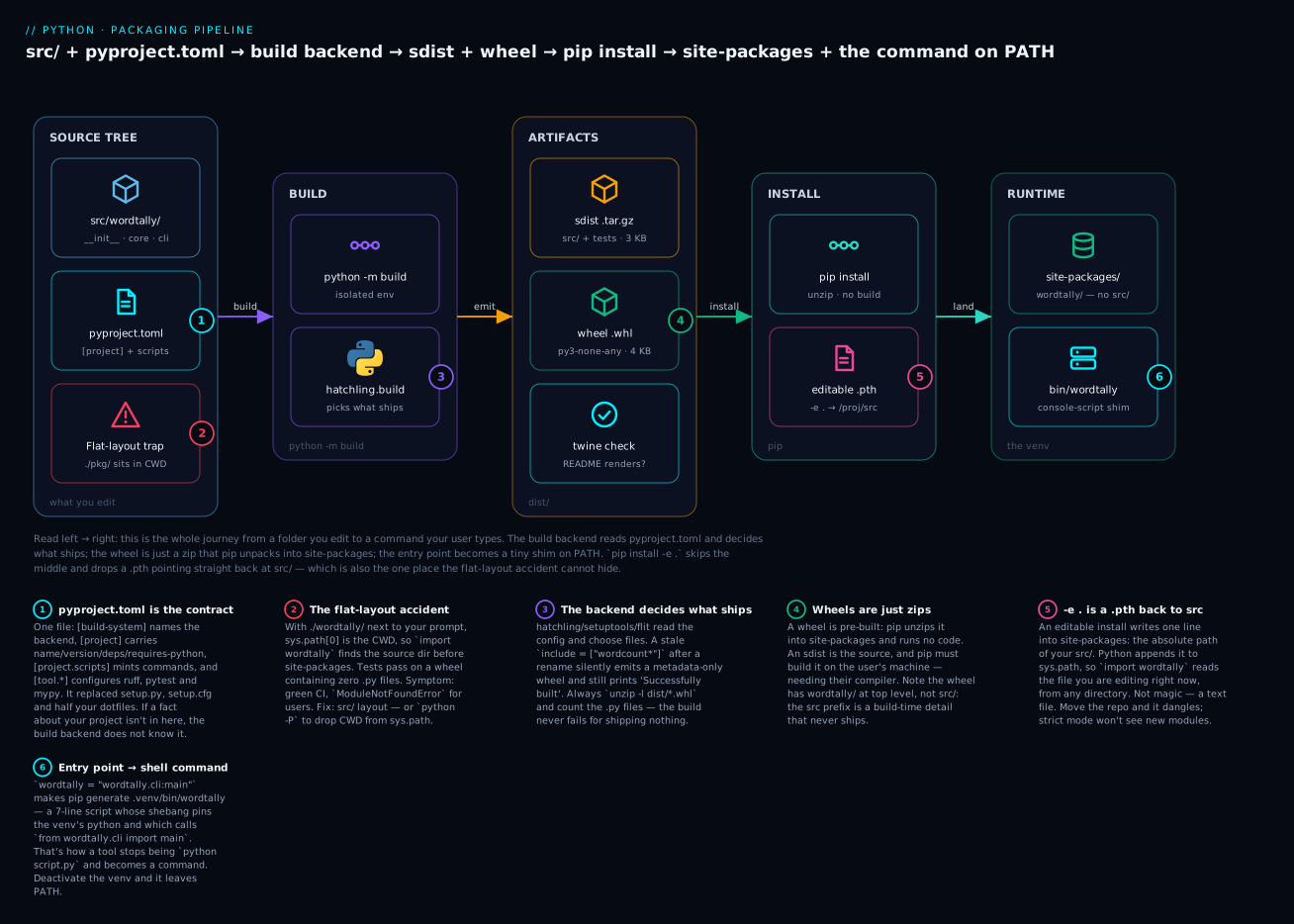
Six things go wrong here and the badges mark all of them: pyproject.toml is the only contract the backend reads (1); the flat-layout shadow means CWD beats site-packages (2); the backend silently ships whatever the config selects, including nothing (3); wheels are zips and sdists make the user build (4); -e . is a text file, not sorcery (5); and your entry point only exists while its venv is on PATH (6).
pip install -e . — the dev workflow
src/ layout makes your package unimportable until it’s installed. So install it — but not a copy, or you’d reinstall after every keystroke:
pip install -e ".[dev]"
Building editable for wordtally (pyproject.toml): finished with status 'done'
Successfully built wordtally
Installing collected packages: wordtally, ruff, pygments, pluggy, packaging, iniconfig, pytest
Successfully installed iniconfig-2.3.0 packaging-26.2 pluggy-1.6.0 pygments-2.20.0 pytest-9.1.1 ruff-0.15.21 wordtally-0.1.0
Note ".[dev]" — the dot is “the project in this directory”, [dev] pulls in optional-dependencies.dev, and the quotes stop your shell from globbing the brackets. One command installed your package and your whole dev toolchain.
Now, what did -e actually do? Almost nothing, and that’s the lesson:
ls .venv/lib/python3.12/site-packages/ | grep -iE "wordtally|editable"
cat .venv/lib/python3.12/site-packages/_editable_impl_wordtally.pth
_editable_impl_wordtally.pth
wordtally-0.1.0.dist-info
/Users/you/pkgdemo/wordtally/src
That’s it. A .pth file containing one line: the absolute path of your src/ directory. Python reads .pth files in site-packages at startup and appends each line to sys.path. So import wordtally searches your src/ folder — the actual files you’re editing:
python -c "import wordtally; print(wordtally.__file__)"
/Users/you/pkgdemo/wordtally/src/wordtally/__init__.py
Change the source, re-run, see the change. No reinstall. And the dist-info beside it is real metadata, so pip list, pip show, dependency resolution and your entry point all behave exactly as for a normal install.
Two consequences fall out of “it’s an absolute path in a text file”: move or rename the repo and the editable install dangles, and -e is for you, never for your users — it hard-wires a path on your disk.
pip install . |
pip install -e . |
|
|---|---|---|
What lands in site-packages |
A copy of your code | A .pth pointing at src/ |
| Edit source → effect | Nothing until you reinstall | Live |
wordtally.__file__ |
.../site-packages/wordtally/... |
.../src/wordtally/... |
| Survives moving the repo | Yes | No — dangling path |
| Use for | Testing the real artifact; deploys | Development. Always |
Building: sdist and wheel
python -m build
You get two files, and they are not two formats of the same thing:
ls dist/
wordtally-0.1.0-py3-none-any.whl
wordtally-0.1.0.tar.gz
Look inside both. The sdist is your repo:
tar tzf dist/wordtally-0.1.0.tar.gz
wordtally-0.1.0/sample.txt
wordtally-0.1.0/src/wordtally/__init__.py
wordtally-0.1.0/src/wordtally/cli.py
wordtally-0.1.0/src/wordtally/core.py
wordtally-0.1.0/tests/test_core.py
wordtally-0.1.0/.gitignore
wordtally-0.1.0/LICENSE
wordtally-0.1.0/README.md
wordtally-0.1.0/pyproject.toml
wordtally-0.1.0/PKG-INFO
Tests, README, pyproject.toml, src/ — the lot. It’s a snapshot of the project as source, and installing it means building it on the user’s machine.
The wheel is the built result:
unzip -l dist/wordtally-0.1.0-py3-none-any.whl
Archive:  dist/wordtally-0.1.0-py3-none-any.whl
  Length      Date    Time    Name
---------  ---------- -----   ----
      164  02-02-2020 00:00   wordtally/__init__.py
     1045  02-02-2020 00:00   wordtally/cli.py
     1009  02-02-2020 00:00   wordtally/core.py
     1423  02-02-2020 00:00   wordtally-0.1.0.dist-info/METADATA
       87  02-02-2020 00:00   wordtally-0.1.0.dist-info/WHEEL
       49  02-02-2020 00:00   wordtally-0.1.0.dist-info/entry_points.txt
     1066  02-02-2020 00:00   wordtally-0.1.0.dist-info/licenses/LICENSE
      632  02-02-2020 00:00   wordtally-0.1.0.dist-info/RECORD
---------                     -------
     5475                     8 files
Three details in that listing repay a close read.
wordtally/ is at the top level. There is no src/. That’s the answer to “won’t src/ layout annoy my users?” — it’s a build-time detail the backend strips. They never type it, never see it, never know.
No tests/. The sdist has them; the wheel doesn’t. Your users don’t need your test suite.
That 02-02-2020 timestamp. Not a bug — hatchling zeroes timestamps so building the same source twice yields a byte-identical wheel. Reproducible builds.
And the entry point, made concrete:
unzip -p dist/wordtally-0.1.0-py3-none-any.whl wordtally-0.1.0.dist-info/entry_points.txt
[console_scripts]
wordtally = wordtally.cli:main
Your TOML became a tiny INI file inside the zip. At install time, pip reads it and generates the shim. That’s the entire mechanism.
sdist (.tar.gz) |
wheel (.whl) |
|
|---|---|---|
| What it is | Your source, archived | The built package |
| Contains | src/, tests/, pyproject.toml, README |
Just the importable package + dist-info |
| Installing means | Run your build backend on the user’s machine | Unzip. That’s all |
| Needs a compiler? | Maybe — for C extensions, yes | Never |
| Speed | Slow (build every time) | Fast (copy files) |
| Runs your code at install? | Yes — the backend | No |
| Can pip resolve deps without installing? | Not reliably | Yes — metadata is right there |
| Ship it? | Yes — the fallback, and the source of truth | Yes — what 99% of users get |
Ship both. The wheel is what everyone actually installs; the sdist is the fallback for platforms you didn’t build for, and it’s what distro packagers and auditors need.
The wheel’s filename is structured data — {name}-{version}-{python tag}-{abi tag}-{platform tag}.whl:
| Filename | Reads as | Meaning |
|---|---|---|
wordtally-0.1.0-py3-none-any.whl |
py3 · none · any |
Pure Python. Any Python 3, any OS, any CPU |
numpy-2.1.0-cp312-cp312-manylinux_2_17_x86_64.whl |
cp312 · cp312 · manylinux…x86_64 |
CPython 3.12 only, Linux only, x86-64 only |
numpy-2.1.0-cp312-cp312-macosx_11_0_arm64.whl |
cp312 · cp312 · macosx…arm64 |
CPython 3.12, macOS 11+, Apple Silicon |
pkg-1.0-py2.py3-none-any.whl |
py2.py3 |
Ancient; supports both Python 2 and 3 |
py3-none-any is the good outcome: one file serves every user on earth. That’s the reward for pure Python. The moment you compile C, you’re building a matrix — every Python version × every OS × every architecture — which is why projects like NumPy publish dozens of wheels per release, and why cibuildwheel exists.
Publishing — accurately, and not right now
⚠️ Do not publish the lab package. PyPI is a public, permanent namespace, and wordtally is a tutorial name. Read this section; don’t run the last command.
First, always:
twine check dist/*
Checking dist/wordtally-0.1.0-py3-none-any.whl: PASSED
Checking dist/wordtally-0.1.0.tar.gz: PASSED
twine check renders your README exactly as PyPI will. This catches the failure the build cannot, because the build never validates markup:
Checking dist/wordtally-0.1.0-py3-none-any.whl: FAILED
ERROR    `long_description` has syntax errors in markup and would not be
         rendered on PyPI.
         line 4: Error: Unknown target name: "broken link reference".
That package builds, installs and runs perfectly. Its PyPI page would be a wall of raw text — permanently, because you cannot re-upload a version to fix it.
Then TestPyPI first — a real, separate instance of PyPI meant for exactly this:
twine upload --repository testpypi dist/*

pip install --index-url https://test.pypi.org/simple/ --no-deps wordtally
--no-deps matters: TestPyPI doesn’t mirror real PyPI, so your dependencies mostly aren’t there. You’re testing your artifact, not the resolver.
Only then, the real thing:
twine upload dist/*
| Step | Command | Why |
|---|---|---|
| 1. Clean | rm -rf dist/ build/ |
Old artifacts get uploaded by dist/* too |
| 2. Build | python -m build |
Fresh sdist + wheel |
| 3. Validate | twine check dist/* |
Catches broken README before it’s permanent |
| 4. Test-install | pip install dist/*.whl in a clean venv |
Prove the artifact works, not your repo |
| 5. TestPyPI | twine upload --repository testpypi dist/* |
A rehearsal you can throw away |
| 6. Verify | pip install --index-url …/simple/ --no-deps pkg |
Install it as a stranger would |
| 7. PyPI | twine upload dist/* |
⚠️ Permanent |
On credentials: PyPI requires 2FA, and you authenticate with an API token (username __token__, password the token) — never your account password. Better still, if you release from CI, use Trusted Publishing: GitHub Actions proves its identity to PyPI over OIDC and gets a short-lived token, so no long-lived secret lives in your repo at all. Since a release is also a tag and a commit, Git & GitHub Workflow: Branches, PRs & Collaboration covers that half.
Now the part that catches people, and the reason to rehearse.
A name is global, first-come, and effectively permanent. There is one wordtally on PyPI for all of humanity, and names are normalised per PEP 503 — Word.Tally, word-tally, word_tally and WORD--TALLY are all the same name. If someone has it, you cannot have it.
A version is immutable. Once wordtally-0.1.0.tar.gz exists on PyPI, that filename can never be uploaded again — not after you delete it, not ever. Deleting a release doesn’t free the version; it only breaks everyone pinned to it. Shipped a typo at 1.0.0? You don’t fix 1.0.0, you ship 1.0.1. That asymmetry — trivially easy to publish, impossible to unpublish — is why steps 3 to 6 exist.
Dependencies: abstract vs concrete
This is the distinction most people get wrong, and getting it right is most of dependency management.
Abstract dependencies say what your code needs, as loosely as honestly possible. They live in pyproject.toml, they’re ranges, and they’re for libraries:
[project]
dependencies = [
  "requests>=2.31,<3",
  "rich>=13",
]
Concrete dependencies say what a specific working environment contained, exactly. They live in a lockfile, they’re pins of the entire resolved tree, and they’re for applications:
certifi==2026.6.17
charset-normalizer==3.4.9
idna==3.18
requests==2.31.0
rich==13.7.1
urllib3==2.7.0
The reason both exist: a library cannot know what else will be installed next to it. If your library pins requests==2.31.0, and the user’s other dependency needs requests==2.32.0, they can’t have both — and your package is the reason. You’ve made yourself un-co-installable to save yourself a compatibility test.
An application has the opposite problem. It’s the final word; nothing gets installed next to it. So “whatever’s newest” isn’t flexibility, it’s an uncontrolled variable: your July build and your August build install different code from the same commit, and you find out in production.
Library (people pip install it) |
Application (a service, a CLI you deploy) | |
|---|---|---|
| Style | Ranges — requests>=2.31,<3 |
Exact pins — requests==2.31.0 |
| Lives in | pyproject.toml dependencies |
requirements.txt / uv.lock / poetry.lock |
| Scope | Direct deps only | The whole resolved tree |
| Who resolves | Your user’s pip, at install time | You, once, deliberately |
| Committed? | Yes — it’s your contract | Yes — it’s your build input |
| If you get it wrong | Users hit ResolutionImpossible because of you |
“Works on my machine”; CI drifts from prod |
The trap is doing it backwards, and it’s common in both directions: a library that pins exactly is antisocial, an application that doesn’t pin is unreliable. Plenty of projects are both — a library you also deploy — and then you do both: ranges in pyproject.toml for your users, a lockfile in the repo for your own CI. They answer different questions.
Extras are named optional groups. pip install wordtally gets nothing extra; pip install "wordtally[dev]" pulls in pytest and ruff:
[project.optional-dependencies]
dev = ["pytest>=8", "ruff>=0.6"]
docs = ["mkdocs-material>=9"]
Extras are for your users’ optional features (pandas[excel]), and by long convention also for dev tooling — which is why pip install -e ".[dev]" is the universal onboarding command. (Newer tooling has [dependency-groups] for dev-only deps that never ship in your metadata; extras remain the widely-supported option.)
Never put a dev dependency in dependencies — every user of your library would install pytest. It happens constantly. dependencies is what your code needs at runtime, nothing more.
Documentation that earns its keep
Docs aren’t a separate deliverable you write at the end. They’re four layers, each answering a different question at a different moment.
The README
Your README is your entire first impression: it renders on GitHub and on PyPI, and it’s the only documentation most users will ever read. It has one job — answer, in order, the questions a stranger actually has:
| Question | Section | Failure if missing |
|---|---|---|
| What is this? | One line, at the top | They leave in 5 seconds |
| Why would I use it? | 2-3 lines, honest about scope | “How is this different from X?” issues |
| How do I install it? | pip install wordtally |
They guess, and guess wrong |
| Show me it working | A copy-pasteable example with real output | They can’t tell if it fits |
| Where are the real docs? | One link | Every question becomes an issue |
| Can I legally use it? | Licence line | Companies can’t adopt it |
That’s the whole list. The commonest README failure isn’t being too short — it’s opening with a badge wall and an architecture essay while never showing the tool running. The quickstart is the load-bearing part: a ## Quickstart heading, one fenced wordtally sample.txt -n 3, and the three lines it actually prints. Readers decide whether your tool fits from that block alone, and an example without its output is an assertion rather than a demonstration.
⚠️ A packaging-specific gotcha: your README ships inside your metadata, so relative image links () resolve on GitHub and 404 on PyPI, which has no repo to resolve against. Use absolute URLs.
Docstrings
A docstring is a string literal as the first statement of a module, class or function. It isn’t a comment — it’s an attribute, readable at runtime by help(), your IDE, and every doc generator:
def top_words(text: str, n: int = 5) -> list[tuple[str, int]]:
    """Return the `n` most common non-stop words in `text`, highest first.

    Args:
        text: Raw text to analyse.
        n: How many words to return. Defaults to 5.

    Returns:
        A list of `(word, count)` pairs, most common first.

    Example:
        >>> top_words("the cat sat on the mat cat", n=1)
        [('cat', 2)]
    """
    return Counter(tokenize(text)).most_common(n)
PEP 257 sets the conventions: triple double-quotes always (even one-liners), a summary line in the imperative mood ending in a period, a blank line before any elaboration, and closing quotes on their own line for multi-line docstrings.
The format of the body is not standardised, and three conventions compete:
| Style | Looks like | Pros | Cons | Used by |
|---|---|---|---|---|
Args: / Returns: / Raises: |
Most readable as plain text; compact | Needs the napoleon extension for Sphinx |
Google, most modern projects | |
| NumPy | Parameters with ---------- underlines |
Excellent for many params; scientific norm | Verbose; lots of vertical space | NumPy, SciPy, pandas, scikit-learn |
| reST | :param text: / :returns: |
Sphinx-native, zero config | Hard to read in the source | Older Sphinx projects |
Pick one and never mix. Google style is the right default for a new project: it reads well in the terminal, in your IDE hover, and rendered. NumPy if you’re in the scientific stack, because your neighbours use it. reST only if the project already does.
That Example: block with >>> isn’t decoration either — python -m doctest and pytest --doctest-modules will execute it and check the output. Docs that fail CI when they lie are the only docs that stay true.
Type hints as documentation
Look at the signature again:
def top_words(text: str, n: int = 5) -> list[tuple[str, int]]:
That line already told you the argument types, the default, and the exact return shape — before you read one word of prose. Type hints are documentation that cannot go stale, because mypy checks them and your IDE completes from them. Docstrings describe meaning (“non-stop words, highest first”); types describe shape. You want both, and the types mean the docstring doesn’t have to repeat itself.
Sphinx vs MkDocs, and a CHANGELOG
When the README stops being enough, you need a docs site:
| Sphinx | MkDocs (+ Material) | |
|---|---|---|
| Source | reStructuredText (Markdown via MyST) | Markdown, natively |
| API docs from docstrings | autodoc — mature, deep |
mkdocstrings — good, newer |
| Learning curve | Steep | Gentle |
| Cross-references | Excellent (intersphinx links across projects) |
Basic |
| Looks good by default | Not really | Yes — Material is excellent |
| Best for | Large libraries; the Python stdlib itself uses it | Most projects; anything doc-site-shaped |
Sphinx if you’re a big library with a big API surface and want intersphinx. MkDocs + Material otherwise — the barrier to writing is lower, and docs that get written beat docs that are theoretically better.
And the CHANGELOG: one Markdown file, newest version on top, grouped by Added / Changed / Deprecated / Removed / Fixed / Security (the Keep a Changelog convention). It’s not your git log — git log is what you did, a changelog is what changed for the user. Your MAJOR bump promised a breaking change; this is where you say which, and it’s the only thing between an upgrader and an issue on your tracker.
Tooling: ruff, mypy, and pre-commit
Four tools, and the modern answer is shorter than it used to be.
ruff is a linter and formatter in one, written in Rust, and it’s the modern choice by a wide margin — it replaces flake8, isort, pyupgrade, autoflake, pydocstyle, a pile of plugins, and (as a formatter) black, at 10-100× the speed. Config lives in pyproject.toml:
[tool.ruff]
line-length = 88
src = ["src", "tests"]

[tool.ruff.lint]
select = ["E", "F", "I", "UP", "B"]
Those five rule families are a good starting set: E pycodestyle, F pyflakes (real bugs — unused imports, undefined names), I isort (import sorting), UP pyupgrade (modernises old syntax), B bugbear (likely-bug patterns). Two commands:
ruff check .        # lint
ruff format .       # format
All checks passed!
4 files left unchanged
And when it isn’t happy, it’s specific:
F401 [*] `os` imported but unused
 --> src/wordtally/core.py:1:8
  |
1 | import os
  |        ^^
help: Remove unused import: `os`

Found 5 errors.
[*] 2 fixable with the `--fix` option.
[*] means ruff can fix it itself — ruff check --fix . and the unused import is gone.
black is the formatter ruff’s formatter deliberately imitates (near-identical output). Its real contribution was cultural: it ended formatting arguments by removing the options. If a project already uses black, leave it — mixing the two is pointless churn. For new projects, ruff format means one tool, one config, one install.
mypy checks your type hints statically — it catches top_words(text, n="5") before your users do. Start lenient and tighten:
[tool.mypy]
python_version = "3.12"
strict = true
strict = true on a new project from day one is realistic; on a large existing codebase it will produce thousands of errors and you should turn it on per-module instead.
pre-commit ties them together. It installs a git hook that runs your tools on staged files before each commit, so broken formatting never reaches the branch:
# .pre-commit-config.yaml
repos:
  - repo: https://github.com/astral-sh/ruff-pre-commit
    rev: v0.6.9
    hooks:
      - id: ruff
        args: [--fix]
      - id: ruff-format
pip install pre-commit && pre-commit install
| Tool | Job | Config in | Modern verdict |
|---|---|---|---|
| ruff | Lint and format | [tool.ruff] |
Use it. Replaces flake8 + isort + pyupgrade + black |
| black | Format | [tool.black] |
Fine, but ruff format matches it and is one fewer tool |
| flake8 | Lint | .flake8 (can’t use pyproject) |
Superseded by ruff |
| isort | Sort imports | [tool.isort] |
Superseded by ruff’s I rules |
| mypy | Static type checking | [tool.mypy] |
Use it; strict on new code |
| pytest | Tests | [tool.pytest.ini_options] |
The standard |
| pre-commit | Run all of it on commit | .pre-commit-config.yaml |
The glue. Same hooks in CI |
The point of pre-commit isn’t the hooks — it’s that every contributor runs the same checks you do, without being told. Run the identical config in CI and formatting stops being a code review topic forever.
Hands-on lab
You’ll take the 40-line script from the top of this lesson and promote it into a real distributable: src/ layout, an entry point that becomes a shell command, an editable install, a README, ruff, a built wheel you’ll open up — and then you’ll break it on purpose to prove the src/ layout claim.
Needs Python 3.10+ (we use X | None syntax) and an internet connection. I’ll write python3.12; substitute your interpreter.
Step 0 — the script we’re starting from.
mkdir -p ~/pkgdemo && cd ~/pkgdemo
Create ~/pkgdemo/wordtally.py — 40 lines, works, goes nowhere:
#!/usr/bin/env python3
"""wordtally - report the most common words in a text file."""
import argparse
import re
import sys
from collections import Counter
from pathlib import Path

STOP_WORDS = {"the", "a", "an", "and", "or", "of", "to", "in", "is", "it", "that"}
WORD_RE = re.compile(r"[a-z']+")


def tokenize(text: str) -> list[str]:
    """Lowercase, split on words, drop stop-words."""
    return [w for w in WORD_RE.findall(text.lower()) if w not in STOP_WORDS]


def top_words(text: str, n: int = 5) -> list[tuple[str, int]]:
    """Return the n most common non-stop words, highest first."""
    return Counter(tokenize(text)).most_common(n)


def main() -> int:
    parser = argparse.ArgumentParser(description="Count the most common words in a file.")
    parser.add_argument("path", type=Path, help="text file to read")
    parser.add_argument("-n", "--number", type=int, default=5, help="how many words")
    args = parser.parse_args()

    if not args.path.is_file():
        print(f"wordtally: no such file: {args.path}", file=sys.stderr)
        return 1

    text = args.path.read_text(encoding="utf-8")
    for word, count in top_words(text, args.number):
        print(f"{count:>6}  {word}")
    return 0


if __name__ == "__main__":
    sys.exit(main())
And ~/pkgdemo/sample.txt:
Packaging is the part of Python that beginners skip and professionals cannot.
A script is a file you run. A module is a file you import. A package is a
directory of modules. A distribution is a package that other people can install.
Packaging is what turns a package into a distribution, and a distribution is
what pip install actually consumes. Packaging is boring right up to the moment
a colleague asks how do I run your tool and the honest answer is you cannot.
python3.12 wordtally.py sample.txt
     3  packaging
     3  you
     3  package
     3  distribution
     2  cannot
What just happened: it works — from this directory, with this interpreter. Change either and it doesn’t. That’s what we’re fixing.
Step 1 — build the src/ layout.
mkdir -p ~/pkgdemo/wordtally-pkg/src/wordtally ~/pkgdemo/wordtally-pkg/tests
cd ~/pkgdemo/wordtally-pkg
cp ~/pkgdemo/sample.txt .
Split the script into logic and CLI. src/wordtally/core.py:
"""Word counting, with no I/O and no CLI - just text in, counts out."""

import re
from collections import Counter

STOP_WORDS = frozenset(
    {"the", "a", "an", "and", "or", "of", "to", "in", "is", "it", "that"}
)
WORD_RE = re.compile(r"[a-z']+")


def tokenize(text: str) -> list[str]:
    """Lowercase `text`, split it into words, and drop stop-words.

    Args:
        text: Raw text to split.

    Returns:
        The surviving words, in document order.
    """
    return [w for w in WORD_RE.findall(text.lower()) if w not in STOP_WORDS]


def top_words(text: str, n: int = 5) -> list[tuple[str, int]]:
    """Return the `n` most common non-stop words in `text`, highest first.

    Args:
        text: Raw text to analyse.
        n: How many words to return. Defaults to 5.

    Returns:
        A list of `(word, count)` pairs, most common first.

    Example:
        >>> top_words("the cat sat on the mat cat", n=1)
        [('cat', 2)]
    """
    return Counter(tokenize(text)).most_common(n)
src/wordtally/cli.py:
"""Command-line entry point for wordtally."""

import argparse
import sys
from pathlib import Path

from wordtally import __version__
from wordtally.core import top_words


def main(argv: list[str] | None = None) -> int:
    """Parse arguments, read the file, print the tally. Returns an exit code."""
    parser = argparse.ArgumentParser(
        prog="wordtally", description="Count the most common words in a file."
    )
    parser.add_argument("path", type=Path, help="text file to read")
    parser.add_argument("-n", "--number", type=int, default=5, help="how many words")
    parser.add_argument(
        "--version", action="version", version=f"wordtally {__version__}"
    )
    args = parser.parse_args(argv)

    if not args.path.is_file():
        print(f"wordtally: no such file: {args.path}", file=sys.stderr)
        return 1

    text = args.path.read_text(encoding="utf-8")
    for word, count in top_words(text, args.number):
        print(f"{count:>6}  {word}")
    return 0


if __name__ == "__main__":
    sys.exit(main())
src/wordtally/__init__.py — the public API:
"""wordtally - report the most common words in a text file."""

__version__ = "0.1.0"

from wordtally.core import top_words

__all__ = ["top_words", "__version__"]
And tests/test_core.py:
from wordtally.core import tokenize, top_words


def test_tokenize_drops_stop_words():
    assert tokenize("The cat and a dog") == ["cat", "dog"]


def test_top_words_orders_by_count():
    assert top_words("cat cat dog", n=2) == [("cat", 2), ("dog", 1)]
What just happened: main() takes argv now, so tests can call it. core has no I/O, so it’s testable without a terminal. And note tests/ imports wordtally like a stranger — which currently cannot possibly work, because nothing is installed.
Step 2 — prove the src/ wall exists.
cd ~/pkgdemo/wordtally-pkg
python3.12 -c "import wordtally"
  File "<string>", line 1, in <module>
ModuleNotFoundError: No module named 'wordtally'
What just happened: this is the feature. You’re standing in the repo root and your own package is not importable, because src/ isn’t a package and src/wordtally/ isn’t in your CWD. There is no way to import this except by installing it. Remember this error — in a flat layout you’d never have seen it.
Step 3 — the pyproject.toml. Create it at ~/pkgdemo/wordtally-pkg/pyproject.toml:
[build-system]
requires = ["hatchling"]
build-backend = "hatchling.build"

[project]
name = "wordtally"
version = "0.1.0"
description = "Report the most common words in a text file."
readme = "README.md"
requires-python = ">=3.10"
license = "MIT"
license-files = ["LICENSE"]
authors = [{ name = "Your Name", email = "you@example.com" }]
keywords = ["text", "wordcount", "cli"]
classifiers = [
  "Development Status :: 3 - Alpha",
  "Environment :: Console",
  "Intended Audience :: Developers",
  "Programming Language :: Python :: 3",
  "Programming Language :: Python :: 3.12",
  "Topic :: Text Processing",
]
dependencies = []

[project.optional-dependencies]
dev = ["pytest>=8", "ruff>=0.6"]

[project.urls]
Homepage = "https://example.com/wordtally"
Source = "https://github.com/you/wordtally"
Issues = "https://github.com/you/wordtally/issues"

[project.scripts]
wordtally = "wordtally.cli:main"

[tool.ruff]
line-length = 88
src = ["src", "tests"]

[tool.ruff.lint]
select = ["E", "F", "I", "UP", "B"]

[tool.pytest.ini_options]
testpaths = ["tests"]
addopts = "-q"
Plus a README.md, a LICENSE (paste the MIT text with your name), and .gitignore:
.venv/
__pycache__/
*.pyc
build/
dist/
*.egg-info/
.pytest_cache/
.ruff_cache/
What just happened: dependencies = [] is honest — we use only the stdlib. requires-python = ">=3.10" is not decoration: list[str] | None in cli.py is a SyntaxError on 3.9.
Step 4 — venv, then pip install -e ..
python3.12 -m venv .venv
source .venv/bin/activate
python -m pip install -e ".[dev]"
Building editable for wordtally (pyproject.toml): finished with status 'done'
Successfully built wordtally
Installing collected packages: wordtally, ruff, pygments, pluggy, packaging, iniconfig, pytest
Successfully installed iniconfig-2.3.0 packaging-26.2 pluggy-1.6.0 pygments-2.20.0 pytest-9.1.1 ruff-0.15.21 wordtally-0.1.0
What just happened: hatchling found src/wordtally/ with no configuration, and [dev] brought the toolchain. The wall from Step 2 is down:
python -c "import wordtally; print(wordtally.__file__)"
cat .venv/lib/python3.12/site-packages/_editable_impl_wordtally.pth
/Users/you/pkgdemo/wordtally-pkg/src/wordtally/__init__.py
/Users/you/pkgdemo/wordtally-pkg/src/wordtally
The whole editable install is one line of text: the absolute path of your src/, appended to sys.path at startup.
Step 5 — collect the payoff.
which wordtally
wordtally sample.txt -n 3
wordtally --version
/Users/you/pkgdemo/wordtally-pkg/.venv/bin/wordtally
     3  packaging
     3  you
     3  package
wordtally 0.1.0
What just happened: your script became a command. Look at the shim pip wrote:
cat .venv/bin/wordtally
#!/Users/you/pkgdemo/wordtally-pkg/.venv/bin/python
# -*- coding: utf-8 -*-
import re
import sys
from wordtally.cli import main
if __name__ == '__main__':
    sys.argv[0] = re.sub(r'(-script\.pyw|\.exe)?$', '', sys.argv[0])
    sys.exit(main())
Seven lines: a shebang pinning the venv’s python, and a call to your function.
Step 6 — tests and ruff.
pytest
ruff check .
ruff format .
..                                                                       [100%]
2 passed in 0.00s
All checks passed!
4 files left unchanged
What just happened: pytest imported the installed package (via the editable .pth), not a directory that happened to be lying around. Now watch ruff earn its place — add a junk import at the top of src/wordtally/core.py:
import os
ruff check .
I001 [*] Import block is un-sorted or un-formatted
 --> src/wordtally/core.py:1:1
F401 [*] `os` imported but unused
 --> src/wordtally/core.py:1:8
  |
1 | import os
  |        ^^
help: Remove unused import: `os`

Found 5 errors.
[*] 2 fixable with the `--fix` option.
ruff check --fix .
What just happened: [*] marks what ruff can fix itself. The unused import is gone; ruff check is green again.
Step 7 — build, and open the box.
python -m pip install build twine
python -m build
ls dist/
Successfully built wordtally-0.1.0.tar.gz and wordtally-0.1.0-py3-none-any.whl
wordtally-0.1.0-py3-none-any.whl
wordtally-0.1.0.tar.gz
unzip -l dist/wordtally-0.1.0-py3-none-any.whl
Archive:  dist/wordtally-0.1.0-py3-none-any.whl
  Length      Date    Time    Name
---------  ---------- -----   ----
      164  02-02-2020 00:00   wordtally/__init__.py
     1045  02-02-2020 00:00   wordtally/cli.py
     1009  02-02-2020 00:00   wordtally/core.py
     1423  02-02-2020 00:00   wordtally-0.1.0.dist-info/METADATA
       87  02-02-2020 00:00   wordtally-0.1.0.dist-info/WHEEL
       49  02-02-2020 00:00   wordtally-0.1.0.dist-info/entry_points.txt
     1066  02-02-2020 00:00   wordtally-0.1.0.dist-info/licenses/LICENSE
      632  02-02-2020 00:00   wordtally-0.1.0.dist-info/RECORD
---------                     -------
     5475                     8 files
What just happened: three things. wordtally/ is at the top — no src/: the layout that protects you never reaches your users. No tests/ — they’re in the sdist, not the wheel. And the 02-02-2020 timestamps are hatchling zeroing them so the build is byte-reproducible.
unzip -p dist/wordtally-0.1.0-py3-none-any.whl wordtally-0.1.0.dist-info/entry_points.txt
twine check dist/*
[console_scripts]
wordtally = wordtally.cli:main
Checking dist/wordtally-0.1.0-py3-none-any.whl: PASSED
Checking dist/wordtally-0.1.0.tar.gz: PASSED
What just happened: your two lines of TOML became a tiny INI inside the zip — that’s the entire entry-point mechanism. And twine check rendered your README the way PyPI will. ⚠️ Stop here. Do not twine upload — wordtally is a tutorial name and PyPI is permanent.
Step 8 — now break it, and prove the point.
Switch to setuptools with a stale package name — exactly what happens when a project gets renamed and the config doesn’t:
[build-system]
requires = ["setuptools>=68"]
build-backend = "setuptools.build_meta"

[project]
name = "wordtally"
version = "0.1.0"
description = "Report the most common words in a text file."
readme = "README.md"
requires-python = ">=3.10"

[project.scripts]
wordtally = "wordtally.cli:main"

[tool.setuptools.packages.find]
where = ["src"]
include = ["wordcount*"]
rm -rf dist build
python -m build --wheel
unzip -l dist/wordtally-0.1.0-py3-none-any.whl | grep -c "\.py$"
Successfully built wordtally-0.1.0-py3-none-any.whl
0
What just happened: “Successfully built” — and zero Python files in the wheel. The glob matched nothing, so the backend shipped metadata and nothing else. No error, exit code 0.
python -m pip install --force-reinstall dist/wordtally-0.1.0-py3-none-any.whl
python -c "import wordtally"
pytest
  File "<string>", line 1, in <module>
ModuleNotFoundError: No module named 'wordtally'
    from wordtally.core import tokenize, top_words
E   ModuleNotFoundError: No module named 'wordtally'
=========================== short test summary info ============================
ERROR tests/test_core.py
!!!!!!!!!!!!!!!!!!!! Interrupted: 1 error during collection !!!!!!!!!!!!!!!!!!!!
1 error in 0.05s
What just happened: your src/ layout caught it in the first second. You cannot proceed.
Step 9 — what flat layout would have done. Same broken wheel, flat layout:
mkdir -p ~/pkgdemo/flat && cd ~/pkgdemo/flat
cp -r ~/pkgdemo/wordtally-pkg/src/wordtally ./wordtally
cp -r ~/pkgdemo/wordtally-pkg/tests .
Copy the same broken pyproject.toml, with where = ["."] instead of where = ["src"], then:
python3.12 -m venv .venv && source .venv/bin/activate
python -m pip install -q build pytest
python -m build --wheel
python -m pip install --force-reinstall dist/wordtally-0.1.0-py3-none-any.whl
python -c "import wordtally; print('import OK ->', wordtally.__file__)"
pytest
import OK -> /Users/you/pkgdemo/flat/wordtally/__init__.py
..                                                                       [100%]
2 passed in 0.01s
What just happened: there it is. Same empty wheel. Same broken install. “2 passed.” Read the import path — that’s your source directory, found via the CWD, not site-packages. Your CI is green and your artifact is hollow. Now be your user:
cd /tmp
~/pkgdemo/flat/.venv/bin/python -c "import wordtally"
~/pkgdemo/flat/.venv/bin/wordtally sample.txt
ModuleNotFoundError: No module named 'wordtally'
  File "/Users/you/pkgdemo/flat/.venv/bin/wordtally", line 5, in <module>
    from wordtally.cli import main
ModuleNotFoundError: No module named 'wordtally'
What just happened: that is the whole argument for src/ layout, and it took two directories to prove. Same bug: src/ made it un-hideable; flat handed you a green checkmark and shipped it. Confirm the mechanism with one flag:
cd ~/pkgdemo/flat
python    -c "import wordtally; print('shadowed ->', wordtally.__file__)"
python -P -c "import wordtally; print('with -P  ->', wordtally.__file__)"
shadowed -> /Users/you/pkgdemo/flat/wordtally/__init__.py
ModuleNotFoundError: No module named 'wordtally'
What just happened: -P (3.11+) removes the CWD from sys.path. The shadow disappears and the truth appears. The bug was always there — the layout decided whether you could see it.
Step 10 — repair, and finish clean. Restore the hatchling pyproject.toml from Step 3 in ~/pkgdemo/wordtally-pkg:
cd ~/pkgdemo/wordtally-pkg
rm -rf dist build
python -m pip install -e ".[dev]" --force-reinstall
python -m build
unzip -l dist/*.whl | grep -c "\.py$"
pytest && ruff check . && wordtally sample.txt -n 3
3
..                                                                       [100%]
2 passed in 0.00s
All checks passed!
     3  packaging
     3  you
     3  package
What just happened: three .py files in the wheel, green tests, clean lint, working command. Count the .py files in your wheel before every release — unzip -l dist/*.whl | grep -c "\.py$" is the ten-second check that would have caught everything in Steps 8 and 9.
⚠️ Cleanup: rm -rf ~/pkgdemo deletes the lot. Check the path before you press enter.
Now try these:
- Add a second command —
wordtally-json = "wordtally.cli:main_json", writemain_json(), reinstall, run it. Why was a reinstall needed? - Put a
stopwords.txtnext tocore.pyand rebuild. Is it in the wheel? Now switch to setuptools and rebuild. (Hatchling ships it; setuptools needs[tool.setuptools.package-data].) - Make the version dynamic, then also leave
version = "0.1.0"in[project]. Read the error. - Set
requires-python = ">=3.13"and install the wheel on 3.12. What exactly does pip say? - Break your README with an undefined
`link reference`_, rebuild, runtwine check. Wouldpython -m buildhave caught it?
Common mistakes and troubleshooting
| Symptom / traceback | Cause | Fix |
|---|---|---|
ModuleNotFoundError: No module named 'wordtally' right after pip install -e . |
src/ layout and the backend never found your package — check what’s in the wheel |
unzip -l dist/*.whl. If no .py files, your packages/include config is wrong or stale |
Works in the repo, ModuleNotFoundError for users |
The flat-layout trap — you were importing the source dir via CWD | Move to src/ layout. Right now: python -P -c "import pkg" or cd /tmp and import |
error: Multiple top-level packages discovered in a flat-layout: ['helpers', 'wordtally'] |
setuptools auto-discovery refuses to guess with 2+ root dirs | Move to src/ layout (setuptools’ own first suggestion), or set [tool.setuptools.packages.find] explicitly |
Successfully built but the wheel has no .py files |
A stale/typo’d include glob after a rename. The build never fails for shipping nothing |
unzip -l dist/*.whl | grep -c "\.py$" before every release |
wordtally: command not found |
The venv isn’t active — the shim lives in .venv/bin/ |
source .venv/bin/activate, or run .venv/bin/wordtally. For a global CLI use pipx install |
Entry point runs but ModuleNotFoundError: No module named 'wordtally' inside the shim |
The command installed; the package didn’t | Same as row 1 — the wheel is empty. pip show -f wordtally lists what landed |
New module invisible after pip install -e . |
Strict editable mode (editable_mode=strict) maps files at install time |
pip install -e . --force-reinstall. Or drop strict mode — the default .pth picks up new files |
| Editable install imports the wrong code after moving the repo | The .pth holds an absolute path that no longer exists |
pip uninstall wordtally && pip install -e . from the new location |
ValueError: Metadata field \version` cannot be both statically defined and listed in field `project.dynamic`` |
version = "0.1.0" and dynamic = ["version"] |
Pick one. Delete version, or delete it from dynamic |
ValueError: Missing \tool.hatch.version` configuration` |
You declared dynamic = ["version"] and never said where to read it |
Add [tool.hatch.version] with path = "src/pkg/__init__.py" |
Data file missing at runtime (FileNotFoundError for a .txt/.json in your package) |
setuptools ships only .py by default |
[tool.setuptools.package-data] → pkg = ["*.txt"], or include-package-data = true + MANIFEST.in. (Hatchling ships it by default) |
twine check → `long_description` has syntax errors in markup and would not be rendered on PyPI |
Broken README markup. The build doesn’t validate it | Fix the markup, rebuild, re-check. You cannot fix it after upload — only a new version can |
| README images 404 on PyPI but work on GitHub | Relative links have no repo to resolve against on PyPI | Use absolute URLs |
User on 3.9 installs happily, then gets SyntaxError from inside your library |
You forgot requires-python |
requires-python = ">=3.10" → pip refuses with requires a different Python: 3.9.6 not in '>=3.10' |
HTTPError: 400 File already exists on twine upload |
Versions are immutable; that file was already published | Bump the version. You cannot re-upload, even after deleting |
Invalid classifier / 400 Bad Request on upload |
Classifiers are a fixed vocabulary — you invented one | Copy from the official Trove list; twine check won’t catch this |
| Users can’t install your library alongside another | You pinned exactly in dependencies |
Libraries use ranges (>=2.31,<3); pins belong in an app’s lockfile |
| Everyone who installs your library also gets pytest | A dev dependency in [project] dependencies |
Move it to [project.optional-dependencies] dev |
python setup.py install “works” but pip can’t uninstall it |
Deprecated, bypasses PEP 517, leaves untracked files | pip install . — works on setup.py projects too |
.pth file present but import still fails |
You edited src/ but the .pth points somewhere else, or two installs are fighting |
pip uninstall pkg (twice — check it’s gone), then reinstall |
Three of these are worth more than a table row.
1. The build never fails for shipping nothing. This is the most dangerous fact in this lesson. Your linter fails on an unused import; your type checker fails on a bad annotation; your tests fail on a wrong answer. But python -m build will cheerfully print Successfully built over a wheel containing zero lines of your code, because “which files ship” is configuration, and an empty selection is a valid selection. Nothing in the toolchain finds this suspicious. So make it a habit, before every release:
unzip -l dist/*.whl | grep -c "\.py$"
If that number isn’t what you expect, stop. And test-install the artifact in a clean venv from a different directory, rather than trusting a green test run in your repo.
2. The day-one pain of src/ layout is the product. Beginners meet it, hit ModuleNotFoundError before writing a line, and conclude it’s ceremony. It’s the opposite: that error is the layout doing its only job — refusing to import code that isn’t properly installed. Flat layout doesn’t spare you the error, it defers it from your machine to your user’s. Cost: one pip install -e .. Benefit: “works on my machine” becomes structurally impossible for this class of bug — which also covers missing package data, a missing __init__.py in a subpackage, and any include/exclude mistake, all of which flat layout hides identically.
3. Publishing is one-way. Everything else in software has an undo; PyPI doesn’t. You cannot re-upload a version — not after deleting it, not with a support ticket. Deleting a release doesn’t free the version, it just breaks everyone pinned to it. And the name is global and first-come for all of humanity. That asymmetry is the entire reason for twine check, TestPyPI, and installing your own wheel in a clean venv first — and why this lab stops at twine check.
Cheat-sheet
| Command / snippet | What it does |
|---|---|
| Layout | |
src/pkg/, tests/, pyproject.toml |
The canonical tree. tests/ outside src/ |
python -c "import sys; print(sys.path[0])" |
'' = CWD — the flat-layout shadow, in one command |
python -P -c "import pkg" |
3.11+: import without the CWD shadow. The truth |
| pyproject.toml | |
[build-system] requires = ["hatchling"] |
What pip installs to build you |
build-backend = "hatchling.build" |
Who does the building |
[project] name, version |
Required. version unless it’s dynamic |
requires-python = ">=3.10" |
Don’t skip. pip refuses old interpreters for you |
dependencies = ["requests>=2.31,<3"] |
Ranges for libraries |
[project.optional-dependencies] dev = [...] |
pip install -e ".[dev]" |
[project.scripts] cmd = "pkg.cli:main" |
The payoff — cmd becomes a shell command |
license = "MIT" + license-files = ["LICENSE"] |
PEP 639 SPDX form |
dynamic = ["version"] + [tool.hatch.version] |
Single source of truth in __init__.py |
[tool.ruff] · [tool.pytest.ini_options] · [tool.mypy] |
Tool config, same file, no dotfiles |
| Develop | |
python3.12 -m venv .venv && source .venv/bin/activate |
Always. Every project |
pip install -e ".[dev]" |
Editable install + dev tools. The dev command |
cat .venv/lib/python3.12/site-packages/*editable*.pth |
See the one line that makes -e work |
pip show -f wordtally |
What actually got installed, file by file |
| Build | |
python -m build |
sdist + wheel into dist/ |
python -m build --wheel |
Wheel only (faster) |
unzip -l dist/*.whl |
Look inside the box. Do this every time |
unzip -l dist/*.whl | grep -c "\.py$" |
Count shipped modules. If it’s 0, stop |
unzip -p dist/*.whl *.dist-info/METADATA |
The metadata pip will read |
unzip -p dist/*.whl *.dist-info/entry_points.txt |
Your commands, as shipped |
tar tzf dist/*.tar.gz |
What’s in the sdist (has tests/; the wheel doesn’t) |
| Publish | |
twine check dist/* |
Does the README render on PyPI? Nothing else checks |
twine upload --repository testpypi dist/* |
Rehearse on TestPyPI |
pip install --index-url https://test.pypi.org/simple/ --no-deps pkg |
Install the rehearsal |
twine upload dist/* |
⚠️ Permanent. Name is global; version is immutable |
| Tools | |
ruff check . · ruff check --fix . |
Lint; [*] rules auto-fix |
ruff format . |
Format (black-compatible) |
mypy src/ |
Type-check |
pytest |
Test the installed package |
pre-commit install |
Run all of it before every commit |
| Versions | |
PATCH 1.4.2→1.4.3 · MINOR →1.5.0 · MAJOR →2.0.0 |
Fix · add · break |
0.x.y |
“Anything may change.” Honest, not lesser |
Interview and exam questions
Q: What’s the difference between a package and a distribution?
A: A package is what you import — a directory of modules with an __init__.py. A distribution is what you pip install — a package plus metadata (name, version, dependencies, entry points), built into an sdist or wheel. They usually share a name but don’t have to: you pip install pillow and import PIL; you pip install scikit-learn and import sklearn. Make yours match unless you have a reason.
Q: Why src/ layout? Give the real reason, not the tidiness one.
A: Because sys.path[0] is the current working directory. In a flat layout, import mypkg from the repo root finds the source directory before site-packages — so your tests pass whether or not the install works. In src/ layout there’s no path from your CWD to the package, so the import can only succeed if the install genuinely worked; your test suite becomes physically incapable of testing anything but the installed artifact. The demo: given a wheel with a stale include glob shipping zero .py files, flat layout reports “2 passed” while src/ can’t even collect the tests.
Q: What does [build-system] do, and why does the build create an isolated environment?
A: requires lists build-time dependencies; build-backend names the object pip calls to build you. Per PEP 517, pip installs requires into a fresh temporary environment rather than using your venv — so builds are reproducible on machines that have never heard of your backend, and your dev environment can’t influence the artifact. It’s why python -m build prints “Creating isolated environment”.
Q: sdist or wheel — what’s the difference, and which do you ship?
A: An sdist is your source archived (src/, tests/, pyproject.toml); installing it runs your build backend on the user’s machine, which may need a compiler. A wheel is the built result; installing it is just unzipping into site-packages — no code runs, no compiler needed. Ship both: the wheel is what 99% of users get, the sdist is the fallback and what packagers need. py3-none-any means pure Python, one file for everyone.
Q: How does mytool become a shell command?
A: [project.scripts] mytool = "mypkg.cli:main" — command name, then package.module:function. At build time it becomes entry_points.txt inside the wheel; at install time pip reads that and generates .venv/bin/mytool, a ~7-line script whose shebang hardcodes the venv’s interpreter and which does from mypkg.cli import main; sys.exit(main()). That’s why main() should return an exit code, and why the command disappears when you deactivate.
Q: What does pip install -e . actually do?
A: It writes a .pth file into site-packages containing the absolute path of your src/ directory, plus real dist-info metadata. Python appends .pth lines to sys.path at startup, so import mypkg reads the files you’re editing right now, from any directory, with no reinstall. It’s a text file holding an absolute path — so moving the repo breaks it, and it’s for development only.
Q: A colleague pins requests==2.31.0 in their library’s dependencies. What do you tell them?
A: That it makes the library un-co-installable. Any user whose other dependency needs a different requests gets ResolutionImpossible, and their package is the cause. Libraries declare abstract dependencies — ranges like requests>=2.31,<3 — because they can’t know what will be installed next to them. Exact pins are for applications, in a lockfile, where you control the deployment and want identical bytes everywhere. Same project can do both: ranges in pyproject.toml, a lockfile for its own CI.
Q: python -m build printed “Successfully built” but users get ModuleNotFoundError. Debug it.
A: The wheel is probably empty. unzip -l dist/*.whl — if there are no .py files, the backend selected nothing: a stale include glob after a rename, a wrong where, or a packages list that doesn’t match the directory. The build won’t fail for this, because an empty file selection is a valid selection. Then ask why you didn’t notice — almost always flat layout, where your CWD supplied the package your tests imported. Fix the config, verify with unzip -l, and install the wheel in a clean venv from another directory.
Q: What does a MAJOR version bump promise?
A: That something a user relied on is gone or behaves differently, so they must read the changelog before upgrading. It’s decided by their code, not your intent: renaming a parameter is MAJOR even if the old name was a typo; changing a default from n=5 to n=10 is MAJOR because every caller relying on it silently changes behaviour; dropping a Python version is MAJOR. Adding an optional keyword is MINOR. Clearer error text is PATCH. And 0.x means “I reserve the right to break you” — honest, not lesser.
Q: What must a README answer, and what does twine check do that the build doesn’t?
A: What is this, why use it, how to install, a copy-pasteable quickstart with real output, a link to full docs, and the licence — in that order. twine check renders your README exactly as PyPI will and fails on broken markup: `long_description` has syntax errors in markup and would not be rendered on PyPI. The build never validates markup, so a package that builds, installs and runs perfectly can still have an unreadable PyPI page — permanently, since you can’t re-upload a version to fix it.
Q (practical): Promote tool.py into an installable CLI called tool. Commands only.
A:
mkdir -p tool-pkg/src/tool tool-pkg/tests && cd tool-pkg
# move the logic to src/tool/core.py, the argparse main() to src/tool/cli.py
python3.12 -m venv .venv && source .venv/bin/activate
python -m pip install -e ".[dev]"
tool --help
With this pyproject.toml:
[build-system]
requires = ["hatchling"]
build-backend = "hatchling.build"

[project]
name = "tool"
version = "0.1.0"
requires-python = ">=3.10"

[project.scripts]
tool = "tool.cli:main"
The points being tested: src/ layout, hatchling needing no package config, main() returning an exit code, and -e ".[dev]" as the one onboarding command.
Q (practical): You inherit a repo with setup.py, setup.cfg, .flake8 and MANIFEST.in. What do you do?
A: Nothing hasty — it isn’t broken, and setuptools is maintained. First, stop running python setup.py (deprecated, bypasses PEP 517, and setup.py install leaves files pip can’t uninstall); use pip install . and python -m build, which work on setup.py projects fine. Then migrate incrementally: [build-system] with setuptools>=61, setup() kwargs into [project] (install_requires → dependencies, python_requires → requires-python, entry_points → [project.scripts]), .flake8 → [tool.ruff], MANIFEST.in → [tool.setuptools.package-data]. Keep a setup.py only for a genuinely dynamic build like a C extension. Verify each step with unzip -l dist/*.whl — the artifact is the only thing that counts.
Key takeaways
- A distribution is a package plus a machine-readable promise. Script → module → package → distribution: each rung exists because the one below ran out of road, and the last one is what turns your code into something a stranger can
pip installand run. src/layout isn’t tidiness — it’s a wall.sys.path[0]is your CWD, so flat layout letsimport mypkgfind the source dir even when the install is broken. Same bug, same wheel with zero.pyfiles: flat prints2 passed,src/can’t even collect the tests.src/makes your suite incapable of testing anything but the installed artifact.- The build never fails for shipping nothing. A stale
includeglob printsSuccessfully builtover a metadata-only wheel.unzip -l dist/*.whl | grep -c "\.py$"before every release — the ten-second check nothing else in the toolchain performs. pyproject.tomlis the one contract.[build-system]= how to build (isolated, per PEP 517),[project]= standard metadata every backend reads identically,[tool.*]= the dotfiles it absorbed. hatchling for new pure-Python projects; setuptools when you compile C or inherit it.[project.scripts]is the payoff, and-e .is a text file.cmd = "pkg.cli:main"becomesentry_points.txtin the wheel and a 7-line shim in.venv/bin/— which is why the command vanishes when you deactivate. And an editable install is one.pthline holding yoursrc/path: no magic, breaks if you move the repo, never ship it.- Wheels are zips, sdists are source. Installing a wheel is unzipping — no build, no compiler, no code run.
py3-none-anymeans one file serves everyone. Ship both. And the wheel has nosrc/and notests/: the layout that protects you never reaches your users. - Ranges for libraries, pins for applications. A library that pins exactly is un-co-installable and hands its users
ResolutionImpossible. An app that doesn’t pin has an uncontrolled variable and finds out in production. Many projects need both, in different files. requires-pythonandtwine checkare the two you’ll skip and shouldn’t. Without the first, a 3.9 user installs happily and gets aSyntaxErrorfrom inside your library. Without the second, a package that builds and runs perfectly gets a permanently broken PyPI page — names are global, versions are immutable, and you cannot re-upload. Rehearse on TestPyPI.
Next: your pyproject.toml now declares dependencies, and pip & Virtual Environments: Isolating Dependencies the Right Way covers the pinning-versus-ranges half in full — ~=, ResolutionImpossible, lockfiles and all. If the sys.path mechanics behind the src/ argument were the interesting part, Modules, Packages, Imports & the Standard Library takes import apart properly. And since a release is a tag and a version bump is a commit, Git & GitHub Workflow: Branches, PRs & Collaboration covers the half of publishing that happens before twine upload.