A single variable holds one thing. Real programs hold many things: the lines of a log file, the rows of a shopping cart, the prices in a report, the servers in a cluster. The moment you need “many things in order,” you reach for a list — and Python’s list is so central that you will type [ more often than almost any other character in this course.
Lists look easy. cart = ["milk", "bread"] — done. And that easiness is exactly the trap. Almost every beginner writes this bug in their first month:
original = [[0, 0], [0, 0]]
backup = original[:]      # "I made a copy, so I'm safe"
backup[0][0] = 99
print(original)           # [[99, 0], [0, 0]]   <- the original changed anyway
Nothing is broken. Python did exactly what it promises. The problem is the mental model: you pictured a list as a box holding values, and it is really a row of references pointing at objects that live somewhere else. Get that one picture right and slicing, copying, aliasing, tuples, and half of Python’s famous “gotchas” stop being surprises and become predictions.
This lesson builds that picture from first principles, then hands you the reference tables you will actually keep open in a second tab.
Why this matters
A list is Python’s general-purpose, ordered, growable collection. It is the default answer to “I have several of these.” You will meet it in every file you read, every API response you parse, every dataset you clean. If you learn only one data structure well, learn this one.
The reason lists deserve a whole lesson — rather than one line of syntax — is that they are mutable. A mutable object can be changed in place, after it is created, by anyone holding a reference to it. That single property is what makes lists so useful (build them up as you go) and what makes them dangerous (someone else’s code can change your list, and you never see the assignment that did it). Nearly every confusing list bug is a mutability bug wearing a disguise.
The tuple is the deliberate opposite: a fixed row of values that cannot be reassigned after creation. Beginners often dismiss tuples as “read-only lists nobody uses.” That is backwards. Tuples exist because immutability buys you three things a list can never offer: they are hashable (so they can be dictionary keys and set members), they are safe to share (nobody can mutate the record you handed them), and they signal intent — this is one record with a fixed shape, not a collection that grows.
Here is the anchor idea for everything below. A name in Python is a label tied to an object, not a box containing a value. cart = [...] does not put a list “into” cart; it creates a list object somewhere in memory and makes cart point at it. alias = cart does not copy anything — it adds a second label to the same object. And the list object itself does not contain your strings and numbers; it contains references to them. Hold “labels and references” in your head, and the rest of this lesson is detail.
Lists: ordered, mutable, heterogeneous
Three words define a Python list, and each one is a promise you can rely on.
Ordered — items keep the position you put them in, permanently. cart[0] is the first item today, tomorrow, and after a restart. (Order means insertion order preserved, not sorted.)
Mutable — you can change the list after creating it: append, remove, overwrite a slot, sort it in place. The object’s identity stays the same while its contents change, which is precisely why aliasing matters.
Heterogeneous — a list can mix types freely, because the slots hold references and a reference to a str is the same size as a reference to a float. Python allows it; good judgement usually says don’t, except for genuine records.
empty       = []                       # the literal — most common
also_empty  = list()                   # the constructor
nums        = [3, 1, 4, 1, 5]          # duplicates are fine — lists don't dedupe
mixed       = [42, "hello", 3.14, True, None, [1, 2]]   # legal: 6 references
print(len(mixed))                      # => 6   (the nested list counts as ONE item)
The constructor list() accepts any iterable — anything you can loop over — and that is the usual way to turn something else into a list:
| Expression | Result | When you’d use it |
|---|---|---|
[] |
[] |
The empty list. Fastest and most readable |
list() |
[] |
Same thing; needed when passing list as a callable |
["a", "b"] |
['a', 'b'] |
A literal you know up front |
list("cat") |
['c', 'a', 't'] |
Explode a string into characters |
list(range(5)) |
[0, 1, 2, 3, 4] |
Materialise a range (which is lazy, not a list) |
list((1, 2)) |
[1, 2] |
Convert a tuple → list (to make it mutable) |
list({3, 1, 2}) |
[1, 2, 3] |
Convert a set → list (order not guaranteed in general) |
[0] * 5 |
[0, 0, 0, 0, 0] |
Pre-fill a fixed-size list — safe only for immutables |
[n * n for n in range(5)] |
[0, 1, 4, 9, 16] |
A comprehension: build from a loop, in one line |
sorted(other) |
new sorted list | Any iterable → a new sorted list |
That [0] * 5 row carries a warning we will detonate later: repetition copies references, not objects. With immutable items like 0 that is harmless. With a mutable item like a list, it is a bug factory.
Indexing: two rulers over one row
An index is a position. Python is 0-based: the first item is at index 0, and the last item of an n-item list is at n - 1. This trips up every beginner exactly once, and the reason is worth knowing: an index is really an offset from the start, and the first item is zero steps from the start.
Python then does something genuinely helpful: it lays a second ruler over the same row, running backwards. Negative indices count from the end, with -1 meaning the last item. So you never need the clumsy cart[len(cart) - 1].
log = ["boot", "auth", "query", "error", "close"]
#       0       1       2        3        4        <- positive: offset from start
#      -5      -4      -3       -2       -1        <- negative: offset from end

print(log[0])     # => boot
print(log[4])     # => close
print(log[-1])    # => close     the last item — no len() needed
print(log[-5])    # => boot      the first item, counting backwards
print(log[len(log) - 1])   # => close   the clumsy way; use -1 instead
Two facts make negative indices click. First, log[-1] is defined as log[len(log) - 1] — Python adds the length for you. Second, the two rulers meet: for any valid index, positive - len(log) == negative. Index 4 and index -1 on a 5-item list are the same slot.
| Expression | Value | Why |
|---|---|---|
log[0] |
'boot' |
First item — zero offset from the start |
log[2] |
'query' |
Third item (0, 1, 2) |
log[-1] |
'close' |
Last item — the idiom to memorise |
log[-2] |
'error' |
Second from the end |
log[-5] |
'boot' |
First item; -len(log) is the lowest legal index |
log[5] |
IndexError |
Valid range is 0..4 — 5 is off the end |
log[-6] |
IndexError |
Valid range is -5..-1 — -6 is off the front |
log[1][0] |
'a' |
Index the result: log[1] is 'auth', then [0] of that string |
len(log) |
5 |
The count — always one more than the last index |
Go off the end and Python refuses, loudly:
log[5]
Traceback (most recent call last):
  File "<stdin>", line 1, in <module>
IndexError: list index out of range
That traceback is a feature. IndexError is Python telling you your arithmetic is wrong at the exact moment it is wrong, rather than handing back garbage. Remember its shape — because in the next section you will meet the one operation that does not raise it.
Slicing: [start:stop:step]
A slice takes a range of items and returns them as a brand-new list. The full form is log[start:stop:step], and every part is optional.
The single most important rule: stop is excluded. log[1:3] gives you indices 1 and 2, not 1, 2 and 3. Read the colon as “up to, but not including.” This looks arbitrary until you notice the payoffs: log[:n] always has exactly n items; log[:n] and log[n:] split the list perfectly with no overlap and no gap; and stop - start is the length of the result.
log = ["boot", "auth", "query", "error", "close"]

print(log[1:3])      # => ['auth', 'query']          indices 1,2 — NOT 3
print(log[:3])       # => ['boot', 'auth', 'query']  start omitted = from the beginning
print(log[3:])       # => ['error', 'close']         stop omitted  = to the end
print(log[:])        # => the whole list — a full COPY (see below)
print(log[-2:])      # => ['error', 'close']         last two — a very common idiom
print(log[:-2])      # => ['boot', 'auth', 'query']  everything except the last two
log[:3] and log[3:] fitting together like puzzle pieces is the stop-exclusive rule paying you back.
The third parameter, step, says how far to jump. It defaults to 1. A negative step walks backwards — and when the step is negative, the defaults for start and stop flip, which is why the famous [::-1] reverses a whole list:
print(log[::2])      # => ['boot', 'query', 'close']    every other item (0,2,4)
print(log[1:4:2])    # => ['auth', 'error']             from 1, up to 4, jumping 2
print(log[::-1])     # => ['close', 'error', 'query', 'auth', 'boot']   reversed COPY
print(log[::-2])     # => ['close', 'query', 'boot']    backwards, every other
| Part | Default (step > 0) | Default (step < 0) | Meaning |
|---|---|---|---|
start |
0 |
len - 1 (the end) |
First index included |
stop |
len |
“before the start” | First index excluded |
step |
1 |
— | Stride; negative walks right→left |
[:] |
— | — | Every item — a full shallow copy |
[::-1] |
— | — | Reversed copy (both bounds flip) |
Here is the behaviour that separates slicing from indexing, and it is the single most useful thing in this section: slicing never raises IndexError. Out-of-range bounds are silently clamped to the list.
print(log[10:20])    # => []      no error — there is simply nothing there
print(log[2:1])      # => []      start after stop — empty, not an error
print(log[0:99])     # => the whole list — 99 is clamped to len(log)
log[10]              # IndexError: list index out of range   <- indexing DOES raise
| Operation | Out of range | Returns / raises |
|---|---|---|
log[10] |
index past the end | IndexError: list index out of range |
log[10:20] |
slice past the end | [] — clamped, silent |
log[0:99] |
stop past the end | the whole list — clamped |
log[2:1] |
start after stop | [] — empty, silent |
log[:] |
— | a new list with the same items |
This cuts both ways. It is a gift when you write page = results[offset:offset + 10] and the last page is short — no special case needed. It is a trap when a typo silently yields [] and your loop just… does nothing, with no error to debug. If a slice mysteriously returns an empty list, your bounds are wrong — Python will never tell you.
Slice assignment: slicing on the left-hand side
A slice can also be an assignment target, which lets you replace, insert, or delete a whole run of items in one statement. This only works on mutable sequences — lists yes, tuples and strings no.
nums = [0, 1, 2, 3, 4]
nums[1:3] = ["a", "b", "c"]   # replace 2 items with 3 — the list GROWS
print(nums)                   # => [0, 'a', 'b', 'c', 3, 4]
print(len(nums))              # => 6

nums = [0, 1, 2, 3, 4]
nums[1:4] = []                # replace 3 items with none = delete them
print(nums)                   # => [0, 4]

nums = [0, 1, 2, 3, 4]
nums[5:5] = ["end"]           # zero-width slice at the end = insert
print(nums)                   # => [0, 1, 2, 3, 4, 'end']
A plain slice may change the list’s length. An extended slice (one with an explicit step) may not — the lengths must match exactly:
nums = [0, 1, 2, 3, 4]
nums[::2] = ["x", "y", "z"]   # 3 targets (0,2,4), 3 values — OK
print(nums)                   # => ['x', 1, 'y', 3, 'z']

nums[::2] = ["x", "y"]        # 3 targets, 2 values
ValueError: attempt to assign sequence of size 2 to extended slice of size 3
| Statement | Effect | Length change? |
|---|---|---|
xs[1:3] = ["a", "b", "c"] |
Replace indices 1–2 with 3 items | Yes — grows by 1 |
xs[1:4] = [] |
Delete indices 1–3 | Yes — shrinks |
xs[5:5] = ["end"] |
Insert at position 5, nothing removed | Yes — grows |
xs[:] = [9, 9] |
Replace contents in place, same object | Yes — and every alias sees it |
xs[::2] = ["x","y","z"] |
Replace every other slot | No — must match exactly |
xs[::2] = ["x","y"] |
— | ValueError — size mismatch |
del xs[1:3] |
Delete indices 1–2 | Yes — shrinks |
xs[:] = [...] deserves a highlight: unlike xs = [...], which just re-points the name at a new object, xs[:] = [...] replaces the contents of the existing object. Every other name pointing at that list sees the change. It is the difference between “give me a new list” and “empty this list and refill it,” and it is occasionally exactly the tool you want.
The list methods that matter
Lists have eleven public methods. Here is every one, with the fact beginners most often get wrong: what it returns.
| Method | What it does | Returns | Mutates? |
|---|---|---|---|
xs.append(v) |
Add v as one item at the end |
None |
Yes |
xs.extend(it) |
Add each item of iterable it at the end |
None |
Yes |
xs.insert(i, v) |
Insert v before index i |
None |
Yes |
xs.remove(v) |
Delete the first item equal to v |
None |
Yes |
xs.pop() |
Remove and return the last item | the item | Yes |
xs.pop(i) |
Remove and return the item at index i |
the item | Yes |
xs.clear() |
Remove every item | None |
Yes |
xs.index(v) |
Position of the first item equal to v |
int |
No |
xs.count(v) |
How many items equal v |
int |
No |
xs.sort() |
Sort in place | None |
Yes |
xs.reverse() |
Reverse in place | None |
Yes |
xs.copy() |
A shallow copy (same as xs[:]) |
new list | No |
Watch one list travel through all of them — note every None:
xs = [3, 1, 4]
xs.append(1)        # xs => [3, 1, 4, 1]          returns None
xs.extend([5, 9])   # xs => [3, 1, 4, 1, 5, 9]    returns None
xs.insert(0, 2)     # xs => [2, 3, 1, 4, 1, 5, 9] returns None
xs.remove(1)        # xs => [2, 3, 4, 1, 5, 9]    removes the FIRST 1 only
print(xs.pop())     # => 9        xs => [2, 3, 4, 1, 5]
print(xs.pop(0))    # => 2        xs => [3, 4, 1, 5]
print(xs.index(4))  # => 1        position, not the value
print(xs.count(1))  # => 1
xs.reverse()        # xs => [5, 1, 4, 3]
xs.sort()           # xs => [1, 3, 4, 5]
xs.clear()          # xs => []
remove and index find items by equality (==), not identity — so cart.remove(["salt", 1, 25.0]) works even though you never held a reference to that exact row object. Both raise ValueError when the value is absent, and pop() raises IndexError on an empty list.
The .sort() returns None trap
This is the most common beginner bug in the language, so it gets its own heading.
names = ["zoe", "adam", "kim"]
result = names.sort()
print(result)      # => None            <- NOT the sorted list!
print(names)       # => ['adam', 'kim', 'zoe']   <- the sort DID happen, in place
The sort worked perfectly; sort() simply has nothing to hand back, because it changed names itself. Python’s convention is deliberate and consistent: methods that mutate in place return None. That convention is a safety rail — it stops you from thinking you got a copy when you mutated the original.
The bug bites hardest when you chain:
first = names.sort()[0]
TypeError: 'NoneType' object is not subscriptable
'NoneType' object is not subscriptable almost always means “you used the return value of a mutating method.” When you want a new list, use the built-in function sorted() instead:
xs.sort() |
sorted(xs) |
|
|---|---|---|
| Kind | List method | Built-in function |
| Works on | Lists only | Any iterable (list, tuple, set, str, dict…) |
| Returns | None |
A new list, always |
| Original | Modified in place | Untouched |
| Memory | No copy | Allocates a new list |
| Use when | You own the list and want it sorted | You need a sorted view, or the input isn’t a list |
Both accept the same two arguments — key (a function that computes what to sort by) and reverse — and both are stable, meaning items that compare equal keep their original relative order.
words = ["banana", "Fig", "apple", "cherry"]

words.sort()                 # => ['Fig', 'apple', 'banana', 'cherry']
# Surprise: 'Fig' sorts first — capitals have lower codepoints than lowercase.

words.sort(key=str.lower)    # => ['apple', 'banana', 'cherry', 'Fig']
words.sort(key=len)          # => ['Fig', 'apple', 'banana', 'cherry']  (3,5,6,6)

print(sorted("banana"))      # => ['a', 'a', 'a', 'b', 'n', 'n']   any iterable
print(sorted({3, 1, 2}))     # => [1, 2, 3]                        set → new list
The key function is called once per item and the results are compared. key=str.lower fixes case-insensitive sorting; key=len sorts by length; key=lambda row: row[2] sorts records by their third field. Note that sorting mixed types fails, because Python refuses to guess an order:
[1, "a"].sort()
TypeError: '<' not supported between instances of 'str' and 'int'
append vs extend vs + vs +=
Four ways to add to a list, and they are genuinely different.
a = [1, 2]; a.append([3, 4])   # a => [1, 2, [3, 4]]   ONE new item (a list), len 3
b = [1, 2]; b.extend([3, 4])   # b => [1, 2, 3, 4]     each item added,      len 4
c = [1, 2] + [3, 4]            # c => [1, 2, 3, 4]     a NEW list; originals untouched
d = [1, 2]; d += [3, 4]        # d => [1, 2, 3, 4]     in place — like extend
| Form | Adds | New list or in place? | Accepts |
|---|---|---|---|
xs.append(v) |
v as a single item |
In place | Any single object |
xs.extend(it) |
Each item of it |
In place | Any iterable |
xs + ys |
Each item of ys |
New list — xs unchanged |
Lists only |
xs += ys |
Each item of ys |
In place (calls extend) |
Any iterable |
xs * 3 |
Repeats the references | New list | — |
Two sharp edges live in that table. First, += is not shorthand for = x + on a list — it mutates in place, so every alias sees the change, whereas xs = xs + ys rebinds only your name. Second, += accepts any iterable while + demands a list, which produces a genuinely confusing pair:
d = [1, 2]; d += "ab"     # d => [1, 2, 'a', 'b']   a str IS iterable — chars added!
d = [1, 2] + "ab"         # TypeError
TypeError: can only concatenate list (not "str") to list
remove vs pop vs del vs clear
| You want to… | Use | By | Returns | If missing |
|---|---|---|---|---|
| Delete a known value | xs.remove(v) |
value (==), first match only |
None |
ValueError: list.remove(x): x not in list |
| Take the last item and use it | xs.pop() |
position (end) | the item | IndexError: pop from empty list |
Take item i and use it |
xs.pop(i) |
position | the item | IndexError |
| Delete by position, discard it | del xs[i] |
position | — (statement) | IndexError |
| Delete a run of positions | del xs[1:3] |
slice | — | never raises |
| Empty the list, keep the object | xs.clear() |
— | None |
— |
| Delete the name itself | del xs |
— | — | NameError on next use |
del is a statement, not a method — which is why it can also delete slices and even the variable binding. del xs removes the label; the list object survives as long as any other name still points at it.
Membership: in and its hidden cost
The in operator asks “does this list contain a value equal to this?” It reads beautifully and it is O(n) — Python scans the list item by item until it finds a match or runs out.
log = ["boot", "auth", "query"]
print("auth" in log)        # => True    found at index 1
print("AUTH" in log)        # => False   == is case-sensitive
print("missing" not in log) # => True
On a three-item list, who cares. On a million-item list inside a loop, this is the difference between a script that finishes and one you kill. Because in on a list must look at every item, while in on a set or dict hashes the value and jumps straight to it in roughly constant time:
import timeit
big_list = list(range(1_000_000))
big_set  = set(range(1_000_000))

timeit.timeit("999_999 in big", setup="big=list(range(1_000_000))", number=100)  # ≈ 0.48 s
timeit.timeit("999_999 in big", setup="big=set(range(1_000_000))",  number=100)  # ≈ 0.0000032 s
That is roughly 150,000× faster on the same data — the single highest-leverage data-structure swap a beginner can learn. (Exact timings vary by machine; the ratio is the point.) If you find yourself writing if x in some_big_list inside a loop, you almost certainly want a set. Sets and dicts get a lesson of their own later in this phase.
Names, references and the copy problem
Now we cash in the mental model. Everything below follows from one sentence: a list holds references to objects, and a name is just another reference.
a = [1, 2, 3]
b = a               # NOT a copy — a second label on the SAME object
b.append(4)
print(a)            # => [1, 2, 3, 4]   <- "a" changed, though you never touched it
print(a is b)       # => True           same object, proven

c = a[:]            # a slice builds a NEW list object
c.append(5)
print(a)            # => [1, 2, 3, 4]   unaffected
print(a is c)       # => False          different objects
print(a == c)       # => False          == compares contents; c has the extra 5
is and == answer different questions, and confusing them is its own bug class. is asks “the same object?” (compares identity). == asks “the same contents?” Two separate lists with identical items are == but not is.
This diagram is the whole lesson in one picture. Read it left to right: the names on the left are labels; the list object in the middle holds reference slots, not values; the element objects live off to the side; a slice makes a new list object whose slots point at the very same elements; and a tuple is the same row of slots with the ability to reassign them removed.
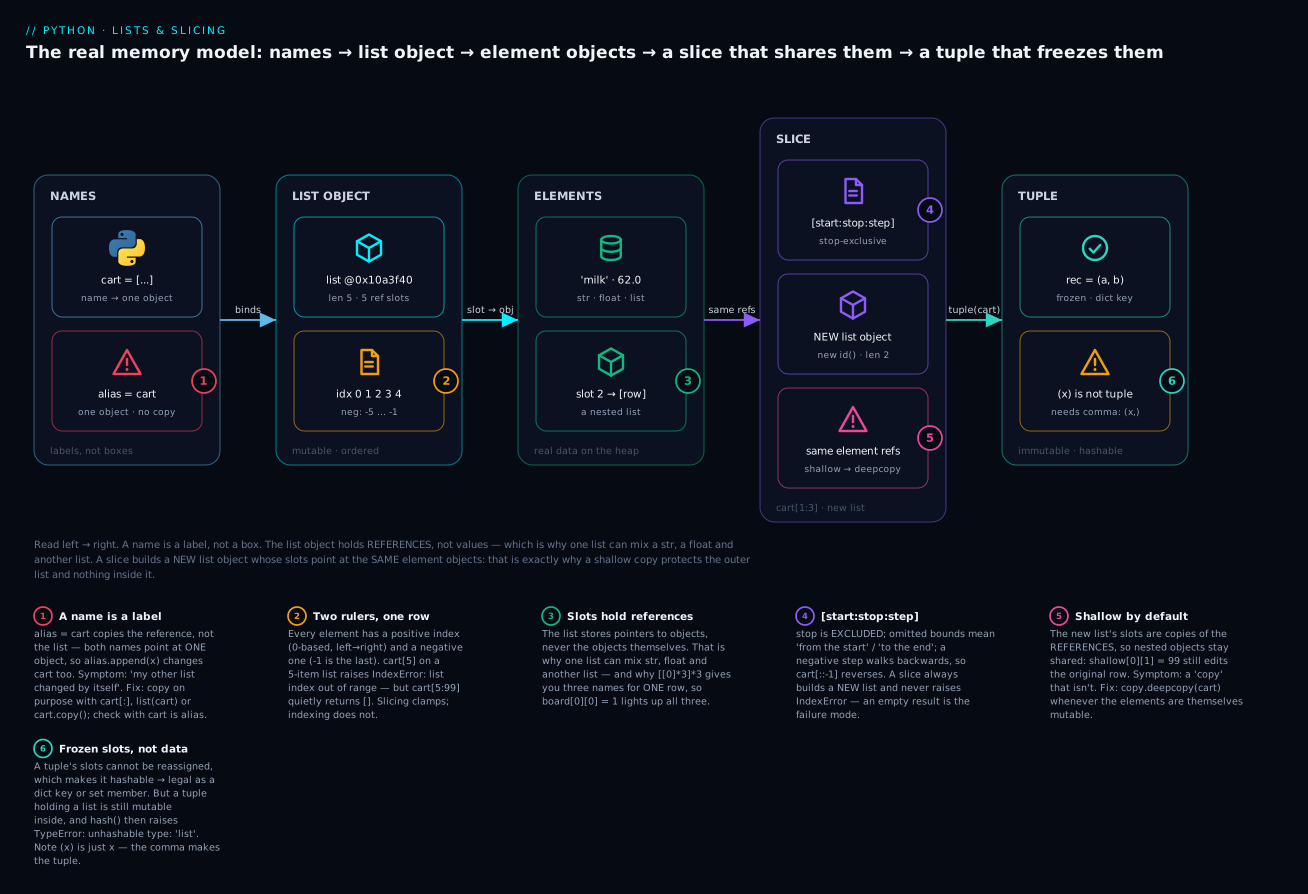
The badges mark the six things worth memorising: assignment copies the reference, not the list (1); every slot has both a positive and a negative index, and slicing clamps where indexing raises (2); the slots hold references, which is why one list mixes types and why [[0]*3]*3 betrays you (3); [start:stop:step] is stop-exclusive and always builds a new list (4); that new list shares the same element references — a shallow copy (5); and a tuple freezes the slots, not the objects they point at (6).
Shallow vs deep: the copy that isn’t
A slice copies the outer list: you get a new object with new slots. But the slots are copies of references, so both lists point at the same inner objects. That is a shallow copy, and it is Python’s default everywhere.
With immutable elements (int, str, float, tuple) this never matters — you cannot mutate a 3, so sharing it is invisible. The instant your elements are mutable (lists, dicts, or your own objects), sharing becomes visible and surprising:
import copy

grid    = [[1, 2], [3, 4]]
shallow = grid[:]              # new OUTER list, same INNER rows
deep    = copy.deepcopy(grid)  # new outer list AND new inner rows, recursively

shallow[0][0] = 99             # mutate a row THROUGH the shallow copy
print(grid)                    # => [[99, 2], [3, 4]]   <- the original changed!
print(shallow)                 # => [[99, 2], [3, 4]]
print(deep)                    # => [[1, 2], [3, 4]]    <- fully independent

print(grid[0] is shallow[0])   # => True    the same row object
print(grid[0] is deep[0])      # => False   a genuinely separate row
| Technique | Outer list | Inner objects | Cost | Use when |
|---|---|---|---|---|
b = a |
Shared | Shared | O(1) | You want one list with two names |
a[:] |
New | Shared | O(n) | Flat list of immutables |
list(a) |
New | Shared | O(n) | Same; reads well with any iterable |
a.copy() |
New | Shared | O(n) | Same; most explicit for a list |
copy.copy(a) |
New | Shared | O(n) | Generic shallow copy of any object |
copy.deepcopy(a) |
New | New, recursively | Slow | Nested/mutable elements you must isolate |
The first four rows of “Shared” inner objects are the whole story: a[:], list(a), a.copy() and copy.copy(a) are the same shallow copy in four spellings. Only copy.deepcopy() walks the structure and rebuilds it (it also tracks objects it has already seen, so cycles don’t loop forever). It is slower and it is the right answer whenever your elements are mutable and must be isolated.
The [[0]*3]*3 aliasing disaster
Now the classic. You want a 3×3 board of zeros, and this looks perfect:
board = [[0] * 3] * 3
print(board)                  # => [[0, 0, 0], [0, 0, 0], [0, 0, 0]]   looks right!

board[0][0] = 1               # set ONE cell
print(board)                  # => [[1, 0, 0], [1, 0, 0], [1, 0, 0]]   <- all three rows!
print(board[0] is board[1])   # => True    there is only ONE row object
Read the expression inside out and it is obvious. [0] * 3 builds one row — fine, because 0 is immutable. Then [<that row>] * 3 repeats the reference to that single row three times. You did not make three rows; you made one row and three labels for it. Writing to board[0][0] writes to the only row that exists, and all three slots show it.
The fix is to build a new inner list on every iteration, which a comprehension does naturally:
board = [[0] * 3 for _ in range(3)]   # the loop body runs 3 times → 3 distinct lists
board[0][0] = 1
print(board)                  # => [[1, 0, 0], [0, 0, 0], [0, 0, 0]]   correct
print(board[0] is board[1])   # => False   three separate row objects
The rule to carry forever: * on a list repeats references. That is safe for immutable items and a bug for mutable ones. [0] * 3 is fine; [[]] * 3 is not.
Tuples: immutable by design
A tuple is an ordered sequence like a list, with one thing removed: you cannot reassign its slots after creation. No append, no sort, no item assignment. Tuples have exactly two methods — count and index — against a list’s eleven.
point = (3, 4)
also  = 3, 4          # the parentheses are OPTIONAL — the COMMA makes the tuple
empty = ()            # the one case that needs parentheses
print(also)           # => (3, 4)

t = (1, 2, 3)
t[0] = 9
TypeError: 'tuple' object does not support item assignment
The one-element tuple trap
This one catches everyone, and it follows from “the comma makes the tuple”:
not_a_tuple = (5)     # just the integer 5 — the parens are ordinary grouping
one_tuple   = (5,)    # THE TRAILING COMMA makes it a tuple

print(type((5)))      # => <class 'int'>
print(type((5,)))     # => <class 'tuple'>
print(len(("milk")))  # => 4      it's the STRING "milk" — len counts characters!
print(len(("milk",))) # => 1      a tuple holding one string
len(("milk")) returning 4 is the giveaway. ("milk") is just "milk" in parentheses, so you sliced and iterated a string while believing it was a tuple — and a string is iterable, so nothing raises until much later.
| Expression | Type | Length | Note |
|---|---|---|---|
() |
tuple |
0 | The empty tuple |
(5) |
int |
— | Not a tuple — just grouping parentheses |
(5,) |
tuple |
1 | The trailing comma is what matters |
5, |
tuple |
1 | Legal — no parentheses needed at all |
(3, 4) |
tuple |
2 | Two items |
3, 4 |
tuple |
2 | Same thing; how functions return “two values” |
tuple([1, 2]) |
tuple |
2 | Convert a list → tuple |
("milk") |
str |
4 | The trap — it’s a string |
Why tuples exist
They are hashable, so they can be dict keys and set members. This is the killer feature. Python can only hash an object whose value cannot change — otherwise the hash would go stale and the dict would lose track of it. Lists are mutable, so they are unhashable, full stop:
locations = {(0, 0): "origin", (1, 2): "target"}   # tuple keys — a coordinate map
print(locations[(0, 0)])       # => origin

bad = {[0, 0]: "origin"}       # a list key
TypeError: unhashable type: 'list'
TypeError: unhashable type: 'list' is one of the errors you will meet most often, and it always means the same thing: you tried to use a mutable object where Python needs a stable one — as a dict key, or as a set member.
They signal a fixed record. ("web01", 443, "ap-south-1") is one server: a fixed number of fields with different meanings per position. A list says “zero or more of the same kind of thing.” Using the right one documents your intent for free.
They are safe to hand out, they are slightly smaller, and they are faster to build (the compiler can cache a constant tuple, so a tuple literal builds ~7× faster than the equivalent list literal).
Immutable ≠ deeply immutable
Here is the subtlety that separates people who “know tuples” from people who understand them. A tuple freezes its own slots — the references it holds. It does not freeze the objects those references point at.
config = ("prod", ["us-east", "eu-west"])   # a tuple holding a LIST
config[1].append("ap-south")                # mutate the list through the tuple
print(config)     # => ('prod', ['us-east', 'eu-west', 'ap-south'])   it changed!
Nothing was violated: slot 1 still points at the exact same list object. The list simply grew. And because hashing a tuple hashes every element, this tuple is not hashable after all:
hash(config)
TypeError: unhashable type: 'list'
So the accurate rule is: a tuple is hashable only if every element is hashable. ("prod", "eu-west") is a fine dict key; ("prod", ["eu-west"]) is not.
For the truly curious, the deepest cut in the language:
t = (1, [2, 3])
try:
    t[1] += [4]              # step 1 extends the list; step 2 fails to store it back
except TypeError as e:
    print("TypeError:", e)
    # => TypeError: 'tuple' object does not support item assignment
print(t)                     # => (1, [2, 3, 4])   the list WAS extended anyway
t[1] += [4] is two steps: extend the list in place (which succeeds), then store the result back into t[1] (which fails). You get the exception and the mutation. Use t[1].extend([4]) if you meant it, and let this be the final proof that the slot and the object it points at are different things.
List vs tuple
list |
tuple |
|
|---|---|---|
| Syntax | [1, 2] |
(1, 2) or 1, 2 |
| Mutable | Yes — grow, shrink, reorder | No — slots are fixed |
| Methods | 11 | 2 (count, index) |
| Hashable | Never | Yes — if every element is |
| Dict key / set member | No | Yes |
x[:] returns |
A new list | The same object (t[:] is t → True) |
sys.getsizeof(...) holding 1, 2, 3 |
88 bytes | 64 bytes |
| Build speed | Slower | ~7× faster (literal is cached) |
| Meaning it conveys | “N of the same kind” | “one record, fixed shape” |
| Typical use | Cart items, log lines, rows | Coordinates, RGB, dict keys, returning 2 values |
That t[:] is t row is a neat proof of the whole idea: copying an immutable object is pointless, so CPython just hands the original back. Lists must copy; tuples need not.
namedtuple: tuples with field names
row[2] is unreadable and row[3] is a bug waiting to happen. collections.namedtuple gives you a tuple whose fields also have names — same immutability, same tuple behaviour, far better code:
from collections import namedtuple

Server = namedtuple("Server", ["host", "port", "region"])
srv = Server("web01", 443, "ap-south-1")

print(srv.host)               # => web01        by name — readable
print(srv[0])                 # => web01        still a tuple
print(srv)                    # => Server(host='web01', port=443, region='ap-south-1')
print(isinstance(srv, tuple)) # => True         it IS a tuple
host, port, region = srv      # unpacks like any tuple
print(srv._replace(port=8443))
# => Server(host='web01', port=8443, region='ap-south-1')   a NEW tuple; srv unchanged
_replace() returns a new object rather than mutating — the leading underscore avoids clashing with your field names, not privacy. For richer records with defaults, methods, and type hints, dataclasses is the modern successor; namedtuple remains perfect when you want a lightweight, hashable, tuple-compatible record.
Unpacking: taking collections apart
Unpacking assigns several names at once from one sequence. It works on any iterable, and it is everywhere in idiomatic Python.
point = (3, 4)
x, y = point          # basic unpacking
print(x, y)           # => 3 4

a, b = 1, 2
a, b = b, a           # the swap — no temporary variable
print(a, b)           # => 2 1
The swap works because the right-hand side is evaluated completely first (into a tuple), then unpacked. The count must match exactly, or you get a precise error:
try:
    a, b = [1, 2, 3]      # 3 items, 2 names
except ValueError as e:
    print(e)              # => too many values to unpack (expected 2)

try:
    a, b, c = [1, 2]      # 2 items, 3 names
except ValueError as e:
    print(e)              # => not enough values to unpack (expected 3, got 2)
Starred unpacking (*name) absorbs “all the rest” and removes the counting problem. It always produces a list, even from a tuple:
first, *rest = [1, 2, 3, 4]
print(first, rest)          # => 1 [2, 3, 4]

*init, last = [1, 2, 3, 4]
print(init, last)           # => [1, 2, 3] 4

head, *mid, tail = [1, 2, 3, 4]
print(head, mid, tail)      # => 1 [2, 3] 4

first, *rest = (1, 2, 3)
print(rest, type(rest))     # => [2, 3] <class 'list'>   a LIST, even from a tuple
| Form | Example | Result |
|---|---|---|
| Basic | x, y = (3, 4) |
x=3, y=4 — counts must match |
| Swap | a, b = b, a |
Exchange, no temp |
| Star at end | first, *rest = [1,2,3,4] |
first=1, rest=[2,3,4] |
| Star at front | *init, last = [1,2,3,4] |
init=[1,2,3], last=4 |
| Star in middle | head, *mid, tail = [1,2,3,4] |
head=1, mid=[2,3], tail=4 |
| Ignore a field | name, _, price = row |
_ is the convention for “don’t care” |
| Nested | (a, b), c = (1, 2), 3 |
a=1, b=2, c=3 |
In a for |
for host, port in servers: |
Unpack each record per iteration |
With enumerate |
for i, (h, p) in enumerate(servers): |
Counter plus unpacked record |
| Too few / too many | a, b = [1, 2, 3] |
ValueError |
Unpacking inside a for loop is where it earns its keep — it turns indexing noise into a sentence:
servers = [("web01", 443), ("db01", 5432), ("cache01", 6379)]

for host, port in servers:               # instead of row[0], row[1]
    print(f"{host} listens on {port}")
# web01 listens on 443
# db01 listens on 5432
# cache01 listens on 6379

for i, (host, port) in enumerate(servers, start=1):
    print(f"{i}. {host}:{port}")
# 1. web01:443
# 2. db01:5432
# 3. cache01:6379
Note the parentheses around (host, port) in the enumerate version: each item is (index, (host, port)), so you unpack a nested structure. This exact pattern appears constantly when looping over dictionaries and CSV rows.
Performance: the honest Big-O
A list is implemented as a dynamic array: one contiguous block of references. That single fact predicts every cost below. Reaching slot i is arithmetic — instant, regardless of size. Inserting or deleting anywhere but the end forces every later element to shift. Finding a value means looking at them one by one.
| Operation | Complexity | Why |
|---|---|---|
xs[i] (get or set) |
O(1) | Direct offset — position and size are irrelevant |
len(xs) |
O(1) | The length is stored, not counted |
xs.append(v) |
O(1) amortised | Free until the block is full, then one resize+copy |
xs.pop() (from the end) |
O(1) | Nothing shifts |
xs.insert(0, v) / xs.pop(0) |
O(n) | Every later element shifts one slot |
xs.insert(i, v) / del xs[i] |
O(n) | Same shift (O(1) only at the very end) |
xs.remove(v) |
O(n) | Scan to find it, then shift |
v in xs / xs.index(v) / xs.count(v) |
O(n) | Linear scan; no shortcuts |
xs[a:b] (slice) |
O(k) | Copies k references, where k is the slice length |
xs.copy() / xs[:] |
O(n) | Shallow copy of every reference |
xs + ys |
O(n + m) | Builds a whole new list |
xs.extend(ys) |
O(m) amortised | Only the added items cost |
xs.sort() / sorted(xs) |
O(n log n) | Timsort — and O(n) on already-sorted data |
xs.reverse() / xs[::-1] |
O(n) | Touch every slot ([::-1] also copies) |
min(xs) / max(xs) / sum(xs) |
O(n) | Must see everything |
v in some_set |
O(1) average | Hashed — the reason sets exist |
Two rows deserve proof rather than trust. “Amortised O(1)” append works because the list over-allocates: it grabs more slots than it needs, so most appends are free and only the occasional resize costs O(n). You can watch it happen:
import sys
xs = []
print(sys.getsizeof(xs))      # => 56    empty list: header only, 0 slots
for i in range(9):
    xs.append(i)
    print(len(xs), sys.getsizeof(xs))
# 1 88     <- grabbed room for 4 slots at once (56 + 4*8)
# 2 88     <- free
# 3 88     <- free
# 4 88     <- free
# 5 120    <- full: resize to 8 slots (56 + 8*8)
# 6 120  ... 8 120
# 9 184    <- resize to 16 slots (56 + 16*8)
Eight of those nine appends cost nothing extra. Averaged out, append is O(1). And O(n) really does hurt, exactly as the table claims:
import timeit
timeit.timeit("xs.append(1)",   setup="xs=[]", number=10_000)   # ≈ 0.0001 s
timeit.timeit("xs.insert(0,1)", setup="xs=[]", number=10_000)   # ≈ 0.025 s  → ~230× slower
Push that to 50,000 items and insert(0, ...) is over 1,000× slower than append — the ratio grows with n, which is the visible signature of O(n) versus O(1). If you need to add at the front repeatedly, you want collections.deque, which is O(1) at both ends. Tuples have the same costs as lists for every non-mutating operation — in on a tuple is still O(n).
Hands-on lab
Everything here is pure standard library — nothing to install, so no virtual environment is strictly required. (If you want the habit: python3 -m venv .venv && source .venv/bin/activate, or .venv\Scripts\activate on Windows. Use python instead of python3 on Windows.) Check your version first — this lab targets Python 3.12+:
python3 --version
# Python 3.12.3
Create cart_lab.py and add each step to the bottom as you go, running python3 cart_lab.py after each one. Every output below is exact — if yours differs, you have found a real difference worth understanding.
Step 1 — Build a real list and index it.
cart = [
    ["milk", 2, 62.00],
    ["bread", 1, 45.50],
    ["eggs", 12, 8.75],
    ["coffee", 1, 480.00],
    ["rice", 5, 72.00],
]

print(len(cart))        # => 5
print(cart[0])          # => ['milk', 2, 62.0]
print(cart[-1])         # => ['rice', 5, 72.0]
print(cart[0][0])       # => milk
print(cart[-1][2])      # => 72.0
What just happened: a list of lists — each row is [name, qty, price]. cart[0][0] chains two indexes: get row 0, then item 0 of that row. Note 62.00 printed as 62.0: the trailing zero was never stored, because floats have no formatting.
Step 2 — Slice it, and watch slicing refuse to fail.
print(cart[:2])       # => [['milk', 2, 62.0], ['bread', 1, 45.5]]
print(cart[-2:])      # => [['coffee', 1, 480.0], ['rice', 5, 72.0]]
print(cart[::2])      # => [['milk', 2, 62.0], ['eggs', 12, 8.75], ['rice', 5, 72.0]]
print(len(cart[::-1]))# => 5     reversed copy
print(cart[10:20])    # => []    <- way out of range, and NO error

try:
    cart[10]
except IndexError as e:
    print("IndexError:", e)   # => IndexError: list index out of range
What just happened: the same out-of-range number is silent as a slice and fatal as an index. Burn this in — it is the number-one source of “my loop did nothing and printed no error.”
Step 3 — Sort with a key, and meet the None trap.
by_price = sorted(cart, key=lambda row: row[2])       # NEW list, cart untouched
for name, qty, price in by_price:
    print(f"{name:<8} {price:>7.2f}")
# eggs        8.75
# bread      45.50
# milk       62.00
# rice       72.00
# coffee    480.00

by_total = sorted(cart, key=lambda row: row[1] * row[2], reverse=True)
print([row[0] for row in by_total])
# => ['coffee', 'rice', 'milk', 'eggs', 'bread']

print(cart.sort(key=lambda row: row[0]))    # => None      <- the trap!
print([row[0] for row in cart])
# => ['bread', 'coffee', 'eggs', 'milk', 'rice']
What just happened: sorted() handed back a new list; .sort() returned None and rearranged cart in place. key=lambda row: row[1] * row[2] sorts by a computed value (qty × price) that exists nowhere in the data — that is the real power of key.
Step 4 — Mutate it: add, remove, delete.
cart.append(["tea", 2, 190.00])                        # ONE row
cart.extend([["salt", 1, 25.00], ["oil", 1, 165.00]])  # TWO rows
cart.insert(0, ["ghee", 1, 620.00])                    # at the front
print([row[0] for row in cart])
# => ['ghee', 'bread', 'coffee', 'eggs', 'milk', 'rice', 'tea', 'salt', 'oil']

removed = cart.pop()                    # takes AND returns the last row
print(removed)                          # => ['oil', 1, 165.0]
cart.remove(["salt", 1, 25.00])         # by VALUE — matched with ==
del cart[0]                             # by POSITION — discards it
print([row[0] for row in cart])
# => ['bread', 'coffee', 'eggs', 'milk', 'rice', 'tea']
print(len(cart))                        # => 6
What just happened: remove found a row by equality even though you never held that exact object — lists compare element-wise. pop gave the row back; del threw it away. Same deletion, three different tools.
Step 5 — Prove alias vs shallow vs deep.
import copy

alias   = cart                  # NO copy at all
shallow = cart[:]               # new outer list, SAME inner rows
deep    = copy.deepcopy(cart)   # new everything, recursively

print(alias is cart, shallow is cart, deep is cart)    # => True False False
print(shallow[0] is cart[0], deep[0] is cart[0])       # => True False

shallow[0][1] = 99              # change a row THROUGH the "copy"
print(cart[0])                  # => ['bread', 99, 45.5]   <- original changed!
print(deep[0])                  # => ['bread', 1, 45.5]    <- deep copy immune

alias.append(["sugar", 1, 55.00])
print(len(cart), len(shallow), len(deep))   # => 7 6 6
What just happened: this is the whole lesson in eight lines. shallow is cart is False (a real new list) but shallow[0] is cart[0] is True (the same row), so writing through shallow[0] edits cart. Meanwhile appending to alias grew cart to 7 — because they are one object. Only deep was truly independent.
Step 6 — Build the [[0]*3]*3 bug, then fix it.
board = [[0] * 3] * 3
board[0][0] = 1
print(board)                  # => [[1, 0, 0], [1, 0, 0], [1, 0, 0]]   <- all rows!
print(board[0] is board[1])   # => True    only ONE row object exists

board = [[0] * 3 for _ in range(3)]   # the fix: build a new row each iteration
board[0][0] = 1
print(board)                  # => [[1, 0, 0], [0, 0, 0], [0, 0, 0]]   correct
print(board[0] is board[1])   # => False   three distinct rows
What just happened: * 3 repeated the reference to one row three times. The comprehension re-runs [0] * 3 on each pass, producing three separate lists. board[0] is board[1] is the test that tells you instantly which one you built.
Step 7 — Unpack records.
records = [
    ("milk", 2, 62.00),
    ("bread", 1, 45.50),
    ("eggs", 12, 8.75),
]

for name, qty, price in records:
    print(f"{name:<6} x{qty:<3} = INR {qty * price:>7.2f}")
# milk   x2   = INR  124.00
# bread  x1   = INR   45.50
# eggs   x12  = INR  105.00

name, *numbers = records[0]
print(name, numbers)              # => milk [2, 62.0]     *rest gives a LIST

first, *middle, last = records
print(first[0], [r[0] for r in middle], last[0])   # => milk ['bread'] eggs

a, b = 1, 2
a, b = b, a
print(a, b)                       # => 2 1
What just happened: for name, qty, price in records unpacked each tuple straight into three readable names — no row[0] anywhere. Starred unpacking split “the first” from “all the rest” without counting.
Step 8 — Tuples: immutability, hashing, and the comma.
row = ("milk", 2, 62.00)
try:
    row[1] = 3
except TypeError as e:
    print("TypeError:", e)   # => TypeError: 'tuple' object does not support item assignment

prices = {("milk", "1L"): 62.00, ("rice", "5kg"): 360.00}   # tuple KEYS
print(prices[("milk", "1L")])       # => 62.0
try:
    bad = {["milk", "1L"]: 62.00}   # list key
except TypeError as e:
    print("TypeError:", e)   # => TypeError: unhashable type: 'list'

print(type(("milk")), type(("milk",)))   # => <class 'str'> <class 'tuple'>
print(len(("milk")), len(("milk",)))     # => 4 1        <- the comma trap, exposed

order = ("ORD-1", ["milk", "rice"])      # immutable tuple holding a MUTABLE list
order[1].append("tea")
print(order)                # => ('ORD-1', ['milk', 'rice', 'tea'])   it changed!
try:
    hash(order)
except TypeError as e:
    print("TypeError:", e)  # => TypeError: unhashable type: 'list'

from collections import namedtuple
Line = namedtuple("Line", ["name", "qty", "price"])
ln = Line("milk", 2, 62.00)
print(ln)                   # => Line(name='milk', qty=2, price=62.0)
print(ln.name, ln.price)    # => milk 62.0
print(ln.qty * ln.price)    # => 124.0
What just happened: the tuple refused item assignment and worked as a dict key, while the list was rejected as unhashable. len(("milk")) printing 4 proves ("milk") was never a tuple. And order — an “immutable” tuple — changed anyway, because its slot still points at a mutable list, which is also why hash(order) fails. namedtuple gave the same immutability with readable field names.
You have now, in eight steps, exercised every idea in this lesson on one real list: indexing both ways, slicing (including its refusal to raise), key-based sorting and the None trap, all four ways to delete, alias vs shallow vs deep copy, the * aliasing disaster and its fix, unpacking, and the full tuple story.
Common mistakes and troubleshooting
| Symptom / traceback | Cause | Fix |
|---|---|---|
IndexError: list index out of range |
Index ≥ len(xs) (or < -len(xs)) — often an off-by-one from range(len(xs) + 1) |
Valid range is 0..len-1. Loop with for item in xs: or enumerate(xs), not manual indices. A slice would have returned [] instead |
| A loop over a slice does nothing, no error | Slicing clamps instead of raising — your bounds are wrong and Python won’t say so | print(len(xs), xs[a:b]) to see it. Remember stop is excluded and xs[2:1] is [] |
TypeError: 'NoneType' object is not subscriptable after .sort() |
.sort() mutates in place and returns None; you used its return value |
Use sorted(xs) for a new list, or call xs.sort() on its own line then use xs |
[1, 2] + [3, 4] gave [1, 2, [3, 4]] |
You used .append(other_list) — it adds ONE item |
Use .extend(other) or xs + other to add each item |
TypeError: can only concatenate list (not "str") to list |
xs + "ab" — + needs a list on both sides |
Use xs + list("ab"), or xs += "ab" if you really want the characters |
| “My other list changed by itself” | b = a is an alias, not a copy — one object, two names |
Copy explicitly: b = a[:] / list(a) / a.copy(). Diagnose with a is b |
| A “copy” still shares nested data | a[:], list(a), a.copy() are all shallow — inner objects stay shared |
import copy; b = copy.deepcopy(a) when elements are mutable. Check a[0] is b[0] |
[[0]*3]*3 — writing one cell changes every row |
* repeats the reference to one inner list |
[[0] * 3 for _ in range(3)]. Verify with board[0] is board[1] → must be False |
ValueError: list.remove(x): x not in list |
remove() needs the value to exist; it matches by == |
Guard with if v in xs:, or use try/except ValueError. To delete by position use del xs[i] / xs.pop(i) |
ValueError: 9 is not in list |
xs.index(9) on a missing value |
Check if 9 in xs: first, or wrap in try/except ValueError |
IndexError: pop from empty list |
xs.pop() on [] |
Guard with if xs: before popping |
Items skipped when deleting inside a for |
Removing shifts everything left while the loop’s counter still moves right | Iterate a copy (for x in xs[:]) or, better, rebuild: xs = [x for x in xs if keep(x)] |
(x) behaves like a plain value, len() looks wrong |
Parentheses don’t make a tuple — the comma does | Write (x,). Test with type(v) / len(v) |
TypeError: unhashable type: 'list' |
A list used as a dict key or set member, or nested inside a tuple you hashed | Convert to a tuple: d[tuple(key)] = v. Remember a tuple is hashable only if every element is |
TypeError: '<' not supported between instances of 'str' and 'int' |
Sorting mixed types — Python won’t guess an order | Make types uniform, or give a key: xs.sort(key=str) |
ValueError: too many values to unpack (expected 2) |
Left-hand names ≠ number of items | Match the count, or use first, *rest = xs |
| A script slows to a crawl on big data | x in big_list or .index() inside a loop is O(n) → O(n²) overall |
Convert to a set for membership; or deque if you insert/pop at the front |
Three of these cost beginners the most hours, so they get extra words.
1. Aliasing — the bug with no visible line. When “my list changed and I never touched it,” look for an earlier b = a, a list passed into a function, or a list stored in two places. None of those copy anything. Python passes references, so a function that calls .append() on its argument mutates your list — that is not a bug in Python, it is the model. The diagnostic is always a is b (identity), never a == b (contents). The fix is to copy at the boundary — on the way in, or on the way out — and to prefer returning a new list over mutating an argument.
2. Shallow copy — the copy that lies. a[:] genuinely protects the outer list: append to the copy and the original is untouched. It gives you zero protection for anything nested, because the inner objects are shared references. So a shallow copy of a flat list of strings is perfectly safe, and a shallow copy of a list of rows is a trap. The test is one line: a[0] is b[0]. If that is True and the element is mutable, you do not have the copy you think you have — reach for copy.deepcopy().
3. Mutating a list while looping over it. This one is nasty because it produces wrong data instead of an error:
nums = [1, 2, 4, 5]
for n in nums:
    if n % 2 == 0:
        nums.remove(n)
print(nums)      # => [1, 4, 5]     <- 4 survived! It should be [1, 5]
The loop walks by internal position. When 2 (position 1) is removed, 4 slides down into position 1 — but the loop has already moved on to position 2, so 4 is never examined. Never mutate the list you are iterating. Either iterate a snapshot (for n in nums[:]) or, far better, build a new list:
nums = [1, 2, 4, 5]
nums = [n for n in nums if n % 2 != 0]
print(nums)      # => [1, 5]     correct
Cheat-sheet
| Syntax | What it does |
|---|---|
xs = [1, 2, 3] |
Create a list literal |
list(iterable) |
Any iterable → new list |
len(xs) |
Item count — O(1) |
xs[0] / xs[-1] |
First / last item |
xs[i] |
Item at i; IndexError if out of range |
xs[a:b] |
Items a … b-1 — new list, never raises |
xs[:n] / xs[n:] |
First n / everything from n — a perfect split |
xs[-n:] / xs[:-n] |
Last n / all but the last n |
xs[:] |
Full shallow copy |
xs[::-1] |
Reversed copy |
xs[::2] |
Every other item |
xs[a:b] = [...] |
Replace a run (length may change) |
xs[:] = [...] |
Refill in place — all aliases see it |
del xs[i] / del xs[a:b] |
Delete by position / by run |
xs.append(v) |
Add one item — O(1) → None |
xs.extend(it) |
Add each item of it → None |
xs.insert(i, v) |
Insert before i — O(n) → None |
xs.remove(v) |
Delete first v → None; ValueError if absent |
xs.pop() / xs.pop(i) |
Remove and return last / i-th |
xs.clear() |
Empty it → None |
xs.index(v) / xs.count(v) |
Position of / occurrences of v — O(n) |
xs.sort() |
Sort in place → None |
sorted(xs) |
New sorted list from any iterable |
xs.sort(key=f, reverse=True) |
Sort by computed key, descending |
xs.reverse() |
Reverse in place → None |
xs.copy() |
Shallow copy (same as xs[:]) |
copy.deepcopy(xs) |
Fully independent copy |
v in xs |
Membership — O(n); use a set for speed |
xs + ys / xs * 3 |
Concatenate / repeat → new list (repeats references) |
a is b / a == b |
Same object / same contents |
t = (1, 2) / t = 1, 2 |
Tuple — the comma makes it |
t = (5,) |
One-element tuple — trailing comma required |
t = () |
Empty tuple |
t[:] is t |
True — copying an immutable is a no-op |
tuple(xs) / list(t) |
Convert list ↔ tuple |
hash(t) |
Works only if every element is hashable |
x, y = pair |
Unpack — counts must match |
a, b = b, a |
Swap |
first, *rest = xs |
Starred unpacking → rest is a list |
for k, v in pairs: |
Unpack each record in a loop |
for i, x in enumerate(xs, 1): |
Index + item, starting at 1 |
[f(x) for x in xs if p(x)] |
Comprehension — the idiomatic transform/filter |
[[0] * 3 for _ in range(3)] |
Correct 2-D grid (never [[0]*3]*3) |
Rec = namedtuple("Rec", ["a","b"]) |
Tuple with named fields |
Interview and exam questions
Q: What is the difference between a list and a tuple?
A: A list is mutable — you can append, remove, reorder, and reassign slots after creation. A tuple is immutable: its slots are fixed. That difference cascades: tuples are hashable (so they work as dict keys and set members), have only two methods (count, index) against a list’s eleven, are slightly smaller and faster to build, and signal “one record of fixed shape” rather than “N of the same thing.”
Q: Explain [start:stop:step]. Is stop included?
A: stop is excluded — xs[1:3] returns indices 1 and 2. Omitted start means the beginning, omitted stop means the end, and step defaults to 1. A negative step walks backwards and flips the bound defaults, so xs[::-1] is a reversed copy. Stop-exclusivity is what makes xs[:n] have exactly n items and xs[:n] + xs[n:] reconstruct the list exactly.
Q: Why does xs[10] raise IndexError but xs[10:20] return []?
A: Indexing must produce one specific item; if it doesn’t exist, the only honest answer is an error. Slicing produces a sequence, and “no items in that range” is a perfectly valid sequence — so out-of-range bounds are clamped. It’s convenient for pagination and dangerous for typos, since a wrong slice fails silently.
Q: What does .sort() return, and why?
A: None. It sorts the list in place, so there’s nothing to return. It’s Python’s convention that mutating methods return None — a guard rail that stops you assuming you got a copy. Use sorted(xs) when you want a new sorted list. names.sort()[0] raises TypeError: 'NoneType' object is not subscriptable.
Q: What’s the difference between append and extend?
A: append(v) adds v as one single item, so [1,2].append([3,4]) gives [1, 2, [3, 4]] (length 3). extend(it) adds each item of the iterable, so [1,2].extend([3,4]) gives [1, 2, 3, 4] (length 4). xs += ys behaves like extend; xs + ys builds a new list and accepts only lists.
Q: What’s the difference between a shallow and a deep copy? How do you get each?
A: A shallow copy makes a new outer list whose slots are copies of the references — so nested objects are shared. xs[:], list(xs), xs.copy() and copy.copy(xs) are all shallow. copy.deepcopy(xs) recursively rebuilds nested objects, so nothing is shared. Shallow is fine for flat lists of immutables; deep is required when the elements are mutable and must be isolated. Test with a[0] is b[0].
Q: Why does board = [[0]*3]*3; board[0][0] = 1 set a 1 in all three rows?
A: * repeats references, not objects. [0]*3 builds one row; repeating it three times stores three references to that same row, so board[0] is board[1] is True and there’s really only one row. Fix with a comprehension — [[0]*3 for _ in range(3)] — which evaluates [0]*3 freshly on each iteration. [0]*3 itself is safe only because 0 is immutable.
Q: Why can a tuple be a dict key but not a list — and is a tuple deeply immutable?
A: Dict keys must be hashable, and hashing requires a value that cannot change — otherwise the hash would go stale and the key would become unfindable. Lists are mutable, so they’re deliberately unhashable and raise TypeError: unhashable type: 'list'. Tuples are immutable and therefore hashable — but only one level deep, and only if every element is hashable. t = ("prod", ["a"]) proves both halves: you can’t do t[0] = "dev", yet t[1].append("b") works fine because the slot still points at the same (mutable) list — and hash(t) then raises TypeError: unhashable type: 'list'. So ("a", [1]) is not a valid key either.
Q: How do you write a one-element tuple, and why?
A: (5,) — with a trailing comma. Parentheses don’t create tuples; the comma does, and (5) is just the integer 5 in grouping parentheses. ("milk") is the string "milk", which is why len(("milk")) is 4 while len(("milk",)) is 1.
Q (coding): Reverse a list, return every second element, and get the last three — without any loops.
A: xs[::-1] for a reversed copy; xs[::2] for every second element (start at 0); xs[-3:] for the last three (and it safely returns fewer if the list is shorter — no IndexError). To reverse in place instead of copying, use xs.reverse().
Q (coding): Remove all even numbers from [1, 2, 4, 5]. Why does looping with .remove() fail?
A: [n for n in nums if n % 2 != 0] → [1, 5]. Looping with for n in nums: nums.remove(n) fails because the iterator walks by position: removing 2 at index 1 shifts 4 down into index 1 while the loop has already advanced to index 2, so 4 is skipped and you get [1, 4, 5] — wrong data, no error. Never mutate the list you’re iterating; iterate nums[:] or rebuild with a comprehension.
Q: Give the Big-O of xs[i], xs.append(v), xs.insert(0, v), and v in xs. Why?
A: xs[i] is O(1) — a list is a contiguous array of references, so position is pure arithmetic. append is O(1) amortised — the list over-allocates, so most appends are free and only occasional resizes cost O(n). insert(0, v) is O(n) — every existing element shifts one slot right. v in xs is O(n) — a linear scan. If membership is hot, use a set (O(1) average); if you insert at the front often, use collections.deque (O(1) at both ends).
Key takeaways
- A name is a label, and a list holds references — not values.
b = acreates a second name for one object; the list’s slots point at objects living elsewhere. Every aliasing and copying surprise follows from this one picture. - Two rulers, one row: indices are 0-based from the left and negative from the right, so
xs[-1]is always the last item.xs[i]raisesIndexErrorout of range; a slice never raises — it clamps and returns[], which is a gift for pagination and a trap for typos. [start:stop:step]is stop-exclusive and always builds a new list. Omitted bounds mean start/end, a negative step reverses (xs[::-1]), and slice assignment can replace, insert, or delete a whole run in one statement.- Mutating methods return
None..sort(),.append(),.reverse()and friends change the list and hand back nothing;sorted(xs)returns a new list from any iterable.'NoneType' object is not subscriptableis that lesson arriving late. - Every ordinary copy is shallow.
xs[:],list(xs),xs.copy()andcopy.copy(xs)all share the nested objects; onlycopy.deepcopy(xs)isolates them. Diagnose withis, not==. *repeats references — safe for immutables ([0]*3), a disaster for mutables ([[0]*3]*3gives one row and three labels). Build 2-D structures with[[0]*3 for _ in range(3)].- Tuples are immutable one level deep, which makes them hashable — legal as dict keys and set members — only if every element is hashable. The comma makes the tuple:
(5,), not(5). Reach fornamedtuplewhen positional fields get unreadable. - Know the costs: index O(1), append O(1) amortised, insert/remove/
in/indexO(n), sort O(n log n). Use asetfor membership and adequefor front insertions — the folklore-free version of “lists are slow.”