You already know how to write a function and call it: def greet(name): ... and then greet("Ada"). This lesson is about the small shift in thinking that unlocks a surprising amount of Python.
Look at those two lines again. greet("Ada") — with parentheses — runs the function. But greet — without parentheses — is not a command at all. It is a thing. An object sitting in memory, exactly as real as the string "Ada" or the number 36, and you can do everything to it that you can do to any other value: give it a second name, drop it in a list, use it as a dictionary value, pass it into another function, or return it from one.
That is what “first-class” means. Functions in Python are first-class objects. Once you see it, sorted(people, key=lambda p: p["age"]) stops being a magic incantation you copy from Stack Overflow and becomes something obvious: you handed sorted a small function, and sorted called it for you.
Everything else here — lambda, higher-order functions, callbacks, dispatch tables — is a consequence of that one fact.
Why this matters
Almost every real Python codebase asks you to hand a function to something else. You sort a list of database rows by one field. You give a web framework a function to run when a URL is hit. You give a button a function to run when it’s clicked. You give pandas a function to apply to a column. In every case, you are not calling your function — you are handing it over, and something else calls it later.
Beginners hit a wall here, and it is almost always the same wall: the parentheses. You write key=by_age() when you meant key=by_age, Python raises a TypeError you don’t recognise, and the fix feels arbitrary. It isn’t. by_age is the function; by_age() is the result of running it. Two completely different values. Get that distinction and half the errors in this lesson vanish.
The mental model to carry: a function name is a variable like any other, and it happens to hold something callable. def doesn’t announce a function to the interpreter — it builds an object and binds a name to it, exactly like x = 5 builds an integer and binds x. There is no separate “function namespace”; there is one namespace, and functions live in it next to your strings and lists.
The payoff is real and immediate: sorting anything by anything in one line, replacing sprawling if/elif chains with a dictionary, and writing code that takes behaviour as a parameter instead of hard-coding it.
Functions are objects, not magic syntax
Let’s prove the claim rather than assert it. Type this in a file or at the python3 prompt:
def shout(text: str) -> str:
    """Return text in caps with an exclamation mark."""
    return text.upper() + "!"

print(type(shout))      # => <class 'function'>
print(shout.__name__)   # => shout
print(shout.__doc__)    # => Return text in caps with an exclamation mark.
print(callable(shout))  # => True
Read that first line of output carefully: <class 'function'>. That is the same shape as <class 'int'> or <class 'str'>. A function is an instance of a class, no more special than a list. callable(shout) is True — that’s the only thing that really distinguishes it from a string: you may put () after it.
Because it is an object, a second name can point at the very same object:
yell = shout            # no parentheses: bind the SAME object to a second name
print(yell("hello"))    # => HELLO!
print(yell is shout)    # => True
print(yell.__name__)    # => shout   <-- the object never learned the new name
That last line is the tell. yell and shout are two labels on one object, and the object’s __name__ was set once, by the def, and never changes. Names point at objects; objects don’t know their names.
Where a function can go. If functions are first-class, every one of these must work — and every one does:
| You can… | Example | Why it works |
|---|---|---|
| Bind it to another name | yell = shout |
A name is just a label on an object |
| Put it in a list | steps = [str.strip, str.lower] |
Lists hold any object |
| Put it in a dict (as a value) | OPS = {"+": add} |
The dispatch-table trick, below |
| Use it as a dict key / set member | {add: "addition"} |
Functions are hashable |
| Pass it into a function | sorted(rows, key=by_age) |
It’s just an argument |
| Return it from a function | return multiply |
It’s just a return value |
| Attach attributes to it | shout.calls = 0 |
It has a __dict__, like most objects |
| Inspect it at runtime | shout.__name__, shout.__doc__ |
It carries its own metadata |
A list of functions is not a party trick — it’s a pipeline:
transforms = [str.strip, str.lower, str.title]
value = "  aDA lovelace  "

for f in transforms:
    value = f(value)                     # f is a different function each time round
    print(f"{f.__name__:<6} -> {value!r}")
strip  -> 'aDA lovelace'
lower  -> 'ada lovelace'
title  -> 'Ada Lovelace'
Notice we never wrote str.strip(...) inside the list. We stored the functions and let the loop call them. The sequence of behaviour became data — a list you could reorder, filter, or load from a config file.
The metadata a function carries. Since it’s an object, it has attributes worth knowing:
| Attribute | What it holds | For shout above |
|---|---|---|
__name__ |
The name the def gave it |
'shout' |
__qualname__ |
Its dotted path (shows nesting/classes) | 'shout' |
__doc__ |
The docstring | 'Return text in caps…' |
__module__ |
Which module defined it | '__main__' |
__annotations__ |
Type hints, as a dict | {'text': <class 'str'>, 'return': <class 'str'>} |
__defaults__ |
Default values for parameters | None (it has none) |
__code__ |
The compiled code object | co_varnames → ('text',) |
__closure__ |
Captured enclosing variables | None unless it’s a closure |
You won’t touch most of these day to day, but they are the reason debuggers, functools.wraps, and every decorator library work at all — and __name__ is about to prove a point about lambda.
Higher-order functions: take one, return one
A higher-order function is a function that does either of two things: takes a function as an argument, or returns a function. That’s the entire definition. There is no special syntax and nothing to import — it falls straight out of “functions are objects.”
Here is one that takes a function:
def apply_twice(func, value):
    """Call func on value, then call it again on the result."""
    return func(func(value))

def add_three(n):
    return n + 3

print(apply_twice(add_three, 10))   # => 16      (10 -> 13 -> 16)
apply_twice has no idea what func does. It doesn’t care. The behaviour is a parameter, supplied by the caller — that’s the whole point. Note again: we passed add_three, not add_three().
And here is one that returns a function:
def multiplier(factor):
    def multiply(n):
        return n * factor      # `factor` comes from the enclosing scope
    return multiply            # return the function OBJECT, uncalled

double = multiplier(2)
triple = multiplier(3)

print(double(7), triple(7))   # => 14 21
print(double.__name__)        # => multiply
print(type(double))           # => <class 'function'>
multiplier is a factory: it builds and hands back a brand-new function each time it’s called. The returned multiply remembers the factor it was born with — a function bundled with the variables it captured is called a closure. Two calls, two independent closures, two different remembered factors. (Closures come back to bite us at the end of this lesson, so hold that thought.)
You already use higher-order functions. The stdlib is full of them:
| Higher-order function | Takes a function as | What it does |
|---|---|---|
sorted(it, key=f) |
key |
Returns a new sorted list |
list.sort(key=f) |
key |
Sorts the list in place, returns None |
min(it, key=f) / max(it, key=f) |
key |
Smallest / largest by that key |
map(f, it) |
1st positional | Lazily applies f to every item |
filter(f, it) |
1st positional | Lazily keeps items where f(item) is truthy |
functools.reduce(f, it) |
1st positional | Folds a sequence to one value |
functools.partial(f, *a) |
1st positional | Returns a new function with args pre-filled |
Decorators (@app.route) |
The decorated function | Take a function, return a replacement |
A first look at map and filter. These are the two classic higher-order functions, and they’re worth meeting now — with an honest caveat.
nums = [1, 2, 3, 4, 5, 6]

squares = map(lambda n: n * n, nums)
print(squares)          # => <map object at 0x104cbf7f0>   <-- NOT a list!
print(list(squares))    # => [1, 4, 9, 16, 25, 36]
print(list(squares))    # => []   <-- exhausted: it was a one-shot iterator
Two surprises for beginners, both important. map does not return a list — it returns a lazy iterator that produces values only when you ask. And once you’ve walked it, it’s spent; the second list() gets nothing. filter behaves identically:
evens = filter(lambda n: n % 2 == 0, nums)
print(list(evens))      # => [2, 4, 6]
Now the caveat. In modern Python, most developers would write both of those as comprehensions, and most style guides agree they read better:
print([n * n for n in nums])            # => [1, 4, 9, 16, 25, 36]
print([n for n in nums if n % 2 == 0])  # => [2, 4, 6]
| Task | map/filter |
Comprehension | Which usually wins |
|---|---|---|---|
| Transform with a lambda | map(lambda n: n*n, xs) |
[n*n for n in xs] |
Comprehension — no lambda noise |
| Transform with an existing function | map(str.strip, xs) |
[s.strip() for s in xs] |
map — genuinely tidy, no lambda needed |
| Filter | filter(lambda n: n > 0, xs) |
[n for n in xs if n > 0] |
Comprehension — reads like English |
| Transform and filter | map(f, filter(g, xs)) |
[f(n) for n in xs if g(n)] |
Comprehension — nesting gets ugly fast |
| Huge / infinite data | Lazy, memory-cheap | [...] builds it all |
map/filter (or a generator expression) |
Feed straight to sum/max |
sum(map(int, xs)) |
sum(int(x) for x in xs) |
Tie — both are lazy and fine |
The rule of thumb: map(some_named_function, xs) is lovely; map(lambda …, xs) is a comprehension wearing a disguise.
rows = ["  ada \n", " linus  ", "grace\t"]
print(list(map(str.strip, rows)))   # => ['ada', 'linus', 'grace']
Comprehensions and generators get a full lesson of their own later in this course. For now, know that map/filter exist, that they’re lazy, and that you’ll read them in other people’s code.
lambda: a function in a single expression
A lambda is a function written inline, in one expression, without a name. The syntax is lambda <parameters>: <single expression>, and the value of that expression is automatically returned — there is no return keyword.
square = lambda n: n * n

print(square(5))        # => 25
print(type(square))     # => <class 'function'>
print(square.__name__)  # => <lambda>
Look at the middle line: <class 'function'>. A lambda is not a different kind of thing. It creates exactly the same type of object def creates. The only differences are that it’s an expression (so it can appear inline, mid-argument-list), it’s limited to one expression, and — third line — it never gets a real name. It is called <lambda> forever.
These two are near-identical:
def square(n):
    return n * n

square = lambda n: n * n     # same object type, worse __name__
The one hard rule: a lambda body is an expression, not a statement. An expression produces a value (n * n, x > 0, f(a), a if b else c). A statement does something (return, if:, for:, x = 5, raise, import). Lambdas take only the former, and Python rejects the latter at parse time:
f = lambda n: return n
  File "/home/you/demo.py", line 1
    f = lambda n: return n
                  ^^^^^^
SyntaxError: invalid syntax
That is a SyntaxError — your file never even ran. Here’s what does and doesn’t fit:
| You want… | In a lambda | Why | Do this instead |
|---|---|---|---|
return x |
❌ SyntaxError |
The expression is the return value | lambda: x |
x = 5 (assignment) |
❌ SyntaxError |
Assignment is a statement | Use a def, or := where it truly fits |
n += 1 |
❌ SyntaxError |
Augmented assignment is a statement | lambda n: n + 1 |
if x: … else: … (block) |
❌ SyntaxError |
The statement form is a block | lambda x: "pos" if x > 0 else "neg" ✅ |
for/while loop |
❌ SyntaxError |
Loops are statements | Use a def, or a comprehension |
raise ValueError(...) |
❌ SyntaxError |
raise is a statement |
Use a def |
import os |
❌ SyntaxError |
import is a statement |
Import at module top |
| Call a function | ✅ | A call is an expression | lambda x: print(x) |
| Conditional expression | ✅ | Ternary is an expression | lambda n: "even" if n % 2 == 0 else "odd" |
Default / *args params |
✅ | Same parameter rules as def |
lambda a, b=10: a + b |
Note the if row twice: the statement if x: ... is banned, but the conditional expression a if cond else b is perfectly legal, because it produces a value.
PEP 8: don’t assign a lambda to a name. PEP 8 is explicit: always use a def statement instead of binding a lambda to an identifier. Linters enforce it — ruff and flake8 flag it as E731 (lambda-assignment). This is not pedantry, and here is the concrete reason. Take this file:
divide = lambda a, b: a / b

print(divide(1, 0))
Traceback (most recent call last):
  File "/home/you/demo.py", line 3, in <module>
    print(divide(1, 0))
          ^^^^^^^^^^^^
  File "/home/you/demo.py", line 1, in <lambda>
    divide = lambda a, b: a / b
                          ~~^~~
ZeroDivisionError: division by zero
Read the second frame: in <lambda>. In a real traceback, five levels deep, with three lambdas in play, every one of them is called <lambda> and you cannot tell which blew up. Write it as a def and the same crash says in divide:
  File "/home/you/demo.py", line 2, in divide
    return a / b
           ~~^~~
ZeroDivisionError: division by zero
The logic is simple: the entire benefit of a lambda is that it’s anonymous and inline. The moment you give it a name, you’ve thrown away the benefit and kept every drawback — a worse traceback, no docstring, no clean place for type hints, no multi-line body. You have written a def badly.
So when is a lambda actually right? Here is the honest table:
| Situation | Use | Why |
|---|---|---|
| A tiny key/callback, used once, right there | lambda |
sorted(rows, key=lambda r: r["age"]) — naming it would be noise |
| It fits in one short expression and reads instantly | lambda |
The reader’s eye never leaves the line |
| You’re assigning it to a name | def |
PEP 8 / E731 — you gain nothing, lose the traceback |
It needs a return, if: block, loop, or raise |
def |
Physically impossible in a lambda |
| It needs a docstring or type hints | def |
Lambdas can’t carry either usefully |
| It’s reused in more than one place | def |
Give it one name and one home |
| It’s longer than ~one comfortable line | def |
If you’re squinting, it’s too long |
| You need a good name to explain why | def |
def is_overdue(inv): documents itself |
| An existing function already does it | Neither | key=str.lower, key=len — don’t wrap it |
| Getting an item/attribute from each record | operator |
key=itemgetter("age") — see below |
That last row matters more than people expect, and it’s next.
The workhorse: sorting with key=
If you use first-class functions for one thing in your first year of Python, it will be key=. This is where the whole idea earns its keep.
Take some records — a list of dicts, the shape you get back from a database, a CSV, or a JSON API:
people = [
    {"name": "Ada",   "age": 36, "city": "London"},
    {"name": "Linus", "age": 54, "city": "Portland"},
    {"name": "Grace", "age": 45, "city": "New York"},
    {"name": "Guido", "age": 68, "city": "San Jose"},
]

by_age = sorted(people, key=lambda p: p["age"])
print([p["name"] for p in by_age])   # => ['Ada', 'Grace', 'Linus', 'Guido']
What just happened: sorted walked the list, and for each record it called your little function to ask “what value should I sort this one on?” Your lambda answered 36, 54, 45, 68, and sorted ordered the records by those answers. You supplied the policy; sorted supplied the mechanism.
This is the exact flow the diagram below draws. Follow it left to right: def builds a function object and binds it to a name (that’s all a def does); you hand sorted the bare name — no parentheses, because you’re not calling it, you’re giving it away; sorted calls it once per record to build a sort key; and you get a new list back. The bottom-right box is the same trick filed away instead of handed over — a dict mapping a name to a function, which we build in the next section.
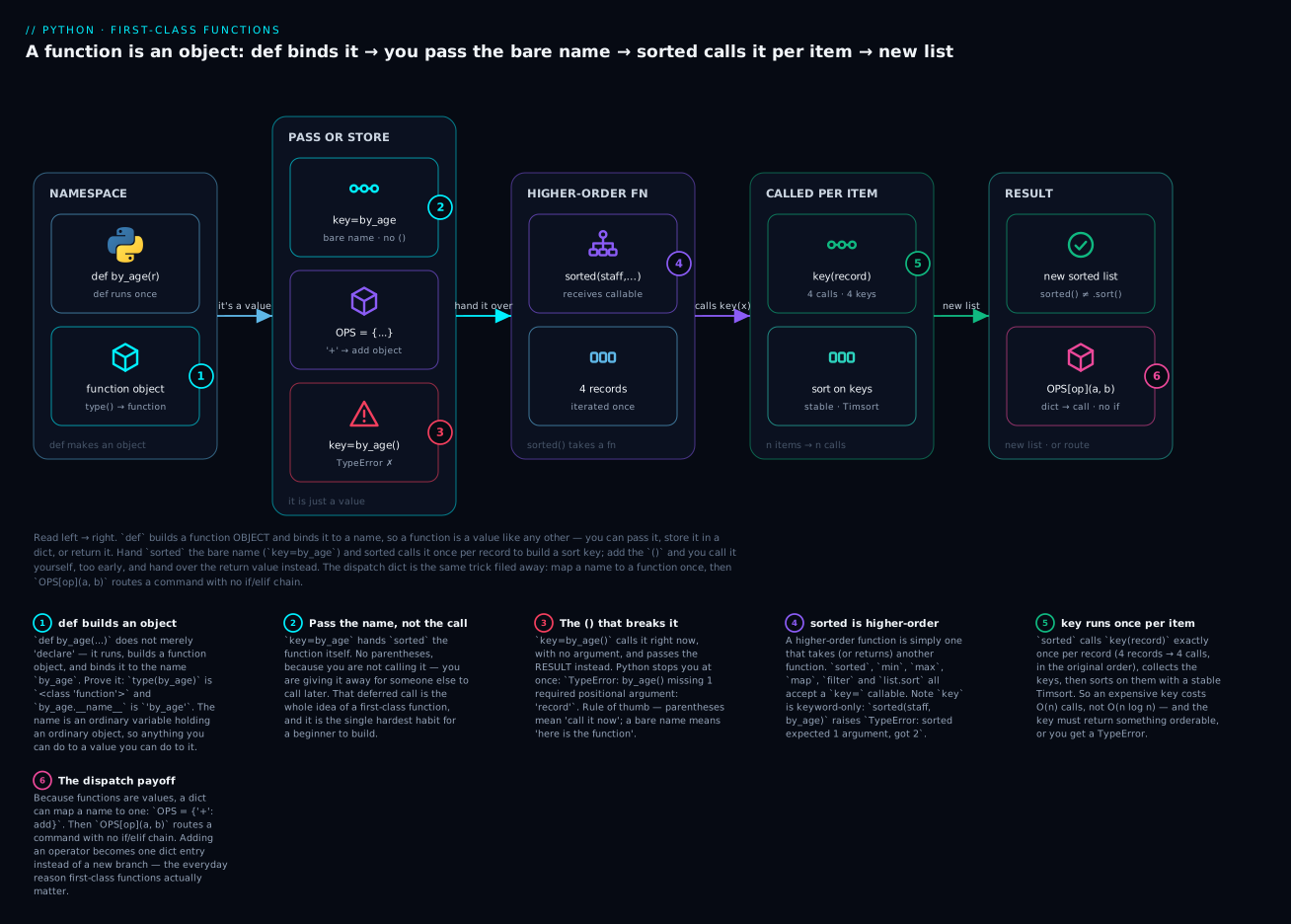
The badges mark the six things worth remembering: def builds an object (1); you pass the bare name, never the call (2); adding () calls it too early and raises TypeError (3); sorted is a higher-order function because it accepts your callable (4); the key runs once per item, not once per comparison (5); and a dict of functions routes a command with no if/elif (6).
That fifth badge is a real, checkable claim. Prove it:
calls = []

def by_age(record):
    calls.append(record["name"])   # spy on every call
    return record["age"]

sorted(people, key=by_age)

print(len(people))   # => 4
print(len(calls))    # => 4        <-- exactly one call per record
print(calls)         # => ['Ada', 'Linus', 'Grace', 'Guido']   (original order)
Four records, four calls, made in the original order before any sorting happens. Python does a decorate–sort–undecorate: compute all the keys first, then sort those. Two consequences worth knowing: an expensive key function costs you O(n) calls (not O(n log n) comparisons), and the key must return something orderable or you’ll get a TypeError.
min and max take the same key= — and return the whole record, not the key:
print(max(people, key=lambda p: p["age"])["name"])   # => Guido
print(min(people, key=lambda p: p["age"])["name"])   # => Ada
reverse=True flips the order, and it’s better than sorting and calling .reverse():
print([p["name"] for p in sorted(people, key=lambda p: p["age"], reverse=True)])
# => ['Guido', 'Linus', 'Grace', 'Ada']
The key= family, precisely:
| Call | Signature | Returns | Note |
|---|---|---|---|
sorted(iterable, *, key=None, reverse=False) |
key is keyword-only |
A new list |
Works on any iterable — tuples, sets, dict keys, generators |
list.sort(*, key=None, reverse=False) |
key is keyword-only |
None |
Lists only; sorts in place |
max(iterable, *, key=None, default=…) |
keyword-only | One item | ValueError on empty unless default= given |
min(iterable, *, key=None, default=…) |
keyword-only | One item | Same |
map(func, iterable) |
func is positional | Lazy iterator | Wrap in list() to see it |
filter(func, iterable) |
func is positional | Lazy iterator | filter(None, xs) drops falsy items |
“Keyword-only” is not trivia — it’s a trap. Pass the function positionally and you get a bewildering error:
sorted(people, lambda p: p["age"])
# TypeError: sorted expected 1 argument, got 2
You must write key=. (nums.sort(lambda x: -x) fails likewise with TypeError: sort() takes no positional arguments.)
sorted() vs .sort() — the classic beginner trap. They are not interchangeable:
nums = [3, 1, 2]
result = nums.sort()
print(result)   # => None        <-- .sort() returns NOTHING
print(nums)     # => [1, 2, 3]   <-- it changed the list itself

nums2 = [3, 1, 2]
result2 = sorted(nums2)
print(result2)  # => [1, 2, 3]   <-- a brand-new list
print(nums2)    # => [3, 1, 2]   <-- the original is untouched
sorted(x) |
x.sort() |
|
|---|---|---|
| Returns | A new sorted list | None |
| Original list | Unchanged | Mutated in place |
| Works on | Any iterable (str, tuple, set, dict, generator) | Lists only |
| Memory | Builds a second list | Cheaper — no copy |
| Chainable? | Yes: sorted(x)[0] |
No — x.sort()[0] raises TypeError |
| Use when | You need a sorted copy, or the input isn’t a list | You own the list and don’t need the original |
Python’s docs say it best — list.sort is documented as “Sort the list in ascending order and return None.” That None is deliberate: it’s a signal that the method mutated its receiver. Which is why this is such a common bug:
for n in nums.sort():
    print(n)
# TypeError: 'NoneType' object is not iterable
Sorting by two things at once — return a tuple from your key. Tuples compare element by element, so this sorts by team ascending, then commits descending:
staff = [
    {"name": "ada",   "team": "platform", "age": 36, "commits": 812},
    {"name": "linus", "team": "kernel",   "age": 54, "commits": 1290},
    {"name": "grace", "team": "platform", "age": 45, "commits": 1290},
    {"name": "guido", "team": "kernel",   "age": 68, "commits": 640},
]

print([r["name"] for r in sorted(staff, key=lambda r: (r["team"], -r["commits"]))])
# => ['linus', 'guido', 'grace', 'ada']
The -r["commits"] is the trick for “descending” inside a multi-key sort — but it only works on numbers. -r["name"] raises TypeError: bad operand type for unary -: 'str'. To sort by one string ascending and another descending, use the stability property instead: sort twice, least-significant key first.
Sorting is stable, and that’s a guarantee, not an accident. Records with equal keys keep their original relative order:
print([r["name"] for r in sorted(staff, key=lambda r: r["commits"])])
# => ['guido', 'ada', 'linus', 'grace']
linus and grace both have 1290 commits, and linus stays first because he came first in the input. (CPython’s sort is Timsort: O(n log n) worst case, O(n) on already-sorted data.)
Use an existing function when one exists. The most common case is case-insensitive sorting:
words = ["banana", "Apple", "Cherry", "date"]
print(sorted(words))                  # => ['Apple', 'Cherry', 'banana', 'date']
print(sorted(words, key=str.lower))   # => ['Apple', 'banana', 'Cherry', 'date']
The default sort compares raw code points, so every capital letter sorts before every lowercase one. key=str.lower fixes it — and note there’s no lambda: str.lower is already a one-argument function, so just pass it.
operator.itemgetter / attrgetter: the cleaner alternative. A lambda that does nothing but reach into a record is boilerplate. The operator module has purpose-built callables:
from operator import itemgetter, attrgetter

# Instead of: key=lambda p: p["age"]
print([p["name"] for p in sorted(people, key=itemgetter("age"))])
# => ['Ada', 'Grace', 'Linus', 'Guido']

# Multi-key, without building a tuple by hand:
print([r["name"] for r in sorted(staff, key=itemgetter("team", "name"))])
# => ['guido', 'linus', 'ada', 'grace']
itemgetter("team", "name") returns a tuple of both fields — exactly the multi-key trick, spelled shorter. attrgetter is the same idea for objects:
from dataclasses import dataclass

@dataclass
class Server:
    host: str
    cpu: float

servers = [Server("web-02", 71.5), Server("web-01", 12.0), Server("db-01", 93.2)]
print([s.host for s in sorted(servers, key=attrgetter("cpu"), reverse=True)])
# => ['db-01', 'web-02', 'web-01']
| Need | With lambda |
With operator |
Verdict |
|---|---|---|---|
| One dict field | lambda p: p["age"] |
itemgetter("age") |
operator — less noise |
| Two dict fields | lambda p: (p["a"], p["b"]) |
itemgetter("a", "b") |
operator — much cleaner |
| One tuple/list index | lambda t: t[1] |
itemgetter(1) |
operator |
| One object attribute | lambda s: s.cpu |
attrgetter("cpu") |
operator |
| A nested attribute | lambda n: n.meta.region |
attrgetter("meta.region") |
operator — dotted paths work |
| Descending on a number | lambda p: -p["age"] |
— | lambda (or reverse=True) |
| Any computation | lambda p: p["a"] / p["b"] |
— | lambda — operator only fetches |
| A method call per item | lambda s: s.strip() |
methodcaller("strip") |
Either; str.strip is simplest |
| Speed on big lists | Python-level call | C-level — measurably faster | operator |
The dividing line is simple: operator fetches, lambda computes. If your lambda body is just p["x"] or p.x, reach for operator.
Recipes worth memorising:
| Goal | Code |
|---|---|
| Sort dicts by a field | sorted(rows, key=itemgetter("age")) |
| …descending | sorted(rows, key=itemgetter("age"), reverse=True) |
| Sort by two fields | sorted(rows, key=itemgetter("team", "name")) |
| Field A up, field B down (numeric) | sorted(rows, key=lambda r: (r["a"], -r["b"])) |
| Case-insensitive strings | sorted(words, key=str.lower) |
| By string length | sorted(words, key=len) |
| Sort a dict’s keys | sorted(d) |
| Sort a dict by its values | sorted(d.items(), key=itemgetter(1)) |
| Objects by attribute | sorted(objs, key=attrgetter("cpu")) |
| Biggest record by a field | max(rows, key=itemgetter("commits")) |
| Top 3 | sorted(rows, key=..., reverse=True)[:3] |
| Sort in place, no copy | rows.sort(key=itemgetter("age")) |
Callbacks and dispatch tables
Now the payoff — the two patterns you’ll actually write at work.
A callback is a function you hand to someone else so they can call it when the moment comes. You’ve been writing them all section: key= is a callback. Here it is stripped bare:
def each_line(lines, callback):
    """Hand every line to whatever the caller wants done with it."""
    for n, line in enumerate(lines, start=1):
        callback(n, line)

each_line(["alpha", "beta"], lambda n, text: print(f"{n:>3}: {text}"))
  1: alpha
  2: beta
each_line owns the looping; the caller owns the doing. Swap the lambda for a database-writing function and the loop never changes. This is exactly how web frameworks (@app.route), GUI buttons (on_click=), schedulers, and test fixtures all work.
A dispatch table is the real workhorse: a dict mapping a name to a function. Say you’re writing a small calculator. The instinct is a chain of ifs:
def calculate(a, op, b):          # the version you should NOT write
    if op == "+":
        return a + b
    elif op == "-":
        return a - b
    elif op == "*":
        return a * b
    elif op == "/":
        return a / b
    else:
        raise ValueError(f"unknown operator {op!r}")
Because functions are values, that whole chain collapses into a lookup:
def add(a, b): return a + b
def sub(a, b): return a - b
def mul(a, b): return a * b
def div(a, b): return a / b

# The VALUES are function objects, not calls. No () anywhere here.
OPS = {"+": add, "-": sub, "*": mul, "/": div}

def calculate(a, op, b):
    action = OPS.get(op)                       # look up the function
    if action is None:
        raise ValueError(f"unknown operator {op!r}; try one of {sorted(OPS)}")
    return action(a, b)                        # NOW call it

print(OPS["+"])            # => <function add at 0x104e2f060>
print(OPS["+"].__name__)   # => add
print(calculate(6, "+", 7))  # => 13
print(calculate(6, "*", 7))  # => 42
print(calculate(6, "/", 4))  # => 1.5
The two-step is the thing to internalise: OPS[op] fetches the function; OPS[op](a, b) fetches it and calls it. And the unknown case stays friendly because the dict knows its own keys:
calculate(1, "^", 2)
# ValueError: unknown operator '^'; try one of ['*', '+', '-', '/']
| Aspect | if/elif chain |
Dict dispatch |
|---|---|---|
| Add a case | Edit the function, add a branch | Add one dict entry |
| Lookup cost | O(n) — checks each branch in turn | O(1) hash lookup |
| List valid options | Hand-maintain a second list | sorted(OPS) — always correct |
| Register from elsewhere | Impossible without editing | OPS["%"] = mod at runtime, or via a plugin |
| Reuse one handler | Copy the branch | OPS["x"] = OPS["*"] — alias it |
| Test one case | Call through the whole chain | Test add directly |
| Default behaviour | Final else: |
OPS.get(op, unknown) |
| Readability at 20 cases | 60 lines of branches | A 20-line table you can read at a glance |
| Best when | Conditions are ranges/complex (if x > 100) |
Dispatch is on an exact value |
That last row is the honest boundary. Dispatch tables key off an exact value. If your conditions are ranges or compound expressions, if/elif (or match) is the right tool.
A tidy variant supplies the default in the lookup itself:
def unknown(a, b):
    raise ValueError("unsupported operation")

action = OPS.get(op, unknown)   # no None-check needed
return action(a, b)
⚠️ The keys must be hashable. A natural-looking attempt to register aliases fails immediately:
OPS = {["+", "add"]: add}
# TypeError: unhashable type: 'list'
Lists are mutable, so they can’t be dict keys. Use a tuple (("+", "add") is hashable) or, more usefully, add one entry per alias: OPS["+"] = OPS["add"] = add. Amusingly, the functions themselves are hashable, so the reverse table works fine: {add: "addition", sub: "subtraction"}.
The late-binding trap — and functools.partial
This is the nastiest gotcha in the lesson, and unlike most bugs it does not crash — it silently returns wrong data. Try to predict the output before reading on:
makers = [lambda: i for i in range(3)]
print([f() for f in makers])
[2, 2, 2]
Not [0, 1, 2]. All three lambdas return 2.
Why. A closure captures the variable, not the variable’s value at creation time. The lambda body says “look up i” — and it does that lookup when it’s called, not when it’s created. By the time you call them, the loop has long finished and i is sitting at its final value, 2. All three lambdas share the same i, and they all read 2. This is called late binding. A plain for loop behaves identically:
makers = []
for i in range(3):
    makers.append(lambda: i)
print([f() for f in makers])   # => [2, 2, 2]
In a toy example it’s obvious. In real code it isn’t. Here’s the same bug wearing work clothes — one “column picker” per index:
row = ["web-01", "healthy", "12.0"]
pickers = [lambda r: r[n] for n in range(3)]
print([pick(row) for pick in pickers])
# => ['12.0', '12.0', '12.0']       <-- expected ['web-01', 'healthy', '12.0']
No traceback. No warning. Just three copies of the last column, quietly wrong, all the way into your report.
The fix: bind the value now, at creation time. Three ways, all producing [0, 1, 2]:
# 1 — default argument (the idiomatic one-liner)
fixed = [lambda i=i: i for i in range(3)]
print([f() for f in fixed])            # => [0, 1, 2]

# 2 — functools.partial: pre-fills the argument immediately
from functools import partial
def identity(n): return n
fixed = [partial(identity, i) for i in range(3)]
print([f() for f in fixed])            # => [0, 1, 2]

# 3 — a factory: each call gets its own fresh variable
def make_getter(n):
    return lambda: n
fixed = [make_getter(i) for i in range(3)]
print([f() for f in fixed])            # => [0, 1, 2]
Fix 1 works because default arguments are evaluated once, at definition time. lambda i=i: i reads “make a parameter i whose default is the current value of the loop’s i”. The odd-looking i=i is deliberate idiom, not a typo.
| Fix | Code | When to use | Trade-off |
|---|---|---|---|
| Default argument | lambda i=i: i |
The quick, standard fix | Adds a parameter a caller could override |
functools.partial |
partial(f, i) |
You already have a named function | Needs the function to take the value as an arg |
| Factory function | make_getter(i) |
Clearest for anything non-trivial | Three extra lines |
| Bind in the call | f(i) immediately |
You didn’t need to defer at all | Not always possible |
functools.partial, briefly. partial takes a function plus some arguments and returns a new callable with those arguments already filled in:
from functools import partial

def connect(host, port, timeout):
    return f"{host}:{port} (timeout={timeout}s)"

local = partial(connect, "localhost", 5432)   # freeze the first two arguments

print(local(timeout=3))     # => localhost:5432 (timeout=3s)
print(type(local))          # => <class 'functools.partial'>
print(local.func.__name__)  # => connect
print(local.args)           # => ('localhost', 5432)
It’s especially handy for key=, which demands a one-argument callable — partial can shrink a two-argument function down to fit:
def nth_char(s, n):
    return s[n]

words = ["kiwi", "apple", "fig"]
print(sorted(words, key=partial(nth_char, n=1)))   # => ['kiwi', 'fig', 'apple']
partial(f, x) |
lambda: f(x) |
|
|---|---|---|
When is x read? |
Immediately, at partial() time |
Later, when called — late binding! |
| Introspectable? | Yes — .func, .args, .keywords |
No — opaque <lambda> |
| Picklable (multiprocessing) | Yes (if f is) |
No — lambdas can’t be pickled |
| Readability | Clear with a well-named f |
Fine for tiny inline cases |
| Speed | Slightly faster (C implementation) | One extra Python frame |
That first row is the whole reason partial fixes late binding: it evaluates its arguments when you build it.
Hands-on lab
Everything here is the standard library — there is nothing to pip install. A virtual environment is still good practice, so let’s start one out of habit.
Step 1 — Set up.
mkdir -p ~/py-lab/firstclass && cd ~/py-lab/firstclass
python3 -m venv .venv
source .venv/bin/activate          # Windows: .venv\Scripts\activate
python --version                   # => Python 3.12.x  (3.12+ recommended)
What just happened: you made an isolated environment. On Windows use python rather than python3; on macOS/Linux both usually work once the venv is active.
Step 2 — Prove a function is an object. Create records.py:
"""Shared data + helpers for the lab."""

STAFF = [
    {"name": "ada",   "team": "platform", "age": 36, "commits": 812},
    {"name": "linus", "team": "kernel",   "age": 54, "commits": 1290},
    {"name": "grace", "team": "platform", "age": 45, "commits": 1290},
    {"name": "guido", "team": "kernel",   "age": 68, "commits": 640},
]


def by_age(record):
    """Return the sort key for one record: its age."""
    return record["age"]


if __name__ == "__main__":
    print(type(by_age))
    print(by_age.__name__)
    print(callable(by_age))
    print(by_age(STAFF[0]))
python records.py
<class 'function'>
by_age
True
36
What just happened: by_age is an object of <class 'function'> that knows its own name — and it’s callable, so by_age(STAFF[0]) returns 36.
Step 3 — Sort the same records nine ways. Create sorting.py:
from operator import itemgetter

from records import STAFF, by_age


def names(rows):
    """Pull just the names out, so the output stays readable."""
    return [r["name"] for r in rows]


print("1 by age        :", names(sorted(STAFF, key=by_age)))
print("2 by age desc   :", names(sorted(STAFF, key=by_age, reverse=True)))
print("3 by name       :", names(sorted(STAFF, key=lambda r: r["name"])))
print("4 by commits    :", names(sorted(STAFF, key=itemgetter("commits"))))
print("5 team, -commits:", names(sorted(STAFF, key=lambda r: (r["team"], -r["commits"]))))
print("6 itemgetter x2 :", names(sorted(STAFF, key=itemgetter("team", "name"))))
print("7 oldest        :", max(STAFF, key=by_age)["name"])
print("8 fewest commits:", min(STAFF, key=itemgetter("commits"))["name"])
print("9 original list :", names(STAFF))
python sorting.py
1 by age        : ['ada', 'grace', 'linus', 'guido']
2 by age desc   : ['guido', 'linus', 'grace', 'ada']
3 by name       : ['ada', 'grace', 'guido', 'linus']
4 by commits    : ['guido', 'ada', 'linus', 'grace']
5 team, -commits: ['linus', 'guido', 'grace', 'ada']
6 itemgetter x2 : ['guido', 'linus', 'ada', 'grace']
7 oldest        : guido
8 fewest commits: guido
9 original list : ['ada', 'linus', 'grace', 'guido']
What just happened: one dataset, six orderings, one line each — the only thing that changed was the function you handed over. Line 4 shows stability (linus before grace, both on 1290, original order kept). Line 9 proves sorted never touched STAFF.
Now break it on purpose. Add this line, run it, then delete it:
print(sorted(STAFF))
# TypeError: '<' not supported between instances of 'dict' and 'dict'
What just happened: with no key=, Python tried to compare two dicts directly. Dicts have no <. This traceback means “you forgot key=.”
Step 4 — Build a dispatch table. Create dispatch.py:
"""A mini calculator routed by a dict of name -> function."""


def add(a, b):
    return a + b


def sub(a, b):
    return a - b


def mul(a, b):
    return a * b


def div(a, b):
    if b == 0:
        raise ValueError("cannot divide by zero")
    return a / b


# The dispatch table: the VALUES are function objects, not calls. No () here.
OPS = {"+": add, "-": sub, "*": mul, "/": div}


def calculate(a, op, b):
    """Look the operator up, then call whatever we found."""
    action = OPS.get(op)
    if action is None:
        raise ValueError(f"unknown operator {op!r}; try one of {sorted(OPS)}")
    return action(a, b)


if __name__ == "__main__":
    print("OPS['+']        :", OPS["+"].__name__)
    print("6 + 7           :", calculate(6, "+", 7))
    print("6 - 7           :", calculate(6, "-", 7))
    print("6 * 7           :", calculate(6, "*", 7))
    print("6 / 4           :", calculate(6, "/", 4))
    print("known operators :", sorted(OPS))
    try:
        calculate(1, "^", 2)
    except ValueError as exc:
        print("bad operator    :", exc)
python dispatch.py
OPS['+']        : add
6 + 7           : 13
6 - 7           : -1
6 * 7           : 42
6 / 4           : 1.5
known operators : ['*', '+', '-', '/']
bad operator    : unknown operator '^'; try one of ['*', '+', '-', '/']
What just happened: zero if/elif branches for the routing. OPS["+"] handed back the add object (its __name__ proves it), and action(a, b) called it. Now add a modulo operator — notice you only touch the table:
def mod(a, b):
    return a % b

OPS["%"] = mod
print(calculate(7, "%", 4))   # => 3
Step 5 — Reproduce the late-binding bug, then fix it. Create latebind.py:
"""Reproduce the late-binding bug, then fix it three ways."""

from functools import partial

# --- THE BUG -----------------------------------------------------------------
buggy = [lambda: i for i in range(3)]
print("buggy   :", [f() for f in buggy])

# The same bug in work clothes: one 'column picker' per index.
row = ["web-01", "healthy", "12.0"]
pickers_buggy = [lambda r: r[n] for n in range(3)]
print("pickers :", [pick(row) for pick in pickers_buggy])

# --- FIX 1: bind now with a default argument ---------------------------------
fixed_default = [lambda i=i: i for i in range(3)]
print("default :", [f() for f in fixed_default])

# --- FIX 2: bind now with functools.partial ----------------------------------
def identity(n):
    return n

fixed_partial = [partial(identity, i) for i in range(3)]
print("partial :", [f() for f in fixed_partial])

# --- FIX 3: a factory gives each closure its own variable ---------------------
def make_getter(n):
    return lambda: n

fixed_factory = [make_getter(i) for i in range(3)]
print("factory :", [f() for f in fixed_factory])

# The realistic picker, fixed:
pickers_fixed = [lambda r, n=n: r[n] for n in range(3)]
print("pickers2:", [pick(row) for pick in pickers_fixed])
python latebind.py
buggy   : [2, 2, 2]
pickers : ['12.0', '12.0', '12.0']
default : [0, 1, 2]
partial : [0, 1, 2]
factory : [0, 1, 2]
pickers2: ['web-01', 'healthy', '12.0']
What just happened: the first two lines are the bug — and neither raised an exception. pickers returned three copies of the last column: plausible-looking, completely wrong data. The three fixes all bind the value at creation time instead of call time. Compare pickers and pickers2 and burn the difference into memory: lambda r: r[n] vs lambda r, n=n: r[n].
Common mistakes and troubleshooting
| Symptom / traceback | Cause | Fix |
|---|---|---|
TypeError: '<' not supported between instances of 'dict' and 'dict' |
sorted(rows) with no key= — Python tried to compare whole dicts |
Say what to sort on: sorted(rows, key=itemgetter("age")) |
TypeError: by_age() missing 1 required positional argument: 'record' |
You passed key=by_age() — the () called it immediately |
Drop the parentheses: key=by_age |
TypeError: sorted expected 1 argument, got 2 |
Key passed positionally: sorted(rows, by_age) |
key is keyword-only: sorted(rows, key=by_age) |
SyntaxError: invalid syntax pointing at return/=/if inside a lambda |
A statement in a lambda body — only expressions allowed | Use a def, or the ternary a if cond else b |
SyntaxError: 'return' outside function |
log = lambda m: print(m); return m — the ; ended the lambda |
Use a def for anything multi-part |
TypeError: 'NoneType' object is not iterable after .sort() |
.sort() sorts in place and returns None |
Iterate the list itself, or use sorted(x) for a new list |
AttributeError: 'NoneType' object has no attribute … |
Same cause: you stored rows = rows.sort() |
rows.sort() alone, or rows = sorted(rows) |
AttributeError: 'tuple' object has no attribute 'sort' |
.sort() is a list method |
sorted(my_tuple) returns a new list |
| Lambdas in a loop all return the last value; no error | Late binding — the closure reads the variable at call time | lambda i=i: i, partial(f, i), or a factory function |
TypeError: unhashable type: 'list' building a dict |
A mutable object used as a dict key | Use a tuple key, or one entry per alias |
E731 do not assign a lambda expression, use a def (ruff/flake8) |
f = lambda x: … — PEP 8 violation |
Rewrite as def f(x): … |
KeyError: 'salary' from inside sorted(...) |
The key function raised; the field doesn’t exist on every record | key=lambda r: r.get("salary", 0) |
TypeError: '<' not supported between instances of 'str' and 'int' |
Key returns mixed types across records | Coerce in the key: key=lambda r: str(r["x"]) |
TypeError: bad operand type for unary -: 'str' |
The -value descending trick on a string |
reverse=True, or sort twice (least-significant key first) |
ValueError: max() iterable argument is empty |
max() on an empty list |
Pass default=: max(rows, key=…, default=None) |
map/filter result is empty the second time |
They’re one-shot lazy iterators | results = list(map(f, xs)) once, then reuse |
Three of these cost beginners the most hours:
1. f versus f() — the parentheses mean “call it now.” This is the first-class-functions bug. by_age is the function object; by_age() runs it and evaluates to its return value. When a higher-order function asks for a function, give it the bare name. The tell is a TypeError complaining about missing arguments at the exact moment you’re passing something to key=, map, or a callback parameter — it means Python tried to run your function right there, with no arguments, instead of handing it over. Say it out loud when you type: “key=by_age — no parens, I’m not calling it.”
2. Late binding returns wrong answers, silently. Every other mistake here raises an exception. This one doesn’t. If you build functions in a loop — pickers, handlers, callbacks, one per column or per button — and they all behave like the last one, this is why. The closure captured the variable, and by call time that variable has moved on. The instant you see lambda inside a for or a comprehension that closes over the loop variable, add =i and bind it now.
3. sorted() returns; .sort() mutates. Any Python function whose job is to change something in place returns None by convention — a deliberate design choice so you can’t accidentally chain a destructive call. So rows = rows.sort() doesn’t sort rows, it destroys it: the list gets sorted in place, then the name is rebound to None, and your next line dies with a confusing NoneType error pointing somewhere else entirely. When you see NoneType right after a sort, this is always the reason.
Cheat-sheet
| Syntax / call | What it does |
|---|---|
f |
The function object — passing it does not call it |
f() |
Calls it now; evaluates to the return value |
type(f) |
<class 'function'> — proof it’s an object |
f.__name__ |
Its name ('<lambda>' for lambdas) |
callable(f) |
True if you can put () after it |
lambda x: expr |
Anonymous one-expression function; expr is returned |
lambda x, y=2: expr |
Lambdas take defaults, *args, **kwargs — same as def |
lambda: x |
Zero-argument lambda |
lambda x: a if c else b |
Ternary is an expression — legal in a lambda |
sorted(it, key=f) |
New sorted list; key is keyword-only |
sorted(it, key=f, reverse=True) |
Descending |
it.sort(key=f) |
Sorts a list in place; returns None |
min(it, key=f) / max(it, key=f) |
Smallest / largest item by that key |
max(it, key=f, default=None) |
Safe on an empty iterable |
key=lambda r: (r["a"], -r["b"]) |
Multi-key: A ascending, B (numeric) descending |
key=str.lower |
Case-insensitive string sort — no lambda needed |
key=len |
Sort by length |
itemgetter("age") |
lambda p: p["age"], but C-fast and clearer |
itemgetter("a", "b") |
Returns a tuple — instant multi-key |
itemgetter(1) |
lambda t: t[1] for tuples/lists |
attrgetter("cpu") |
lambda o: o.cpu |
attrgetter("meta.region") |
Nested attributes via a dotted path |
methodcaller("strip") |
lambda s: s.strip() |
map(f, it) |
Lazy iterator of f(item) — wrap in list() |
filter(f, it) |
Lazy iterator of items where f(item) is truthy |
filter(None, it) |
Drops falsy items |
reduce(f, it, init) |
Folds to a single value (from functools import reduce) |
partial(f, a) |
New callable with a pre-filled now |
p.func / p.args / p.keywords |
Introspect a partial |
OPS = {"+": add} |
Dispatch table — no () on the values |
OPS[op](a, b) |
Look the function up and call it |
OPS.get(op, default_fn) |
Dispatch with a fallback handler |
lambda i=i: i |
The late-binding fix — bind the value now |
The three rules that prevent most bugs:
- Parentheses mean call it now. Passing a function? Bare name.
sorted()gives you a new list;.sort()gives youNone.- A
lambdainside a loop that uses the loop variable is broken until you write=i.
Interview and exam questions
Q: What does “functions are first-class objects” mean in Python?
A: A function is an ordinary object — an instance of <class 'function'> — so it can be bound to a name, stored in lists/dicts/sets, passed as an argument, returned from another function, and given attributes. def doesn’t declare anything special; it builds a function object and binds a name to it, exactly as x = 5 builds an int and binds x.
Q: What is a higher-order function? Name three from the standard library.
A: One that takes a function as an argument and/or returns a function. Examples: sorted (takes key=), map and filter (take a function first), functools.reduce, functools.partial (returns a new function), min/max, and every decorator.
Q: What’s the difference between f and f()?
A: f is the function object itself; f() calls it and evaluates to whatever it returns. When a higher-order function wants a function, pass f. Passing f() calls it immediately and hands over the result — typically raising TypeError: f() missing 1 required positional argument.
Q: What can’t go in a lambda, and why?
A: Statements. A lambda body must be a single expression, so return, assignment, if:/for:/while: blocks, raise, and import are all SyntaxErrors. Expressions are fine — including function calls and the ternary a if cond else b. Anything needing a statement needs a def.
Q: PEP 8 says never assign a lambda to a name. Why not?
A: Because you lose the lambda’s only advantage (being anonymous and inline) and keep all its drawbacks. Concretely, the traceback frame shows <lambda> instead of the name, so you can’t tell which function failed; you also can’t add a docstring, clean type hints, or a multi-line body. ruff/flake8 flag it as E731. def f(x): ... is strictly better.
Q: sorted(x) vs x.sort() — what’s the difference?
A: sorted(x) returns a new list and leaves x alone, and works on any iterable. x.sort() sorts the list in place and returns None. The classic bug is x = x.sort(), which sets x to None. Returning None from in-place operations is a deliberate Python convention.
Q: How many times does sorted call your key function?
A: Exactly once per element, before sorting — decorate–sort–undecorate. So the key costs O(n) calls, not O(n log n). Python’s sort is Timsort: O(n log n) worst case, O(n) on nearly-sorted input, and stable (equal keys keep their original relative order).
Q (coding): Sort a list of dicts by team ascending, then commits descending.
A: Return a tuple from the key and negate the numeric field:
sorted(staff, key=lambda r: (r["team"], -r["commits"]))
Only works because commits is numeric — you can’t negate a string. For a string field descending, exploit stability and sort twice, least-significant key first:
rows = sorted(staff, key=itemgetter("name"), reverse=True)
rows = sorted(rows, key=itemgetter("team"))
Q: When would you use operator.itemgetter over a lambda?
A: Whenever the lambda only fetches something: itemgetter("age") beats lambda p: p["age"] — it’s clearer, it’s implemented in C so it’s faster on big lists, and itemgetter("a", "b") gives multi-key sorting for free. Use a lambda when you need to compute (e.g. lambda p: p["a"] / p["b"]). Rule: operator fetches, lambda computes.
Q (coding): What does [lambda: i for i in range(3)] produce when each is called, and why?
A: [2, 2, 2], not [0, 1, 2]. The closures capture the variable i, not its value, and they look it up when called — by which time the loop has finished and i is 2. This is late binding. Fix by binding at creation time: [lambda i=i: i for i in range(3)], [partial(identity, i) for i in range(3)], or a factory function returning the lambda. The danger is that it raises no exception — it just returns wrong data.
Q: What is a dispatch table and why prefer it to if/elif?
A: A dict mapping a value to a function: OPS = {"+": add, "-": sub}, called with OPS[op](a, b). It’s O(1) instead of O(n), adding a case is one dict entry rather than a new branch, valid options are just sorted(OPS), handlers can be registered at runtime or aliased, and each handler is testable on its own. Prefer if/elif/match when the conditions are ranges or compound tests rather than an exact value.
Q: What does functools.partial do, and how does it differ from a lambda?
A: partial(f, x) returns a new callable with x already supplied. The key difference: partial evaluates its arguments immediately, whereas lambda: f(x) looks x up when called — which is exactly why partial sidesteps late binding. partial objects are also introspectable (.func, .args) and picklable, so they survive multiprocessing; lambdas can’t be pickled.
Key takeaways
- A function is an object.
defbuilds an instance of<class 'function'>and binds a name to it. Prove it any time withtype(f)andf.__name__. There’s no separate function namespace — functions sit beside your ints and strings. fhands it over;f()runs it. Passingf()tokey=,map, or a callback is the single most common beginner bug, and it announces itself asTypeError: f() missing 1 required positional argument.- A higher-order function takes or returns a function —
sorted,min,max,map,filter,partial, and every decorator. Nothing to import; it’s just a consequence of functions being values. - A lambda is one expression, no statements — no
return, no assignment, noif:block, no loops. It creates the same object type asdef; it just never gets a real name. - Never assign a lambda to a name (PEP 8, lint rule E731). You lose the only benefit — anonymity — and your traceback says
<lambda>instead of telling you which function failed. Use adef. key=is the workhorse. It’s keyword-only, it’s called exactly once per item, sorting is stable, and a tuple key gives you multi-key sorting. Reach foritemgetter/attrgetterwhen you’re only fetching a field —operatorfetches,lambdacomputes.sorted()returns a new list;.sort()returnsNoneand mutates in place.rows = rows.sort()is always a bug.- A dispatch table beats an
if/elifchain for exact-value routing:OPS = {"+": add}thenOPS[op](a, b). O(1), one entry per new case, self-documenting, and each handler is independently testable. - Late binding is the silent one.
[lambda: i for i in range(3)]gives[2, 2, 2]with no traceback — closures capture the variable, not its value. Bind at creation time withlambda i=i: i,functools.partial, or a factory.