Up to now your programs have been a single stream of statements: do this, then that, then loop. That works until it doesn’t. The moment you need the same six lines in three places, or you want to test one piece of logic on its own, or a script grows past a screen, you need a way to take a chunk of work, give it a name, and call it by that name.
That is a function. Not a syntax feature to memorise — a way of thinking. Functions are how you turn “a long list of instructions” into “a vocabulary of things my program can do.”
This lesson is about all of it: how to define one, how values get in (parameters, arguments, defaults, keywords), how a value gets out (return, and the infamous None), and — most important — what actually happens to your data when you pass it in. That last one has a reputation for burning beginners for weeks, so we’re going to prove it with real output rather than hand-wave it.
Everything below was run on Python 3.12. Type the snippets. Watching a value change on your own screen is what turns a rule into an instinct.
Why this matters
Imagine you’re computing the average of a list of numbers in three different places in a script. You copy-paste the same sum(x) / len(x) each time. Then you discover it crashes on an empty list. Now you have to find and fix that bug three times — and you will miss one. That’s not a hypothetical; that’s Tuesday.
A function fixes this by giving the computation exactly one home. Fix it there, and every caller is fixed at once. This is the principle called DRY — Don’t Repeat Yourself — and it’s less about saving keystrokes than about having a single place where a truth lives.
But naming things buys you more than deduplication. A well-named function turns a wall of arithmetic into a sentence you can read. Code that says if is_eligible(customer) explains itself; ten lines of nested comparisons don’t. And once logic lives in a function, you can test it — call it with a known input, check the output, done. You cannot meaningfully test a fragment buried in the middle of a script.
Here is what you actually get, and what its absence costs you:
| A function gives you | What that means | What it costs you to skip it |
|---|---|---|
| A name | average(scores) instead of a formula |
Readers (and future-you) must re-derive intent every time |
| DRY — one home for a rule | Fix a bug once, every caller is fixed | The same bug fixed in 3 places, badly, in 2 of them |
| Testability | Call it with a known input, assert the output | Untestable logic → you “test” by running the whole script |
| An interface | Callers depend on the signature, not the body | Any change ripples through everything that copied the code |
| Reuse | Import it, call it from anywhere | Copy-paste drift: three versions that slowly disagree |
| A smaller mental load | You reason about 5 lines, not 500 | Everything is global; nothing is safe to change |
The mental model to hold for the whole lesson: a function is a machine with an inlet and an outlet. Arguments go in the inlet, a return value comes out the outlet. Everything else — defaults, keywords, *args, scope — is detail about how the inlet works. Beginners get into trouble almost exclusively at two spots: forgetting to wire up the outlet (return), and not realising the inlet hands over the real object, not a photocopy.
def, parameters, and arguments
A function definition has a fixed shape. Here it is with every part named:
def greet(name):                    # header: def · name · parameters · colon
    """Return a friendly greeting."""   # docstring (optional, but do it)
    return f"Hello, {name}!"        # body: indented; return sends a value back

message = greet("Vinod")            # the CALL — this is what runs the body
print(message)
# => Hello, Vinod!
Two separate events are happening, and keeping them apart clears up a lot of confusion:
defruns once and creates a function object, binding it to the namegreet. It does not execute the body.- The call
greet("Vinod")runs the body, once per call.
That’s why a function defined but never called does nothing at all — and why a syntax error inside the body still explodes at def time, but a TypeError inside it only appears when you actually call it.
| Part | Name | Notes |
|---|---|---|
def |
The keyword | Creates a function object and binds it to the name |
greet |
Function name | Same rules as a variable: snake_case, no spaces |
(name) |
Parameter list | The names the body will use; empty parens are fine: def f(): |
: |
Colon | Required — forget it and you get SyntaxError: expected ':' |
| 4 spaces | Indentation | Defines the body; Python has no {}. PEP 8 says 4 spaces |
"""...""" |
Docstring | First statement in the body; becomes greet.__doc__ |
return |
Return statement | Sends one value back and exits immediately |
greet("Vinod") |
The call | The () is what invokes it. No parens = no call |
Now the vocabulary that trips people in interviews, because the two words get used interchangeably in casual speech but mean different things:
| Term | What it is | Where it lives | In our example |
|---|---|---|---|
| Parameter | A name in the function definition | The def line |
name |
| Argument | A value you pass at the call | The call site | "Vinod" |
| Signature | The name + parameter list together | The def line |
greet(name) |
| Binding | Attaching an argument to a parameter | Happens at call time | name = "Vinod" |
One sentence to remember it: parameters are the empty slots; arguments are what you drop into them. A call is just an assignment you didn’t write yourself — calling greet("Vinod") effectively performs name = "Vinod" inside a fresh private workspace, then runs the body.
return: the value that flows back
return does two things at once, and beginners usually only notice the first: it hands a value back to the caller, and it exits the function immediately. Any code after a return on the same path never runs.
Here is the single most common beginner bug in all of Python:
def add(a, b):
    print(a + b)          # prints to the screen... and returns NOTHING

result = add(2, 3)
print(result)
5
None
Look at that output carefully. The 5 came from the print inside the function. Then print(result) shows None — because add never returned anything. Printing is not returning. Printing throws characters at your screen; returning hands a value back to the code that called you. They’re unrelated.
Why None? Because a Python function always returns something. If you never say return, Python appends an invisible return None for you. That’s why the classic symptom is not usually the None itself — it’s the crash one line later when you try to use it:
total = add(2, 3)
print(total + 1)
# TypeError: unsupported operand type(s) for +: 'NoneType' and 'int'
Whenever you see “NoneType” in a traceback, your first suspicion should be: some function forgot to return.
| What you write | What the caller receives | Notes |
|---|---|---|
return value |
value |
The normal case |
return (bare) |
None |
Common as an early exit / guard clause |
no return at all |
None |
Python adds it implicitly — this is the trap |
print(value) |
None |
Prints to screen; returns nothing. Not the same thing! |
return a, b |
(a, b) — a tuple |
Comma makes a tuple; the parens are optional |
return a; x = 1 |
a |
x = 1 is dead code — return exits at once |
Returning more than one value
Python has no “multiple return values” feature. It doesn’t need one: return a, b builds a tuple, and the caller can unpack it in one step.
def min_max(numbers):
    """Return the smallest and largest value in numbers."""
    return min(numbers), max(numbers)      # the comma builds a tuple

lo, hi = min_max([4, 1, 9, 7])             # unpack into two names
print(lo, hi)
# => 1 9

print(min_max([4, 1, 9, 7]))               # ...or keep the tuple whole
# => (1, 9)
print(type(min_max([4, 1, 9, 7])))
# => <class 'tuple'>
| Pattern | Use when | Example |
|---|---|---|
return a, b → x, y = f() |
2-3 closely related values | lo, hi = min_max(data) |
return a, b → pair = f() |
Caller wants them together | bounds = min_max(data) |
x, _ = f() |
You only need one of them | _ is the “I’m ignoring this” convention |
| Return a dict | Many values, or names matter | {"lo": 1, "hi": 9} |
| Return a dataclass | Many values + you want dot-access | result.lo — clearer past ~3 fields |
A word of judgement, because this is where returning-multiple-values goes bad: past about three values, positional tuples get unreadable. a, b, c, d, e = analyse(text) is a bug waiting to happen — swap two and nothing complains. When you get there, return a dict or a small dataclass and let the names carry the meaning.
Positional, keyword, and default arguments
There are two ways to pass an argument, and they can be mixed:
def power(base, exponent):
    return base ** exponent

print(power(2, 10))                    # positional: order decides
print(power(base=2, exponent=10))      # keyword: name decides
print(power(exponent=10, base=2))      # keyword: order is now irrelevant
print(power(2, exponent=10))           # mixed: positional first, then keyword
1024
1024
1024
1024
All four calls are identical to Python. The one rule you can’t break: positional arguments must come before keyword arguments.
power(base=2, 10)
  File "demo.py", line 3
    power(base=2, 10)
                    ^
SyntaxError: positional argument follows keyword argument
Note that’s a SyntaxError — Python refuses to even compile the file. It’s not a runtime mistake; it’s malformed code.
Default arguments
A default makes a parameter optional by giving it a fallback value:
def greet(name, greeting="Hello", punctuation="!"):
    return f"{greeting}, {name}{punctuation}"

print(greet("Vinod"))                    # => Hello, Vinod!
print(greet("Vinod", "Hi"))              # => Hi, Vinod!
print(greet("Vinod", punctuation="?"))   # => Hello, Vinod?
That third call is the one to study. It skips greeting entirely and jumps straight to punctuation by name. Without keyword arguments you’d have to re-supply "Hello" just to reach past it. This is exactly why real libraries have long lists of defaulted parameters and expect you to name the one you want.
Parameters with defaults must come after those without — otherwise a positional call would be ambiguous:
def f(a=1, b):
    return a + b
  File "demo.py", line 1
    def f(a=1, b):
               ^
SyntaxError: parameter without a default follows parameter with a default
Version note: on Python 3.11 and older that same error reads
SyntaxError: non-default argument follows default argument. Same mistake, reworded in 3.12.
| Call style | Syntax | Order matters? | Best for |
|---|---|---|---|
| Positional | f(2, 10) |
Yes | 1-2 obvious args where order is natural |
| Keyword | f(base=2, exponent=10) |
No | Clarity; anything with 3+ args |
| Mixed | f(2, exponent=10) |
Positionals first | The common real-world style |
| Default supplied | f(2) |
— | Optional behaviour with a sensible fallback |
| Boolean flags | f(x, verbose=True) |
No | Always name booleans — f(x, True) is unreadable |
That last row is a genuine style rule, not a preference. save(data, True, False) is unreadable at a glance; save(data, overwrite=True, backup=False) needs no comment.
The mutable default argument trap
This is the most famous gotcha in Python, it catches everyone once, and it follows directly from a rule you already know: def runs once.
If def runs once, then the default value expression is evaluated once, when the function is defined — not on every call. For an immutable default like 0 or "Hello" nobody notices. For a mutable default like a list, it’s a disaster:
def add_item(item, basket=[]):      # BUG: this list is created ONCE
    basket.append(item)
    return basket

print(add_item("apple"))
print(add_item("banana"))
print(add_item("cherry"))
['apple']
['apple', 'banana']
['apple', 'banana', 'cherry']
Every call is sharing one list. It was created when def executed, and it lives as long as the function does — accumulating forever. Nobody wants this. Beginners usually conclude Python is broken; it isn’t, it’s being perfectly consistent about def running once.
You can see the shared object directly, because Python stores defaults on the function object where you can inspect them:
def add_item(item, basket=[]):
    basket.append(item)
    return basket

print(add_item.__defaults__)     # => ([],)
add_item("apple")
print(add_item.__defaults__)     # => (['apple'],)
There it is in the open: the default itself is mutating. It isn’t magic or a scoping subtlety — it’s one object, stored on the function, being appended to.
The fix is the None sentinel, and it’s the same three lines every time:
def add_item(item, basket=None):
    if basket is None:           # "no basket given" → make a FRESH one
        basket = []
    basket.append(item)
    return basket

print(add_item("apple"))         # => ['apple']
print(add_item("banana"))        # => ['banana']   <- fixed: fresh list each call
None works as the sentinel because it’s immutable, it’s unambiguous, and is None is a cheap identity check. Use is None, never == None — a custom class can lie about ==, but nothing can lie about is.
| Default value | Safe? | Why |
|---|---|---|
0, 1, 3.14 |
✅ | Immutable — can’t be changed in place |
"text", True, None |
✅ | Immutable |
(1, 2) — tuple |
✅ | Immutable |
[] — list |
❌ | Mutable — shared across all calls, grows forever |
{} — dict |
❌ | Mutable — same trap |
set() |
❌ | Mutable — same trap |
datetime.now() |
❌ | Evaluated once at import → frozen at start-up time, forever |
| Any class instance | ❌ | Shared instance across every call |
That datetime.now() row is the same bug wearing a disguise, and it’s nastier because there’s no list visibly growing — the value is simply, permanently, the moment your program started. def log(msg, when=datetime.now()) will happily stamp every log line for the next six months with the timestamp of your deploy.
The rule, with no exceptions worth learning as a beginner: if a default is mutable, or is the result of calling something, use None and build the real value inside the body.
*args, **kwargs, and the / and * markers
Sometimes you genuinely don’t know how many arguments you’ll get. *args collects extra positional arguments into a tuple; **kwargs collects extra keyword arguments into a dict.
def total(*args):
    return sum(args)             # args is a tuple

print(total(1, 2, 3))            # => 6
print(total())                   # => 0   (empty tuple, sum is 0)

def show(**kwargs):
    for key, value in kwargs.items():    # kwargs is a dict
        print(f"{key} = {value}")

show(host="db01", port=5432)
# => host = db01
# => port = 5432
They combine, in a fixed order — and the names args/kwargs are pure convention; the * and ** do the work:
def describe(name, *args, **kwargs):
    print(name, args, kwargs)

describe("srv", 1, 2, role="web")
# => srv (1, 2) {'role': 'web'}
The same * and ** work in reverse at a call site, where they unpack a collection into arguments:
nums = [1, 2, 3]
print(total(*nums))              # => 6      unpacks list → total(1, 2, 3)

opts = {"host": "db01", "port": 5432}
show(**opts)                     # unpacks dict → show(host="db01", port=5432)
| Syntax | Where | Collects / does | Type inside |
|---|---|---|---|
*args |
def |
Extra positional arguments | tuple |
**kwargs |
def |
Extra keyword arguments | dict |
*seq |
call | Unpacks a list/tuple into positionals | — |
**mapping |
call | Unpacks a dict into keywords | — |
def f(a, *args, **kwargs) |
def |
Required, then extras, then named extras | order is fixed |
When are these right? Honest answer: less often than beginners think. Reach for them when you’re writing a wrapper that must forward whatever it’s given (decorators do this constantly), or a genuine variadic like sum/print. Do not use them to avoid deciding what your function takes — def process(*args, **kwargs) destroys your signature, so nothing can autocomplete it, no type checker can check it, and the reader has to go read the body to learn how to call it. Named parameters are documentation that can’t drift.
The / and * markers
Two modern markers let you control how an argument may be passed. Both look cryptic once and then never again.
A bare * means everything after me must be passed by keyword:
def connect(host, *, timeout=30, retries=3):
    return f"{host} timeout={timeout} retries={retries}"

print(connect("db01", timeout=5))    # => db01 timeout=5 retries=3
connect("db01", 5)                   # TypeError!
TypeError: connect() takes 1 positional argument but 2 were given
That error is the feature working. It stops connect("db01", 5) — where nobody can tell whether 5 is a timeout or a retry count — from ever compiling into a habit.
A / means everything before me must be passed positionally (Python 3.8+):
def area(width, height, /, unit="cm"):
    return f"{width * height} sq {unit}"

print(area(3, 4))                    # => 12 sq cm
print(area(3, 4, unit="m"))          # => 12 sq m
area(width=3, height=4)              # TypeError!
TypeError: area() got some positional-only arguments passed as keyword arguments: 'width, height'
Why would you want that restriction? Because a parameter name that callers can use is a name you can never rename without breaking them. / keeps width an implementation detail. You’ll meet this mostly in the standard library (it’s why len(obj=x) fails); as a beginner, recognise /, use *. Forcing keywords on optional settings is a small change that makes call sites readable for years.
| Signature | f(1, 2) |
f(a=1, b=2) |
Meaning |
|---|---|---|---|
def f(a, b) |
✅ | ✅ | Either style — the default |
def f(a, *, b) |
❌ TypeError |
✅ | b is keyword-only |
def f(a, /, b) |
✅ | ❌ TypeError |
a is positional-only |
def f(a, /, *, b) |
❌ | ❌ | a positional-only, b keyword-only |
Pass by object reference: mutate vs rebind
This is the section to read twice. Almost every “my function corrupted my data” and “why didn’t my function change anything?” question traces back to here.
Python is neither “pass by value” (copying the data) nor “pass by reference” (sharing the caller’s variable). It is pass by object reference: the parameter name inside the function is bound to the very same object the caller passed. No copy is made. But the parameter is a new name — rebinding it doesn’t touch the caller’s name.
That distinction sounds like pedantry until you see the two behaviours side by side:
def mutate(items):
    items.append("added")        # CHANGES the object both names point at

def rebind(items):
    items = ["brand", "new"]     # re-points the LOCAL name at a new object

data = ["original"]
mutate(data)
print(data)
# => ['original', 'added']       <- caller sees the change

data2 = ["original"]
rebind(data2)
print(data2)
# => ['original']                <- caller sees NOTHING
Same list type, same call syntax, opposite outcomes. The difference is entirely what the body did:
items.append(...)mutates — it reaches into the shared object and changes it. Both names see it because there’s only one object.items = [...]rebinds — it makesitemspoint somewhere else. The caller’sdata2still points at the original.
You can watch the identity flip in real time:
def rebind(items):
    print("  entry  :", items, "| same object?", items is original)
    items = ["new"]
    print("  rebound:", items, "| same object?", items is original)

original = ["a"]
rebind(original)
print("caller sees:", original)
  entry  : ['a'] | same object? True
  rebound: ['new'] | same object? False
caller sees: ['a']
On entry the parameter is the caller’s object — literally, is says True, no copy. The assignment doesn’t change that object; it makes the local name stop pointing at it. That’s the whole mystery, dissolved.
Now here is the picture of a call from end to end. Read it left to right in call order: the caller hands arguments over, Python binds them to parameter names in a brand-new frame pushed onto the call stack, the body runs in that frame, and one value flows back as the frame is popped. Zone 4 is the fork in the road we just proved — the frame shares the caller’s object (so mutating is visible) but owns its own names (so rebinding is not).
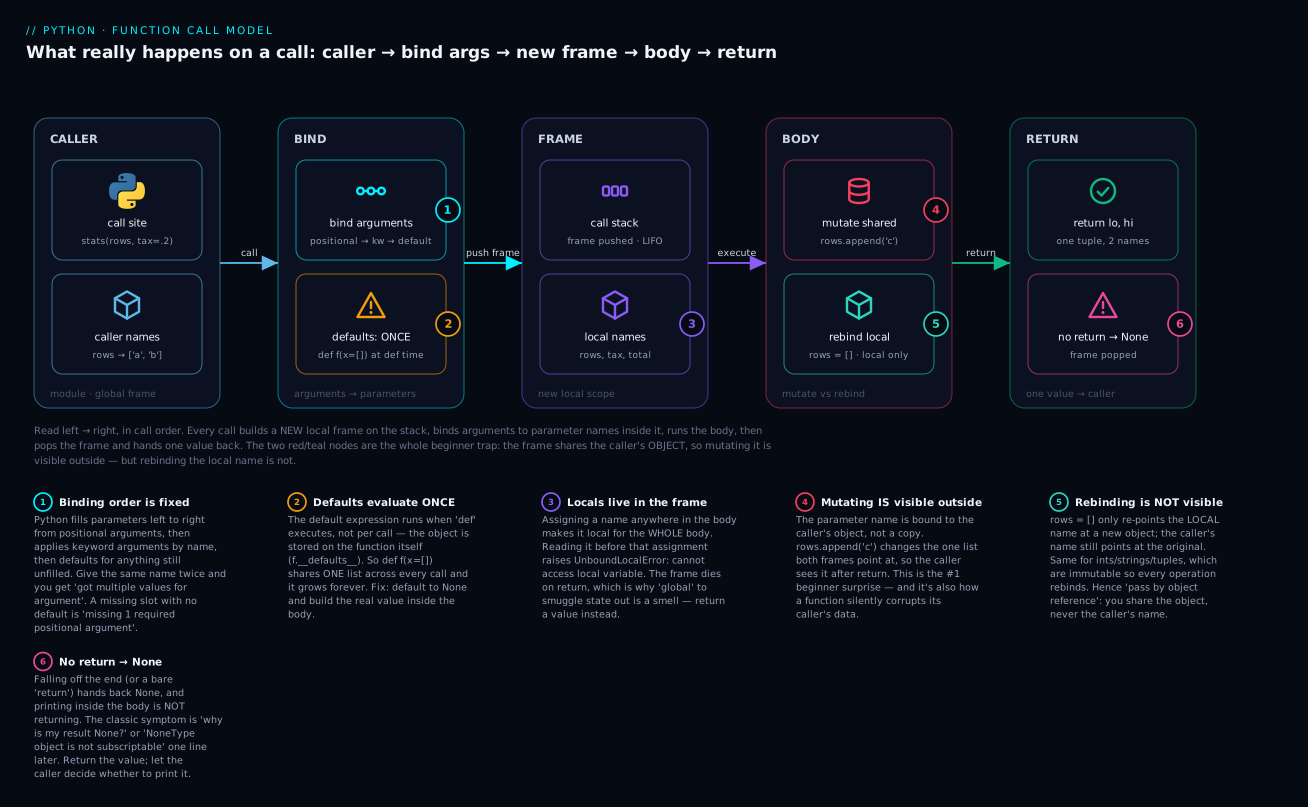
The six badges mark exactly where beginners fall: binding order is fixed (1); defaults are built once at def time, not per call (2); assigning a name makes it local for the whole body (3); mutating the shared object escapes the function (4); rebinding never does (5); and no return means None (6).
For immutable types the question never even arises, because there’s no such thing as mutating them — every operation rebinds:
def bump(n):
    n = n + 1        # ints are immutable: this ALWAYS rebinds
    return n

x = 5
bump(x)
print(x)             # => 5    the call did nothing to x!
x = bump(x)          # you must ASSIGN the result
print(x)             # => 6
| Operation inside the function | Caller sees it? | Why |
|---|---|---|
items.append(x) / .extend() / .sort() |
✅ Yes | Mutates the shared object in place |
items[0] = x |
✅ Yes | Item assignment mutates in place |
d["key"] = x |
✅ Yes | Mutates the shared dict |
items = [...] |
❌ No | Rebinds the local name only |
items = items + [x] |
❌ No | + builds a new list, then rebinds |
items += [x] |
⚠️ Yes for lists | += on a list calls .extend() — it mutates! |
n = n + 1 (int/str/tuple) |
❌ No | Immutable — always rebinds |
That += row is a genuinely nasty edge: items = items + [x] and items += [x] look like synonyms and are not. On a list, += mutates in place; on an immutable type it can only rebind. If that feels arbitrary, it is — just remember += on a list is .extend() wearing a costume.
| Type | Mutable? | A function can change it in place? |
|---|---|---|
list, dict, set |
✅ Yes | Yes — caller sees it |
| Class instances (usually) | ✅ Yes | Yes — caller sees it |
int, float, bool |
❌ No | No — only rebinds locally |
str |
❌ No | No — every “change” makes a new string |
tuple, frozenset |
❌ No | No |
The practical rule: if a function mutates something it was given, that’s a side effect, and it must be obvious from the name. sort_in_place(rows) is honest. get_summary(rows) quietly appending to rows is a bug factory. When in doubt, don’t mutate the input — build and return a new value:
def with_tag(tags, tag):
    return tags + [tag]          # new list; caller's list untouched
Scope: locals, UnboundLocalError, and why global is a smell
Every call gets a fresh, private workspace — the frame from the diagram. Names you assign in the body are local: they’re created on entry and destroyed on return. That isolation is the point; it’s what stops two functions from clobbering each other’s variables.
Reading an outer (module-level) name from inside a function works fine:
counter = 0

def show():
    print(counter)      # reading the global is fine
show()
# => 0
But try to assign it and you meet the single most confusing error a beginner will hit:
counter = 0

def increment():
    counter = counter + 1     # boom
    return counter

increment()
Traceback (most recent call last):
  File "demo.py", line 7, in <module>
    increment()
  File "demo.py", line 4, in increment
    counter = counter + 1
              ^^^^^^^
UnboundLocalError: cannot access local variable 'counter' where it is not associated with a value
Read that slowly, because the cause is genuinely surprising. Python scans the whole function body before running it. It sees counter = ... and decides, statically, that counter is a local name for the entire function. So when the right-hand side asks for counter, it looks in the local scope — where nothing has been assigned yet — and refuses. The global counter is never consulted at all.
The gotcha: one assignment anywhere in the body makes the name local everywhere in that body, including on lines above the assignment.
Version note: Python 3.10 and older word this as
UnboundLocalError: local variable 'counter' referenced before assignment. Identical cause. The caret markers (^^^^^^^) pointing at the exact expression are a 3.11+ nicety.
Python resolves names by searching four scopes in order, known as LEGB:
| Scope | Where | Example |
|---|---|---|
| Local | Inside the current function | counter assigned in the body |
| Enclosing | A function wrapping this one | Outer function’s names (closures) |
| Global | Module level | counter = 0 at the top of the file |
| Builtin | Python itself | len, print, list, sum |
You can silence the error with global counter, and you should almost never do it. Global state means any function can change a value any other function depends on — so a bug’s cause and its symptom end up in different files, and tests stop being repeatable because the result depends on what ran first. The signature stops telling the truth: increment() claims to need nothing and return nothing, while secretly reading and writing shared state.
The fix is nearly always to make the data flow visible — take it in, hand it back:
def increment(counter):
    return counter + 1        # no global; input in, output out

counter = 0
counter = increment(counter)
print(counter)                # => 1
| Instead of… | Do this | Why |
|---|---|---|
global x to write a value out |
Return it; let the caller assign | The signature tells the truth |
global for config |
Pass it as a parameter (with a default) | Testable; no import-order surprises |
global to accumulate |
Return the new value, or pass a list in deliberately | Data flow is visible at the call site |
global for a constant |
Just read it — reading needs no global |
Constants are UPPER_CASE and never reassigned |
nonlocal in nested funcs |
Fine in closures — a narrow, deliberate tool | Scoped to the enclosing function, not the world |
One more scope-adjacent trap: shadowing. Assign a name that’s already a builtin and you lose the builtin for the rest of that scope:
def f():
    list = [1, 2]        # shadows the builtin `list`
    return list("ab")    # now `list` is a list object, not the type

f()
# TypeError: 'list' object is not callable
The usual victims are list, dict, str, id, type, sum, input and max. If a builtin suddenly “isn’t callable”, you’ve shadowed it. Name it items or words instead.
Docstrings, type hints, and functions as objects
A function’s signature is a contract. Two cheap habits make that contract readable:
def bmi(weight_kg: float, height_m: float) -> float:
    """Return the Body Mass Index.

    Args:
        weight_kg: Mass in kilograms.
        height_m: Height in metres.

    Returns:
        BMI rounded to one decimal place.
    """
    return round(weight_kg / height_m ** 2, 1)

print(bmi(70, 1.75))                  # => 22.9
print(bmi.__doc__.splitlines()[0])    # => Return the Body Mass Index.
print(bmi.__annotations__)
# => {'weight_kg': <class 'float'>, 'height_m': <class 'float'>, 'return': <class 'float'>}
The docstring isn’t a comment — it’s a string stored on the function, which is why help(bmi) works and why IDEs can show it on hover. Note the units live in the parameter names (weight_kg, not weight); that’s free documentation that can never fall out of date.
Type hints are not enforced at runtime. Python will cheerfully let you pass the wrong thing and fail later, deeper, and more confusingly:
print(bmi("70", 1.75))
# TypeError: unsupported operand type(s) for /: 'str' and 'float'
Hints are for humans and tools — your editor’s autocomplete, and checkers like mypy or pyright that read them and flag mistakes before you run anything. They’re documentation the computer can verify.
| Element | Syntax | Purpose |
|---|---|---|
| Parameter hint | name: str |
Declares the expected type |
| Return hint | -> float |
Declares what comes back |
| No return value | -> None |
Explicit: this function is called for its side effect |
| Optional value | x: int | None = None |
The None-sentinel pattern, typed (3.10+) |
| Docstring | """...""" first in body |
help(), IDE hovers, __doc__ |
| Read the contract | inspect.signature(f) |
Prints the full signature at runtime |
Pure vs side-effecting
A pure function depends only on its arguments and does nothing but return a value. Same input, same output, every time — trivially testable, safe to reuse. A function that prints, writes a file, mutates its argument, or reads a global has side effects.
Both are necessary — a program with no side effects can’t do anything observable. The craft is separating them: keep the calculation pure, do the I/O at the edges. average(scores) should compute; its caller should print.
Functions are objects
Last idea, and it’s the door to the next lesson. A function is an ordinary object. You can assign it, pass it, and store it — just leave the () off, because () means call it:
def shout(text):
    return text.upper() + "!"

def whisper(text):
    return text.lower() + "..."

f = shout                    # no parens: bind the OBJECT, don't call it
print(f("hello"))            # => HELLO!
print(shout.__name__)        # => shout
print(type(shout))           # => <class 'function'>

for fn in (shout, whisper):  # functions in a tuple, called in a loop
    print(fn("Hello"))
# => HELLO!
# => hello...
This is why sorted(words, key=len) works: len is just an object being handed to sorted. Functions that take or return other functions are called higher-order functions, and they’re the foundation of lambda, map, sorted(key=...), and decorators.
Hands-on lab
You’ll build textstats, a small text-analysis tool that exercises every idea above — and you’ll reproduce the mutable-default bug, watch it happen, then fix it.
Everything here is standard library. No pip install needed, but a virtual environment is the right habit:
mkdir textstats && cd textstats
python3 -m venv .venv
source .venv/bin/activate       # Windows: .venv\Scripts\activate
python3 --version               # want 3.12+ (Windows users: use `python`)
Step 1 — one function, one job. Create textstats.py:
"""textstats — a tiny text-statistics tool."""

from collections import Counter

SAMPLE = "the cat sat on the mat. The cat was fat."


def word_count(text: str) -> int:
    """Return the number of whitespace-separated words in text."""
    return len(text.split())
What just happened: a named, hinted, documented computation. text is the parameter; whatever you pass at the call is the argument.
Step 2 — return several values at once. Append:
def stats(text: str) -> tuple[int, int, int]:
    """Return (characters, words, unique_words) for text."""
    words = text.split()
    unique = {w.lower() for w in words}
    return len(text), len(words), len(unique)
What just happened: the comma builds a tuple, so the caller can unpack three values in one line. words and unique are locals — they vanish when the function returns.
Step 3 — defaults and a keyword-only argument. Append:
def top_words(text: str, n: int = 3, *, min_length: int = 1) -> list[tuple[str, int]]:
    """Return the n most common words of at least min_length characters."""
    words = [w.strip(".,!?").lower() for w in text.split()]
    words = [w for w in words if len(w) >= min_length]
    return Counter(words).most_common(n)
What just happened: n is optional. Everything after the bare * is keyword-only, so callers must write min_length=3 — nobody will ever wonder what a stray 3 meant.
Step 4 — reproduce the mutable-default bug on purpose. Append:
def collect_buggy(word: str, seen: list[str] = []) -> list[str]:
    """BUG ON PURPOSE: seen is built ONCE, when def runs."""
    seen.append(word)
    return seen
What just happened: nothing yet — but that = [] was evaluated the moment def ran, and there is now exactly one list that every call will share.
Step 5 — fix it with the None sentinel. Append:
def collect(word: str, seen: list[str] | None = None) -> list[str]:
    """Fixed: a fresh list per call unless the caller supplies one."""
    if seen is None:
        seen = []
    seen.append(word)
    return seen
What just happened: the default is now an immutable None, and the real list is built inside the body — so each call gets its own.
Step 6 — the mutate-vs-rebind demo. Append:
def add_tag_mutate(tags: list[str]) -> None:
    """Mutate the caller's list in place — the caller WILL see this."""
    tags.append("mutated")


def add_tag_rebind(tags: list[str]) -> None:
    """Rebind the local name only — the caller will NOT see this."""
    tags = tags + ["rebound"]
What just happened: two functions, same signature, opposite effects on the caller. -> None says out loud “I’m called for my side effect.”
Step 7 — *args and **kwargs. Append:
def report(title: str, *lines: str, **options: object) -> str:
    """Build a text report: *lines are bullets, **options tweak formatting."""
    width = options.get("width", 40)
    bullet = options.get("bullet", "-")
    out = [title.upper().center(width, "=")]
    out.extend(f" {bullet} {line}" for line in lines)
    return "\n".join(out)
What just happened: lines arrives as a tuple, options as a dict — so report takes any number of bullets and any of several named settings.
Step 8 — wire it up. Append:
def main() -> None:
    print("1. word_count      :", word_count(SAMPLE))

    chars, words, unique = stats(SAMPLE)
    print("2. stats           :", chars, "chars,", words, "words,", unique, "unique")

    print("3. top_words()     :", top_words(SAMPLE))
    print("4. top_words(2,>=3):", top_words(SAMPLE, 2, min_length=3))

    print("5. buggy default   :", collect_buggy("alpha"))
    print("   buggy default   :", collect_buggy("beta"))
    print("   buggy default   :", collect_buggy("gamma"))
    print("   leaked default  :", collect_buggy.__defaults__)

    print("6. fixed default   :", collect("alpha"))
    print("   fixed default   :", collect("beta"))
    print("   fixed default   :", collect("gamma"))

    tags = ["start"]
    add_tag_mutate(tags)
    print("7. after mutate    :", tags)

    tags = ["start"]
    add_tag_rebind(tags)
    print("8. after rebind    :", tags)

    print()
    print(report("summary", f"{words} words", f"{unique} unique", width=30))


if __name__ == "__main__":
    main()
Step 9 — run it.
python3 textstats.py
1. word_count      : 10
2. stats           : 40 chars, 10 words, 7 unique
3. top_words()     : [('the', 3), ('cat', 2), ('sat', 1)]
4. top_words(2,>=3): [('the', 3), ('cat', 2)]
5. buggy default   : ['alpha']
   buggy default   : ['alpha', 'beta']
   buggy default   : ['alpha', 'beta', 'gamma']
   leaked default  : (['alpha', 'beta', 'gamma'],)
6. fixed default   : ['alpha']
   fixed default   : ['beta']
   fixed default   : ['gamma']
7. after mutate    : ['start', 'mutated']
8. after rebind    : ['start']

===========SUMMARY============
 - 10 words
 - 7 unique
Read lines 5-8 — they’re the whole lesson in eight lines of output:
- Line 5 is the bug, live. Three calls, one list, growing. And
collect_buggy.__defaults__shows the culprit sitting on the function object with all three words in it. - Line 6 is the fix. Same three calls, three separate lists.
- Lines 7 and 8 are mutate vs rebind. Identical signatures; only
mutateescapes the function.
Two details worth noticing. stats reports 7 unique words, not 6 — it doesn’t strip punctuation, so "mat." and "fat." keep their full stops while top_words (which calls .strip(".,!?")) does clean them. Same text, different answers, because they’re different functions with different jobs. That’s a real bug-hunting instinct in miniature: which function produced the number?
Now try these, and predict the output before you run it:
- Call
top_words(SAMPLE, min_length=3)— doesnstill default to 3? - Call
top_words(SAMPLE, 2, 3)and watch it fail. Why? (The*is doing its job.) - Add
basket = ["existing"]; print(collect("delta", basket)); print(basket). The fixed function still mutates a list you passed in — is that a bug? (No: you handed it the list. TheNonefix is about defaults, not about mutation.) - Delete the
returnfromword_countand run again. Predict the output before you do.
Common mistakes and troubleshooting
| Symptom / traceback | Cause | Fix |
|---|---|---|
TypeError: greet() missing 1 required positional argument: 'name' |
Called with too few arguments | Pass it, or give the parameter a default |
TypeError: greet() got multiple values for argument 'name' |
Filled the same slot positionally and by keyword — greet("Vinod", name="Bob") |
Pick one. Usually you meant a different keyword |
TypeError: greet() got an unexpected keyword argument 'greetings' |
Typo’d keyword, or the parameter doesn’t exist | Check the spelling against the def line |
TypeError: f() takes 1 positional argument but 2 were given |
Passed a positional past a bare * (keyword-only) |
Name it: f(x, timeout=5) |
TypeError: got some positional-only arguments passed as keyword arguments |
Used a keyword for a parameter before / |
Pass it positionally |
Result is None / TypeError: unsupported operand type(s) for +: 'NoneType' and 'int' |
Function prints instead of returning, or falls off the end |
Add return. Printing ≠ returning |
| Default list keeps growing between calls | def f(x=[]) — the default was built once at def time |
def f(x=None) then if x is None: x = [] |
UnboundLocalError: cannot access local variable 'c' where it is not associated with a value |
Assigned a global name inside the body → it became local everywhere | Pass it in and return the new value |
NameError: name 'greet' is not defined |
Called before the def ran (defined lower in the file) |
Move the def above the call, or into main() |
Prints <function total at 0x104c44a60> |
Forgot the () — you printed the function object |
total() |
TypeError: 'list' object is not callable |
Shadowed a builtin: list = [1, 2] |
Rename to items/words |
SyntaxError: parameter without a default follows parameter with a default |
def f(a=1, b) |
Defaulted parameters go last: def f(b, a=1) |
SyntaxError: positional argument follows keyword argument |
f(base=2, 10) |
Positionals first: f(2, exponent=10) |
| Caller’s list changed and you didn’t expect it | The function mutated the shared object | Don’t mutate inputs — return a new list — or rename it to say so |
Three deserve extra words, because they cost the most hours.
1. “Why is my function returning None?” Ninety percent of the time the body ends in print(x) where it should say return x. The confusion is understandable: while learning, print is how you see things, so it feels like output. But print writes characters to a terminal and evaluates to None. return hands a value to the caller. A function that prints can’t be composed, can’t be tested, and can’t be reused — the printing belongs to the caller. Rule of thumb: calculate and return; print at the top level.
2. The mutable default. You’ll only hit this once, but it’ll cost you an afternoon, because the symptom appears far from the cause: a list that’s mysteriously full of data from an earlier call — sometimes an earlier test. Remember the one-line explanation: def runs once, so the default is built once. Any mutable default ([], {}, set()) or any called default (datetime.now()) is the same bug. None sentinel, always.
3. Mutate vs rebind. The trap is that both look like “changing the argument”. items.append(x) reaches into the object the caller still holds — that change escapes. items = [...] only re-points a local name — that change dies at return. When a function mysteriously “did nothing”, you rebound. When your caller’s data mysteriously changed, you mutated. Both come from the same fact: the object is shared; the name is not.
Cheat-sheet
| Syntax | What it does |
|---|---|
def f(): |
Define a function (creates the object; body does not run) |
f() |
Call it — the () is what runs the body |
f |
The function object — pass it, store it, don’t call it |
return x |
Hand x back and exit immediately |
return a, b |
Return a tuple; unpack with x, y = f() |
| no return | Returns None implicitly ← the classic bug |
def f(a, b) |
Two required parameters |
def f(a, b=10) |
b is optional, defaults to 10 (defaults go last) |
def f(a=None) |
The safe default for a list/dict — build it in the body |
f(1, 2) |
Positional arguments — order decides |
f(a=1, b=2) |
Keyword arguments — name decides, order free |
f(1, b=2) |
Mixed — positionals must come first |
def f(*args) |
Collect extra positionals into a tuple |
def f(**kwargs) |
Collect extra keywords into a dict |
f(*mylist) |
Unpack a list into positional arguments |
f(**mydict) |
Unpack a dict into keyword arguments |
def f(a, *, b) |
b is keyword-only — great for flags/settings |
def f(a, /, b) |
a is positional-only (3.8+) |
def f(a: int) -> str: |
Type hints — for humans/tools, not enforced at runtime |
"""docstring""" |
First line of the body → f.__doc__, help(f) |
f.__defaults__ |
Inspect the stored defaults (see the mutable trap live) |
f.__name__ |
The function’s name as a string |
inspect.signature(f) |
Print the full signature at runtime |
global x |
Rebind a module-level name — a code smell; return instead |
nonlocal x |
Rebind an enclosing function’s name (closures) |
Interview and exam questions
Q: What’s the difference between a parameter and an argument?
A: A parameter is the name in the def line — the empty slot. An argument is the actual value passed at the call site. In def greet(name) / greet("Vinod"), name is the parameter and "Vinod" is the argument. Calling binds one to the other.
Q: What does a function return if it has no return statement?
A: None. Python appends an implicit return None. It’s the reason result = my_func() gives None when the body only prints — and why you often see the error one line later as TypeError: ... 'NoneType' and 'int'.
Q: How do you return multiple values from a Python function?
A: You don’t — you return one tuple. return a, b builds a tuple (the comma does it, not the parens) and the caller unpacks it: x, y = f(). Past ~3 values, prefer a dict or a dataclass so names carry the meaning.
Q: Explain the mutable default argument problem and how to fix it.
A: Default values are evaluated once, when def executes — not per call. So def f(x=[]) creates a single list shared by every call, which accumulates forever (you can watch it in f.__defaults__). Fix: default to None and build the real value in the body: def f(x=None): if x is None: x = [].
Q: Is Python pass-by-value or pass-by-reference?
A: Neither — it’s pass by object reference. The parameter is bound to the same object the caller passed (no copy), but it’s a new name. So mutating the object (items.append(x)) is visible to the caller, while rebinding the name (items = [...]) is not. For immutable types (int, str, tuple) only rebinding is possible, so callers never see changes.
Q: What does this print, and why?
def f(items):
    items = items + ["new"]

data = ["a"]
f(data)
print(data)
A: ['a']. items + ["new"] builds a new list and rebinds the local items to it; the caller’s data still points at the original. Note the trap: change it to items += ["new"] and it prints ['a', 'new'], because += on a list calls .extend() and mutates in place.
Q: Why does this raise UnboundLocalError?
count = 0
def bump():
    count = count + 1
A: Python decides at compile time that count is local to bump, because the body assigns to it. So the right-hand side looks up a local that has no value yet and raises UnboundLocalError: cannot access local variable 'count' where it is not associated with a value. Reading a global works; assigning makes the name local for the entire body. Fix by passing it in and returning the new value, rather than global.
Q: What do *args and **kwargs do, and when should you avoid them?
A: *args collects extra positional arguments into a tuple; **kwargs collects extra keyword arguments into a dict. At a call site the same symbols unpack: f(*mylist), f(**mydict). Avoid them when you actually know your parameters — they erase the signature, so autocomplete, type checkers, and readers all lose. Right for wrappers/decorators that must forward whatever they’re given.
Q: What do the / and bare * markers mean in a signature?
A: Everything before / is positional-only (can’t be passed by name); everything after a bare * is keyword-only (can’t be passed positionally). def f(a, /, b, *, c) means a positional-only, b either, c keyword-only. Use * to force flags and settings to be named at the call site; / mostly appears in the stdlib to keep parameter names free to rename.
Q: Are Python type hints enforced at runtime?
A: No. def f(x: int) will happily accept a string; you’ll just fail later with a confusing error. Hints exist for humans and tools — IDE autocomplete and static checkers like mypy/pyright. They’re documentation a machine can verify, not a runtime guard. Use pydantic or explicit checks if you need real validation.
Q: What’s a pure function, and why care? A: One that depends only on its arguments and does nothing but return a value — no printing, no file writes, no mutating its inputs, no reading globals. Same input, same output, always. It’s trivially testable and safe to reuse. Real programs need side effects, so the craft is keeping the calculation pure and pushing I/O to the edges.
Q (coding): Write a function that returns the min, max and average of a list, handling the empty case. A:
def summarise(numbers: list[float]) -> tuple[float, float, float] | None:
    """Return (min, max, average), or None for an empty list."""
    if not numbers:
        return None                    # guard clause: bare early return
    return min(numbers), max(numbers), sum(numbers) / len(numbers)

print(summarise([4, 1, 9, 6]))   # => (1, 9, 5.0)
print(summarise([]))             # => None
The point being tested is the empty-list guard (sum/len would raise ZeroDivisionError) and returning a tuple. Returning None for “no answer” is idiomatic — just make the caller check it.
Key takeaways
- A function names a computation. That buys you DRY (one home for a rule), readability, and testability.
defcreates the function object and runs once; the()call runs the body. - Parameters are the slots in the
def; arguments are the values at the call. A call is really an assignment:greet("Vinod")bindsname = "Vinod"in a fresh local frame. returnhands a value back and exits. Printing is not returning. Noreturnmeans the caller getsNone— the cause of nearly every mysterious'NoneType'traceback. Returna, bto hand back a tuple.- Defaults are evaluated once, at
deftime. Sodef f(x=[])shares one list across all calls forever. Any mutable or called default ([],{},datetime.now()) needs theNonesentinel: default toNone, build the real value in the body. - Python is pass by object reference. The function gets the caller’s object (no copy) bound to a new name. So mutating (
items.append(x)) is visible to the caller; rebinding (items = [...]) is not. This is the beginner mistake — know which one your body is doing. - Assigning a name in a body makes it local for the whole body — reading it first raises
UnboundLocalError. Prefer passing data in and returning it out;globalhides data flow and makes the signature lie. - Name your arguments at the call site when it isn’t obvious — and force it with a bare
*for flags and settings.connect(host, *, timeout=5)can never be misread. - Docstrings and type hints are the contract. Hints aren’t enforced at runtime; they’re for readers, editors, and
mypy. Keep functions pure where you can and push I/O to the edges. - Functions are objects — assign them, pass them, store them (just leave the
()off). That’s what makessorted(words, key=len)work, and it’s the foundation of lambdas,map, and decorators.