Up to now your Python has run in a straight line: statement, statement, statement, done. Every run does the same thing. Control flow is what breaks the line — it lets a program choose a path and repeat work, which is the whole difference between a script that prints one greeting and a script that checks a thousand servers and reports only the two that are down.
There are only two ideas here, and you already own both. Decide (“if the disk is over 90% full, alert”) and repeat (“for every server in the list, check it”). Everything in this lesson — if, elif, else, for, while, break, continue, and, or, not — expresses those two ideas precisely enough for a computer.
Python’s spelling of them is unusually close to English, which is a gift and a trap. The gift: if user and user.is_active: reads aloud correctly on the first try. The trap: a few of these do something subtly different from what the English suggests — and doesn’t return true or false, for isn’t a counter, and a loop can have an else. This lesson teaches the English, then the places where the English lies.
Type every snippet. Python 3.12 or newer; python3 --version to check. Nothing here needs an installed package.
Why this matters
Almost all real code is conditions and loops. Open any codebase you admire: the clever algorithms are rare, while if statements and for loops are on nearly every screen. This is the load-bearing syntax of the language, and fluency here is what makes the next forty lessons feel easy instead of exhausting.
It’s also where beginners lose the most hours, because the bugs are quiet. A syntax error is loud and honest — Python refuses to run and points at the line. But a control-flow bug produces a program that runs perfectly and gives the wrong answer: an elif ladder in the wrong order that never reaches its last branch, a while that spins forever because you forgot one line, a list that loses half the items you asked it to filter. Nothing crashes. The output is just… wrong. This lesson spends real time on exactly those silent failures.
Here’s the mental model to carry through everything below. The interpreter walks your file one statement at a time, top to bottom. A condition is a fork in that walk — it evaluates one expression, reduces it to true or false, and picks a path. A loop is a controlled backwards jump — it runs a block, returns to the top, and asks again. Every construct here is one of those two wearing a different hat. When code confuses you, walk it like the interpreter does: one statement, one question, one jump.
And the piece beginners most often miss: the condition doesn’t have to be a True or False. Python takes whatever expression you wrote and asks it “are you empty?” That single rule — truthiness — explains most of what follows, so we start there.
if / elif / else — and the truthiness that drives them
The basic shape is an if, a colon, and an indented block:
disk_used = 92

if disk_used > 90:
    print("ALERT: disk nearly full")   # runs only when the test is True
print("check complete")                # not indented -> always runs
ALERT: disk nearly full
check complete
That indentation is not decoration. In most languages braces {} mark the block and indentation is a politeness; in Python the indentation is the block. Those four spaces are what tell the interpreter that print("ALERT: ...") belongs to the if and the second print does not — which is why Python from any two authors looks alike, and why a stray space is a real error.
Add else for the other path, and elif (short for “else if”) for extra tests in between:
disk_used = 78

if disk_used > 90:
    print("critical")
elif disk_used > 75:      # only tested if the FIRST test was False
    print("warning")
elif disk_used > 50:      # only tested if BOTH above were False
    print("watch")
else:                     # only if nothing above matched
    print("healthy")
warning
Read that carefully, because the whole behaviour of a ladder is in it. The tests run top to bottom and stop at the first True. 78 > 75 is true, so warning prints and Python does not even evaluate 78 > 50 — even though that’s true as well. Exactly one block runs, ever.
| Form | When the block runs | Notes |
|---|---|---|
if cond: |
when bool(cond) is True |
The only required part |
elif cond: |
when every test above was False and this one is True | Any number of these; each is only tested if the previous failed |
else: |
when every test above was False | At most one, always last, no condition |
if … if (separate) |
each is tested independently | Not a ladder — two ifs can both run |
That last row is a real beginner bug. if / elif is one decision with several outcomes; two consecutive ifs are two separate decisions. Swap elif for if in the example above and you’d print warning, watch — both.
Because the ladder stops at the first match, order is a correctness decision, not a style one. Put the most specific test first. This is precisely why FizzBuzz checks i % 15 before i % 3: 15 is divisible by 3, so a Fizz branch placed first would swallow every multiple of 15 and the word “FizzBuzz” would never print.
Truthiness: the condition is never really a bool
Here’s the rule that surprises people coming from other languages: if doesn’t require True or False. It calls bool() on whatever you give it. And Python’s rule for that is simple and worth memorising — empty is false, everything else is true:
| Value | bool(value) |
Category |
|---|---|---|
False |
False |
the bool itself |
None |
False |
absence |
0, 0.0, 0j |
False |
zero of any numeric type |
"" |
False |
empty string |
[], (), {}, set() |
False |
empty list / tuple / dict / set |
"0", "False", " " |
True |
non-empty strings — a classic trap |
[0], [[]], {"a": 0} |
True |
non-empty containers, whatever’s inside |
-1, 0.1, 42 |
True |
any non-zero number (negatives too!) |
Two rows there deserve a flashing light. " " — a single space — is a non-empty string and therefore True. And [0] is a non-empty list and therefore True, even though the only thing in it is falsy. Truthiness asks “are you empty?”, never “is your content meaningful?”.
This is why idiomatic Python is written like this:
items = []

if items:                 # idiomatic: "if there are any items"
    print("processing")
else:
    print("nothing to do")

# NOT this — it's noise that says the same thing:
if len(items) > 0:
    ...
nothing to do
Nesting vs guard clauses — flatten your code
New programmers reach for nesting, and it quickly builds a “pyramid of doom” that drifts off the right of the screen:
def checkout(user, cart):
    if user is not None:
        if user.is_active:
            if cart:
                if user.balance >= total(cart):
                    return "ok"
                else:
                    return "insufficient funds"
            else:
                return "empty cart"
        else:
            return "inactive user"
    else:
        return "no user"
Every else there is far from the if it belongs to, so you must hold four conditions in your head at once to know why “ok” happened. Now invert each test and return early — a guard clause:
def checkout(user, cart):
    if user is None:                 # guard: bail out on the bad case
        return "no user"
    if not user.is_active:           # guard
        return "inactive user"
    if not cart:                     # guard
        return "empty cart"
    if user.balance < total(cart):   # guard
        return "insufficient funds"
    return "ok"                      # the happy path, unindented and obvious
Identical logic, branch for branch — but now every failure is handled the moment you can first detect it, and the success case sits flat at the bottom. This is the single highest-value habit in this lesson.
| Nested | Guard clauses | |
|---|---|---|
| Indentation | Grows with every condition | Stays flat |
| The happy path | Buried deepest | Last line, unindented |
| Reading a branch | Must match else to a distant if |
Read top to bottom, stop at first return |
| Adding a 5th rule | Another level of nesting | One more line at the top |
| Best for | Genuinely dependent logic | Validation, precondition checks |
The conditional (ternary) expression
Sometimes you only want to pick a value, not run a block. Python has a one-line conditional expression, and its word order is deliberately English:
flag = True
status = "on" if flag else "off"    # <value> if <cond> else <other value>
print(status)

n = 5
print(f"{n} item{'' if n == 1 else 's'}")   # tidy pluralisation
on
5 items
The key word is expression — it evaluates to a value, so it goes anywhere a value goes: inside an f-string, a function argument, a list. A plain if statement cannot. Use it for short either/or values; the moment it needs a second else or wraps past the line end, go back to a real if block. Nested ternaries are legal and unreadable.
Comparisons: chaining, and == vs is
Conditions are usually built from comparisons. The operators hold no surprises:
| Operator | Asks | Example → result |
|---|---|---|
== |
equal value? | [1, 2] == [1, 2] → True |
!= |
different value? | 3 != 4 → True |
< <= > >= |
ordering | 3 <= 3 → True |
is / is not |
the same object in memory? | [1] is [1] → False |
in / not in |
membership | "a" in "cat" → True |
Now a genuinely lovely piece of Python that most languages lack — comparison chaining:
x = 5
if 0 < x < 10:                # reads exactly like maths
    print("in range")

# Python expands it to this, but evaluates x only ONCE:
if 0 < x and x < 10:
    print("same thing")
in range
same thing
0 < x < 10 is not (0 < x) < 10 — Python genuinely chains it into 0 < x and x < 10. The “evaluated once” detail matters when the middle term is a function call:
def mid():
    print("  mid() called")
    return 5

print(0 < mid() < 10)
  mid() called
True
One call, not two. In C-like languages you’d write 0 < mid() && mid() < 10 and call it twice. Chaining works for any comparison, including a == b == c, and it short-circuits like and does.
== vs is — and why None is special
This one bites everyone. == asks “do these have the same value?” is asks “are these literally the same object?”
x = [1]
y = [1]
print(x == y)    # True  - same contents
print(x is y)    # False - two separate list objects
True
False
The rule you can apply without thinking: use is only for None, True, and False; use == for everything else. Those three are singletons — there is exactly one None object in a running program — so identity is the correct question, and it’s faster besides.
Why None in particular? Because == can be redefined by a class, and is cannot:
class Weird:
    def __eq__(self, other):
        return True          # a class is free to claim it equals anything

w = Weird()
print(w == None)   # True  <- the class lied, and == believed it
print(w is None)   # False <- the truth. `is` cannot be faked.
True
False
That’s not hypothetical — pandas and NumPy override == to return an array of comparisons, so if arr == None: blows up while if arr is None: always works. Note the word order too: is not is a single operator, so write x is not None, not the technically-equivalent not x is None.
| You want to check | Write | Not |
|---|---|---|
| Is it None? | if x is None: |
if x == None: |
| Is it not None? | if x is not None: |
if not x is None: |
| Same value? | if a == b: |
if a is b: |
| Is it empty/zero/None (any falsy)? | if not x: |
if x == False: |
| Is it exactly the bool False? | if x is False: |
if not x: (that catches 0, "", [] too) |
The last two rows are a real distinction. if not x: is the idiom you want 95% of the time — but it fires for 0, "" and [] as well as None. To tell “the user passed nothing” apart from “the user passed zero”, is None is the only correct test.
and / or / not: they return an operand, not a bool
Here is the most important sentence in this lesson: and and or do not return True or False. They return one of the operands you gave them.
print(1 and 2)        # 2
print(0 and 2)        # 0
print(1 or 2)         # 1
print(0 or 2)         # 2
print(type(1 and 2))  # <class 'int'>   <- not bool!
print(not 5)          # False           <- `not` DOES return a real bool
2
0
1
2
<class 'int'>
False
The rules are short, and once you see them the outputs above are obvious:
| Operator | Returns | Mnemonic |
|---|---|---|
a and b |
the first falsy operand, else the last operand | “and” needs everything true, so it stops at the first thing that isn’t |
a or b |
the first truthy operand, else the last operand | “or” needs one thing true, so it stops at the first thing that is |
not a |
a real True / False, always |
The only one of the three that returns a bool |
Walk 0 and 2: and needs both true, 0 is falsy, the answer can’t be true — hand back 0 immediately. Walk 1 or 2: or needs one true, 1 is truthy, settled — hand back 1. These operators return the evidence, not a verdict.
| Expression | Right side evaluated? | Result | Why |
|---|---|---|---|
"ana" or "friend" |
no | "ana" |
first is truthy → or stops there |
"" or "friend" |
yes | "friend" |
"" is falsy → take the next |
[] and "x" |
no | [] |
first is falsy → and returns it |
1 and 2 and 3 |
yes | 3 |
all truthy → return the last operand |
None or 0 or "last" |
yes | "last" |
all falsy → return the last operand |
False and f() |
no | False |
f() is never called |
True or f() |
no | True |
f() is never called |
user and user.name |
only if user is truthy |
safe against None |
the guard idiom |
Short-circuit evaluation
The flip side of that rule is that Python stops evaluating as soon as the answer is known. It is not being clever; it literally never runs the right-hand side:
def loud(v):
    print(f"  evaluated {v!r}")
    return v

print("A:", loud(False) and loud("B"))   # loud("B") is NEVER called
print("C:", loud(True) or loud("D"))     # loud("D") is NEVER called
  evaluated False
A: False
  evaluated True
C: True
Only one loud() ran in each line. This is called short-circuiting, and it’s not a micro-optimisation — it’s a tool you use on purpose. It’s the entire reason this is the standard Python idiom:
from dataclasses import dataclass

@dataclass
class User:
    name: str

for user in (None, User("ana")):
    if user and user.name:      # if user is None, `user.name` never happens
        print(f"  hello {user.name}")
    else:
        print("  anonymous")
  anonymous
  hello ana
Write if user.name and user: instead and the first iteration dies with AttributeError: 'NoneType' object has no attribute 'name'. The order of the operands is doing real safety work. Put the cheap check that protects the expensive one on the left — the same rule that makes if i < len(xs) and xs[i] == target: guard an IndexError, and if key in cfg and cfg[key] > 0: guard a KeyError.
The or default trick — and its falsy-zero trap
Because or returns the first truthy operand, it makes a tidy “use this unless it’s empty” default:
def greet(name=None):
    name = name or "friend"    # if name is None or "", use "friend"
    return f"hello {name}"

print(greet("ana"))   # hello ana
print(greet(None))    # hello friend
print(greet(""))      # hello friend
hello ana
hello friend
hello friend
That’s genuinely useful and you’ll see it everywhere. And it is a bug factory, because or can’t tell “nothing was passed” from “a falsy value was passed on purpose”:
def fetch(page_size=None):
    size = page_size or 20     # looks fine...
    return size

print(fetch(50))    # 50  - fine
print(fetch(None))  # 20  - fine
print(fetch(0))     # 20  - *** BUG *** the caller explicitly said 0!
50
20
20
The caller asked for 0 and silently got 20. Nothing raised. Nothing logged. The same trap eats "" (a deliberately empty name), [] (a deliberately empty list), and False (a deliberately disabled flag). The fix is to test for the thing you actually mean — absence — with is None:
def fetch(page_size=None):
    size = 20 if page_size is None else page_size   # explicit and correct
    return size

print(fetch(0))     # 0  <- the caller's 0 survives
0
| Value passed | x or 20 |
20 if x is None else x |
Which is right? |
|---|---|---|---|
50 |
50 |
50 |
same |
None |
20 |
20 |
same |
0 |
20 ✗ |
0 ✓ |
is None |
"" |
20 ✗ |
"" ✓ |
is None |
False |
20 ✗ |
False ✓ |
is None |
Use or for defaults only when every falsy value genuinely should be replaced (a display name is a fair example). The moment 0, "", or False is a legitimate input, reach for is None.
One last consequence of “returns an operand”: it leaks. A function that promises a bool but ends with return a and b hands its caller an int, a str, or a None:
def has_access(user, resource) -> bool:
    return user and user.token       # LIES - returns None or a str, never a bool

print(repr(has_access(None, "db")))     # None  <- not False!
None
If the signature says -> bool, wrap it: return bool(user and user.token). We’ll see why this one survives code review in the troubleshooting section.
for loops: Python’s for is a for-each
If you’ve met C, Java, or JavaScript, unlearn this now: for (int i = 0; i < n; i++). Python has no C-style counting loop. Python’s for is a for-each: it takes an iterable, pulls one item at a time, and stops when there are none left. There is no counter, no bound, no increment.
for host in ["web01", "db01", "cache01"]:
    print(host)
web01
db01
cache01
No index arithmetic, so no off-by-one and no chance of running past the end. The loop variable is the item itself. And “iterable” is a wide word — the same for walks lists, tuples, strings, sets, dicts, files and generators:
for ch in "hi":          print(ch)        # h, i          (characters)
for k in {"a": 1, "b": 2}: print(k)       # a, b          (dict -> keys!)
for k, v in {"a": 1}.items(): print(k, v) # a 1           (key AND value)
Note that looping a dict gives you keys, not values — use .items() when you want both.
range(): when you really do want numbers
When you need counting, you ask for a sequence of numbers to for-each over. That’s range():
| Call | Produces | Count |
|---|---|---|
range(5) |
0 1 2 3 4 |
5 items — starts at 0 |
range(1, 5) |
1 2 3 4 |
stop - start = 4 |
range(2, 10, 3) |
2 5 8 |
step 3; stops before 10 |
range(5, 0, -1) |
5 4 3 2 1 |
negative step counts down |
range(0) / range(5, 0) |
(nothing) | empty — a loop body that never runs |
range(1, 16) |
1 … 15 |
the FizzBuzz range |
Why is stop exclusive? It looks like a wart; it’s actually the reason range is pleasant to use:
range(n)yields exactlynitems.range(5)→ five numbers. No mental arithmetic.range(len(xs))covers exactly the valid indices ofxs—0tolen(xs) - 1. Ifstopwere inclusive, every one of these would need a- 1, and you’d forget it.- Adjacent ranges tile perfectly, no overlap and no gap:
range(0, 3)thenrange(3, 6). With an inclusive stop you’d write0..2and3..5and re-derive the boundary every time.
range is also lazy: range(10_000_000) allocates almost nothing, computing numbers on demand rather than building a list. That’s why you need list(range(5)) to see it, and why range(10**12) is instant.
enumerate() and zip(): the two you’ll use daily
You can write for i in range(len(hosts)): and index manually. Don’t — enumerate() exists:
hosts = ["web01", "db01"]

for i, host in enumerate(hosts, start=1):   # start=1 for human numbering
    print(f"{i}. {host}")
1. web01
2. db01
enumerate yields (index, value) pairs, and start= changes only the number, never which items you get. To walk two lists together, use zip():
names = ["web01", "db01"]
ips   = ["10.0.0.1", "10.0.0.2"]

for name, ip in zip(names, ips):
    print(f"{name} -> {ip}")
web01 -> 10.0.0.1
db01 -> 10.0.0.2
zip stops at the shortest input, silently. That default has hidden a lot of bugs, so Python 3.10 added strict=True — use it whenever the lists are supposed to be the same length:
print(list(zip([1, 2, 3], "ab")))                # silently drops the 3!
print(list(zip([1, 2, 3], "ab", strict=True)))   # raises instead
[(1, 'a'), (2, 'b')]
Traceback (most recent call last):
  File "<stdin>", line 1, in <module>
ValueError: zip() argument 2 is shorter than argument 1
| Helper | Yields | Use it for |
|---|---|---|
enumerate(xs) |
(0, x0), (1, x1) … |
you need the index and the item |
enumerate(xs, start=1) |
(1, x0), (2, x1) … |
human-facing numbering |
zip(a, b) |
(a0, b0), (a1, b1) … |
walking two collections in step |
zip(a, b, strict=True) |
same, but raises on length mismatch | when equal length is a real invariant (3.10+) |
reversed(xs) |
items back to front | last-to-first, without [::-1]'s copy |
sorted(xs) |
items in order | iterate in sorted order (returns a new list) |
d.items() |
(key, value) pairs |
looping a dict’s keys and values |
d.values() |
values only | you don’t care about the keys |
Reach for these before range(len(...)). If you’re writing xs[i] inside a loop, one of the rows above is almost certainly the answer.
while loops, break, continue, pass — and the for…else nobody expects
A for loop needs to know what to iterate. A while loop only needs a condition — it repeats as long as that condition stays true, however many times that turns out to be:
countdown = 3
while countdown > 0:
    print(countdown)
    countdown -= 1        # <- the line that eventually ends the loop
print("liftoff")
3
2
1
liftoff
The choice between them is not taste — it’s whether you know the count:
| Use | When | Example |
|---|---|---|
for |
You have a collection, or a known number of repeats | every host in a list; range(1, 16) |
while |
The count is unknown — it depends on something that happens inside the loop | menu until quit; retry until success; read until EOF; game until solved |
If you catch yourself writing i = 0; while i < len(xs): ... i += 1, that’s a for loop wearing a disguise — write for x in xs:.
The infinite-loop trap. A while runs until its condition goes false, so if nothing in the body can make it false, it never stops:
countdown = 3
while countdown > 0:
    print(countdown)      # 3, 3, 3, 3, 3, ... forever
    # countdown -= 1      <- forgot this line
countdown is never touched, so 3 > 0 is true forever. Press Ctrl+C to kill it. Every while deserves one deliberate glance: what in this body changes the condition? If you can’t point at the line, you have an infinite loop. The subtler version has that line present but unreachable — hiding below a continue, which we’ll see in a moment.
while True: is a deliberate infinite loop that you exit from the inside with break. That’s not a bug — it’s the standard shape for a menu or a server, and it beats inventing a done flag.
break, continue, pass
| Keyword | Does | Affects |
|---|---|---|
break |
leaves the loop immediately, skipping remaining items | the innermost loop only |
continue |
abandons the rest of the body, jumps to the next item | the innermost loop only |
pass |
nothing at all — a placeholder | it’s a no-op statement |
else (on a loop) |
runs only if the loop never hit break |
the loop it’s attached to |
for n in range(1, 10):
    if n % 2 == 0:
        continue          # skip evens: jump straight to the next n
    if n > 5:
        break             # stop the whole loop at the first odd over 5
    print(n)
1
3
5
continue is the loop’s guard clause — if not host: continue at the top of a body keeps the real work flat, exactly like an early return does in a function.
⚠️ The one continue landmine, in a while: if your counter update lives below the continue, it gets skipped and you spin forever.
i = 0
while i < 5:
    if i == 2:
        continue      # <- jumps back up; i is never incremented; INFINITE
    print(i)
    i += 1            # unreachable once i == 2
In a for loop this can’t happen — advancing the iterator isn’t your job — which is one more reason to prefer for when you can.
pass is Python’s “deliberately nothing”. Because a block cannot be empty, pass is how you stub one out:
def not_written_yet():
    pass              # valid, does nothing - a placeholder to fill in later

if x < 0:
    pass              # "this case is handled: do nothing" - documents intent
else:
    process(x)
Don’t confuse the three: pass does nothing and carries on; continue skips to the next iteration; break leaves. pass in a loop body is not continue — it’s a shrug.
for…else — the genuinely surprising one
Loops can have an else. It runs only if the loop finished without hitting break:
for n in [1, 3, 5]:
    if n % 2 == 0:
        print("found an even")
        break
else:
    print("no even found")     # runs: we never broke
no even found
Everyone reads else as “otherwise” and expects it to mean “if the loop body never ran”. It doesn’t — an empty list still runs the else. The keyword is a genuine wart, widely regretted, and the only way to keep it straight is to mentally rename it: else on a loop means nobreak. Read “for … nobreak:” and it’s suddenly obvious.
It works identically on while:
i = 0
while i < 3:
    i += 1
else:
    print("while-else ran, i =", i)   # the condition went false: no break
while-else ran, i = 3
Its one honest use is search, where it kills the bookkeeping flag:
# Without for...else - the flag is easy to forget to reset
found = False
for host in hosts:
    if host == target:
        found = True
        break
if not found:
    print("not in inventory")

# With for...else - the "not found" branch IS the else
for host in hosts:
    if host == target:
        break
else:
    print("not in inventory")
Use it for exactly that pattern and it’s a small gift. Use it for anything else and your reviewer will file a bug against working code.
Nested loops and early exit
break only ever exits one loop — the innermost one it sits in:
found = None
for row in range(3):
    for col in range(3):
        if row * 3 + col == 4:
            found = (row, col)
            break        # exits the COLUMN loop only
    if found:            # ...so the row loop needs its own check
        break
print(found)
(1, 1)
Python has no break 2 and no labelled break. The three real options: the flag above; better, put the loops in a function and return (which exits everything at once); or restructure with itertools.product.
Here is the whole path in one picture. Follow it left to right: a statement arrives, its condition is reduced to true/false by the truthiness rules (with and/or short-circuiting as soon as the answer is known), one branch wins, the loop body runs per item — and continue loops back while break leaves and cancels the else.
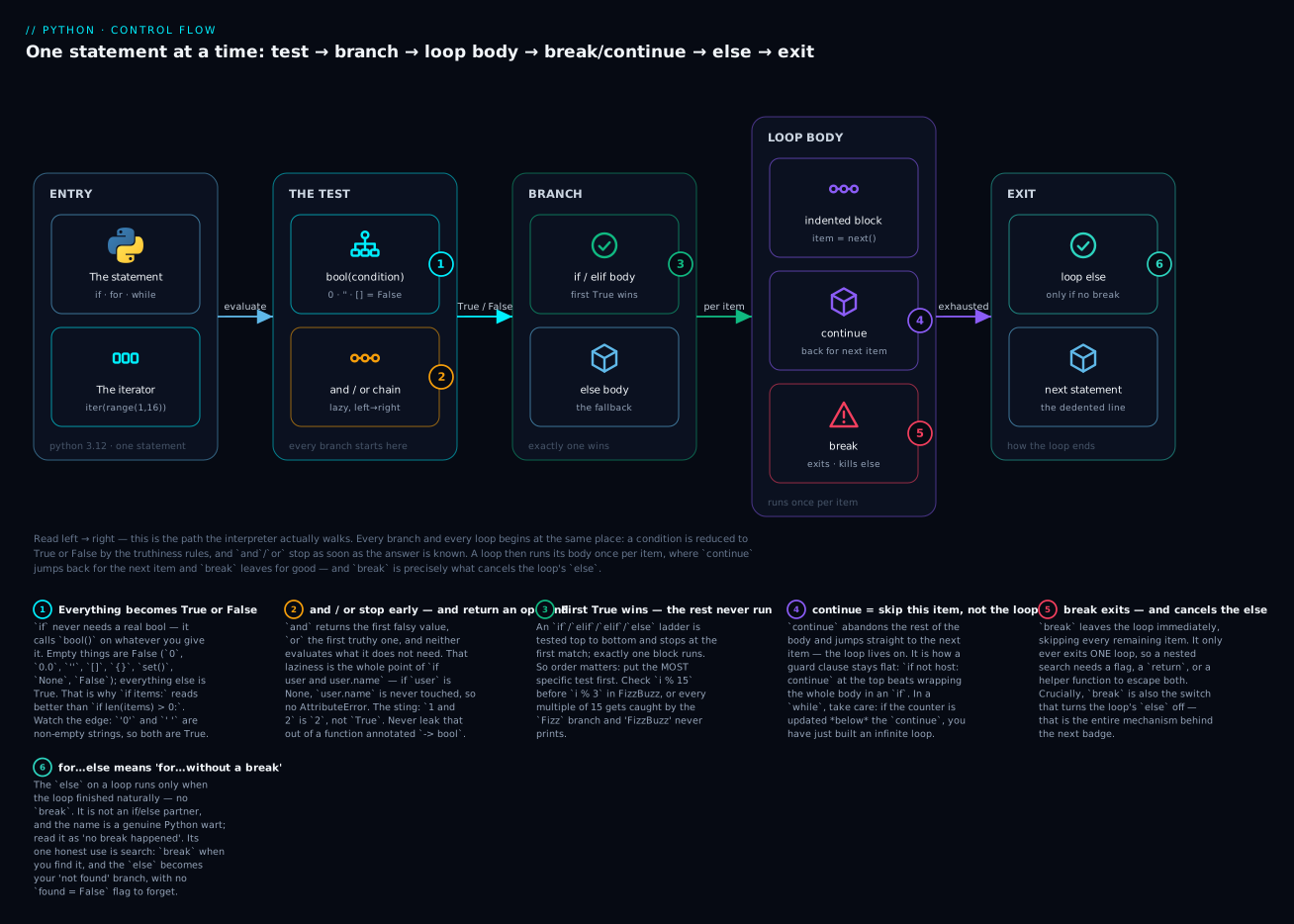
The badges mark the six things worth tattooing on your brain: every condition becomes a bool via truthiness (1); and/or stop early and return an operand (2); the first true branch wins and the rest never run (3); continue skips the item, not the loop (4); break exits one loop and cancels the else (5); and the loop else means “no break happened” (6).
match (3.10+) vs a dict dispatch — an honest note
Python 3.10 added match/case. It is not a C-style switch, and it is not a faster elif ladder — it’s structural pattern matching, which destructures a value while it tests it:
def route(cmd: str):
    match cmd.split():
        case ["quit"] | ["exit"]:        # alternatives with |
            return "bye"
        case ["add", x, y]:              # matches shape AND binds x, y
            return int(x) + int(y)
        case ["ls", *rest]:              # captures the remainder
            return f"ls with {len(rest)} args"
        case _:                          # the wildcard: the default
            return "unknown"

for c in ["quit", "add 2 3", "ls a b c", "nope"]:
    print(f"{c!r} -> {route(c)!r}")
'quit' -> 'bye'
'add 2 3' -> 5
'ls a b c' -> 'ls with 3 args'
'nope' -> 'unknown'
That case ["add", x, y] is doing something an elif can’t: checking the list’s length and its first element and binding the other two to names, in one line.
⚠️ The match trap you must know before you use it. A bare lowercase name in a case is a capture pattern — it binds, it does not compare:
LIMIT = 10
n = 5
match n:
    case LIMIT:          # NOT "is n equal to LIMIT?" - it rebinds LIMIT to 5!
        print("at limit")
    case _:
        print("other")
  File "e6.py", line 4
    case LIMIT:
         ^^^^^
SyntaxError: name capture 'LIMIT' makes remaining patterns unreachable
Python catches it here only because a later case becomes unreachable. Make it the last case and it compiles silently, matches everything, and rebinds your constant. To compare against a constant it must be a dotted name — case Status.ACTIVE: or case config.LIMIT:. That rule surprises everyone once.
So when should a beginner use what?
| Approach | Best at | Weak at |
|---|---|---|
if / elif ladder |
2–5 branches; conditions that are ranges or unrelated tests (x > 90) |
long ladders of equality checks get repetitive |
dict dispatch |
many branches keyed by one exact value; adding cases at runtime; table-driven data | only does equality on one key; no ranges |
match / case |
destructuring shapes — nested dicts, JSON, tuples, dataclasses, ASTs | 3.10+ only; the capture-pattern trap; overkill for x > 90 |
Dict dispatch is worth seeing, because it’s the one many “use match for this!” examples should really be:
OPS = {
    "square": lambda x: x * x,
    "circle": lambda x: 3.14159 * x * x,
}

def area(shape, x):
    try:
        return OPS[shape](x)        # the dict IS the branch table
    except KeyError:
        raise ValueError(shape) from None

print(area("square", 2))   # 4
print(area("circle", 2))   # 12.56636
4
12.56636
The honest summary for now: if/elif is the workhorse and you will not go wrong leaning on it. Use a dict when you’re picking one of many things by an exact key. Reach for match when you’re pulling apart a structure — parsing a JSON payload or a command — which is where it genuinely shines and an elif ladder gets ugly.
What a loop costs
Loops are where beginner code gets accidentally slow, almost always from one mistake: an in check on a list, inside a loop.
| Operation | Cost | In a loop over n items |
|---|---|---|
for x in xs |
O(n) — one pass | the baseline |
x in some_list |
O(n) — scans every element | → O(n²) ⚠️ |
x in some_set / x in some_dict |
O(1) average — hashed | → O(n) ✓ |
for a in xs: for b in ys: |
O(n·m) | fine for small n; deadly for big |
xs.append(x) |
O(1) amortised | → O(n) ✓ |
xs.insert(0, x) |
O(n) — shifts everything | → O(n²) ⚠️ |
xs.pop() vs xs.pop(0) |
O(1) vs O(n) | use collections.deque for a queue |
Those aren’t folklore — here’s the list-vs-set gap measured on a 10,000-element haystack, 100 lookups per pass:
100 lookups in a 10k list :    2.312 ms per pass
100 lookups in a 10k set  :    0.002 ms per pass
speedup                   :     1012x
One thousand times faster, purely from changing haystack = [...] to haystack = {...}. If you check membership repeatedly, build a set first. Likewise xs.insert(0, x) in a 50k loop measured 553 ms against 0.9 ms for append — every insert shifts the whole list one slot right.
One honest correction, since you will be told “string += in a loop is O(n²)”. That’s folklore-shaped. Measured:
n= 10000  +=(opt)     0.53 ms | +=(defeated)      1.40 ms | join    0.34 ms
n= 20000  +=(opt)     0.96 ms | +=(defeated)      3.71 ms | join    0.58 ms
n= 40000  +=(opt)     1.61 ms | +=(defeated)     11.56 ms | join    1.09 ms
n= 80000  +=(opt)     3.19 ms | +=(defeated)    108.60 ms | join    2.15 ms
+= scales linearly (0.53 → 3.19 as n grows 8×) because CPython mutates the string in place when it holds the only reference. Keep a second reference alive and that optimisation vanishes: 1.40 → 108.60, a 78× blow-up for 8× the data — textbook quadratic. So the rule isn’t “+= is quadratic”; it’s “+= is quadratic whenever a CPython implementation detail doesn’t happen to save you” — a detail in no spec and on no other interpreter. Use "".join(parts): fastest in every row, and it never has a bad day.
Never mutate a list while you iterate it
This is the silent one. A for loop over a list walks it by position; removing an item shifts everything left, so the next position skips an element:
items = ["a", "b", "c", "d"]
for x in items:
    items.remove(x)
print(items)
['b', 'd']
We asked to remove everything. Half of it is still there, and Python raised nothing. Trace it: position 0 is "a" → remove → ["b","c","d"]. Position 1 is now "c" (not "b" — everything shifted left!) → remove → ["b","d"]. Position 2 is past the end → loop ends. "b" and "d" were never even looked at.
The subtler version bites the same way:
nums = [1, 2, 2, 3]
for n in nums:
    if n == 2:
        nums.remove(n)
print(nums)      # [1, 2, 3]  <- one 2 survived!
The rule: never add to or remove from a list while a for loop is walking it. Build a new one instead:
| Instead of | Do this | Why |
|---|---|---|
for x in xs: xs.remove(x) |
xs = [x for x in xs if keep(x)] |
a comprehension builds a fresh list — nothing shifts |
| removing inside the loop | for x in xs[:]: — iterate a copy |
the slice is a snapshot; mutate the original safely |
| filtering a dict in place | d = {k: v for k, v in d.items() if keep(v)} |
dicts raise RuntimeError if you resize them mid-loop |
| collecting results | out = [] then out.append(...) |
never touch the thing you’re iterating |
items = ["a", "b", "c", "d"]
kept = [x for x in items if x != "b"]     # the idiomatic fix
print(kept)

items2 = ["a", "b", "c", "d"]
for x in items2[:]:                       # [:] = iterate a copy
    if x == "b":
        items2.remove(x)
print(items2)
['a', 'c', 'd']
['a', 'c', 'd']
Dicts and sets are stricter than lists, and you should be glad: resize one mid-loop and you get RuntimeError: dictionary changed size during iteration — a loud, immediate error instead of a list’s silent wrong answer.
Hands-on lab
Now build something that uses all of it: a while menu loop, a for over range(), a for over a list, guard clauses, break, continue, and a for…else.
This lab needs no packages — control flow is pure language. (When a later lesson does need one, you’ll make a virtual environment first: python3 -m venv .venv && source .venv/bin/activate, or .venv\Scripts\activate on Windows. Worth knowing now; not needed today.)
Step 1 — Set up.
mkdir -p ~/python-lab && cd ~/python-lab
python3 --version     # need 3.12 or newer
Python 3.12.3
What just happened: A scratch directory and a version check. On Windows use python --version; on macOS/Linux it’s python3 (a bare python may not exist, or may be an ancient 2.7).
Step 2 — Write the script. Save this as control_flow_lab.py:
#!/usr/bin/env python3
"""KloudVin Python Zero-to-Hero - the control flow lab."""
import random

random.seed(7)  # fixed so your run matches the lesson; delete it for a real game

HOSTS = ["web01", "", "db01", "cache01", "web02"]

MENU = """\
1) FizzBuzz          (for + range + if/elif/else)
2) Guess the number  (while + guard + break)
3) Find a host       (for over a list + for...else)
q) Quit"""


def fizzbuzz(n: int) -> None:
    """A for-each over range() driving an if/elif/else ladder."""
    for i in range(1, n + 1):          # 1..n, because stop is exclusive
        if i % 15 == 0:                # check the MOST specific case first
            print("FizzBuzz")
        elif i % 3 == 0:
            print("Fizz")
        elif i % 5 == 0:
            print("Buzz")
        else:
            print(i)


def guess_game() -> None:
    """while: we do not know how many guesses it takes. break ends it."""
    secret = random.randint(1, 100)
    attempts = 0
    while True:
        raw = input("guess 1-100 (q to give up): ").strip()
        if raw == "q":                 # break: leave the loop for good
            print(f"  giving up - it was {secret}")
            break
        if not raw.isdigit():          # guard clause + continue: skip this round
            print("  digits only, please")
            continue
        guess = int(raw)
        attempts += 1
        if guess < secret:
            print("  too low")
        elif guess > secret:
            print("  too high")
        else:
            print(f"  correct in {attempts} attempts!")
            break


def find_host(target: str) -> None:
    """for over a list + a guard + for...else (the honest 'not found' branch)."""
    for host in HOSTS:
        if not host:                   # guard: skip blank inventory rows
            continue
        if host == target:
            print(f"  found {host}")
            break
    else:                              # runs ONLY if we never hit break
        print(f"  {target} is not in the inventory")


def main() -> None:
    while True:                        # the menu loop: spins until we break
        print(MENU)
        choice = input("> ").strip().lower()
        if not choice:                 # guard clause: "" is falsy
            print("  nothing typed")
            continue
        if choice == "q":
            print("bye")
            break
        elif choice == "1":
            fizzbuzz(15)
        elif choice == "2":
            guess_game()
        elif choice == "3":
            find_host(input("host: ").strip())
        else:
            print(f"  unknown option {choice!r}")


if __name__ == "__main__":
    main()
What just happened: Every construct from this lesson, in one 70-line file. random.seed(7) makes the “random” secret always 42, so your output matches this page exactly — delete that line and it’s a real game.
Step 3 — Run it and type 1.
python3 control_flow_lab.py
1) FizzBuzz          (for + range + if/elif/else)
2) Guess the number  (while + guard + break)
3) Find a host       (for over a list + for...else)
q) Quit
> 1
1
2
Fizz
4
Buzz
Fizz
7
8
Fizz
Buzz
11
Fizz
13
14
FizzBuzz
What just happened: for i in range(1, 16) for-eached over 15 numbers, and the elif ladder picked exactly one branch each time. Note 15 printed FizzBuzz, not Fizz — because i % 15 is tested first. Move that branch to the bottom and watch “FizzBuzz” disappear entirely; that’s the ladder-order lesson in one edit.
Step 4 — Choose 2 and play. Type abc, then 50, 20, 42.
> 2
guess 1-100 (q to give up): abc
  digits only, please
guess 1-100 (q to give up): 50
  too high
guess 1-100 (q to give up): 20
  too low
guess 1-100 (q to give up): 42
  correct in 3 attempts!
What just happened: The while True loop had no idea how many guesses this would take — that’s exactly why it isn’t a for. abc hit the isdigit() guard and continued without burning an attempt (note it says 3, not 4). The correct guess hit break.
Step 5 — Choose 3 twice: once for db01, once for web99.
> 3
host: db01
  found db01
1) FizzBuzz          (for + range + if/elif/else)
2) Guess the number  (while + guard + break)
3) Find a host       (for over a list + for...else)
q) Quit
> 3
host: web99
  web99 is not in the inventory
What just happened: This is for…else earning its keep. db01 was found → break → the else was cancelled. web99 was never found → the loop ran out naturally → the else fired with the “not found” message. No found = False flag anywhere. The empty string in HOSTS was skipped by the if not host: continue guard both times.
Step 6 — Press Enter on an empty line, then type x, then q.
>
  nothing typed
1) FizzBuzz          (for + range + if/elif/else)
2) Guess the number  (while + guard + break)
3) Find a host       (for over a list + for...else)
q) Quit
> x
  unknown option 'x'
1) FizzBuzz          (for + range + if/elif/else)
2) Guess the number  (while + guard + break)
3) Find a host       (for over a list + for...else)
q) Quit
> bye
What just happened: The empty line hit if not choice: — truthiness, since "" is falsy — and continued back to the menu. x fell through to the else. q hit break, which ended the while True loop, which ended main(), which ended the program.
Step 7 — Break it on purpose. Delete the break from main’s q branch and run it again. The menu now prints bye and immediately redraws itself, forever — Ctrl+C to escape.
What just happened: You built the infinite loop by hand. while True has no exit condition of its own; the break is the exit. Put it back before moving on.
Common mistakes and troubleshooting
| Symptom / traceback | Cause | Fix |
|---|---|---|
| Loop never ends; you must press Ctrl+C | while condition never becomes false — the update line is missing or sits below a continue |
Point at the line that changes the condition. If you can’t, add it. In a while True, check every path can reach a break |
SyntaxError: invalid syntax. Maybe you meant '==' or ':=' instead of '='? |
Used assignment = in a condition: if x = 5: |
Use == to compare. (Python deliberately forbids = in a condition — this whole bug class is a C tradition Python refuses to inherit) |
IndentationError: expected an indented block after 'if' statement on line 2 |
The body after if ...: isn’t indented |
Indent the block 4 spaces. A block can’t be empty — use pass if you truly want nothing |
IndentationError: unexpected indent |
A line is indented that shouldn’t be | Line it up with the statement it belongs to |
TabError: inconsistent use of tabs and spaces in indentation |
Mixed tabs and spaces — often from pasting | Never use tabs in Python. Set your editor to “insert spaces”, 4 per indent |
AttributeError: 'NoneType' object has no attribute 'name' |
Touched an attribute on a None |
Short-circuit it: if user and user.name: — and keep the cheap guard on the left |
| Filtering a list leaves half the items behind, no error | Mutated a list while a for loop walked it — removals shift the indices |
xs = [x for x in xs if keep(x)], or iterate a copy: for x in xs[:]: |
RuntimeError: dictionary changed size during iteration |
Added/removed dict keys mid-loop | Build a new dict, or iterate list(d.items()) to snapshot it first |
Off-by-one: loop misses the last item, or IndexError |
range(1, n) stops at n-1; range(len(xs)+1) runs past the end |
range(n) = n items from 0. To include n, write range(1, n + 1). Better: for x in xs: — no indices, no off-by-one |
A -> bool function returns None or a string |
return a and b returns an operand, not a bool |
return bool(a and b) |
A caller passes 0 / "" / False and silently gets the default |
x or default treats every falsy value as “missing” |
default if x is None else x |
zip() silently drops the tail of the longer list |
zip stops at the shortest by default |
zip(a, b, strict=True) (3.10+) when equal length is a real invariant |
| Two branches both run when only one should | Wrote two separate ifs instead of if / elif |
Use elif — it’s one decision, and only one branch can win |
The last elif never fires |
Ladder order: a broader test above swallows it | Put the most specific test first (i % 15 before i % 3) |
SyntaxError: name capture 'LIMIT' makes remaining patterns unreachable |
case LIMIT: captures, it doesn’t compare |
Use a dotted name: case Status.LIMIT: or case config.LIMIT: |
Three of these deserve extra words, because they cost the most hours.
1. The silent list-mutation bug. It’s the nastiest thing in this lesson precisely because nothing goes wrong loudly. for x in items: items.remove(x) leaves you ['b', 'd'] and a clean exit code. With no traceback to chase, you end up staring at your remove logic — which is correct — instead of at the loop. Internalise the rule as an absolute: the thing you iterate and the thing you mutate must be two different objects. Dicts are kinder here — they raise RuntimeError instead of quietly lying to you.
2. and/or returning an operand. This is fine until it escapes. Inside an if, user and user.token behaves exactly like a bool, because if only cares about truthiness — so the habit forms and nothing punishes it. Then someone puts return user and user.token behind a -> bool signature and the function returns None for a logged-out user. Every if has_access(...) keeps working, so the bug lies dormant until it’s serialised to JSON as null, or compared with is True. The discipline: and/or are fine in a condition; wrap them in bool() the moment the value leaves the function.
3. The or-default zero trap. size = page_size or 20 is such clean, readable code that it feels like the right answer — and for a display name it is. But or asks “is this falsy?” when you meant “was this provided?”, and those differ for exactly the values that matter: 0, "", False, []. A page size of 0, a deliberately blank label, an intentionally empty list, a flag set False on purpose — every one gets silently overwritten. Ask the question you mean: 20 if page_size is None else page_size.
Cheat-sheet
| Syntax | What it does |
|---|---|
if cond: |
run the block when bool(cond) is True |
elif cond: |
tested only if every test above failed |
else: |
runs if every test above failed |
a if cond else b |
conditional expression — evaluates to a value |
if x: |
truthy test — the idiom for “not empty/zero/None” |
if not x: |
falsy test — catches None, 0, "", [], False |
if x is None: |
the None check (never == None) |
if x is not None: |
the not-None check (not not x is None) |
0 < x < 10 |
chained comparison; x evaluated once |
a and b |
first falsy operand, else the last — short-circuits |
a or b |
first truthy operand, else the last — short-circuits |
not a |
a real bool, always |
bool(a and b) |
force a real bool before returning it |
x or default |
default when x is any falsy value |
default if x is None else x |
default only when x is missing ✓ |
for x in xs: |
for-each over any iterable |
for i, x in enumerate(xs, start=1): |
item + index, numbered from 1 |
for a, b in zip(xs, ys, strict=True): |
walk two collections in step, error on mismatch |
for k, v in d.items(): |
a dict’s keys and values |
range(n) / range(a, b) / range(a, b, step) |
n items from 0 / a…b-1 / stepped; stop is exclusive |
range(5, 0, -1) |
count down: 5 4 3 2 1 |
while cond: |
repeat while true — for an unknown count |
while True: … break |
deliberate infinite loop, exited from inside |
break |
exit the innermost loop now (and cancel its else) |
continue |
skip to the next item |
pass |
do nothing (a placeholder; a block can’t be empty) |
for … else: |
the else runs only if no break — read it as “nobreak” |
xs = [x for x in xs if keep(x)] |
the safe way to filter (never mutate while iterating) |
for x in xs[:]: |
iterate a copy so you can mutate the original |
match v: case [a, b]: |
structural pattern matching (3.10+); dotted names to compare constants |
| Pick the right tool | Use |
|---|---|
| Known collection or known count | for |
| Unknown count, depends on the loop body | while |
2–5 branches, or range tests (x > 90) |
if / elif / else |
| Many branches on one exact key | dict dispatch |
| Destructuring a shape (JSON, tuples, commands) | match (3.10+) |
| Repeated membership checks in a loop | build a set first — O(1), not O(n) |
| Building a string in a loop | "".join(parts) |
| Nested loop that must exit both | put it in a function, return |
Interview and exam questions
Q: What do and and or return in Python?
A: Not booleans — one of their operands. and returns the first falsy operand, or the last if all are truthy; or returns the first truthy operand, or the last if all are falsy. So 1 and 2 is 2, 0 or "x" is "x", and type(1 and 2) is int. Only not always returns a real bool. Behind a -> bool signature, wrap it: return bool(a and b).
Q: What is short-circuit evaluation, and give a practical use?
A: and/or stop evaluating as soon as the result is determined — False and f() never calls f(), and True or f() never calls f(). The classic use is guarding: if user and user.name: avoids AttributeError when user is None, because user.name is never evaluated. Same shape for if i < len(xs) and xs[i] == t: (guards IndexError) and if k in d and d[k] > 0: (guards KeyError). The cheap guard goes on the left.
Q: Which values are falsy in Python?
A: False, None, zero of any numeric type (0, 0.0, 0j), empty sequences and collections ("", [], (), {}, set()), and objects whose __bool__ returns False or __len__ returns 0. Everything else is truthy — including "0", " ", [0] and -1, which are the ones that catch people.
Q: Why is x = value or default risky?
A: or fires on any falsy value, not just “missing”. If the caller passes 0, "", False or [] deliberately, they silently get the default instead. Use default if value is None else value when zero or empty is a legitimate input.
Q: == vs is — when do you use each?
A: == compares value; is compares object identity. Use is only for None, True and False — singletons, so identity is the right question and it can’t be faked. == for everything else. It matters for None because a class can override __eq__ and make x == None return True; pandas/NumPy return arrays from ==, so if arr == None: raises. is None always works.
Q: What does 0 < x < 10 do, and how is it different from C?
A: Python chains it into 0 < x and x < 10, evaluating x once and short-circuiting. In C-like languages it parses as (0 < x) < 10 — the first comparison yields a bool, which is then compared to 10, usually giving a silently wrong answer. Python’s version means what it looks like.
Q: Why is range’s stop exclusive?
A: So range(n) yields exactly n items and range(len(xs)) covers exactly the valid indices, with no -1 anywhere. It also lets adjacent ranges tile without overlap or gaps: range(0, 3) then range(3, 6). To include n, write range(1, n + 1).
Q: What do break, continue and pass do — and what does an else on a loop do?
A: break exits the innermost loop immediately. continue abandons the rest of the body and jumps to the next iteration. pass does nothing at all — a placeholder that exists because a block can’t be empty (so pass in a loop is not continue; execution carries on to the next line). A loop’s else runs only if the loop finished without hitting break — it is not “if the loop didn’t run”, since an empty iterable still runs the else. Read it as nobreak. Its honest use is search: break when you find the item, and the else becomes the “not found” branch, removing the found = False flag.
Q (coding): FizzBuzz, 1 to 15. Why does branch order matter? A:
for i in range(1, 16):
    if i % 15 == 0:      # MUST be first
        print("FizzBuzz")
    elif i % 3 == 0:
        print("Fizz")
    elif i % 5 == 0:
        print("Buzz")
    else:
        print(i)
An elif ladder stops at the first True. 15 is divisible by 3 and by 5, so if i % 3 were tested first it would catch 15 and print Fizz — “FizzBuzz” would never appear. The most specific test goes first.
Q (coding): What does this print, and why?
items = ["a", "b", "c", "d"]
for x in items:
    items.remove(x)
print(items)
A: ['b', 'd']. The loop walks by index while remove shifts elements left. Index 0 removes "a", leaving ["b","c","d"]; index 1 is now "c" (not "b"), removes it, leaving ["b","d"]; index 2 is past the end, so the loop stops. "b" and "d" were never visited — and Python raised nothing. Fix with a comprehension or by iterating items[:].
Q: When would you use while rather than for, and how do you break out of two nested loops?
A: Use while when the iteration count is unknown at the start because it depends on what happens inside the loop — a menu until the user quits, a retry until success, reading until EOF. If you know the collection or the count, for is correct; i = 0; while i < len(xs): ... i += 1 is a for loop in disguise. As for nested loops: break only exits the innermost one and Python has no labelled break or break 2, so either set a flag and re-check it in the outer loop, or — better — extract the loops into a function and return, which exits both at once.
Q: match vs an if/elif ladder — when is match actually the right call?
A: When you’re destructuring a shape rather than testing a value: case ["add", x, y]: checks the list’s length and its first element and binds the rest, in one line. That’s parsing JSON, commands, tuples, or dataclasses. For range tests (x > 90) or a handful of unrelated conditions, if/elif is clearer. For many exact-value branches, a dict dispatch usually beats both. Also know the trap: a bare name in a case captures rather than compares — you need a dotted name like case Status.ACTIVE:.
Key takeaways
- Every condition is a truthiness test.
ifcallsbool()on whatever you give it: empty is False (0,"",[],{},None), everything else is True. Writeif items:, notif len(items) > 0:— but remember" ","0"and[0]are all True. - An
if/elif/elseladder stops at the first True and runs exactly one block, so order is correctness, not style — most specific first. Two separateifs are two decisions and can both fire. and/orreturn an operand, not a bool, and they short-circuit — which is what makesif user and user.name:safe. Wrap inbool()before returning from a-> boolfunction. Andx or defaultmeans “if falsy”, not “if missing”, so a deliberate0,""orFalseis silently overwritten: usedefault if x is None else x.- Python’s
foris a for-each, not a counter. Loop the items directly; userange()only when you need numbers (stop is exclusive, sorange(n)gives n items), andenumerate/zipinstead ofrange(len(xs)). whileis for an unknown iteration count, and everywhileneeds one line that can make its condition false — or it spins forever.while True: … breakis the honest shape for a menu.breakexits one loop and cancels that loop’selse;continueskips one item;passdoes nothing. Readfor…elseasfor…nobreak— a search tool that deletes the “found” flag.- Never mutate a list while you iterate it — removals shift indices and items get skipped with no error at all. Build a new list with a comprehension, or iterate a copy (
xs[:]). In a loop,x in a_setis O(1) wherex in a_listis O(n) — measured at 1000× on 10k items. - Flatten with guard clauses. Invert each check and return early; the happy path ends up unindented at the bottom where anyone can find it.