Most Python tutorials tell you a variable is “a box that holds a value.” It is a comfortable lie, and it will cost you an evening of debugging within your first month. Python does not have boxes. It has names and it has objects, and the arrow between them is the single most important idea in the language.
This lesson builds the correct model from the ground up. We cover the syntax rules that Python actually enforces (starting with the famous one: indentation is not style, it is the code), what assignment really does, the five built-in scalar types you will use every hour, how to convert between them without getting a ValueError at 2 a.m., the operators — including the is trap that fools people with ten years of experience — and a first honest look at scope.
Everything here is verified on Python 3.12. Where output is surprising, it is printed exactly as your terminal will print it. Type along in a REPL (python3); the ideas only become real when you watch them happen.
Why this matters
Every bug a beginner hits in their first month is one of about six bugs, and five of them live in this lesson. “My list changed and I never touched it.” “Why is 0.1 + 0.2 not 0.3?” “It says IndentationError but my code looks fine.” “can only concatenate str (not "int") to str — but I am concatenating a string!” “It worked in the REPL and broke in the file.” Each one is not a mystery; each one is a direct consequence of a rule you are about to learn.
Here is the anchor idea, and it repays reading twice. In Python, everything is an object, and a variable is just a name pointing at one. The number 42 is an object. The string "hello" is an object. A function is an object. None is an object. Each object carries three things: a type (what it is), a value (what it holds), and an identity (a unique id for as long as it lives). The name x carries none of those — it is a label you stuck on an object, and you can peel it off and stick it on a different one at any time.
That is why Python is dynamically typed: the type lives on the object, not on the name, so a name is free to point at an int on one line and a str on the next. It is also why b = a does not copy a list — you copied the label, not the thing. Hold that model and the rest of this lesson is detail. Miss it and you will be confused for months.
The second anchor: Python is dynamically typed but strongly typed. Dynamic means names don’t have declared types. Strong means Python refuses to silently guess across types — "I am " + 30 is an error, not "I am 30". Those two words sound similar and mean completely different things, and knowing the difference is a genuine interview filter.
The syntax rules: indentation IS the structure
In C, Java, JavaScript, and Go, { } marks a block and indentation is decoration you could delete without changing the program. In Python, the indentation is the block. There are no braces. The whitespace at the start of a line is a real, parsed part of the grammar — which is why an “invisible” character can be a hard syntax error.
# The colon opens a block; the INDENT is the block itself.
temperature = 32

if temperature > 30:
    print("It is hot")          # indented => inside the if
    print("Drink water")        # same level => same block
print("Always runs")            # dedented => outside the if
It is hot
Drink water
Always runs
Move that last print four spaces right and it becomes part of the if — same characters, different program. Nothing else in the language is this unforgiving, and nothing else is this good at keeping code readable.
| Rule | What Python requires | What breaks if you ignore it |
|---|---|---|
| Indentation = block | Consistent indent for every line in a block; 4 spaces by PEP 8 | IndentationError / silently wrong logic |
| Never mix tabs & spaces | Pick one — spaces. Python 3 refuses the mixture | TabError: inconsistent use of tabs and spaces in indentation |
| Colon opens a block | if, for, while, def, class, with, try, else all end in : |
SyntaxError: expected ':' |
| One statement per line | Newline ends a statement — no semicolon needed | ; works but is un-Pythonic; PEP 8 says don’t |
| Case-sensitive | age, Age, and AGE are three different names |
NameError on the one you didn’t define |
| Blocks can’t be empty | Use pass as a placeholder |
IndentationError: expected an indented block |
| No variable declaration | Assignment creates the name; there is no let/var/int x |
NameError if you read before assigning |
The tabs-versus-spaces rule bites hardest when you paste code from a web page into an editor set to tabs. It looks perfectly aligned and Python still rejects it:
  File "tab.py", line 3
    y = 2
TabError: inconsistent use of tabs and spaces in indentation
Configure your editor once — “insert spaces, tab size 4” — and you will never see this again. Every serious Python editor can also show whitespace characters; turn that on when a TabError appears out of nowhere.
Comments and long lines. A comment starts at # and runs to end of line. Python has no /* ... */ block comment; a triple-quoted string that isn’t assigned to anything is often used as one, but its real job is the docstring — the documentation string as the first statement in a module, function, or class, which tools read via help().
| Form | Example | Use it for |
|---|---|---|
| Inline comment | x = 5 # two spaces before # |
A short why-note; PEP 8 wants 2 spaces before # |
| Block comment | # explain the next block |
Reasoning above a chunk of code |
| Docstring | """Return the total.""" |
The first line of a module/def/class — help() reads this |
| Implicit continuation | total = (a + b) inside (), [], {} |
Preferred way to split a long line |
| Explicit continuation | total = a + \ at end of line |
Backslash — legal but fragile (a trailing space kills it) |
| Multiple statements | a = 1; b = 2 |
Legal, discouraged by PEP 8 |
# Implicit continuation — the parentheses do the work. Nothing can break this.
total = (
    1_000        # underscores are legal in numeric literals: 1_000 == 1000
    + 2_000
    + 3_000
)
print(total)   # => 6000
Prefer the parentheses form always. The backslash version fails invisibly if a single space sneaks in after it, producing a SyntaxError you will stare at for ten minutes.
Variables are names bound to objects
Now the core. When you write x = 42, Python does three things in this order:
- Evaluates the right-hand side and gets (or creates) the object
42. - Puts the name
xinto the current namespace. - Binds the name to the object — stores a reference, i.e. an arrow.
Note what did not happen: no box was allocated for x, and no type was attached to x. The type is on the object. The name is a sticky label. id() returns the object’s identity (in CPython, its memory address), and it is how you see the arrow:
x = 42
print(type(x), id(x))     # <class 'int'> 4363084136
y = x                     # y now points at the SAME object
print(id(y) == id(x))     # => True  — one object, two names
x = "now a string"        # REBIND: x points somewhere else entirely
print(type(x))            # => <class 'str'>
print(y)                  # => 42     — y never moved
Your
id()numbers will differ from mine, and differ on every run. That’s expected — an id is only meaningful within a single run, as a “same object or not?” test.
Rebinding x did not modify the object 42; you cannot modify 42. It moved the label. This is why the assignment forms below all read naturally once you think “bind a name” instead of “fill a box”:
| Form | Example | What it does |
|---|---|---|
| Simple | x = 42 |
Binds x to the object 42 |
| Multiple targets | a = b = 0 |
Binds both names to the same object |
| Tuple unpacking | a, b = 1, 2 |
Binds a→1, b→2 in one statement |
| Swap | a, b = b, a |
No temp variable — RHS is evaluated first |
| Augmented | x += 1 |
x = x + 1 for immutables; in-place for lists |
| Starred unpacking | first, *rest = [1, 2, 3] |
first→1, rest→[2, 3] |
| Walrus | if (n := len(s)) > 3: |
Assigns and returns, inside an expression |
| Delete the name | del x |
Unbinds the name; object dies if nothing else points at it |
And here is the moment every Python beginner remembers. Two names, one list:
a = [1, 2, 3]
b = a               # NOT a copy — b is a second label on ONE list
b.append(4)         # mutate the object through the b label
print(a)            # => [1, 2, 3, 4]   <- a "changed" and you never touched it
print(a is b)       # => True           <- because there is only one list

c = a.copy()        # NOW you have a genuine second list
c.append(99)
print(a)            # => [1, 2, 3, 4]   <- unaffected
print(a is c)       # => False
Nothing weird happened. b = a copied the arrow, as it always does. The difference from x = 42 is not the assignment — it is that a list can be mutated and an int cannot. Same rule, different object.
This diagram is the whole model on one page. Read it left → right: your statements bind names in a namespace (which is literally a dict), each name holds a reference to an object on the heap, and what happens next depends entirely on whether that object is mutable. Follow the top path (b.append(4)) to see one object change under two names; follow the bottom (x = x + 1) to see a brand-new int built because the old one cannot change.
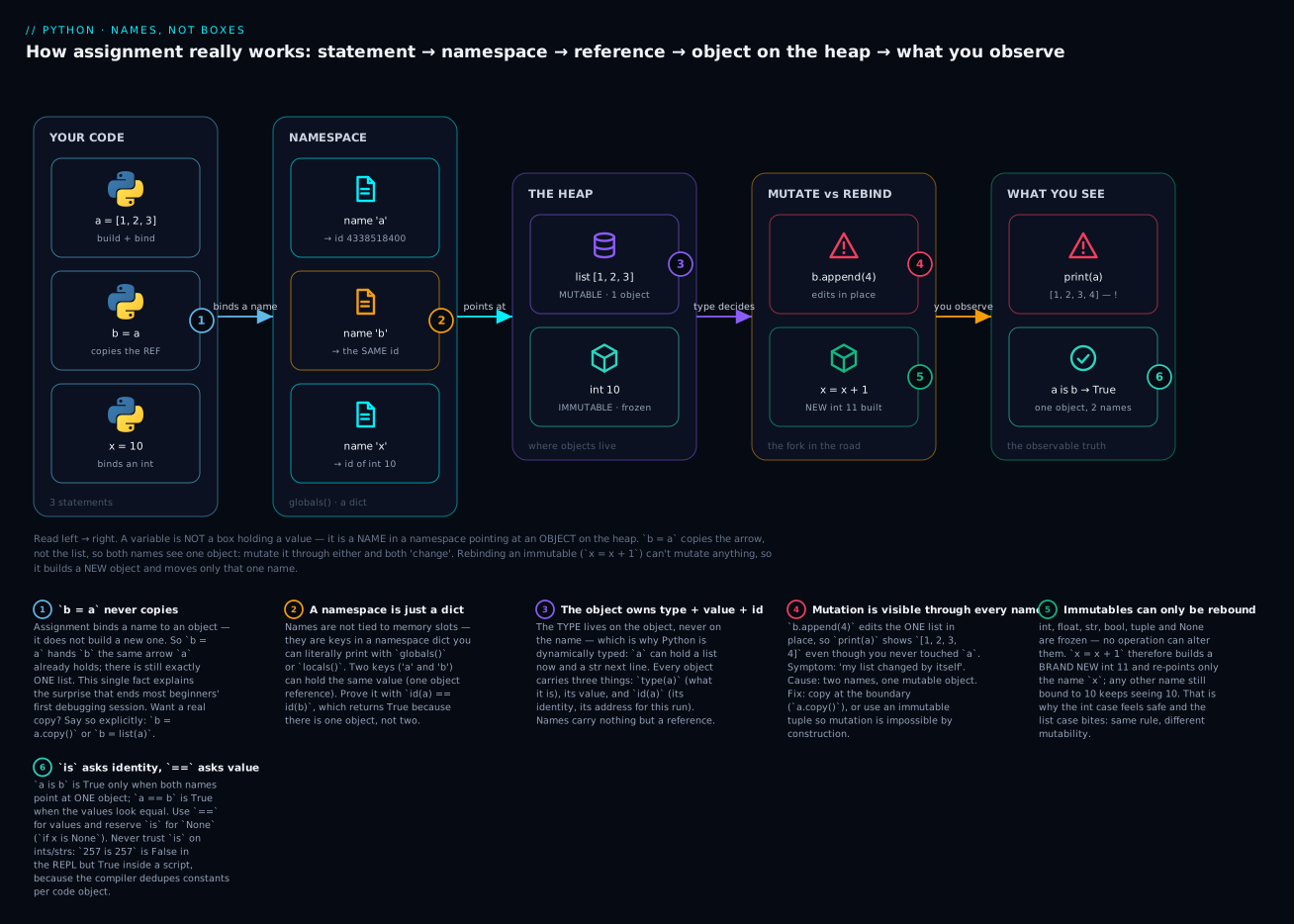
The badges mark the six facts worth memorising: b = a copies the reference, never the object (1); a namespace is a plain dict you can print (2); type, value and id all live on the object, never on the name (3); mutating through one name is visible through every name (4); immutables can only be rebound, never changed (5); and is compares identity while == compares value (6).
Naming things: PEP 8, keywords, and the underscore
PEP 8 is Python’s official style guide. It is not enforced by the interpreter, but it is enforced by every code reviewer, linter, and interviewer you will meet — and following it makes your code look like Python instead of translated Java.
| Thing | Convention | Example | Not this |
|---|---|---|---|
| Variable / function | snake_case |
user_name, get_total() |
userName, GetTotal |
| Constant | UPPER_SNAKE_CASE |
MAX_RETRIES = 3 |
maxRetries |
| Class | PascalCase |
class HttpClient: |
class http_client: |
| Module / file | short lowercase |
utils.py, db_pool.py |
Utils.py, dbPool.py |
| “Internal” name | leading _ |
_cache, _helper() |
(a hint, not privacy) |
| Avoid a keyword clash | trailing _ |
class_, id_, list_ |
class, id, list |
| Throwaway value | _ |
for _ in range(3): |
i you never use |
Python has 35 reserved keywords you cannot use as names. You do not need to memorise them — SyntaxError will tell you — but recognise them on sight:
| Category | Keywords |
|---|---|
| Values | True False None |
| Logic | and or not in is |
| Conditionals & loops | if elif else for while break continue pass |
| Functions & classes | def return lambda class yield |
| Errors | try except finally raise assert |
| Scope & imports | global nonlocal import from as del |
| Context & async | with async await |
Confirm the list on your own machine — never trust a blog (including this one) for something the interpreter can tell you:
import keyword
print(len(keyword.kwlist))     # => 35
print(keyword.softkwlist)      # => ['_', 'case', 'match', 'type']
Those four are soft keywords: special in one grammatical position (match/case in a match statement, type in a type alias) but still usable as ordinary names elsewhere. True, False and None are capitalised — a classic slip for anyone arriving from JavaScript, where true/null are lowercase.
The underscore carries several distinct meanings, and beginners routinely mistake one for another:
| Pattern | Meaning | Reality check |
|---|---|---|
_ |
“I don’t care about this value” | Also the last result in the REPL |
_name |
Internal by convention | Not private — nothing stops you |
__name |
Name-mangled inside a class | Becomes _ClassName__name; avoid unless you need it |
__name__ |
Python-defined “dunder” | Never invent your own dunders |
name_ |
Dodge a keyword/builtin clash | class_, list_, id_ |
The one that actually hurts: shadowing a builtin. Nothing prevents you from naming a variable list, str, id, type, sum, or dict. Python happily rebinds the name — and the real function is now unreachable in that scope:
list = [1, 2, 3]        # looks harmless...
nums = list(range(3))   # ...until you try to USE the builtin
Traceback (most recent call last):
  File "shadow.py", line 2, in <module>
    nums = list(range(3))
           ^^^^^^^^^^^^^^
TypeError: 'list' object is not callable
That traceback says “you tried to call a list.” You did — you called your list. The fix is a rename (items, values, nums, or list_), and any linter flags it instantly.
The built-in types: int, float, bool, str, None
Five scalar types cover the overwhelming majority of the values you will handle. Here is the full reference:
| Type | What it is | Literal | Mutable? | Falsy when | Gotcha to know |
|---|---|---|---|---|---|
int |
Whole number, unlimited size | 42, -7, 1_000, 0xff |
No | 0 |
No overflow — ever |
float |
64-bit binary decimal (IEEE 754) | 3.14, 1e3, .5 |
No | 0.0 |
0.1 + 0.2 != 0.3 |
bool |
True / False — a subclass of int |
True, False |
No | False |
True + True == 2 |
str |
Immutable text (Unicode) | "hi", 'hi', f"{x}" |
No | "" |
"0" and "False" are truthy |
NoneType |
The “no value” singleton | None |
No | always | Test with is None, never == None |
complex |
Complex number | 3+4j |
No | 0j |
Rare outside science/engineering |
Every one of these scalars is immutable. Remember that when we reach mutability.
int has no maximum. This genuinely separates Python from C, Java, and Go, where a 64-bit integer silently wraps around at about 9.2 quintillion. Python grows the integer instead:
print(2 ** 100)                # => 1267650600228229401496703205376
print(len(str(2 ** 1000)))     # => 302   (a 302-digit number, no problem)

import sys
print(sys.getsizeof(0))        # => 28    bytes — an int is a full object
print(sys.getsizeof(2 ** 100)) # => 40    it grows as needed
There is no MAX_INT to check and no overflow bug to write. The price is that a Python int is a heap object with ~28 bytes of overhead, not a bare CPU register — correctness bought with memory and speed. It is almost always the right trade.
Integers can be written in several bases, which matters the moment you touch file permissions, colours, or network protocols:
| Literal | Base | Value | Where you’ll meet it |
|---|---|---|---|
42 |
Decimal | 42 | Everywhere |
0b101010 |
Binary | 42 | Bit flags, masks |
0o52 |
Octal | 42 | Unix file modes (0o644) |
0x2a |
Hex | 42 | Colours, bytes, memory addresses |
1_000_000 |
Decimal + separators | 1000000 | Big numbers, readably |
int("2a", 16) |
Parse from string | 42 | Reading config/protocol data |
float is binary, and that changes everything. This is the single most reported “Python bug” that is not a bug:
print(0.1 + 0.2)                # => 0.30000000000000004
print(0.1 + 0.2 == 0.3)         # => False
print(format(0.1, ".20f"))      # => 0.10000000000000000555
Nothing is broken. A float is IEEE 754 double-precision: a number stored in binary. Just as 1/3 cannot be written exactly in decimal (0.333… forever), 0.1 cannot be written exactly in binary — it repeats forever, so the CPU stores the nearest representable value, which is very slightly more than 0.1. Add two such approximations and the tiny errors show up around the 17th digit. Every language with IEEE floats does this: JavaScript, Java, C, Go. Python just prints enough digits to be honest about it.
The rule that follows is absolute: never compare floats with ==, and never use float for money.
| Need | Use | Why |
|---|---|---|
| “Are these two floats basically equal?” | math.isclose(a, b) |
Handles relative + absolute tolerance properly |
| Money, invoices, tax | decimal.Decimal("0.1") |
Exact decimal arithmetic — build from a string |
| Exact fractions (⅓) | fractions.Fraction(1, 3) |
Rational maths, no rounding at all |
| Counting anything | int |
Exact and unbounded |
| Science, graphics, ML | float |
Fast, hardware-accelerated, tolerance is fine |
import math
from decimal import Decimal

print(math.isclose(0.1 + 0.2, 0.3))                        # => True
print(Decimal("0.1") + Decimal("0.2") == Decimal("0.3"))   # => True
print(Decimal(0.1))   # => 0.1000000000000000055511151231257827021181583404541015625
That last line is the smoking gun: Decimal(0.1) passes the already-broken float into Decimal and shows you the exact value the machine really stored. Always build a Decimal from a string.
bool is an int. Not “like” an int — it is one, by inheritance, and it does arithmetic:
print(issubclass(bool, int))   # => True
print(True + True)             # => 2
print(sum([True, False, True]))# => 2   — a genuinely useful idiom for counting
None is a singleton. There is exactly one None object in the whole process, which is precisely why is None is the correct test — you are asking “is this the None object?”, which is faster than == and cannot be faked by a class that overrides equality. A function with no return returns None, which produces one of the most common beginner tracebacks:
result = print("hi")     # print() RETURNS None; it only prints
print(result + 1)
hi
Traceback (most recent call last):
  File "none.py", line 2, in <module>
    print(result + 1)
          ~~~~~~~^~~
TypeError: unsupported operand type(s) for +: 'NoneType' and 'int'
Whenever a traceback mentions 'NoneType', read it as: something returned nothing, and you used the nothing. Ninety percent of the time it is a function you forgot to return from, or a method like list.sort() / list.append() that mutates in place and returns None.
Conversion, truthiness, and strong typing
Because Python is strongly typed, it will not guess across types. This is the error every beginner meets on day one:
age = 30
print("I am " + age)
Traceback (most recent call last):
  File "concat.py", line 2, in <module>
    print("I am " + age)
          ~~~~~~~~^~~~~
TypeError: can only concatenate str (not "int") to str
JavaScript would cheerfully produce "I am 30". Python refuses, because silent coercion is where real bugs hide. You must convert explicitly — and the modern way is an f-string, which converts for you:
age = 30
print("I am " + str(age))    # explicit conversion — fine
print(f"I am {age}")         # f-string — PREFERRED (3.6+)
print("I am", age)           # print() takes multiple args and adds a space
# All three => I am 30
Use f-strings. The old "I am %s" % age and "I am {}".format(age) styles still work and you will meet them in older code, but new code should not use them.
| Function | Turns into | Examples (all verified) |
|---|---|---|
int(x) |
Integer | int("42")→42 · int(3.99)→3 · int(True)→1 |
int(s, base) |
Integer from a string in a base | int("ff", 16)→255 · int("1010", 2)→10 |
float(x) |
Float | float("3.5")→3.5 · float("1e3")→1000.0 · float(7)→7.0 |
str(x) |
Human-readable text | str(3.0)→'3.0' · str(None)→'None' |
repr(x) |
Developer text (unambiguous) | repr("hi")→'hi' — the quotes are in the string |
bool(x) |
Truth value | bool(0)→False · bool("False")→True |
list/tuple/set |
Container | list("abc")→['a','b','c'] |
Three details in that table repay attention. int() truncates toward zero, it does not round — int(3.99) is 3 and int(-3.99) is -3. Use round() when you want rounding. int() on a string is strict but not fussy about whitespace or underscores — int(" 42 ") and int("1_000") both work. And bool("False") is True, because it is a non-empty string; the content is irrelevant.
Now the conversions that blow up, with their real messages — knowing these by sight turns a scary red wall into a two-second fix:
| Call | Result | Why |
|---|---|---|
int("3.5") |
ValueError: invalid literal for int() with base 10: '3.5' |
int() won’t parse a decimal string — use int(float("3.5")) |
int("") |
ValueError: invalid literal for int() with base 10: '' |
Empty input — the classic unvalidated-form bug |
int("abc") |
ValueError: invalid literal for int() with base 10: 'abc' |
Not a number at all |
int(None) |
TypeError: int() argument must be a string, a bytes-like object or a real number, not 'NoneType' |
A missing value reached your parser |
float("abc") |
ValueError: could not convert string to float: 'abc' |
Note: a different message from int() |
"a" + 1 |
TypeError: can only concatenate str (not "int") to str |
Strong typing — convert explicitly |
1 / 0 |
ZeroDivisionError: division by zero |
Float division by zero |
1 // 0 |
ZeroDivisionError: integer division or modulo by zero |
Floor division by zero |
The pattern to learn: ValueError = right type, wrong content (“it is a string, it just isn’t a number”). TypeError = wrong type entirely (“you gave me None; I wanted a string or a number”). That one distinction will let you read half of all Python tracebacks without thinking.
Truthiness. Any object can be used where Python wants a condition, and every object is either “truthy” or “falsy”. The rule is delightfully consistent: empty and zero are falsy; everything else is truthy.
| Falsy (all of them) | Truthy (examples) |
|---|---|
False |
True |
None |
any other object |
0, 0.0, 0j, Decimal(0) |
1, -1, 0.0001 |
"" (empty string) |
"0", "False", " " — non-empty is truthy |
[], (), {}, set() |
[0], [[]] — non-empty is truthy |
range(0) |
range(1) |
Objects defining __bool__/__len__ returning False/0 |
Most custom objects (truthy by default) |
if []:                    # falsy — never runs
    print("never")
if "False":               # a NON-EMPTY string — truthy!
    print("runs")         # => runs
if [0]:                   # a non-empty LIST (containing a falsy 0) — truthy
    print("also runs")    # => also runs
The idiomatic test for “is this list empty?” is if not items: — not if len(items) == 0:. But be careful: if not x: is True for 0, "", [], and None. When you specifically mean “was this argument supplied?”, write if x is None: — otherwise a legitimate 0 looks identical to a missing value. That conflation is a real production bug, not a style nit.
Type hints, briefly. Since 3.5 you can annotate types. They make your intent explicit and let tools catch mistakes before you run — but the interpreter ignores them completely at runtime:
def greet(name: str) -> str:
    return "Hello, " + name

print(greet.__annotations__)   # => {'name': <class 'str'>, 'return': <class 'str'>}
print(greet(42))               # hints do NOT enforce — this still fails at runtime
Traceback (most recent call last):
  File "hints.py", line 6, in <module>
    print(greet(42))
                ...
TypeError: can only concatenate str (not "int") to str
Read that carefully: the annotation said str and Python let 42 straight through. The error came from the +, not from the hint. Hints are documentation that a type checker (mypy, pyright, your editor) reads — install one and it would have flagged greet(42) before you ran a line. Get in the habit of hinting public functions now; it costs nothing and pays forever.
Operators, identity, and mutability
The arithmetic operators hold one genuine surprise — Python has two division operators:
| Operator | Name | Example | Result | Note |
|---|---|---|---|---|
+ - * |
Add, subtract, multiply | 7 * 2 |
14 |
+ also concatenates str/list |
/ |
True division | 7 / 2 |
3.5 |
Always a float, even 4 / 2 → 2.0 |
// |
Floor division | 7 // 2 |
3 |
Rounds down: -7 // 2 → -4, not -3 |
% |
Modulo (remainder) | 7 % 2 |
1 |
Sign follows the divisor: -7 % 2 → 1 |
** |
Power | 2 ** 10 |
1024 |
2 ** 0.5 → square root |
divmod(a, b) |
Both at once | divmod(7, 2) |
(3, 1) |
Quotient and remainder |
Two traps live in that table. / always returns a float — 4 / 2 is 2.0, not 2 (in Python 2 it was 2, which is why old code ported badly). And // floors toward negative infinity rather than truncating toward zero: -7 // 2 is -4. Meanwhile int(-3.5) truncates to -3. Different operations, different rounding — don’t assume.
One more rounding surprise, because it looks like a bug and isn’t:
print(round(2.5))    # => 2   (not 3!)
print(round(3.5))    # => 4
That is banker’s rounding (round-half-to-even), the IEEE 754 default, and it exists because always rounding halves up biases sums upward over millions of rows. Use Decimal with an explicit rounding mode when a regulator cares.
| Operator | Asks | Example | Result |
|---|---|---|---|
== != |
Value equality | [1,2] == [1,2] |
True |
< <= > >= |
Ordering | 3 < 5 |
True |
a < b < c |
Chained comparison | 1 < 2 < 3 |
True — Pythonic, no and needed |
is / is not |
Identity — same object? | a is b |
True only if ONE object |
in / not in |
Membership | "y" in "python" |
True |
and or not |
Boolean logic | x and y |
Short-circuits; returns an operand |
The is trap — and why the internet gets it wrong
== asks “do these have the same value?”. is asks “are these literally the same object?”. They are different questions, and mixing them up produces bugs that appear and disappear depending on where the code runs. Watch — this is the real behaviour, in a real interactive REPL:
>>> a = 256
>>> b = 256
>>> a is b
True
>>> c = 257
>>> d = 257
>>> c is d
False
Why? CPython pre-creates every small integer from -5 to 256 at startup and reuses them, so every 256 is the same object. 257 is built fresh each time, so you get two objects. Nothing about your code changed — only an implementation detail of the interpreter.
Now run the same lines inside a .py file and you get the opposite answer:
c = 257
d = 257
print(c is d)      # => True  in a script — but False in the REPL!
Both results are correct. The compiler stores each distinct constant once per code object, and a script’s module body is one code object, so c and d share it. In the REPL, each line is compiled separately, so they don’t. You can watch it happen:
code = compile("c = 257\nd = 257", "<script>", "exec")
print(code.co_consts)     # => (257, None)   <- ONE 257 object for both names
If your correctness depends on that, your code is broken. And the moment the value is built at runtime — parsed from a file, a form, or an API — all the caching evaporates:
n = int("257")
m = int("257")
print(n is m)     # => False
print(n == m)     # => True   <- the question you actually meant

x = "hello"
y = "".join(["hel", "lo"])   # built at runtime, not a literal
print(x is y)     # => False
print(x == y)     # => True
Python 3.12 even warns you when you write it against a literal:
lit.py:2: SyntaxWarning: "is" with 'int' literal. Did you mean "=="?
So when is is actually correct? Use == for values — that is the default, and it is what you want 99% of the time (if name == "admin":). Reserve is for singletons: None, True, False, sentinel objects, and enum members (if x is None:, if x is not None:). The one other honest use is asking “are these literally the same object?” during a mutability check, exactly as a is b did earlier. Never use is to compare ints or strings, never write == None (a class can lie about __eq__; identity cannot), and never write if not x is None: when if x is not None: says the same thing readably.
The rule: use == for values. Reserve is for None and other singletons. That’s it — and it is right in every interpreter, every version, every platform.
Mutability — the one that costs you a weekend
| Immutable (cannot change) | Mutable (can change in place) |
|---|---|
int, float, complex, bool |
list |
str |
dict |
tuple |
set |
frozenset |
bytearray |
bytes, None |
most of your own classes |
s = "hi"
s[0] = "H"
TypeError: 'str' object does not support item assignment
Strings are immutable — s.upper() doesn’t change s, it returns a new string. Forgetting to catch that return value (s.upper() on a line by itself, discarding the result) is a top-five beginner bug, and its mirror image is assigning the result of a mutating method (items = items.sort(), which sets items to None).
Why does mutability matter so much? Three reasons, and you will meet all three:
- Aliasing. Two names on one mutable object means a change through either is visible through both — the
b = asurprise. - Function arguments. Passing a list into a function passes the reference; if the function appends, your caller’s list changed. Passing an int is safe, because nothing can mutate it.
- Dict keys and set members must be hashable, which in practice means immutable.
d[(1, 2)] = "ok"works;d[[1, 2]] = "no"raisesTypeError: unhashable type: 'list'.
The defensive habit: when a mutable object crosses a boundary you don’t control, copy it (items.copy(), list(items), or copy.deepcopy() for nested structures) — or reach for a tuple, where mutation is impossible by construction.
Scope: your first honest look at LEGB
A scope is the region where a name is visible. When Python meets a name, it searches four namespaces in a fixed order, remembered as LEGB:
| # | Scope | Means | Example |
|---|---|---|---|
| L | Local | Inside the current function | A variable assigned in the def |
| E | Enclosing | A function wrapping this one | The outer def of a nested def |
| G | Global | Top level of the module (file) | A name defined at column 0 |
| B | Built-in | Always-available names | print, len, str, True |
First match wins, and the search stops there — which is exactly why naming a variable list shadows the builtin: Python finds your L or G name and never reaches B.
x = "global"

def outer():
    x = "enclosing"
    def inner():
        print("LEGB finds:", x)   # no local x -> looks Enclosing -> finds it
    inner()

outer()      # => LEGB finds: enclosing
Reading a global works. Assigning creates a local. This asymmetry is where UnboundLocalError is born, and it is the most confusing error in Phase 1:
total = 100

def read_it():
    print("read_it sees total =", total)     # fine — no assignment, so it reads the global

def shadow_it():
    total = 5                                 # creates a NEW local; global untouched
    print("shadow_it sees total =", total)

def break_it():
    print("break_it sees total =", total)     # boom — reported HERE
    total = 5                                 # ...but CAUSED by this line

read_it()        # => read_it sees total = 100
shadow_it()      # => shadow_it sees total = 5
print(total)     # => 100   (shadow_it never touched the global)
break_it()       # => UnboundLocalError
read_it sees total = 100
shadow_it sees total = 5
100
Traceback (most recent call last):
  File "scope_demo.py", line 20, in <module>
    break_it()
  File "scope_demo.py", line 14, in break_it
    print("break_it sees total =", total)   # boom
                                   ^^^^^
UnboundLocalError: cannot access local variable 'total' where it is not associated with a value
Read that slowly, because the fix is counter-intuitive. Python decides a name is local for the entire function at compile time, the moment it sees an assignment to it anywhere in that function — even on a later line. So in break_it, total is local from the first line onward, and the print on line 14 asks for a local that hasn’t been given a value yet. The error is reported on the print; the cause is the assignment three lines below it. When you see UnboundLocalError, don’t stare at the line in the traceback — look further down the function for an assignment to that name.
Why global is usually the wrong fix. Python offers global to force an assignment to hit the module-level name:
counter = 0

def bump():
    global counter      # legal — and usually a design smell
    counter += 1

bump(); bump()
print(counter)   # => 2
It works. It is also how you build code that is hard to test, impossible to reason about, and unsafe under threads: any function anywhere can now change counter, so “who set this to 7?” becomes an archaeology project. The overwhelmingly better pattern is to pass values in and return values out:
def bump(counter: int) -> int:
    return counter + 1

counter = 0
counter = bump(counter)
counter = bump(counter)
print(counter)   # => 2   — same answer, no hidden state, trivially testable
global has narrow legitimate uses (module-level caches and configuration set once at startup). For everything else, the arrow points from parameters to return values. Its sibling nonlocal targets the enclosing function scope rather than the module — you’ll meet it properly with closures and decorators.
Hands-on lab
Everything below runs on a stock Python 3.12+ with no installs — no pip, no virtual environment needed, because we use only builtins. (Check with python3 --version; on Windows use python instead of python3.) Nothing here touches your filesystem.
Step 1 — Meet the REPL.
python3
Python 3.12.3 (v3.12.3:f6650f9ad7, Apr  9 2024, 08:18:47) [Clang 13.0.0] on darwin
Type "help", "copyright", "credits" or "license" for more information.
>>>
(Your exact build string and date will differ — that’s just how your copy was compiled. What matters is the 3.12 and the >>>.)
What just happened: the REPL (Read-Eval-Print Loop) evaluates one expression at a time and prints the result — no print() needed. It is the fastest way to test an idea. Exit with exit() or Ctrl-D (Ctrl-Z then Enter on Windows).
Step 2 — Every value has a type, a value, and an id.
>>> x = 42
>>> type(x)
<class 'int'>
>>> id(x)
4363084136
>>> y = x
>>> id(y) == id(x)
True
What just happened: y = x bound a second name to the same object — one object, two labels. Your id() numbers will differ from mine and change every run; only “same or not” is meaningful.
Step 3 — Provoke the two errors you’ll meet most.
>>> "I am " + 30
Traceback (most recent call last):
  File "<stdin>", line 1, in <module>
TypeError: can only concatenate str (not "int") to str
>>> int("thirty")
Traceback (most recent call last):
  File "<stdin>", line 1, in <module>
ValueError: invalid literal for int() with base 10: 'thirty'
What just happened: you met both halves of the rule — TypeError = wrong type (Python won’t guess across types), ValueError = right type, wrong content (a str, just not a numeric one). Fix the first with an f-string, the second by validating input.
Step 4 — See the float truth.
>>> 0.1 + 0.2
0.30000000000000004
>>> 0.1 + 0.2 == 0.3
False
>>> import math
>>> math.isclose(0.1 + 0.2, 0.3)
True
What just happened: binary floats can’t hold 0.1 exactly, so the error surfaces at the 17th digit. math.isclose() is the correct way to compare floats — and Decimal("0.1") is the correct way to handle money.
Step 5 — The is trap, live.
>>> a = 256
>>> b = 256
>>> a is b
True
>>> c = 257
>>> d = 257
>>> c is d
False
>>> c == d
True
What just happened: small ints (-5…256) are cached and shared; 257 is not. The value question (==) gives the right answer in both cases. Keep the file version of this in mind — in a script, c is d is True, which is precisely why you must never rely on is for numbers.
Step 6 — Write the script. Exit the REPL (Ctrl-D) and save this as explore_types.py:
"""explore_types.py — see Python's object model with your own eyes."""

# 1. Every value is an object with a type, a value, and an identity.
samples = [42, 3.14, True, "python", None, [1, 2], (1, 2), {"k": 1}]
print(f"{'value':<12} {'type':<10} {'truthy':<7} id")
print("-" * 46)
for v in samples:
    print(f"{v!r:<12} {type(v).__name__:<10} {bool(v)!s:<7} {id(v)}")

# 2. int is arbitrary precision — no overflow, ever.
big = 2 ** 100
print("\n2**100      =", big)
print("digits in 2**1000 =", len(str(2 ** 1000)))

# 3. float is binary — 0.1 cannot be represented exactly.
print("\n0.1 + 0.2   =", 0.1 + 0.2)
print("== 0.3      ?", 0.1 + 0.2 == 0.3)
print("0.1 to 20dp =", format(0.1, ".20f"))

# 4. bool IS an int (subclass) — this is not a metaphor.
print("\nissubclass(bool, int) =", issubclass(bool, int))
print("True + True           =", True + True)

# 5. Rebinding an immutable vs mutating a shared mutable.
x = 10
y = x
y += 1                       # rebinds y to a NEW int; x untouched
print(f"\nimmutable: x={x} y={y}  (x unchanged)")

a = [1, 2, 3]
b = a                        # NOT a copy — a second name for ONE list
b.append(4)                  # mutates the object BOTH names see
print(f"mutable:   a={a} b={b}  same object? {a is b}")

c = a.copy()                 # NOW it is a real copy
c.append(99)
print(f"copied:    a={a} c={c}  same object? {a is c}")
Run it:
python3 explore_types.py
value        type       truthy  id
----------------------------------------------
42           int        True    4363084136
3.14         float      True    4337921136
True         bool       True    4362128792
'python'     str        True    4338448064
None         NoneType   False   4362215840
[1, 2]       list       True    4338518400
(1, 2)       tuple      True    4339051136
{'k': 1}     dict       True    4338907776

2**100      = 1267650600228229401496703205376
digits in 2**1000 = 302

0.1 + 0.2   = 0.30000000000000004
== 0.3      ? False
0.1 to 20dp = 0.10000000000000000555

issubclass(bool, int) = True
True + True           = 2

immutable: x=10 y=11  (x unchanged)
mutable:   a=[1, 2, 3, 4] b=[1, 2, 3, 4]  same object? True
copied:    a=[1, 2, 3, 4] c=[1, 2, 3, 4, 99]  same object? False
What just happened: the last three lines are the whole lesson. y += 1 rebound y to a new int and left x alone — because ints are immutable and cannot be changed. b.append(4) mutated the one list that both a and b name, so a “changed” without being touched. a.copy() finally made a second object, and a is c proves it. Same assignment rule throughout; only mutability differs.
Step 7 — Provoke UnboundLocalError on purpose. Save as scope_demo.py:
"""scope_demo.py — where does Python look for a name?"""

total = 100          # module-level (GLOBAL)

def read_it():
    # No assignment to `total` here, so Python looks outward: L -> E -> G -> B
    print("read_it sees total =", total)

def shadow_it():
    total = 5        # a NEW local; the global is untouched
    print("shadow_it sees total =", total)

def break_it():
    print("break_it sees total =", total)   # boom
    total = 5                               # ...because of THIS line

read_it()
shadow_it()
print("module still sees total =", total)
break_it()
python3 scope_demo.py
read_it sees total = 100
shadow_it sees total = 5
module still sees total = 100
Traceback (most recent call last):
  File "scope_demo.py", line 20, in <module>
    break_it()
  File "scope_demo.py", line 14, in break_it
    print("break_it sees total =", total)   # boom
                                   ^^^^^
UnboundLocalError: cannot access local variable 'total' where it is not associated with a value
What just happened: three functions, three behaviours, one rule. read_it had no assignment, so total was global and readable. shadow_it assigned, so it got a private local and the global never moved. break_it also assigned — on line 15 — which made total local for the whole function, so the read on line 14 failed. Delete line 15 and line 14 works. That is the mental jump: the error is reported above its cause.
Step 8 — Prove is is a lie and == is the truth.
>>> n = int("257")      # built at RUNTIME — no caching, no constant folding
>>> m = int("257")
>>> n is m
False
>>> n == m
True
What just happened: once a value comes from real input rather than a literal, every caching trick disappears and is returns False for equal numbers. This is exactly what happens when your data arrives from a file, a form, or an API — which is why is on values is a bug waiting for production.
Common mistakes and troubleshooting
| Symptom / traceback | Cause | Fix |
|---|---|---|
IndentationError: expected an indented block after function definition on line 1 |
A def/if/for with nothing indented under it |
Indent the body 4 spaces, or use pass as a placeholder |
IndentationError: unexpected indent |
A line indented for no reason | Remove the leading spaces; blocks only open after a : |
TabError: inconsistent use of tabs and spaces in indentation |
Tabs and spaces mixed — usually pasted code | Set your editor to “spaces, 4”; run “convert indentation to spaces” |
SyntaxError: expected ':' |
Missing colon after if/for/while/def |
Add the : at the end of the header line |
NameError: name 'mesage' is not defined. Did you mean: 'message'? |
Typo, or used before assignment; Python 3.12 suggests the fix | Read the suggestion — it’s usually right. Names are case-sensitive |
TypeError: can only concatenate str (not "int") to str |
Strong typing — "a" + 1 |
Use an f-string: f"a{n}", or str(n) |
TypeError: unsupported operand type(s) for +: 'NoneType' and 'int' |
Something returned None (a def with no return, or list.sort()) |
Return a value; use sorted(x) not x.sort() when you want a result |
ValueError: invalid literal for int() with base 10: '3.5' |
int() can’t parse a decimal string |
int(float("3.5")) → 3, or use float() |
ValueError: invalid literal for int() with base 10: '' |
Empty/blank user input reached int() |
Validate first, or wrap in try/except ValueError |
TypeError: 'list' object is not callable |
You named a variable list and shadowed the builtin |
Rename to items/nums; a linter catches this instantly |
UnboundLocalError: cannot access local variable 'x' where it is not associated with a value |
You assign to x somewhere in the function, making it local everywhere in it |
Rename the local, pass x as a parameter, or (rarely) global x |
TypeError: 'str' object does not support item assignment |
Strings are immutable | Build a new string: s = "H" + s[1:] |
TypeError: unhashable type: 'list' |
Used a mutable object as a dict key / set member | Use a tuple — keys must be immutable/hashable |
a is b is False for equal numbers/strings |
is compares identity, not value |
Use ==. Reserve is for None |
0.1 + 0.2 != 0.3 |
Binary floating point — not a bug | math.isclose(), or Decimal("0.1") for money |
Three of these deserve extra words, because they cost the most hours.
1. UnboundLocalError — the error above its cause. Python decides at compile time that a name is local if it is assigned anywhere in the function, including on a line after the one that fails. So the traceback points at your print, but the culprit is the x = ... further down. The instinct to “look up” is wrong here: look down. And when you feel the urge to reach for global, that urge is almost always a signal that the value should be a parameter and a return value instead.
2. The aliasing bug (“my list changed by itself”). b = a never copies. Neither does passing a list into a function, appending it to another list, or storing it in a dict — all of those store the same reference. If something mutates it, everyone holding that reference sees the change, and the “guilty” line can be in a completely different file. When it bites: copy at the boundary (b = a.copy(), or copy.deepcopy(a) for nested structures), or make it a tuple so mutation is impossible. This is also why def f(items=[]) — a mutable default argument — is Python’s most famous trap; it is one object created once and shared by every call.
3. is versus ==, and why testing lies to you. a is b on small integers or short strings often returns True because CPython caches -5…256 and interns some strings — so your test passes, your code ships, and it fails on real data where the values are built at runtime. It can even flip between the REPL (257 is 257 → False) and a script (→ True), because the compiler dedupes constants per code object. There is exactly one rule and no exceptions worth learning: == for values, is for None.
Cheat-sheet
| Syntax / function | What it does |
|---|---|
x = 42 |
Bind the name x to the object 42 (no box, no declaration) |
a, b = b, a |
Swap — no temp variable (RHS evaluated first) |
type(x) |
The object’s type → <class 'int'> |
id(x) |
The object’s identity (address) for this run |
isinstance(x, int) |
Type check — preferred over type(x) == int (respects subclasses) |
x is None |
The only correct way to test for None |
x == y |
Value equality — your default comparison |
int(x) / int(s, 16) |
To integer / parse a hex string. Truncates: int(3.9) → 3 |
float(x) |
To float. float("1e3") → 1000.0 |
str(x) / repr(x) |
Human text / unambiguous developer text |
bool(x) |
Truthiness. Falsy: 0 0.0 "" [] {} () set() None False |
f"{name} is {age}" |
f-string — the modern way to build strings |
7 / 2 → 3.5 |
True division — always a float |
7 // 2 → 3 |
Floor division — rounds down (-7 // 2 → -4) |
7 % 2 → 1 |
Remainder (sign follows the divisor) |
2 ** 10 → 1024 |
Power; 2 ** 0.5 is a square root |
divmod(7, 2) → (3, 1) |
Quotient and remainder together |
round(2.5) → 2 |
Banker’s rounding (half-to-even), not what you expect |
math.isclose(a, b) |
The correct float comparison |
Decimal("0.1") |
Exact decimal — for money. Build from a string |
1 < x < 10 |
Chained comparison — no and needed |
x += 1 |
Augmented assign; rebinds immutables, mutates lists in place |
b = a.copy() |
A real copy — b = a only copies the reference |
del x |
Unbind the name (not necessarily the object) |
keyword.kwlist |
The 35 reserved words, from the horse’s mouth |
globals() / locals() |
The namespace dicts — names really are dict keys |
def f(x: int) -> str: |
Type hints — documentation + tooling, not enforced at runtime |
1_000_000 |
Numeric separators — legal and readable |
# comment / """docstring""" |
Comment to end of line / documentation help() can read |
Interview and exam questions
Q: Is Python dynamically typed or statically typed? Is it strongly or weakly typed?
A: Dynamically typed — types belong to objects, not names, so a name can be rebound to any type at any time and type checks happen at runtime. But strongly typed — it refuses to silently coerce across types, which is why "a" + 1 raises TypeError instead of guessing. Dynamic ≠ weak; those are independent axes.
Q: Explain what actually happens when you write x = 42.
A: Python evaluates the RHS to get the object 42, adds the name x to the current namespace (a dict), and binds the name to a reference to that object. No box is allocated and no type is attached to x — the type lives on the object. Rebinding x later just re-points the label.
Q: Why does this print [1, 2, 3, 4]?
a = [1, 2, 3]
b = a
b.append(4)
print(a)
A: b = a copies the reference, not the list — there is only ever one list object with two names. append mutates that object in place, so the change is visible through a too. a is b is True. For an independent list, use b = a.copy() or b = list(a).
Q: Why is 0.1 + 0.2 == 0.3 False, and what do you do about it?
A: Floats are IEEE 754 binary; 0.1 has no exact binary representation (it repeats forever), so it’s stored as the nearest double and the tiny error surfaces at the 17th digit — 0.30000000000000004. Every IEEE language does this. Compare with math.isclose(), and use decimal.Decimal("0.1") for money (built from a string, never from a float).
Q: What’s the difference between is and ==? When is is correct?
A: == compares values (via __eq__); is compares identity — whether both names point at one object. is is correct only for singletons: None, True, False, sentinels, enum members. Use if x is None:. It’s wrong for ints/strings because caching makes it look right: 256 is 256 → True but 257 is 257 → False in the REPL (and True in a script, since the compiler dedupes constants per code object).
Q: Name the mutable and immutable built-in types.
A: Immutable: int, float, complex, bool, str, tuple, frozenset, bytes, None. Mutable: list, dict, set, bytearray, and most user-defined classes. It matters for aliasing, for function arguments, and because dict keys / set members must be hashable — which effectively means immutable.
Q: True + True — what does it print, and why?
A: 2. bool is a genuine subclass of int (issubclass(bool, int) is True), with True == 1 and False == 0. It’s why sum([True, False, True]) is a legitimate way to count matches.
Q: What is // and how does it differ from / and from int()?
A: / is true division and always returns a float (4 / 2 → 2.0). // is floor division: it rounds toward negative infinity, so 7 // 2 → 3 and -7 // 2 → -4. int() truncates toward zero, so int(-3.5) → -3. Three different behaviours — don’t assume they agree on negatives.
Q (coding): Predict the output.
x = 10
def f():
    print(x)
    x = 20
f()
A: UnboundLocalError: cannot access local variable 'x' where it is not associated with a value. Because x is assigned somewhere in f, Python makes it local for the entire function at compile time — so the print reads a local that has no value yet. The error is on the print; the cause is the line below it. Fix: rename the local, pass x in as a parameter, or (rarely) declare global x.
Q: What is LEGB?
A: The order Python resolves a name: Local → Enclosing (a wrapping function) → Global (module) → Built-in. First match wins, which is exactly why naming a variable list shadows the builtin — the search finds yours and never reaches B.
Q: Why is global usually the wrong answer?
A: It creates hidden, action-at-a-distance state: any function can mutate it, so behaviour depends on call order, tests interfere with each other, and it’s unsafe under threads. Prefer parameters in and return values out (counter = bump(counter)). Legitimate uses are narrow — module-level caches or config set once at startup.
Q (coding): Which of these are falsy — 0, "0", [], [0], " ", None, 0.0, "False"?
A: Falsy: 0, [], None, 0.0. Truthy: "0", [0], " ", "False" — all non-empty containers/strings are truthy regardless of content. The rule is “empty or zero is falsy”. Careful: if not x: catches 0, "", [] and None alike — when you mean “was it supplied?”, write if x is None:.
Key takeaways
- A variable is a name, not a box. Assignment binds a name to an object; the object owns the type, the value, and the id.
type()andid()let you see it. Rebinding moves the label — it never changes the object. - Indentation IS the block structure. 4 spaces, never tabs, colon opens the block.
IndentationErrorandTabErrorare grammar errors, not style complaints. b = acopies the reference, never the object. With a mutable object (list/dict/set) both names see every change — copy at the boundary (a.copy()) or use atuple. With an immutable (int/float/str/bool/tuple/None) there’s nothing to fear: it can only be rebound.intis unbounded;floatis binary. No overflow, ever — but0.1 + 0.2 == 0.30000000000000004. Compare floats withmath.isclose(); useDecimal("0.1")for money. Andboolis literally a subclass ofint.- Python is dynamically typed but strongly typed. It won’t coerce
"a" + 1— convert explicitly, and prefer f-strings.ValueError= right type, wrong content;TypeError= wrong type. ==for values,isforNone. Small-int caching (-5…256) and per-code-object constant dedup makeislook correct on literals and then fail on runtime data —257 is 257isFalsein the REPL andTruein a script.- Empty and zero are falsy; everything else is truthy — including
"0","False"," "and[0]. When you mean “missing”, testis None, notnot x. - Assigning to a name makes it local for the whole function, which is what
UnboundLocalErroris telling you — look below the failing line for the assignment. Reach for parameters and return values, notglobal.