Almost everything a program touches arrives as text. A log line, a CSV row, a JSON payload, a filename, a command-line argument, a form field, an error message — all of it is str before it is anything else. You will spend more time cleaning, searching, slicing and formatting strings than you spend on any other single type in Python.
The good news is that Python’s str is one of the best-designed string types in any language. The catch is that it is big: roughly fifty methods, three separate historical formatting systems, a format specification with its own mini-language, and one design decision — immutability — that quietly explains half of the surprises beginners hit.
This lesson covers all of it, from first principles. Type the examples as you read; every snippet here is real and shows real output from Python 3.12+.
Why this matters
Here is the single most common shape of a beginner’s first real bug. You read a file, you split a line, and something is subtly wrong — an extra space, a trailing newline, a number that is secretly a string. You “fix” it with line.strip() and nothing changes, because you forgot that strip() doesn’t modify line; it returns a new string. That one misunderstanding costs people hours.
It comes from a single fact: strings in Python are immutable. Once a str object exists, its characters can never change. Every method that looks like it edits a string — strip, replace, upper, lstrip — actually builds and returns a brand-new string and leaves the original untouched. Once you internalise that, a whole family of bugs disappears at once, and one performance trap (+= in a loop) becomes obvious rather than mysterious.
The second thing worth your attention is formatting. Python has accumulated three ways to build a string out of values: the old % operator inherited from C, the .format() method from Python 2.6, and f-strings from Python 3.6. Modern code uses f-strings for almost everything, but you will read all three in real codebases, and you need to know why the newest one won and where the old ones still legitimately survive.
The third is Unicode. Python 3’s str is a sequence of Unicode code points, not bytes — which is why len("café") is 4 while the same text on disk is 5 bytes. Get the str versus bytes distinction straight now and UnicodeDecodeError stops being a mystery later.
The mental model to carry through the whole lesson: a str is an immutable sequence of Unicode code points. Every idea below is a consequence of that one sentence.
Strings are immutable sequences of Unicode code points
Let’s take that sentence apart, backwards.
Code points, not bytes. A code point is a number Unicode assigns to a character: A is 65, é is 233, 👍 is 128077. A Python str is a sequence of those numbers. It has no encoding — encoding is what happens when text leaves your program.
A sequence. This is the useful part: str supports the same indexing and slicing model as a list. If you have met lists, you already know how to index a string; the syntax and the rules are identical. Indices start at 0, negative indices count from the right, and a slice [start:stop:step] takes start up to but not including stop.
word = "Python"
#       012345      <- index from the left
#      -654321      <- index from the right

print(word[0])      # => P
print(word[-1])     # => n      last character
print(word[0:3])    # => Pyt    index 0, 1, 2 -- stop is EXCLUSIVE
print(word[:3])     # => Pyt    omit start = "from the beginning"
print(word[3:])     # => hon    omit stop  = "to the end"
print(word[::2])    # => Pto    every 2nd character
print(word[::-1])   # => nohtyP    a reversed copy (the classic Python trick)
print(len(word))    # => 6
| Operation | Meaning | Example on "Python" |
Result |
|---|---|---|---|
s[i] |
Character at index i (a 1-char str, not a char type) |
word[1] |
'y' |
s[-i] |
i-th character from the end |
word[-1] |
'n' |
s[a:b] |
Slice from a up to (not including) b |
word[0:3] |
'Pyt' |
s[a:] / s[:b] |
Open-ended slice | word[3:] |
'hon' |
s[::-1] |
Reversed copy | word[::-1] |
'nohtyP' |
s[a:b] out of range |
Slices clamp, they never raise | word[2:100] |
'thon' |
s[i] out of range |
Indexing does raise | word[100] |
IndexError: string index out of range |
len(s) |
Number of code points | len(word) |
6 |
x in s |
Substring test (not “is it a character?”) | "tho" in word |
True |
s * n |
Repetition | "-" * 20 |
'--------------------' |
s1 < s2 |
Compare by code point, left to right | "Zebra" < "apple" |
True (uppercase sorts first) |
That last row catches people: "Zebra" < "apple" is True because Z is code point 90 and a is 97. Sorting is by code point, so all uppercase letters sort before all lowercase ones. When you want human-friendly sorting, pass a key: sorted(names, key=str.casefold).
Immutable. Now the big one. You cannot change a string in place:
name = "ada"
name[0] = "A"
Traceback (most recent call last):
  File "/tmp/demo.py", line 2, in <module>
    name[0] = "A"
    ~~~~^^^
TypeError: 'str' object does not support item assignment
Lists let you do exactly this (xs[0] = "A" is fine). Strings do not. So what does += do? It builds a new string and rebinds your variable to it. You can prove it with id(), which returns an object’s identity:
s = "hello"
before = id(s)
s += " world"
print(s, id(s) == before)     # => hello world False   <- a DIFFERENT object

xs = [1, 2]
before = id(xs)
xs += [3]
print(xs, id(xs) == before)   # => [1, 2, 3] True      <- the SAME list, mutated
Same operator, opposite behaviour, because list is mutable and str is not. This table is worth memorising:
| You write | On a str |
On a list |
|---|---|---|
x[0] = v |
TypeError — never allowed |
Mutates in place |
x += y |
Builds a new object, rebinds the name | Mutates the existing object in place |
x.replace(a, b) / x.append(v) |
Returns a new str; original untouched |
append mutates, returns None |
Passing x to a function |
Callee cannot change your string | Callee can change your list |
Usable as a dict key |
Yes (immutable → hashable) | No (TypeError: unhashable type: 'list') |
The “returns a new string” rule is the one that bites first:
line = "  hello  "
line.strip()          # computes "hello" ... and throws it away
print(repr(line))     # => '  hello  '   unchanged!

line = line.strip()   # you must ASSIGN the result
print(repr(line))     # => 'hello'
Why += in a loop is a trap
If every += builds a new string, then building a string one piece at a time in a loop means copying everything you have so far, every single iteration. Copy 1 char, then 2, then 3… up to n. That is 1 + 2 + 3 + … + n, which is O(n²) — quadratic. Double the input and you quadruple the work.
The fix is to collect the pieces in a list and join once at the end:
# The habit to build:  collect, then join once.
parts = []
for row in rows:
    parts.append(format_row(row))
text = "".join(parts)          # ONE allocation, O(n)
str.join is linear because it can cheat: it walks the list once to add up the total length, allocates exactly one buffer of that size, then copies each piece in. No repeated copying.
Now the honest part, because this is where most tutorials tell you a half-truth. CPython contains a fast path that can resize a string in place — but only when the string it is appending to has exactly one reference and the result is stored straight back into the same local variable. When that fast path fires, s += chunk really is roughly linear. When it doesn’t, you get the full quadratic cost. Here are real measurements on Python 3.13 building a 400,000-character string:
| Approach | Big-O by the model | What CPython actually does | Measured, n=40,000 |
|---|---|---|---|
s += chunk, s a bare local |
O(n²) | Hits the in-place resize fast path → effectively O(n) | 2.7 ms |
s += chunk, but a second reference to s exists |
O(n²) | Fast path refuses → full copy every iteration | 142 ms (≈124× slower) |
obj.s += chunk (attribute) |
O(n²) | No fast path → full copy every iteration | 146 ms (≈127× slower) |
box[0] += chunk / d["s"] += chunk |
O(n²) | No fast path → full copy every iteration | 140 ms (≈122× slower) |
"".join(parts) |
O(n) | O(n) by construction — one pass, one allocation | 1.2 ms |
io.StringIO().write(...) then .getvalue() |
O(n) | O(n) — a growable buffer | 1.5 ms |
(Absolute milliseconds depend on your machine; the ratios are what matter, and they reproduce.)
Read rows 1 and 2 together — that is the whole lesson. They are the same loop over the same bare local variable. The only difference is that row 2 keeps a second reference alive, so the refcount is 2 instead of 1, and the optimisation silently switches off. The fast path is an implementation detail you cannot see in your source code. It vanishes the moment your accumulator lives on an object, in a list, in a dict, in a global, or in a closure — which, in real code, is most of the time.
So the advice survives, just for a better reason than “+= is slow”: join is linear because of how it works; += is linear only when you get lucky. Collect and join.
Quoting, escapes, and raw strings
Python gives you four ways to delimit a literal, and they exist to save you from escaping.
| Literal | Use it for | Example |
|---|---|---|
'single' |
The everyday default | 'hello' |
"double" |
Text containing an apostrophe | "It's fine" — no escape needed |
'''triple''' / """triple""" |
Multi-line text, docstrings | Spans lines; newlines are kept literally |
r'raw' / r"raw" |
Regex patterns, Windows paths | r"\d+\.\d+" — backslashes stay backslashes |
Single and double quotes are identical in behaviour — pick whichever avoids an escape. "It's fine" beats 'It\'s fine'. (Most teams settle this with a formatter such as Black, which normalises to double quotes; don’t spend meetings on it.)
Adjacent string literals are concatenated by the compiler, which is handy for long text — but note there is no comma, and a stray comma silently gives you a tuple instead:
msg = ("Dear user, "
       "your report is ready.")     # one string, joined at compile time
print(msg)   # => Dear user, your report is ready.
Inside a normal string, a backslash starts an escape sequence:
| Escape | Means | len() |
|---|---|---|
\n |
Newline | 1 |
\t |
Tab | 1 |
\\ |
A literal backslash | 1 |
\' \" |
A literal quote | 1 |
\xNN |
Character by hex code — "\x41" → 'A' |
1 |
\uXXXX / \UXXXXXXXX |
Unicode code point by hex | 1 |
\N{NAME} |
Unicode character by name — "\N{GREEK SMALL LETTER ALPHA}" → 'α' |
1 |
\ at end of line |
Line continuation (no newline inserted) | 0 |
Which brings us to the most valuable five minutes in this lesson: the Windows-path and regex bug.
p = "C:\path\to\file"
print(repr(p))
demo.py:1: SyntaxWarning: invalid escape sequence '\p'
  p = "C:\path\to\file"
'C:\\path\to\x0cile'
Look carefully at that result. \p isn’t a valid escape so it survived as a literal backslash-p (with a warning). But \t became a tab and \f became a form feed (\x0c). Your path is now silently corrupted in two places, and nothing raised. Change one letter and it gets louder instead:
p = "C:\Users\new\table.txt"
  File "/tmp/demo.py", line 1
    p = "C:\Users\new\table.txt"
        ^^^^^^^^^^^^^^^^^^^^^^^^
SyntaxError: (unicode error) 'unicodeescape' codec can't decode bytes in position 2-3: truncated \UXXXXXXXX escape
\U starts an 8-hex-digit Unicode escape, and sers\new… isn’t hex. The raw string prefix turns all of this off — inside r"...", a backslash is just a backslash:
print(repr(r"C:\Users\new\table.txt"))   # => 'C:\\Users\\new\\table.txt'
print(len("\n"), len(r"\n"))             # => 1 2   (one newline vs backslash + n)
The same applies to regex, where patterns are full of backslashes. "\d+" happens to work today — \d is not a valid Python escape so it survives — but it emits SyntaxWarning: invalid escape sequence '\d', and the Python docs state that unrecognised escapes are slated to become a SyntaxError in a future release. So the rule is absolute: regex patterns and Windows paths always get an r prefix.
import re
print(re.findall(r"\d+\.\d+", "pi is 3.14 and e is 2.71"))   # => ['3.14', '2.71']
One quirk to know: a raw string cannot end in an odd number of backslashes. r"C:\path\" is a SyntaxError — the backslash still escapes the closing quote for the tokeniser, it just also stays in the string. Write "C:\\path\\" or, far better, use pathlib and stop hand-writing paths.
The method toolkit
There are about fifty methods on str. You need perhaps fifteen daily. Every one returns a new string (or a number/bool/list) — none of them mutate.
Trimming and padding. Note the trap in the first row: strip() with an argument takes a set of characters, not a prefix.
| Method | Does | Example | Result |
|---|---|---|---|
strip() |
Remove leading+trailing whitespace | " pad ".strip() |
'pad' |
lstrip() / rstrip() |
Trim one side only | " pad ".rstrip() |
' pad' |
strip(chars) |
Remove any char in the set chars from both ends |
"xyzzy".strip("xy") |
'zz' |
removeprefix(p) (3.9+) |
Remove p as a whole, else unchanged |
"HelloWorld".removeprefix("Hello") |
'World' |
removesuffix(s) (3.9+) |
Remove s as a whole, else unchanged |
"file.tar.gz".removesuffix(".gz") |
'file.tar' |
ljust(w, c) / rjust(w, c) |
Pad to width w |
"42".ljust(5, ".") |
'42...' |
center(w, c) |
Pad both sides | "42".center(8, "-") |
'---42---' |
zfill(w) |
Zero-pad, sign-aware | "-42".zfill(5) |
'-0042' |
The strip(chars) trap deserves a demonstration, because it silently mangles data:
print("mississippi.com".strip(".com"))        # => ississippi   <- WRONG!
print("mississippi.com".removesuffix(".com")) # => mississippi  <- right
strip(".com") removed every leading/trailing character that appears in the set {'.', 'c', 'o', 'm'} — so the leading m went too. removeprefix/removesuffix exist precisely to fix this and are what you want ~95% of the time. And compare zfill with the naive alternative: "-42".zfill(5) gives '-0042', but "-42".rjust(5, "0") gives '00-42' — a broken number.
Splitting and joining. These two are the workhorses of text processing.
| Method | Does | Example | Result |
|---|---|---|---|
split() |
Split on runs of whitespace, drop empties | " a b ".split() |
['a', 'b'] |
split(sep) |
Split on each sep, keep empties |
" a b ".split(" ") |
['', '', 'a', '', 'b', '', ''] |
split(sep, maxsplit) |
Stop after maxsplit splits |
"a,b,c".split(",", maxsplit=1) |
['a', 'b,c'] |
rsplit(sep, n) |
Same, but from the right | "a,b,c".rsplit(",", 1) |
['a,b', 'c'] |
splitlines() |
Split on line boundaries, no trailing empty | "a\nb\n".splitlines() |
['a', 'b'] |
split("\n") |
Naive line split — keeps the trailing empty | "a\nb\n".split("\n") |
['a', 'b', ''] |
sep.join(iterable) |
Glue an iterable of strings with sep |
"-".join(["a", "b", "c"]) |
'a-b-c' |
partition(sep) |
Split at the first sep → 3-tuple |
"key=value".partition("=") |
('key', '=', 'value') |
rpartition(sep) |
Split at the last sep → 3-tuple |
"path/to/f.txt".rpartition("/") |
('path/to', '/', 'f.txt') |
Four things to notice. First, bare split() and split(" ") are genuinely different — the bare form is what you want for human-typed whitespace. Second, use splitlines() for lines, never split("\n"), or you will process a phantom empty last line (and splitlines() also handles \r\n, which matters on Windows). Third, join is a method on the separator, which reads backwards at first but means any iterable works. Fourth, partition never raises and always returns three items — if the separator is absent you get ("nokey", "", "") — which makes it safer than split for “key=value” parsing where the value might itself contain =.
join only accepts strings. This is the single most common join error:
",".join(["a", 1])
TypeError: sequence item 1: expected str instance, int found
Convert first: ",".join(str(x) for x in [1, 2, 3]) → '1,2,3', or ",".join(map(str, [1, 2, 3])).
Searching and replacing. The find/index pair is the classic exam question.
| Method | Does | Not found | Example |
|---|---|---|---|
in |
Substring test — the idiomatic check | — | "ell" in "hello" → True |
find(sub) |
Index of first match | Returns -1 |
"hello".find("z") → -1 |
index(sub) |
Index of first match | Raises ValueError |
"hello".index("z") → ValueError: substring not found |
rfind / rindex |
Search from the right | -1 / ValueError |
"hello".rfind("l") → 3 |
count(sub) |
Count non-overlapping matches | — | "aaaa".count("aa") → 2 |
replace(a, b) |
Replace all occurrences | — | "hello".replace("l", "L") → 'heLLo' |
replace(a, b, n) |
Replace at most n |
— | "hello".replace("l", "L", 1) → 'heLlo' |
startswith(p) / endswith(s) |
Prefix/suffix test; accepts a tuple | — | "a.py".endswith((".py", ".pyi")) → True |
Use in when you only care whether it’s there, find when you want a position and absence is normal, and index when absence is a bug you want to hear about. Note "aaaa".count("aa") is 2, not 3 — matches don’t overlap.
Case and classification.
| Method | Does | Example | Result |
|---|---|---|---|
upper() / lower() |
Change case | "Hello, World".lower() |
'hello, world' |
casefold() |
Aggressive lowercase for comparison | "ß".casefold() |
'ss' |
title() |
Capitalise every word | "hello world".title() |
'Hello World' |
capitalize() |
Capitalise first letter only | "hello world".capitalize() |
'Hello world' |
isdigit() |
All chars are digits | "5.0".isdigit() / "²".isdigit() |
False / True |
isnumeric() |
Wider — includes ½, Roman numerals |
"½".isnumeric() |
True |
isalpha() |
All alphabetic (Unicode-aware) | "café".isalpha() |
True |
isspace() |
All whitespace; "" → False |
" \t\n".isspace() |
True |
isalnum() |
Letters or digits | "abc123".isalnum() |
True |
Two gotchas here. title() is naive — it uppercases after any non-letter, so "don't".title() gives "Don'T". Don’t use it on real names. And casefold() beats lower() for case-insensitive comparison: German ß lowercases to itself but casefolds to ss, so "Straße".lower() == "STRASSE".lower() is False while "Straße".casefold() == "STRASSE".casefold() is True.
The is* family is a minefield for validating numbers: "-5".isdigit() is False (the minus sign isn’t a digit), "5.0".isdigit() is False (nor is the dot), "".isdigit() is False, and "²".isdigit() is True (superscript two is a digit to Unicode). If you want “is this a valid number?”, don’t use isdigit() — try converting and catch the failure:
def parse_int(text: str) -> int | None:
    try:
        return int(text)          # int() handles "-5", " 42 ", "1_000"
    except ValueError:
        return None
Three eras of formatting
Python has three formatting systems, layered up over thirty years. You need to recognise all three and write only the last.
name, qty, price = "Ada", 3, 19.99

# 1. %-formatting  (1991, inherited from C's printf)
print("%s bought %d at %.2f" % (name, qty, price))

# 2. str.format()  (Python 2.6, 2008)
print("{} bought {} at {:.2f}".format(name, qty, price))

# 3. f-strings     (Python 3.6, 2016) -- use this
print(f"{name} bought {qty} at {price:.2f}")
All three print Ada bought 3 at 19.99. Here is how they actually compare:
% operator |
.format() |
f-string | |
|---|---|---|---|
| Since | Python 1.x (from C) | 2.6 / 3.0 | 3.6 |
| Reads as | "%s is %d" % (a, b) |
"{} is {}".format(a, b) |
f"{a} is {b}" |
| Where the values are | At the end, far from the holes | At the end, far from the holes | Inline, at the hole |
| Arbitrary expressions | No | No | Yes — f"{a * b:.1f}" |
| Speed | Slow-ish | Slowest (runtime parse + method call) | Fastest — compiled to bytecode |
| Reorder / reuse a value | %(name)s with a dict |
{0} {1} {0} |
Just name it again |
| Works on a runtime template | Yes | Yes | No — needs a literal |
| Classic footgun | A tuple value raises TypeError |
Index/key errors at runtime | Forgetting the f |
| Verdict | Legacy — read it, don’t write it | Keep only for runtime templates | Default choice |
Why f-strings won: the values sit where they are printed. f"{name} bought {qty}" can be read left to right; "%s bought %d" % (name, qty) forces your eye to bounce between the holes and the tuple, and to keep them in the right order. That is the entire argument, and it is a good one — most formatting bugs are ordering bugs.
The % footgun, since you will meet it in old code:
point = (1, 2)
print("point: %s" % point)
TypeError: not all arguments converted during string formatting
% treats a tuple as its argument list, so it tried to fill one hole with two values. You have to write "point: %s" % (point,). f-strings have no such problem: f"point: {point}" → point: (1, 2).
Where .format() still legitimately wins. An f-string is a literal — the compiler reads the holes out of your source. So you cannot store a template somewhere and f-string it later. When the template arrives at runtime — from a config file, a database, a translation catalogue — .format() is the right tool:
# templates.toml / i18n catalogue / DB column -- not known at compile time
TEMPLATE = "Hello {name}, you have {n} message(s)"

print(TEMPLATE.format(name="Ada", n=3))
# => Hello Ada, you have 3 message(s)

print(TEMPLATE.format_map({"name": "Bo", "n": 1}))   # takes a dict directly
# => Hello Bo, you have 1 message(s)
⚠️ Never call
.format()on a template that came from a user. Format strings can reach into attributes ({x.__class__}) and leak internals. For user-supplied templates usestring.Template, which only does$namesubstitution.
One more place % survives: logging. Write logger.info("user %s did %s", user, action), not an f-string — the logging module only does the formatting if the message is actually emitted, so a filtered-out DEBUG line costs nothing.
f-strings in depth
An f-string is any literal with an f prefix. Inside it, {...} is a hole containing a real Python expression, evaluated in the enclosing scope:
items = ["apple", "banana"]
x = 5

print(f"{len(items)} items")               # => 2 items
print(f"{items[0].upper()}")               # => APPLE
print(f"{sum([1, 2, 3]) / 3:.1f}")         # => 2.0
print(f"{'yes' if x > 3 else 'no'}")       # => yes
To print a literal brace, double it: f"{{literal}}" → {literal}.
This diagram is the whole pipeline. Read it left to right: the literal you type is compiled once (the {…} holes become bytecode — an f-string is not parsed at runtime), then each hole is evaluated, optionally converted with !r, and handed to format(obj, spec) where the mini-language does its work; the pieces become one brand-new str. The last zone is where this lesson’s two halves meet: that new object is unavoidable, because str is immutable — which is why the +=-vs-join choice sits right there at the end of the pipeline.
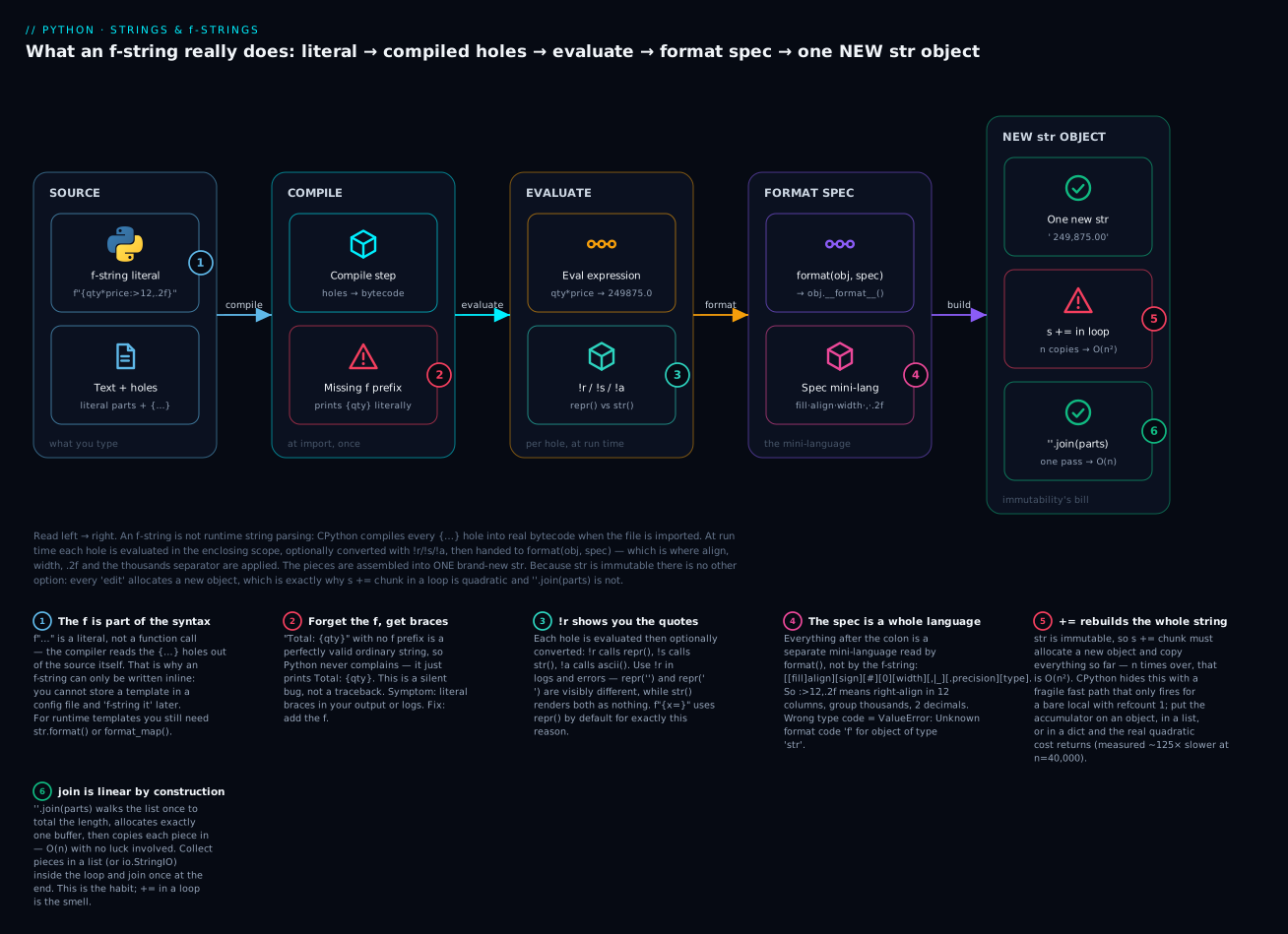
The badges mark the six things that actually bite: the f is syntax, not a function (1), so forgetting it gives you literal braces and no error (2); !r calls repr() and is what you want in logs (3); everything after the : is a separate mini-language (4); and because the output is always a new object, += in a loop copies n times (5) while join allocates once (6).
You can see the compile step yourself — this is the proof that an f-string is not runtime string parsing:
import dis

def f(qty, price):
    return f"{qty * price:>10,.2f}"

dis.dis(f)
  RESUME                   0
  LOAD_FAST_LOAD_FAST      1 (qty, price)
  BINARY_OP                5 (*)
  LOAD_CONST               1 ('>10,.2f')
  FORMAT_WITH_SPEC
  RETURN_VALUE
The multiplication is real bytecode and the spec is a constant. (Exact opcode names vary by version — 3.13 shows FORMAT_WITH_SPEC, 3.12 shows FORMAT_VALUE. The shape is the same.)
The = debugging specifier
Added in 3.8, this is the fastest print-debugging tool in Python. Put = after an expression and you get the source text and the value:
x = 5
name = "Ada"
val = 3.14159

print(f"{x=}")        # => x=5
print(f"{x = }")      # => x = 5          whitespace is preserved
print(f"{x*2=}")      # => x*2=10         the expression source is echoed
print(f"{name=}")     # => name='Ada'     note: repr() by default -- quotes!
print(f"{name=!s}")   # => name=Ada       force str()
print(f"{val=:.2f}")  # => val=3.14       specs still work
It defaults to repr() deliberately, so f"{x=}" distinguishes x='' from x=' '. Stop writing print("x is", x).
Conversions
Applied before formatting, with !:
| Conversion | Calls | f"{'café'!X}" → |
|---|---|---|
| (none) | format(obj, spec) |
café |
!s |
str(obj) |
café |
!r |
repr(obj) — use in logs and errors |
'café' (with quotes) |
!a |
ascii(obj) — escapes non-ASCII |
'caf\xe9' |
The format spec mini-language
Everything after the : is a separate mini-language, read by format(). The full grammar is:
[[fill]align][sign][#][0][width][grouping][.precision][type]
Every part is optional, and the order is fixed. Field by field:
| Field | Values | Does | Example | Result |
|---|---|---|---|---|
fill |
any character | Pad with this (requires align) |
f"{'x':*^7}" |
'***x***' |
align |
< > ^ = |
Left / right / centre / pad-after-sign | f"{'hi':>10}|" |
' hi|' |
sign |
+ - space |
Always show sign / only - / space for positive |
f"{42:+d}" |
'+42' |
# |
— | Alternate form: 0x/0b/0o prefix |
f"{255:#x}" |
'0xff' |
0 |
— | Zero-pad (shorthand for 0=) |
f"{3:03d}" |
'003' |
width |
integer | Minimum total width | f"{42:>6}|" |
' 42|' |
grouping |
, or _ |
Thousands separator | f"{1234567:,}" |
'1,234,567' |
.precision |
.n |
Decimals (floats) or max length (strings) | f"{3.14159:.2f}" |
'3.14' |
type |
see below | How to render it | f"{0.25:.1%}" |
'25.0%' |
Defaults are worth knowing: strings left-align, numbers right-align. So f"{'hi':8}|" gives 'hi |' but f"{42:8}|" gives ' 42|' — which is exactly what you want in a table, for free.
The type codes:
| Type | For | Example | Result |
|---|---|---|---|
d |
Integer (decimal) | f"{42:d}" |
'42' |
f |
Fixed-point float | f"{3.14159:.2f}" |
'3.14' |
% |
Percentage (multiplies by 100) | f"{0.25:%}" / f"{0.25:.1%}" |
'25.000000%' / '25.0%' |
e |
Scientific notation | f"{1e6:e}" |
'1.000000e+06' |
g |
General — picks f or e |
f"{1234.5678:g}" |
'1234.57' |
x / X |
Hex, lower/upper | f"{255:x}" / f"{255:#x}" |
'ff' / '0xff' |
b |
Binary | f"{5:b}" / f"{5:08b}" |
'101' / '00000101' |
o |
Octal | f"{255:o}" |
'377' |
s |
String (the default) | f"{'hi':s}" |
'hi' |
Specs compose, which is the point — f"{1234567.891:,.2f}" → '1,234,567.89' combines grouping and precision, and f"{3.14159:10.3f}" → ' 3.142' combines width and precision.
Two sharp edges. On a string, .precision truncates: f"{'abcdefgh':.3}" → 'abc'. Combine with width to get a hard-bounded column: f"{'abcdefgh':<6.3}|" → 'abc |'. And float rounding is banker’s rounding, not what you learned at school: f"{2.5:.0f}" → '2' but f"{3.5:.0f}" → '4'. Ties go to the even digit. This is correct IEEE-754 behaviour and it is deliberate — but if you are formatting money, use decimal.Decimal, not float.
Formatting also fixes float display noise: f"{0.1 + 0.2}" → '0.30000000000000004', but f"{0.1 + 0.2:.2f}" → '0.30'.
Nested braces for dynamic width
width and precision can themselves be holes — this is how you build a table whose columns are computed:
w = 12
p = 3
print(repr(f"{'hi':>{w}}"))   # => '          hi'    width from a variable
print(f"{3.14159:.{p}f}")     # => 3.142            precision from a variable
Quotes and version boundaries
Before Python 3.12, you could not reuse the same quote character inside an f-string expression, and backslashes were banned inside the holes. PEP 701 lifted both restrictions in 3.12:
row = {"region": "APAC"}

print(f"{row['region']}")   # works everywhere -- inner quotes differ
print(f"{row["region"]}")   # 3.12+ ONLY -- same quotes, SyntaxError on 3.11
| You want | 3.11 and earlier | 3.12+ |
|---|---|---|
| Same quote type inside the hole | SyntaxError |
Allowed |
| Backslash inside the hole | SyntaxError |
Allowed |
Multi-line expression inside {} |
SyntaxError |
Allowed |
| Nesting f-strings arbitrarily deep | Limited | Allowed |
If your code must run on 3.11 (still very common), keep alternating your quotes — f"{row['region']}" works on every version, so it remains the safe habit.
For long messages, use implicit concatenation or a triple-quoted f-string:
name, qty = "Ada", 3

msg = (
    f"Customer: {name}\n"
    f"Items:    {qty}"
)

report = f"""Customer: {name}
Items:    {qty}"""      # newlines are literal
Unicode vs bytes
Python 3’s str is text — a sequence of code points, with no encoding. bytes is raw data — a sequence of integers 0–255. They are different types and they do not mix. The boundary between them is .encode() and .decode():
   str  ──.encode("utf-8")──►  bytes        (text leaving your program)
   str  ◄──.decode("utf-8")──  bytes        (data arriving from outside)
s = "café"
b = s.encode("utf-8")

print(len(s))          # => 4     four characters
print(b)               # => b'caf\xc3\xa9'
print(len(b))          # => 5     FIVE bytes -- é needs two
print(b.decode("utf-8"))  # => café   round-trip
That mismatch is the headline: len() counts code points, not bytes.
| Type | str |
bytes |
|---|---|---|
| Holds | Unicode code points (text) | Integers 0–255 (raw data) |
| Literal | "café" |
b"caf\xc3\xa9" |
x[0] gives |
A 1-char str — 'c' |
An int — 99 |
x[0:1] gives |
'c' |
b'c' |
| Where it lives | In memory, in your logic | Files, sockets, disks, the network |
| Convert with | .encode(enc) → bytes |
.decode(enc) → str |
| Mixing them | "a" + b"b" → TypeError: can only concatenate str (not "bytes") to str |
b[0] returning 99 instead of b'c' surprises everyone once. Slice instead of index (b[0:1]) when you want bytes back.
Why len() of an emoji surprises. str counts code points — which is not the same as what a human sees:
| Text | len() |
UTF-8 bytes | Why |
|---|---|---|---|
"a" |
1 | 1 | ASCII |
"café" |
4 | 5 | é is 2 bytes in UTF-8 |
"\u00e9" → renders as é |
1 | 2 | One precomposed code point (NFC) |
"e\u0301" → renders as é |
2 | 3 | e + a combining acute accent (NFD) |
"👍" |
1 | 4 | One code point outside the BMP |
"🇮🇳" |
2 | 8 | A flag is two regional-indicator code points |
"👨👩👧👦" |
7 | 25 | 4 people + 3 zero-width joiners |
So one visible “character” can be 1, 2 or 7 code points. len("👨👩👧👦") == 7 is not a bug — Python is telling you the truth about Unicode. (For “what a human calls a character” you need grapheme clusters, which the stdlib doesn’t do; the third-party regex module does.)
Those two é rows matter for comparison, and this catches real programs. The two literals below are written with explicit escapes precisely because you cannot tell them apart by eye:
import unicodedata

a = "\u00e9"      # é  -- one precomposed code point (NFC)
b = "e\u0301"     # é  -- plain e + a combining acute accent (NFD)

print(a == b)                                  # => False   they LOOK identical!
print(len(a), len(b))                          # => 1 2
print(unicodedata.normalize("NFC", b) == a)    # => True    normalise first
Text from macOS filenames, PDFs, or copy-paste can arrive decomposed. Normalise before comparing or storing user text: unicodedata.normalize("NFC", text).
The two encoding errors, with their real tracebacks:
"café".encode("ascii")
UnicodeEncodeError: 'ascii' codec can't encode character '\xe9' in position 3: ordinal not in range(128)
"café".encode("utf-8").decode("ascii")
UnicodeDecodeError: 'ascii' codec can't decode byte 0xc3 in position 3: ordinal not in range(128)
Remember them by direction: encode = text → bytes (UnicodeEncodeError); decode = bytes → text (UnicodeDecodeError). The fix is almost always “use UTF-8 explicitly at the boundary”, i.e. open(path, encoding="utf-8"). On Linux/macOS UTF-8 is usually the default; on Windows the default has historically been the legacy ANSI code page, which is why the same script can work on your laptop and mangle text on a colleague’s. Always pass encoding="utf-8" to open() and never rely on the default.
The nastiest failure isn’t an exception at all:
raw = "café".encode("utf-8")
print(raw.decode("latin-1"))    # => café      MOJIBAKE -- no error!
latin-1 maps all 256 byte values to characters, so it can never fail — it just silently produces garbage. If you see é, ’ or ä, you are looking at UTF-8 bytes decoded as latin-1. When you must survive bad bytes, be explicit about it:
print(b"caf\xc3".decode("utf-8", errors="replace"))   # => caf�    U+FFFD replacement char
print(b"caf\xc3".decode("utf-8", errors="ignore"))    # => caf     the bad byte is dropped
Wrapping and centring text
For anything beyond a single line, textwrap saves you writing a word-wrap loop:
import textwrap

long = "Python strings are immutable sequences of Unicode code points, which surprises newcomers."

print(textwrap.fill(long, width=40))
Python strings are immutable sequences
of Unicode code points, which surprises
newcomers.
The rest of the module, in the same file (repr() here so you can see the newlines):
print(textwrap.shorten(long, width=40, placeholder=" ..."))
# => Python strings are immutable ...

print(repr(textwrap.indent("a\nb\n", "> ")))                    # => '> a\n> b\n'
print(repr(textwrap.dedent("\n    def f():\n        pass\n")))  # => '\ndef f():\n    pass\n'
print("TITLE".center(21, "="))                                  # => ========TITLE========
dedent is the one to remember: it strips the common leading whitespace, which lets you indent a triple-quoted string to match your code without the indentation ending up in the output.
Hands-on lab
You will build a small report formatter: parse a messy CSV-ish blob, clean it, reassemble it, print an aligned table — then benchmark += against join and see the truth for yourself. Everything here is standard library, so no pip install and no virtual environment is strictly needed. (If you’d like one anyway: python3 -m venv .venv && source .venv/bin/activate; on Windows, .venv\Scripts\activate.)
Requires Python 3.12+. Check with python3 -V (on Windows, py -V).
Step 1 — Make a working directory.
mkdir -p ~/pylab/strings && cd ~/pylab/strings
Step 2 — Parse and clean. Create report.py:
RAW = """
region , units , unit_price
 APAC  , 12500 , 19.99
EMEA,  8300 ,  24.50
 AMER , 15750 ,17.25
"""

# splitlines() over split("\n") -- no phantom empty last line.
# The `if ln.strip()` drops blank lines from the triple-quoted literal.
lines = [ln for ln in RAW.strip().splitlines() if ln.strip()]

header = [field.strip() for field in lines[0].split(",")]
rows = [[field.strip() for field in ln.split(",")] for ln in lines[1:]]

print("header:", header)
print("rows[0]:", rows[0])
python3 report.py
header: ['region', 'units', 'unit_price']
rows[0]: ['APAC', '12500', '19.99']
What just happened: split(",") cut each line into fields, and strip() cleaned the ragged spaces off every one. Note the fields are still strings — '12500', not 12500. That is what parsing gives you; conversion is your job.
Step 3 — Reassemble with join. Append to report.py:
canonical = "\n".join(",".join(r) for r in rows)
print(canonical)
APAC,12500,19.99
EMEA,8300,24.50
AMER,15750,17.25
What just happened: two joins nested — the inner one glues fields with commas, the outer glues lines with newlines. This is the split → clean → join round trip, and the messy input is now canonical.
Step 4 — Print an aligned table. Append:
W_REGION, W_UNITS, W_PRICE, W_REV = 8, 9, 12, 15
TOTAL_W = W_REGION + W_UNITS + W_PRICE + W_REV

titles = [h.replace("_", " ").title() for h in header] + ["Revenue"]

print(" QUARTERLY REVENUE ".center(TOTAL_W, "="))
print(
    f"{titles[0]:<{W_REGION}}"      # strings left-align by default; explicit is clearer
    f"{titles[1]:>{W_UNITS}}"       # nested {W_UNITS} = dynamic width
    f"{titles[2]:>{W_PRICE}}"
    f"{titles[3]:>{W_REV}}"
)
print("-" * TOTAL_W)

total_units = 0
total_rev = 0.0
for region, units_s, price_s in rows:
    units = int(units_s)            # NOW convert
    price = float(price_s)
    revenue = units * price
    total_units += units
    total_rev += revenue
    print(
        f"{region:<{W_REGION}}"
        f"{units:>{W_UNITS},}"      # , = thousands separator
        f"{price:>{W_PRICE},.2f}"   # , + 2 decimals
        f"{revenue:>{W_REV},.2f}"
    )

print("-" * TOTAL_W)
print(
    f"{'TOTAL':<{W_REGION}}"
    f"{total_units:>{W_UNITS},}"
    f"{'':>{W_PRICE}}"              # an empty cell, still padded
    f"{total_rev:>{W_REV},.2f}"
)

print()
for region, units_s, price_s in rows:
    share = int(units_s) * float(price_s) / total_rev
    bar = "#" * round(share * 30)
    print(f"{region:<{W_REGION}}{share:>7.1%}  {bar}")
============ QUARTERLY REVENUE =============
Region      Units  Unit Price        Revenue
--------------------------------------------
APAC       12,500       19.99     249,875.00
EMEA        8,300       24.50     203,350.00
AMER       15,750       17.25     271,687.50
--------------------------------------------
TOTAL      36,550                 724,912.50

APAC      34.5%  ##########
EMEA      28.1%  ########
AMER      37.5%  ###########
What just happened: the columns line up because every field was formatted to a fixed width, and the widths came from variables via nested braces — change W_REV to 18 and the table re-flows. .title() turned unit_price into Unit Price after a replace, center() drew the banner, , grouped the thousands, .2f fixed the decimals, and .1% turned a ratio into a percentage. Adjacent f-string literals concatenate, which is what lets one print span several readable lines.
Step 5 — Benchmark += against join. Create bench.py:
import timeit

CHUNK = "abcdefghij"

def plus_local(n):
    s = ""                      # a bare local, refcount 1
    for _ in range(n):
        s += CHUNK
    return s

def plus_attr(n):
    class Buf:
        pass
    b = Buf()
    b.s = ""                    # lives on an object -> refcount > 1
    for _ in range(n):
        b.s += CHUNK
    return b.s

def with_join(n):
    parts = []
    for _ in range(n):
        parts.append(CHUNK)
    return "".join(parts)

FNS = (plus_local, plus_attr, with_join)
assert len({fn(200) for fn in FNS}) == 1      # identical results

N = 40_000
print(f"Building a {N * len(CHUNK):,}-char string, three ways (n={N:,}):\n")
times = {}
for fn in FNS:
    t = timeit.timeit(lambda: fn(N), number=3) / 3
    times[fn.__name__] = t
    print(f"  {fn.__name__:<12} {t * 1000:8.2f} ms")

base = times["with_join"]
print("\n  slowdown vs join:")
for name, t in times.items():
    print(f"  {name:<12} {t / base:7.1f}x")

print("\nScaling shape (time ratio as n doubles; ~2x = linear, ~4x = quadratic):")
for fn in FNS:
    prev, cells = None, []
    for n in (10_000, 20_000, 40_000):
        t = timeit.timeit(lambda: fn(n), number=3) / 3
        cells.append(f"{t / prev:.1f}x" if prev else "  -")
        prev = t
    print(f"  {fn.__name__:<12} {'  '.join(f'{c:>5}' for c in cells)}")
python3 bench.py
Building a 400,000-char string, three ways (n=40,000):

  plus_local       2.66 ms
  plus_attr      145.81 ms
  with_join        1.15 ms

  slowdown vs join:
  plus_local       2.3x
  plus_attr      126.7x
  with_join        1.0x

Scaling shape (time ratio as n doubles; ~2x = linear, ~4x = quadratic):
  plus_local       -   2.0x   2.0x
  plus_attr        -   3.7x   2.5x
  with_join        -   1.9x   2.0x
What just happened: your absolute milliseconds will differ — watch the ratios. plus_local and with_join both hold a clean ~2× as n doubles: linear. plus_attr climbs much faster: that is the O(n²) signature (it wobbles because your allocator can sometimes extend a buffer in place). plus_local is fast only because CPython’s in-place fast path fires for a bare local; move the accumulator onto an object — which is what real code does — and it is ~127× slower than join.
Step 6 — Break the fast path yourself. Add to bench.py and re-run:
def plus_local_second_ref(n):
    s = ""
    keep = s
    for _ in range(n):
        s += CHUNK
        keep = s            # a second reference -> refcount 2
    return s

t = timeit.timeit(lambda: plus_local_second_ref(N), number=3) / 3
print(f"\n  plus_local_second_ref {t * 1000:8.2f} ms  ({t / base:.0f}x vs join)")
plus_local_second_ref 142.35 ms (124x vs join)
What just happened: the same loop over the same bare local, one extra line, and it just got ~50× slower than plus_local. Nothing about the concatenation changed — only the reference count. This is the proof that the fast path is invisible luck, not a language guarantee. Collect into a list and join.
Common mistakes and troubleshooting
| Symptom / traceback | Cause | Fix |
|---|---|---|
TypeError: can only concatenate str (not "int") to str |
"Age: " + age where age is an int — + won’t coerce |
f"Age: {age}", or "Age: " + str(age) |
TypeError: 'str' object does not support item assignment |
name[0] = "A" — strings are immutable |
Build a new one: "A" + name[1:], or name.replace(...) |
.strip() / .replace() “does nothing” |
They return a new string; you discarded it | Assign it: line = line.strip() |
TypeError: sequence item 1: expected str instance, int found |
",".join([...]) with a non-string in the list |
",".join(map(str, items)) |
ValueError: substring not found |
.index(sub) and sub isn’t there |
Use .find() (returns -1) or test with in first |
"...".find(x) returned -1 and you used it as an index |
-1 is a valid index — the last character! |
Check if i == -1: explicitly, or use in |
Output shows literal {name} |
Missing f prefix — a plain string is valid, so no error |
Add the f: f"Hello {name}" |
SyntaxError: (unicode error) 'unicodeescape' codec can't decode bytes ... truncated \UXXXXXXXX escape |
"C:\Users\..." — \U starts a Unicode escape |
Raw string: r"C:\Users\...", or pathlib |
SyntaxWarning: invalid escape sequence '\d' |
Regex/path in a normal string; \d, \p etc. aren’t Python escapes |
Raw string: r"\d+". Slated to become a SyntaxError |
| Path silently contains a tab/newline | "C:\new\table" — \n and \t are valid escapes, so no warning at all |
Raw string, and check with repr() / len() |
ValueError: Unknown format code 'f' for object of type 'str' |
f"{'text':.2f}" — f is a float code |
Convert first, or use a string spec (:.2 truncates) |
ValueError: Cannot specify ',' with 's'. |
f"{'abc':,}" — grouping is numeric-only |
Apply , to the number, not to a string |
SyntaxError on f"{d["k"]}" |
Same quotes inside a hole — 3.11 and earlier only | Alternate quotes: f"{d['k']}" (works everywhere) |
TypeError: not all arguments converted during string formatting |
"%s" % some_tuple — % reads a tuple as the arg list |
"%s" % (some_tuple,), or just use an f-string |
UnicodeDecodeError: 'ascii' codec can't decode byte 0xc3 ... |
Reading UTF-8 bytes with the wrong codec | Decode explicitly: open(p, encoding="utf-8") |
UnicodeEncodeError: 'ascii' codec can't encode character '\xe9' ... |
Writing non-ASCII text to an ASCII/legacy stream | encoding="utf-8" on open(); check the console code page on Windows |
Text prints as café / ’ — no error |
UTF-8 bytes decoded as latin-1 (which never fails) | Decode as UTF-8; latin-1 silently produces mojibake |
len("👨👩👧👦") is 7, not 1 |
len() counts code points; the emoji is a ZWJ sequence |
Correct behaviour. For visible characters use grapheme clusters (regex module) |
Two identical-looking strings compare False |
One is NFC (é), one is NFD (é) |
unicodedata.normalize("NFC", s) before comparing |
Three of these deserve more than a table row.
1. “My .replace() isn’t working.” This is the number-one string bug, and it is really a misunderstanding of immutability wearing a disguise. text.replace("a", "b") cannot change text — nothing can. It computes a new string and hands it back, and if you don’t catch it, it’s garbage-collected. The tell is a “no-op” line all by itself:
text.strip()          # <- a line with no assignment and no side effect is ALWAYS a bug
text = text.strip()   # <- what you meant
Compare with lists, where xs.append(1) does mutate and returns None — which is why xs = xs.append(1) silently sets xs to None. Mutable types mutate and return None; immutable types return new objects. Once you know which type you’re holding, you know which rule applies.
2. Backslashes are two bugs, not one. "C:\Users\name" fails loudly with a SyntaxError because \U starts a Unicode escape. "C:\new\table" fails silently — \n and \t are perfectly valid escapes, so Python cheerfully gives you a string with a newline and a tab in it and never says a word. len("C:\new\table") is 10; the raw version is 12. The silent one is far more dangerous. The rule has no exceptions: any string with a backslash in it gets an r prefix, and if you’re building filesystem paths, use pathlib and don’t type separators at all.
3. find returning -1 is a trap, not a convenience. -1 is a perfectly valid Python index meaning “last character”, so a find result used without checking doesn’t crash — it quietly reads the wrong end of the string:
i = line.find(":")          # not found -> -1
key = line[:i]              # line[:-1] = everything except the last char. Silent garbage.
Prefer partition, which cannot fail and forces you to handle absence:
key, sep, value = line.partition(":")
if not sep:
    raise ValueError(f"no ':' in {line!r}")     # note !r -- shows the quotes
Cheat-sheet
| Syntax / method | What it does |
|---|---|
s[i] · s[a:b] · s[::-1] |
Index · slice (stop exclusive) · reversed copy |
len(s) |
Number of code points (not bytes, not glyphs) |
x in s |
Substring test — the idiomatic check |
s.strip() · .lstrip() · .rstrip() |
Trim whitespace (both / left / right) |
s.strip(chars) |
Trim any char in the set chars — not a prefix! |
s.removeprefix(p) · .removesuffix(x) |
Remove a whole prefix/suffix (3.9+) — what you usually want |
s.split() |
Split on runs of whitespace, drop empties |
s.split(sep, maxsplit) · .rsplit(...) |
Split on each sep, optionally limited, from left/right |
s.splitlines() |
Split into lines — no phantom trailing empty |
sep.join(iterable) |
Glue strings together — the linear way to build a string |
s.partition(sep) · .rpartition(sep) |
Split once at first/last sep → 3-tuple, never raises |
s.replace(a, b[, n]) |
Replace all (or first n) — returns a new string |
s.find(x) / s.index(x) |
First position; -1 / ValueError when absent |
s.count(x) |
Non-overlapping occurrences |
s.startswith(p) · .endswith(x) |
Prefix/suffix test; both accept a tuple of options |
s.upper() · .lower() · .title() · .capitalize() |
Case conversion (title() breaks on apostrophes) |
s.casefold() |
Aggressive fold — use for case-insensitive comparison |
s.isdigit() · .isalpha() · .isspace() · .isalnum() |
Classification (all False for ""; isdigit() accepts ²) |
s.zfill(w) |
Zero-pad, sign-aware ("-42" → "-0042") |
s.ljust(w,c) · .rjust(w,c) · .center(w,c) |
Pad to width |
s.translate(str.maketrans(a, b)) |
Bulk character mapping / deletion |
s.encode("utf-8") / b.decode("utf-8") |
str → bytes / bytes → str |
unicodedata.normalize("NFC", s) |
Normalise before comparing or storing user text |
textwrap.fill(s, width=n) · .dedent · .shorten · .indent |
Word-wrap · strip common indent · truncate · prefix lines |
f-string quick reference:
| Pattern | Result |
|---|---|
f"{x}" |
str(x) |
f"{x!r}" · f"{x!s}" · f"{x!a}" |
repr(x) · str(x) · ascii(x) |
f"{x=}" · f"{x = }" |
x=5 · x = 5 — debug print, uses repr() |
f"{{literal}}" |
{literal} — doubled braces escape |
f"{s:<10}" · f"{s:>10}" · f"{s:^10}" |
Left · right · centre in 10 columns |
f"{s:*^10}" |
Centre, padding with * |
f"{n:.2f}" |
2 decimal places |
f"{n:,}" · f"{n:_}" |
1,234,567 · 1_234_567 |
f"{n:,.2f}" |
1,234,567.89 — grouping + precision |
f"{r:.1%}" |
25.0% — multiplies by 100 |
f"{n:+d}" · f"{n:05d}" |
+42 · 00042 |
f"{n:#x}" · f"{n:b}" · f"{n:08b}" |
0xff · 101 · 00000101 |
f"{s:.3}" |
Truncate a string to 3 chars |
f"{x:>{w}}" · f"{v:.{p}f}" |
Width / precision from a variable |
| Full spec | [[fill]align][sign][#][0][width][,|_][.precision][type] |
Interview and exam questions
Q: What does it mean that Python strings are immutable, and what follows from it?
A: Once a str exists its contents can never change. s[0] = "x" raises TypeError: 'str' object does not support item assignment, and every “modifying” method (strip, replace, upper) returns a new string instead of editing the original. Three consequences: you must assign the result or it’s lost; strings are hashable and so usable as dict keys and set members; and building a string with += in a loop is quadratic in the general case, so you collect pieces in a list and "".join() them once.
Q: Why is s += x in a loop discouraged, and is it really O(n²)?
A: Conceptually yes: each += must allocate a new string and copy everything accumulated so far, giving 1+2+…+n = O(n²). In practice CPython has a fast path that resizes in place when the target has a refcount of 1 and the result is stored straight back to the same local, so a naive benchmark on a bare local looks linear. That optimisation is invisible and fragile — hold a second reference, or put the accumulator on an object, in a list, or in a dict, and the real quadratic cost returns (measurably ~125× slower than join at n=40,000). "".join(parts) is O(n) by construction: one pass to sum the lengths, one allocation, one copy of each piece. Use join.
Q: What is the difference between find and index?
A: They both return the index of the first occurrence. When the substring is absent, find returns -1 and index raises ValueError: substring not found. Use find when absence is expected, index when absence is a bug. The trap is that -1 is a valid index (the last character), so an unchecked find result silently reads the wrong data rather than crashing. If you’re splitting on the separator anyway, partition is safer than both.
Q: What’s wrong with "example.com".strip(".com")?
A: strip(chars) treats its argument as a set of characters, not a suffix, and removes any of them from both ends. So "mississippi.com".strip(".com") returns 'ississippi' — the leading m is also stripped. Use removesuffix(".com") (3.9+), which removes the whole suffix or nothing.
Q: When would you still use .format() or % instead of an f-string?
A: Two real cases. First, when the template isn’t a literal in your source — it comes from a config file, database, or i18n catalogue at runtime. An f-string is compiled from source and can’t do that, so you need .format() / .format_map(). Second, logging: logger.info("user %s did %s", user, action) defers formatting until the record is actually emitted, so a filtered-out DEBUG line costs nothing. Everywhere else, f-strings — they’re more readable and faster.
Q: What does f"{value!r}" do, and when do you want it?
A: !r applies repr() instead of str() before formatting. Use it in logs and error messages: repr() shows quotes and escapes, so '', ' ' and 'None' are visibly different from each other and from None. That’s why f"{x=}" uses repr() by default.
Q: Explain the format spec :>10,.2f.
A: Right-align (>) in a minimum width of 10 columns, group thousands with commas (,), and render as a fixed-point float with 2 decimals (.2f). Full grammar: [[fill]align][sign][#][0][width][grouping][.precision][type]. Everything after the : is a mini-language read by format(), not by the f-string itself.
Q: Why is len("café") 4 but the file on disk is 5 bytes?
A: A Python str is a sequence of Unicode code points, and café is four of them. Bytes only exist once you encode: in UTF-8, é (U+00E9) needs two bytes, so "café".encode("utf-8") is b'caf\xc3\xa9', length 5. str is text with no encoding; bytes is data.
Q: What’s the difference between UnicodeEncodeError and UnicodeDecodeError?
A: Encode goes text → bytes, so UnicodeEncodeError means your text contains a character the target codec can’t represent ("café".encode("ascii")). Decode goes bytes → text, so UnicodeDecodeError means the bytes aren’t valid in the codec you named (utf8_bytes.decode("ascii")). Fix by being explicit at the boundary: open(path, encoding="utf-8"). Beware latin-1, which decodes any byte and so never errors — it silently produces mojibake like café.
Q (coding): Write a function that reverses the word order of a sentence and normalises whitespace. " the quick brown fox " → "fox brown quick the".
A:
def reverse_words(sentence: str) -> str:
    return " ".join(reversed(sentence.split()))

print(reverse_words("  the   quick  brown fox "))   # => fox brown quick the
Bare split() splits on runs of whitespace and drops empties, so the collapsing is free — that’s why you don’t want split(" ") here. join reassembles in one pass.
Q (coding): Check whether two strings are anagrams, case-insensitively. A:
def is_anagram(a: str, b: str) -> bool:
    return sorted(a.casefold()) == sorted(b.casefold())

print(is_anagram("Listen", "Silent"))   # => True
casefold() rather than lower() so it holds for non-English text. sorted() on a string returns a list of characters. (For large inputs, collections.Counter is the O(n) version.)
Q (coding): Given "name=Ada Lovelace=engineer", extract the key and the full value without losing the second =.
A:
line = "name=Ada Lovelace=engineer"
key, sep, value = line.partition("=")
print(key, "|", value)      # => name | Ada Lovelace=engineer
partition splits at the first separator only and returns a 3-tuple, so the rest of the value stays intact. split("=") would give three fragments; split("=", maxsplit=1) also works but partition additionally tells you via sep whether the separator was there at all.
Key takeaways
- A
stris an immutable sequence of Unicode code points. Every other fact in this lesson falls out of that sentence — indexing works like a list, methods return new strings, and strings are hashable. - Nothing modifies a string in place.
strip,replace,upperall return a new object; a line liketext.strip()with no assignment is always a bug.s[0] = "x"is aTypeError, forever. - Collect and
join."".join(parts)is O(n) by construction.s += chunkin a loop is O(n²) in the model, and only escapes it via a CPython fast path that silently switches off the moment a second reference exists — measured ~125× slower thanjoinwhen it does. - Raw strings for regex and Windows paths, always.
"C:\new\table"silently smuggles in a tab and a newline;"C:\Users\x"is a hardSyntaxError.r"..."turns escapes off — and for paths, preferpathlibover typing separators at all. strip(chars)is a character set, not a suffix."mississippi.com".strip(".com")→'ississippi'. Reach forremoveprefix/removesuffixinstead.- f-strings are the default; the other two eras are read-only knowledge. Keep
.format()for templates that arrive at runtime and%-style args forlogger.info(...). Forgetting thefprints literal braces with no error. - Learn the format spec once —
[[fill]align][sign][#][0][width][,|_][.precision][type]— andf"{total:>12,.2f}"gives you aligned, grouped, 2-decimal columns for free.f"{x=}"is the fastest debug print in Python. stris text,bytesis data, and.encode()/.decode()is the boundary.len()counts code points, solen("café")is 4 while its UTF-8 form is 5 bytes andlen("👨👩👧👦")is 7. Passencoding="utf-8"explicitly at every I/O boundary, and normalise user text withunicodedata.normalize("NFC", s)before comparing it.