Every program you have written so far has been an amnesiac. It starts, it thinks, it prints, it exits — and everything it knew evaporates. Files are how that stops. A file is the first thing you will meet that outlives your process, and that single fact is why file I/O is where beginners get hurt: a variable that is wrong just prints wrong, but a file that is wrong is still wrong tomorrow. One misread character in a mode string can delete a log you needed.
This lesson is about six things, and they are all connected: open() and the mode that decides your fate; with, the block that guarantees your file is closed even when your code explodes; the difference between text and binary (which is really the story of str versus bytes); pathlib, which makes paths stop being strings you glue together and hope; and try/except, which turns “my script crashed” into “my script handled it.”
Type every snippet. Not because typing is magic, but because file I/O is the first topic where the machine pushes back — the file isn’t there, the encoding is wrong, the directory doesn’t exist — and you learn far more from a real FileNotFoundError on your own screen than from reading about one. Everything here targets Python 3.12+, needs no pip install, and runs identically on macOS, Linux, and Windows unless we say otherwise.
Why this matters
Almost every useful program is a pipe with a file on at least one end. You read a config file to know what to do. You read a CSV to analyse it. You write a log so that future-you can find out what happened at 03:00. You save a model, a report, an image, a database dump. “Reading input, doing something, writing output” is the job — the interesting logic in the middle is sandwiched between two file operations.
Here is the mental model to carry through the whole lesson, because it prevents most of the bugs. open() does not give you a file. It gives you a file object — a small machine in your program’s memory that knows how to talk to a file on disk. Those are different things, and every confusing behaviour in this lesson comes from that gap:
- You call
f.write("hello"), it returns5, and you feel finished. But nothing is on the disk yet. The text is sitting in a buffer in RAM. If the process dies now, those bytes never existed. - The disk only ever stores bytes — numbers. Your program works with
str— text. Something has to translate, and that translation needs an encoding. Get it wrong and you get mojibake or aUnicodeDecodeError. - The file object holds an operating-system resource (a file descriptor). Your OS gives each process a limited number. Leak them in a loop and a long-running program eventually dies of
OSError: [Errno 24] Too many open files.
So the three questions to ask about every file operation are: Am I sure it’s closed? Am I sure of the encoding? Am I sure of the mode? Answer those three and file I/O is easy. Ignore them and you get the classic beginner trio — an empty file, a crash on a colleague’s laptop, and a log missing its last ten lines.
One more reason this lesson matters: it is where you will first meet exceptions in earnest. Not as a punishment, but as an interface. The filesystem is the outside world, and the outside world says no — the file is missing, the disk is full, you lack permission. try/except is how Python hands you that “no” in a form you can actually do something about.
open(): one function, and the mode that decides everything
Everything starts with one built-in. Here is its real signature in Python 3.12:
open(file, mode='r', buffering=-1, encoding=None, errors=None,
     newline=None, closefd=True, opener=None)
In practice you will use the first four, and mostly the first three:
# The shape you should burn into muscle memory:
with open("app.log", "r", encoding="utf-8") as f:
    ...
The mode is a tiny string, and it is the single most consequential argument in this lesson. It answers two questions at once: what am I allowed to do? and is this text or bytes? Read this table slowly — the w row is the one that costs people real data:
| Mode | Name | File must exist? | If it exists | Position at open | Can read? | Can write? |
|---|---|---|---|---|---|---|
r |
read (default) | Yes → else FileNotFoundError |
untouched | start | ✅ | ❌ |
w |
write | No — created | ⚠️ truncated to 0 bytes | start | ❌ | ✅ |
a |
append | No — created | kept; writes forced to end | end | ❌ | ✅ |
x |
exclusive create | Must not exist → else FileExistsError |
n/a | start | ❌ | ✅ |
r+ |
read + update | Yes | kept, not truncated | start | ✅ | ✅ |
w+ |
write + read | No — created | ⚠️ truncated to 0 bytes | start | ✅ | ✅ |
a+ |
append + read | No — created | kept; writes forced to end | end | ✅ | ✅ |
b |
binary (modifier) | — | — | — | gives you bytes |
takes bytes |
t |
text (modifier, default) | — | — | — | gives you str |
takes str |
Two rules make the table smaller than it looks. First, b and t are modifiers you combine with a letter: "rb" is read-binary, "wb" is write-binary, "r" means "rt". Second, + means “add the other capability” — it never means “be safe.”
⚠️ The w trap, stated plainly. Mode w truncates the file at open() time, before you write a single character. It does not wait to see whether you actually write anything. It does not care whether your program crashes on the next line. Watch:
from pathlib import Path

print("before open :", Path("app.log").stat().st_size, "bytes")
f = open("app.log", "w", encoding="utf-8")   # <-- the data dies HERE
print("after open  :", Path("app.log").stat().st_size, "bytes")
f.close()
before open : 226 bytes
after open  : 0 bytes
Not one write() call was made, and a 226-byte file is already gone. This is why open(path, "w") on a file you meant to add to is one of the most expensive typos in Python. If you mean “add”, the mode is a. If you mean “create, but never clobber”, the mode is x — it raises FileExistsError rather than destroy something.
So pick the mode from the intent, not from habit:
| I want to… | Mode | Why that one |
|---|---|---|
| Read a config/CSV/log | "r" |
The default; fails loudly if it’s missing, which is what you want |
| Create a report, replacing any old one | "w" |
Truncation is intended here |
| Add a line to a log | "a" |
Never loses history; each write goes to the end |
| Create a file only if it’s new | "x" |
Refuses to overwrite — FileExistsError is a feature |
| Edit part of a file in place | "r+" |
Opens without truncating; use .seek() to position |
| Read a PNG/ZIP/model file | "rb" |
Binary — no decoding, no newline translation |
| Write raw bytes | "wb" |
Binary — you supply bytes, not str |
The remaining parameters matter less often, but two of them matter a lot when they matter:
| Parameter | Default | What it does | When you care |
|---|---|---|---|
encoding |
None → platform default |
Which codec maps bytes ↔ text | Always pass "utf-8" in text mode. See the trap below |
errors |
"strict" |
What to do when a byte won’t decode | Salvaging dirty data: "replace", "ignore" |
newline |
None |
Newline translation on read/write | CSV, \r\n files, byte-exact output |
buffering |
-1 (~8192 bytes) |
Size of the in-memory buffer | 1 = line-buffered (text only); 0 = unbuffered (binary only — text raises ValueError: can't have unbuffered text I/O) |
closefd |
True |
Close the underlying descriptor on close | Only when passing an existing fd instead of a path |
opener |
None |
Custom low-level open callable | Rare — advanced permission/flag control |
Why with is non-negotiable
You can open a file without with. You should not, and here is the demonstration that settles it. Both blocks below hit an exception; only one of them closes the file:
# 1: manual close — the close() NEVER runs
f = open("app.log", "r", encoding="utf-8")
try:
    raise ValueError("boom in the middle of processing")
    f.close()                      # unreachable — the raise jumped over it
except ValueError:
    pass
print("manual  -> closed?", f.closed)

# 2: with — closed no matter what
try:
    with open("app.log", "r", encoding="utf-8") as g:
        raise ValueError("same boom")
except ValueError:
    pass
print("with    -> closed?", g.closed)
manual  -> closed? False
with    -> closed? True
That is the whole argument. with is a context manager: a with block promises that when control leaves it — normally, via return, via break, or because a line raised an exception — Python calls the object’s cleanup method. For a file, that cleanup is close(), and close() flushes the buffer first. The exception still propagates; it just can’t leave your file dangling on the way out.
with open(...) as f: |
f = open(...) + f.close() |
|
|---|---|---|
| Closed on success | ✅ | ✅ (if you remembered) |
| Closed on exception | ✅ guaranteed | ❌ skipped by the raise |
Closed on early return/break |
✅ | ❌ commonly missed |
| Buffer flushed to disk | ✅ | ✅ / ❌ |
Needs try/finally to be correct |
No | Yes — and that’s just with with extra steps |
| Lines of code | 1 | 4+ |
“But my file gets closed anyway” — often true, and it is a trap. CPython uses reference counting, so when the last reference to a file object disappears the file usually does get closed. That is an implementation detail of one interpreter, not a language guarantee (PyPy, for instance, won’t do it promptly). Meanwhile the file stays open for an unpredictable window, which on Windows means nobody else can delete or rename it, and in a loop means you can exhaust your descriptor budget.
Python will even tell you, if you ask. ResourceWarning is silenced by default; development mode turns it on:
# leak.py
def read_it():
    f = open("app.log", "r", encoding="utf-8")   # never closed!
    return f.readline()
print(read_it().strip())
$ python3 leak.py
2026-07-15 09:14:02 INFO  service started          # silent — looks fine

$ python3 -X dev leak.py
leak.py:4: ResourceWarning: unclosed file <_io.TextIOWrapper name='app.log' mode='r' encoding='utf-8'>
  print(read_it().strip())
ResourceWarning: Enable tracemalloc to get the object allocation traceback
2026-07-15 09:14:02 INFO  service started
Get in the habit of running scripts with python3 -X dev while you’re learning. It is a free, permanent code reviewer for exactly this class of bug. And you can open several files in one with:
with (open("in.txt", encoding="utf-8") as src,
      open("out.txt", "w", encoding="utf-8") as dst):
    for line in src:
        dst.write(line.upper())
Reading: four ways, and only one survives a big file
Once you hold a file object, there are four ways to get text out of it. They differ in exactly one property that matters at 3 a.m.: how much of the file lands in RAM at once.
with open("app.log", "r", encoding="utf-8") as f:
    whole = f.read()                   # 1: the WHOLE file into one str
print("read()     ->", type(whole).__name__, len(whole), "chars")

with open("app.log", "r", encoding="utf-8") as f:
    first = f.readline()               # 2: one line, keeps its "\n"
print("readline() ->", repr(first))

with open("app.log", "r", encoding="utf-8") as f:
    for i, line in enumerate(f, 1):    # 3: THE idiom — one line at a time
        print(f"  {i}: {line.rstrip()}")
read()     -> str 226 chars
readline() -> '2026-07-15 09:14:02 INFO  service started\n'
  1: 2026-07-15 09:14:02 INFO  service started
  2: 2026-07-15 09:14:07 WARN  cache miss ratio 0.42
  3: 2026-07-15 09:15:31 ERROR upstream timeout after 30s
  4: 2026-07-15 09:16:03 INFO  retry succeeded
  5: 2026-07-15 09:18:44 ERROR disk usage 91%
| Method | Returns | Memory used | At end of file | Use it when |
|---|---|---|---|---|
f.read() |
one str (or bytes) |
⚠️ the entire file | '' |
The file is small and you need it whole |
f.read(n) |
≤ n chars/bytes |
n |
'' |
Streaming fixed-size chunks; magic numbers |
f.readline() |
one str, keeps \n |
one line | '' |
Reading a header, then the rest |
f.readlines() |
list[str], each keeps \n |
⚠️ whole file + list overhead | [] |
Small file, you genuinely need a list |
for line in f: |
one str per loop |
one line ✅ | loop ends | The default. Any file, any size |
Note the readlines() row carefully: it is read() with extra memory cost, because you pay for the text and a list object per line. Beginners reach for it because the name sounds like “read the lines,” and it is almost always the wrong call. Compare:
# ❌ 10 GB log -> tries to allocate 10 GB of str, plus a huge list. MemoryError.
for line in open("huge.log", encoding="utf-8").readlines():
    ...

# ✅ 10 GB log -> one line in memory at a time. Runs on a laptop.
with open("huge.log", encoding="utf-8") as f:
    for line in f:
        ...
Iterating the file object works because a file is lazy — it reads a block, hands you lines from it, and fetches the next block only when you ask. This is why “iterate the file” is not merely a style preference; it is the difference between a script that scales and one that dies on real data.
Two details that catch everyone. First, every line keeps its trailing \n — that is why the output above uses line.rstrip(). Forget it and your prints come out double-spaced. Second, a file object is a one-shot iterator: once you’ve read to the end, the position sits at EOF and a second loop yields nothing. If you need a second pass, either f.seek(0) or open it again.
Writing: write() returns a count, and nothing adds newlines for you
Writing has two surprises, and they are both about the things Python doesn’t do for you.
from pathlib import Path

with open("demo.txt", "w", encoding="utf-8") as f:
    n = f.write("2026-07-15 09:14:02 INFO  service started\n")
    print("write() returned:", n)      # a CHARACTER count — not "saved to disk"
    f.write("alpha")                   # write() appends NOTHING
    f.write("beta")
    f.writelines(["gamma", "delta"])   # writelines adds nothing either!

print(repr(Path("demo.txt").read_text(encoding="utf-8")))
write() returned: 42
'2026-07-15 09:14:02 INFO  service started\nalphabetagammadelta'
Surprise 1: write() does not add a newline. print() trained you to expect one; write() is the raw tool and appends nothing — which is why alpha, beta, gamma and delta fused into one word. Miss this on a log and your five lines become one 226-character line. Surprise 2: write() returns a count — characters in text mode, bytes in binary mode. That return value is a common beginner-quiz answer, and it carries a subtle lie: it means “accepted into the buffer,” not “safely on disk.”
And writelines() — despite the name — also adds nothing. It is a loop over write(), no more:
| Call | Adds \n? |
Takes | Gotcha |
|---|---|---|---|
f.write(s) |
❌ never | one str (text) / bytes (binary) |
Returns a count. f.write(42) → TypeError: write() argument must be str, not int |
f.writelines(seq) |
❌ never | any iterable of str |
Name lies. ["a","b"] writes ab. Returns None |
print(s, file=f) |
✅ yes | anything printable | The friendly option — converts to str for you |
f.flush() |
— | — | Push the buffer to the OS now, without closing |
Path.write_text(s) |
❌ never | one str |
Opens, writes, closes. Returns chars written |
Because writelines adds nothing, the idiomatic way to write a list of lines is to put the newlines in yourself with a generator expression:
more = [
    "2026-07-15 09:16:03 INFO  retry succeeded",
    "2026-07-15 09:18:44 ERROR disk usage 91%",
]

with open("app.log", "a", encoding="utf-8") as f:          # "a" = append!
    f.writelines(line + "\n" for line in more)             # newlines are on YOU
That n = f.write(...) returning “accepted, not durable” is worth one more beat. Writes accumulate in an ~8192-byte buffer and only reach the operating system when the buffer fills, when you call flush(), or when the file is closed. This is the real reason “my log is missing the last few lines” happens: the process was killed before anything flushed. with fixes it by guaranteeing the close. If you need a tail-able log right now, either open(..., buffering=1) for line buffering or call f.flush() after each write.
Text vs binary: the codec in the middle
Here is the truth the t/b modifier hides: a disk stores only bytes. Never characters, never lines — numbers from 0 to 255. So when you ask for text, somebody has to translate, and that somebody is the file object.
That is what text mode is: open() in text mode wraps the raw file in a TextIOWrapper, which runs a codec in both directions — decoding bytes → str on the way in, encoding str → bytes on the way out. Binary mode skips that wrapper entirely and hands you the bytes untouched. Here is the whole path, from your with statement down to the platters and back:
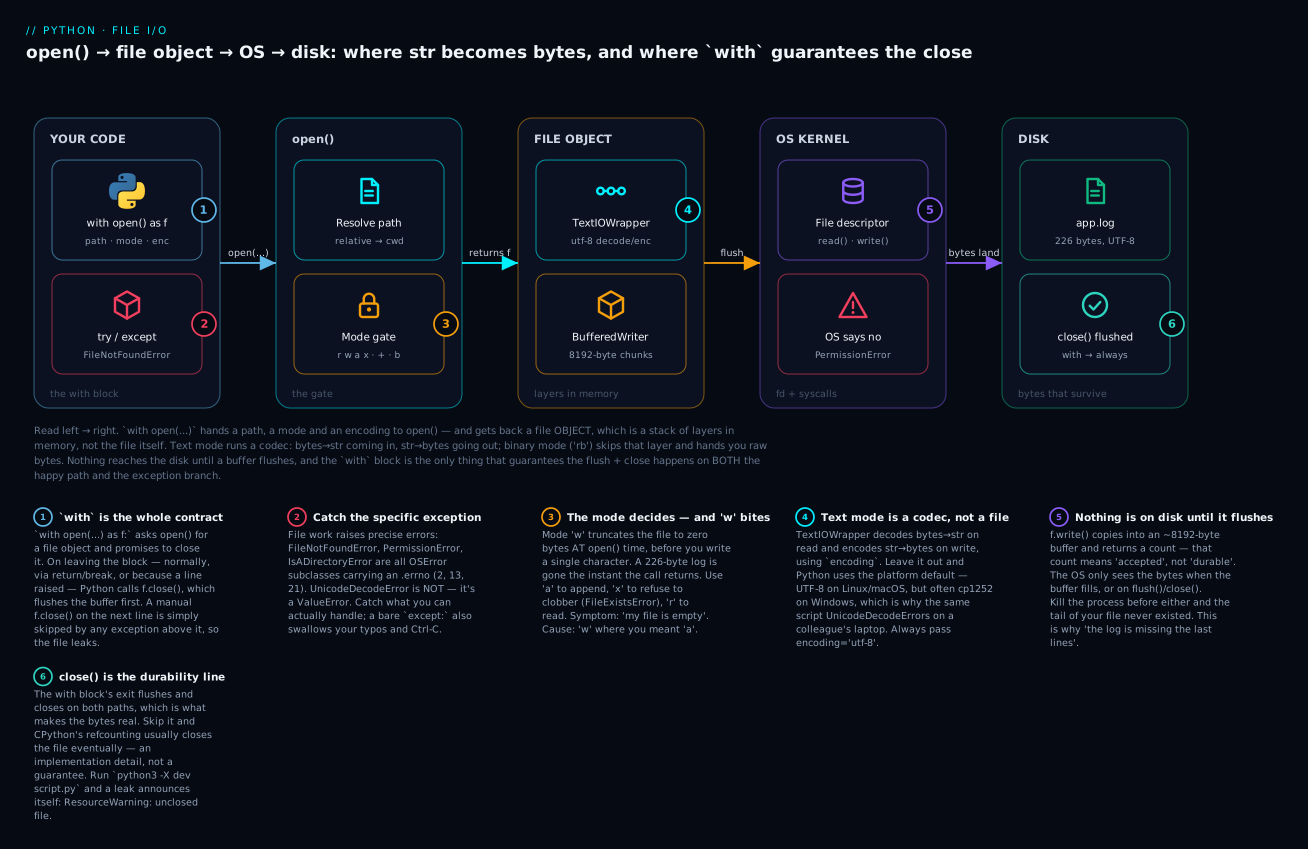
Follow the arrows: your with open(...) passes a path, a mode and an encoding into open(), which resolves the path against your working directory and applies the mode gate (this is where w truncates, and where x refuses). What comes back is not a file but a stack of layers — a TextIOWrapper doing UTF-8 decode/encode on top of a buffer — and only when that buffer flushes does the OS write real bytes to app.log.
The badges mark the six things that actually bite. with is a contract that closes the file on both the happy path and the exception branch (1), so catch the specific error rather than everything (2). The mode gate is where a stray w destroys 226 bytes before you write anything (3). Text mode is a codec, not a file, so a missing encoding= is a bug waiting for a Windows laptop (4). Nothing is durable until the buffer flushes (5), which is exactly what the guaranteed close() gives you (6).
Now watch the layer disappear. Same file, binary mode:
with open("app.log", "rb") as f:        # "rb" -> bytes, and NO encoding=
    head = f.read(20)                   # the first 20 BYTES

print("type :", type(head).__name__)
print("repr :", head)
print("byte0:", head[0])                # indexing bytes gives an int!

rupee = "billing ₹1,240"                # non-ASCII
print("str  :", len(rupee), "chars |  utf8 :", len(rupee.encode("utf-8")), "bytes")
type : bytes
repr : b'2026-07-15 09:14:02 '
byte0: 50
str  : 14 chars |  utf8 : 16 bytes
Three lessons in one output. Binary gives you a bytes object, not a str. Indexing bytes gives an int (head[0] is 50, the byte value of "2") — a classic surprise. And len(str) ≠ len(bytes): ₹ is one character but three UTF-8 bytes, which is precisely why you cannot treat “characters” and “bytes” as the same unit.
Text mode ("r", "w", "a") |
Binary mode ("rb", "wb", "ab") |
|
|---|---|---|
| You get / give | str |
bytes |
encoding= |
Used — always pass it | ❌ ValueError if you pass it |
| Newline translation | ✅ yes (universal newlines) | ❌ none — bytes are literal |
| Indexing an element | a 1-char str |
an int (0–255) |
| Underlying object | TextIOWrapper |
BufferedReader / BufferedWriter |
| Can decode wrong | ✅ UnicodeDecodeError |
❌ impossible — no decoding |
| Use for | .txt, .csv, .json, .py, logs |
.png, .zip, .pdf, .parquet, models |
The encoding trap
encoding=None does not mean “UTF-8”. It means “whatever this machine’s locale says” — locale.getencoding(). On Linux and macOS that is almost always UTF-8, so your script works. On Windows it has historically been the ANSI code page, commonly cp1252. Same code, same file, different machine, sudden crash:
# What a latin-1/cp1252 file does to a UTF-8 reader
with open("latin.txt", "r", encoding="utf-8") as f:
    print(f.read())
Traceback (most recent call last):
  File "/home/vinod/python-io-lab/e_unicode.py", line 2, in <module>
    print(f.read())
          ^^^^^^^^
  File "<frozen codecs>", line 322, in decode
UnicodeDecodeError: 'utf-8' codec can't decode byte 0xe9 in position 3: invalid continuation byte
Read that last line like a sentence: the utf-8 codec found byte 0xe9 at position 3, and in UTF-8 that byte must be followed by continuation bytes — it wasn’t. In latin-1, 0xe9 is simply é. The bytes aren’t corrupt; you brought the wrong decoder.
That is why the rule is absolute: always pass encoding="utf-8" explicitly in text mode. Not because your machine needs it — because the other machine does. (Python is slowly fixing this: PEP 686 makes UTF-8 mode the default in Python 3.15. Until every machine you run on is 3.15+, pass it yourself. You can also audit your code today with python3 -X warn_default_encoding script.py, which flags every open() that forgot.)
| Encoding | What it is | When you’ll meet it |
|---|---|---|
"utf-8" |
The universal default. Any character; ASCII-compatible | Your answer 99% of the time |
"utf-8-sig" |
UTF-8, but strips/writes a leading BOM | Excel-exported CSVs — see below |
"latin-1" / "cp1252" |
Single-byte Western European legacy | Old Windows exports, old European data |
"ascii" |
7-bit only; anything ≥ 0x80 raises | Validating that data really is plain ASCII |
errors="strict" |
Default — raise on bad bytes | Correctness matters (usually!) |
errors="replace" |
Bad bytes → � (U+FFFD) |
Salvaging a dirty file you must read |
errors="ignore" |
Bad bytes silently dropped | ⚠️ Last resort — silently loses data |
errors="surrogateescape" |
Round-trips undecodable bytes unchanged | Filenames / byte-exact passthrough |
Those errors= values are your recovery kit when you can’t control the input:
from pathlib import Path
p = Path("latin.txt")                                # holds b'caf\xe9 ok'
print("latin-1  :", repr(p.read_text(encoding="latin-1")))
print("replace  :", repr(p.read_text(encoding="utf-8", errors="replace")))
print("ignore   :", repr(p.read_text(encoding="utf-8", errors="ignore")))
latin-1  : 'café ok'
replace  : 'caf� ok'
ignore   : 'caf ok'
Only the first is correct — the other two are damage control, and note how ignore quietly ate the é without telling anyone.
The BOM deserves its own warning, because it produces the strangest bug report in data work. A “UTF-8” CSV from Excel often starts with three invisible bytes (\xef\xbb\xbf):
Path("bom.txt").write_text("id,name", encoding="utf-8-sig")
print("bytes     :", Path("bom.txt").read_bytes())
print("as utf-8  :", repr(Path("bom.txt").read_text(encoding="utf-8")))
print("as utf8sig:", repr(Path("bom.txt").read_text(encoding="utf-8-sig")))
bytes     : b'\xef\xbb\xbfid,name'
as utf-8  : 'id,name'
as utf8sig: 'id,name'
Decoded as plain utf-8, your first column is named 'id' — not 'id' — so row["id"] raises KeyError while the file looks perfect in every editor. The fix is encoding="utf-8-sig", which eats the BOM on read.
Newlines
The other thing text mode does quietly is translate line endings. Unix ends lines with \n; Windows uses \r\n. Text mode’s universal newlines hides the difference:
Path("crlf.txt").write_bytes(b"one\r\ntwo\r\n")                 # a Windows-style file
print("raw bytes      :", Path("crlf.txt").read_bytes())
with open("crlf.txt", "r", encoding="utf-8") as f:              # newline=None (default)
    print("default read   :", f.readlines())
with open("crlf.txt", "r", encoding="utf-8", newline="") as f:  # no translation
    print("newline='' read:", f.readlines())
with open("crlf.txt", "rb") as f:
    print("binary read    :", f.readlines())
raw bytes      : b'one\r\ntwo\r\n'
default read   : ['one\n', 'two\n']
newline='' read: ['one\r\n', 'two\r\n']
binary read    : [b'one\r\n', b'two\r\n']
The default silently gave you clean \n lines from a \r\n file — usually exactly what you want, and the reason your code is portable at all.
newline= |
On read | On write |
|---|---|---|
None (default) |
\n, \r, \r\n all → \n |
\n → os.linesep (\r\n on Windows!) |
"" |
Universal, but line endings untranslated | \n written literally, no translation |
"\n" |
Only \n ends a line |
\n written literally |
"\r\n" |
Only \r\n ends a line |
\n → \r\n |
The row that bites: with newline=None on Windows, writing "a\n" puts a\r\n on disk. Write a CSV that way and you get the infamous blank line between every row, because csv already emits \r\n and text mode turns the \n into a second \r. That is why the csv docs insist on newline="" — the one time you should override the default.
Paths: pathlib, the cwd trap, and the os.path you’ll inherit
You have been passing "app.log" — a string. Strings are a bad way to describe paths: they need OS-specific separators, gluing them together is error-prone, and asking questions about them means a second module. Since Python 3.4 the answer is pathlib, and it turns a path into an object that knows things.
from pathlib import Path

log = Path("app.log")                        # relative to your CWD
print("name/stem/suffix:", log.name, log.stem, log.suffix)
print("exists / size   :", log.exists(), log.stat().st_size, "bytes")

text = log.read_text(encoding="utf-8")       # open + read + close, one call
print("ERRORs          :", sum("ERROR" in l for l in text.splitlines()))

reports = Path("reports")
reports.mkdir(parents=True, exist_ok=True)   # never explodes if it exists
out = reports / "summary.txt"                # "/" joins paths, cross-platform
print("joined          :", out.as_posix())
name/stem/suffix: app.log app .log
exists / size   : True 226 bytes
ERRORs          : 2
joined          : reports/summary.txt
No open() anywhere: read_text() did open-read-close in one call, and Path answered questions about the file that would otherwise need a second module. The star of the snippet is the / operator — reports / "summary.txt" builds a path the right way on every OS (reports/summary.txt on Linux/macOS, reports\summary.txt on Windows) with no string gluing and no doubled separators.
pathlib |
What it does | Note |
|---|---|---|
Path("a") / "b" / "c.txt" |
Join path parts | Correct separator on every OS |
p.exists() / .is_file() / .is_dir() |
Does it exist, and what is it? | Prefer try/except — see EAFP below |
p.read_text(encoding="utf-8") |
Open + read + close → str |
Small files only (reads it all) |
p.write_text(s, encoding="utf-8") |
Open + write + close | ⚠️ Truncates like "w". Returns chars written |
p.read_bytes() / p.write_bytes(b) |
Same, in binary | No encoding involved |
p.open("r", encoding="utf-8") |
A real file object | Use with with for big files |
p.mkdir(parents=True, exist_ok=True) |
Create a directory | The two flags kill 90% of mkdir bugs |
p.glob("*.log") / p.rglob("*.log") |
Match files / recursively | Returns a generator, not a list |
p.iterdir() |
Every entry in a directory | Generator |
p.name .stem .suffix .parent .parts |
app.log, app, .log, dir, tuple |
Pure string logic — no disk access |
p.resolve() |
→ absolute, symlinks resolved | The “where am I really” call |
p.stat().st_size / .st_mtime |
Size in bytes / modified time | Raises if missing |
p.rename(q) / p.replace(q) |
Move/rename | replace overwrites, rename may not |
p.unlink(missing_ok=True) |
⚠️ Delete a file | missing_ok=True = no error if absent |
Path.cwd() / Path.home() |
Working dir / home dir | cwd is the trap below |
⚠️ On deleting. p.unlink() deletes a file and shutil.rmtree(p) deletes an entire tree, recursively, with no confirmation and no recycle bin. There is no undo. Never point either at a path you built from user input or a variable you haven’t printed first. When in doubt, print(p.resolve()) before you delete — the two seconds it costs are cheaper than the restore.
You will still meet os.path everywhere, because it predates pathlib by two decades. Learn to read it; write pathlib:
Legacy os.path / os |
Modern pathlib |
|---|---|
os.path.join(a, b) |
Path(a) / b |
os.path.exists(p) |
Path(p).exists() |
os.path.basename(p) / dirname(p) |
Path(p).name / Path(p).parent |
os.path.splitext(p)[1] |
Path(p).suffix |
os.path.abspath(p) |
Path(p).resolve() |
os.getcwd() |
Path.cwd() |
os.makedirs(p, exist_ok=True) |
Path(p).mkdir(parents=True, exist_ok=True) |
glob.glob("*.log") |
Path(".").glob("*.log") |
os.remove(p) |
Path(p).unlink() |
The “runs in my IDE, not from the terminal” bug
This one confuses every beginner exactly once, and the fix is worth a paragraph. A relative path like "app.log" is not resolved against your script’s folder. It is resolved against the current working directory — the folder your shell was in when it launched Python. Those are often different, and that is the entire bug:
$ cd ~/python-io-lab && python3 count_errors.py     # cwd = python-io-lab -> works
$ cd ~ && python3 python-io-lab/count_errors.py     # cwd = ~ -> FileNotFoundError
Traceback (most recent call last):
  File "/home/vinod/python-io-lab/e_notfound.py", line 1, in <module>
    with open("app.log") as f:
         ^^^^^^^^^^^^^^^
FileNotFoundError: [Errno 2] No such file or directory: 'app.log'
Same script, same file on disk, different directory to start from. Your IDE usually sets the cwd to the project root, which is why it “works in PyCharm” and fails in the terminal, or vice versa.
| Path kind | Example | Resolved against | Verdict |
|---|---|---|---|
| Relative | "app.log", "data/in.csv" |
Path.cwd() — where the shell is |
Fine for CLI tools that act on the user’s dir |
| Absolute | /home/vinod/app.log, C:\logs\app.log |
Nothing — it’s already complete | Portable? No. Hard-coding these is its own bug |
| Script-relative | Path(__file__).resolve().parent / "app.log" |
The script’s own folder | ✅ The fix — works from any cwd |
from pathlib import Path

HERE = Path(__file__).resolve().parent       # the folder THIS script lives in
log = HERE / "app.log"                       # works from any directory
Path(__file__).resolve().parent is the idiom to remember: it anchors data files to the code that owns them, and it is immune to whatever directory the user happens to be in.
⚠️ Windows backslashes. In a Python string, \ starts an escape sequence — so a Windows path pasted into quotes is quietly a different string:
bad = "C:\temp\new.txt"          # looks fine, is not
print("len      :", len(bad))
print("chars    :", [c for c in bad[:8]])
good = r"C:\temp\new.txt"        # raw string
print("raw len  :", len(good))
len      : 13
chars    : ['C', ':', '\t', 'e', 'm', 'p', '\n', 'e']
raw len  : 15
\t became a tab and \n a newline — the path is now 13 characters of nonsense, and nothing warned you. Sometimes it does raise, which is friendlier:
  File "<string>", line 1
    print("C:\Users\vinod\app.log")
          ^^^^^^^^^^^^^^^^^^^^^^^^
SyntaxError: (unicode error) 'unicodeescape' codec can't decode bytes in position 2-3: truncated \UXXXXXXXX escape
(\U begins an 8-hex-digit Unicode escape, so C:\Users is a syntax error.) Three fixes: a raw string r"C:\temp\new.txt", forward slashes "C:/temp/new.txt" (Windows accepts them), or best — Path("C:/temp") / "new.txt".
Error handling: specific exceptions and the EAFP idiom
The filesystem is the outside world, and the outside world fails. try/except is how you meet it.
try:
    with open("missing.log", "r", encoding="utf-8") as f:
        data = f.read()
except FileNotFoundError:
    data = ""                      # a sensible default
Read a traceback bottom-up; the last line is always ExceptionType: message, and that type is the thing you catch:
| Exception | Errno | Raised when | Typical fix |
|---|---|---|---|
FileNotFoundError |
2 | Path doesn’t exist ("r"), or its directory doesn’t |
Check cwd; create the dir; default the value |
PermissionError |
13 | No OS permission to read/write | Fix permissions, or write somewhere you own |
IsADirectoryError |
21 | You opened a directory as a file | You wanted p / "file.txt" |
NotADirectoryError |
20 | A path component is a file, not a dir | Fix the path |
FileExistsError |
17 | Mode "x" and the file exists |
Use "w"/"a", or handle it — often intended |
IsADirectoryError on delete |
21 | unlink() on a directory |
p.rmdir() (empty) or ⚠️ shutil.rmtree() |
UnicodeDecodeError |
— | Bytes aren’t valid in your encoding | Not an OSError — it’s a ValueError |
ValueError: I/O operation on closed file. |
— | Using f after the with block ended |
Do the work inside the block |
TypeError: write() argument must be str, not int |
— | f.write(42) in text mode |
f.write(str(42)) or f.write(f"{n}") |
TypeError: a bytes-like object is required, not 'str' |
— | f.write("hi") in "wb" mode |
f.write(b"hi") or "hi".encode("utf-8") |
OSError: [Errno 28] No space left on device |
28 | Disk full | Free space; check before big writes |
OSError: [Errno 24] Too many open files |
24 | Descriptor leak — files never closed | Use with |
The structure is important: FileNotFoundError, PermissionError, IsADirectoryError and friends are all subclasses of OSError and carry .errno, .strerror and .filename. So except OSError: catches the whole family when you genuinely want to. But UnicodeDecodeError is not in that family — it’s a ValueError — which surprises people who wrote except OSError and still crashed.
A full statement has four clauses, and beginners rarely use the last two:
from pathlib import Path

for target in ("app.log", "missing.log"):
    try:
        text = Path(target).read_text(encoding="utf-8")  # the risky bit — keep it SMALL
    except FileNotFoundError as exc:
        print(f"{target}: no such file (errno {exc.errno}) - skipping")
    except PermissionError:
        print(f"{target}: not allowed to read it")
    else:
        print(f"{target}: {len(text)} chars")            # ran ONLY if no exception
    finally:
        print(f"  ...done with {target}")                # runs ALWAYS
app.log: 226 chars
  ...done with app.log
missing.log: no such file (errno 2) - skipping
  ...done with missing.log
| Clause | Runs when | Use it for |
|---|---|---|
try: |
Always | The smallest risky operation — not your whole program |
except X: |
X (or a subclass) was raised |
Handling this failure. Order: most specific first |
except X as e: |
Same, binding the object | Reading e.errno, e.filename, e.strerror |
else: |
try finished with no exception |
The success path — keeps it out of try |
finally: |
Always — success, exception, even return |
Cleanup. (with already does this for files) |
Why a bare except: is wrong. It looks tidy and it is a trap:
# ❌ Catches EVERYTHING — including your own typos and Ctrl-C
try:
    with open(path) as f:
        data = f.raed()          # typo!
except:
    data = ""                    # you'll never learn about the typo
except: catches BaseException, which includes KeyboardInterrupt (Ctrl-C) and SystemExit — so your program becomes unkillable and silently swallows the AttributeError from f.raed(). You’d debug “why is data always empty?” for an hour. Catch what you can actually handle; if you must be broad, except Exception as exc: at least spares Ctrl-C and lets you log exc.
EAFP beats LBYL
Python has a name for its preferred style: EAFP — Easier to Ask Forgiveness than Permission. Just try the thing and handle the failure. The alternative, LBYL (Look Before You Leap), checks first — and for files it is subtly broken:
# ❌ LBYL — two trips to the filesystem, and a race between them
if path.exists():
    text = path.read_text(encoding="utf-8")   # may STILL raise!
else:
    text = ""

# ✅ EAFP — one atomic attempt
try:
    text = path.read_text(encoding="utf-8")
except FileNotFoundError:
    text = ""
The LBYL version has a real bug called TOCTOU (time-of-check to time-of-use): between exists() saying yes and read_text() running, another process can delete the file, and you crash anyway — on the line you “protected.” You cannot fix it by checking harder; the check and the open are two separate operations and something can always happen in the gap. open() is atomic: it either hands you the file or raises, with no window in between.
LBYL (if exists:) |
EAFP (try: open) |
|
|---|---|---|
| Filesystem calls | 2+ | 1 |
| Race condition | ⚠️ Yes — TOCTOU | ✅ None — atomic |
| Covers permissions/is-a-dir? | ❌ exists() only answers existence |
✅ The except sees every failure |
| Pythonic? | No | Yes |
| Still use it when… | Choosing a branch (“if config exists, use it, else generate one”) | Everything else |
exists() is not banned — it is fine for genuine branching. It is just not a guard.
Hands-on lab
You will build a small log-processing script: create a file, append to it, read it line by line, count matches, survive a missing file, redo it with pathlib, peek at raw bytes, and finish by watching w destroy your work on purpose. Everything is stdlib — no pip install, no virtual environment needed (a venv is only for third-party packages, which we don’t use here). About 10 minutes.
Step 1 — Make a lab directory and check your Python.
mkdir ~/python-io-lab && cd ~/python-io-lab
python3 -V
# Python 3.12.3        # any 3.12+ is fine. On Windows use: py -3 -V
What just happened: You cd’d into the lab, so your cwd is ~/python-io-lab and every relative path below resolves there. That matters in Step 8.
Step 2 — Create the log (write_log.py).
# write_log.py — create the log from scratch with mode "w"
lines = [
    "2026-07-15 09:14:02 INFO  service started",
    "2026-07-15 09:14:07 WARN  cache miss ratio 0.42",
    "2026-07-15 09:15:31 ERROR upstream timeout after 30s",
]

with open("app.log", "w", encoding="utf-8") as f:
    for line in lines:
        n = f.write(line + "\n")       # write() RETURNS a character count
        print(f"wrote {n} chars: {line[:24]}")

print("closed?", f.closed)             # the with block closed it for us
$ python3 write_log.py
wrote 42 chars: 2026-07-15 09:14:02 INFO
wrote 48 chars: 2026-07-15 09:14:07 WARN
wrote 53 chars: 2026-07-15 09:15:31 ERRO
closed? True
What just happened: "w" created the file. Each write() returned a character count (42/48/53 — the line plus the \n you added yourself). After the block, f.closed is True without you calling anything.
Step 3 — Append, never overwrite (append_log.py).
# append_log.py — add lines to the END with mode "a"
more = [
    "2026-07-15 09:16:03 INFO  retry succeeded",
    "2026-07-15 09:18:44 ERROR disk usage 91%",
]

with open("app.log", "a", encoding="utf-8") as f:
    f.writelines(line + "\n" for line in more)   # writelines adds NO newlines

with open("app.log", "r", encoding="utf-8") as f:
    print("lines now:", len(f.readlines()))
$ python3 append_log.py
lines now: 5
What just happened: "a" kept the first three lines and added two. Had you typed "w", you’d now have 2 lines and the first three would be gone forever. Run it twice and you’ll see 7 — appending is additive, which is exactly the point.
Step 4 — Read it back three ways (read_log.py).
# read_log.py — three ways to read; only one of them scales
with open("app.log", "r", encoding="utf-8") as f:
    whole = f.read()                   # 1: the WHOLE file into one str
print("read()     ->", type(whole).__name__, len(whole), "chars")

with open("app.log", "r", encoding="utf-8") as f:
    first = f.readline()               # 2: one line, keeps its "\n"
print("readline() ->", repr(first))

with open("app.log", "r", encoding="utf-8") as f:
    for i, line in enumerate(f, 1):    # 3: THE idiom — one line at a time
        print(f"  {i}: {line.rstrip()}")
$ python3 read_log.py
read()     -> str 226 chars
readline() -> '2026-07-15 09:14:02 INFO  service started\n'
  1: 2026-07-15 09:14:02 INFO  service started
  2: 2026-07-15 09:14:07 WARN  cache miss ratio 0.42
  3: 2026-07-15 09:15:31 ERROR upstream timeout after 30s
  4: 2026-07-15 09:16:03 INFO  retry succeeded
  5: 2026-07-15 09:18:44 ERROR disk usage 91%
What just happened: read() pulled all 226 characters into one str. readline() returned one line with its \n (see the repr). The loop held one line at a time — the only version that would survive a 10 GB log. Each block re-opened the file because a file object is a one-shot iterator.
Step 5 — The real job: count matches, survive a missing file (count_errors.py).
# count_errors.py — count matches, survive a missing file
def count_errors(path: str) -> int:
    """Count ERROR lines. EAFP: just try to open it."""
    hits = 0
    with open(path, "r", encoding="utf-8") as f:
        for line in f:                 # memory-safe on a 10 GB log
            if "ERROR" in line:
                hits += 1
    return hits

for target in ("app.log", "missing.log"):
    try:
        found = count_errors(target)
    except FileNotFoundError as exc:
        print(f"{target}: no such file (errno {exc.errno}) - skipping")
    except PermissionError:
        print(f"{target}: not allowed to read it")
    else:
        print(f"{target}: {found} ERROR lines")
    finally:
        print(f"  ...done with {target}")
$ python3 count_errors.py
app.log: 2 ERROR lines
  ...done with app.log
missing.log: no such file (errno 2) - skipping
  ...done with missing.log
What just happened: The missing file didn’t crash the script — it took the except branch, reported errno 2, and the loop continued. Note else: ran only for the successful file, and finally: ran for both.
Step 6 — The same job with pathlib (pathlib_count.py).
# pathlib_count.py — the same job, the modern way
from pathlib import Path

log = Path("app.log")                        # relative to your CWD
print("where    :", "/".join(log.resolve().parts[-2:]))
print("exists   :", log.exists())
print("stem/suf :", log.stem, log.suffix)
print("size     :", log.stat().st_size, "bytes")

text = log.read_text(encoding="utf-8")       # open + read + close, one call
errors = sum("ERROR" in line for line in text.splitlines())
print("ERRORs   :", errors)

reports = Path("reports")
reports.mkdir(parents=True, exist_ok=True)   # never explodes if it exists
out = reports / "summary.txt"                # "/" joins paths, cross-platform
n = out.write_text(f"errors={errors}\n", encoding="utf-8")
print("wrote    :", n, "chars ->", out.as_posix())
print("globbed  :", sorted(p.name for p in Path(".").glob("*.log")))
$ python3 pathlib_count.py
where    : python-io-lab/app.log
exists   : True
stem/suf : app .log
size     : 226 bytes
ERRORs   : 2
wrote    : 9 chars -> reports/summary.txt
globbed  : ['app.log']
What just happened: Same answer, no open() in sight. read_text() did open-read-close in one call, mkdir(parents=True, exist_ok=True) was safe to re-run, and reports / "summary.txt" built the path correctly for your OS. Run it twice — it won’t complain about the existing directory.
Step 7 — Binary: the bytes underneath (peek_bytes.py).
# peek_bytes.py — binary mode: no decode, no newline translation
with open("app.log", "rb") as f:        # "rb" -> bytes, and NO encoding=
    head = f.read(20)                   # the first 20 BYTES

print("type :", type(head).__name__)
print("repr :", head)
print("hex  :", head[:8].hex(" "))
print("byte0:", head[0])                # indexing bytes gives an int!
print("text :", head.decode("utf-8"))   # you decode, explicitly

rupee = "billing ₹1,240"                # non-ASCII
print("str  :", len(rupee), "characters")
print("utf8 :", len(rupee.encode("utf-8")), "bytes")
$ python3 peek_bytes.py
type : bytes
repr : b'2026-07-15 09:14:02 '
hex  : 32 30 32 36 2d 30 37 2d
byte0: 50
text : 2026-07-15 09:14:02
str  : 14 characters
utf8 : 16 bytes
What just happened: No encoding= and no TextIOWrapper — just 20 raw bytes. head[0] is the int 50, not "2". And ₹ proved that one character can be three bytes, which is why “characters” and “bytes” are different units. This read(n)-then-inspect pattern is exactly how you check a file’s magic number (a PNG always starts \x89PNG).
Step 8 — ⚠️ Watch "w" destroy your log (truncate_demo.py).
⚠️ This step deliberately destroys
app.log. That is the lesson. You’ve already read the file, and Step 2 rebuilds it in one command.
# truncate_demo.py — WARNING: this DESTROYS app.log. That is the whole point.
from pathlib import Path

print("before open :", Path("app.log").stat().st_size, "bytes")
f = open("app.log", "w", encoding="utf-8")     # <-- truncates RIGHT HERE
print("after open  :", Path("app.log").stat().st_size, "bytes  <-- gone already")
f.close()
print("after close :", Path("app.log").stat().st_size, "bytes")
$ python3 truncate_demo.py
before open : 226 bytes
after open  : 0 bytes  <-- gone already
after close : 0 bytes
What just happened: 226 bytes vanished on the open() line, before any write(). No exception, no warning, no recycle bin. Internalise this and you will never again type "w" when you meant "a". Rebuild with python3 write_log.py && python3 append_log.py.
Step 9 — Prove the cwd bug, then clean up.
cd ~ && python3 python-io-lab/count_errors.py    # same script, different cwd
# app.log: no such file (errno 2) - skipping
What just happened: The script is fine; your cwd moved. "app.log" resolved against ~, not against the script’s folder. This is the “works in my IDE, fails in the terminal” bug — and Path(__file__).resolve().parent / "app.log" is the fix.
⚠️ Cleanup deletes the whole lab folder. Check the path before you press Enter —
rm -rfandshutil.rmtree()have no undo.
cd ~ && rm -rf ~/python-io-lab # Windows: rmdir /s /q %USERPROFILE%\python-io-lab
Common mistakes and troubleshooting
| Symptom / traceback | Cause | Fix |
|---|---|---|
FileNotFoundError: [Errno 2] No such file or directory: 'app.log' |
Relative path resolved against the cwd, not the script’s folder | print(Path.cwd()) to see where you are; use Path(__file__).resolve().parent / "app.log" |
| The file is empty / my data is gone | open(p, "w") truncated it at open time |
Use "a" to append or "x" to refuse to clobber. "w" means “replace” |
| Last few lines missing from the log | Buffer never flushed — no close(), or the process was killed |
Use with; or f.flush(); or open(..., buffering=1) for line buffering |
ResourceWarning: unclosed file (under -X dev) |
You never closed it; CPython’s refcounting hid it | Use with. Run python3 -X dev to catch these early |
OSError: [Errno 24] Too many open files |
Descriptor leak — opening in a loop without closing | Use with inside the loop |
UnicodeDecodeError: 'utf-8' codec can't decode byte 0xe9 in position 3: invalid continuation byte |
Wrong decoder — the file isn’t UTF-8 (or encoding= omitted on Windows) |
Pass the real encoding (latin-1, cp1252); or errors="replace" to salvage |
First CSV column is 'id', then KeyError: 'id' |
UTF-8 BOM from Excel decoded as plain utf-8 |
encoding="utf-8-sig" |
PermissionError: [Errno 13] Permission denied: 'secret.txt' |
No OS permission, or the file is open/locked (Windows), or it’s read-only | ls -l / check ownership; write somewhere you own; close other programs |
IsADirectoryError: [Errno 21] Is a directory: 'reports' |
You opened a directory as a file | You meant Path("reports") / "summary.txt" |
FileExistsError: [Errno 17] File exists: 'app.log' |
Mode "x" and the file already exists |
That’s "x" working. Use "w"/"a", or catch it |
TypeError: write() argument must be str, not int |
f.write(42) — text mode takes str only |
f.write(str(42)), or f.write(f"{n}\n") |
TypeError: a bytes-like object is required, not 'str' |
f.write("hi") on a "wb" file |
f.write(b"hi") or f.write("hi".encode("utf-8")) |
ValueError: I/O operation on closed file. |
Using f after its with block ended |
Move the work inside the block |
| Output is double-spaced | Lines from a file keep their \n, and print adds another |
print(line.rstrip()), or print(line, end="") |
| All lines run together / one giant line | write() and writelines() never add \n |
Add it: f.write(line + "\n") |
| Blank line between every CSV row (Windows) | newline=None turned csv’s \r\n into \r\r\n |
open(p, "w", newline="", encoding="utf-8") |
MemoryError on a big file |
f.read() / f.readlines() loaded the whole thing |
for line in f: — one line at a time |
SyntaxError: (unicode error) 'unicodeescape' codec can't decode bytes ... truncated \UXXXXXXXX escape |
Windows path in a normal string — \U, \t, \n are escapes |
Raw string r"C:\Users\...", forward slashes, or Path() |
| Script “does nothing”, no error at all | A bare except: swallowed the real exception |
Never except:. Catch the specific type, or except Exception as exc: and log it |
Three of these deserve more than a table row.
1. "w" is not “write”, it is “replace”. Reading a mode string as English is the mistake: "w" sounds like “let me write to this file,” which is what "a" and "r+" do. "w" means “this file’s history is over.” It truncates on open(), before any write, and if your program crashes on the very next line the file is still empty. The tell is a file that’s 0 bytes when you expected content. Make "a" your reflex for anything log-shaped, and reserve "w" for output you genuinely regenerate each run.
2. The default encoding is a bug that only fires on someone else’s machine. open(p) without encoding= asks the locale what to do. On your Mac that’s UTF-8 and everything is fine. On a colleague’s Windows box it may be cp1252, and the same file now raises UnicodeDecodeError — or worse, decodes without error into subtly wrong text (mojibake), because cp1252 has a meaning for almost every byte. That silent version is the dangerous one: no traceback, just wrong data. encoding="utf-8" on every text open() costs 18 characters and removes the entire class of bug. Audit an existing codebase with python3 -X warn_default_encoding yourscript.py.
3. A bare except: doesn’t handle errors, it hides them. except: catches BaseException — every error in the language, including your typos, plus KeyboardInterrupt and SystemExit. So a misspelled f.raed() becomes “the file must have been missing,” you set data = "", and the program cheerfully computes a wrong answer while Ctrl-C stops working. The rule: catch only what you have a plan for. except FileNotFoundError: says “I know what to do when it’s missing.” except: says “I don’t want to know,” and files are the one place where not knowing gets expensive.
Cheat-sheet
| Syntax | What it does |
|---|---|
open(p, "r", encoding="utf-8") |
Read text. Fails if missing. The default mode |
open(p, "w", encoding="utf-8") |
⚠️ Write — truncates at open |
open(p, "a", encoding="utf-8") |
Append — creates if needed, never truncates |
open(p, "x", encoding="utf-8") |
Create only if absent → else FileExistsError |
open(p, "r+", encoding="utf-8") |
Read and write, no truncation; must exist |
open(p, "rb") / open(p, "wb") |
Binary → bytes. No encoding= |
with open(...) as f: |
Always. Guarantees flush + close, even on exception |
f.read() |
Whole file → one str ⚠️ memory |
f.read(n) |
Up to n chars/bytes |
f.readline() |
One line, keeps \n; '' at EOF |
f.readlines() |
list[str] ⚠️ whole file in memory |
for line in f: |
✅ The idiom — one line at a time, any file size |
f.write(s) |
Write; returns count; adds no newline |
f.writelines(seq) |
Write each item; adds no newlines; returns None |
print(s, file=f) |
Write with a newline; converts to str |
f.flush() |
Push the buffer to the OS without closing |
f.seek(0) / f.tell() |
Jump to a position / report the position |
f.closed .name .mode .encoding |
Inspect the file object |
s.encode("utf-8") / b.decode("utf-8") |
str → bytes / bytes → str |
python3 -X dev script.py |
Surface ResourceWarning: unclosed file |
python3 -X warn_default_encoding s.py |
Flag every open() missing encoding= |
pathlib / errors |
What it does |
|---|---|
from pathlib import Path |
The import you want |
Path("a") / "b" / "c.txt" |
Join — correct separator everywhere |
Path(__file__).resolve().parent |
The script’s own folder — beats the cwd bug |
Path.cwd() / Path.home() |
Working directory / home directory |
p.read_text(encoding="utf-8") |
Open + read + close → str |
p.write_text(s, encoding="utf-8") |
⚠️ Open + write (truncates) + close |
p.read_bytes() / p.write_bytes(b) |
Same, binary |
p.exists() .is_file() .is_dir() |
Existence checks (branching, not guarding) |
p.mkdir(parents=True, exist_ok=True) |
Make a directory tree, idempotently |
p.glob("*.log") / p.rglob("*.log") |
Match files / recursively → generator |
p.name .stem .suffix .parent |
app.log · app · .log · its folder |
p.stat().st_size |
Size in bytes |
p.unlink(missing_ok=True) |
⚠️ Delete a file — no undo |
shutil.rmtree(p) |
⚠️⚠️ Delete a whole tree — no undo, no prompt |
try/except FileNotFoundError: |
Missing file (errno 2) |
except PermissionError: |
No access (errno 13) |
except IsADirectoryError: |
It’s a directory (errno 21) |
except UnicodeDecodeError: |
Wrong encoding — a ValueError, not an OSError |
except OSError as e: |
The whole filesystem family; read e.errno |
else: / finally: |
Success-only path / always-runs cleanup |
❌ except: |
Never. Catches typos, KeyboardInterrupt, SystemExit |
Interview and exam questions
Q: What does with open(...) give you that open() + close() doesn’t?
A: A guarantee. with is a context manager: when control leaves the block — normally, via return/break, or because an exception was raised — Python calls close(), which flushes the buffer first. A manual close() on a later line is simply jumped over by any exception above it, leaking the file descriptor and possibly losing buffered writes. Achieving the same by hand needs try/finally, which is just with with extra steps.
Q: What’s the difference between modes w, a, and x?
A: w creates the file, or truncates it to zero bytes at open() time if it exists. a creates it if needed and forces every write to the end, never destroying existing content. x refuses to touch an existing file and raises FileExistsError. If you mean “add,” use a; if you mean “create but never clobber,” use x.
Q: Why is for line in f: better than f.readlines()?
A: Memory. readlines() loads the entire file into RAM and builds a list object per line, so a 10 GB log needs >10 GB and raises MemoryError. Iterating the file object is lazy — it reads a block and hands you one line at a time, so peak memory is one line regardless of file size. Both give you the same lines (each keeping its trailing \n).
Q: What does f.write("hello") return, and does it mean the data is saved?
A: It returns 5 — the number of characters written in text mode (bytes in binary mode). It does not mean the data is on disk. The text is copied into an in-memory buffer (~8192 bytes) and only reaches the OS when the buffer fills, when you call flush(), or when the file is closed. Kill the process before that and the bytes never existed.
Q: What is the difference between text mode and binary mode?
A: Text mode wraps the file in a TextIOWrapper that runs a codec — decoding bytes→str on read and encoding str→bytes on write using encoding — and also translates newlines. Binary mode skips both: you get and give raw bytes, indexing gives an int, and passing encoding= raises ValueError. Use text for .txt/.csv/.json, binary for .png/.zip/.parquet.
Q: Why should you always pass encoding="utf-8"?
A: Because encoding=None means “the platform’s locale encoding,” not UTF-8. On Linux/macOS that’s usually UTF-8 so it works; on Windows it’s often cp1252, so the identical script either raises UnicodeDecodeError or — worse — silently decodes into mojibake on a colleague’s machine. Passing it explicitly makes the code deterministic everywhere. (PEP 686 makes UTF-8 the default in Python 3.15, but you can’t assume that yet.)
Q: Which exception is UnicodeDecodeError a subclass of, and why does that matter?
A: ValueError (via UnicodeError) — not OSError. It matters because except OSError: catches FileNotFoundError, PermissionError and IsADirectoryError but sails straight past a decoding failure, so code that “handles all file errors” still crashes on a badly encoded file.
Q: What are EAFP and LBYL, and which does Python prefer for files?
A: LBYL (“look before you leap”) checks first: if p.exists(): open(p). EAFP (“easier to ask forgiveness than permission”) just tries: try: open(p) except FileNotFoundError:. Python prefers EAFP, and for files LBYL is actually buggy — between the exists() check and the open() another process can delete the file (a TOCTOU race), so you crash on the line you thought you’d protected. open() is atomic; exists() + open() is not.
Q: Why is except: bad?
A: It catches BaseException — everything, including KeyboardInterrupt and SystemExit, so Ctrl-C stops working — and it swallows your own bugs. A typo like f.raed() raises AttributeError, gets caught by the same handler as the missing file, and the program silently continues with wrong data. Catch the specific exception you have a plan for; if you must be broad, use except Exception as exc: and log exc.
Q (coding): Write a function that returns the number of lines containing “ERROR”, returning 0 if the file doesn’t exist. It must work on a 10 GB file. A:
from pathlib import Path

def count_errors(path: Path | str) -> int:
    try:
        with open(path, "r", encoding="utf-8") as f:
            return sum(1 for line in f if "ERROR" in line)   # one line at a time
    except FileNotFoundError:
        return 0
The points being tested: with (guaranteed close), iterating the file rather than read()/readlines() (memory), explicit encoding, and EAFP with the specific exception. The generator inside sum() keeps peak memory at one line.
Q (coding): A script writes a report but the file is sometimes empty when it crashes. What are the two most likely causes?
A: (1) It opens with "w", which truncates at open() — so any crash after the open but before the writes leaves a zero-byte file where the old report used to be. (2) It never closes the file (no with), so the buffered writes were never flushed when the process died. Fix both: with open(path, "w", encoding="utf-8") as f:, and if the old content must survive a failure, write to a temporary file and Path(tmp).replace(final) only on success — replace() is atomic.
Q: Your script works in PyCharm but raises FileNotFoundError from the terminal. Why?
A: The path is relative, and relative paths resolve against the current working directory — the folder the shell was in when it launched Python — not the folder the script lives in. Your IDE sets the cwd to the project root; your terminal doesn’t. Fix it by anchoring to the script: Path(__file__).resolve().parent / "app.log".
Key takeaways
open()returns a file object, not a file. It’s a machine in memory with a buffer, an encoding, and an OS descriptor. Every surprise in this lesson lives in that gap between the object and the bytes on disk.- The mode decides everything, and
wtruncates atopen()— before a single write, with no warning and no undo. Useato append,xto create without clobbering,r+to edit in place. withis non-negotiable. It guarantees flush + close on the happy path and the exception path. Manualclose()is skipped by anyraiseabove it; CPython’s refcounting rescue is an implementation detail, not a guarantee. Develop withpython3 -X dev.for line in f:is the reading idiom. It’s lazy and holds one line at a time, so it works on a 10 GB log.read()andreadlines()load the whole file — and every line keeps its trailing\n.write()returns a count, and adds no newline — nor doeswritelines(). That count means “buffered,” not “durable”; only a flush or close makes it real.- Text mode is a codec. It decodes
bytes→strwith an encoding and translates newlines; binary gives rawbyteswhere indexing yields anint. Always passencoding="utf-8"— the default is the locale, which is why the bug only appears on someone else’s laptop. - Use
pathlib.Path("a") / "b"joins correctly on every OS,read_text/write_textare one-liners, andPath(__file__).resolve().parentkills the “works in my IDE” cwd bug. Reados.path; writepathlib. - Catch the specific exception —
FileNotFoundError,PermissionError,IsADirectoryError(allOSError, all with.errno), andUnicodeDecodeError(aValueError). Prefer EAFP (try: open) over LBYL (if exists:), which has a real TOCTOU race. Never write a bareexcept:.