Your first programs live in one file. That’s correct — a 40-line script belongs in a 40-line script. But files grow. Somewhere around 300 lines you stop being able to find anything, two unrelated ideas start sharing variables by accident, and the same date-parsing helper is pasted into three scripts. You can’t test a piece of it, because there are no pieces.
The fix is the one you already met with functions: split the work up and give each part a name. Functions do it inside a file. Modules do it across files, and packages do it across directories. import is the statement that stitches them back together.
And import looks simple but is not. It is not “paste that file in here.” It’s a five-step lookup — cache, search path, compile, execute, bind — and every step has a famous failure mode attached. ModuleNotFoundError on a package you definitely installed. A file called random.py that silently breaks import random everywhere. Two modules that import each other and take the program down. An edit that seems to have no effect.
None of those are mysteries once you’ve seen the machinery. This lesson shows you the machinery, then makes you break it on purpose and fix it. Everything below was run on Python 3.12.
Why this matters
Picture the script that grew. It reads a CSV, cleans some names, computes a few statistics, and writes a report. Six hundred lines, one file. You want the name-cleaning logic in another script, so you copy-paste it. Now there are two copies, and next month they’ll disagree. You want to check the statistics are right, so you… run the whole thing and squint at a report. There’s no way to ask “is clean_name correct?” because clean_name isn’t a thing you can hold — it’s line 214.
Modules turn line 214 into a thing you can hold. from cleaning import clean_name — now it has one home, one test, one place to fix a bug.
But there’s a second reason, bigger than tidiness. Every Python library you will ever use is just somebody’s modules. import json, import pandas, import requests — none of that is special syntax the language blessed. It’s the same mechanism you’re about to build yourself, pointed at somebody else’s directory. Once you understand what import mytools does, you understand what import pandas does, and the standard library stops being magic and becomes code you can go read. That shift is much of what separates someone who uses Python from someone who knows it.
| Splitting into modules gives you | What that means in practice | What it costs you to skip it |
|---|---|---|
| One home per idea | cleaning.py holds cleaning; nothing else does |
The same helper, copy-pasted, slowly diverging |
| Reuse across scripts | from cleaning import clean_name from anywhere |
Copy-paste, then fix the same bug in four files |
| Testability | Import the module in a test, call one function | “Testing” = run everything and read the output |
| A namespace | json.loads and pickle.loads coexist happily |
Name collisions; the last definition silently wins |
| Load-time control | Import it and nothing runs but definitions | Importing a file executes somebody’s whole script |
| A public surface | The package decides what it exports | Every internal detail is part of your API forever |
The mental model for the whole lesson: a module is an object, and import is the statement that builds it once and hands you a name for it. Not a file inclusion. An object — one you can print, inspect with dir(), and pass around. Hold that and the rest follows.
What a module is, and what import actually does
A module is a .py file. That’s the entire definition. Create greeter.py and you have created a module named greeter. There is no registration step, no manifest, no declaration.
What’s interesting is what Python does with that file when you import it. Make two files in an empty directory:
# greeter.py
print(">>> greeter body is running NOW")
COUNT = 0
# triple.py
import sys

print("before  :", "greeter" in sys.modules)
import greeter
print("after 1 :", "greeter" in sys.modules)
import greeter          # again
import greeter          # and again
print("body ran exactly once, despite 3 imports")
before  : False
>>> greeter body is running NOW
after 1 : True
body ran exactly once, despite 3 imports
Three import greeter statements. One execution of the body. That is the single most important fact about importing, and it falls out of step one of the algorithm: before Python looks for any file, it checks a dictionary called sys.modules. If the name’s already in there, it’s done — it just binds the name and moves on.
So import runs roughly like this:
| Step | What Python does | Where it can go wrong |
|---|---|---|
| 1. Cache | Look up the name in sys.modules — a plain dict. Hit → skip to step 5. |
Edited the file mid-session? Cache still holds the old one |
| 2. Find | Walk sys.path in order, take the first match |
Your random.py matches before the stdlib’s |
| 3. Compile | Source → bytecode, cached as a .pyc in __pycache__ |
Stale .pyc served instead of your edit (rare, real) |
| 4. Execute | Create an empty module object, run the file top to bottom inside it | Circular imports see a half-built module here |
| 5. Bind | Attach the module object to a name in your namespace | import x.y as z binds only z — x stays undefined |
Step 4 deserves a second look, because it’s where “module = object” becomes concrete. Python makes an empty module object, then runs your file’s statements with that object’s namespace as the globals. Every def, every class, every top-level assignment becomes an attribute on the module. That’s all a module is: a bag of names produced by running a file once.
Which is why this works — no special language feature involved:
import mytools.textkit as tk

print(type(tk))         # => <class 'module'>
print(tk.__doc__)       # => textkit — small text helpers.
print(tk.__file__)      # => /.../mytools/textkit.py
print([n for n in dir(tk) if not n.startswith("_")])
# => ['VOWELS', 'count_vowels', 'slugify']
dir() on a module lists what running that file produced. Every module carries a set of dunder attributes describing itself:
| Attribute | What it holds | Why you care |
|---|---|---|
__name__ |
The module’s name — or "__main__" if run as a script |
The whole if __name__ == "__main__" trick |
__file__ |
Absolute path to the source file | The debugging tool — proves which file got imported |
__doc__ |
The module’s docstring (first string in the file) | What help(module) prints |
__package__ |
The package this module belongs to ("" for top-level) |
Relative imports resolve against this |
__path__ |
List of directories — packages only | Its presence is how you tell a package from a module |
__all__ |
List of names from x import * will export |
Your public API; only affects the star form |
__version__ |
Convention, not a rule — you set it yourself | Nothing enforces it; it’s just an attribute |
__file__ is the one to remember. When an import misbehaves, print(something.__file__) answers “which file did I actually get?” in one line, and that answer is usually the bug.
The cache is live, and from copies values
sys.modules isn’t a record of what happened — it’s the actual dict holding the actual module objects. Mutate a module and everyone importing it sees the change, because there’s only one object:
import greeter

greeter.COUNT = 99
import greeter as g_again
print(g_again.COUNT)          # => 99
print(g_again is greeter)     # => True   — same object, two names
But from greeter import COUNT behaves differently, and the difference bites people:
# a FRESH session — greeter.COUNT starts at 0 again
import greeter
from greeter import COUNT     # copies the VALUE, right now

greeter.COUNT = 99            # change it on the module
print(greeter.COUNT)          # => 99   — the module's attribute did change
print(COUNT)                  # => 0    — but your name still holds the old value
from x import a reads x.a once, at import time, and binds that value to a local name — an ordinary assignment, not a live link. For functions and classes nobody notices; they don’t get reassigned. For a counter, a config flag, or anything patched at runtime, it’s a real bug. If a value can change, import the module and read module.value when you need it.
__pycache__ and bytecode
Step 3 leaves evidence. Import a module and a __pycache__/ directory appears next to it:
mytools/
├── __init__.py
├── numkit.py
├── textkit.py
└── __pycache__/
    ├── __init__.cpython-312.pyc
    ├── numkit.cpython-312.pyc
    └── textkit.cpython-312.pyc
Those .pyc files are compiled bytecode — the thing the interpreter actually executes. Caching them means the second run skips compiling. The filename carries the interpreter version (cpython-312) so different Pythons never fight over one cache.
Three things worth knowing, all verifiable:
- It’s disposable. Delete
__pycache__any time; Python rebuilds it. Add it to.gitignore— never commit it. - The script you run is never cached. Only imported modules get a
.pyc. Runpython main.pyand nomain.cpython-312.pycever appears, because there’d be nobody to reuse it. - Invalidation is
(mtime, size)— and that’s a real trap. The.pycheader stores the source’s modification time (whole seconds) and its size in bytes. If both still match, Python reuses the cache without reading your source at all.
That last one is worth proving, because it sounds theoretical and isn’t:
# lib.py  — write it, run it, then edit "v1" → "v2" within the same second
def version(): return "v1"
$ python3 run.py
v1
$ # ...edit lib.py so it returns "v2" — same file size, same second...
$ python3 run.py
v1          ← STALE. Your edit is on disk and being ignored.
"v1" and "v2" are the same length, and the edit landed in the same clock second, so both header fields still matched and Python served the old bytecode. Change the file’s length and it recompiles instantly; wait a second and it recompiles. You’ll rarely hit this by hand — but generated code, rsync/tar with preserved timestamps, and container builds hit it regularly. The fix is always the same: delete __pycache__.
⚠️ One genuinely nasty relative: a stray lib.pyc sitting next to lib.py (not inside __pycache__) is importable on its own, with no source file at all. Delete lib.py, leave lib.pyc, and import lib still works — serving code you can no longer read. If a module’s behaviour contradicts its source, run print(lib.__file__). A .pyc answer means you’ve found it.
The import forms — and why from x import * is a trap
There are five spellings. They differ in exactly one way: which name they bind in your namespace.
| Form | Binds | Access with | Use when |
|---|---|---|---|
import math |
math |
math.sqrt(16) |
The default. Always clear where a name came from |
import numpy as np |
np |
np.array(...) |
Long names, or a community convention (np, pd, plt) |
import os.path |
os — not path! |
os.path.join(...) |
Submodules; note the surprise in the middle column |
import os.path as osp |
osp — only osp |
osp.join(...) |
Deep submodules you use a lot |
from math import sqrt |
sqrt |
sqrt(16) |
1-3 names used constantly; short and readable |
from math import sqrt as sq |
sq |
sq(16) |
Avoiding a collision with your own name |
from math import * |
everything public | sqrt(16) |
❌ Effectively never — see below |
Two rows there surprise people. import os.path binds os, not path — Python imports the parent package and gives you the top name, so you must write the full dotted path afterwards. And import os.path as osp binds only osp:
import os.path as osp

print(osp.join("a", "b"))     # => a/b
os.getcwd()                   # NameError: name 'os' is not defined
The as form replaces the binding rather than adding one. That single fact explains a good share of beginner NameErrors.
Why the star is bad
from math import * dumps every public name from math into your namespace. It looks like a shortcut. It’s a bug generator, and here’s the proof — two lines, from the standard library, no tricks:
from math import *
from cmath import *          # complex-number math; also defines sqrt
print("sqrt(16) =", sqrt(16))
print("sqrt(-1) =", sqrt(-1))
sqrt(16) = (4+0j)
sqrt(-1) = 1j
sqrt(16) returned a complex number. Now swap the two import lines — change nothing else:
from cmath import *
from math import *           # now math wins
print("sqrt(16) =", sqrt(16))
print("sqrt(-1) =", sqrt(-1))
sqrt(16) = 4.0
sqrt(-1) -> ValueError: math domain error
Same two imports. Different order. sqrt(16) changed type, and sqrt(-1) went from a valid answer to a crash. The order of your import lines silently changed your program’s arithmetic, with no warning, no error, and nothing at the call site to hint that sqrt isn’t the sqrt you meant.
That’s the whole case against it:
Problem with from x import * |
Consequence |
|---|---|
| Silently overwrites existing names | Later star-import wins; no warning at all |
| Reader can’t tell where a name came from | sqrt(16) — from which of your six star-imports? |
| Clobbers builtins too | from math import * shadows pow: pow(2,3) → 8.0, not 8 |
| Linters go blind | Can’t resolve names → no autocomplete, no undefined-name checks |
| The module’s API becomes your API | They add a name next release, it lands in your namespace |
That builtin row is real: math.pow always returns a float, so after from math import *, pow(2, 3) evaluates to 8.0 instead of the builtin’s 8. An integer quietly became a float across your whole file.
The one defensible use is a throwaway REPL session, and even there import math as m costs two keystrokes. In a file: never.
A module can limit the damage by defining __all__, a list of the names the star form should export:
# mytools/__init__.py
__all__ = ["slugify", "mean", "__version__"]
Now from mytools import * brings exactly those three. But note what __all__ really is: documentation of your public API that happens to also control the star form. Set it because it tells readers what’s public — not because it makes import * safe.
How Python finds a module: sys.path and the shadowing disaster
On a cache miss, Python searches. The search list is sys.path — an ordinary list of directory strings you can print, and even modify:
import sys
for i, p in enumerate(sys.path):
    print(f"[{i}] {p!r}")
[0] ''
[1] '/Library/Frameworks/Python.framework/Versions/3.12/lib/python312.zip'
[2] '/Library/Frameworks/Python.framework/Versions/3.12/lib/python3.12'
[3] '/Library/Frameworks/Python.framework/Versions/3.12/lib/python3.12/lib-dynload'
[4] '/Users/vinod/Library/Python/3.12/lib/python/site-packages'
[5] '/Library/Frameworks/Python.framework/Versions/3.12/lib/python3.12/site-packages'
Read that as a priority order, because that’s what it is — Python takes the first match and stops:
| Position | Entry | What lives there |
|---|---|---|
[0] |
The script’s directory (or cwd — see below) | Your own files. Searched first, ahead of everything |
| next | PYTHONPATH entries |
Env-var directories, in the order you listed them |
| next | The stdlib zip + stdlib dir | json, random, pathlib, datetime… |
| next | lib-dynload |
Compiled C extension modules (math is one!) |
| last | site-packages |
Everything pip install puts there |
Two consequences follow, and they’re the two you’ll actually hit.
First: site-packages is last, so it’s the easiest thing to shadow. Name a file json.py and every import json in that directory gets yours.
Second: entry [0] is the directory of the script you ran — not the directory you ran it from. That distinction matters and people get it backwards:
| How you started Python | sys.path[0] is |
Note |
|---|---|---|
python3 dice.py |
The directory containing dice.py |
Even if you’re standing somewhere else entirely |
python3 -m pkg.mod |
The current working directory (absolute) | Which is why -m finds packages under your cwd |
python3 -c "..." |
'' — meaning the cwd |
Same effect, different spelling |
REPL / python3 |
'' — the cwd |
|
pytest, some tools |
Varies — they manipulate sys.path themselves |
The usual source of “works in pytest, not in python” |
Proof of the first row — run a script by absolute path from your home directory and sys.path[0] is still the script’s folder:
$ cd /Users/vinod
$ python3 /tmp/importlab/showpath.py
sys.path[0] = '/tmp/importlab'        ← the script's dir, not /Users/vinod
Here’s the whole resolution path end to end. Read it left to right: the cache is consulted before any file is touched (which is why a module body runs once, ever), the sys.path walk takes the first hit and therefore lets your own directory outrank the standard library, and only then is the file compiled, executed once, and bound to a name in your namespace.
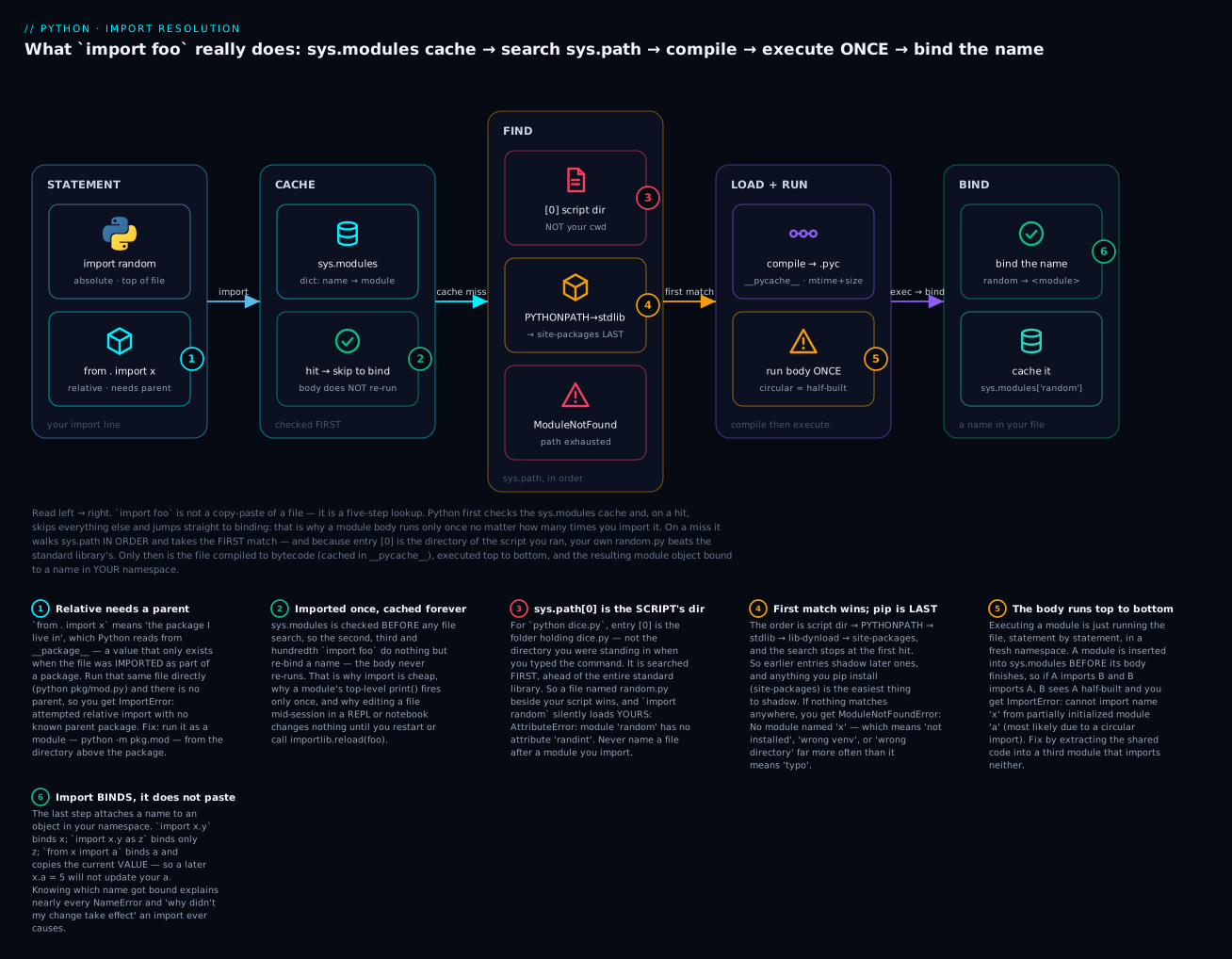
The six badges are the six places beginners lose hours: relative imports need a parent package (1), the cache means a body never re-runs (2), sys.path[0] is the script’s directory and outranks the stdlib (3), the first match wins and pip’s directory is last (4), the body runs top-to-bottom so circular imports meet a half-built module (5), and import binds a name rather than pasting a file (6).
The shadowing disaster
Now the classic. You’re learning about randomness, so you name your practice file random.py. Perfectly reasonable. Later, in the same folder, you write dice.py:
# dice.py
import random

print("rolling:", random.randint(1, 6))
this is MY random.py
Traceback (most recent call last):
  File "/tmp/importlab/shadow/dice.py", line 3, in <module>
    print("rolling:", random.randint(1, 6))
                      ^^^^^^^^^^^^^^
AttributeError: module 'random' has no attribute 'randint'
Read the first line: this is MY random.py. Your file’s own print fired — import random found your file at sys.path[0] and never reached the standard library. Then random.randint failed, because your module has no randint.
The error is the cruel part. module 'random' has no attribute 'randint' reads like the standard library is broken, and sends beginners off to reinstall Python. It isn’t broken — you’re not looking at the standard library’s random at all.
One line diagnoses it, always:
import random
print(random.__file__)
# => /tmp/importlab/shadow/random.py     ← that is not the standard library
If __file__ points inside your project, you’ve shadowed. The fix is to rename your file (dice_practice.py) and — this matters — delete the __pycache__ directory, because a stale random.cpython-312.pyc can keep the ghost alive after the source is gone.
The from spelling of the same bug is friendlier, because it prints the culprit’s path for you:
ImportError: cannot import name 'randint' from 'random' (/tmp/importlab/shadow/random.py)
Version note: on Python 3.13+ both messages gain a hint:
AttributeError: module 'random' has no attribute 'randint' (consider renaming '/tmp/.../random.py' since it has the same name as the standard library module named 'random' and prevents importing that standard library module). On 3.12 and older — including the output above — you get the bareAttributeErrorwith no hint, which is exactly why this bug has burned so many people.
The names that bite most often are the ones beginners reach for:
| Never name a file… | Because it shadows | Call it instead |
|---|---|---|
random.py |
the stdlib random |
dice.py, random_practice.py |
json.py |
the stdlib json |
json_utils.py, config_io.py |
string.py / types.py / code.py |
stdlib modules you don’t import but something else does | strings_lab.py, mytypes.py |
test.py |
the stdlib test package |
test_thing.py (also what pytest wants) |
email.py, logging.py, select.py |
stdlib — and logging.py breaks libraries, not just you |
email_utils.py, log_setup.py |
csv.py, datetime.py, math.py |
stdlib | csv_report.py, dates.py |
numpy.py, requests.py, pandas.py |
the installed package | numpy_demo.py |
The string.py / types.py row is the sneaky one. You may never import string yourself — but some library you use does, and it’ll get your file, and the traceback will point somewhere deep inside a package you’ve never opened. If a fresh project starts failing inside a library on an import you didn’t write, look for a file of yours with a stdlib name.
PYTHONPATH and where pip puts things
PYTHONPATH is an environment variable of extra directories, inserted right after sys.path[0]:
$ PYTHONPATH=/tmp/mylibs:/tmp/other python3 -c "import sys; print(sys.path[:3])"
['', '/tmp/mylibs', '/tmp/other']
Fine for a quick experiment, poor as a permanent fix: it’s invisible in your code and breaks the moment a colleague clones the repo. If you need your package importable from anywhere, the real answer is a venv plus pip install -e .. For now, run from the project root and let sys.path[0] do the work.
You can also append to sys.path at runtime — you’ll see it in tutorials:
import sys
sys.path.append("/some/other/dir")   # works — and is a smell
import faraway
It works. It also hides your project’s real structure and breaks under a different cwd. Recognise it; don’t reach for it.
__name__ == "__main__": one file, two jobs
You’ve seen this line everywhere. It exists to solve a specific problem created by everything above: importing a module runs its body.
That’s fine for defs. It’s a disaster for a print or a main() call at the bottom, because whoever imports your module gets your demo output — or your 40-minute data-processing run — as a side effect of trying to borrow one function.
Python gives every module a __name__, and sets it differently depending on how the module got loaded:
| How the file is loaded | __name__ is |
Effect |
|---|---|---|
python3 numkit.py (run directly) |
"__main__" |
The guarded block runs |
import numkit (imported) |
"numkit" |
The guarded block is skipped |
python3 -m mytools.numkit |
"__main__" |
Runs — and see the trap below |
Inside a package: import mytools.numkit |
"mytools.numkit" |
Full dotted path |
| The REPL | "__main__" |
The prompt is itself __main__ |
So the idiom is just an if on that value:
def mean(numbers):
    return sum(numbers) / len(numbers) if numbers else 0.0

def _demo():
    print("numkit demo :", mean([1, 2, 3, 4]))

if __name__ == "__main__":     # true ONLY when run directly
    _demo()
Run it → the demo runs. Import it → you get mean and silence. One file, two jobs.
There’s no magic in __name__ — it’s an ordinary string attribute. Print it both ways and it demystifies:
$ python3 mytools/numkit.py
[numkit] module body running (__name__ = __main__)
numkit demo : 2.5 | 10

$ python3 -c "import mytools.numkit"
[numkit] module body running (__name__ = mytools.numkit)
Same file. Different __name__. That’s the entire mechanism.
Two habits that make it worth more than it looks:
Put the real work in a main() function, not directly under the if. Code under the if is at module level, so its variables are globals and nothing else can call it. A main() is testable and importable:
def main() -> None:
    ...

if __name__ == "__main__":
    main()
To make a whole package runnable, add __main__.py. Then python3 -m mytools executes it — that’s exactly how python3 -m pip and python3 -m venv work:
# mytools/__main__.py
from . import slugify, mean

print("mytools CLI:", slugify("Run The Package"), "|", mean([10, 20]))
$ python3 -m mytools
mytools CLI: run-the-package | 15.0
Packages: __init__.py, subpackages, and relative imports
A package is a directory of modules, and importing it works by dotted path. Traditionally the directory holds an __init__.py to mark it as a package:
mytools/                  ← the package
├── __init__.py           ← marks it; runs when the package is imported
├── textkit.py            ← module: mytools.textkit
├── numkit.py             ← module: mytools.numkit
└── formats/              ← SUBpackage: mytools.formats
    ├── __init__.py
    └── csv_tools.py      ← module: mytools.formats.csv_tools
| Thing | Is | Import it as |
|---|---|---|
mytools/ |
Package (has __init__.py) |
import mytools |
mytools/textkit.py |
Module inside a package | import mytools.textkit |
mytools/formats/ |
Subpackage | import mytools.formats |
mytools/formats/csv_tools.py |
Module in a subpackage | import mytools.formats.csv_tools |
mytools/__init__.py |
The package’s own body | Runs on import mytools — always, and first |
__init__.py is just a module — the package’s body. It may be completely empty (very common, and perfectly good), or it can do two useful jobs: set package-level data like __version__, and re-export the names you want to be your public API.
# mytools/__init__.py
"""mytools — a tiny demo package."""
__version__ = "0.1.0"

from .textkit import slugify      # re-export → mytools.slugify
from .numkit import mean          # re-export → mytools.mean

__all__ = ["slugify", "mean", "__version__"]
Re-exporting is why you can write from mytools import slugify instead of from mytools.textkit import slugify. Users get a flat surface; you keep the freedom to move slugify later. Big libraries all do it — pd.read_csv really lives several modules deep.
But __init__.py has a cost worth naming: it runs on every import of anything in the package. import mytools.textkit executes mytools/__init__.py first — always. If that file imports six heavy submodules, import mytools.textkit pays for all six. Keep __init__.py light.
Importing a package does not import its submodules automatically:
import xml
xml.etree.ElementTree
# AttributeError: module 'xml' has no attribute 'etree'
You must import xml.etree.ElementTree explicitly. (os.path seems to break this rule only because os deliberately imports it for you.)
Absolute vs relative imports
Inside a package, one module often needs another. Two spellings:
# inside mytools/textkit.py
from mytools.numkit import mean      # ABSOLUTE — full path from sys.path
from .numkit import mean             # RELATIVE — "the package I live in"
from . import numkit                 # RELATIVE — bind the sibling module
from ..other import thing            # RELATIVE — one package UP
| Form | Means | Works when |
|---|---|---|
import mytools.numkit |
Absolute: find mytools on sys.path |
Always — if the package is importable |
from mytools.numkit import mean |
Absolute, bind the name | Always |
from . import numkit |
The package this file is in | Only if the file was imported as part of a package |
from .numkit import mean |
Sibling module | Same condition |
from .. import other |
Parent package | Same, and the parent must exist |
from .formats import csv_tools |
Subpackage of my package | Same |
Relative imports read well and survive renaming the package. But they carry one hard condition, and it produces the error in the section title.
The dot means “the package I belong to” — which Python reads from __package__, and that only has a value if the file was imported as part of a package. Run the file directly and there is no parent, so:
# mytools/report.py
from .helpers import shout    # relative
$ python3 mytools/report.py
  File "/tmp/importlab/rel/pkg/report.py", line 1, in <module>
    from .helpers import shout
    ^^^^^^^^^^^^^^^^^^^^^^^^^^
ImportError: attempted relative import with no known parent package
That message is precise, and now you can read it exactly: “you used a dot, but I have no idea what package you’re in — because you ran me as a plain script, and a plain script has no parent.” Running it as a module from the directory above the package fixes it, because now Python knows the parent is pkg:
$ python3 -m pkg.report
REPORT READY
This is the single most common cause of relative-import pain, and the rule is short: a file with relative imports is a library module, not a script. Run it with -m from the project root, or give the package a __main__.py.
| Situation | Verdict |
|---|---|
| Module inside a package importing a sibling | Relative (from . import x) is idiomatic and fine |
| A script you run directly | Absolute only — relative will always fail |
| A top-level module (not in a package) | Absolute only — there is no parent to be relative to |
| Application code, team preference | Many teams mandate absolute everywhere: greppable, unambiguous |
from . import numkit vs from .numkit import mean: the first binds the module (numkit.mean(...)), the second binds the name. The first is more resistant to circular imports — for the reason coming up next.
Namespace packages (the one without __init__.py)
Since Python 3.3, a directory with no __init__.py still imports — as a namespace package:
$ python3 -c "import plain.sub.tool; print(plain.sub.tool.hi())"
hello from a namespace package
That surprises people who were taught __init__.py is mandatory. It isn’t anymore. The difference is visible:
| Regular package | Namespace package | |
|---|---|---|
Has __init__.py |
Yes | No |
__file__ |
Path to __init__.py |
None |
__path__ |
A plain list |
A _NamespacePath object |
| Can span multiple directories | No | Yes — that’s the point |
| Runs code on import | Yes (__init__.py) |
No — nothing to run |
Namespace packages exist so one importable name can be split across several distributions (plugin systems: company.plugin_a, company.plugin_b from separate installs). A real need — almost certainly not yours.
The practical advice: write the __init__.py. An empty one costs nothing and buys predictability. Forgetting it is usually an accident, and it fails confusingly — a typo’d directory name quietly becomes an empty namespace package instead of failing loudly.
Circular imports: why they bite and how to fix them
You’ll write your first circular import by accident and it will feel like Python being unreasonable. It isn’t — it follows directly from step 4.
Two modules, each needing something from the other:
# orders.py
from customers import customer_name        # ← imports customers at module level

PRICES = {"widget": 9.99, "gizmo": 24.50}

def order_total(items):
    return round(sum(PRICES[i] for i in items), 2)

def describe(customer_id, items):
    return f"{customer_name(customer_id)} owes {order_total(items)}"
# customers.py
from orders import order_total             # ← imports orders at module level

NAMES = {1: "Vinod", 2: "Asha"}

def customer_name(customer_id):
    return NAMES.get(customer_id, "unknown")

def lifetime_value(customer_id, all_orders):
    return round(sum(order_total(o) for o in all_orders), 2)
Perfectly reasonable code. import orders explodes:
Traceback (most recent call last):
  File "/tmp/importlab/circ/shop.py", line 1, in <module>
    import orders
  File "/tmp/importlab/circ/orders.py", line 2, in <module>
    from customers import customer_name
    ^^^^^^^^^^^^^^^^^^^^^^^^^^^^^^^^^^
  File "/tmp/importlab/circ/customers.py", line 2, in <module>
    from orders import order_total
    ^^^^^^^^^^^^^^^^^^^^^^^^^^^^^^
ImportError: cannot import name 'order_total' from partially initialized module 'orders'
(most likely due to a circular import) (/tmp/importlab/circ/orders.py)
Walk the traceback and the cause is right there. shop.py imports orders. Python creates an empty orders module, puts it in sys.modules immediately, and starts running its body. Line 2 says from customers import ..., so Python goes off to run customers. Its line 2 says from orders import order_total — orders is in sys.modules (cache hit!), so Python hands over the module object… which is two lines in and has no order_total yet. Boom.
The phrase “partially initialized module” is the whole diagnosis. The module exists; its body hasn’t finished. And notice the cache is what makes this fail loudly rather than recursing forever — without it, the two files would import each other until the stack blew up.
Now the fixes, in order of how much you should want them:
Fix 1 — break the cycle (the real fix). A cycle means your module boundaries are wrong. Something is shared; pull it into a third module that imports neither:
# pricing.py — the shared leaf. Imports nothing of ours.
PRICES = {"widget": 9.99, "gizmo": 24.50}

def order_total(items):
    return round(sum(PRICES[i] for i in items), 2)
# customers.py — depends only on the leaf
from pricing import order_total
...

# orders.py — depends on the leaf and on customers. No cycle.
from customers import customer_name
from pricing import order_total
$ python3 shop.py
Vinod owes 34.49
The dependency graph is now a tree: pricing ← customers ← orders. Nothing points back up. Worth internalising — a circular import is a design signal, almost always telling you a shared concept (here, pricing) hasn’t been given its own home.
Fix 2 — import the module, not the name, on both sides. import orders binds the module object; the attribute lookup orders.order_total then happens at call time, when both bodies have finished:
# customers.py
import orders                                   # not: from orders import order_total

def lifetime_value(customer_id, all_orders):
    return round(sum(orders.order_total(o) for o in all_orders), 2)
This genuinely works — but only if you do it on both sides. Fix one direction and leave from customers import customer_name in the other, and it works when you enter via orders and still fails when you enter via customers:
$ python3 -c "import customers"
ImportError: cannot import name 'customer_name' from partially initialized module 'customers'
(most likely due to a circular import)
That asymmetry is a nasty trap: your app works, and the test that imports customers first fails — which looks like a broken test rather than a real bug. Tutorials that present “just use import module” as the fix rarely mention it.
Fix 3 — defer the import into the function body. Legal, and it works from any entry point, because the import runs at call time:
def describe(customer_id, items):
    from customers import customer_name        # runs at CALL time
    return f"{customer_name(customer_id)} owes {order_total(items)}"
The cost: the dependency is invisible at the top of the file, and you’ve moved a failure from import time to call time — so it surfaces in production rather than at startup. Use it to unblock yourself, then go do Fix 1. (It’s genuinely correct in two narrow cases: if TYPE_CHECKING: blocks for type-hint-only cycles, and deliberately deferring a slow import.)
| Fix | Works from any entry point? | Verdict |
|---|---|---|
| Extract a shared leaf module | ✅ Yes | The real fix — the cycle was a design bug |
import module on both sides |
✅ Yes | Fine; needs discipline on both files |
import module on one side |
❌ No — breaks from the other entry | The trap. Looks fixed; isn’t |
| Import inside the function | ✅ Yes | Escape hatch; hides the dependency |
| Move the import to the bottom of the file | ⚠️ Sometimes | Order-dependent voodoo — don’t |
The standard library tour: what’s already on your machine
Python ships with a large standard library — “batteries included.” No pip install, no dependency, no version drift. This section is not here to teach twelve modules; it’s here so you never write forty lines for something that’s one import away. You only need to know that it exists.
| Module | One-liner | Reach for it when |
|---|---|---|
os |
Operating-system interface: env vars, processes, dirs | os.environ, os.getcwd(), os.cpu_count() |
sys |
The interpreter itself | sys.argv, sys.exit(), sys.path, sys.version_info |
pathlib |
Modern object-oriented filesystem paths | Any path work at all — the / operator |
math |
Floats: sqrt, trig, constants, floor/ceil | Real arithmetic beyond + - * / |
random |
Pseudo-random numbers and choices | Sampling, shuffling, dice, test data |
datetime |
Dates, times, and the arithmetic between them | Anything with a date. Never roll your own |
json |
JSON ⇄ Python dicts/lists | APIs, config files, saving structured data |
collections |
Better containers: Counter, defaultdict, deque |
Counting, grouping, queues |
itertools |
Lazy iterator building blocks | Combinations, chaining, infinite sequences |
re |
Regular expressions | Pattern-matching text — after str methods fail |
subprocess |
Run external commands, capture output | Shelling out to git, ffmpeg, any CLI |
argparse |
Real command-line interfaces with --help |
The moment your script needs an option |
Now the same twelve, as code that runs. Every output below is real:
import os, sys, math, random, re, json, itertools, subprocess
from pathlib import Path
from datetime import date, timedelta
from collections import Counter, defaultdict

# os — the OS, and environment variables (never hardcode a secret)
print(os.getcwd())                          # => /tmp/importlab
print(os.environ.get("EDITOR", "(unset)"))  # => (unset)   — .get avoids a KeyError

# sys — the interpreter. sys.argv[0] is the script name; [1:] are the args
print(sys.version_info[:2])                 # => (3, 12)
print(sys.platform)                         # => darwin   (linux / win32)

# pathlib — the modern way. `/` joins paths, cross-platform
p = Path("mytools") / "textkit.py"
print(p, p.suffix, p.stem, p.exists())      # => mytools/textkit.py .py textkit True

# math
print(math.sqrt(16), round(math.pi, 4), math.floor(3.7))   # => 4.0 3.1416 3

# random — seed it when you need reproducibility (tests!)
random.seed(42)
print(random.randint(1, 6))                 # => 6
print(random.choice(["red", "green", "blue"]))   # => red

# datetime — date arithmetic, for free
d = date(2026, 7, 15)
print(d.isoformat())                        # => 2026-07-15
print((d + timedelta(days=30)).isoformat()) # => 2026-08-14
print(d.strftime("%d %b %Y"))               # => 15 Jul 2026

# json — dumps() makes a string, loads() parses one
text = json.dumps({"name": "Vinod", "langs": ["py", "go"]})
print(text)                                 # => {"name": "Vinod", "langs": ["py", "go"]}
print(json.loads(text)["langs"][0])         # => py

# collections
print(Counter("mississippi").most_common(2))    # => [('i', 4), ('s', 4)]
dd = defaultdict(list)
dd["a"].append(1)                           # no KeyError — the list is created for you
print(dict(dd))                             # => {'a': [1]}

# itertools — lazy; wrap in list() to see it
print(list(itertools.chain([1, 2], [3])))              # => [1, 2, 3]
print(list(itertools.combinations("abc", 2)))          # => [('a', 'b'), ('a', 'c'), ('b', 'c')]
print(list(itertools.islice(itertools.count(10), 3)))  # => [10, 11, 12]

# re — always use a raw string r"..." for patterns
m = re.search(r"(\d{4})-(\d{2})", "log 2026-07 ok")
print(m.group(0), m.groups())               # => 2026-07 ('2026', '07')
print(re.sub(r"\s+", " ", "too   many    spaces"))   # => too many spaces
print(re.findall(r"\d+", "a1b22c333"))      # => ['1', '22', '333']

# subprocess — list form, never shell=True with user input
r = subprocess.run(["echo", "hello"], capture_output=True, text=True, check=True)
print(r.stdout.strip(), r.returncode)       # => hello 0
⚠️ Two safety notes on that last one. Use the list form (["echo", "hello"]), not shell=True with a string — shell=True on anything containing user input is a shell-injection hole. And check=True makes a failing command raise CalledProcessError instead of being silently ignored, which is nearly always what you want.
And argparse, which needs its own file because it reads sys.argv:
# greet.py — a real CLI in 8 lines
import argparse

parser = argparse.ArgumentParser(description="Greet someone.")
parser.add_argument("name", help="who to greet")
parser.add_argument("-n", "--times", type=int, default=1, help="repeat count")
parser.add_argument("--shout", action="store_true", help="upper-case it")
args = parser.parse_args()

msg = f"Hello, {args.name}!"
print("\n".join([msg.upper() if args.shout else msg] * args.times))
$ python3 greet.py Vinod
Hello, Vinod!

$ python3 greet.py Vinod -n 2 --shout
HELLO, VINOD!
HELLO, VINOD!

$ python3 greet.py --help
usage: greet.py [-h] [-n TIMES] [--shout] name

Greet someone.

positional arguments:
  name                  who to greet

options:
  -h, --help            show this help message and exit
  -n TIMES, --times TIMES
                        repeat count
  --shout               upper-case it

$ python3 greet.py
usage: greet.py [-h] [-n TIMES] [--shout] name
greet.py: error: the following arguments are required: name
Three add_argument lines bought you --help, type conversion, and a proper error with a non-zero exit code. That’s the case for knowing the standard library exists: the alternative is fifty lines of sys.argv slicing that handles none of it.
Four honest notes on the tour:
pathliboveros.path.Path("data") / "raw" / "x.csv"beatsos.path.join("data", "raw", "x.csv"), andp.read_text()beats anopen()dance. Learnos.pathanyway — you’ll meet it in every codebase written before ~2018. (Paths and files get proper treatment in File I/O.)reis a last resort, not a first one."x" in text,text.startswith(...)andtext.split(...)are faster to write, faster to read, and can’t be got wrong. Reach forrewhen the pattern is genuinely a pattern.randomis not secure. Predictable by design, and fine for dice, simulations, and test data. For passwords or tokens, usesecrets.datetimehas sharp edges (naive vs timezone-aware, mostly) and is still far better than rolling your own. Addzoneinfowhen timezones show up.
Others worth recognising by name: csv, sqlite3 (a real database, zero setup), dataclasses, typing, logging (the grown-up print), unittest, functools, shutil, tempfile, urllib.request, time, statistics, enum, decimal (when float rounding hurts).
Hands-on lab
You’ll build a real package, import it three ways, watch __name__ flip between script and import — then deliberately reproduce the two classic import bugs and fix them. Roughly 15 minutes.
Everything here is standard library. No pip install — but a virtual environment is the right habit (see Install & environments if this is new):
mkdir importlab && cd importlab
python3 -m venv .venv
source .venv/bin/activate       # Windows: .venv\Scripts\activate
python3 --version               # want 3.12+  (Windows users: `python`)
mkdir mytools
Step 1 — the first module. Create mytools/textkit.py:
"""textkit — small text helpers."""

print(f"[textkit] module body running (__name__ = {__name__})")

VOWELS = "aeiou"


def slugify(text: str) -> str:
    """Return a lowercase, dash-separated slug."""
    return "-".join(text.lower().split())


def count_vowels(text: str) -> int:
    """Return the number of vowels in text."""
    return sum(1 for ch in text.lower() if ch in VOWELS)
What just happened: you made a module. That’s it — a .py file is a module. The top-level print is a spy: it fires exactly when the body runs, so you can see the import machinery working.
Step 2 — a second module, with a __main__ guard. Create mytools/numkit.py:
"""numkit — small number helpers."""

print(f"[numkit] module body running (__name__ = {__name__})")


def mean(numbers: list[float]) -> float:
    """Return the arithmetic mean; 0.0 for an empty list."""
    return sum(numbers) / len(numbers) if numbers else 0.0


def clamp(value: float, low: float, high: float) -> float:
    """Return value limited to the range [low, high]."""
    return max(low, min(value, high))


def _demo() -> None:
    print("numkit demo :", mean([1, 2, 3, 4]), "|", clamp(99, 0, 10))


if __name__ == "__main__":
    _demo()
What just happened: _demo() runs only when this file is run directly. The leading underscore is the convention for “internal — not part of the API.”
Step 3 — make it a package. Create mytools/__init__.py:
"""mytools — a tiny demo package."""

print(f"[mytools] __init__ running (__name__ = {__name__})")

__version__ = "0.1.0"

from .textkit import slugify      # re-export → mytools.slugify
from .numkit import mean          # re-export → mytools.mean

__all__ = ["slugify", "mean", "__version__"]
What just happened: mytools/ is now a package. The two relative imports re-export slugify and mean to the top level, so users can write from mytools import slugify.
Step 4 — import it three ways. Create main.py (next to mytools/, not inside it):
"""main.py — import mytools three different ways."""
import sys

# Form 1 — import the module, reach in with dots
import mytools.textkit

# Form 2 — import a module and rename it
import mytools.numkit as nk

# Form 3 — import names straight out of the package
from mytools import slugify, mean

import mytools.textkit             # second import: silent — it's cached

print()
print("1. import mytools.textkit  ->", mytools.textkit.slugify("Hello Modular World"))
print("2. import ... as nk        ->", nk.mean([2, 4, 6]))
print("3. from mytools import ... ->", slugify("Three Ways In"), "|", mean([1, 2]))
print()
print("mytools.__version__       ->", mytools.__version__)
print("type(mytools)             ->", type(mytools))
print("mytools.textkit.__name__  ->", mytools.textkit.__name__)
print("nk is mytools.numkit      ->", nk is mytools.numkit)
print("cached in sys.modules     ->", "mytools.textkit" in sys.modules)
Step 5 — run it.
python3 main.py
[mytools] __init__ running (__name__ = mytools)
[textkit] module body running (__name__ = mytools.textkit)
[numkit] module body running (__name__ = mytools.numkit)

1. import mytools.textkit  -> hello-modular-world
2. import ... as nk        -> 4.0
3. from mytools import ... -> three-ways-in | 1.5

mytools.__version__       -> 0.1.0
type(mytools)             -> <class 'module'>
mytools.textkit.__name__  -> mytools.textkit
nk is mytools.numkit      -> True
cached in sys.modules     -> True
What just happened — and the first three lines are the interesting part:
__init__ran first, beforetextkit. You asked formytools.textkit, but Python must import the parent packagemytoolsfirst — and__init__.pyitself importstextkit, so that’s what triggered it.numkitran too, even thoughmain.pyline 5 only asked fortextkit. Again:__init__.pyimports it. This is the “keep__init__.pylight” cost, live.- Each body ran exactly once, despite four import statements including a repeat of
mytools.textkit. That’ssys.modules. nk is mytools.numkit→True. Two names, one object.asrenames a binding; it doesn’t copy anything.- The
__name__values are the full dotted paths (mytools.textkit), because they were imported, not run.
Step 6 — script vs import. Now run the same file two different ways:
python3 mytools/numkit.py
[numkit] module body running (__name__ = __main__)
numkit demo : 2.5 | 10
__name__ is __main__, so _demo() fired. Compare with main.py above, where the same file reported mytools.numkit and stayed quiet. One file, two jobs — that’s the whole point of the guard.
Step 7 — the -m double-run trap. Try the other way to run a module:
python3 -m mytools.numkit
[mytools] __init__ running (__name__ = mytools)
[textkit] module body running (__name__ = mytools.textkit)
[numkit] module body running (__name__ = mytools.numkit)
<frozen runpy>:128: RuntimeWarning: 'mytools.numkit' found in sys.modules after import of
package 'mytools', but prior to execution of 'mytools.numkit'; this may result in
unpredictable behaviour
[numkit] module body running (__name__ = __main__)
numkit demo : 2.5 | 10
Look at that carefully — numkit’s body ran twice, and the warning lands exactly between the two runs. Not a typo: -m mytools.numkit must import the package mytools first, whose __init__.py imports numkit (as mytools.numkit). Then runpy executes the file again, this time as __main__. Same file, two names, two separate module objects with two separate sets of globals — exactly what the RuntimeWarning is warning you about. A module-level counter or cache would now exist in two copies.
If you pipe the output (
| less, or into a file) the warning jumps to the top — stderr is unbuffered, while stdout turns block-buffered when it isn’t a terminal and flushes at exit. Worth knowing the first time a traceback appears “in the wrong place.”
This is the real reason sys.modules is keyed by name, not by file path, and it’s why you don’t run a submodule with -m when its own package re-exports it. The clean fix is __main__.py:
# mytools/__main__.py
"""Makes the package runnable: python3 -m mytools"""
from . import slugify, mean

print("mytools CLI:", slugify("Run The Package"), "|", mean([10, 20]))
python3 -m mytools
[mytools] __init__ running (__name__ = mytools)
[textkit] module body running (__name__ = mytools.textkit)
[numkit] module body running (__name__ = mytools.numkit)
mytools CLI: run-the-package | 15.0
No warning, nothing double-run. That’s how python3 -m pip works.
Step 8 — reproduce the shadowing bug. ⚠️ On purpose. Make a subfolder so you can delete it cleanly:
mkdir shadow && cd shadow
Create shadow/random.py — the innocent-looking practice file:
"""My little experiment file. Innocent, right?"""
print("this is MY random.py")
And shadow/dice.py:
import random

print("rolling:", random.randint(1, 6))
python3 dice.py
this is MY random.py
Traceback (most recent call last):
  File "/tmp/importlab/shadow/dice.py", line 3, in <module>
    print("rolling:", random.randint(1, 6))
                      ^^^^^^^^^^^^^^
AttributeError: module 'random' has no attribute 'randint'
What just happened: sys.path[0] is dice.py’s directory, so import random found your file — you can see its print fire on line 1 — and never reached the standard library. The error blames random, which is exactly why this bug is so disorienting.
Step 9 — diagnose and fix it. One line finds it:
python3 -c "import random; print(random.__file__)"
this is MY random.py
/tmp/importlab/shadow/random.py
There’s the proof: not the standard library. Fix it — rename, and clear the cache:
mv random.py random_practice.py
rm -rf __pycache__          # the stale random.pyc can keep the ghost alive
python3 dice.py
rolling: 3
What just happened: with no random.py at sys.path[0], the search continued down sys.path and found the real stdlib module. (Your number will differ — it’s random.)
Version note: on Python 3.13+ the
AttributeErroradds a hint —(consider renaming '/tmp/.../random.py' since it has the same name as the standard library module named 'random'...). On 3.12 and older, you get the bare message shown above.
Step 10 — reproduce a circular import. ⚠️ Also on purpose:
cd .. && mkdir circ && cd circ
circ/orders.py:
"""orders.py — needs a customer's name to describe an order."""
from customers import customer_name

PRICES = {"widget": 9.99, "gizmo": 24.50}


def order_total(items: list[str]) -> float:
    return round(sum(PRICES[i] for i in items), 2)


def describe(customer_id: int, items: list[str]) -> str:
    return f"{customer_name(customer_id)} owes {order_total(items)}"
circ/customers.py:
"""customers.py — needs order totals to compute lifetime value."""
from orders import order_total

NAMES = {1: "Vinod", 2: "Asha"}


def customer_name(customer_id: int) -> str:
    return NAMES.get(customer_id, "unknown")


def lifetime_value(customer_id: int, all_orders: list[list[str]]) -> float:
    return round(sum(order_total(o) for o in all_orders), 2)
circ/shop.py:
import orders

print(orders.describe(1, ["widget", "gizmo"]))
python3 shop.py
Traceback (most recent call last):
  File "/tmp/importlab/circ/shop.py", line 1, in <module>
    import orders
  File "/tmp/importlab/circ/orders.py", line 2, in <module>
    from customers import customer_name
    ^^^^^^^^^^^^^^^^^^^^^^^^^^^^^^^^^^^
  File "/tmp/importlab/circ/customers.py", line 2, in <module>
    from orders import order_total
    ^^^^^^^^^^^^^^^^^^^^^^^^^^^^^^
ImportError: cannot import name 'order_total' from partially initialized module 'orders'
(most likely due to a circular import) (/tmp/importlab/circ/orders.py)
What just happened: read the traceback top-down — it’s the cycle, drawn for you. shop → orders (body starts, module goes into sys.modules immediately) → customers → back to orders, which is a cache hit on a module that’s only two lines in. order_total doesn’t exist yet.
Step 11 — fix it properly. Extract the shared thing. circ/pricing.py:
"""pricing.py — the shared leaf. Imports nothing of ours."""
PRICES = {"widget": 9.99, "gizmo": 24.50}


def order_total(items: list[str]) -> float:
    return round(sum(PRICES[i] for i in items), 2)
Now rewrite the other two so nothing points back up. circ/customers.py:
"""customers.py — depends only on the leaf."""
from pricing import order_total

NAMES = {1: "Vinod", 2: "Asha"}


def customer_name(customer_id: int) -> str:
    return NAMES.get(customer_id, "unknown")


def lifetime_value(customer_id: int, all_orders: list[list[str]]) -> float:
    return round(sum(order_total(o) for o in all_orders), 2)
circ/orders.py:
"""orders.py — depends on the leaf and on customers. No cycle."""
from customers import customer_name
from pricing import order_total


def describe(customer_id: int, items: list[str]) -> str:
    return f"{customer_name(customer_id)} owes {order_total(items)}"
python3 shop.py
Vinod owes 34.49
What just happened: the graph is a tree now — pricing ← customers ← orders — so every body finishes before anyone needs it. The cycle wasn’t a Python problem; it was PRICES living in the wrong file.
Step 12 — clean up.
cd .. && deactivate
# ⚠️ removes the whole lab — check you're in the right place first:
pwd                       # should end in /importlab
# rm -rf ../importlab     # uncomment only when you're sure
Now try these, predicting the output first:
- In
main.py, comment out bothfrom .lines inmytools/__init__.pyand re-run. Which bodies still run? Which of the three import forms now breaks, and with what error? - Run
python3 -m mytools.numkitagain after doing (1). Does theRuntimeWarningdisappear? Why? - In
shadow/, restorerandom.pyand runpython3 -c "import random"from the parent directory instead. Does it break? What does that tell you aboutsys.path[0]? - Add
print(__package__)to the top oftextkit.py. Runpython3 mytools/textkit.py, thenpython3 main.py. Explain both values. - Add
from .numkit import meanto the top oftextkit.py, then runpython3 mytools/textkit.pydirectly. Which error do you get — and which flag fixes it?
Common mistakes and troubleshooting
| Symptom / traceback | Cause | Fix |
|---|---|---|
ModuleNotFoundError: No module named 'requests' |
Not installed — or installed in a different environment | pip install requests inside the active venv. Check with which python3 / pip -V |
ModuleNotFoundError: No module named 'mytools' |
Running from the wrong directory — sys.path[0] doesn’t contain it |
cd to the project root and run from there; or python3 -m pkg.mod |
ModuleNotFoundError: No module named 'reqeusts' |
Typo | Read the name in the quotes — Python prints exactly what it looked for |
AttributeError: module 'random' has no attribute 'randint' |
You have a random.py shadowing the stdlib |
print(random.__file__). Rename your file and rm -rf __pycache__ |
ImportError: cannot import name 'randint' from 'random' (/your/path/random.py) |
Same shadowing bug, from form |
The path in the parens is the culprit — rename it |
ImportError: cannot import name 'X' from partially initialized module 'Y' (most likely due to a circular import) |
Circular import: Y’s body isn’t finished | Extract the shared code into a third module; or import Y (module, not name) on both sides |
ImportError: attempted relative import with no known parent package |
Ran a file with from . import x as a script |
python3 -m pkg.module from the directory above the package |
AttributeError: module 'xml' has no attribute 'etree' |
Importing a package does not import its submodules | import xml.etree.ElementTree explicitly |
NameError: name 'os' is not defined after import os.path as osp |
as binds only osp |
Use osp.join(...), or import os as well |
TypeError/wrong type after from math import * |
Star-import clobbered a builtin (pow → math.pow → float) |
Stop star-importing. import math and use math.pow |
| Your edit has no effect in a REPL/notebook | sys.modules cache — the body won’t re-run |
Restart the kernel, or importlib.reload(mod) |
| Your edit has no effect running a script | Stale .pyc: same file size and same mtime second |
rm -rf __pycache__. Check for a stray x.pyc beside x.py |
<frozen runpy>:128: RuntimeWarning: 'pkg.mod' found in sys.modules... |
-m pkg.mod where pkg/__init__.py imports mod → runs twice |
Add pkg/__main__.py and run python3 -m pkg |
| Module runs its demo output when you import it | Top-level code with no guard | Wrap it: if __name__ == "__main__": main() |
Works in python3, fails in pytest (or vice versa) |
The two set sys.path[0] differently |
Don’t depend on cwd — use a package + absolute imports |
Three deserve extra words, because they cost the most hours.
1. ModuleNotFoundError on something you definitely installed. Almost never a typo — it’s an environment mismatch. You have several Pythons (macOS ships one, Homebrew adds one, each venv is another), and pip install X put X into a different one than the python3 you’re running. Diagnose it in two lines, and believe what they say:
which python3          # which interpreter am I actually running?
python3 -m pip -V      # which pip belongs to THAT interpreter?
The habit that makes this evaporate: always python3 -m pip install X, never bare pip install X. The -m form guarantees the pip you run belongs to the python you run. And activate your venv first — which python3 should point inside .venv/.
The second flavour is No module named 'mytools' for your own code. That’s not installation, it’s location: sys.path[0] is the script’s directory, so python3 scripts/run.py can’t see a mytools/ at the project root. Run python3 -m scripts.run from the root instead, and the cwd goes on the path.
2. Shadowing. The one that makes people reinstall Python. The tell is an AttributeError on a stdlib module that has obviously always had that attribute — “module ‘random’ has no attribute ‘randint’” is not a real possibility, so the module isn’t real. print(mod.__file__) settles it instantly. Two follow-ups people miss: delete __pycache__ after renaming (a leftover .pyc is importable on its own), and remember the file that shadows doesn’t have to be one you import — name a file types.py and you’ll break some library, and the traceback will point at code you’ve never seen.
3. The sys.modules cache vs your editor. In a notebook or REPL, import mymod, edit mymod.py, re-run import mymod — nothing changes. That’s not a bug; step 1 is a cache hit, so the body never re-runs. importlib.reload(mymod) forces it:
import importlib, greeter
importlib.reload(greeter)      # => >>> greeter body is running NOW
But reload is a sharp tool: it patches the module object, not the references you’ve scattered around — names you already from-imported still point at the old values, and existing instances keep their old classes. Jupyter’s %autoreload 2 automates it and inherits the same caveats. For anything confusing, restart the interpreter — it’s the only way to get a genuinely clean import graph.
Cheat-sheet
| Syntax / command | What it does |
|---|---|
import math |
Bind math; access as math.sqrt(16). The default form |
import numpy as np |
Bind np only |
import os.path |
Bind os (not path) — use os.path.join(...) |
import os.path as osp |
Bind only osp — os stays undefined |
from math import sqrt |
Bind sqrt; copies the value at import time |
from math import sqrt as sq |
Bind sq |
from x import * |
❌ Dumps everything. Silently clobbers — don’t |
from . import numkit |
Relative: sibling module in my package |
from .numkit import mean |
Relative: a name from a sibling module |
from ..other import thing |
Relative: one package up |
if __name__ == "__main__": |
Run only when executed directly, not when imported |
python3 mod.py |
Run as a script → __name__ == "__main__", sys.path[0] = script’s dir |
python3 -m pkg.mod |
Run as a module → relative imports work, sys.path[0] = cwd |
python3 -m pkg |
Runs pkg/__main__.py |
python3 -m pip install X |
Install into this interpreter. Always use -m |
sys.path |
The ordered search list. [0] = script dir; site-packages last |
sys.modules |
The import cache: {name: module}. Checked before any file search |
mod.__file__ |
Which file did I actually import? — the #1 debugging line |
mod.__name__ |
"pkg.mod" when imported, "__main__" when run |
mod.__doc__ / help(mod) |
The module docstring |
mod.__path__ |
Present only on packages |
__all__ = [...] |
Declares the public API; controls from x import * |
dir(mod) |
Every name the module defines |
importlib.reload(mod) |
Force a re-execution (REPL/notebook escape hatch) |
importlib.util.find_spec("x") |
Check importability without importing |
__init__.py |
Marks a package; its body runs on any import from the package |
__main__.py |
Makes a package runnable via python3 -m pkg |
__pycache__/*.pyc |
Cached bytecode. Disposable — .gitignore it |
rm -rf __pycache__ |
The fix for “my edit had no effect” / post-rename ghosts |
PYTHONPATH=/a:/b |
Extra search dirs, inserted after sys.path[0]. A smell in production |
PYTHONDONTWRITEBYTECODE=1 |
Don’t write .pyc files at all |
Interview and exam questions
Q: What is a module in Python?
A: A .py file. Nothing more — creating greeter.py creates a module named greeter, with no registration step. When imported, Python creates a module object, runs the file top to bottom inside that object’s namespace, and every top-level def, class, and assignment becomes an attribute of it. A module is an object you can inspect with dir(), pass around, and print.
Q: What exactly happens when you run import foo?
A: Five steps. (1) Cache — look up "foo" in sys.modules; on a hit, skip straight to step 5. (2) Find — search sys.path in order and take the first match. (3) Compile — source to bytecode, cached in __pycache__/foo.cpython-312.pyc. (4) Execute — create an empty module object, insert it into sys.modules, run the body once. (5) Bind — attach the module object to the name foo in the importing namespace.
Q: You create random.py to practise, and now import random fails with AttributeError: module 'random' has no attribute 'randint'. Explain.
A: sys.path[0] is the directory of the script being run, and it’s searched before the standard library. So import random finds your random.py and stops — the real one is never reached. The AttributeError blames random, which misleads. Diagnose with print(random.__file__); if it points into your project, that’s the bug. Fix by renaming the file and deleting __pycache__ (a stale .pyc is importable on its own).
Q: Is sys.path[0] the current working directory?
A: Not for python3 script.py — there it’s the directory containing the script, even if you invoke it by absolute path from somewhere else. It is the cwd for python3 -m pkg.mod, python3 -c, and the REPL. That difference is behind a lot of “works when I run it, breaks under pytest.”
Q: Why is from module import * considered bad practice?
A: It binds every public name into your namespace, silently overwriting anything with the same name — including builtins. Real example: from math import * followed by from cmath import * makes sqrt(16) return (4+0j); swap the two lines and it returns 4.0. The order of your import lines changed your arithmetic, with no warning. It also blinds linters and makes it impossible to tell where a name came from. __all__ limits what the star exports, but the right move is to not use it.
Q: What’s the difference between import x.y and import x.y as z?
A: import x.y binds x (not y), so you write x.y.thing(). import x.y as z binds only z — x is left undefined, so touching x raises NameError. The as form replaces the binding rather than adding one.
Q: What is __init__.py for, and is it still required?
A: It marks a directory as a regular package and acts as the package’s body — it runs on any import from that package. It’s typically used to set __version__ and re-export a public API (from .textkit import slugify), so users can write from mytools import slugify. Since Python 3.3 it’s not required: a directory without one becomes a namespace package (__file__ is None, __path__ is a _NamespacePath, and it can span multiple directories). Namespace packages exist for split distributions; for normal projects, write the __init__.py — an empty one is fine and predictable.
Q: Explain if __name__ == "__main__":.
A: Python sets each module’s __name__ to its dotted import name ("mytools.numkit") when imported, but to "__main__" when it’s the file being run. The guard therefore runs a block only on direct execution. It exists because importing a module executes its body — without the guard, anyone importing your file to borrow one function also gets your demo output or your whole data pipeline. Put the work in a main() and call it from the guard.
Q: What causes ImportError: cannot import name 'x' from partially initialized module, and how do you fix it?
A: A circular import. Python inserts a module into sys.modules before its body finishes, so if A imports B and B imports A, B gets a cache hit on a half-executed A and the name it wants doesn’t exist yet. The real fix is to break the cycle — extract the shared code into a third module that imports neither, making the dependency graph a tree. Alternatives: import a (module, not name) on both sides so the attribute is resolved at call time, or defer the import into the function body. Doing the module-import fix on only one side is a trap — it works from one entry point and still fails from the other.
Q: When does from . import x fail, and why?
A: With ImportError: attempted relative import with no known parent package, whenever the file wasn’t imported as part of a package — most commonly because you ran it directly (python3 pkg/mod.py). The dot resolves against __package__, which is only set when the module is imported as pkg.mod. Fix: run it as a module — python3 -m pkg.mod from the directory above the package — or add a __main__.py. Rule of thumb: a file with relative imports is a library module, not a script.
Q: You pip install requests, and import requests still raises ModuleNotFoundError. Debug it.
A: Almost always two Pythons. pip installed into a different interpreter than the python3 you’re running — a common result of having system Python, a Homebrew Python, and a venv, and of an unactivated (or wrong) venv. Check which python3 and python3 -m pip -V and confirm they point at the same place, ideally inside .venv/. The permanent habit is python3 -m pip install X, which guarantees the pip you run belongs to the python you run.
Q (coding): You’ve edited mymod.py but your running Jupyter notebook still uses the old code. Why, and what are your options?
A: The cache. import mymod was a hit in sys.modules, so the body never re-ran.
import importlib, mymod
importlib.reload(mymod)          # re-executes the body, updates the module object
The caveats matter: names bound earlier via from mymod import f still point at the old function, and existing objects keep their old classes — reload updates the module object, not references already scattered around. %autoreload 2 automates it with the same limits. For anything confusing, restart the kernel; it’s the only way to get a genuinely clean import graph.
Key takeaways
- A module is a
.pyfile; importing it produces a module object. Python runs the file once, top to bottom, and every top-level name becomes an attribute.importis not file inclusion — it’s build-once-and-bind-a-name. importis five steps: cache → find → compile → execute → bind. Nearly every import bug is one of those steps doing exactly what it’s supposed to.sys.modulesis checked first, so a body runs once however many times you import it — and your edit does nothing until you restart orimportlib.reload(). The compile step leaves__pycache__, which is disposable:rm -rf __pycache__is a real fix, because invalidation is(mtime, size)and a same-size edit inside one second genuinely serves stale bytecode.sys.pathis an ordered list and the first match wins. Entry[0]is the script’s directory (not your cwd), andsite-packagesis last — so your own files outrank the entire standard library. That’s the shadowing disaster: arandom.pyin your folder breaksimport random, and theAttributeErrorblames the wrong module.print(mod.__file__)is the one-line diagnosis.- Prefer
import xandfrom x import name. Neverfrom x import *. The star silently clobbers — including builtins — andfrom math import *; from cmath import *genuinely changes whatsqrt(16)returns. Also rememberimport x.ybindsx, whileimport x.y as zbinds onlyz. if __name__ == "__main__":exists because importing runs the body. It lets one file be both an importable library and a runnable script. Put the work inmain(); make a whole package runnable with__main__.pyandpython3 -m pkg.- A package is a directory with
__init__.py— the package’s body, which runs on every import from the package (so keep it light) and is where you re-export your public API. Relative imports (from . import x) inside it need a parent package, so they only work when the file was imported as part of one: run it directly and you getattempted relative import with no known parent package. Usepython3 -m pkg.mod. A file with relative imports is a library module, not a script. - A circular import is a design signal, not a Python quirk.
partially initialized modulemeans the cache handed out a half-built module. Fix it by extracting the shared code into a leaf module so the dependency graph becomes a tree — not by shuffling import lines around. - Know what’s in the standard library —
pathlib,json,datetime,collections,itertools,argparse,re,subprocess,os,sys,math,random. You don’t need to memorise their APIs; you need to never write forty lines for something that’s one import away.