In the requests lesson you learned the client side of HTTP: you sent a request and read the response somebody else produced. This lesson flips it. Now you are the server. A request arrives from the network — a browser, a mobile app, another service, a curl command — and it lands in your Python function. You decide what it means, whether it’s allowed, whether it’s valid, and what comes back. Everything the requests lesson taught you to worry about as a caller — status codes, JSON bodies, timeouts, auth headers — is now something you produce.
Here is the entire job, in one sentence: a request comes in, you route it to a function, that function does the work, and you return a response. Request → route → handler → response. Every web framework in every language is a variation on making those four steps ergonomic and fast. This lesson is about the two that matter in Python today — Flask, the small one you’ll meet in a decade of existing codebases, and FastAPI, the modern default you’ll reach for when you build something new.
Everything below targets Python 3.12+. Every output block is real — copied from a 3.12.3 run against a live server (an in-process TestClient or a background uvicorn process hit with httpx), not paraphrased. The versions in play: FastAPI 0.139, Starlette 1.3, pydantic 2.13, uvicorn 0.51, Flask 3.1, httpx 0.28. One install, in a virtual environment:
python3 -m venv .venv
source .venv/bin/activate          # Windows: .venv\Scripts\activate
python -m pip install fastapi uvicorn pydantic httpx flask pytest
httpx is here because FastAPI’s TestClient is built on it — you get the test client for free by installing it. (You may also see pip install "fastapi[standard]", which bundles uvicorn, httpx and a few CLI extras in one go.)
This is Part 1 of two. It covers the framework, the request pipeline, validation, and REST design — everything up to a working, tested, in-memory API. Part 2 picks up where an in-memory dict stops being honest: real databases (SQLAlchemy sessions injected through the same Depends you’ll meet here), authentication (OAuth2, JWT, hashing passwords), and production deployment. Where this lesson stubs something out, that’s the seam.
Why this matters
The hard part of writing a server is not the happy path. Returning {"status": "ok"} when everything is correct takes four lines in any framework. The hard part is that the request is untrusted input from a stranger, and your function is the thing standing between that stranger and your database. Every field might be missing, the wrong type, out of range, malicious, or simply absent. A price arrives as the string "-5" instead of a positive number. A required name isn’t there at all. Someone sends you 40 MB of JSON to see if you fall over. The client is, at best, a mobile app written by a hurried colleague and, at worst, a script probing you for holes.
In a lot of codebases the response to that reality is a wall of hand-written checks at the top of every handler — if "name" not in body: return error(400), if not isinstance(price, (int, float)): ..., if price <= 0: ... — repeated, subtly inconsistent, and forgotten in exactly the spot that gets exploited. FastAPI’s central idea is to delete that wall. You declare the shape you accept as a Python type, and the framework rejects anything that doesn’t match, before your code runs, with a precise machine-readable error. The validation becomes the type signature. That one move — validation as declaration — is why the bulk of this lesson is FastAPI.
The second thing that makes servers different from scripts is concurrency. A script does one thing and exits. A server handles many requests at once, potentially thousands, and the way it overlaps them decides whether it serves 50 users or 50,000 on the same box. That’s the WSGI-versus-ASGI story, and it’s the reason a single misplaced time.sleep or a synchronous database call inside an async def can bring a healthy-looking server to its knees — a trap we’ll measure directly.
So carry three ideas through the lesson:
- The request is data you must validate, not trust. The framework should reject bad input for you, at the edge, with a clear error — not leave it to a checklist you’ll get wrong.
- The response is a contract you must control. What you return is an API other people build on. Returning “the whole database row” leaks secrets and welds your internals to your public shape; returning a declared model keeps them separate.
- A server is concurrent. How you handle one request affects all the others sharing that process. Blocking the event loop is the sharpest edge in async Python, and it has no traceback.
Get those straight and a framework is just the machinery that makes them ergonomic.
The server side of HTTP: request → route → handler → response
You already know the anatomy of an HTTP exchange from the client side. Nothing about the bytes changes when you’re the server — you’re just on the other end, reading the request the client built and writing the response it will read.
POST /items HTTP/1.1                             <- method + path: what + which
Host: api.example.com
Content-Type: application/json                    <- headers: how to read the body
Authorization: Bearer ghp_xxx

{"name": "Widget", "price": 9.99}                 <- body: the data you must validate

HTTP/1.1 201 Created                              <- STATUS CODE you choose
Content-Type: application/json
Location: /items/1                                <- headers you set

{"id": 1, "name": "Widget", "price": 9.99}        <- body you produce
A web framework’s job is to turn the top half into something Pythonic — a function call with the path, headers and parsed body as arguments — and to turn your return value into the bottom half. The four steps map cleanly onto the four things a framework gives you:
| Step | What happens | Who does it | Your job |
|---|---|---|---|
| Request | Raw bytes parsed into method, path, headers, body | The server (uvicorn/gunicorn) + framework | Declare what body/params you accept |
| Route | Method + path matched to one function | The framework’s router | Write @app.post("/items") |
| Handler | Your function runs the actual work | You | The business logic |
| Response | Return value serialized to an HTTP response | The framework | Return data + a status code |
The distinction that trips people coming from scripting: you never write the loop that accepts connections. There’s no while True: accept(). The server (uvicorn, gunicorn) owns the socket and the accept loop; the framework (FastAPI, Flask) owns the routing and the request/response objects; you own the handlers. Three layers, and knowing which one owns what is most of understanding a stack trace when something breaks. When a request hangs, is it the server’s socket handling, the framework’s routing, or your handler? They fail differently and you fix them in different files.
WSGI vs ASGI: two contracts, sync and async
Between “the server owns the socket” and “the framework owns the routing” sits a standard interface so any server can talk to any framework. Python has two, and the difference between them is the single most important architectural fact in Python web development.
WSGI (Web Server Gateway Interface, 2003) is the classic one. It’s a dead-simple contract: the server calls a Python function, that function returns the response, done. It is fundamentally synchronous and one-request-at-a-time per worker — a WSGI worker picks up a request, runs your handler start to finish, and only then picks up the next. Flask, Django (classically), and every mature Python web app for two decades are WSGI. To handle concurrency you run many worker processes/threads (via gunicorn or uWSGI), and each one blocks on its single request.
ASGI (Asynchronous Server Gateway Interface, 2018) is the modern one, built for async/await. An ASGI worker runs an event loop: when a handler awaits something slow (a database query, an outbound HTTP call), the worker doesn’t block — it sets that request aside and works on another, coming back when the slow thing is ready. One worker, one thread, many concurrent requests in flight. FastAPI, Starlette (which FastAPI is built on), and modern Django are ASGI. This is the same event-loop model from the asyncio lesson — a web server is one of the places async pays off most, because serving requests is overwhelmingly I/O-bound (waiting on databases and other services), which is exactly what an event loop is good at.
| WSGI | ASGI | |
|---|---|---|
| Introduced | 2003 (PEP 333/3333) | 2018 |
| Model | Synchronous, blocking | Async, event-loop |
| Concurrency unit | 1 request per worker | Many concurrent requests per worker |
| Handler style | def view(request) |
async def view(request) (or def) |
| Servers | gunicorn, uWSGI, mod_wsgi | uvicorn, hypercorn, daphne |
| Frameworks | Flask, Bottle, classic Django | FastAPI, Starlette, modern Django |
| WebSockets / SSE / HTTP2 | ❌ Awkward or impossible | ✅ First-class |
| Scales I/O-bound work by | Adding worker processes | The event loop (+ workers) |
| CPU-bound work | Fine (already blocking) | ⚠️ Blocks the loop — needs care |
| Best when | Simple sync apps, CPU work | High-concurrency I/O, real-time |
The practical upshot: FastAPI is ASGI, which is why it can be async, which is why it scales I/O-bound workloads on fewer resources than a Flask app doing the same job. But ASGI’s power is also its footgun — because one worker juggles many requests on one thread, anything that blocks that thread stalls all of them. Hold that thought; we’ll measure it.
One reassuring detail: on ASGI you can still write plain synchronous def handlers. FastAPI runs those in a threadpool so they don’t block the loop. You are not forced into async everywhere. The rule for when to use which is later, and it’s more subtle than “async is faster.”
Flask: the microframework you’ll meet everywhere
Flask is a microframework: a tiny, unopinionated core (routing, request/response, a template engine) and nothing else — no ORM, no validation, no auth, no admin. You add what you need from a huge ecosystem of extensions. That minimalism made it the default Python web framework for a decade, which means you will inherit Flask code. Even building new things in FastAPI, you must be able to read and maintain Flask. Here’s enough to do that.
The whole “hello world” is genuinely this small:
# hello.py
from flask import Flask

app = Flask(__name__)          # the application object; __name__ helps it find files

@app.route("/")                 # decorator: bind this URL to this function
def index():
    return "Hello, KloudVin"    # a str return becomes a 200 text/html response

if __name__ == "__main__":
    app.run(port=5000)          # dev server ONLY - never in production
flask --app hello run # or: python hello.py
The @app.route decorator is the router: it maps a URL to a view function. By default a route answers only GET; you opt into other methods explicitly. The core surface you’ll actually use:
| Flask piece | What it does | Example |
|---|---|---|
Flask(__name__) |
The application object | app = Flask(__name__) |
@app.route(path, methods=[...]) |
Bind a URL + methods to a view | @app.route("/items", methods=["POST"]) |
@app.get(p) / @app.post(p) |
Shorthands (Flask 2.0+) | @app.get("/items") |
<converter:name> in the path |
Capture a path variable | @app.route("/items/<int:id>") |
request |
The incoming request (a global proxy) | request.get_json(), request.args |
jsonify(...) |
Build a JSON response with the right header | return jsonify(data), 201 |
return body, status, headers |
Set the status code / headers | return {"x": 1}, 201 |
abort(code) |
Bail out with an error status | abort(404) |
render_template(...) |
Render a Jinja HTML template | server-rendered HTML |
Blueprint(...) |
Group routes into a module | bp = Blueprint("api", __name__) |
The one genuinely confusing thing for newcomers is request. It’s a global you import — but it magically refers to the current request even under concurrency. That’s Flask’s “context locals”: it’s not really global, it’s thread-local, swapped in per request. It reads oddly (a global that isn’t) and it’s the opposite of FastAPI’s explicit “the request is a function argument” approach. Here’s the request object’s surface:
request. |
Gives you | Notes |
|---|---|---|
.method |
"GET", "POST" |
The verb |
.args |
Query string params | request.args.get("limit") — a MultiDict |
.get_json() |
Parsed JSON body | ⚠️ Raises 400 on bad JSON; silent=True returns None |
.form |
Form-encoded body fields | HTML form posts |
.files |
Uploaded files | multipart/form-data |
.headers |
Request headers | Case-insensitive |
.view_args |
Captured path variables | {"id": 7} |
.json |
Property alias for get_json() |
Convenient, same caveats |
Here’s a real GET + POST pair with a JSON body — the same two endpoints we’ll build in FastAPI, so the contrast is exact. Notice there is no automatic validation: you check every field by hand.
# flask_api.py
from flask import Flask, jsonify, request

app = Flask(__name__)
_DB, _NEXT = {}, {"n": 0}

@app.get("/items/<int:item_id>")
def read_item(item_id):
    row = _DB.get(item_id)
    if row is None:
        return jsonify(error=f"Item {item_id} not found"), 404
    return jsonify({k: v for k, v in row.items() if k != "owner_token"})   # strip secret by hand

@app.post("/items")
def create_item():
    data = request.get_json(silent=True) or {}
    errors = {}                                        # ⚠️ manual validation, every field
    name, price = data.get("name"), data.get("price")
    if not isinstance(name, str) or not name:
        errors["name"] = "required non-empty string"
    if not isinstance(price, (int, float)) or isinstance(price, bool) or price <= 0:
        errors["price"] = "required number > 0"
    if errors:
        return jsonify(errors=errors), 422
    _NEXT["n"] += 1
    row = {"id": _NEXT["n"], "name": name, "price": price,
           "tags": data.get("tags", []), "owner_token": f"secret-{_NEXT['n']}"}
    _DB[_NEXT["n"]] = row
    return jsonify({k: v for k, v in row.items() if k != "owner_token"}), 201
Exercised with Flask’s built-in test client (no server needed):
c = app.test_client()
print("POST valid ->", c.post("/items", json={"name": "Widget", "price": 9.99, "tags": ["a"]}).status_code,
      c.post("/items", json={"name": "Widget", "price": 9.99}).get_json())
print("POST bad   ->", c.post("/items", json={"price": -5}).status_code,
      c.post("/items", json={"price": -5}).get_json())
print("GET  ok    ->", c.get("/items/1").status_code, c.get("/items/1").get_json())
print("GET  miss  ->", c.get("/items/9").status_code, c.get("/items/9").get_json())
POST valid -> 201 {'id': 2, 'name': 'Widget', 'price': 9.99, 'tags': []}
POST bad   -> 422 {'errors': {'name': 'required non-empty string', 'price': 'required number > 0'}}
GET  ok    -> 200 {'id': 1, 'name': 'Widget', 'price': 9.99, 'tags': ['a']}
GET  miss  -> 404 {'error': 'Item 9 not found'}
It works, and it’s clear. But look at how much of create_item is validation — isinstance checks, the sneaky isinstance(price, bool) guard (because in Python True is an int, so isinstance(True, int) is True and True <= 0 is False, meaning a raw bool would sail through your price check), the manual secret-stripping in two places. Every route repeats this. That repetition, and the bugs that hide in it, is precisely what FastAPI automates. Keep this example in mind — it’s the “before” picture.
Jinja templates: when the server renders HTML
Flask also does server-rendered HTML via the Jinja2 template engine — the other half of “web development,” for apps that return pages, not JSON. You won’t use this for a REST API, but you’ll meet it constantly in Flask apps:
from flask import Flask, render_template_string
app = Flask(__name__)

@app.get("/hello/<name>")
def hello(name):
    return render_template_string("<h1>Hi {{ name }}</h1><p>{{ 2 + 2 }}</p>", name=name)

print(app.test_client().get("/hello/<script>").get_data(as_text=True))
<h1>Hi <script></h1><p>4</p>
Two things to note. {{ name }} interpolates a variable and {{ 2 + 2 }} evaluates an expression (4) — that’s Jinja. And critically, the <script> in the name came back escaped to <script>: Jinja auto-escapes HTML by default, which is your first line of defence against cross-site scripting (XSS). In real apps you use render_template("page.html", ...) with files in a templates/ folder, plus template inheritance ({% extends %}, {% block %}) — a whole topic, but this is the shape. Django, by contrast, ships this (and an ORM and an admin) in the box; Flask makes it opt-in.
The Flask ecosystem, briefly
Because the core is tiny, real Flask apps are a stack of extensions. Recognising the names helps you read a codebase:
| Extension | Adds | FastAPI equivalent |
|---|---|---|
| Flask-SQLAlchemy | ORM / database | SQLAlchemy directly (Part 2) |
| Flask-Migrate (Alembic) | DB migrations | Alembic directly |
| Marshmallow / Flask-RESTX | Serialization + validation | ✅ Built in via pydantic |
| Flask-Login | Session auth | Depends + OAuth2 (Part 2) |
| Flask-JWT-Extended | JWT auth | Depends + python-jose (Part 2) |
| Flask-CORS | CORS headers | ✅ Built-in CORSMiddleware |
| Blueprints | Route grouping | ✅ APIRouter |
Notice how many of those FastAPI folds into its core. That’s the philosophical difference in one table: Flask is a small core plus a bazaar of extensions you assemble; FastAPI is a batteries-included core where validation, serialization, docs and CORS are already there.
FastAPI: path operations and routing
Everything from here is FastAPI, because it’s the modern default and where you’ll spend your time. Start with routing. FastAPI calls a route a path operation: a path (/items/{id}) combined with an operation (the HTTP method). You declare one with a decorator named after the method.
from fastapi import FastAPI

app = FastAPI(title="Widget API", version="1.0.0")

@app.get("/")
def root():
    return {"service": "widgets", "status": "ok"}    # a dict becomes a JSON 200
Returning a dict (or list, or pydantic model, or None) gives you a JSON response automatically — no jsonify. The method decorators are the CRUD verbs from the requests lesson, now on the receiving end:
| Decorator | HTTP method | REST meaning | Typical status on success |
|---|---|---|---|
@app.get(path) |
GET | Read a resource / list | 200 OK |
@app.post(path) |
POST | Create a resource | 201 Created |
@app.put(path) |
PUT | Replace a resource wholesale | 200 OK |
@app.patch(path) |
PATCH | Partially update | 200 OK |
@app.delete(path) |
DELETE | Remove a resource | 204 No Content |
@app.head / @app.options |
HEAD / OPTIONS | Metadata / capabilities | 200 OK |
Those verbs map onto CRUD — Create, Read, Update, Delete — which is the backbone of REST design we’ll formalise later. For now: POST creates, GET reads, PUT/PATCH update, DELETE removes.
As an app grows past a handful of routes you split them with APIRouter, FastAPI’s equivalent of Flask blueprints — a group of path operations you define in their own module and include_router into the app under a shared prefix. It keeps a large API navigable and is where versioning lives:
from fastapi import APIRouter
router = APIRouter(prefix="/v1/items", tags=["items"])   # groups + prefixes routes

@router.get("")           # becomes GET /v1/items
def list_items():
    return ["a", "b"]

app.include_router(router)         # GET /v1/items -> 200 ['a', 'b']
The prefix is prepended to every route in the group and the tags group them in /docs, so /v1/items and /v1/users live in separate files and the app just include_routers each. We’ll keep everything in one file for the lab, but reach for APIRouter the moment you have more than one resource — it’s also the cleanest place to bump an API version.
Pydantic: the killer feature
This is the reason FastAPI exists and the bulk of what makes it productive. A pydantic model is a class that declares the shape of some data as typed fields; FastAPI uses it to parse, validate, document, and serialize both requests and responses. You met dataclasses in the domain-models lesson; a pydantic BaseModel is that idea with runtime validation and coercion welded on.
from pydantic import BaseModel, Field

class ItemCreate(BaseModel):
    name: str = Field(min_length=1, max_length=50)
    price: float = Field(gt=0, description="Price in INR, must be positive")
    tags: list[str] = Field(default_factory=list)
That class is simultaneously four things: a parser (JSON → typed Python object), a validator (rejects anything violating the types or constraints), a schema (generates OpenAPI/JSON Schema), and a serializer (typed object → JSON). You wrote validation once, as types, and got the other three free.
To use it as a request body, you type a handler parameter with it. FastAPI sees a pydantic-typed parameter and knows: read the request body as JSON, validate it against this model, and pass the validated instance in.
@app.post("/items")
def create_item(payload: ItemCreate):        # <- body validated against ItemCreate
    return {"received": payload.name, "price": payload.price}
When the body is valid, payload is a fully-typed ItemCreate — payload.price is a float, editor autocomplete works, and you never wrote a single if. When it’s invalid, the caller never reaches your function. FastAPI returns a 422 Unprocessable Entity whose body names every problem. This is the demonstration the whole section is built around — a POST with a missing name and a negative price:
from fastapi.testclient import TestClient
c = TestClient(app)
r = c.post("/items", json={"price": -5})       # name missing, price <= 0
print("status:", r.status_code)
print(r.json())
status: 422
{'detail': [
  {'type': 'missing',      'loc': ['body', 'name'],  'msg': 'Field required',
   'input': {'price': -5}},
  {'type': 'greater_than', 'loc': ['body', 'price'], 'msg': 'Input should be greater than 0',
   'input': -5, 'ctx': {'gt': 0.0}}]}
Read that response, because it is doing your error handling for you. It found both problems in one pass (not just the first). Each entry has a type (machine-readable: missing, greater_than), a loc pointing at the exact field (["body", "name"]), a human msg, and the offending input. A client can render that straight into form errors. You wrote none of it — it fell out of the type declaration. That is the “before/after” against the Flask create_item above: the wall of isinstance checks, deleted, replaced by field types.
Field constraints
Field(...) attaches validation rules to a field. The common ones:
| Constraint | Applies to | Meaning |
|---|---|---|
min_length / max_length |
str, list |
Length bounds |
gt / ge / lt / le |
numbers | Greater/less than (or equal) |
multiple_of |
numbers | Divisibility |
pattern |
str |
Regex must match |
default=... |
any | Default value → field is optional |
default_factory=... |
mutable defaults | ✅ list, dict, datetime.now |
description= / examples= |
any | Feeds the OpenAPI docs |
alias= |
any | Accept a different JSON key (e.g. camelCase) |
Types themselves are constraints too — EmailStr validates an email, HttpUrl a URL, int rejects "abc", datetime parses ISO-8601 strings. And pydantic coerces where it’s safe: send "5" for an int field and you get 5 (an actual int). That leniency is usually a convenience, occasionally a surprise — worth knowing it happens.
class C(BaseModel):
    n: int
print(C(n="5").n, type(C(n="5").n).__name__)     # -> 5 int   (string coerced)
Custom validation with field_validator
Constraints cover the common cases; for anything bespoke — normalising a value, cross-checking, a business rule — you write a @field_validator. It’s a classmethod that receives the field’s value and either returns a (possibly transformed) value or raises ValueError to reject it, which FastAPI surfaces as a 422 like any other validation failure.
from pydantic import BaseModel, Field, field_validator

class ItemCreate(BaseModel):
    name: str = Field(min_length=1, max_length=50)
    tags: list[str] = Field(default_factory=list)

    @field_validator("name")
    @classmethod
    def normalise_name(cls, v: str) -> str:
        return v.strip().title()                 # transform: "  wIDget " -> "Widget"

    @field_validator("tags")
    @classmethod
    def no_duplicate_tags(cls, v: list[str]) -> list[str]:
        if len(v) != len(set(v)):
            raise ValueError("tags must be unique")   # reject -> 422
        return v

print(ItemCreate(name="  wIDget ", tags=["a", "b"]).name)     # -> Widget
normalized: Widget
rejected  : value_error | Value error, tags must be unique
A validator that transforms (like normalise_name) runs on every valid request and cleans the data before your handler sees it; one that raises (like no_duplicate_tags) rejects the request with the value_error type in the 422 detail. For rules that span multiple fields (e.g. “end_date must be after start_date”), use @model_validator(mode="after"), which sees the whole validated model. This is the extension point that keeps validation declarative even when the rule isn’t a simple bound.
response_model: shaping the output and stripping secrets
Validation on the way in is half the value. The other half is controlling what goes out. By default, whatever you return gets serialized — and if your handler returns a database row that happens to contain a password hash, an internal owner_token, or a soft-delete flag, it ships to the client. The fix is response_model: declare the output shape, and FastAPI serializes only those fields.
class ItemPublic(BaseModel):        # the PUBLIC shape - no secrets
    id: int
    name: str
    price: float
    tags: list[str]

@app.post("/items", response_model=ItemPublic, status_code=201)
def create_item(payload: ItemCreate):
    row = payload.model_dump()
    row["id"] = 1
    row["owner_token"] = "secret-1"      # an internal field
    return row                           # returns the WHOLE dict...
The handler returns a dict including owner_token, but the response is filtered to ItemPublic:
POST /items -> 201
{"id": 1, "name": "Widget", "price": 9.99, "tags": ["a", "b"]}   <- owner_token GONE
Now watch the same handler without response_model, returning the same dict:
@app.get("/items-leaky/{item_id}")       # NO response_model
def read_leaky(item_id: int):
    return {"id": item_id, "name": "Widget", "owner_token": "secret-1"}
GET /items-leaky/1 -> 200
{"id": 1, "name": "Widget", "owner_token": "secret-1"}          <- SECRET LEAKED
That contrast is one of the most important habits in this lesson: response_model is a security boundary, not a formality. It also decouples your public API from your internal storage — you can refactor the row’s fields without changing what clients see. Related knobs:
| Option | Effect |
|---|---|
response_model=Model |
Serialize only Model’s fields; drop the rest |
response_model_exclude={"debug"} |
Drop specific fields |
response_model_exclude_none=True |
Omit fields that are None |
response_model_exclude_unset=True |
Omit fields the caller never set |
status_code=201 |
The success status for this operation |
class Out(BaseModel):
    id: int; name: str; debug: str | None = None

@app.get("/a", response_model=Out, response_model_exclude={"debug"})
def a(): return Out(id=1, name="x", debug="SECRET")
# GET /a -> {"id": 1, "name": "x"}       debug excluded
The free interactive docs
Because every request and response model is also a schema, FastAPI generates a complete OpenAPI 3.1 description of your API and serves two interactive documentation UIs with zero extra work: Swagger UI at /docs (try requests in the browser) and ReDoc at /redoc. The raw schema lives at /openapi.json.
spec = c.get("/openapi.json").json()
print("openapi:", spec["openapi"], "| title:", spec["info"]["title"])
print("ItemCreate required:", spec["components"]["schemas"]["ItemCreate"]["required"])
print("price constraint:", spec["components"]["schemas"]["ItemCreate"]["properties"]["price"])
print("/docs ->", c.get("/docs").status_code, c.get("/docs").headers["content-type"][:24])
openapi: 3.1.0 | title: Widget API
ItemCreate required: ['name', 'price']
price constraint: {'type': 'number', 'exclusiveMinimum': 0.0, 'title': 'Price', 'description': 'Price in INR, must be positive'}
/docs -> 200 text/html; charset=utf-8
The gt=0 became exclusiveMinimum: 0.0 in the schema; Field(min_length=1) became minLength; the description is there for readers. Your validation rules are your documentation, always in sync because they’re the same source. Here’s the full request pipeline these pieces form:
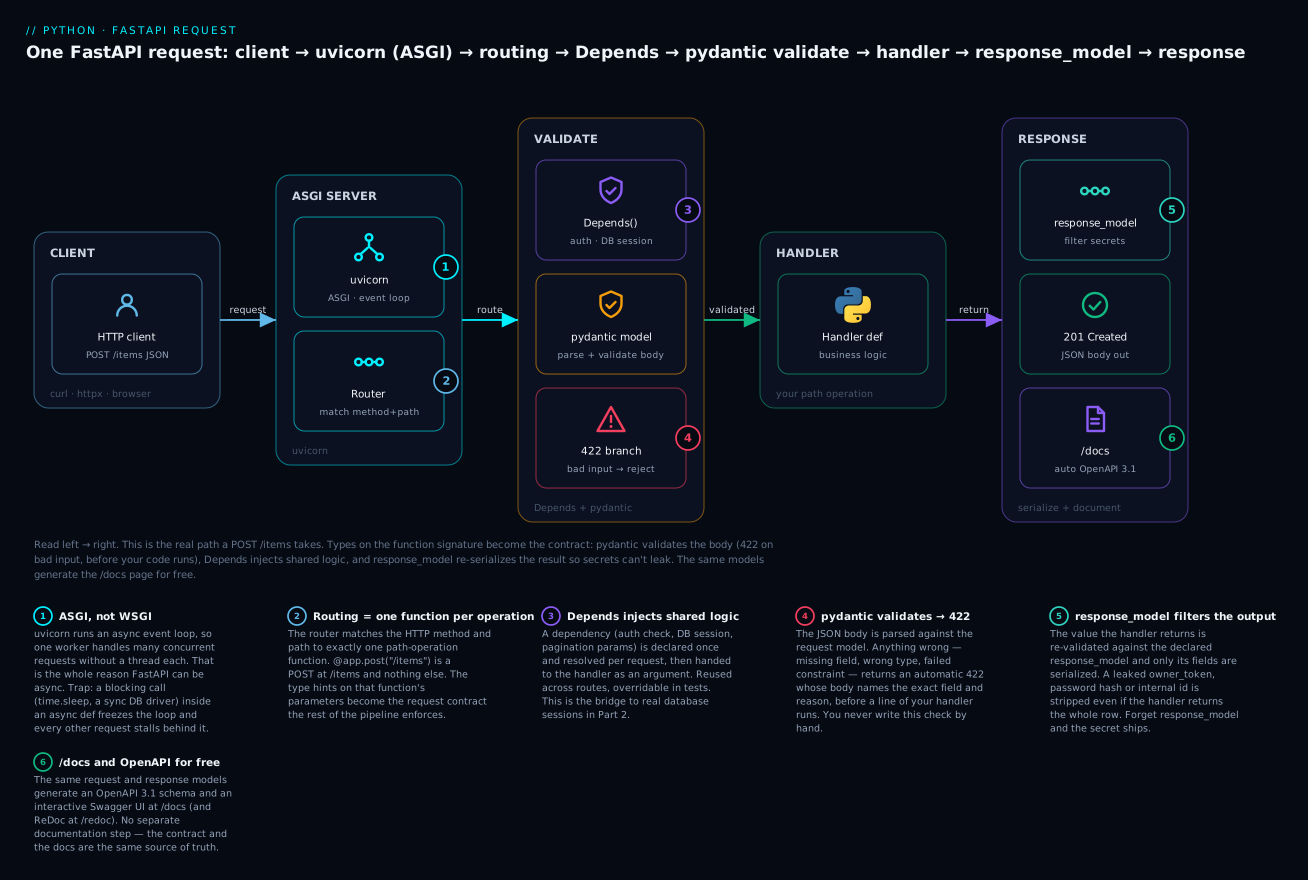
Trace it left to right and the design falls out: types on the function signature become the contract, pydantic enforces it at the door (the red 422 branch fires before your code), Depends injects shared logic, and response_model re-serializes the result so a secret can’t slip out — while the same models power /docs for free. The two coloured badges to watch are red (validation → 422) and teal (response filtering); those are the gates most bugs try to sneak past.
Path, query, and body parameters
FastAPI reads a handler’s signature and decides, per parameter, where each value comes from — path, query string, or body — using a clear rule. Getting this rule wrong is a top-three beginner confusion, so here it is explicitly.
| Parameter kind | Comes from | How FastAPI decides | Example |
|---|---|---|---|
| Path | The URL path | Name matches a {placeholder} in the path |
/items/{item_id} → item_id: int |
| Query | The ?a=1&b=2 string |
A simple type (int, str, bool) not in the path |
def list(limit: int = 10) |
| Body | The request body (JSON) | Typed with a pydantic model | def create(payload: ItemCreate) |
So in def read(item_id: int, verbose: bool = False, payload: ItemCreate): item_id is a path param (it’s in the path), verbose is a query param (simple type, has a default, not in the path → ?verbose=true), and payload is the body (it’s a pydantic model). The types aren’t decoration — they’re parsed and validated. Ask for item_id: int and a request to /items/abc gets an automatic 422; you never see "abc".
Query parameters get the same Field-style constraints via Query(...), and validation failures there produce a 422 just like body validation:
from typing import Annotated
from fastapi import Query

@app.get("/items")
def list_items(limit: Annotated[int, Query(ge=1, le=100)] = 10,
               tag: str | None = None):        # optional query param
    ...
print(c.get("/items", params={"limit": 999}).status_code)   # over the max
print(c.get("/items", params={"limit": 999}).json())
422
{'detail': [{'type': 'less_than_equal', 'loc': ['query', 'limit'],
   'msg': 'Input should be less than or equal to 100', 'input': '999', 'ctx': {'le': 100}}]}
Note 'loc': ['query', 'limit'] — the error tells the caller it was the query parameter, not a body field. The Annotated[int, Query(...)] form is the modern, recommended way to attach metadata to a parameter (it keeps the type and the constraint together and plays well with type checkers); you’ll also see the older limit: int = Query(10, ge=1) style in existing code.
Dependency injection with Depends
Real handlers share logic: “get the current user from the token,” “open a database session,” “parse common pagination params,” “enforce this API is rate-limited.” Copy-pasting that into every route is how it drifts out of sync. FastAPI’s answer is dependency injection: write the shared logic as a function, declare it as a dependency with Depends, and FastAPI runs it per request and hands the result to your handler.
from fastapi import Depends, HTTPException
from typing import Annotated

_DB: dict[int, dict] = {}

def get_item_or_404(item_id: int) -> dict:      # shared lookup, used by 3 routes
    row = _DB.get(item_id)
    if row is None:
        raise HTTPException(status_code=404, detail=f"Item {item_id} not found")
    return row

ItemDep = Annotated[dict, Depends(get_item_or_404)]    # name the dependency once

@app.get("/items/{item_id}", response_model=ItemPublic)
def read_item(item: ItemDep):                   # FastAPI runs get_item_or_404, injects the row
    return item

@app.delete("/items/{item_id}", status_code=204)
def delete_item(item: ItemDep):                 # SAME dependency, reused
    _DB.pop(item["id"])
get_item_or_404 itself takes item_id — a path parameter — so a dependency can have its own parameters, which FastAPI resolves from the request the same way it resolves a handler’s. It can raise HTTPException to short-circuit the request (the 404 here happens before the handler runs). And crucially, the same ItemDep is reused by read, update, and delete — write the lookup once, get consistent 404s everywhere.
Depends is how you do |
Example dependency | Returns / does |
|---|---|---|
| Fetch-or-404 | get_item_or_404(item_id) |
The row, or raises 404 |
| Auth / current user | get_current_user(token) |
The user, or raises 401 |
| Database session | get_db() |
A session, cleaned up after (Part 2) |
| Shared query params | pagination(skip=0, limit=10) |
A params object |
| Feature gate / rate limit | require_pro_plan(user) |
Passes or raises 403 |
Two things make Depends more than a helper function. It’s testable: app.dependency_overrides[get_db] = fake_db swaps a dependency in tests without touching the routes — the seam that makes the Part 2 database code unit-testable. And it’s recursive: get_current_user can itself Depends on get_db, and FastAPI resolves the whole chain, caching each dependency once per request. This is the bridge to Part 2: the database session and the authenticated user both arrive through Depends.
⚠️ The classic mistake is calling the dependency instead of passing it. You pass the function object, Depends(get_db); FastAPI calls it. Write Depends(get_db()) — with parentheses — and you’ve called it yourself at import time and handed Depends the return value, which isn’t callable:
TypeError: {'conn': 'db-handle'} is not a callable object
That fires at startup, when the route is registered — a fail-fast you’ll see immediately, not a runtime surprise.
Async endpoints and the blocking-call trap
FastAPI lets you write a handler as either def or async def, and choosing wrong is the sharpest performance edge in the framework. Here is the rule, and it is not “async is faster”:
- Use
async defwhen the handlerawaits genuinely async I/O — an async database driver, anhttpx.AsyncClientcall,asyncio.sleep. Theawaitlets the event loop serve other requests while this one waits. - Use plain
defwhen the handler does blocking work — a synchronous DB driver, arequestscall, file I/O, CPU work. FastAPI runsdefhandlers in a threadpool, so the blocking doesn’t freeze the event loop. - ⚠️ Never put a blocking call inside an
async def. That’s the trap. The event loop is one thread; a blocking call in anasynchandler seizes that thread and every other concurrent request stalls behind it until it finishes.
This is not theoretical, and it’s the direct application of everything in the asyncio lesson. Three endpoints, each “taking one second,” hit with 5 concurrent requests:
import asyncio, time
from fastapi import FastAPI
app = FastAPI()

@app.get("/block")
async def block():
    time.sleep(1)            # ❌ BLOCKING inside async def - freezes the loop
    return {"route": "block"}

@app.get("/await")
async def await_ok():
    await asyncio.sleep(1)   # ✅ yields to the loop - others proceed
    return {"route": "await"}

@app.get("/sync")
def sync_ok():
    time.sleep(1)            # ✅ plain def -> threadpool -> does NOT block the loop
    return {"route": "sync"}
Run it under uvicorn and fire 5 concurrent requests at each route with httpx.AsyncClient:
/block   5 concurrent x 1s sleep -> 5.06s wall     <- SERIALIZED: 1+1+1+1+1
/await   5 concurrent x 1s sleep -> 1.02s wall     <- overlapped
/sync    5 concurrent x 1s sleep -> 1.02s wall     <- overlapped (threadpool)
Read those numbers slowly. /await and /sync handled five concurrent one-second requests in one second — they overlapped. /block took five seconds: because time.sleep blocked the single event-loop thread, the five requests ran one after another, and a sixth would have waited six seconds. The async version is 5x slower than the sync one — the exact opposite of the intuition that “async is faster.” And there is no error, no warning, no traceback; the server just gets mysteriously slow under load. This is why the rule matters: async def is a promise that you will only await inside it. Break the promise with one synchronous database call and you’ve converted your concurrent server into a sequential one.
| Handler style | Loop behaviour | Use for | Danger |
|---|---|---|---|
async def + await |
Yields on I/O; concurrent | Async drivers, httpx.AsyncClient |
— |
async def + blocking call |
❌ Freezes the loop | — never | Serializes everything |
plain def |
Runs in threadpool | Sync DB, requests, CPU, files |
Threadpool has a size limit |
async def + run_in_threadpool |
Offload a blocking bit | One blocking call in async code | Slightly more code |
The safe default if you’re unsure: write plain def. FastAPI’s threadpool handles it correctly, and you can’t create the blocking trap. Reach for async def deliberately, when you have real awaits.
Status codes, HTTPException, and error handling
You are now the one choosing the status code, and getting it right is part of a good API. The requests lesson had a table of what codes mean; here’s what you return, per operation:
| Situation | Return | Why |
|---|---|---|
| GET succeeded | 200 |
Default for GET |
| POST created a resource | 201 |
⚠️ Not 200 — signals creation; set Location |
| POST did work, nothing to return | 200 or 204 |
204 if truly empty |
| DELETE succeeded | 204 |
No body — ⚠️ don’t return JSON |
| Accepted for async processing | 202 |
“Got it, working on it” |
| Validation failed (framework) | 422 |
Automatic from pydantic |
| Bad request (your check) | 400 |
Malformed in a way pydantic didn’t catch |
| Not authenticated | 401 |
Missing/invalid token |
| Authenticated but forbidden | 403 |
Known, not allowed |
| Resource not found | 404 |
raise HTTPException(404) |
| Conflict (duplicate) | 409 |
Unique constraint violated |
| Your bug | 500 |
Uncaught exception → FastAPI returns 500 |
You set the success code with status_code= on the decorator (use the status module for readable names: status.HTTP_201_CREATED). You signal an error by raising HTTPException — from a handler or a dependency — which FastAPI turns into a JSON error response:
from fastapi import HTTPException, status

@app.get("/items/{item_id}")
def read(item_id: int):
    row = _DB.get(item_id)
    if row is None:
        raise HTTPException(status_code=status.HTTP_404_NOT_FOUND,
                            detail=f"Item {item_id} not found")
    return row
GET /items/999 -> 404
{"detail": "Item 999 not found"}
raise rather than return matters: it unwinds cleanly from anywhere in the call stack — a dependency three levels deep can raise HTTPException(401) and the request stops there. For domain-specific errors you’d rather not sprinkle HTTPException through your business logic, register a custom exception handler that maps your own exception type to a response:
from fastapi import Request
from fastapi.responses import JSONResponse

class OutOfStock(Exception):
    def __init__(self, sku): self.sku = sku

@app.exception_handler(OutOfStock)
async def out_of_stock_handler(request: Request, exc: OutOfStock):
    return JSONResponse(status_code=409, content={"detail": f"{exc.sku} is out of stock"})

@app.post("/order/{sku}")
async def order(sku: str):
    if sku == "SOLD":
        raise OutOfStock(sku)        # business code raises a DOMAIN error...
    return {"ordered": sku}
POST /order/SOLD -> 409
{"detail": "SOLD is out of stock"}
Now your service layer raises OutOfStock — a clean domain concept — and the HTTP concern (which status code) lives in one handler at the edge. That separation scales; scattering status codes through business logic doesn’t.
Background tasks
Some work should happen after you’ve answered the client — sending a confirmation email, writing an audit log, invalidating a cache. Blocking the response on it makes the client wait for something they don’t care about. BackgroundTasks runs it after the response is sent:
from fastapi import BackgroundTasks

AUDIT = []
def write_audit(msg: str): AUDIT.append(msg)

@app.post("/order/{sku}")
async def order(sku: str, bg: BackgroundTasks):
    bg.add_task(write_audit, f"ordered {sku}")   # runs AFTER the response
    return {"ordered": sku}
# response returns immediately; AUDIT == ['ordered ABC'] a moment later
⚠️ Background tasks run in the same process, so they’re for quick, best-effort work. If the process dies, the task is lost; if the work is heavy or must not be lost (payment processing, video encoding), you need a real task queue (Celery, RQ, Dramatiq) — a Part 2 / distributed-systems concern.
Middleware and CORS (the browser gotcha)
Middleware wraps every request/response — for logging, timing, adding headers. The one you’ll need on day one is CORS. Here’s the gotcha that will cost you an afternoon: browsers enforce the same-origin policy, so JavaScript on https://app.example.com calling your API on https://api.example.com is blocked by the browser unless your API explicitly says that origin is allowed. Your API is working perfectly; curl and your tests pass; only the browser fails, with a console error about “CORS policy” and no useful status code. The fix is CORSMiddleware:
from fastapi.middleware.cors import CORSMiddleware

app.add_middleware(
    CORSMiddleware,
    allow_origins=["https://app.example.com"],   # ⚠️ NOT ["*"] with credentials
    allow_methods=["*"],
    allow_headers=["*"],
)
OPTIONS /order (preflight, Origin: app.example.com) -> 200, allow-origin: https://app.example.com
GET     /order (Origin: evil.example.com)           -> allow-origin header: None (blocked)
The browser sends a preflight OPTIONS request first to ask “am I allowed?”; the middleware answers with the Access-Control-Allow-Origin header for permitted origins and omits it for others, and the browser enforces the rest. ⚠️ Don’t reflexively set allow_origins=["*"] — it’s fine for a public read-only API but forbidden in combination with allow_credentials=True (cookies), and it’s a security smell on anything authenticated. Name your real front-end origins.
Designing a REST API
Framework mechanics aside, REST is a set of conventions for modelling your API around resources (nouns) manipulated by HTTP methods (verbs). Follow them and your API is predictable to anyone who’s used another REST API — which is the whole point.
The core discipline: URLs are nouns, methods are verbs. Don’t put verbs in URLs (/getItem, /createItem, /deleteAllItems); name the resource and let the method say what to do:
| Operation | ✅ RESTful | ❌ Not RESTful | Success code |
|---|---|---|---|
| List items | GET /items |
GET /getAllItems |
200 |
| Get one | GET /items/1 |
GET /getItem?id=1 |
200 / 404 |
| Create | POST /items |
POST /createItem |
201 |
| Replace | PUT /items/1 |
POST /updateItem |
200 |
| Partial update | PATCH /items/1 |
POST /editItem |
200 |
| Delete | DELETE /items/1 |
POST /deleteItem |
204 |
| Nested (an item’s tags) | GET /items/1/tags |
GET /getItemTags?id=1 |
200 |
A few conventions worth building in from the start, because retrofitting them hurts:
| Concern | Convention | Notes |
|---|---|---|
| Versioning | /v1/items in the path |
✅ Simplest, most visible. Also seen: an Accept header version |
| Pagination | ?limit=20&offset=40 or a cursor |
✅ Never return an unbounded list; cursor is stable under writes (see the requests lesson) |
| Filtering | ?status=active&tag=x |
Query params, not new endpoints |
| Sorting | ?sort=-created_at |
- prefix for descending is a common idiom |
| Errors | Consistent JSON shape ({"detail": ...}) |
Same shape everywhere; FastAPI’s default is {"detail": ...} |
| Idempotency | PUT/DELETE safe to repeat; POST is not | The idempotency-key pattern from the requests lesson |
The idempotency point ties straight back to the requests lesson from the other side of the wire: because you’re now the server, you are the one who must make PUT /items/1 produce the same result whether it’s called once or five times, and DELETE return cleanly on a second call (the item’s already gone — a 404 is a fine, honest answer). Design your writes so a client’s retry can’t double-charge or duplicate. That’s not a framework feature; it’s your handler’s responsibility.
Running it: development and production
In development you run uvicorn with auto-reload, so editing a file restarts the server:
uvicorn app:app --reload # app.py, the FastAPI() object named `app`
INFO:     Uvicorn running on http://127.0.0.1:8000 (Press CTRL+C to quit)
INFO:     Started reloader process using StatReload
INFO:     Application startup complete.
INFO:     127.0.0.1:63870 - "GET /items HTTP/1.1" 200 OK
That access-log line is the server-side echo of every request you sent as a client in the last lesson — method, path, protocol, status. The --reload flag is development only: it watches files and costs performance. ⚠️ Shipping --reload (or the bare dev server) to production is a real mistake — it’s slower, single-process by default, and not hardened.
For production you run multiple worker processes so you use all your CPU cores, typically gunicorn managing uvicorn workers:
gunicorn app:app -k uvicorn.workers.UvicornWorker -w 4 --bind 0.0.0.0:8000
| Concern | Development | Production |
|---|---|---|
| Command | uvicorn app:app --reload |
gunicorn -k uvicorn.workers.UvicornWorker -w N |
| Reload on edit | ✅ --reload |
❌ Never |
| Workers | 1 | N ≈ CPU cores (I/O-bound: more) |
| Process manager | none | gunicorn / systemd / container orchestrator |
| Behind | nothing | a reverse proxy (nginx) / load balancer |
| Flask equivalent | flask run |
gunicorn app:app (sync workers) |
The rule of thumb: -w (2 × cores) + 1 for a starting point, then measure. Each worker is a separate process with its own memory — which is the honest reason your in-memory _DB dict won’t survive contact with production: four workers means four separate dicts, and a request hitting worker 2 can’t see what worker 1 stored. That’s not a bug to fix here; it’s the exact reason Part 2 moves the data into a real database that all workers share. Deployment, containers, and the reverse proxy in front are also Part 2.
Flask vs FastAPI vs Django REST: choosing
Three mainstream ways to build an API in Python. The honest guidance:
| Flask | FastAPI | Django REST Framework | |
|---|---|---|---|
| Style | Microframework | Modern, typed, async | Batteries-included |
| Server model | WSGI (sync) | ASGI (async + sync) | WSGI (ASGI-capable) |
| Validation | ❌ Manual / Marshmallow | ✅ Built-in (pydantic) | ✅ Serializers |
| Auto API docs | ❌ Add-on | ✅ Built-in (/docs) |
✅ (browsable API) |
| Async support | ⚠️ Limited | ✅ First-class | ⚠️ Partial |
| ORM included | ❌ (Flask-SQLAlchemy) | ❌ (bring your own) | ✅ Django ORM |
| Admin UI | ❌ | ❌ | ✅ Django admin |
| Type hints drive it | ❌ | ✅ Yes | Partly |
| Learning curve | ✅ Gentle | ✅ Gentle–moderate | ⚠️ Steeper |
| Best for | Small apps, legacy, full control | ✅ New APIs, microservices, async, ML serving | Full web apps with DB + admin |
| Performance | Good | ✅ Excellent (async I/O) | Good |
The short version. FastAPI is the default for a new API, microservice, or ML model server — the validation, docs, and async are exactly what an API needs, and the type-driven design catches bugs before runtime. Django REST Framework wins when you’re building a whole web application — you want the ORM, migrations, admin, auth, and templates in one integrated box, and the API is one part of it. Flask is the choice for something small where you want total control and minimal magic, and it’s what you’ll maintain in the enormous body of existing Python web code. There’s no wrong answer, only a fit — but if someone says “we’re building a new JSON API in 2026,” FastAPI is the boring, correct default.
Hands-on lab
Build a complete CRUD REST API in FastAPI — create, read, list, update, delete an in-memory Item — with pydantic request/response models, validation, proper status codes, and a Depends. Run it, hit every endpoint (including a 422 from bad input and a 404), view the auto docs, then write the Flask equivalent of GET + POST for contrast.
⚠️ Everything is local and in-memory. No database, no external services, no cost.
Step 1 — Set up
mkdir widget-api && cd widget-api
python3 -m venv .venv
source .venv/bin/activate                 # Windows: .venv\Scripts\activate
python -m pip install fastapi uvicorn pydantic httpx flask pytest
What just happened: an isolated environment. httpx also gives FastAPI’s TestClient its engine, so the tests in Step 5 need no extra install.
Step 2 — The API
# app.py
from __future__ import annotations
from typing import Annotated

from fastapi import Depends, FastAPI, HTTPException, Query, status
from pydantic import BaseModel, Field

app = FastAPI(title="Widget API", version="1.0.0")

_DB: dict[int, dict] = {}                  # in-memory store (dies with the process)
_NEXT_ID = {"n": 0}

# ---- models ----
class ItemCreate(BaseModel):
    name: str = Field(min_length=1, max_length=50)
    price: float = Field(gt=0, description="Price in INR, must be positive")
    tags: list[str] = Field(default_factory=list)

class ItemUpdate(BaseModel):               # all optional -> partial update
    name: str | None = Field(default=None, min_length=1, max_length=50)
    price: float | None = Field(default=None, gt=0)
    tags: list[str] | None = None

class ItemPublic(BaseModel):               # the PUBLIC shape - no owner_token
    id: int
    name: str
    price: float
    tags: list[str]

# ---- a dependency: fetch-or-404, reused by read/update/delete ----
def get_item_or_404(item_id: int) -> dict:
    row = _DB.get(item_id)
    if row is None:
        raise HTTPException(status_code=404, detail=f"Item {item_id} not found")
    return row

ItemDep = Annotated[dict, Depends(get_item_or_404)]

# ---- routes ----
@app.post("/items", response_model=ItemPublic, status_code=status.HTTP_201_CREATED)
def create_item(payload: ItemCreate):
    _NEXT_ID["n"] += 1
    row = payload.model_dump()
    row["id"] = _NEXT_ID["n"]
    row["owner_token"] = f"secret-{_NEXT_ID['n']}"     # internal, must not leak
    _DB[_NEXT_ID["n"]] = row
    return row                                         # response_model strips owner_token

@app.get("/items", response_model=list[ItemPublic])
def list_items(limit: Annotated[int, Query(ge=1, le=100)] = 10, tag: str | None = None):
    rows = list(_DB.values())
    if tag is not None:
        rows = [r for r in rows if tag in r["tags"]]
    return rows[:limit]

@app.get("/items/{item_id}", response_model=ItemPublic)
def read_item(item: ItemDep):
    return item

@app.put("/items/{item_id}", response_model=ItemPublic)
def update_item(item: ItemDep, payload: ItemUpdate):
    item.update(payload.model_dump(exclude_unset=True))     # only fields the caller sent
    return item

@app.delete("/items/{item_id}", status_code=status.HTTP_204_NO_CONTENT)
def delete_item(item: ItemDep):
    _DB.pop(item["id"])

# a deliberately-leaky twin, to prove response_model matters:
@app.get("/items-leaky/{item_id}")
def read_leaky(item: ItemDep):
    return item                                          # NO response_model -> secret leaks
What just happened: five CRUD routes, three pydantic models (create / partial-update / public), one shared Depends, correct status codes (201 create, 204 delete), and a secret (owner_token) that the response_model will strip everywhere except the leaky twin.
Step 3 — Run it and open the docs
uvicorn app:app --reload
INFO:     Uvicorn running on http://127.0.0.1:8000 (Press CTRL+C to quit)
INFO:     Application startup complete.
Open http://127.0.0.1:8000/docs in a browser: you get a full interactive Swagger UI, every endpoint with its schema, and a “Try it out” button that fires real requests. That page is generated entirely from your type hints — you wrote no documentation.
Step 4 — Hit every endpoint (real request/response)
In a second terminal (same venv), drive the running server with httpx:
# drive.py
import httpx

B = "http://127.0.0.1:8000"
with httpx.Client(base_url=B, timeout=5) as x:
    print("CREATE ->", (r := x.post("/items", json={"name": "Widget", "price": 9.99, "tags": ["a", "b"]})).status_code, r.json())
    x.post("/items", json={"name": "Gadget", "price": 20, "tags": ["a"]})
    print("LIST   ->", x.get("/items").status_code, x.get("/items").json())
    print("FILTER ->", x.get("/items", params={"tag": "b"}).json())
    print("READ   ->", x.get("/items/1").status_code, x.get("/items/1").json())
    print("404    ->", x.get("/items/999").status_code, x.get("/items/999").json())
    print("UPDATE ->", x.put("/items/1", json={"price": 12.50}).json())
    print("422    ->", (r := x.post("/items", json={"price": -5})).status_code, r.json()["detail"][0]["type"], r.json()["detail"][1]["type"])
    print("LEAK   ->", x.get("/items-leaky/1").json())
    print("DELETE ->", x.delete("/items/2").status_code, repr(x.delete("/items/2").status_code))
CREATE -> 201 {'id': 1, 'name': 'Widget', 'price': 9.99, 'tags': ['a', 'b']}
LIST   -> 200 [{'id': 1, 'name': 'Widget', 'price': 9.99, 'tags': ['a', 'b']}, {'id': 2, 'name': 'Gadget', 'price': 20.0, 'tags': ['a']}]
FILTER -> [{'id': 1, 'name': 'Widget', 'price': 9.99, 'tags': ['a', 'b']}]
READ   -> 200 {'id': 1, 'name': 'Widget', 'price': 9.99, 'tags': ['a', 'b']}
404    -> 404 {'detail': 'Item 999 not found'}
UPDATE -> {'id': 1, 'name': 'Widget', 'price': 12.5, 'tags': ['a', 'b']}
422    -> 422 missing greater_than
LEAK   -> {'name': 'Widget', 'price': 12.5, 'tags': ['a', 'b'], 'id': 1, 'owner_token': 'secret-1'}
What just happened: the whole CRUD lifecycle over a real socket. CREATE returned 201 and the response has no owner_token — response_model stripped it. 404 came from the dependency, before the handler. 422 caught both the missing name and the negative price. And LEAK — the twin without response_model — shows owner_token: secret-1 sitting right there in the response. That single diff is the argument for response_model.
Step 5 — Tests that need no running server
TestClient runs the app in-process — no uvicorn, no socket, no network — so tests are fast and deterministic. (Under the hood it uses httpx; on the newest Starlette you may see a StarletteDeprecationWarning about it — harmless.)
# test_app.py
import pytest
from fastapi.testclient import TestClient
from app import app, _DB, _NEXT_ID

@pytest.fixture
def client():
    _DB.clear(); _NEXT_ID["n"] = 0        # isolate each test from the shared store
    return TestClient(app)

def test_create_returns_201_and_strips_secret(client):
    r = client.post("/items", json={"name": "Widget", "price": 9.99, "tags": ["a"]})
    assert r.status_code == 201
    assert r.json() == {"id": 1, "name": "Widget", "price": 9.99, "tags": ["a"]}
    assert "owner_token" not in r.json()          # response_model did its job

def test_read_missing_is_404(client):
    assert client.get("/items/999").status_code == 404

def test_bad_body_is_422_naming_fields(client):
    r = client.post("/items", json={"price": -5})
    assert r.status_code == 422
    assert {e["type"] for e in r.json()["detail"]} == {"missing", "greater_than"}

def test_query_out_of_range_is_422(client):
    assert client.get("/items", params={"limit": 999}).status_code == 422

def test_full_crud_round_trip(client):
    iid = client.post("/items", json={"name": "A", "price": 1}).json()["id"]
    assert client.put(f"/items/{iid}", json={"price": 2}).json()["price"] == 2
    assert client.delete(f"/items/{iid}").status_code == 204
    assert client.get(f"/items/{iid}").status_code == 404     # gone after delete
python -m pytest test_app.py -q
.....                                                                     [100%]
5 passed in 0.16s
What just happened: five real behaviours — the 201 + secret-stripping, the 404, the 422 naming both bad fields, query validation, and a full create→update→delete→gone round trip — verified in 0.16 seconds with no server running. This is the testing lesson’s pytest applied to an API: fast, offline, deterministic. Note the fixture clears _DB each test, because the in-memory store is shared module state — the same “stateful test double” gotcha you’ll meet in every integration suite.
Step 6 — The same two endpoints in Flask
For contrast, GET + POST in Flask — same behaviour, manual validation:
# flask_app.py
from flask import Flask, jsonify, request
app = Flask(__name__)
_DB, _NEXT = {}, {"n": 0}

@app.get("/items/<int:item_id>")
def read_item(item_id):
    row = _DB.get(item_id)
    if row is None:
        return jsonify(error=f"Item {item_id} not found"), 404
    return jsonify({k: v for k, v in row.items() if k != "owner_token"})

@app.post("/items")
def create_item():
    data = request.get_json(silent=True) or {}
    errors = {}
    if not isinstance(data.get("name"), str) or not data.get("name"):
        errors["name"] = "required non-empty string"
    p = data.get("price")
    if not isinstance(p, (int, float)) or isinstance(p, bool) or p <= 0:
        errors["price"] = "required number > 0"
    if errors:
        return jsonify(errors=errors), 422
    _NEXT["n"] += 1
    row = {"id": _NEXT["n"], "name": data["name"], "price": p,
           "tags": data.get("tags", []), "owner_token": f"secret-{_NEXT['n']}"}
    _DB[_NEXT["n"]] = row
    return jsonify({k: v for k, v in row.items() if k != "owner_token"}), 201
c = app.test_client()
print("POST ok  ->", c.post("/items", json={"name": "Widget", "price": 9.99, "tags": ["a"]}).status_code)
print("POST bad ->", c.post("/items", json={"price": -5}).status_code, c.post("/items", json={"price": -5}).get_json())
print("GET  404 ->", c.get("/items/9").status_code)
POST ok  -> 201
POST bad -> 422 {'errors': {'name': 'required non-empty string', 'price': 'required number > 0'}}
GET  404 -> 404
What just happened: the same API surface, and it works — but count the hand-written validation, the isinstance(p, bool) guard against Python’s True == 1 quirk, and the manual secret-stripping in two places. Then look back at the FastAPI version, where the same guarantees came from three lines of typed model. That is the case for FastAPI in one side-by-side, and also why you can still read and maintain the Flask you’ll inherit.
Common mistakes and troubleshooting
| Symptom / traceback | Cause | Fix |
|---|---|---|
422 Unprocessable Entity you didn’t expect |
Request body/params don’t match the pydantic model — wrong type, missing field, failed constraint | Read detail[].loc — it names the exact field. Fix the client’s JSON or the model |
| A secret (token, hash) appears in the JSON response | Returned a dict/row without response_model, or the model includes the field |
Add response_model=PublicModel; keep secrets out of the public model |
| Server mysteriously slow under load, no errors | Blocking call inside async def — froze the event loop |
Use plain def (threadpool), or await a real async call. Measured 5x here |
TypeError: ... is not a callable object at startup |
Depends(get_db()) — you called the dependency |
Pass the function: Depends(get_db), no parentheses |
Browser: “blocked by CORS policy”; curl works fine |
No CORSMiddleware, or the origin isn’t allowed |
add_middleware(CORSMiddleware, allow_origins=[...]) with your front-end origin |
POST returns 200, client expected 201 |
Forgot status_code=201 on the decorator |
@app.post(..., status_code=status.HTTP_201_CREATED) |
AssertionError / ResponseValidationError on response |
Handler returned data that doesn’t fit response_model (missing required field) |
Return all fields the model requires, or relax the model |
| Value showed up as a query param, not the body (or vice-versa) | Path/query/body inference: simple types → query, pydantic model → body | Type body params with a BaseModel; match path names to {placeholders} |
RuntimeError: no running event loop in a test |
Called an async def handler directly |
Use TestClient (it manages the loop) or pytest-asyncio |
DELETE returns a body / breaks a strict client |
Returned JSON with a 204 status |
204 means no body — return nothing |
| Data vanishes / is inconsistent across requests in prod | In-memory store + multiple workers = separate memory each | Use a shared database (Part 2). In-memory only works single-process |
--reload not picking up changes |
Editing a file uvicorn isn’t watching, or ran without --reload |
Run uvicorn app:app --reload; check the watched dir |
ImportError: cannot import name 'TestClient' |
httpx not installed (TestClient depends on it) |
pip install httpx (or fastapi[standard]) |
| Unknown JSON fields silently ignored | pydantic v2 default is extra="ignore" |
Set model_config = ConfigDict(extra="forbid") to reject unknown keys |
bool passed where a positive number expected slips through |
isinstance(True, int) is True in Python (Flask manual checks) |
Guard with isinstance(x, bool), or let pydantic’s float type handle it |
Three of these are worth more than a row.
The blocking-call trap is the one with no traceback. Every other bug here throws an exception or a visible 4xx. This one just makes your server slow, and only under concurrency, so it passes every single-request test and every local check, then falls over in production when real load arrives. The tell is latency that scales with concurrency — response times fine at one request, terrible at fifty. The cause is almost always a synchronous call (a requests call, a sync DB driver, a time.sleep, a heavy CPU loop) inside an async def. The fix is a decision, not a patch: either make the handler plain def (FastAPI threadpools it) or replace the blocking call with a real await. When in doubt, write def — you cannot create this trap in a synchronous handler.
response_model is not cosmetic — it’s a data-exfiltration boundary. The leaky-twin demo wasn’t a toy: the single most common way secrets escape a Python API is a handler that returns a database row (return user) where the row object carries a password_hash, an internal flag, or another user’s data through a relationship. Without response_model, all of it serializes and ships. Declare the public shape and return through it, every time. Treat any handler returning a raw ORM object or a full dict without a response_model as a bug in code review.
The pydantic “mutable default” question has a surprising answer. In a plain function or a @dataclass, def f(tags=[]) is the classic Python bug — the list is created once and shared across every call. Many people carry that fear into pydantic and reach for Field(default_factory=list) believing a bare = [] is dangerous. It isn’t: pydantic deep-copies field defaults per instance, so a bare tags: list[str] = [] is actually safe on a model:
class A(BaseModel):
    tags: list[str] = []          # SAFE in pydantic (copied per instance)
a1, a2 = A(), A()
a1.tags.append("x")
print(a1.tags, a2.tags)           # -> ['x'] []    a2 is NOT polluted

def f(tags=[]):                   # the classic bug, for contrast
    tags.append(1); return tags
print(f(), f(), f())              # -> [1, 1, 1] [1, 1, 1] [1, 1, 1]  (same shared list)
Use Field(default_factory=list) anyway — not because the bare form is unsafe in pydantic, but because it’s unambiguously correct, it’s mandatory the moment you use a real @dataclass or a Query(default=...), and it documents intent. Know the nuance so you don’t cargo-cult the rule into the wrong place.
Cheat-sheet
| FastAPI | What it does |
|---|---|
app = FastAPI(title=..., version=...) |
The application object |
@app.get/post/put/patch/delete("/x") |
A path operation (route) |
def h(item_id: int) |
Path param (name in the {...}) |
def h(limit: int = 10) |
Query param (simple type, default) |
def h(payload: MyModel) |
Request body (pydantic model) |
Annotated[int, Query(ge=1, le=100)] |
Query param with validation |
status_code=status.HTTP_201_CREATED |
Success status for the operation |
response_model=Public |
✅ Filter the output — strip secrets |
raise HTTPException(404, detail=...) |
Return an error response |
dep: Annotated[T, Depends(fn)] |
Inject shared logic (auth, DB, 404) |
bg: BackgroundTasks; bg.add_task(fn, x) |
Run work after the response |
app.add_middleware(CORSMiddleware, ...) |
Allow browser cross-origin calls |
@app.exception_handler(MyError) |
Map a domain exception to a response |
/docs, /redoc, /openapi.json |
✅ Free interactive docs + schema |
| pydantic | What it does |
|---|---|
class M(BaseModel): x: int |
A validated, typed model |
Field(gt=0, max_length=50) |
Field constraints |
Field(default_factory=list) |
✅ Safe mutable default |
x: str | None = None |
Optional field |
m.model_dump() |
Model → dict |
m.model_dump(exclude_unset=True) |
Only fields the caller set (partial update) |
M.model_validate(data) |
Validate a dict → model (raises ValidationError) |
ConfigDict(extra="forbid") |
Reject unknown JSON keys |
| Run it | Command |
|---|---|
| Dev server | uvicorn app:app --reload |
| Production | gunicorn app:app -k uvicorn.workers.UvicornWorker -w 4 |
| Test (in-process) | TestClient(app) + pytest |
| Flask dev / prod | flask run / gunicorn app:app |
| Status code | Return it when |
|---|---|
200 |
GET/PUT/PATCH succeeded |
201 |
POST created a resource |
204 |
DELETE succeeded (no body) |
400 / 422 |
Bad request / validation failed |
401 / 403 |
Not authenticated / forbidden |
404 / 409 |
Not found / conflict |
Interview and exam questions
Q: What’s the difference between WSGI and ASGI, and why is FastAPI ASGI?
A: WSGI (2003) is the synchronous Python web interface: a worker handles one request at a time, start to finish, and you scale by adding worker processes (gunicorn, uWSGI). It powers Flask and classic Django. ASGI (2018) is the async interface: a worker runs an event loop and juggles many concurrent requests on one thread, setting a request aside whenever it awaits slow I/O. FastAPI is built on Starlette, which is ASGI, and that’s precisely why FastAPI can define async def handlers and serve high-concurrency I/O-bound workloads (the common case for APIs — mostly waiting on databases and other services) efficiently on fewer resources. WSGI can’t do that without a process per concurrent request. The trade-off: on ASGI a blocking call freezes the shared loop, so async requires discipline.
Q: Why does FastAPI return a 422 for bad input, and what’s in the response?
A: Because you declared the request shape as a pydantic model (or typed parameters), and the input violated it — wrong type, missing required field, or a failed constraint like gt=0. FastAPI validates before your handler runs and returns 422 Unprocessable Entity with a detail list where each entry has type (machine-readable, e.g. missing, greater_than), loc (the exact field path, e.g. ["body", "price"]), msg, and the offending input. It reports all errors in one pass, not just the first. You wrote none of that checking — it comes from the type declaration, which is the core productivity win.
Q: What is response_model and why is it a security feature?
A: response_model=SomeModel on a path operation tells FastAPI to serialize the return value through SomeModel, emitting only that model’s fields. It’s a security boundary because the most common way secrets leak from a Python API is returning a database row or dict that contains a password_hash, an internal token, or another user’s data — without response_model, all of it ships. With it, anything not in the public model is stripped. It also decouples your public API shape from internal storage, so you can refactor the model behind it without breaking clients. In review, a handler returning a raw ORM object or full dict with no response_model should be treated as a potential leak.
Q: You have an async def endpoint that makes a database call, and the server is slow under load. What’s likely wrong?
A: The database call is almost certainly synchronous (a blocking driver like psycopg2 in sync mode, or a requests call) sitting inside async def. Because the ASGI worker is one event-loop thread, a blocking call seizes it and every other concurrent request stalls behind it — the server serializes instead of overlapping. Measured in this lesson: five concurrent one-second requests took 5 seconds blocking vs 1 second when done right. The fix is either make the handler a plain def (FastAPI runs it in a threadpool, so it doesn’t block the loop) or use a genuinely async driver / httpx.AsyncClient you can await. The rule: only await non-blocking work inside async def; if it blocks, use def.
Q: How does FastAPI decide whether a parameter is a path, query, or body param?
A: By the parameter’s type and whether its name appears in the path. If the name matches a {placeholder} in the route path, it’s a path param. If it’s a simple type (int, str, bool, etc.) and not in the path, it’s a query param. If it’s typed with a pydantic BaseModel, it’s the body. So def read(item_id: int, verbose: bool = False, data: ItemModel) reads item_id from the path, verbose from ?verbose=, and data from the JSON body. All three are validated against their declared types, producing a 422 on mismatch.
Q: What is Depends and give two real uses.
A: Depends is FastAPI’s dependency injection: you write shared logic as a callable, declare Depends(that_callable) on a parameter, and FastAPI runs it per request and injects the result — resolving the dependency’s own parameters and any sub-dependencies, caching each once per request. Real uses: (1) fetch-or-404 — a get_item_or_404(item_id) dependency reused by read/update/delete so the 404 logic exists once; (2) auth — get_current_user(token) that decodes the token and returns the user or raises 401; (3) database sessions — get_db() yielding a session cleaned up after the request. It’s also the test seam: app.dependency_overrides[get_db] = fake swaps dependencies in tests. Common bug: writing Depends(get_db()) (called) instead of Depends(get_db) (passed) — a startup TypeError.
Q: A front-end JavaScript app can’t call your API but curl works. Why?
A: CORS. Browsers enforce the same-origin policy: JS on https://app.example.com calling https://api.example.com is blocked by the browser unless the API returns Access-Control-Allow-Origin naming that origin. curl and your tests aren’t browsers, so they don’t enforce it — which is why it “works everywhere except the browser,” with only a console “CORS policy” error and no useful status. Fix: app.add_middleware(CORSMiddleware, allow_origins=["https://app.example.com"], ...). The browser sends a preflight OPTIONS request first; the middleware answers it. ⚠️ Don’t use allow_origins=["*"] with credentials/cookies — it’s disallowed and a security smell.
Q: What status codes should a RESTful CRUD API return, and why is 201 vs 200 a thing?
A: GET → 200; POST that creates → 201 Created (ideally with a Location header to the new resource); PUT/PATCH → 200; DELETE → 204 No Content (empty body). 201 vs 200 matters because it communicates creation specifically — clients, caches, and API consumers can rely on it to mean “a new resource now exists here,” and it’s part of REST’s contract. Returning 200 from a create still “works” but throws away that signal and breaks strict clients. Errors follow the classes: 400/422 for bad input, 401/403 for auth, 404 for missing, 409 for conflicts, 500 for your bugs.
Q: How do you test a FastAPI app without running a server or hitting the network?
A: TestClient(app) from fastapi.testclient runs the ASGI app in-process — it constructs requests and calls the app directly, no socket, no uvicorn, no network. You write ordinary pytest: r = client.post("/items", json=...); assert r.status_code == 201. It’s fast (5 tests in ~0.16s here) and deterministic. For dependency-heavy code you use app.dependency_overrides to inject fakes (e.g. a test database). If you have shared mutable state like an in-memory store, reset it in a fixture between tests. TestClient uses httpx internally, so httpx must be installed.
Q (coding): Add a partial-update (PATCH-style) endpoint that only changes the fields the caller sends.
A: Use an all-optional model plus model_dump(exclude_unset=True) so untouched fields stay as they are:
class ItemUpdate(BaseModel):
    name: str | None = Field(default=None, min_length=1)
    price: float | None = Field(default=None, gt=0)

@app.patch("/items/{item_id}", response_model=ItemPublic)
def patch_item(item: ItemDep, payload: ItemUpdate):
    item.update(payload.model_dump(exclude_unset=True))   # only what the caller set
    return item
The key is exclude_unset=True: it emits only the fields present in the request, so sending {"price": 5} updates the price and leaves name alone. Without it, model_dump() includes the None defaults and would wipe fields the caller didn’t mention. Constraints (gt=0) still apply to whatever is sent, giving a 422 on a bad value.
Q (coding): Write a dependency that returns the current user from a Bearer token, or 401. A:
from fastapi import Depends, HTTPException, Header
from typing import Annotated

def get_current_user(authorization: Annotated[str | None, Header()] = None) -> dict:
    if not authorization or not authorization.startswith("Bearer "):
        raise HTTPException(status_code=401, detail="Missing or malformed token")
    token = authorization.removeprefix("Bearer ")
    user = lookup_user_by_token(token)          # Part 2: decode a JWT / hit the DB
    if user is None:
        raise HTTPException(status_code=401, detail="Invalid token")
    return user

CurrentUser = Annotated[dict, Depends(get_current_user)]

@app.get("/me")
def me(user: CurrentUser):                      # any route gets auth by adding this param
    return {"id": user["id"]}
Points tested: reading the Authorization header via Header(), raising 401 (not 403 — the caller isn’t known yet) for missing/invalid credentials, and returning the user so downstream handlers just declare user: CurrentUser. This is exactly the injection seam Part 2 fills with real JWT decoding and a DB lookup.
Q: When would you pick Flask or Django REST over FastAPI? A: Flask when you want a tiny, unopinionated core with total control and minimal magic, for a small service — and, realistically, when you’re maintaining the large body of existing Flask code. Django REST Framework when you’re building a whole web application, not just an API: you want the integrated ORM, migrations, admin UI, auth, and templates in one box, with the API as one facet. FastAPI is the default for a new standalone API, microservice, or ML model server, where its built-in validation, automatic docs, and first-class async are exactly what you need and the type-driven design catches errors before runtime. None is wrong; it’s about fit — but “new JSON API” with no other constraints points to FastAPI.
Key takeaways
- You’re the server now: request → route → handler → response. The server (uvicorn) owns the socket, the framework owns routing, and you own the handlers. The request is untrusted input you must validate; the response is a contract you must control.
- ASGI is why FastAPI is async — and why blocking is deadly. WSGI (Flask) is one request per worker; ASGI (FastAPI) juggles many on one event-loop thread, which suits I/O-bound APIs. ⚠️ A blocking call inside
async deffreezes all concurrent requests — measured at 5x slower. When unsure, write plaindefand let FastAPI’s threadpool handle it. - Pydantic models are the killer feature: validation as type declaration. Declare the body shape and FastAPI parses, validates, and rejects bad input with a precise 422 naming every bad field — before your code runs. The same model generates the OpenAPI schema and the free interactive
/docs. response_modelis a security boundary, not a formality. It serializes only the declared fields, so apassword_hashor internal token in your row can’t leak. Return through a public model every time; a handler returning a raw row without one is a bug.Dependsinjects shared logic — and bridges to Part 2. Fetch-or-404, the current user, the database session all arrive throughDepends, written once and reused, overridable in tests. ⚠️ Pass the function (Depends(get_db)), never call it (Depends(get_db())).- Choose status codes deliberately: 201 on create, 204 on delete, 404/409 for the obvious cases. Raise
HTTPExceptionfrom anywhere (including dependencies) to short-circuit; map domain errors with@app.exception_handler. And remember CORS — a browser-only failure yourcurltests will never catch. - Design around resources and methods, not verbs-in-URLs.
POST /items,GET /items/1,DELETE /items/1— version in the path (/v1/), paginate every list, and make PUT/DELETE idempotent so a client’s retry is safe. - Test in-process with
TestClient+pytest, run with uvicorn (dev) and gunicorn+uvicorn workers (prod). ⚠️ Never ship--reload; and know that multiple workers mean your in-memory dict won’t be shared — the exact reason Part 2 moves to a real database, with auth and production deployment.