If you have never written a line of code, this is the right place to start. Not with syntax to memorise, but with a map — because almost everything that makes beginners quit is a map problem, not a talent problem.
“Why did my program do nothing at all?” “Why does the tutorial say python but my machine says command not found?” “It runs, but the answer is wrong — is the computer broken?” “How does typing English-ish words in a text file make a machine do something?” Every one of those questions dissolves the moment you hold the right model of what is actually happening.
Here is the honest summary of this lesson in one sentence: a computer cannot solve your problem, and it cannot read Python. You solve the problem — on paper, in plain words — and Python is just the notation you use to hand the solution over. Nearly everyone gets this backwards at first. They think programming is typing, and that the hard part is remembering the punctuation. Programming is thinking; the typing is the last and easiest step.
Read slowly. Where you see code, type it. Seeing an idea run on a real machine is what turns a diagram into knowledge.
Why this matters
Every piece of software you touched today — the app that woke you, the map that routed you, the bank that moved your money — is the same thing underneath: a list of very small instructions, written by a person, that a machine carries out without understanding any of it. There is no magic layer. Once you can write that list, you can automate essentially any task you can describe precisely.
That last word is the catch, and it is the reason this lesson exists before any lesson about syntax. A computer is not clever. It is fast and obedient. It will do exactly what you said, several billion times a second, including the parts you did not mean. The skill you are actually learning over the next few months is not “Python” — it is the discipline of describing a task so precisely that something with no judgement can execute it.
This is also why the skill keeps its value. The language changes every decade; the thinking does not. A developer who learned this in C in 1995 could move to Python in 2010 and to whatever comes next in 2035, because algorithms and problem decomposition transfer perfectly and syntax does not. Learn the thinking now and Python becomes a detail you pick up almost by accident.
So we will go in the correct order: what a program is, what an algorithm is, how to plan one in plain English, the only three ways instructions can be arranged, what python3 really does to your file, and how to think when it breaks. Then you will run your first program.
What a program actually is
A program is a list of instructions that a computer carries out, in order, to turn some input into some output. That is the entire definition. A 40-million-line operating system and your first three-line script are the same kind of object — they differ only in size.
The instructions have to be very small, because the machine underneath is startlingly simple. Strip away every abstraction and a CPU (the Central Processing Unit — the chip that does the actual work) can do only about five kinds of thing:
| What a CPU can actually do | In plain English | Example |
|---|---|---|
| Move data | Copy a number from memory into the chip, or back | Fetch the 1025 you stored a moment ago |
| Arithmetic | Add, subtract, multiply, divide two numbers | 1025 / 2 becomes one division instruction |
| Compare | Ask “is this bigger than that?” and remember the yes/no | Is 512.5 greater than 500? |
| Jump | Continue at a different instruction — always, or only if the last comparison said yes | Skip the warning message when the bill is small |
| Talk to a device | Move a byte to or from the disk, screen, keyboard, or network | Put the characters 512.5 on your terminal |
That is close to the whole repertoire. There is no “split the bill” instruction, no “understand the user” instruction. Every app you have ever used is built out of moving, adding, comparing, and jumping — a few billion times a second. The computer does not think. It moves numbers around very quickly. Hold on to that; it explains every strange thing your code will ever do.
Because a program’s job is to transform something into something else, it is useful to see every program as three stages. This is the oldest model in computing and it never stops being true:
| Stage | What it means | In your first program | In an app you use |
|---|---|---|---|
| Input | The data the program starts with | The bill total and the number of people | Your tap on the screen; a GPS reading |
| Process | The work done on that data | Divide the total by the people | Route-finding across a road graph |
| Output | The result, made visible or saved | Text printed on your terminal | The blue line drawn on the map |
When you get stuck later — and you will — come back to this table and ask the three questions in order: What do I have? What must I do to it? What must come out? A surprising share of “I don’t know where to start” is really “I have not decided what my input is.”
A note on words, since people use several for one thing. Code is the text you write; a program is any list of instructions a computer executes; a script is a small program run straight from its source, which is how Python usually works; an app is a program with a face on it. Those are all the same kind of object. The one word that means something genuinely different is algorithm — which is the next section.
Algorithms: the recipe that comes before the code
An algorithm is a finite sequence of unambiguous steps that solves a problem or completes a task. It is not code. It has no language, no punctuation, no semicolons. You have followed thousands of them: a recipe, an IKEA manual, the instructions on a fire extinguisher, the way you were taught long division at school.
Let us decompose one you know by heart. The task: make chai for three people, one of whom takes no sugar. Try writing that down as steps a machine could follow, and watch how much you normally leave unsaid:
| # | Step, written for something with no judgement | Notice |
|---|---|---|
| 1 | Pour 300 ml water into the pan | How much? “Some water” is not an instruction |
| 2 | Put the pan on the flame | — |
| 3 | Keep heating while the water is not boiling | A step that repeats an unknown number of times |
| 4 | Add 3 teaspoons tea leaves | Why 3? Because there are 3 cups — the input drove it |
| 5 | Add 150 ml milk | — |
| 6 | Keep heating while it has not risen | Repeats again |
| 7 | For each of the 3 cups: pour the chai in | Repeats a known number of times |
| 8 | For each cup: if that person takes sugar, stir in 1 spoon | A decision, made per cup |
| 9 | Serve. Stop. | It must end |
Two things just happened that matter more than the chai. First, you were forced to be specific, and the vagueness you had to remove (“some water”, “a bit of sugar”, “until it’s ready”) is exactly the vagueness that becomes a bug when you skip this stage and start typing. Second, look at the right-hand column: everything is either do this, then that, repeat while / for each, or if this then that. Those three shapes are all there is — we will name them properly in a moment.
A list of steps is not automatically an algorithm, though. To be a usable one, it needs five properties:
| Property | What it demands | What breaks without it |
|---|---|---|
| Unambiguous | Each step has exactly one meaning | “Add sugar to taste” — whose taste? The machine has none |
| Finite | It must stop, in a bounded number of steps | Step 3 with no flame never boils: your program hangs forever |
| Well-defined inputs | You know what you start with, and its type | “Make chai” for how many? A missing input is a missing answer |
| Well-defined output | You know what “done” produces | If you can’t state the output, you can’t test it |
| Effective | Each step is actually doable | “Guess the winning number” is not a step |
And here is the distinction the exam questions always ask about, and that beginners blur for months:
| Algorithm | Program | |
|---|---|---|
| What it is | The method — an idea | The implementation — a file |
| Written in | Plain English, pseudocode, a flowchart, your head | A specific language: Python, Java, Go |
| Runs on | Nothing — a human follows it | A computer, via an interpreter or compiler |
| Language | None. It is language-independent | Exactly one, and it is fussy about commas |
| Can it be wrong? | Yes — a logic error. The idea itself is broken | Yes — either a bad algorithm, or a bad translation of a good one |
| Lifespan | Decades. Sorting algorithms from the 1960s still ship | Years. Rewritten whenever the language or framework moves |
| Example | “Divide the total by the number of people” | share = total / people |
The practical payoff: one algorithm, many programs. The chai algorithm above could be written in Python, Java, or Malayalam — it is the same algorithm. The trap is the mirror image: a beautiful, perfectly-typed Python file implementing a wrong algorithm is a wrong program, and no amount of syntax knowledge will save it.
There is a more encouraging corollary. The same problem usually has several algorithms, and choosing between them is real engineering. Suppose you must find “Sharma” in a 1,000-page phone book:
| Algorithm | The method | Steps for 1,000 pages | Trade-off |
|---|---|---|---|
| Linear search | Start at page 1, check every page in order | Up to 1,000 | Dead simple; works even if unsorted; slow |
| Binary search | Open the middle, throw away the wrong half, repeat | About 10 | Vastly faster — but only works because the book is sorted |
Both are correct. One is a hundred times faster, and its speed is bought with an assumption (sortedness) that you must actually check. That trade — correctness, speed, simplicity, and the assumptions you are willing to make — is the job. You will meet these two again, formally, when the course reaches searching and Big-O.
Pseudocode: think before you type
Pseudocode is your algorithm written down in structured plain English — code-shaped, but with no language’s rules to obey. It is deliberately fake (“pseudo”) code. There is no compiler for it, no official standard, and nobody will mark you wrong for a missing bracket. That freedom is the entire point: it lets you debug your thinking while thinking is still cheap.
Here is the bill-splitting problem — the one you will actually run in the lab — as pseudocode:
START
  READ total          # what the meal cost
  READ people         # how many are splitting it
  SET share TO total / people
  PRINT "Each person pays:", share
  IF share > 500 THEN
      PRINT "Ouch. Next time we cook."
  END IF
END
Read it aloud. You do not know Python yet and you understood every line — that is the test of good pseudocode. Now put it beside the real thing:
| Pseudocode | Python | What changed |
|---|---|---|
READ total |
total = 1025 |
Python needs a real value, from a literal or input() |
SET share TO total / people |
share = total / people |
= means “store this”, not “is equal to” |
PRINT "..." |
print("...") |
Real function name, real brackets, real quotes |
IF share > 500 THEN |
if share > 500: |
Lowercase if, a colon, no THEN |
| (indented under THEN) | (indented under :) |
In Python the indentation is mandatory — it is the syntax |
END IF |
(nothing — the indent just stops) | Python has no END; the block ends when the indenting ends |
# what the meal cost |
# what the meal cost |
Comments survive the trip unchanged |
| Nobody checks it | The interpreter checks every character | This is the whole difference in one row |
The mapping is nearly one-to-one, which is exactly why this step is worth ninety seconds. You are never translating a problem into Python. You are translating a problem into an algorithm, then an algorithm into Python — and only the second half needs the manual.
Pseudocode has no official keywords and nobody will grade yours. The conventions above are simply the near-universal ones — capitals for keywords (READ, SET … TO, PRINT, IF … THEN, WHILE, FOR EACH), indenting for blocks — and they are worth following only so that other people, including future you, can read what you wrote. The full pseudocode-to-Python mapping is in the cheat-sheet at the end of this lesson.
Sequence, selection, iteration — the only three building blocks
Now the single most liberating fact in this lesson, and the reason the chai table looked so repetitive.
Every program ever written — your first script, a browser, a flight-control system — is built from exactly three ways of arranging instructions. Not thirty. Three. This is not a teaching simplification; it is a proved result (the structured program theorem, Böhm–Jacopini, 1966): sequence, selection and iteration are sufficient to express any computable algorithm.
| Construct | The idea | Plain-English test | Pseudocode | Python | The chai step |
|---|---|---|---|---|---|
| Sequence | Do this, then the next thing, top to bottom | “and then…” | one line after another | one line after another | “Pour water, put on flame” |
| Selection | Choose a path based on a yes/no question | “if… otherwise…” | IF … THEN … ELSE |
if / elif / else |
“If they take sugar, stir it in” |
| Iteration | Repeat something, either while a condition holds or once per item | “keep… / for each…” | WHILE / FOR EACH |
while / for |
“While not boiling, keep heating” |
That is the whole toolkit. Everything else you will learn — functions, classes, decorators, async, machine learning — is a way of organising these three so that humans can still understand the result at scale. When a program’s logic confuses you, ask which of the three you are looking at. There are only three answers.
One clarification worth having early, because it costs beginners hours: the two kinds of iteration are not interchangeable. Use for when you know the collection or the count in advance (“for each of the 3 cups”). Use while when you do not, and the loop ends on a condition (“while it is not boiling”). A while whose condition never becomes false is an infinite loop — the program hangs, the fan spins, nothing prints. It has not crashed; it is obediently doing what you said, forever. That is the “finite” property from the algorithm table, biting.
Why we need a language, and what an interpreter does
So the CPU wants moving, adding, comparing and jumping — expressed as numbers. You want to write share = total / people. Something has to bridge that gap, and that something is why programming languages exist.
A language gives you two things at once: a notation precise enough that a machine can mechanically translate it, and one loose enough that a human can read it. Those goals fight each other, and every language is a truce. Python’s leans hard toward the human — which is why it is a superb first language, and why it is slower than C.
The bridging happens in one of two broad ways:
| Compiled (C, C++, Go, Rust) | Interpreted / bytecode VM (Python) | |
|---|---|---|
| Separate build step | Yes — gcc bill.c -o bill, then run ./bill |
No — python3 bill.py does everything, every run |
| What you ship | A machine-code executable | Your .py text file |
| Who executes it | The CPU, directly | The Python VM — a program, which itself runs on the CPU |
| Rebuild for a new OS/CPU? | Yes, every time | No — the same .py runs anywhere python3 does |
| Typo in a never-run branch | Many caught at build time, before you ship | SyntaxError caught; a TypeError waits until that line runs |
| Speed | Fast | Typically 10–100× slower on tight numeric loops |
| Feedback loop | edit → build → run | edit → run |
| Best at | Squeezing the hardware | Getting the idea working today |
That last row is the honest trade. Python buys an enormously faster loop from idea to running thing and pays for it in raw execution speed — a bargain that is almost always right while you are learning, and often right in production too. (When it is not, the heavy loop gets handed to a C library like NumPy — which is why “Python is slow” is more slogan than fact.)
Now the part that most tutorials get wrong. “Interpreted” does not mean Python reads your file one line at a time and does what each line says. What actually happens when you type python3 bill.py is a two-phase process:
| Phase | What python3 does |
What you can observe |
|---|---|---|
| 1. Read | Loads bill.py as plain text |
It really is just text — open it in any editor |
| 2. Compile | Parses the whole file and turns it into bytecode — compact instructions like LOAD_CONST, COMPARE_OP, CALL |
python3 -m dis bill.py prints them |
| 3. Check syntax | Any grammar mistake, anywhere in the file, stops everything here | SyntaxError, and no output at all — not even from line 1 |
| 4. Execute | A loop inside the interpreter walks the bytecode and performs each instruction | Your output appears |
| 5. Cache (imports only) | Bytecode for imported modules is saved as __pycache__/*.pyc so the next import skips phase 2 |
The folder appears after an import, not after running a script |
| 6. Runtime errors | A bad value or type only explodes when its line is actually reached | TypeError, NameError — with a traceback |
So Python is compiled — just not to machine code, and not by you. It compiles to bytecode for a virtual machine: a program that pretends to be a CPU with a Python-shaped instruction set. Your bytecode is data that the interpreter chews on, and the interpreter (written in C, compiled to real machine code years ago by someone else) is what finally reaches your actual CPU.
Phase 3 is your fastest diagnostic tool for the next six months: if you got no output whatsoever, it is a SyntaxError, and nothing ran. If you got some output and then an error, it is a runtime error, and the lines before it did run.
Here is the whole path, from a problem in your head to characters on your screen. Read it left to right, and notice that the first two zones contain no code at all — that is the thinking you now know to do first — and that your .py file never touches the CPU directly.
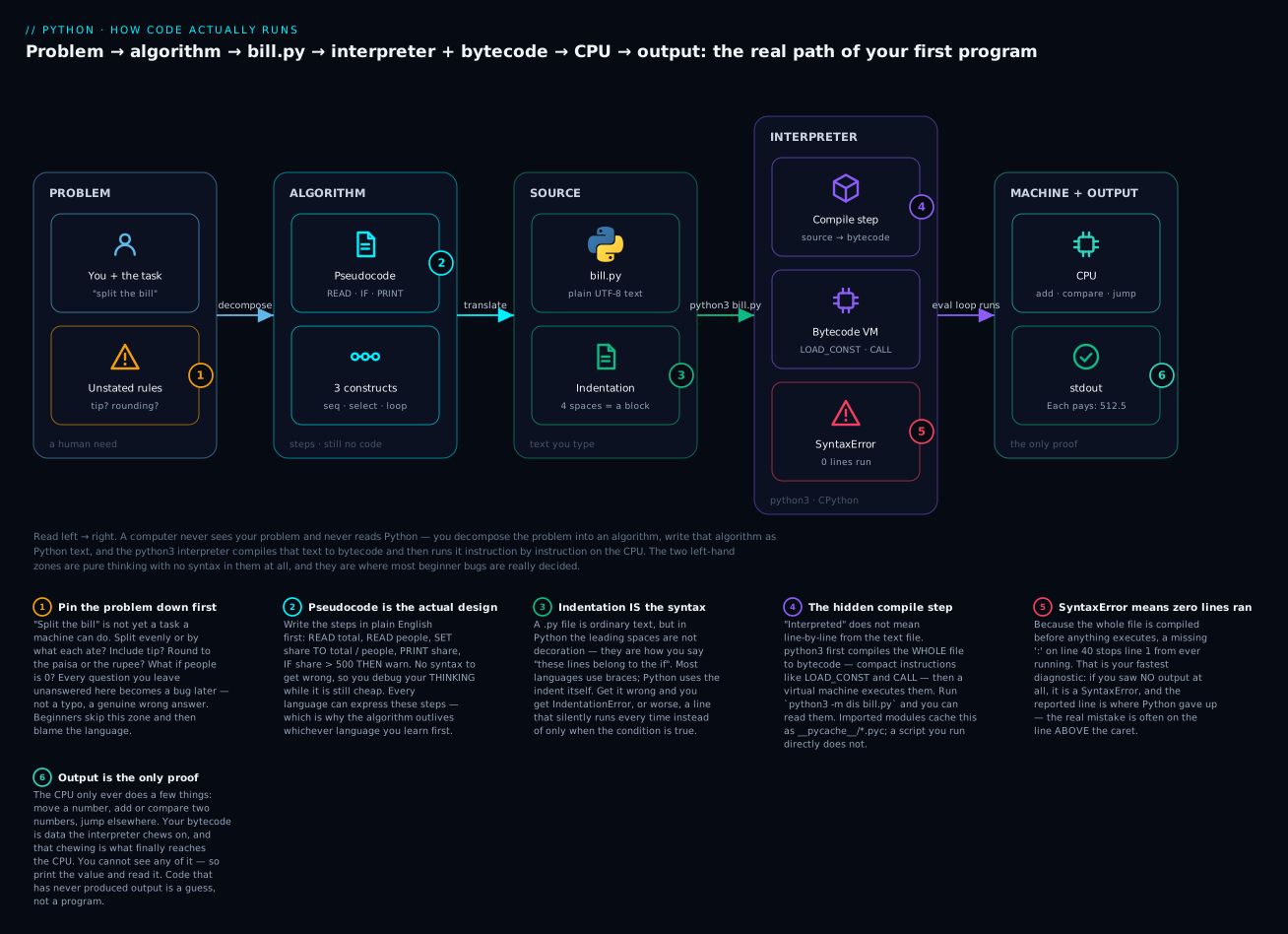
The badges mark the six things worth remembering: pin the vague problem down before you type (1), because pseudocode is where the real design happens (2); indentation is not decoration in Python, it is the syntax (3); there is a hidden compile step you can actually read (4), and it means a SyntaxError anywhere stops everything everywhere (5); and the CPU’s output is the only proof any of it worked (6).
(Two honest footnotes. “CPython” is the standard Python you downloaded, and the one this describes; alternatives like PyPy compile further, to real machine code, and run much faster. And CPython 3.13 ships an experimental JIT that can turn hot bytecode into machine code — but it is off by default and must be enabled when Python is built, so the model above is what you will actually observe.)
The problem-solving method
You now have the pieces. Here is the assembly procedure — the loop that professionals actually run, whether they admit it or not. It is roughly Pólya’s 1945 method from mathematics, and it predates computers entirely.
| # | Stage | What you actually do | Done when | Beginners’ error |
|---|---|---|---|---|
| 1 | Understand | Restate the problem in your own words. Name the input, the output, and every rule | You can state it in one sentence, with no “somehow” in it | Starting to type at minute zero |
| 2 | Decompose | Break it into pieces small enough to be obvious | Every piece is a step you could do by hand | Trying to solve all of it at once |
| 3 | Plan | Write the pseudocode. Walk through it on paper with a real example | Your hand-trace gives the right answer | Skipping straight to syntax |
| 4 | Implement | Translate the pseudocode, one construct at a time | It runs | Writing 60 lines before running any |
| 5 | Test | Try the normal case, the edge cases, and the stupid cases | You tried to break it and could not | Testing only the case you designed for |
| 6 | Refine | Make it clearer, name things better, remove repetition | You would not wince showing it to someone | Refactoring code that is still wrong |
Stage 4 has a rule that is worth more than any other advice here: write a few lines, run it, repeat. A beginner writes the whole program and then meets forty errors at once, in an unknown order, with no idea which caused which. A professional writes three lines and runs them. Same forty mistakes — met one at a time, each with an obvious cause. The loop is the skill.
Stage 5 deserves its own checklist, because “it worked when I tried it” is where trust in your code goes to die:
| Ask this | For the bill splitter | Why it bites |
|---|---|---|
| Does the normal case work? | ₹1025 between 2 → 512.5 | The only case most people test |
| What about the boundary? | Exactly ₹1000 between 2 → is 500 “> 500”? No | Off-by-one and > vs >= live here |
| What about zero? | 0 people → ZeroDivisionError |
The classic crash |
| What about one? | 1 person → should print the whole total | Loops and divisions love to break at 1 |
| What about wrong types? | Someone types “ten” instead of 10 | input() always hands you text |
| What about negatives? | A bill of −500? A refund, or nonsense? | Decide deliberately, don’t discover it live |
| Is the output what a human wanted? | 341.6666666666667 — or 341.67? |
Correct and useful are different bars |
Notice that most of that table is questions from stage 1, coming back to collect. That is the pattern: the cost of skipping “understand” is paid, with interest, in “test”.
How to think about a bug
Your code will not work. This is not a sign you are bad at this; it is the job. Professionals with twenty years of experience write broken code all day — they are just faster at the next part.
The first move is always the same: decide which of the three kinds of bug you have. Do not touch anything until you know, because each kind has a different hunting method.
| Kind | When it bites | How you know | Example | How to hunt it |
|---|---|---|---|---|
| Syntax error | At compile — before any line runs | No output at all, and SyntaxError / IndentationError |
if x > 5 (missing colon) |
Read the reported line, then the line above it. Purely mechanical |
| Runtime error | When that specific line executes | Some output, then a traceback ending in TypeError, NameError, … |
"1025" / 2 |
The last line names the exception; the traceback shows exactly where |
| Logic error | Never — it runs perfectly | Wrong answer, no error at all | // where you meant / |
The hard one. Hand-trace your algorithm against reality |
The third row is the dangerous one, and it is exactly why we spent this lesson on algorithms. A logic error means the machine faithfully executed a wrong idea. No traceback will ever appear, because nothing went wrong from Python’s point of view. You find these by comparing what the program did against what your pseudocode said — which requires having written pseudocode.
When you are stuck on any of the three, four moves solve most of it:
- Read the actual error, out loud, from the bottom. The last line of a traceback names the exception and the problem in plain English. Beginners see a wall of red and panic; the answer is usually written right there. Modern Python even suggests the fix:
NameError: name 'prnt' is not defined. Did you mean: 'print'? - Print the values. You cannot see inside a running program.
print(total, people, share)before the failing line turns a mystery into a fact. Not cheating — the most-used debugging technique on Earth. - Narrow it down. Comment out half. Does it still break? You have halved the search space — the phone book’s binary search, applied to your own file.
- Explain it to something that cannot help. Say the code aloud, line by line, to a rubber duck or a patient friend. You will hear your own wrong assumption. This has a name — rubber-duck debugging — because it works that reliably.
Misconceptions worth killing on day one
| The belief | The reality |
|---|---|
| “Programming is about memorising syntax” | It is about decomposing problems. Syntax you look up forever, and so does everyone else |
| “Real programmers don’t need to look things up” | They look things up constantly. Nobody memorises a standard library |
| “The computer misunderstood me” | It cannot misunderstand. It did exactly what you wrote — which was not what you meant |
| “An error message means I failed” | An error is the machine helping — it is telling you where and why. Silence would be worse |
| “I need to be good at maths” | You need logic and patience. Most programming needs arithmetic you had at 12 |
“= means equals” |
= stores a value. == asks whether two things are equal. This one bug will visit you |
| “I should write the whole program, then run it” | Write 3 lines, run it, repeat. Meet your mistakes one at a time |
| “It ran, so it’s correct” | It ran, so it has no syntax or runtime error. Correctness is a separate question, answered by testing |
| “I’m too slow — everyone else gets this instantly” | Nobody gets it instantly. The people who look fast are just further into the same struggle |
Hands-on lab
Time to make all of it concrete. This lab needs nothing but Python — no libraries, no virtual environment, no internet. You will write pseudocode first (yes, really), then run your first program, then deliberately break it, then look inside the interpreter. Everything here is safe: no step deletes, downloads, or changes anything outside a folder you create.
Step 0 — Check that Python is installed.
python3 --version
# Python 3.13.9      <- any 3.12+ is fine
If you get command not found, install Python from python.org/downloads (on Windows, tick “Add python.exe to PATH” in the installer). Note the 3: on macOS and Linux the command is almost always python3, and bare python frequently does not exist at all. On Windows it is usually python or py. This one character causes an astonishing number of day-one failures.
What just happened: You confirmed the interpreter — the program that will read your file — is on your machine and can be found by name.
Step 1 — Make a home for your work.
mkdir ~/python-course && cd ~/python-course
What just happened: Nothing clever, but from here on python3 bill.py will find your file, because you are standing in the same folder. “No such file” nearly always means “wrong directory.”
Step 2 — Write pseudocode. On paper. Before any code.
Do not skip this — it is the actual lesson. The task: split a restaurant bill and warn me if my share is painful. Write the steps in plain English, aiming for something like:
START
  SET total TO the bill amount
  SET people TO how many are splitting
  SET share TO total / people
  PRINT share
  IF share is more than 500 THEN
      PRINT a warning
  END IF
END
What just happened: You wrote an algorithm. It is language-independent, and it is now the specification your Python must match. When the code misbehaves later, this is what you compare it against.
Step 3 — Your first program: one line.
Create a file called hello.py in that folder, with your editor of choice (VS Code, Notepad, nano, anything that saves plain text — not Word):
print("Hello, world!")
Run it:
python3 hello.py
Hello, world!
What just happened: You wrote a program — genuinely, that is a complete one. print is a function: a named, reusable chunk of behaviour someone else already wrote. The brackets mean “run it now”, and the thing inside is what you handed it. The quotes mean “this is text, not a name” — text in quotes is a string.
Step 4 — Add variables (translate the middle of your pseudocode).
Change hello.py, or start bill.py:
total = 1025            # the bill, in rupees
people = 2              # how many are splitting it
share = total / people  # each person's cost
print("Each person pays:", share)
python3 bill.py
Each person pays: 512.5
What just happened: Four ideas in four lines. A variable is a name pointing at a value — total now means 1025. = is assignment, not equality: read it as “put 1025 into total”, right side first. Line 3 proves that ordering — Python works out 1025 / 2 first, then stores the result. print takes several things separated by commas and puts a space between them. And anything after a # is a comment, ignored entirely by Python and written purely for the human reading it (in six months: you).
Step 5 — Add the if (the last line of your pseudocode).
Append these two lines to bill.py:
if share > 500:
    print("Ouch. Next time we cook.")
The whole file is now:
# bill.py - my first real program
total = 1025
people = 2
share = total / people
print("Each person pays:", share)
if share > 500:
    print("Ouch. Next time we cook.")
python3 bill.py
Each person pays: 512.5
Ouch. Next time we cook.
What just happened: Selection — construct number two of the three. Read it exactly as English: “if share is greater than 500, then print”. Two details carry all the weight. The colon at the end of the if line means “a block follows”. The four spaces on the next line are how you say “this line belongs to the if” — other languages use { } braces; Python uses the indentation itself, and it is not optional.
Now prove the if actually decides. Change total to 800 and re-run:
Each person pays: 400.0
What just happened: The warning vanished, because 400.0 > 500 is False, so the indented line was skipped. You did not tell the machine to skip it — you told it a condition, and it compared and jumped. That is the CPU’s compare and jump from the very first table, running in your own program. Set total back to 1025 before continuing.
Step 6 — Break it on purpose (meet the SyntaxError).
Delete the colon from the if line, so it reads if share > 500, and run it:
  File "/Users/you/python-course/bill.py", line 6
    if share > 500
                  ^
SyntaxError: expected ':'
What just happened: Read what you got — and what you did not get. There is no “Each person pays” line, even though that print sits on line 5, above the mistake. That is phase 3 from the interpreter table, live: the whole file compiles before a single line executes, so a grammar error anywhere means nothing runs. The ^ marks where Python gave up, and there is no Traceback header — that appears only for runtime errors. Put the colon back.
Step 7 — Break it the way copy-paste breaks it (smart quotes).
This one will happen to you for real, so meet it now on purpose. Paste this exact line into a new file oops.py — the quotes are the curly ones a web page or Word will silently give you:
print(“Hello, world!”)
  File "/Users/you/python-course/oops.py", line 1
    print(“Hello, world!”)
          ^
SyntaxError: invalid character '“' (U+201C)
What just happened: Python needs the straight " (U+0022). Word processors, chat apps, and many websites “helpfully” convert straight quotes into typographic ones — almost identical on screen, a completely different character underneath. Modern Python names the culprit and its Unicode code point exactly. The fix is always the same: use a code editor, and retype the quotes rather than pasting them.
Step 8 — Meet a runtime error (and see the difference).
Create runtime.py:
total = 1025
print("Starting up...")
print(totl)          # deliberate typo
Starting up...
Traceback (most recent call last):
  File "/Users/you/python-course/runtime.py", line 3, in <module>
    print(totl)          # deliberate typo
          ^^^^
NameError: name 'totl' is not defined. Did you mean: 'total'?
What just happened: Compare it with Step 6 and the whole model clicks. Starting up... did print — this file’s grammar was fine, so it compiled, and lines ran until the broken one was reached. You got a Traceback, and the last line is a plain English sentence that names the exception and suggests the fix. Syntax errors: nothing runs, no traceback. Runtime errors: partial output, traceback. That single distinction will orient you in a thousand future failures.
Step 9 — Meet a logic error (the scary kind).
Change the division in bill.py from / to //:
share = total // people
Each person pays: 512
Ouch. Next time we cook.
What just happened: No error. No traceback. Red flags nowhere. And the answer is wrong — 512, not 512.5, quietly losing 50 paise per person. / is true division; // is floor division, which throws away the remainder. Python did precisely what you asked. This is a logic error, it is invisible, and the only defence is the pseudocode you wrote in Step 2 plus the testing table above. Put / back.
Step 10 — Look inside: see the bytecode with your own eyes.
python3 -m dis bill.py
  0           RESUME                   0

  2           LOAD_CONST               0 (1025)
              STORE_NAME               0 (total)

  3           LOAD_CONST               1 (2)
              STORE_NAME               1 (people)

  4           LOAD_NAME                0 (total)
              LOAD_NAME                1 (people)
              BINARY_OP               11 (/)
              STORE_NAME               2 (share)

  5           LOAD_NAME                3 (print)
              PUSH_NULL
              LOAD_CONST               2 ('Each person pays:')
              LOAD_NAME                2 (share)
              CALL                     2
              POP_TOP

  6           LOAD_NAME                2 (share)
              LOAD_CONST               3 (500)
              COMPARE_OP             148 (bool(>))
              POP_JUMP_IF_FALSE        9 (to L1)
  ...
What just happened: This is the compile step, made visible. The left column is your line numbers. Line 4 became “load total, load people, do a binary /, store into share”. Line 6 — your if — became COMPARE_OP followed by POP_JUMP_IF_FALSE: compare, then jump, exactly the two CPU operations from this lesson’s first table. Your Python was never executed as text; this is what actually ran.
You are not expected to write bytecode, ever — the point is only that the compile step is real and inspectable, not a story. (Exact instruction names differ by version: this is 3.13, and 3.12 prints byte offsets too. Bytecode is an internal detail with no compatibility promise, which is itself why you write Python and not this.)
Step 11 — Prove where the .pyc cache really comes from.
ls -a                       # after all that running: no __pycache__ anywhere
mkdir -p demo && cd demo
echo 'message = "hi from a module"' > greet.py
python3 -c "import greet; print(greet.message)"
hi from a module
ls __pycache__
# greet.cpython-313.pyc
What just happened: You just corrected a myth most tutorials repeat. Running a script directly — everything you did in Steps 3–10 — creates no __pycache__; Python compiles it fresh each time and throws the bytecode away. Only imported modules get cached, because those are the ones loaded repeatedly. The filename records the exact version (cpython-313) because bytecode is not portable across Python releases. When you meet a mysterious __pycache__ folder later, you will know what made it — and that it is safe to delete.
In eleven steps you went from a problem in English to an algorithm, to pseudocode, to a running program, through all three kinds of bug, and down to the bytecode itself — the whole map of this lesson, walked end to end on your own machine.
Common mistakes and troubleshooting
Almost every day-one failure is one of these. Keep this table close for your first month.
| Symptom / traceback | Cause | Fix |
|---|---|---|
python: command not found (macOS/Linux) |
On most systems the command is python3; bare python may not exist |
Use python3. On Windows use python or py. Check with python3 --version |
can't open file '/…/bill.py': [Errno 2] No such file or directory |
You are in a different folder from the file, or the name/extension is wrong | cd to the folder; ls (or dir) to confirm. Watch for bill.py.txt from Notepad. Read the full path in the message — it shows where Python actually looked |
SyntaxError: expected ':' |
Missing colon at the end of an if / for / while / def line |
Add the :. Every line that opens a block ends with one |
SyntaxError: invalid character '“' (U+201C) |
Smart quotes — you copied code from a web page, chat, or Word | Retype the quotes as straight " in a real code editor. Never paste code from a word processor |
SyntaxError: invalid syntax. Maybe you meant '==' or ':=' instead of '='? |
You wrote if x = 5: — assignment where a comparison belongs |
Use == to compare. = only ever stores |
IndentationError: expected an indented block after 'if' statement on line 2 |
The line under an if: is not indented |
Indent it by 4 spaces. The indent is what puts it inside the if |
IndentationError: unexpected indent |
A line is indented that has no reason to be | Remove the leading spaces. Only block bodies are indented |
TabError: inconsistent use of tabs and spaces in indentation |
Tabs and spaces mixed in one file — usually from pasting | Pick spaces (4). Set your editor to “insert spaces for tabs” and re-indent |
NameError: name 'totl' is not defined. Did you mean: 'total'? |
Typo, or you used a variable before assigning it | Read the suggestion — it is usually right. Names are case-sensitive: Total ≠ total |
TypeError: unsupported operand type(s) for /: 'str' and 'int' |
Doing maths on text. input() always returns a string, even for “1025” |
Convert first: total = float(input(...)) or int(...) |
ZeroDivisionError: division by zero |
people was 0 — the edge case from the testing table |
Guard it: if people > 0: before dividing |
| Program prints nothing and never ends | Infinite loop — a while condition that never becomes false |
Press Ctrl+C to stop it. Check that something inside the loop actually changes the condition |
No output at all, and a SyntaxError |
Whole-file compile failed, so nothing ran | Fix the reported line — and check the line above it |
| It runs, no errors, wrong answer | Logic error — the machine did what you said, not what you meant | Hand-trace your pseudocode with real numbers. print() the values at each step |
Three of these deserve extra words, because they cost the most hours.
1. The error is often on the line above the one Python names. Python reports where it noticed the problem, not where you made it. An unclosed bracket on line 10 is frequently reported on line 11, because Python kept hopefully reading, looking for the ), and only gave up on the next line. So when the reported line looks perfect — and it will look perfect, and you will stare at it for ten minutes — look up one line. This single habit will save you more time than any other tip in this lesson.
2. input() always gives you text, and it never warns you. Type 1025 at an input() prompt and Python hands you the string "1025", not the number. It looks identical when printed, which is the whole trap. "1025" / 2 is meaningless, so you get TypeError: unsupported operand type(s) for /: 'str' and 'int'. Worse, "1025" + 2 fails differently (can only concatenate str (not "int") to str), and "1025" * 2 succeeds and gives you "10251025" — a wrong answer with no error at all. Convert at the boundary, the moment the value arrives: total = float(input("Bill? ")).
3. A SyntaxError says nothing about your logic. Beginners see one and conclude their whole approach is wrong. It is not — the interpreter never got far enough to have an opinion about your approach; it could not even read the sentence. Fix the punctuation mechanically, run again, and then start thinking. Syntax errors are typing problems, logic errors are thinking problems, and confusing the two is exhausting.
Cheat-sheet
Everything you can legitimately use after this lesson, in one place.
| Thing | What it does | Example |
|---|---|---|
python3 file.py |
Compile and run a file (python or py on Windows) |
python3 bill.py |
python3 --version |
Check which Python you have (want 3.12+) | Python 3.13.9 |
python3 (alone) |
Open the interactive prompt (REPL) to try one line | >>> 2 + 2 → 4 |
exit() or Ctrl+D |
Leave the REPL (Ctrl+Z then Enter on Windows) | — |
python3 -m dis file.py |
Show the bytecode your file compiles to | The Step 10 output |
| Ctrl+C | Stop a running/hung program | Your infinite-loop escape hatch |
print(x) |
Show a value on screen | print(share) → 512.5 |
print("a:", x) |
Print several things; comma adds a space | Each person pays: 512.5 |
# comment |
Ignored by Python; a note for humans | total = 1025 # in rupees |
name = value |
Assignment — store a value under a name | total = 1025 |
= vs == |
= stores · == compares |
x = 5 vs if x == 5: |
"text" |
A string — text in straight quotes | "Hello" |
1025 / 512.5 |
An int (whole) / a float (decimal) | type(512.5) → float |
+ - * / |
Add, subtract, multiply, divide (/ always gives a float) |
1025 / 2 → 512.5 |
// |
Floor division — drops the remainder | 1025 // 2 → 512 |
> < >= <= == != |
Comparisons — each gives True or False |
512.5 > 500 → True |
if condition: |
Selection — run the indented block only if true | if share > 500: |
| (4 spaces) | Indentation — how Python knows what is inside a block | Mandatory, not style |
input("Prompt? ") |
Read text from the user — always returns a string | name = input("Name? ") |
int(x) / float(x) |
Convert text to a whole / decimal number | float("1025") → 1025.0 |
round(x, 2) |
Round to 2 decimal places | round(341.666, 2) → 341.67 |
__pycache__/ |
Cached bytecode for imported modules only | greet.cpython-313.pyc |
And the translation table you will actually use — pseudocode in, Python out:
| Pseudocode | Python |
|---|---|
SET x TO 5 |
x = 5 |
READ x |
x = input("...") — then convert it! |
PRINT x |
print(x) |
IF cond THEN … END IF |
if cond: + indented block |
IF … ELSE … END IF |
if cond: … else: … |
WHILE cond … END WHILE |
while cond: + indented block |
FOR EACH item IN things |
for item in things: |
x IS EQUAL TO y |
x == y |
x IS NOT EQUAL TO y |
x != y |
Interview and exam questions
Q: What is the difference between an algorithm and a program? A: An algorithm is the method — a finite, unambiguous sequence of steps that solves a problem, expressed in plain English, pseudocode, or a flowchart, and independent of any language. A program is an implementation of an algorithm in one specific language, executable by a computer. The algorithm is the idea, the program is the artefact — and a correct program implementing a wrong algorithm is still wrong.
Q: Why bother with pseudocode when you could just write the code? A: It separates the two hard things. Pseudocode lets you debug your thinking with no syntax rules to obey and no cost to changing your mind. Once the logic is right on paper, translating it is nearly mechanical. Skipping it means debugging your logic and your punctuation simultaneously, which is how beginners end up believing programming is harder than it is.
Q: Name the three fundamental control constructs and give an everyday example of each. A: Sequence — do steps in order (pour water, then light the flame). Selection — choose a path from a condition (if they take sugar, add sugar). Iteration — repeat, either while a condition holds or once per item (keep heating while it isn’t boiling; pour one cup for each person). The structured program theorem proves these three are sufficient to express any computable algorithm.
Q: Is Python compiled or interpreted? Be precise.
A: Both — and the question is really about the implementation, not the language. CPython compiles your entire .py file into bytecode (instructions like LOAD_CONST, COMPARE_OP), then a virtual machine inside the interpreter executes it. So there is a genuine compile step, but it runs automatically on every execution, produces bytecode rather than machine code, and needs no separate build command. No machine-code executable is ever created; the interpreter — itself compiled C — is what runs on the CPU.
Q: You run your script and see no output whatsoever, just an error. What kind of error is it, and how do you know?
A: A SyntaxError (or IndentationError). Python compiles the whole file before executing any of it, so a grammar mistake anywhere prevents every line from running — including print statements above it. The tell is the absence of both output and a Traceback header. A runtime error would have produced the output from earlier lines, plus a traceback.
Q: What are the three kinds of bug, and which is the most dangerous? A: Syntax errors (caught at compile time — nothing runs), runtime errors (raised when a line executes — you get a traceback), and logic errors (it runs perfectly and gives the wrong answer). Logic errors are by far the most dangerous, because nothing warns you: the machine correctly executed an incorrect idea. You find them by testing against expectations and hand-tracing the algorithm, never by reading tracebacks.
Q: What does a CPU actually do, at the level of a single instruction?
A: Very little: move data between memory and registers, do arithmetic on two numbers, compare two numbers and record the result, jump to a different instruction (unconditionally or based on that comparison), and move bytes to/from devices. Everything — every app, game, and model — is built from those, executed billions of times a second. Notably, if share > 500: compiles down to exactly two of them: a compare and a conditional jump.
Q (practical): Write pseudocode for finding the largest number in a list of numbers. A:
START
  SET largest TO the first number in the list
  FOR EACH number IN the rest of the list
      IF number > largest THEN
          SET largest TO number
      END IF
  END FOR
  PRINT largest
END
It uses all three constructs — sequence, iteration over the list, and selection inside the loop. Note the edge case worth stating out loud: an empty list has no first number, so the algorithm must either forbid it or define an answer.
Q (practical): This program runs without any error but prints 512 when the bill is ₹1025 split two ways. What is wrong?
share = total // people
print("Each person pays:", share)
A: A logic error. // is floor division, which discards the remainder, so 512.5 becomes 512. The fix is / (true division), which returns a float. There is no traceback because nothing failed from Python’s point of view — this is precisely the class of bug that only testing against a known-correct expected value can catch.
Q (practical): A user types 1025 at an input() prompt and the program crashes with TypeError: unsupported operand type(s) for /: 'str' and 'int'. Why, and what is the fix?
A: input() always returns a string, regardless of what the user typed — "1025", not 1025. Dividing text by a number is meaningless, hence the TypeError. Fix it by converting at the boundary: total = float(input("Bill? ")). Note the sinister cousin: "1025" * 2 does not error — it produces "10251025", a wrong answer with no warning.
Key takeaways
- A program is a list of small instructions that turns input into output. The CPU underneath can only move, add, compare, jump, and talk to devices — everything else is those five, done billions of times a second. It never thinks and it never misunderstands you; it does exactly what you wrote.
- An algorithm is the method; the program is the implementation. The algorithm is language-independent and outlives every language you will learn. Get it wrong and perfect Python cannot save you.
- Write pseudocode first. It lets you debug your thinking before syntax can punish you, and the translation to Python is then nearly mechanical.
- There are only three building blocks: sequence, selection, iteration. That is a theorem, not a simplification. Everything else — functions, classes,
async, ML — organises those three so humans can still follow along. - Python is compiled and interpreted:
python3 bill.pycompiles the whole file to bytecode, then a virtual machine executes it. Prove it withpython3 -m dis bill.py. Because the whole file compiles first, aSyntaxErroranywhere means nothing at all runs — no output is your fastest diagnostic. - Follow the loop: understand → decompose → plan → implement → test → refine. And inside “implement”: write three lines, run them, repeat. Meeting forty mistakes one at a time is easy; meeting them all at once is why people quit.
- Classify the bug before you hunt it. No output +
SyntaxError= the file never compiled (check the line above the caret). Partial output + traceback = a runtime error (read the last line — it is English, and often suggests the fix). No error + wrong answer = a logic error, the dangerous one, findable only by testing against what you actually meant. =stores,==compares, indentation is syntax, andinput()always hands you text. Those four facts will prevent more of your first month’s errors than anything else here.