In a nutshell
Think of this lesson as setting up your AWS workshop before any real building starts. Three things have to be true before Terraform can safely make anything, and this whole lesson is those three things.
Install your tools. The aws provider is the set of adapters Terraform plugs in so that your plain-English resource blocks turn into real AWS API calls. You bolt it on once, pin it to a version so it can’t quietly change shape under you, and tell it which region (which AWS “city”) you’re working in.
Prove who you are at the door. AWS won’t let anyone build until they show a valid badge. The credential chain is the fixed list of places Terraform looks for that badge — an environment variable, a saved profile, a single-sign-on session, or a role your CI pipeline borrows for a few minutes. The best badges are the ones that expire on their own, so a lost one can’t be reused: that’s why the whole industry is moving off long-lived keys and onto short-lived ones.
Put the shared logbook in a safe. Terraform keeps a state file — its written record of everything it built. Leave it on your laptop and a teammate can’t see it, and two people running at once scribble over each other. So you move it into a shared S3 vault (encrypted, versioned) and put a lock on it — a DynamoDB table, or the newer built-in S3 lockfile — so only one writer touches it at a time. Same idea as a workshop’s sign-out sheet chained inside a locked cabinet.
Get those three right once and every later AWS lesson is just “add more resource blocks.” Get any of them wrong and you meet the classic first-day errors: NoCredentialProviders, AccessDenied, or Error acquiring the state lock.
Level: Intermediate (with a beginner on-ramp) · Time: ~63 min
Prerequisites
- Core Terraform — HCL, resources, variables, state, and the
plan/applyworkflow (the Terraform fundamentals lesson). If any of that is fuzzy, start there. - An AWS account you can log into, and the AWS CLI v2 installed. No prior IAM depth needed — we build exactly what you need here.
- Comfort running commands in a terminal.
After this lesson you can
- Declare and version-pin the
hashicorp/awsprovider with a region and estate-widedefault_tags. - Read the AWS credential chain and pick the right authentication method for laptop, in-AWS compute, and CI — including keyless OIDC.
- Stand up an encrypted, versioned, locked S3 backend and migrate state into it.
- Solve the chicken-and-egg bootstrap and read another stack’s outputs with
terraform_remote_state. - Diagnose the classic
NoCredentialProviders/AccessDenied/ state-lock errors on sight, rather than guessing.
Every AWS-with-Terraform lesson you will ever read assumes three things already work: Terraform knows which AWS account and region it is talking to (the aws provider), Terraform is allowed to talk to it (an authenticated identity carrying the right IAM permissions), and Terraform can safely remember what it built (remote state with locking). Get those three right once and everything else — VPCs, EC2 fleets, RDS, EKS, Lambda — is just more resource blocks. Get any of them wrong and you hit the same wall of confusing errors: NoCredentialProviders: no valid providers in chain, AccessDenied on an action you thought you had, Error acquiring the state lock, or the quietly catastrophic one where two engineers apply against local state and silently clobber each other’s infrastructure.
This lesson builds that foundation properly, and it is the on-ramp for the entire real-world AWS track. You will declare the hashicorp/aws provider with a pinned version, a region, and estate-wide default_tags; learn the AWS credential chain — the fixed order in which the provider hunts for credentials — and set up each practical link: static keys (env vars, and why long-lived ones are a footgun), a shared profile / IAM Identity Center (SSO) login, cross-account assume-role, an EC2 instance profile / ECS task role, and OIDC / GitHub Actions federation (short-lived tokens, no stored secret — the modern default). Then you will move state off your laptop into an encrypted S3 bucket, lock it with a DynamoDB table and the newer S3-native lockfile, solve the chicken-and-egg problem of creating the very bucket that holds your state, and wire cross-stack reads with terraform_remote_state.
Because this is the foundation the rest of the course stands on, it is relentlessly hands-on: complete .tf files you can copy verbatim, a real terraform init → plan → apply walkthrough, aws CLI verification of what Terraform created, and a terraform destroy to clean up. It assumes core Terraform — HCL, resources, variables, state, the plan/apply workflow — from the course’s foundation tier; if any of that is fuzzy, the Terraform fundamentals: HCL, providers, state & the workflow lesson is the prerequisite. Here we make that generic knowledge AWS.
What you’ll build
The scenario is the one every team faces on day one: you have an AWS account and you want to manage its resources with Terraform, from your laptop today and from a CI/CD pipeline tomorrow, without ever pasting a long-lived access key into a file or racing a colleague on shared state. By the end you will have a working Terraform root module that authenticates to AWS, creates a real VPC, and stores its state in a locked, encrypted S3 object — the exact skeleton you will copy into every future AWS project.
Concretely, you will produce a small set of files — versions.tf (the provider and backend), providers.tf (the aws provider block with a region and default_tags), variables.tf, main.tf (a VPC, your first managed resource), and outputs.tf — and run them end to end. Along the way you will stand up a dedicated state S3 bucket (versioned, encrypted, public access blocked) and a DynamoDB lock table, point Terraform’s backend at them, and watch terraform init migrate your state from the laptop into S3. You will authenticate as yourself via a profile for the interactive build, then wire the same configuration to run non-interactively under an assumed role and under OIDC — the two ways it will run in automation.
Why Terraform for this at all, rather than the console, a pile of aws CLI commands, or CloudFormation/CDK? Because Terraform gives you a declarative, version-controlled, plan-before-apply description of your AWS estate that is identical whether a human or a pipeline runs it, with a state file for precise diffs and drift detection — where the console is unauditable click-ops, raw aws scripts are imperative and non-idempotent, and CloudFormation/CDK are AWS-only with coarser previews. The honest comparison for this task — provisioning and continuously managing AWS infrastructure:
| Approach | Declarative? | Idempotent | Plan preview | State / drift | Multi-cloud | Best for |
|---|---|---|---|---|---|---|
| AWS Console | No (click-ops) | No | No | None | No | Learning, one-off inspection |
aws CLI scripts |
No (imperative) | Rarely | No | None | No | Glue, quick fixes, bootstrap |
| CloudFormation | Yes (YAML/JSON) | Yes | Change sets (coarse) | AWS-managed | No | AWS-only shops avoiding a tool |
| AWS CDK | Imperative → CFN | Yes | Change sets via cdk diff |
AWS-managed | No | Teams wanting a real language |
Terraform (aws) |
Yes (HCL) | Yes | terraform plan |
Explicit state + drift | Yes | Repeatable, reviewable, portable IaC |
The architecture you are wiring together has three moving parts on the request path plus a state plane, and the diagram below is the mental model to keep open for the rest of the lesson.
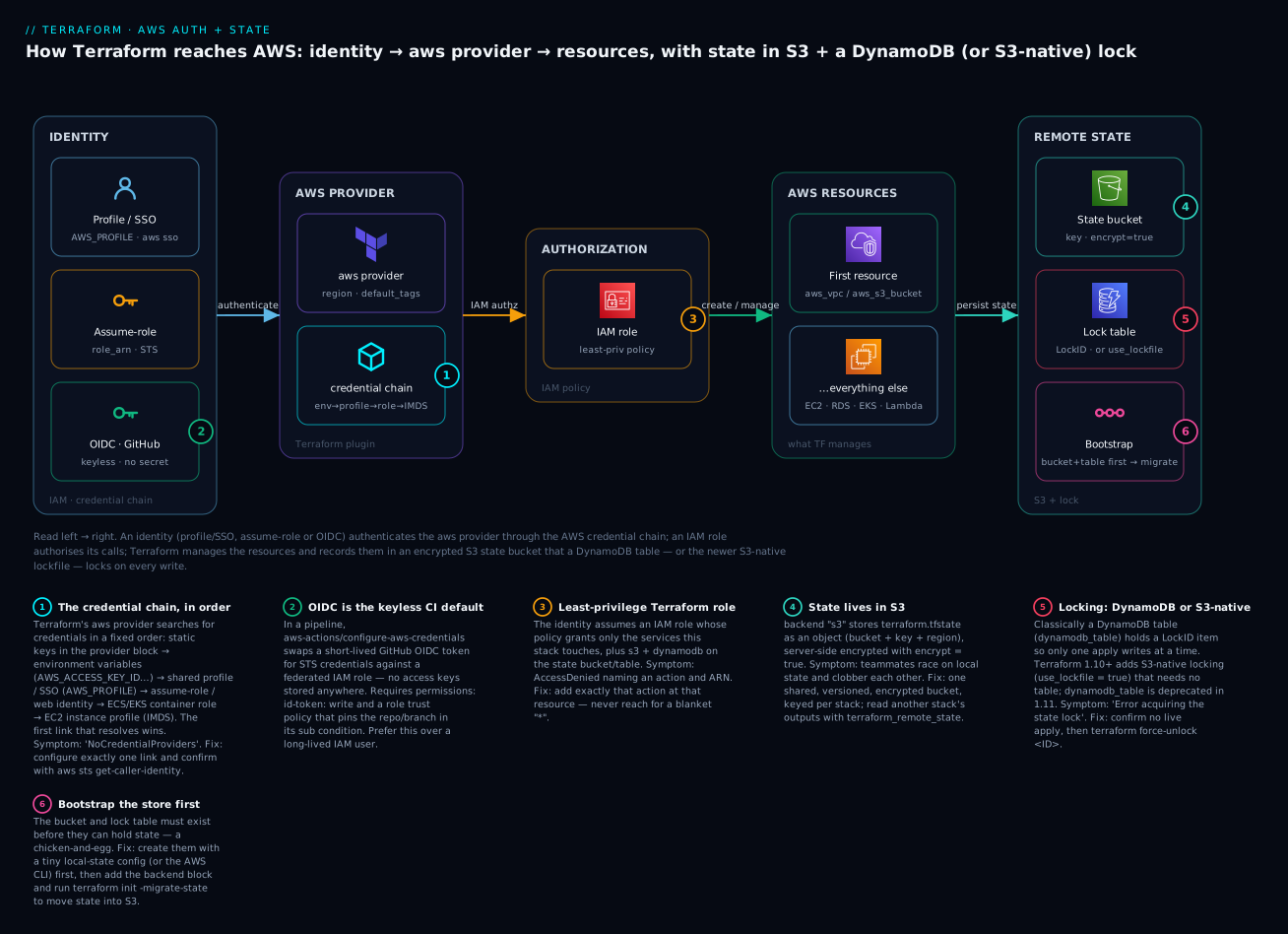
Reading it left to right: an identity (a profile/SSO login, an assumed role, or an OIDC token) authenticates the aws provider through the credential chain; an IAM role authorises each API call; Terraform then creates and manages AWS resources; and it persists state into an encrypted S3 bucket that a DynamoDB table (or S3-native lockfile) locks on every write. The six badges mark the decisions that trip people up — credential-chain order, OIDC keyless CI, the least-privilege role, remote state in S3, the lock choice, and bootstrap ordering — each a section below.
The aws provider: required_providers, version pinning, region & default_tags
A Terraform provider is the plugin that translates your HCL resource blocks into AWS API calls. For AWS the provider is hashicorp/aws, which manages virtually the entire AWS surface — VPCs, EC2, S3, IAM, RDS, EKS, Lambda, and thousands of resources more. (A sibling, awscc, uses the Cloud Control API to expose newer resources sooner; aws remains the mature default and is what this lesson uses.)
You declare it in a terraform {} block with required_providers, and you pin the version — never let a fresh init silently pull a new major that renames arguments under you. The deep mechanics of version constraints, the dependency lock file, and provider aliases are covered in Terraform providers deep dive: versions, aliases & the lock file; here is the AWS-specific shape:
# versions.tf
terraform {
  required_version = ">= 1.6"

  required_providers {
    aws = {
      source  = "hashicorp/aws"
      version = "~> 5.0"   # allow 5.x, refuse 6.0 — pin tighter (e.g. ~> 5.60) in prod
    }
  }
}
The required_providers entry has two parts, and the source address matters more than beginners expect:
| Argument | Example | What it does | Gotcha |
|---|---|---|---|
source |
"hashicorp/aws" |
Registry address namespace/type |
Omitting it makes Terraform guess hashicorp/<name>; always write it explicitly |
version |
"~> 5.0" |
Version constraint for init to resolve |
Unpinned = a future init can jump majors and break your config |
The constraint operators you will actually use, and what each admits:
| Constraint | Meaning | Admits | Refuses | When to use |
|---|---|---|---|---|
~> 5.0 |
Pessimistic, minor-level | 5.1, 5.60, 5.99 |
6.0 |
Roots/modules that want 5.x fixes, not a major |
~> 5.60.0 |
Pessimistic, patch-level | 5.60.1, 5.60.9 |
5.61.0 |
Tightest sane pin for production stability |
>= 5.0, < 6.0 |
Explicit range | any 5.x | 6.0+ |
Same effect, spelled out |
= 5.60.0 |
Exact | only 5.60.0 |
everything else | Reproducing a specific bug/version |
⚠️ AWS provider v6 exists. Provider 6.0 (2025) added enhanced multi-region support (a per-resource
regionargument, so one provider can target several regions) among other changes. Most production code and community modules still target~> 5.0, which is the widely compatible pin used throughout this lesson; adopt v6 deliberately, read its upgrade guide, and pin tighter (~> 6.0) once you do. The pattern — pin a major with~>, upgrade on purpose — is the point.
The provider block: region and default_tags
Unlike some providers, the aws provider has no mandatory block — but it must resolve a region (from the block, AWS_REGION, or a profile) or every call fails. The two arguments you set on essentially every project are region and default_tags:
# providers.tf
provider "aws" {
  region = var.aws_region   # e.g. "ap-south-1" (Mumbai)

  default_tags {
    tags = {
      ManagedBy   = "terraform"
      Environment = var.environment
      Project     = "kloudvin"
    }
  }
}
default_tags is one of the highest-leverage features in the whole provider: every taggable resource this provider creates inherits these tags automatically, so you write your governance tags once instead of on every resource. A resource’s own tags merge on top and win on a key conflict. The behaviour to internalise:
| Aspect | default_tags |
Per-resource tags |
|---|---|---|
| Scope | Every taggable resource under the provider | Only that resource |
| Precedence | Base layer | Overrides default on key conflict |
| Typical use | ManagedBy, Environment, Project, cost centre |
Name, resource-specific labels |
| Seen in state/plan | Merged into each resource’s effective tags | As written |
| Gotcha | Setting the same key in both once caused perpetual diffs (largely resolved in v5) | Use ignore_tags for tags set out-of-band |
The core provider arguments you will actually touch — most can also come from the environment or a profile, which is how CI passes them without editing your files:
| Provider argument | Env / source equivalent | Purpose | Notes |
|---|---|---|---|
region |
AWS_REGION / AWS_DEFAULT_REGION |
Which region to manage | Required (block, env, or profile) |
profile |
AWS_PROFILE |
Named profile from ~/.aws |
Local dev / SSO |
access_key / secret_key |
AWS_ACCESS_KEY_ID / AWS_SECRET_ACCESS_KEY |
Static credentials | ⚠️ avoid literals in .tf |
token |
AWS_SESSION_TOKEN |
Session token for temp creds | Set with the above for STS creds |
assume_role { … } |
AWS_ROLE_ARN (+ session file) |
Assume an IAM role | Cross-account, CI |
default_tags { … } |
— | Estate-wide tags | No env equivalent |
allowed_account_ids |
— | Guard against wrong-account applies | Safety net; errors if account not in list |
retry_mode / max_retries |
AWS_RETRY_MODE |
Throttling behaviour | adaptive for busy accounts |
The golden rule: secrets never go in .tf files. A region is not a secret; a role ARN is not a secret; a long-lived secret_key absolutely is, and belongs only in a credential store or — better — avoided entirely via a profile, an instance role, or OIDC.
The AWS credential chain: how Terraform finds credentials
The aws provider needs authenticated credentials before it can make a single API call, and it finds them by walking a fixed search order called the credential chain (the same one the AWS SDKs and CLI use). Understanding this order is the whole game: almost every “it works on my laptop but not in CI” bug is two links of this chain fighting. The first link that resolves wins, and the rest are never consulted:
| Order | Source | How the provider detects it | Typical use |
|---|---|---|---|
| 1 | Static creds in the provider block | access_key/secret_key/token set literally |
Discouraged — never commit |
| 2 | Environment variables | AWS_ACCESS_KEY_ID, AWS_SECRET_ACCESS_KEY, AWS_SESSION_TOKEN |
CI injecting temp creds |
| 3 | Shared credentials / config files | ~/.aws/credentials, ~/.aws/config, AWS_PROFILE (incl. SSO) |
Local dev |
| 4 | Assume-role / web identity | assume_role {} block, or AWS_ROLE_ARN + web-identity token |
Cross-account, OIDC CI |
| 5 | Container credentials (ECS / EKS) | AWS_CONTAINER_CREDENTIALS_*, or IRSA / Pod Identity token |
Terraform in a container/pod |
| 6 | EC2 instance profile (IMDS) | IMDSv2 metadata endpoint | Terraform on an EC2 runner |
A single command tells you which link actually won and who Terraform will act as — run it before you debug anything else:
aws sts get-caller-identity
# { "UserId": "...", "Account": "111122223333", "Arn": "arn:aws:iam::111122223333:user/vinod" }
Now each practical method, in the order you will meet them.
Method 1 — Static access keys (env vars) — and why to avoid long-lived ones
The most basic method: an IAM user’s access key ID and secret access key, supplied as environment variables. Terraform (link 2 of the chain) picks them up with no provider changes:
export AWS_ACCESS_KEY_ID="AKIAIOSFODNN7EXAMPLE"
export AWS_SECRET_ACCESS_KEY="wJalrXUtnFEMI/K7MDENG/bPxRfiCYEXAMPLEKEY"
# Temporary (STS) credentials ALSO need the session token:
export AWS_SESSION_TOKEN="FQoGZXIvYXdzE...=="
export AWS_REGION="ap-south-1"

terraform plan   # the provider reads these automatically — no provider edits
This works, and for a five-minute experiment it is fine. But long-lived IAM user keys are the single worst credential in AWS: setup is trivial, but they never expire, grant standing access, are rotated only manually (and so rarely are), and a single leak is a full account breach with no natural revocation — which is exactly why every other method below issues temporary credentials instead.
⚠️ Never commit an access key, and prefer never creating a long-lived one. Not in
.tf, not in.tfvars, not in a committed.env. If a key lands in git, deactivate and delete it immediately (aws iam delete-access-key) and treat the account as compromised. The safest key is the one that doesn’t exist — every method below issues temporary credentials instead.
Method 2 — Shared profiles and IAM Identity Center (SSO)
The right choice on your laptop is a named profile in ~/.aws. A profile can hold static keys (better than env vars, but still long-lived) or — far better — an IAM Identity Center (SSO) session that issues short-lived credentials on demand. The SSO setup lives in ~/.aws/config:
# ~/.aws/config
[sso-session kloudvin]
sso_start_url            = https://kloudvin.awsapps.com/start
sso_region               = ap-south-1
sso_registration_scopes  = sso:account:access

[profile kloudvin-dev]
sso_session    = kloudvin
sso_account_id = 111122223333
sso_role_name  = PowerUserAccess
region         = ap-south-1
You log in once (a browser flow); the CLI caches short-lived credentials, and Terraform uses them via the profile:
aws sso login --profile kloudvin-dev      # opens a browser, caches temp creds
export AWS_PROFILE=kloudvin-dev           # Terraform (chain link 3) uses this profile
terraform plan
You can also pin the profile in the provider block (profile = "kloudvin-dev"), but AWS_PROFILE keeps the code environment-agnostic. Profile-based auth at a glance:
| Profile flavour | Where credentials come from | Expire? | Best for |
|---|---|---|---|
| SSO / Identity Center | Short-lived, minted on aws sso login |
Hours (re-login) | The modern local-dev default |
| Static-key profile | aws_access_key_id in ~/.aws/credentials |
Never | Legacy; prefer SSO |
source_profile + role_arn |
Assumes a role from a base profile | Session length | Cross-account from the CLI |
credential_process |
An external helper prints JSON creds | Per helper | Vault / custom brokers |
Method 3 — Cross-account assume-role (role_arn)
Real organisations run many AWS accounts (dev, staging, prod, security, logging). The standard pattern is to authenticate once in a base account, then assume an IAM role in the target account. Terraform models this directly with an assume_role block on the provider:
provider "aws" {
  region = "ap-south-1"

  assume_role {
    role_arn     = "arn:aws:iam::444455556666:role/terraform-exec"
    session_name = "terraform-kloudvin"
    external_id  = "kloudvin-tf"   # optional — required when a third party assumes the role
  }
}
Terraform calls STS AssumeRole, receives temporary credentials scoped to terraform-exec in account 444455556666, and acts as that role. The target role’s trust policy must allow your base identity to assume it. The assume_role arguments worth knowing:
assume_role argument |
Purpose | Notes |
|---|---|---|
role_arn |
The role to assume | Required |
session_name |
Names the session in CloudTrail | Make it identifiable (who/what) |
external_id |
Shared secret for third-party trust | Defeats the “confused deputy” problem |
duration |
Session length (e.g. "1h") |
Up to the role’s max session duration |
policy / policy_arns |
Further narrow the session | Session policies for extra least-privilege |
tags / transitive_tag_keys |
Session tags | ABAC / propagate to chained assumptions |
The cross-account deep dive (external IDs, confused-deputy, session policies) is its own topic; here the takeaway is that assume-role gives you temporary, auditable, cross-account credentials with no stored secret — the building block for both multi-account Terraform and the OIDC method below.
Method 4 — EC2 instance profile / ECS task role (Terraform running in AWS)
When Terraform runs on an AWS compute resource — a self-hosted CI runner on an EC2 instance, a Terraform step in an ECS task, a job in an EKS pod — you attach an IAM role to that compute and Terraform picks up its credentials automatically. No keys anywhere; AWS issues and rotates them:
| Runtime | Mechanism | Chain link | You configure |
|---|---|---|---|
| EC2 instance | Instance profile via IMDSv2 | 6 | Attach an instance profile to the instance |
| ECS task | Task role via container credential endpoint | 5 | Set taskRoleArn on the task definition |
| EKS pod | IRSA (web identity) or Pod Identity | 5 | Annotate/associate the service account with a role |
| Lambda | Execution role | (env) | The function’s role |
On an EC2 runner you literally set nothing in Terraform — the provider reads temporary credentials from the Instance Metadata Service:
# On an EC2 instance with an attached instance profile:
aws sts get-caller-identity   # shows the assumed instance-profile role — no keys set
terraform plan                # provider uses IMDS creds automatically
The catch is obvious: this only works inside AWS. Your laptop and GitHub-hosted runners can’t reach IMDS — for those, OIDC is the no-secret answer.
Method 5 — OIDC / GitHub Actions federation (the modern CI default)
OIDC (OpenID Connect) federation is how you authenticate a pipeline to AWS with no stored secret at all. You register GitHub’s OIDC provider in IAM once, create a role whose trust policy trusts tokens from a specific repo/branch, and in the workflow the aws-actions/configure-aws-credentials action swaps a short-lived GitHub OIDC token for STS credentials via AssumeRoleWithWebIdentity. Nothing to store, nothing to rotate, nothing to leak.
Set it up once. Register the OIDC provider and create the role with a trust policy pinned to your repo:
// Trust policy on arn:aws:iam::111122223333:role/gha-terraform
{
  "Version": "2012-10-17",
  "Statement": [{
    "Effect": "Allow",
    "Principal": { "Federated": "arn:aws:iam::111122223333:oidc-provider/token.actions.githubusercontent.com" },
    "Action": "sts:AssumeRoleWithWebIdentity",
    "Condition": {
      "StringEquals": { "token.actions.githubusercontent.com:aud": "sts.amazonaws.com" },
      "StringLike":   { "token.actions.githubusercontent.com:sub": "repo:kloudvin/infra:ref:refs/heads/main" }
    }
  }]
}
The sub condition is the security boundary — it must match the workflow’s OIDC claim exactly. Common sub shapes:
| Pipeline trigger | sub claim value |
|---|---|
| Branch | repo:ORG/REPO:ref:refs/heads/main |
| Tag | repo:ORG/REPO:ref:refs/tags/v1.2.3 |
| Pull request | repo:ORG/REPO:pull_request |
| GitHub Environment | repo:ORG/REPO:environment:production |
Then the workflow requests the token (id-token: write) and assumes the role — no secret in sight:
# .github/workflows/terraform.yml
permissions:
  id-token: write     # REQUIRED to mint the OIDC token
  contents: read

jobs:
  apply:
    runs-on: ubuntu-latest
    steps:
      - uses: actions/checkout@v4
      - uses: aws-actions/configure-aws-credentials@v4
        with:
          role-to-assume: arn:aws:iam::111122223333:role/gha-terraform
          aws-region: ap-south-1
      - uses: hashicorp/setup-terraform@v3
      - run: terraform init
      - run: terraform apply -auto-approve
The action exports AWS_ROLE_ARN and a web-identity token file into the environment; Terraform’s provider (chain link 4) uses them with no HCL changes. If you prefer to keep it in HCL — for non-GitHub runners — the provider has a matching block:
provider "aws" {
  region = "ap-south-1"
  assume_role_with_web_identity {
    role_arn                = "arn:aws:iam::111122223333:role/gha-terraform"
    web_identity_token_file = "/path/to/token"   # or web_identity_token
  }
}
This is the method to standardise on for CI. The full auth landscape, ranked by security posture — OIDC ≈ instance/task role > assume-role from SSO > static keys:
| Method | Secret stored? | Where it belongs | Expires? | Best for |
|---|---|---|---|---|
| Static access keys | Yes (long-lived) | Nowhere, ideally | Never | Quick local test only |
| Profile / SSO | No (SSO) / keys (static) | Local dev | Hours (SSO) | Interactive work on your laptop |
| Assume-role | No (temp STS creds) | Cross-account CLI/CI | Session length | Multi-account Terraform |
| Instance / task role | No (platform-issued) | Terraform on AWS compute | Auto-rotated | Self-hosted runners in AWS |
| OIDC federation | No (short-lived token) | GitHub/GitLab pipelines | Minutes (per run) | The modern default for CI/CD |
IAM: the least-privilege role the Terraform identity needs
Authentication proves who the identity is; IAM authorization decides what it may do. An identity Terraform authenticates with but that lacks the right permissions produces the most common runtime error on AWS:
Error: creating EC2 VPC: AccessDenied: User: arn:aws:iam::111122223333:role/terraform-exec
is not authorized to perform: ec2:CreateVpc on resource: arn:aws:ec2:ap-south-1:111122223333:vpc/*
because no identity-based policy allows the ec2:CreateVpc action
The discipline is least privilege: the Terraform role’s policy grants exactly the actions this stack uses, plus the S3/DynamoDB permissions for its own state, and nothing else. The options, weakest-to-strongest posture:
| Policy approach | Example | Blast radius | Use when |
|---|---|---|---|
AWS managed AdministratorAccess |
one attach | Whole account | Never in prod — bootstrap/lab only |
| AWS managed, scoped | AmazonVPCFullAccess, AmazonS3FullAccess |
Per service | Fast start, still broad |
| Customer-managed policy | your own JSON, specific actions | Exactly what you list | The production default |
| + permissions boundary | boundary caps the max | Can’t exceed the ceiling | Delegated / self-service accounts |
| + session policy | narrow on assume_role |
Per apply | Extra runtime least-privilege |
A minimal customer-managed policy for a Terraform role always needs its state permissions on top of the resource actions — this is the piece people forget, and it manifests as a backend error rather than a resource error:
{
  "Version": "2012-10-17",
  "Statement": [
    { "Sid": "State", "Effect": "Allow",
      "Action": ["s3:GetObject", "s3:PutObject", "s3:ListBucket"],
      "Resource": [
        "arn:aws:s3:::kloudvin-tfstate-111122223333",
        "arn:aws:s3:::kloudvin-tfstate-111122223333/*"
      ] },
    { "Sid": "Lock", "Effect": "Allow",
      "Action": ["dynamodb:GetItem", "dynamodb:PutItem", "dynamodb:DeleteItem"],
      "Resource": "arn:aws:dynamodb:ap-south-1:111122223333:table/terraform-locks" }
  ]
}
Multiple providers: alias for multi-region & multi-account
By default a configuration has one aws provider in one region and one account. Two common needs break that: a resource that must live in a different region (the classic being an ACM certificate for CloudFront, which AWS requires in us-east-1), and managing several accounts from one root. Both are solved with provider aliases — additional named provider instances you attach to specific resources or modules:
# Default provider — ap-south-1 (Mumbai)
provider "aws" {
  region = "ap-south-1"
}

# Aliased provider — us-east-1, for CloudFront/ACM
provider "aws" {
  alias  = "us_east_1"
  region = "us-east-1"
}

# Aliased provider — a different ACCOUNT via assume-role
provider "aws" {
  alias  = "prod"
  region = "ap-south-1"
  assume_role {
    role_arn = "arn:aws:iam::444455556666:role/terraform-exec"
  }
}
You then point a resource or module at an alias with the provider (or providers) argument:
# An ACM cert that MUST be in us-east-1 for CloudFront
resource "aws_acm_certificate" "cdn" {
  provider          = aws.us_east_1
  domain_name       = "cdn.kloudvin.com"
  validation_method = "DNS"
}

# A whole module deployed into the prod account
module "network_prod" {
  source    = "./modules/network"
  providers = { aws = aws.prod }
}
When to reach for an alias:
| Need | Pattern | Example |
|---|---|---|
| Region-pinned resource | alias in that region + provider = |
ACM for CloudFront in us-east-1 |
| Active/DR across regions | Default + one alias per region | Replicate an S3 bucket, RDS read replica |
| Cross-account management | alias with assume_role per account |
A landing-zone root managing many accounts |
| Provider-level tag/config split | Aliases with different default_tags |
Different tagging per environment provider |
The full mechanics of aliases and passing providers into modules are in the providers deep dive; the rule of thumb is: one region + one account per provider instance, add an alias for each additional region or account.
Remote state in S3: the backend “s3” block
Terraform records everything it manages in a state file. By default that file (terraform.tfstate) sits on your local disk — fine for a solo experiment, disastrous for a team: it can’t be shared, isn’t locked (two applies race and corrupt it), holds secrets in plaintext on a laptop, and vanishes if the disk dies. A remote backend moves state to shared, durable, lockable storage. On AWS that backend is s3, and it stores state as an object in an S3 bucket. (The full taxonomy of backend types and migration mechanics lives in Terraform backends deep dive: local, remote, types & migration; the team-scale patterns are in Terraform remote state at scale.)
A real backend "s3" block names the bucket, the object key, the region, a lock mechanism, and encryption:
# versions.tf  (backend goes inside the SAME terraform {} block)
terraform {
  required_version = ">= 1.6"
  required_providers {
    aws = { source = "hashicorp/aws", version = "~> 5.0" }
  }

  backend "s3" {
    bucket         = "kloudvin-tfstate-111122223333"  # globally unique
    key            = "prod/network/terraform.tfstate" # the object path — one per stack
    region         = "ap-south-1"
    encrypt        = true                              # server-side encrypt the state object
    dynamodb_table = "terraform-locks"                 # classic lock table (see below)
    # use_lockfile = true                              # newer S3-native lock (see below)
  }
}
Every argument and why it is there:
| Backend argument | Required | Purpose | Notes |
|---|---|---|---|
bucket |
Yes | S3 bucket holding state | Globally unique; often suffix the account id |
key |
Yes | Object path = this stack’s state | Use a path per stack, e.g. prod/network/terraform.tfstate |
region |
Yes | Bucket’s region | Can also come from AWS_REGION |
encrypt |
Recommended | Server-side encrypt the state object | true — state holds secrets in plaintext |
dynamodb_table |
Legacy | Table for state locking | Deprecated in TF 1.11; see S3-native below |
use_lockfile |
Modern | S3-native locking, no table | Terraform 1.10+ |
kms_key_id |
Optional | Encrypt with a customer-managed KMS key | Tighter than the default SSE-S3 |
profile / role_arn |
CI | Auth to the backend | Backend authenticates separately (see below) |
workspace_key_prefix |
Optional | Prefix for workspace state keys | When you use CLI workspaces |
acl |
Optional | Object ACL | Usually leave default; bucket owner enforced |
Two design rules pay off immediately. First, one key per stack — never share a single state object across unrelated stacks; give each root module its own key (prod/network/…, prod/eks/…) so their state and their locks are independent. Second, isolate environments — a dev/ vs prod/ key prefix (or separate buckets entirely for hard isolation) keeps a dev apply from ever touching prod state.
State locking: DynamoDB table vs the S3-native lockfile
The reason two people can’t corrupt shared state is locking. On S3 there are now two mechanisms, and knowing both — and that the newer one is superseding the older — is exactly the kind of currency this lesson is about:
- DynamoDB lock table (classic). Historically S3 couldn’t lock on its own, so the backend used a DynamoDB table with a single item to coordinate: before a write, Terraform
PutItems aLockIDrow; while it holds it, no other run can write; on finish itDeleteItems. The table’s hash key must be named exactlyLockID(type String) — get that wrong and locking silently misbehaves. - S3-native lockfile (modern). Terraform 1.10 added
use_lockfile = true, which uses S3 conditional writes (a.tflockobject created withIf-None-Match) to lock natively — no DynamoDB table at all. In Terraform 1.11 thedynamodb_tableargument was deprecated in favour of it.
The comparison, and the migration path:
DynamoDB table (dynamodb_table) |
S3-native lockfile (use_lockfile) |
|
|---|---|---|
| Extra resource | A DynamoDB table | None (lock object in the state bucket) |
| Introduced | Original S3 backend | Terraform 1.10 |
| Status | Deprecated in 1.11 (still works) | Current recommendation |
| How it locks | LockID item in the table |
.tflock object via S3 conditional write |
| Cost | Per-request DynamoDB (tiny) | None beyond S3 requests |
| Extra IAM | dynamodb:*Item on the table |
s3:PutObject/DeleteObject (already have it) |
| Migrate | — | Set use_lockfile = true; keep the table briefly, then drop it |
For a brand-new project in 2026, use use_lockfile = true and skip DynamoDB entirely. For an existing project on a DynamoDB table, you can run both during a transition (set use_lockfile = true while keeping dynamodb_table), then remove the table argument once every collaborator is on Terraform ≥ 1.10. Either way, when a run crashes mid-apply the lock can be left held, and the next run reports:
Error: Error acquiring the state lock

Lock Info:
  ID:        3f2b1c9a-1234-5678-9abc-def012345678
  Operation: OperationTypeApply
  Who:       vinod@laptop
  Created:   2026-07-09 06:14:22 UTC
Only after confirming no apply is genuinely still running do you break it with the lock ID:
terraform force-unlock 3f2b1c9a-1234-5678-9abc-def012345678
Never wire force-unlock into automation — breaking a lock that a live apply still holds is exactly how you corrupt state.
Authenticating to the backend
The backend authenticates separately from the provider (it’s initialised earlier, at init, before the provider even loads) — but on AWS it uses the same credential chain, so a working AWS_PROFILE or role usually just works for both. When they need to differ (a state bucket in a separate “shared services” account), the backend takes its own profile, role_arn, or assume_role arguments. The identity needs S3 access on the bucket (s3:GetObject/PutObject/ListBucket) and, if you use the classic lock, DynamoDB access on the table (dynamodb:GetItem/PutItem/DeleteItem) — exactly the state policy shown earlier.
The chicken-and-egg bootstrap
Here is the puzzle: the backend needs an S3 bucket (and maybe a DynamoDB table) to hold state, but you manage those with Terraform, which needs the backend. You cannot have Terraform create the very bucket its own backend points at in one shot. You break the cycle by creating the state store first, then pointing the backend at it. Two approaches:
| Bootstrap approach | How | Pros | Cons |
|---|---|---|---|
| Local-state Terraform (recommended) | A tiny root with the default local backend creates the bucket + table, then you migrate | Fully in Terraform, reviewable, re-usable | A little local state for the bootstrap itself |
| AWS CLI bootstrap | aws s3api / aws dynamodb commands create them |
No state to babysit, one-time | Imperative — document/script it |
The local-state Terraform bootstrap is the clean default — a small root you apply once, that itself creates a properly hardened state bucket:
# bootstrap/main.tf  — uses the default LOCAL backend (no backend block yet)
resource "aws_s3_bucket" "tfstate" {
  bucket = "kloudvin-tfstate-111122223333"   # globally unique
}

resource "aws_s3_bucket_versioning" "tfstate" {
  bucket = aws_s3_bucket.tfstate.id
  versioning_configuration { status = "Enabled" }   # recover a clobbered state
}

resource "aws_s3_bucket_server_side_encryption_configuration" "tfstate" {
  bucket = aws_s3_bucket.tfstate.id
  rule { apply_server_side_encryption_by_default { sse_algorithm = "aws:kms" } }
}

resource "aws_s3_bucket_public_access_block" "tfstate" {
  bucket                  = aws_s3_bucket.tfstate.id
  block_public_acls       = true
  block_public_policy     = true
  ignore_public_acls      = true
  restrict_public_buckets = true
}

# Optional if you use the classic lock (skip when use_lockfile = true)
resource "aws_dynamodb_table" "locks" {
  name         = "terraform-locks"
  billing_mode = "PAY_PER_REQUEST"
  hash_key     = "LockID"                    # MUST be exactly "LockID"
  attribute {
    name = "LockID"
    type = "S"
  }
}
Apply that once with local state, then add the backend "s3" block to your real root and run terraform init. If you had existing local state, init detects the new backend and offers to migrate it into S3:
terraform init -migrate-state
# Terraform prompts:
#   Do you want to copy existing state to the new backend? -> yes
Either way the ordering is the invariant: state bucket (+ table) exists → backend points at it → everything else.
Reading another stack’s outputs: terraform_remote_state
Once state lives in S3, one stack can read another’s outputs with the terraform_remote_state data source — the clean way for, say, an app stack to consume the network stack’s vpc_id without hardcoding it:
data "terraform_remote_state" "network" {
  backend = "s3"
  config = {
    bucket = "kloudvin-tfstate-111122223333"
    key    = "prod/network/terraform.tfstate"
    region = "ap-south-1"
  }
}

resource "aws_instance" "app" {
  subnet_id = data.terraform_remote_state.network.outputs.private_subnet_ids[0]
  # ...
}
Only values the network stack explicitly declares as output are visible here — remote state exposes outputs, not internals — and the reader needs read access to that state object. At scale you often prefer looser coupling (SSM Parameter Store, data sources that look the resource up by tag), a trade-off the remote state at scale lesson works through.
Hands-on: build it with Terraform
Now the full walkthrough. You will bootstrap a state bucket and lock table, write the starter files, authenticate via an SSO profile, and run init → plan → apply to create a VPC whose state lives in S3 — then verify with the aws CLI and destroy. Everything here is free-tier-friendly; the cleanup step removes it all.
⚠️ Real cloud spend. A plain VPC is free; the state S3 bucket costs a fraction of a rupee for a tiny object, and a PAY_PER_REQUEST DynamoDB table costs effectively nothing at this volume. The final
destroy+ bucket/table cleanup remove everything. Run in your own account.
Step 0 — Prerequisites. Terraform ≥ 1.6 and the AWS CLI v2 installed, and you’re authenticated:
terraform version                 # expect Terraform v1.6+ (OpenTofu 1.6+ works identically)
aws sso login --profile kloudvin-dev
export AWS_PROFILE=kloudvin-dev
aws sts get-caller-identity       # confirm the account + identity Terraform will use
Step 1 — Bootstrap the state store (the chicken-and-egg fix; run once). Pick a globally-unique bucket name — suffixing your account id is a reliable trick:
ACCOUNT=$(aws sts get-caller-identity --query Account --output text)
BUCKET="kloudvin-tfstate-$ACCOUNT"
REGION="ap-south-1"

# Create the bucket (note: outside us-east-1 you MUST pass a LocationConstraint)
aws s3api create-bucket --bucket "$BUCKET" --region "$REGION" \
  --create-bucket-configuration LocationConstraint="$REGION"

# Version it (recover a clobbered state), encrypt it, and block public access
aws s3api put-bucket-versioning --bucket "$BUCKET" \
  --versioning-configuration Status=Enabled
aws s3api put-bucket-encryption --bucket "$BUCKET" \
  --server-side-encryption-configuration \
  '{"Rules":[{"ApplyServerSideEncryptionByDefault":{"SSEAlgorithm":"AES256"}}]}'
aws s3api put-public-access-block --bucket "$BUCKET" \
  --public-access-block-configuration \
  BlockPublicAcls=true,IgnorePublicAcls=true,BlockPublicPolicy=true,RestrictPublicBuckets=true

# Optional: a DynamoDB lock table (skip if you'll use use_lockfile = true)
aws dynamodb create-table --table-name terraform-locks \
  --attribute-definitions AttributeName=LockID,AttributeType=S \
  --key-schema AttributeName=LockID,KeyType=HASH \
  --billing-mode PAY_PER_REQUEST --region "$REGION"

echo "State bucket: $BUCKET"   # note this — you'll paste it into the backend block
Step 2 — Write the starter files. Five files in an empty directory. versions.tf (provider + backend — paste your bucket name; this example uses the modern S3-native lock):
# versions.tf
terraform {
  required_version = ">= 1.6"

  required_providers {
    aws = {
      source  = "hashicorp/aws"
      version = "~> 5.0"
    }
  }

  backend "s3" {
    bucket       = "kloudvin-tfstate-XXXXXXXXXXXX"  # <-- your $BUCKET from Step 1
    key          = "demo/getting-started/terraform.tfstate"
    region       = "ap-south-1"
    encrypt      = true
    use_lockfile = true    # S3-native locking (TF 1.10+); or use dynamodb_table = "terraform-locks"
  }
}
# providers.tf
provider "aws" {
  region = var.aws_region

  default_tags {
    tags = {
      ManagedBy   = "terraform"
      Environment = var.environment
      Project     = "kloudvin"
      Lesson      = "aws-getting-started"
    }
  }
}
# variables.tf
variable "aws_region" {
  description = "AWS region to deploy into"
  type        = string
  default     = "ap-south-1"
}

variable "environment" {
  description = "Environment tag"
  type        = string
  default     = "demo"
}

variable "vpc_cidr" {
  description = "CIDR block for the VPC"
  type        = string
  default     = "10.42.0.0/16"
}
# main.tf  — your first managed resource
resource "aws_vpc" "demo" {
  cidr_block           = var.vpc_cidr
  enable_dns_support   = true
  enable_dns_hostnames = true

  tags = {
    Name = "vpc-tf-getting-started"   # merges over default_tags
  }
}
# outputs.tf
output "vpc_id" {
  description = "ID of the created VPC"
  value       = aws_vpc.demo.id
}

output "vpc_arn" {
  description = "ARN of the created VPC"
  value       = aws_vpc.demo.arn
}
Step 3 — terraform init. This downloads the aws provider and initialises the backend against your bucket:
terraform init
Initializing the backend...
Successfully configured the backend "s3"! Terraform will automatically
use this backend unless the backend configuration changes.

Initializing provider plugins...
- Finding hashicorp/aws versions matching "~> 5.0"...
- Installing hashicorp/aws v5.x.x...

Terraform has been successfully initialized!
If you had existing local state, you’d add -migrate-state and confirm the copy. A fresh directory just wires the backend.
Step 4 — terraform plan. Preview the change. One resource to add (output trimmed — a real VPC plan shows many computed attributes):
terraform plan
Terraform will perform the following actions:

  # aws_vpc.demo will be created
  + resource "aws_vpc" "demo" {
      + arn                  = (known after apply)
      + cidr_block           = "10.42.0.0/16"
      + enable_dns_hostnames = true
      + enable_dns_support   = true
      + id                   = (known after apply)
      + tags                 = { "Name" = "vpc-tf-getting-started" }
      + tags_all             = {
          + "Environment" = "demo"
          + "Lesson"      = "aws-getting-started"
          + "ManagedBy"   = "terraform"
          + "Name"        = "vpc-tf-getting-started"
          + "Project"     = "kloudvin"
        }
    }

Plan: 1 to add, 0 to change, 0 to destroy.
Note tags_all — that’s your default_tags merged with the resource’s own Name. If instead you see NoCredentialProviders, no chain link resolved (Step 0); if you see a region error, set aws_region/AWS_REGION.
Step 5 — terraform apply. Create it for real. Terraform takes the state lock, applies, writes state to S3, releases the lock:
terraform apply # review, type: yes
aws_vpc.demo: Creating...
aws_vpc.demo: Creation complete after 2s [id=vpc-0a1b2c3d4e5f67890]

Apply complete! Resources: 1 added, 0 changed, 0 destroyed.

Outputs:
vpc_id = "vpc-0a1b2c3d4e5f67890"
Step 6 — Verify in AWS with the aws CLI. Confirm the VPC exists and that the state is really an object in your bucket:
# The VPC Terraform created (found by its default_tags)
aws ec2 describe-vpcs --filters "Name=tag:ManagedBy,Values=terraform" \
  --query "Vpcs[].{id:VpcId,cidr:CidrBlock,name:Tags[?Key=='Name']|[0].Value}" --output table

# The state object really lives in S3
aws s3 ls "s3://kloudvin-tfstate-$ACCOUNT/demo/getting-started/"
# -> terraform.tfstate

# When no apply is running, no lock is held (S3-native lock leaves a .tflock only during a write)
aws s3 ls "s3://kloudvin-tfstate-$ACCOUNT/demo/getting-started/" | grep -c tflock   # -> 0
Seeing terraform.tfstate listed in S3 is the whole point: your state is not on your laptop — it’s a locked, shared, encrypted, versioned object in S3.
Step 7 — Destroy and clean up (⚠️ removes the resources):
terraform destroy # type: yes — removes the VPC
Plan: 0 to add, 0 to change, 1 to destroy.
...
Destroy complete! Resources: 1 destroyed.
Then remove the state store itself when you’re done with the lesson entirely (this deletes your state object too):
aws s3 rb "s3://kloudvin-tfstate-$ACCOUNT" --force     # empty + delete the bucket
aws dynamodb delete-table --table-name terraform-locks --region ap-south-1
The steps mapped to what each one proves:
| Step | Command | What it proves |
|---|---|---|
| 1 | aws s3api create-bucket + dynamodb create-table |
Bootstrap breaks the chicken-and-egg |
| 3 | terraform init |
Provider install + backend wiring in one |
| 4 | terraform plan |
Declarative preview; tags_all shows default_tags |
| 5 | terraform apply |
Real resource created; state lock taken/released |
| 6 | aws s3 ls |
State genuinely lives in the remote bucket |
| 7 | terraform destroy + s3 rb |
Clean teardown, no lingering spend |
Variables, outputs & making it reusable
The starter hardcodes almost nothing already, but three patterns turn it from a demo into something you’d actually reuse. First, partial backend configuration — you should not hardcode the bucket and key in versions.tf if the same code deploys to several environments. Leave the values out and supply them at init time:
# versions.tf — partial backend (values supplied at init)
terraform {
  backend "s3" {
    encrypt      = true
    use_lockfile = true
  }
}
# One .tfbackend file per environment
terraform init -backend-config=prod.tfbackend
# prod.tfbackend
bucket = "kloudvin-tfstate-111122223333"
key    = "prod/network/terraform.tfstate"
region = "ap-south-1"
This keeps one set of .tf files and swaps only the backend target per environment — the pattern the remote state at scale lesson builds on. Second, for_each to create many resources from a map — the leap from one VPC to a parameterised set of subnets:
variable "subnets" {
  description = "Map of subnet name => CIDR within the VPC"
  type        = map(string)
  default = {
    "public-a"  = "10.42.1.0/24"
    "public-b"  = "10.42.2.0/24"
    "private-a" = "10.42.10.0/24"
  }
}

resource "aws_subnet" "these" {
  for_each   = var.subnets
  vpc_id     = aws_vpc.demo.id
  cidr_block = each.value
  tags       = { Name = each.key }
}
Third, for real AWS infrastructure you will often reach for community modules from the registry rather than rolling your own. When to use each:
| Option | Example | Use when |
|---|---|---|
| Roll your own resources | aws_vpc, aws_subnet |
Simple, few resources, full control |
terraform-aws-modules/* |
terraform-aws-modules/vpc/aws |
Battle-tested, opinionated building blocks (the de-facto standard) |
| Other community modules | cloudposse/* |
A solved problem you don’t want to re-solve |
| A private module registry | your org’s modules | Standardising patterns across teams |
The classic example — an entire production-grade VPC in a dozen lines via the community module instead of dozens of aws_* resources:
module "vpc" {
  source  = "terraform-aws-modules/vpc/aws"
  version = "~> 5.0"

  name = "kloudvin-prod"
  cidr = "10.42.0.0/16"

  azs             = ["ap-south-1a", "ap-south-1b"]
  private_subnets = ["10.42.10.0/24", "10.42.11.0/24"]
  public_subnets  = ["10.42.1.0/24", "10.42.2.0/24"]

  enable_nat_gateway = true   # ⚠️ a NAT gateway is the one thing here that costs real money
}
The inputs your reusable root should expose, so it’s environment-agnostic:
| Input variable | Type | Why parameterise it |
|---|---|---|
aws_region |
string |
Different region per environment |
environment |
string |
Drives tags and naming |
vpc_cidr / subnets |
string / map |
Address space per environment |
default_tags |
map(string) |
Org-wide tag policy |
| backend values | via -backend-config |
State target per environment |
Common mistakes and troubleshooting
The failure modes are predictable and almost all live in the three foundations — provider/region config, authentication/IAM, and the backend. Scan the table, then read the detail for the ones that bite hardest.
| # | Symptom | Root cause | Confirm | Fix |
|---|---|---|---|---|
| 1 | NoCredentialProviders: no valid providers in chain |
No credential-chain link resolved | aws sts get-caller-identity also fails |
aws sso login / export AWS_PROFILE / set keys or a role |
| 2 | no valid credential sources … region / The region must be set |
No region resolved | Provider has no region, AWS_REGION unset |
Set region in the provider or AWS_REGION |
| 3 | AccessDenied … not authorized to perform: <action> |
IAM identity lacks the action | 403 naming the action + ARN | Add exactly that action at that resource to the policy |
| 4 | ExpiredToken / The security token … is expired |
SSO/STS session lapsed | Worked earlier, now 401/403 | aws sso login again (re-mint temp creds) |
| 5 | Error acquiring the state lock |
Lock held by a crashed/parallel run | Lock info shows ID + Who/Created | Ensure no live apply, then terraform force-unlock <ID> |
| 6 | Error: Failed to get existing workspaces … NoSuchBucket |
Backend bucket missing/typo’d | Bucket not created or wrong name | Bootstrap the bucket; fix bucket; terraform init |
| 7 | Backend init: AccessDenied on s3:ListBucket/GetObject |
Identity lacks state-bucket IAM | Have resource perms, not state perms | Add the S3 (+ DynamoDB) state policy shown above |
| 8 | plan wants to create everything that exists |
Backend points at empty/wrong key |
Full-create plan instead of no-op | Fix key/backend target; do not apply |
| 9 | BucketAlreadyExists / …OwnedByYou at bootstrap |
Bucket name not globally unique | 409 at create | Choose a unique name (suffix the account id) |
| 10 | ValidationException … schema on lock |
DynamoDB hash key not LockID |
Table exists but locking misbehaves | Recreate the table with hash key exactly LockID (String) |
| 11 | Error: creating … you are not authorized … sts:AssumeRole |
Assume-role trust/perm gap | 403 on AssumeRole |
Fix the target role’s trust policy; add sts:AssumeRole |
| 12 | OIDC login fails in CI | Missing id-token: write or bad sub |
GitHub token/claim mismatch | Add the permission; match the role’s sub condition exactly |
| 13 | Resource created in the wrong region | Provider/alias region mismatch | Resource shows up in another region | Set the right region/alias; provider = on the resource |
| 14 | Error inspecting states … dynamodb_table is deprecated |
Using the classic lock on TF 1.11+ | Warning at init/plan | Add use_lockfile = true; drop dynamodb_table once all collaborators are on ≥ 1.10 |
The five that cause the most lost hours, expanded:
1. NoCredentialProviders. No credential-chain link resolved — usually an expired SSO session or an unset AWS_PROFILE. Run aws sts get-caller-identity first; if that fails, so will Terraform. Fix the CLI (aws sso login, export AWS_PROFILE), then re-run. The number-one first-run AWS error.
3 & 7. AccessDenied — resource vs state. Two flavours. The common one lacks a resource action (ec2:CreateVpc) — the error names the exact action and ARN, so add precisely that, never "*". The subtle one is a backend AccessDenied: the identity has resource permissions but not the state permissions (s3:GetObject/PutObject/ListBucket on the bucket, plus dynamodb:*Item on the table for the classic lock). Grant the state policy shown earlier.
5. Error acquiring the state lock. A lock (a DynamoDB LockID item or an S3 .tflock object) left held by a crashed run — or a colleague applying right now. Confirm no apply is actually running (the lock info shows who and when), then terraform force-unlock <ID>. Never automate it — force-unlocking a live apply corrupts state. Full recovery mechanics are in the backends deep dive.
8. plan proposes creating resources that already exist. Almost always the backend points at the wrong or empty key/bucket (a typo, wrong -backend-config, or an accidental -reconfigure). Terraform read empty state and thinks nothing exists. Do not apply — you’ll create duplicates or collide on names. Re-point the backend and re-init.
13. Wrong region / alias. A resource in the wrong region means either the provider’s region isn’t what you think (an AWS_REGION shadowing the block) or you forgot provider = aws.<alias> on a region-pinned resource (the ACM-for-CloudFront trap). Terraform binds each resource to the provider that made it, so moving regions means destroy-and-recreate — set the region correctly before the first apply.
Cost, cleanup & production notes
The cost of this foundation is essentially free — the only paid things are the state store and any downstream resources, and the state store is negligible:
| Item | What you pay for | Rough cost | Notes |
|---|---|---|---|
| VPC (+ subnets, IGW, route tables) | Nothing | ₹0 | These are free; NAT gateway is not |
| State S3 bucket | Storage + requests | a fraction of ₹1/month | A tiny object + light traffic |
| DynamoDB lock table (PAY_PER_REQUEST) | Per-request | effectively ₹0 | A handful of writes per apply |
| S3-native lockfile | S3 requests only | effectively ₹0 | No table at all |
| IAM roles / OIDC provider | Nothing | ₹0 | IAM objects are free |
| The resources you go on to build | Per-service | varies | The real bill is downstream (NAT, EC2, RDS…) |
Cleanup is terraform destroy for what a root created, then emptying and deleting the state bucket (aws s3 rb --force) and the lock table when you’re finished. Because state is remote, don’t just delete local files — destroy through Terraform so state stays consistent.
Production hardening notes — the discipline that keeps this foundation safe at scale:
| Practice | Why it matters | How |
|---|---|---|
| OIDC over static keys in CI | No credential to leak or rotate | configure-aws-credentials + a federated role; never a committed key |
| Least-privilege IAM + narrow scope | Limit blast radius | Customer-managed policy of exact actions; permissions boundary on delegated roles |
| Lock down the state bucket | State holds secrets in plaintext | Block public access, encrypt (SSE-KMS), bucket policy, optionally a VPC endpoint |
| Versioning + (optional) MFA delete | Recover a clobbered state | Turn on S3 versioning on the state bucket |
| One state key per stack; isolate envs | Contain lock scope and failure | dev/ vs prod/ prefixes or separate buckets/accounts |
| Pin provider + commit the lock file | Reproducible plans | ~> pin in required_providers; commit .terraform.lock.hcl |
default_tags for governance |
Cost allocation + ownership | Provider-level default_tags; enforce with SCP/Config |
| Detect drift | Catch out-of-band changes | Scheduled plan -detailed-exitcode in CI |
On state security specifically: the state file records resource attributes including secrets (a generated password, an RDS connection string) in plaintext. That is exactly why the state bucket deserves the same protection as a secrets store — block public access, SSE-KMS encryption, a tight bucket policy, versioning, and ideally a private S3 endpoint. Treat kloudvin-tfstate-* as tier-0 infrastructure.
Going deeper
The sections above are the load-bearing 90%. This one is the sharp edges — the behaviours that turn a “works on my laptop” foundation into one that also works in a container, in another account, in CI, and at scale. None of it is needed to finish the hands-on; all of it saves an afternoon later.
How the chain actually resolves — and the env-var shadow
The credential-chain table tells you the order; the bug you actually hit is when two links are populated at once. The rule is unforgiving — the first link that resolves wins, and the rest are never consulted — and static credentials in environment variables sit above profiles. So the single most common “why is Terraform acting as the wrong identity?” cause is a forgotten export AWS_ACCESS_KEY_ID=… left in your shell (or a ~/.bashrc) that silently shadows the AWS_PROFILE / aws sso login you meant to use:
env | grep -E 'AWS_(ACCESS|SECRET|SESSION|PROFILE|REGION)'   # what is actually set?
aws sts get-caller-identity                                   # who did the chain pick?
# Wrong identity? Clear the stray static keys so the profile can win:
unset AWS_ACCESS_KEY_ID AWS_SECRET_ACCESS_KEY AWS_SESSION_TOKEN
Treat aws sts get-caller-identity as the ground truth before every debugging session — it reports the identity the same chain resolved, so if it is wrong, Terraform will be wrong the same way. When the shared files live somewhere non-standard (a mounted secret, a CI cache), point the provider at them explicitly rather than relying on $HOME:
| Provider argument | Env equivalent | Purpose |
|---|---|---|
shared_config_files |
AWS_CONFIG_FILE |
Non-default config file location(s) |
shared_credentials_files |
AWS_SHARED_CREDENTIALS_FILE |
Non-default credentials file location(s) |
profile |
AWS_PROFILE |
Which profile inside those files |
The backend authenticates on its own — and its assume-role is a block now
A subtlety worth internalising: the backend is initialised at init, before the provider ever loads, and it authenticates separately. On AWS it walks the same credential chain, so a working AWS_PROFILE usually covers both — but when state lives in a different account from the resources (a common “shared-services” pattern), you configure auth twice: once on the backend, once on the provider. The backend cannot see your provider’s assume_role.
The current form is a nested assume_role {} block (Terraform 1.6+); the old flat top-level role_arn / session_name / external_id backend arguments are deprecated:
terraform {
  backend "s3" {
    bucket = "kloudvin-tfstate-111122223333"
    key    = "prod/network/terraform.tfstate"
    region = "ap-south-1"

    assume_role {                                            # nested block (TF 1.6+) —
      role_arn     = "arn:aws:iam::999988887777:role/tf-backend"  # replaces the deprecated
      session_name = "tf-backend-network"                   # flat backend role_arn args
    }
  }
}
Escape hatches: skip flags, custom endpoints, LocalStack & FIPS
On start-up the provider makes a couple of calls (validate credentials, discover the account id, maybe probe IMDS). In an air-gapped account, against LocalStack, or in GovCloud/FIPS regions those calls are wrong or slow, so the provider exposes escape hatches:
| Argument | What it turns off / changes | Use when |
|---|---|---|
skip_credentials_validation |
The start-up STS call | LocalStack / offline |
skip_requesting_account_id |
The account-id discovery call | LocalStack / restricted STS |
skip_metadata_api_check |
The IMDS probe | Not on EC2, but IMDS is reachable/slow |
skip_region_validation |
The known-region check | New regions / non-AWS endpoints |
endpoints { … } |
Per-service API URLs | LocalStack, private link, testing |
s3_use_path_style |
Path-style vs virtual-host S3 URLs | LocalStack S3 |
use_fips_endpoint / use_dualstack_endpoint |
FIPS / IPv6 endpoints | Compliance / IPv6 estates |
custom_ca_bundle |
Trust a private CA | Corporate TLS interception |
A LocalStack provider, for example, is entirely skip-flags and endpoints:
provider "aws" {
  region                      = "ap-south-1"
  access_key                  = "test"          # LocalStack ignores the values
  secret_key                  = "test"
  skip_credentials_validation = true
  skip_requesting_account_id  = true
  skip_metadata_api_check     = true
  s3_use_path_style           = true
  endpoints {
    s3       = "http://localhost:4566"
    dynamodb = "http://localhost:4566"
    ec2      = "http://localhost:4566"
  }
}
IMDSv2 and the container hop-limit trap
When Terraform runs on EC2 it reads temporary credentials from the Instance Metadata Service. Always enforce IMDSv2 (token-based, http_tokens = "required") — IMDSv1’s unauthenticated GET is the vector behind several famous SSRF-to-credential-theft breaches. The trap that eats hours: a container on an EC2 host sits one network hop further from IMDS, and the instance’s default http_put_response_hop_limit = 1 drops that request, so credentials “mysteriously” don’t resolve inside the container. Raise the hop limit to 2 on the instance/launch-template metadata_options:
metadata_options {
  http_endpoint               = "enabled"
  http_tokens                 = "required"   # IMDSv2 only
  http_put_response_hop_limit = 2            # so containers on the host can still reach IMDS
}
To disable IMDS credential lookup entirely (e.g. to force env-var creds and speed start-up off-EC2), set AWS_EC2_METADATA_DISABLED=true.
default_tags at the edges: ignore_tags, tags_all and ASG propagation
Three real-world wrinkles the happy-path default_tags example doesn’t show:
- Out-of-band tags cause perpetual diffs. When AWS Config, an SCP, Backup, or a Kubernetes controller stamps tags Terraform didn’t write, every plan wants to remove them. Tell the provider to leave them alone with a provider-level
ignore_tagsblock —ignore_tags { key_prefixes = ["aws:", "kubernetes.io/"] }— rather than fighting the diff. - Auto Scaling Groups don’t propagate
default_tagsto their instances.default_tagstags theaws_autoscaling_groupresource itself, but tags reaching the launched instances are governed by the ASG’s owntag { … propagate_at_launch = true }blocks. Don’t expect estate-wide tags to appear on ASG-born EC2 instances automatically. - A few resources aren’t taggable at all;
default_tagsis silently skipped there, and setting the same tag key in bothdefault_tagsand a resource’stagsis legal (the resource wins intags_all) but historically triggered perpetual diffs on some resource versions — keep the two key sets disjoint.
terraform_remote_state is a coarse trust boundary
The earlier section says remote state exposes “outputs, not internals” — true at the HCL level, you can only reference declared outputs. But the IAM picture is coarser: the reader needs s3:GetObject on the entire state object, which means whoever can consume your outputs can also read everything else in that state file — every resource attribute, and any secret that landed there. So terraform_remote_state is a whole-file trust boundary, not an output-level one. Two consequences: never put a secret in an output, and when a consumer shouldn’t see the producer’s whole state, publish the handful of values through SSM Parameter Store or a tag-based data lookup instead — the looser coupling the remote state at scale lesson prefers.
Assumed-role lifetimes: the one-hour chaining cap and throttling
Two production gotchas around temporary credentials on long applies:
- Role chaining is hard-capped at one hour. When you assume a role from already-temporary credentials — the normal OIDC/CI path, or an SSO profile that assumes another role — AWS caps the session at 1 hour regardless of the role’s
max_session_durationor yourdurationrequest. A big apply that runs past the hour dies mid-flight withExpiredToken. Mitigate by shortening the apply (split the stack), or by assuming the execution role once from a durable identity rather than chaining through several. - Large applies get throttled. Creating hundreds of resources hammers the AWS APIs and surfaces
RequestLimitExceeded/ThrottlingException. The provider’sretry_mode = "adaptive"(orAWS_RETRY_MODE) plus a raisedmax_retries(AWS_MAX_ATTEMPTS) back off and retry automatically; pair that with-parallelism=Nto cap concurrent operations on a busy account.
Practice challenges
Six exercises, escalating from beginner to advanced. Try each before opening the solution — the one-line why is the part worth remembering.
1 (Beginner) — Pin the provider and tag the estate. Write a versions.tf + providers.tf that allows any 5.x release but refuses 6.0, and applies ManagedBy=terraform and Environment=dev to every resource without repeating them per-resource.
<details> <summary>Solution</summary>
# versions.tf
terraform {
  required_providers {
    aws = { source = "hashicorp/aws", version = "~> 5.0" }   # 5.x yes, 6.0 no
  }
}
# providers.tf
provider "aws" {
  region = "ap-south-1"
  default_tags { tags = { ManagedBy = "terraform", Environment = "dev" } }
}
Why: ~> 5.0 is the pessimistic operator — it admits 5.1…5.99 but stops at 6.0; default_tags writes governance tags once and merges them into every taggable resource’s tags_all.
</details>
2 (Beginner) — Find out who Terraform will act as. You ran aws sso login but a plan still shows the wrong account. In one or two commands, prove which identity the credential chain resolved and fix a stray override.
<details> <summary>Solution</summary>
env | grep AWS_                # is a stray AWS_ACCESS_KEY_ID set?
aws sts get-caller-identity    # the identity the chain actually picked
unset AWS_ACCESS_KEY_ID AWS_SECRET_ACCESS_KEY AWS_SESSION_TOKEN   # let the profile win
Why: static keys in env vars sit above profiles in the chain, so a forgotten export silently shadows your SSO login — the first link that resolves wins. </details>
3 (Intermediate) — Make the backend environment-agnostic. Take a backend "s3" block that hardcodes bucket and key and refactor it so the same .tf files deploy to dev and prod with no edits.
<details> <summary>Solution</summary>
# versions.tf — partial backend (no bucket/key here)
terraform { backend "s3" { encrypt = true, use_lockfile = true } }
# prod.tfbackend
bucket = "kloudvin-tfstate-111122223333"
key    = "prod/network/terraform.tfstate"
region = "ap-south-1"
terraform init -backend-config=prod.tfbackend # swap prod.tfbackend for dev.tfbackend
Why: partial backend config keeps one code base and supplies the state target per environment at init — backend blocks can’t use variables, so this is the only clean way.
</details>
4 (Intermediate) — Retire the DynamoDB lock table with no downtime. An existing stack locks via dynamodb_table = "terraform-locks" on Terraform 1.11. Move it to native S3 locking without a window where nobody can apply.
<details> <summary>Solution</summary>
backend "s3" {
  bucket         = "kloudvin-tfstate-111122223333"
  key            = "prod/network/terraform.tfstate"
  region         = "ap-south-1"
  dynamodb_table = "terraform-locks"   # keep briefly during the transition
  use_lockfile   = true                # add native lock; re-run terraform init
}
Once every collaborator is on Terraform ≥ 1.10, delete the dynamodb_table line (and the table). Why: running both locks together bridges collaborators still on older CLIs — use_lockfile (TF 1.10) supersedes dynamodb_table, which is deprecated in 1.11.
</details>
5 (Advanced) — Lock an OIDC role to exactly two triggers. Write the trust-policy condition so arn:…:role/gha-terraform can be assumed only from the main branch and the production GitHub Environment of kloudvin/infra — nothing else.
<details> <summary>Solution</summary>
"Condition": {
  "StringEquals": { "token.actions.githubusercontent.com:aud": "sts.amazonaws.com" },
  "StringLike": {
    "token.actions.githubusercontent.com:sub": [
      "repo:kloudvin/infra:ref:refs/heads/main",
      "repo:kloudvin/infra:environment:production"
    ]
  }
}
Why: the sub claim is the security boundary — a list under StringLike ORs the two allowed shapes, and the aud check blocks tokens minted for any other audience.
</details>
6 (Advanced) — Certificate in the wrong region. Your default provider is ap-south-1, but a CloudFront distribution needs an ACM certificate, which AWS only accepts in us-east-1. Wire it without moving the rest of your stack.
<details> <summary>Solution</summary>
provider "aws" { alias = "us_east_1", region = "us-east-1" }

resource "aws_acm_certificate" "cdn" {
  provider          = aws.us_east_1     # this resource only, in us-east-1
  domain_name       = "cdn.kloudvin.com"
  validation_method = "DNS"
}
Why: an aliased provider is a second instance pinned to another region; provider = aws.<alias> binds just that resource to it, leaving everything else in ap-south-1.
</details>
Common beginner mistakes
These are misconceptions, not error messages — the wrong mental model that produces the errors in the troubleshooting table above. Fix the model and the errors stop recurring.
“I’ll just paste the access key into the provider block (or a .tfvars) for now.” The moment a secret is a literal in .tf/.tfvars it gets committed to git and copied into state in plaintext — two leaks from one shortcut, and “for now” becomes forever. Right model: credentials come from the environment (a profile, a role, or OIDC), never from HCL. A region or a role ARN is not a secret and is fine in code; a secret_key never belongs there.
“The backend block can read my variables.” Writing backend "s3" { bucket = var.state_bucket } feels natural and fails hard: the backend is configured at init, before variables, locals, or resources exist, so it accepts only literal values. Right model: leave the changing values out (partial config) and supply them with -backend-config=env.tfbackend. There is no interpolation in a backend block, by design.
“default_tags and a resource’s own tags will conflict, so I should pick one.” They don’t conflict — they merge. The provider’s default_tags form the base layer and the resource’s tags override on a key collision; the combined result shows up as tags_all. Right model: put governance tags (ManagedBy, Environment, cost centre) in default_tags once, and per-resource labels (Name) in the resource — not the same tag in both places.
“It’s just me — I don’t need state locking.” You are rarely the only writer: your laptop and your CI pipeline are two actors, and a crashed apply plus your retry are two writers against one file. Without a lock they interleave and corrupt state. Right model: always lock remote state (use_lockfile = true), and give every stack its own key so locks don’t collide across unrelated work.
“One big state file for the whole account is simpler.” It’s simpler on day one and painful forever after: every plan reads and locks the entire estate (slow, and one lock blocks everyone), and a single bad apply can touch anything. Right model: one key per stack (prod/network, prod/eks), isolated dev/ vs prod/ prefixes or separate buckets — small blast radius, independent locks, fast plans.
“OIDC is complicated; a long-lived key in GitHub secrets is fine.” A stored access key is precisely the thing that leaks (in logs, forks, screenshots) and that nobody ever rotates. Right model: OIDC is less ongoing work than owning a key forever — you register a federated role once and every run mints a short-lived token that expires on its own. Keyless is the modern default for a reason.
Cheat-sheet
The whole foundation on one screen.
Provider + backend skeleton:
terraform {
  required_version = ">= 1.6"
  required_providers {
    aws = { source = "hashicorp/aws", version = "~> 5.0" }
  }
  backend "s3" {
    bucket       = "kloudvin-tfstate-<account-id>"
    key          = "env/stack/terraform.tfstate"
    region       = "ap-south-1"
    encrypt      = true
    use_lockfile = true            # or dynamodb_table = "terraform-locks"
  }
}

provider "aws" {
  region = var.aws_region
  default_tags { tags = { ManagedBy = "terraform", Environment = var.environment } }
}
Auth method → how to turn it on:
| Method | Turn on with |
|---|---|
| Static keys | AWS_ACCESS_KEY_ID, AWS_SECRET_ACCESS_KEY (+ AWS_SESSION_TOKEN for temp) |
| Profile / SSO | aws sso login --profile P + AWS_PROFILE=P |
| Assume-role | assume_role { role_arn = "…" } in the provider |
| Instance/task role | Attach the role to the EC2/ECS/EKS compute (nothing in .tf) |
| OIDC (GitHub) | aws-actions/configure-aws-credentials + id-token: write + federated role |
Commands you’ll run constantly:
| Command | Does |
|---|---|
aws sso login --profile P / export AWS_PROFILE=P |
Authenticate; select account |
aws sts get-caller-identity |
Confirm who Terraform will act as |
terraform init (-migrate-state, -backend-config=f.tfbackend) |
Install providers; wire/migrate backend |
terraform plan / apply / destroy |
Preview / make / remove changes |
terraform force-unlock <ID> |
Break a stale state lock (carefully) |
aws s3 ls s3://<bucket>/<key-prefix>/ |
Confirm state is in the bucket |
IAM quick map:
| Need | Grant |
|---|---|
| Manage resources | The service actions this stack uses (least-privilege) |
| Read/write state in S3 | s3:GetObject, s3:PutObject, s3:ListBucket on the bucket |
| Classic DynamoDB lock | dynamodb:GetItem, PutItem, DeleteItem on the table |
| Assume a cross-account role | sts:AssumeRole + the target role’s trust policy |
Interview and exam questions
1. What does the aws provider require to initialise, and what’s the region gotcha? Unlike some providers it has no mandatory block, but it must resolve a region — from the provider region argument, AWS_REGION/AWS_DEFAULT_REGION, or a profile — or every API call fails. Credentials must also resolve via the credential chain. Missing region → The region must be set; missing creds → NoCredentialProviders.
2. Describe the AWS credential chain and its order. The provider searches, in order: (1) static creds in the provider block, (2) environment variables (AWS_ACCESS_KEY_ID…), (3) shared credentials/config files and profiles (incl. SSO), (4) assume-role / web identity, (5) container credentials (ECS/EKS), (6) EC2 instance profile via IMDS. The first link that resolves wins; confirm the winner with aws sts get-caller-identity.
3. Why avoid long-lived IAM access keys, and what do you use instead? They never expire, grant standing access, and a leak is an account breach with no natural revocation. Prefer temporary credentials from short-lived sources: an SSO profile locally, an instance/task role on AWS compute, and OIDC federation in CI — none of which stores a permanent secret.
4. How does OIDC authenticate GitHub Actions to AWS with no stored secret? You register GitHub’s OIDC provider in IAM and create a role whose trust policy trusts token.actions.githubusercontent.com with a sub condition pinning the repo/branch. In the workflow (id-token: write), aws-actions/configure-aws-credentials exchanges the short-lived OIDC token for STS credentials via AssumeRoleWithWebIdentity. Nothing is stored or rotated.
5. Write a backend "s3" block and name each argument. bucket (the S3 bucket), key (the object path = this stack’s state), region (the bucket’s region), encrypt = true (server-side encrypt the state object), and a lock: either dynamodb_table (classic) or use_lockfile = true (S3-native, TF 1.10+).
6. Compare DynamoDB locking with the S3-native lockfile. DynamoDB uses a table with a LockID item to coordinate writes — an extra resource, needs dynamodb:*Item IAM. S3-native locking (use_lockfile = true, Terraform 1.10+) uses an S3 conditional-write .tflock object — no table, no extra IAM beyond S3. dynamodb_table was deprecated in Terraform 1.11; new projects should use use_lockfile.
7. Explain the chicken-and-egg bootstrap and how you solve it. The backend needs an S3 bucket (and maybe a DynamoDB table) to hold state, but you’d manage those with Terraform, which needs the backend — circular. Break it by creating the bucket + table first (a tiny local-state Terraform root, or the AWS CLI), then add the backend "s3" block and run terraform init (with -migrate-state if you had local state).
8. What is default_tags, and how do resource tags interact with it? A provider-level block whose tags are applied to every taggable resource the provider creates, so governance tags are written once. A resource’s own tags merge on top and override on a key conflict; the merged result appears as tags_all in plan/state.
9. When do you need a provider alias, and how do you use it? When a resource must live in a different region (e.g. an ACM cert for CloudFront in us-east-1) or you manage multiple accounts. Declare a second provider "aws" with alias = "x" (and a different region and/or assume_role), then point a resource with provider = aws.x or a module with providers = { aws = aws.x }.
10. What IAM does a Terraform role need beyond the resource actions? Its state permissions: s3:GetObject/PutObject/ListBucket on the state bucket, and — if using the classic lock — dynamodb:GetItem/PutItem/DeleteItem on the lock table. Teams grant resource perms, then hit a backend AccessDenied because the state policy is missing.
11. (Terraform Associate style) You run terraform plan and it proposes creating resources that already exist in AWS. What happened? The backend initialised against empty or wrong state — a mistyped key/bucket, wrong -backend-config, or an accidental -reconfigure — so Terraform read no state and thinks nothing exists. Do not apply (you’d create duplicates or hit name collisions). Re-point the backend at the correct object and re-init.
12. (Terraform Associate style) A teammate’s crashed apply left the state locked. What do you do? Read the lock info (ID, who, when), confirm no apply is genuinely still running, then terraform force-unlock <ID>. Never force-unlock blindly or from automation — breaking a live lock corrupts state.
These map cleanly onto the certification landscape:
| Question theme | Primary cert | Objective area |
|---|---|---|
| Provider config, backends, state locking | HashiCorp Terraform Associate (003) | Providers; backends & state |
| Credential chain, profiles, OIDC | Terraform Associate + AWS SAA-C03 | Automation identity; secure IaC |
| IAM roles, assume-role, least-privilege | AWS SAA-C03 / Security Specialty | IAM & access management |
| State security, S3/KMS hardening | AWS Security Specialty | Data protection |
Glossary
- Provider — the plugin that turns your HCL resource blocks into a specific platform’s API calls. For AWS it is
hashicorp/aws. awsccprovider — a sibling AWS provider built on the Cloud Control API that exposes brand-new resources sooner;awsremains the mature default.required_providers— theterraform {}entry that names each provider’s registrysourceandversionconstraint soinitinstalls the right plugin.- Version constraint /
~>— the “pessimistic” operator:~> 5.0allows any5.xbut refuses6.0, pinning a major while still taking fixes. - Dependency lock file (
.terraform.lock.hcl) — records the exact provider versions and checksumsinitchose; commit it so every machine resolves identically. default_tags— a provider-level block whose tags are applied automatically to every taggable resource, so governance tags are written once.tags_all— the computed, merged result ofdefault_tagsplus a resource’s owntags, as it appears in plan and state.ignore_tags— a provider block telling Terraform to leave tags that other systems set out-of-band alone, avoiding perpetual diffs.- Credential chain — the fixed search order (static block → env vars → profile/SSO → assume-role/OIDC → container role → EC2 IMDS) in which the provider hunts for credentials; the first that resolves wins.
- STS (Security Token Service) — the AWS service that issues temporary credentials for
AssumeRoleand web-identity federation. AssumeRole/AssumeRoleWithWebIdentity— STS calls that mint short-lived credentials for a target IAM role, from another identity or from an OIDC token respectively.- OIDC federation — trusting an external identity provider’s signed token (e.g. GitHub Actions’) to obtain AWS credentials with no stored secret.
- IAM Identity Center (SSO) — AWS’s single-sign-on that issues short-lived credentials on
aws sso login; the modern local-dev default. - Named profile — a labelled credential set in
~/.aws/config/credentials, selected withAWS_PROFILEor the providerprofileargument. - Instance profile — an IAM role attached to an EC2 instance; the provider reads its rotating credentials from IMDS with nothing configured.
- IMDSv2 — the token-based, SSRF-resistant Instance Metadata Service; always prefer it (
http_tokens = "required") over IMDSv1. - IRSA / Pod Identity — the two ways an EKS pod assumes an IAM role via its service account, without node-wide credentials.
- Permissions boundary — an IAM policy that caps the maximum permissions an identity can have, even if its own policies grant more.
- Session policy — an inline policy passed at
AssumeRoletime to further narrow that one session’s permissions. external_id/ confused deputy — a shared secret in a third-party role’s trust policy that stops an attacker tricking that third party into acting on your account.- Remote backend — shared, durable, lockable storage for state; on AWS the
s3backend stores state as an object in an S3 bucket. - State lock — the mechanism that stops two runs writing state at once: a DynamoDB
LockIDitem, or the S3-native.tflockobject. - DynamoDB lock table — the classic S3-backend lock, a table whose hash key must be exactly
LockID; deprecated in Terraform 1.11. - S3-native lockfile (
use_lockfile) — Terraform 1.10+ locking via an S3 conditional-write.tflockobject — no DynamoDB table needed. - Partial backend configuration — leaving backend values out of the block and supplying them at
initvia-backend-config, so one code base targets many environments. - Bootstrap (chicken-and-egg) — creating the state bucket/table before the backend that will use them, since Terraform can’t create the store its own state lives in.
terraform_remote_state— a data source that reads another stack’s declared outputs from its state; note the reader gets IAM read of that whole state file.- SSE-S3 vs SSE-KMS — S3 server-side encryption with AWS-managed keys (
AES256) versus a customer-managed KMS key (aws:kms) for tighter control and audit. - Provider alias — a second named instance of a provider (another region and/or account) attached to specific resources with
provider = aws.<alias>. force-unlock— the manual break of a stale state lock by its ID; safe only after confirming no apply is genuinely still running.
Key takeaways
- The
awsprovider needs a resolved region and credentials. Setregion(orAWS_REGION) and pin the version (~> 5.0); missing region →The region must be set, missing creds →NoCredentialProviders. - Know the credential chain order: static block → env vars → profile/SSO → assume-role/OIDC → ECS/EKS role → EC2 instance profile. The first link wins;
aws sts get-caller-identitytells you which. - Prefer temporary credentials, never long-lived keys. SSO profiles locally, instance/task roles on AWS compute, and OIDC federation in CI — ranked above static access keys, which you should avoid.
default_tagswrites governance tags once for the whole provider; resourcetagsoverride on conflict and the merged result istags_all. Usealiasfor a second region (ACM/CloudFront inus-east-1) or account.- Remote state =
backend "s3"withbucket+key+region+encrypt = true, and locking is either a DynamoDB table (classic, deprecated in 1.11) oruse_lockfile = true(S3-native, TF 1.10+) — choose the native lockfile for new projects. - The Terraform role needs state permissions too —
s3:*Object/ListBucketon the bucket (anddynamodb:*Itemon the table for the classic lock) — separate from its resource actions. - Bootstrap the state store first (tiny local-state root or the AWS CLI), then point the backend at it and
init -migrate-state— the chicken-and-egg is solved by ordering. Harden the bucket like a secrets vault: block public access, SSE-KMS, versioning. - This is the on-ramp: with provider, auth, and remote state solid, every later AWS lesson is just more resource blocks against the same reliable foundation.