In a nutshell
Think of Amazon RDS as a managed database appliance: you rack a box, pick its size, plug in the network and a lock on the door, and AWS runs the boring, dangerous parts — patching, backups, failover to a spare. You never SSH in; you turn knobs (parameter groups) and read an endpoint. Aurora is what happens when AWS keeps that appliance’s front panel but rebuilds its guts: it splits the compute (the query engine) from a shared, self-healing storage layer that every instance in a cluster reads and writes, replicated six ways across three Availability Zones. That single architectural move is why Aurora adds readers in seconds, fails over in ~30s, and grows storage without you ever setting a disk size — and why it models in Terraform as a cluster plus instances rather than a single box.
This lesson does the same job twice — plain RDS and Aurora — because the seams between the machinery (the subnet group, the security group, the parameter group, the master secret, standby-vs-replica) are exactly where production outages and breaches are born. Terraform fits a database better than the console precisely because a database is the most stateful, security-sensitive, long-lived thing you run: you want it reviewable, drift-detectable with a plan, and destroyable, with the password never in a human’s hands or your Git history.
Level: Advanced · Time: ~76 min
Before you start, be comfortable with core Terraform — HCL, providers, variables, state, for_each, modules — and be able to authenticate the aws provider (an SSO profile, AWS_PROFILE, an assumed role, or OIDC in CI). You should already have a VPC with private subnets; if not, the VPC, subnets, IGW, NAT & routing lesson builds one and the security groups, EC2 & key pairs lesson covers the SG idioms this lesson reuses.
After this lesson you will be able to:
- Write correct
hashicorp/awsHCL for anaws_db_instance— Multi-AZ, encrypted, private, backed up — and place it in a two-AZaws_db_subnet_group. - Keep the master password out of your HCL and your state with
manage_master_user_password, and explain the one case where a self-managed secret still lands in state. - Wire a database security group that admits the DB port only from the app tier’s SG, and say why that beats any CIDR.
- Tell Multi-AZ (availability) apart from a read replica (throughput), and build either in Terraform.
- Stand up an Aurora cluster — provisioned or Serverless v2 — with writer/reader endpoints, and know when to reach for it over RDS.
- Run the full
init → plan → apply → verify → destroyloop, including the deletion-protection and final-snapshot dance.
Nearly every real AWS workload ends at a managed relational database, and it is exactly the tier where a wrong default quietly becomes an outage or a breach: an instance that is publicly_accessible by accident, a master password pasted into a .tfvars file and committed, a single-AZ database that a hardware fault takes down at 3 a.m., or a terraform destroy that deletes production with no final snapshot. This lesson builds that tier the safe way with Terraform — a private, Multi-AZ PostgreSQL RDS instance in a DB subnet group spanning two Availability Zones, encrypted with KMS, guarded by a security group that only the application tier can open, with the master password managed by RDS in Secrets Manager so it never touches your HCL or state. You will run it end to end: terraform init → plan → apply → verify → destroy.
We teach RDS and Aurora together because they model the same job with different machinery, and the seams between them — the subnet group, the security group, the parameter group, the secret, the standby-vs-replica distinction — are where engineers actually get hurt. The subnet group is one resource, but forget that it must span two AZs and your apply fails. The security group is one resource, but its most tempting shortcut (0.0.0.0/0 on 5432) is a breach. The master password is one argument, but the naïve way to set it writes plaintext into your state file. multi_az = true and a read replica look similar and do completely different things. We cover each seam explicitly, with the exact HCL and the exact failure.
This is a Senior-tier, hands-on lesson. It assumes you already know core Terraform — HCL, providers, variables, state, modules, for_each — and that you can authenticate the aws provider to an account (via an SSO profile, AWS_PROFILE, an assumed role, or OIDC in CI). It also assumes a VPC with private subnets already exists; if that part is new, the companion Lesson: VPC, subnets, IGW, NAT & routing with Terraform builds it, and Lesson: security groups, EC2 & key pairs covers the SG idioms this lesson leans on. We pin hashicorp/aws ~> 5.0 throughout and assume Terraform ≥ 1.6 (OpenTofu is a drop-in for everything here).
What you’ll build
The scenario is the data tier for a line-of-business application running on EC2 (or ECS/EKS) in a private subnet. The app needs a PostgreSQL database; the database must never be reachable from the internet; its credential must never be typed by a human or committed to Git; it must survive an AZ failure; and a careless destroy must not vaporize the data. In console terms that is a dozen screens, several of which default to insecure (RDS still offers to make your instance publicly accessible in a default VPC). In Terraform it is one directory you can read, review, plan for drift, and destroy in a single command.
Concretely, terraform apply will stand up: a small VPC with two private subnets across two AZs; a KMS key for encryption; an aws_db_subnet_group over those subnets; two security groups — one representing the app tier, one for the database that admits 5432 only from the app SG; an aws_db_parameter_group tuning a couple of PostgreSQL settings; and the star, an aws_db_instance — Multi-AZ, encrypted, publicly_accessible = false, backups on, deletion protection on, with manage_master_user_password = true so RDS mints and rotates the master secret in Secrets Manager. Outputs expose the (private) endpoint and the secret ARN. The whole thing is a few hundred rupees a day if you leave it running and is fully removed by terraform destroy (with the deletion-protection dance we will do deliberately).
The AWS services map to Terraform resources like this — keep this table open, it is the spine of the lesson:
| AWS service | Primary Terraform resource(s) | What it models | Key companion resource |
|---|---|---|---|
| RDS instance | aws_db_instance |
One managed engine instance (Postgres/MySQL/…) | aws_db_parameter_group, aws_db_option_group |
| DB networking | aws_db_subnet_group |
The private subnets (≥2 AZs) RDS may place into | aws_security_group (+ ingress rule) |
| Encryption | aws_kms_key / alias |
The CMK protecting storage & the managed secret | storage_encrypted, kms_key_id |
| Secrets | aws_secretsmanager_secret + _version, or manage_master_user_password |
Where the master password lives | random_password (self-managed path) |
| Read scaling | aws_db_instance with replicate_source_db |
An async read replica (same/cross-region) | source instance’s id/arn |
| Aurora | aws_rds_cluster + aws_rds_cluster_instance |
A cluster (writer + readers, shared storage) | serverlessv2_scaling_configuration, aws_rds_global_cluster |
Why Terraform for this at all, rather than the console, aws CLI, or CloudFormation? Because a database is the most stateful, security-sensitive, long-lived thing you run, which is exactly the profile Terraform is built for:
| Approach | Repeatable | Drift-detectable | Secret handling | Verdict for this tier |
|---|---|---|---|---|
| Console | No (manual clicks) | No | Human types the password | Fine to learn RDS; unsafe as source of truth |
aws rds CLI scripts |
Partially (imperative) | No | You script the secret plumbing | OK for one-off ops, not lifecycle |
| CloudFormation | Yes (declarative) | Weak (drift detection is manual/partial) | Native, but verbose | Good on AWS-only shops; no cross-cloud, JSON/YAML sprawl |
Terraform (aws) |
Yes | Yes (plan = drift) |
manage_master_user_password (no secret in state) or random_password (⚠ in state) |
Best fit: one language for RDS+network+KMS+Aurora, reviewable, destroyable |
The one honest caveat — a self-managed password can land in Terraform state — is not a reason to avoid Terraform; it is a thing you manage, and this lesson shows the two ways to avoid it. Let’s build the pieces.
RDS as code: the aws_db_instance
Amazon RDS is a managed relational database: AWS runs the engine (PostgreSQL, MySQL, MariaDB, Oracle, SQL Server), patches the OS, takes backups, and can fail over to a standby — you get an endpoint and a set of knobs. In Terraform the whole instance is one resource, aws_db_instance, and it has a lot of arguments because it is a lot of machine. Here is a realistic, secure instance; every argument is explained in the table that follows.
resource "aws_db_instance" "postgres" {
  identifier     = "app-prod-pg"
  engine         = "postgres"
  engine_version = "16.4"                       # pin a minor; check aws rds describe-db-engine-versions
  instance_class = "db.m6g.large"               # Graviton; 2 vCPU / 8 GiB

  # --- storage (with autoscaling) ---
  allocated_storage     = 50                     # initial GiB
  max_allocated_storage = 200                    # ceiling for storage autoscaling (>allocated turns it ON)
  storage_type          = "gp3"                  # gp3 is the modern default
  storage_encrypted     = true                   # ⚠ can only be set at create time
  kms_key_id            = aws_kms_key.rds.arn     # CMK (omit → AWS-managed aws/rds key)

  # --- placement & access ---
  db_subnet_group_name   = aws_db_subnet_group.db.name
  vpc_security_group_ids = [aws_security_group.db.id]
  multi_az               = true                  # synchronous standby in a 2nd AZ
  publicly_accessible    = false                 # ⚠ NEVER true for a real DB
  port                   = 5432

  # --- database + credentials ---
  db_name                     = "appdb"          # initial database created on launch
  username                    = "dbadmin"
  manage_master_user_password = true             # RDS creates+rotates the secret in Secrets Manager

  # --- engine config ---
  parameter_group_name = aws_db_parameter_group.pg.name
  # option_group_name  = ...                      # not used by PostgreSQL (see below)
  auto_minor_version_upgrade = true

  # --- backups & maintenance ---
  backup_retention_period = 7                    # 1–35 days; 0 disables (never in prod)
  backup_window           = "18:30-19:00"        # UTC; keep off peak
  maintenance_window      = "Mon:19:30-Mon:20:30" # UTC; after the backup window
  copy_tags_to_snapshot   = true

  # --- observability ---
  performance_insights_enabled          = true
  performance_insights_retention_period = 7      # 7 (free) or 31·n up to 731

  # --- lifecycle safety ---
  deletion_protection       = true               # blocks destroy until flipped off
  skip_final_snapshot       = false              # take a final snapshot on delete
  final_snapshot_identifier = "app-prod-pg-final"
  apply_immediately         = false              # queue changes to the maintenance window

  tags = local.tags
}
The arguments that carry the most weight — and their traps:
| Argument | Purpose | Trap / note |
|---|---|---|
identifier |
The DB instance name / DNS label | Lowercase, unique per region; changing forces replace |
engine |
postgres / mysql / mariadb / oracle-* / sqlserver-* |
Changing engine forces replace |
engine_version |
Pin the minor (e.g. 16.4) |
Omit the minor to get the family default; downgrades aren’t allowed in place |
instance_class |
Compute size (db.<family>.<size>) |
Not all classes support all engines/features; Graviton (m6g,r6g) is cheaper |
allocated_storage |
Initial storage (GiB) | You can grow (not shrink) it; growth may pause I/O briefly |
max_allocated_storage |
Storage-autoscaling ceiling | Setting > allocated_storage enables autoscaling; equal/0 disables it |
storage_type |
gp2 / gp3 / io1 / io2 |
gp3 decouples IOPS from size; see the storage table |
storage_encrypted |
Encrypt at rest | ⚠ create-time only — you cannot toggle it on an existing instance |
kms_key_id |
CMK for encryption | Omit → AWS-managed aws/rds key (fine, but not customer-controlled) |
multi_az |
Synchronous standby in a 2nd AZ | Availability, not read scaling; ~2× the instance cost |
publicly_accessible |
Assign a public endpoint | ⚠ Keep false; true + an open SG = an internet-exposed DB |
manage_master_user_password |
RDS manages the secret in Secrets Manager | The modern way; omit password when this is true |
backup_retention_period |
Days of automated backups / PITR | 0 disables backups and blocks read replicas |
deletion_protection |
Block deletion | ⚠ terraform destroy errors until you set it false and apply |
skip_final_snapshot |
Skip the final snapshot on delete | false needs a unique final_snapshot_identifier |
apply_immediately |
Apply mutable changes now vs in the window | false can make a plan look like it “did nothing” until the window |
Storage: gp3, io2, and autoscaling
Storage is the second-biggest cost lever after the instance class, and RDS gives you four types. gp3 is the modern default because it lets you buy IOPS and throughput independently of size — with gp2, IOPS were tied to how many GiB you provisioned, which pushed people to over-provision storage just to get IOPS.
storage_type |
What it is | IOPS model | Best for | Extra args |
|---|---|---|---|---|
gp2 |
Older general-purpose SSD | 3 IOPS/GiB (burst on small volumes) | Legacy; avoid for new | — |
gp3 |
General-purpose SSD (default) | Baseline 3,000 IOPS, buy more independently | Most workloads | iops, storage_throughput |
io1 |
Provisioned IOPS SSD | You set iops (up to 50:1 IOPS:GiB) |
High, steady IOPS | iops (required) |
io2 |
Provisioned IOPS SSD, higher durability | You set iops (up to 1000:1) |
Latency-critical, HA | iops (required) |
Storage autoscaling is the safety valve that prevents “disk full at 2 a.m.” You set a ceiling; RDS grows the volume automatically when free space runs low, up to that ceiling — never past it, so a runaway process can’t run up an unbounded bill:
allocated_storage     = 50    # start here
max_allocated_storage = 200   # RDS may grow to here automatically; set 0 to disable
The rule people forget:
max_allocated_storagemust be greater thanallocated_storageto turn autoscaling on. If they are equal (ormaxis0), autoscaling is off and you are back to manual growth. Also, storage only ever grows — you cannot shrink an RDS volume; to reduce it you migrate to a new instance.
Instance classes
The instance_class is db.<family>.<size>. You choose a family (its CPU:memory ratio and whether it is Graviton) and a size. The families you will actually reach for:
| Family | Profile | Example classes | When |
|---|---|---|---|
db.t3 / db.t4g |
Burstable (CPU credits) | db.t4g.micro … db.t4g.large |
Dev/test, low steady load; not for sustained CPU |
db.m6g / db.m7g |
Balanced, Graviton | db.m6g.large … db.m6g.8xlarge |
General production (our demo’s prod class) |
db.r6g / db.r7g |
Memory-optimized, Graviton | db.r6g.large … db.r6g.16xlarge |
Large working sets, caches, analytics |
db.x2g |
Extreme memory | db.x2g.large … |
In-memory-heavy engines |
Graviton (*g) classes are typically ~10–20% cheaper than the Intel equivalents for the same size and are the default choice for new PostgreSQL/MySQL work. Burstable t-classes are a trap for steady production load: when you exhaust CPU credits the instance throttles hard.
Backups, snapshots, and PITR
RDS has two backup mechanisms and it is worth being precise about which is which, because they behave differently at destroy time:
| Mechanism | Terraform surface | What it gives you | Lifecycle |
|---|---|---|---|
| Automated backups | backup_retention_period (+ backup_window) |
Daily snapshot + 5-min transaction logs → point-in-time restore | Deleted with the instance (unless retained) |
| Manual snapshots | aws_db_snapshot (or the final snapshot) |
A snapshot you own until you delete it | Survives instance deletion |
| Final snapshot | skip_final_snapshot / final_snapshot_identifier |
A last snapshot taken at delete | You keep it; restore later |
| Cross-account/region copy | aws_db_snapshot_copy |
A snapshot in another account/region | For DR / compliance |
Point-in-time restore (PITR) is the one that saves you after a bad DELETE: with backup_retention_period = 7 you can restore to any second in the last 7 days via aws rds restore-db-instance-to-point-in-time (Terraform can adopt the result with an import). Two rules: backup_retention_period = 0 disables automated backups and prevents you from creating read replicas; and the final snapshot is the thing standing between a fat-fingered destroy and permanent data loss — keep skip_final_snapshot = false anywhere real.
Networking the database: subnet group & security group
A database is only as safe as the network around it, and RDS models that with two resources you must get right: the DB subnet group (where the instance may live) and the security group (who may connect). Getting these wrong is the number-one reason “I can’t connect to my database.”
The DB subnet group
An aws_db_subnet_group is simply a named list of subnets RDS is allowed to place the instance (and its standby) into. It must contain subnets in at least two Availability Zones — even for a single-AZ instance — because RDS needs the option to fail over. For a real database those subnets should be private (no route to an internet gateway):
resource "aws_db_subnet_group" "db" {
  name       = "app-prod-db"
  subnet_ids = [aws_subnet.db_a.id, aws_subnet.db_b.id]  # 2 AZs, both private
  tags       = local.tags
}
| Argument | Purpose | Trap |
|---|---|---|
name |
Group name RDS references | Lowercase; changing forces replace |
subnet_ids |
The subnets RDS may use | ≥ 2 AZs required, or apply fails |
| (implicit) | Subnets should be private | Public subnets + publicly_accessible=false is fine, but keep DB subnets private for defense in depth |
The error you will meet if you give it one AZ (or two subnets in the same AZ):
The DB subnet group doesn't meet Availability Zone coverage requirement. Please add subnets to cover at least 2 AZs.The fix is always: two subnets, two different AZs.
The security group — reference the app SG, not a CIDR
A database security group should allow the DB port only from the application tier, and the idiomatic way to express that is not a CIDR block but a reference to the app tier’s own security group (referenced_security_group_id). That way the rule follows the app tier as it autoscales — instances come and go, the rule keeps working, and nobody is tempted to widen it to 0.0.0.0/0:
# The app tier's SG (created in the compute lesson; shown here for the reference)
resource "aws_security_group" "app" {
  name        = "app-tier"
  description = "App tier"
  vpc_id      = aws_vpc.main.id
  tags        = local.tags
}

# The database SG — no inline rules; rules are their own resources (provider v5 idiom)
resource "aws_security_group" "db" {
  name        = "app-prod-db"
  description = "RDS Postgres — ingress from app tier only"
  vpc_id      = aws_vpc.main.id
  tags        = local.tags
}

# Ingress: Postgres 5432 ONLY from instances in the app SG
resource "aws_vpc_security_group_ingress_rule" "db_from_app" {
  security_group_id            = aws_security_group.db.id
  referenced_security_group_id = aws_security_group.app.id   # ← SG-references-SG
  from_port                    = 5432
  to_port                      = 5432
  ip_protocol                  = "tcp"
  description                  = "Postgres from app tier"
}
The three connectivity postures, and why the reference pattern wins:
| Ingress style | Rule | Exposure | Verdict |
|---|---|---|---|
| SG reference | referenced_security_group_id = app.id |
Only instances in the app SG | ✅ Best — follows autoscaling, no CIDR to widen |
| CIDR (private) | cidr_ipv4 = "10.0.0.0/16" |
Any host in that range | OK for fixed ranges; broader than needed |
| CIDR (open) | cidr_ipv4 = "0.0.0.0/0" |
The entire internet | ❌ Never — this is the classic breach |
Using separate
aws_vpc_security_group_ingress_rule/aws_vpc_security_group_egress_ruleresources (rather than inlineingress {}/egress {}blocks insideaws_security_group) is the current provider-v5 idiom: it avoids the notorious drift where a console-added rule fights your inline rules on everyapply. The security-groups lesson goes deep on this.
Between publicly_accessible = false, private subnets, and an SG that only the app tier can open, the database has three independent layers keeping it off the internet — you have to break all three to expose it, and each one shows up in a plan diff if someone tries.
Engine tuning: parameter groups & option groups
You do not SSH into an RDS instance to edit postgresql.conf — you attach a parameter group. And for engines that support pluggable features (Oracle, SQL Server, MySQL/MariaDB), you attach an option group. These are two different things and PostgreSQL uses only the first.
aws_db_parameter_group |
aws_db_option_group |
|
|---|---|---|
| Configures | Engine config values (postgresql.conf / my.cnf equivalents) |
Optional engine features/add-ons |
| Keyed by | family (e.g. postgres16, mysql8.0) |
engine_name + major_engine_version |
| Examples | max_connections, log_min_duration_statement, rds.force_ssl |
MySQL MEMCACHED, SQL Server SQLSERVER_AUDIT, Oracle OEM |
| PostgreSQL | Yes (extensions via shared_preload_libraries) |
No (Postgres has no option groups) |
| Attaches via | parameter_group_name on the instance |
option_group_name on the instance |
A parameter group with a couple of common PostgreSQL settings — note the apply_method, which is the subtle part:
resource "aws_db_parameter_group" "pg" {
  name   = "app-prod-pg16"
  family = "postgres16"

  parameter {
    name         = "log_min_duration_statement"
    value        = "500"            # log queries slower than 500ms
    apply_method = "immediate"      # dynamic — takes effect without a reboot
  }

  parameter {
    name         = "rds.force_ssl"
    value        = "1"              # require TLS
    apply_method = "pending-reboot" # static — needs a reboot to take effect
  }

  # shared_preload_libraries is static → pending-reboot
  parameter {
    name         = "shared_preload_libraries"
    value        = "pg_stat_statements"
    apply_method = "pending-reboot"
  }

  lifecycle { create_before_destroy = true }  # so a rename doesn't detach the live DB
}
Every parameter is either dynamic (can change live) or static (needs a reboot). The apply_method must match:
apply_method |
Use for | Effect | Gotcha |
|---|---|---|---|
immediate |
Dynamic parameters | Applies as soon as apply runs |
Setting it on a static param errors |
pending-reboot |
Static parameters | Waits until the instance reboots | terraform apply succeeds but the change is not live until you reboot |
This is the parameter-group trap: you change a static parameter (say
shared_preload_libraries),terraform applyreports success, and nothing happens — because the value ispending-rebootand you never rebooted. Reboot withaws rds reboot-db-instance --db-instance-identifier app-prod-pg(or via a maintenance action) to make static changes live. Terraform will not reboot the instance for you.
Passwords & secrets: never hardcode
The master password is the single most dangerous field in the file. There are four ways to set it, and only two are acceptable. This table is the whole point of the section:
| Approach | HCL | Secret in state? | Verdict |
|---|---|---|---|
| Hardcode | password = "P@ssw0rd" |
Yes (+ in Git!) | ❌ Never |
| Plain variable | password = var.db_password |
Yes (+ likely in .tfvars/CI logs) |
❌ Avoid |
random_password + Secrets Manager |
generate, store, reference | Yes (.result in state) |
⚠ OK if state is locked down |
manage_master_user_password |
RDS manages the secret | No | ✅ Best — modern default |
The modern way: manage_master_user_password
Set one boolean and RDS creates the master secret in Secrets Manager, rotates it, and never hands the plaintext to Terraform. You provide the username; you do not provide a password:
resource "aws_db_instance" "postgres" {
  # ...
  username                      = "dbadmin"
  manage_master_user_password   = true
  master_user_secret_kms_key_id = aws_kms_key.rds.arn  # optional CMK for the secret

  # DO NOT set `password` when manage_master_user_password = true
}

# RDS exposes the created secret's ARN as a nested attribute:
output "db_secret_arn" {
  value = aws_db_instance.postgres.master_user_secret[0].secret_arn
}
The app (or a human) fetches the current password from Secrets Manager at runtime — aws secretsmanager get-secret-value --secret-id <arn> — and the value is never in Terraform state. This is the pattern the demo uses and the one to reach for by default.
The self-managed way: random_password + aws_secretsmanager_secret
Sometimes you must control the secret yourself (a shared credential another system also reads, or a rotation Lambda you own). The self-managed pattern generates the password in-graph and stores it — but be honest that random_password.result lands in state:
resource "random_password" "db" {
  length           = 32
  special          = true
  override_special = "!#$%*-_=+"
  min_upper        = 2
  min_lower        = 2
  min_numeric      = 2
}

resource "aws_secretsmanager_secret" "db" {
  name       = "app/prod/db-master"
  kms_key_id = aws_kms_key.rds.arn
  # recovery_window_in_days = 7   # 0 = force-delete immediately (handy for demos)
}

resource "aws_secretsmanager_secret_version" "db" {
  secret_id     = aws_secretsmanager_secret.db.id
  secret_string = jsonencode({
    username = "dbadmin"
    password = random_password.db.result
  })
}

resource "aws_db_instance" "postgres" {
  # ...
  username = "dbadmin"
  password = random_password.db.result   # ⚠ lands in state
}
| Where the value ends up | This path | Mitigation |
|---|---|---|
terraform.tfstate |
random_password.result + password |
Encrypted, locked S3 backend (below); prefer manage_master_user_password |
| Plan output | Shown as (sensitive value) |
Cosmetic — redaction ≠ protection |
| Secrets Manager | secret_string (as intended) |
Least-privilege read for the app only |
| Git | Only if you commit .tfvars |
Never commit real secrets; .gitignore *.tfvars |
The reminder that matters: with the self-managed path, the password is in your state file in cleartext, plan-output redaction notwithstanding. If you take this path, the encrypted, access-controlled remote backend is not optional — it is the control that keeps the secret safe. When you can, let RDS manage the secret so Terraform never touches it.
Read replicas & Multi-AZ
These two look similar in the console and do opposite jobs. Multi-AZ is for availability — a hot standby you cannot read. A read replica is for read throughput — an asynchronous copy you can read. Confusing them is a classic senior-interview trap and a classic production mistake (pointing read traffic at a Multi-AZ standby that isn’t there to serve it).
| Dimension | Multi-AZ (multi_az = true) |
Read replica (replicate_source_db) |
|---|---|---|
| Purpose | High availability / failover | Read scaling, offload reporting |
| Replication | Synchronous to a standby | Asynchronous from the primary |
| Readable? | No — standby serves nothing until failover | Yes — serve reads from it |
| Failover | Automatic (~60–120s), endpoint unchanged | Manual promotion (becomes standalone) |
| Region | Same region only | Same or cross-region |
| Count | One standby | Up to 15 (engine-dependent) |
| Cost | ~2× the instance | +1 instance per replica |
A read replica in Terraform is just another aws_db_instance with replicate_source_db set — and note that when you do, you omit the credential/storage/db_name args because they are inherited from the source:
# Same-region replica: reference the source instance's identifier
resource "aws_db_instance" "reader" {
  identifier          = "app-prod-pg-ro"
  replicate_source_db = aws_db_instance.postgres.identifier
  instance_class      = "db.m6g.large"
  publicly_accessible = false
  # no engine/username/password/allocated_storage/db_name — inherited
  skip_final_snapshot = true
  tags                = local.tags
}

# Cross-region replica: reference the source ARN + a KMS key in THIS region
resource "aws_db_instance" "dr_reader" {
  provider            = aws.dr_region            # a second provider alias
  identifier          = "app-dr-pg-ro"
  replicate_source_db = aws_db_instance.postgres.arn   # ARN, not identifier, cross-region
  instance_class      = "db.m6g.large"
  kms_key_id          = aws_kms_key.rds_dr.arn         # encryption key in the DR region
  skip_final_snapshot = true
}
There is also a newer Multi-AZ DB cluster deployment (three instances — one writer, two readable standbys) that blurs the line, giving both faster failover and readable replicas. It is a distinct shape from the classic Multi-AZ instance:
| Deployment | Terraform | Instances | Readable standbys? | Failover |
|---|---|---|---|---|
| Single-AZ | aws_db_instance, multi_az = false |
1 | — | None (restore from backup) |
| Multi-AZ instance | aws_db_instance, multi_az = true |
2 (1 hidden standby) | No | ~60–120s |
| Multi-AZ cluster | aws_rds_cluster (engine postgres/mysql) + instances |
3 (1 writer, 2 readers) | Yes | ~35s |
Aurora: aws_rds_cluster + aws_rds_cluster_instance
Aurora is AWS’s cloud-native reimplementation of MySQL and PostgreSQL. The database engine is separated from a distributed, self-healing storage layer that is shared by every instance in the cluster and replicated six ways across three AZs. That architecture is why Aurora models differently in Terraform: you create a cluster (aws_rds_cluster, which owns the storage, endpoints, backups, and credentials) and then attach one or more instances (aws_rds_cluster_instance, the compute) to it.
When Aurora versus plain RDS?
| Choose RDS when | Choose Aurora when |
|---|---|
| You want the exact community engine + full parameter control | You want higher throughput & up to 15 low-lag readers |
| Cost predictability on a small/steady DB | Read-heavy or spiky load (Serverless v2 auto-scales) |
| An engine Aurora doesn’t offer (SQL Server, Oracle, MariaDB) | MySQL/PostgreSQL and you want cluster-storage durability |
| Simplicity — one instance, one resource | You need fast failover (~30s), global database, or Serverless |
A provisioned Aurora PostgreSQL cluster with a writer and a reader:
resource "aws_rds_cluster" "aurora" {
  cluster_identifier     = "app-prod-aurora"
  engine                 = "aurora-postgresql"
  engine_version         = "16.4"
  database_name          = "appdb"
  master_username        = "dbadmin"
  manage_master_user_password = true            # same Secrets-Manager pattern as RDS

  db_subnet_group_name   = aws_db_subnet_group.db.name
  vpc_security_group_ids  = [aws_security_group.db.id]
  storage_encrypted       = true
  kms_key_id              = aws_kms_key.rds.arn

  backup_retention_period      = 7
  preferred_backup_window      = "18:30-19:00"
  preferred_maintenance_window = "Mon:19:30-Mon:20:30"

  deletion_protection       = true
  skip_final_snapshot       = false
  final_snapshot_identifier = "app-prod-aurora-final"

  tags = local.tags
}

# Writer + one reader — RDS decides who is writer; add more for more read capacity
resource "aws_rds_cluster_instance" "members" {
  count               = 2
  identifier          = "app-prod-aurora-${count.index}"
  cluster_identifier  = aws_rds_cluster.aurora.id
  engine              = aws_rds_cluster.aurora.engine
  engine_version      = aws_rds_cluster.aurora.engine_version
  instance_class      = "db.r6g.large"
  publicly_accessible = false

  performance_insights_enabled = true
}
The cluster arguments that differ from a plain instance:
| Argument | On | Purpose |
|---|---|---|
cluster_identifier |
cluster | The cluster’s name & endpoint stem |
engine |
cluster | aurora-mysql or aurora-postgresql |
master_username / manage_master_user_password |
cluster | Credentials live on the cluster, not the instance |
serverlessv2_scaling_configuration |
cluster | ACU range for Serverless v2 (below) |
db_cluster_parameter_group_name |
cluster | Cluster-wide params |
instance_class |
instance | Compute size; db.serverless for Serverless v2 |
count / for_each |
instance | How many writer/reader members |
Cluster endpoints
Aurora hands you named endpoints so your app connects to the role it needs, not a specific box. This is the operational payoff of the cluster model:
| Endpoint | Terraform attribute | Points at | Use for |
|---|---|---|---|
| Writer | aws_rds_cluster.aurora.endpoint |
The current writer | All writes (and reads if you must) |
| Reader | aws_rds_cluster.aurora.reader_endpoint |
Load-balanced across readers | Read-only traffic |
| Custom | aws_rds_cluster_endpoint |
A subset you define | Pinning analytics to specific readers |
| Instance | aws_rds_cluster_instance.members[*].endpoint |
One specific member | Rarely — diagnostics |
Aurora Serverless v2
Serverless v2 scales an Aurora instance’s capacity up and down in fine-grained Aurora Capacity Units (ACUs) — roughly 2 GiB of RAM plus proportional CPU each — in seconds, without failover. You express it with a scaling block on the cluster and instance_class = "db.serverless" on the members:
resource "aws_rds_cluster" "aurora" {
  # ...
  engine_mode = "provisioned"                    # Serverless v2 uses "provisioned" + the block below
  serverlessv2_scaling_configuration {
    min_capacity = 0.5                            # ACUs; 0.5 = ~1 GiB (can go to 0 for auto-pause)
    max_capacity = 8                              # scale ceiling
  }
}

resource "aws_rds_cluster_instance" "serverless" {
  count              = 2
  identifier         = "app-prod-sv2-${count.index}"
  cluster_identifier = aws_rds_cluster.aurora.id
  engine             = aws_rds_cluster.aurora.engine
  instance_class     = "db.serverless"           # ← the Serverless v2 marker
  publicly_accessible = false
}
| Setting | Meaning | Note |
|---|---|---|
min_capacity |
Floor in ACUs (e.g. 0.5) |
Set 0 to allow auto-pause when idle |
max_capacity |
Ceiling in ACUs (e.g. 8, 64) |
Caps cost; sized to peak load |
instance_class = "db.serverless" |
Marks the member as Serverless v2 | Mix with provisioned members if you like |
engine_mode |
"provisioned" |
⚠ Serverless v2 is not engine_mode = "serverless" (that’s the deprecated v1) |
Aurora Global Database
For cross-region disaster recovery or low-latency global reads, an aws_rds_global_cluster ties a primary cluster in one region to secondary clusters in others, with sub-second storage-level replication:
resource "aws_rds_global_cluster" "app" {
  global_cluster_identifier = "app-global"
  engine                    = "aurora-postgresql"
  engine_version            = "16.4"
}

resource "aws_rds_cluster" "primary" {
  cluster_identifier        = "app-primary"
  global_cluster_identifier = aws_rds_global_cluster.app.id
  engine                    = aws_rds_global_cluster.app.engine
  engine_version            = aws_rds_global_cluster.app.engine_version
  # ... master creds, subnet group, etc.
}
Hands-on: build it with Terraform
Now the centerpiece — a complete directory you can copy, apply, verify with the AWS CLI, and destroy. It builds exactly the architecture in the diagram: a private, Multi-AZ PostgreSQL RDS instance in a two-AZ subnet group, encrypted with a KMS CMK, reachable only from the app tier’s SG, with the master password managed by RDS in Secrets Manager.
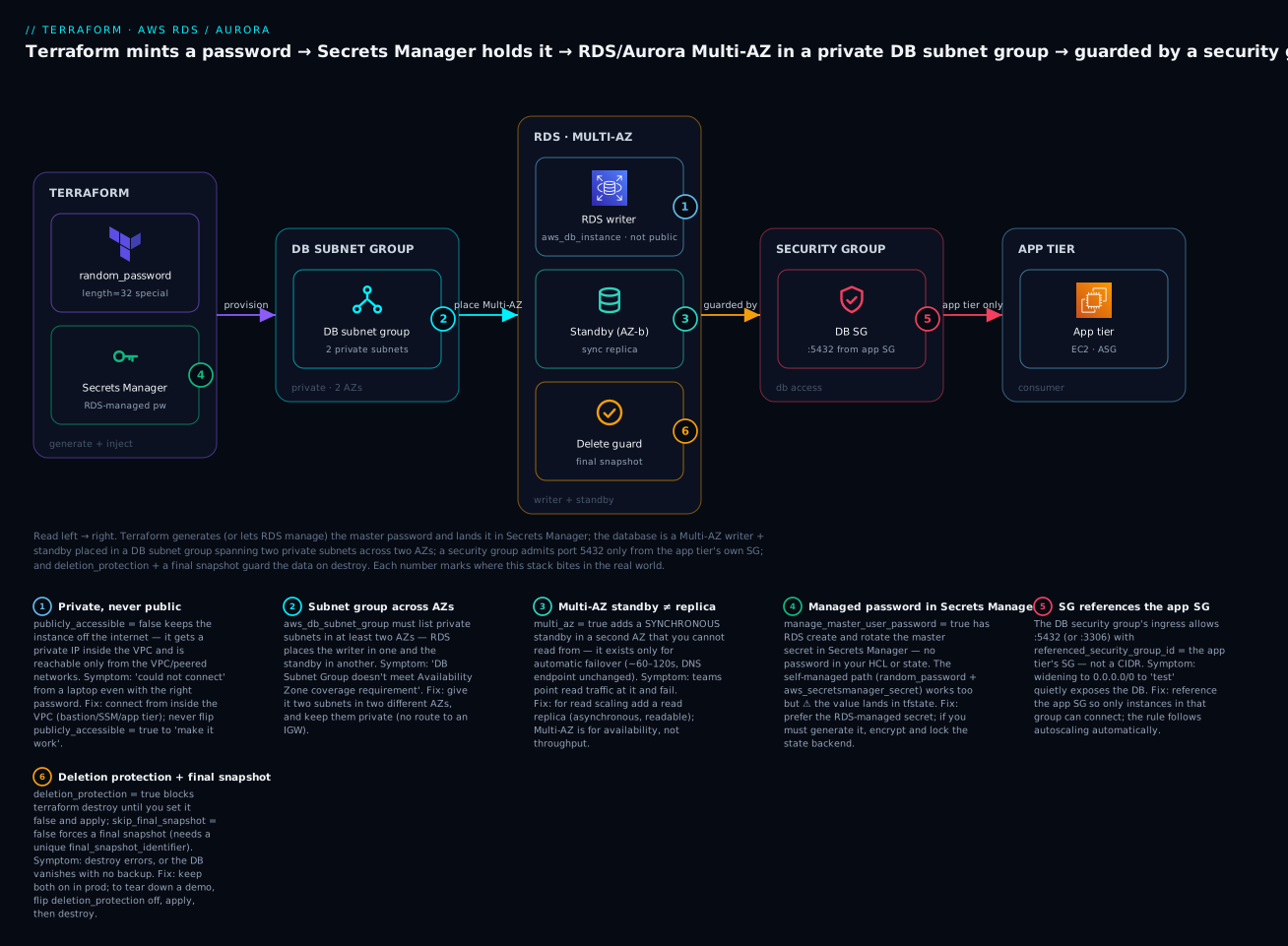
Read it left→right: Terraform arranges for the master password to live in Secrets Manager (RDS-managed, so it never enters state); the database is a Multi-AZ writer + standby placed in a DB subnet group across two private AZs; a security group admits 5432 only from the app tier’s SG; and deletion protection plus a final snapshot guard the data on destroy. The six badges are the six things that go wrong in production — we hit each one below.
The directory has five files:
| File | Contains |
|---|---|
versions.tf |
required_version, required_providers, S3+DynamoDB backend, provider |
variables.tf |
Inputs: region, name prefix, CIDRs, instance class, lifecycle toggles |
main.tf |
VPC + 2 private subnets, KMS key, subnet group, 2 SGs + ingress rule, parameter group, the aws_db_instance |
outputs.tf |
The (private) endpoint, port, and the managed-secret ARN |
terraform.tfvars |
Your actual values |
versions.tf — providers pinned, remote state on S3 with a DynamoDB lock (the AWS remote-state pattern):
terraform {
  required_version = ">= 1.6"

  required_providers {
    aws    = { source = "hashicorp/aws",    version = "~> 5.0" }
    random = { source = "hashicorp/random", version = "~> 3.6" }
  }

  # Remote state — S3 stores it, DynamoDB provides the lock.
  # (Terraform 1.10+ can instead use S3-native locking: `use_lockfile = true`, no DynamoDB.)
  backend "s3" {
    bucket         = "kv-tfstate-prod"
    key            = "aws/rds-aurora.tfstate"
    region         = "ap-south-1"
    dynamodb_table = "kv-tfstate-lock"
    encrypt        = true
  }
}

provider "aws" {
  region = var.region
  default_tags {
    tags = {
      project   = "rds-demo"
      managedBy = "terraform"
      env       = "demo"
    }
  }
}

provider "random" {}
variables.tf:
variable "region" {
  type    = string
  default = "ap-south-1"          # Mumbai
}

variable "prefix" {
  type    = string
  default = "appdemo"
}

variable "instance_class" {
  type    = string
  default = "db.t3.micro"         # cheapest that supports Multi-AZ; use db.m6g.large for real
}

variable "multi_az" {
  type    = bool
  default = true
}

variable "deletion_protection" {
  type    = bool
  default = true                  # realistic; we flip it off to destroy the demo
}

variable "skip_final_snapshot" {
  type    = bool
  default = false                 # take a final snapshot on delete
}
main.tf — the whole stack:
data "aws_availability_zones" "available" { state = "available" }

locals {
  tags = { project = "rds-demo", managedBy = "terraform", env = "demo" }
  azs  = slice(data.aws_availability_zones.available.names, 0, 2)  # first 2 AZs
}

# ---------- minimal VPC + two PRIVATE subnets across 2 AZs ----------
resource "aws_vpc" "main" {
  cidr_block           = "10.20.0.0/16"
  enable_dns_support   = true
  enable_dns_hostnames = true
  tags                 = merge(local.tags, { Name = "${var.prefix}-vpc" })
}

resource "aws_subnet" "db_a" {
  vpc_id            = aws_vpc.main.id
  cidr_block        = "10.20.1.0/24"
  availability_zone = local.azs[0]
  tags              = merge(local.tags, { Name = "${var.prefix}-db-a" })
}

resource "aws_subnet" "db_b" {
  vpc_id            = aws_vpc.main.id
  cidr_block        = "10.20.2.0/24"
  availability_zone = local.azs[1]
  tags              = merge(local.tags, { Name = "${var.prefix}-db-b" })
}

# ---------- KMS CMK for storage + the managed secret ----------
resource "aws_kms_key" "rds" {
  description             = "CMK for ${var.prefix} RDS storage & secret"
  deletion_window_in_days = 7
  enable_key_rotation     = true
  tags                    = local.tags
}

resource "aws_kms_alias" "rds" {
  name          = "alias/${var.prefix}-rds"
  target_key_id = aws_kms_key.rds.key_id
}

# ---------- DB subnet group (2 AZs, private) ----------
resource "aws_db_subnet_group" "db" {
  name       = "${var.prefix}-db"
  subnet_ids = [aws_subnet.db_a.id, aws_subnet.db_b.id]
  tags       = local.tags
}

# ---------- security groups: app tier + database ----------
resource "aws_security_group" "app" {
  name        = "${var.prefix}-app"
  description = "App tier"
  vpc_id      = aws_vpc.main.id
  tags        = local.tags
}

resource "aws_security_group" "db" {
  name        = "${var.prefix}-db"
  description = "RDS Postgres — ingress from app tier only"
  vpc_id      = aws_vpc.main.id
  tags        = local.tags
}

resource "aws_vpc_security_group_ingress_rule" "db_from_app" {
  security_group_id            = aws_security_group.db.id
  referenced_security_group_id = aws_security_group.app.id
  from_port                    = 5432
  to_port                      = 5432
  ip_protocol                  = "tcp"
  description                  = "Postgres from app tier"
}

# ---------- parameter group ----------
resource "aws_db_parameter_group" "pg" {
  name   = "${var.prefix}-pg16"
  family = "postgres16"

  parameter {
    name         = "log_min_duration_statement"
    value        = "500"
    apply_method = "immediate"
  }
  parameter {
    name         = "rds.force_ssl"
    value        = "1"
    apply_method = "pending-reboot"
  }

  lifecycle { create_before_destroy = true }
}

# ---------- the RDS instance ----------
resource "aws_db_instance" "postgres" {
  identifier     = "${var.prefix}-pg"
  engine         = "postgres"
  engine_version = "16.4"
  instance_class = var.instance_class

  allocated_storage     = 20
  max_allocated_storage = 100          # autoscaling ON (max > allocated)
  storage_type          = "gp3"
  storage_encrypted     = true
  kms_key_id            = aws_kms_key.rds.arn

  db_subnet_group_name   = aws_db_subnet_group.db.name
  vpc_security_group_ids = [aws_security_group.db.id]
  multi_az               = var.multi_az
  publicly_accessible    = false
  port                   = 5432

  db_name                       = "appdb"
  username                      = "dbadmin"
  manage_master_user_password   = true
  master_user_secret_kms_key_id = aws_kms_key.rds.arn

  parameter_group_name    = aws_db_parameter_group.pg.name
  backup_retention_period = 7
  backup_window           = "18:30-19:00"
  maintenance_window      = "Mon:19:30-Mon:20:30"
  copy_tags_to_snapshot   = true
  auto_minor_version_upgrade = true

  deletion_protection       = var.deletion_protection
  skip_final_snapshot       = var.skip_final_snapshot
  final_snapshot_identifier = "${var.prefix}-pg-final"
  apply_immediately         = true     # demo: see changes now, not in the window

  tags = local.tags
}
outputs.tf:
output "db_endpoint" {
  description = "Private connection endpoint (host:port)."
  value       = aws_db_instance.postgres.endpoint
}

output "db_address" {
  value = aws_db_instance.postgres.address
}

output "db_secret_arn" {
  description = "Secrets Manager ARN of the RDS-managed master password."
  value       = aws_db_instance.postgres.master_user_secret[0].secret_arn
}

output "db_subnet_group" {
  value = aws_db_subnet_group.db.name
}
Run it, step by step
Step 1 — terraform init. Downloads the two providers and wires the S3 backend (the bucket + DynamoDB table must already exist — see the remote-state setup in the 3-tier lesson below). Expect:
Initializing the backend...
Initializing provider plugins...
- Installing hashicorp/aws v5.x.x...
- Installing hashicorp/random v3.x.x...
Terraform has been successfully initialized!
Step 2 — terraform plan -out tfplan. Read the summary line — it should propose creating everything and nothing destructive:
Plan: 11 to add, 0 to change, 0 to destroy.
Because we use manage_master_user_password, there is no password anywhere in this plan — no random_password, no (sensitive value) for a password, nothing to leak. That absence is the security win.
Step 3 — terraform apply tfplan. ⚠️ This creates real, billed resources. The RDS instance is the slow part: provisioning a Multi-AZ Postgres instance takes 8–15 minutes (it builds the primary and the standby and syncs them). Watch the ordering — VPC and subnets first, then the subnet group and SGs, then KMS, then the instance last. On success:
Apply complete! Resources: 11 added, 0 changed, 0 destroyed.

Outputs:
db_address      = "appdemo-pg.abcdefgh1234.ap-south-1.rds.amazonaws.com"
db_endpoint     = "appdemo-pg.abcdefgh1234.ap-south-1.rds.amazonaws.com:5432"
db_secret_arn   = "arn:aws:secretsmanager:ap-south-1:123456789012:secret:rds!db-...-AbCdEf"
db_subnet_group = "appdemo-db"
Step 4 — verify. Confirm each property independently — don’t trust “apply succeeded”:
| Check | Command | Expected |
|---|---|---|
| Status, Multi-AZ, public? | aws rds describe-db-instances --db-instance-identifier appdemo-pg --query 'DBInstances[0].[DBInstanceStatus,MultiAZ,PubliclyAccessible]' |
["available", true, false] |
| Endpoint & port | aws rds describe-db-instances --db-instance-identifier appdemo-pg --query 'DBInstances[0].Endpoint' |
{Address, Port: 5432} |
| Encrypted + KMS key | aws rds describe-db-instances --db-instance-identifier appdemo-pg --query 'DBInstances[0].[StorageEncrypted,KmsKeyId]' |
[true, "arn:aws:kms:..."] |
| Storage autoscaling | aws rds describe-db-instances --db-instance-identifier appdemo-pg --query 'DBInstances[0].[AllocatedStorage,MaxAllocatedStorage]' |
[20, 100] |
| Managed secret exists | aws secretsmanager describe-secret --secret-id "$(terraform output -raw db_secret_arn)" --query 'Name' |
rds!db-... |
| Read the password (if needed) | aws secretsmanager get-secret-value --secret-id "$(terraform output -raw db_secret_arn)" --query 'SecretString' --output text |
{"username":"dbadmin","password":"..."} |
| Connect (from inside the VPC) | psql "host=<address> port=5432 dbname=appdb user=dbadmin sslmode=require" |
appdb=> prompt |
The connection test only works from inside the VPC (an EC2 host in the app SG, or over SSM/bastion) because the instance is private and the SG admits only the app tier — that is the whole design. From your laptop it will (correctly) time out.
Step 5 — terraform destroy. ⚠️ Here we meet the deletion-protection trap on purpose. With deletion_protection = true, destroy refuses:
Error: deleting RDS DB Instance (appdemo-pg): operation error RDS:
DeleteDBInstance ... Cannot delete protected DB Instance, please
disable deletion protection and try again.
The correct sequence — flip protection off, apply that one change, then destroy:
terraform apply -var deletion_protection=false -auto-approve   # 1 change, in place
terraform destroy -auto-approve                                 # now it proceeds
Because skip_final_snapshot = false, destroy takes a final snapshot named appdemo-pg-final before deleting — so the data survives even the teardown. For a truly disposable demo, add -var skip_final_snapshot=true to skip it (and save the snapshot-storage cost). Everything else — VPC, subnets, KMS (schedules deletion after its window), SGs, subnet group — is removed, and billing stops.
Variables, outputs & making it reusable
The demo hardcodes structure but parameterizes the moving parts. To turn “one database” into “a fleet,” a for_each over a map creates N instances from one block:
variable "databases" {
  type = map(object({
    instance_class = string
    multi_az       = bool
    allocated      = number
  }))
  default = {
    appdb     = { instance_class = "db.m6g.large", multi_az = true,  allocated = 50 }
    reporting = { instance_class = "db.r6g.large", multi_az = false, allocated = 100 }
  }
}

resource "aws_db_instance" "fleet" {
  for_each       = var.databases
  identifier     = "${var.prefix}-${each.key}"
  engine         = "postgres"
  engine_version = "16.4"
  instance_class = each.value.instance_class
  multi_az       = each.value.multi_az
  allocated_storage      = each.value.allocated
  db_subnet_group_name   = aws_db_subnet_group.db.name
  vpc_security_group_ids = [aws_security_group.db.id]
  publicly_accessible    = false
  username               = "dbadmin"
  manage_master_user_password = true
  skip_final_snapshot         = true
  tags = local.tags
}
A sensible module input surface if you lift this into modules/rds/:
| Input | Type | Why expose it |
|---|---|---|
prefix / region |
string | Naming + region per environment |
instance_class / allocated_storage / max_allocated_storage |
string / number | Size & autoscaling per env |
multi_az |
bool | On in prod, off in dev to save cost |
subnet_ids / app_security_group_id |
list / string | Wire into the caller’s VPC & app tier |
deletion_protection / skip_final_snapshot |
bool | Prod-safe defaults; dev can be disposable |
parameters |
map(string) | Engine tuning without touching the module |
You don’t have to write all this plumbing yourself — the community terraform-aws-modules/rds/aws module is maintained, widely used, and covers instances, subnet groups, and parameter groups; terraform-aws-modules/rds-aurora/aws does the same for Aurora clusters:
| Need | Registry module | Roll-your-own when |
|---|---|---|
| RDS instance | terraform-aws-modules/rds/aws |
You want the exact resource wiring visible in review |
| Aurora cluster | terraform-aws-modules/rds-aurora/aws |
Bespoke endpoint/parameter shapes |
| Subnet group / SG | terraform-aws-modules/vpc/aws (+ security-group module) |
Trivial single-VPC setups (inline is fine) |
| Secrets | Provider resources (aws_secretsmanager_secret) |
Almost always inline — it’s a few lines |
Use the registry module when you want tested defaults and less code; roll your own thin module when you want the retention/backup/SG wiring legible in every PR. For how the data tier plugs into a full application stack with remote state and environments, see Lesson: 3-tier architecture, modules, SRE & remote state.
Common mistakes and troubleshooting
Every row here is something that has cost a real engineer real time on exactly this stack:
| # | Symptom | Cause | Fix |
|---|---|---|---|
| 1 | Cannot connect / timeout from your laptop |
publicly_accessible = false (correct!) — the DB is private |
Connect from inside the VPC (app instance, bastion, SSM); do not flip it public |
| 2 | Cannot connect from an app instance |
DB SG doesn’t allow the app SG on the port | Add aws_vpc_security_group_ingress_rule with referenced_security_group_id = app.id, 5432 |
| 3 | apply fails: subnet group AZ coverage |
Subnet group has < 2 AZs (or 2 subnets, same AZ) | Give it two subnets in two different AZs |
| 4 | Master password sits in terraform.tfstate |
Self-managed random_password / password path |
Switch to manage_master_user_password = true; if you must self-manage, lock the state backend |
| 5 | destroy blocked: Cannot delete protected DB Instance |
deletion_protection = true |
apply -var deletion_protection=false, then destroy |
| 6 | destroy fails: final snapshot identifier required |
skip_final_snapshot = false but no final_snapshot_identifier |
Set a unique final_snapshot_identifier, or skip_final_snapshot = true |
| 7 | Static parameter change “did nothing” | apply_method = "pending-reboot" and no reboot |
aws rds reboot-db-instance --db-instance-identifier <id> to apply static params |
| 8 | apply errors setting apply_method = "immediate" |
The parameter is static, not dynamic | Use pending-reboot for static params |
| 9 | Change to instance_class/params “not applied” |
apply_immediately = false — queued to the window |
Set apply_immediately = true, or wait for the maintenance window |
| 10 | Can’t enable encryption on an existing DB | storage_encrypted is create-time only |
Snapshot → copy with encryption → restore as a new encrypted instance |
| 11 | password conflict error |
Set both password and manage_master_user_password |
Pick one — omit password when RDS manages it |
| 12 | Disk full despite “autoscaling on” | max_allocated_storage ≤ allocated_storage |
Set max strictly greater than allocated to enable autoscaling |
| 13 | Can’t create a read replica | backup_retention_period = 0 on the source |
Set retention ≥ 1 on the source |
| 14 | Every apply shows SG rule drift |
Inline ingress {} fighting console/other rules |
Move rules to aws_vpc_security_group_ingress_rule resources |
Four of these deserve a sentence of context. Rows 1–2 (can’t connect) are the same root cause split two ways: the database is intentionally unreachable except from the app tier inside the VPC, so a failed connection almost always means either you’re outside the VPC (row 1 — expected) or the SG doesn’t reference the app SG (row 2 — fix the rule). The instinct to “just make it public” is exactly the instinct this design exists to resist. Row 4 (secret in state) is a property to manage, not a bug: any password Terraform knows is written to state, so prefer manage_master_user_password and, where you can’t, protect the backend. Rows 5–6 (destroy) are the lifecycle-safety features working as intended — deletion_protection and the final snapshot are there to make a careless teardown hard, and the fix is the deliberate two-step, not disabling the guardrails in your prod config. Row 7 (pending-reboot) catches everyone once: a terraform apply that succeeds is not the same as a parameter that is live, when the parameter is static.
Cost, cleanup & production notes
Left running, this demo is modest but not free. Approximate Mumbai (ap-south-1) monthly costs:
| Resource | Config | Rough monthly cost | Notes |
|---|---|---|---|
| RDS instance | db.t3.micro, Multi-AZ |
~₹2,400–2,800 | Multi-AZ ≈ 2× single-AZ; db.m6g.large Multi-AZ is far more |
| Storage | 20 GiB gp3 | ~₹250–350 | Grows with autoscaling; snapshots billed separately |
| KMS key | 1 CMK | ~₹90 + per-request | ₹90/key/mo flat |
| Secrets Manager | 1 managed secret | ~₹40 + API calls | ₹40/secret/mo |
| Backups | ≤ DB size free, then per-GiB | ~₹0–100 | Free up to 100% of provisioned storage |
| Total | ~₹2,800–3,400/mo | Single-AZ (multi_az=false) roughly halves the instance line |
⚠️ The Multi-AZ instance is the meter that spins — it doubles the compute cost for a standby you can’t read. For pure learning, set
-var multi_az=false(single-AZ) and-var instance_class=db.t3.micro, andterraform destroybetween sessions. Nothing here needs to run overnight, and the final snapshot means you can rebuild from where you left off.
To clean up: the two-step from Step 5 (apply -var deletion_protection=false, then destroy). The only residue is the final snapshot (billed at snapshot rates until you delete it: aws rds delete-db-snapshot --db-snapshot-identifier appdemo-pg-final) and the KMS key (which enters a 7-day deletion window). Everything else is gone and billing stops.
Five production hardening notes for this exact tier:
| Hardening | What to change | Why |
|---|---|---|
| RDS-managed secret | manage_master_user_password = true (never password) |
Password never in HCL or state; RDS rotates it |
| Private only | publicly_accessible = false + private subnets + SG-from-app |
Three independent layers keep the DB off the internet |
| Encrypt with a CMK | storage_encrypted = true, kms_key_id = <cmk> |
Customer-controlled key; audit & revoke via KMS |
| Deletion safety | deletion_protection = true, skip_final_snapshot = false |
A careless destroy can’t vaporize data |
| Locked-down state | S3 backend, encrypt = true, bucket policy + DynamoDB/use_lockfile lock |
State can hold secrets/ARNs — protect it like production data |
Two of those tie back to the wider stack: the app in front of this database should authenticate to it with IAM database authentication (iam_database_authentication_enabled = true) or by reading the managed secret with its instance role — the same least-privilege pattern the 3-tier architecture lesson uses — and the SGs here are the DB half of the security-group model taught in the EC2 & security-groups lesson.
Going deeper
The core lesson builds a safe instance and a cluster. This section is for the operational realities that only show up later: changing a live database without downtime, keeping a rotating secret from fighting Terraform, bringing an existing database under management, and what actually happens under the hood when things fail over.
Blue/Green deployments: change the engine without the downtime
The scary changes to a production database are the ones that disrupt it — a major-version upgrade, a static parameter change, a resize. RDS Blue/Green deployments de-risk those: AWS stands up a green (staging) environment that replicates from your live blue one, you apply the change to green and test it, then RDS switches over in about a minute by swapping the endpoints — blue is kept briefly so you can roll back. In Terraform you opt in with a nested block on the instance, which tells the aws provider to route an eligible in-place change through a managed Blue/Green deployment instead of a disruptive ModifyDBInstance:
resource "aws_db_instance" "postgres" {
  # ...
  engine_version = "16.6"          # e.g. a minor/major bump you want done safely

  blue_green_update {
    enabled = true                 # route eligible changes through a managed Blue/Green deployment
  }
}
The caveats worth knowing: only changes RDS supports via Blue/Green qualify (engine version, parameter group, some class/storage changes); the switchover renames identifiers under the hood, so read the plan; and you still pay for the green environment while it runs. It is the difference between a 1-minute cutover and a multi-minute in-place modify with a reboot.
The password lifecycle: ignore_changes, rotation, and create-vs-update
password is only sent to RDS at create time and whenever you explicitly change it. That collides with rotation: if a rotation Lambda (or another operator) changes the password out of band, the value in state no longer matches reality, and the next apply will try to “correct” it back — resetting the live credential. On the self-managed path the fix is to tell Terraform to stop caring about that field after create:
resource "aws_db_instance" "self_managed" {
  # ... self-managed secret path
  username = "dbadmin"
  password = random_password.db.result

  lifecycle {
    ignore_changes = [password]    # let out-of-band rotation own it after the initial create
  }
}
With manage_master_user_password = true there is no password argument at all, so there is nothing to ignore — RDS owns creation and rotation. The managed secret surfaces as a computed nested attribute, master_user_secret[0].secret_arn (and .kms_key_id); you grant the application read on that ARN, and it fetches the current password at runtime. If you want to drop passwords entirely, iam_database_authentication_enabled = true lets clients log in with a short-lived IAM token instead — no shared secret to rotate at all.
Adopting an existing database: import and moved blocks
You rarely start greenfield. A database someone clicked out in the console (or one a CloudFormation stack owns) needs to come under Terraform without a destroy-and-recreate. Use a config-driven import block (Terraform 1.5+) keyed by the DB identifier, write a resource whose arguments match the live values, plan until it reports no changes, then delete the import block. moved blocks are the companion for pure refactors — renaming a resource or lifting it into a module — and make zero API calls:
# 1.5+ config-driven import — adopt a console-made instance, no recreate
import {
  to = aws_db_instance.postgres
  id = "app-prod-pg"               # the DB instance identifier
}

# Refactor an address with zero API calls (rename, or move into a module)
moved {
  from = aws_db_instance.postgres
  to   = module.data.aws_db_instance.postgres
}
Importing forces you to confront every argument: a non-empty plan after import means your HCL does not yet match reality, and you align it (not the database) until the plan is a no-op. It is also worth knowing the other ways an instance can come into being, because they are mutually exclusive create modes:
| How it comes to exist | Argument / block | Result |
|---|---|---|
| Fresh, empty | (none of the below) | New instance (empty, or with db_name) |
| From a snapshot | snapshot_identifier |
New instance seeded from a snapshot |
| Point-in-time clone | restore_to_point_in_time {} |
New instance restored to a chosen second |
| Read replica | replicate_source_db |
Async replica of a source instance |
| Adopt existing | import {} block |
Existing instance brought into state (not created) |
Under the hood: failover and Aurora’s shared storage
The Multi-AZ-vs-Aurora distinction is not marketing; it falls out of how the bytes are stored. An RDS Multi-AZ instance has two separate EBS volumes — primary and standby — kept in lockstep by synchronous, block-level replication. On failure RDS promotes the standby and flips the endpoint’s DNS CNAME to it (~60–120s), then builds a fresh standby in the background. Because the volumes are separate, a replica or a new standby means physically copying data.
Aurora has no per-instance volume at all. Every instance in the cluster points at one shared, log-structured storage layer that keeps six copies across three AZs and commits on a write quorum. Failover is therefore just electing a different compute node to be the writer against the same storage (~30s, no data to copy); adding a reader copies nothing; and storage grows automatically up to 128 TiB — which is exactly why an Aurora cluster has no allocated_storage argument. The Multi-AZ DB cluster (three readable instances) is a third shape that borrows the “readable standbys, fast failover” feel for the community RDS engines without being Aurora. Knowing which of the three you are running tells you your failover time, whether your standby can serve reads, and whether adding capacity is instant or a copy.
Cheat-sheet
Resources and their load-bearing arguments:
| Resource | Must-set arguments | Watch out |
|---|---|---|
aws_db_instance |
engine, engine_version, instance_class, allocated_storage, db_subnet_group_name, vpc_security_group_ids, username + manage_master_user_password |
publicly_accessible=false; storage_encrypted is create-time; deletion-protection blocks destroy |
aws_db_subnet_group |
name, subnet_ids |
≥ 2 AZs, keep private |
aws_security_group (+ aws_vpc_security_group_ingress_rule) |
vpc_id; rule: referenced_security_group_id, ports, ip_protocol |
Reference the app SG, not 0.0.0.0/0 |
aws_db_parameter_group |
name, family, parameter{} |
apply_method static→pending-reboot (needs reboot) |
aws_db_option_group |
engine_name, major_engine_version, option{} |
Not for PostgreSQL |
aws_secretsmanager_secret + _version |
name; secret_id, secret_string |
Self-managed value lands in state |
aws_kms_key / aws_kms_alias |
enable_key_rotation; target_key_id |
Encryption is create-time on RDS |
| read replica | aws_db_instance + replicate_source_db |
identifier (same-region) vs arn (cross-region) + KMS |
aws_rds_cluster |
cluster_identifier, engine, creds, db_subnet_group_name |
Creds live on the cluster; serverlessv2_scaling_configuration for SV2 |
aws_rds_cluster_instance |
cluster_identifier, instance_class |
db.serverless marks Serverless v2 |
Command quick-reference:
| Task | Command |
|---|---|
| Init / plan / apply | terraform init · terraform plan -out tfplan · terraform apply tfplan |
| Describe instance | aws rds describe-db-instances --db-instance-identifier <id> |
| Available engine versions | aws rds describe-db-engine-versions --engine postgres --query 'DBEngineVersions[].EngineVersion' |
| Read the managed secret | aws secretsmanager get-secret-value --secret-id "$(terraform output -raw db_secret_arn)" |
| Reboot (apply static params) | aws rds reboot-db-instance --db-instance-identifier <id> |
| Take a manual snapshot | aws rds create-db-snapshot --db-instance-identifier <id> --db-snapshot-identifier <snap> |
| PITR restore | aws rds restore-db-instance-to-point-in-time --source-db-instance-identifier <id> --target-db-instance-identifier <new> --restore-time <ts> |
| Disable deletion protection | terraform apply -var deletion_protection=false |
| Destroy | terraform destroy |
| Delete a leftover snapshot | aws rds delete-db-snapshot --db-snapshot-identifier <snap> |
Interview and exam questions
1. What’s the difference between Multi-AZ and a read replica? Multi-AZ (multi_az = true) is a synchronous standby in a second AZ for availability — you cannot read from it; it exists for automatic failover with the endpoint unchanged. A read replica (replicate_source_db) is an asynchronous, readable copy for read scaling, can be cross-region, and is promoted manually. Multi-AZ = uptime; read replica = throughput.
2. Why must a DB subnet group span two AZs even for a single-AZ instance? Because RDS needs the option to place a standby (or fail over) into a second AZ. If the group has only one AZ, apply fails with an AZ-coverage error. Give it two subnets in two different AZs.
3. A colleague sets publicly_accessible = true “to make the connection work.” What’s wrong? They’re exposing the database to the internet instead of fixing the real problem — they’re connecting from outside the VPC, or the SG doesn’t allow their source. Keep publicly_accessible = false; connect from inside the VPC and reference the app SG in the DB SG’s ingress rule.
4. How do you keep the master password out of Terraform state? Use manage_master_user_password = true (with username, and no password). RDS creates and rotates the secret in Secrets Manager; Terraform only ever sees the secret’s ARN, never the value. The self-managed random_password/password path puts the plaintext in state.
5. What does max_allocated_storage do, and when is autoscaling actually on? It’s the ceiling for RDS storage autoscaling. Autoscaling is enabled only when max_allocated_storage is strictly greater than allocated_storage; if they’re equal (or max is 0), it’s off. Storage can grow to the ceiling automatically but never shrinks.
6. You changed a parameter and nothing happened. Why? The parameter is static and its apply_method is pending-reboot — terraform apply records the change but it isn’t live until you reboot the instance (aws rds reboot-db-instance). Dynamic parameters use immediate; static ones require a reboot.
7. Explain the terraform destroy dance for a protected database. deletion_protection = true makes destroy fail. You must terraform apply -var deletion_protection=false (a one-line change), then terraform destroy. With skip_final_snapshot = false, destroy also takes a final snapshot (needing a unique final_snapshot_identifier) before deleting.
8. When would you choose Aurora over RDS? When you want higher throughput, up to 15 low-lag readers, ~30s failover, a global database, or Serverless v2 auto-scaling — and you’re on MySQL or PostgreSQL. Stick with RDS for full community-engine parameter control, an engine Aurora doesn’t offer (SQL Server, Oracle, MariaDB), or a small steady DB where cost predictability matters.
9. How does Aurora model differently in Terraform? You create an aws_rds_cluster (owns the shared storage, endpoints, backups, and credentials) plus one or more aws_rds_cluster_instance members (the compute). Credentials and the subnet group go on the cluster; the instance class (including db.serverless for Serverless v2) goes on the members. Apps connect to the cluster’s writer/reader endpoints.
10. (Associate-style) Where does encryption get decided for RDS, and can you change it later? At create time, via storage_encrypted = true (+ optional kms_key_id). You cannot toggle encryption on an existing unencrypted instance — you snapshot it, copy the snapshot with encryption, and restore that as a new encrypted instance.
11. (Associate-style) Why prefer aws_vpc_security_group_ingress_rule over inline ingress {} blocks? Separate rule resources avoid the drift war where a rule added out-of-band (console/another tool) conflicts with inline rules and shows up as a diff on every plan. Provider v5 makes the standalone rule resources the idiomatic choice, and they pair naturally with referenced_security_group_id.
12. What’s the difference between an option group and a parameter group? A parameter group sets engine configuration values (like postgresql.conf/my.cnf); a parameter’s apply_method is immediate (dynamic) or pending-reboot (static). An option group enables optional engine features (e.g. SQL Server audit, MySQL MEMCACHED) and is keyed by engine_name + major_engine_version. PostgreSQL uses parameter groups only.
Practice challenges
Work these against the hands-on directory from the lesson (or a scratch copy). They escalate from a one-flag warm-up to rebuilding the tier as Aurora. Everything here bills real money — terraform destroy between attempts, and prefer -var multi_az=false while practising.
1. (Warm-up) Make the demo cheap to learn on. Run the whole stack single-AZ on the smallest class without editing any .tf file.
<details> <summary>Solution</summary>
terraform apply -var multi_az=false -var instance_class=db.t3.micro. Why: both toggles are already declared as variables, so you override them at the CLI — single-AZ drops the standby (the meter that spins) and db.t3.micro is the cheapest class that still runs the demo.
</details>
2. (Networking) Let a bastion reach the database too. Add a second ingress path so a bastion security group can also open 5432, without introducing any CIDR.
<details> <summary>Solution</summary>
Create a bastion SG and a second standalone rule referencing it:
resource "aws_vpc_security_group_ingress_rule" "db_from_bastion" {
  security_group_id            = aws_security_group.db.id
  referenced_security_group_id = aws_security_group.bastion.id
  from_port                    = 5432
  to_port                      = 5432
  ip_protocol                  = "tcp"
  description                  = "Postgres from bastion"
}
Why: each source SG is its own rule resource — you add reach by adding rules, never by loosening one to 0.0.0.0/0.
</details>
3. (Scaling) Add a same-region read replica. Give the primary a readable async copy for reporting traffic.
<details> <summary>Solution</summary>
resource "aws_db_instance" "reader" {
  identifier          = "${var.prefix}-pg-ro"
  replicate_source_db = aws_db_instance.postgres.identifier
  instance_class      = var.instance_class
  publicly_accessible = false
  skip_final_snapshot = true
}
Why: a replica inherits engine, username, password, allocated_storage, and db_name from its source — setting them errors — and it requires backup_retention_period ≥ 1 on the source (the demo already uses 7).
</details>
4. (Parameters) Turn on rds.force_ssl and make it actually live. The parameter group already sets it; prove the change is enforced, not just recorded.
<details> <summary>Solution</summary>
rds.force_ssl is a static parameter (apply_method = "pending-reboot"), so terraform apply records the value but it is not live until you reboot: aws rds reboot-db-instance --db-instance-identifier appdemo-pg. Why: a successful apply is not the same as a live static parameter — static values wait for a reboot Terraform will not perform for you.
</details>
5. (Lifecycle) Adopt a console-made database into Terraform. A teammate clicked out a DB named legacy-pg; bring it under this config with no destroy/recreate.
<details> <summary>Solution</summary>
Add a config-driven import block, write a matching resource, then reconcile:
import {
  to = aws_db_instance.legacy
  id = "legacy-pg"        # the DB instance identifier
}
Run terraform plan and edit the aws_db_instance.legacy arguments until it reports 0 to change, then delete the import block. Why: config-driven import (1.5+) brings the resource into state without a create; a non-empty plan means your HCL doesn’t yet match the live instance — you align the code, not the database.
</details>
6. (Aurora) Rebuild the tier as an Aurora Serverless v2 cluster. Replace the aws_db_instance with a cluster that has a writer and a reader which scale with load.
<details> <summary>Solution</summary>
resource "aws_rds_cluster" "aurora" {
  cluster_identifier          = "${var.prefix}-aurora"
  engine                      = "aurora-postgresql"
  engine_version              = "16.4"
  engine_mode                 = "provisioned"        # Serverless v2 uses "provisioned" + the block
  database_name               = "appdb"
  master_username             = "dbadmin"
  manage_master_user_password = true
  db_subnet_group_name        = aws_db_subnet_group.db.name
  vpc_security_group_ids      = [aws_security_group.db.id]
  storage_encrypted           = true
  kms_key_id                  = aws_kms_key.rds.arn
  skip_final_snapshot         = true
  serverlessv2_scaling_configuration {
    min_capacity = 0.5
    max_capacity = 8
  }
}

resource "aws_rds_cluster_instance" "members" {
  count              = 2
  identifier         = "${var.prefix}-aurora-${count.index}"
  cluster_identifier = aws_rds_cluster.aurora.id
  engine             = aws_rds_cluster.aurora.engine
  instance_class     = "db.serverless"               # the Serverless v2 marker
  publicly_accessible = false
}
Point writes at aws_rds_cluster.aurora.endpoint and reads at .reader_endpoint. Why: Aurora is a cluster + instances, storage is shared so there is no allocated_storage; db.serverless plus the scaling block is the v2 marker — engine_mode stays "provisioned", never the deprecated "serverless" (that was v1).
</details>
Common beginner mistakes
These are misconceptions — wrong mental models — as opposed to the symptom→cause→fix rows in the troubleshooting table above. Each one tends to bite exactly once.
| Misconception | Why it’s wrong | The right mental model |
|---|---|---|
| “Multi-AZ gives me a free read replica.” | The standby serves nothing until a failover — you cannot open a connection to it. | Multi-AZ = availability; a read replica = throughput. Different resource, different problem. |
“publicly_accessible = true is how the app connects.” |
It hands the DB a public endpoint; the app reaches it over the VPC either way. Public just means internet-exposed. | Connect from inside the VPC; the SG-references-app-SG rule is the real door. |
“I’ll put the password in terraform.tfvars and .gitignore it.” |
Terraform still writes the value into state in cleartext; gitignore only hides the tfvars file. | Any password Terraform knows lands in state. Let RDS own it via manage_master_user_password. |
| “Aurora is just RDS with a checkbox.” | Aurora has no per-instance disk and no allocated_storage; it is a cluster of compute over shared storage. |
Model it as aws_rds_cluster + aws_rds_cluster_instance; the credentials live on the cluster. |
“I’ll enable storage_encrypted later.” |
Encryption is create-time only — you cannot toggle it on a live instance. | Decide at create. To encrypt later: snapshot → copy the snapshot encrypted → restore as a new instance. |
“apply succeeded, so my parameter change is live.” |
Static parameters are pending-reboot; the value waits for a reboot Terraform will not do. |
apply records the desired value; a reboot makes a static parameter live. |
“terraform destroy cleans up, so backups are optional.” |
Deletion protection blocks it, and with no final snapshot the data is gone for good. | Keep deletion_protection on and skip_final_snapshot = false; teardown is a deliberate two-step. |
| “One subnet in one AZ is fine for a single-AZ DB.” | The subnet group must span ≥ 2 AZs or apply fails outright. |
RDS needs somewhere to fail over to — give it two subnets in two AZs, always. |
Glossary
| Term | Plain-language meaning |
|---|---|
| RDS | Amazon’s managed relational database service — AWS runs the engine (Postgres/MySQL/…) and hands you an endpoint plus a set of knobs. |
| Aurora | AWS’s cloud-native rebuild of MySQL/PostgreSQL that splits compute from a shared, six-way-replicated storage layer. |
aws_db_instance |
The Terraform resource for one RDS engine instance (also used for read replicas). |
aws_rds_cluster / aws_rds_cluster_instance |
The Aurora pair — the cluster owns storage, endpoints, and credentials; the instances are the compute members. |
| Multi-AZ | A synchronous standby in a second AZ for automatic failover. Availability, not read scaling; the standby is unreadable. |
| Standby | The hidden Multi-AZ replica that only becomes active during a failover. |
| Read replica | An asynchronous, readable copy for offloading reads; promoted manually to become standalone. |
| DB subnet group | The named set of subnets (spanning ≥ 2 AZs) RDS may place the instance and its standby into. |
| Security group (SG) | A stateful virtual firewall; the DB SG should admit the DB port only from the app tier’s SG. |
| Parameter group | Where you set engine config (the postgresql.conf/my.cnf equivalents), since you can’t SSH into RDS. |
| Option group | Enables optional engine features (SQL Server audit, MySQL MEMCACHED); PostgreSQL doesn’t use them. |
apply_method |
immediate for dynamic parameters, pending-reboot for static ones (which need a reboot to go live). |
| Secrets Manager | AWS’s secret store; RDS can create and rotate the master password here so it never enters state. |
manage_master_user_password |
The boolean that hands password creation and rotation to RDS — the modern, state-safe default. |
master_user_secret |
The computed nested attribute exposing the managed secret’s ARN and KMS key id. |
| KMS CMK | A customer-managed key used to encrypt storage and the managed secret at rest. |
| Storage autoscaling | RDS grows the volume automatically up to max_allocated_storage (which must exceed allocated_storage). |
| PITR | Point-in-time restore — rebuild to any second within the backup-retention window from automated backups. |
| Final snapshot | The last snapshot taken at destroy when skip_final_snapshot = false; your teardown safety net. |
| Deletion protection | A flag that makes destroy fail until you flip it off — a guardrail, not a bug. |
| ACU | Aurora Capacity Unit — roughly 2 GiB of RAM plus proportional CPU; the unit Serverless v2 scales in. |
| Serverless v2 | Aurora instances (db.serverless) that scale capacity in ACUs within seconds via serverlessv2_scaling_configuration. |
| Writer / reader endpoint | Aurora’s role-based DNS names — writes go to the writer, reads load-balance across the readers. |
| Blue/Green deployment | A managed staging clone RDS switches to in ~1 minute for low-risk upgrades and changes. |
| IAM database authentication | Logging in with a short-lived IAM token instead of a password (iam_database_authentication_enabled). |
Key takeaways
- Private by three layers.
publicly_accessible = false, private DB subnets, and a security group that references the app tier’s SG each keep the database off the internet — you’d have to break all three, and every break shows up in aplandiff. - Let RDS manage the password.
manage_master_user_password = trueputs the master secret in Secrets Manager, rotated, and out of your HCL and state. Reach forrandom_password+aws_secretsmanager_secretonly when you must own the secret — and then lock the state backend, because.resultlands in state. - The subnet group must span two AZs. Even a single-AZ instance needs it; Multi-AZ then places a synchronous standby in the second AZ for automatic failover — which is availability, not read scaling.
- Multi-AZ ≠ read replica. Standby = uptime, unreadable, automatic failover, same region. Read replica = read throughput, readable, manual promotion, can be cross-region. Know which problem you’re solving.
- Parameter groups have a reboot trap. Static parameters (
pending-reboot) don’t take effect until you reboot; a successfulapplyisn’t a live change. Matchapply_methodto whether the parameter is dynamic or static. - Deletion protection and the final snapshot are features, not obstacles. Keep them on in production; to tear down a demo, flip
deletion_protectionoff,apply, thendestroy— and let the final snapshot save you. - Aurora is a cluster, not an instance.
aws_rds_cluster(storage, endpoints, creds) +aws_rds_cluster_instance(compute,db.serverlessfor Serverless v2). Choose it for scale, fast failover, or global reach; choose RDS for simplicity and full engine control. - Destroy to stop the meter. The Multi-AZ instance is the cost; use single-AZ +
db.t3.microfor learning andterraform destroybetween sessions to keep this an under-₹3,500 exercise.