In a nutshell
Picture a nightclub. The Security Group is the bouncer at the door: it holds a short guest list of who may come in — “HTTP from anyone, SSH only from my laptop” — and turns everyone else away. The clever part is that this bouncer has a memory: once it lets your request in, it automatically lets the reply back out, so you never write a rule for return traffic. That single trait — being stateful — is what makes a Security Group so much easier to reason about than the old, rule-numbered firewalls (the network ACLs) that force you to spell out both directions. And a Security Group only ever says yes; there is no “deny” rule, because anything not on the guest list is already turned away.
The key pair is the physical key to the box itself. AWS keeps the lock (the public key, injected into the instance at launch); you keep the key (the private half — which must never touch Terraform state or a git repo). Lose it and you cannot SSH in — but as you will see, the modern answer is to throw the key away entirely and walk in through a logged side door: SSM Session Manager.
Everything else in this lesson is the box that bouncer guards — an EC2 instance, a whole Linux machine you rent by the second. You assemble it as a small graph of Terraform resources — an image to boot from, a size, a subnet to live in, disks, a bootstrap script, a stable address — and the reason to do it in Terraform rather than clicking “Launch” is that you get to read the plan before it exists and destroy the whole thing in one command.
Level: Senior · Time: ~63 min
Prerequisites — you should already be comfortable with:
- The Terraform core loop —
init/plan/apply/destroy— and how to read a plan. - What a VPC, subnet, route table and internet gateway are; this lesson drops a box into a network — the full story is Terraform on AWS: VPC, Subnets, Internet & NAT Gateways, Route Tables.
- Basic Linux, plus a working AWS provider and remote backend.
After this lesson you will be able to:
- Resolve an AMI with
data.aws_ami(and explain why a hardcodedami-…is a bug waiting to happen). - Write Security Group rules in the modern
aws_vpc_security_group_ingress_rulemodel and explain why you must never mix rule models on one group. - Reference one SG from another to build web → app → db tiers that survive every IP change.
- Boot an instance with
user_data, harden it with IMDSv2, give it a role via an instance profile, and reach it with no open SSH port through SSM. - Attach an encrypted gp3 data volume, pin an Elastic IP, and read a plan for the
-/+replacement triggers that bite (amianduser_data).
An EC2 instance is the oldest primitive in AWS and still the first thing most teams reach for: a whole Linux (or Windows) machine you rent by the second, on hardware you never see. The console makes it feel like one click — pick an AMI, pick a size, “Launch.” Terraform makes the truth explicit: an instance you can actually curl is never one resource. To stand up a web box you can reach from the internet you assemble a small graph — an AMI resolved (not hardcoded), an instance type, a subnet to land in, a key pair or an instance profile for access, a Security Group that decides who may knock, a root volume and often a separate EBS data volume, a user-data script so it boots already serving, and an Elastic IP so its address survives a reboot. The console hides that graph behind a wizard; Terraform is the graph, written down, reviewed before it exists, and destroyable in one command.
This lesson builds that graph for real. You will learn every argument that matters on aws_instance — how data.aws_ami with owners and filter blocks finds the latest Amazon Linux 2023 or Ubuntu so you never paste an ami-0abc… that vanishes next region; how instance_type, subnet_id, availability_zone and associate_public_ip_address place the box; how user_data (with the sharp-edged user_data_replace_on_change) bootstraps it; how metadata_options forces IMDSv2; and how iam_instance_profile gives it a role with no static keys. You will meet EBS two ways — the inline root_block_device versus a standalone aws_ebs_volume + aws_volume_attachment — and the gp3 vs gp2 vs io2 decision. You will meet key pairs (aws_key_pair, optionally minted by tls_private_key) and the reason to prefer SSM Session Manager over SSH entirely. And you will meet the part that trips up everyone: Security Groups, and the three different ways Terraform lets you write their rules — inline ingress/egress, the older standalone aws_security_group_rule, and the newer aws_vpc_security_group_ingress_rule — which you must never mix, plus the default-egress trap and the pattern of one SG referencing another as its source.
Why Terraform and not the console, aws ec2 run-instances, or CloudFormation? Because an instance is exactly the kind of multi-resource, order-sensitive, frequently-rebuilt thing that punishes manual work and rewards a plan you can read before you apply. The console cannot show you, before you click Launch, that changing the AMI or the user_data will replace the instance; terraform plan shows you the -/+ destroy and then create replacement in red. This lesson assumes you already have the AWS provider and a remote backend working, and it drops the instance into a network — for the full VPC story see Terraform on AWS: VPC, Subnets, Internet & NAT Gateways, Route Tables. When the box needs to sit behind a real load balancer that is Terraform on AWS: ELB — ALB, NLB & Target Groups, and the instance profile you attach here is authored properly in Terraform on AWS: IAM Roles, Policies & S3 Buckets.
What you’ll build
The scenario is week-one-on-AWS: “stand me up a Linux box in a public subnet, give it a stable public address, lock SSH to my own IP (or better, no SSH at all), attach an encrypted data disk, and have nginx already serving when it boots.” By the end you will have exactly that as .tf files you can commit, review and destroy — and you will understand every decision each resource forces.
The architecture in words: a small VPC (10.0.0.0/16) with one public subnet (10.0.1.0/24), an internet gateway and a route so the subnet can reach the world. A Security Group allows 80/443 from anywhere and 22 only from your /32. A data source resolves the newest Amazon Linux 2023 AMI. The EC2 instance references that AMI, the subnet and the SG, carries a key pair and an instance profile (so you can use SSM), enforces IMDSv2 via metadata_options, boots an nginx user-data script, and roots itself on an encrypted gp3 volume. A separate aws_ebs_volume attaches as a data disk, and an Elastic IP pins the address. That is the graph the diagram draws, left to right.
Here is the full bill of materials — every resource, what it models, and whether changing it in place is cheap or forces a replacement (destroy-and-recreate), which is the single most important column when you read a plan:
| Resource | Models | Key reference | Change-in-place or replace? |
|---|---|---|---|
aws_vpc |
The 10.0.0.0/16 address space |
none | In place (CIDR change replaces) |
aws_internet_gateway |
The door to the internet | VPC | In place |
aws_subnet |
The 10.0.1.0/24 segment + AZ |
VPC | AZ/CIDR change replaces |
aws_route_table (+ association) |
0.0.0.0/0 → IGW |
VPC + IGW | In place |
aws_security_group |
The stateful firewall (empty shell) | VPC | In place (name/desc/vpc replaces) |
aws_vpc_security_group_ingress_rule ×3 |
80 / 443 / 22 allow rules | SG | In place (most fields replace the rule) |
aws_vpc_security_group_egress_rule |
Explicit allow-all egress | SG | In place |
data.aws_ami |
The latest AL2023 image (read-only) | none | n/a (a lookup, not a resource) |
tls_private_key + aws_key_pair |
An SSH key pair | none | Public key change replaces |
aws_iam_role + _instance_profile |
The role the box assumes (for SSM) | none | In place (name replaces) |
aws_instance |
The VM itself | AMI, subnet, SG, key, profile | AMI / user_data / type-in-some-cases replace |
aws_ebs_volume + aws_volume_attachment |
A reattachable encrypted data disk | subnet AZ + instance | In place (grow only) |
aws_eip |
The stable public IP | instance + IGW | In place |
And the decision that sends people to Terraform in the first place — why not just click, script, or template it:
| Approach | How you describe the box | Sees drift? | Preview before change? | Verdict for an EC2 graph |
|---|---|---|---|---|
| AWS Console | Point-and-click Launch wizard | No | No | Fine to learn once; unrepeatable, unreviewable |
aws ec2 run-instances |
Imperative CLI flags | No | No | Great for throwaways; no state, no plan |
| CloudFormation | Declarative YAML/JSON | Partial (change sets) | aws cloudformation deploy --no-execute-changeset |
AWS-only; weaker multi-cloud/module ecosystem |
Terraform (aws) |
Declarative HCL + state | Yes (plan refreshes) |
Yes (terraform plan) |
The graph, versioned, previewed, destroyable |
The single most important idea is that Terraform builds the dependency graph from your references, not from an order you write. You never tell it “create the Security Group before the instance”; the instance’s vpc_security_group_ids = [aws_security_group.web.id] is the edge, and subnet_id = aws_subnet.public.id is the next one. Terraform reads the references and orders the graph — which is why depends_on is almost never needed here.
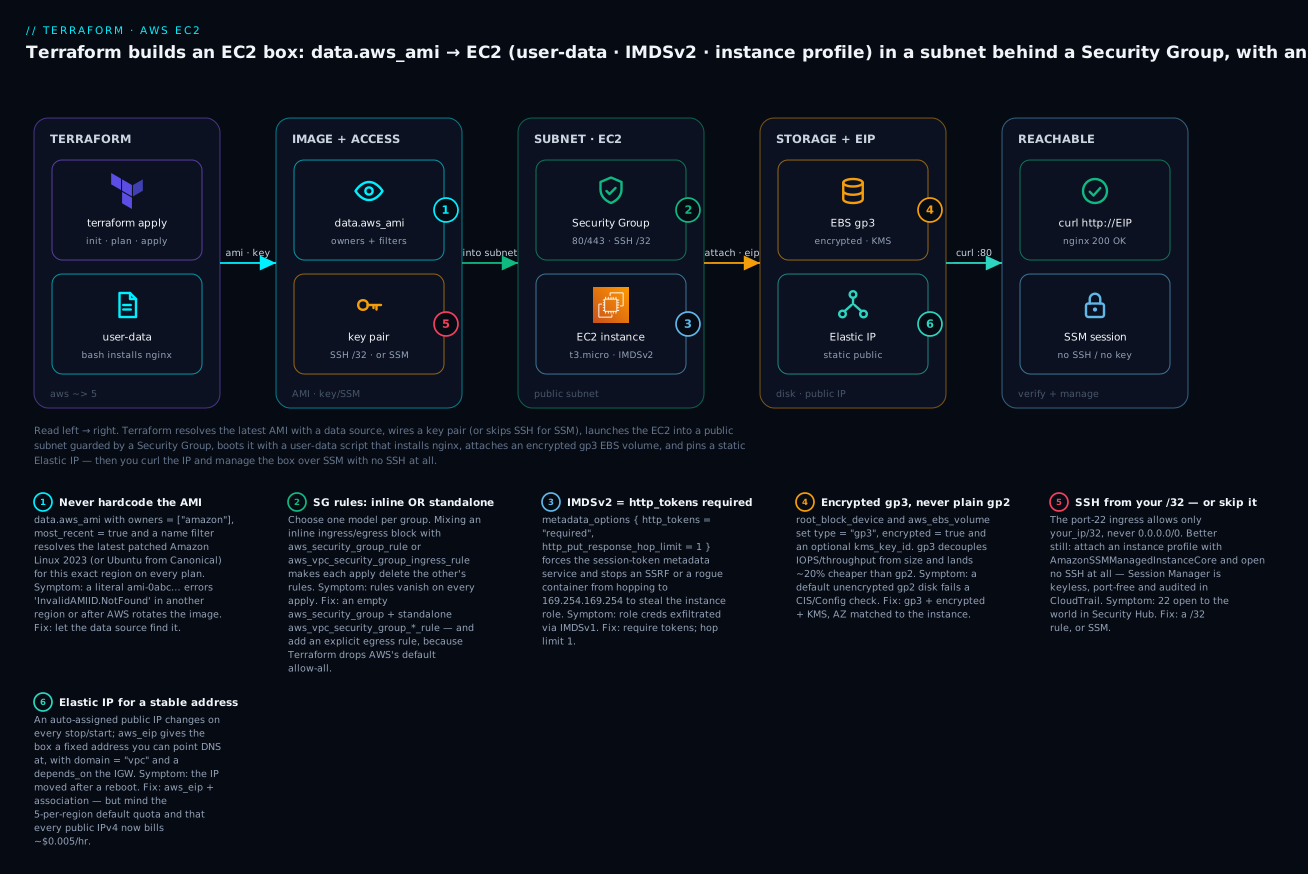
Read it left to right: Terraform resolves the newest AMI and wires a key pair (or skips SSH for SSM), launches the instance into a public subnet behind a Security Group, boots it with a user-data script, attaches an encrypted gp3 data volume and pins an Elastic IP — and the far right is the payoff, a curl that returns the nginx page and a keyless SSM shell. The six numbered badges mark the decisions that trip people up, and the legend narrates each with a symptom and a fix.
The aws_instance resource and its arguments
The centre of gravity is aws_instance. It has dozens of arguments; the ones you set on nearly every real instance are below, grouped by what they control. Read this as the reference you keep open while writing the resource:
aws_instance argument |
Controls | Typical value / note |
|---|---|---|
ami |
Which image boots | data.aws_ami.al2023.id — never a literal id |
instance_type |
CPU / memory / network shape | t3.micro (free-tier), m6i.large for real |
subnet_id |
Which subnet (and thus AZ + VPC) it lands in | aws_subnet.public.id |
availability_zone |
Pin the AZ (usually inferred from subnet) | omit — the subnet decides |
vpc_security_group_ids |
The SGs attached to its ENI | [aws_security_group.web.id] |
key_name |
The SSH key pair to inject | aws_key_pair.demo.key_name |
associate_public_ip_address |
Give it an auto public IP | true in a public subnet (EIP overrides it) |
iam_instance_profile |
The role it assumes (name, not ARN) | aws_iam_instance_profile.ec2.name |
user_data / user_data_base64 |
First-boot bootstrap script | heredoc bash (see below) |
user_data_replace_on_change |
Recreate the box when the script changes | true (default false — a trap) |
metadata_options |
IMDS version + hop limit | block forcing IMDSv2 |
root_block_device |
The OS disk (size, type, encryption) | gp3, encrypted = true |
ebs_block_device |
Inline extra disks (alternative to standalone) | prefer standalone aws_ebs_volume |
instance_market_options |
Spot request | market_type = "spot" for interruptible work |
placement_group / tenancy |
Physical placement | cluster/spread groups; default tenancy |
monitoring |
Detailed (1-min) CloudWatch | false unless you need it (costs) |
tags |
Cost allocation + identification | Name at minimum |
Two of those columns hide the whole reason to preview a plan. ami and user_data are replacement triggers by nature: you cannot swap the image or the boot script of a running instance in place, so Terraform destroys and recreates it. instance_type is subtler — it can often change in place (a stop/start under the hood) but for some virtualization or bare-metal transitions it replaces. Always read the plan; never assume a “small” edit is non-destructive.
The subnet_id is doing more than it looks. Because a subnet belongs to exactly one Availability Zone, choosing the subnet chooses the AZ — and that AZ must match any aws_ebs_volume you attach. You almost never set availability_zone on the instance directly; you let the subnet decide and read the AZ back with aws_subnet.public.availability_zone when you need it (for the data volume, exactly).
associate_public_ip_address = true gives the box an auto-assigned public IP at launch — convenient, but that address changes on every stop/start. The moment you want a durable address (for DNS, for an allow-list at a partner), you attach an Elastic IP, which supersedes the auto one. More on that below.
AMIs: resolve the latest, never hardcode an ID
An AMI (Amazon Machine Image) is the template the disk is cloned from. Its identifier — ami-0abc123… — is region-specific and mutable: the same logical image has a different id in us-east-1 and ap-south-1, and AWS publishes a new id every time it patches the base OS. Hardcode one and you get two failure modes: InvalidAMIID.NotFound when a teammate applies in another region, and a stale, unpatched OS that never updates because nothing tells Terraform the id moved.
The fix is a data.aws_ami lookup that resolves the newest matching image at plan time. You give it the owners (the account that publishes the image) and filter blocks (name pattern, architecture, virtualization), and most_recent = true to pick the latest:
data "aws_ami" "al2023" {
  most_recent = true
  owners      = ["amazon"]                       # AWS's own alias for Amazon Linux

  filter {
    name   = "name"
    values = ["al2023-ami-2023.*-x86_64"]        # the AL2023 naming scheme
  }
  filter {
    name   = "virtualization-type"
    values = ["hvm"]
  }
  filter {
    name   = "root-device-type"
    values = ["ebs"]
  }
}

# usage:  ami = data.aws_ami.al2023.id
The arguments on data.aws_ami:
| Argument | Purpose | Note |
|---|---|---|
most_recent |
Pick the newest match | true — otherwise a multi-match errors |
owners |
Restrict to a publisher | ["amazon"], ["099720109477"] (Canonical), ["self"] |
filter { name, values } |
Narrow by AMI attribute | name, architecture, virtualization-type, state |
name_regex |
Client-side regex on the name | applied after the API filter |
include_deprecated |
Consider deprecated AMIs | default false (you want false) |
The owner id and name pattern are the two things people get wrong. Here are the tuples you will actually use — memorise the first two:
| OS | owners |
filter name = "name" pattern |
Default SSH user |
|---|---|---|---|
| Amazon Linux 2023 | ["amazon"] |
al2023-ami-2023.*-x86_64 |
ec2-user |
| Amazon Linux 2 | ["amazon"] |
amzn2-ami-hvm-*-x86_64-gp2 |
ec2-user |
| Ubuntu 22.04 LTS | ["099720109477"] |
ubuntu/images/hvm-ssd/ubuntu-jammy-22.04-amd64-server-* |
ubuntu |
| Ubuntu 24.04 LTS | ["099720109477"] |
ubuntu/images/hvm-ssd-gp3/ubuntu-noble-24.04-amd64-server-* |
ubuntu |
| RHEL 9 | ["309956199498"] |
RHEL-9.*_HVM-*-x86_64-*-Hourly2-GP2 |
ec2-user |
| Debian 12 | ["136693071363"] |
debian-12-amd64-* |
admin |
099720109477 is Canonical’s AWS account; 309956199498 is Red Hat’s; these are stable, published values, not secrets. For arm64 (Graviton — cheaper and faster per rupee), swap the pattern to …-arm64 / …-aarch64 and pick a t4g/m7g/c7g instance type. A mismatch — an x86 AMI on a Graviton type or vice-versa — is the cryptic “instance immediately stopped” failure.
There is a second, even simpler pattern for Amazon Linux: read the AMI id straight from the SSM public parameter AWS maintains, which is always the latest:
data "aws_ssm_parameter" "al2023" {
  name = "/aws/service/ami-amazon-linux-latest/al2023-ami-kernel-default-x86_64"
}
# usage:  ami = data.aws_ssm_parameter.al2023.value
Both are correct; data.aws_ami gives you filtering power and works for any publisher, while the SSM parameter is a one-liner for Amazon’s own images. The three ways to name an image, ranked:
| Method | HCL | Pros | Cons |
|---|---|---|---|
| Hardcoded id | ami = "ami-0abc123…" |
None worth it | Region-bound, goes stale, breaks teammates — avoid |
data.aws_ami |
owners + filter + most_recent |
Any publisher; full filtering; latest | Can shift under prod if unpinned |
| SSM public parameter | data.aws_ssm_parameter |
One line; always latest AL | Amazon images only |
For a production fleet you want the resolution of data.aws_ami but the stability of a fixed id — resolve once, then pass the concrete ami_id into the module as a variable so a new base image never silently replaces running instances until you choose to bump it.
instance_type: what the box actually is
instance_type is a string like t3.micro or m6i.large, and the family letter tells you its shape. For a demo you want the free-tier-eligible t3.micro (or t2.micro in older regions); for production you size to the workload.
| Family | Examples | Optimised for | Use for |
|---|---|---|---|
| T (burstable) | t3.micro, t3.medium, t4g.small |
Cheap, bursty CPU (credits) | Dev boxes, low-traffic web, this demo |
| M (general) | m6i.large, m7g.xlarge |
Balanced CPU:memory | App servers, small databases |
| C (compute) | c7i.xlarge, c7g.2xlarge |
High CPU:memory ratio | Batch, encoding, game servers |
| R (memory) | r6i.large, r7g.xlarge |
High memory:CPU | Caches, in-memory DBs |
| I / D (storage) | i4i.large, d3.xlarge |
High local NVMe/HDD | NoSQL, data nodes, warehouses |
| G / P (accelerated) | g5.xlarge, p4d.24xlarge |
GPU | ML training/inference, rendering |
The g suffix (t4g, m7g, c7g) means Graviton (arm64) — AWS’s own silicon, typically ~20% cheaper and often faster per rupee, but it needs an arm64 AMI. The i/a/d infixes name the CPU vendor (Intel/AMD) and disk. Not every type exists in every AZ; the classic InsufficientInstanceCapacity error is AWS out of that shape in that AZ, not a typo — try another AZ, another size, or a slightly older generation. Find what a region offers with aws ec2 describe-instance-type-offerings --location-type availability-zone --filters Name=location,Values=ap-south-1a.
user_data: bootstrapping the box at first boot
A raw instance is useless; you want it serving the moment it boots. user_data is a script the instance runs once, on first boot, executed by cloud-init as root. It can be a plain #!/bin/bash script or a #cloud-config YAML document — both are fine; bash is the common case. Here is a real one that installs and starts nginx on Amazon Linux 2023 and drops a home page:
resource "aws_instance" "web" {
  # …
  user_data = <<-EOF
    #!/bin/bash
    set -euxo pipefail
    dnf -y update
    dnf -y install nginx
    cat > /usr/share/nginx/html/index.html <<'HTML'
    <!doctype html>
    <h1>Hello from Terraform on EC2</h1>
    <p>This nginx page was installed by user_data at first boot.</p>
    HTML
    systemctl enable --now nginx
  EOF

  user_data_replace_on_change = true   # edit the script -> recreate the box
}
Three things to know. First, on AL2023 the package manager is dnf and the web root is /usr/share/nginx/html/; on Ubuntu it is apt-get install -y nginx and /var/www/html/. Second, user_data accepts either raw text (as above) or, via user_data_base64, a base64 blob — the two are mutually exclusive; use user_data_base64 = base64encode(...) when you need to ship gzipped or binary content. Third, and most important: user_data only runs on first boot. Change the script on a running instance and, by default, nothing happens — the box keeps its old config, and your plan shows no change. Setting user_data_replace_on_change = true makes Terraform treat an edited script as a reason to replace the instance so the new script actually runs. That is the behaviour you almost always want; the default (false) silently ignores your edit and is a classic “why didn’t my change take” trap.
When the script needs values from Terraform — a database endpoint, a bucket name, a token — use templatefile() so you interpolate cleanly instead of string-mashing:
user_data = templatefile("${path.module}/init.sh.tftpl", {
  bucket = aws_s3_bucket.assets.bucket
  region = var.region
})
The mechanisms compared:
| Mechanism | When it runs | Tracked in state? | Change → effect | Best for |
|---|---|---|---|---|
user_data (raw) |
Once, first boot | No (an instance arg) | Ignored unless replace_on_change |
Immutable first-boot config |
user_data_base64 |
Once, first boot | No | Same | Gzipped/binary payloads |
templatefile() into user_data |
Once, first boot | No | Recreates when rendered text changes | Config that needs TF values |
| SSM Run Command / State Manager | Any time, re-runnable | Separate service | Re-applies in place | Post-boot config, fleets, reruns |
| Golden AMI (Packer) | Baked; boots ready | AMI is the artifact | Rebuild image + roll | Fast boot, no first-boot risk |
For anything that changes often, user_data is the wrong tool — bake a golden AMI with Packer (referenced via data.aws_ami with owners = ["self"]) or drive config with SSM, and keep user_data for the thin bootstrap.
Key pairs and access: SSH vs SSM Session Manager
To SSH into a Linux instance you inject a public key at launch via a key pair. In Terraform that is aws_key_pair, and you can either register an existing public key or have Terraform mint a fresh pair with the tls provider:
# Option A — register a key you already have:
resource "aws_key_pair" "demo" {
  key_name   = "kv-demo-key"
  public_key = file("~/.ssh/id_ed25519.pub")   # the PUBLIC half
}

# Option B — let Terraform generate one (handy in CI where no key exists):
resource "tls_private_key" "demo" {
  algorithm = "ED25519"                          # or "RSA" with rsa_bits = 4096
}
resource "aws_key_pair" "demo" {
  key_name   = "kv-demo-key"
  public_key = tls_private_key.demo.public_key_openssh
}
⚠️ With Option B the private key lands in state (tls_private_key.demo.private_key_pem), and state is plaintext JSON in your backend. Treat state as a secret, or prefer Option A for humans. The sources:
| Key-pair source | HCL | Where the private key lives | Use when |
|---|---|---|---|
| Existing public key | public_key = file("~/.ssh/id_ed25519.pub") |
On your laptop only | Humans; you already have a key |
tls_private_key |
public_key = tls_private_key.x.public_key_openssh |
In state (sensitive) | CI/ephemeral; no pre-existing key |
| Imported in console | reference by key_name (a data source) |
Wherever you made it | Shared org key (discouraged) |
But the modern, better answer is to not open SSH at all. AWS Systems Manager Session Manager gives you an interactive shell through the SSM agent (pre-installed on AL2023/Ubuntu AMIs) with no inbound port, no key pair, and full CloudTrail audit of every session. All it needs is an instance profile carrying the AmazonSSMManagedInstanceCore policy and egress to the SSM endpoints. You start a shell with aws ssm start-session --target i-0abc….
| Dimension | SSH (key pair) | SSM Session Manager |
|---|---|---|
| Inbound port | 22 open (even to a /32) |
None — outbound to SSM only |
| Credential | A private key to distribute + rotate | IAM — the instance profile |
| Audit | sshd logs on the box | CloudTrail + session logs to S3/CW |
| Bastion needed? | Often, for private instances | No — works in private subnets |
| MFA / least-privilege | Hard | Native (IAM policies, ssm:StartSession) |
| Verdict | Legacy / break-glass | Default for new fleets |
The demo below creates a key pair (so you can SSH if you insist) and an instance profile with the SSM policy, so you can compare — but it opens 22 only to your own /32, and the recommended path is aws ssm start-session.
Security Groups: the three ways to write rules — and which to trust
A Security Group is a stateful virtual firewall attached to an instance’s network interface (ENI). “Stateful” means you only write the request direction — if you allow inbound 443, the response is allowed back automatically; you do not write a return rule. Every rule is allow-only (there is no deny rule; absence is denial), and rules can reference a CIDR, another Security Group, or a prefix list.
Here is the trap that costs the most time: Terraform gives you three different, mutually incompatible ways to express the rules of one SG, and mixing any two of them on the same group makes every apply fight itself.
Form 1 — inline ingress/egress blocks on aws_security_group. Compact, everything in one resource, but the whole rule set is managed as one attribute — you cannot add a rule elsewhere without conflict:
resource "aws_security_group" "web_inline" {
  name        = "kv-web-inline"
  description = "web tier"
  vpc_id      = aws_vpc.this.id

  ingress {
    description = "HTTP"
    from_port   = 80
    to_port     = 80
    protocol    = "tcp"
    cidr_blocks = ["0.0.0.0/0"]
  }
  ingress {
    description = "SSH from my IP"
    from_port   = 22
    to_port     = 22
    protocol    = "tcp"
    cidr_blocks = [var.my_ip_cidr]
  }
  egress {
    description = "all outbound"
    from_port   = 0
    to_port     = 0
    protocol    = "-1"                 # -1 = every protocol
    cidr_blocks = ["0.0.0.0/0"]
  }
}
Form 2 — the older standalone aws_security_group_rule. One resource per rule, attached to an SG that has no inline rules. Lets you add rules from modules or loops, but it is being superseded:
resource "aws_security_group_rule" "https" {
  type              = "ingress"
  security_group_id = aws_security_group.web.id
  from_port         = 443
  to_port           = 443
  protocol          = "tcp"
  cidr_blocks       = ["0.0.0.0/0"]
}
Form 3 — the newer aws_vpc_security_group_ingress_rule / aws_vpc_security_group_egress_rule (AWS provider v5+). This is the one HashiCorp now recommends: exactly one CIDR (or one referenced SG) per rule, each rule gets its own stable id (so plans are clean and rules are individually taggable), and it uses ip_protocol/cidr_ipv4 naming:
resource "aws_vpc_security_group_ingress_rule" "http" {
  security_group_id = aws_security_group.web.id
  cidr_ipv4         = "0.0.0.0/0"
  from_port         = 80
  to_port           = 80
  ip_protocol       = "tcp"
  description       = "HTTP from anywhere"
}

resource "aws_vpc_security_group_egress_rule" "all" {
  security_group_id = aws_security_group.web.id
  cidr_ipv4         = "0.0.0.0/0"
  ip_protocol       = "-1"            # all protocols; omit from_port/to_port
}
The fields differ between the forms — this catches everyone migrating:
| Field | Inline / aws_security_group_rule |
aws_vpc_security_group_*_rule |
|---|---|---|
| Protocol | protocol ("tcp", "-1") |
ip_protocol ("tcp", "-1") |
| CIDR (v4) | cidr_blocks = [".../0"] (list) |
cidr_ipv4 = ".../0" (single) |
| CIDR (v6) | ipv6_cidr_blocks |
cidr_ipv6 |
| Source SG | source_security_group_id |
referenced_security_group_id |
| Self | self = true |
referenced_security_group_id = <self id> |
| Rules per resource | many (aws_security_group_rule = 1) |
exactly 1 |
Ports for -1 |
ignored | omit from_port/to_port |
And the head-to-head on which to reach for:
| Model | Pros | Cons | Use when |
|---|---|---|---|
Inline ingress/egress |
Compact; one resource | Whole rule set is one attribute; can’t extend externally | Small, fixed SGs owned by one module |
aws_security_group_rule |
One-per-rule; loopable | Older; noisier diffs; being superseded | Existing code; migrating gradually |
aws_vpc_security_group_*_rule |
Stable per-rule ids; taggable; recommended | One CIDR per rule (more resources) | New code — the default |
The cardinal rule: pick ONE model per Security Group. If a group has an inline ingress block and an aws_security_group_rule (or a _vpc_security_group_ingress_rule) points at it, Terraform will, on every apply, delete whatever the other model added — your rules flap in and out and nothing stays stable. An aws_security_group you attach standalone rules to must declare no inline ingress/egress.
The default-egress trap
Here is the gotcha that locks people out of the internet. When AWS creates a Security Group it adds a default allow-all egress rule. But Terraform’s aws_security_group manages egress, and if your resource declares no egress (because you plan to use standalone rules) Terraform removes that default to make reality match your (empty) config. The result: a brand-new SG with no outbound at all — dnf update in your user-data hangs, the SSM agent can’t call home, nothing works. The fix is to always add an explicit egress rule (the aws_vpc_security_group_egress_rule with ip_protocol = "-1" above), or keep an inline egress block. Never assume the AWS default survives Terraform.
Tiered Security Groups: reference an SG, not an IP
The production pattern for a multi-tier app is to make each SG’s source another SG, not a CIDR — so rules survive every scale event and IP change. The web tier accepts 443 from the ALB’s SG; the app tier accepts 8080 only from the web SG; the database accepts 5432 only from the app SG:
resource "aws_vpc_security_group_ingress_rule" "app_from_web" {
  security_group_id            = aws_security_group.app.id
  referenced_security_group_id = aws_security_group.web.id   # source = the web SG
  from_port                    = 8080
  to_port                      = 8080
  ip_protocol                  = "tcp"
}
| Tier SG | Allows | Source | Never |
|---|---|---|---|
| web | 80 / 443 | 0.0.0.0/0 (or the ALB’s SG) |
direct DB access |
| app | 8080 | referenced_security_group_id = web SG |
the internet |
| db | 5432 / 3306 | referenced_security_group_id = app SG |
the web tier or 0.0.0.0/0 |
This is the single most reused idea in AWS networking: reference security groups, not addresses. Instances come and go, IPs churn, autoscaling doubles the fleet — the SG-to-SG rule never has to change.
EBS volumes: root and data disks, and the gp3 decision
Every instance has one root volume (the OS disk, cloned from the AMI) and zero or more data volumes you attach. Terraform gives you the root disk as an inline root_block_device block on the instance, and data disks two ways: inline ebs_block_device, or — better — a standalone aws_ebs_volume joined by an aws_volume_attachment.
The root volume, inline on the instance:
root_block_device {
  volume_type           = "gp3"     # not the old default gp2
  volume_size           = 20        # GiB
  encrypted             = true      # always
  throughput            = 125       # MiB/s (gp3 baseline)
  iops                  = 3000      # gp3 baseline; raise independently of size
  delete_on_termination = true      # root: yes, so you don't orphan disks
  tags = { Name = "kv-demo-root" }
}
A data volume as its own resource, so it can outlive the instance, be resized, or move to another box. The one hard rule: its availability_zone must match the instance’s AZ — which is the subnet’s AZ:
resource "aws_ebs_volume" "data" {
  availability_zone = aws_subnet.public.availability_zone   # MUST match the instance
  size              = 50
  type              = "gp3"
  iops              = 3000
  throughput        = 250
  encrypted         = true
  # kms_key_id      = aws_kms_key.ebs.arn                   # optional CMK; omit = aws/ebs key
  tags = { Name = "kv-demo-data" }
}

resource "aws_volume_attachment" "data" {
  device_name = "/dev/sdf"                 # Linux sees /dev/xvdf or an nvme name
  volume_id   = aws_ebs_volume.data.id
  instance_id = aws_instance.web.id
}
Why standalone over inline ebs_block_device? Because an inline block is part of the instance and dies with it; a standalone aws_ebs_volume is independent — you can terraform destroy the instance and keep the disk, resize it without touching the box, or detach and reattach it elsewhere. Inline vs standalone:
| Aspect | root_block_device |
ebs_block_device (inline) |
aws_ebs_volume + attachment |
|---|---|---|---|
| What it is | The OS disk | Extra disk, part of the instance | Independent disk resource |
| Lifecycle | Dies with the instance | Dies with the instance | Survives the instance |
| Resize | In place (grow) | In place (grow) | In place; detachable |
| Reattach elsewhere | No | No | Yes |
| Use for | Always (the root) | Quick throwaway scratch | Real data disks |
The type you pick is a price/performance dial. gp3 is the modern default and should be your reflex — it decouples IOPS and throughput from size (gp2 tied them to size) and costs ~20% less:
| Volume type | Media | IOPS | Throughput | Cost | Use for |
|---|---|---|---|---|---|
gp3 |
SSD | 3,000 baseline → 16,000 | 125 → 1,000 MiB/s | ₹ (cheapest SSD) | Default — boot + most workloads |
gp2 |
SSD | 3 IOPS/GiB (size-tied) | up to 250 MiB/s | ₹₹ | Legacy; migrate to gp3 |
io1 / io2 |
SSD | up to 64,000 (io2 Block Express 256k) | high | ₹₹₹₹ | Latency-critical DBs; io2 for 99.999% durability |
st1 |
HDD | throughput-optimised | up to 500 MiB/s | ₹ | Big sequential: logs, data warehouse |
sc1 |
HDD | cold | up to 250 MiB/s | ₹ (cheapest) | Infrequent, archival |
Two more disk rules to bank. Encryption is a reflex — set encrypted = true everywhere; with no kms_key_id you get the AWS-managed aws/ebs key for free, and you can point at a customer-managed KMS key (CMK) for key control and cross-account sharing. And the disk shows up under a different name inside Linux — you asked for /dev/sdf but Nitro instances present it as an NVMe device (/dev/nvme1n1); you still have to mkfs and mount it (or script that in user-data), because attaching a volume does not format it.
IMDSv2, instance profiles and the Elastic IP
Three small but load-bearing pieces finish the box.
IMDSv2 — the Instance Metadata Service is the 169.254.169.254 endpoint every instance can query for its own metadata and its role’s temporary credentials. IMDSv1 answered any HTTP GET, which is why a single SSRF bug (or a rogue container that can reach the link-local address) could read your instance role’s keys. IMDSv2 requires a session token obtained with a PUT, and a hop limit stops the token from being proxied off-box. Enforce it with metadata_options:
metadata_options {
  http_endpoint               = "enabled"
  http_tokens                 = "required"   # IMDSv2 only — reject IMDSv1
  http_put_response_hop_limit = 1            # token can't hop to a container/pod
  instance_metadata_tags      = "enabled"    # expose tags via IMDS (handy)
}
metadata_options field |
Values | Guidance |
|---|---|---|
http_endpoint |
enabled / disabled |
enabled (disable only if the box truly needs no metadata) |
http_tokens |
optional / required |
required — this is what “IMDSv2 only” means |
http_put_response_hop_limit |
1–64 |
1 for a plain instance; 2 if a container must reach IMDS |
instance_metadata_tags |
enabled / disabled |
enabled to read instance tags from IMDS |
AL2023 already defaults to IMDSv2, but set it explicitly so the intent is in code and drift is caught.
Instance profile — the box authenticates to AWS with an IAM role delivered through an instance profile, so there are no static access keys on disk. You attach it by name via iam_instance_profile. The role’s trust policy allows ec2.amazonaws.com to assume it, and you attach whatever policies the app needs — here just SSM so Session Manager works:
data "aws_iam_policy_document" "ec2_assume" {
  statement {
    actions = ["sts:AssumeRole"]
    principals {
      type        = "Service"
      identifiers = ["ec2.amazonaws.com"]
    }
  }
}

resource "aws_iam_role" "ec2" {
  name               = "kv-demo-ec2-role"
  assume_role_policy = data.aws_iam_policy_document.ec2_assume.json
}

resource "aws_iam_role_policy_attachment" "ssm" {
  role       = aws_iam_role.ec2.name
  policy_arn = "arn:aws:iam::aws:policy/AmazonSSMManagedInstanceCore"
}

resource "aws_iam_instance_profile" "ec2" {
  name = "kv-demo-ec2-profile"
  role = aws_iam_role.ec2.name
}
# on the instance:  iam_instance_profile = aws_iam_instance_profile.ec2.name
The role and its policies are a lesson in themselves — authoring least-privilege policies, the trust vs permission split, and reusing the role for S3/other access is the subject of Terraform on AWS: IAM Roles, Policies & S3 Buckets. Here you attach one AWS-managed policy and move on.
Elastic IP — an auto-assigned public IP changes on every stop/start, which breaks DNS and partner allow-lists. An aws_eip is a static, account-owned IPv4 you pin to the instance. In a VPC set domain = "vpc" and depends_on the internet gateway so the association doesn’t race the route:
resource "aws_eip" "web" {
  domain     = "vpc"                     # replaces the deprecated `vpc = true`
  instance   = aws_instance.web.id
  depends_on = [aws_internet_gateway.this]
  tags = { Name = "kv-demo-eip" }
}
aws_eip argument |
Purpose | Note |
|---|---|---|
domain |
VPC vs EC2-Classic | "vpc" always (Classic is gone) |
instance |
Instance to associate | or use a separate aws_eip_association |
network_interface |
Attach to an ENI instead | for multi-NIC / NAT setups |
associate_with_private_ip |
Which private IP to map | when the ENI has several |
depends_on |
Force IGW-first ordering | avoids a create-time race |
⚠️ EIPs have a default quota of 5 per region, and — since Feb 2024 — every public IPv4 address bills ~$0.005/hour whether attached or not (~₹300/month). Release EIPs you are not using; an unattached EIP is billed and is the classic “why am I paying for nothing” line item.
A taste of Spot
For interruptible, fault-tolerant work (batch, CI runners, stateless workers) Spot instances run the same hardware at up to ~90% off, with the catch that AWS can reclaim them on two minutes’ notice. Request Spot inline with instance_market_options:
instance_market_options {
  market_type = "spot"
  spot_options {
    max_price                      = "0.0100"   # optional cap; omit to pay the spot price
    spot_instance_type             = "one-time"
    instance_interruption_behavior = "terminate"
  }
}
Never put a stateful singleton on Spot; for elastic capacity you would normally drive Spot through an Auto Scaling Group with a mixed-instances policy rather than a lone aws_instance, but the argument above is the primitive. The purchasing options, so you pick the right one:
| Purchase option | Discount vs on-demand | Reclaimable? | Commitment | Use for |
|---|---|---|---|---|
| On-Demand | baseline | No | None | Steady, unpredictable, or short-lived workloads |
| Spot | up to ~90% | Yes (2-min notice) | None | Batch, CI, stateless, fault-tolerant fleets |
| Reserved Instance | up to ~72% | No | 1 or 3 years, specific type | Legacy steady-state; fixed shapes |
| Savings Plan | up to ~72% | No | 1 or 3 years, $/hour | Steady spend across changing types |
Reserved Instances and Savings Plans are billing constructs (bought in the console or via aws_ec2_capacity_reservation / billing APIs), not an aws_instance argument — you launch normal on-demand instances and the commitment discounts them automatically.
Hands-on: build it with Terraform
This is the demo. Six files, one folder, run top to bottom. ⚠️ It creates real, billable AWS resources — an instance, EBS volumes and an Elastic IP. A t3.micro is free-tier-eligible for the first 12 months, but the EIP and EBS bill regardless; follow the destroy step at the end. Expect a few rupees for a few minutes.
Step 0 — prerequisites. Configure credentials, pick a region, make an SSH key if you want the SSH path, and grab your public IP so only you can reach port 22:
aws configure           # or export AWS_PROFILE / AWS_ACCESS_KEY_ID + AWS_SECRET_ACCESS_KEY
aws sts get-caller-identity          # confirm who you are

# create an SSH key pair if you don't have one (public half is the .pub)
test -f ~/.ssh/id_ed25519.pub || ssh-keygen -t ed25519 -N "" -f ~/.ssh/id_ed25519

# your current public IP in CIDR form, for the SSH allow-rule
echo "$(curl -s https://checkip.amazonaws.com)/32"
Step 1 — the files. Create a folder and drop in these six files:
| File | Holds |
|---|---|
versions.tf |
required_version, required_providers (aws + tls), the provider block |
variables.tf |
Inputs: region, name prefix, instance type, your IP CIDR |
network.tf |
The minimal public network: VPC, IGW, subnet, route table |
security.tf |
The Security Group + standalone ingress/egress rules |
main.tf |
The AMI lookup, key pair, IAM instance profile, instance, data volume, EIP |
outputs.tf |
The Elastic IP, the SSH command, the SSM command |
versions.tf — pin the providers and configure the region with default tags:
terraform {
  required_version = ">= 1.6"
  required_providers {
    aws = {
      source  = "hashicorp/aws"
      version = "~> 5.60"
    }
    tls = {
      source  = "hashicorp/tls"
      version = "~> 4.0"
    }
  }
}

provider "aws" {
  region = var.region
  default_tags {
    tags = {
      project    = "kv-ec2-demo"
      managed_by = "terraform"
    }
  }
}
variables.tf:
variable "region" {
  description = "AWS region"
  type        = string
  default     = "ap-south-1"
}

variable "name" {
  description = "Name prefix for every resource"
  type        = string
  default     = "kv-demo"
}

variable "instance_type" {
  description = "EC2 instance type (t3.micro is free-tier eligible)"
  type        = string
  default     = "t3.micro"
}

variable "my_ip_cidr" {
  description = "Your public IP in CIDR form for the SSH rule, e.g. 203.0.113.5/32"
  type        = string
}
network.tf — a minimal public network so the demo is self-contained. ⚠️ In real projects you would consume the VPC from the VPC lesson instead of inlining this:
data "aws_availability_zones" "available" {
  state = "available"
}

resource "aws_vpc" "this" {
  cidr_block           = "10.0.0.0/16"
  enable_dns_hostnames = true
  enable_dns_support   = true
  tags = { Name = "${var.name}-vpc" }
}

resource "aws_internet_gateway" "this" {
  vpc_id = aws_vpc.this.id
  tags   = { Name = "${var.name}-igw" }
}

resource "aws_subnet" "public" {
  vpc_id                  = aws_vpc.this.id
  cidr_block              = "10.0.1.0/24"
  availability_zone       = data.aws_availability_zones.available.names[0]
  map_public_ip_on_launch = true
  tags = { Name = "${var.name}-public" }
}

resource "aws_route_table" "public" {
  vpc_id = aws_vpc.this.id
  route {
    cidr_block = "0.0.0.0/0"
    gateway_id = aws_internet_gateway.this.id
  }
  tags = { Name = "${var.name}-public-rt" }
}

resource "aws_route_table_association" "public" {
  subnet_id      = aws_subnet.public.id
  route_table_id = aws_route_table.public.id
}
security.tf — an empty SG plus standalone rules (the recommended model), and the explicit egress that replaces the default Terraform removes:
resource "aws_security_group" "web" {
  name        = "${var.name}-web-sg"
  description = "web tier: 80/443 world, 22 from my ip"
  vpc_id      = aws_vpc.this.id
  tags        = { Name = "${var.name}-web-sg" }
  # NO inline ingress/egress — rules are standalone below (pick ONE model)
}

resource "aws_vpc_security_group_ingress_rule" "http" {
  security_group_id = aws_security_group.web.id
  cidr_ipv4         = "0.0.0.0/0"
  from_port         = 80
  to_port           = 80
  ip_protocol       = "tcp"
  description       = "HTTP from anywhere"
}

resource "aws_vpc_security_group_ingress_rule" "https" {
  security_group_id = aws_security_group.web.id
  cidr_ipv4         = "0.0.0.0/0"
  from_port         = 443
  to_port           = 443
  ip_protocol       = "tcp"
  description       = "HTTPS from anywhere"
}

resource "aws_vpc_security_group_ingress_rule" "ssh" {
  security_group_id = aws_security_group.web.id
  cidr_ipv4         = var.my_ip_cidr           # only YOU can SSH
  from_port         = 22
  to_port           = 22
  ip_protocol       = "tcp"
  description       = "SSH from my IP"
}

resource "aws_vpc_security_group_egress_rule" "all" {
  security_group_id = aws_security_group.web.id
  cidr_ipv4         = "0.0.0.0/0"
  ip_protocol       = "-1"                     # all — Terraform won't add this for you
  description       = "all outbound"
}
main.tf — the AMI lookup, key pair, instance profile, the instance, a data volume and the EIP:
# --- latest Amazon Linux 2023, resolved (never hardcoded) ---
data "aws_ami" "al2023" {
  most_recent = true
  owners      = ["amazon"]
  filter {
    name   = "name"
    values = ["al2023-ami-2023.*-x86_64"]
  }
  filter {
    name   = "virtualization-type"
    values = ["hvm"]
  }
}

# --- key pair (generated; you can SSH, but SSM is preferred) ---
resource "tls_private_key" "demo" {
  algorithm = "ED25519"
}

resource "aws_key_pair" "demo" {
  key_name   = "${var.name}-key"
  public_key = tls_private_key.demo.public_key_openssh
}

# --- instance profile so Session Manager works, no static keys ---
data "aws_iam_policy_document" "ec2_assume" {
  statement {
    actions = ["sts:AssumeRole"]
    principals {
      type        = "Service"
      identifiers = ["ec2.amazonaws.com"]
    }
  }
}

resource "aws_iam_role" "ec2" {
  name               = "${var.name}-ec2-role"
  assume_role_policy = data.aws_iam_policy_document.ec2_assume.json
}

resource "aws_iam_role_policy_attachment" "ssm" {
  role       = aws_iam_role.ec2.name
  policy_arn = "arn:aws:iam::aws:policy/AmazonSSMManagedInstanceCore"
}

resource "aws_iam_instance_profile" "ec2" {
  name = "${var.name}-ec2-profile"
  role = aws_iam_role.ec2.name
}

# --- the instance ---
resource "aws_instance" "web" {
  ami                         = data.aws_ami.al2023.id
  instance_type               = var.instance_type
  subnet_id                   = aws_subnet.public.id
  vpc_security_group_ids      = [aws_security_group.web.id]
  key_name                    = aws_key_pair.demo.key_name
  iam_instance_profile        = aws_iam_instance_profile.ec2.name
  associate_public_ip_address = true

  metadata_options {
    http_endpoint               = "enabled"
    http_tokens                 = "required"      # IMDSv2 only
    http_put_response_hop_limit = 1
    instance_metadata_tags      = "enabled"
  }

  root_block_device {
    volume_type           = "gp3"
    volume_size           = 20
    encrypted             = true
    delete_on_termination = true
    tags                  = { Name = "${var.name}-root" }
  }

  user_data = <<-EOF
    #!/bin/bash
    set -euxo pipefail
    dnf -y update
    dnf -y install nginx
    cat > /usr/share/nginx/html/index.html <<'HTML'
    <!doctype html>
    <h1>Hello from Terraform on EC2</h1>
    <p>Installed by user_data at first boot. AMI: ${data.aws_ami.al2023.id}</p>
    HTML
    systemctl enable --now nginx
  EOF

  user_data_replace_on_change = true

  tags = { Name = "${var.name}-web" }
}

# --- a separate, reattachable encrypted data disk ---
resource "aws_ebs_volume" "data" {
  availability_zone = aws_subnet.public.availability_zone   # MUST match the instance AZ
  size              = 50
  type              = "gp3"
  encrypted         = true
  tags              = { Name = "${var.name}-data" }
}

resource "aws_volume_attachment" "data" {
  device_name = "/dev/sdf"
  volume_id   = aws_ebs_volume.data.id
  instance_id = aws_instance.web.id
}

# --- a stable public address ---
resource "aws_eip" "web" {
  domain     = "vpc"
  instance   = aws_instance.web.id
  depends_on = [aws_internet_gateway.this]
  tags       = { Name = "${var.name}-eip" }
}
outputs.tf:
output "elastic_ip" {
  description = "Stable public IP of the web box"
  value       = aws_eip.web.public_ip
}

output "instance_id" {
  description = "Instance id (use it with SSM)"
  value       = aws_instance.web.id
}

output "ssm_command" {
  description = "Open a shell with no SSH, no key"
  value       = "aws ssm start-session --target ${aws_instance.web.id}"
}

output "ssh_command" {
  description = "SSH path (save the key first — see note)"
  value       = "ssh -i ${var.name}-key.pem ec2-user@${aws_eip.web.public_ip}"
}

output "private_key_pem" {
  description = "Private key if you insist on SSH (also lives in state)"
  value       = tls_private_key.demo.private_key_pem
  sensitive   = true
}
Step 2 — init. Download the providers:
terraform init
Initializing provider plugins...
- Installing hashicorp/aws v5.62.0...
- Installing hashicorp/tls v4.0.5...
Terraform has been successfully initialized!
Step 3 — plan. Pass your IP so the SSH rule is scoped to you:
terraform plan -var "my_ip_cidr=$(curl -s https://checkip.amazonaws.com)/32"
  # aws_instance.web will be created
  + resource "aws_instance" "web" {
      + ami                          = "ami-0abc123def4567890"
      + instance_type                = "t3.micro"
      + associate_public_ip_address  = true
      + user_data_replace_on_change  = true
      + ...
    }
  # (~15 more: vpc, igw, subnet, route table + assoc, sg + 4 rules,
  #  key pair, iam role/attachment/profile, ebs volume + attachment, eip)

Plan: 17 to add, 0 to change, 0 to destroy.

Changes to Outputs:
  + elastic_ip  = (known after apply)
  + instance_id = (known after apply)
Read the plan. 17 to add, 0 to change, 0 to destroy is what a first apply should say. Note the ami shows a concrete id — that’s the data source resolving the latest AL2023 for you. If you ever see destroy on something you didn’t expect, stop.
Step 4 — apply. Build it (-auto-approve skips the prompt; drop it to review):
terraform apply -var "my_ip_cidr=$(curl -s https://checkip.amazonaws.com)/32" -auto-approve
aws_instance.web: Creating...
aws_instance.web: Creation complete after 22s [id=i-0abc123def4567890]
aws_volume_attachment.data: Creation complete after 9s
aws_eip.web: Creation complete after 2s

Apply complete! Resources: 17 added, 0 changed, 0 destroyed.

Outputs:
elastic_ip  = "13.234.55.66"
instance_id = "i-0abc123def4567890"
ssm_command = "aws ssm start-session --target i-0abc123def4567890"
Step 5 — verify. Give user-data a minute to install nginx on first boot, then curl the Elastic IP:
IP=$(terraform output -raw elastic_ip)
curl "http://$IP"
<!doctype html>
<h1>Hello from Terraform on EC2</h1>
<p>Installed by user_data at first boot. AMI: ami-0abc123def4567890</p>
Then open a shell without SSH using the instance profile you attached — no key, no open port 22:
aws ssm start-session --target "$(terraform output -raw instance_id)"
# on the box:
sudo systemctl is-active nginx      # -> active
lsblk                               # the 50 GiB data disk (nvme1n1 / xvdf), unformatted
cloud-init status --wait            # -> status: done
cat /var/log/cloud-init-output.log  # the console of your user-data script
If you prefer SSH, save the generated key first: terraform output -raw private_key_pem > kv-demo-key.pem && chmod 400 kv-demo-key.pem, then use the ssh_command output. But SSM needed no key and left a CloudTrail record.
Step 6 — destroy. ⚠️ Do this when you’re done — the EIP and EBS bill by the hour even though the instance is free-tier. One command removes everything in reverse dependency order:
terraform destroy -var "my_ip_cidr=$(curl -s https://checkip.amazonaws.com)/32" -auto-approve
Plan: 0 to add, 0 to change, 17 to destroy.
...
Destroy complete! Resources: 17 destroyed.
Confirm nothing lingers — an orphaned EBS volume or an unassociated EIP is the classic surprise bill:
aws ec2 describe-volumes  --filters Name=tag:project,Values=kv-ec2-demo --query 'Volumes[].VolumeId'
aws ec2 describe-addresses --filters Name=tag:project,Values=kv-ec2-demo --query 'Addresses[].PublicIp'
Variables, outputs and making it reusable
The demo hardcodes one box. Real usage wants many from the same definition. Two patterns get you there.
for_each over a map turns the single instance into a fleet keyed by name, each with its own type — no copy-paste:
variable "servers" {
  type = map(object({
    instance_type = string
  }))
  default = {
    web-1 = { instance_type = "t3.micro" }
    web-2 = { instance_type = "t3.micro" }
    app-1 = { instance_type = "t3.small" }
  }
}

resource "aws_instance" "fleet" {
  for_each      = var.servers
  ami           = data.aws_ami.al2023.id
  instance_type = each.value.instance_type
  subnet_id     = aws_subnet.public.id

  vpc_security_group_ids = [aws_security_group.web.id]
  iam_instance_profile   = aws_iam_instance_profile.ec2.name

  metadata_options {
    http_tokens = "required"
  }
  root_block_device {
    volume_type = "gp3"
    encrypted   = true
  }
  tags = { Name = "${var.name}-${each.key}" }
}
Adding db-1 is a one-line change to the map; Terraform plans exactly one new instance. Reference an individual member with aws_instance.fleet["web-1"].private_ip.
Wrap it in a module when the whole pattern (SG + rules + instance + profile + volume + EIP) repeats across projects. Expose instance_type, ami_id, subnet_id, vpc_id, ingress_rules and key_name; output the instance id, private IP and EIP. Then decide build-vs-borrow:
| Option | Source | Use when |
|---|---|---|
| Roll your own module | ./modules/ec2-web |
You need a specific, opinionated shape; full control |
| Community registry module | terraform-aws-modules/ec2-instance/aws |
You want a battle-tested, feature-complete instance fast |
| Golden AMI + thin module | Packer image + a tiny wrapper | Immutable infra; boot time and drift matter |
The official terraform-aws-modules/ec2-instance/aws wraps exactly this graph with sane defaults, IMDSv2 on by default, and clean variable surfaces — pin its version so a registry update never surprises a plan, and roll your own only when your standards diverge.
Going deeper
The core above is everything you need to ship the demo. This section is for the reader who wants the mechanics underneath — why the rule models behave as they do, how a Security Group differs from the other firewall AWS gives you, and the access and image patterns real fleets rely on.
Stateful Security Groups vs stateless NACLs
A Security Group is not the only packet filter in a VPC. Every subnet also has a Network ACL (NACL), and the two are easy to confuse until you see the one property that separates them: an SG is stateful, a NACL is stateless. Stateful means the SG tracks each connection it allows and automatically permits the return packets — you allow inbound 443 and the response flows back with no egress rule. A NACL tracks nothing; it evaluates every packet in isolation, so if you allow inbound 443 you must also allow outbound on the ephemeral port range (1024–65535) or the reply is dropped. That asymmetry is why beginners who start editing NACLs lock themselves out and beginners who stick to SGs rarely do.
They differ on more than state:
| Property | Security Group | Network ACL (NACL) |
|---|---|---|
| Attaches to | An ENI (instance interface) | A subnet (every instance in it) |
| State | Stateful — return traffic automatic | Stateless — allow both directions |
| Rule types | Allow only (absence = deny) | Allow and deny |
| Evaluation | All rules, unordered | Numbered, first match wins |
| Default | Denies inbound, allows outbound | Default NACL allows all; custom denies all |
| Per resource | Multiple SGs per ENI, all OR-ed | Exactly one NACL per subnet |
The practical rule: do your real access control in Security Groups — they are stateful, composable and reference-able — and treat NACLs as a coarse, subnet-wide backstop (a blunt “block this bad /16” or a compliance boundary between tiers). Because a NACL is ordered and can deny, it is the only place you can express “block exactly this CIDR”; an SG can never deny, only fail to allow. The VPC lesson covers NACLs in full — Terraform on AWS: VPC, Subnets, Internet & NAT Gateways, Route Tables.
Why the separate-rule resources really win
The core said “pick one model.” Here is the mechanism that makes the newer aws_vpc_security_group_ingress_rule/_egress_rule the right default, not just the fashionable one. With inline ingress/egress, the entire rule set is a single attribute of aws_security_group: Terraform stores it as one list, so any change is a diff on the whole block, and any rule that appears out of band (added in the console, or by another module) is seen as drift and revoked on the next apply. That is exactly the mechanism behind the default-egress trap — an empty aws_security_group isn’t “no opinion about egress,” it is “egress = this empty list,” so Terraform deletes AWS’s default allow-all to match.
The separate resources invert that. Each rule is its own resource with its own stable id (sgr-…), tracked independently. Editing one rule plans a change to exactly that rule; adding a rule adds one resource; a console-added rule that no separate resource manages is simply ignored rather than revoked. That independence is what makes rules taggable, loop-friendly (for_each over a map of ports), and clean in a diff. The trade — more resources, one CIDR each — is the price of that stability, and on any group larger than a handful of rules it pays for itself. One nuance worth knowing: on aws_security_group you can set revoke_rules_on_delete = true to force rule removal before the group is destroyed, which unblocks a cross-referencing pair that would otherwise deadlock on destroy.
Self-referencing Security Groups
Tiering (web → app → db) with referenced_security_group_id was in the core. The pattern people miss is a Security Group referencing itself — the way you let every member of a cluster talk to every other member without naming a single IP. Think etcd, Consul, a Kafka broker set, or Elasticsearch nodes gossiping on a port: members come and go under autoscaling, so you write one rule whose source is the very SG the instances already carry.
resource "aws_vpc_security_group_ingress_rule" "cluster_gossip" {
  security_group_id            = aws_security_group.cluster.id
  referenced_security_group_id = aws_security_group.cluster.id   # itself
  from_port                    = 7946
  to_port                      = 7946
  ip_protocol                  = "tcp"
  description                  = "intra-cluster gossip"
}
In the older inline/aws_security_group_rule model the same idea is written self = true. Either way the effect is “any ENI carrying this SG may reach any other ENI carrying this SG on that port,” and it keeps working as the fleet scales from three nodes to thirty.
Key access, ranked — and the private-key rule
SSH-with-a-key-pair and SSM Session Manager were the two paths in the core. There is a third worth knowing and one principle that governs all of them. The third is EC2 Instance Connect (EIC): instead of a long-lived key stored anywhere, the EC2 Instance Connect API pushes a one-time public key valid for ~60 seconds, and you connect with aws ec2-instance-connect ssh (or the console button). No key pair to store, IAM decides who may connect, and an EIC Endpoint tunnels it into a private subnet with no bastion and no public IP.
| Access method | Open inbound port? | Long-lived credential? | Audited? | Private subnet? |
|---|---|---|---|---|
| SSH + key pair | 22 | A private key to store & rotate | sshd logs on the box | Only via a bastion |
| EC2 Instance Connect | 22 (SG still needed) | No — 60-second ephemeral key | CloudTrail | Via an EIC Endpoint |
| SSM Session Manager | None | No — the instance profile | CloudTrail + session logs | Yes, natively |
The principle underneath all three is non-negotiable: the private key never belongs in Terraform. aws_key_pair takes only the public half — that is the whole design. The moment you generate a pair with tls_private_key, the private key is written to state as plaintext, and state is not a secret store. So generate keys out of band (ssh-keygen) and register the public key with file(...), or — better — use no keys at all and let SSM/EIC mint ephemeral credentials that never persist. If you must generate in Terraform (CI with no pre-existing key), treat the whole state file as a secret: encrypted backend, tight access, rotate after.
most_recent pinning risk and the launch-template teaser
Two production-shaped notes to close. First, data.aws_ami with most_recent = true is a convenience with a tail: the day AWS publishes a newer AL2023 image, the data source resolves a new id, and because ami is a replacement trigger, the very next apply plans to destroy and recreate every instance that references it — a fleet-wide roll you did not ask for, possibly mid-incident. The fix is to resolve once and pin: capture the id into a variable and pass that concrete ami_id in, bumping it deliberately through a PR. most_recent is perfect for a demo and dangerous for a stateful fleet.
Second, a lone aws_instance is the teaching primitive, but production capacity is almost never a hand-placed instance. It is an aws_launch_template — a versioned, reusable spec (AMI, type, SG, IMDSv2, user-data, block devices, instance profile) that an Auto Scaling Group, a Spot fleet, or an EKS managed node group consumes to stamp out identical instances. The template carries every hardening choice from this lesson exactly once and versions it, so a change is an auditable new template version rather than an edit to a live box. When you outgrow the single instance, that is the next step — Terraform on AWS: Auto Scaling & Launch Templates.
Common mistakes and troubleshooting
EC2 fails in a small number of well-worn ways. Scan this when apply errors or the box is up but wrong:
| Symptom | Likely cause | Fix |
|---|---|---|
| SSH times out / refused | SG has no 22 rule, wrong source IP, or the box is in a private subnet with no route |
Add the 22 ingress from my_ip_cidr; confirm the subnet has a 0.0.0.0/0 route to the IGW and a public IP/EIP |
| SSH: Permission denied (publickey) | Wrong user for the AMI, or wrong key | AL2023/RHEL = ec2-user, Ubuntu = ubuntu; use the private key matching key_name |
curl hangs / connection refused on 80 |
user-data still running, nginx not installed, or no 80 rule |
Wait ~1 min; check /var/log/cloud-init-output.log; confirm the HTTP ingress rule |
| user-data didn’t run / edit ignored | It only runs on first boot; user_data_replace_on_change is false |
Set user_data_replace_on_change = true so an edit recreates the box |
InvalidAMIID.NotFound |
Hardcoded AMI id from another region, or a rotated/deprecated id | Use data.aws_ami with owners + filter + most_recent |
| Instance launches then immediately stops | AMI architecture ≠ instance type (x86 AMI on Graviton, or vice-versa) | Match -x86_64 AMI to an x86 type, -arm64 to a *g type |
| SG rules flap on every apply | Inline ingress/egress mixed with standalone rule resources |
Pick ONE model; an SG with standalone rules must have no inline blocks |
No outbound / dnf hangs / SSM offline |
Terraform removed AWS’s default egress and none was re-added | Add an explicit aws_vpc_security_group_egress_rule (ip_protocol = "-1") |
VolumeInUse / disk not visible in Linux |
AZ mismatch, or you attached but didn’t format/mount | Match aws_ebs_volume.availability_zone to the subnet AZ; mkfs + mount the device |
AddressLimitExceeded |
More than 5 EIPs in the region (default quota) | Release unused EIPs or request a quota increase |
InsufficientInstanceCapacity |
AWS is out of that type in that AZ | Try another AZ, a different size, or an older generation |
| IMDSv2 SDK calls fail from a container | http_put_response_hop_limit = 1 blocks the extra hop |
Set the hop limit to 2 when a container must reach IMDS |
UnauthorizedOperation on apply |
The Terraform principal lacks ec2:*/iam:PassRole |
Grant the runner the needed actions; iam:PassRole is required to attach the profile |
Four traps deserve prose because they eat afternoons. Ordering is inferred, not declared — you never write “create the SG before the instance”; the instance’s vpc_security_group_ids = [aws_security_group.web.id] is the edge. If you reach for depends_on between an instance and its SG, you probably hardcoded an id where a reference belongs; the one legitimate depends_on here is the EIP → IGW race. user_data is first-boot-only and, by default, silently immutable — teams are stunned when a “quick script fix” does nothing on the running box; set user_data_replace_on_change = true and accept that the edit means a replacement, or move mutable config to SSM. The default-egress removal locks new SGs out of the internet — always add an explicit egress rule. And iam:PassRole is the permission everyone forgets: to attach an instance profile, the Terraform principal itself needs iam:PassRole on that role, or apply fails with UnauthorizedOperation even though the role is perfectly defined.
Common beginner mistakes
These are conceptual traps — wrong mental models, not error messages. The symptom→cause→fix table above catches the errors; this catches the misunderstandings that cause them.
- “A Security Group needs an outbound rule for the reply.” No — it is stateful. Allow inbound
443and the response is allowed back automatically; you never write a return rule. The only thing egress governs is new outbound connections the box itself starts (dnf, SSM), not replies to inbound traffic. (NACLs are the stateless ones that need both directions.) - “Terraform leaves AWS’s default allow-all egress alone.” It does not. If your
aws_security_groupdeclares noegress, Terraform reads that as “egress = nothing” and removes the default — silently cutting off outbound. Always add an explicit egress rule. - “I’ll paste the AMI id from the console.” That id is region-specific and is replaced every time AWS repatches the OS. Pasted, it breaks in another region (
InvalidAMIID.NotFound) or pins you to a stale, unpatched image. Always resolve withdata.aws_ami. - “I edited
user_data, so the running box will pick it up.”user_dataruns once, at first boot. On a live instance an edit does nothing — and by default Terraform shows no diff at all. Setuser_data_replace_on_change = true(which replaces the box) or move mutable config to SSM. - “
tls_private_keyis a safe way to make a key pair.” The private key lands in plaintext state. Anyone who can read the state file can SSH in. Register a public key you generated withssh-keygen, or skip keys entirely and use SSM/EIC. - “An unattached Elastic IP is free.” Since Feb 2024 every public IPv4 — attached or not — bills ~$0.005/hour. A leftover EIP is a silent ~₹300/month. Release what you are not using.
- “
depends_onmakes the ordering safe.” Terraform already orders from your references —vpc_security_group_ids = [aws_security_group.web.id]is the edge. Reaching fordepends_onbetween an instance and its SG usually means you hardcoded an id where a reference belongs; the one legitimate use here is the EIP → internet-gateway race. - “Attaching an EBS volume means I can use it.” Attaching is not formatting. A fresh
aws_ebs_volumeshows up as a raw device (often an NVMe name like/dev/nvme1n1, not the/dev/sdfyou asked for) and needsmkfs+mountbefore anything can write to it.
Cost, cleanup and production notes
An instance is billed while running (stopped instances stop compute charges), but its EBS volumes and any Elastic IP bill regardless. Rough monthly cost if you forget to destroy this demo (ap-south-1, on-demand, indicative — a t3.micro is free for the first 12 months):
| Resource | Rate driver | ~Cost if left a month |
|---|---|---|
t3.micro (beyond free tier) |
Compute hours (running) | ~₹750 (~$9) |
gp3 20 GiB root volume |
Provisioned size | ~₹150 (~$1.8) |
gp3 50 GiB data volume |
Provisioned size | ~₹380 (~$4.5) |
| Elastic IP | Hourly, whether attached or not | ~₹300 (~$3.6) |
| Public IPv4 (auto-assigned) | Hourly since Feb 2024 | ~₹300 (~$3.6) if you keep one |
| Total | — | ~₹1,600–1,900 / month if abandoned |
Two cost levers: stop the instance when idle (aws ec2 stop-instances halts compute billing — but EBS and the EIP still bill), and destroy when truly done (terraform destroy removes everything). Note that an in-OS shutdown stops the instance and stops compute billing, unlike some clouds, but the disks and IP persist.
Production hardening, five notes:
| Practice | Why | How |
|---|---|---|
| Remote, locked state | An EC2 graph in local terraform.tfstate is a disaster |
S3 backend + DynamoDB (or S3 native) lock — see below |
| No SSH, no public IP on servers | Attack surface | SSM Session Manager + private subnets + an ALB/NAT |
| IMDSv2 + least-privilege profile | Stops credential theft via metadata | http_tokens = "required"; scope the role’s policies |
| Encrypt every volume | Data-at-rest compliance | encrypted = true (+ a CMK where key control matters) |
| Pin AMIs for prod fleets | most_recent can shift under you and replace instances |
Resolve once, pass an explicit ami_id, or use a golden AMI |
The brief requires you to see the remote backend at least once — for AWS that is an S3 bucket (state) with a lock. Historically the lock lived in a DynamoDB table; modern Terraform can use S3-native locking instead. Create the bucket (and table, if used) once, then:
terraform {
  backend "s3" {
    bucket         = "kv-tfstate-ap-south-1"   # a bucket you created first
    key            = "ec2-demo/terraform.tfstate"
    region         = "ap-south-1"
    encrypt        = true
    dynamodb_table = "kv-tflock"                # or: use_lockfile = true for S3-native lock
  }
}
Practice challenges
Six exercises, easy to hard. Each has a worked solution — try it before you open the toggle. Most are read-and-reason or write-the-HCL drills; run them against the demo only if you are ready to pay for a few minutes of EC2.
1 (beginner) — Read the replacement triggers. You change instance_type from t3.micro to t3.small on the running instance and run plan. Separately, you edit the user_data script. Which produces an in-place update and which forces a replacement, and why?
<details> <summary>Show solution</summary>
instance_type usually updates in place (a stop/start under the hood) — the plan shows ~ update in-place. Editing user_data forces a replacement (-/+) only because user_data_replace_on_change = true is set; with the default false the edit would show no change at all. Why: the boot script runs once at first boot, so the only way to re-run it is to build a new box — and Terraform won’t do that unless you opt in.
</details>
2 (beginner) — Scope SSH to yourself. The demo opens 22 to var.my_ip_cidr. Write the single aws_vpc_security_group_ingress_rule that allows SSH only from 203.0.113.10/32, with a description.
<details> <summary>Show solution</summary>
resource "aws_vpc_security_group_ingress_rule" "ssh" {
  security_group_id = aws_security_group.web.id
  cidr_ipv4         = "203.0.113.10/32"
  from_port         = 22
  to_port           = 22
  ip_protocol       = "tcp"
  description       = "SSH from my IP"
}
Why: the v5 rule uses cidr_ipv4 (a single CIDR) and ip_protocol, not the inline cidr_blocks/protocol — and /32 is exactly one address.
</details>
3 (intermediate) — Fix the flapping rules. A teammate’s SG has an inline ingress block for 443 and a separate aws_vpc_security_group_ingress_rule for 80. Every apply shows the 443 rule being deleted and re-added. What’s wrong, and what’s the fix?
<details> <summary>Show solution</summary>
They mixed rule models on one group. The aws_security_group manages its inline rules as the complete set, so it revokes anything it doesn’t own — and the separate resource re-adds its rule — forever. Fix: pick one model. Remove the inline ingress block and express 443 as its own aws_vpc_security_group_ingress_rule. Why: an SG that has standalone rules must declare no inline ingress/egress.
</details>
4 (intermediate) — Restore lost egress. You split the rules out of the SG, and now dnf update in user-data hangs and the SSM agent is offline, even though nothing blocks inbound. What happened, and write the fix.
<details> <summary>Show solution</summary>
Declaring the SG with no egress made Terraform strip AWS’s default allow-all egress, so the box has no outbound. Add it back explicitly:
resource "aws_vpc_security_group_egress_rule" "all" {
  security_group_id = aws_security_group.web.id
  cidr_ipv4         = "0.0.0.0/0"
  ip_protocol       = "-1"
}
Why: an empty egress config means “allow nothing out,” not “leave AWS’s default alone” — and with ip_protocol = "-1" you omit the ports.
</details>
5 (advanced) — Tier with SG references. Write the ingress rule that lets the app SG accept 8080 only from the web SG (no CIDR), and say why this beats an IP allow-list.
<details> <summary>Show solution</summary>
resource "aws_vpc_security_group_ingress_rule" "app_from_web" {
  security_group_id            = aws_security_group.app.id
  referenced_security_group_id = aws_security_group.web.id
  from_port                    = 8080
  to_port                      = 8080
  ip_protocol                  = "tcp"
}
Why: the source is a group, not an address, so autoscaling can double the web fleet and churn every IP — the rule never changes because membership, not IP, is the key. </details>
6 (advanced) — Pin the AMI so a fleet doesn’t roll. Your instances resolve their image with data.aws_ami and most_recent = true. Overnight, a plan wants to replace all of them and nobody changed the code. Explain the cause and show the pinning pattern.
<details> <summary>Show solution</summary>
AWS published a newer AL2023 image; most_recent resolved a new ami-…, and because ami is a replacement trigger the plan wants to rebuild every instance. Pin it: resolve once, then pass a concrete id you bump deliberately.
variable "ami_id" { type = string }          # bumped via PR, not overnight
# resolve the current id out-of-band, set var.ami_id, then:
resource "aws_instance" "web" {
  ami = var.ami_id
  # …
}
Why: most_recent is right for a demo and dangerous for a stateful fleet — a base-image publish should be a reviewed change, never a silent overnight roll.
</details>
Cheat-sheet
The resources, in dependency order:
| Resource | One-line role |
|---|---|
data.aws_ami |
Resolve the latest image (owners + filter + most_recent) |
aws_security_group |
The stateful firewall shell (no inline rules if using standalone) |
aws_vpc_security_group_ingress_rule / _egress_rule |
The recommended per-rule model (one CIDR each) |
tls_private_key + aws_key_pair |
An SSH key pair (private key lands in state) |
aws_iam_role + aws_iam_instance_profile |
The role the box assumes (for SSM / AWS APIs) |
aws_instance |
The VM (AMI, type, subnet, SG, profile, user_data, IMDSv2) |
aws_ebs_volume + aws_volume_attachment |
A reattachable encrypted data disk (AZ-matched) |
aws_eip |
A stable public IP (domain = "vpc") |
The arguments you set every time:
| Need | Argument | Value |
|---|---|---|
| Image | ami |
data.aws_ami.al2023.id (never a literal) |
| Size | instance_type |
t3.micro (free) / m6i.large (real) / *g = Graviton |
| Place | subnet_id |
aws_subnet.public.id (chooses the AZ) |
| Firewall | vpc_security_group_ids |
[aws_security_group.web.id] |
| Access | key_name + iam_instance_profile |
key pair + SSM profile (prefer SSM) |
| Boot | user_data + user_data_replace_on_change |
heredoc bash; true |
| Harden | metadata_options |
http_tokens = "required", hop limit 1 |
| Root disk | root_block_device |
gp3, encrypted = true |
| Data disk | aws_ebs_volume + aws_volume_attachment |
AZ = subnet AZ, gp3, encrypted |
| Address | aws_eip |
domain = "vpc", depends_on IGW |
Commands:
terraform init
terraform plan  -var "my_ip_cidr=$(curl -s https://checkip.amazonaws.com)/32"
terraform apply -var "my_ip_cidr=$(curl -s https://checkip.amazonaws.com)/32"
terraform output -raw elastic_ip
terraform destroy -var "my_ip_cidr=$(curl -s https://checkip.amazonaws.com)/32"

aws ssm start-session --target <instance-id>          # shell, no SSH
aws ec2 describe-images --owners amazon \
  --filters "Name=name,Values=al2023-ami-2023.*-x86_64" \
  --query 'reverse(sort_by(Images,&CreationDate))[0].ImageId' --output text   # latest AL2023
Glossary
- AMI (Amazon Machine Image) — the template an instance’s disk is cloned from. Region-specific and mutable, so you resolve it with
data.aws_amirather than paste the id. aws_instance— the Terraform resource for one EC2 virtual machine; the centre of the graph, wiring AMI, type, subnet, SG, profile, disks and user-data together.- Security Group (SG) — a stateful, allow-only virtual firewall attached to an instance’s network interface. Return traffic for an allowed connection is automatic.
- Stateful vs stateless — a stateful filter (SG) remembers allowed connections and permits their replies; a stateless one (NACL) evaluates each packet alone and needs rules for both directions.
- NACL (Network ACL) — a stateless, ordered, allow-and-deny filter attached to a whole subnet; the coarse backstop beneath Security Groups and the only place you can deny a CIDR.
- Ingress / egress — inbound / outbound rules. Egress governs new outbound connections (updates, SSM), not the replies to inbound traffic.
aws_vpc_security_group_ingress_rule/_egress_rule— the provider-v5 per-rule resources (one CIDR each,cidr_ipv4+ip_protocol), each with a stable id — the recommended model.referenced_security_group_id— a rule whose source is another Security Group (or itself), so it survives IP churn and autoscaling; the basis of tiered and cluster access.- Key pair — an SSH keypair; AWS stores the public half (via
aws_key_pair), you keep the private half. The private key must never enter Terraform state. - SSM Session Manager — an audited shell to an instance with no open port and no key, via the SSM agent and an instance profile; the modern default over SSH.
- EC2 Instance Connect (EIC) — access that pushes a ~60-second ephemeral SSH key through an API; an EIC Endpoint reaches private subnets with no bastion.
- IMDSv2 — the hardened Instance Metadata Service: a session token (a PUT) is required and a hop limit blocks proxying, protecting the instance role’s credentials from SSRF. Set via
metadata_options. - Instance profile — the wrapper that delivers an IAM role to an instance, so it authenticates to AWS with rotating credentials instead of static keys.
user_data— a first-boot bootstrap script run by cloud-init as root. Only runs once; pair withuser_data_replace_on_changeto make edits take effect.- EBS volume — network-attached block storage.
gp3is the modern default; a standaloneaws_ebs_volumesurvives the instance and must sit in the instance’s AZ. - Elastic IP (EIP) — a static, account-owned public IPv4 you pin to an instance so its address survives stop/start; billed hourly whether attached or not.
- Launch template — a versioned, reusable instance spec (
aws_launch_template) that Auto Scaling Groups and node groups consume to stamp out identical, hardened instances. - Replacement trigger — an argument (like
amioruser_data) that can’t change on a live instance, so editing it makes Terraform destroy and recreate the box (-/+in the plan).
Interview and exam questions
1. Why does terraform apply for “one EC2 instance” create a dozen resources? Because a reachable instance is a graph: a subnet, an internet gateway and route for connectivity, a Security Group plus its rules, an AMI lookup, a key pair or instance profile for access, EBS volumes, and an Elastic IP. Each is its own resource, and the references between them build the dependency order.
2. Why should you never hardcode an AMI id, and what do you use instead? AMI ids are region-specific and change every time AWS re-publishes the patched base image, so a literal id breaks in another region (InvalidAMIID.NotFound) or leaves you unpatched. Use data.aws_ami with owners, filter blocks and most_recent = true (or the AL2023 SSM public parameter) to resolve the latest at plan time.
3. What are the three ways to write Security Group rules in Terraform, and what’s the rule about mixing them? Inline ingress/egress blocks on aws_security_group; the older standalone aws_security_group_rule; and the newer aws_vpc_security_group_ingress_rule/_egress_rule (one CIDR per rule, recommended). You must use exactly one model per Security Group — mixing them makes each apply delete the other’s rules.
4. Explain the default-egress trap. AWS adds a default allow-all egress rule to a new SG, but Terraform’s aws_security_group manages egress and, if you declare none, removes that default to match your empty config — leaving the box with no outbound. Always add an explicit egress rule.
5. What does IMDSv2 protect against and how do you enforce it? IMDSv1 answered any GET to 169.254.169.254, so an SSRF or a container reaching the link-local address could read the instance role’s temporary credentials. IMDSv2 requires a session token (a PUT) and a hop limit. Enforce with metadata_options { http_tokens = "required"; http_put_response_hop_limit = 1 }.
6. Why prefer SSM Session Manager over SSH, and what does the instance need for it? SSM gives an audited shell with no inbound port, no key pair and no bastion — it works in private subnets. The instance needs an instance profile with the AmazonSSMManagedInstanceCore policy and egress to the SSM endpoints; you connect with aws ssm start-session --target <id>.
7. What’s the difference between root_block_device, inline ebs_block_device, and a standalone aws_ebs_volume? root_block_device configures the OS disk (dies with the instance). Inline ebs_block_device adds extra disks that also die with the instance. A standalone aws_ebs_volume + aws_volume_attachment is an independent disk that survives the instance, can be resized or reattached — the right choice for real data. Its AZ must match the instance.
8. Why gp3 over gp2? gp3 decouples IOPS (3,000 baseline) and throughput (125 MiB/s baseline) from volume size — gp2 tied performance to size — and costs about 20% less. It should be the default for boot and most workloads; reserve io2 for latency-critical databases.
9. (Terraform Associate style) A colleague sets user_data on a running instance, applies, and nothing changes on the box. Why, and what’s the fix? user_data runs only on first boot, and user_data_replace_on_change defaults to false, so Terraform ignores the edit. Set user_data_replace_on_change = true so an edited script forces a replacement and actually re-runs — or move mutable config to SSM.
10. (Terraform Associate style) terraform apply fails with UnauthorizedOperation when attaching the instance profile, though the role is defined. What’s missing? The Terraform principal needs iam:PassRole on that role to pass it to EC2 — a permission separate from creating the role. Grant iam:PassRole (ideally scoped to the specific role ARN).
11. How does an Elastic IP differ from an auto-assigned public IP, and what’s the cost catch? An auto-assigned public IP changes on every stop/start; an aws_eip is a static, account-owned address you can point DNS at. The catch: EIPs default to 5 per region, and since Feb 2024 every public IPv4 (attached or not) bills ~$0.005/hour — an unattached EIP is a silent charge.
12. How does Terraform know to create the Security Group before the instance without depends_on? From the reference: vpc_security_group_ids = [aws_security_group.web.id] is a graph edge, so Terraform orders the SG first. Reference resource attributes instead of hardcoding ids and the dependency builds itself; depends_on is only for hidden dependencies Terraform can’t see (like the EIP → IGW race).
Key takeaways
- An EC2 box is a graph, not a resource. AMI (resolved) → instance → SG + rules → key/profile → EBS → EIP, all ordered from your
.idreferences. Reference resources instead of hardcoding ids or reaching fordepends_on. - Never hardcode an AMI.
data.aws_amiwithowners,filterandmost_recent = true(or the AL2023 SSM parameter) resolves the latest patched image per region, every plan. - Pick ONE Security Group rule model — prefer the newer
aws_vpc_security_group_ingress_rule/_egress_rule— never mix it with inline blocks, and always add an explicit egress rule because Terraform strips AWS’s default allow-all. - Harden by default: IMDSv2 via
metadata_options(http_tokens = "required"), an instance profile instead of static keys, SSM Session Manager instead of open SSH, andencrypted = truegp3 volumes with the data disk’s AZ matched to the instance. - Mind the sharp edges:
user_datais first-boot-only — setuser_data_replace_on_change = true; the AMI architecture must match the instance type;iam:PassRoleis required to attach a profile; and an unattached EIP still bills. - Destroy what you build. A
t3.microis free-tier but the EBS and EIP are not;terraform destroystops the bill, and remote locked state plus tags plus pinned AMIs keep the estate honest in production.