In a nutshell
Think of a Launch Template as the blueprint for one worker. It spells out everything about a single instance before anyone is hired: which machine image (AMI) they start from, how big they are (instance type), what they run on their first shift (user_data), and what badge they carry (security groups and an IAM role). It is just a specification — it never launches anything by itself.
The Auto Scaling Group (ASG) is the staffing manager who reads that blueprint and keeps exactly the right number of workers on shift. You give the manager three numbers — a minimum, a maximum, and a desired headcount — and it keeps that many healthy workers on the floor, spread across two buildings (Availability Zones) so a whole building can go dark without closing the shop. When the queue gets long it hires more; when it’s quiet it sends some home; and the instant anyone calls in sick — an instance whose app stops answering — the manager quietly replaces them. You never manage individual workers; you set the rules and the manager runs the floor.
That is the whole idea of elastic compute: instances are cattle, not pets — interchangeable, disposable, stamped from one blueprint. The Launch Template answers what a worker looks like; the ASG answers how many, where, and keep them alive; a scaling policy answers when to change the number (a thermostat holding a target like “average CPU at 50%”); and an instance refresh answers how to swap the whole crew onto a new blueprint without ever closing the shop. Everything below is those four ideas, written in Terraform.
Level: Senior · Time: ~48 min read + ~30 min hands-on lab (build → verify → destroy)
Before you start, be comfortable with core Terraform (HCL, providers, resources, variables, data sources, state, modules) and AWS basics (regions, AZs, VPCs, EC2, IAM). Two sibling lessons build the pieces this one consumes: the single-instance building blocks come from the Security Groups, EC2 & Key Pairs lesson, and the load balancer in front from the ELB: ALB, NLB & Target Groups lesson.
After this lesson you’ll be able to:
- Write a versioned
aws_launch_template— AMI (via adatasource, never a literal), instance type, base64user_data, an encryptedgp3root, IMDSv2, tag-on-launch — and explain why you never write the deprecatedaws_launch_configuration. - Stand up an
aws_autoscaling_groupacross two AZs that self-registers every instance into an ALB target group viatarget_group_arnsand heals on app failure withhealth_check_type = "ELB". - Choose and write the right scaling policy — target-tracking, step, scheduled, or predictive — and ship a new AMI as a safe rolling deploy with
instance_refreshplus thecreate_before_destroy+name_prefixpattern. - Diagnose the traps that bite every first ASG: instances not registering, health-check flapping, scaling that never triggers, and Terraform fighting your own
desired_capacity.
Every workload that has to survive a busy Monday and a quiet Sunday eventually needs the same thing on AWS: a pool of identical instances that grows when load arrives, shrinks when it leaves, replaces anything that dies, and rolls out a new build without a maintenance window. That is the job of the Auto Scaling Group (ASG) — and the ASG is only ever as good as the Launch Template that tells it what an instance should look like. Click these together in the console and you get a snapshot no one can reproduce; worse, you get a Launch Configuration, the immutable, feature-frozen predecessor AWS has spent years steering everyone off. This lesson builds the whole elastic-compute tier in Terraform, the way you would run it in production: a versioned Launch Template, an ASG spread across two Availability Zones, registered into an Application Load Balancer’s target group, scaling itself against CPU, and deploying new AMIs with a rolling instance refresh.
By the end you will have stood up, from an empty directory, a real Launch Template (AMI, instance type, user_data, IMDSv2, encrypted gp3 root volume, tag specifications), an Auto Scaling Group across two AZs (min/max/desired, health_check_type = "ELB", target_group_arns, instance_refresh), an ALB target group the group self-registers into, and a target-tracking scaling policy that holds average CPU at 50% by managing its own CloudWatch alarms. You will curl the load balancer to watch it serve, drive a load test to watch desired_capacity climb, read the truth from aws autoscaling describe-auto-scaling-groups, then tear it all down with terraform destroy. Above all you will learn the two patterns that separate a toy ASG from a production one: the create_before_destroy + name_prefix dance that makes Launch Template changes zero-downtime, and the instance_refresh block that turns “deploy a new AMI” into a safe, batched, health-gated rollout.
This is the provider-specific, hands-on layer of the course. It assumes you already know core Terraform — HCL, providers, resources, variables, state and modules from the Foundation and Intermediate tiers — and applies it to a real cloud, relentlessly, with copy-pasteable .tf files and a terraform init → plan → apply → verify → destroy you actually run.
What you’ll build
The scenario is the one you meet on day one of almost any AWS project that runs code on EC2: a stateless web tier that must be reachable behind a public load balancer, survive a single instance (or a whole AZ) dying, scale on demand, and take a new build without downtime. That is an Auto Scaling Group behind an Application Load Balancer, end to end. The instances are cattle, not pets — every one is stamped from the same Launch Template, boots the same user_data, and is interchangeable. The ASG owns their lifecycle: it keeps desired_capacity instances healthy across two AZs, replaces any that fail an ELB health check, registers each new one into the ALB’s target group, and drains and terminates them on scale-in.
Reading the diagram below left to right is reading exactly what a single terraform apply wires together. Terraform renders the Launch Template (the versioned blueprint: which AMI, which instance type, the user_data, the security groups, the IAM instance profile). The Auto Scaling Group references that template and spreads instances across two AZs via vpc_zone_identifier. Every instance the group launches self-registers into the ALB target group through target_group_arns — you never attach targets by hand. And a target-tracking policy watches average CPU on CloudWatch, adding instances when the fleet runs hot and removing them when it cools, holding the target you set.
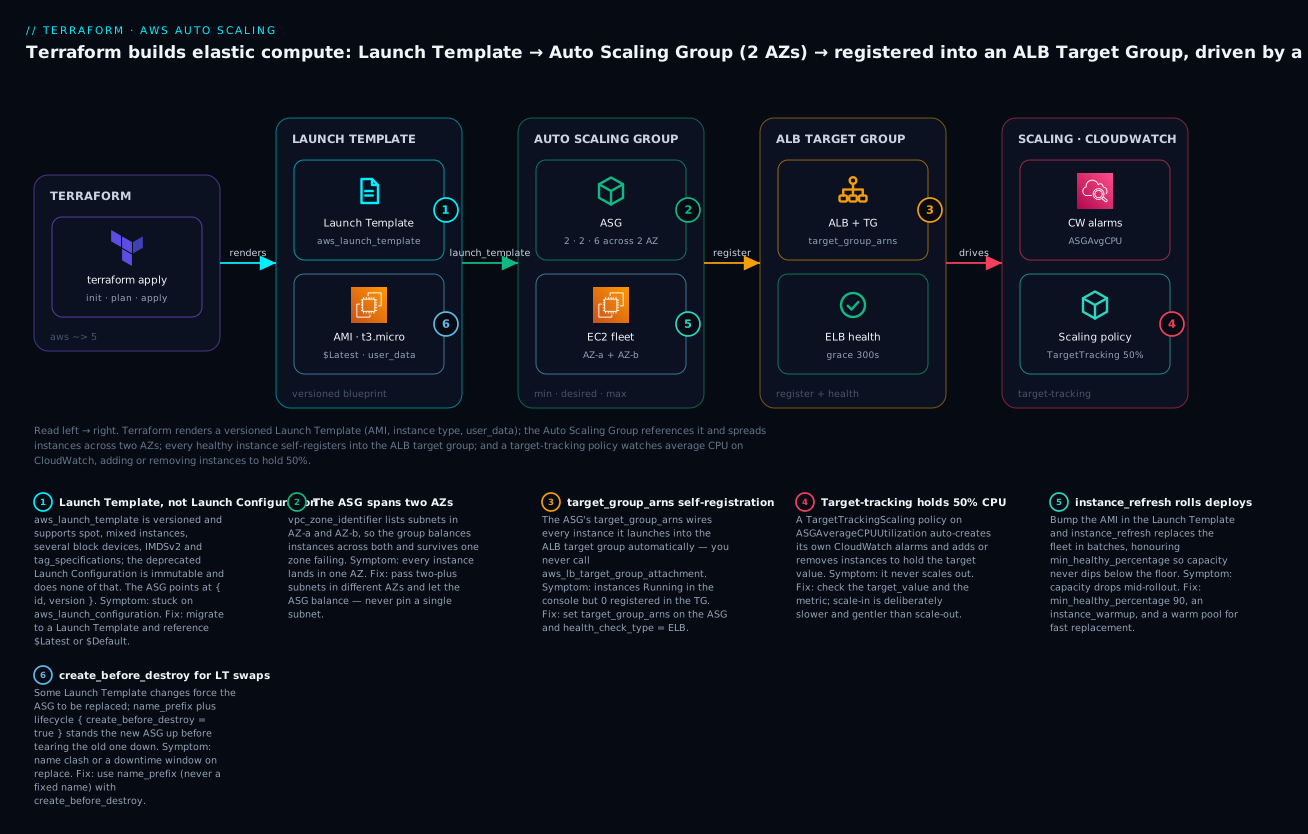
The six badges call out the decisions that matter: (1) a Launch Template rather than the deprecated Launch Configuration; (2) the ASG spanning two AZs; (3) target_group_arns self-registration; (4) the target-tracking policy that manages its own alarms; (5) instance_refresh for rolling deploys; and (6) the create_before_destroy + name_prefix pattern for zero-downtime template swaps. Each is a section below.
Why Terraform rather than the console, a CLI script, or CloudFormation? Because this tier is a graph of tightly-coupled resources — a Launch Template, an ASG, an ALB, a target group, a listener, two security groups, an IAM role and instance profile, a scaling policy — where every one holds an ID or ARN another references. Terraform’s dependency graph wires those references for you, shows the exact diff in plan before touching anything, and lets you stamp the identical fleet into dev, staging and prod from one module with different variables. The console gives you none of that reproducibility; CloudFormation gives you the graph but not the plan preview ergonomics, the multi-cloud state model, or the for_each patterns you already know from the core tiers.
Here is the full inventory a single terraform apply creates, and roughly what each part costs if you leave it running (Mumbai ap-south-1, on-demand, indicative July 2026):
| Resource (Terraform) | AWS object | Role in the build | Rough cost if left up |
|---|---|---|---|
aws_launch_template |
Launch Template | The versioned instance blueprint | Free |
aws_autoscaling_group |
Auto Scaling Group | Owns instance lifecycle across 2 AZs | Free (you pay for instances) |
aws_instance (via ASG) ×2 |
2× t3.micro EC2 |
The web fleet | ~₹1,700/mo for two |
aws_lb (application) |
Application Load Balancer | Public L7 entry, spreads traffic | ~₹1,600/mo + LCU |
aws_lb_target_group |
Target group | The registration + health target | Free |
aws_lb_listener |
Listener :80 | Forwards to the target group | Free |
aws_security_group ×2 |
ALB SG + instance SG | Allow 80 in; instance only from ALB | Free |
aws_iam_role + aws_iam_instance_profile |
Instance role | SSM access, no SSH keys needed | Free |
aws_autoscaling_policy |
Target-tracking policy | Holds 50% CPU; makes its own alarms | Free (alarms ~₹0) |
The ALB and the two instances are the only real line items, and both are modest — this is a build it, verify it, destroy it lesson you can run for well under ₹100 if you tear it down the same hour. Every costly or destructive step below is marked ⚠️.
Where this fits: the ALB here is deliberately minimal so the lesson stays about scaling. The load-balancing tier in full — ALB vs NLB vs Gateway, listeners, rules, path routing, and the target-group mechanics — is the subject of the ELB: ALB, NLB & Target Groups lesson; this lesson consumes a target group from it. The single-instance building blocks — aws_instance, security groups, key pairs and the IAM instance profile — are built in the Security Groups, EC2 & Key Pairs lesson. And the CloudWatch alarms and SNS notifications a production ASG hangs off are covered in the CloudWatch, SNS & Observability lesson; here we let the target-tracking policy create its alarms implicitly.
Launch Templates: the versioned instance blueprint
An Auto Scaling Group does not know what an instance is. It knows how many it should have and where to put them; the Launch Template supplies the what — the AMI, the instance type, the network and security configuration, the storage, the user_data, the IAM role, the tags. Every instance the ASG launches is stamped from one version of one template, which is exactly why the fleet is homogeneous and disposable.
The first decision is not an argument at all — it is which resource. AWS has two blueprint resources, and one of them is a trap. The Launch Configuration (aws_launch_configuration) is the old one: immutable (you cannot edit it — you replace it), single instance type, no versioning, and frozen out of every feature added since ~2017. The Launch Template (aws_launch_template) is the current one: versioned, supports multiple instance types (via the ASG’s mixed-instances policy), spot, IMDSv2, multiple network interfaces, T-instance credit specification, placement, licensing, and tag specifications. AWS recommends Launch Templates for all new work and the console no longer offers Launch Configurations for new accounts.
| Capability | Launch Configuration (aws_launch_configuration) |
Launch Template (aws_launch_template) |
|---|---|---|
| Status | Legacy, no new features | Current, recommended |
| Versioning | None (immutable, replace-only) | Numbered versions + $Latest/$Default |
| Multiple instance types | No | Yes (with ASG mixed-instances) |
| Spot + On-Demand mix | No | Yes (mixed-instances policy) |
| IMDSv2 enforcement | Limited | Yes (metadata_options) |
| Multiple block devices | Basic | Full block_device_mappings |
| Tag on launch | No | Yes (tag_specifications) |
| Terraform replace on edit | Always (forces new) | Only for immutable fields; else new version |
| Use it when | Never, for new builds | Always |
The practical upshot: never write aws_launch_configuration for anything new. If you inherit one, migrating to a Launch Template is a small, mechanical change that unlocks versioning and everything above.
Here is a Launch Template with the arguments you actually set in production. Note base64encode on user_data, the IMDSv2 enforcement, the encrypted gp3 root volume, tags applied to the instances at launch, and the lifecycle block we will justify in the ASG section:
resource "aws_launch_template" "web" {
  name_prefix   = "kv-web-"                  # name_prefix, not name (see create_before_destroy)
  image_id      = data.aws_ami.al2023.id     # a data source, not a hard-coded AMI
  instance_type = var.instance_type          # e.g. t3.micro
  key_name      = var.key_name               # optional; we use SSM instead in the demo

  vpc_security_group_ids = [aws_security_group.instance.id]

  iam_instance_profile {
    arn = aws_iam_instance_profile.web.arn
  }

  # user_data MUST be base64-encoded; the OS runs it once on first boot.
  user_data = base64encode(local.user_data)

  block_device_mappings {
    device_name = "/dev/xvda"                # root device for Amazon Linux 2023
    ebs {
      volume_size           = 8
      volume_type           = "gp3"          # gp3 > gp2: cheaper, decoupled IOPS
      encrypted             = true
      delete_on_termination = true
    }
  }

  metadata_options {
    http_tokens                 = "required"  # IMDSv2 only — blocks SSRF-to-creds
    http_endpoint               = "enabled"
    http_put_response_hop_limit = 1
  }

  monitoring { enabled = true }              # 1-minute EC2 metrics → faster scaling

  tag_specifications {
    resource_type = "instance"
    tags = { Name = "kv-web", role = "web" }
  }

  tag_specifications {
    resource_type = "volume"
    tags = { Name = "kv-web-vol" }
  }

  tags = { project = "tf-course", lesson = "asg" }  # tags on the template itself

  lifecycle {
    create_before_destroy = true
  }
}
The top-level aws_launch_template arguments, and why each matters:
| Argument | Purpose | Notes / gotcha |
|---|---|---|
image_id |
The AMI to boot | Use a data.aws_ami lookup, not a literal — AMIs are region-specific and rotate |
instance_type |
Default size | Overridable per-instance-type in the ASG mixed-instances policy |
key_name |
SSH key pair name | Optional; prefer SSM Session Manager (keyless) — omitted in the demo |
vpc_security_group_ids |
SGs in a VPC | Use this in a VPC; security_group_names is EC2-Classic only |
iam_instance_profile |
Instance role (by arn or name) |
How the app gets AWS creds without keys |
user_data |
First-boot script | Must be base64encode(...); runs once |
block_device_mappings |
Root + extra EBS | Set gp3, encrypted = true, delete_on_termination |
metadata_options |
IMDS config | http_tokens = "required" forces IMDSv2 |
monitoring |
Detailed (1-min) metrics | On = faster, more responsive scaling |
instance_market_options |
Spot request | Makes all instances spot; for a mix use the ASG |
tag_specifications |
Tags applied at launch | Per resource_type (instance, volume, …) |
network_interfaces |
ENI config | Public IP, multiple ENIs, security groups per-ENI |
credit_specification |
T-instance CPU credits | "unlimited" to avoid throttling under burst |
update_default_version |
Bump $Default on change |
Handy when consumers pin $Default |
Block device mappings deserve a table of their own, because a wrong device_name or a forgotten encrypted is a common production miss:
ebs {} argument |
Purpose | Sane default |
|---|---|---|
volume_size |
Size in GiB | 8–30 for a stateless web root |
volume_type |
gp3, gp2, io2, … |
gp3 (cheaper, tunable IOPS/throughput) |
iops |
Provisioned IOPS | Only for gp3/io2; gp3 baseline is 3000 |
throughput |
MB/s (gp3 only) | 125 default; raise for logs/DB |
encrypted |
Encrypt at rest | true — always |
kms_key_id |
CMK for encryption | Omit for the AWS-managed key |
delete_on_termination |
Delete the volume with the instance | true for a stateless root |
Versions are the whole reason Launch Templates exist. Every change produces a new numbered version (1, 2, 3, …), and two symbolic aliases let the ASG track them: $Latest always points at the newest version, and $Default points at whichever version you nominate as default. Which one the ASG references changes the deploy story completely:
| Version reference | Meaning | Deploy behaviour | Use when |
|---|---|---|---|
$Latest |
Newest version, always | New launches use the new template immediately; existing instances unchanged until refreshed | You drive rollouts with instance_refresh |
$Default |
The nominated default | New launches use the default; bump default_version to promote |
You want an explicit promote step |
"3" (pinned) |
One exact version | Frozen; nothing changes until you edit the number | You need a hard pin / rollback target |
The idiomatic production pattern is version = "$Latest" on the ASG plus an instance_refresh block: you edit the template (say, a new AMI), Terraform creates a new version, and the refresh rolls the fleet onto it in batches. Pinning to a literal version is your rollback lever — set it to the last-known-good number and re-apply.
Spot instances can be requested directly in the template via instance_market_options — but understand the blast radius: this makes every instance the template launches a spot instance. That is fine for a fault-tolerant batch fleet, but a web tier usually wants a mix of on-demand (for a stable floor) and spot (for cheap burst), which is the ASG’s mixed_instances_policy, not the template. Show the template form so you know it exists:
  # In the Launch Template — makes ALL instances spot. Prefer the ASG mix for web tiers.
  instance_market_options {
    market_type = "spot"
    spot_options {
      max_price          = "0.005"      # cap; omit to pay up to on-demand
      spot_instance_type = "one-time"   # ASGs use one-time, not persistent
    }
  }
The Auto Scaling Group
The ASG is the control loop. You tell it a minimum, a maximum and a desired count; it keeps desired_capacity healthy instances running, never fewer than min_size, never more than max_size, and lets scaling policies move desired between those rails. It spreads instances across the subnets you give it, replaces unhealthy ones, and — the point of this lesson — registers each instance into a load balancer’s target group so traffic only reaches healthy members.
Here is the ASG that consumes the Launch Template above, spread across two AZs and wired to an ALB target group:
resource "aws_autoscaling_group" "web" {
  name_prefix         = "kv-web-asg-"          # name_prefix + create_before_destroy
  min_size            = var.min_size           # 2
  max_size            = var.max_size           # 6
  desired_capacity    = var.desired_capacity   # 2
  vpc_zone_identifier = local.subnet_ids       # 2+ subnets in different AZs

  health_check_type         = "ELB"            # trust the LB's health check, not just EC2
  health_check_grace_period = 300              # seconds to boot before health counts

  target_group_arns = [aws_lb_target_group.web.arn]  # self-register every instance

  launch_template {
    id      = aws_launch_template.web.id
    version = "$Latest"
  }

  instance_refresh {
    strategy = "Rolling"
    preferences {
      min_healthy_percentage = 90
      instance_warmup        = 120
    }
    triggers = ["tag"]                         # also refresh when a tag changes
  }

  wait_for_capacity_timeout = "10m"            # how long apply waits for healthy capacity

  tag {
    key                 = "Name"
    value               = "kv-web"
    propagate_at_launch = true
  }

  lifecycle {
    create_before_destroy = true
  }
}
The aws_autoscaling_group arguments that carry the weight:
| Argument | Purpose | Notes / gotcha |
|---|---|---|
min_size / max_size |
Hard rails on capacity | Policies move desired only between these |
desired_capacity |
Target count now | Omit to let policies own it and avoid plan churn |
vpc_zone_identifier |
Subnets (⇒ AZs) to launch in | List 2+ subnets in different AZs for HA |
launch_template |
{ id, version } |
Use $Latest with instance_refresh |
target_group_arns |
ALB/NLB target groups | Self-registers instances — no manual attach |
health_check_type |
EC2 or ELB |
ELB catches app failures; EC2 only hardware |
health_check_grace_period |
Boot grace (seconds) | Must exceed boot-to-healthy or new instances get killed |
instance_refresh |
Rolling replace on change | The safe way to ship a new AMI |
mixed_instances_policy |
Spot + on-demand + types | Replaces the top-level launch_template block |
wait_for_capacity_timeout |
Apply wait for healthy | "0" disables the wait; default "10m" |
default_cooldown |
Seconds between simple-scaling actions | Ignored by target-tracking |
termination_policies |
Which instance to kill on scale-in | OldestLaunchTemplate, Default, … |
suspended_processes |
Pause Launch, Terminate, AZRebalance |
For controlled maintenance |
enabled_metrics |
Group metrics to CloudWatch | e.g. GroupInServiceInstances |
health_check_type is the single most consequential toggle and the cause of the classic “booted but broken” incident. With EC2, the ASG only replaces an instance the hypervisor reports as failed — a crash-looping app on a perfectly healthy VM stays in rotation, serving errors. With ELB, the ASG also honours the load balancer’s health check, so an instance whose app returns non-200 is marked unhealthy and replaced. Almost every web tier wants ELB — paired with a health_check_grace_period long enough for the app to boot, or the ASG kills new instances before they finish starting.
| Aspect | health_check_type = "EC2" |
health_check_type = "ELB" |
|---|---|---|
| Detects hardware/hypervisor failure | Yes | Yes |
| Detects app-level failure (5xx, crash) | No | Yes |
| Requires a target group | No | Yes (target_group_arns) |
| Grace period matters | Somewhat | Critically (kills new instances if too short) |
| Right for a web tier | Rarely | Almost always |
Spreading across AZs is vpc_zone_identifier — a list of subnet IDs. Give it subnets in two (or three) different Availability Zones and the ASG balances instances across them and rebalances after a zone recovers. Give it one subnet and you have a single point of failure that scales. This is badge (2) in the diagram: two subnets, two AZs, no exceptions.
mixed_instances_policy is how a web tier gets cheap burst without betting the floor on spot. It combines the Launch Template with a list of instance-type overrides and a distribution that says “keep N on-demand as a base, make the rest mostly spot.” Note you do not also set the top-level launch_template block when you use this — the mixed policy replaces it:
resource "aws_autoscaling_group" "web" {
  name_prefix         = "kv-web-asg-"
  min_size            = 2
  max_size            = 10
  desired_capacity    = 4
  vpc_zone_identifier = local.subnet_ids
  target_group_arns   = [aws_lb_target_group.web.arn]
  health_check_type   = "ELB"

  mixed_instances_policy {
    launch_template {
      launch_template_specification {
        launch_template_id = aws_launch_template.web.id
        version            = "$Latest"
      }
      override { instance_type = "t3.micro" }
      override { instance_type = "t3a.micro" }   # AMD — different capacity pool
      override { instance_type = "t2.micro" }    # older gen — more spot capacity
    }
    instances_distribution {
      on_demand_base_capacity                  = 1    # always ≥1 on-demand
      on_demand_percentage_above_base_capacity = 25   # 25% on-demand above the base
      spot_allocation_strategy                 = "price-capacity-optimized"  # best practice
    }
  }

  lifecycle { create_before_destroy = true }
}
instances_distribution argument |
Meaning | Sane value |
|---|---|---|
on_demand_base_capacity |
On-demand instances guaranteed first | 1–2 (the stable floor) |
on_demand_percentage_above_base_capacity |
% on-demand above the base | 20–30 for cost; 100 = no spot |
spot_allocation_strategy |
How spot pools are chosen | price-capacity-optimized (fewest interruptions) |
spot_instance_pools |
Pools to spread across (lowest-price only) | 2–4; ignored by capacity-optimized |
spot_max_price |
Cap per spot instance | Omit to pay up to on-demand |
⚠️ The create_before_destroy + name_prefix pattern. This is badge (6) and the gotcha that catches everyone. Some changes to a Launch Template or ASG force Terraform to replace the ASG rather than update it in place. If your ASG has a fixed name, Terraform tries to create the new ASG with the same name before destroying the old one, and AWS rejects the duplicate — the apply fails, and you can be left mid-replace. The fix is a two-part pattern: use name_prefix (so AWS generates a unique suffix and two ASGs can coexist for a moment) and lifecycle { create_before_destroy = true } (so Terraform stands the new group up, waits for healthy capacity, then destroys the old one). Apply the same pattern to the Launch Template. Without it, a template change that forces replacement is a downtime window; with it, it is seamless.
| Pattern element | Without it | With it |
|---|---|---|
name (fixed) vs name_prefix |
Replace fails: “already exists” | Unique suffix lets old + new coexist |
| Default (destroy-before-create) | Old ASG gone before new is healthy → downtime | New ASG healthy first, then old destroyed |
| Combined | Fragile, error-prone replaces | Zero-downtime template/ASG swaps |
Scaling policies: target-tracking, step, scheduled, predictive
An ASG with no scaling policy is just a fixed fleet that self-heals. Scaling policies are what make it elastic — they move desired_capacity in response to load. AWS gives you four kinds, and choosing correctly is most of the skill:
| Policy type | Terraform policy_type |
How it decides | Best for |
|---|---|---|---|
| Target tracking | TargetTrackingScaling |
Holds a metric at a target (like a thermostat); auto-manages alarms | The default choice — CPU, request count |
| Step scaling | StepScaling |
You define steps by alarm breach size; you own the alarm | Fine-grained, non-linear response |
| Simple scaling | SimpleScaling |
One adjustment per alarm + cooldown | Legacy; avoid — step scaling supersedes it |
| Scheduled | aws_autoscaling_schedule |
Time-based (cron); sets min/max/desired | Predictable daily/weekly patterns |
| Predictive | PredictiveScaling |
ML forecast from history; scales ahead of load | Regular cyclical load, warm-ahead |
Target tracking is the one you reach for first. You pick a metric and a target value, and AWS keeps the metric at the target by adding or removing instances — creating and managing the CloudWatch alarms for you. It is the thermostat model: “hold average CPU at 50%,” and the policy figures out the rest. This is badge (4):
resource "aws_autoscaling_policy" "cpu" {
  name                   = "kv-web-cpu-tt"
  autoscaling_group_name = aws_autoscaling_group.web.name
  policy_type            = "TargetTrackingScaling"

  target_tracking_configuration {
    predefined_metric_specification {
      predefined_metric_type = "ASGAverageCPUUtilization"
    }
    target_value     = 50.0
    disable_scale_in = false   # true = only scale out; scale-in handled elsewhere
  }
}
The four predefined target-tracking metrics cover most needs; for anything else you supply a customized_metric_specification:
predefined_metric_type |
Tracks | Needs resource_label? |
Use for |
|---|---|---|---|
ASGAverageCPUUtilization |
Mean CPU across the group | No | CPU-bound apps |
ASGAverageNetworkIn |
Bytes in per instance | No | Network-bound ingest |
ASGAverageNetworkOut |
Bytes out per instance | No | Network-bound egress |
ALBRequestCountPerTarget |
Requests per target via the ALB | Yes (ALB+TG ARN suffixes) | Web tiers — scales on real traffic |
ALBRequestCountPerTarget is often the better web-tier signal than CPU, because it scales on the thing you actually care about — requests — and needs a resource_label pointing at the ALB and target-group ARN suffixes:
resource "aws_autoscaling_policy" "reqcount" {
  name                   = "kv-web-req-tt"
  autoscaling_group_name = aws_autoscaling_group.web.name
  policy_type            = "TargetTrackingScaling"

  target_tracking_configuration {
    predefined_metric_specification {
      predefined_metric_type = "ALBRequestCountPerTarget"
      resource_label         = "${aws_lb.web.arn_suffix}/${aws_lb_target_group.web.arn_suffix}"
    }
    target_value = 1000   # requests per target per minute
  }
}
Step scaling hands you the alarm and the steps. You define a CloudWatch alarm and a policy whose adjustment grows with how far the metric breaches the threshold — add 1 instance for a small breach, 2 for a bigger one. It is more work than target tracking but gives you non-linear, tuned control:
resource "aws_autoscaling_policy" "step_up" {
  name                    = "kv-web-step-up"
  autoscaling_group_name  = aws_autoscaling_group.web.name
  policy_type             = "StepScaling"
  adjustment_type         = "ChangeInCapacity"
  metric_aggregation_type = "Average"

  step_adjustment {
    scaling_adjustment          = 1      # +1 instance
    metric_interval_lower_bound = 0      # from threshold to +20 over
    metric_interval_upper_bound = 20
  }
  step_adjustment {
    scaling_adjustment          = 2      # +2 instances
    metric_interval_lower_bound = 20     # 20+ over the threshold
  }
}

resource "aws_cloudwatch_metric_alarm" "cpu_high" {
  alarm_name          = "kv-web-cpu-high"
  comparison_operator = "GreaterThanOrEqualToThreshold"
  evaluation_periods  = 2
  metric_name         = "CPUUtilization"
  namespace           = "AWS/EC2"
  period              = 60
  statistic           = "Average"
  threshold           = 70
  dimensions          = { AutoScalingGroupName = aws_autoscaling_group.web.name }
  alarm_actions       = [aws_autoscaling_policy.step_up.arn]
}
The adjustment_type decides how scaling_adjustment is interpreted — a frequent source of confusion:
adjustment_type |
scaling_adjustment means |
Example |
|---|---|---|
ChangeInCapacity |
Add/remove this many instances | +2 → desired + 2 |
ExactCapacity |
Set desired to exactly this | 4 → desired = 4 |
PercentChangeInCapacity |
Change by this percent of current | +50 on 4 → 6 |
Scheduled scaling ignores metrics entirely and changes capacity on a cron schedule — perfect for known patterns like “scale up at 8am on weekdays, down at 8pm.” It sets min/max/desired at the scheduled time:
resource "aws_autoscaling_schedule" "business_up" {
  scheduled_action_name  = "scale-up-mornings"
  autoscaling_group_name = aws_autoscaling_group.web.name
  min_size               = 4
  max_size               = 10
  desired_capacity       = 4
  recurrence             = "0 8 * * MON-FRI"   # cron, in time_zone
  time_zone              = "Asia/Kolkata"
}

resource "aws_autoscaling_schedule" "business_down" {
  scheduled_action_name  = "scale-down-evenings"
  autoscaling_group_name = aws_autoscaling_group.web.name
  min_size               = 2
  max_size               = 10
  desired_capacity       = 2
  recurrence             = "0 20 * * MON-FRI"
  time_zone              = "Asia/Kolkata"
}
Scheduled and dynamic (target-tracking/step) policies compose: the schedule sets the floor for the day, and target tracking handles the within-day variation above it. Set desired_capacity in a schedule but be aware it fights a desired_capacity you also hard-code on the ASG — a reason many teams omit desired_capacity from the ASG resource and let policies own it.
Predictive scaling uses machine-learning forecasts from up to 14 days of history to scale ahead of predictable load — it provisions capacity before the daily spike rather than reacting to it. It is a separate policy type, and ForecastAndScale mode actually acts on the forecast (ForecastOnly just reports):
resource "aws_autoscaling_policy" "predictive" {
  name                   = "kv-web-predictive"
  autoscaling_group_name = aws_autoscaling_group.web.name
  policy_type            = "PredictiveScaling"

  predictive_scaling_configuration {
    metric_specification {
      target_value = 50
      predefined_metric_pair_specification {
        predefined_metric_type = "ASGCPUUtilization"
      }
    }
    mode                         = "ForecastAndScale"   # or "ForecastOnly" to observe first
    scheduling_buffer_time       = 300                  # provision 5 min ahead
    max_capacity_breach_behavior = "IncreaseMaxCapacity"
    max_capacity_buffer          = 10                   # allow 10% over max_size
  }
}
The rule of thumb across all four: start with target tracking; add scheduled for known patterns; reach for step when you need tuned, non-linear response; and layer predictive on top when your load is cyclical and reacting is too late.
Lifecycle hooks & warm pools
Two features handle the edges of an instance’s life — the moment it launches and the moment it terminates. Lifecycle hooks pause an instance in a Pending:Wait (launching) or Terminating:Wait (terminating) state so something can act before it enters or leaves service: run a warm-up, register with an external system, or — most commonly — drain connections before termination so scale-in and spot reclaims don’t drop in-flight requests. The instance stays paused until you call complete-lifecycle-action (or the heartbeat_timeout expires):
resource "aws_autoscaling_lifecycle_hook" "drain" {
  name                   = "drain-on-terminate"
  autoscaling_group_name = aws_autoscaling_group.web.name
  lifecycle_transition   = "autoscaling:EC2_INSTANCE_TERMINATING"
  default_result         = "CONTINUE"   # proceed if the heartbeat times out
  heartbeat_timeout      = 300          # seconds to drain — must exceed TG dereg delay
}
| Lifecycle hook setting | Purpose | Gotcha |
|---|---|---|
lifecycle_transition |
...EC2_INSTANCE_LAUNCHING or ...TERMINATING |
Two hooks for both ends |
default_result |
CONTINUE or ABANDON on timeout |
ABANDON kills a stuck launch |
heartbeat_timeout |
Seconds the instance waits | Must exceed the target-group deregistration delay or you drop connections |
notification_target_arn |
SNS/SQS to notify | Where your automation listens |
The critical rule: a terminate hook’s heartbeat_timeout must be longer than the target group’s deregistration_delay (default 300s), or the instance is torn down before connections finish draining — the source of intermittent 5xx on every scale-in and spot reclaim.
Warm pools attack scale-out latency. If your instances take minutes to boot (a fat AMI, a slow app start), a traffic spike outruns cold launches. A warm pool keeps pre-initialised instances in a Stopped (or Running/Hibernated) state, so scaling out is a fast start rather than a slow launch:
resource "aws_autoscaling_group" "web" {
  # ... min_size, max_size, launch_template, etc. ...
  warm_pool {
    pool_state                  = "Stopped"   # cheapest: no compute charge while stopped
    min_size                    = 2           # always keep 2 pre-warmed
    max_group_prepared_capacity = 4
    instance_reuse_policy {
      reuse_on_scale_in = true                # return scaled-in instances to the pool
    }
  }
}
warm_pool setting |
Purpose | Note |
|---|---|---|
pool_state |
Stopped / Running / Hibernated |
Stopped = cheapest (no compute charge) |
min_size |
Warm instances always held | Size to your surge rate |
max_group_prepared_capacity |
Cap on warm + in-service prepared | Bounds the pre-warm cost |
instance_reuse_policy |
Reuse scaled-in instances | reuse_on_scale_in = true recycles them |
instance_refresh: rolling deploys
When you bump the AMI in the Launch Template, existing instances don’t change — the new version only applies to future launches. instance_refresh is how you roll the fleet onto the new template safely: it terminates and replaces instances in batches, honouring a minimum healthy percentage so capacity never dips below your floor, and waiting an instance_warmup for each new instance to become healthy before moving on. This is badge (5). It is declared as a block on the ASG and triggered by changes to the launch template (and any extra fields you list in triggers):
  instance_refresh {
    strategy = "Rolling"
    preferences {
      min_healthy_percentage = 90     # never drop below 90% of desired during rollout
      instance_warmup        = 120    # wait 120s for each new instance to warm
      checkpoint_percentages = [50, 100]   # pause at 50% for a canary check
      checkpoint_delay       = 600         # hold 10 min at each checkpoint
      auto_rollback          = true        # roll back if the refresh fails
    }
    triggers = ["tag"]   # also refresh when a tag changes, not just the LT
  }
instance_refresh preference |
Purpose | Trade-off |
|---|---|---|
min_healthy_percentage |
Floor of healthy instances during rollout | 100 = zero dip but needs surge headroom; 90 replaces faster |
max_healthy_percentage |
Ceiling (surge above desired) | Set 110+ to replace before terminating (no dip) |
instance_warmup |
Seconds before a new instance counts healthy | Too low = rolls onto not-yet-ready instances |
checkpoint_percentages |
Pause points (canary gates) | [20, 100] = 20% canary, then the rest |
checkpoint_delay |
Seconds to hold at each checkpoint | Your window to observe before proceeding |
auto_rollback |
Revert on failure | Needs a prior known-good version |
strategy |
Currently Rolling |
The only strategy today |
The mental model: min_healthy_percentage below 100 means the ASG can terminate before launching (capacity dips but no surge cost); max_healthy_percentage above 100 means it launches before terminating (surge cost but no dip). For a fleet that must never lose capacity mid-deploy, set max_healthy_percentage = 110 and let it surge; for cost, accept a small dip at min_healthy_percentage = 90. A warm pool makes either far faster.
Hands-on: build it with Terraform
⚠️ This provisions real, billable AWS resources — an Application Load Balancer and two EC2 instances. They are modest (well under ₹100 for an hour), but follow it end to end and run the destroy step. Do not leave it up.
We now assemble everything above into one working project: a Launch Template, an ASG across two AZs registered into an ALB target group, a target-tracking policy at 50% CPU, and an instance refresh. To keep the network out of scope we use the account’s default VPC via data sources; in production you would point subnet_ids at your own private subnets. Lay out the files:
mkdir -p asg-demo && cd asg-demo
touch versions.tf provider.tf variables.tf data.tf \
      security.tf iam.tf alb.tf compute.tf scaling.tf outputs.tf
1. Pin Terraform and the provider (versions.tf). Pin aws with ~> so a plan in CI never silently changes behaviour, and use a remote backend — for AWS that is an S3 bucket for state plus a DynamoDB table for the lock:
# versions.tf
terraform {
  required_version = ">= 1.6.0"

  required_providers {
    aws = {
      source  = "hashicorp/aws"
      version = "~> 5.60"
    }
  }

  # Remote state (AWS = S3 + DynamoDB lock). Create these once, out of band.
  backend "s3" {
    bucket         = "kv-tfstate-2026"
    key            = "asg-demo/terraform.tfstate"
    region         = "ap-south-1"
    dynamodb_table = "kv-tf-locks"
    encrypt        = true
  }
}
2. Configure the provider (provider.tf). Authenticate ahead of time with aws configure, aws sso login, an assumed role, or OIDC in CI — never put keys in HCL. Default tags applied here land on every taggable resource:
# provider.tf
provider "aws" {
  region = var.region

  default_tags {
    tags = {
      project = "tf-course"
      lesson  = "aws-asg"
      owner   = "vinod"
    }
  }
}
3. Variables (variables.tf). Parameterise region, sizes and capacity so the same code stamps any environment:
# variables.tf
variable "region" {
  type    = string
  default = "ap-south-1"
}
variable "name" {
  type    = string
  default = "kv-web"
}
variable "instance_type" {
  type    = string
  default = "t3.micro"
}
variable "min_size" {
  type    = number
  default = 2
}
variable "max_size" {
  type    = number
  default = 6
}
variable "desired_capacity" {
  type    = number
  default = 2
}
4. Data sources: default VPC, two AZs’ subnets, and the AMI (data.tf). We look up the latest Amazon Linux 2023 AMI (never hard-code an AMI ID — they are region-specific and rotate), the default VPC, and slice two of its subnets so the ASG spans exactly two AZs:
# data.tf
data "aws_ami" "al2023" {
  most_recent = true
  owners      = ["amazon"]
  filter {
    name   = "name"
    values = ["al2023-ami-2023.*-x86_64"]
  }
  filter {
    name   = "state"
    values = ["available"]
  }
}

data "aws_vpc" "default" {
  default = true
}

data "aws_subnets" "default" {
  filter {
    name   = "vpc-id"
    values = [data.aws_vpc.default.id]
  }
}

locals {
  vpc_id     = data.aws_vpc.default.id
  # Default VPC has one subnet per AZ; take two → two AZs.
  subnet_ids = slice(tolist(data.aws_subnets.default.ids), 0, 2)

  user_data = <<-EOF
    #!/bin/bash
    dnf install -y httpd stress-ng
    echo "<h1>KloudVin ASG — $(hostname -f)</h1>" > /var/www/html/index.html
    systemctl enable --now httpd
  EOF
}
5. Security groups (security.tf). The ALB accepts 80 from the internet; the instances accept 80 only from the ALB’s security group — the tightest correct pattern:
# security.tf
resource "aws_security_group" "alb" {
  name_prefix = "${var.name}-alb-"
  vpc_id      = local.vpc_id

  ingress {
    description = "HTTP from anywhere"
    from_port   = 80
    to_port     = 80
    protocol    = "tcp"
    cidr_blocks = ["0.0.0.0/0"]
  }
  egress {
    from_port   = 0
    to_port     = 0
    protocol    = "-1"
    cidr_blocks = ["0.0.0.0/0"]
  }
  lifecycle { create_before_destroy = true }
}

resource "aws_security_group" "instance" {
  name_prefix = "${var.name}-inst-"
  vpc_id      = local.vpc_id

  ingress {
    description     = "HTTP from the ALB only"
    from_port       = 80
    to_port         = 80
    protocol        = "tcp"
    security_groups = [aws_security_group.alb.id]   # SG reference, not a CIDR
  }
  egress {
    from_port   = 0
    to_port     = 0
    protocol    = "-1"
    cidr_blocks = ["0.0.0.0/0"]
  }
  lifecycle { create_before_destroy = true }
}
6. IAM instance profile for SSM (iam.tf). Attaching AmazonSSMManagedInstanceCore lets us connect with SSM Session Manager — no SSH key, no port 22 open — which is how we will drive the load test:
# iam.tf
resource "aws_iam_role" "web" {
  name_prefix = "${var.name}-role-"
  assume_role_policy = jsonencode({
    Version = "2012-10-17"
    Statement = [{
      Action    = "sts:AssumeRole"
      Effect    = "Allow"
      Principal = { Service = "ec2.amazonaws.com" }
    }]
  })
}

resource "aws_iam_role_policy_attachment" "ssm" {
  role       = aws_iam_role.web.name
  policy_arn = "arn:aws:iam::aws:policy/AmazonSSMManagedInstanceCore"
}

resource "aws_iam_instance_profile" "web" {
  name_prefix = "${var.name}-"
  role        = aws_iam_role.web.name
}
7. The ALB and target group (alb.tf). A minimal public ALB with an HTTP listener forwarding to a target group the ASG will register into. The target group’s health check is what makes health_check_type = "ELB" meaningful:
# alb.tf
resource "aws_lb" "web" {
  name               = "${var.name}-alb"
  load_balancer_type = "application"
  security_groups    = [aws_security_group.alb.id]
  subnets            = local.subnet_ids   # 2 AZs — ALB requires ≥2
}

resource "aws_lb_target_group" "web" {
  name     = "${var.name}-tg"
  port     = 80
  protocol = "HTTP"
  vpc_id   = local.vpc_id

  health_check {
    path                = "/"
    protocol            = "HTTP"
    matcher             = "200"
    healthy_threshold   = 2
    unhealthy_threshold = 3
    interval            = 15
    timeout             = 5
  }
}

resource "aws_lb_listener" "http" {
  load_balancer_arn = aws_lb.web.arn
  port              = 80
  protocol          = "HTTP"

  default_action {
    type             = "forward"
    target_group_arn = aws_lb_target_group.web.arn
  }
}
8. The Launch Template and ASG (compute.tf). The heart of the lesson — the versioned template and the group that spreads it across two AZs and registers it into the target group:
# compute.tf
resource "aws_launch_template" "web" {
  name_prefix   = "${var.name}-"
  image_id      = data.aws_ami.al2023.id
  instance_type = var.instance_type
  user_data     = base64encode(local.user_data)

  vpc_security_group_ids = [aws_security_group.instance.id]

  iam_instance_profile {
    arn = aws_iam_instance_profile.web.arn
  }

  block_device_mappings {
    device_name = "/dev/xvda"
    ebs {
      volume_size           = 8
      volume_type           = "gp3"
      encrypted             = true
      delete_on_termination = true
    }
  }

  metadata_options {
    http_tokens   = "required"   # IMDSv2 only
    http_endpoint = "enabled"
  }

  monitoring { enabled = true }

  tag_specifications {
    resource_type = "instance"
    tags          = { Name = var.name }
  }

  lifecycle { create_before_destroy = true }
}

resource "aws_autoscaling_group" "web" {
  name_prefix         = "${var.name}-asg-"
  min_size            = var.min_size
  max_size            = var.max_size
  desired_capacity    = var.desired_capacity
  vpc_zone_identifier = local.subnet_ids            # two AZs

  health_check_type         = "ELB"
  health_check_grace_period = 120

  target_group_arns = [aws_lb_target_group.web.arn]  # self-register

  launch_template {
    id      = aws_launch_template.web.id
    version = "$Latest"
  }

  instance_refresh {
    strategy = "Rolling"
    preferences {
      min_healthy_percentage = 90
      instance_warmup        = 120
    }
    triggers = ["tag"]
  }

  wait_for_capacity_timeout = "10m"

  tag {
    key                 = "Name"
    value               = var.name
    propagate_at_launch = true
  }

  lifecycle { create_before_destroy = true }
}
9. The scaling policy (scaling.tf). Target tracking at 50% average CPU — it creates and manages its own CloudWatch alarms:
# scaling.tf
resource "aws_autoscaling_policy" "cpu" {
  name                   = "${var.name}-cpu-tt"
  autoscaling_group_name = aws_autoscaling_group.web.name
  policy_type            = "TargetTrackingScaling"

  target_tracking_configuration {
    predefined_metric_specification {
      predefined_metric_type = "ASGAverageCPUUtilization"
    }
    target_value = 50.0
  }
}
10. Outputs (outputs.tf). Emit the ALB DNS name to curl and the ASG name to inspect:
# outputs.tf
output "alb_dns_name" {
  value = aws_lb.web.dns_name
}
output "asg_name" {
  value = aws_autoscaling_group.web.name
}
11. Init. Downloads the provider and wires the backend:
terraform init
# Initializing the backend...
# Initializing provider plugins...
# - Installing hashicorp/aws v5.60.x ...
# Terraform has been successfully initialized!
12. Plan. Read the summary line — it must create the whole graph and change nothing unexpected:
terraform plan
# ...
# Plan: 12 to add, 0 to change, 0 to destroy.
# Changes to Outputs:
#   + alb_dns_name = (known after apply)
#   + asg_name     = (known after apply)
13. Apply. ⚠️ Billing starts here. The ALB and instances come up in a couple of minutes; the apply waits (wait_for_capacity_timeout) for the ASG to report healthy capacity in the target group:
terraform apply -auto-approve
# aws_launch_template.web: Creation complete after 2s
# aws_lb.web: Still creating... [1m0s elapsed]
# aws_autoscaling_group.web: Still creating... [2m0s elapsed]   # waiting for ELB health
# aws_autoscaling_group.web: Creation complete after 2m30s
# Apply complete! Resources: 12 added, 0 changed, 0 destroyed.
# Outputs:
# alb_dns_name = "kv-web-alb-123456789.ap-south-1.elb.amazonaws.com"
# asg_name     = "kv-web-asg-20260709xxxxxx"
14. Verify — curl the ALB, then read the group and target health. Repeat the curl and watch the hostname alternate between the two instances as the ALB spreads requests:
ALB=$(terraform output -raw alb_dns_name)
ASG=$(terraform output -raw asg_name)

curl http://$ALB/
# <h1>KloudVin ASG — ip-172-31-x-x.ap-south-1.compute.internal</h1>
curl http://$ALB/
# <h1>KloudVin ASG — ip-172-31-y-y.ap-south-1.compute.internal</h1>   # load balanced!

# The ASG's own view: capacity, AZs, and each instance's health.
aws autoscaling describe-auto-scaling-groups \
  --auto-scaling-group-names "$ASG" \
  --query 'AutoScalingGroups[0].{Min:MinSize,Max:MaxSize,Desired:DesiredCapacity,
           AZs:AvailabilityZones,Instances:Instances[].{Id:InstanceId,AZ:AvailabilityZone,
           Health:HealthStatus,State:LifecycleState}}'
# "Desired": 2, "AZs": ["ap-south-1a","ap-south-1b"], each instance Healthy / InService

# The target group's view: are both instances registered and healthy?
TG=$(aws elbv2 describe-target-groups --names kv-web-tg \
       --query 'TargetGroups[0].TargetGroupArn' --output text)
aws elbv2 describe-target-health --target-group-arn "$TG" \
  --query 'TargetHealthDescriptions[].TargetHealth.State'
# [ "healthy", "healthy" ]
Two healthy targets across two AZs is the whole build working: the ASG launched instances in ap-south-1a and ap-south-1b, each registered itself into the target group via target_group_arns, and each passes the ALB health check. The verification checklist:
| Step | Command | Expect |
|---|---|---|
| ALB resolves | terraform output -raw alb_dns_name |
An *.elb.amazonaws.com name |
| Endpoint serves | curl http://$ALB/ |
The “KloudVin ASG” page |
| Load balancing works | repeat curl | Hostname alternates between instances |
| Two AZs | describe-auto-scaling-groups … AvailabilityZones |
Two distinct AZs |
| Targets registered + healthy | describe-target-health |
healthy for each instance |
15. Load test — watch it scale out. ⚠️ Drive CPU on the fleet so target tracking reacts. Connect to an instance with SSM Session Manager (no SSH key needed thanks to the instance profile) and run stress-ng, then watch desired_capacity climb:
# Grab one instance id from the group and open an SSM shell:
IID=$(aws autoscaling describe-auto-scaling-groups --auto-scaling-group-names "$ASG" \
        --query 'AutoScalingGroups[0].Instances[0].InstanceId' --output text)
aws ssm start-session --target "$IID"

# Inside the instance — peg all CPUs for 10 minutes:
sudo stress-ng --cpu 0 --timeout 600s &
exit

# Back on your machine, watch the group grow (CPU > 50% → target tracking scales out):
watch -n 30 "aws autoscaling describe-auto-scaling-groups \
  --auto-scaling-group-names $ASG \
  --query 'AutoScalingGroups[0].DesiredCapacity'"
# 2 ... 2 ... 3 ... 4    (climbs toward max_size as CPU stays high)

# The audit trail of every scaling decision:
aws autoscaling describe-scaling-activities --auto-scaling-group-name "$ASG" \
  --query 'Activities[].{Time:StartTime,Desc:Description,Cause:Cause}' --max-items 5
# "Launching a new EC2 instance ... at 50.0 CPUUtilization ... breaching the alarm threshold"
Within a few minutes the target-tracking policy notices average CPU above 50%, its auto-created CloudWatch alarm fires, and the ASG raises desired_capacity and launches instances (up to max_size = 6). When stress-ng ends and CPU falls, the policy scales back in — more slowly and gently, by design, to avoid flapping. If you had used the ALBRequestCountPerTarget metric instead, a load generator (hey, ab, wrk) against the ALB URL would trigger the same scale-out on request volume rather than CPU.
16. Destroy. ⚠️ Do this — the ALB and instances bill by the hour.
terraform destroy -auto-approve
# aws_autoscaling_group.web: Destroying...   (terminates instances first)
# aws_lb.web: Destruction complete
# Destroy complete! Resources: 12 destroyed.
Confirm the group is gone (aws autoscaling describe-auto-scaling-groups --auto-scaling-group-names $ASG returns an empty list) and no stray instances linger (aws ec2 describe-instances --filters "Name=tag:project,Values=tf-course" "Name=instance-state-name,Values=running"). Terraform terminates the ASG’s instances as part of destroying the group — you do not clean them up separately.
Variables, outputs & making it reusable
The demo hard-codes one fleet. Real platforms run this shape many times — a web tier, an API tier, a worker tier — each an ASG behind a target group with its own sizing. Two patterns turn the demo into something reusable: wrap it in a module and drive many fleets with for_each, or reach for the mature community module.
Wrapped as a module, the inputs worth exposing are the ones that vary per environment and per tier:
| Variable | Type | Why expose it |
|---|---|---|
name |
string | Distinguish web/api/worker fleets |
instance_type |
string | Size per tier/env (t3.micro in dev, m6i in prod) |
min_size / max_size |
number | Capacity rails per env |
desired_capacity |
number (optional) | Often omitted so policies own it |
subnet_ids |
list(string) | Bring-your-own private subnets |
target_group_arns |
list(string) | Register into an existing ALB |
cpu_target |
number | Target-tracking value per tier |
ami_id |
string | Pin or float the AMI per env |
on_demand_base |
number | Spot/on-demand mix per env (0 in dev) |
Then a for_each over a map of tiers stamps them all:
variable "tiers" {
  type = map(object({
    instance_type = string
    min_size      = number
    max_size      = number
    cpu_target    = number
  }))
  default = {
    web    = { instance_type = "t3.micro",  min_size = 2, max_size = 8, cpu_target = 50 }
    worker = { instance_type = "t3.medium", min_size = 1, max_size = 4, cpu_target = 70 }
  }
}

module "fleet" {
  source   = "./modules/asg"
  for_each = var.tiers

  name          = "kv-${each.key}"
  instance_type = each.value.instance_type
  min_size      = each.value.min_size
  max_size      = each.value.max_size
  cpu_target    = each.value.cpu_target
  subnet_ids    = local.private_subnet_ids
}
Before writing your own, know the registry standard. terraform-aws-modules/autoscaling/aws is the mature, widely-used community module — it builds the Launch Template and ASG together, handles the create_before_destroy and name_prefix wiring, and exposes scaling policies and instance refresh as inputs:
| Need | Registry module | Roll your own when |
|---|---|---|
| ASG + Launch Template | terraform-aws-modules/autoscaling/aws |
Highly bespoke lifecycle/mixed-instances logic |
| The ALB in front | terraform-aws-modules/alb/aws |
Unusual listener/routing topology |
| The VPC + subnets | terraform-aws-modules/vpc/aws |
— |
Pin the module version (version = "~> 8.0") — a floating module version is as dangerous as a floating provider. Use the registry module when your fleet is conventional and you value the maintenance; roll your own when your mixed-instances, warm-pool or lifecycle-hook logic is genuinely bespoke.
Common mistakes and troubleshooting
Auto Scaling failures cluster into a handful of signatures, and each has a precise confirmation command. This is the symptom → cause → fix table to keep open during an incident:
| Symptom | Likely cause | Fix |
|---|---|---|
Instances Running but 0 registered in the target group |
ASG missing target_group_arns, or you attached targets manually |
Set target_group_arns on the ASG; delete any aws_lb_target_group_attachment |
Instances register then go unhealthy and get replaced |
Target-group health check path 404s / wrong port, or grace too short | Point health_check.path at a real 200; raise health_check_grace_period above boot time |
| Health-check flapping (constant launch/terminate) | health_check_type = "ELB" + grace shorter than boot-to-healthy |
Increase health_check_grace_period; make the app healthy sooner |
| App crash-loops but instances stay in rotation | health_check_type = "EC2" — only hardware is checked |
Switch to health_check_type = "ELB" |
| Scaling policy never triggers | Not enough metric data, wrong metric, or already at max_size |
Enable detailed monitoring; verify the metric; check max_size headroom |
| Scales out but never scales in | disable_scale_in = true, or scale-in is just slow (by design) |
Remove disable_scale_in; target-tracking scale-in is deliberately gradual |
apply fails: ASG “already exists” on replace |
Fixed name + destroy-before-create |
Use name_prefix + lifecycle { create_before_destroy = true } |
| New AMI in the template but instances don’t update | $Latest only affects new launches; no refresh triggered |
Add instance_refresh, or bump a triggers field / new template version |
| Spot instances repeatedly interrupted, capacity drops | lowest-price strategy, few pools, no rebalancing |
Use price-capacity-optimized + more instance-type overrides |
| Connections dropped on scale-in / spot reclaim | No drain; terminate hook shorter than dereg delay | Set a terminate lifecycle hook heartbeat_timeout > target-group deregistration_delay |
instance_refresh dips capacity mid-rollout |
min_healthy_percentage too low, or no surge headroom |
Raise min_healthy_percentage, or set max_healthy_percentage = 110 to surge |
Instances launch but user_data never ran |
Not base64-encoded, or a script error | user_data = base64encode(...); read /var/log/cloud-init-output.log |
Because the “unhealthy target” family is the most common, here is the decision matrix that maps what describe-target-health reports to the specific misconfiguration — walk it top to bottom:
| Target health state | Meaning | Where the bug is |
|---|---|---|
healthy |
Passing the ALB health check | Working as intended |
unhealthy |
Registered, but the health check fails | Health-check path/port/matcher, or the app returns non-200 |
initial (stuck) |
Registered, still in the grace window | Wait; if it never clears, boot time > grace period |
draining |
Deregistering (scale-in / refresh) | Normal during scale-in; watch deregistration_delay |
unused — no registered targets |
ASG not registering | Missing target_group_arns; VPC/subnet mismatch between ASG and TG |
Beyond the table, the traps that cost real time:
Instances not registering to the target group. The number-one ASG-with-ALB failure. It is almost always one of three things: the ASG has no target_group_arns (so it registers nothing); the target group and the ASG’s subnets are in different VPCs (a target group is VPC-scoped); or someone added a manual aws_lb_target_group_attachment that fights the ASG’s own registration. The ASG owns registration end to end — set target_group_arns and never attach by hand.
Health-check flapping. With health_check_type = "ELB", the ASG replaces any instance the target group calls unhealthy. If your health_check_grace_period is shorter than your boot-to-healthy time, the ASG kills each new instance before its app finishes starting, launches a replacement, and repeats forever — a launch/terminate storm that never converges and burns money. Measure your real boot-to-first-200 and set the grace period comfortably above it (a fat app image with a slow start can need 300s+). The complementary bug is health_check_type = "EC2", where a crash-looping app stays in rotation because the hypervisor is fine — the “booted but broken” instance serving 5xx.
Scaling not triggering. Three usual causes. First, no metric data — an ASG without detailed monitoring emits CPU every 5 minutes, so target tracking reacts slowly; enable monitoring { enabled = true } on the template for 1-minute data. Second, the wrong metric — CPU tracking does nothing for an I/O-bound app; use the metric that actually moves under load (often ALBRequestCountPerTarget). Third, no headroom — if desired_capacity already equals max_size, there is nowhere to scale; check describe-scaling-activities for “reached max capacity.”
Launch Template version pinning. version = "$Latest" means new launches use the newest version — it does not touch running instances. Teams edit the template, see a new version, and are baffled that the fleet is unchanged. Either drive the rollout with instance_refresh (the right way) or, for an emergency rollback, pin version to the last-good number and re-apply so new launches use it (existing instances still need a refresh or manual cycle). And beware pinning to $Default while another process bumps default_version out from under you — that is a surprise deploy on the next launch.
The create_before_destroy chain. create_before_destroy is contagious: if an ASG that has it references a Launch Template that does not, Terraform can deadlock trying to satisfy the ordering. The rule is to put lifecycle { create_before_destroy = true } on the Launch Template, the ASG, and the security groups they depend on — the whole replacement chain must agree. And always pair it with name_prefix (never a fixed name) so two copies can briefly coexist during the swap.
Cost, cleanup & production notes
The ASG and Launch Template are free — you pay only for the instances they run and the ALB in front. Indicative ap-south-1, on-demand, July 2026:
| Resource | Rough monthly if left up | Notes |
|---|---|---|
| Application Load Balancer | ~₹1,600 (~$19) + LCU | Fixed hourly + Load Balancer Capacity Units |
2× t3.micro EC2 |
~₹1,700 (~$20) | The demo fleet; t3.micro is inexpensive |
| EBS (2× 8 GiB gp3) | ~₹130 (~$1.60) | Tiny; deleted on termination |
| Data transfer | Usage-based | Egress to the internet is the variable line |
| This demo, one hour | < ₹100 (~$1) | Which is why you destroy it |
Cleanup is terraform destroy. Two things to watch: destroying the ASG terminates its instances first (so a destroy can take a couple of minutes while instances drain and terminate), and if a lifecycle hook is holding an instance in Terminating:Wait, the destroy can stall until the hook heartbeat times out — call complete-lifecycle-action or shorten the heartbeat if you get stuck.
Production hardening, the five that matter:
- Remote, locked state. The
backend "s3"block (S3 for state + DynamoDB for the lock) shown inversions.tfis non-negotiable for a team — local state on a scaling fleet is how two engineers clobber each other’s ASG. - Own your network. The demo uses the default VPC for brevity; production ASGs launch into private subnets (
vpc_zone_identifier) with a NAT gateway or VPC endpoints for egress, and the ALB in public subnets. Never run a web fleet in the default VPC. ELBhealth checks with an honest path.health_check_type = "ELB"plus a health-check endpoint that returns 200 only when the app is truly ready (dependencies reachable) is what makes the ASG self-heal on app failures, not just hardware. Set the grace period above real boot time.- Zero-downtime deploys by construction.
create_before_destroy+name_prefixon the template and ASG, plus aninstance_refreshwith a sensiblemin_healthy_percentage(and a warm pool if boots are slow), turns every AMI change into a safe rolling deploy. Addauto_rollbackand a canarycheckpoint_percentagesfor extra safety. - Tag, monitor, and watch drift. Use
default_tagsfor cost attribution, send group metrics (GroupInServiceInstances,GroupDesiredCapacity) to CloudWatch, and runterraform planon a schedule — someone will “quickly” changedesired_capacityin the console, and drift detection catches it before it surprises you. The CloudWatch, SNS & Observability lesson wires the alarms and notifications a production ASG hangs off.
Going deeper
The sections above give you a working, production-shaped fleet. This one is for the reader who has to operate it — the Terraform-side mechanics that decide whether a deploy is invisible or an incident. Four things bite people long after the first apply: how the version string actually drives (or fails to drive) a rollout, the fact that a refresh is fire-and-forget from Terraform’s point of view, the two different ways an ASG gets attached to a target group, and how desired_capacity quietly fights your own autoscaling.
The four ways to reference a template version — and what each does to plan
The body showed three literal version values ($Latest, $Default, a pinned number). There is a fourth, and it is the one seasoned teams reach for: interpolate the template’s computed latest_version (or default_version) attribute. The difference is not cosmetic — it changes whether a template edit shows up in terraform plan at all.
aws_launch_template exports latest_version and default_version as computed numbers. When you write version = aws_launch_template.web.latest_version, that number becomes a tracked value in the ASG’s state. Edit the template — a new AMI, a changed user_data — and the template rolls from version 3 to 4; on the next plan the ASG’s launch_template.version visibly changes "3" → "4", which is a diff on the launch_template block, which is exactly what triggers instance_refresh. With the static string "$Latest", the ASG block is textually constant, so a template edit produces no ASG diff — new AWS-initiated launches pick up the newest version, but a single terraform apply will not detect the change or drive the rolling refresh on its own.
version = |
In plan after a template edit |
Drives instance_refresh? |
Use when |
|---|---|---|---|
"$Latest" |
No ASG diff (string is constant) | Not from Terraform on the edit alone | You roll out-of-band or via a triggers field |
"$Default" |
No ASG diff | No — bumping default_version is the promote step |
You want an explicit, separate promote |
"3" (literal) |
Diff only when you hand-edit the number | Yes, when you change the number | Hard pin / rollback target |
aws_launch_template.web.latest_version |
Diff "3" → "4" every template edit |
Yes — the block diffs, refresh fires | You want plan to show the rollout and Terraform to drive it |
The practical rule: if you want terraform plan to show “this apply rolls the fleet onto a new template,” bind version to latest_version. Keep a literal pin in your back pocket as the rollback lever. update_default_version = true on the template (so $Default follows every new version) is the third style — an explicit “publish” that consumers tracking $Default inherit on their next launch.
A refresh is asynchronous — apply finishes before the rollout does
The single most surprising thing about instance_refresh in Terraform: the provider starts the refresh and returns. terraform apply prints Apply complete! while AWS is still terminating and replacing instances one batch at a time — the rollout can run for many minutes after Terraform has exited zero. This is by design (a refresh is a long-running AWS-side operation, not a resource create), but it means “apply succeeded” is not “deploy finished,” and CI that tears down the runner on green will walk away mid-rollout. Watch the real status out-of-band:
# The refresh Terraform kicked off is still running server-side:
aws autoscaling describe-instance-refreshes \
  --auto-scaling-group-name "$ASG" \
  --query 'InstanceRefreshes[0].{Status:Status,Pct:PercentageComplete,Reason:StatusReason}'
# { "Status": "InProgress", "Pct": 40, "Reason": "Waiting for instances to warm up" }
# Statuses: Pending → InProgress → Successful | Failed | Cancelled | RollbackInProgress
Two consequences follow. First, a second apply that changes the template again while a refresh is InProgress is rejected by AWS (InstanceRefreshInProgress) — you cannot stack rollouts. Second, auto_rollback = true only helps if min_healthy_percentage is satisfiable and a prior known-good version exists; a refresh that can never reach healthy capacity sits InProgress until it times out rather than rolling back instantly. Two newer group-level controls are worth knowing: default_instance_warmup sets one warmup every scaling policy and the refresh inherit (AWS now recommends it over scattered per-policy values), and instance_maintenance_policy { min_healthy_percentage, max_healthy_percentage } governs the healthy floor and ceiling for all replacements — AZ rebalancing and health-check replacements included, not just refreshes.
Two ways to attach a target group — and never both
The body says “never attach targets by hand,” meaning never use aws_lb_target_group_attachment (that resource registers a single instance or IP — it fights the ASG, which owns registration). But there is a legitimate second, ASG-level pattern you will meet in real code: aws_autoscaling_attachment, a standalone resource that wires an entire ASG to a target group. It is the decoupled alternative to the inline target_group_arns argument — useful when the ALB and the ASG live in different modules and you don’t want a module-to-module ARN dependency baked into the ASG resource itself.
The rule is pick exactly one. If you set both the inline target_group_arns on the ASG and an aws_autoscaling_attachment for the same target group, Terraform and AWS disagree about who owns the attachment and you get a perpetual diff — every plan tries to add or remove it. When you deliberately use the separate resource, tell the ASG to stop managing the field:
resource "aws_autoscaling_group" "web" {
  # ... NO target_group_arns here ...
  lifecycle {
    ignore_changes = [target_group_arns, load_balancers]  # the attachment owns these
  }
}

resource "aws_autoscaling_attachment" "web" {
  autoscaling_group_name = aws_autoscaling_group.web.id
  lb_target_group_arn    = aws_lb_target_group.web.arn
}
| Approach | Resource | Use when | Watch out for |
|---|---|---|---|
| Inline | target_group_arns on the ASG |
ASG + TG in the same module (the common case) | — |
| Decoupled | aws_autoscaling_attachment |
TG created elsewhere; avoid cross-module ASG dependency | Add ignore_changes = [target_group_arns] or perpetual diff |
| Per-instance (wrong for ASG) | aws_lb_target_group_attachment |
Registering a standalone instance/IP, never an ASG | Fights the ASG’s own registration |
desired_capacity drift: omit it, or ignore it
The trap that turns Terraform against your own autoscaling: you set desired_capacity = 2, a scaling policy grows the group to 4, and because Terraform stored 2 in state, the next plan proposes to shrink you back to 2 — undoing a scale-out, possibly mid-spike. Whoever runs the next apply (or a scheduled CI plan) silently reverts your capacity. There are two correct fixes, and the difference between them is subtle:
- Omit
desired_capacityentirely. Then it is a computed value: AWS sets the initial desired tomin_sizeat create time, and Terraform never manages it again. Simplest, and the reason many teams drop the argument. The downside: your initial capacity is whatevermin_sizeis, not a separate “start at 4” number. - Keep it, but
lifecycle { ignore_changes = [desired_capacity] }. Terraform sets your chosen initial value on create, then stops tracking it — scaling policies own it thereafter. Use this when you want a specific starting count that differs frommin_size.
resource "aws_autoscaling_group" "web" {
  min_size         = 2
  max_size         = 6
  desired_capacity = 4                       # a deliberate initial count
  lifecycle {
    ignore_changes = [desired_capacity]      # then hands off to scaling policies
  }
}
Crucially, min_size and max_size are not ignored — Terraform still enforces the rails, so autoscaling stays bounded and a policy can never push you outside them. Only the moving number inside the rails is handed off. The same pattern (ignore_changes) is how you tolerate any AWS-managed field a controller mutates out from under Terraform — capacity is just the most common one.
Practice challenges
Six exercises climbing from “wire the basics” to “deploy without dropping a request.” Write each as HCL for the hands-on project above, then open the solution and check the reasoning, not just the syntax. ⚠️ If you run them they bill real money — terraform destroy after each.
Challenge 1 — Lock the blueprint down (Beginner)
Write the metadata_options and root block_device_mappings for a Launch Template so that every instance enforces IMDSv2 and boots on an 8 GiB encrypted gp3 volume that is deleted with the instance.
<details> <summary>Solution</summary>
metadata_options {
  http_tokens   = "required"   # IMDSv2 only — the session-token handshake
  http_endpoint = "enabled"
}

block_device_mappings {
  device_name = "/dev/xvda"
  ebs {
    volume_size           = 8
    volume_type           = "gp3"
    encrypted             = true
    delete_on_termination = true
  }
}
Why: http_tokens = "required" closes the IMDSv1 SSRF-to-credentials hole, and encrypted = true on a gp3 root is the always-on default for a stateless web instance.
</details>
Challenge 2 — Two AZs, self-registering, self-healing (Beginner)
Write the core aws_autoscaling_group arguments so the group runs 2–6 instances across two AZs, registers every instance into aws_lb_target_group.web, and replaces an instance whose application fails (not just its hardware).
<details> <summary>Solution</summary>
resource "aws_autoscaling_group" "web" {
  min_size            = 2
  max_size            = 6
  vpc_zone_identifier = local.subnet_ids            # 2 subnets, 2 different AZs
  target_group_arns   = [aws_lb_target_group.web.arn]

  health_check_type         = "ELB"                 # honour the LB health check
  health_check_grace_period = 300                   # > boot-to-healthy time

  launch_template {
    id      = aws_launch_template.web.id
    version = "$Latest"
  }
}
Why: health_check_type = "ELB" is what turns “the VM is up” into “the app answers 200,” and two subnets in different AZs is the line between surviving a zone outage and scaling a single point of failure.
</details>
Challenge 3 — Scale on traffic, not CPU (Intermediate)
A web tier’s CPU barely moves but request volume swings 10×. Write a target-tracking policy that holds ~1000 requests per target per minute using the ALB signal instead of CPU.
<details> <summary>Solution</summary>
resource "aws_autoscaling_policy" "reqcount" {
  name                   = "kv-web-req-tt"
  autoscaling_group_name = aws_autoscaling_group.web.name
  policy_type            = "TargetTrackingScaling"

  target_tracking_configuration {
    predefined_metric_specification {
      predefined_metric_type = "ALBRequestCountPerTarget"
      resource_label         = "${aws_lb.web.arn_suffix}/${aws_lb_target_group.web.arn_suffix}"
    }
    target_value = 1000
  }
}
Why: ALBRequestCountPerTarget scales on the thing you actually care about — requests — and it is the one predefined metric that requires a resource_label built from the ALB and target-group ARN suffixes.
</details>
Challenge 4 — Stop Terraform undoing your scale-out (Intermediate)
Your ASG hard-codes desired_capacity = 2. A policy grew it to 4; the next terraform plan wants to shrink it back to 2. Fix it two different ways and say when you’d pick each.
<details> <summary>Solution</summary>
# Option A — omit desired_capacity entirely (initial = min_size, then hands off):
resource "aws_autoscaling_group" "web" {
  min_size = 2
  max_size = 6
  # (no desired_capacity)
}

# Option B — keep an explicit initial count, then ignore drift:
resource "aws_autoscaling_group" "web" {
  min_size         = 2
  max_size         = 6
  desired_capacity = 4
  lifecycle { ignore_changes = [desired_capacity] }
}
Why: both stop Terraform reverting a scaling event; use A for simplicity (start at min_size), B when you need a specific starting count above min_size — and note min_size/max_size stay enforced either way, so scaling remains bounded.
</details>
Challenge 5 — Cheap burst without betting the floor on spot (Advanced)
Replace the single launch_template block with a mixed_instances_policy that keeps 2 on-demand instances as a stable floor, makes ~20% of everything above that on-demand and the rest spot, spreads across three instance types, and uses the interruption-minimising allocation strategy.
<details> <summary>Solution</summary>
mixed_instances_policy {
  launch_template {
    launch_template_specification {
      launch_template_id = aws_launch_template.web.id
      version            = "$Latest"
    }
    override { instance_type = "t3.micro" }
    override { instance_type = "t3a.micro" }   # AMD — a different capacity pool
    override { instance_type = "t2.micro" }    # older gen — more spot capacity
  }
  instances_distribution {
    on_demand_base_capacity                  = 2
    on_demand_percentage_above_base_capacity = 20
    spot_allocation_strategy                 = "price-capacity-optimized"
  }
}
Why: the on_demand_base_capacity is the guaranteed floor, the percentage governs the mix above it, more instance-type overrides mean more spot pools to draw from, and price-capacity-optimized picks pools with the fewest interruptions — remember to drop the top-level launch_template block, since the mixed policy replaces it.
</details>
Challenge 6 — Ship a new AMI with zero capacity dip (Advanced)
Configure the ASG so that (a) terraform plan shows the rollout when the template changes, and (b) the rolling replace surges above desired rather than dipping below it, canaries at 20% with a hold, and rolls back on failure.
<details> <summary>Solution</summary>
launch_template {
  id      = aws_launch_template.web.id
  version = aws_launch_template.web.latest_version   # (a) version diffs in plan
}

instance_refresh {
  strategy = "Rolling"
  preferences {
    min_healthy_percentage = 100     # never drop below desired...
    max_healthy_percentage = 110     # ...launch before terminate (surge, no dip)
    instance_warmup        = 120
    checkpoint_percentages = [20, 100]   # 20% canary, then the rest
    checkpoint_delay       = 600         # 10 min to observe the canary
    auto_rollback          = true
  }
}
Why: binding version to the computed latest_version makes every template edit a visible launch_template diff that triggers the refresh (the static "$Latest" would not), and max_healthy_percentage = 110 launches replacements before terminating old instances so capacity never dips — the canary checkpoint and auto_rollback gate the blast radius if the new AMI is bad.
</details>
Common beginner mistakes
The troubleshooting table above is for when something is already broken. These are the misconceptions that cause the breakage — the wrong mental model, corrected. Each looks reasonable until it isn’t.
“I changed the AMI in the template and applied — my instances will pick it up.” They will not. Editing the template is editing the blueprint; it does nothing to workers already on the floor. version = "$Latest" only affects future launches. Running instances change only when something replaces them — an instance_refresh, a scaling event, or a manual cycle. The right model: a template edit and a fleet rollout are two separate acts, and instance_refresh is the one that connects them.
“health_check_type defaults to ELB, so my app failures are covered.” It defaults to EC2. With the default, the ASG only replaces instances the hypervisor reports dead — a crash-looping app on a healthy VM stays in rotation, cheerfully serving 5xx. You must set health_check_type = "ELB" explicitly, and pair it with a health_check_grace_period longer than boot-to-healthy, or you get the opposite failure: new instances killed before their app finishes starting.
“One subnet is fine — the ASG keeps my instances alive.” It keeps them alive against instance failure, not zone failure. A single subnet lives in a single Availability Zone; when that AZ has an outage, your whole “highly available” fleet is gone at once. The right model: high availability is a property of spread, not of count. Give vpc_zone_identifier at least two subnets in two different AZs — scaling one point of failure is still one point of failure.
“terraform apply said Apply complete!, so the deploy is done.” For an instance_refresh, no. Terraform starts the refresh and returns; AWS keeps rolling instances for minutes afterward. “Apply complete” means “the refresh was accepted,” not “the fleet is on the new AMI.” The right model: a rolling deploy is asynchronous — confirm it with aws autoscaling describe-instance-refreshes, and never tear down your CI runner on green assuming the rollout finished.
“I set desired_capacity, so Terraform will hold my fleet at that size.” It will hold it against your own autoscaling. A scaling policy raises capacity to 4; Terraform, which stored 2, sees drift and reverts you to 2 on the next apply — often mid-spike. The right model: whoever owns the moving number must own it alone. Either omit desired_capacity or add lifecycle { ignore_changes = [desired_capacity] }, and let the scaling policy drive it between the min/max rails Terraform still enforces.
Cheat-sheet
The dense reference for this tier — resources, the arguments you reach for most, and the verification commands:
| Resource | Purpose | Must-set arguments |
|---|---|---|
aws_launch_template |
Versioned instance blueprint | image_id, instance_type, user_data (base64), name_prefix |
aws_autoscaling_group |
Instance lifecycle across AZs | min/max_size, vpc_zone_identifier, launch_template, target_group_arns |
aws_autoscaling_policy |
Dynamic scaling | policy_type, target_tracking_configuration |
aws_autoscaling_schedule |
Time-based scaling | recurrence, min/max/desired |
aws_autoscaling_lifecycle_hook |
Pause on launch/terminate | lifecycle_transition, heartbeat_timeout |
aws_lb_target_group |
Registration + health target | port, protocol, vpc_id, health_check |
aws_cloudwatch_metric_alarm |
Trigger for step scaling | metric_name, threshold, alarm_actions |
| Key argument | On | Sets |
|---|---|---|
version = "$Latest" |
ASG launch_template |
Track the newest template version |
health_check_type = "ELB" |
ASG | Replace on app failure, not just hardware |
target_group_arns |
ASG | Self-register instances into the ALB |
vpc_zone_identifier |
ASG | Subnets ⇒ AZ spread (list 2+) |
instance_refresh {} |
ASG | Rolling replace on template change |
create_before_destroy + name_prefix |
LT + ASG | Zero-downtime replaces |
metadata_options.http_tokens = "required" |
LT | Enforce IMDSv2 |
predefined_metric_type |
policy | ASGAverageCPUUtilization / ALBRequestCountPerTarget |
| Verify with | Command |
|---|---|
| Group + instance health | aws autoscaling describe-auto-scaling-groups --auto-scaling-group-names <asg> |
| Scaling decisions | aws autoscaling describe-scaling-activities --auto-scaling-group-name <asg> |
| Target registration | aws elbv2 describe-target-health --target-group-arn <tg-arn> |
| Launch Template versions | aws ec2 describe-launch-template-versions --launch-template-id <lt> |
| Refresh status | aws autoscaling describe-instance-refreshes --auto-scaling-group-name <asg> |
| Policies | aws autoscaling describe-policies --auto-scaling-group-name <asg> |
Interview and exam questions
1. Why a Launch Template over a Launch Configuration? Launch Templates are versioned, support multiple instance types and spot via the ASG’s mixed-instances policy, enforce IMDSv2, allow multiple block devices and tag-on-launch, and receive all new features. Launch Configurations are immutable, single-type, unversioned and frozen. AWS recommends Launch Templates for everything new; never write a Launch Configuration for new work.
2. How does an ASG register instances into an ALB? Set target_group_arns on the ASG to the target group’s ARN. The ASG then registers every instance it launches into that target group automatically and deregisters them on termination — you never use aws_lb_target_group_attachment. Pair it with health_check_type = "ELB" so the ASG also acts on the load balancer’s health check.
3. What’s the difference between health_check_type = "EC2" and "ELB"? EC2 only replaces instances the hypervisor reports as failed, so a crash-looping app on a healthy VM stays in rotation serving errors. ELB also honours the target group’s health check, replacing instances whose app fails. Web tiers want ELB, with a health_check_grace_period longer than boot-to-healthy time.
4. Explain the create_before_destroy + name_prefix pattern and why it exists. Some Launch Template/ASG changes force replacement. With a fixed name, Terraform’s default destroy-before-create either causes downtime or fails because the new ASG can’t share the old name. name_prefix lets AWS generate a unique name so two ASGs briefly coexist, and lifecycle { create_before_destroy = true } stands the new one up (waiting for healthy capacity) before destroying the old — a zero-downtime swap.
5. When would you use target tracking vs step scaling? Target tracking for the common case — pick a metric and a target and let AWS manage the alarms and adjustments (thermostat model). Step scaling when you need tuned, non-linear response: different adjustment sizes for different breach magnitudes, with a CloudWatch alarm you own. Start with target tracking; reach for step scaling only when target tracking’s single-target model isn’t enough.
6. You changed the AMI in the Launch Template and applied. Nothing happened to the running instances. Why? version = "$Latest" only affects new launches; it never touches running instances. To roll the fleet onto the new template you need an instance_refresh (triggered by the template change), or you manually cycle instances. This is by design so a template edit doesn’t cause an uncontrolled fleet-wide replace.
7. How do you mix spot and on-demand in one ASG? Use mixed_instances_policy: a launch_template with multiple override { instance_type } entries (more types = more spot capacity pools) and an instances_distribution with on_demand_base_capacity (a guaranteed floor), on_demand_percentage_above_base_capacity, and spot_allocation_strategy = "price-capacity-optimized" for the fewest interruptions. Don’t also set the top-level launch_template block — the mixed policy replaces it.
8. Your ASG scales out but connections drop during scale-in. Fix it? The instance is terminated before in-flight connections drain. Add a terminate lifecycle hook (autoscaling:EC2_INSTANCE_TERMINATING) whose heartbeat_timeout exceeds the target group’s deregistration_delay, so the instance drains before it dies; complete the hook when draining finishes. The same protects against spot-reclaim connection loss.
9. (Terraform Associate 003) The ASG references aws_launch_template.web.id and aws_lb_target_group.web.arn. What guarantees creation order? Terraform’s implicit dependency graph: because the ASG references attributes of the template and target group, Terraform creates both before the ASG automatically — no depends_on needed. depends_on is only for hidden dependencies with no attribute reference.
10. (Terraform Associate 003) You set desired_capacity = 2 on the ASG, but a scaling policy grew it to 4. On the next terraform plan, what happens? Terraform sees actual capacity (4) drifting from the configured desired_capacity (2) and plans to reset it to 2 — fighting your own autoscaling. The fix is to omit desired_capacity from the resource (or use lifecycle { ignore_changes = [desired_capacity] }) so scaling policies own it and Terraform stops reverting it.
11. What does instance_refresh with min_healthy_percentage = 90 do during a deploy? It replaces instances in rolling batches while keeping at least 90% of desired capacity healthy at all times — so capacity dips at most 10% during the rollout, and each new instance waits instance_warmup before counting healthy. Setting max_healthy_percentage = 110 instead makes it surge (launch before terminate) so capacity never dips.
12. Why enforce IMDSv2, and how, in a Launch Template? IMDSv1’s unauthenticated metadata endpoint is a classic SSRF-to-credentials vector — a server-side request forgery can read the instance role’s temporary credentials. metadata_options { http_tokens = "required" } forces IMDSv2’s session-token handshake, closing that path. Set it on every Launch Template.
Glossary
- Launch Template (
aws_launch_template) — the versioned blueprint for one instance: AMI, instance type,user_data, security groups, IAM role, storage, tags. Launches nothing on its own; an ASG consumes it. - Launch Configuration (
aws_launch_configuration) — the deprecated predecessor: immutable, single-type, unversioned, frozen out of new features. Never write one for new work. - Auto Scaling Group (ASG,
aws_autoscaling_group) — the control loop that keeps a set number of healthy instances running across AZs, replaces failures, and registers instances into load balancers. - Desired / min / max capacity — the target instance count now (desired), and the hard rails (min/max) between which scaling policies may move it.
- Availability Zone (AZ) — an isolated datacenter within a region; spreading across 2+ AZs is what lets a fleet survive a zone outage.
vpc_zone_identifier— the ASG argument listing the subnets to launch into; since each subnet lives in one AZ, listing subnets in 2+ AZs is how you get the spread.- Target group (
aws_lb_target_group) — the pool of backends a load balancer forwards to, plus the health check that decides which are in rotation. VPC-scoped. target_group_arns— the ASG argument that makes every launched instance self-register into a target group (and deregister on termination), with no manual attachment.health_check_type—EC2(replace only on hardware failure — the default) orELB(also replace on app-level failure, i.e. a failed load-balancer health check). Web tiers wantELB.- Health-check grace period — seconds after launch before health checks count, giving the app time to boot. Too short with
ELBchecks causes flapping (new instances killed mid-boot). - Scaling policy — the rule that moves
desired_capacityin response to load: target-tracking, step, scheduled, or predictive. - Target-tracking scaling — the thermostat model: pick a metric and a target value (e.g. 50% CPU) and AWS adds/removes instances to hold it, managing the alarms for you. The default choice; step scaling is the manual-alarm alternative for tuned, non-linear control.
instance_refresh— the ASG block that rolls the fleet onto a new template version in health-gated batches. The safe way to ship a new AMI; runs asynchronously (Terraform starts it and returns).min_healthy_percentage/max_healthy_percentage— the floor and ceiling of healthy capacity during a rollout. Below 100 = terminate before launch (capacity dips); above 100 = launch before terminate (surge, no dip).- Mixed instances policy — the ASG block that combines a Launch Template with multiple instance-type overrides and a spot/on-demand distribution (
on_demand_base_capacityis the guaranteed floor). - Spot vs on-demand — spot is spare capacity at a deep discount that AWS can reclaim on short notice; on-demand is full-price but guaranteed.
- Lifecycle hook (
aws_autoscaling_lifecycle_hook) — a pause at launch or termination so automation can act — most often to drain connections before an instance is torn down; a warm pool is the complementary reserve of pre-initialised instances that makes scale-out a fast start rather than a slow cold launch. create_before_destroy+name_prefix— the lifecycle pattern that stands a new ASG/Launch Template up (with a unique auto-generated name) before destroying the old one, making forced replacements zero-downtime.$Latest/$Default— symbolic template-version aliases:$Latestalways points at the newest version,$Defaultat whichever you nominate. Interpolating.latest_versioninstead makes the version a tracked value that shows inplan.- IMDSv2 — the session-token-protected instance metadata service;
metadata_options { http_tokens = "required" }enforces it, closing the SSRF-to-credentials hole of IMDSv1.
Key takeaways
- Template first, group second. The Launch Template is the versioned blueprint (
aws_launch_template); the ASG (aws_autoscaling_group) references it and owns the fleet’s lifecycle. Always a Launch Template, never the deprecated Launch Configuration. target_group_arnsis how the ASG meets the ALB. Set it and every launched instance self-registers into the target group; never attach targets by hand. Pair withhealth_check_type = "ELB"so the group heals on app failures.- Spread across AZs, always.
vpc_zone_identifierwith 2+ subnets in different AZs is the difference between a fleet that survives a zone outage and one that scales a single point of failure. - Target tracking is the default scaling policy. Pick a metric (CPU or
ALBRequestCountPerTarget) and a target; AWS manages the alarms. Add scheduled for known patterns, step for tuned response, predictive for cyclical load. create_before_destroy+name_prefix= zero-downtime replaces. Put the lifecycle block andname_prefixon the template, the ASG, and their security groups so a forced replacement stands the new fleet up before tearing the old one down.instance_refreshturns “new AMI” into a safe rollout.$Latestonly affects new launches; the refresh rolls the running fleet onto the new version in health-gated batches — withmin_healthy_percentage,instance_warmup, and optional canary checkpoints.- Grace period and health type cause most incidents. Too short a
health_check_grace_periodwithELBhealth checks makes new instances get killed before they boot (flapping);EC2health checks leave crash-looped apps in rotation. Measure boot-to-healthy and set the grace above it. - Build it, verify it, destroy it. The ALB and instances bill by the hour —
terraform destroyis part of the exercise, and destroying the ASG terminates its instances for you.